

Page 1
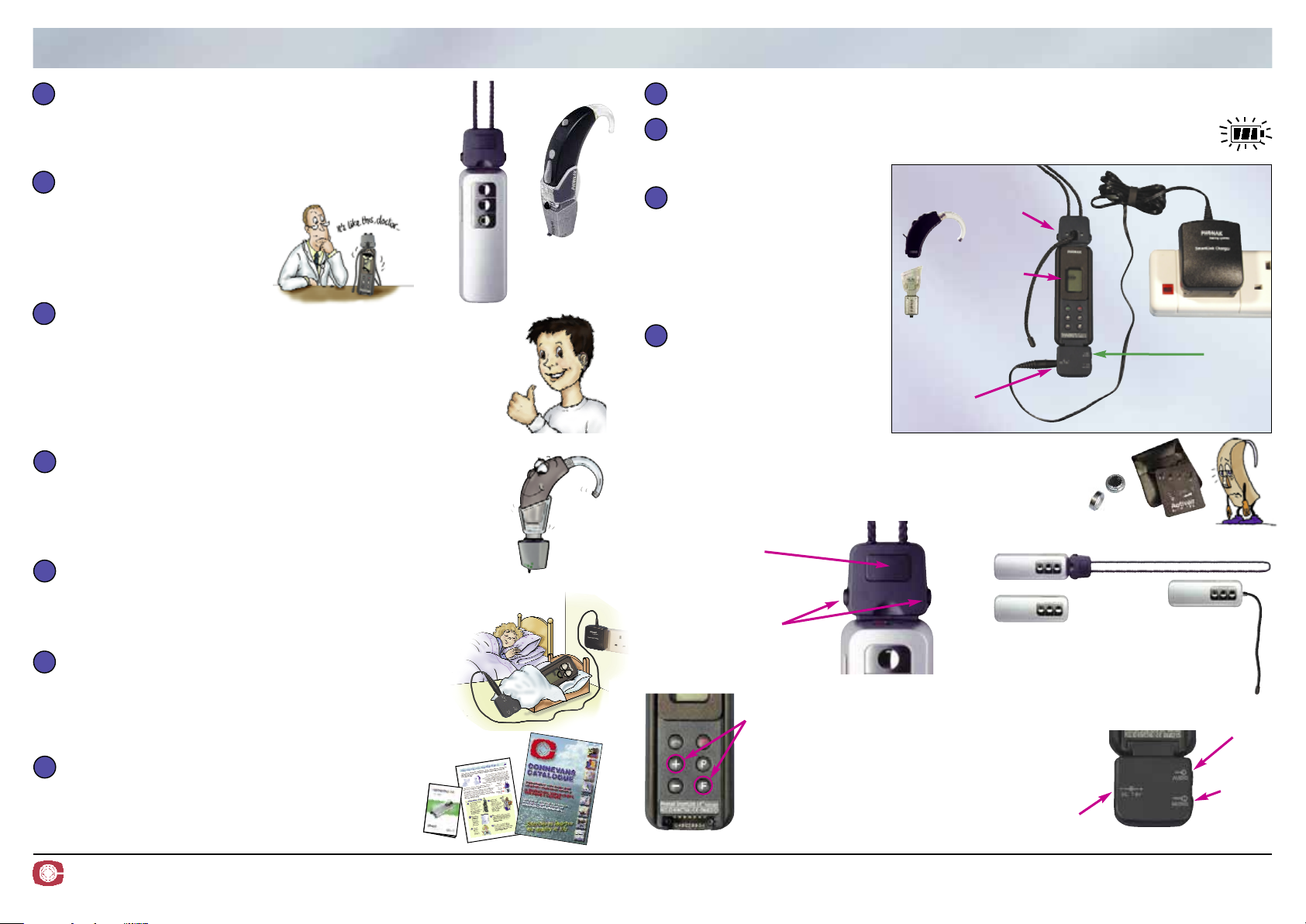
Morning Check List Phonak SmartLink SX & MicroMLxS/MLxS
CONNECT up the system as it will
be used & TURN ON.
Remember to check that
connections are pushed home.
INVESTIGATE any reported operating
problems from yesterday.
Intermittent sound problems
can be difficult to trace, ask
the user to explain what
happened when.
1
1
2
2
3
3
4
4
5
5
6
6
7
7
Evening Check List
Do not waste time
unnecessarily disconnecting
items.
You will only have to put
them all back together in the
morning and it saves
general wear and tear.
As the MLxS receiver takes
its power from the hearing
aid battery it is very
important that the battery is
in good condition.
A low hearing aid battery will
result in increased hiss and
reduced range – the normal life of a hearing aid battery
will be more than halved when used with an MLxS.
If in doubt, fit a new battery in the hearing aid.
The SmartLink has a battery life of approx 10 hours so we advise charging daily.
Check that the SmartLink SX unit on charge has a flashing battery icon.
If the battery icon is not flashing then the unit is not charging – check
the connections.
3
3
4
4
1
1
2
2
Hearing
aid shoe
and MLxS
TEST the overall system.
Give the transmitter to a friend or place it somewhere a few
metres away where it will pick up some identifiable sound
and listen to the output of the hearing aid.
If you are the hearing aid user, make sure that you can hear a
clear sound from the transmitter. If you are a hearing helper,
use a stetoclip and attenuator to listen to the hearing aid.
RECEIVER Gently check the connections between the MLxS
receiver, the shoe and hearing aid to check that the sound
does not break up or crackle.
Worn hearing aid contacts are a common source of problems,
if necessary return the hearing aid to the clinic for re-casing.
TRANSMITTER While still listening to the hearing aid,
ask your helper to gently wiggle the lavalier neck strap on the
SmartLink SX transmitter make sure that the sound does
not break up or crackle. Change any suspect items.
BATTERY STATUS Use a battery tester to check
the condition of the hearing aid battery. Look at the
SmartLink display to see that there is enough power
for the time that the system will be used – but of
course, you did check & recharge last night!
RE-ORDER spares as required – always keep
spare shoes and hearing aid batteries etc.
CONNEVANS LIMITED 54 Albert Road North, Reigate, Surrey RH2 9YR Helpline 01737 247571 info
@
connevans.com
Information: www.connevans.com/phonak Online shopping: www.DeafEquipment.co.uk
BSMAMLSCK V2.0
Charger cable
Squeeze sides to
remove/replace lavalier
cord. Guide in and out
carefully – do not bend.
Adjust length by
squeezing front pad and
pulling the free end of
the cord.
No aerial: very
close handheld
use only
Aux
input
Flashing
battery
icon
Shoe &
MicroMLxS
receiver
Changing channel
Press both ‘+’ and ‘F’ together
– the channel number will
start to flash. Then press the
‘+’ or ‘–’ as required.
To reprogramme the SmartLink SX
to have a different channel set, visit
www.connevans.com/phonak/tx
SmartLink SX adaptor
Slide in carefully – do not
lever in and
out or you
may cause
damage.
Lavalier aerial
SmartLink SX
and lavalier
aerial
In case of difficulty, consult the SmartLink SX User Guide
which contains much useful help. You will also find lots of
information on the Connevans website.
Ext. audio
Ext. mic
Lavalier cord: best range, all normal use
Short antenna:
TV or group use
round table
No need to
remove
lavalier
cord
Charger
 Loading...