

Page 1
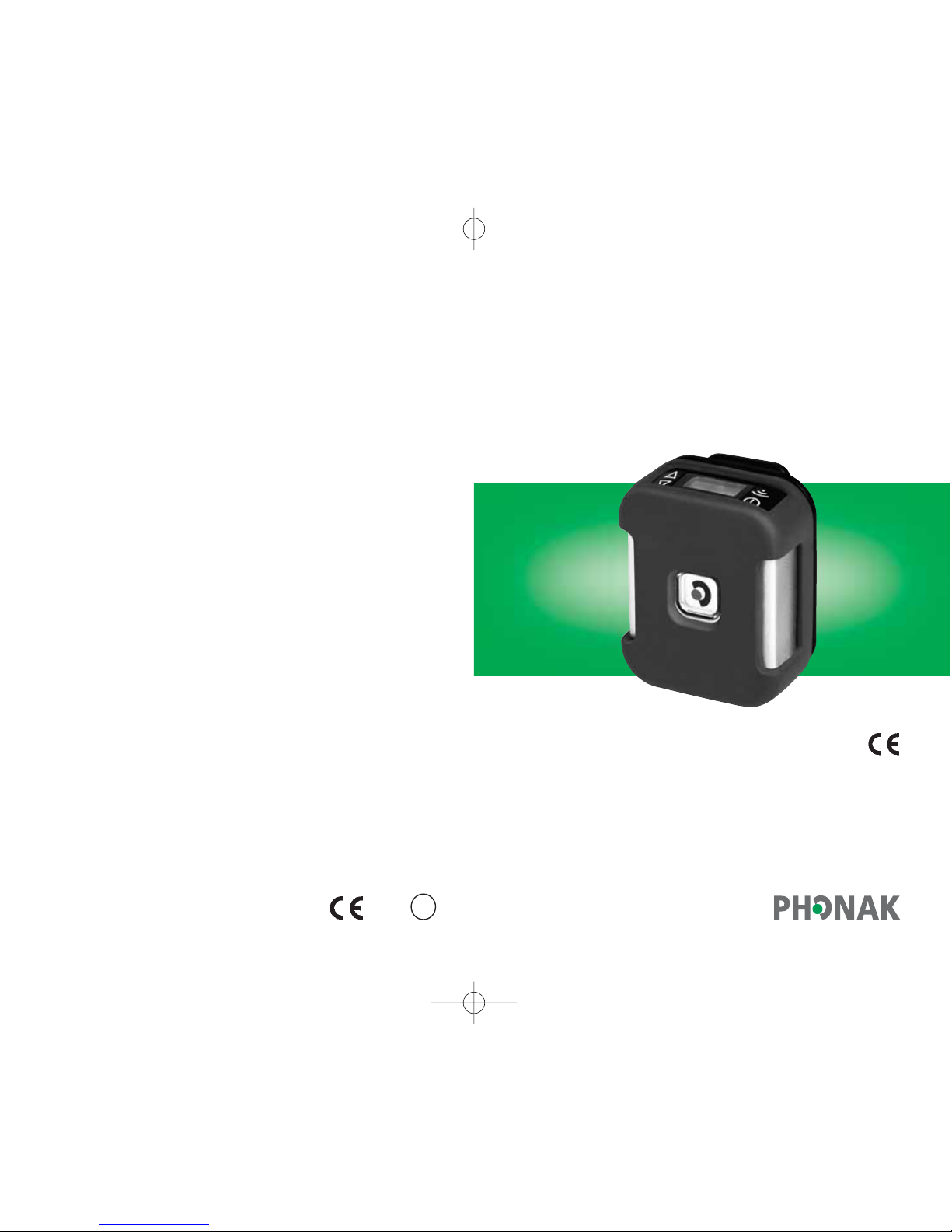
Micro TX-SX
User Guide
Transmitter and Microphone
0681
!
Micro TX-SX_GB_3.12.07.qxd 6.12.2007 8:40 Uhr Seite 201
Page 2

3
2
Welcome
The Micro TX-SX is a highly flexible multi-frequency
FM transmitter which has been developed for use
with the Guide-U system.
To obtain maximum benefit from the Micro TX-SX
transmitter and its comprehensive features,
please read this user guide carefully.
Contact us if you have any questions. Enjoy the benefits
of the Micro TX-SX.
Micro TX-SX_GB_3.12.07.qxd 6.12.2007 8:40 Uhr Seite 2
Page 3
5
4
Contents
Instrument description 6
Micro TX-SX 6
MM8 8
How your Micro TX-SX works 9
Charging Micro TX-SX 10
Standard charging 10
Getting started 14
Wearing Micro TX-SX 14
Switching Micro TX-SX on 16
Microphone muting 17
Changing the channel 18
Keypad lock 20
Connecting to other media devices 21
Connecting the microphone 23
Operating range 25
FM receivers 26
Fundamental benefits of
multi-frequency receivers 26
Troubleshooting 28
Important points 30
Declaration of conformity 32
Micro TX-SX_GB_3.12.07.qxd 6.12.2007 8:40 Uhr Seite 4
Page 4
7
6
Instrument description
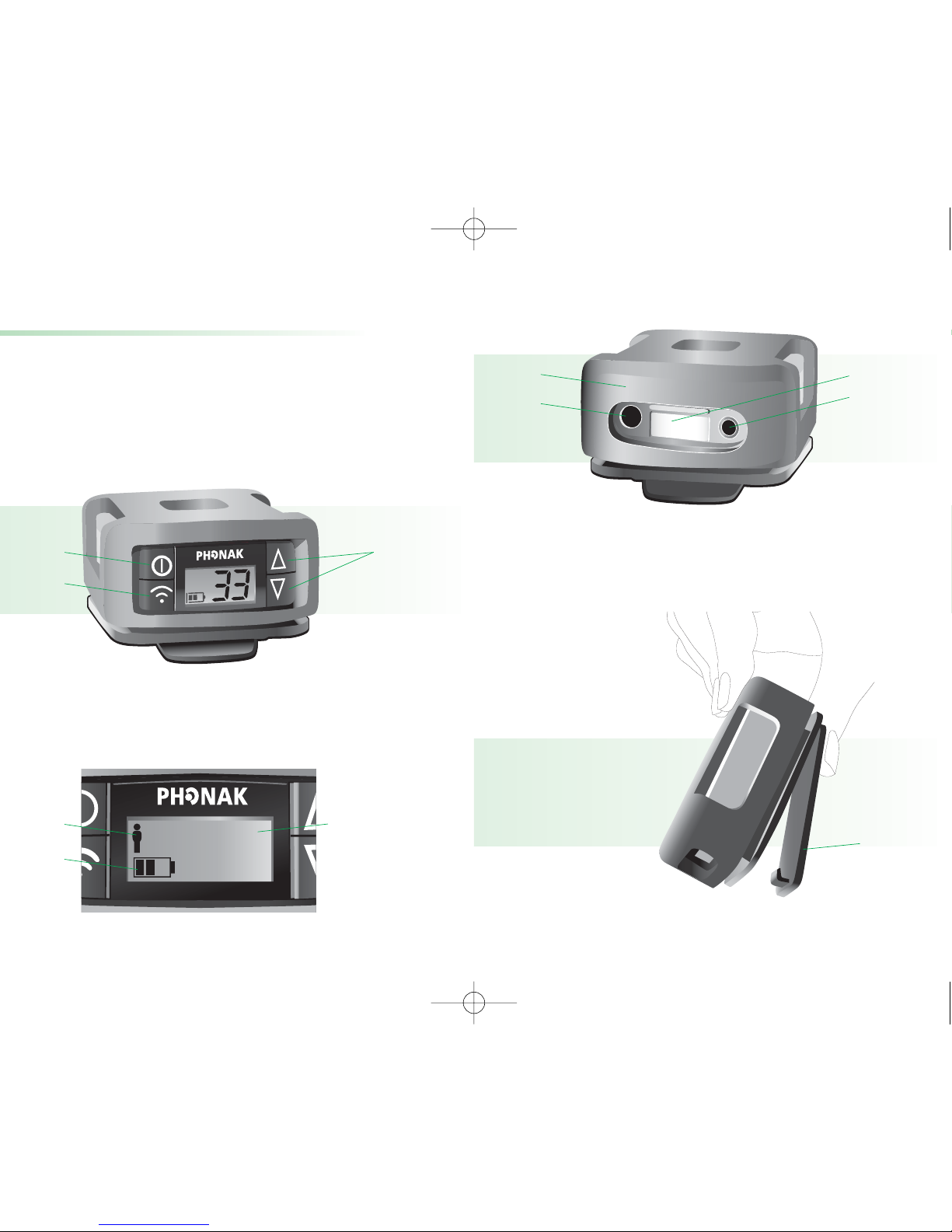
Micro TX-SX
햲 On/Off (long time press) and
Microphone muting (short time press)
햳 Direct frequency synchronization
햴 Channel selection
LCD
햲 Keypad lock
햳 Channel in use
햴 Battery status indication
33
햲
햲
햴
햴
햳
햳
햲 Rubber coat
햳 Audio input socket
햴 Label for your initials
햵 Charging socket (red ring)
햲 Clip
햲
햲
햳
햴
햵
Micro TX-SX_GB_3.12.07.qxd 6.12.2007 8:41 Uhr Seite 6
Page 5
9
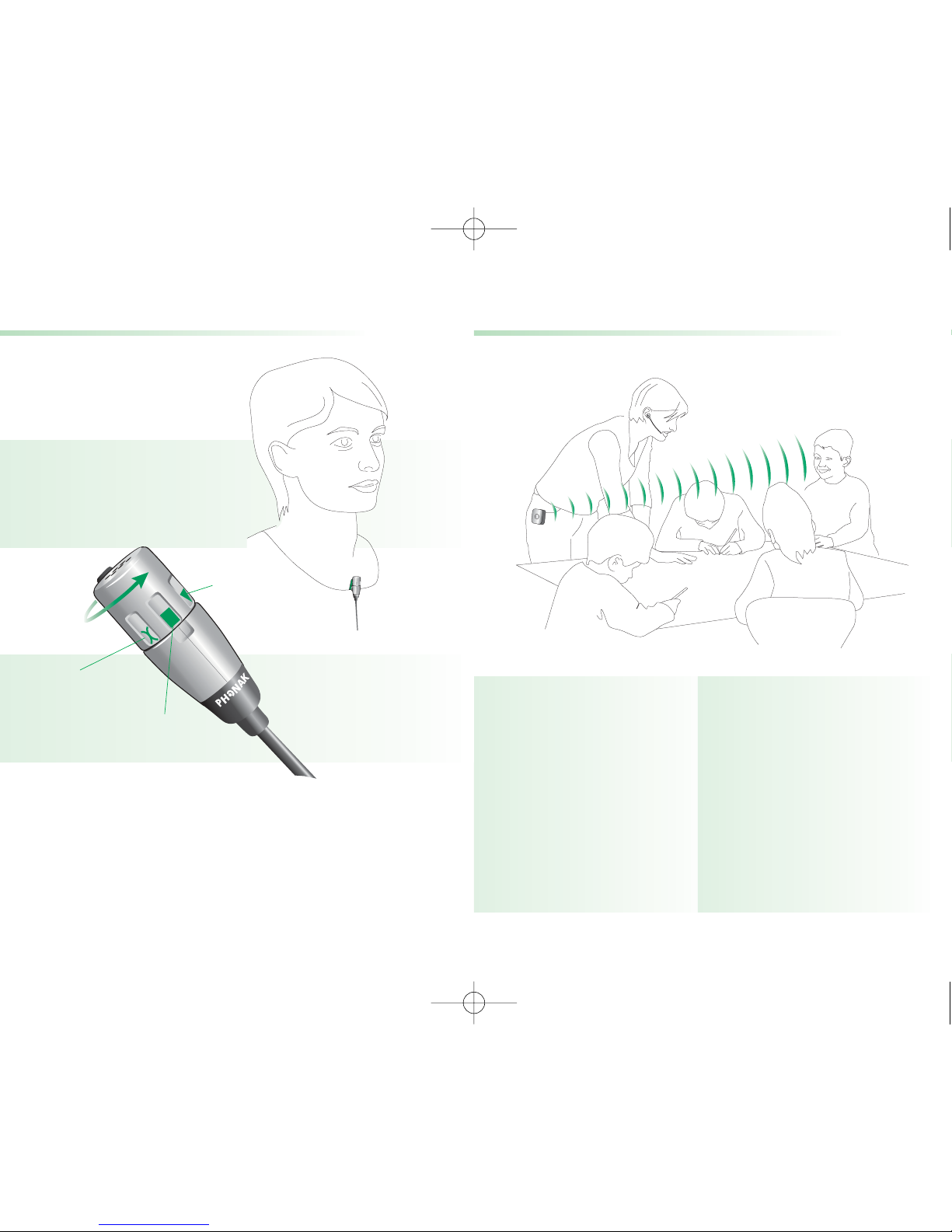
The visitors are wearing
guide-U receivers.
How your Micro TX-SX works
The tour guide is
wearing Micro TX-SX
with the
Boom-microphone or
MM8 microphone.
8
Instrument description
MM8
MM8 is a very flexible miniature lapel microphone
which can be used in an omnidirectional or directional
mode. See details on page 17.
OFF
Directional
Omnidirectional
Micro TX-SX_GB_3.12.07.qxd 6.12.2007 8:41 Uhr Seite 8
Page 6
11
10
!
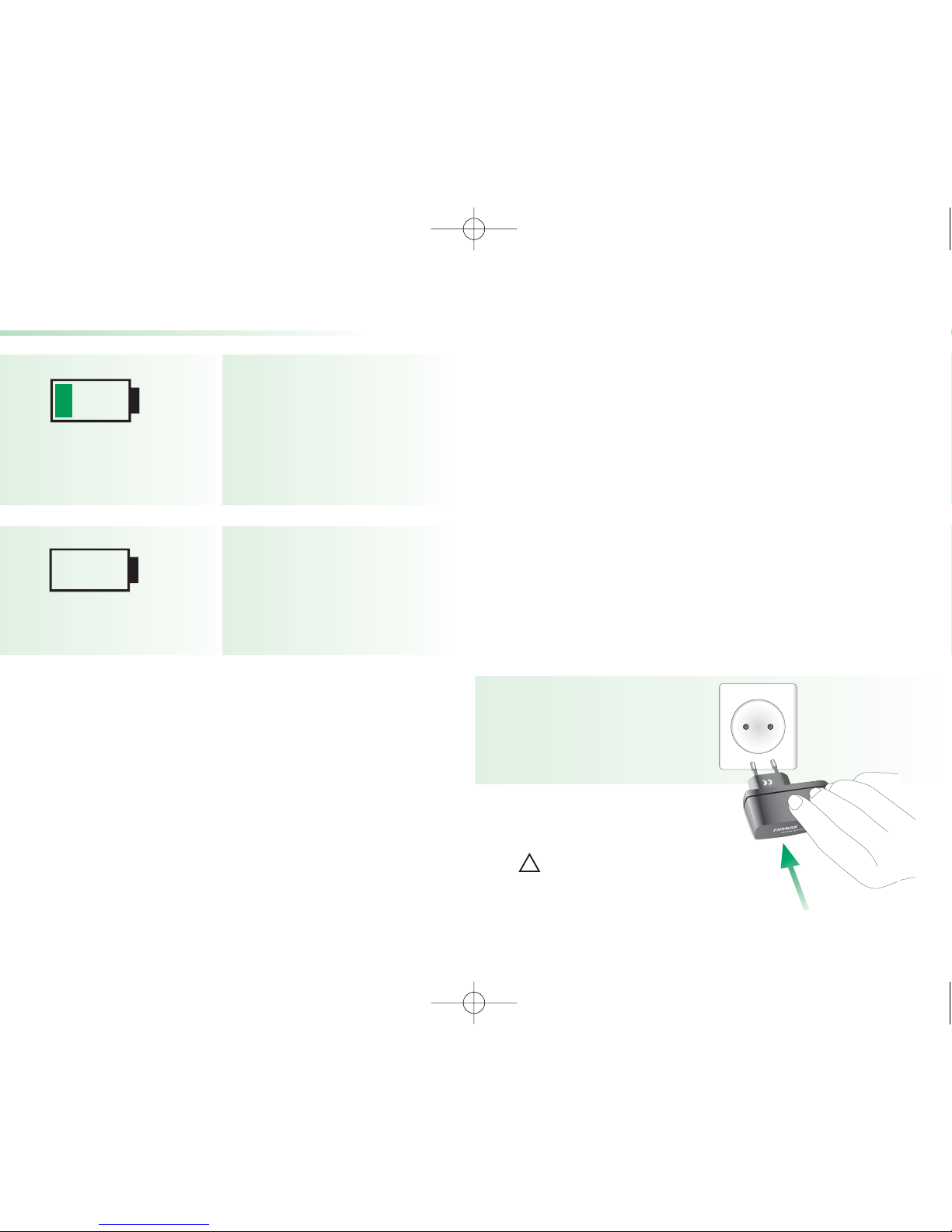
a) Fully charge the battery of the Micro TX-SX before
using the transmitter for the first time. An empty
Micro TX-SX battery is
• 80% charged after 3.5 hours and
• 100% charged in 4.5 hours
if the Micro TX-SX is switched off during charging.
If Micro TX-SX is in use during charging, it is 100%
charged in about 6 hours.
Plug the Micro TX-SX battery charger into an easy
accessible wall power socket.
Use original Phonak
charging units only
Charging Micro TX-SX
Standard charging
The Micro TX-SX can be charged while switched
off or while switched on, e.g. while transmitting the
sound.
The battery is almost
dead and needs to be
charged as soon as
possible.
The battery is completely
dead and needs to be
charged immediately.
Micro TX-SX_GB_3.12.07.qxd 6.12.2007 8:41 Uhr Seite 10
Page 7
13
12
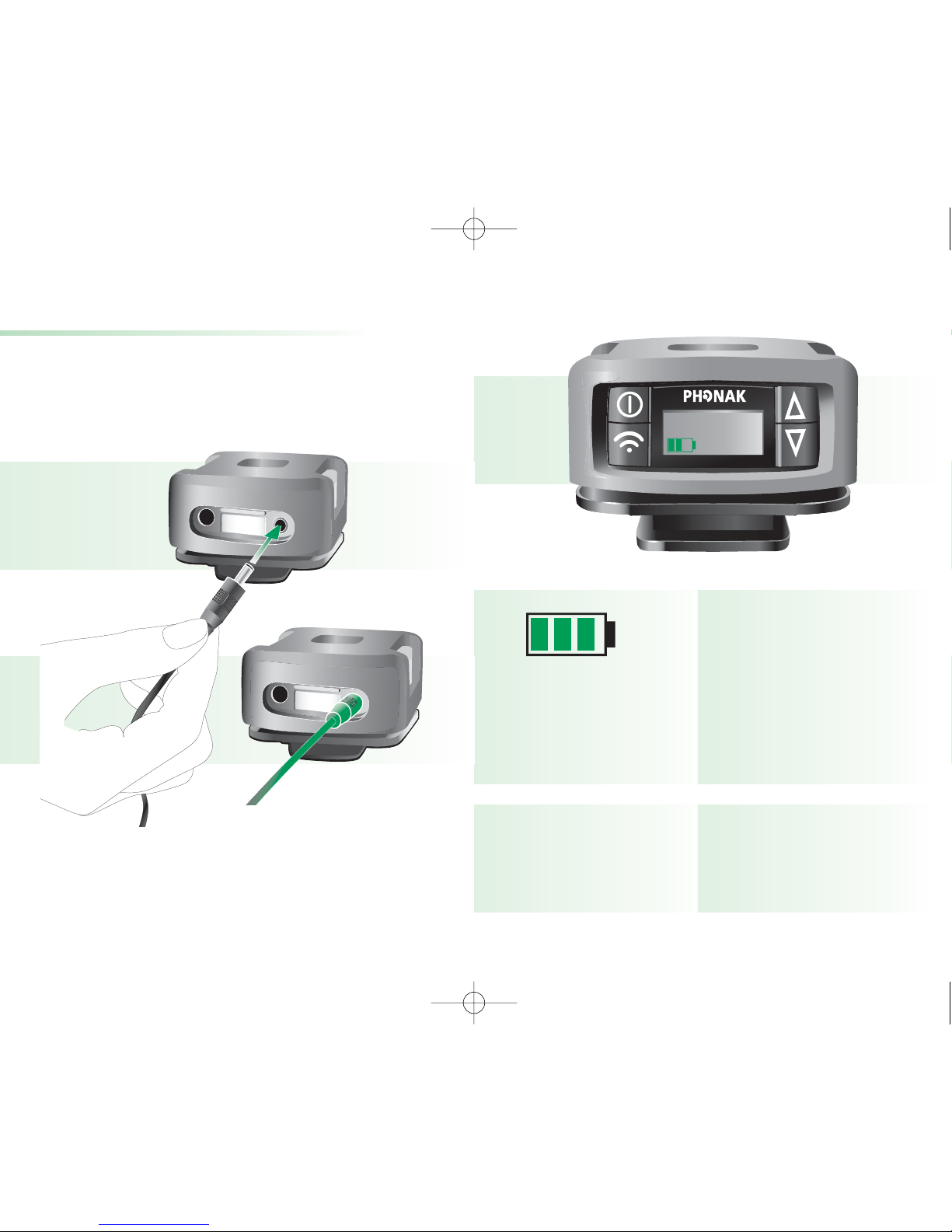
The three battery
segments are moving
fast (flashing)
Three battery segments
stay visible and the
battery case is flashing
33
Meaning
Micro TX-SX is fast
charging
Micro TX-SX is fully
charged and the charger
can be detached
Charging Micro TX-SX
b) Plug the connector from the charger into
the red marked charging socket underneath your
Micro TX-SX.
c) The blinking battery symbol in the LCD indicates
that the Micro TX-SX is charging.
Micro TX-SX_GB_3.12.07.qxd 6.12.2007 8:41 Uhr Seite 12
Page 8
15
14
Getting started
Wearing Micro TX-SX
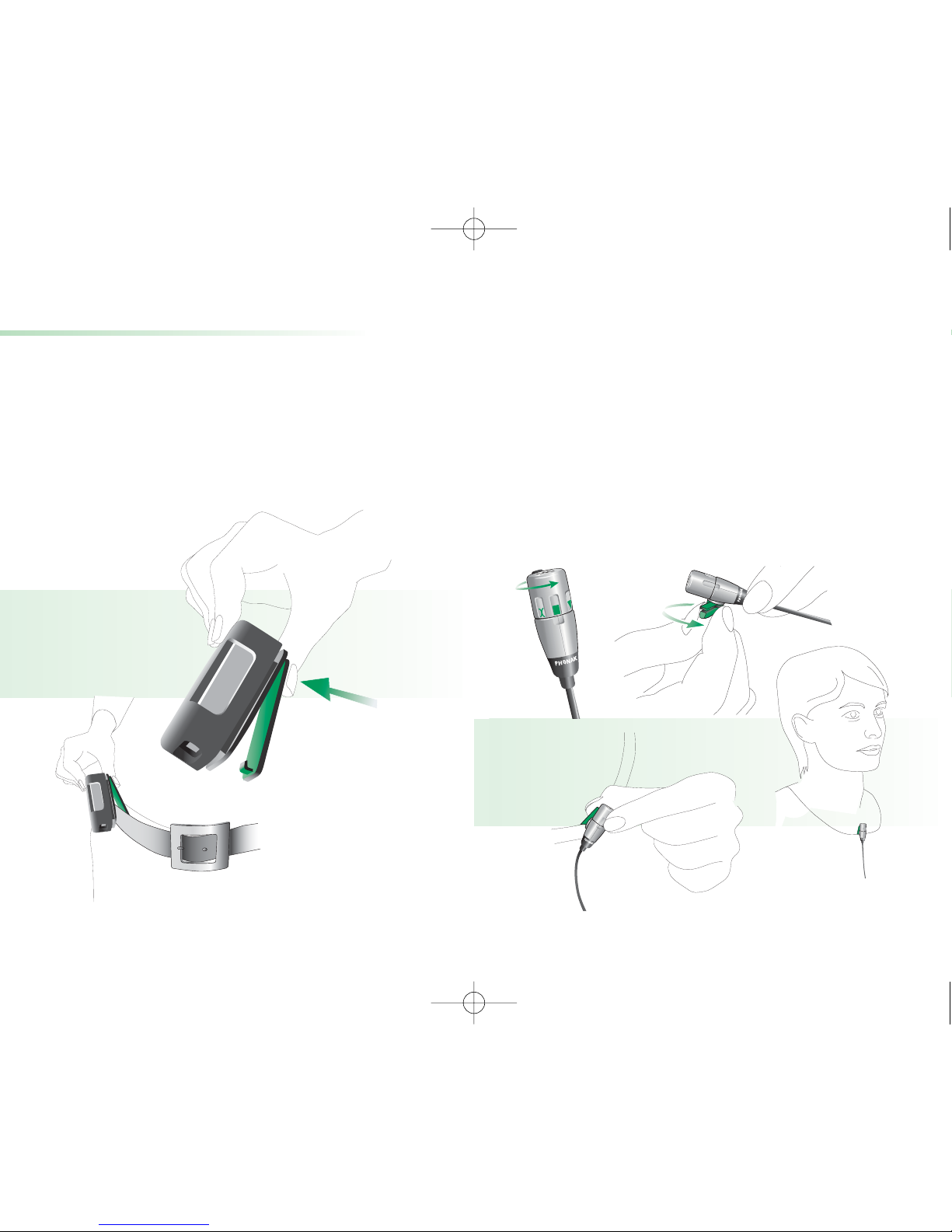
a) Open the clip 햲 and fix Micro TX-SX on your belt 햳
or to your pants. Make sure it clamps firmly.
햲
햳
b) Attach the microphone
If using the MM8 lapel microphone:
Make sure the MM8 is switched to omnidirectional or
directional mode 햲. Turn the clip on the MM8 according
to your needs 햳 and fix it to your shirt 햴. Make sure
the distance between the microphone and your mouth
is approximately 8 inches 햵.
햳햲
햴 햵
Micro TX-SX_GB_3.12.07.qxd 6.12.2007 8:41 Uhr Seite 14
Page 9
16
17
33
Getting started
Switching Micro TX-SX on
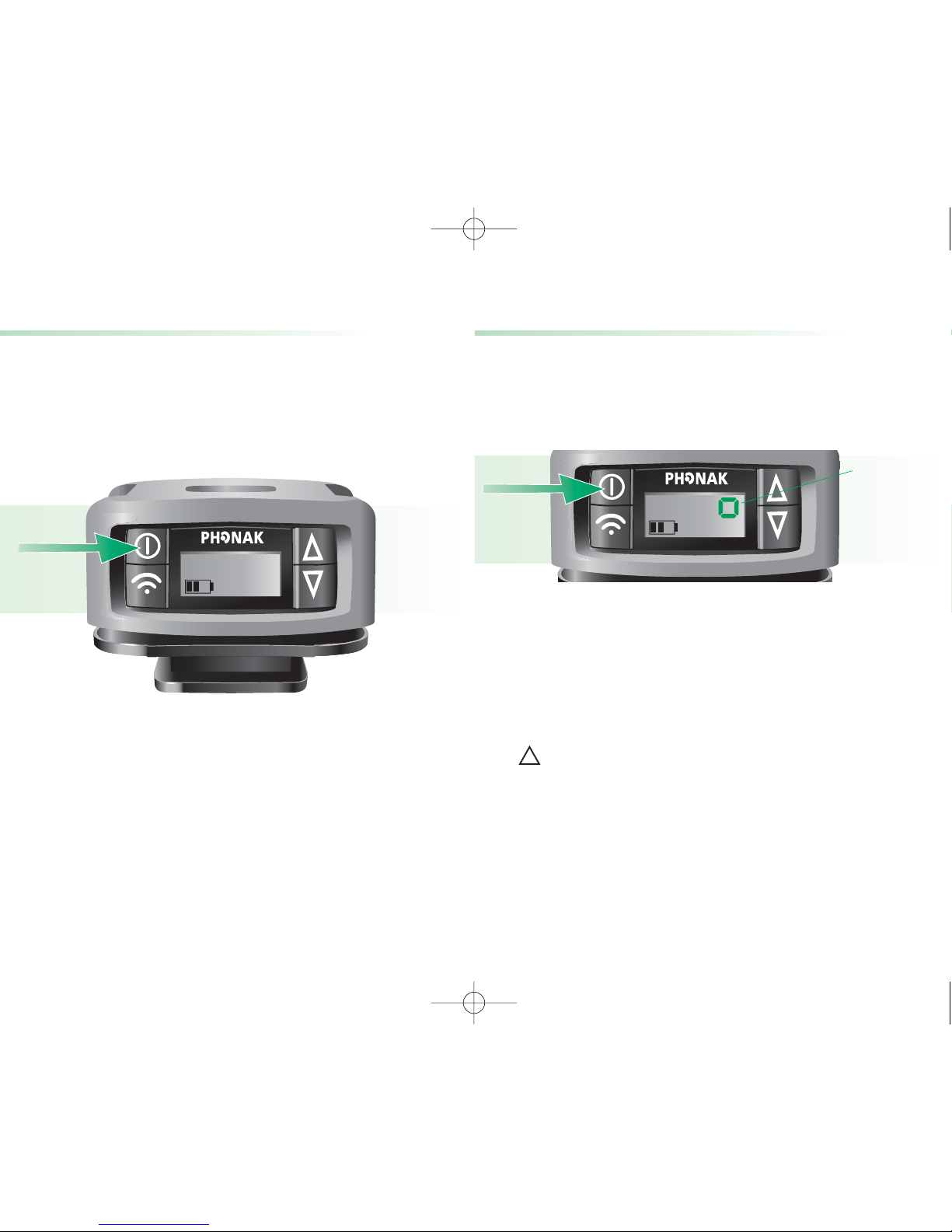
Switch the Micro TX-SX on by pressing the on/off button
for about two seconds.
If the Micro TX-SX is switched on, the channel number
and the battery indication are shown in the LCD.
!
Microphone muting
The microphone attached to the Micro TX-SX can easily
be muted, in case a conversation with a visitor or
another guide is not meant to be listened to by guests.
To mute the attached microphone, the Micro TX-SX
needs to be switched on. Briefly press the on/off
button (A) until the small rectangle (B) is displayed.
To deactivate the microphone mute function, briefly
press the on/off button again. The rectangle disappears
and the channel number is displayed again.
Please note that a long press (2 seconds) on
the on/off button switches the Micro TX-SX off.
• It is not possible to change the frequency while
the microphone is muted.
• The microphone mute function only controls
the attached microphone. The audio input socket
is useable when the microphone is muted.
B
A
Micro TX-SX_GB_3.12.07.qxd 6.12.2007 8:41 Uhr Seite 16
Page 10
19
18
33
햳 햲
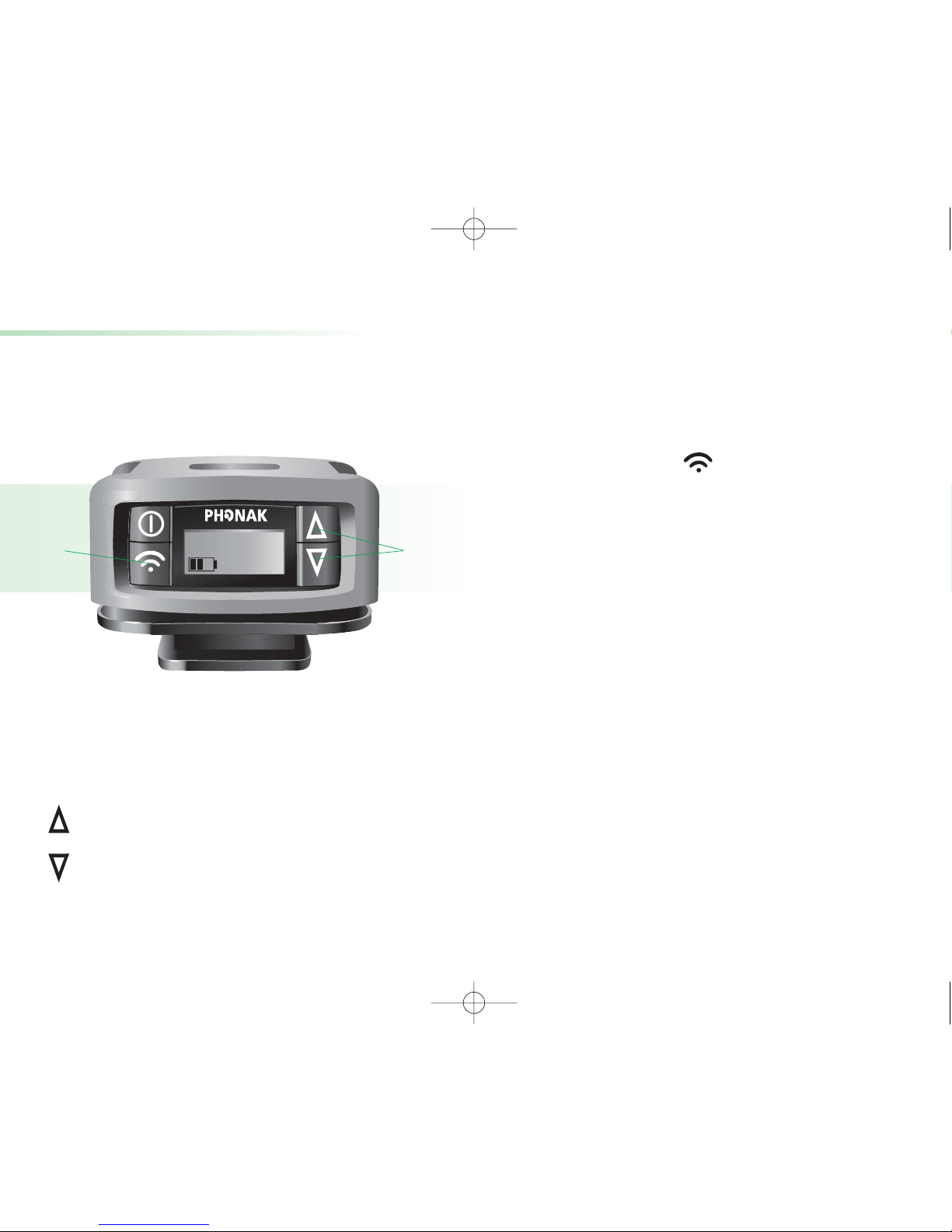
Changing the channel
Micro TX-SX is a multi-channel transmitter and allows
changing the channels easily.
햲 Press one of the channel selection buttons to
change the channel in the transmitter. The new
channel number is displayed in the LCD.
selects a higher channel
selects a lower channel
햳 If the FM receivers are not yet on the new frequency,
• hold the Micro TX-SX close to the FM receiver
(Distance to the FM receivers: <1m/3 feet)
and press the synchronization button on the
Micro TX-SX for one second.
After switching the multi-frequency receiver off and
on, the receiver goes back to its default channel.
Micro TX-SX_GB_3.12.07.qxd 6.12.2007 8:41 Uhr Seite 18
Page 11
21
20
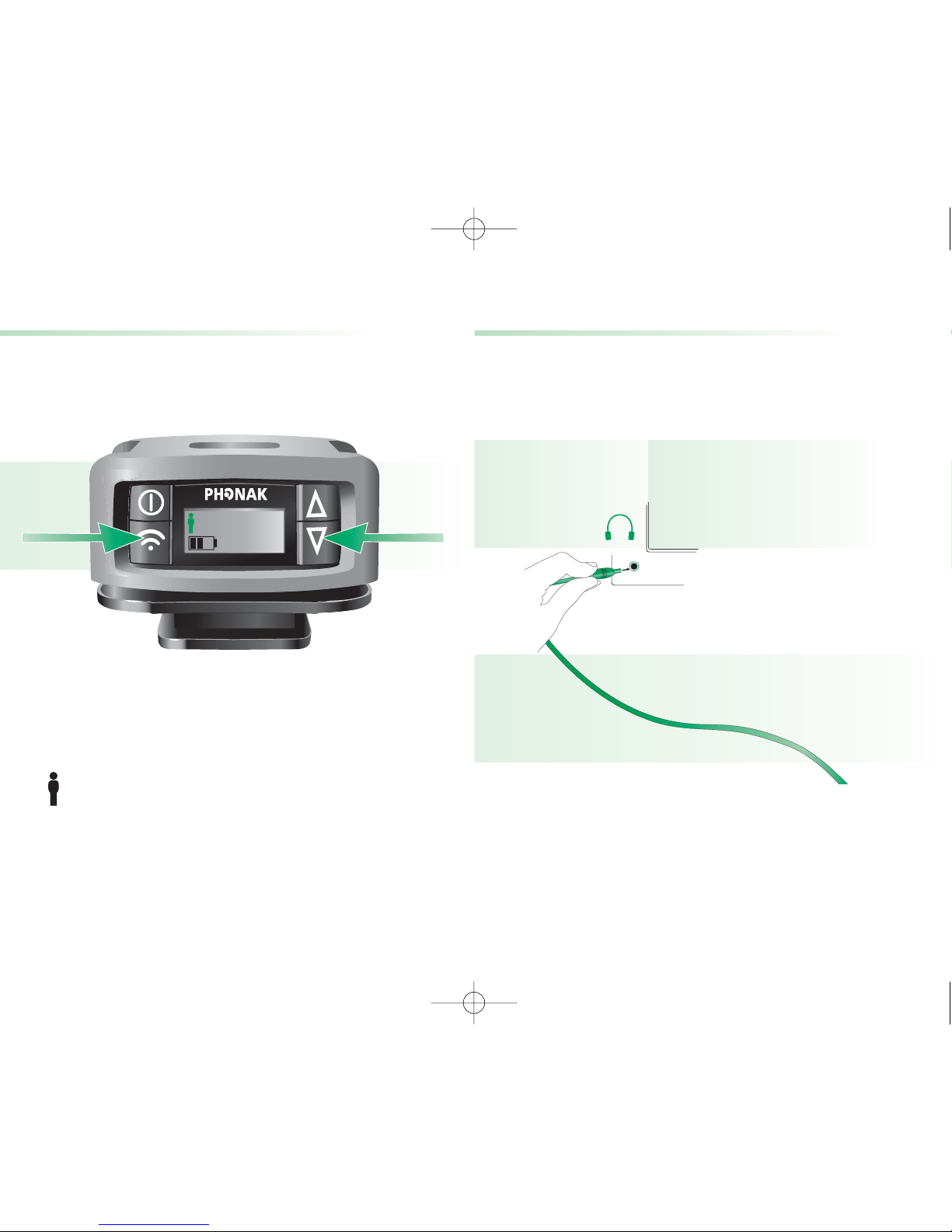
Keypad lock
As with cell phones, Micro TX-SX provides a keypad
lock, to prevent inadvertent operation of the controls.
• To lock the controls:
Micro TX-SX must be switched on to activate this
feature. Simultaneously press the two buttons
as depicted for about 1 second. The watchman
symbol in the LCD shows that the keypad lock
is activated.
• To unlock the controls:
Simultaneously press the same two keys again
for about 1 second. When the watchman symbol
disappears, the keypad lock is deactivated.
33
Connecting to other media devices
Micro TX-SX can directly be connected to audio
equipment like TV, CD and MP3 players, and computers
with audio outputs.
햲 Plug the audio cable (standard accessory) into
the headphone output of your audio equipment.
햳 Plug the other end of the audio cable into the
audio input underneath your Micro TX-SX.
햲
Micro TX-SX_GB_3.12.07.qxd 6.12.2007 8:41 Uhr Seite 20
Page 12
23
22
!
햳
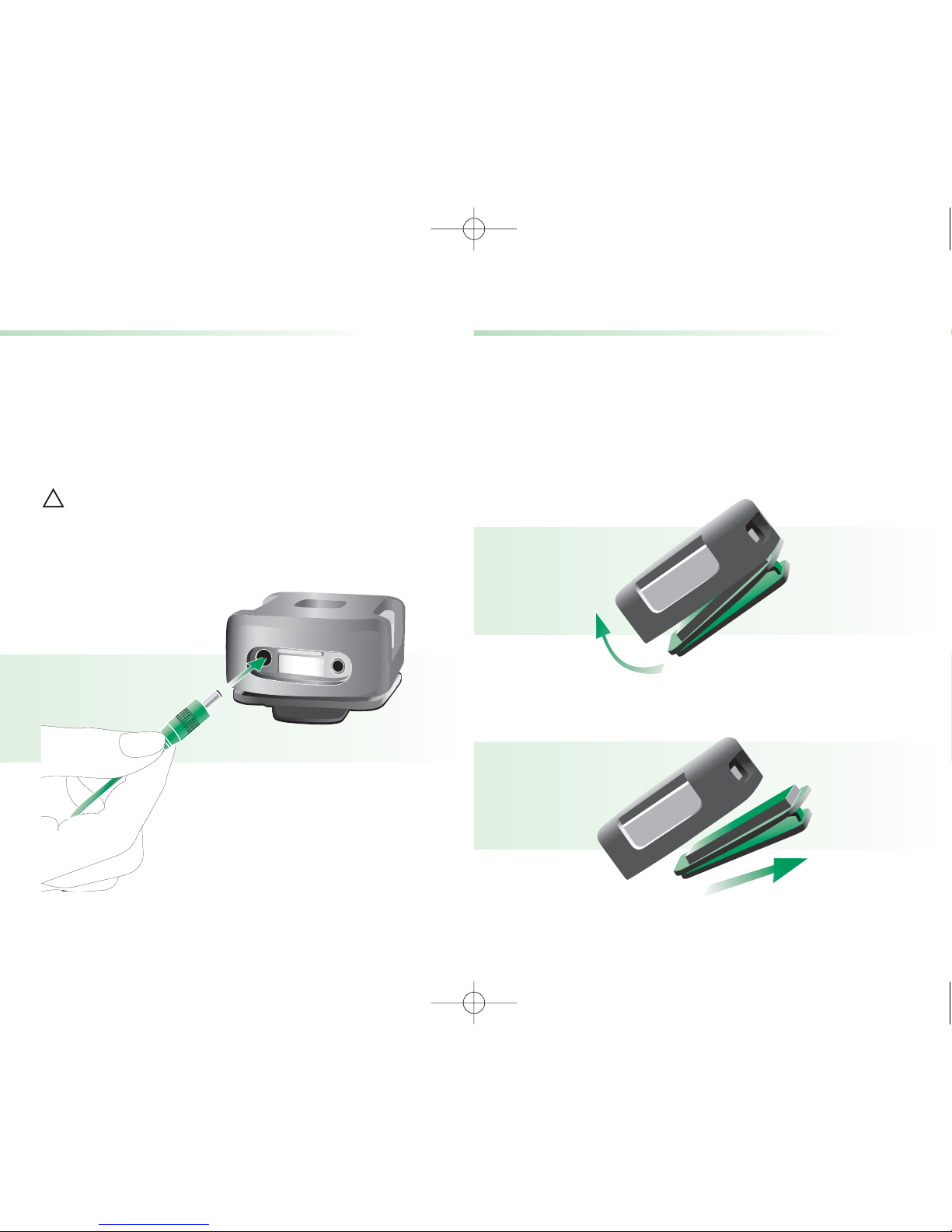
Connecting the microphone
To attach another microphone to the Micro TX-SX,
proceed as follow:
a) Unwind the existing microphone
b) Open the clip carefully
c) Remove the clip from the Micro TX-SX
Connecting to other media devices
햴 Mute the microphone which is attached to the
Micro TX-SX (see page 21). If you want to give
comments to a visitor in parallel to the other audio
input, deactivate the mute function and talk into
the microphone.
Since Micro TX-SX uses the microphone cable as
an antenna, unwind the microphone cable for an
optimal operating range.
Micro TX-SX_GB_3.12.07.qxd 6.12.2007 8:41 Uhr Seite 22
Page 13
25
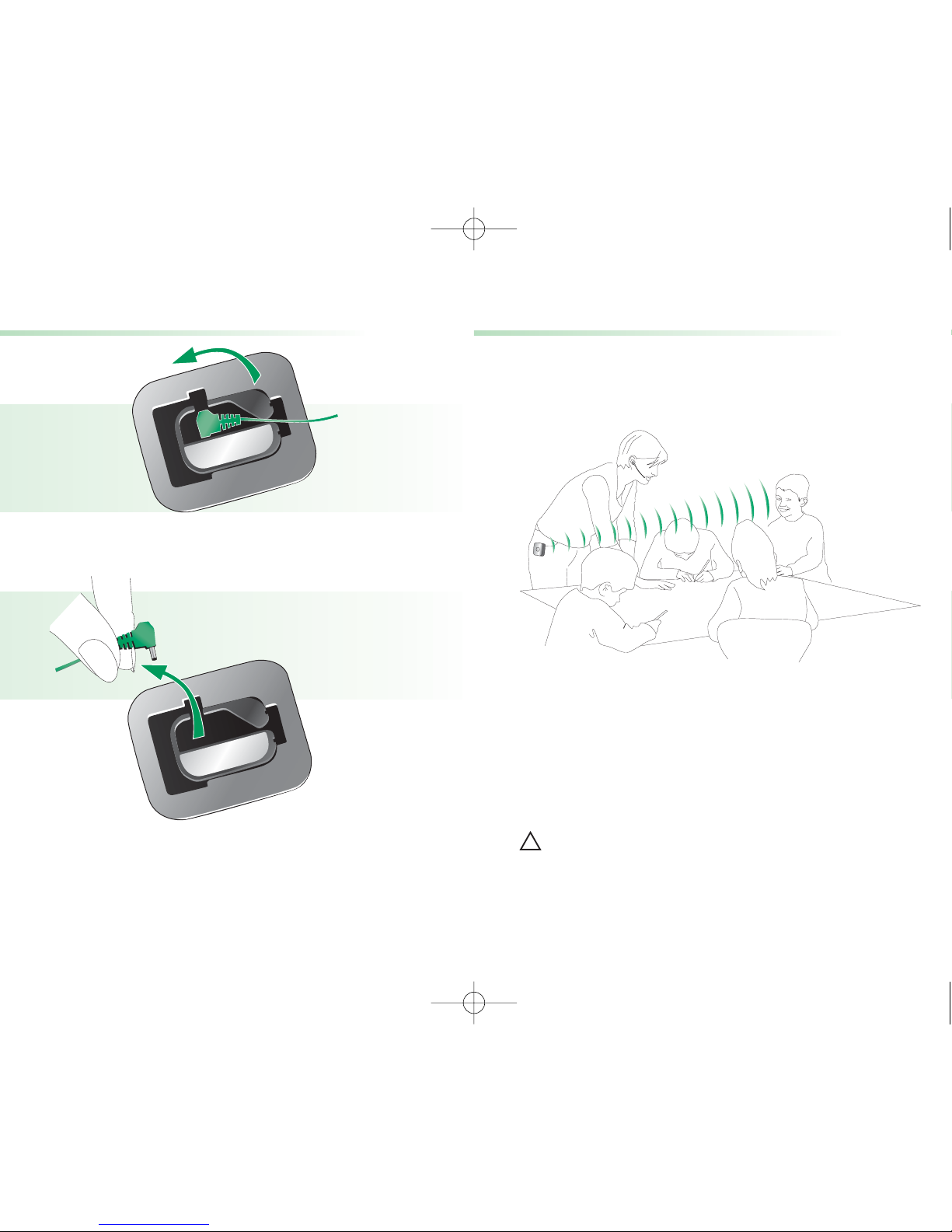
Operating range
The operating range is the distance between maximum
and minimum FM reception of transmitter and receiver.
• Unwind the microphone cable for optimal operating
range.
• The operating range is typically more than
10 meters (30 feet) inside and more than
30 meters (90 feet) outside.
High-power electronic equipment, larger
electronic installations and metallic
structures may affect and significantly reduce
the operating range.
!
24
Connecting the microphone
d) Remove the microphone
e) For attaching the microphone, proceed in
reverse order.
Micro TX-SX_GB_3.12.07.qxd 6.12.2007 8:41 Uhr Seite 24
Page 14

27
26
FM receivers
Fundamental benefits of multi-frequency receivers
• Frequency synchronization
Micro TX-SX can change the actual channel of the
Acoustiguide Guide-U multi-frequency receivers
directly over the air (see page 22). Changing the
channel is quick and easy.
• Standby mode for power saving
This function helps economize on power. 40 seconds
after switching off the transmitter the receivers
automatically enter standby mode.
The receivers consume practically no power in
standby mode. They detect when the Micro TX-SX
switches on again and automatically resume
normal operation mode.
Micro TX-SX_GB_3.12.07.qxd 6.12.2007 8:41 Uhr Seite 26
Page 15

29
28
Troubleshooting
Situation
“E8” is displayed in the LCD while the charger is
connected.
“E9” is displayed in the LCD when the Micro TX-SX
is on.
Remedy
Replace the battery
(see page 29).
Contact the responsible
person.
Most probable cause
The battery is defective.
The Micro TX-SX needs
servicing.
Micro TX-SX_GB_3.12.07.qxd 6.12.2007 8:41 Uhr Seite 28
Page 16
31
30
Important points
• Do not use water or fluids for cleaning.
It is recommended to use Phonak CleanLine
products.
• Use original accessories only.
• Be aware that FM signals might also be picked
up and overheard by other receivers.
• Micro TX-SX may only be repaired at an authorized
service center.
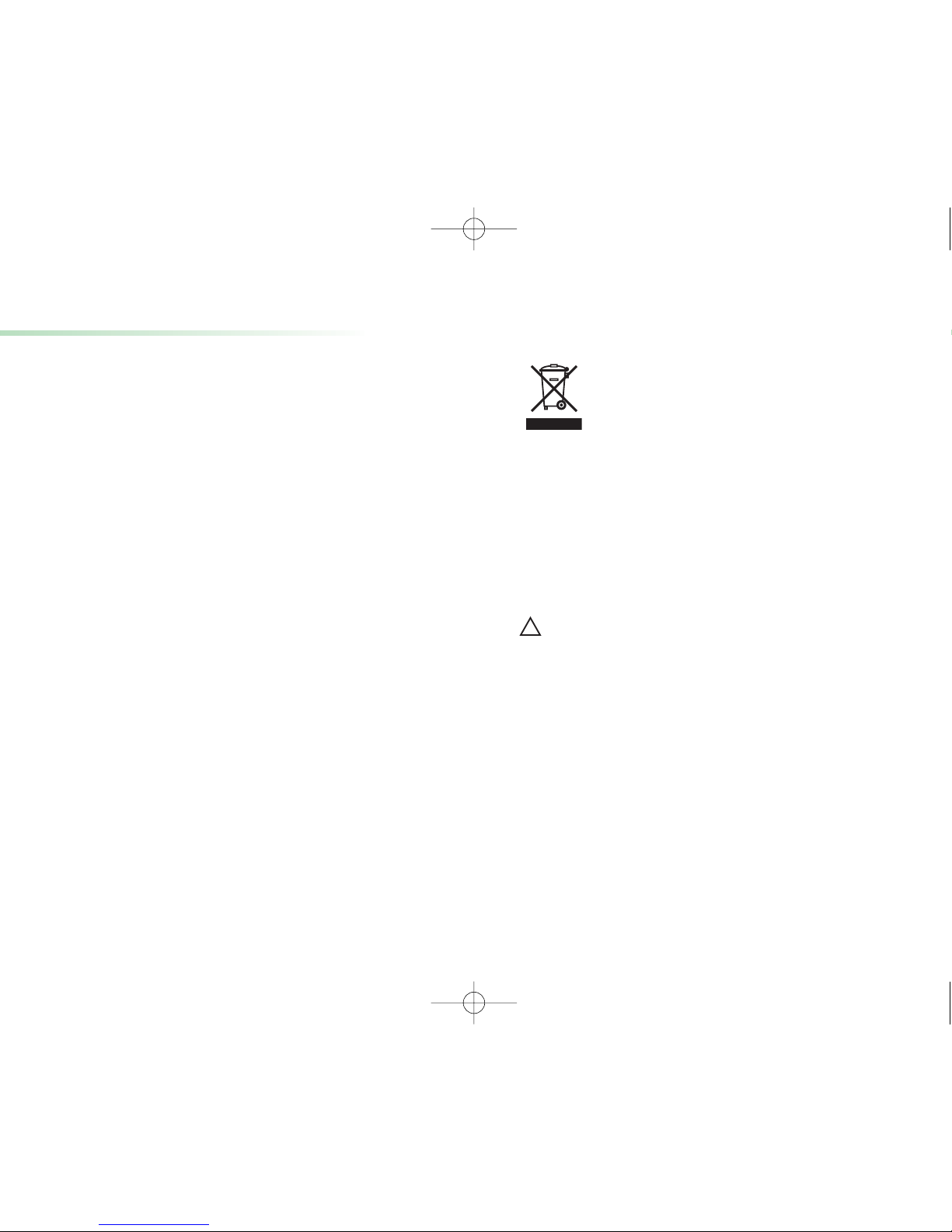
The symbol with the crossed out disposal
bin indicates that this device should
not be treated as household waste. Please
hand over your old or unused device to
the applicable collection point for the recycling of
electrical and electronic equipment or bring
your old device to your hearing care professional for
appropriate disposal. By ensuring this product
is disposed of correctly, you will help prevent potential
negative effects on the environment and human
health.
Only use batteries delivered by Phonak.
There is risk of explosion if battery is replaced
by an incorrect type. Dispose of used batteries
according to the instructions.
!
Micro TX-SX_GB_3.12.07.qxd 6.12.2007 8:41 Uhr Seite 30
Page 17
33
32
Declaration of conformity
Hereby, Phonak Communications AG, declares that
the Micro TX-SX multi-frequency transmitter is
authorized by rule under the Low Power Radio Service
(47 C.F.R. Part 95) and must not cause harmful
interference to TV reception or United States Navy
SPASUR installations. You do not need an FCC
license to operate this transmitter.
This transmitter may only be used to provide: auditory
assistance to persons with disabilities, persons who
require language translation, or persons in educational
settings; health care services to the ill; law enforcement
tracking services under agreement with a law enforcement
agency; or automated maritime telecommunications
system (AMTS) network control communications. Two-way
voice communications and all other types of uses not
mentioned above are expressly prohibited.
This device may not interfere with TV reception or
Federal Government radar.
Warning: Changes or modifications made to
this equipment not expressly approved by Phonak
may void the user’s authority to operate the
equipment.
!
Manufacturer: Phonak Communications AG, Laenggasse 17,
CH-3280 Murten
Micro TX-SX_GB_3.12.07.qxd 6.12.2007 8:41 Uhr Seite 32
Page 18
35
34
Notes
Micro TX-SX_GB_3.12.07.qxd 6.12.2007 8:41 Uhr Seite 34
 Loading...