

Page 1
COMPACT, CLASS A/B & MONO
Z
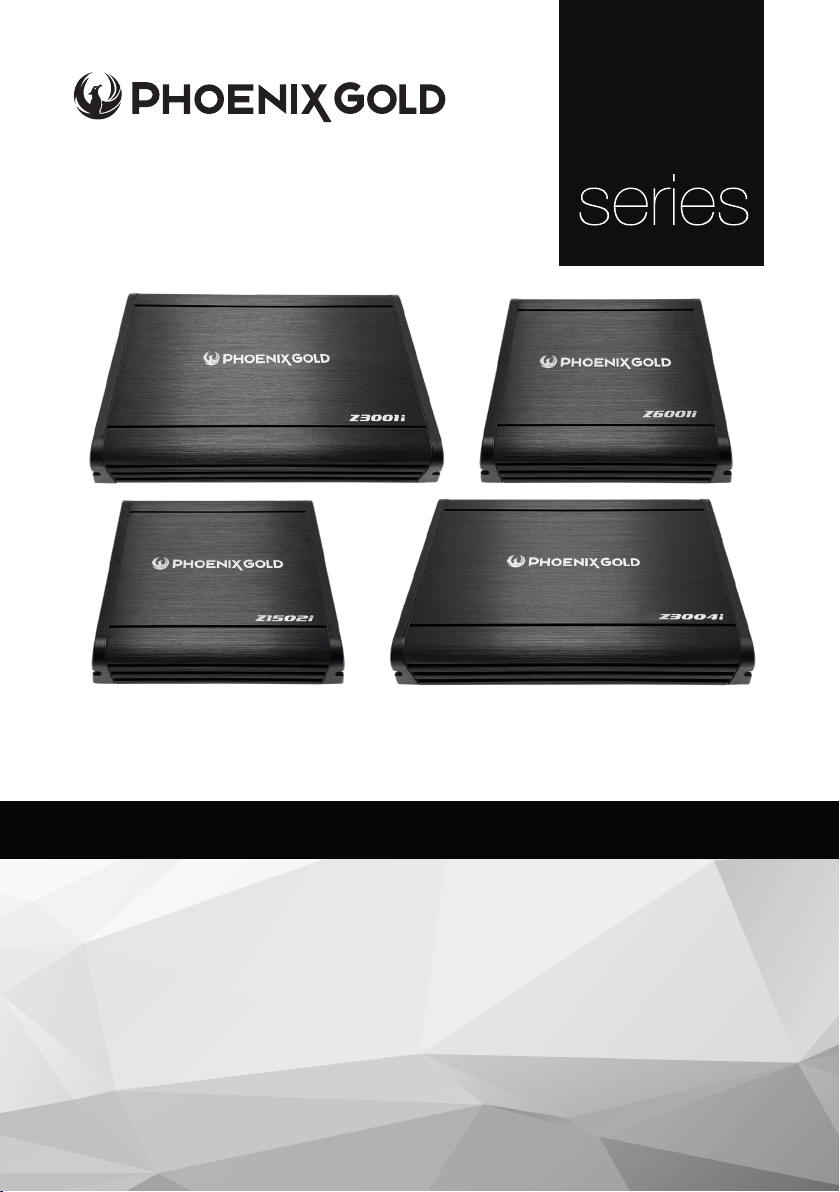
Z-SERIES AMPLIFIERS
Model: Z1502i / Z3001i / Z3004i / Z6001i
SPECIFICATIONS
• OEM Connection Ready - compatible with aftermarket & original source units
• Remote Bass Ready - control the bass level with included ZRBC (Z3001i & Z6001i)
• High Level Auto-Turn On - powers on the amp when audio signal is supplied
• Integrated Cooling Fan - regulates temperature for sustained performance
• High & Low Level Inputs - versatile connectivity to suit any vehicle
• Heavy Duty Connector Block - enables maximum current supply
• 4-Way Protected Circuit - protection against thermal damage,
reversed power, speaker polarity and low voltage
All specications subject to change without notice.
© 2023 Phoenix Gold | www.phoenixgold.com
Page 2

Z1502i / Z3001i / Z3004i / Z6001i - Z-Series Ampliers
Specications: Z1502i Z3001i Z3004i Z6001i
Class Class A/B Class A/B Class A/B Class D
Channels 2 1 4 1
Frequency Response 10Hz – 25kHz 20Hz – 250Hz 10Hz – 25kHz 20Hz – 400Hz
RMS Power Rating (1Ω): N/A N/A N/A 1 x 600W
RMS Power Rating (2Ω): 2 x 100W 1 x 300W 4 x 80W 1 x 400W
RMS Power Rating (4Ω):
Signal to Noise Ratio (SNR)
(Full Power)
Total Harmonic Distortion
(THD)
Low Pass Filter (LPF) 50Hz – 400Hz (6dB/Oct) 50 – 250Hz (12dB/Oct)
High Pass Filter (HPF) 50Hz – 400Hz (6dB/Oct) N/A
Subsonic N/A
Bass Boost @ 45Hz 0 – +18dB 0 – +18dB N/A 0 – +18dB
Crosstalk -56dB N/A -51dB N/A
Input Sensitivity 0.25V – 9.5V 0.25V – 9.5V 0.25V – 9.5V 0.25V – 9.5V
Fuses 1 x 25A 1 x 40A 2 x 25A 2 x 30A
Remote No Yes (Included) No Yes (Included)
High-level Input Via RCA Yes Yes Yes Yes
Auto Turn-on Yes Yes Yes Yes
Phase Control N/A 0° - 180° N/A 0° - 180°
Operating Voltage 9V – 16V 9V – 16V 9V – 16V 9V – 16V
Idle Current 0.67A 0.4A 0.57A 0.62A
Current Draw (Max) 27A 35A 46A 57A
2 x 65W
1 x 200W Bridged
-87dB -87dB -87dB -84dB
<1% <1% <1% <1%
1 x 205W 4 x 60W 1 x 250W
50Hz – 400Hz (6dB/
Oct)
50Hz – 400Hz (6dB/
Oct)
10Hz – 55Hz (12dB/
Oct)
N/A
50Hz – 250Hz (24dB/
Oct)
N/A
10Hz – 55Hz (24dB/
Oct)
Total Efciency (4Ω) 63% 71% 65% 89%
Power Terminal 20mm² 20mm² 20mm² 20mm²
Speaker Terminal 4mm² 4mm² 4mm² 4mm²
Dimensions (LxWxH) 184 x 160 x 48mm 254 x 160 x 48mm 254 x 160 x 48mm 184 x 160 x 48mm
Weight 1.16 kg 1.66 kg 1.76 kg 1.30 kg
© 2023 Phoenix Gold | www.phoenixgold.com
Page 3

Z1502i / Z3001i / Z3004i / Z6001i - Z-Series Ampliers
Disclaimer
Ensure your safety and the well-being of those around you by following these essential guidelines:
• Keep all product materials and packaging away from children, pets, or anyone at risk of suffocation.
• Exposure to noise levels above 85 dB can cause permanent hearing damage.
• Extreme sound frequencies reduce perception abilities that are essential in road trafc conditions; do not let loud
volumes distract from being mindful behind the wheel.
• Phoenix Gold takes no responsibility for any physical harm or damage caused by improper use of their products.
• Ensure that all metals and raw materials are disposed of in accordance with local regulations and environmental
Warranty
Phoenix Gold products come with a limited warranty and are covered by our regional distribution partners and their
terms and conditions. You can nd out more information by contacting your local retailer or distributor.
Installation Warnings
1. Ensure the +12V lead is disconnected from the battery before you
connect any new equipment
2. Ensure that the amplier mounting location and holes will not interfere
with the petrol tank, brake lines or electrical wiring.
3. Ensure the amplier is securely fastened to the vehicle to prevent the
amplier from moving and causing damage in the event of an
accident.
4. Ensure all wiring is protected from sharp objects and pinching or
crushing, which could damage the audio system.
5. Ensure the mounting location has sufcient air ow around the
amplier. If the amplier is mounted in an enclosed space, a 3” fan
with ducting should be used to assist with cooling.
6. Ensure the minimum recommended gauge wire/cable or larger for
all amplier connections.
7. Appropriate mounting is essential for the prolonged life expectancy of
any amplier. Select a location that protects from moisture. Keep in
mind that an amplier should never be mounted upside down. Up
side-down mounting will compromise heat dissipation through the heat
sink and could engage the thermal protection circuit.
Note:
Z1501i, Z3001i and Z3004i are Class A/B ampliers. These ampliers can run very hot
whilst providing high sound quality.
© 2023 Phoenix Gold | www.phoenixgold.com
Page 4
Z1502i / Z3001i / Z3004i / Z6001i - Z-Series Ampliers
ϬͲϭDĞƚƌĞ
Connection
Ensure the audio system is turned off before making any connections to the amplier, speakers or
source unit. Failure to do so could result in permanent damage to the audio system.
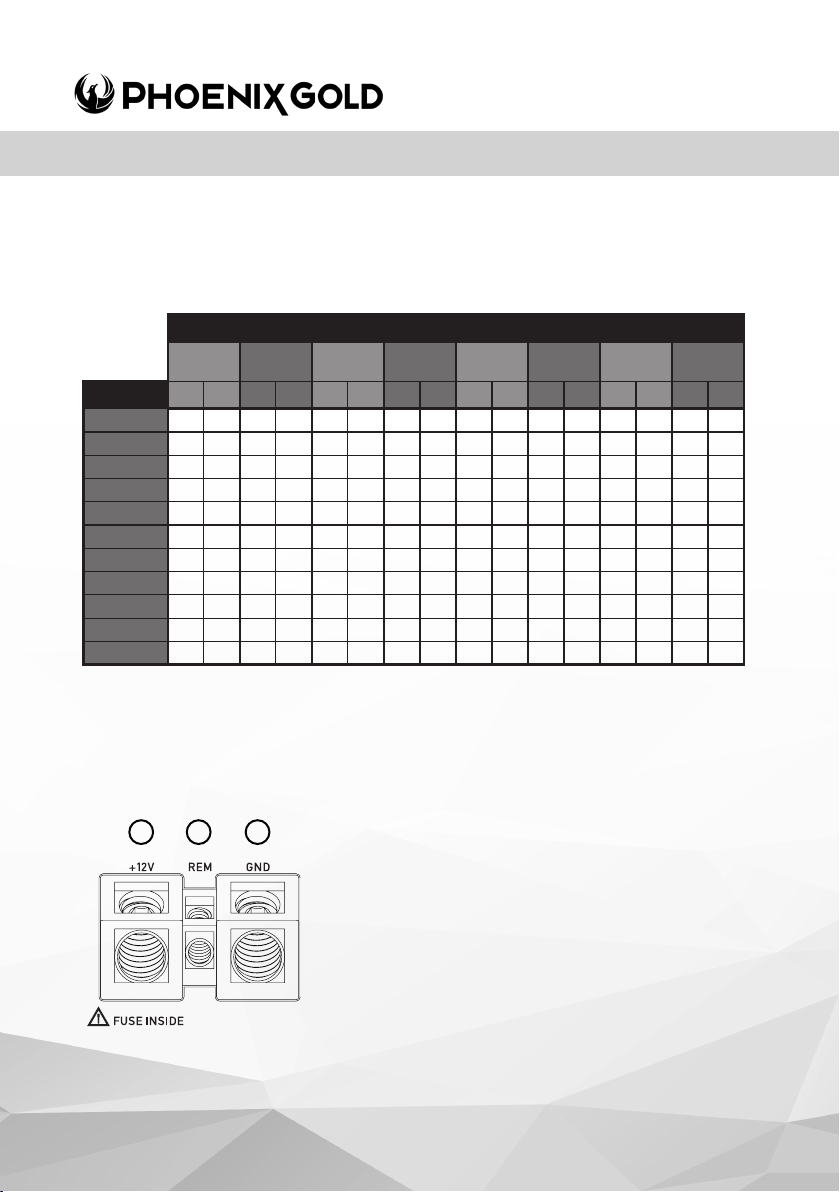
Ensure the correct gauge cable is used for all connections; consult the cable calculator diagram
below for the correct gauge cable for your installation.
>>E'd,
1-2 Metre /
ϬͲϰ&ĞĞƚ
dKd>DW^ DDϮ t' DDϮ t' DDϮ t' DDϮ t' DDϮ t' DDϮ t' DDϮ t' DDϮ t'
ϬͲϮϬ ϰ ϭϮ
ϮϬͲϯϱ ϰ ϭϮ 6 10 6 10 6 10 6 10 10 8 10 8 20 4
ϯϱͲϱϬ ϲ ϭϬ 6 10 6 10 10 8 10 8 10 8 20 4 20 4
ϱϬͲϲϱ ϭϬ ϴ 10 8 10 8 10 8 20 4 20 4 20 4 20 4
ϲϱͲϴϱ ϭϬ ϴ 10 8 10 8 20 4 20 4 20 4 20 4 35 2
ϴϱͲϭϬϱ ϭϬ ϴ 10 8 20 4 20 4 20 4 20 4 20 4 35 2
ϭϬϱͲϭϮϱ ϮϬ ϰ 20 4 20 4 20 4 20 4 20 4 35 2 35 2
ϭϮϱͲϭϱϬ ϮϬ ϰ ϮϬ 4 20 4 20 4 35 2 35 2 35 2 50 0
ϭϱϬͲϮϬϬ ϮϬ ϰ ϮϬ 4 20 4 35 2 35 2 50 0 50 0 50 0
ϮϬϬͲϮϱϬ ϯϱ Ϯ ϯϱ 2 35 2 50 0 50 0 50 0 50 0 70 2/0
ϮϱϬͲϯϬϬ ϱϬ Ϭ ϱϬ 0 50 0 50 0 50 0 50 0 70 2/0 70 2/0
4-7 Feet
4 12 4 12 4 12 6 10 6 10 6 10 10 8
If aluminium wire is used, it is recommended to increase the size of the gauges to compensate.
The calculation of cable gauge size considers the resistance of terminal connections.
2-3 Metre /
7-10 Feet
3-4 Metre /
10-13 Feet
4-5 Metre /
13-16 Feet
5-6 Metre /
16-19 Feet
6-7 Metre /
19-22 Feet
7-9 Metre /
22-28 Feet
AMPLIFIER CONNECTION
1 2 3
© 2023 Phoenix Gold | www.phoenixgold.com
1. +12V Power
Ensure ALL other cable connections are completed
before connecting this cable to the battery. PHOENIX
GOLD ampliers should be connected directly to the
12V battery terminal using the appropriate gauge cable.
Start at the vehicles battery and run the cable through
to the amplier. PHOENIX GOLD recommends the use
of rubber grommets when passing any cable through
metal panels to avoid sharp corners or panels that could
cut through the insulation of the cable. An inline fuse or
circuit breaker MUST be used within 30cm (12”) of your
battery; this will prevent the potential risk of a re caused
by a short in your power cable (see spec table for
recommended inline fuse/circuit breaker ratings).
Connect the other end of your power cable to the
battery, but remember to leave the fuse out or circuit
breaker off until all other cable connections are made.
Page 5
Z1502i / Z3001i / Z3004i / Z6001i - Z-Series Ampliers
2. Remote Turn-On
This connection turns the amplier on and should be connected to the ‘Remote Turn on’
wire from the Head Unit. If one is not available a switched +12V source must be used,
such as a power antenna wire or ACC +12V.
If you are using high level (speaker) inputs and a remote turn on wire is not available, then
instead the ‘Auto Turn-On’ switch must be set to ON.
3. Ground
Connect the Ground/Earth cable for your amplier rst. Ensure that the location is a good
source of ground (preferably the chassis/oor pan). Investigate the area you wish to use
to ensure it is free of wiring, vacuum lines, brake and fuel lines. Use either a wire brush or
sandpaper to expose bare metal, this will provide a high current contact for your ground
connection. Use the same gauge cable for the ground cable as you did for the power
cable. Secure the ground cable to the ground point with a bolt, star washer and nut.
Apply some neutral cure silicon to the bolt and bare metal to prevent possible water
leaks and rust. Connect the other end of your ground cable to the amplier.
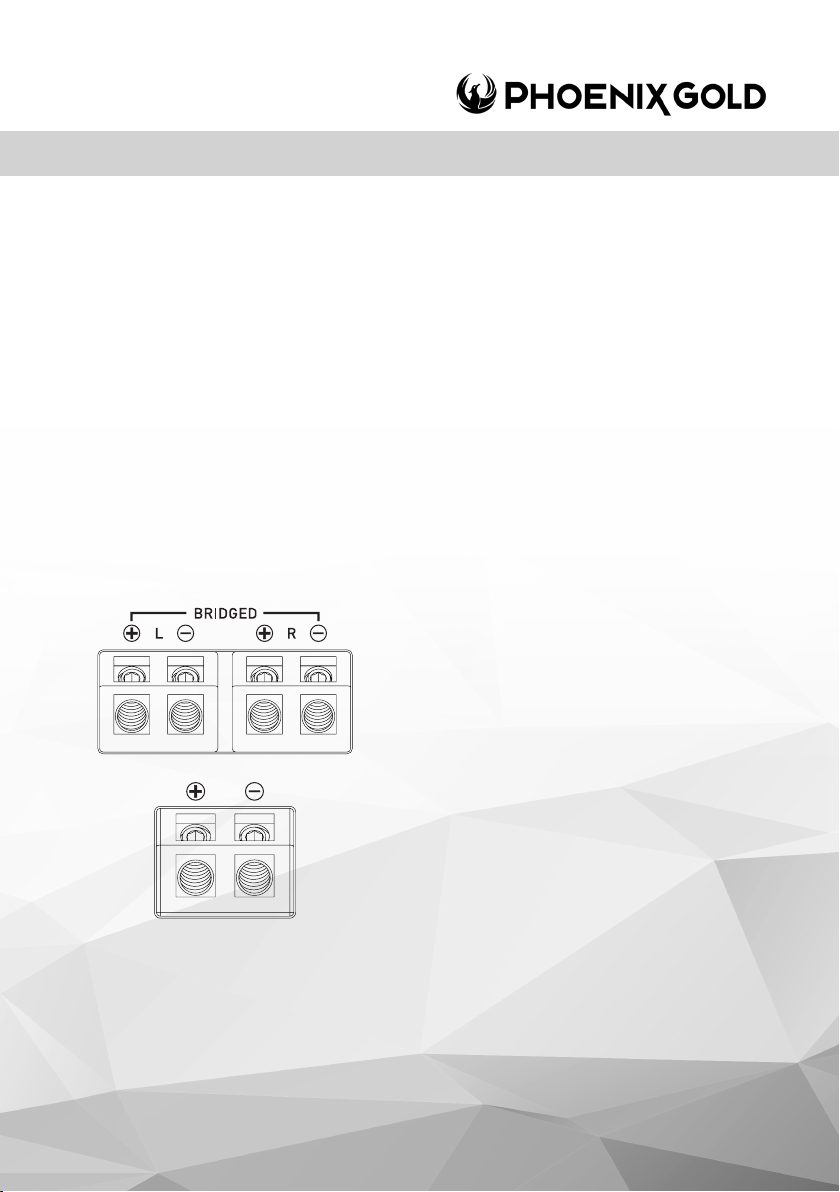
4. Speaker Output Connection
(Z1502i - Z3004i)
Ensure the correct polarity is observed when connecting
speakers/subwoofers.
2 Ohm minimum speaker impedance for stereo
operation (per channel).
4 Ohm minimum speaker impedance for bridged
operation.
(Z3001i - Z6001i)
Speaker output for minimum 2 Ohm load for Z3001i and
1 Ohm for Z6001i.
Learn more about speaker loads by visiting;
www.phoenixgold.com
© 2023 Phoenix Gold | www.phoenixgold.com
Page 6
Z1502i / Z3001i / Z3004i / Z6001i - Z-Series Ampliers
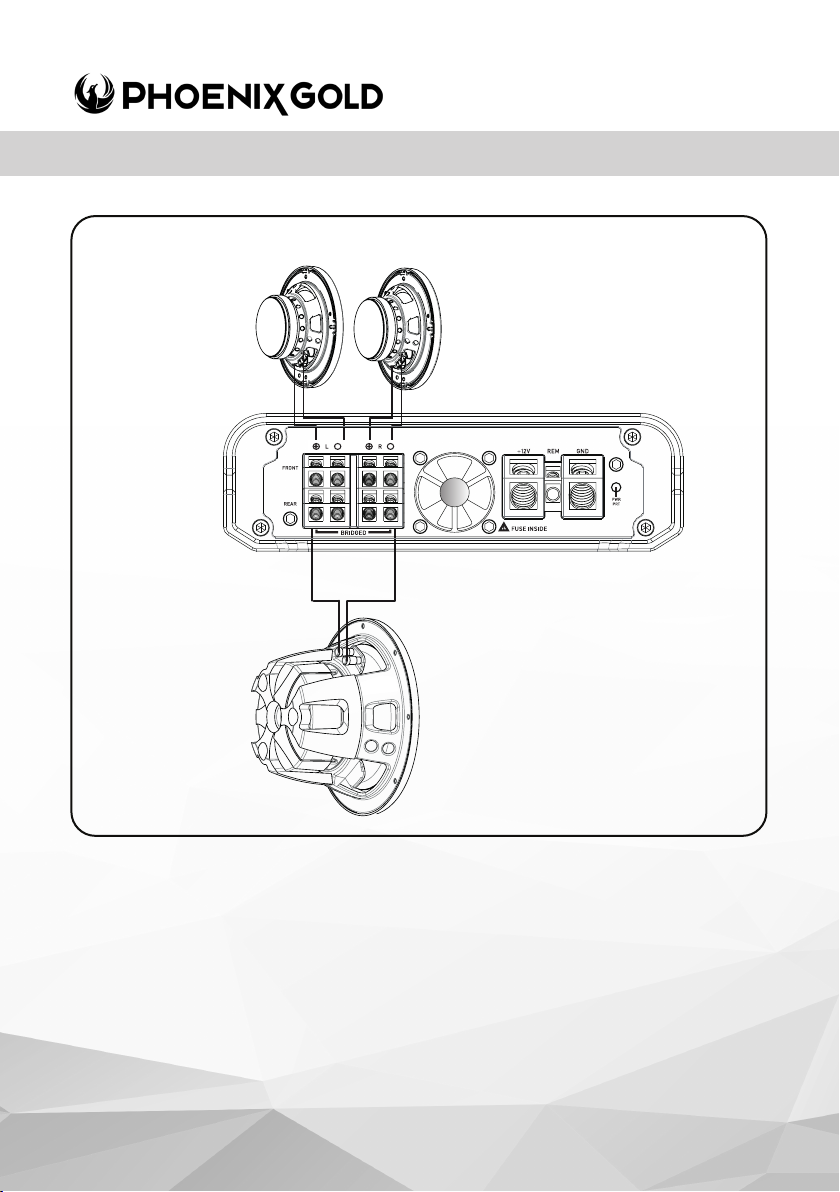
Z3004i
Example of 3 Channel
conguration
2 x Front/Rear Speakers
(4Ohm Subwoofer)
Bridged Rear Channels
© 2023 Phoenix Gold | www.phoenixgold.com
Page 7
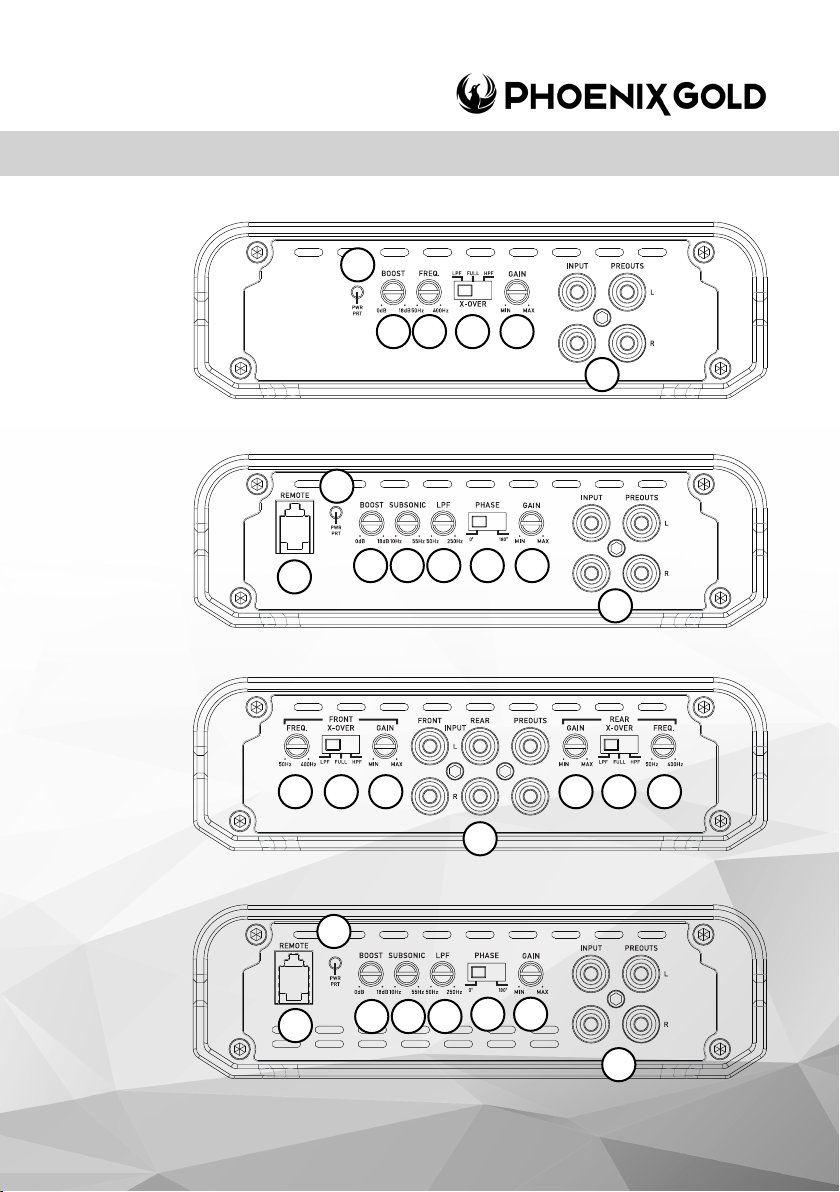
Z1502i
Z3001i
Z1502i / Z3001i / Z3004i / Z6001i - Z-Series Ampliers
14
12
14
11
11 10
7 9
8
13
6
5
6
5
Z3004i
Z6001i
7 7
5
14
13
12
© 2023 Phoenix Gold | www.phoenixgold.com
11 10
8
66
6
99
5
Page 8

Z1502i / Z3001i / Z3004i / Z6001i - Z-Series Ampliers
5. RCA Inputs Front-Rear-Subwoofer
Choose the correct length RCA cables to connect the RCA outputs of the source/head
unit, to the input connectors of the amplier. The RCA inputs also accept ‘high level
input’, when using a high level signal, the amplier will autostart without the need of a
remote signal.
Run the RCA cables on the opposite side of the vehicle. to the power cable and vehicle
wiring loom. Avoid the electric fan motor and wiring. Ensure you follow the correct
balance. (L LEFT = White or Black. R Right = Red)
6. Gain/Level Control (Sub/Front/Rear)
This control is used to match the input level of the amplier to the output level of your
head unit. We recommend the method below, as failure to follow these steps may
damage the audio system.
1. Turn the amplier Gain to zero
2. Turn the volume of the head unit to ¾ and the bass and treble to zero
3. Adjust the amplier Gain/Level control until the desired maximum volume is
achieved without distortion.
4. Make ne adjustments to tune your install.
7. High Pass Crossover Filter
Set the crossover switch to HP and turn this control to 65Hz or above when using
speaker’s smaller than 6 x 9”. When a subwoofer is used in the system, this feature is
designed to lter out all low bass frequencies that only subwoofers should produce. See
specication table for adjustable frequency range
8. Low Pass Crossover Filter (Z3001i & Z6001i)
Ensure the crossover frequency is set at 100Hz or below. This feature must be used with
a subwoofer to lter out all mid to high frequencies that only full range speakers should
produce. See specication table for adjustable frequency range
9. Crossover Switch
Full - This setting is for large speakers (e.g. 6 X 9”) or speakers when a sub
woofer is not included in the system. The amplied audio signal is not ltered
so the full range audio signal is sent to the speakers.
Low - This setting is used when using a subwoofer and will only allow
frequencies below the low pass lter setting to pass through.
High - Used to run mid-range speakers when a separate subwoofer is
connected. This setting will only allow frequencies above the set high pass lter
setting to pass through.
10. Subsonic Filter (Z3001i & Z6001i)
This is a variable control that lters out all subsonic bass frequencies below the set point.
These are frequencies that are not audible. These frequencies can damage
subwoofers. See specication table for adjustable frequency range.
© 2023 Phoenix Gold | www.phoenixgold.com
Page 9

Z1502i / Z3001i / Z3004i / Z6001i - Z-Series Ampliers
11. Bass Boost
This control adjusts the bass boost at 45Hz, from 0 to +18dB. Start from 0 and slowly
increase to the desired level. Use this control with extreme care as failure to do so may
result in damage to the subwoofers.
12. Remote Bass Controller Port
This connection should be used with the optional remote control (ZRBC - included in box)
to adjust the bass level from any location within the vehicle.
13. Phase Switch
This control adjusts the phase shift 180 degrees for the subwoofer. This means that the
subwoofer will move inwards instead of outwards on a sinus wave.
14. Power / Protect LED
1. When illuminated Blue, indicates normal operation. Amplier is powered on with no
faults detected.
2. When illuminated Red, indicates the amplier is in protection mode / fault state. See
troubleshooting section on the next page.
© 2023 Phoenix Gold | www.phoenixgold.com
Page 10
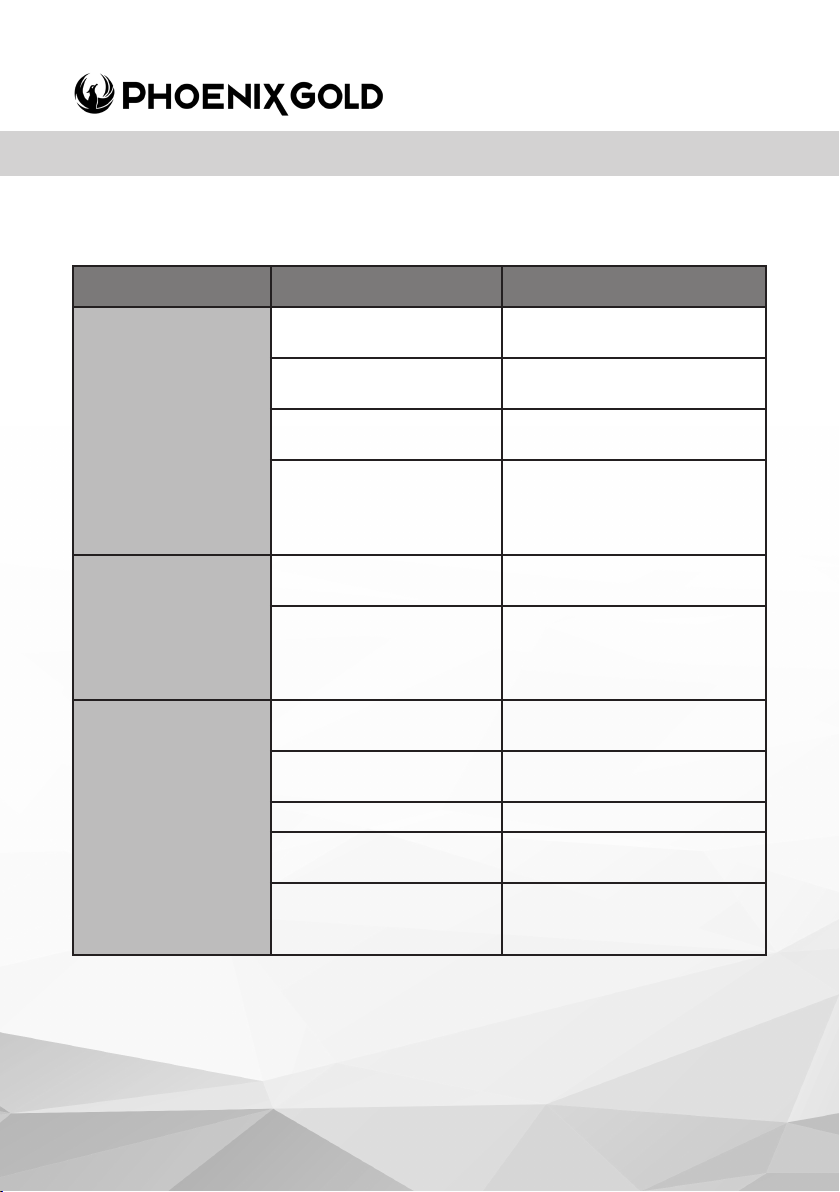
Z1502i / Z3001i / Z3004i / Z6001i - Z-Series Ampliers
AMPLIFIER TROUBLESHOOTING
PROBLEM POSSIBLE REASON SOLUTION
No 12V to power wire Check fuses and
connections to battery
Amplier not
switching ON
LED = OFF
(not ‘Red or Blue’)
Amplier not work-
ing, status LED = RED
No Sound
LED = Blue
No power to remote
wire
Blown Fuse Replace fuse with correct
No ground connection Check ground cable is
Amplier too hot Move amplier to vented
Speaker wires shorted Check that there are no
RCA Signal Check RCA connection to
Gain control not set up Ensure you have set up the
Head unit Check head unit volume
Amplier Check all power, remote on
Speakers Check speakers are
Check remote turn on
connections to head unit
correctly connected to the
amplier and vehicle / body
area. Turn head unit down
speaker wires shorted to
amplier gain level control
and ground connections
Check speakers for shorts
type and amperage
chassis
another wire or to the
vehicle chassis
head unit
correctly connected
© 2023 Phoenix Gold | www.phoenixgold.com
Page 11
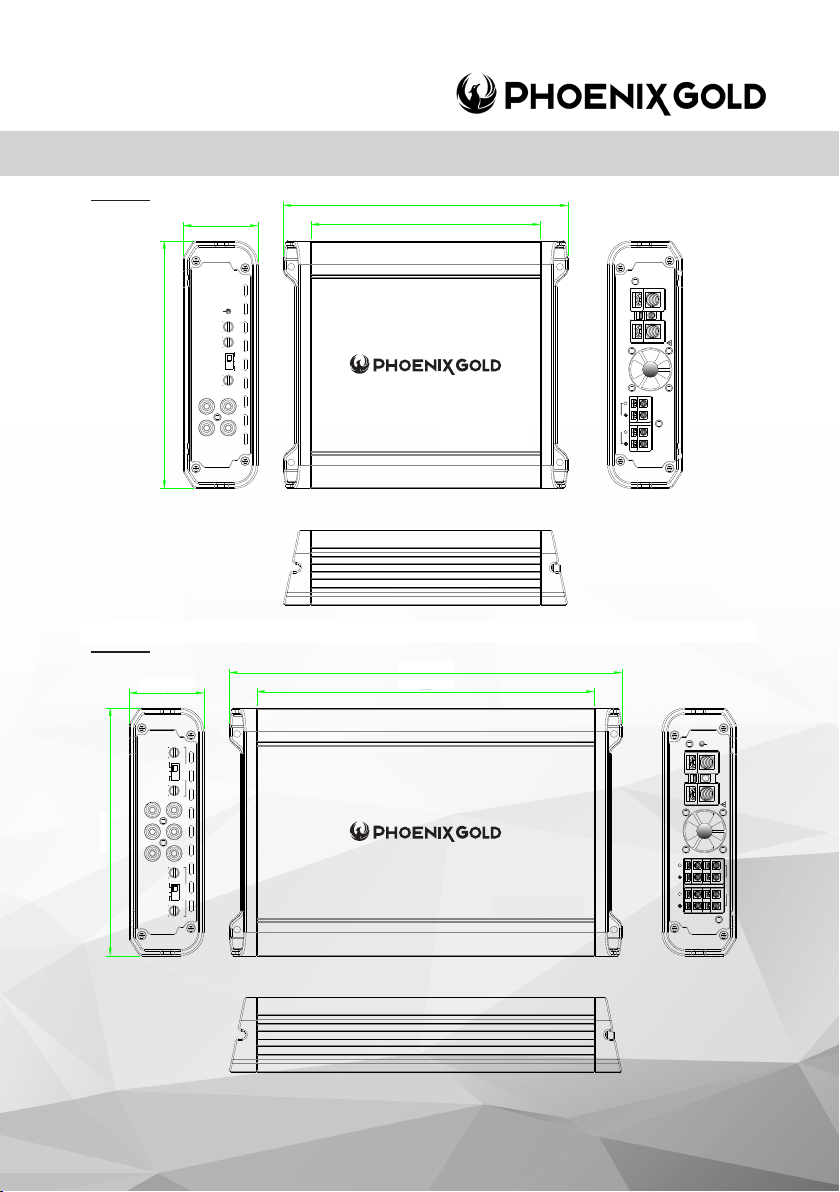
Z1502i / Z3001i / Z3004i / Z6001i - Z-Series Ampliers
Z1502i
48mm
Z3004i
0
6
1
160mm
0
6
1
160mm
48mm
4
8,3
R
183,6
6
48mm
4
8,3
PWR
PRT
0dB
BOOST
18dB
50Hz
FREQ.
400Hz
X-OVER
FULL
HPFLPF
MIN
GAIN
MAX
INPUT
PREOUTS
R
L
50Hz 400Hz
FREQ.
X-OVER
FRONT
FULL
HPFLPF
MIN MA X
GAIN
FRONT REAR PRE OUTS
INPUT
L
MIN MA X
GAIN
X-OVER
REAR
FULL
HPFLPF
50Hz 400Hz
FREQ.
184mm
148mm
148
254mm
253,6
218mm
218
Zx 15 02
6
Zx 30 04
REM GND+12V
FUSE INSIDE
BRIDGED
L R
PRT
PWR
REM GND+12V
FUSE INSIDE
BRIDGED
L R
REAR
FRONT
© 2023 Phoenix Gold | www.phoenixgold.com
Page 12
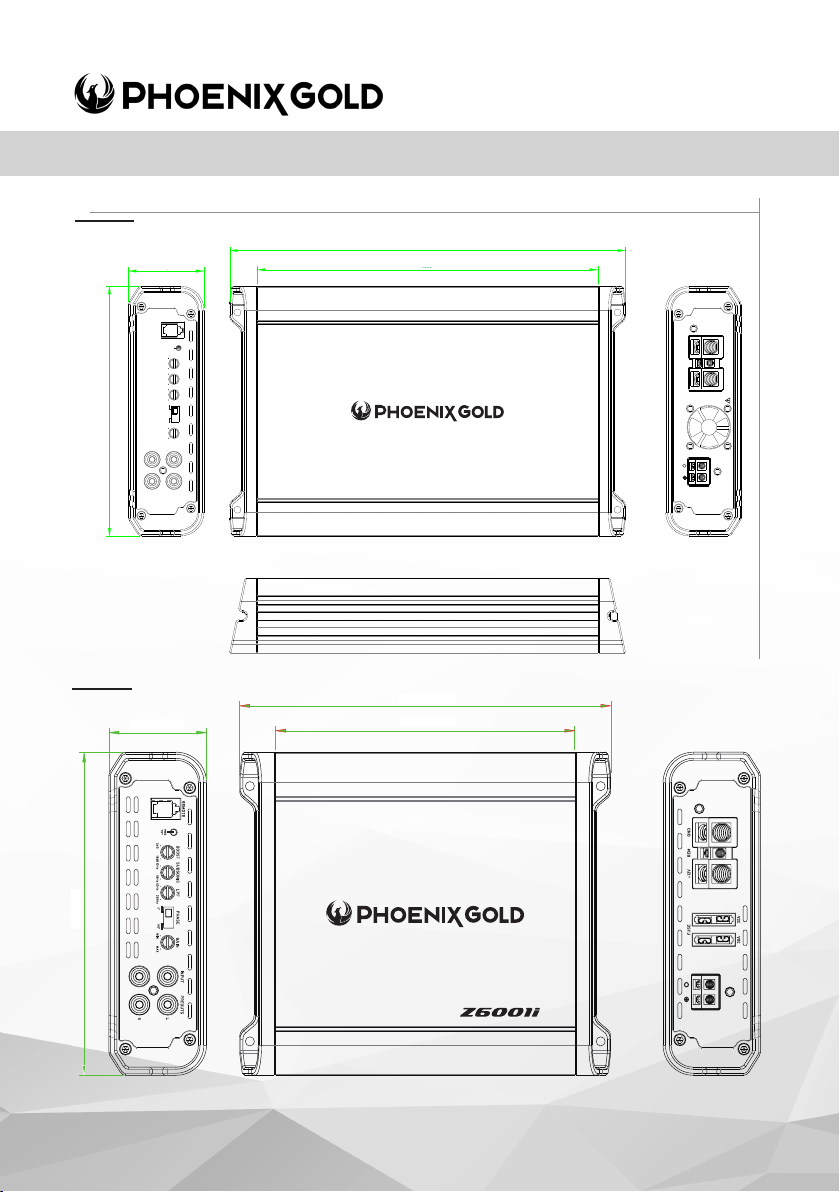
116600
L
R
INPUT
PREOUTS
HPFLPF
GAIN
MIN
MAX
BRIDGED
L R
Zx 15 02
REM GND+12V
PWR
PRT
FRONT
REAR
BRIDGED
L R
INPUT
L
R
FRONT REAR PR EOUTS
FREQ.
50Hz 400Hz
X-OVER
HPFLPF
FULL
GAIN
MIN MA X
FRONT
FREQ.
50Hz 400Hz
X-OVER
HPFLPF
FULL
GAIN
MIN MA X
REAR
4488,,33
116600
221188
225533
,,6666
FUSE INSIDE
Zx 30 04
Z1502i / Z3001i / Z3004i / Z6001i - Z-Series Ampliers
Z3001i
254mm
48mm
4
8,3
0
6
1
160mm
REMOTE
PWR
PRT
0dB
BOOST
18dB
SUBSONIC
10Hz
55Hz
50Hz
LPF
250Hz
0
0
PHASE
180
0
MIN
GAIN
MAX
INPUT
PREOUTS
R
L
253,6
218mm
218
6
REM GND+12V
FUSE INSIDE
Zx 30 01
Z6001i
60mm
160mm
48mm
48mm
184mm
184mm
148mm
148mm
© 2023 Phoenix Gold | www.phoenixgold.com
 Loading...