

Page 1
4201 LIEN RD. • MADISON, WI 53704
Phoenix Stackable CAM Pro - Centrifugal Air Mover
OWNER’S MANUAL
Installation, Operation & Service Instructions
– READ AND SAVE THESE INSTRUCTIONS –
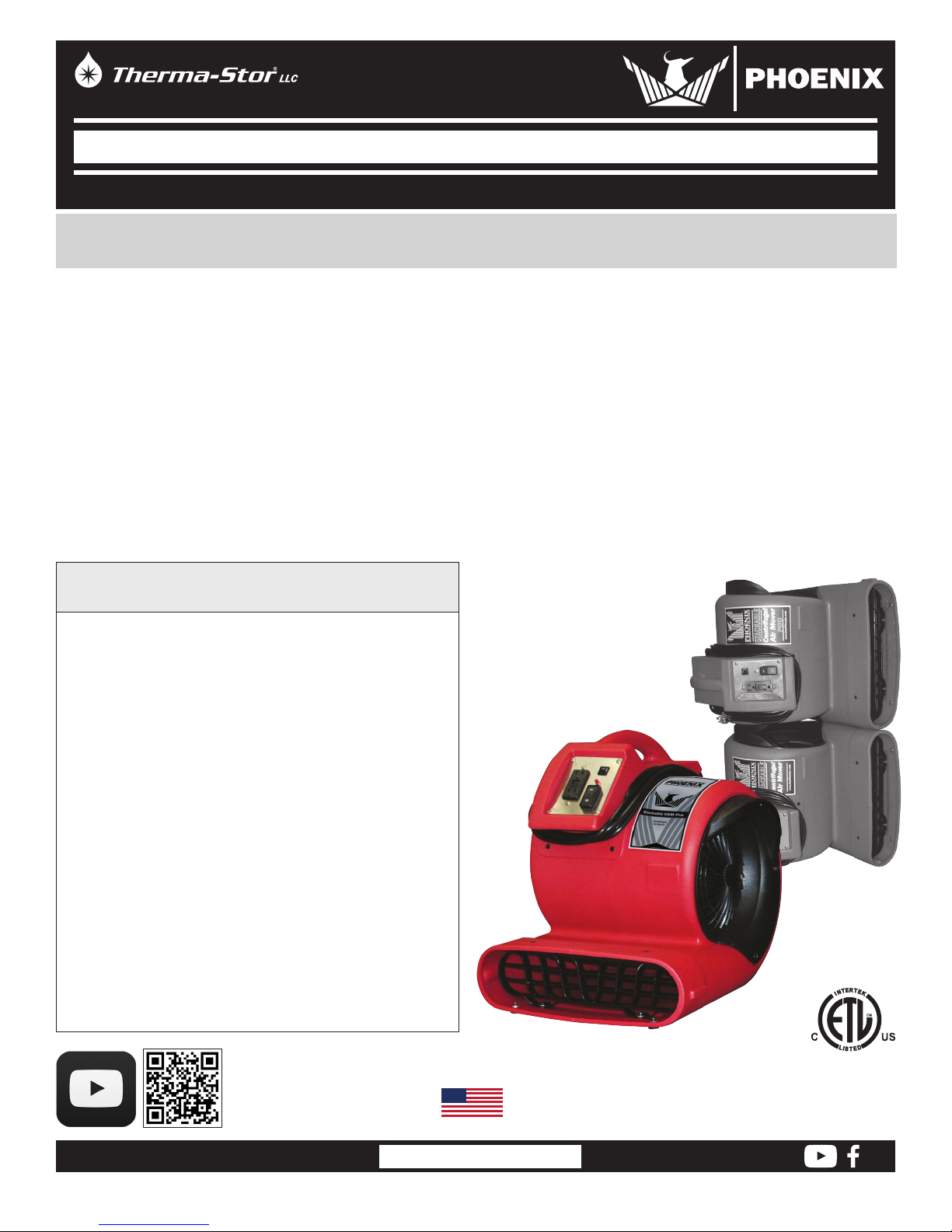
The Phoenix Stackable CAM Pro offers all the great features of our proven CAM air movers, with the addition of an innovative
stackable cabinet design. Featuring multiple contact points and interlocking side grills, the Phoenix Stackable CAM Pro can be stored
safely and securely up to 4 units high, freeing up valuable space in your trucks and warehouses.
The Stackable CAM Pro features class-leading airflow and efficiency. Using a unique 1/3 horsepower motor design and proprietary
blower technology, the Phoenix Stackables achieve 1050 CFM at over 2800 FPM with high static pressure, while using only 2.6 amps
of electricity on high speed (2.0 amps on low). With it’s low amp draw and onboard GFCI, the Phoenix Stackable CAM Pro gives
you maximum airflow on a circuit, allowing up to 4 CAMs on a standard 15 amp household circuit on high speed (or up to 6 on low
speed). The Phoenix Stackable CAM housing is durable, washable, and chemical resistant. It features multiple operating positions
allowing it to be aimed horizontally, vertically, or at 45°. And, like all Phoenix air movers, the Stackable CAM Pro is ETL Listed, UL
Certified.
The Phoenix Stackable CAM Pro is also lightweight and properly balanced for easy handling. Other convenience features include a
lighted cord for easier determination of power to the outlet and superior cord management for better handling, packing, and storage.
The Phoenix Stackable Centrifugal Air Mover Pro
• 2-Speed 1/3 Horsepower Motor
2.6 Amps on High Speed
2.0 Amps on Low Speed
• Maximum Velocities 2800 FPM
• Balanced Exhaust Airflow
• Directional Airflow
Horizontal, 45° Angle, 90° Angle
• Durable, rugged, chemical resistant housing, fan wheel,
and controls design.
• Operator interface conveniently located for easy access,
featuring: power indicator lamp and large three-position
switch.
• Ergonomic carry handle and power cord storage.
• Non-marking, anti-skid, rubber feet.
• 4 CAMs on a circuit on high
• 6 CAMs on a circuit on low
• 20% more CFM/Amp than our current industry leading
CAM
• On-board duplex GFCI and circuit breaker
• Stacks up to 4 units high
*PN 4030980 is
pictured to demonstrate
stackability
1.800.533.7533
Phoenix Stackable Centrifugal Air Mover Pro
PN 4030990
WISCONSIN
USEPHOENIX.COM
1
Specifications subject to change without notice.
TS-669
08/18 Rev. A
Page 2

Table of Contents
Introduction ...............................................................................1
Centrifugal Air Mover Pro Features and Benefits .................1
1. Safety Information .............................................................2
2. Specifications .....................................................................3
3. Power Requirements .........................................................3
3.1 Daisy-Chaining ............................................................. 3
3.2 Recommended Use ....................................................4
4. Operating Instructions.......................................................4
5. Operator Panel Features ...................................................4
5.1 12 Amp Circuit Breaker ..............................................4
5.2 Power Indication Lamp ..............................................4
5.3 3-Position Drying Selector Switch .............................4
5.4 GFCI Protection ............................................................5
6. How to Stack .......................................................................5
7. Maintenance .......................................................................5
7.1 Servicing .......................................................................5
7.2 Cleaning ........................................................................5
8. Replacement Parts and Optional Accessories ..............5
9. Wiring Diagram ..................................................................6
Warranty ..............................................................................7
Serial No.__________________________________
Purchase Date_____________________________
Dealer’s Name_____________________________
Read the operation and maintenance instructions
carefully before using this unit. Proper adherence to these
instructions is essential to obtain maximum benefit from
your Phoenix 4030990.
1 Safety Information
When using any rotational electrical device basic
precautions should always be followed, including the
following:
CAUTION! For general ventilating use only. Do not use in
environments containing hazardous or explosive materials
and vapors.
• Do not operate the unit without the safety guards
properly installed and secured. Do not operate the unit if
the guards become damaged. Contact Therma-Stor for
replacement parts.
• Always replace the guards as originally installed after
servicing or cleaning the product.
• Never place your face, hands, or other susceptible body
parts in the air stream, inlets, or outlet of this device.
• This fan is not a toy! Ensure children do not play with
and do not have access to the equipment. Do not allow
children to play with or stand near the unit or in its air
flow.
• Do not use this fan with any solid-state speed control
device.
• Do not operate unit with a cut or frayed power cord.
Replace cord if it becomes damaged.
• Handle with care. Do not drop or throw the unit. The unit
can be damaged under harsh treatment.
• Do not unplug the unit by pulling on the cord. Grasp the
plug firmly and pull it out of the wall socket or power
receptacle.
• Always use a grounded outlet.
• Do not plug more than 9.3 amps total into the GFCI
outlet.
• Check GFCI protection before each use by pushing “test”
button. If operating properly, “reset” button will pop out.
• Never operate electrical equipment in standing water.
• Never operate with the safety grills removed. Personal
injury may result.
• Do not stick your fingers or other objects through the
safety grills.
• Do not restrict airflow to the unit. This may cause the unit
to overheat.
• Unit should never be serviced or cleaned while it is
plugged in.
• Make sure the unit is secure, stable and safe from falling
over or falling down before operating.
• Do not sit or stand on the unit or use as a step.
• Do not leave device plugged in when not in use.
• Indoor use only. Do not expose to water or rain (store
indoors.)
• Use only as described in this manual.
1.800.533.7533
USEPHOENIX.COM
2
Page 3
• Use only Manufacturer’s recommended attachments.
Contact Therma-Stor for proper repair instructions.
• Do not pull or carry it by the power cord, use cord as a
handle, close doors on cord or pull cord around sharp
edges.
• Do not run or drive over cord.
• Keep cord away from heated surfaces.
• Do not handle power cord plug with wet hands.
• Turn off all controls before unplugging.
• Do not use when you are tired, distracted or under the
influence of drugs, alcohol or medication.
LIRE ET CONSERVER CES INSTRUCTIONS
• Risque de choc électrique Peut causer des blessures ou
la mort. Débrancher toutes les alimentations en courant
électrique à distance avant l’entretien ou le nettoyage.
• Ne pas utiliser l’appareil avec un cordon d’alimentation
coupé ou effiloché.
• Ne pas débrancher l’appareil en tirant sur le cordon. Tenir
la fiche fermement et la tirer hors de la prise murale ou
la prise d’alimentation électrique.
• Toujours utiliser une prise mise à la terre.
• Ne jamais utiliser l’équipement électrique dans de l’eau
stagnante.
• Ne jamais utiliser sans les grilles de protection. Des
blessures risquent d’en résulter.
• Ne pas brancher plus de 8 ampères au total au
différentiel.
• Vérifier la protection du différentiel avant chaque
utilisation en appuyant sur le bouton “ test “. Si l’appareil
fonctionne correctement, le bouton “ reset “ ressort.
• Ne pas passer les doigts ou d’autres objets dans les
grilles de protection.
• Ne pas diminuer le débit d’air arrivant jusqu’à l’appareil.
L’appareil risque de trop chauffer.
• Ne pas s’asseoir ou se tenir debout sur l’appareil; ne pas
l’utiliser comme étagère ou table.
• Avant de laisser un appareil aéraulique axial sans
surveillance, s’assurer que les enfants n’ont pas accès
à l’équipement. Ne pas laisser les enfants jouer avec
l’appareil ou à proximité de l’appareil ou dans l’air qu’il
projette.
• Pour réduire le risque d’incendie ou de choc électrique,
ne pas utiliser ce ventilateur avec un dispositif de
commande de vitesse à semi-conducteurs.
2 Specifications
Part No.
Power 115 VAC, 60 hz.
Operating 3 – 0°, 45°, 90°
Positions
Drive Motor 1 /3 Horsepower, 2-Speed
Motor Thermal cut-off
Protection
Cord Length 20 Feet
Airflow 2800 ft/min outlet velocity
Current Draw 2.6 Amps High speed, 2.0 Amps Low speed
Warranty One Year - 100% parts and labor
(all components)
Three Years - Only materials and workmanship
of the housing are covered.
Dimensions Machine Shipping
Width 17.25” 17.3”
Height 20” 20”
Depth 19.4” 20”
Weight 27 lb 30 lb
4030990
3 Power Requirements
3.1 Daisy Chaining
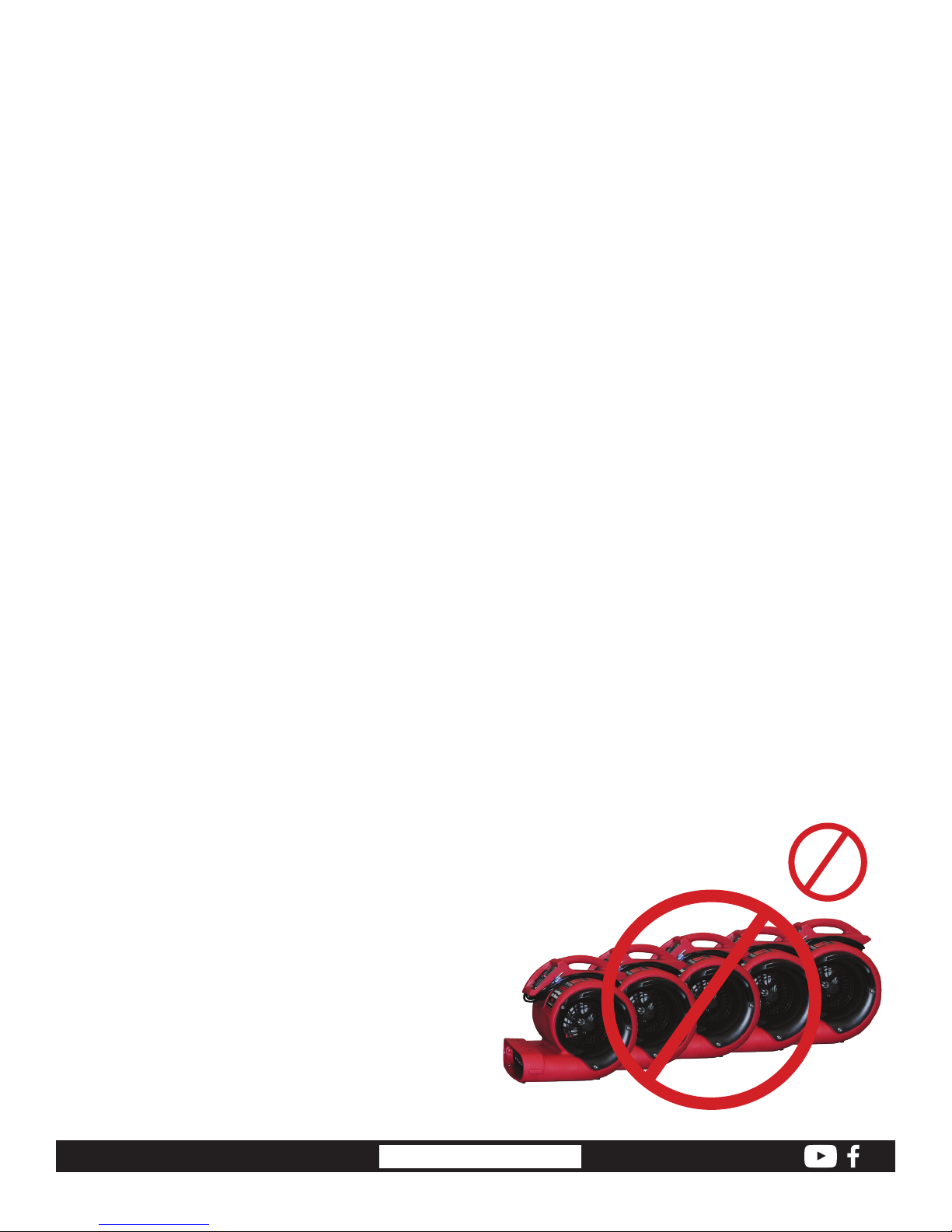
The Phoenix Centrifugal Air Mover draws 2.6 amps. The 12
amp, on-board circuit breaker will allow four (4) Phoenix
Centrifugal Air Movers on one circuit. When daisy-chaining
the Phoenix Centrifugal Air Mover, turn on one Phoenix
Centrifugal Air Mover at a time to prevent excessive current
inrush caused by four units starting at once.
A ground fault in the Phoenix Centrifugal Air Mover Pro or
anywhere on the circuit will cause the Phoenix Centrifugal
Air Mover’s GFCI to trip. After rectifying the ground fault,
reset the GFCI by pressing the reset button.
5
1.800.533.7533
Figure 1: Too many Centrifugal Air Movers daisy-chained
USEPHOENIX.COM
3
Page 4
3.2 Recommended Use
IMPORTANT: Total amperage of the Centrifugal Air Mover
plus all devices plugged into the receptacle must not
exceed 12 amps. The circuit breaker will not allow for loads
in excess of 12 amps, although there is a time delay before
the overloaded circuit is broken.
5.2 Power Indication Lamp
The red, sealed, high intensity AC voltage power indication
lamp allows operators to visually identify the operation
status of several Phoenix Centrifugal Air Movers at a
distance, with a single glance. The power indication lamp
will remain lit when the AC power cord is plugged into a
standard “powered” AC power outlet and the
3-Position drying selector switch is in either the HIGH or
LOW operation position. The power indication lamp will
remain unlit when the AC power cord is unplugged, the
3-Position drying selector switch in the OFF position, the
on-board GFCI or 12 Amp circuit breaker is tripped, or the
3.2 Recommended Use
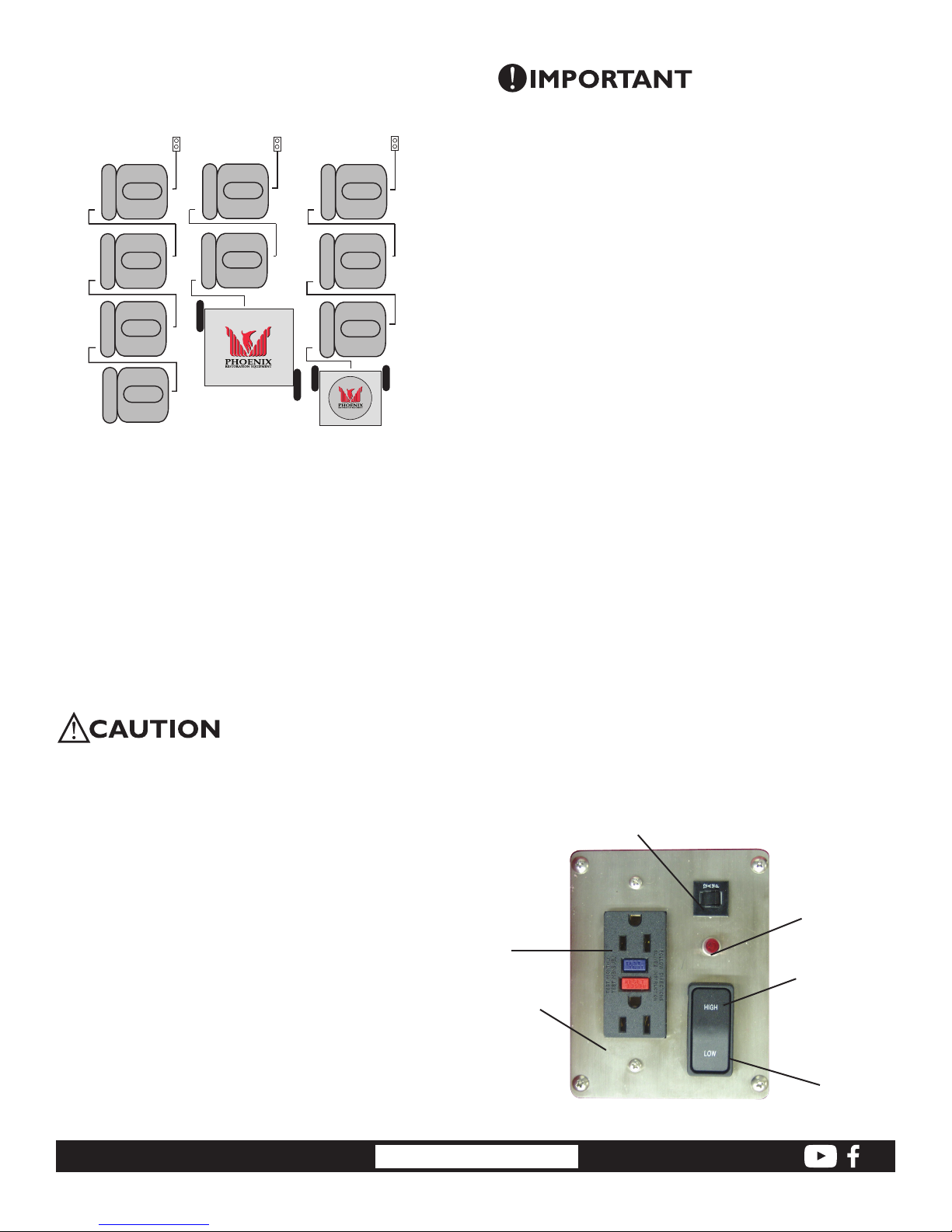
Recommended use(s) of on-board duplex GFCI are shown.
Note: Standard 115 VAC electrical outlets.
Recommended use(s) of on-board duplex GFCI are shown.
Note: Standard 115 VAC electrical outlets.
15 Amp
Outlet
Phoenix
CAM
Phoenix
CAM
Phoenix
CAM
Phoenix
Phoenix 200 MAX
CAM
Figure 2: Duplex GFCI use
15 Amp
Outlet
Phoenix
CAM
Phoenix
CAM
15 Amp
Outlet
Phoenix
CAM
Phoenix
CAM
Phoenix
CAM
Phoenix Mini-Guardian
IMP0RTANT: Total amperage of the Centrifugal Air Mover
plus all devices plugged into the receptacle must not
exceed 12 amps. The circuit breaker will not allow for loads
in excess of 12 amps, although there is a time delay before
the overloaded circuit is broken.
5.2 Power Indication Lamp
The red, sealed, high intensity AC voltage power indication
lamp allows operators to visually identify the operation
status of several Phoenix Centrifugal Air Mover Pros at a
distance, with a single glance. The power indication lamp
will remain lit when the AC power cord is plugged into a
standard “powered” AC power outlet and the
3-Position drying selector switch is in either the HIGH or LOW
operation position. The power indication lamp will remain
unlit when the AC power cord is unplugged, the 3-Position
drying selector switch in the OFF position, the on-board
GFCI or 12 Amp circuit breaker is tripped, or the connected,
standard AC wall outlet power has been turned off.
4 Operation Instructions
The Phoenix Centrifugal Air Mover Pro is intended for use
by water damage restoration, carpet cleaning, construction,
and janitorial/sanitation professionals in general ventilating
and structural surface drying applications. The Phoenix
Centrifugal Air Mover Pro as packaged is ready to be put
into service. Inspect the unit completely for any shipping
damage. Place the unit on the ground. Check the GFCI to
ensure it is not tripped. Plug the unit into a grounded outlet
and select the drying mode.
CAUTION: The Phoenix Centrifugal Air Mover Pro consumes
2.6 Amps on high speed. Do not plug devices requiring more
than 9.3 Amps of current into the duplex outlet.
5 Operator Panel Features
5.1 12 Amp Resettable Circuit Breaker
The 12 AMP thermal response resettable circuit breaker
protects the unit and devices connected to its duplex GFCI
outlet.
The circuit breaker is designed to sense the total current
draw through the circuit. The circuit breaker “trips” when
more than 12 amps of electrical current are drawn through
the device’s power cord. Should an over-current condition
occur, the Centrifugal Air Movers’ on-board circuit breaker
trips thus preventing nuisance visits to a remote power
junction box.
To reset on-board breaker, remove over drawing equipment.
Allow to cool for 10 minutes and reset breaker.
1.800.533.7533
5.3 3-Position Drying Selector Switch
The Phoenix Centrifugal Air Mover Pro features a threeposition switch - LOW–OFF–HIGH.
1. Inspect the machine for damage and airflow
obstructions prior to plugging it in or operating it.
2. Ensure the power switch is in the OFF (middle) position.
3. Place the machine into the desired position for
operation. Ensure that the machine rests stable and
secure and will not overturn.
4. Plug the power cord into a GFCI protected outlet. Do not
use an extension cord in conjunction with the standard
power cord.
5. Turn the unit on to the desired speed, high or low.
GFCI Outlet
Stainless
USEPHOENIX.COM
Steel
Control
Panel
Figure 3: Centrifugal Air Mover Pro Operator
Panel
4
12 Amp
Circuit Breaker
AC Indicator
Lamp
High Speed:
“Ultra”
Drying Power
Low Speed:
Quiet Operation
Page 5
5.4 GFCI Protection and the On-Board Duplex
Outlet
The standard AC voltage outlet GFCI (Ground Fault Circuit
Interrupter) promotes operator safety in wet applications.
GFCI devices trip when a fault to electrical ground is sensed.
It is recommended to check the GFCI protection prior to
operation. To check, push the “TEST” button located on the
GFCI duplex outlet will pop out. If operating properly the
“RESET” button on the GFCI outlet will pop out. Depending
on your Centrifugal Air Movers specific equipment, a tripped
GFCI may be indicated by a small LED. The device can only
be “RESET” when the Centrifugal Air Mover is connected to a
wall outlet providing standard voltage. This duplex AC outlet
allows the inter-connection of other AC powered devices. The
sum total amperage of all devices (excluding the first fan)
plugged into the receptacle must not exceed 8.5 amps.
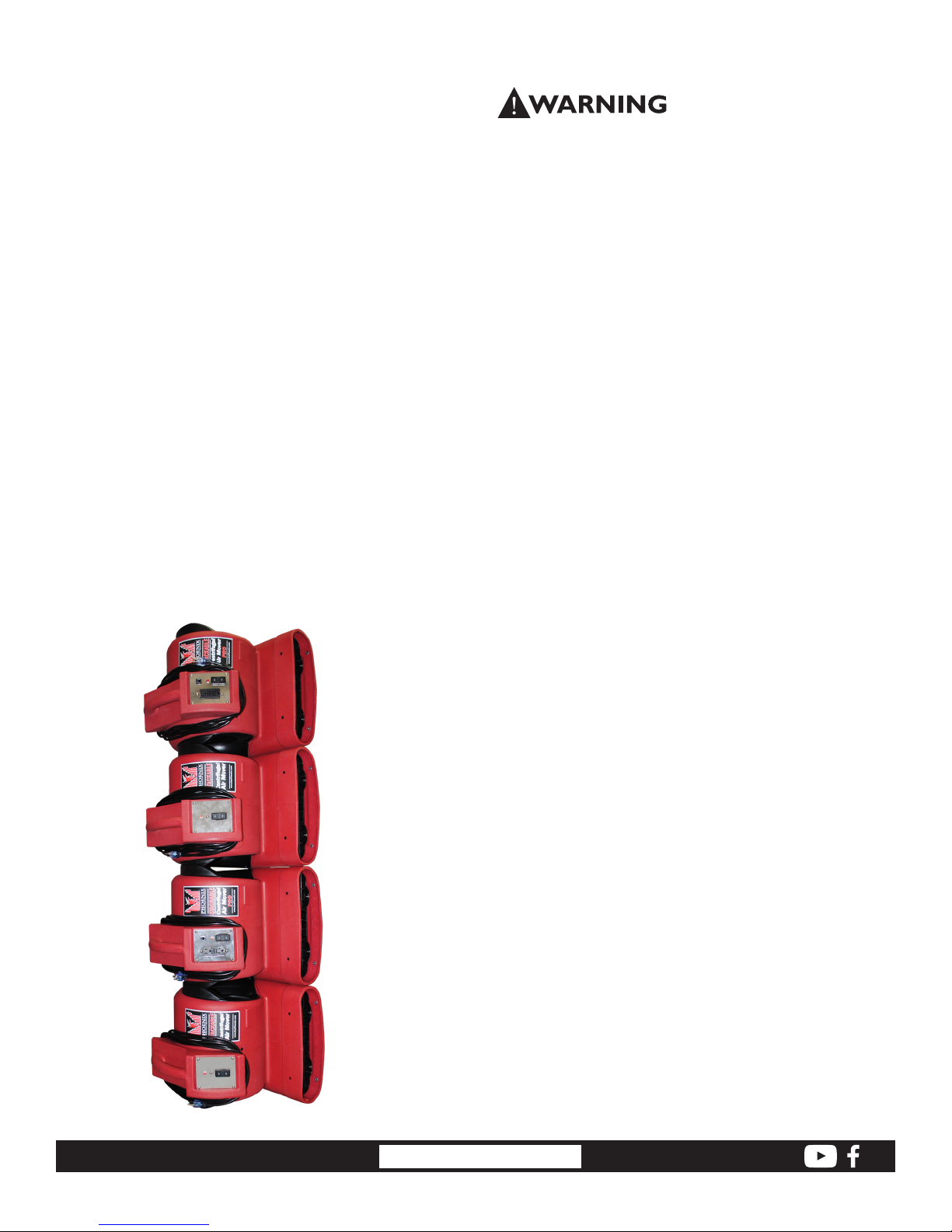
6 How to Stack
Place your first fan on the floor, motor side down. Pick up
your second fan and orient it above the first fan. Engage
the alignment nubs on the side of both snouts. Rotate the
second fan down into position until the grills engage. If the
fans will be transported while stacked, they must be securely
strapped into position.
7 Maintenance
WARNING: Disconnect the unit from power before servicing
or cleaning. Replace the safety grill after
servicing, lubrication or cleaning.
7.1 Servicing
Before each use, inspect for damage, blocked inlet or outlet,
or any excess buildup of foreign material.
Inspect the GFCI to ensure it is not in a “tripped” condition.
Push “RESET” to reset the GFCI.
When the Phoenix Centrifugal Air Mover Pro is first turned
on, check for excessive vibration. If the unit vibrates
excessively or if blower wheel rubs on housing, turn off the
unit immediately. Have a service technician inspect the unit
to locate the problem.
7.2 Cleaning
The housing is made of a durable and washable
polyethylene. When cleaning, the use of solvents is NOT
recommended.
8 Replacement Parts and
Optional Accessories
4030989 motor, 60HZ
4027572 blower wheel
4029721 rocker switch
4025458 red pilot light
4029742 cord
4030982 inlet grill, motor side
4030983 inlet grill, wheel side
4030984 grill, snout
4025203 breaker
4025205 GFCI
Contact the factory at 1-800-533-7533 to order
replacement parts, or optional accessories
1.800.533.7533
PNs 4030990 and
4030980 are pictured
to demonstrate
maximum stackability.
USEPHOENIX.COM
Specifications subject to change without notice.
5
Page 6
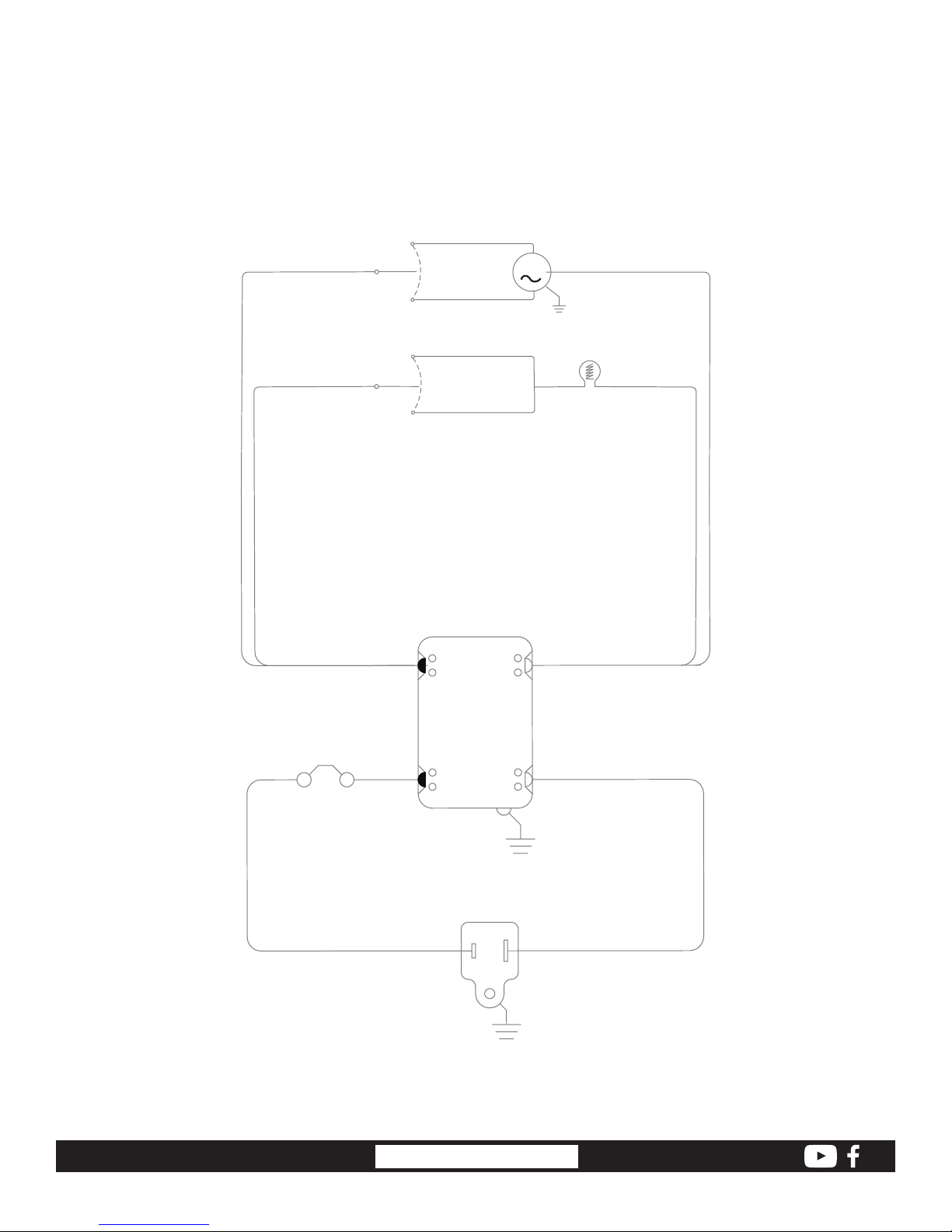
9 Wiring Diagram
PUR
ORG
1
2
3
LOW
HIGH
M
WHT
4
5
WHT
6
WHT
LOAD
1.800.533.7533
12 AMP
CIRCUIT
BREAKER
DUPLEX
HOT
GFCI
LINE
GROUNDED
PLUG
USEPHOENIX.COM
6
NEUTRAL
THWKLB
WHTBLK
Page 7

4201 LIEN RD. • MADISON, WI 53704
Phoenix Stackable CAM Pro - Centrifugal Air Mover
LIMITED WARRANTY
Warrantor:
Therma-Stor LLC
4201 Lien Rd
Madison, WI 53704
Telephone: 1-800-533-7533
Warranty: This warranty covers Phoenix Stackable Centrifugal Air Mover Pros, Part Number 4030990
Year One: - 100% parts and labor (all components)
Year Two: - 100% parts only (all components)
Year Three: - Materails and workmanship of the housing only are covered.
If a defect in materials or workmanship occurs within the warranty period, Therma-Stor LLC will repair or
replace the defect.
End-User Responsibilities: Warranty service must be performed by a servicer authorized by Therma-Stor LLC.
To obtain warranty service you must obtain a return material authorization (RMA). To obtain an RMA you must
present proof of purchase or (lease), by use of a warranty card, original sales receipt or other reasonable
and reliable means. To obtain an RMA call Therma-Stor LLC at the above number and ask for the ThermaStor LLC Service Department, which will then issue an RMA# and arrange for, at our option, either repair or
replacement.
Freight: Freight to and from the servicer is the responsibility of the end-user. The end-user is responsible for
normal care and proper return packaging.
Limitations and Exclusions: This warranty does not cover any defect, malfunction, etc. resulting from misuse,
abuse, lack of normal care, corrosion, freezing, tampering, modification, unauthorized or improper repair or
installation, accident, acts of nature or any other cause beyond Therma-Stor LLC’s reasonable control.
If any Phoenix Centrifugal Air Mover part is repaired or replaced, the new part shall be warranted for the
balance of original warranty (but all warranty periods will be extended by the period of time, if any, that the
Phoenix Centrifugal Air Mover is out of service while awaiting covered warranty service).
Warranty service will be performed during normal working hours.
UPON THE EXPIRATION OF THE WRITTEN WARRANTY APPLICABLE TO THE PHOENIX CENTRIFUGAL AIR
MOVER OR ANY PART THEREOF, ALL OTHER WARRANTIES IMPLIED BY LAW, INCLUDING MERCHANTABILITY
AND FITNESS FOR A PARTICULAR PURPOSE, SHALL ALSO EXPIRE. ALL WARRANTIES MADE BY THERMASTOR LLC ARE SET FORTH HEREIN, AND NO CLAIM MAY BE MADE AGAINST THERMA-STOR BASED ON ANY
ORAL WARRANTY. IN NO EVENT SHALL THERMA-STOR LLC, IN CONNECTION WITH THE SALE, INSTALLATION,
USE, REPAIR OR REPLACEMENT OF ANY PHOENIX CENTRIFUGAL AIR MOVER OR PART THEREOF BE LIABLE
UNDER ANY LEGAL THEORY FOR ANY SPECIAL, INDIRECT OR CONSEQUENTIAL DAMAGES INCLUDING
WITHOUT LIMITATION WATER DAMAGE (THE END USER SHOULD TAKE PRECAUTIONS AGAINST SAME), LOST
PROFITS, DELAY, OR LOSS OF USE OR DAMAGE TO ANY REAL OR PERSONAL PROPERTY.
Some states do not allow limitations on how long an implied warranty lasts, and some do not allow the
exclusion or limitation of incidental or consequential damages, so one or both of these limitations may not
apply to you.
Legal Rights: This warranty gives you specific legal rights, and you may also have other rights which vary from
state to state.
1.800.533.7533
USEPHOENIX.COM
7
 Loading...