

Page 1
<TPM1.3E
<< TPM1.3E >>
<< TPM1.3E >>
SERVICE TRAINING
< Instructor Theo Heijnen>
April, 2008
V2.0
PERSONAL NOTES:
PERSONAL NOTES:
© Copyright reserved 2007 Philips Consumer Electronics Euroservice
page: 1
Page 2

• Objective
• Range overview and features
• Block Diagram
• Mechanical overview
• Diagrams
• Service chapter
<< TPM1.3E >>
<< TPM1.3E >>
Subjects
SERVICE TRAINING
Philips CL, Consumer Care, April 2008 slide 2
PERSONAL NOTES:
PERSONAL NOTES:
© Copyright reserved 2007 Philips Consumer Electronics Euroservice
page: 2
Page 3

<< TPM1.3E >>
<< TPM1.3E >>
Course Objective
After this training you:
Know the main features
Can diagnose the set
Can do software upgrades
Can repair the set on component level for SSB
SERVICE TRAINING
Philips CL, Consumer Care, April 2008 slide 3
PERSONAL NOTES:
PERSONAL NOTES:
© Copyright reserved 2007 Philips Consumer Electronics Euroservice
page: 3
Page 4

• Objective
• Range overview and features
• Block Diagram
• Mechanical overview
• Diagrams
• Service chapter
<< TPM1.3E >>
<< TPM1.3E >>
Subjects
SERVICE TRAINING
Philips CL, Consumer Care, April 2008 slide 4
PERSONAL NOTES:
PERSONAL NOTES:
© Copyright reserved 2007 Philips Consumer Electronics Euroservice
page: 4
Page 5
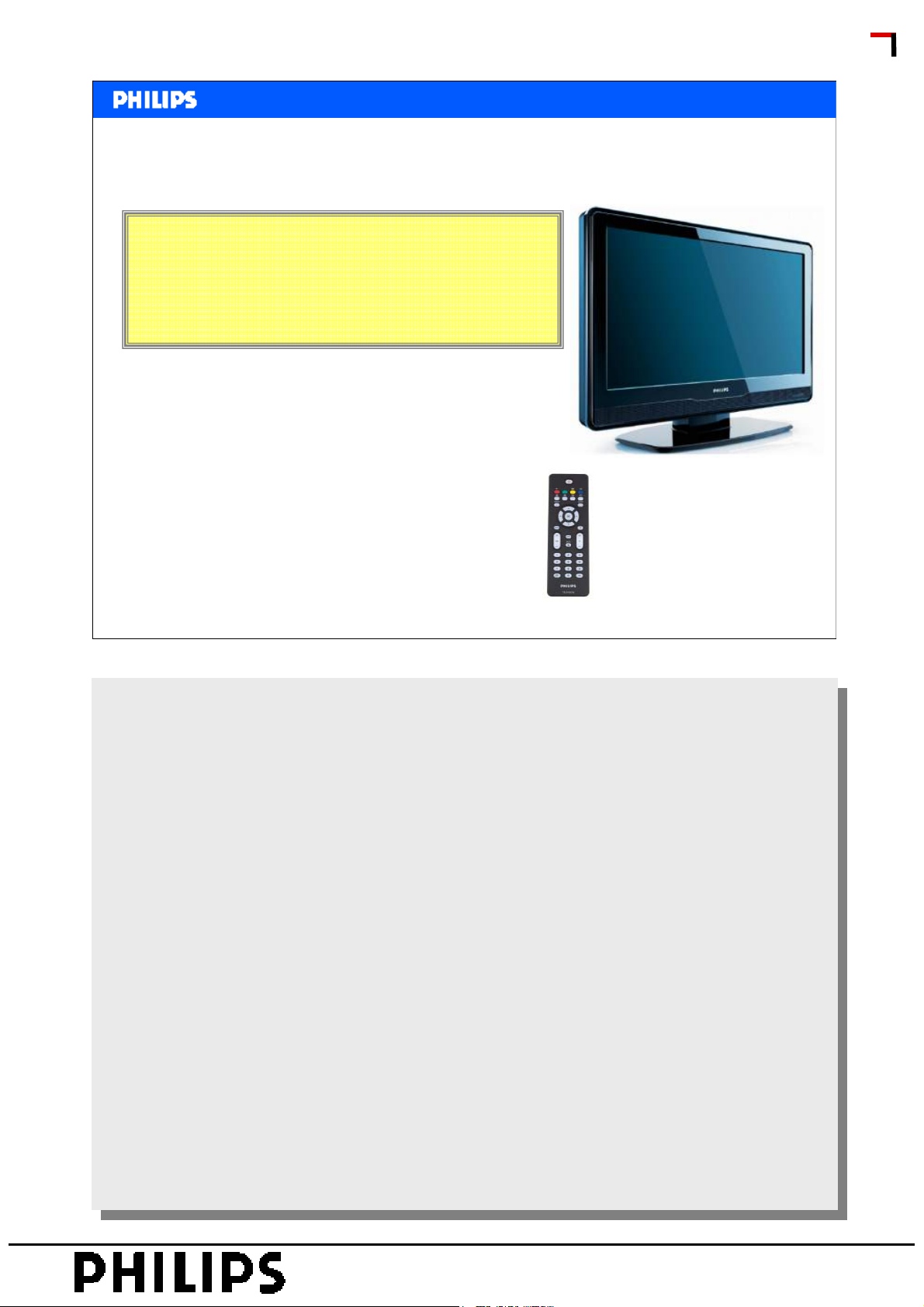
TMP1.3E:
19PFL3403D/10
22PFL3403D/10
<< TPM1.3E >>
<< TPM1.3E >>
Range Overview
SERVICE TRAINING
Philips CL, Consumer Care, April 2008 slide 5
Features are the same as 19PFL3403/10 and 22PFL3403/10
Features are the same as 19PFL3403/10 and 22PFL3403/10
from the TPS1.2E and TPS1.4E chassis.
from the TPS1.2E and TPS1.4E chassis.
Difference: These sets can receive DVB-t.
Difference: These sets can receive DVB-t.
PERSONAL NOTES:
PERSONAL NOTES:
© Copyright reserved 2007 Philips Consumer Electronics Euroservice
page: 5
Page 6
<< TPM1.3E >>
<< TPM1.3E >>
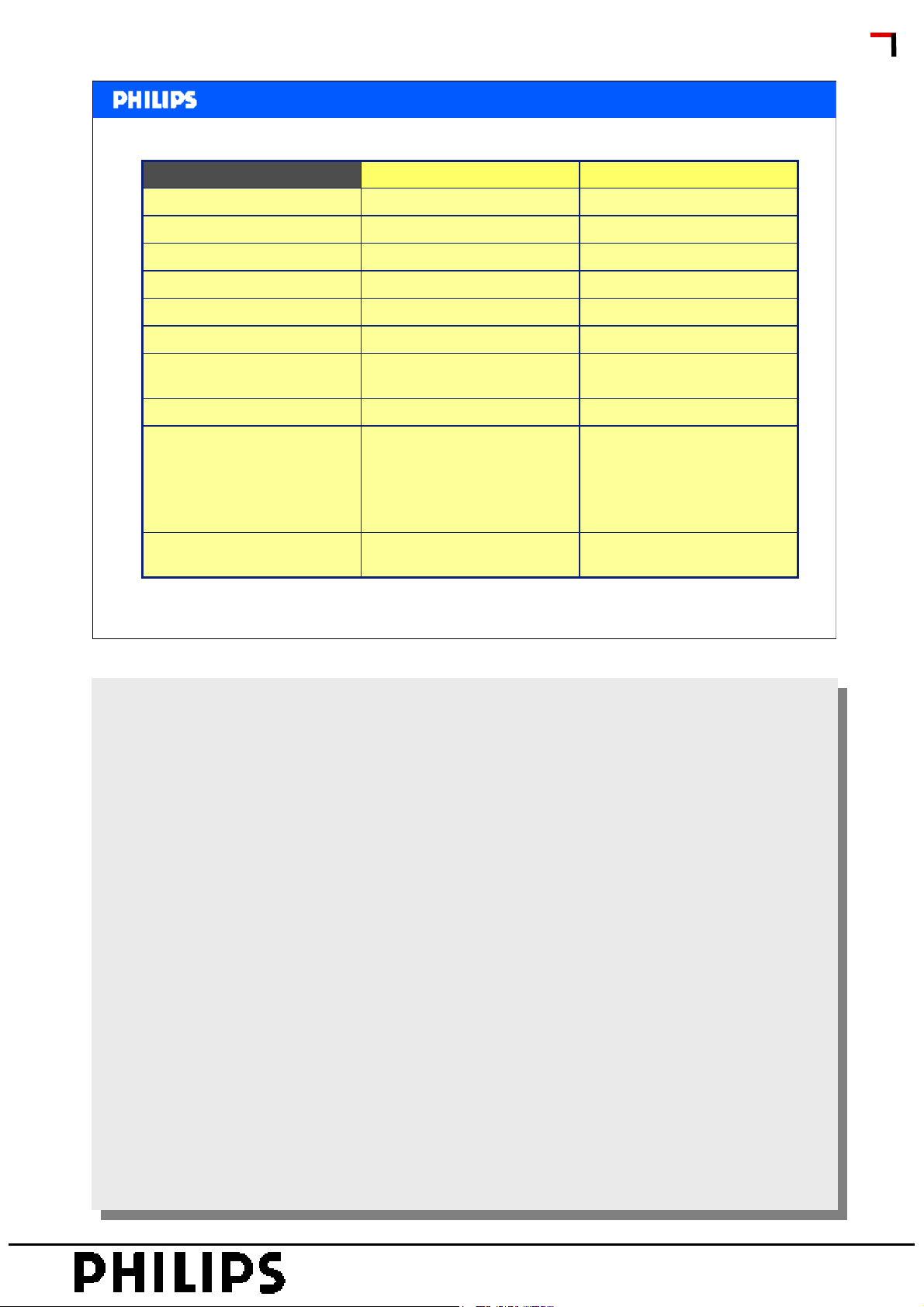
Picture/Display
22PFL3403/1019PFL3403/10
WidescreenWidescreenAspect ratio
300 cd/m²300 cd/m²Brightness
1000:11000:1Contrast ratio (typical):
5 ms5msResponse time (typical):
SERVICE TRAINING
Viewing angle
Diagonal screen size
Display screen type
Picture enhancement
Screen enhancement
Philips CL, Consumer Care, April 2008 slide 6
19 inch / 48 cm
LCD WXGA Active Matrix
TFT
2D Combfilter, Crystal Clear
III, 3/2 - 2/2 motion pull
down, White stretch,
Progressive Scan, Smart
Picture
Anti-Reflection coated
screen
170º (H) / 160º (V)170º (H) / 160º (V)
22 inch / 56 cm
LCD WXGA Active Matrix
TFT
1680 x 1050P1440 x 900pPanel resolution
2D Combfilter, Crystal Clear
III, 3/2 - 2/2 motion pull
down, White stretch,
Progressive Scan, Smart
Picture
Anti-Reflection coated
screen
PERSONAL NOTES:
PERSONAL NOTES:
© Copyright reserved 2007 Philips Consumer Electronics Euroservice
page: 6
Page 7
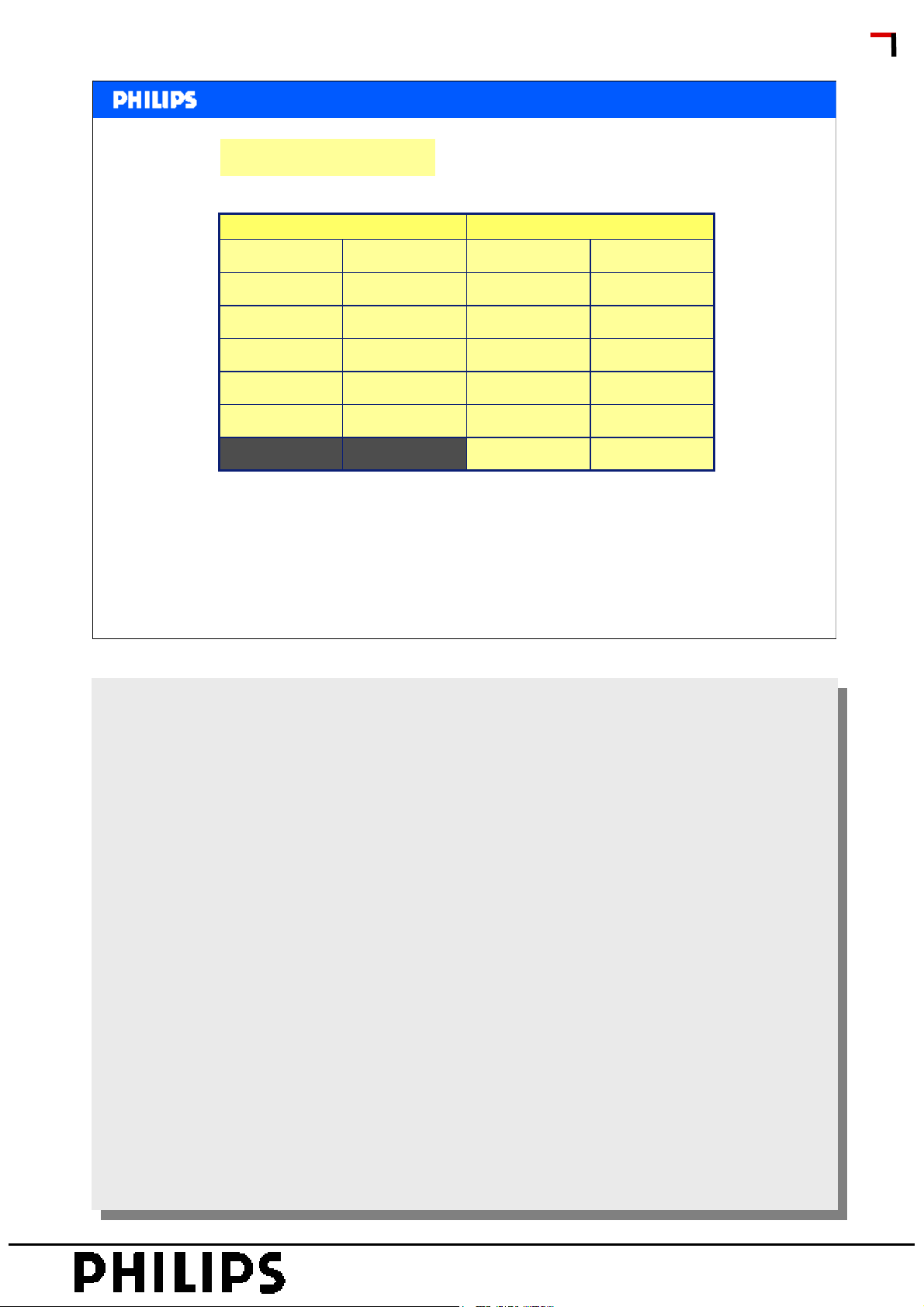
Computer Formats
<< TPM1.3E >>
<< TPM1.3E >>
Supported Display Resolutions
22PFL3403/1019PFL3403/10
Refresh RateResolutionRefresh RateResolution
60Hz640 x 48060Hz640 x 480
60Hz800 x 60060Hz800 x 600
60Hz1024 x 76860Hz1024 x 768
60Hz1280 x 102460Hz1280 x 1024
50Hz 75Hz1440 x 90050Hz 75Hz1440 x 900
50Hz 75Hz1680 x 1050
SERVICE TRAINING
Philips CL, Consumer Care, April 2008 slide 7
PERSONAL NOTES:
PERSONAL NOTES:
© Copyright reserved 2007 Philips Consumer Electronics Euroservice
page: 7
Page 8
Video Formats
<< TPM1.3E >>
<< TPM1.3E >>
Supported Display Resolutions
22PFL3403/1019PFL3403/10
Refresh RateResolutionRefresh RateResolution
60Hz480i60Hz480i
60Hz480P60Hz480P
50Hz576i50Hz576i
50Hz576P50Hz576P
50Hz 60Hz720P50Hz 60Hz720P
50Hz 60Hz1080i50Hz 60Hz1080i
SERVICE TRAINING
Philips CL, Consumer Care, April 2008 slide 8
PERSONAL NOTES:
PERSONAL NOTES:
© Copyright reserved 2007 Philips Consumer Electronics Euroservice
page: 8
Page 9
For both sets:
<< TPM1.3E >>
<< TPM1.3E >>
Connectivity
SERVICE TRAINING
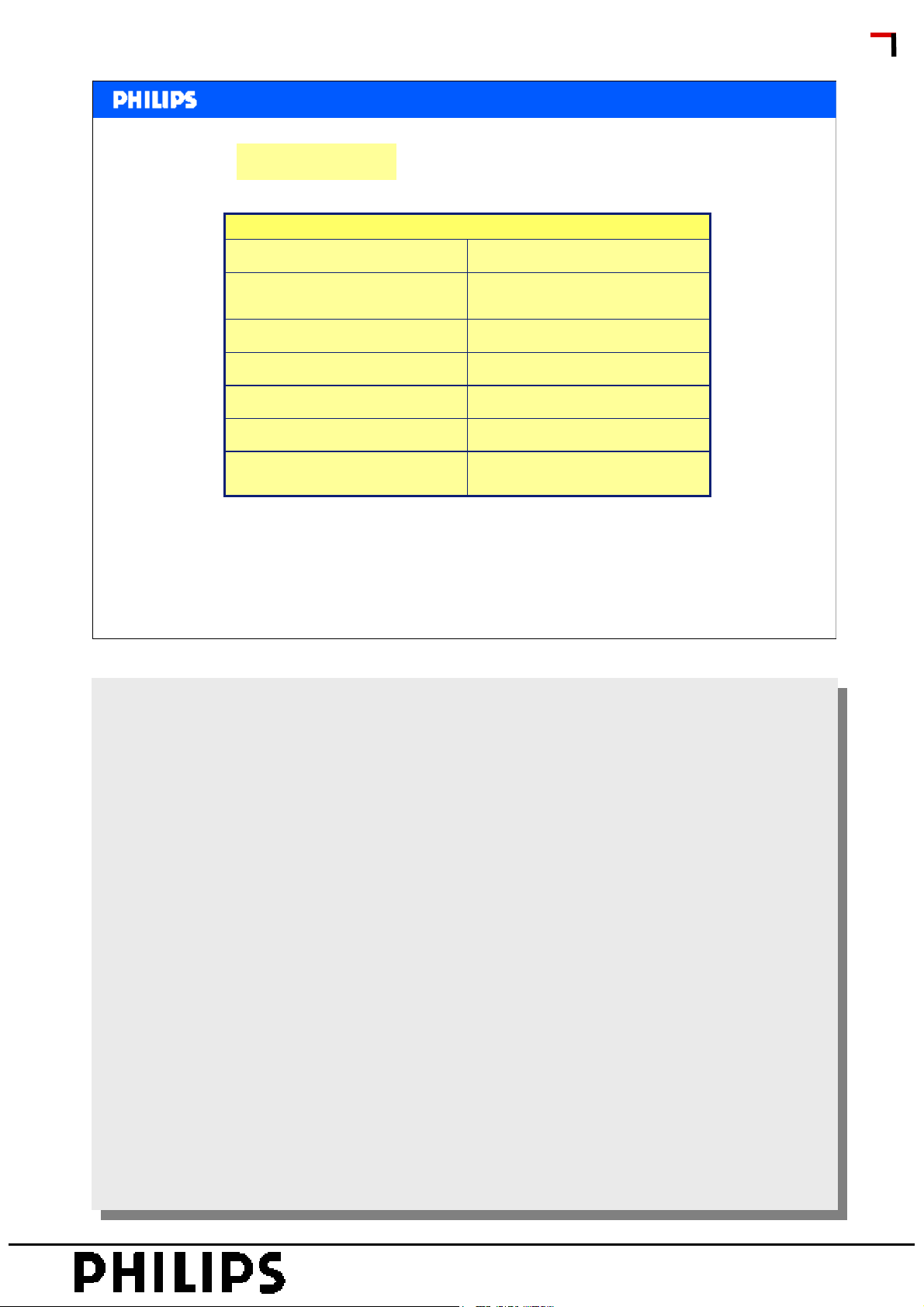
Ext 1 Scart:
Ext 2:
Other connections:
Philips CL, Consumer Care, April 2008 slide 9
Audio L/R, CVBS in/out, RGB
S-video in, CVBS in, Audio L/R
in
YPbPr, Audio L/R inExt 3:
HDMI v1.3HDMI 1:
HDMI v1.3HDMI 2:
One touch playHDMI-control (CEC features):
Headphone out, PC Audio in,
PC-In VGA
PERSONAL NOTES:
PERSONAL NOTES:
© Copyright reserved 2007 Philips Consumer Electronics Euroservice
page: 9
Page 10

• Objective
• Range overview and features
• Block Diagram
• Mechanical overview
• Diagrams
• Service chapter
<< TPM1.3E >>
<< TPM1.3E >>
Subjects
SERVICE TRAINING
Philips CL, Consumer Care, April 2008 slide 10
PERSONAL NOTES:
PERSONAL NOTES:
© Copyright reserved 2007 Philips Consumer Electronics Euroservice
page: 10
Page 11
Sub µP
<< TPM1.3E >>
<< TPM1.3E >>
Block Diagram
SERVICE TRAINING
Philips CL, Consumer Care, April 2008 slide 11
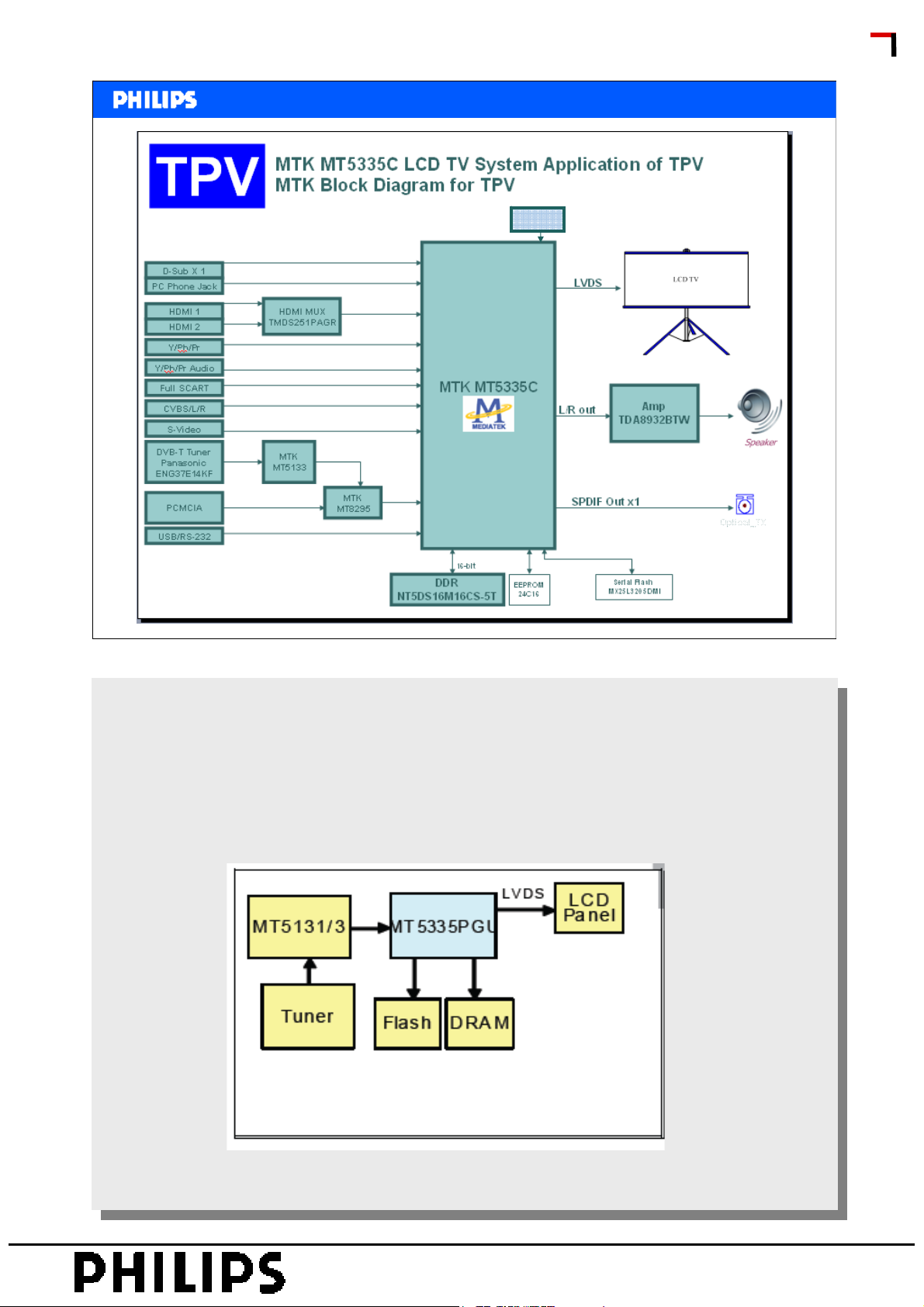
Key Features MT5335:
Key Features MT5335:
An transport demultiplexer
An transport demultiplexer
An MPEG2 video decoder
An MPEG2 video decoder
An AC3 audio decoder
An AC3 audio decoder
HDMI1.3 receiver
HDMI1.3 receiver
Audio codec
Audio codec
The MT5335PGU is designed as an advanced, highly integrated SoC with improved connectivity features including HDMI
The MT5335PGU is designed as an advanced, highly integrated SoC with improved connectivity features including HDMI
interface and component/composite signal connections. Figure below shows the MT5335PGU system block diagram.
interface and component/composite signal connections. Figure below shows the MT5335PGU system block diagram.
PERSONAL NOTES:
PERSONAL NOTES:
© Copyright reserved 2007 Philips Consumer Electronics Euroservice
page: 11
Page 12
<< TPM1.3E >>
<< TPM1.3E >>
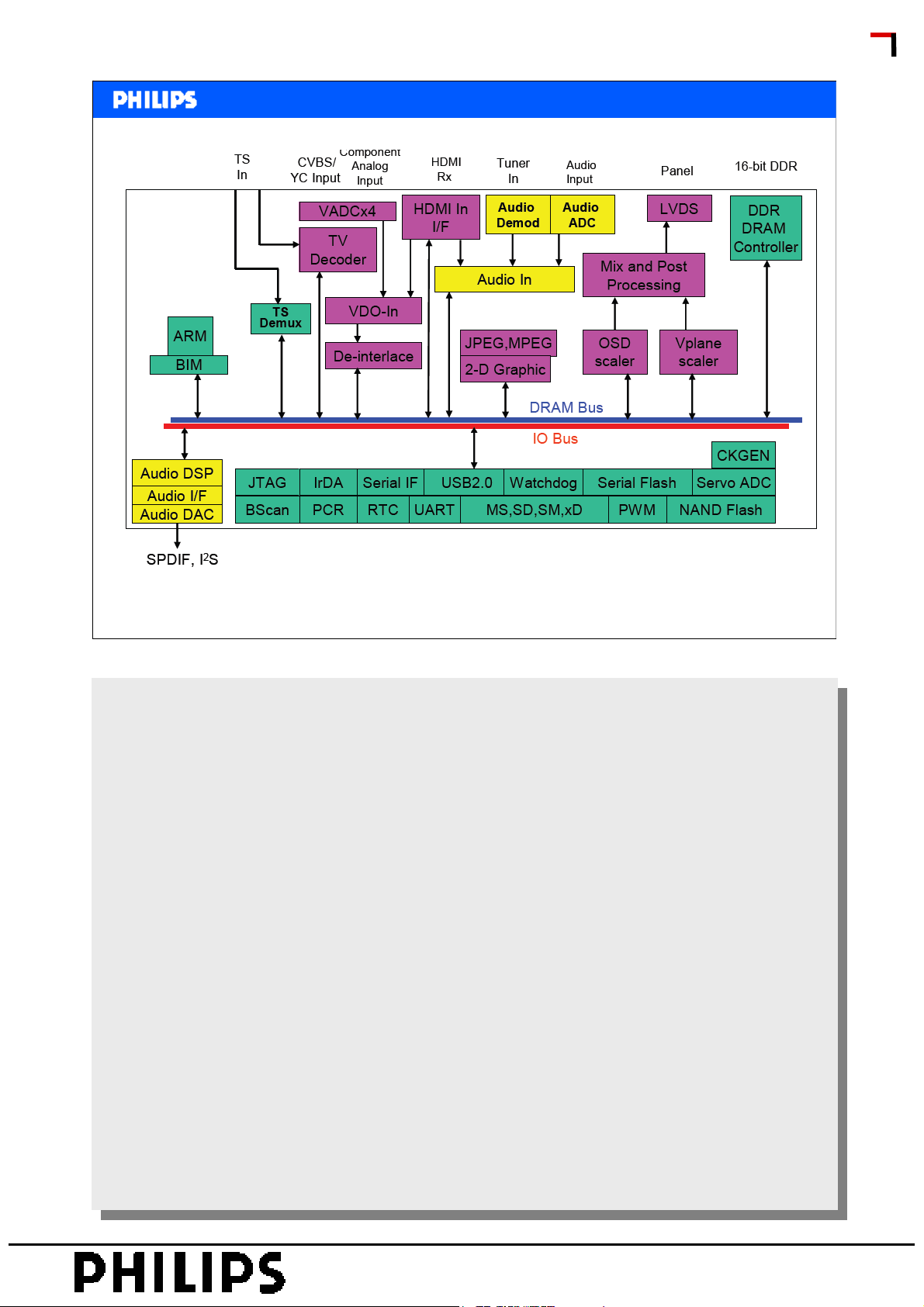
Functional Block diagram MT5335
SERVICE TRAINING
Philips CL, Consumer Care, April 2008 slide 12
The MediaTek MT5335PGU family consists of a backend decoder and a TV controller and offers high
The MediaTek MT5335PGU family consists of a backend decoder and a TV controller and offers high
integration for advanced applications. It combines a transport de-multiplexer, a high definition MPEG-2
integration for advanced applications. It combines a transport de-multiplexer, a high definition MPEG-2
video decoder, an MPEG2 audio decoder, an LVDS transmitter, and an NTSC/PAL/SECAM TV decoder
video decoder, an MPEG2 audio decoder, an LVDS transmitter, and an NTSC/PAL/SECAM TV decoder
with a 3D comb filter. The MT5335PGU enables consumer electronics manufactures to build high quality,
with a 3D comb filter. The MT5335PGU enables consumer electronics manufactures to build high quality,
low cost and feature-rich iDTVs.
low cost and feature-rich iDTVs.
The MT5335PGU family has built-in high resolution and high-quality audio codec.
The MT5335PGU family has built-in high resolution and high-quality audio codec.
It includes MediaTek 2D MDDiTM de-interlace solution to generate very smooth
It includes MediaTek 2D MDDiTM de-interlace solution to generate very smooth
picture quality for motions. A 3D comb filter added to the TV decoder recovers great detail for still pictures.
picture quality for motions. A 3D comb filter added to the TV decoder recovers great detail for still pictures.
The special color processing technology provides natural, deep colors and true studio quality graphics.
The special color processing technology provides natural, deep colors and true studio quality graphics.
Rich Features for High Value Products: The MT5335PGU family enables a true single-chip experience.
Rich Features for High Value Products: The MT5335PGU family enables a true single-chip experience.
It integrates high-quality HDMI1.3, high speed VGA ADC, dual-channel LVDS, and USB2.0 receiver
It integrates high-quality HDMI1.3, high speed VGA ADC, dual-channel LVDS, and USB2.0 receiver
Reliable Front-end Receiving Capability: Excellent adjacent and co-channel rejection capability grants
Reliable Front-end Receiving Capability: Excellent adjacent and co-channel rejection capability grants
customers never miss any wonderful stream. Professional error-concealment provides stable, smooth and
customers never miss any wonderful stream. Professional error-concealment provides stable, smooth and
mosaic-free video quality.
mosaic-free video quality.
PERSONAL NOTES:
PERSONAL NOTES:
© Copyright reserved 2007 Philips Consumer Electronics Euroservice
page: 12
Page 13
Parallel data
<< TPM1.3E >>
<< TPM1.3E >>
Block Diagram digital part
Ci_OUTDATA[0..7]
Ci_INDATA[0..7]
SERVICE TRAINING
FAT_in
Tuner
CVBS
To analogue part
Philips CL, Consumer Care, April 2008 slide 13
Demodulator
TS0INDATA[0..7]
COFDM
MT5133
U704
TSDATAO
Serial data
Switch
Interface
CAM module
MT8295
U702
TV Processor
MT5335
U401
Connector CAM
LVDS
Audio
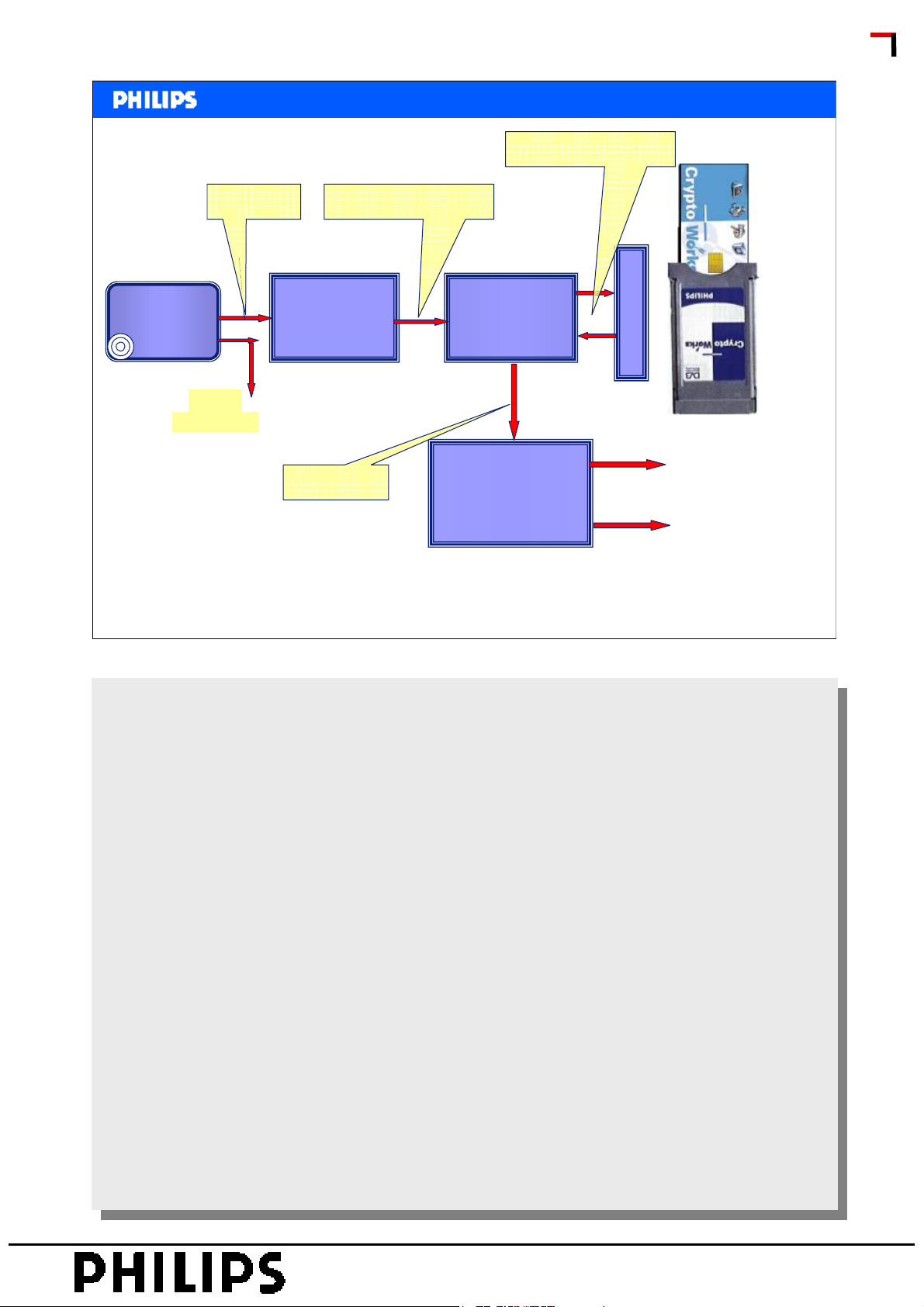
DVB-t signal is COFDM modulated. After tuning the COFDM modulated signal FAT+ and FAT- is
DVB-t signal is COFDM modulated. After tuning the COFDM modulated signal FAT+ and FAT- is
connected to the COFDM demodulator MT5133. Out of the demodulator comes the Transport Stream
connected to the COFDM demodulator MT5133. Out of the demodulator comes the Transport Stream
TS. This is a 8 bit parallel signal. Free to air channels are switched via the Switch Interface MT8295 to
TS. This is a 8 bit parallel signal. Free to air channels are switched via the Switch Interface MT8295 to
the TV processor via a serial databus TDSATA0.
the TV processor via a serial databus TDSATA0.
Not all channels are free to air. This means that encrypted channels need decryption. Because there
Not all channels are free to air. This means that encrypted channels need decryption. Because there
are many encryption systems (eg. Irdato, Cryptoworks etc.) an external decrytion module should be
are many encryption systems (eg. Irdato, Cryptoworks etc.) an external decrytion module should be
used. The decryption module is a CAM Module (Common Interface Module). In the CAM module a
used. The decryption module is a CAM Module (Common Interface Module). In the CAM module a
smartcard can be inserted that contains the subscription key’s.
smartcard can be inserted that contains the subscription key’s.
When receiving an encrypted channel the Switch MT8295 distributes the signal to the CAM Module.
When receiving an encrypted channel the Switch MT8295 distributes the signal to the CAM Module.
After decryption the signal is sent back to the MT8295 and switched to the TV processor.
After decryption the signal is sent back to the MT8295 and switched to the TV processor.
Important: When receiving DVB-t encrypted signals the consumer must buy the correct CAM module.
Important: When receiving DVB-t encrypted signals the consumer must buy the correct CAM module.
PERSONAL NOTES:
PERSONAL NOTES:
© Copyright reserved 2007 Philips Consumer Electronics Euroservice
page: 13
Page 14
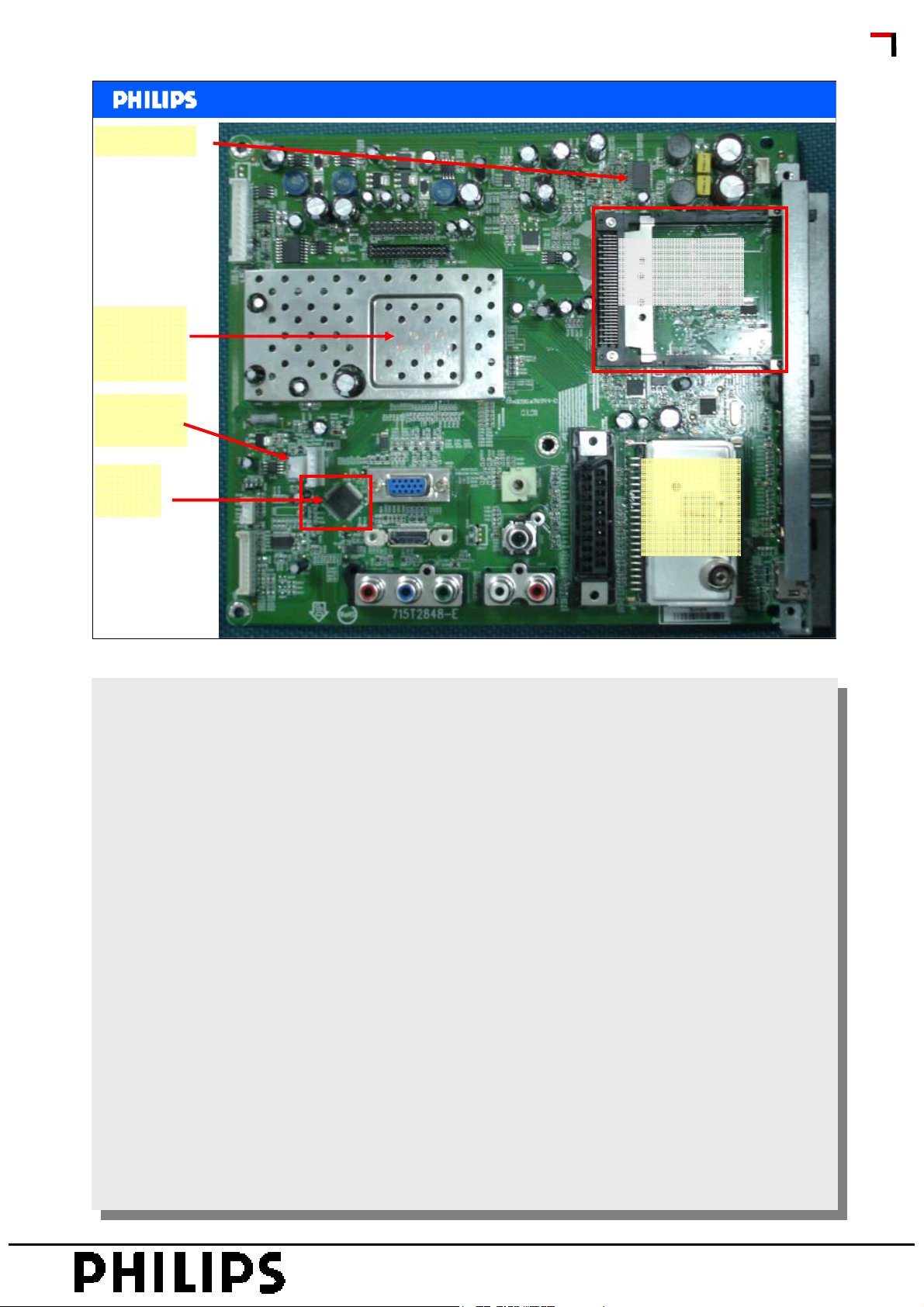
Audio Amp
MTchipset
below
schielding
ComPair
connector
<< TPM1.3E >>
<< TPM1.3E >>
Scaler Board
CAM
Connector
SERVICE TRAINING
HDMi
Switch
Philips CL, Consumer Care, April 2008 slide 14
Tuner
Analogue
and DVB-t
PERSONAL NOTES:
PERSONAL NOTES:
© Copyright reserved 2007 Philips Consumer Electronics Euroservice
page: 14
Page 15
<< TPM1.3E >>
<< TPM1.3E >>
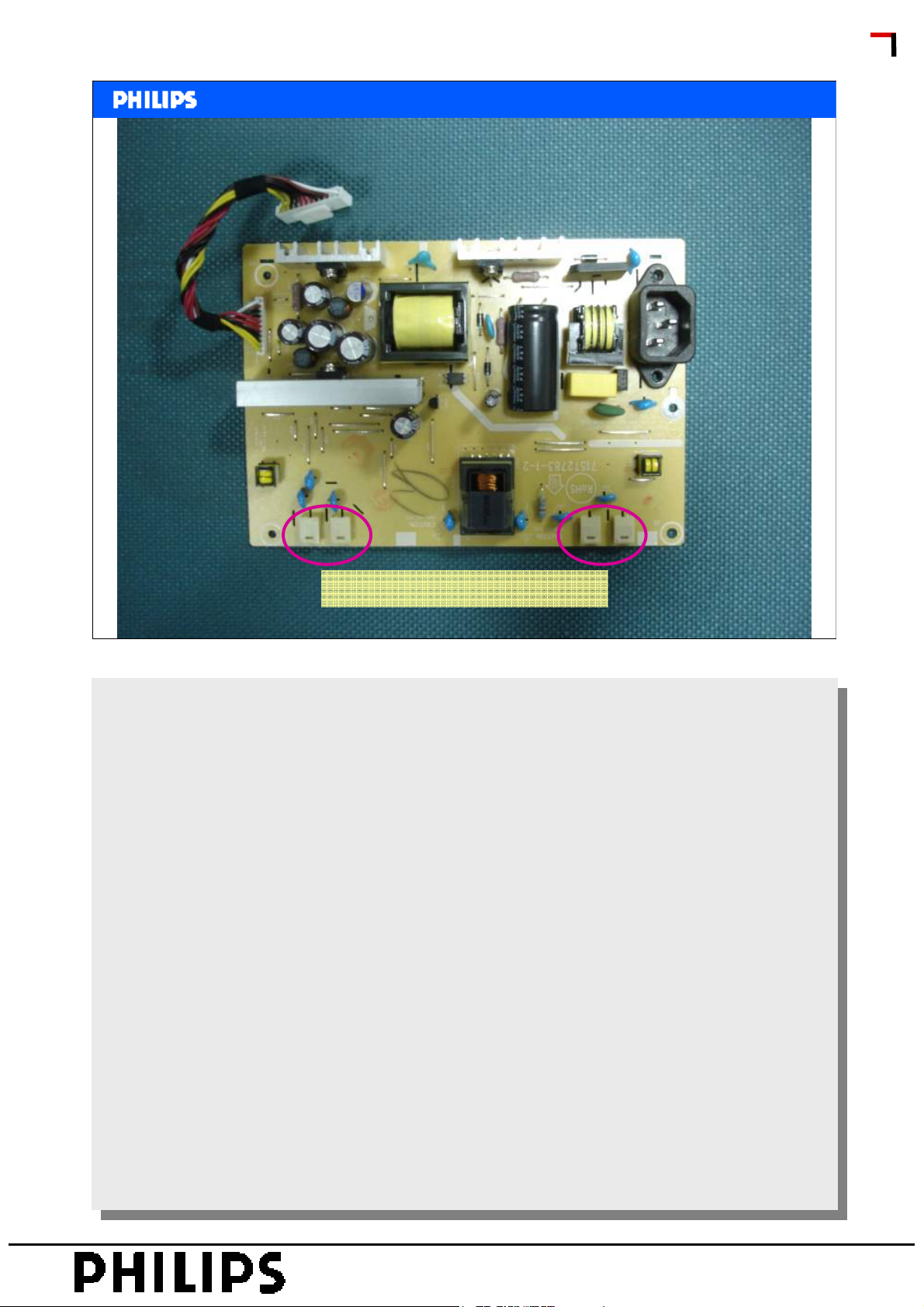
Power Supply
SERVICE TRAINING
Connection to CCL Lamps
Philips CL, Consumer Care, April 2008 slide 15
PERSONAL NOTES:
PERSONAL NOTES:
© Copyright reserved 2007 Philips Consumer Electronics Euroservice
page: 15
Page 16

• Objective
• Range overview and features
• Block Diagram
• Mechanical overview
• Diagrams
• Service chapter
<< TPM1.3E >>
<< TPM1.3E >>
Subjects
SERVICE TRAINING
Philips CL, Consumer Care, April 2008 slide 16
PERSONAL NOTES:
PERSONAL NOTES:
© Copyright reserved 2007 Philips Consumer Electronics Euroservice
page: 16
Page 17
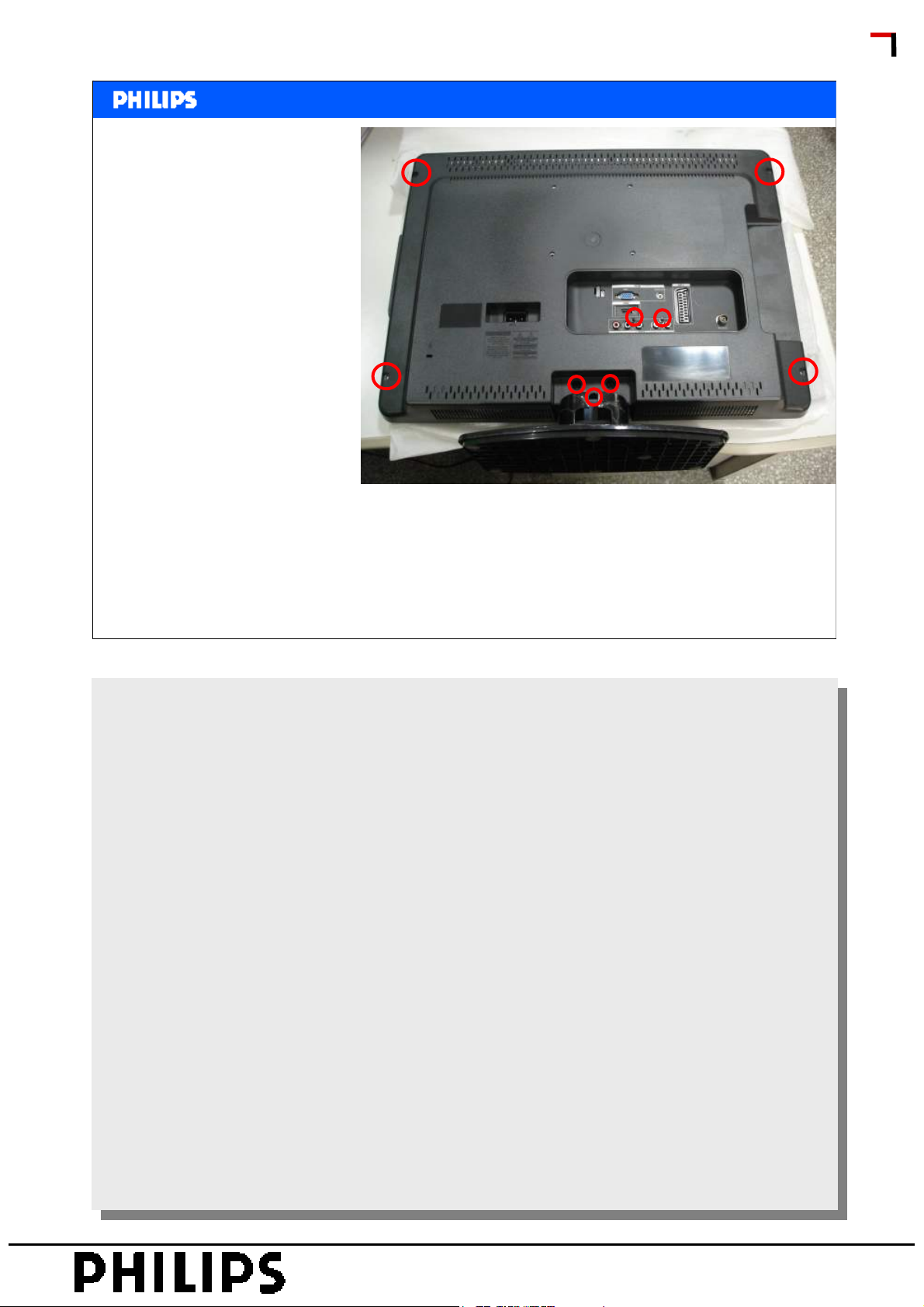
1.Remove the nine
screws remarked
in red which
secured the rear
cover.
<< TPM1.3E >>
<< TPM1.3E >>
Mechanical Instructions
SERVICE TRAINING
2.We should pay attention to the hooks while removing the
rear cover. Use plastic putty knife to release the hooks on
the bottom, the top, the left and the right side, then you can
easily remove the rear cover from the bezel.
Philips CL, Consumer Care, April 2008 slide 17
PERSONAL NOTES:
PERSONAL NOTES:
© Copyright reserved 2007 Philips Consumer Electronics Euroservice
page: 17
Page 18
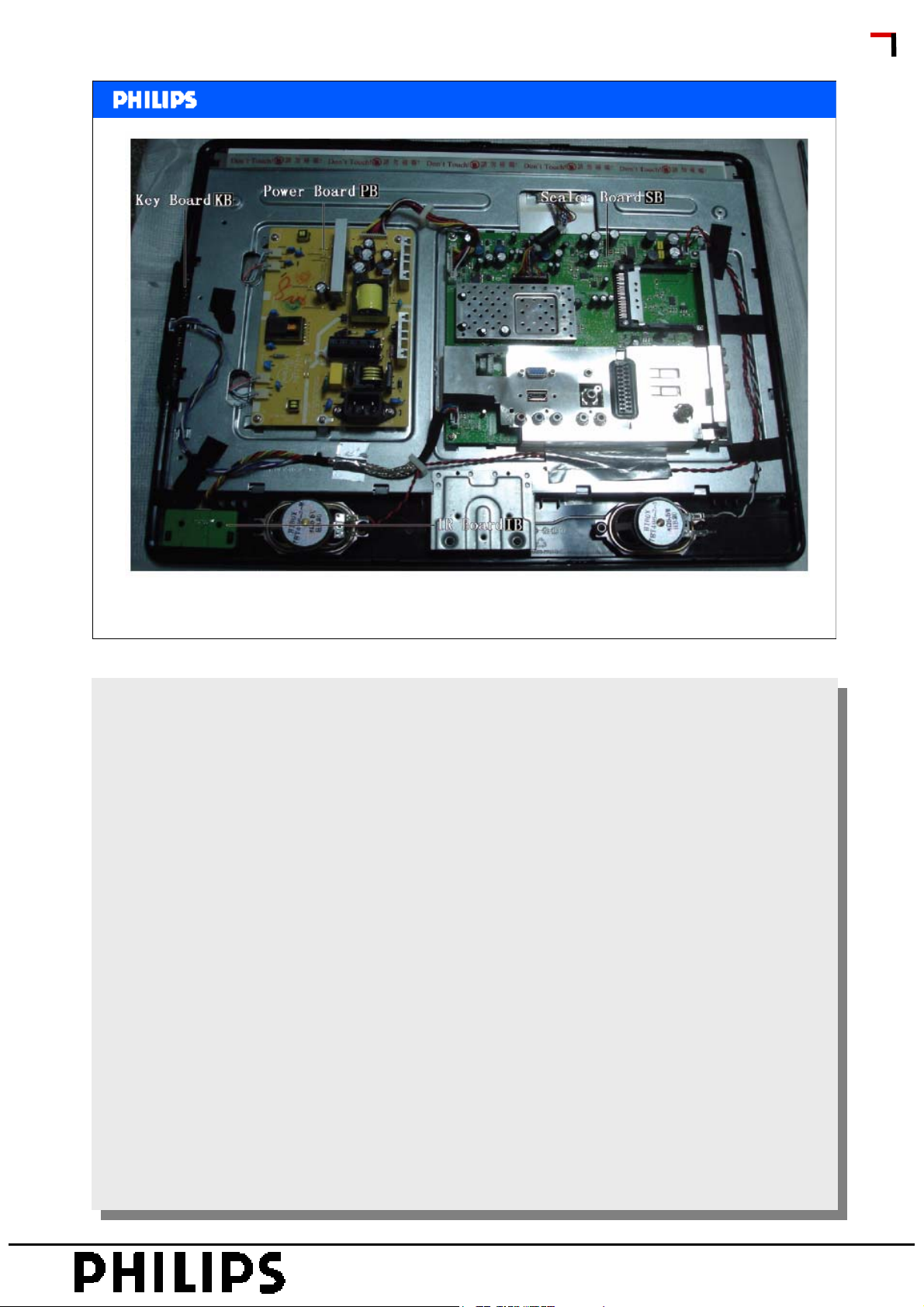
<< TPM1.3E >>
<< TPM1.3E >>
Mechanical Instructions
SERVICE TRAINING
Philips CL, Consumer Care, April 2008 slide 18
PERSONAL NOTES:
PERSONAL NOTES:
© Copyright reserved 2007 Philips Consumer Electronics Euroservice
page: 18
Page 19
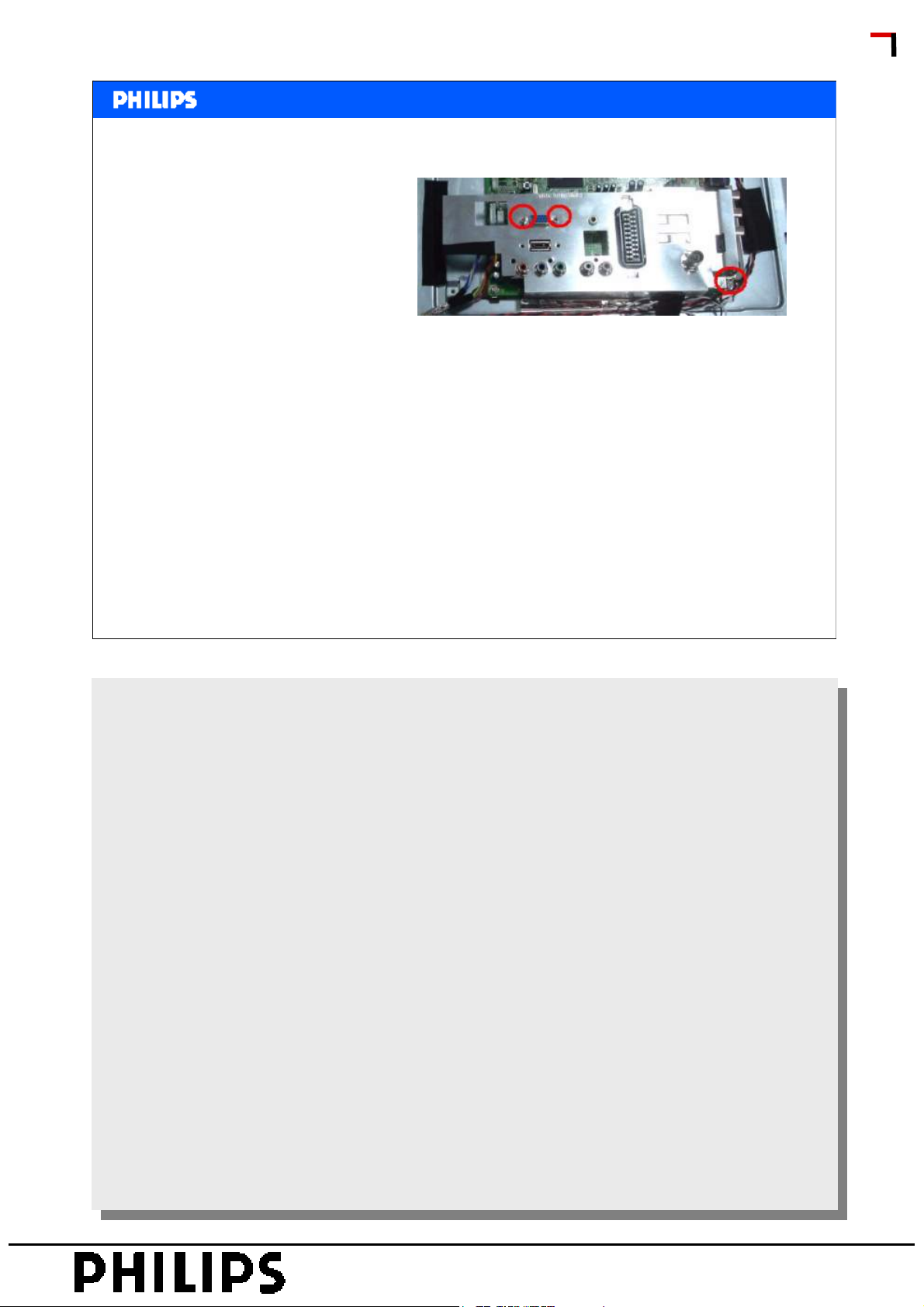
Shielding-EMI
Release the screws
remarked in red and
remove the shielding-EMI.
<< TPM1.3E >>
<< TPM1.3E >>
Mechanical Instructions
SERVICE TRAINING
Philips CL, Consumer Care, April 2008 slide 19
PERSONAL NOTES:
PERSONAL NOTES:
© Copyright reserved 2007 Philips Consumer Electronics Euroservice
page: 19
Page 20
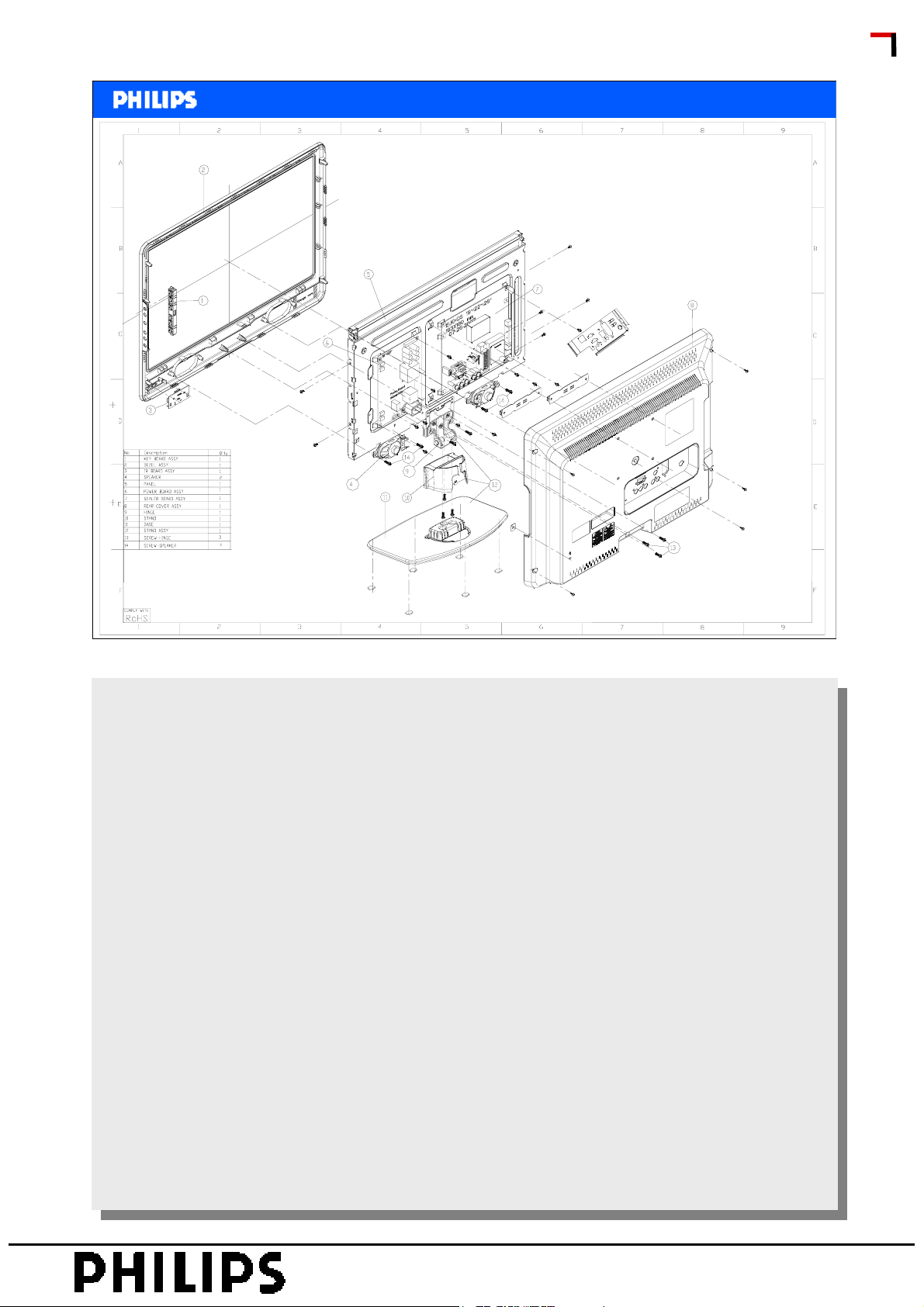
<< TPM1.3E >>
<< TPM1.3E >>
Mechanical Instructions
Exploded view
SERVICE TRAINING
Philips CL, Consumer Care, April 2008 slide 20
PERSONAL NOTES:
PERSONAL NOTES:
© Copyright reserved 2007 Philips Consumer Electronics Euroservice
page: 20
Page 21

• Objective
• Range overview and features
• Block Diagram
• Mechanical overview
• Diagrams
• Service chapter
<< TPM1.3E >>
<< TPM1.3E >>
Subjects
SERVICE TRAINING
Philips CL, Consumer Care, April 2008 slide 21
PERSONAL NOTES:
PERSONAL NOTES:
© Copyright reserved 2007 Philips Consumer Electronics Euroservice
page: 21
Page 22
02 Block Diagram
03 VGA In
04 YPbPr input and SPDIF
05 Svideo/CVBS input
06 Scart connector
07 Blank
08 LVDS Out
09 MT5335 hdmi
10 MT5335 Control
11 MT5335 Audio I/O
<< TPM1.3E >>
<< TPM1.3E >>
Diagrams
12 DDR1
13 Flash
14 CEC µP
15 HDMI inputs
16 HDMI Switch
17 Line Out/HP
18 Audio Amplifier
19 EU Tuner
20 Demodulator
21 CI Common Interface
SERVICE TRAINING
22 Power
Philips CL, Consumer Care, April 2008 slide 22
PERSONAL NOTES:
PERSONAL NOTES:
© Copyright reserved 2007 Philips Consumer Electronics Euroservice
page: 22
Page 23

• Objective
• Range overview and features
• Block Diagram
• Mechanical overview
• Diagrams
• Service chapter
<< TPM1.3E >>
<< TPM1.3E >>
Subjects
SERVICE TRAINING
Philips CL, Consumer Care, April 2008 slide 23
PERSONAL NOTES:
PERSONAL NOTES:
© Copyright reserved 2007 Philips Consumer Electronics Euroservice
page: 23
Page 24
<< TPM1.3E >>
<< TPM1.3E >>
Service Provisions
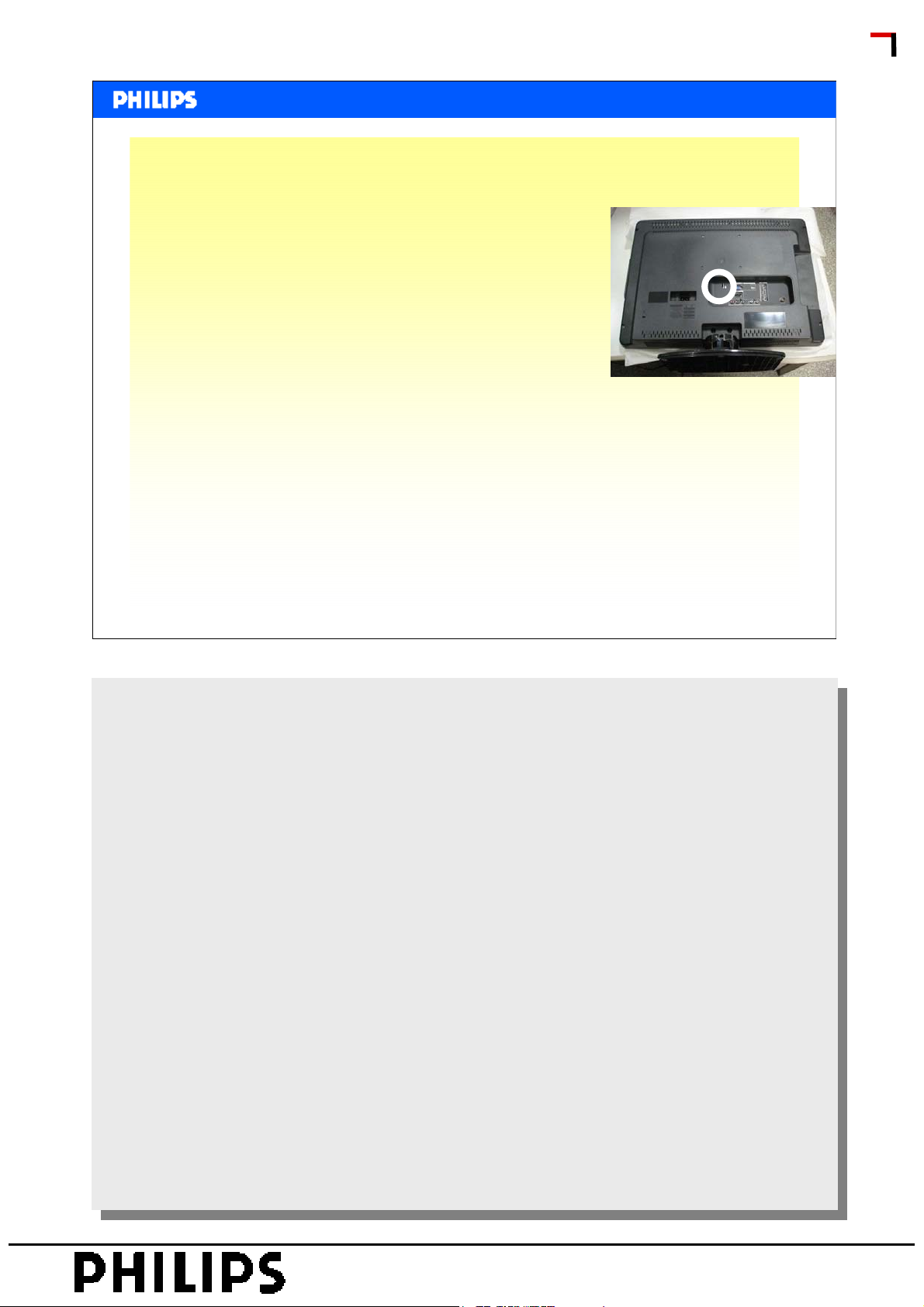
• To do a proper front end filtering CSM is available
• SW upgrade via ComPair is foreseen
via standard 3-pin connector outside
accessible
• Factory Mode is present
• In the service manual however extra flowcharts &
waveform pictures are embedded to support CLR-repair.
SERVICE TRAINING
• There are also some error-codes embedded in the set,
these can be retrieved via the CSM-menu.
• NOT implemented: SDM
Philips CL, Consumer Care, April 2008 slide 24
PERSONAL NOTES:
PERSONAL NOTES:
© Copyright reserved 2007 Philips Consumer Electronics Euroservice
page: 24
Page 25
<< TPM1.3E >>
<< TPM1.3E >>
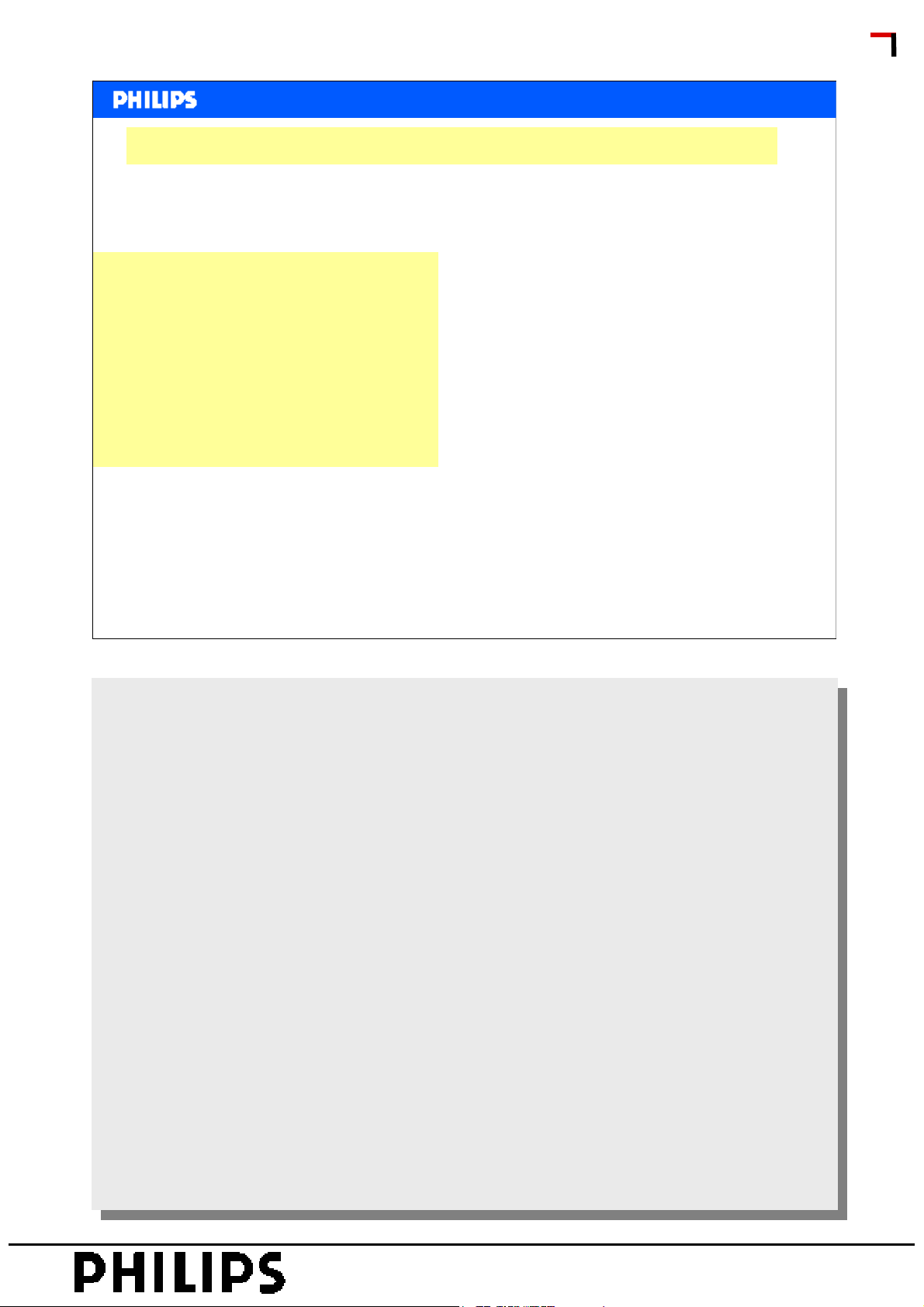
To do a proper front end filtering a CSM menu is available.
How to Activate CSM
Key in the code”123654” via
the standard RC transmitter.
How to Navigate
By mean of the “CURSORDOWN/UP” knob on the RC
transmitter on the screen.
SERVICE TRAINING
CSM
Contents of CSM
Philips CL, Consumer Care, April 2008 slide 25
Menu Explanation
Menu Explanation
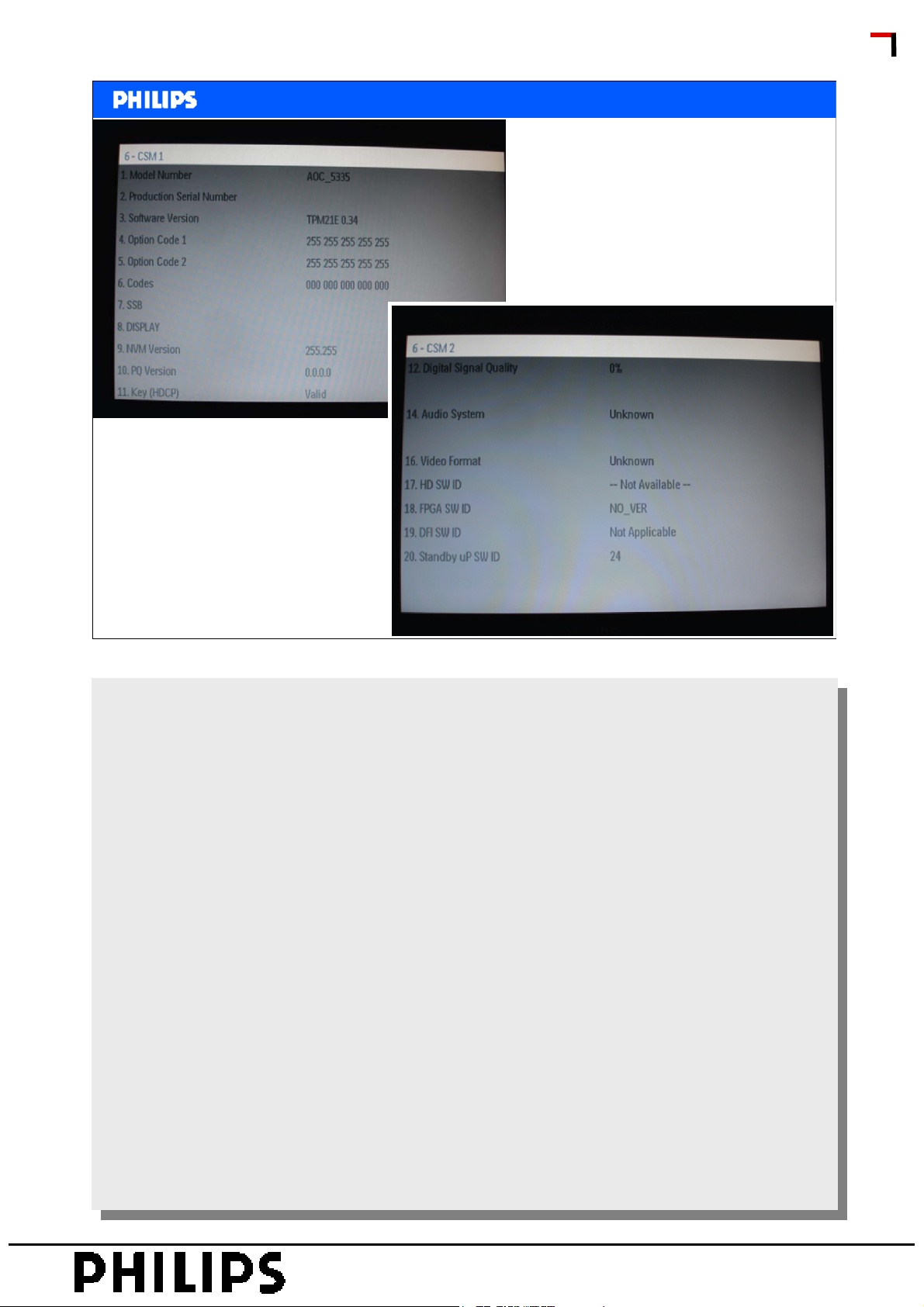
1. Set Type. Type number and region.
1. Set Type. Type number and region.
2. Production code. Product serial no.
2. Production code. Product serial no.
3. SW main-processor. SW-naming of Mstar/Trident, see fomat in
3. SW main-processor. SW-naming of Mstar/Trident, see fomat in
generic service document.
generic service document.
4. SW other-processor. if valid.
4. SW other-processor. if valid.
5. Code 1. Logging I2C error codes in NVM/EEPROM(5 last logged
5. Code 1. Logging I2C error codes in NVM/EEPROM(5 last logged
errors).
errors).
6. Code 2. Logging I2C error codes in NVM/EEPROM(5 first logged
6. Code 2. Logging I2C error codes in NVM/EEPROM(5 first logged
errors).
errors).
7. Key (HDCP) : Indicates if the HDCP-key are valid.
7. Key (HDCP) : Indicates if the HDCP-key are valid.
8. NVM-naming: Indicates the used LCD panel type and region (NVM
8. NVM-naming: Indicates the used LCD panel type and region (NVM
content and main SW depend on the used LCD panel).
content and main SW depend on the used LCD panel).
How to exit
How to exit
Press “MENU” on the RC-transmitter.
Press “MENU” on the RC-transmitter.
PERSONAL NOTES:
PERSONAL NOTES:
© Copyright reserved 2007 Philips Consumer Electronics Euroservice
page: 25
Page 26
<< TPM1.3E >>
<< TPM1.3E >>
CSM
SERVICE TRAINING
Philips CL, Consumer Care, April 2008 slide 26
PERSONAL NOTES:
PERSONAL NOTES:
© Copyright reserved 2007 Philips Consumer Electronics Euroservice
page: 26
Page 27
<< TPM1.3E >>
<< TPM1.3E >>
Factory Service Mode
Factory Mode
How to Enter
To enter the Factory mode, use one of the following methods:
• Turn on the TV, press the “menu” key.
• Press remote control code”062596” ,then press “Info.” key.
When you press the “menu” key again, the OSD will show,
Now press the “F3 EU 0.21” to carry out the factory OSD.
Caution: These functions are available for development and
service personal only, not for end customers.
SERVICE TRAINING
After entering factory mode, the following screen is visible, the
values can be adjusted according to the requested.
Philips CL, Consumer Care, April 2008 slide 27
PERSONAL NOTES:
PERSONAL NOTES:
© Copyright reserved 2007 Philips Consumer Electronics Euroservice
page: 27
Page 28
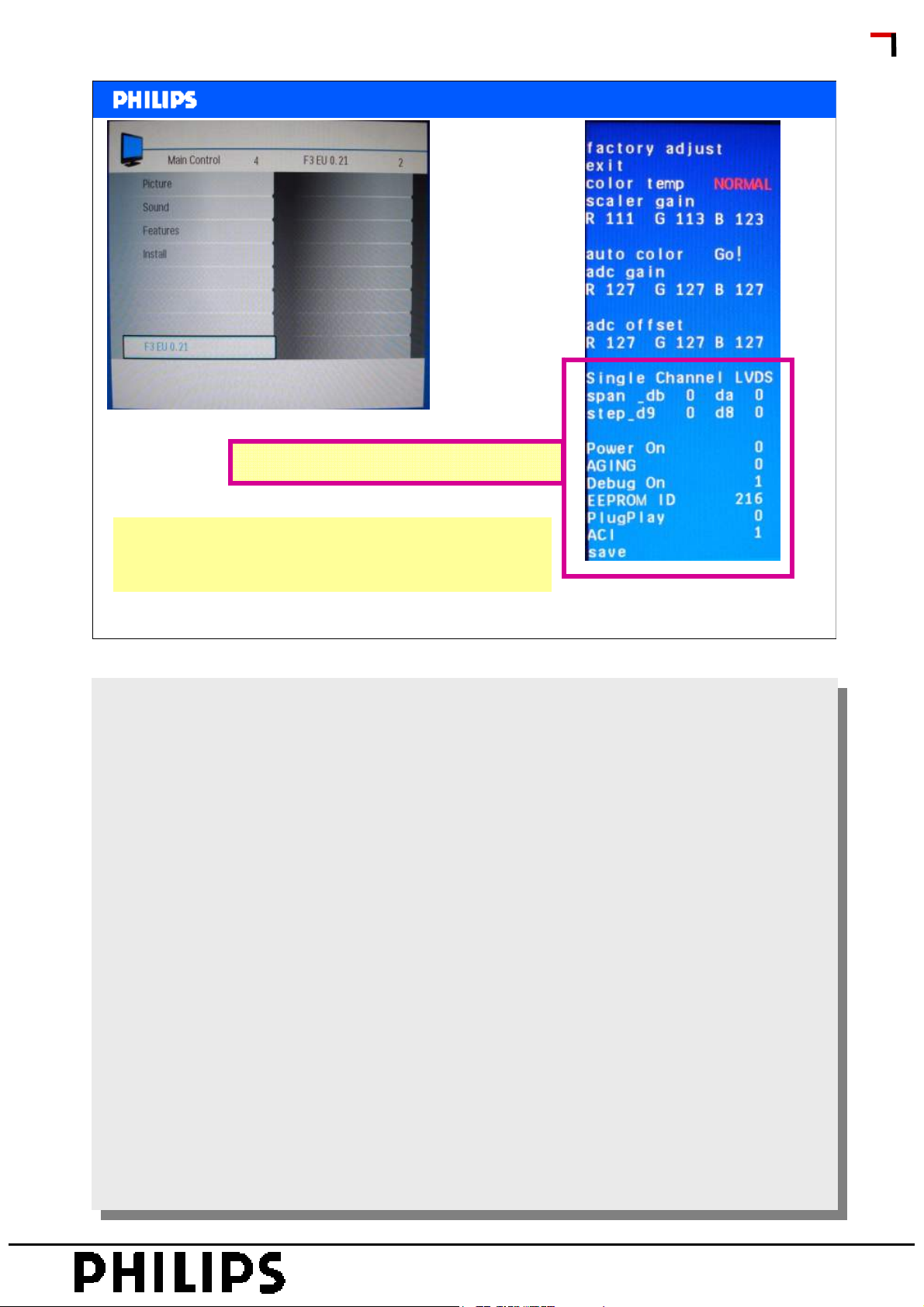
Do NOT change these settings
<< TPM1.3E >>
<< TPM1.3E >>
Factory Service Mode
SERVICE TRAINING
How to EXIT
Choose ‘EXIT”, then press “OK” button on remote
control.
Philips CL, Consumer Care, April 2008 slide 28
PERSONAL NOTES:
PERSONAL NOTES:
© Copyright reserved 2007 Philips Consumer Electronics Euroservice
page: 28
Page 29
<< TPM1.3E >>
<< TPM1.3E >>
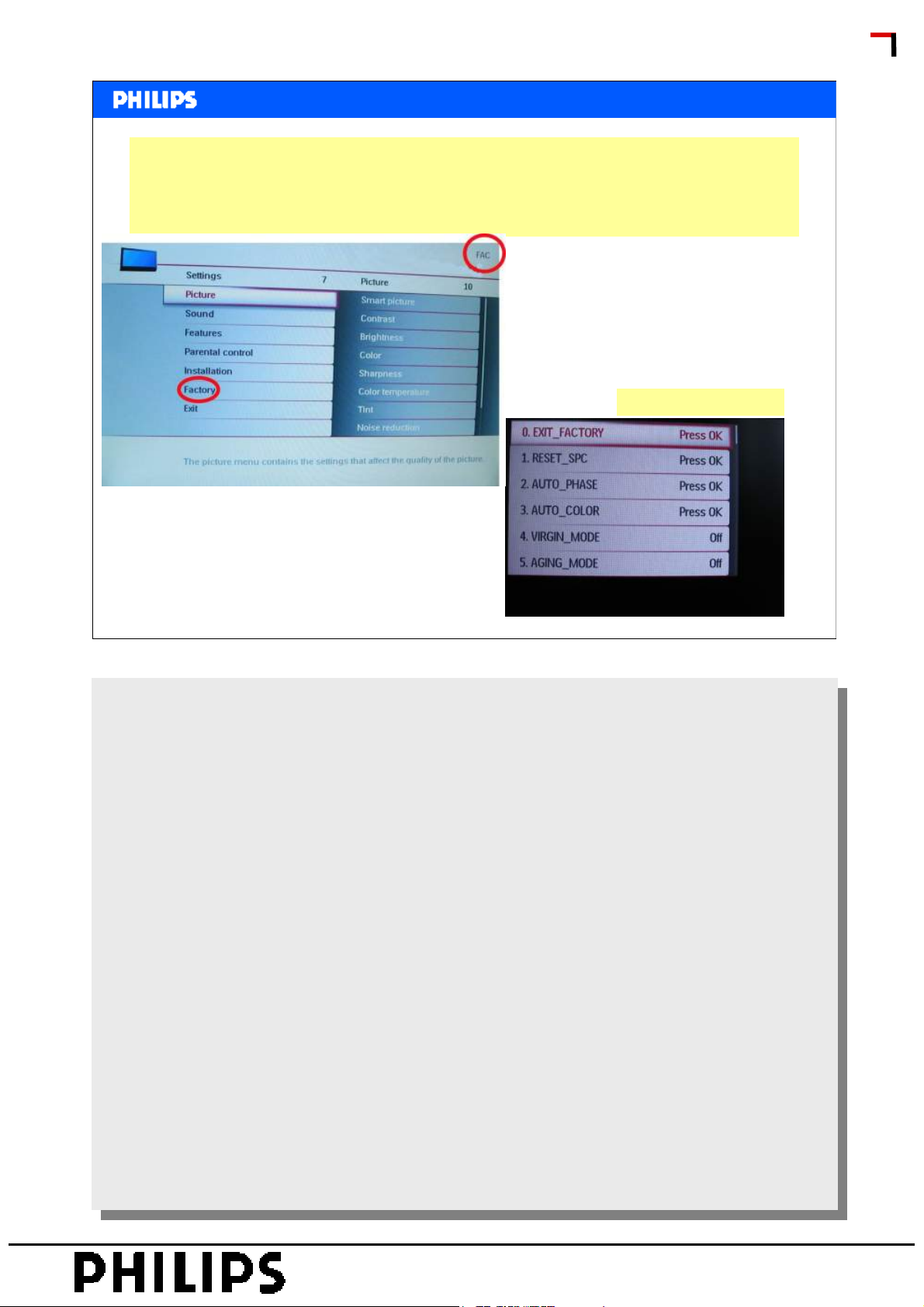
Alignment
There is a kind of SAM which is in fact a Factory Mode;
062596+info
Than select factory from the menu.
Enter Factory gives:
SERVICE TRAINING
Philips CL, Consumer Care, April 2008 slide 29
PERSONAL NOTES:
PERSONAL NOTES:
© Copyright reserved 2007 Philips Consumer Electronics Euroservice
page: 29
Page 30
<< TPM1.3E >>
<< TPM1.3E >>
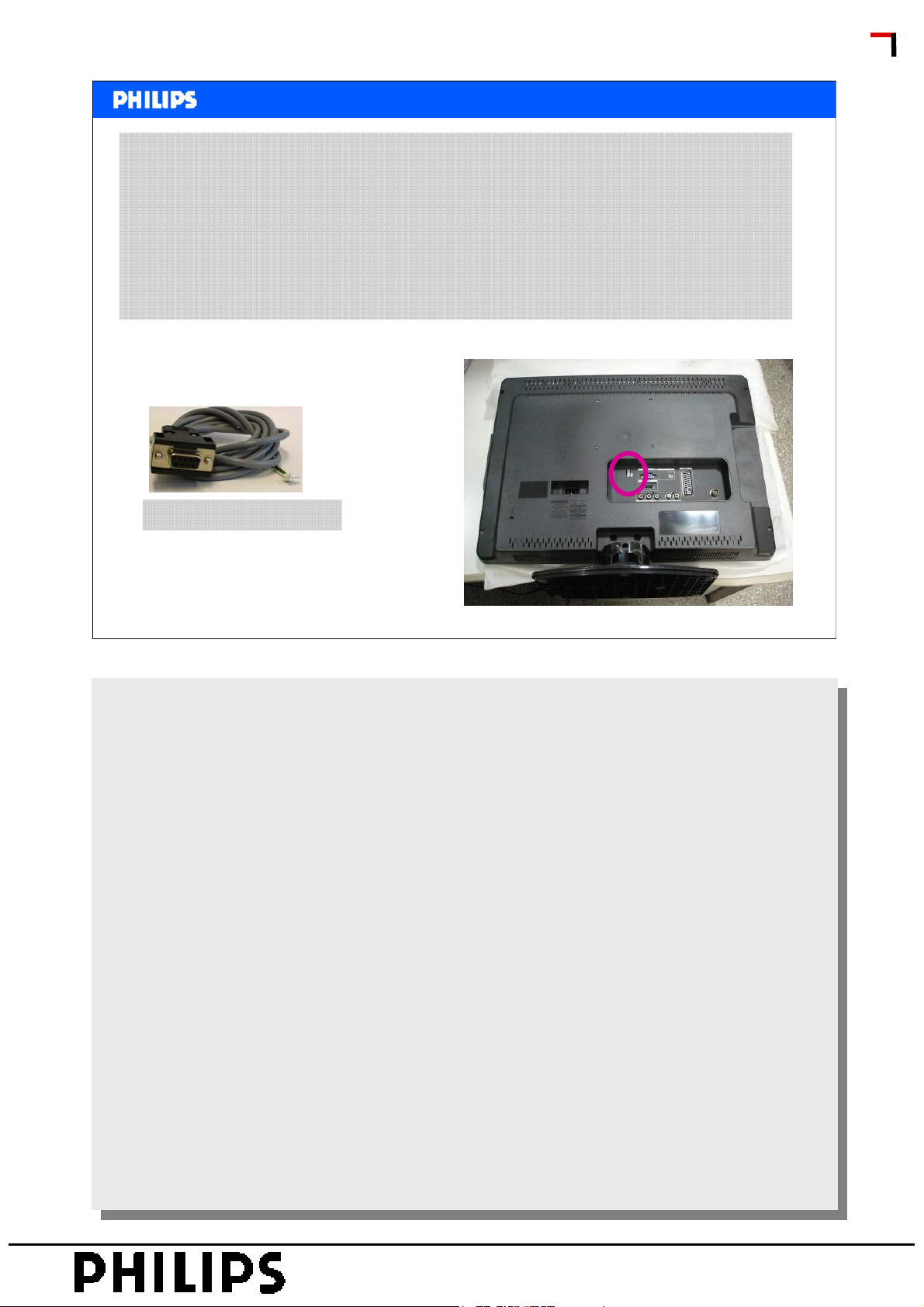
ComPair
Connect ComPair
Proceed with the following steps:
1. Connect the ComPair interface to the PC via the USB
cable.
2. Connect the ComPair interface to the set via the
ComPair/UART interconnection cable.
SERVICE TRAINING
12NC: 3122 785 90630
Philips CL, Consumer Care, April 2008 slide 30
PERSONAL NOTES:
PERSONAL NOTES:
© Copyright reserved 2007 Philips Consumer Electronics Euroservice
page: 30
Page 31
<< TPM1.3E >>
<< TPM1.3E >>
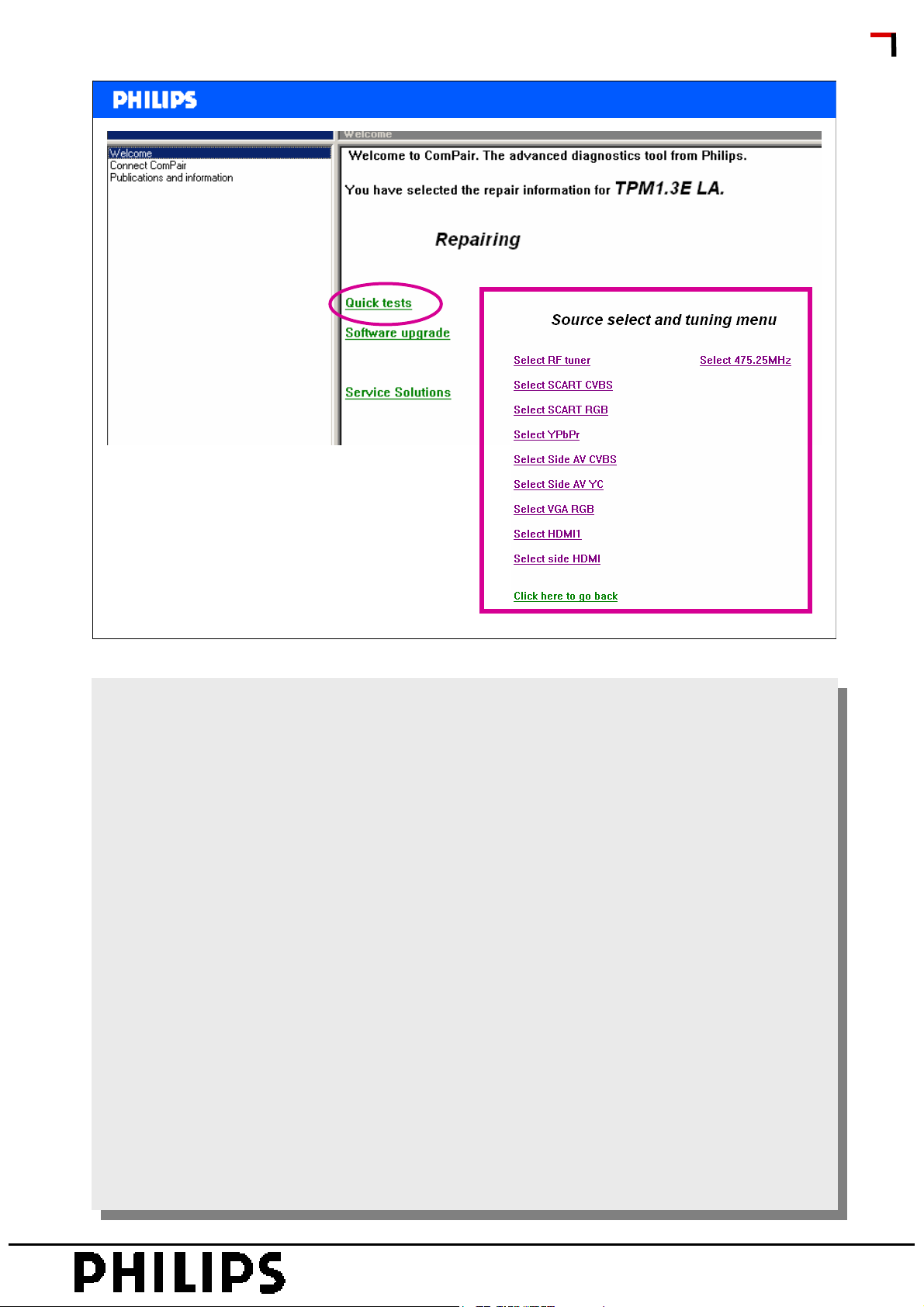
ComPair
SERVICE TRAINING
Philips CL, Consumer Care, April 2008 slide 31
PERSONAL NOTES:
PERSONAL NOTES:
© Copyright reserved 2007 Philips Consumer Electronics Euroservice
page: 31
Page 32

<< TPM1.3E >>
<< TPM1.3E >>
SERVICE TRAINING
PERSONAL NOTES:
PERSONAL NOTES:
© Copyright reserved 2007 Philips Consumer Electronics Euroservice
page: 32
 Loading...