

Page 1
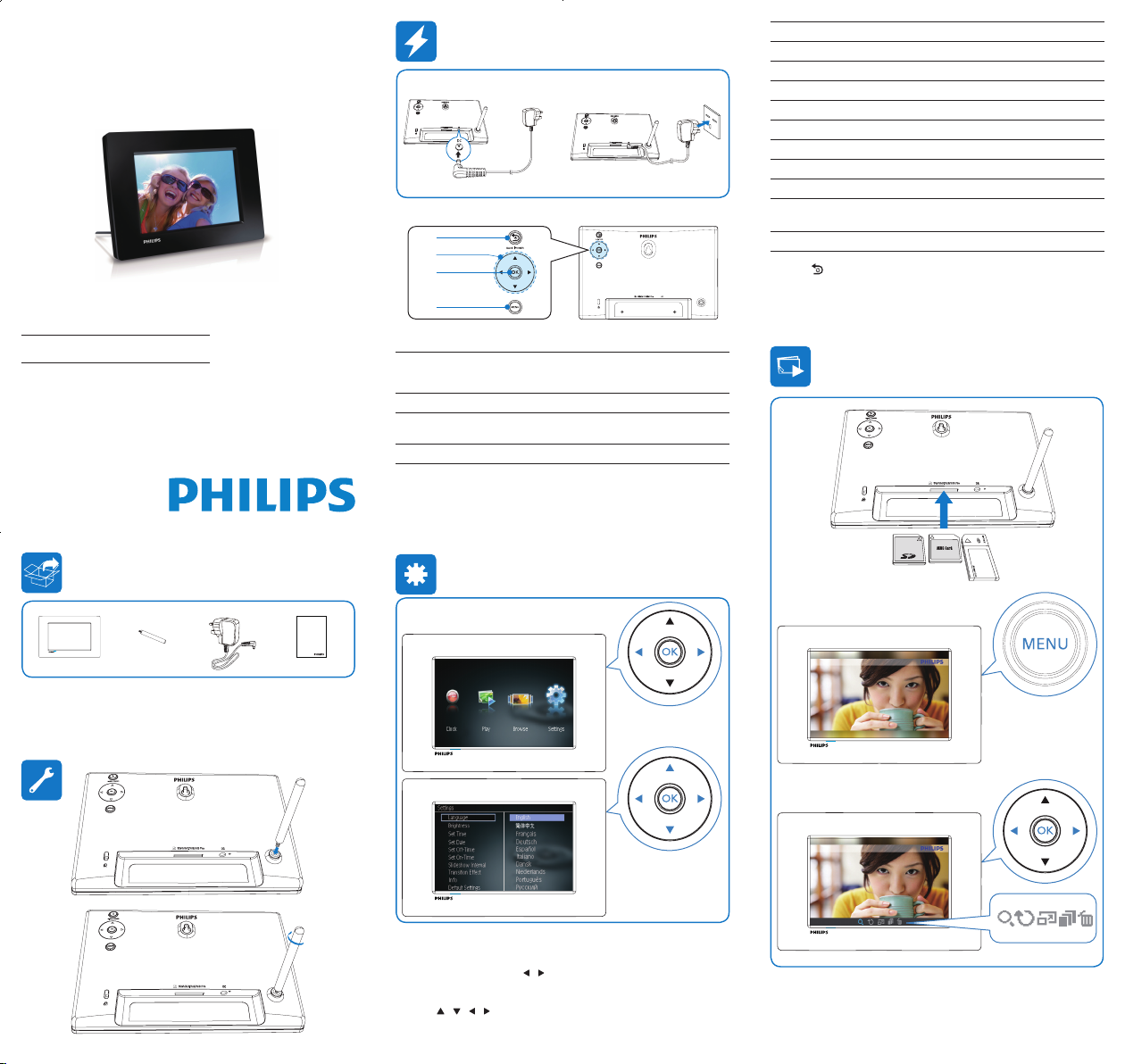
Adjust settings
1 In the h ome me nu, pr ess / to selec t [Settings], and then p ress OK .
The setup menu is displayed. »
2 Pres s / / / to sele ct an o ption a nd press OK to con rm.
Register your product and get support at
www.philips.com/welcome
PhotoFrame
SPF1207
a
c
b
d
Register your product and get support at
www.philips.com/welcome
PhotoFrame
User Manual
EN User manual
1
Hold to turn on/off the PhotoFrame
Press to go to the home screen
Press to go back
2
Press to select the upper/lower/right/left option
3
Press to play/pause slideshow
Press to conrm a selection
4
Press to enter/exit a menu
Menu options Function
[Language] Sele ct on -screen dis play la nguage.
[Brightness] Sele ct dis play br ightness level .
[Set T ime] Set th e clock t ime.
[Set D ate] Set the date.
[Set O ff-Time] Set th e auto -of f time .
[Set O n-Time] Set th e auto -on time.
[Slideshow I nter val] Sele ct the slide show di splay i nter val.
[Trans ition E ffect] Sele ct the slide show trans itio n effe ct.
[Info] Display the gener al info rmation of t he
PhotoFrame.
[Default Se ttin gs] Rest ore de faul t settings .
3 Pres s BACK|POWER to exit.
Page 2
Safety
Safety precautions and maintenance
Never touch, push, rub or s trike the screen with hard objec ts •
as this may damage the screen permanently.
When t he product is not used for long periods , unplug it.•
Befor e you clean the screen, turn off and unplug the power •
cord. Only clean the screen with a soft, water- damp cloth.
Never use substances such as alcohol, chemicals or household
cleaners to clean t he product.
Never place the product near naked ames or other heat •
sources, including direct sunlight.
Never expose the produc t to rain or water. Never place •
liquid containers, such as vases , near the produc t.
Never drop the product. When you drop the product, it will be •
damaged.
Ensur e that you install and use services or soft ware only from •
trustworthy sources fr ee of virus or harmful sof tware.
This product is designed for indoor use only.•
Only use the supplied power adaptor for the product.•
Notice
This product is in compliance with the essential
requirements and other relevant provisions of Directives
2006/95/EC (Low Voltage), 20 04/108/EC (EMC).
Respect copyrights
The making of unauthorized copies
of copy-protected mater ial, including
computer programs, les, broadcas ts
and sound recordings, may be an infringement of copyr ights and
constitute a criminal offence. This equipment should not be used
for such purposes.
End of life disposal
Your new product contains materials that can be recycled •
and reused. Specialized companies can rec ycle your product
to increase the amount of reusable materials and to minimize
the amount to be disposed of.
Please nd out about the local regulations on how to dispose •
your old monitor from your local Philips dealer.
(For customers in Canada and U.S. A .) Dispose the old •
product in accordance to local-state and feder al regulations.
For additional information on recycling contac t ww w.eia.or g
(Consumer Education Ini tiative).
Recycling Information for Customers
Philips est ablishes technically and economically viable objec tives
to optimize the environmental per formance of t he organization’s
product, ser vice and activities .
From the planning, design and pr oduc tion stages, Philips
emphasizes the impor tance of mak ing produc ts that can easily
be rec ycled . At Philips, e nd-of-life management primarily entails
par ticipation in national t ake-back initiatives and recycling
programs w henever possible, prefera bly in cooper ation with
competitors.
There is currently a system of recycling up and running in the
European countries, such as The Netherlands, Belgium, Norway,
Sweden and Denmar k.
In U.S.A., Philips Consumer L ifestyle Nor th America has
contr ibuted funds for the Elec tronic Industries Alliance (EIA)
Elec tronics Recycling Project and st ate recycling initiatives for
end- of-life electronics products from household sources . In
addition, the Northeas t Recycling Council (NERC) - a mul ti-
state non-prot organization focused on promoting rec ycling
market development - plans to implement a recycling program .
In Asia Pacic, Taiwan , the products can be taken back by
Environment Protection Adminis tration (EPA) to follow the IT
product recycling management process , detail can be found in
web site ww w.epa .gov.t w.
Environmental information
Your product is designed and manufactured with
high qualit y mate rials and compone nts, which can be
recycled and reused.
When you see the crossed- out wheel bin symbol
att ached to a product , it means the product is covered by the
European Direc tive 2002 /96/EC:
Never dispose of your product with other household
waste . Please infor m yourself about the local rules
on the separate collection of electrical and electronic
produc ts. The correct disposal of your old product
helps prevent potentially negative consequences on the
envir onment and human health.
Banned Substance Declaration
This product complies with RoHS.
Class II equipment symbol:
This symbol indicates that this product has a double
insulation system.
For detailed instructions for use, please visit www.philips.com/support.
© 2010 Koninklijke Philips Electronics N.V.
All rights reserved.
Specications are subject to change without notice.Trademarks are the
property of Koninklijke Philips Electronics N.V. or their respective owners.
SPF1207_05_UM_V1.0
 Loading...