

Page 1
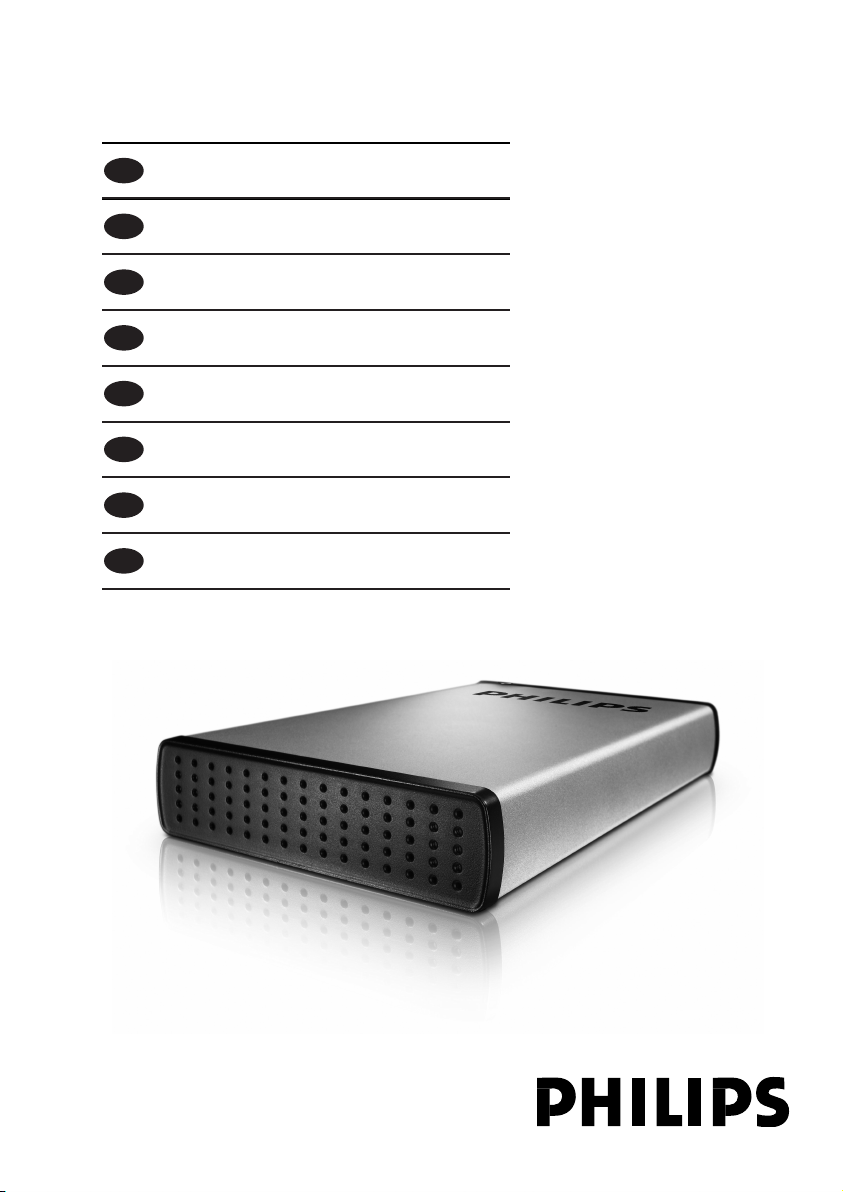
External hard disk SPE3000 series
EN
User manual 3
F
Manuel d’instructions 9
D
Benutzerhandbuch 15
NL
Gebruikershandleiding 21
ES
Manual del usuario 27
I
Manuale utente 33
PT
Manuel do utilizador 39
TR
Kurulum Kılavuzu 45
Page 2

2
Page 3

Contents
4 What’s in the box?
4 How to connect?
5 How to disconnect?
5 Installation for Mac,Windows 98 and
Windows ME?
6 Important information
7 Need help?
8 FCC Compliance
EN
3
Page 4
EN
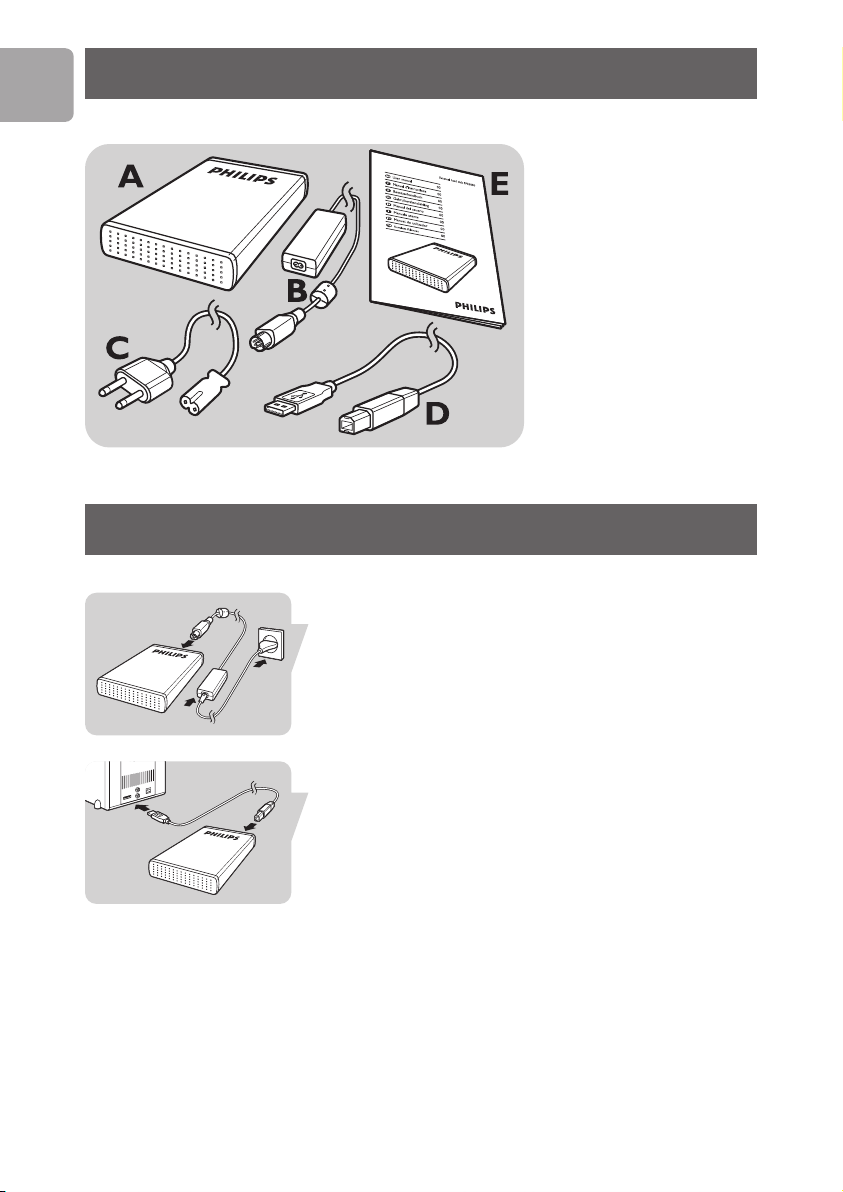
What’s in the box?
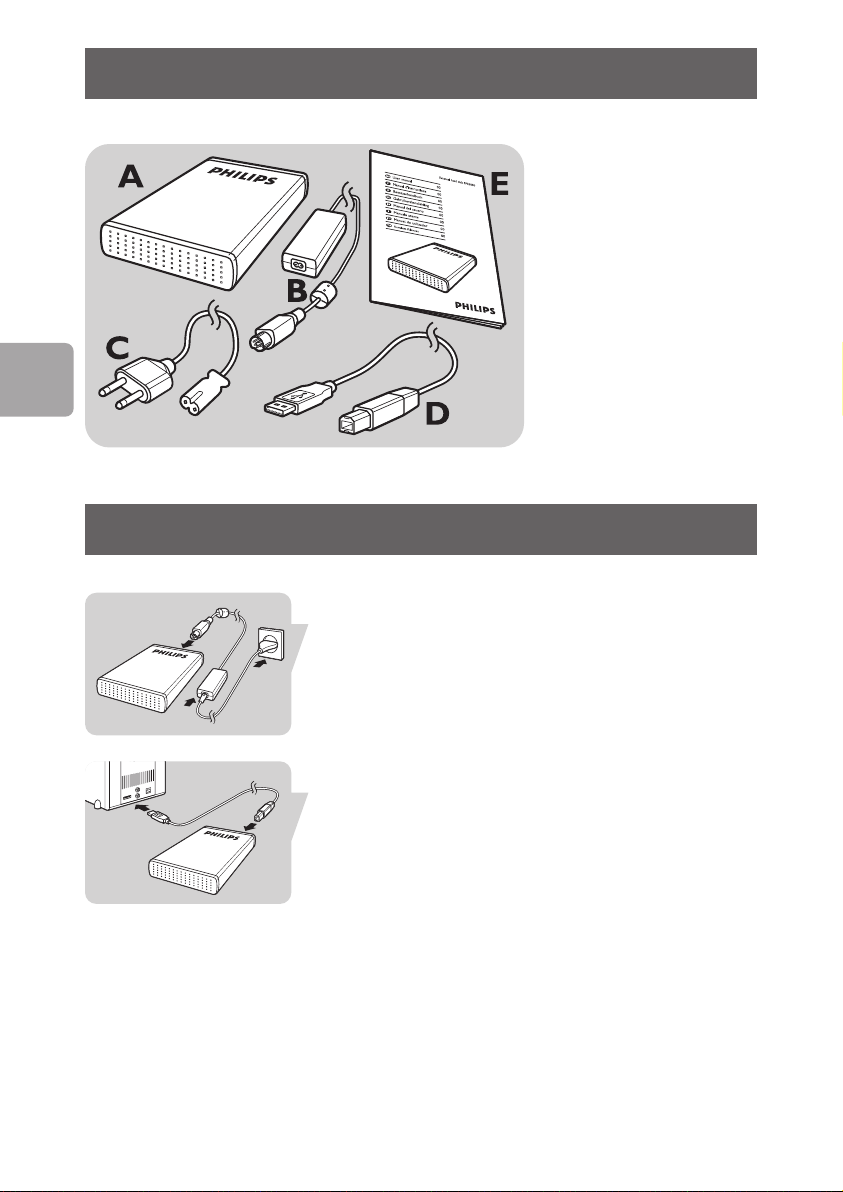
A : External hard disk
B : Power adapter
C : Power cord
D : USB cable
E : User manual
How to connect?
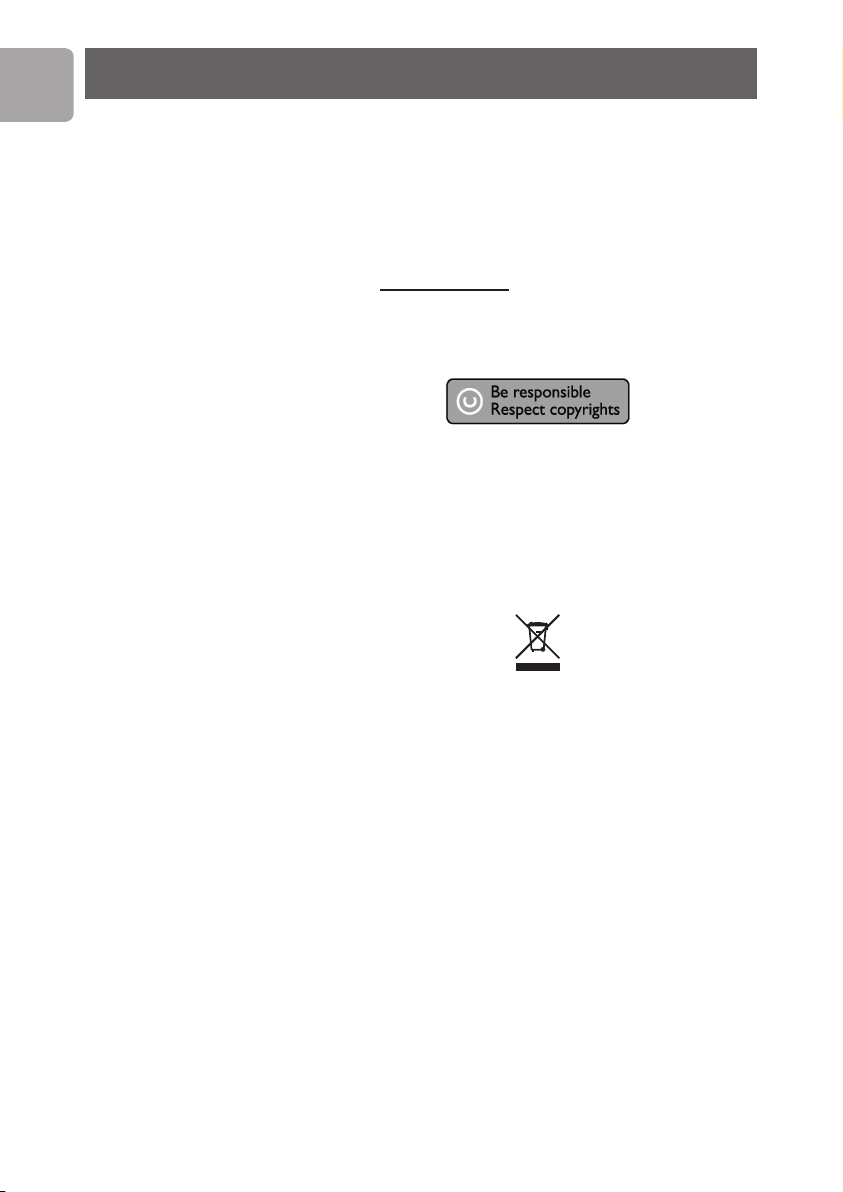
Put the Power Adapter (B) and the Power Cord (C)
together and connect them to the external hard disk
and a power outlet.
Plug the USB cable (D) in the USB port of your external
hard disk. Connect the other side of the USB cable to
an empty USB port of your computer.
A drive icon, Philips External Hard Disk, appears in
Windows Explorer and the Blue light should light up.
(To use the new hardware, the computer sometimes
ted)
needs to be r
Your hard disk is now ready to use and you can now
save and copy data, just as you do when using your
internal hard disk.
4
estar
Page 5

How to disconnect?
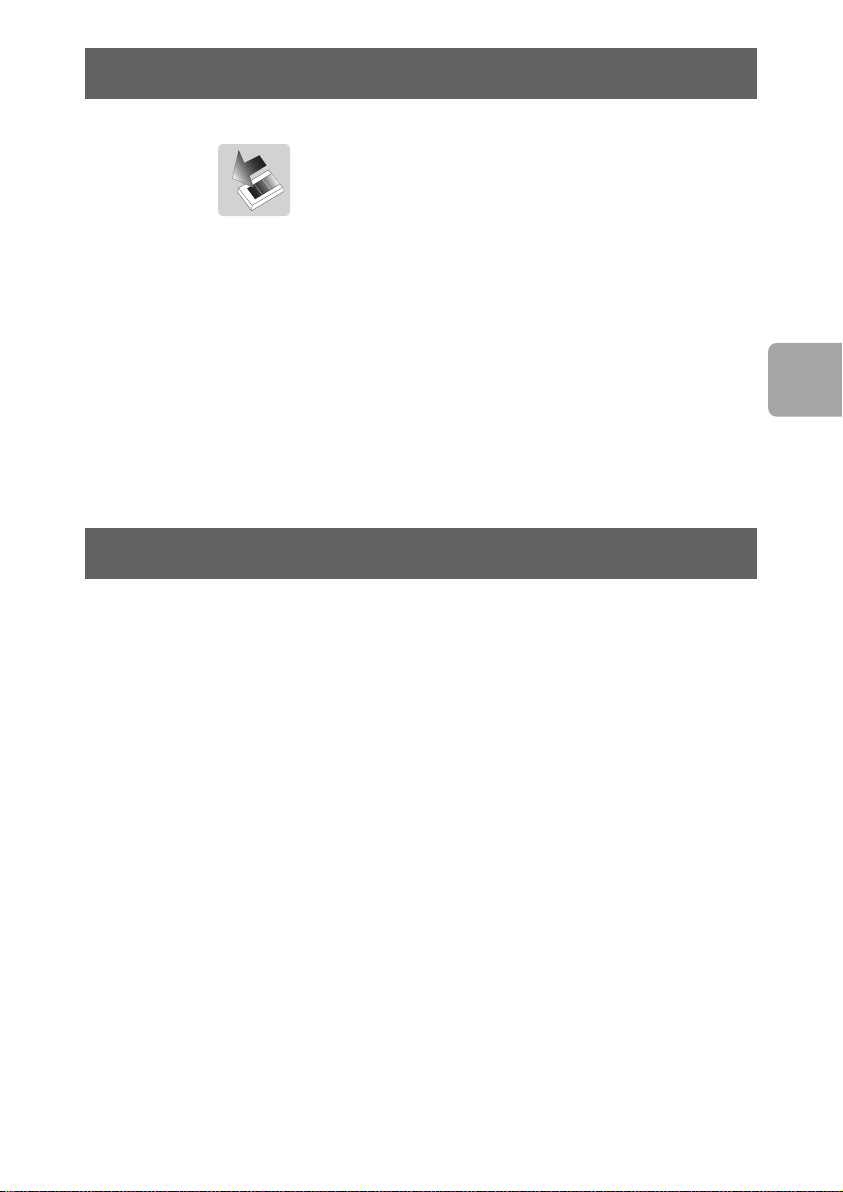
1 Double-click the Safely Remove Hardware icon
in the task bar in the lower right part of the screen.
2 In the window that appears, select the name of the
device that is to be removed, then click the
button.
3 When the Stop a hardware device screen
appears, make sure the correct information is
displayed, and then click the
4 When the message Safe to remove hardware
appears, remove the drive from the computer’s
USB port.
OK button.
Stop
Installation
Installation for Mac,Windows 98 and
Windows ME?
The hard disk is preconfigured for Windows 2000 and
Windows XP, with a NTFS format.
For Mac,Windows 98 and Windows ME, the hard disk
needs to be formatted to FAT32.
EN
5
Page 6
EN
Important information
How to find warranty information?
Look on your external hard disk and browse to the
folder ‘Philips Warranty’.
You need Adobe Reader software to open these files.
If you don’t have Adobe Reader, you can download it for
free on www
The Philips warranty may not apply if damage is caused
by accidents, shock, misuse or neglect.
“The making of unauthorized copies of copy-protected
material including computer programs, files, broadcasts
and sound recordings, may be an infringement of
copyrights and constitute a criminal offence.
This equipment should not be used for such purposes.”
WEEE mark:“Information to the Consumer”
.adobe.com.
Disposal of your old product
Your product is designed and manufactured with
high quality materials and components, which can be
recycled and reused. Please inform yourself about the
local separate collection system for electrical and
electronic products, including those marked by the
crossed-out wheel bin symbol.
Please act according to your local rules and do not
dispose of your old products with your normal
household waste.
ARNING
W
Plastic bags can be dangerous.
To avoid danger of suffocation, keep this bag away from
babies and small children.
Although this product has been designed with utmost
care for long-lasting performance. Philips does advise
6
Page 7
you to handle electronics with good care:Avoid contact
with water, exposure to extreme forces.
Please make sure you place the device in a
well-ventilated environment, to ensure longest possible
lifetime and optimal performance.
Specifications
Capacity Depending on model
Interface Hi-Speed USB 2.0
Transfer speed 480 Mb/s
Rotational speed 7200 rpm
Cache memory 8 MB
System requirements USB 1.1 (USB 2.0 for
max. transfer speed)
Windows 2000,
Windows XP
Need help?
EN
For interactive help and support:
.philips.com/support
www
For software updates and frequently asked questions:
.storageupdates.philips.com
www
7
Page 8
EN
FCC Compliance
Caution:
Changes or modifications made to this equipment not
expressly approved by Philips may void the FCC
authorization to operate this equipment.
Note:
This equipment has been tested and found to comply
with the limits for a Class B digital device, pursuant to
Part 15 of the FCC Rules.These limits are designed to
provide reasonable protection against harmful
interference in a residential installation.This equipment
generates, uses and can radiate radio frequency energy
and, if not installed and used in accordance with the
instructions, may cause harmful interference to radio
communications. However, there is no guarantee that
interference will not occur in a particular installation. If
this equipment does cause harmful interference to radio
or television reception, which can be determined by
turning the equipment off and on, the user is
encouraged to try to correct the interference by one or
more of the following measures:
• Reorient or relocate the receiving antenna.
• Increase the separation between the equipment and
receiver.
• Connect the equipment into an outlet on a circuit
different from that to which the receiver is
connected.
• Consult the dealer or an experienced radio/TV
technician for help.
The shielded interface cable and connectors must be
used in order to comply with the limits for digital device
pursuant to subpart B of Part 15 of FCC Rules.
8
Page 9

Table des matières
10 Contenu de l'emballage
10 Raccordement
11 Déconnexion
11 Installation pour Mac,Windows 98 et
Windows ME
12 Informations importantes
13 Aide
F
9
Page 10
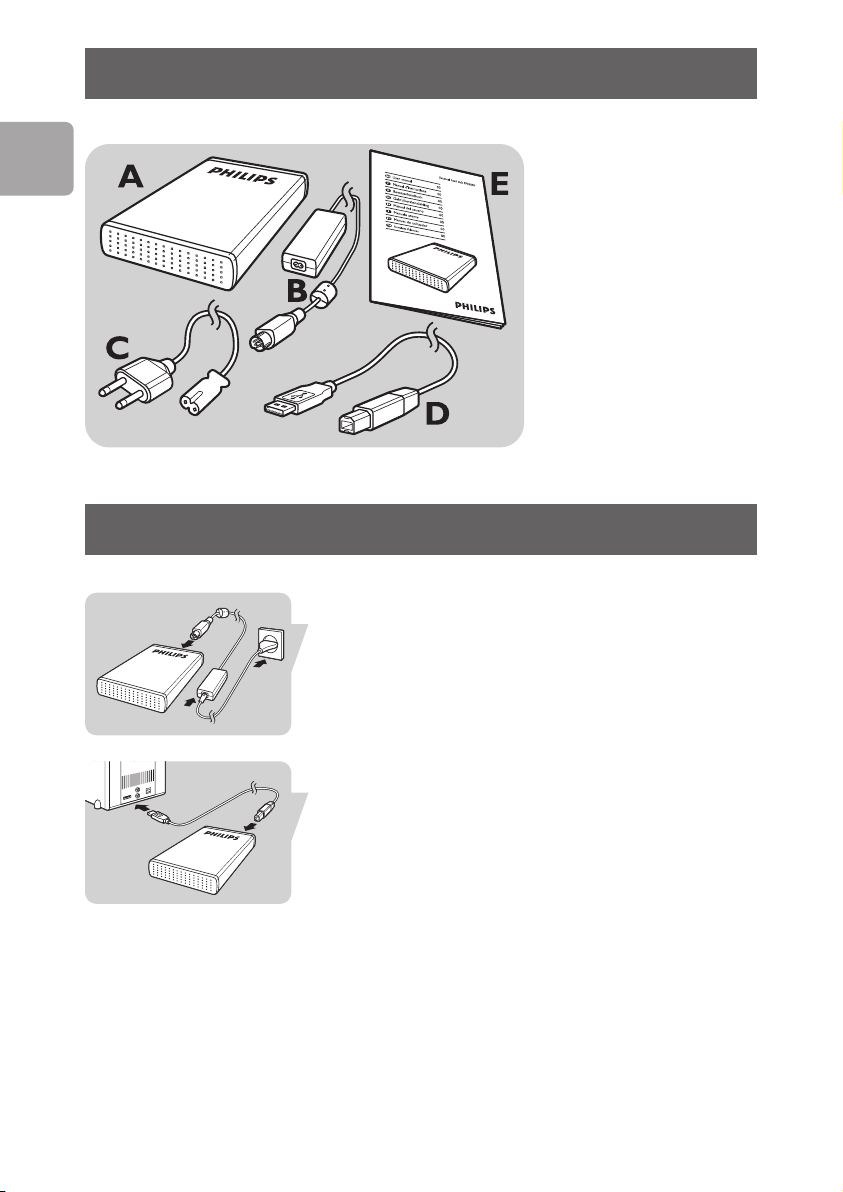
Contenu de l'emballage
F
A : Disque dur externe
B :Adaptateur secteur
C : Cordon d'alimentation
D : Câble USB
E : Manuel d'utilisation
Raccordement
Branchez le cordon d'alimentation (C) sur l'adaptateur
secteur (B) et raccordez l'ensemble au disque dur
externe et à la prise de courant.
10
Branchez le câble USB (D) sur le port USB du disque
dur externe. Raccordez l'autre extrémité du câble USB
à un port USB libre de l'ordinateur.
Une icône de lecteur Philips External Hard Disk
apparaît dans Windows Explorer. Le témoin bleu doit
également s'allumer. (Pour utiliser le nouveau matériel, il
peut êtr
Le disque dur est prêt à être utilisé.Vous pouvez donc y
enregistrer et y copier des données comme avec un
disque dur interne.
e nécessair
e de réinitialiser l'ordinateur.)
Page 11

Déconnexion
1 Double-cliquez sur l'icône Safely Remove
Hardware
sécurité) dans la barre système, dans l'angle inférieur
droit de l'écran.
2 Dans la fenêtre qui apparaît, sélectionnez le nom du
périphérique à retirer, puis cliquez sur le bouton
Stop (Arrêter).
3 Lorsque l'écran Stop a hardware device (Arrêt
d'un périphérique matériel) s'affiche, vérifiez si les
informations présentées sont correctes, puis cliquez
sur le bouton
4 Lorsque le message Safe to remove hardware
(Le matériel peut être retiré en toute sécurité)
apparaît, débranchez le lecteur du port USB de
l'ordinateur.
(Retirer le périphérique en toute
OK.
Installation
Installation pour Mac,Windows 98 et
Windows ME
Le disque dur est préconfiguré pour être utilisé avec
Windows 2000 et Windows XP au format NTFS.
Pour Mac,Windows 98 et Windows ME, le disque dur
doit être formaté en FAT32.
F
11
Page 12
Informations importantes
F
Où trouver les informations relatives à
la garantie ?
Sur le disque dur externe, accédez au dossier 'Philips
Warranty' (Informations relatives à la garantie).
Vous aurez besoin du logiciel Adobe Reader pour ouvrir
ces fichiers. Si vous disposez pas d'Adobe Reader, vous
pouvez le télécharger gratuitement du site
.adobe.com.
www
La garantie Philips peut ne pas s'appliquer si le
périphérique est endommagé à la suite d'un accident,
d'un choc, d'un usage impropre ou d'une négligence.
« La création de copies illégales de contenu protégé
contre la copie, y compris les programmes
informatiques, les fichiers, les diffusions et les
enregistrements sonores, peut constituer une violation
des droits d'auteur et de copie (copyrights) ainsi qu'un
délit. Cet équipement ne doit en aucun cas être utilisé à
de telles fins. »
Marque WEEE :“Informations pour le
consommateur”.
12
Mise au rebut d'un périphérique usagé
Votre appareil est conçu et fabriqué avec des matériaux
et des composants de haute qualité qui peuvent être
recyclés et réutilisés. Renseignez-vous au sujet du
système de collecte et de tri sélectif de votre région en
ce qui concerne les pr
électroniques, y compris ceux caractérisés par le
symbole de la poubelle à roulettes marquée d'une croix.
Veuillez procéder conformément aux règlements locaux
et ne pas mettre au rebut vos appareils usagés avec les
ordures ménagères ordinaires.
oduits électriques et
Page 13

AVERTISSEMENT
Les sacs en plastique peuvent être dangereux.
Pour écarter tout risque d'étouffement, conservez ce
sac hors de portée des bébés et des enfants en bas âge.
Ce produit a été conçu avec un soin extrême pour des
performances durables. Philips vous recommande
cependant de manipuler tout appareil électronique avec
soin. En particulier, il convient d'éviter tout contact avec
l'eau et toute exposition à des forces extrêmes.
Veillez à installer l'appareil dans un endroit bien ventilé,
afin de lui garantir une durée de vie la plus longue
possible et des performances optimales.
Caractéristiques techniques
Capacité Selon le modèle
Interface USB 2.0 (haute vitesse)
Vitesse de transfert 480 Mo/s
Vitesse de rotation 7200 tr/mn
Mémoire cache 8 Mo
Configuration requise USB 1.1 (USB 2.0 pour la
vitesse de transfert
maximale)
Windows 2000,
Windows XP
F
Aide
Pour une aide interactive et le support :
.philips.com/support
www
Pour les mises à jour du logiciel et les questions-
réponses : www
.storageupdates.philips.com
13
Page 14

14
Page 15

Inhalt
16 Packungsinhalt
16 Anschließen
17 Trennen
17 Installation für Mac,Windows 98 und
Windows ME
18 Wichtige Informationen
Garantieinformationen
19 Hilfe und Unterstützung
D
15
Page 16
∂D
Packungsinhalt
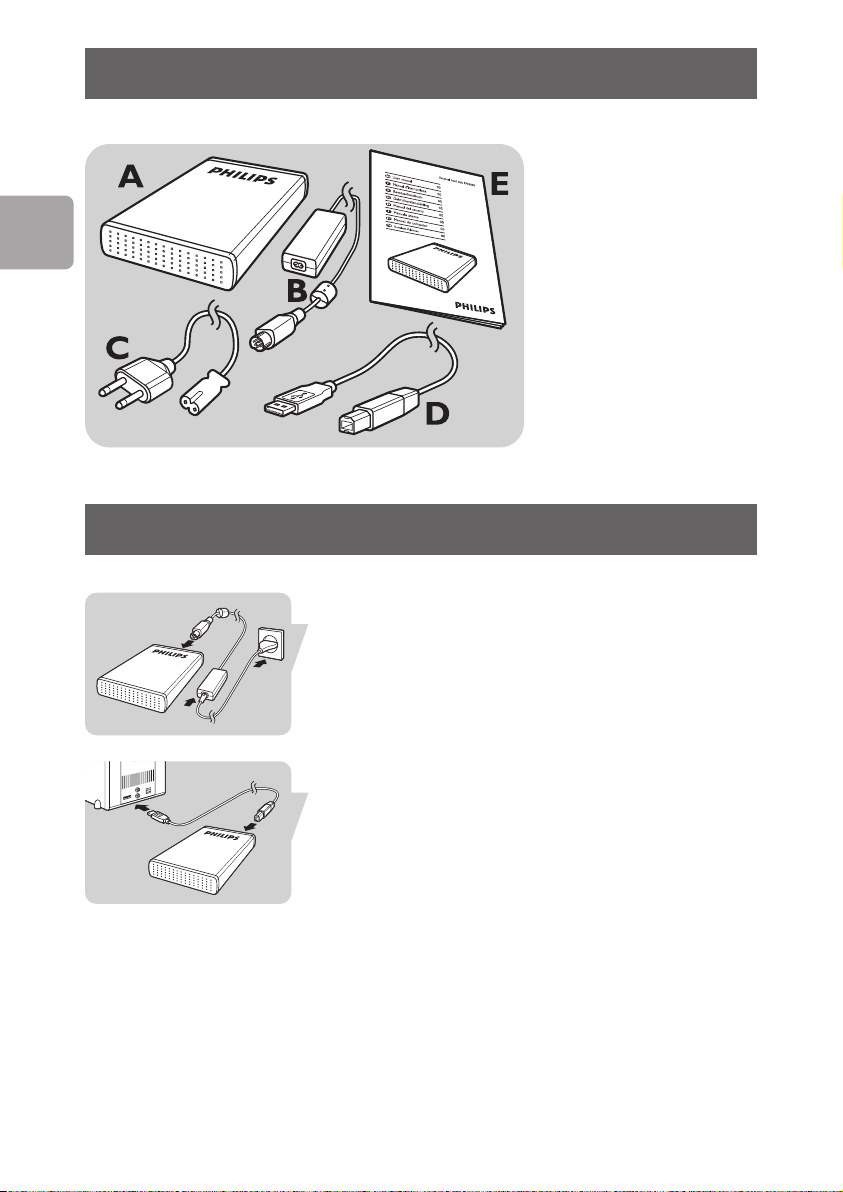
A : Externe Festplatte.
B : Netzteil
C : Netzkabel
D : USB-Kabel
E : Benutzerhandbuch
Anschließen
Verbinden Sie das Netzteil (B) und Netzkabel (C)
miteinander und schließen Sie diese an die externe
Festplatte und an eine Netzsteckdose an.
16
Stecken Sie das USB-Kabel (D) in den USB-Anschluss
Ihrer externen Festplatte. Schließen Sie das andere Ende
des USB-Kabels an einem freien USB-Anschluss an
Ihrem PC an.
Im Windows Explorer wird das Laufwerksymbol, „Philips
External Hard Disk“, angezeigt und die blaue Leuchte
Verwendung der neuen Hardware
leuchtet auf.
muss der Computer ggf. neu gestartet werden)
Ihre Festplatte ist jetzt einsatzbereit und Sie können
Daten auf der Festplatte speichern und kopieren, so wie
Sie es bei Ihrer internen Festplatte gewohnt sind.
(Zur
Page 17

Trennen
1 Doppelklicken Sie auf das Symbol Hardware
entfernen in der Taskleiste unten rechts auf
sicher
dem Bildschirm.
2 Wählen Sie in dem danach angezeigten Fenster den
Namen des zu entfernenden Geräts und klicken Sie
auf die Schaltfläche
3 Sobald das Fenster Eine Hardwarekomponente
beenden
richtigen Informationen angezeigt werden, und
klicken Sie dann auf die Schaltfläche
4 Wenn die Meldung Hardware kann jetzt
entfernt
Festplatte aus dem USB-Anschluss Ihres Computers
entfernen.
angezeigt wird, überprüfen Sie, ob die
werden erscheint, können Sie die
Beenden.
OK.
Installation
Installation für Mac,Windows 98 und
Windows ME
Die Festplatte ist für Windows 2000 und Windows XP
mit dem Format NTFS vorformatiert.
Für Mac,Windows 98 und Windows ME muss die
Festplatte auf FAT32 umformatiert werden.
D
17
Page 18
D
Wichtige Informationen
Garantieinformationen
Navigieren Sie auf Ihrer externen Festplatte in den
Ordner "Philips Warranty" (Garantieinformationen).
Zum Öffnen dieser Dateien benötigen Sie die Software
Adobe Reader. Wenn Sie Adobe Reader nicht haben,
können Sie die Software kostenlos von der Website
.adobe.com herunterladen.
www
Die Philips Garantie deckt Schäden nicht ab, die auf
Unfälle, Stöße, unsachgemäße Verwendung oder
Vernachlässigung zurückzuführen sind.
„Das Anfertigen ungenehmigter Kopien von
urheberrechtlich geschütztem Material, einschließlich
Computerprogrammen, Dateien, Sendungen und
Tonaufzeichnungen, kann ein Bruch von Copyrights und
damit ein strafrechtliches Vergehen darstellen. Diese
Ausrüstung sollte nicht für solche Zwecke verwendet
werden.“
18
WEEE-Markierung: „Verbraucherinformation“.
Entsorgung Ihres alten Produkts
Ihr Produkt wurde mit qualitativ hochwertigen
Materialien und Bauteilen entwickelt und gefertigt, die
recycelt und wiederverwertet werden können. Bitte
informieren Sie sich hinsichtlich der örtlichen,
getrennten Sammelsysteme für Elektro- und
Elektronikabfälle, einschließlich derer, die durch das
chgestrichene Rolltonnensymbol gek
dur
sind.
Bitte halten Sie sich an Ihre örtlichen Vorschriften und
entsorgen Sie Ihr altes Produkt nicht mit Ihrem
normalen Haushaltsmüll.
ennzeichnet
Page 19

ACHTUNG
Kunststoffbeutel können gefährlich sein.
Diese Beutel von Säuglingen und Kleinkindern fern
halten, um Erstickungsgefahr zu vermeiden.
Obwohl dieses Produkt mit größter Sorgfalt für eine
lange Nutzungsdauer entwickelt wurden, empfiehlt
Philips, dass Sie Elektronikteile sorgfältig handhaben.
Vermeiden Sie den Kontakt mit Wasser und extremen
Kräften.
Bitte sorgen Sie dafür, dass das Gerät in einem gut
belüfteten Umfeld steht, um die längstmögliche Standzeit
und eine optimale Leistung zu gewährleisten.
Spezifikationen
Kapazität Je nach Modell
Schnittstelle USB 2.0 Hi-Speed
Übertragungsgeschwindigkeit 480 MB/s
Drehzahl 7200/min
Cache-Speicher 8 MB
Systemanforderungen USB1.1 (USB 2.0 für
max. Übertragungsgeschwindigkeit)
Windows 2000,
Windows XP
D
Hilfe und Unterstützung
Für interaktive Hilfe und Unterstützung
.philips.com/support
www
Für Software-Updates und häufig gestellte Fragen:
.storageupdates.philips.com
www
19
Page 20

20
Page 21

Inhoud
22 Wat zit er in de doos?
22 Hoe sluit ik hem aan?
23 Hoe koppel ik hem los?
23 Installatie voor Mac,Windows 98 en
Windows ME?
24 Belangrijke informatie
25 Hulp nodig?
NL
21
Page 22
NL
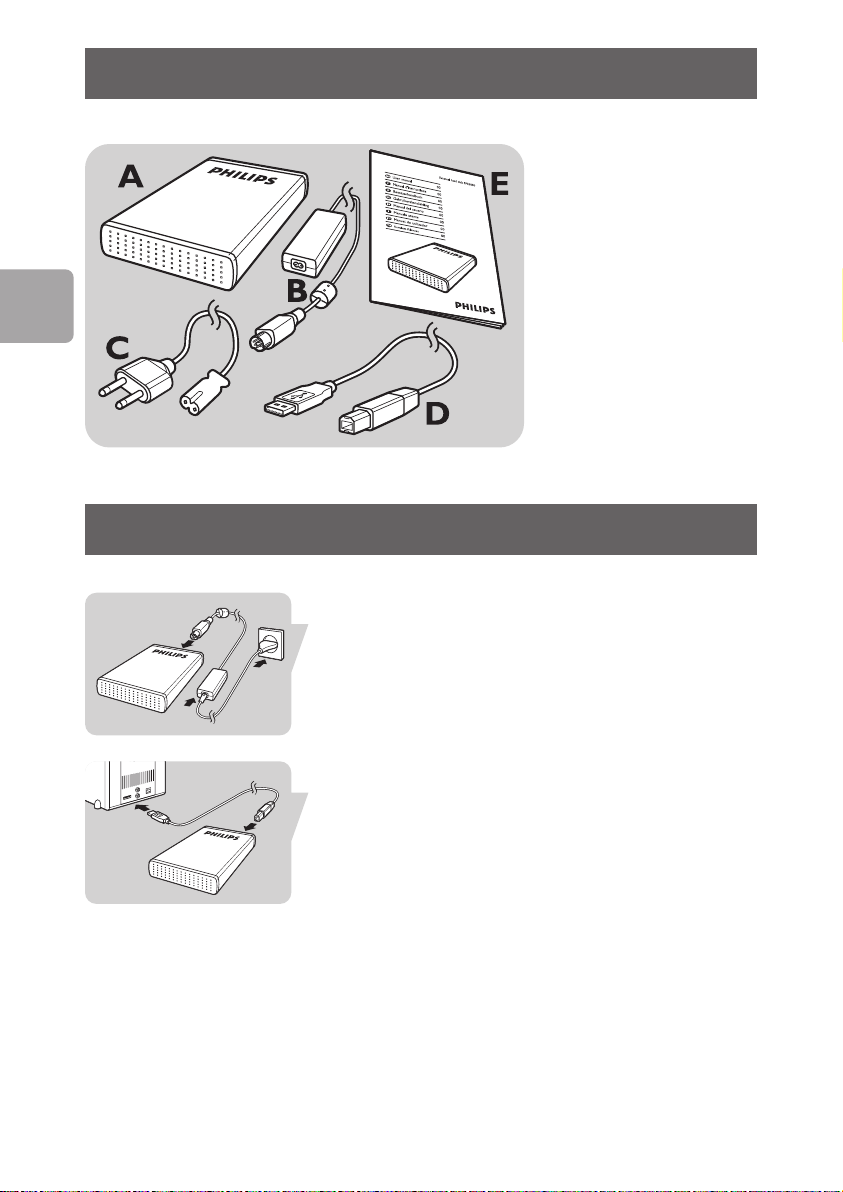
Wat zit er in de doos?
A : Externe harde schijf
B : Stroomadapter
C : Stroomsnoer
D : USB-kabel
E : Handleiding
Hoe sluit ik hem aan?
Verbind de stroomadapter (B) en het stroomsnoer (C)
met elkaar en sluit ze aan op de externe harde schijf en
een stopcontact.
22
Steek de USB-kabel (D) in de USB-poort van uw
externe harde schijf. Sluit het andere uiteinde van de
USB-kabel aan op een lege USB-poort van uw
computer.
Een stationpictogram, Philips External Hard Disk,
verschijnt in Windows Verkenner en het blauwe lampje
zou moeten oplichten.
opnieuw worden gestart om de nieuwe hardware te
gebruiken)
De harde schijf is nu gereed voor gebruik en u kunt
gegevens opslaan en kopiëren, net zoals bij uw interne
harde schijf.
(Soms moet de computer
Page 23
Hoe koppel ik hem los?
1 Dubbelklik op het pictogram Safely Remove
Hardware
taakbalk rechtsonder in het scherm.
2 Selecteer, in het venster dat verschijnt, de naam van
het apparaat dat moet worden verwijderd en klik
vervolgens op
3 Wanneer het scherm Stop a hardware device
(een hardwareapparaat stoppen) verschijnt, moet u
controleren of de juiste informatie wordt gegeven.
Klik vervolgens op
Haal, wanneer de melding Safe to remove
4
hardware
verschijnt, het station uit de USB-poort van de
computer
(hardware veilig verwijderen) in de
Stop.
OK
(hardware kan veilig worden verwijderd)
Installatie
Installatie voor Mac,Windows 98 en
Windows ME?
De harde schijf is vooraf geconfigureerd voor Windows
2000 en Windows XP, met een NTFS-formaat.
Voor Mac,Windows 98 en Windows ME, moet de harde
schijf worden geformatteerd tot FAT32.
NL
23
Page 24
NL
Belangrijke informatie
Waar vind ik informatie over de
garantie?
Zoek op uw externe harde schijf en kijk in de map
‘Philips Warranty’.
Deze bestanden kunt u lezen met Adobe Reader.
Als u dit programma niet hebt, kunt u het gratis
downloaden op www
De garantie van Philips komt te vervallen in geval van
schade als gevolg van ongelukken, schokken, misbruik of
verwaarlozing.
“Het zonder toestemming maken van kopieën van tegen
kopiëren beschermd materiaal, met inbegrip van
computerprogramma’s, bestanden, uitzendingen en
geluidsopnamen, kan een schending van het copyright
inhouden en kan een overtreding zijn. Deze apparatuur
mag niet voor dergelijke doeleinden worden gebruikt.”
.adobe.com.
24
WEEE-markering:“Informatie voor de klant”.
Oude producten opruimen
Uw product is ontworpen en gemaakt met materialen
en componenten van hoge kwaliteit, die kunnen worden
gerecycled en hergebruikt. Laat u informeren over het
plaatselijke systeem voor het gescheiden opruimen van
elektrische en elektronische producten, inclusief
producten die zijn voorzien van het symbool met de
doorgekruiste verrijdbare afvalbak.
ereenstemming met de plaatselijke
Handel in o
voorschriften en gooi de oude producten niet weg bij
het normale huishoudelijke afval.
v
Page 25

WAARSCHUWING
Plastic zakken kunnen gevaarlijk zijn. Om gevaar op
verstikking te voorkomen,moet u deze zak uit de buurt
van baby’s en kleine kinderen bewaren.
Dit systeem is zorgvuldig ontworpen met het oog op
een langdurige prestatie. Philips adviseert u elektronica
met de nodige zorg te behandelen: vermijd contact met
water, blootstelling aan extreme krachten.
Plaats het apparaat in een goed geventileerde omgeving,
zodat hij zo lang mogelijk zo goed mogelijk blijft
presteren.
Specificaties
Capaciteit Afhankelijk van model
Interface Hi-Speed USB 2.0
Overdrachtsnelheid 480 Mb/s
Draaisnelheid 7200 rpm
Cachegeheugen 8 MB
Systeemvereisten USB1.1 (USB 2.0 voor
max. overdrachtsnelheid)
Windows 2000,
Windows XP
NL
Hulp nodig?
Voor interactieve hulp en ondersteuning:
.philips.com/support
www
oor softwar
V
.storageupdates.philips.com
www
e-updates en veel gestelde vragen:
25
Page 26

26
Page 27

Índice
28 ¿Qué trae la caja?
28 ¿Cómo conectarlo?
29 ¿Cómo desconectarlo?
29 Instalación en ordenadores Macintosh
con Windows 98 y Windows ME
30 Información importante
31 ¿Necesita ayuda?
ES
27
Page 28
ES
¿Qué trae la caja?
A : Disco duro externo
B :Adaptador de
corriente
C : Cable de alimentación
D : Cable USB
E : Manual de usuario
¿Cómo conectarlo?
Conecte entre sí el adaptador de alimentación (B) y el
cable de alimentación (C) y conéctelos al disco duro
externo y a la toma de corriente de la red eléctrica.
28
Conecte el cable USB (D) en el puerto USB del disco
duro externo. Conecte el otro extremo del cable USB
en un puerto USB libre de su ordenador.
Aparece el icono de una unidad, Philips External Hard
Disk (disco duro externo de Philips) en el explorador
de Windows y se encenderá el piloto azul. (Para utilizar
vo hardware, a veces el ordenador debe
ue
el n
reiniciarse)
Su disco duro está ahora preparado para ser utilizado,
podrá guardar y copiar datos en él, como lo hace
cuando utiliza el disco duro interno del ordenador.
Page 29
¿Cómo desconectarlo?
1 Haga doble clic en el icono Safely Remove
Hardware
barra de tareas, en la parte inferior derecha de la
pantalla.
2 En la ventana que aparece, seleccione el nombre del
dispositivo a extraer y haga clic en el botón
(Detener).
3 Cuando aparezca la pantalla Stop a hardware
device
asegúrese de que se muestre la información
correcta y haga clic en el botón
4 Cuando aparezca el mensaje Safe to remove
hardware
unidad del puerto USB del ordenador.
(Quitar hardware con seguridad) en la
Stop
(Detener un dispositivo de hardware),
OK (Aceptar).
(Es seguro retirar el hardware), quite la
Instalación
Instalación en ordenadores Macintosh
con Windows 98 y Windows ME
El disco duro está preconfigurado para Windows 2000 y
Windows XP, con formato NTFS.
En el caso de Macintosh,Windows 98 y Windows ME,
el disco duro debe ser formateado en FAT32.
ES
29
Page 30
ES
Información importante
Dónde encontrar información sobre
garantía
Busque en el disco duro externo y vaya a la carpeta
‘Philips Warranty’ (Información de garantía).
Necesitará el software Adobe Reader para abrir estos
archivos. Si no dispone de Adobe Reader, puede
descargarlo gratuitamente de www
La garantía Philips no se aplicará si el daño se debe a un
accidente, golpe, mal uso o negligencia.
“La creación de copias no autorizadas de material
protegido contra copias de programas informáticos,
archivos, material de radiodifusión y grabaciones
acústicas, podría violar los derechos de copyright y
constituir un delito. Este equipo no debe ser utilizado
con dicha finalidad”.
Marca WEEE:“Información al consumidor”.
.adobe.com.
30
Eliminación del producto antiguo
Este producto ha sido diseñado y fabricado con
materiales y componentes de alta calidad, que pueden
ser reciclados y reutilizados. Por favor infórmese acerca
del sistema de recolección independiente local de
productos eléctricos y electrónicos, incluidos aquellos
marcados con el símbolo del carrito contenedor
tachado.
Por favor actúe de acuerdo a las leyes locales y no
deseche los pr
domésticos.
ADVERTENCIA
Las bolsas de plástico pueden ser peligrosas
Para evitar peligro de asfixia, mantenga esta bolsa fuera
del alcance de los bebes o niños pequeños.
oductos viejos con los desper
dicios
Page 31

Aunque este producto ha sido diseñado con el máximo
cuidado para proporcionar un rendimiento duradero.
Philips le recomienda manipular los componentes
electrónicos con mucho cuidado: Evite el contacto con
el agua, así como someterlo a fuerzas extremas.
Por favor asegúrese de colocar el equipo en un lugar
bien ventilado, para asegurar una vida útil duradera y un
rendimiento óptimo.
Especificaciones
Capacidad Dependiendo del modelo
Interfaz USB 2.0 de alta velocidad
Velocidad de transferencia 480 Mb/s
Velocidad de giro 7200 rpm
Memoria caché 8 MB
Requisitos del sistema USB1.1 (USB 2.0 para una
velocidad de transferencia
máx.)
Windows 2000,
Windows XP
ES
¿Necesita ayuda?
Para obtener ayuda y soporte interactivo:
.philips.com/support
www
Para actualizar el software y preguntas frecuentes:
.storageupdates.philips.com
www
31
Page 32

32
Page 33

Indice
34 Fornitura
34 Guida al collegamento
35 Guida allo scollegamento
35 Guida all’installazione per Mac,
Windows 98 e Windows ME
36 Informazioni importanti
37 Assistenza
I
33
Page 34
Fornitura
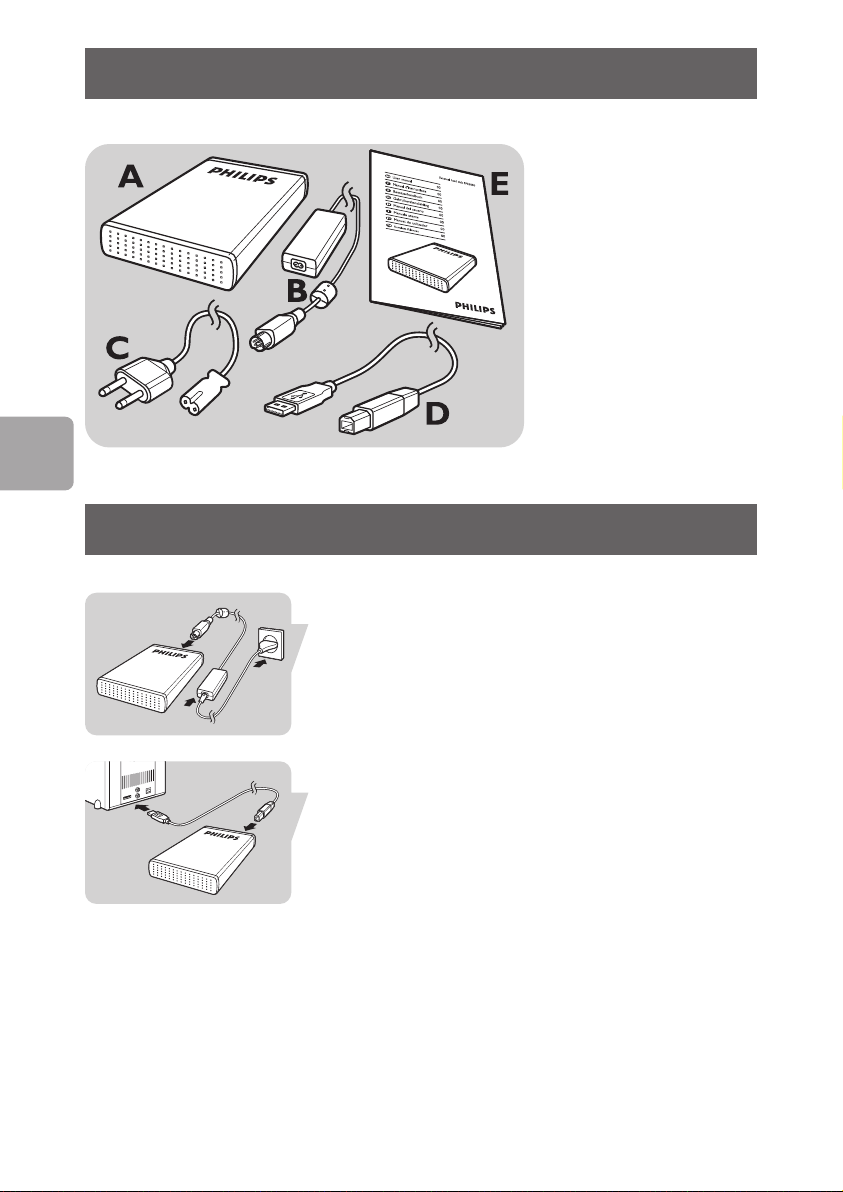
A : Disco rigido esterno
B :Adattatore di
alimentazione
C : Cavo di alimentazione
D : Cavo USB
E : Manuale dell’utente
I
Guida al collegamento
Collegare insieme adattatore di alimentazione (B) e cavo
di alimentazione (C); collegarli al disco rigido esterno e
ad una presa di alimentazione.
34
Inserire il cavo USB (D) nella porta USB del disco rigido
esterno. Connettere l’altro lato del cavo USB a una
porta USB libera del computer.
Un’icona periferica, Disco Rigido Esterno Philips,
compare in Windows Explorer e la spia blu deve essere
accesa. (Per utilizzare il nuovo hardware, il computer
ve essere riavviato)
olta de
talv
Ora il disco rigido è pronto all’uso ed è possibile salvare
e copiarvi i dati, nello stesso modo utilizzato per il disco
rigido interno.
Page 35
Guida allo scollegamento
1 Fare doppio clic sull’icona Safely Remove
Hardware
barra delle attività, nella parte inferiore destra dello
schermo.
2 Nella finestra che compare, selezionare il nome del
dispositivo che deve essere rimosso, quindi fare clic
sul pulsante
3 Quando compare la schermata Stop a hardware
device
che siano visualizzate le informazioni corrette e
quindi fare clic sul pulsante
Quando compare il messaggio Safe to remove
4
hardware
problemi), rimuovere l'unità dalla porta USB del
computer
(Rimozione sicura dell’hardware) nella
Stop (Disattiva).
(Disattivazione di una periferica), accertarsi
OK
(È possibile rimuovere l’hardware senza
Guida all’installazione
I
Guida all’installazione per Mac,
Windows 98 e Windows ME
Il disco rigido è preconfigurato per Windows 2000 e
Windows XP, con un formato NTFS.
Per Mac,Windows 98 e Windows ME, il disco rigido
deve essere formattato in FAT32.
35
Page 36
Informazioni importanti
Come trovare le informazioni sulla
garanzia
Guardare nel disco rigido esterno e sfogliare fino alla
cartella ‘Philips Warranty’ (Informazioni di garanzia).
Per aprire questi file è necessario il software Adobe
Reader. Se non fosse disponibile, è possibile scaricarlo
gratuitamente all’indirizzo www
La garanzia Philips può non applicarsi se vengono causati
danni dovuti a incidenti, colpi, uso non corretto o
negligenza.
.adobe.com.
I
“La produzione di copie non autorizzate di materiale
protetto dalla copia, compresi programmi per computer,
file, registrazioni di trasmissioni e audio può costituire
una violazione dei diritti di copyright e costituire un
atto criminale. Questo apparecchio non deve essere
utilizzato a tali scopi.”
36
Contrassegno WEEE:“Informazioni al
Consumatore”.
Smaltimento del vecchio prodotto
Il prodotto in dotazione è studiato e progettato con
materiali e componenti di elevata qualità che possono
essere riciclati e riutilizzati. La preghiamo di informarsi
sul sistema di raccolta differenziata in vigore localmente
per i prodotti elettrici ed elettronici, compresi quelli
contrassegnati con il simbolo del bidone con ruote
.
ociato
cr
La preghiamo di attenersi alle norme locali e di non
smaltire i vecchi prodotti insieme ai normali rifiuti
domestici.
Page 37

AVVERTENZA
I sacchetti di plastica possono essere pericolosi
Per evitare pericoli di soffocamento, tenere questo
sacchetto lontano dalla portata di neonati e bambini
piccoli.
Sebbene questo prodotto sia stato studiato con la
massima cura per assicurare una lunga durata, Philips
raccomanda di maneggiare gli apparecchi elettronici con
estrema cura: evitare il contatto con l’acqua e
l’esposizione a forze estreme.
Accertarsi di posizionare la periferica in un ambiente
ben ventilato, per garantire la vita utile più lunga
possibile e prestazioni ottimali.
Specifiche
Capacità Come da modello
Interfaccia USB 2.0 ad alta velocità
Velocità di trasmissione 480 Mb/s
Velocità di rotazione 7200 g/m
Memoria cache 8 MB
Requisiti di sistema USB1.1 (USB 2.0 per la
max. velocità di
trasmissione)
Windows 2000,
Windows XP
Assistenza
Per l’assistenza e il supporto interattivo:
www.philips.com/support
Per gli aggiornamenti software e le domande frequenti:
.storageupdates.philips.com
www
I
37
Page 38

38
Page 39

Índice
40 O que há na caixa?
40 Como conectar?
41 Como desconectar?
41 Instalação para Mac,Windows 98 e
Windows ME?
42 Informações importantes
43 Precisa de ajuda?
PT
39
Page 40
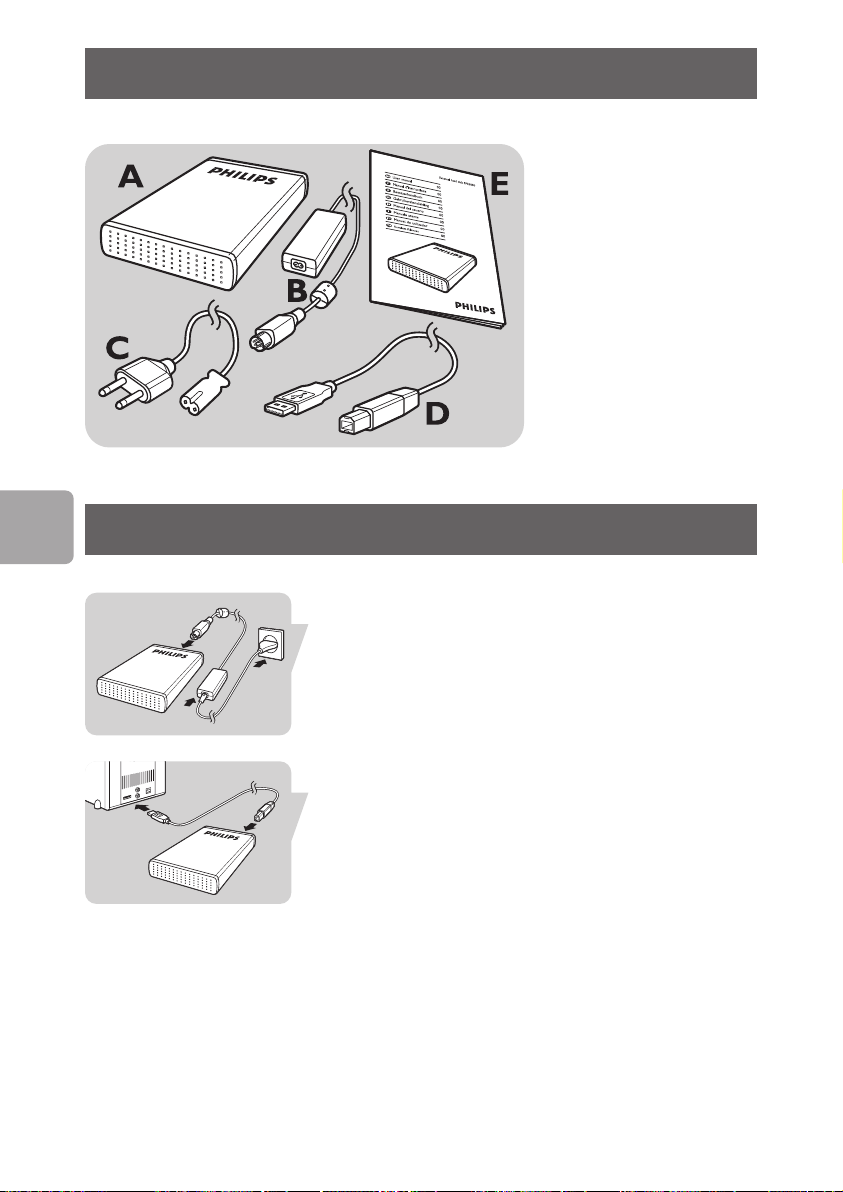
O que há na caixa?
A : Disco rígido externo
B :Adaptador de
alimentação
C : Cabo de alimentação
D : Cabo USB
E : Manual do usuário
PT
Como conectar?
Coloque o adaptador de alimentação (B) e o cabo de
alimentação (C) juntos e conecte-os ao disco rígido
externo e a uma tomada elétrica.
Conecte o cabo USB (D) na porta USB de seu disco
rígido externo. Conecte o outro lado do cabo USB a
uma porta USB vazia de seu computador.
O ícone de uma unidade, disco rígido externo Philips,
aparecerá no Windows Explorer e a luz azul deverá
acender. (Para usar o novo hardware, às vezes é
necessário r
Agora seu disco rígido estará pronto para ser usado e
você poderá salvar e copiar dados no, da mesma forma
que o faz ao usar seu disco rígido interno.
einiciar o computador)
40
Page 41
Como desconectar?
1 Clique duas vezes no ícone Remover hardware
com segurança
inferior direita da tela.
2 Na janela que aparecerá, selecione o nome do
dispositivo que deve ser removido e, depois, clique
no botão
3 Quando aparecer a tela Parar um dispositivo de
hardware
informações corretas e, depois, clique no botão
4 Quando aparecer a mensagem É seguro remover
o hardware
computador.
Parar.
na barra de tarefas na parte
, certifique-se de que sejam exibidas as
Ok.
, remova a unidade da porta USB do
Instalação
Instalação para Mac,Windows 98 e
Windows ME?
O disco rígido está pré-configurado para o Windows
2000 e Windows XP, com um formato NTFS.
Para Mac,Windows 98 e Windows ME, o disco rígido
precisa ser formatado para FAT32.
PT
41
Page 42
PT
Informações importantes
Como encontrar informações sobre
garantia?
Olhe seu disco rígido externo e navegue até a pasta
“Philips Warranty” (Informações sobre garantia).
Você precisará do software Adobe Reader para abrir
esses arquivos. Se você não tiver o Adobe Reader,
poderá baixá-lo gratuitamente em www
A garantia da Philips pode não se aplicar se ocorrerem
danos causados por acidentes, choques, má utilização ou
negligência.
“A realização de cópias desautorizadas de material
protegido contra cópia, incluindo programas de
computador, arquivos, transmissões e gravações sonoras,
podem ser uma violação de direitos autorais e
constituem um crime. Este equipamento não deve ser
utilizado com essa finalidade.”
.adobe.com.
42
Marca WEEE:“Informações para o consumidor”.
Descarte de seu produto antigo
Seu produto foi projetado e fabricado com materiais e
componentes de alta qualidade, que podem ser
reciclados e reutilizados. Informe-se sobre seu sistema
local de coleta separada para produtos elétricos e
eletrônicos, incluindo aqueles marcados pelo símbolo de
uma cesta de lixo sobre rodas riscada.
Aja de acordo com suas regras locais e não descarte
odutos antig
seus pr
coleta domiciliar normal.
ALERTA
Sacos plásticos podem ser perigosos.
Para evitar o perigo de sufocamento, mantenha este
saco longe de bebês e crianças pequenas.
os juntamente com seu sistema de
Page 43

Embora este produto tenha sido projetado com o
máximo cuidado para um desempenho de longa
duração, a Philips aconselha que os produtos eletrônicos
sejam tratados com o devido cuidado: evite o contato
com a água e a exposição a forças extremas.
Certifique-se de colocar o aparelho em um ambiente
com boa ventilação, para assegurar a máxima vida útil
possível e um desempenho ideal.
Especificações
Capacidade Depende do modelo
T1 USB 2.0 Hi-Speed
Velocidade de transferência 480 MB/s
Velocidade de rotação 7200 rpm
Memória cache 8 MB
Requisitos do sistema USB1.1 (USB 2.0 para
a velocidade máx.
de transferência)
Windows 2000,
Windows XP
Precisa de
PT
ajuda?
Para obter ajuda e suporte interativos:
.philips.com/support
www
Para obter atualizações de software e perguntas mais
freqüentes: www
.storageupdates.philips.com
43
Page 44

44
Page 45

İçindekiler
46 Kutunun içindekiler nelerdir?
46 Bağlantı nasıl yapılır?
47 Bağlantı nasıl yapılır?
47 Mac,Windows 98 ve Windows ME için
kurulum?
48 Önemli bilgi
49 Yardım?
TR
45
Page 46
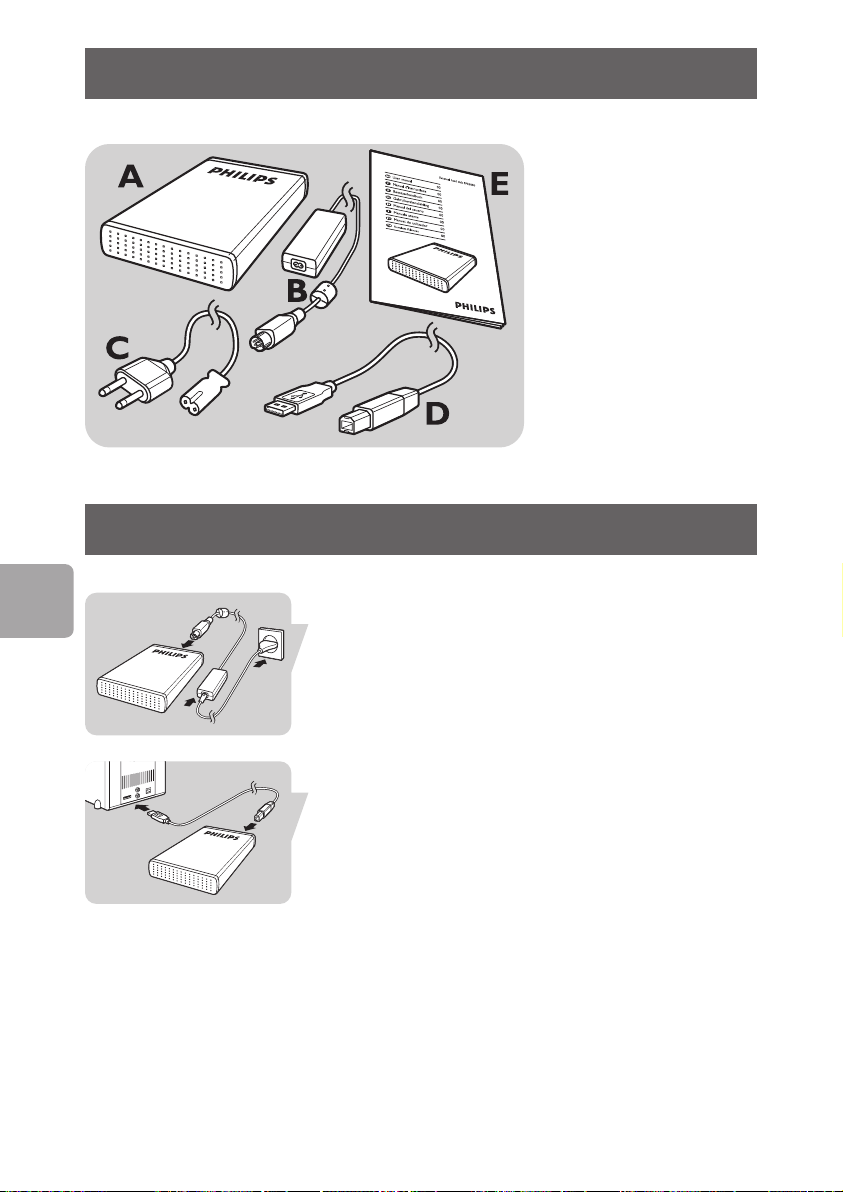
Kutunun içindekiler nelerdir?
A : Harici hard disk
B : Güç adaptörü
C : Güç kordonu
D : USB kablosu
E : Kullanıcı kitapçığı
Bağlantı nasıl yapılır?
TR
46
Güç adaptörünü (B) Güç kordonu (C) ile birlikte takın
ve bunların harici hard disk ve güç çıktısına
bağlantılarını yapın.
Harici hard diskinizin USB portundaki USB kablosunun
(D) fişini takın. USB kablonuzun diğer kenarının,
bilgisayarınızın boş USB portuna bağlantısını yapın.
Bir ikon ile,Windows Explorer’da Philips External Hard
Disk ifadesi görünecektir ve mavi ışık yanacaktır. (Yeni
donanımı kullanmak için bilgisayarın bazı durumlarda
eniden başlatılması ger
y
Hard diskiniz şu anda kullanılmaya hazır ve şimdi ona,
dahili hard diskinizi kullandığınız durumlarda da
verilerinizi kaydedebilir ve kopyalayabilirsiniz.
ekebilir.
Page 47
Bağlantı nasıl yapılır?
1 Ekranın alt sağ kısmındaki görev çubuğunda bulunan
Safely Remove Hardware (Güvenli Donanım
Kaldırma) ikonuna çift tıklayın.
2 Pencerede görünen, kaldırılacak olan aygıtın ismini
seçin ifadesi ile,
3 Stop a hardware device (bir donanım aygıtını
durdurun) ifadesi ekranda göründüğünde, doğru
bilginin gösterilmekte olduğuna emin olun ve
butonuna basın.
4 Safe to remove hardware mesajı göründüğünde,
bilgisayarın USB portundan sürümü kaldırın.
Stop butonuna basın.
OK
Kurulum için
Mac,Windows 98 ve Windows ME için
kurulum?
Hard diskin,Windows 2000 ve Windows XP için bir
NTFS formatı ile. Mac,Windows 98 ve Windows ME için
ön konfigürasyonu yapılmış olup, hard disk FAT32 için
format edilme gereksinimi bulunmaktadır.
TR
47
Page 48
Önemli bilgi
Garanti bilgisi nasıl bulunur?
Harici hard diskinize bakın ve ‘Philips Warranty’ (Garanti
Bilgisi) dosyasına göz atın.
Dosyaları açmak için, Adobe Reader yazılımına
ihtiyacınız bulunmaktadır. Adobe Reader yazılımınız
yoksa, ücretsiz olarak www
indirebilirsiniz.
Philips garantisi, şayet kaza, şok, yanlış kullanım ve ihmal
sebebiyle bir zarar söz konusu ise uygulanmayacaktır.
“Bilgisayar programları, dosyaları, yayım ve ses kayıtlarını
içeren kopya engellemeli materyalin yetkisiz şekilde
kopyalanması, bir telif hakları ihlali oluşturabileceği gibi,
ceza gerektiren bir suç meydana getirebilir. Bu ekipman,
bu şekildeki amaçlar için kullanılamaz.”
.adobe.com adresinden
TR
48
DÖNÜfiÜM sembolü:“Tüketicinin Bilgisine”.
Eski ürününüzün bertaraf edilmesi
Ürününüz, geri dönüşümü olan ve yeniden
kullanılabilecek yüksek kalite materyaller ve bileşenler
ile dizayn edilerek üretilmiştir. Çarpı atılmış dönüşüm
kutusu sembolü işaretli olanlar dahil, elektrikli ve
elektronik ürünler için yerel ayırma - toplama sistemi
hakkında bilgi sahibi olunuz.
Yerel kurallara uygun olarak hareket ediniz ve eski
ürünlerinizi, normal ev atıklarınız ile bertaraf etmeyiniz.
DİKKA
Plastik poşetler tehlike arz etmektedir.
Boğulma tehlikesinden kaçınmak üzere, bu türlü
poşetleri, bebeklerden ve küçük çocuklardan uzak tutun.
T
Page 49

Aynı zamanda bu ürün, uzun süre sağlam kalma
performansı açısından, büyük bir gayret ile dizayn
edilmiştir. Philips, elektronik aygıtların dikkat edilerek de
olsa ellenmesini tavsiye etmez: Su ile temastan ve
gereğinden fazla güce maruz kalmasından kaçının.
Aygıtın, mümkün olan en uzun süre kullanılabilmesi ve
optimal performansta çalışabilmesinin garanti edilmesi
açısından iyi havalandırılan alanlarda yerleştirilmiş
olduğundan emin olun.
Özellikler
Kapasite Modele bağlı
Ara yüz Hi-Speed USB 2.0
Transfer hızı 480 Mb/s
Rasyonel hız 7200 rpm
Önbellek 8 MB
Sistem gereksinimleri USB1.1 (maksimum
transfer hızı için USB 2.0)
Windows 2000,
Windows XP
TR
Yardım?
İnteraktif yardım ve destek için:
.philips.com/support
www
Yazılım güncellemeleri ve sıkça sorulan sorular:
.storageupdates.philips.com
www
49
Page 50
Notes
50
Page 51
Notes
51
Page 52

Specifications subject to change without notice.
All dimensions shown are approximate.
© 2006 Koninklijke Philips Electronics N.V.
ed.
v
eser
Public performance, transmission and/or broadcasting in whole or part is prohibited without the written consent of Philips Electronics N.V.
Reproduction, copying, usage, modifying, hiring,renting,
All rights r
 Loading...