

Page 1
Sonicare
EssentialClean
Page 2
1
Page 3

Sonicare EssentialClean
ENGLISH 4
Page 4

4
Introduction
Congratulations on your purchase and welcome to
Philips! To fully benet from the support that Philips
offers, register your product at www.philips.com/
welcome.
IMPORTANT
SAFEGUARDS
READ ALL INSTRUCTIONS BEFORE USE
DANGERS
To reduce the risk of electrocution:
1 Always place and store the charger at a safe
distance from water.
2 Do not reach for a charger that has fallen into
water. Unplug immediately.
3 Never use a charger with a damaged cord or plug.
WARNINGS
To reduce the risk of burns, electrocution, re or
physical injury:
1 Do not use attachments other than those
recommended by the manufacturer.
2 Never force the plug into an outlet; if the plug
does not easily t into the outlet, discontinue use.
3 Discontinue use if the product appears damaged
in any way (brush head, handle or charger).
4 The mains cord cannot be replaced. If the mains
cord is damaged, discard the charger.
5 Keep the cord away from heated surfaces.
6 Do not use the charger outdoors.
ENGLISH
Page 5

7 This product contains no user-serviceable parts.
Refer to ‘Warranty and support’ if the product
no longer works properly or needs repair.
8 Use this product only for its intended use as
described in this document or as recommended
by your dental professional.
9 This product is not intended for use by persons
(including children) with reduced physical, sensory,
or mental capabilities, or lack of experience and
knowledge, unless they have been given supervision
or instruction concerning use of the appliance by
a person responsible for their safety.
10 Children should be supervised to ensure
that they do not play with the product.
11 Sonicare is a personal care device and is not
intended for use on multiple patients in a dental
ofce or institution.
MEDICAL WARNINGS
1 Consult your dental professional before you use
this product if you have had oral or gum surgery
in the previous 2 months.
2 Contact your dental professional if excessive
bleeding occurs after using this product or
bleeding continues to occur after 1 week of use.
3 Discontinue use of this product and contact
a physician/dentist if discomfort or pain is
experienced.
4 This product complies with the safety standards for
electromagnetic devices. If you have a pacemaker
or other implanted device, contact your physician
or the device manufacturer prior to use.
5 Consult your physician if you have other medical
concerns.
ENGLISH 5
Page 6
Electromagnetic elds (EMF)
This Philips product complies with all applicable
standards and regulations regarding exposure to
electromagnetic elds.
SAVE THESE
INSTRUCTIONS
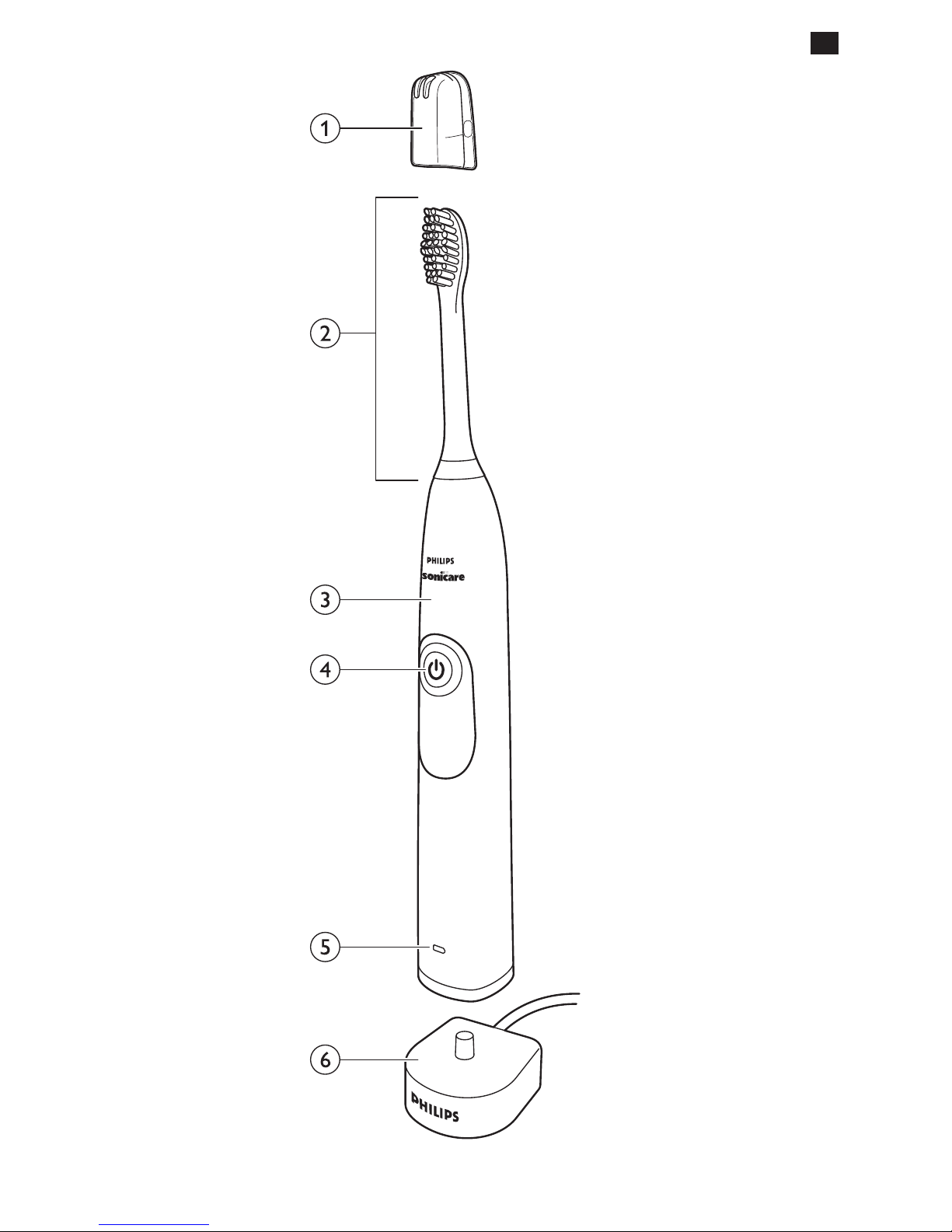
Your Sonicare (Fig. 1)
1 Hygienic travel cap
2 Brushheadwithuniqueidentier
3 Handle
4 Power on/off & mode button
5 Battery level indicator
6 Charger
Getting started
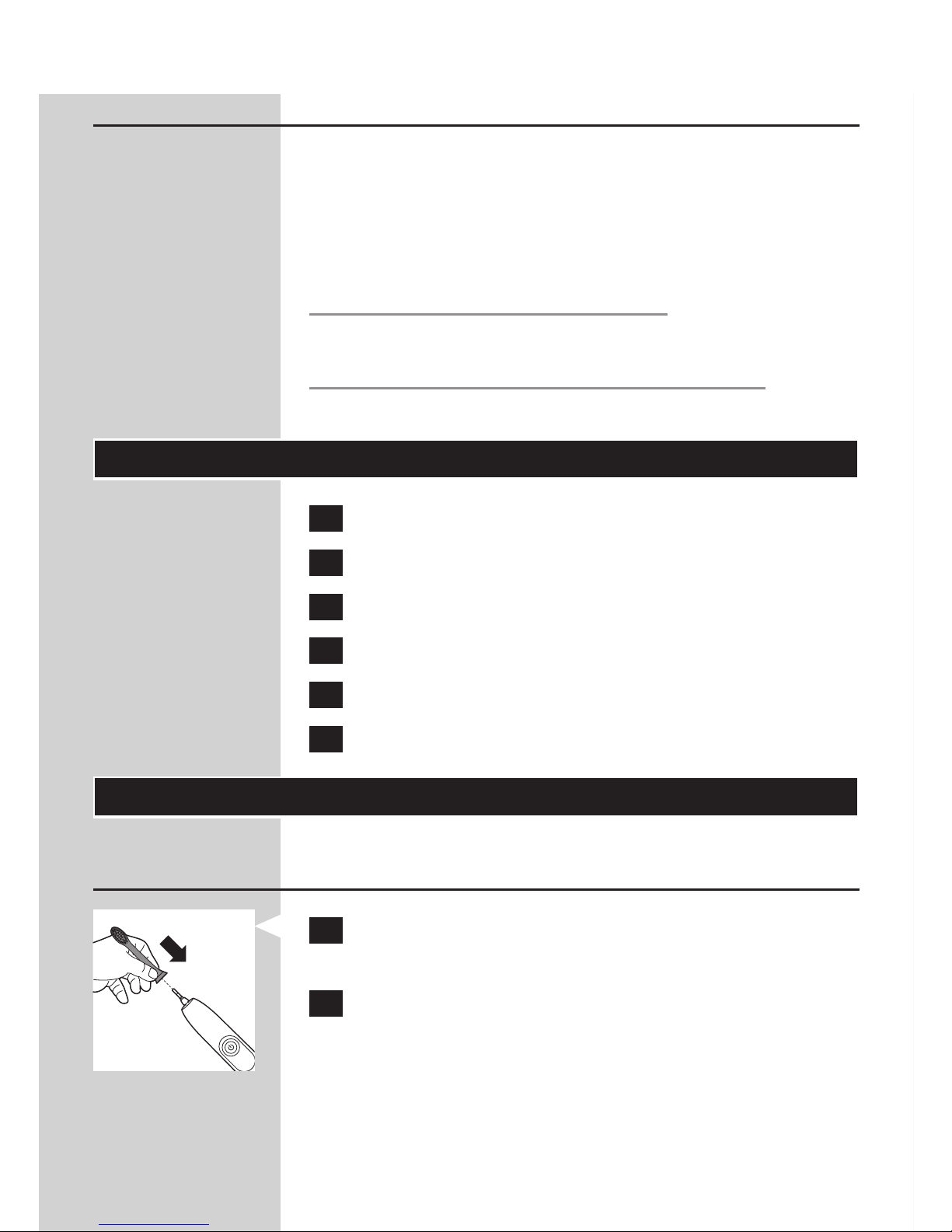
Attaching the brush head
1 Align the brush head so the bristles face the
front of the handle.
2 Firmly press the brush head down on the metal
shaft until it stops.
Note: Sonicare brush heads come with easily
identiable icons to identify your brush head.
ENGLISH6
Page 7
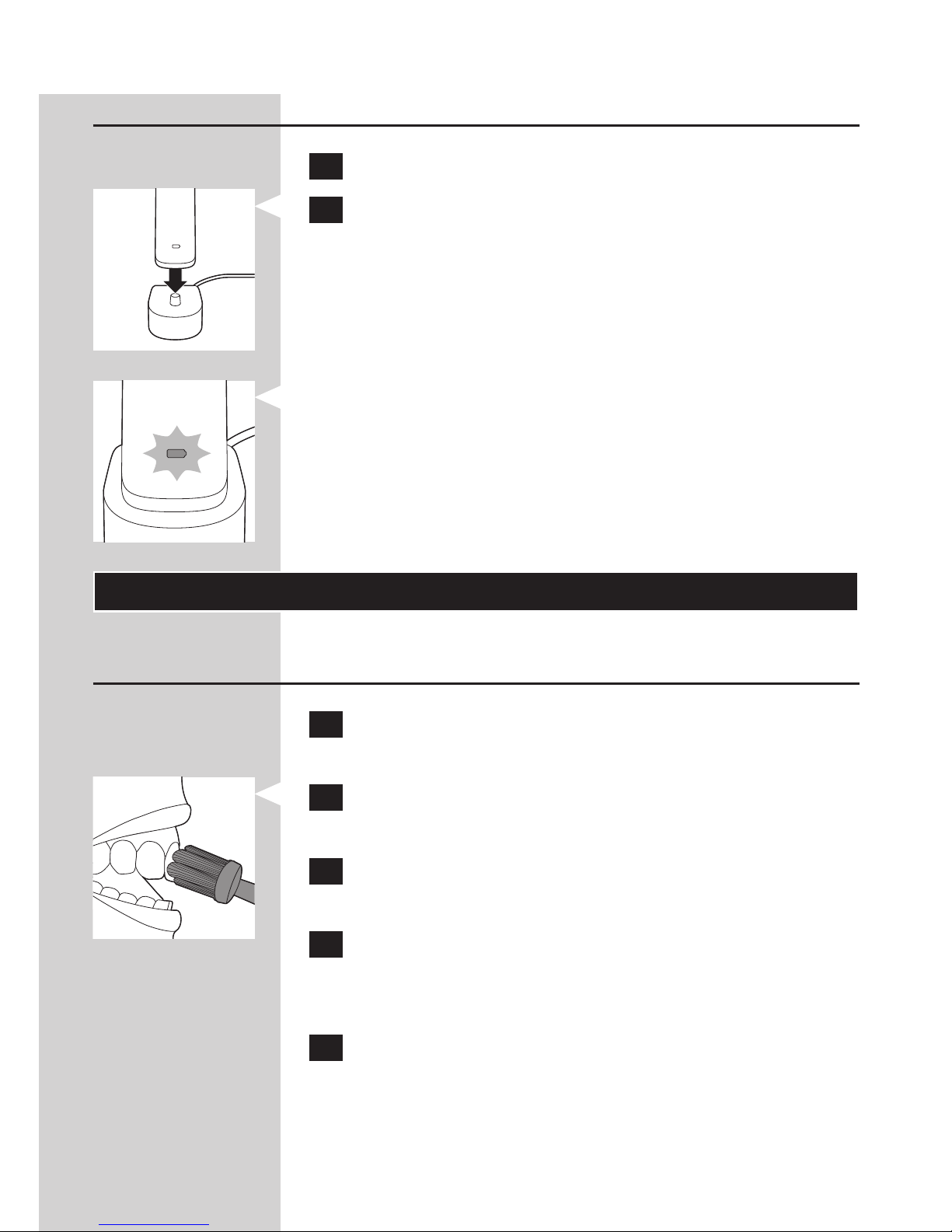
Charging your Sonicare
1 Plug the charger into a live electrical outlet.
2 Place the handle on the charger.
- The battery level indicator ashes to indicate that
the toothbrush is charging.
Note: It can take up to 48 hours to fully charge the battery,
but the Sonicare may be used before it is fully charged.
Using your Sonicare
Brushing instructions
1 Wet the bristles and apply a small amount of
toothpaste.
2 Place the toothbrush bristles against the teeth
at a slight angle towards the gumline.
3 Press the power on/off & mode button to turn
on the Sonicare.
4 Apply light pressure to maximize Sonicare’s
effectiveness and let the Sonicare toothbrush
do the brushing for you. Do not scrub.
5 Gently move the brush head slowly across the
teeth in a small back and forth motion so the
longer bristles reach between the teeth. Continue
this motion throughout the brushing cycle.
ENGLISH 7
Page 8
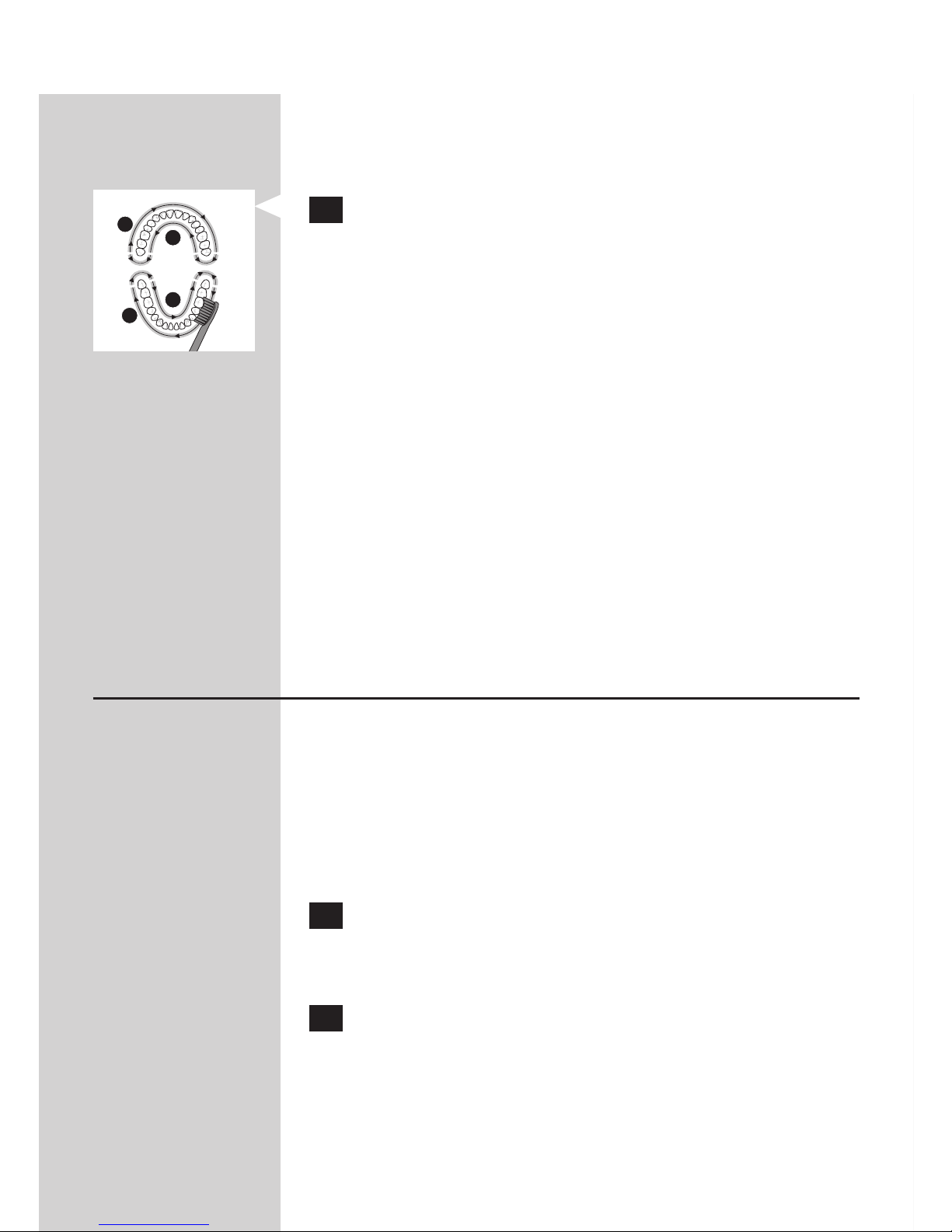
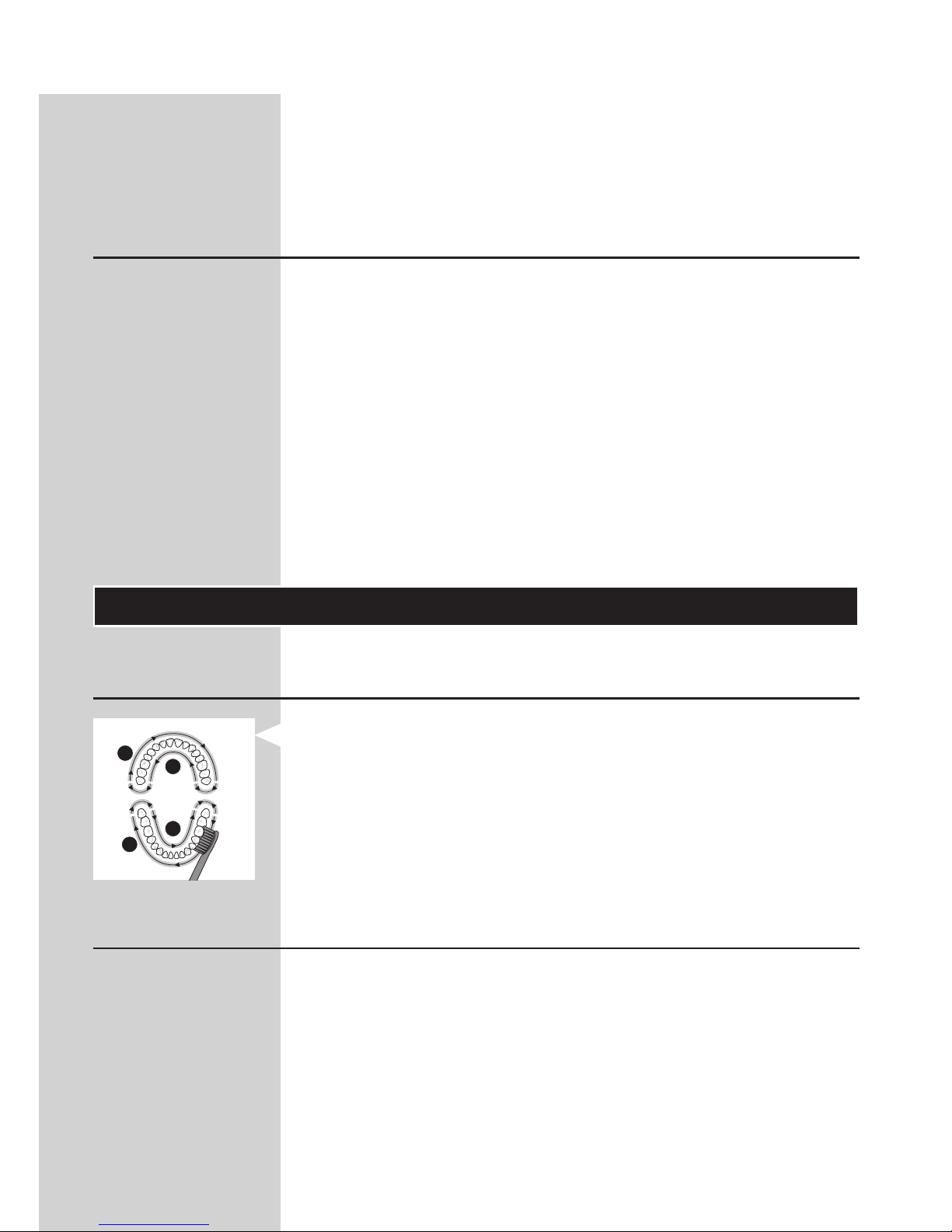
Note: This model is equipped with the Quadpacer feature.
This feature prompts you to brush all 4 quadrants of the
mouth (see chapter ‘Features’).
6 Begin brushing in section 1 (outside top teeth)
and brush for 30 seconds before moving to
section 2 (inside top teeth). Continue brushing
in section 3 (outside bottom teeth) and brush
for 30 seconds before moving to section
4 (inside bottom teeth).
Note: After you have completed the brushing cycle,
you can spend additional time brushing the chewing
surfaces of your teeth and areas where staining occurs.
You may also brush your tongue, with the toothbrush
turned on or off, as you prefer.
Your Sonicare is safe to use on:
- Braces (brush heads may wear out more quickly
when used on braces)
- Dental restorations (llings, crowns, veneers, implants)
Brushing modes (Select models)
Clean mode
Standard mode for superior teeth cleaning
(default mode).
Massage mode
Mode for gentle gum stimulation.
1 Press the power on/off & mode button to turn
on your Sonicare. Sonicare automatically starts
in the default Clean mode.
2 Press the power on/off & mode button again
to switch to Massage mode.
Note: When you press the power on/off & mode
button another time, the toothbrush turns off.
1
2
4
3
ENGLISH8
Page 9
Note: When Sonicare is used in clinical studies, the
default 2-minute Clean mode must be selected. The
handle should be fully charged and the Easy-start
feature deactivated.
Battery status (when handle is not on charger)
- A yellow battery level indicator indicates a low charge.
- A green battery level indicator indicates a high charge.
- The battery level indicator turns off when the
battery is in between a low and a high charge.
Note: When you hear 3 beeps and the battery level
indicator ashes yellow, this means the battery charge
is below 10% and the battery should be recharged.
Note: To keep the battery fully charged at all times, you
may keep your Sonicare on the charger when not in use.
Features
Quadpacer
- The Quadpacer is an interval timer. It has a short
beep and pause that remind you to switch to the
next section of your mouth.
Smartimer
The Smartimer indicates that your brushing cycle
is complete when it automatically turns off the
toothbrush at the end of the brushing cycle.
Dental professionals recommend brushing at least
2 minutes twice a day.
1
2
4
3
ENGLISH 9
Page 10

Note: If you press the power on/off & mode button
after you started the brushing cycle, the toothbrush will
pause. After a pause of 30 seconds, the Smartimer resets.
Easy-start
The Easy-start feature gently increases power over the
rst 14 brushings to ease into the Sonicare experience.
Note: This Sonicare model comes with the
Easy-start feature deactivated.
To activate the Easy-start feature:
1 Attach your brush head to the handle.
2 Place the handle in the plugged-in charger.
3 Press and hold the power on/off & mode
button for 2 seconds. Your Sonicare beeps
twiceandthebatterylevelindicatorashes
green to indicate that the Easy-start feature
has been activated.
To deactivate Easy-start: Press and hold the power on/
off & mode button for 2 seconds. You hear 1 beep and
the battery level indicator ashes yellow to indicate
that the Easy-start feature has been deactivated.
Note: Each of the rst 14 brushings must be at least
1 minute in length to properly move through the
Easy-start ramp-up cycle.
Note: Using the Easy-start feature beyond the initial
ramp-up period is not recommended and reduces
Sonicare’s effectiveness in removing plaque.
ENGLISH10
Page 11
Cleaning
DO NOT clean the brush head, handle
or charger in dishwasher.
Toothbrush handle
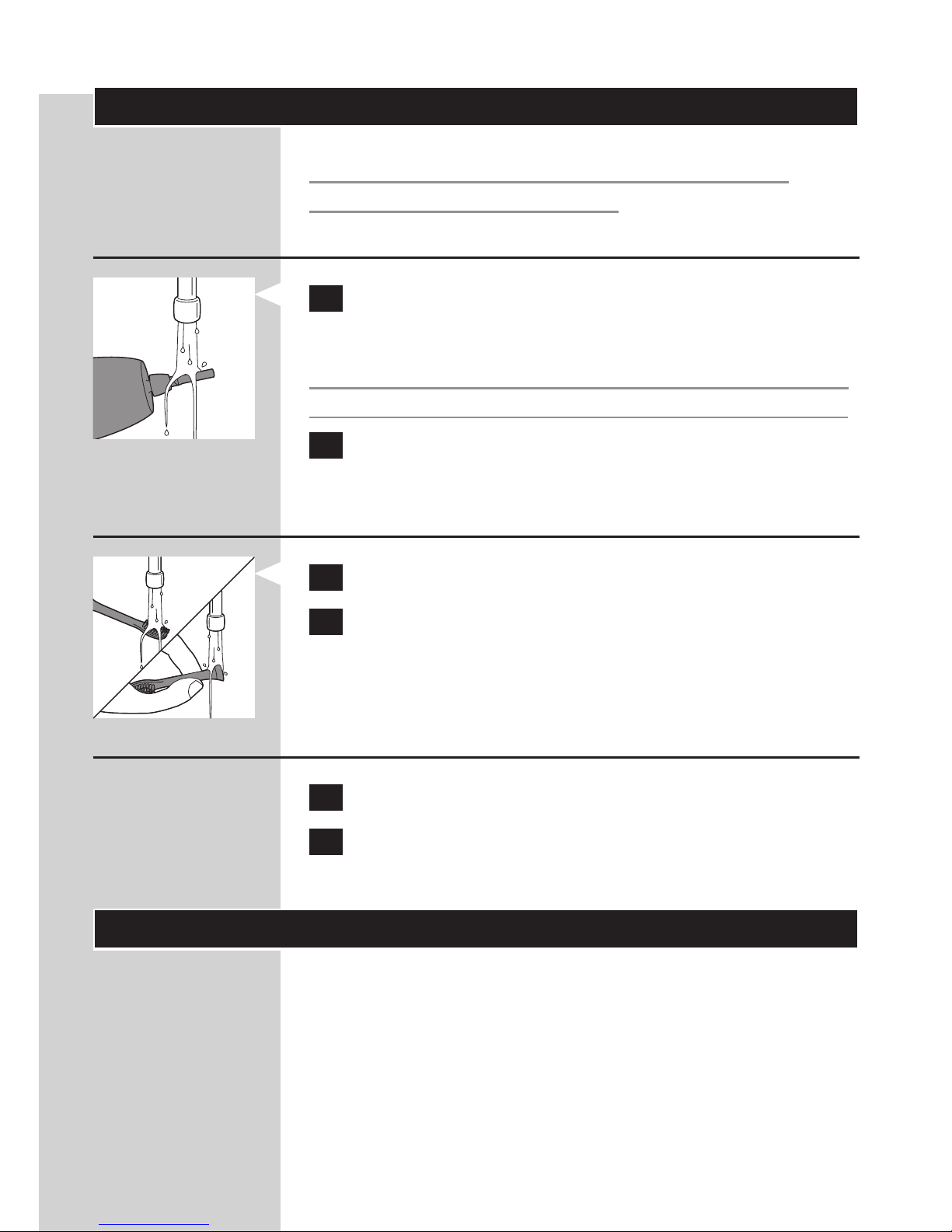
1 Remove the brush head and rinse the metal
shaft area with warm water.
Do not push on the rubber seal around the metal
shaft with sharp objects, as this may cause damage.
2 Use a damp cloth to wipe the entire surface of
the handle.
Brush head
1 Rinse the brush head and bristles after each use.
2 Remove the brush head from the handle and
rinse the brush head connection at least once
a week with warm water.
Charger
1 Unplug the charger.
2 Use a damp cloth to wipe the surface of
the charger.
Storage
If you are not going to use the product for an
extended period of time, unplug it from the
electrical outlet, clean it and store it in a cool
and dry place away from direct sunlight.
ENGLISH 11
Page 12

Replacement
Brush head
- Replace Sonicare brush heads every 3 months
to achieve optimal results.
- Use only genuine Philips Sonicare replacement
brush heads that are suitable for this model.
Disposal
- This appliance contains a rechargeable battery
which must be disposed of properly.
- Contact your local town or city ofcials for
battery disposal information. You can also call
1-800-8-BATTERY or visit www.rbrc.com
for battery drop-off locations.
- For assistance, visit our website www.philips.com/
support or call 1-800-243-3050 toll free.
Removing the rechargeable battery
This process is not reversible.
Only remove the rechargeable battery
when you discard the appliance. Make sure
the battery is completely empty when you
remove it.
To remove the rechargeable battery, you need a small
standard screwdriver and tape. Observe basic safety
precautions when you follow the procedure below.
1 To deplete the rechargeable battery of any
charge, remove the handle from the charger,
turn on the Sonicare and let it operate until it
stops. Repeat this step until you can no longer
turn on the Sonicare.
ENGLISH12
Page 13
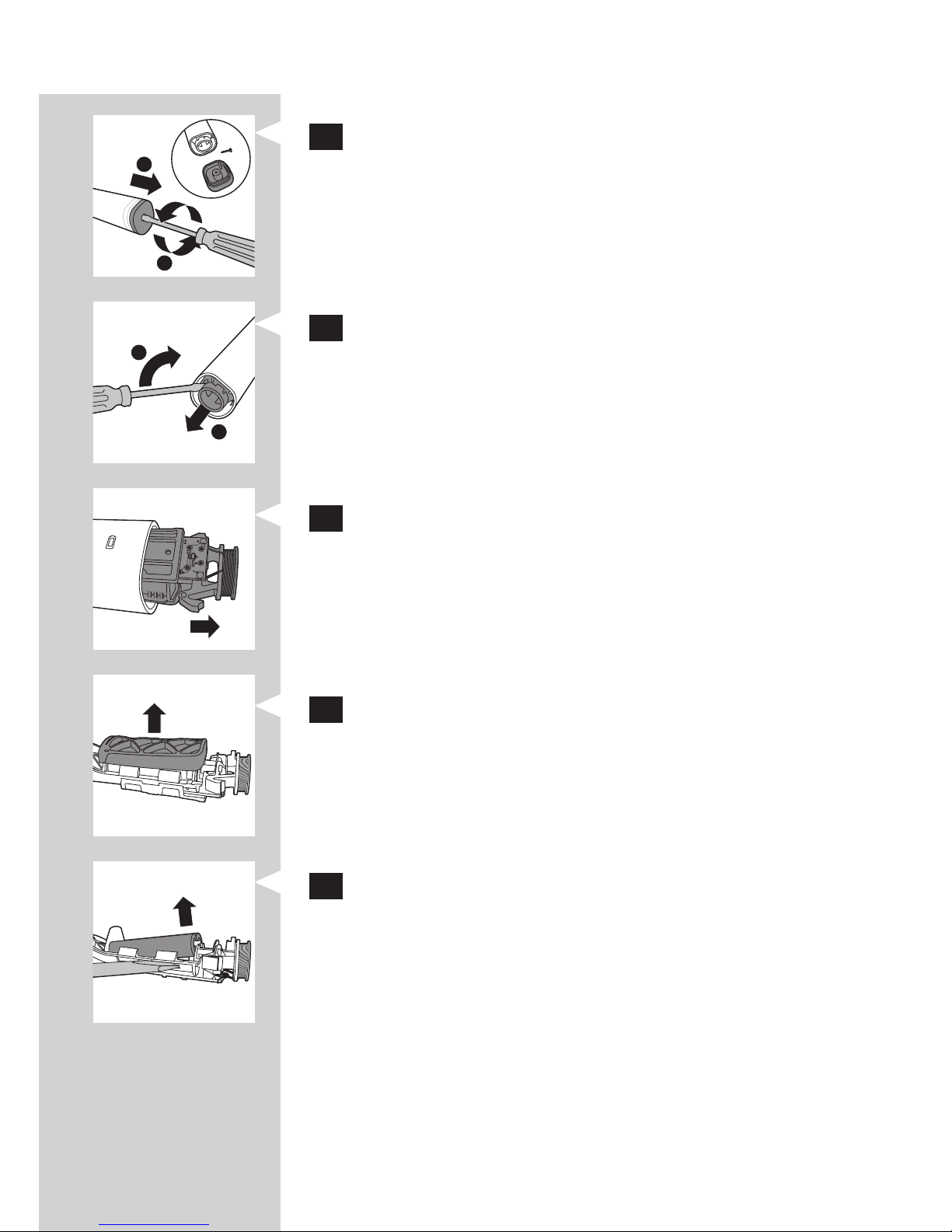
2 Insert a small standard screwdriver into the
bottom of the handle and turn it counter-
clockwise to remove the screw. Pull the end
cap off of the handle.
3 Insert the screwdriver between the handle and
the internal frame. Tilt the screwdriver
to loosen the handle.
4 Remove the internal frame from the handle.
5 Remove the rubber bumpers that are on top
and below the battery.
6 Insert the screwdriver between the battery
and the frame. Tilt the screwdriver to pop
the battery out of the frame.
1
2
2
1
ENGLISH 13
Page 14

7 Place some tape over the ends of the battery
to avoid any short-circuiting due to residual
energy in the battery.
The rechargeable battery can now be recycled or
disposed of and the rest of the product discarded
appropriately.
Warranty and support
Philips warrants its products for two years after the
date of purchase. Defects due to faulty materials and
workmanship will be repaired or replaced at Philips’
expense provided that convincing proof of purchase in
the qualifying period is provided. Use of unauthorized
replacement parts will void this warranty.
Contact our Consumer Care Center at 1-800-682-7664
(North America), outside North America contact
your local Philips Consumer Care Center.
Internet information: www.sonicare.com
(North America) or www.philips.com
(outside North America).
WARRANTY EXCLUSIONS
What is not covered under warranty:
- Brush heads.
- Damage caused by use of unauthorized
replacement parts.
- Damage caused by misuse, abuse, neglect,
alterations or unauthorized repair.
- Normal wear and tear, including chips, scratches,
abrasions, discoloration or fading.
ENGLISH14
Page 15

IMPLIED WARRANTIES
ANY IMPLIED WARRANTIES, INCLUDING
IMPLIED WARRANTIES OF MERCHANTABILITY
AND FITNESS FOR A PARTICULAR PURPOSE,
SHALL BE LIMITED TO THE DURATION OF THE
EXPRESS WARRANTIES SET FORTH ABOVE. IN
SOME STATES LIMITATIONS ON DURATION OF
IMPLIED WARRANTIES DO NOT APPLY.
LIMITATION OF REMEDIES
IN NO EVENT SHALL PHILIPS OR ANY OF
ITS AFFILIATED OR SUBSIDIARY COMPANIES
BE LIABLE FOR ANY SPECIAL, INCIDENTAL
OR CONSEQUENTIAL DAMAGES BASED
UPON BREACH OF WARRANTY, BREACH OF
CONTRACT, NEGLIGENCE, TORT, OR ANY
OTHER LEGAL THEORY. SUCH DAMAGES
INCLUDE, WITHOUT LIMITATION, LOSS OF
SAVINGS OR REVENUE; LOSS OF PROFIT;
LOSS OF USE; THE CLAIMS OF THIRD PARTIES
INCLUDING, WITHOUT LIMITATION, DENTISTS
AND DENTAL HYGIENISTS; AND COST OF ANY
SUBSTITUTE EQUIPMENT OR SERVICES. SOME
STATES DO NOT ALLOW THE EXCLUSION
OR LIMITATION OF INCIDENTAL OR
CONSEQUENTIAL DAMAGES.
ENGLISH 15
Page 16

4235.021.0618.1
www.philips.com/Sonicare
©2015 Koninklijke Philips N.V. (KPNV). All rights reserved.
Philips and the Philips shield are trademarks of KPNV.
Sonicare and the Sonicare logo are trademarks
of Philips Oral Healthcare, LLC and/or KPNV.
 Loading...