

Page 1
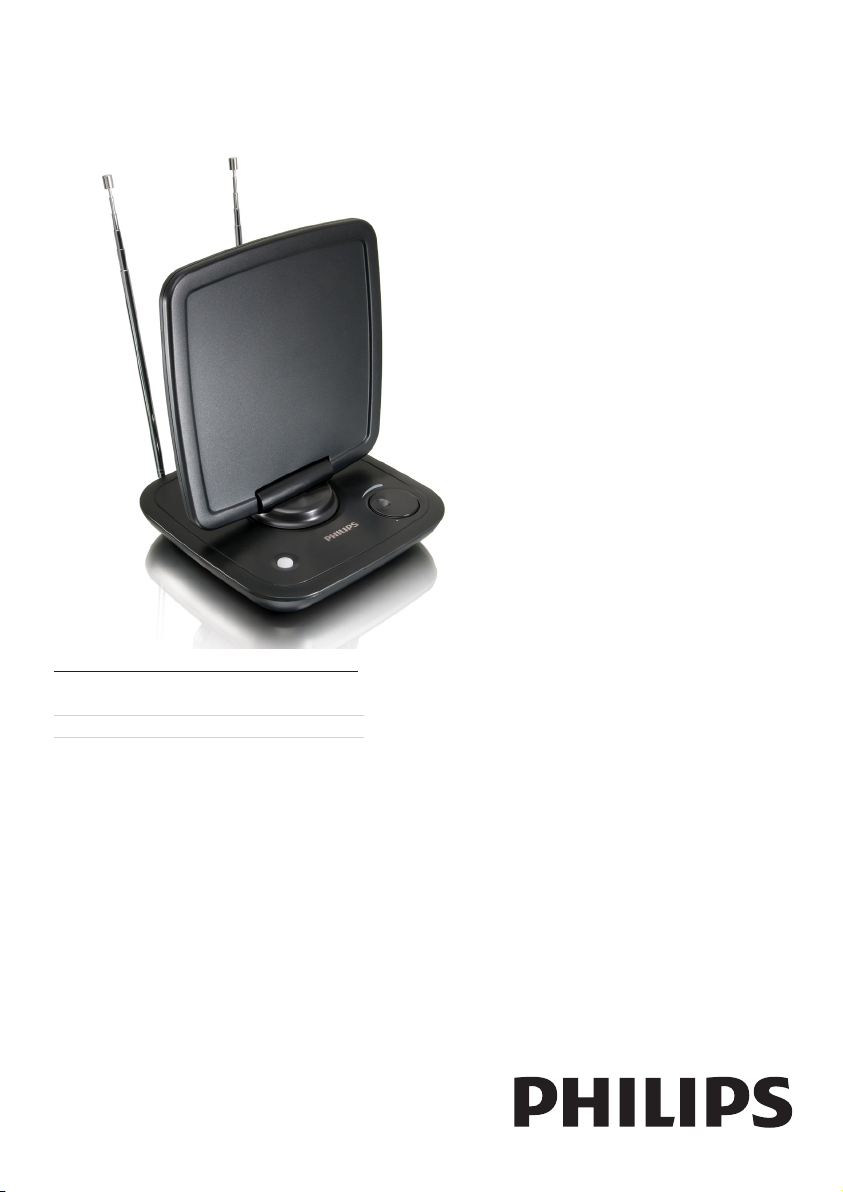
Register your product and get support at
www.philips.com/welcome
SDV6120/10
EN User manual
Page 2

Page 3

Contents
1 Important 4
Safety 4
Recycling 4
2 Your SDV6120 4
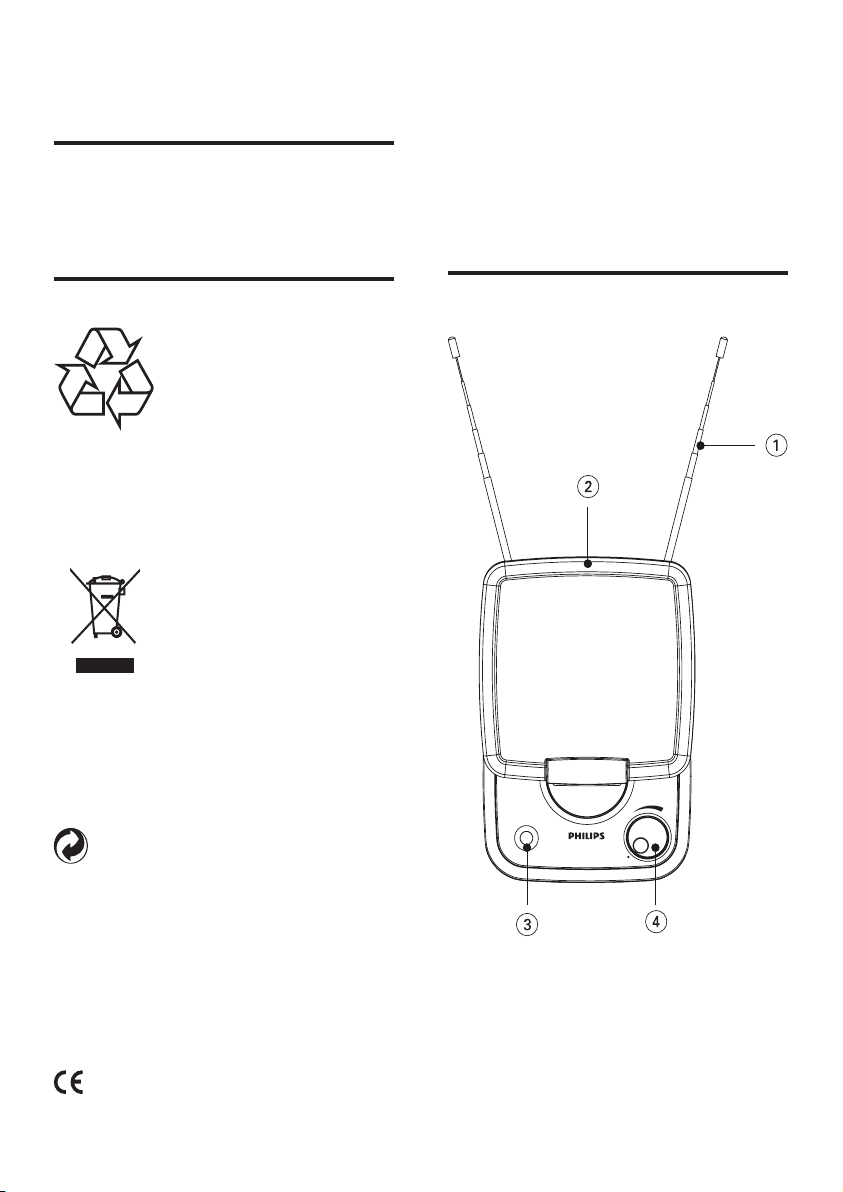
Overview 4
3 Get started 5
Installation 5
4 Set up SDV6120 6
For VHF/FM reception 6
For UHF reception 7
Set up a digital tuner with this antenna 7
5 Frequently asked questions 8
6 Warranty and service 8
7 Glossary 9
English
EN
3
Page 4
1 Important
Safety
This manual contains important information about
the Philips indoor television antenna. Read it
carefully before you start the installation and setup.
2 Your SDV6120
Congratulations on your purchase and welcome
to Philips!
To fully benet from the support that Philips
offers, register your product at www.philips.
com/welcome.
Recycling
Your product is designed and manufactured
with high quality materials and components,
which can be recycled and reused.
When you see the crossed-out wheel bin symbol
attached to a product, it means the product is
covered by the European Directive 2002/96/EC:
Never dispose of your product with other
household waste. Please inform yourself about
the local rules on the separate collection of
electrical and electronic products. The correct
disposal of your old product helps prevent
potentially negative consequences on the
environment and human health.
When this logo is attached to a product, it means
a nancial contribution has been paid to the
associated national recovery and recycling system.
© 2008 Koninklijke Philips Electronics N.V. All
rights reserved. Reproduction in whole or in
part is prohibited without the written consent
of the copyright owner. Trademarks are the
property of Koninklijke Philips Electronics N.V.
or their respective owners.
Overview
4 EN
Page 5
3 Get started
To ensure the antenna to work properly, read
the user manual of your television before you
start. Set the television so that it receives the
signal from an ANTENNA instead of CABLE or
SATELLITE.
Installation
English
1 VHF antenna
2 UHF antenna
3 LED power indicator
4 Power switch/gain control
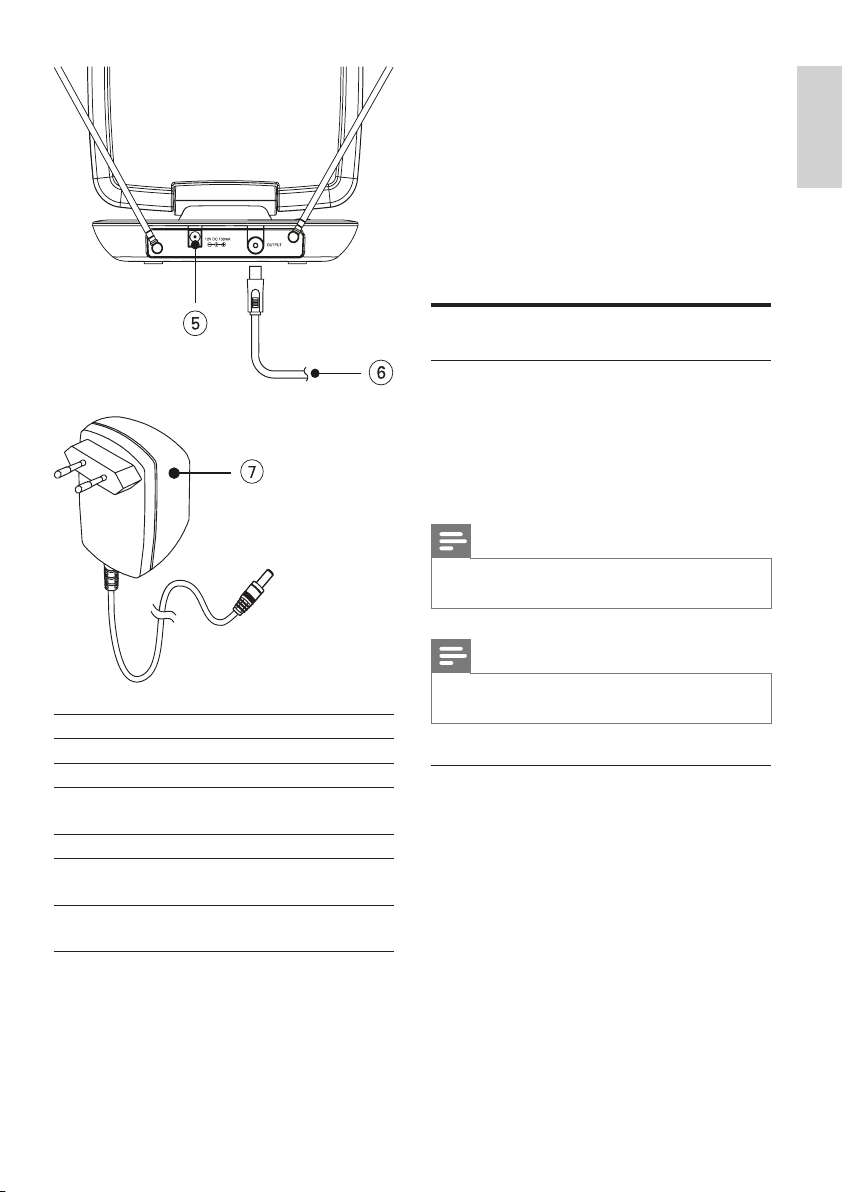
knob
5 12V DC power connection
6 Coaxial cable (for TV
connection)
7 230-240V AC/12V DC
power adaptor (included)
Determine the signal strength
Before Installation, determine the best
location for optimum reception. It is important
for the antenna to have an unobstructed path
to the transmitter. For best results, ensure the
antenna faces the location of the transmitter.
Note
Choose a location near a window which gives the •
antenna a clear view of the transmitter.
Note
Place the antenna away from the metal surface to •
avoid interference.
Connect to the TV
1 Connect one end of your coaxial cable to
the signal output of the antenna.
2 Connect the other end to the input on
the TV receiver.
EN
5
Page 6
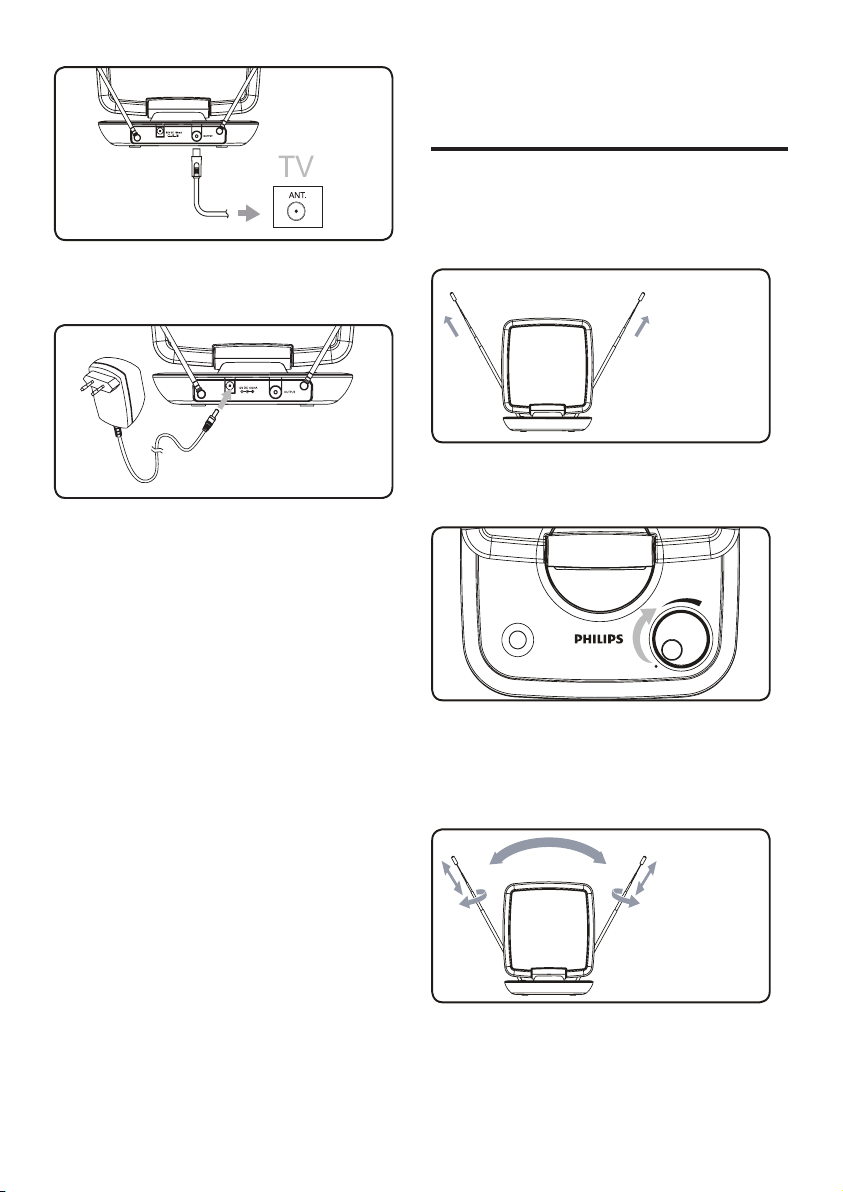
3 Connect the DC plug to the antenna and
the power supply to a 230-240V AC outlet.
4 Set up SDV6120
For VHF/FM reception
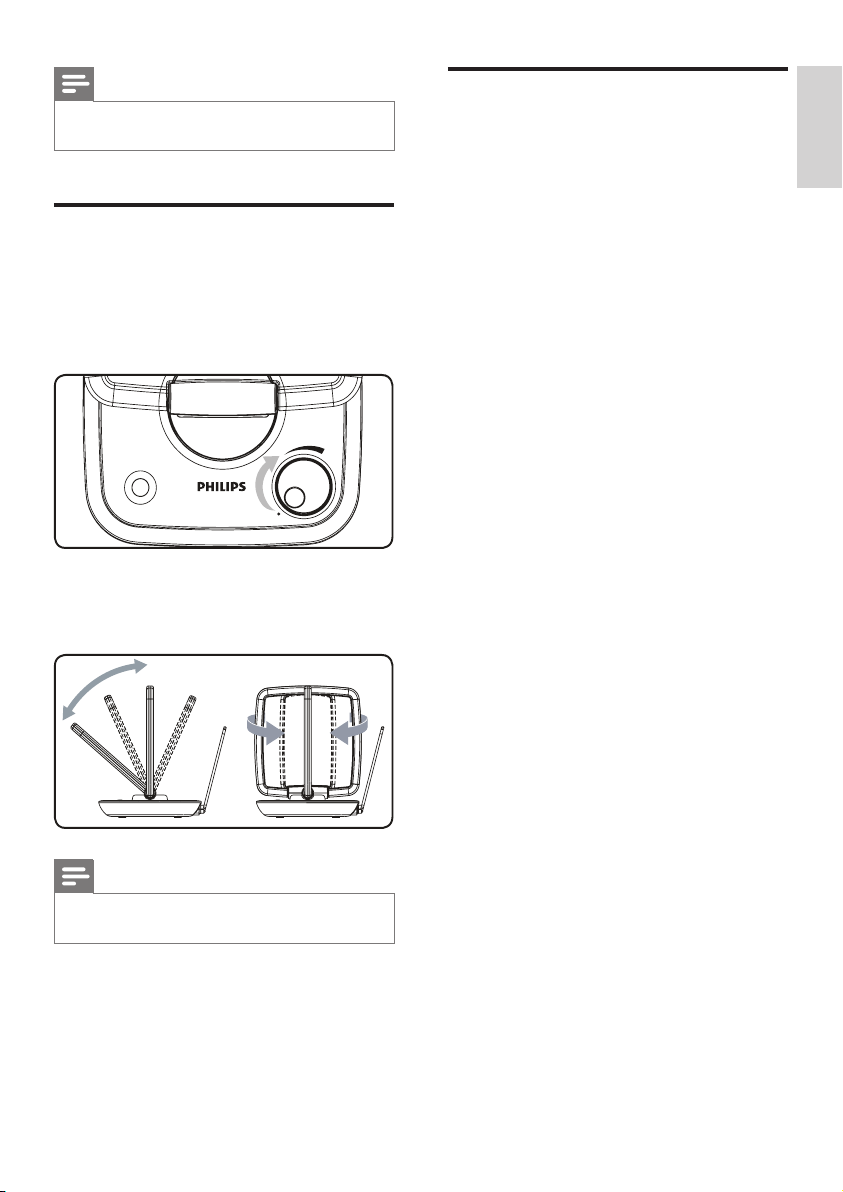
Extend the telescopic dipoles to the longest
1
possible length.
2 To turn the amplier up, rotate the gain
control knob towards the max position.
3 Turn the TV or FM radio to the desired
channel/station. Move the dipoles in
different directions up and down until the
reception is achieved.
6 EN
Page 7
Note
It is possible to turn t he gain control knob down for •
best reception.
For UHF reception
Turn the TV to the desired channel/
1
station.
2 To turn the amplier up, rotate the gain
control knob towards the max position.
3 Tilt or swivel the UHF antenna towards
the transmitter until the reception is
achieved.
Set up a digital tuner with this antenna
English
You can install available channels with the digital
TV tuner. This automatic process is part of the
setup of the tuner. Ensure the antenna has
set up properly before the tuner can receive
viewable channels.
There are two ways to connect the antenna to
the TV:
Connect the antenna to a digital tuner. •
If the signal strength is good enough, the
channels can be memorized in the tuner
automatically .
Connect the antenna directly to the TV. •
Tune to the analogue channels and nd
the best antenna location. Then reconnect the antenna to the digital tuner.
Ensure the signal strength is good enough
before you install the channels with the
tu ner.
Note
It is possible to turn t he gain control knob down for •
best reception.
EN
7
Page 8
5 Frequently
6 Warranty and
asked questions
Can this antenna work with Analogue
transmissions?
Yes, this antenna can receive analogue
television broadcasts in the UHF and VHF
bandwidths.
Can this antenna receive digital or work with
HD-DVB broadcasts?
Yes, this antenna is designed to receive digital
DVB and HDTV broadcasts in the UHF &
VHF bandwidths.
Can the antenna be powered by a DC power
supply in a boat, RV or camper?
Yes, there is a DC power socket located at the
back of the antenna. Plug your cable/adapter
into the antenna and then into your power
source.
Where should I place the antenna in order to
get the best reception possible?
Choose a location near a window which gives
the antenna a clear view of the transmitter.
Note
For bes t reception , place the antenna away from the •
metal surface to avoid interference .
service
Warranty information can be found at:
www.philips.com/welcome
For technical support, send us an email
with the model number of the product
and a detailed description of your problem
to:accessorysuppor [email protected]
How do I know how much gain (amplication)
is required to receive a clear picture?
Once you have the VHF dipoles ex tended to
the longest length, turn on the amplier. Turn
the amplier up to the max position and then
reduce as needed. In some case, you need to
turn the amplier down to receive a clearer
picture.
Can I set up this antenna with a digital tuner?
Yes, this antenna can be set up with a digital
tuner. (see ‘Set up a digital tuner with this
antenna’ on page 8)
8 EN
Page 9

7 Glossary
A
Amplier
A device, either a single stage or a large scale
circuit with multiple stages for creating gain,
i.e. it makes small signals larger.
Antenna
A device, such as a rod or wire, which picks up
a received radio frequency signal or radiates a
transmitted RF signal.
C
Coaxial
A single copper conductor, surrounded with
a layer of insulation, covered by a surrounding
copper shield and nally, an insulating jacket.
An unbalanced transmission line with constant
impedance. In audio, this type is commonly
used for low level, line signals terminated in
RCA connectors.
H
HDTV (High-Denition Television)
It is a digital television broadcasting system
with higher resolution than traditional
television systems (standard-denition TV,
or SDTV ). HDTV is digitally broadcast;
the earliest implementations used analog
broadcasting, but today digital television
(DTV) signals are used, requiring less
bandwidth due to digital video compression.
U
UHF (Ultra high frequency)
In radio or TV broadcasting: it is the frequency
range of electromagnetic waves which lies
between 300 MHz and 3 GHz (3000 MHz).
V
VHF (Very high frequency)
In radio or TV broadcasting: it is the frequency
range of electromagnetic waves which lies
between 30 MHz and 300 MHz.
English
D
DVB (Digital Video Broadcasting)
DVB is a suite of internationally accepted open
standards for digital television.
F
FM (Frequency Modulation)
In radio broadcasting: a method of modulation
in which the frequency of the carrier voltage
is varied with the frequency of the modulation
voltage.
EN
9
Page 10

© 2008 Koninklijke Philips Electronics N.V.
All rights reserved. PDCC-PENG-908
 Loading...