

Page 1

Register your product and get support at
www.philips.com/welcome
SA2420BT
SA2421BT
SA2422BT
SA2425BT
SA2426BT
SA2427BT
SA2440BT
SA2441BT
SA2442BT
SA2445BT
SA2446BT
SA2447BT
EN User manual 3
Page 2

Philips Consumer Lifestyle
HK- 0845-SA2420BT
(report No.)
EC DECLARATION OF CONFORMITY
We,
Philips Consumer Lifestyle
(manufacturer’s name)
Philips, Glaslaan 2, 5616 JB Eindhoven, The Netherlands
(manufacturer’s address)
declare under our responsibility that the electrical product:
Philips SA2420BT/00, /02, /05
(name) (type or model)
Digital Audio Player
(product description)
to which this declaration relates is in conformity with the following standards:
EN55013: 2001 + admt.A1: 2003 + admt. A2: 2006 + EN55020: 2007 + EN55022: 2006 +
EN55024: 1998 + admt.A1: 2001 + admt.A2: 2003 + EN300 328 V1.7.1: 2006 + EN301
489-17 V1.2.1: 2002 + EN301 489-1 V1.6.1: 2005 + EN50371:2002 + EN60950-1: 2006 +
EN50332-1: 2000
(title and/or number and date of issue of the standards)
following the provisions of 99/5/EC & 2004/108EC & 2006/95/EC directives
and are produced by a manufacturing organization on ISO 9000 level.
Leuven, November 07, 2008
(place, date)
Frank Dethier
Development Manager
Innovation Lab Leuven
Philips Consumer Lifestyle
(signature, name and function)
Philips Consumer Lifestyle
HK- 0845-SA2425BT
(report No.)
EC DECLARATION OF CONFORMITY
We,
Philips Consumer Lifestyle
(manufacturer’s name)
Philips, Glaslaan 2, 5616 JB Eindhoven, The Netherlands
(manufacturer’s address)
declare under our responsibility that the electrical product:
Philips SA2425BT/00, /02, /05
(name) (type or model)
Digital Audio Player
(product description)
to which this declaration relates is in conformity with the following standards:
EN55013: 2001 + admt.A1: 2003 + admt. A2: 2006 + EN55020: 2007 + EN55022: 2006 +
EN55024: 1998 + admt.A1: 2001 + admt.A2: 2003 + EN300 328 V1.7.1: 2006 + EN301
489-17 V1.2.1: 2002 + EN301 489-1 V1.6.1: 2005 + EN50371:2002 + EN60950-1: 2006 +
EN50332-1: 2000
(title and/or number and date of issue of the standards)
following the provisions of 99/5/EC & 2004/108EC & 2006/95/EC directives
and are produced by a manufacturing organization on ISO 9000 level.
Leuven, November 07, 2008
(place, date)
Frank Dethier
Development Manager
Innovation Lab Leuven
Philips Consumer Lifestyle
(signature, name and function)
Philips Consumer Lifestyle
HK- 0845-SA2440BT
(report No.)
EC DECLARATION OF CONFORMITY
We,
Philips Consumer Lifestyle
(manufacturer’s name)
Philips, Glaslaan 2, 5616 JB Eindhoven, The Netherlands
(manufacturer’s address)
declare under our responsibility that the electrical product:
Philips SA2440BT/00, /02, /05
(name) (type or model)
Digital Audio Player
(product description)
to which this declaration relates is in conformity with the following standards:
EN55013: 2001 + admt.A1: 2003 + admt. A2: 2006 + EN55020: 2007 + EN55022: 2006 +
EN55024: 1998 + admt.A1: 2001 + admt.A2: 2003 + EN300 328 V1.7.1: 2006 + EN301
489-17 V1.2.1: 2002 + EN301 489-1 V1.6.1: 2005 + EN50371:2002 + EN60950-1: 2006 +
EN50332-1: 2000
(title and/or number and date of issue of the standards)
following the provisions of 99/5/EC & 2004/108EC & 2006/95/EC directives
and are produced by a manufacturing organization on ISO 9000 level.
Leuven, November 07, 2008
(place, date)
Frank Dethier
Development Manager
Innovation Lab Leuven
Philips Consumer Lifestyle
(signature, name and function)
Philips Consumer Lifestyle
HK- 0845-SA2445BT
(report No.)
EC DECLARATION OF CONFORMITY
We,
Philips Consumer Lifestyle
(manufacturer’s name)
Philips, Glaslaan 2, 5616 JB Eindhoven, The Netherlands
(manufacturer’s address)
declare under our responsibility that the electrical product:
Philips SA2445BT/00, /02, /05
(name) (type or model)
Digital Audio Player
(product description)
to which this declaration relates is in conformity with the following standards:
EN55013: 2001 + admt.A1: 2003 + admt. A2: 2006 + EN55020: 2007 + EN55022: 2006 +
EN55024: 1998 + admt.A1: 2001 + admt.A2: 2003 + EN300 328 V1.7.1: 2006 + EN301
489-17 V1.2.1: 2002 + EN301 489-1 V1.6.1: 2005 + EN50371:2002 + EN60950-1: 2006 +
EN50332-1: 2000
(title and/or number and date of issue of the standards)
following the provisions of 99/5/EC & 2004/108EC & 2006/95/EC directives
and are produced by a manufacturing organization on ISO 9000 level.
Leuven, November 07, 2008
(place, date)
Frank Dethier
Development Manager
Innovation Lab Leuven
Philips Consumer Lifestyle
(signature, name and function)
Philips Consumer Lifestyle
HK- 0845-SA2421BT
(report No.)
EC DECLARATION OF CONFORMITY
We,
Philips Consumer Lifestyle
(manufacturer’s name)
Philips, Glaslaan 2, 5616 JB Eindhoven, The Netherlands
(manufacturer’s address)
declare under our responsibility that the electrical product:
Philips SA2421BT/00, /02, /05
(name) (type or model)
Digital Audio Player
(product description)
to which this declaration relates is in conformity with the following standards:
EN55013: 2001 + admt.A1: 2003 + admt. A2: 2006 + EN55020: 2007 + EN55022: 2006 +
EN55024: 1998 + admt.A1: 2001 + admt.A2: 2003 + EN300 328 V1.7.1: 2006 + EN301
489-17 V1.2.1: 2002 + EN301 489-1 V1.6.1: 2005 + EN50371:2002 + EN60950-1: 2006 +
EN50332-1: 2000
(title and/or number and date of issue of the standards)
following the provisions of 99/5/EC & 2004/108EC & 2006/95/EC directives
and are produced by a manufacturing organization on ISO 9000 level.
Leuven, November 07, 2008
(place, date)
Frank Dethier
Development Manager
Innovation Lab Leuven
Philips Consumer Lifestyle
(signature, name and function)
Philips Consumer Lifestyle
HK- 0845-SA2426BT
(report No.)
EC DECLARATION OF CONFORMITY
We,
Philips Consumer Lifestyle
(manufacturer’s name)
Philips, Glaslaan 2, 5616 JB Eindhoven, The Netherlands
(manufacturer’s address)
declare under our responsibility that the electrical product:
Philips SA2426BT/00, /02, /05
(name) (type or model)
Digital Audio Player
(product description)
to which this declaration relates is in conformity with the following standards:
EN55013: 2001 + admt.A1: 2003 + admt. A2: 2006 + EN55020: 2007 + EN55022: 2006 +
EN55024: 1998 + admt.A1: 2001 + admt.A2: 2003 + EN300 328 V1.7.1: 2006 + EN301
489-17 V1.2.1: 2002 + EN301 489-1 V1.6.1: 2005 + EN50371:2002 + EN60950-1: 2006 +
EN50332-1: 2000
(title and/or number and date of issue of the standards)
following the provisions of 99/5/EC & 2004/108EC & 2006/95/EC directives
and are produced by a manufacturing organization on ISO 9000 level.
Leuven, November 07, 2008
(place, date)
Frank Dethier
Development Manager
Innovation Lab Leuven
Philips Consumer Lifestyle
(signature, name and function)
Philips Consumer Lifestyle
HK- 0845-SA2441BT
(report No.)
EC DECLARATION OF CONFORMITY
We,
Philips Consumer Lifestyle
(manufacturer’s name)
Philips, Glaslaan 2, 5616 JB Eindhoven, The Netherlands
(manufacturer’s address)
declare under our responsibility that the electrical product:
Philips SA2441BT/00, /02, /05
(name) (type or model)
Digital Audio Player
(product description)
to which this declaration relates is in conformity with the following standards:
EN55013: 2001 + admt.A1: 2003 + admt. A2: 2006 + EN55020: 2007 + EN55022: 2006 +
EN55024: 1998 + admt.A1: 2001 + admt.A2: 2003 + EN300 328 V1.7.1: 2006 + EN301
489-17 V1.2.1: 2002 + EN301 489-1 V1.6.1: 2005 + EN50371:2002 + EN60950-1: 2006 +
EN50332-1: 2000
(title and/or number and date of issue of the standards)
following the provisions of 99/5/EC & 2004/108EC & 2006/95/EC directives
and are produced by a manufacturing organization on ISO 9000 level.
Leuven, November 07, 2008
(place, date)
Frank Dethier
Development Manager
Innovation Lab Leuven
Philips Consumer Lifestyle
(signature, name and function)
Philips Consumer Lifestyle
HK- 0845-SA2446BT
(report No.)
EC DECLARATION OF CONFORMITY
We,
Philips Consumer Lifestyle
(manufacturer’s name)
Philips, Glaslaan 2, 5616 JB Eindhoven, The Netherlands
(manufacturer’s address)
declare under our responsibility that the electrical product:
Philips SA2446BT/00, /02, /05
(name) (type or model)
Digital Audio Player
(product description)
to which this declaration relates is in conformity with the following standards:
EN55013: 2001 + admt.A1: 2003 + admt. A2: 2006 + EN55020: 2007 + EN55022: 2006 +
EN55024: 1998 + admt.A1: 2001 + admt.A2: 2003 + EN300 328 V1.7.1: 2006 + EN301
489-17 V1.2.1: 2002 + EN301 489-1 V1.6.1: 2005 + EN50371:2002 + EN60950-1: 2006 +
EN50332-1: 2000
(title and/or number and date of issue of the standards)
following the provisions of 99/5/EC & 2004/108EC & 2006/95/EC directives
and are produced by a manufacturing organization on ISO 9000 level.
Leuven, November 07, 2008
(place, date)
Frank Dethier
Development Manager
Innovation Lab Leuven
Philips Consumer Lifestyle
(signature, name and function)
Philips Consumer Lifestyle
HK- 0845-SA2422BT
(report No.)
EC DECLARATION OF CONFORMITY
We,
Philips Consumer Lifestyle
(manufacturer’s name)
Philips, Glaslaan 2, 5616 JB Eindhoven, The Netherlands
(manufacturer’s address)
declare under our responsibility that the electrical product:
Philips SA2422BT/00, /02, /05
(name) (type or model)
Digital Audio Player
(product description)
to which this declaration relates is in conformity with the following standards:
EN55013: 2001 + admt.A1: 2003 + admt. A2: 2006 + EN55020: 2007 + EN55022: 2006 +
EN55024: 1998 + admt.A1: 2001 + admt.A2: 2003 + EN300 328 V1.7.1: 2006 + EN301
489-17 V1.2.1: 2002 + EN301 489-1 V1.6.1: 2005 + EN50371:2002 + EN60950-1: 2006 +
EN50332-1: 2000
(title and/or number and date of issue of the standards)
following the provisions of 99/5/EC & 2004/108EC & 2006/95/EC directives
and are produced by a manufacturing organization on ISO 9000 level.
Leuven, November 07, 2008
(place, date)
Frank Dethier
Development Manager
Innovation Lab Leuven
Philips Consumer Lifestyle
(signature, name and function)
Philips Consumer Lifestyle
HK- 0845-SA2427BT
(report No.)
EC DECLARATION OF CONFORMITY
We,
Philips Consumer Lifestyle
(manufacturer’s name)
Philips, Glaslaan 2, 5616 JB Eindhoven, The Netherlands
(manufacturer’s address)
declare under our responsibility that the electrical product:
Philips SA2427BT/00, /02, /05
(name) (type or model)
Digital Audio Player
(product description)
to which this declaration relates is in conformity with the following standards:
EN55013: 2001 + admt.A1: 2003 + admt. A2: 2006 + EN55020: 2007 + EN55022: 2006 +
EN55024: 1998 + admt.A1: 2001 + admt.A2: 2003 + EN300 328 V1.7.1: 2006 + EN301
489-17 V1.2.1: 2002 + EN301 489-1 V1.6.1: 2005 + EN50371:2002 + EN60950-1: 2006 +
EN50332-1: 2000
(title and/or number and date of issue of the standards)
following the provisions of 99/5/EC & 2004/108EC & 2006/95/EC directives
and are produced by a manufacturing organization on ISO 9000 level.
Leuven, November 07, 2008
(place, date)
Frank Dethier
Development Manager
Innovation Lab Leuven
Philips Consumer Lifestyle
(signature, name and function)
Philips Consumer Lifestyle
HK- 0845-SA2442BT
(report No.)
EC DECLARATION OF CONFORMITY
We,
Philips Consumer Lifestyle
(manufacturer’s name)
Philips, Glaslaan 2, 5616 JB Eindhoven, The Netherlands
(manufacturer’s address)
declare under our responsibility that the electrical product:
Philips SA2442BT/00, /02, /05
(name) (type or model)
Digital Audio Player
(product description)
to which this declaration relates is in conformity with the following standards:
EN55013: 2001 + admt.A1: 2003 + admt. A2: 2006 + EN55020: 2007 + EN55022: 2006 +
EN55024: 1998 + admt.A1: 2001 + admt.A2: 2003 + EN300 328 V1.7.1: 2006 + EN301
489-17 V1.2.1: 2002 + EN301 489-1 V1.6.1: 2005 + EN50371:2002 + EN60950-1: 2006 +
EN50332-1: 2000
(title and/or number and date of issue of the standards)
following the provisions of 99/5/EC & 2004/108EC & 2006/95/EC directives
and are produced by a manufacturing organization on ISO 9000 level.
Leuven, November 07, 2008
(place, date)
Frank Dethier
Development Manager
Innovation Lab Leuven
Philips Consumer Lifestyle
(signature, name and function)
Philips Consumer Lifestyle
HK- 0845-SA2447BT
(report No.)
EC DECLARATION OF CONFORMITY
We,
Philips Consumer Lifestyle
(manufacturer’s name)
Philips, Glaslaan 2, 5616 JB Eindhoven, The Netherlands
(manufacturer’s address)
declare under our responsibility that the electrical product:
Philips SA2447BT/00, /02, /05
(name) (type or model)
Digital Audio Player
(product description)
to which this declaration relates is in conformity with the following standards:
EN55013: 2001 + admt.A1: 2003 + admt. A2: 2006 + EN55020: 2007 + EN55022: 2006 +
EN55024: 1998 + admt.A1: 2001 + admt.A2: 2003 + EN300 328 V1.7.1: 2006 + EN301
489-17 V1.2.1: 2002 + EN301 489-1 V1.6.1: 2005 + EN50371:2002 + EN60950-1: 2006 +
EN50332-1: 2000
(title and/or number and date of issue of the standards)
following the provisions of 99/5/EC & 2004/108EC & 2006/95/EC directives
and are produced by a manufacturing organization on ISO 9000 level.
Leuven, November 07, 2008
(place, date)
Frank Dethier
Development Manager
Innovation Lab Leuven
Philips Consumer Lifestyle
(signature, name and function)
Page 3

Contents
1 Important safety information 4
General maintenance 4
Recycling the product
6 Technical data 19
Supported music le formats 19
LED indicators and their meanings
19
En glish
7 Glossary 20
6
2 Your new Digital Audio Player 7
What’s in the box 7
3 Getting started 8
General overview of the LUXE 8
Detailed overview of the controls
Connect and charge
Connect the supplied USB cable
Connect the earphones and extension
cable
Connect the supplied charger
Battery level indication
Install the Philips Device Manager software
First-time Bluetooth® connection setup
Bluetooth® setup with forced pairing
Transfer music to the LUXE
Organize your music on the LUXE
10
10
10
11
11
11
12
12
13
13
4 Enjoy 14
Turn the LUXE on and off 14
Automatic standby and shut-down
Listen to your music
Find your music
Radio
Phone calls
Accept phone calls
Call the last used number
Transfer a call back to your mobile
phone
Change the ringtone of the LUXE
Use the LUXE to store and carry data les
17
14
14
15
15
16
16
17
17
17
Contents
9
5 Troubleshooting 18
EN
3
Page 4

1 Important safety
information
Modications
Modications not authorized by the
manufacturer may void user’s authority to
operate this device.
Philips
SA2420BT SA2421BT SA2422BT
SA2425BT SA2426BT SA2427BT
SA2440BT SA2441BT SA2442BT
SA2445BT SA2446BT SA2447BT
Notice for the USA
This equipment has been tested and found
to comply with the limits for a Class B digital
device, pursuant to part 15 of the FCC Rules.
These limits are designed to provide reasonable
protection against harmful interference in a
residential installation. This equipment generates,
uses, and can radiate radio frequency energy
and, if not installed and used in accordance
with the instruction manual, may cause harmful
interference to radio communications.
However, there is no guarantee that
interference will not occur in a particular
installation. If this equipment does cause harmful
interference to radio or television reception,
which can be determined by turning the
equipment off and on, the user is encouraged
to try to correct the interference by o
ne or more of the following measures:
Relocate the receiving antenna.
•
Increase the separation between
•
equipment and receiver.
Connect the equipment into an outlet on
•
a circuit different from that to which the
receiver is connected.
Consult the dealer or an experienced
•
radio/TV technician for help.
Notice for Canada
This Class B digital apparatus complies with
Canadian ICES-003.
The set complies with the FCC-Rules, Part-15
and with 21 CFR 1040.10. Operation is subject
to the following two conditions:
This device may not cause harmful
•
interference, and
This device must accept any interference
•
received, including interference that may
cause undesired operation.
General maintenance
Caution
To avoid damage or malfunction:
•
Do not expose the player to excessive heat caused by
•
heating equipment or direct sunlight.
Do not drop your player or allow objects to fall on
•
your player.
Do not allow your player to be submerged in water. Do
•
not expose headphone socket or battery compar tment
to water, as water entering the set may cause major
damage.
Active mobile phones in the vicinity may cause
•
interference.
Back up your les. Ensure that you retain the original
•
les you have downloaded to your device. Philips is not
responsible for any loss of data if the product becomes
damaged or not readable / legible.
Manage (transfer, delete, etc.) your music les only with
•
the supplied music software to avoid problems.
Do not use any cleaning agents containing alcohol,
•
ammonia, benzene, or abrasives as these may harm
the set.
Active mobile phones in the vicinity may cause
•
interference.
Back up your les. Please ensure that you retain the
•
original les you have downloaded to your device.
Philips is not responsible for any loss of data if the
product becomes damaged or not readable / legible.
Manage (transfer, delete, etc.) your music les only
•
with the supplied or recommended software to avoid
problems.
About operating and storage temperatures
Operate in a place where temperature is
•
always between 0 and 35ºC (32 to 95ºF)
Store in a place where temperature is
•
always between -20 and 45ºC (-4 to
113ºF).
Battery life may be shortened in low
•
temperature conditions.
4
EN
Page 5
Replacement parts/accessories:
Visit www.philips.com/support to order
replacement parts/accessories.
Hearing Safety
Listen at a moderate volume:
Using headphones at a high volume can impair
your hearing. This product can produce sounds
in decibel ranges that may cause hearing loss for
a normal person, even for exposure less than
a minute. The higher decibel ranges are offered
for those that may have already experienced
some hearing loss.
Sound can be deceiving. Over time your hearing
‘comfort level’ adapts to higher volumes of
sound. So after prolonged listening, what sounds
‘normal’ can actually be loud and harmful to
your hearing. To guard against this, set your
volume to a safe level before your hearing
adapts and leave it there.
To establish a safe volume level:
Set your volume control at a low setting.
Slowly increase the sound until you can hear it
comfortably and clearly, without distortion.
Listen for reasonable periods of time:
Prolonged exposure to sound, even at normally
‘safe’ levels, can also cause hearing loss.
Be sure to use your equipment reasonably and
take appropriate breaks.
Be sure to observe the following guidelines
when using your headphones.
Listen at reasonable volumes for reasonable
periods of time.
Be careful not to adjust the volume as your
hearing adapts.
Do not turn up the volume so high that you
can’t hear what’s around you.
You should use caution or temporarily
discontinue use in potentially hazardous
situations.
Do not use headphones while operating a
motorized vehicle, cycling, skateboarding, etc.; it
may create a trafc hazard and is illegal in many
areas.
Copyright information
All other brands and product names are
trademarks of their respective companies or
organizations.
Unauthorized duplication of any recordings
whether downloaded from the Internet or
made from audio CDs is a violation of copyright
laws and international treaties.
The making of unauthorized copies of copyprotected material, including computer
programs, les, broadcasts and sound recordings,
may be an infringement of copyrights and
constitute a criminal offenseThis equipment
should not be used for such purposes.
The Windows Media and the Windows logo are
registered trademarks of Microsoft Corporation
in the United States and/or other countries.
Be responsible! Respect copyrights.
Philips respects the intellectual property of
others, and we ask our users to do the same.
Multimedia content on the internet may have
been created and/or distributed without the
original copyright owner’s authorization.
Copying or distributing unauthorized content
may violate copyright laws in various countries
including yours.
Compliance with copyright laws remains your
responsibility.
The recording and transfer to the portable
player of video streams downloaded to your
computer is intended only for use with public
domain or properly licensed content. You
may only use such content for your private,
non-commercial use and shall respect eventual
copyright instructions provided by the copyright
owner of the work. Such instruction may
state that no further copies shall be made.
Video streams may include copy protection
technology that prohibits further copying. For
such situations the recording function will not
work and you will be notied with a message.
En glish
Important safety information
EN
5
Page 6
Recycling the product
Your product is designed and manufactured
with high quality materials and components,
which can be recycled and reused.
When you see the crossed-out wheel bin
symbol attached to a product, it means the
product is covered by the European Directive
2002/96/EC:
Never dispose of your product with other
household waste. Please inform yourself about
the local rules on the separate collection of
electrical and electronic products. The correct
disposal of your old product helps prevent
potentially negative consequences on the
environment and human health.
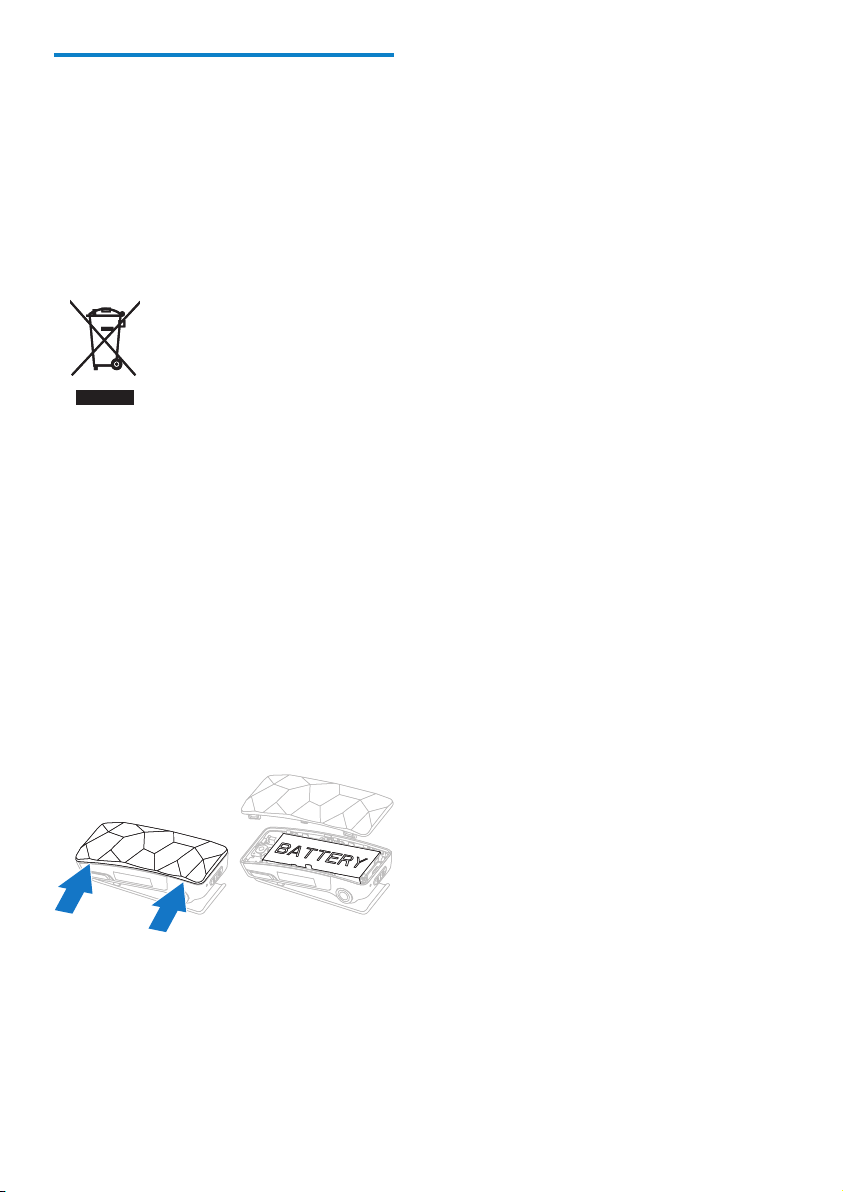
Your product contains a built-in rechargeable
battery covered by the European Directive
2006/66/EC, which cannot be disposed of
with normal household waste. To safeguard the
functionality and safety of your product, take
your product to an ofcial collection point or
service centre where a professional can remove
or replace the battery as shown:
Please inform yourself about the local rules on
separate collection of batteries. The correct
disposal of batteries helps prevent potentially
negative consequences on the environment and
human health.
6
EN
Page 7

Philips GoGear audio player
Quick start guide
SA2420BT SA2440BT
SA2421BT SA2441BT
SA2422BT SA2442BT
SA2425BT SA2445BT
SA2426BT SA2446BT
SA2427BT SA2447BT
Philips GoGear audio player
Quick start guide
SA2420BT SA2440BT
SA2421BT SA2441BT
SA2422BT SA2442BT
SA2425BT SA2445BT
SA2426BT SA2446BT
SA2427BT SA2447BT
2 Your new Digital
Player
Audio Player
The LUXE allows you to
play MP3 and unprotected WMA les
•
listen to FM radio
•
accept/place calls from your phone via
•
Bluetooth®*
* Requires paring with a Bluetooth® enabled
phone.
What’s in the box
The LUXE comes with a box that you can use
to store the LUXE or other items.
The following accessories are included with the
LUXE:
En glish
Earphones
Your new Digital Audio Player
Earphone extension cable
USB cable
AC charger
Quick start guide
EN
7
Page 8
3 Getting started
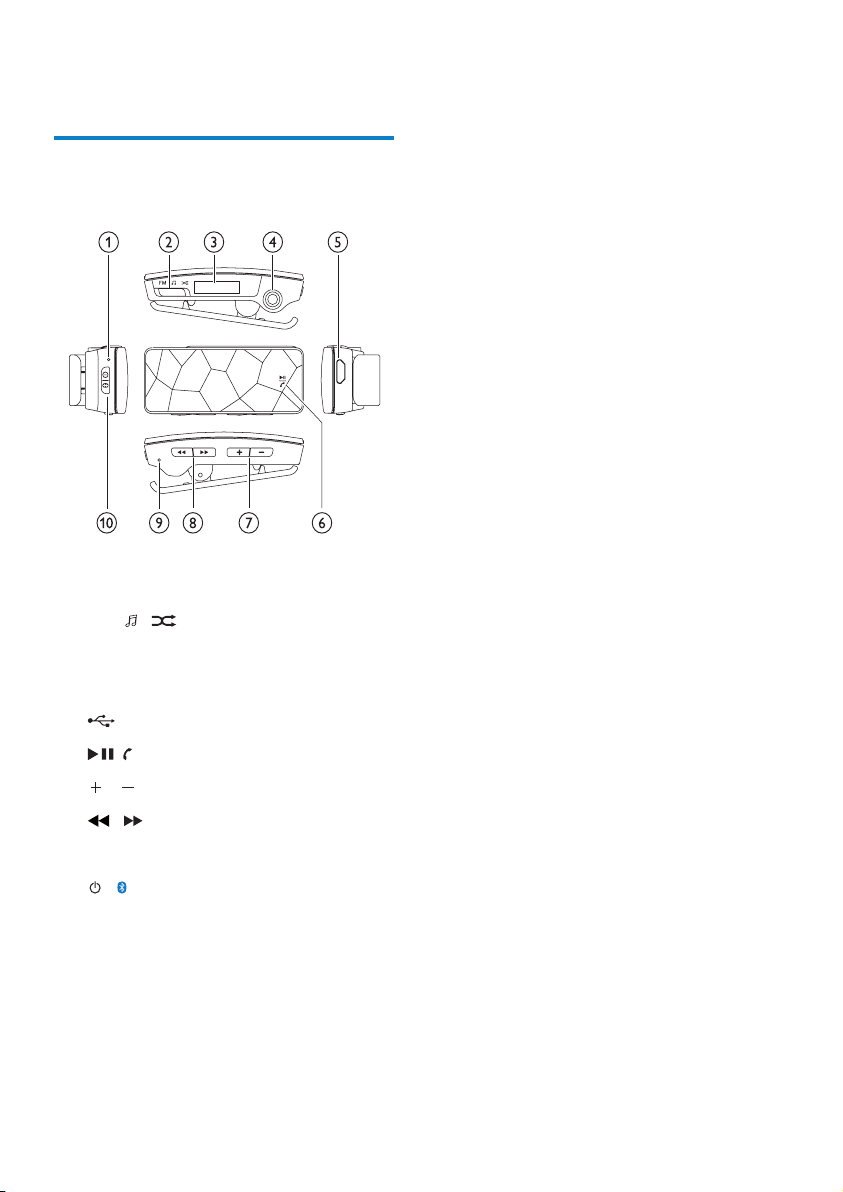
General overview of the LUXE
a Microphone
b FM / / slide selector
c LCD display
d Earphone jack
e USB connector
f / play/pause / phone
g / increase/decrease the volume
h / navigate
i Reset
j / on/off / Bluetooth®
8
EN
Page 9
Detailed overview of the controls
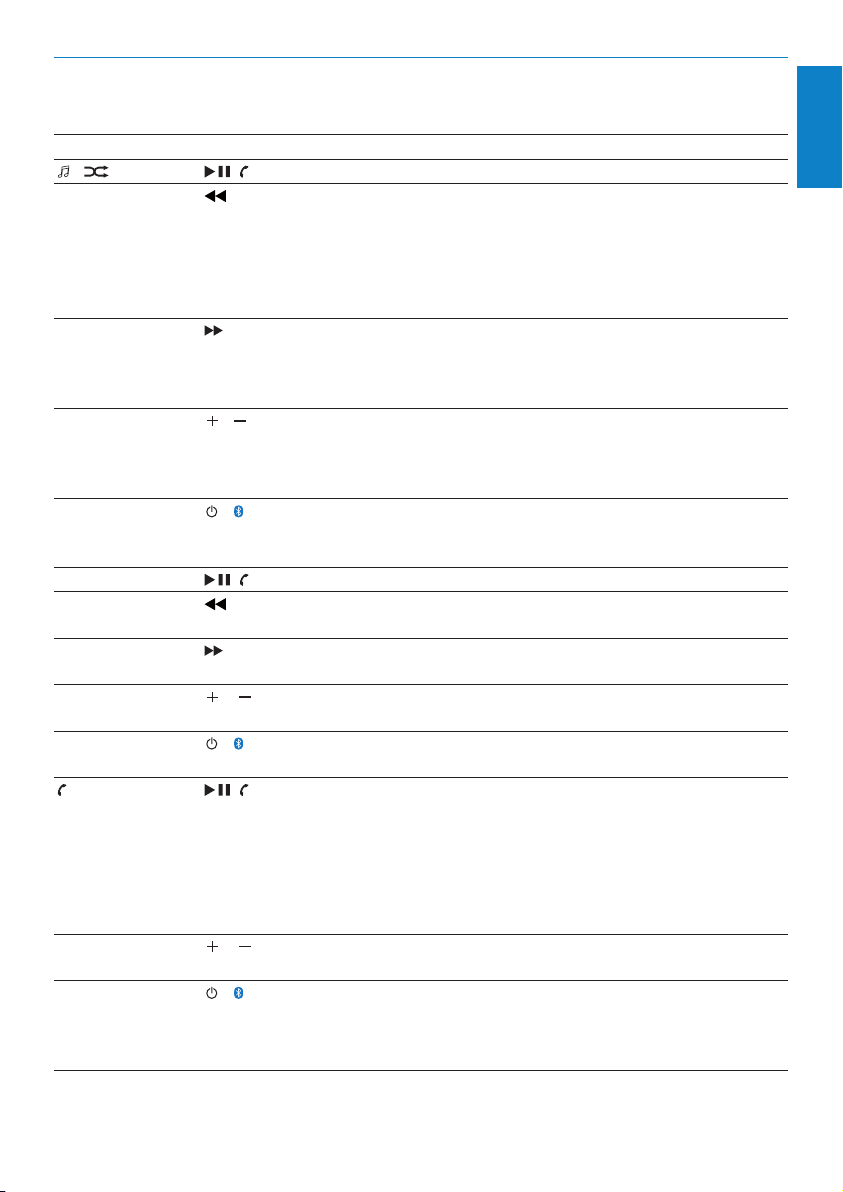
The LUXE offers the following control options:
Mode Functions Action
/ / Press 1x: toggle between play and pause
Press 1x at the beginning of a song: go to beginning of
previous song
Press 1x when playing: go to beginning of current song
Press and hold when playing: scan backwards through current
song
Press 2x: skip to previous folder (if folders are present)
Press 1x: go to beginning of next song
Press and hold when playing: scan forward through current
song
Press 2x: skip to next folder (if folders are present)
/ Press 1x: increase / decrease the volume one step at a time
Press and hold: quickly increase / decrease the volume
Press both buttons simultaneously: toggle FullSound™ on /
off
/ Press and hold for 2 seconds: toggle the LUXE on / off
Press and hold for 4 seconds: activate forced Bluetooth®
pairing mode
FM / Press 1x: toggle the radio sound between mute and unmute
Press 1x: scan frequencies downwards
Press and hold: quickly skip to lower frequency
Press 1x: scan frequencies upwards
Press and hold: quickly skip to higher frequency
/ Press 1x: increase / decrease the volume one step at a time
Press and hold: quickly increase / decrease the volume
/ Press 1x: toggle between Bluetooth® on and Bluetooth® off
Press and hold for 2 seconds: toggle the LUXE on / off
/ Press 1x when a call comes in: accept the incoming call
Press and hold when a call comes in: reject the incoming call
Press 1x during a call: end the current call
Press 2x during a call: toggle the microphone between mute
/ unmute
Press 2x: redial the last used number (incoming call or
outgoing call)
/ Press 1x: increase / decrease the volume
Press and hold: quickly increase / decrease the volume
/ Press 1x: toggle between Bluetooth® on and Bluetooth® off
Press during a call: toggle the current call between mobile
phone and the LUXE
Press and hold for 2 seconds: toggle the LUXE on / off
En glish
Getting started
EN
9
Page 10
Source slide selector FM / / :
FM
Select FM
radio source
* In shufe mode, the LUXE plays the songs in
random order.
Connect and charge
The LUXE has a built-in battery that can be
charged as follows:
Directly from the power supply (with the
•
supplied charger).
Through the USB port of a computer
•
(with the supplied USB cable).
Connect the supplied USB cable
1 Connect the USB plug of the supplied
USB cable to a spare USB port on your
computer.
2 Connect the small USB plug of the
supplied USB cable to the small USB jack
on the LUXE.
3 Turn on your computer.
»
Select music
source
The LUXE charges.
Select music
source shufe*
mode
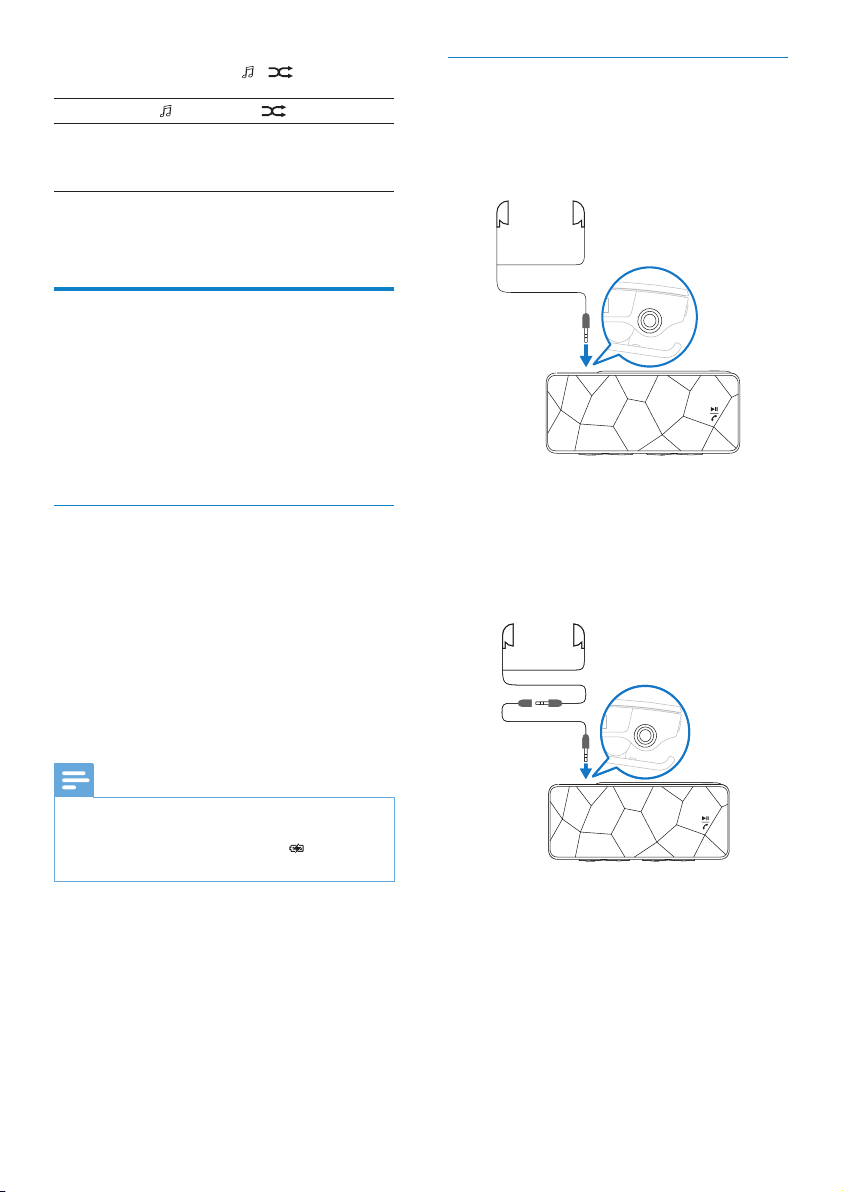
Connect the earphones and
extension cable
The supplied earphones have an integrated
microphone.
The microphone on the LUXE is automatically
disabled when the supplied earphones are
connected.
The short cable of the supplied earphones is
designed to avoid entanglement.
Note
For rst-time use, allow the LUXE to charge for 3
•
hours.
The charging animation stops and the icon is
•
displayed when the charging process is completed.
10
EN
The supplied earphone extension cable
can serve as FM antenna to improve radio
reception.
Page 11
Connect the supplied charger
1 Check that your local power supply
corresponds to the specications of the
charger.
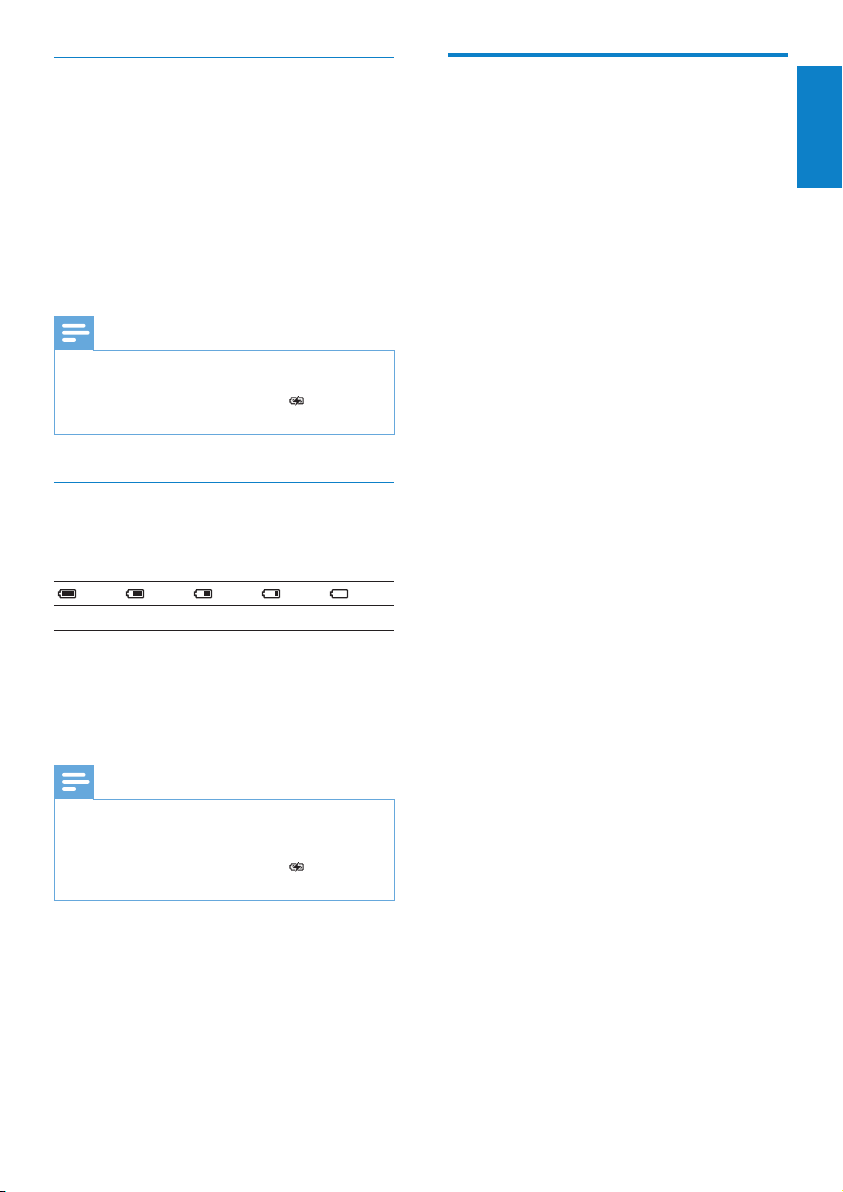
2 Use the supplied USB cable to connect the
LUXE with the supplied charger.
3 Connect the AC power plug of the charger
to a suitable power outlet.
The LUXE charges.
»
Note
For rst-time use, allow the LUXE to charge for 3
•
hours.
The charging animation stops and the icon is
•
displayed when the charging process is completed.
Battery level indication
The display indicates the approximate levels of
the battery status as follows:
100% 75% 50% 25% 0%
A ashing battery screen indicates that
»
the battery is low. The player saves
all settings and switches off within 60
seconds.
Note
Rechargeable batteries have a limited number of charge
•
cycles. Battery life and number of charge cycles vary by
use and settings.
The charging animation stops and the icon is
•
displayed when the charging process is completed.
Install the Philips Device
Manager software
System requirements:
Windows® (2000, XP, Vista)
•
Pentium III 800 MHz processor or higher
•
128 MB RAM
•
500 MB hard disk space
•
Interent connection
•
Microsoft® Internet Explorer 6.0 or later
•
USB port
•
1 Connect the mini USB plug of the supplied
cable to the LUXE.
2 Connect the standard USB plug of the
supplied cable to your computer.
A pop-up window appears on the
»
computer.
3 From the pop-up window, select Install
Philips Device Manager.
4 Follow the on-screen instructions to
complete the installation of the Philips
Device Manager.
If the pop-up window fails to appear on the
computer...
1 Select My Computer (WindowsXP®
/ Windows2000®) / Computer
(WindowsVista®).
2 Right click on Philips GoGear Luxe.
3 Select Install Philips Device Manager.
4 Follow the on-screen instructions to
complete the installation of the Philips
Device Manager.
Can’t nd the le on the LUXE?
1 Ensure that your computer is connected to
the Internet.
2 Select My Computer (WindowsXP®
/ Windows2000®) / Computer
(WindowsVista®).
3 Right click on Philips GoGear Luxe.
4 Select Install Philips Device Manager from
the Internet.
En glish
Getting started
EN
11
Page 12
5 Follow the on-screen instructions to
complete the installation of the Philips
Device Manager from the Internet.
First-time Bluetooth®
connection setup
The LUXE is set up and ready to connect
to the rst Bluetooth® discoverable and
Bluetooth® enabled mobile phone within
range.
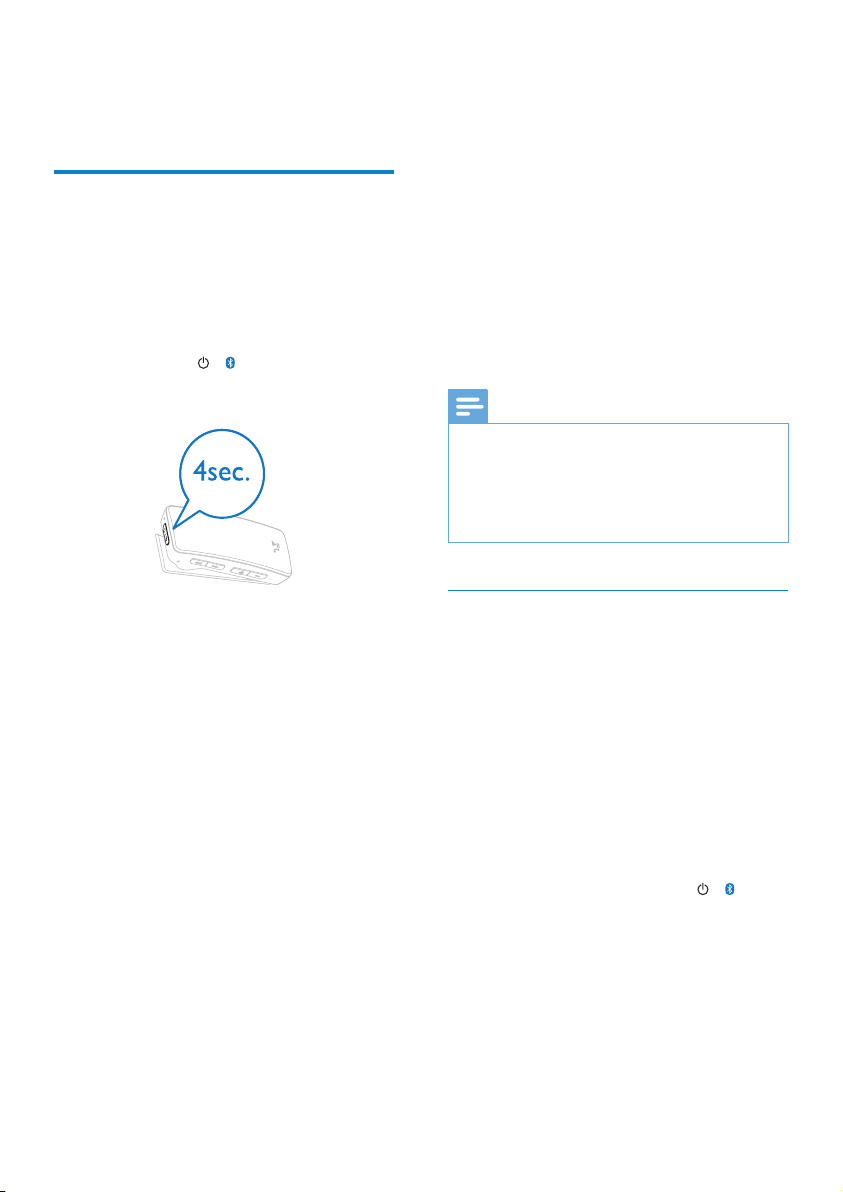
1 Press and hold / for approximately 4
seconds to turn on the LUXE.
Once the connection is established, the
LUXE automatically reconnects to your
mobile phone every time you switch
on the LUXE. (This requires that the
automatic reconnection feature is
enabled on your phone.)
The Bluetooth® connection failed...
The display shows a crossed out
»
Bluetooth® icon.
1 Follow the steps for a Bluetooth® setup
with forced pairing (see ‘Bluetooth® setup
with forced pairing’ on page 12) until the
pairing is successful.
Note
The Bluetooth® connection requires a distance of less
•
than 10 meters between the LUXE and your mobile
phone.
To save battery power, the LUXE discontinues
•
unsuccessful Bluetooth™ connection attempts after
10 minutes.
The power LED ashes once to
»
indicate that the LUXE is turned on.
The Bluetooth® LED ashes rapidly to
»
indicate the pairing mode.
On your mobile phone, enter 0000
»
as the pass code for the LUXE, if
required.
The LUXE connects to the rst
»
Bluetooth® discoverable and
Bluetooth® enabled mobile phone
that is within range.
The Bluetooth® connection was successful...
The Bluetooth® LED ashes once
»
every 5 seconds to indicate that the
Bluetooth® connection is successfully
established.
You can accept or reject all your
»
incoming mobile phone calls with the
LUXE.
12
EN
Bluetooth® setup with forced pairing
The following forced pairing method can be
used in the event that the automatic connection
fails:
1 Turn on your mobile phone.
2 Enable the Bluetooth® feature on your
mobile phone.
3 Set your mobile phone Bluetooth® feature
to discoverable.
4 Ensure that the LUXE is turned off when
you start.
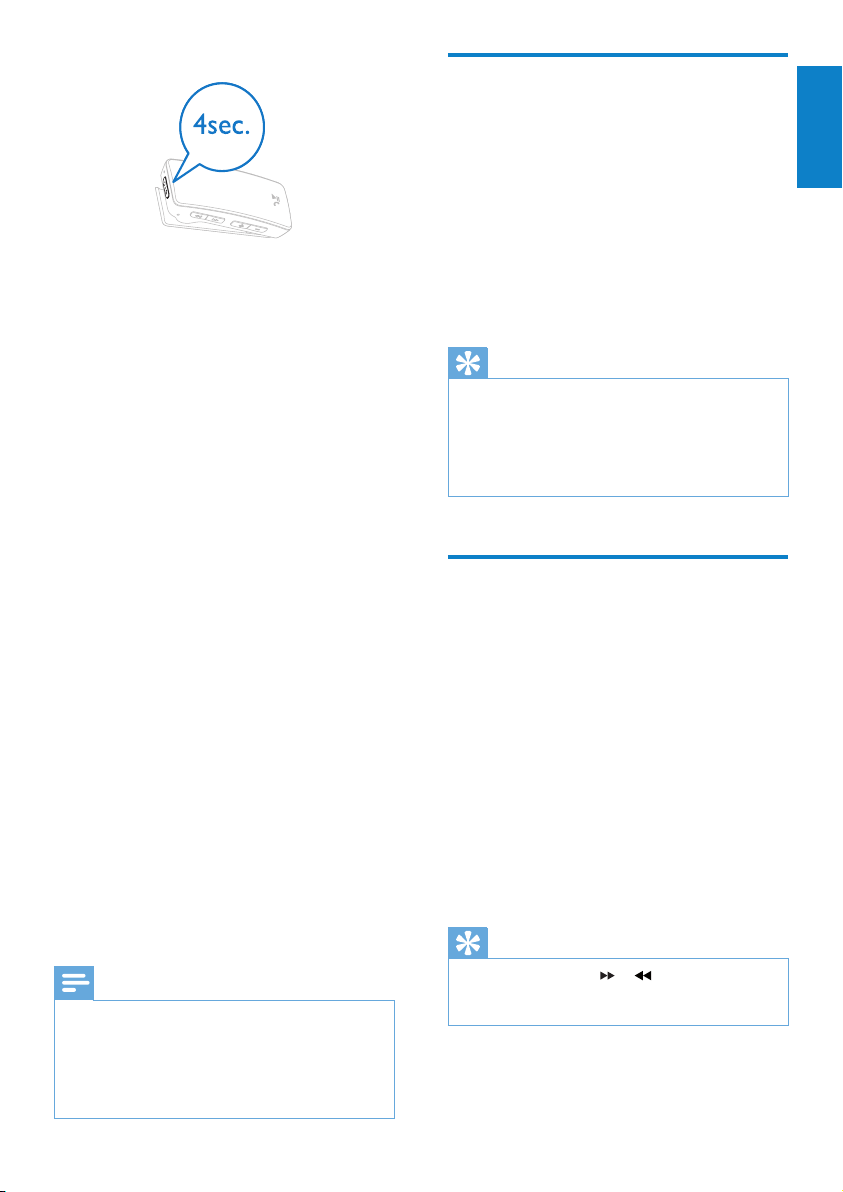
5 On the LUXE, press and hold / for
approximately 4 seconds.
Page 13
Transfer music to the LUXE
The LUXE enters pairing mode and
»
searches for your mobile phone.
The power LED ashes once to
»
indicate that the LUXE is turned on.
The Bluetooth® LED ashes rapidly to
»
indicate the pairing mode.
On your mobile phone, enter 0000
»
as the pass code for the LUXE, if
required.
The Bluetooth® connection was successful...
The Bluetooth® LED ashes once
»
every 5 seconds to indicate that the
Bluetooth® connection is successfully
established.
You can accept or reject all your
»
incoming mobile phone calls with the
LUXE.
Once the connection is established, the
LUXE automatically reconnects to your
mobile phone every time you switch
on the LUXE. (This requires that the
automatic reconnection feature is
enabled on your mobile phone.)
The Bluetooth® connection failed...
The display shows a crossed out
»
Bluetooth® icon.
1 Repeat the forced pairing procedure until
the pairing is successful.
Note
The Bluetooth® connection requires a distance of less
•
than 10 meters between the LUXE and your mobile
phone.
To save battery power, the LUXE discontinues
•
unsuccessful Bluetooth™ connection attempts after
10 minutes.
The LUXE appears as a USB mass storage
device in Windows® Explorer. You can transfer
and organize music les to the LUXE through
USB connection.
1 Click and highlight one or more songs to
transfer between your computer and the
LUXE.
2 Use drag and drop actions to complete
the transfer.
Tip
To transfer music CDs to the player: Rip (convert) the
•
songs on your music CDs to MP3/WMA les with
software such as Windows® Media Player. Copy the
les into the LUXE with Windows® Explorer. Free
versions of these programs can be downloaded from
the Internet.
Organize your music on the LUXE
The LUXE can store hundreds of music tracks.
To organize and facilitate locating your music,
the LUXE allows you to sort your music into
folders.
1 With the LUXE connected to the USB
port of the computer, open Windows®
Explorer.
2 Create folders in the mass storage of the
LUXE.
3 Use drag and drop actions to sort your
music into the folders.
Tip
A double press on the or button allows you to
•
skip forwards or backwards through the folders on the
LUXE, so you can quickly locate your music.
En glish
Getting started
EN
13
Page 14
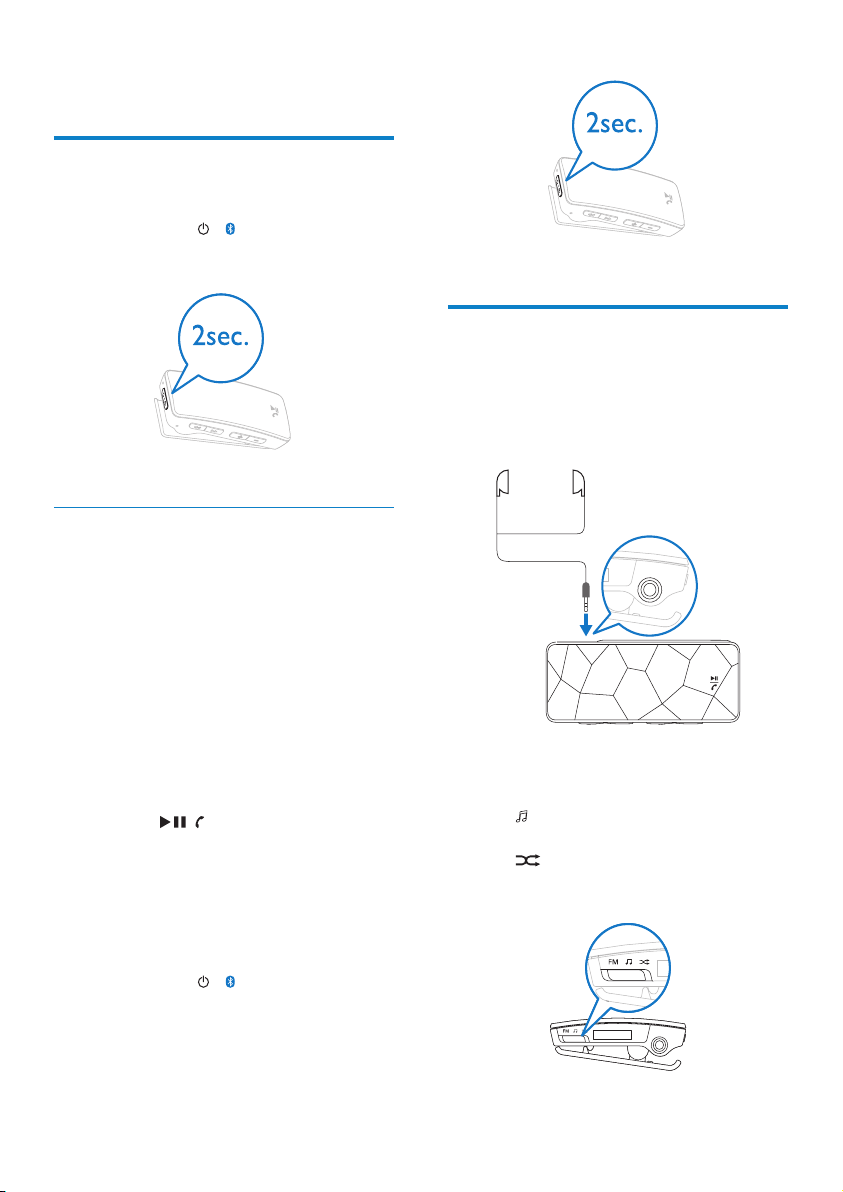
4 Enjoy
Turn the LUXE on and off
1 To toggle between modes on and off,
press and hold / for approximately 2
seconds.
Automatic standby and shut-down
The LUXE has an automatic standby and shutdown feature that can save battery power.
With an active Bluetooth™ connection:
After 5 minutes in idle mode (no music plays,
no button is pressed), the LUXE switches to
standby mode.
In standby mode
the display switches off
•
an existing Bluetooth™ connection is
•
maintained
The LUXE switches back to active mode,
when
you press / button
•
your Bluetooth™-connected mobile phone
•
receives an incoming call
Without an active Bluetooth™ connection:
After 10 minutes in idle mode (no music plays,
no button is pressed), the LUXE shuts down
(turns off).
1 Press and hold / for approximately 2
seconds to turn the LUXE back on.
Listen to your music
The fully charged LUXE allows you to enjoy up
to 10 hours of music.
1 Connect the earphones to the LUXE.
2 Set the slide selector to one of the
followingmusic play options:
- Music mode (play songs as you
•
select them)
- Shufe* mode (plays all songs in
•
random order)
14
EN
Page 15
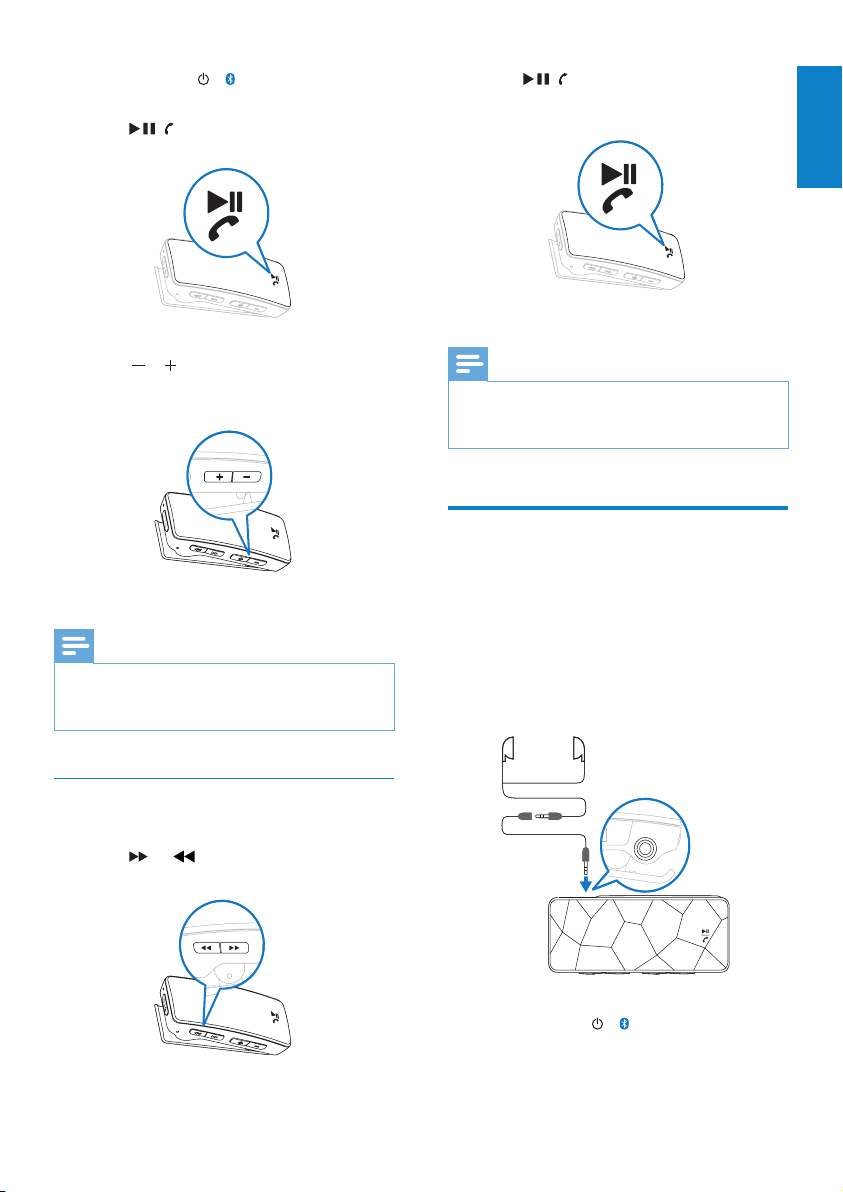
3 Press and hold / for approximately 2
seconds to turn on the LUXE.
4 Press / to star t play.
2 Press / to toggle between play and
pause.
En glish
Enjoy
5 Press / to decrease / increase the
volume.
Note
The LUXE has a repeat play function.
•
*In Shufe mode the LUXE plays all the songs in
•
random order before it repeats a song.
Find your music
The LUXE can store hundreds of songs.
1 Press or to locate a song.
Note
This player offers no support for copyright protected
•
(Digital Rights Management - DRM) WMA songs that
were bought from the Internet.
Radio
The LUXE has an FM radio tuner. Here’s how
to listen to the radio:
1 Connect the supplied earphone extension
cable (see note) to the supplied earphones.
2 Connect the earphone extension cable to
the LUXE.
3 Press and hold / for approximately 2
seconds to turn on the LUXE.
EN
15
Page 16
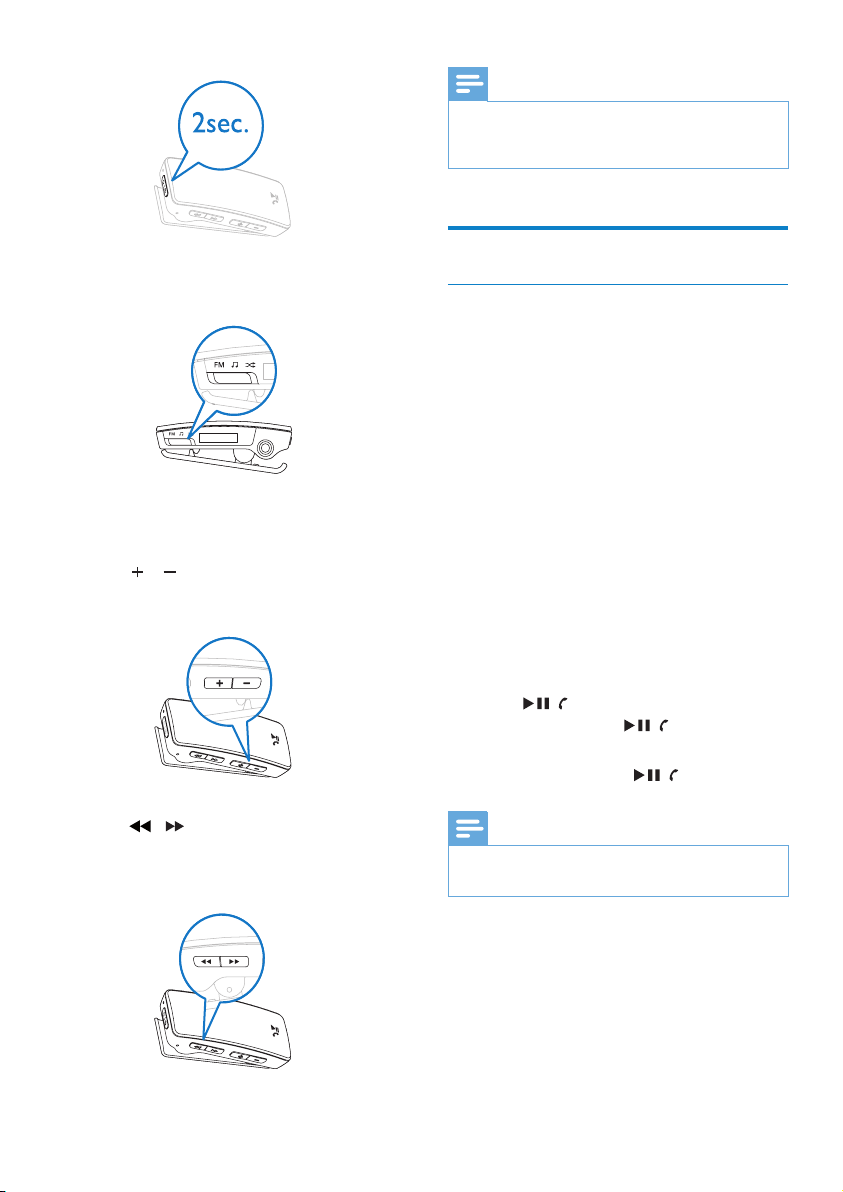
Note
The supplied extension cable for the earphones serves
•
as a radio antenna. Ensure you connect the extension
cable and earphones properly for an optimal reception.
4 Set the slide selector to position FM.
The display shows the radio symbol for
»
1 second.
5 Press / to increase / decrease the
volume.
6 Press / to decrease / increase the
radio frequency. (Hold button to scan radio
frequencies down / up.)
Phone calls
Accept phone calls
You can connect the LUXE to your mobile
phone with Bluetooth® and accept incoming
phone calls on the LUXE:
1 Follow the instructions to connect the item
to your mobile phone with Bluetooth®.
2 Connect the supplied earphones.
When a phone call comes in on your
mobile phone, the LUXE alerts you
through a ringing alert tone. The LUXE
mutes any currently active radio or music
sound output.
The display shows the mobile phone
symbol followed by the caller ID or phone
number of the caller, if available. (For
unknown callers, the display shows three
dots.)
3 Press / to accept the call.
Press and hold / to reject the
•
call.
4 To end the call, press / again.
Note
For optimal reception, maintain a distance of less than
•
10 meters between the LUXE and your mobile phone.
16
EN
Page 17
Call the last used number
You can place a phone call to the last number
that registered:
1 Press / twice in quick succession to
call the number of the last incoming/dialled
caller.
2 To end the call, press / again.
Transfer a call back to your mobile phone
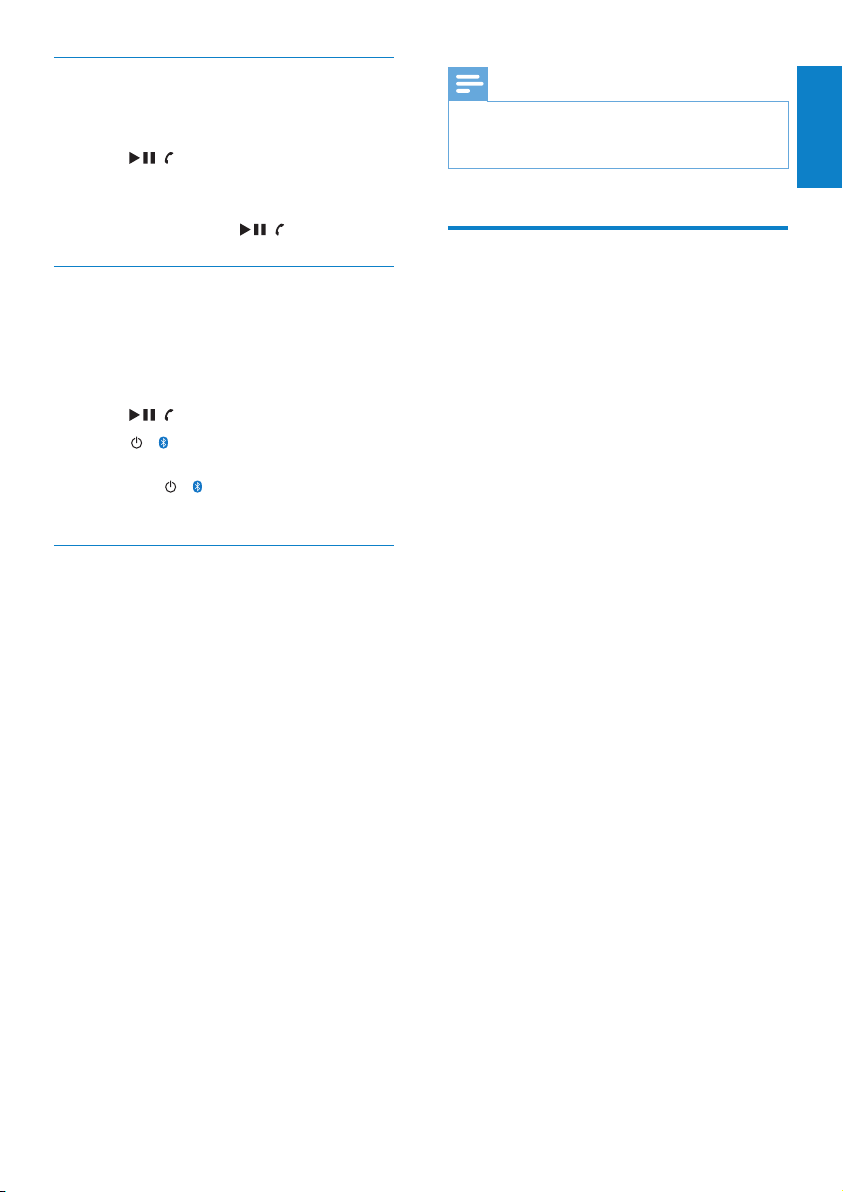
The LUXE allows you to accept an incoming
call from your mobile phone and then transfer
it back to your mobile phone.
1 Press / to accept the call.
2 Press / to transfer the call back to
your mobile phone.
Press / again to retrieve the call
•
back again to the LUXE.
Change the ringtone of the LUXE
When your connected mobile phone receives
an incoming call, the LUXE alerts you with
ringtone (through the earphones). For mobile
phones that support ringtone streaming to the
LUXE, you can hear the personalized ringtone
of the mobile phone. For mobile phones that
lack ringtone streaming support, the LUXE plays
a standard ringtone.
You can customize the standard ringtone as
follows:
1 With the LUXE connected to the USB
port of the computer, open Windows®
Explorer.
2 Drag and drop your ringtone le into the
folder called RINGTONE on the LUXE.
3 The next time your mobile phone receives
an incoming call, the LUXE will play your
ringtone.
Note
In case the RINGTONE folder contains more than
•
one ringtone le, the LUXE plays the le that is rst by
alphanumeric order.
Use the LUXE to store and
carry data les
You can use the LUXE to store and carry data
les.
1 Connect the LUXE to your computer.
2 On your computer, open Windows®
Explorer.
3 Use drag and drop action to copy data
les from your computer to the LUXE.
En glish
Enjoy
EN
17
Page 18
5 Troubleshooting
How do I reset my player?
Insert a pen tip or other object into the
•
reset hole located at the bottom of the
LUXE. Hold until the player shuts down.
If the reset option is unsuccessful, follow
•
the steps how to recover the LUXE with
the Philips Device Manager:
1 On your computer, select Start >
Programs > Philips Digital Audio Player >
GoGear LUXE Device Manager to launch
the Philips Device Manager.
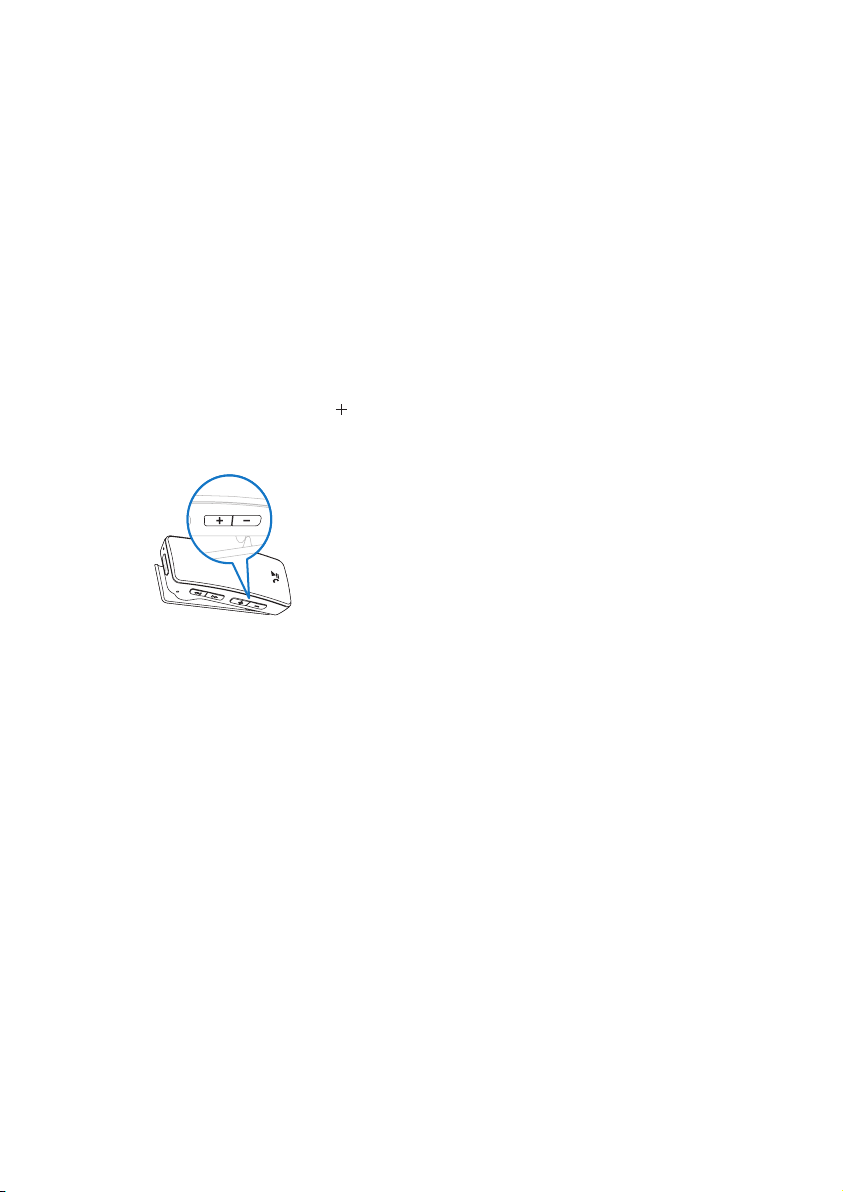
2 Press and hold the volume button while
you connect the LUXE to your computer.
3 Keep holding the key until the Philips
Device Manager acknowledges the LUXE
and enters the recovery mode.
4 On the computer, click the Repair button
and follow the instructions of the Philips
Device Manager to complete the recovery
process.
5 When the recovery is completed,
disconnect the LUXE from your computer.
6 Restart the LUXE.
18
EN
Page 19
6 Technical data
Supported music le formats
Power
Power supply:
150mAh Li-ion
polymer internal
rechargeable battery
Play time (music/
radio): 10 hours
Standby time: 100
hours
Talk time (phone): 4
hours
System requirements
Windows® 2000, XP,
Vista
Pentium III 800 MHz
processor or higher
128 MB RAM
500 MB hard disk
space
Internet connection
Microsoft® Internet
Explorer 6.0 or later
Sound card
USB port
Sound
Sound enhancement:
FullSound™
Channel separation:
45 dB
Frequency Reponse:
20 - 18 kHz
Output power: 2x 2.4
mW
Signal to noise ratio: >
84 dB
Display
White backlight LCD
96 x 16 pixels
Storage media
Built-in memory
capacity:
SA242x/BT 2GB
NAND Flash
SA244x/BT 4GB
NAND Flash
Software
Philips Device
Manager: to restore
and upgrade
Connectivity
Bluetooth®
Headphone 3.5 mm
USB 2.0 High speed
Bluethooth®
connection features:
Call management:
accept/reject/end calls,
switch between call
and music
Caller ID display
Audio playback
Compression format:
MP3 bit rates: 8-320
kps and VBR
MP3 sample rates: 8,
11.025, 16, 22.050, 24,
32, 44.1, 48 kHz
WMA (unprotected)
bit rates: 5 - 192 kbps
VBR
WMA sample rates: 8,
11.025, 16, 22.050, 24,
32, 44.1, 48 kHz
Music transfer
Drag and drop in
Windows® Explorer
The LUXE supports the following music
formats:
MP3
•
unprotected WMA
•
LED indicators and their meanings
The LUXE has the following LED indicators:
Power LED for all power-related alerts =
•
red
Bluetooth® for all Bluetooth®-related
•
alerts = blue (yellow on the red version
LUXE)
Here are the power LED indicators and their
meanings:
Indicator Meaning
Once on and off
(approximately 1 second)
Quick ashes for 1
minute
1 ash every 3 seconds LUXE is charging
LED is on LUXE is fully
Here are the Bluetooth® LED indicators and
their meanings:
Indicator Meaning
Quick ashes for 2
minutes
1 ash every 5
seconds
Quick ashes
(synchronized with
ringtone)
2 ashes every
second
LUXE turned on
/ off
Battery low
charged (continues
until LUXE is
unplugged)
LUXE is in Bluetooth®
pairing mode
Bluetooth® is connected
(also during a call)
Incoming call on mobile
phone
Bluetooth® attempts to
reconnect
En glish
Technical data
EN
19
Page 20

7 Glossary
B
Bluetooth®
Bluetooth® is a short-range wireless protocol
that is meant to allow mobile devices to share
information and applications without the worry
of cables or interface incompatibilities. The name
refers to a Viking King who unied Denmark.
Operates at 2.4 GHz. For more information, see
bluetooth.com.
S
Shufe
A feature that plays audio les (tracks) in
random order.
Streaming
A technique for transferring data such that it
can be processed as a steady and continuous
stream. Streaming technologies are often used
on the Internet because many users do not
have fast enough access to download large
multimedia les quickly, so the client browser or
plug-in can start displaying the data before the
entire le has been transmitted.
D
Decibel (dB)
A unit of measure used to express relative
difference in power or intensity of sound.
F
FullSound
FullSound™ is an innovative technology
designed by Philips. FullSound™ faithfully
restores sonic details to compressed music,
enhancing it to provide a full sound experience
without any distortion.
L
LCD (Liquid Crystal Display)
Probably the most common way to show
visual information on non-computer electronic
equipment.
M
MP3
A le format with a sound data compression
system. MP3 is the abbreviation of Motion
Picture Experts Group 1 (or MPEG-1) Audio
Layer 3. With the MP3 format, one CD-R or
CD-RW can contain about 10 times more data
than a regular CD.
V
Volume
Volume is the most common word used to
specify the control of relative loudness of
sounds. It also pertains to the function on many
electronic devices that is used to control the
loudness.
W
WMA (Windows Media Audio)
An audio format owned by Microsoft, is a
part of Microsoft Windows Media technology.
Includes Microsoft Digital Rights Management
tools, Windows Media Video encoding
technology, and Windows Media Audio
encoding technology.
20
EN
Page 21

21
Page 22

22
Page 23

© 2008 Koninklijke Philips Electronics N.V.
All rights reserved.
Document order number: 000000000000
wk8431
 Loading...