

Page 1
PR3743
PR3741
Page 2
1
Page 3

PR3743, PR3741
ENGLISH 4
DANSK 39
ESPAÑOL 76
SUOMI 112
NORSK 147
PORTUGUÊS 183
SVENSKA 219
Page 4

4
Table of contents
Introduction 4
Contra-indications, reactions and side effects 5
Important safety information 8
Treatment schedule and treatment modes 13
Product overview 14
Preparing for use 15
Using the device 16
After treatment 22
Troubleshooting 23
Signals on the device 27
Ordering accessories 27
Guarantee and support 28
Recycling 29
Specications 30
Explanation of symbols 31
Introduction
Congratulations on your purchase and welcome to
Philips! To benet fully from the support that Philips
offers, register your product at www.philips.com/
pain-relief/register.
Read this user manual carefully before you use the
BlueTouch Pain Relief Patch and save it for future
reference. This medical device is available without
prescription. To achieve the optimal treatment
success, we recommend that you use the device
according to the treatment schedule and the
instructions in this user manual. If you need
further information or have questions, please visit
www.philips.com/pain-relief or contact the
Philips Consumer Care Centre in your country
BlueTouch is a trademark owned by Koninklijke
Philips N.V.
ENGLISH
Page 5

Intended use
The BlueTouch Pain Relief Patch is a wearable
medical device intended for use on and by persons
older than 18. It treats muscular back pain by
supplying light and warmth to the body by means
of optical power and thermal conduction. Its special
blue LED light relaxes and helps to heal damaged
muscles through improved blood circulation.
The intended treatment area of the device is the
upper and lower back. You can position the device
on the treatment area with a strap and use it during
your normal daily activities. The power for the
device comes from non-exchangeable rechargeable
batteries.
Contra-indications, reactions and side effects
Contra-indications
General health conditions
Do not use the device if any of the following general
health conditions apply to you:
- pregnancy or breastfeeding
- fever
- uncontrolled high blood pressure or a
cardiovascular condition (stroke, myocardial
infarction, angina pectoris, arteriosclerotic vascular
disease (ASVD), peripheral vascular disease,
or (severe) congestive heart failure)
- severe or uncontrolled diabetes or diabetes with
peripheral damage
- presence of an implanted medical device (screw,
etc.) in or near the treatment area or presence
of an active implantable medical device, such as a
cardiac pacemaker, debrillator, neurostimulator,
cochlear implant, or an active drug administration
device, anywhere in the body
ENGLISH 5
Page 6

- widespread pain
- poor general health
- schizophrenia, borderline syndrome or severe
depression
- severe osteoporosis (T score of 2.5 and a history
of 1 or more bone fractures) or another serious
bone disease
Pain-related health problems
Do not use the device if any of the following painrelated health problems apply to you:
- unsuccessful back surgery or surgery to torso,
head or back within the previous 8 weeks
- acute dislocation or fracture within the previous
8 weeks
- a degenerative central nervous system disease
such as multiple sclerosis or Parkinson’s disease
- spinal stenosis that causes back pain
- cauda equina syndrome or other neurological
symptoms that indicate neuropathy
- sensory deprivation or diagnosed shingles or postherpetic neuralgia, especially in the mid-trunk area.
- an inammatory disease or a chronic disease
or an infection known to cause pain, such as
spondyloarthropathy, rheumatoid arthritis, lupus
erythematodes, Lyme borreliosis
Dermatological or oncological problems
Do not use the device if any of the following
dermatological or oncological problems apply to you:
- a history of skin cancer or any other localised
cancer or the presence of precancerous lesions or
large moles in the treatment area
- sun allergy
- burnt or sunburnt skin
- if you take photosensitising medication, do not
use the device if the package insert states that
ENGLISH6
Page 7

the medication can cause photo-allergic reactions,
photo-toxic reactions or that you must avoid sun
exposure
- if you are on steroids, as this medication makes
the skin more susceptible to irritation
- a skin disease such as porphyria, polymorphic light
eruption, chronic actinic dermatitis, actinic prurigo
or solar urticaria that causes photosensitivity
- infections, eczema, unhealed tattoos, burns,
inammations (e.g. of hair follicles), lacerations,
abrasions, herpes simplex, psoriasis, wounds or
lesions and haematomas in the treatment area
- allergy to the surface materials of the BlueTouch
Pain Relief Patch (polyurethane for the skin
contact surface and polyester for the surface that
does not touch the skin) or to the polyester of
the straps
Reactions and side effects
- It is normal for the skin to become a little red during
treatment. The cause of this skin redness is the
increased blood circulation due to the warmth of
the BlueTouch Pain Relief Patch. This skin redness is
harmless and fades after the treatment has ended.
- You may sometimes notice tanning after
treatment. The cause of this tan is the exposure
to light - a similar effect to that caused by sunlight
- or to warmth. This effect is harmless and fades
away by itself after a number of weeks and
sometimes a few months. Postpone treatment
until the tan has disappeared. To prevent tanning,
resume treatment in a lower mode and avoid
excessive pressure on the BlueTouch Pain Relief
Patch during treatment, for example by sitting or
lying on it or by leaning heavily against it.
- Blue light may discolour tattoos in the treatment
area.
ENGLISH 7
Page 8

Important safety information
Warning
- The purpose of the BlueTouch Pain
Relief Patch is to treat back pain.
Do not use it for any other purpose.
- This is a medical device. Keep the
device out of the reach of children.
- Read this user manual carefully and
always adhere to the treatment and
installation instructions.
- Do not use the device on children
or babies because of their immature
skin.
- Adults with reduced sensory or
mental capabilities must not use this
device, as they may not be able to
use it according to the instructions
in this user manual.
- The BlueTouch Pain Relief Patch
is not suitable for continuous use.
Always adhere to the treatment
schedule in chapter ‘Treatment
schedule and treatment modes’.
Do not treat more often than twice
a day.
ENGLISH8
Page 9

- If treatment becomes
uncomfortable, switch to a lower
treatment mode. If treatment is still
uncomfortable in low mode, switch
off the BlueTouch Pain Relief Patch
and stop using it.
- Do not stare into the light emitted
by the BlueTouch Pain Relief Patch
during operation, as this may lead to
eye irritation or eye damage.
- Do not leave the BlueTouch Pain
Relief Patch unattended when it is
on, as this may cause eye irritation
or eye damage when other people
stare into the light emitted by the
device.
- Do not apply any creams or lotions
to the skin before treatment, as this
may lead to skin irritation.
- Only charge the BlueTouch Pain
Relief Patch by connecting the USB
cable and the adapter supplied with
the device to a wall socket.
- Do not wear the BlueTouch Pain
Relief Patch while it is charging.
There is a risk of electric shock.
ENGLISH 9
Page 10

- The BlueTouch Pain Relief Patch
is not waterproof. Do not use the
BlueTouch Pain Relief Patch in wet
surroundings. Do not immerse
the BlueTouch Pain Relief Patch in
water nor rinse it under the tap.
- Keep the adapter dry.
- Never exert excessive pressure on
the BlueTouch Pain Relief Patch, for
instance by pressing, lying, sitting
or standing on it. Do not lean
heavily against the BlueTouch Pain
Relief Patch when sitting. Excessive
pressure on the device may lead to
darkening or redness of the skin in
the area in contact with the patch.
- Do not squeeze or twist the
BlueTouch Pain Relief Patch. Keep
the BlueTouch Pain Relief Patch
away from sharp, pointed or
abrasive objects.
- Always check the BlueTouch Pain
Relief Patch and the adapter for
damage before use. Do not use the
BlueTouch Pain Relief Patch or the
adapter if you notice any damage.
- Always have a damaged adapter
replaced with one of the original
ENGLISH10
Page 11

type to avoid a hazard. Contact
Philips to obtain a new adapter.
- Do not modify the BlueTouch Pain
Relief Patch and its accessories.
- Always return the BlueTouch
Pain Relief Patch to a service
centre authorised by Philips for
examination or repair. Repair by
unqualied people could cause a
hazardous situation for the user.
- Use and charge the BlueTouch Pain
Relief Patch at a temperature
between +5°C and +35°C. Store
the BlueTouch Pain Relief Patch at
a temperature between -20°C
and +50°C.
- Only use the BlueTouch Pain Relief
Patch in one of the specially designed
straps supplied with the device.
- Do not use the device if it is
closer than 30cm to wireless
communication equipment, such
as wireless home network routers
and walkie-talkies. This wireless
communication equipment may
cause electromagnetic interference
that prevents the device from
operating properly.
ENGLISH 11
Page 12

Caution
- Do not subject the BlueTouch Pain
Relief Patch to heavy shocks or
drop it.
- If you take the BlueTouch
Pain Relief Patch from a very
warm environment to a colder
environment, wait approximately
3 hours before you use it.
- To prevent damage to the drum of
the washing machine or to other
laundry in the drum, wash the
straps in a ne-mesh washing bag.
- If the device is not used for several
months, recharge it regularly.
Compliance with standards
- This BlueTouch Pain Relief Patch meets all
standards relevant for electrical medical appliances
and appliances using optical (LED) radiation for
home use (IEC60601 family).
Electromagnetic emissions and immunity
- The BlueTouch Pain Relief Patch is approved
according to EMC safety standard EN 60601-1-2.
It is designed to be used in typical domestic or
clinical environments.
ENGLISH12
Page 13

Treatment schedule and treatment modes
Treatment schedule
Always stick to the treatment time indicated in this
chapter. Do not treat more often than twice a day.
The BlueTouch Pain Relief Patch is suitable for daily
use. You can use it when you feel pain, but do not
use it more often than twice a day. If you follow the
instructions in this chapter, you do not exceed the
maximum daily light dose.
Since the effect of the BlueTouch Pain Relief
Patch is generally not noticeable immediately, we
recommend that you try out the device for at least
two weeks before you draw any conclusions about
its effectiveness.
Note: You can use the BlueTouch Pain Relief Patch twice
in a row for two treatments of 15 minutes, 20 minutes
or 30 minutes. To start the second treatment, press the
mode button to switch on the device again.
Treatment modes
Modes No. of treatments per
day
Treatment duration
and light intensity
1: low 1 or 2 30 min at 50%
2: medium 1 or 2 20 min at 75%
3: high 1 or 2 15 min at 100%
ENGLISH 13
Page 14

- Mode 1 (low): This mode gives a mild warmth
sensation and stimulates the release of nitric
oxide. You can use this mode twice a day for
30 minutes each time.
- Mode 2 (medium): This mode gives a moderate
warmth sensation and stimulates the release of
nitric oxide. You can use this mode twice a day for
20 minutes each time.
- Mode 3 (high): This mode gives a full warmth
sensation and stimulates the release of nitric
oxide. You can use it twice a day for 15 minutes
each time.
The warmth and the nitric oxide relax and help
to heal damaged muscles through improved blood
circulation.
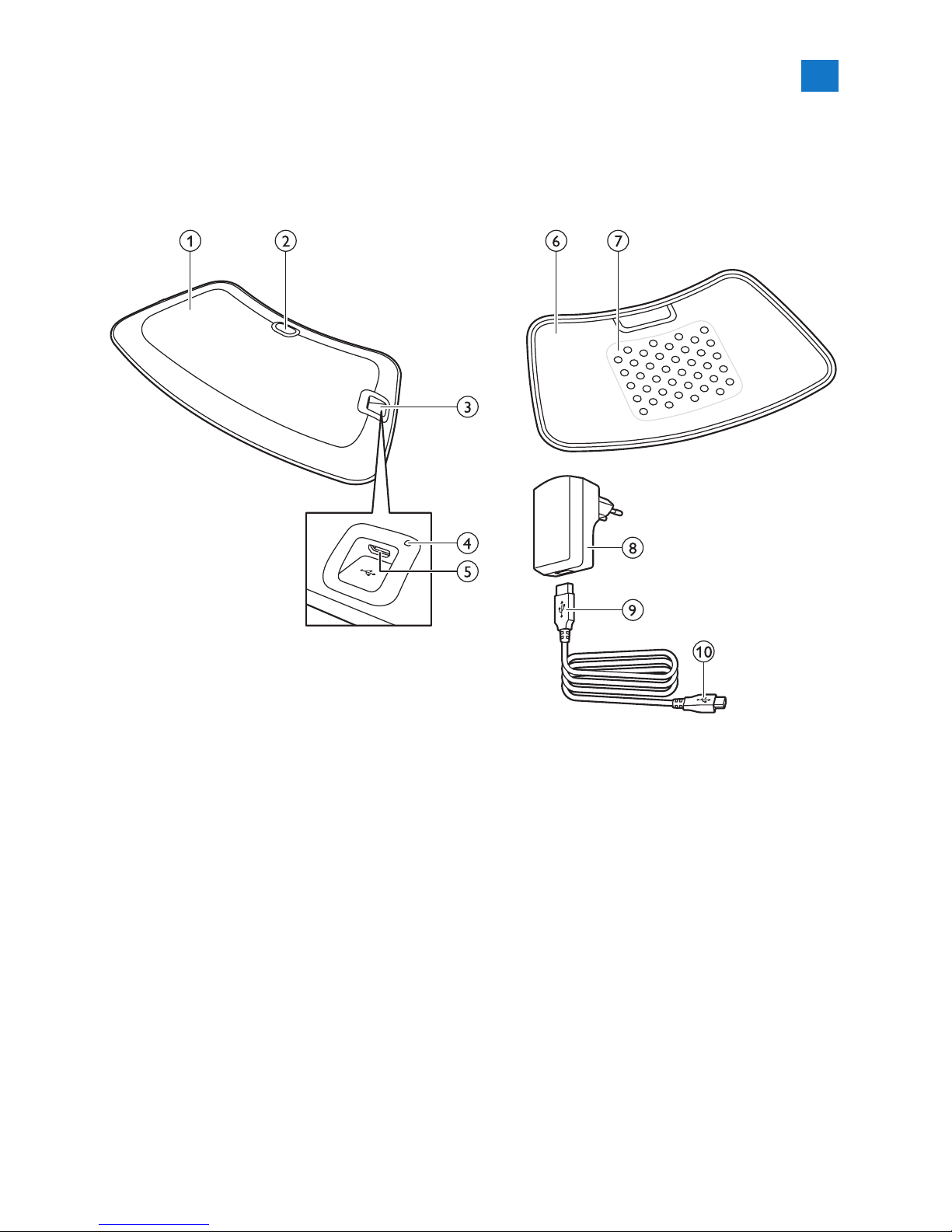
Product overview (Fig. 1)
1 BlueTouch Pain Relief Patch (outside)
2 On/off button
3 Connection panel
4 Charging light
5 Micro USB socket
6 BlueTouch Pain Relief Patch (skin side)
7 Treatment area
8 Adapter
9 Standard USB plug
10 Micro USB plug
ENGLISH14
Page 15
Preparing for use
Charging the device
You have to charge the BlueTouch Pain Relief
Patch before rst use. You also have to charge the
device when its battery is low. When you charge
the BlueTouch Pain Relief Patch, it takes less than
5 hours to charge the battery. When fully charged,
the battery contains enough energy for 4 or more
treatments. You can charge the BlueTouch Pain Relief
Patch with the adapter and USB cable supplied.
Note: You cannot use the BlueTouch Pain Relief Patch
when it is charging.
Note: If the device is not fully charged when you start
a treatment, the battery may run out during the
treatment. We advise you to always fully charge the
device before you start a treatment.
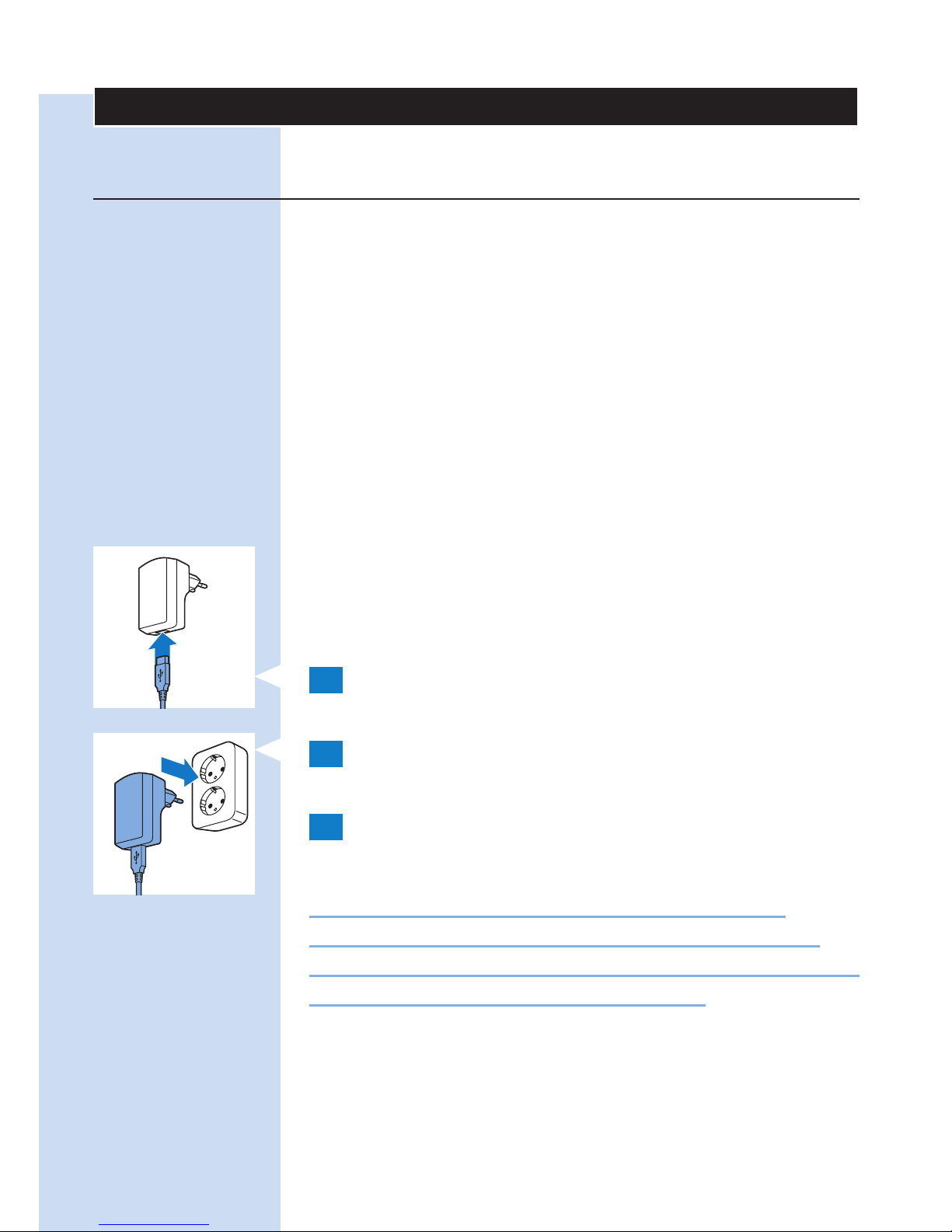
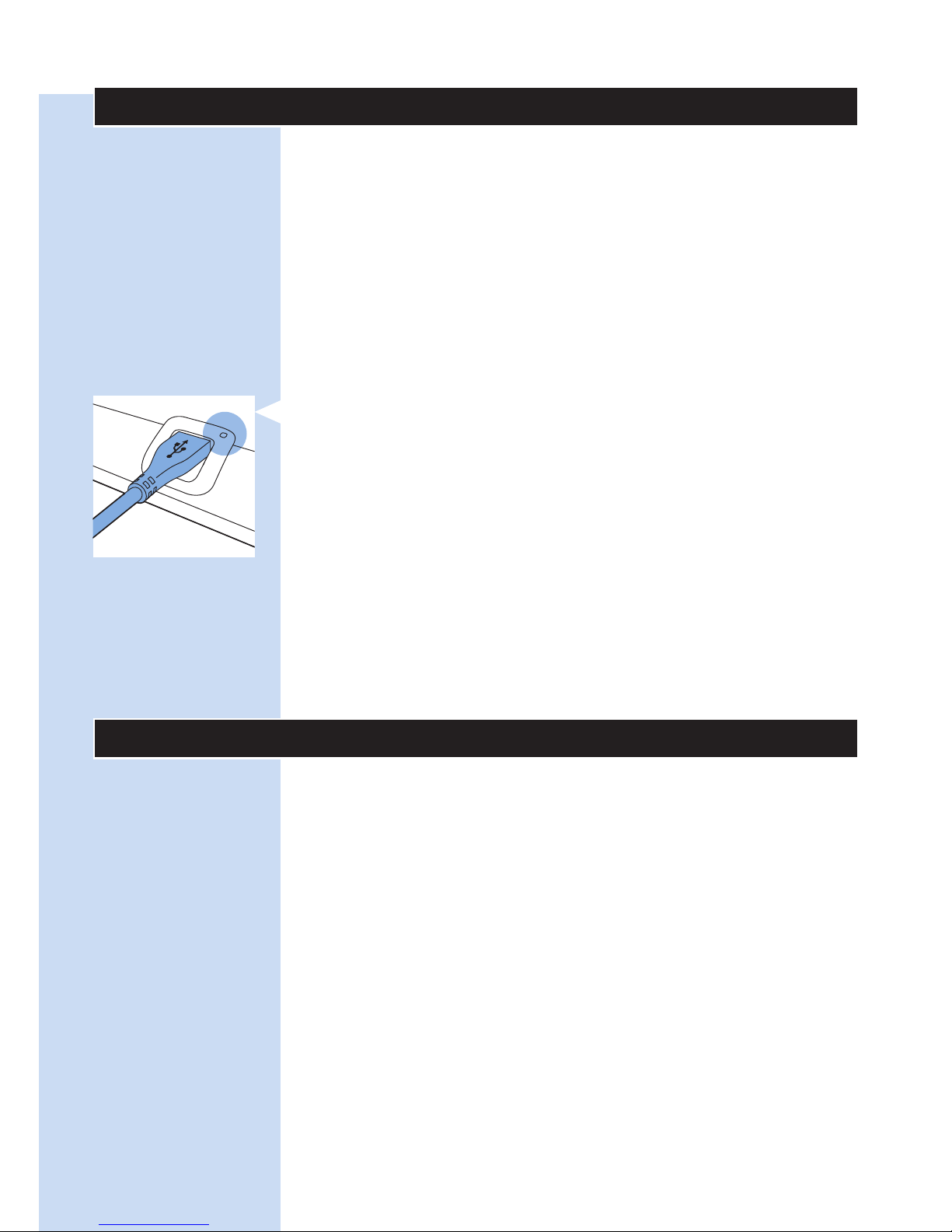
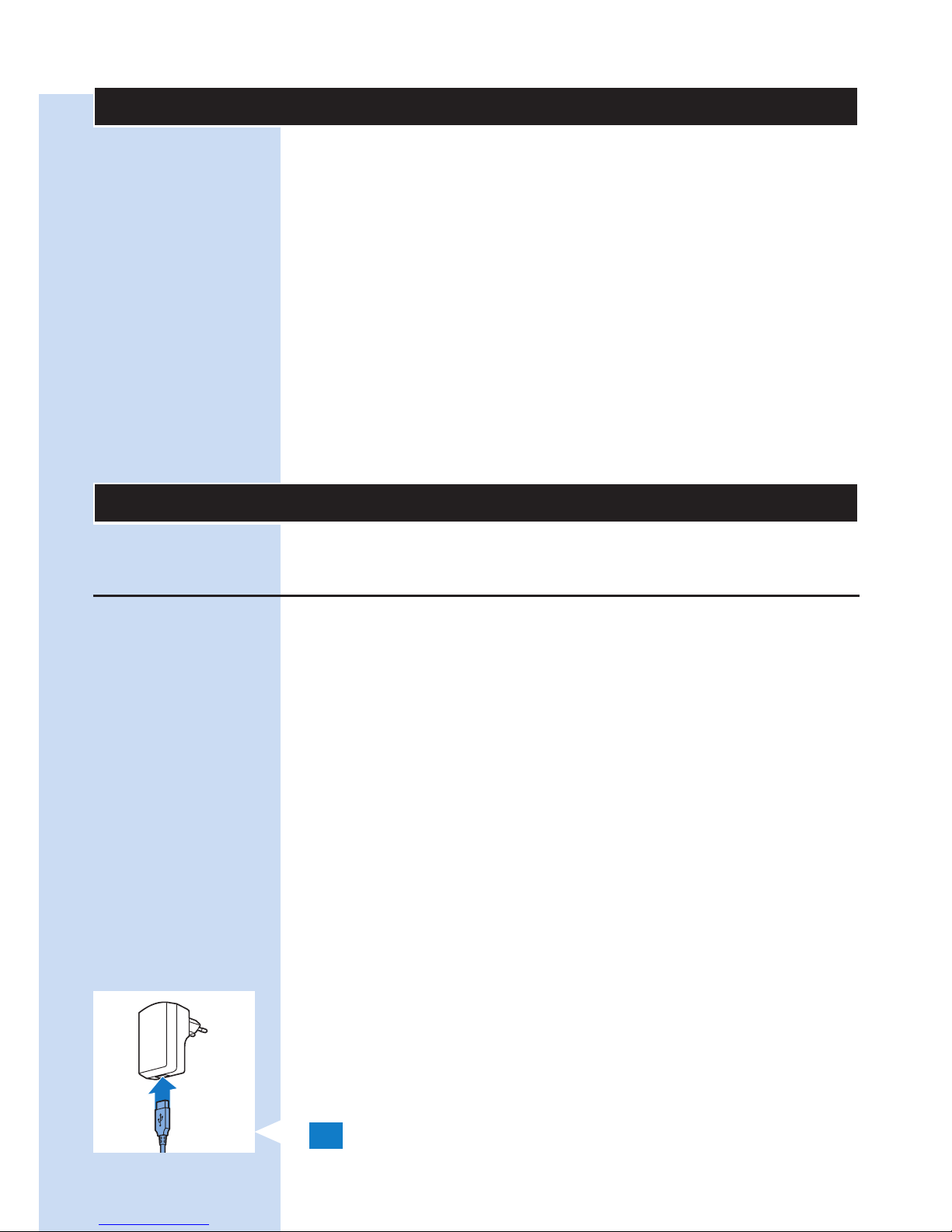
1 Insert the standard USB plug into the socket
of the adapter.
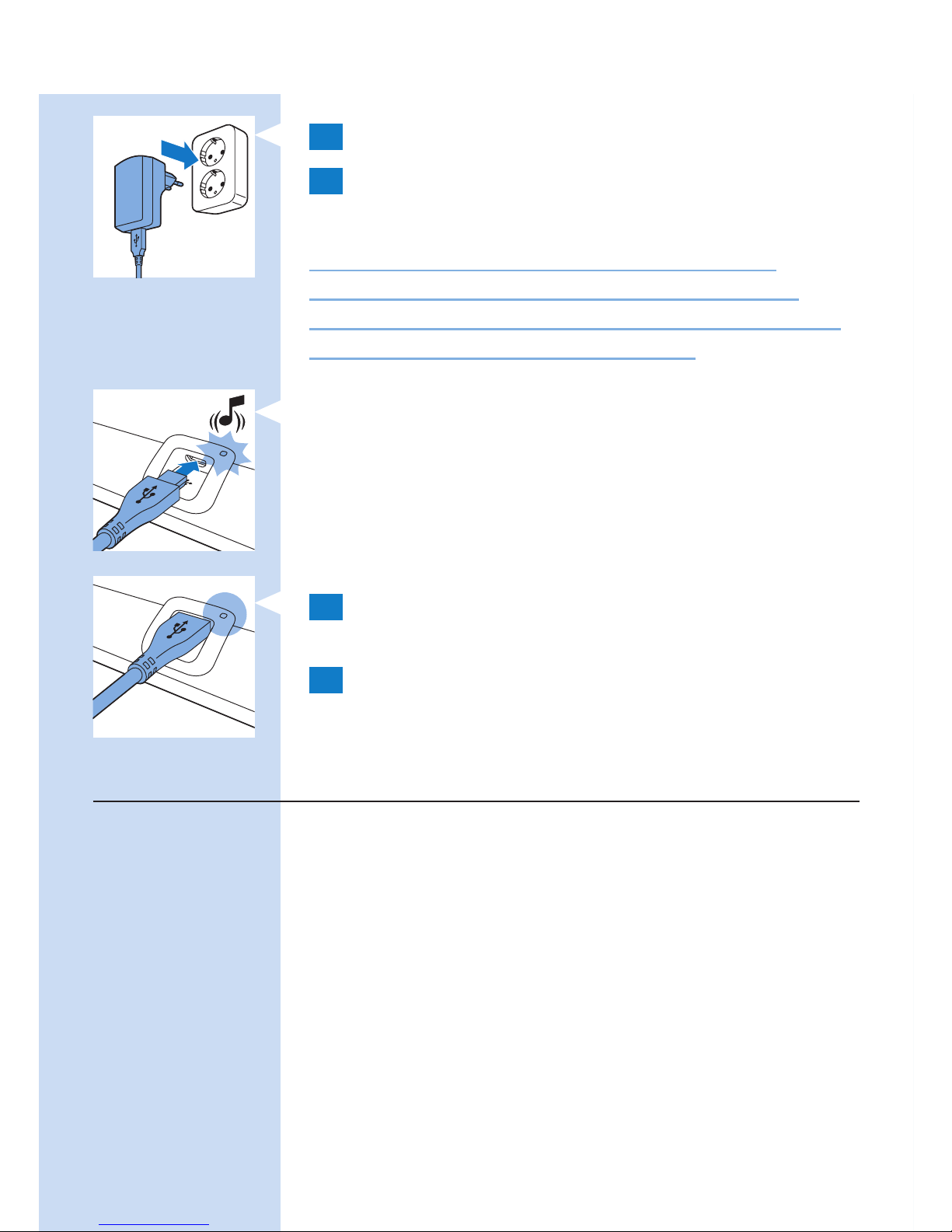
2 Insert the adapter into a wall socket
(100V-240V).
3 Insert the micro USB plug into the socket on
the BlueTouch Pain Relief Patch.
Caution: Only use this micro-USB socket to
connect the BlueTouch Pain Relief Patch to the
mains for charging. Do not connect any other cable
with a micro-USB plug to this socket.
ENGLISH 15
Page 16
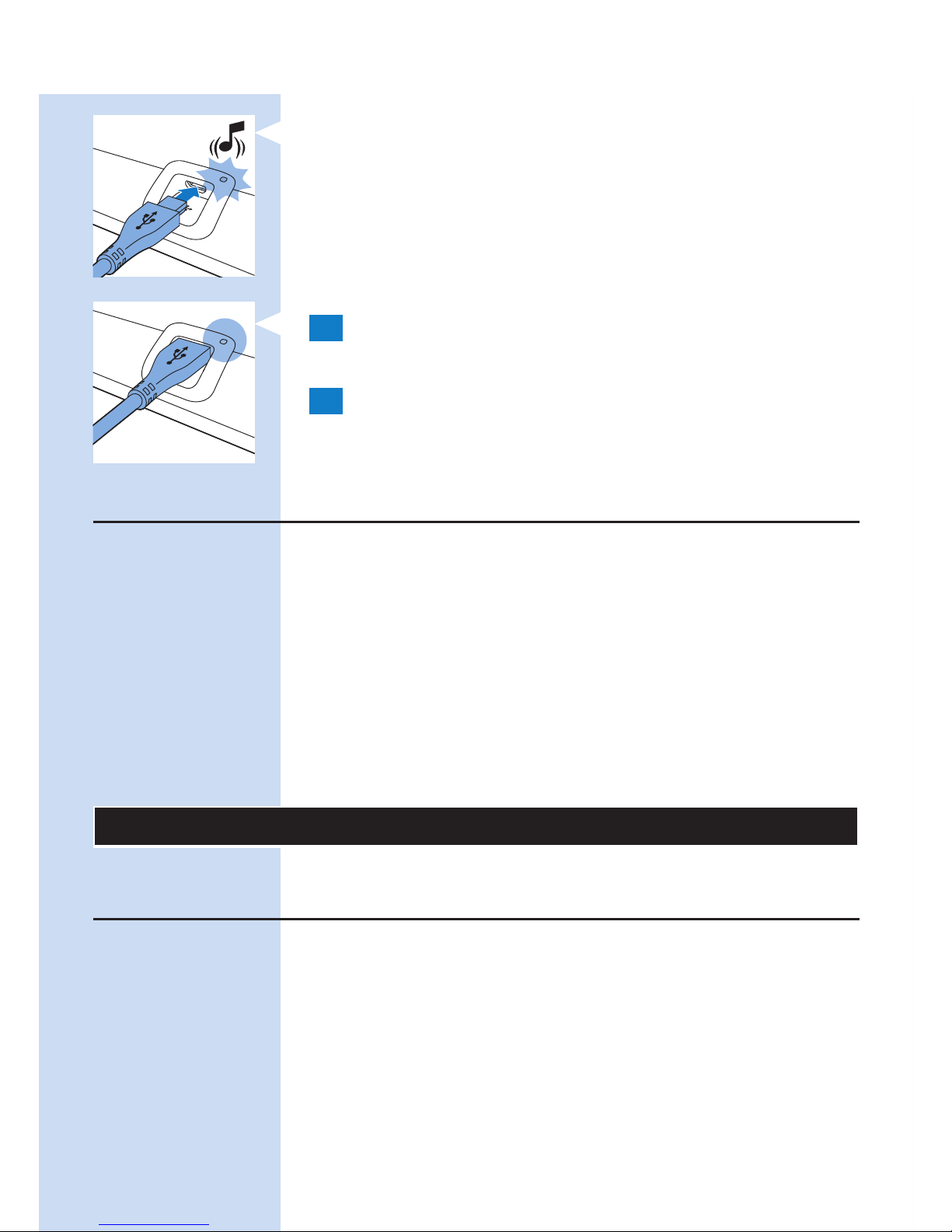
, When you connect the BlueTouch Pain Relief
Patch to the mains, it beeps once to indicate
that charging starts. The charging light on the
connection panel ashes green slowly and
regularly during charging.
4 When the battery is fully charged, the charging
light turns solid green.
5 Remove the adapter from the wall socket and
pull the USB plug out of the micro USB socket
of the BlueTouch Pain Relief Patch.
Installing and setting up the Treatment App
You need the Philips Treatment app to operate the
device. Please go to the Apple App Store or Google
Play, search for the ‘Philips Treatment’ app and press
install. Refer to the quick start guide for more details.
Note: The Treatment App is an app that can be used
for BlueTouch (PR3743, PR3741) and for PulseRelief
(PR3840). The installation procedure is the same for
both devices.
Using the device
Positioning the device
You position the BlueTouch Pain Relief Patch on
your body with one of the straps supplied with the
device. There is a special strap for treatment of the
upper back and a special strap for treatment of the
lower back.
Note: Do not wear multiple layers of clothing or tight or
thick clothing over the BlueTouch Pain Relief Patch.
ENGLISH16
Page 17
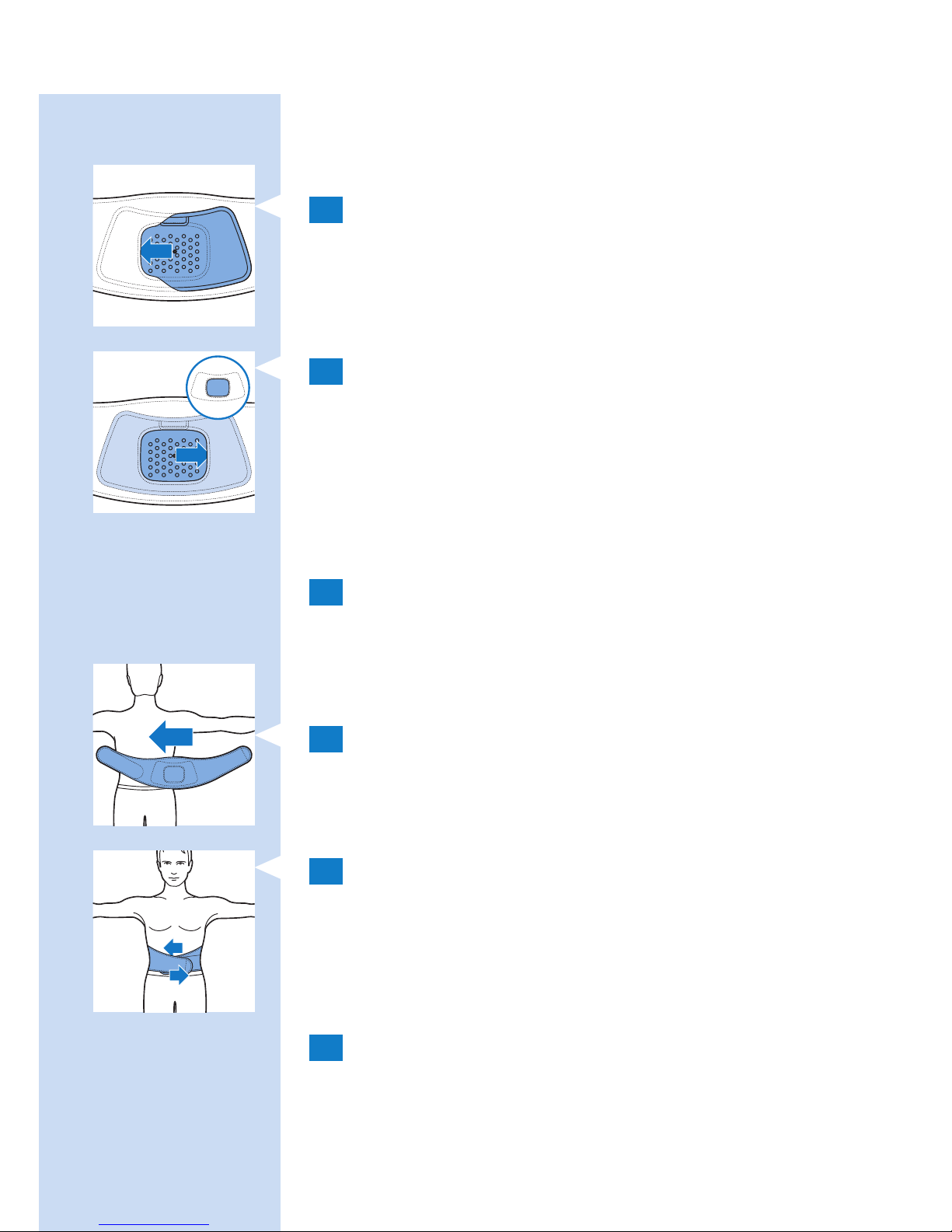
Positioning the lower back strap
To place the BlueTouch Pain Relief Patch in the
lower back strap, follow the steps below.
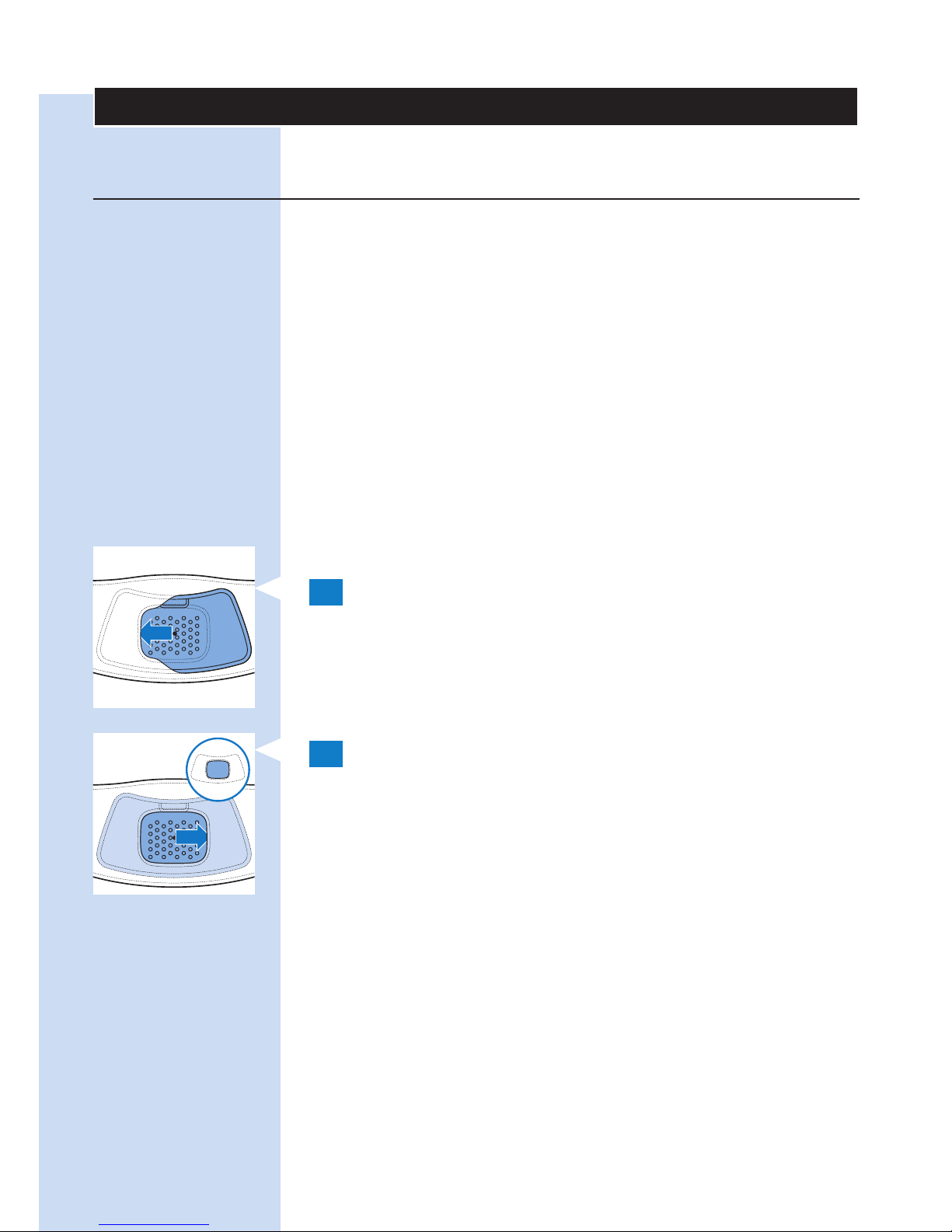
1 Place the lower back strap and the BlueTouch
Pain Relief Patch in front of you on a table.
Slide the left side of the BlueTouch Pain Relief
Patch behind the elastic edge of the opening in
the strap.
2 Then slide the other end of the BlueTouch Pain
Relief Patch behind the opposite elastic edge of
the opening so that the whole patch is inside
the lower back strap. Check to make sure that
material of the strap does not cover the LEDs.
If necessary, shift the BlueTouch Pain Relief
Patch a little.
3 Remove clothing from the area to be treated.
Note: Make sure the skin in the area to be treated is
clean, entirely dry and free from creams, lotions and
other cosmetics.
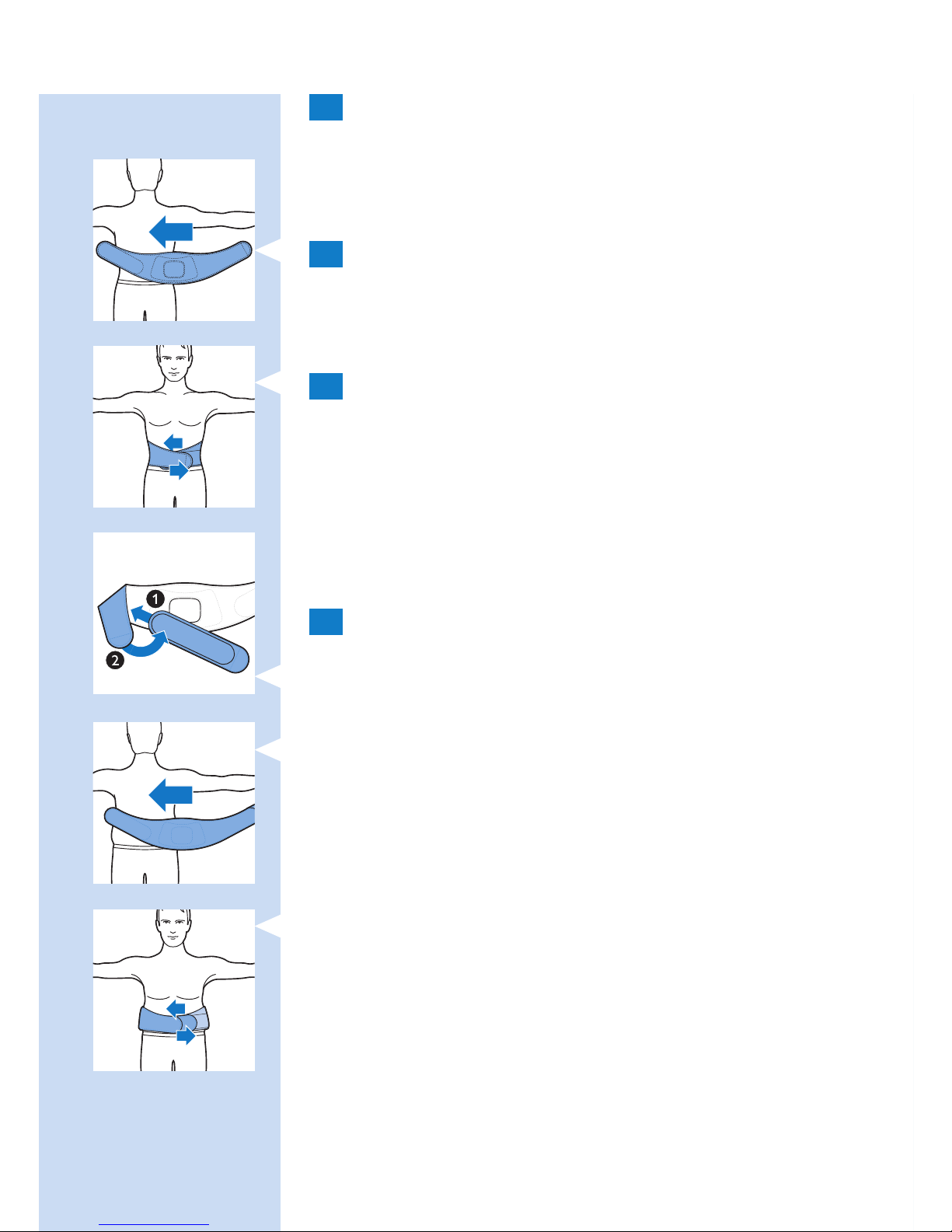
4 Wrap the lower back strap with the BlueTouch
Pain Relief Patch in it around your waist with
the treatment area of the device facing your
back.
5 Fasten the lower back strap with the Velcro
strips on both ends of the lower back strap.
Note: Make sure the BlueTouch Pain Relief Patch in
the strap is located on the area to be treated and the
treatment area is in contact with the skin.
6 If the lower back strap does not t around
your body, you can do the following.
ENGLISH 17
Page 18
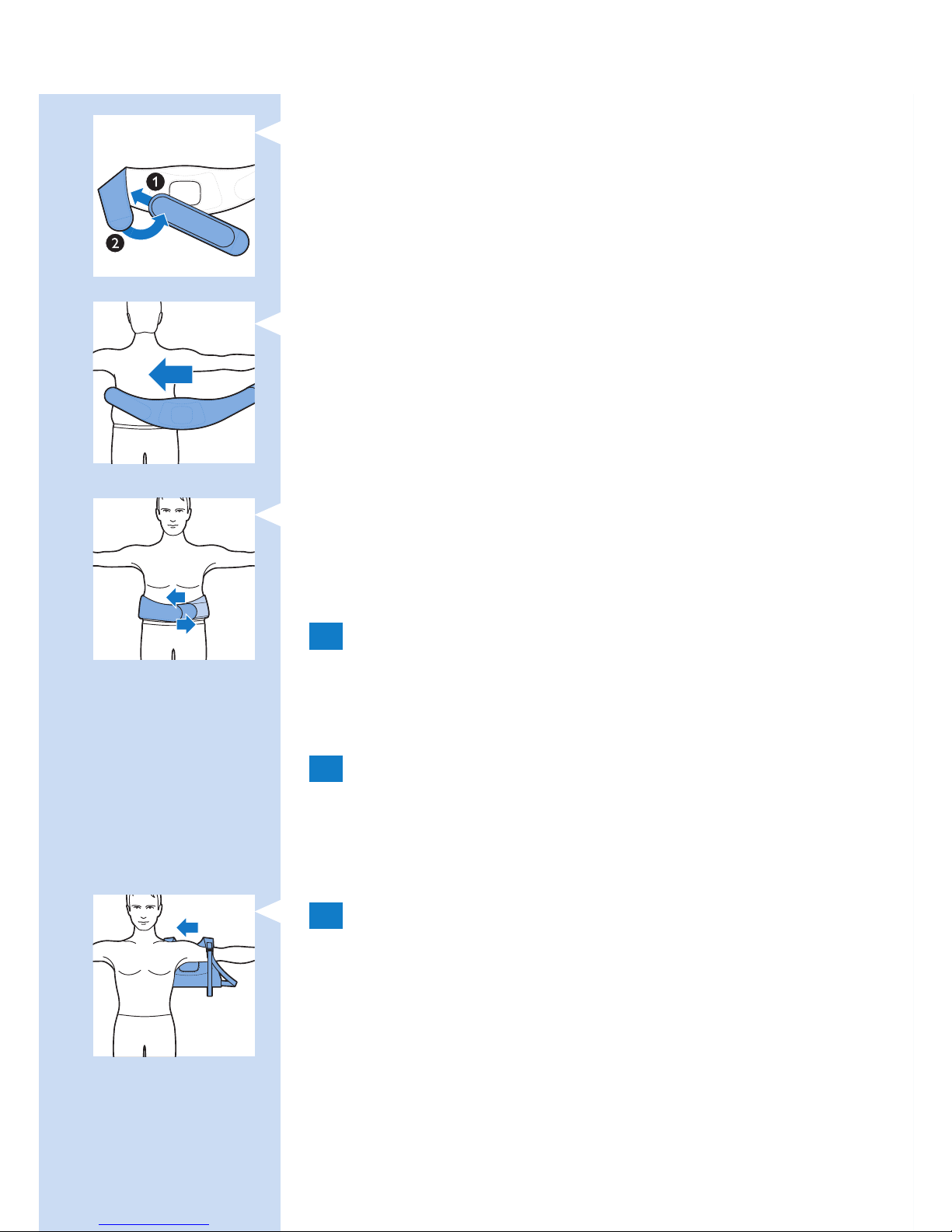
1 Attach the extension strap to the Velcro strip on
one end of the lower back strip.
2 Then wrap the extended lower back strip
around your body.
3 Fasten the lower back strap with the Velcro strip
at a width that feels comfortable.
Positioning the upper back strap
1 To put the BlueTouch Pain Relief Patch in the
upper back strap, follow the same procedure
as described in steps 1 and 2 in section
‘Positioning the lower back strap’ above.
2 Remove clothing from the area to be treated.
Note: Make sure the skin in the area to be treated is
clean, entirely dry and free from creams, lotions and
other cosmetics.
3 Put on the upper back strap like a backpack.
First, put one arm through the shoulder sling
on one side. Then do the same on the other
side.
Note: Make sure the BlueTouch Pain Relief Patch in the
strap is located on the area to be treated and the LED
area is in contact with the skin.
ENGLISH18
Page 19
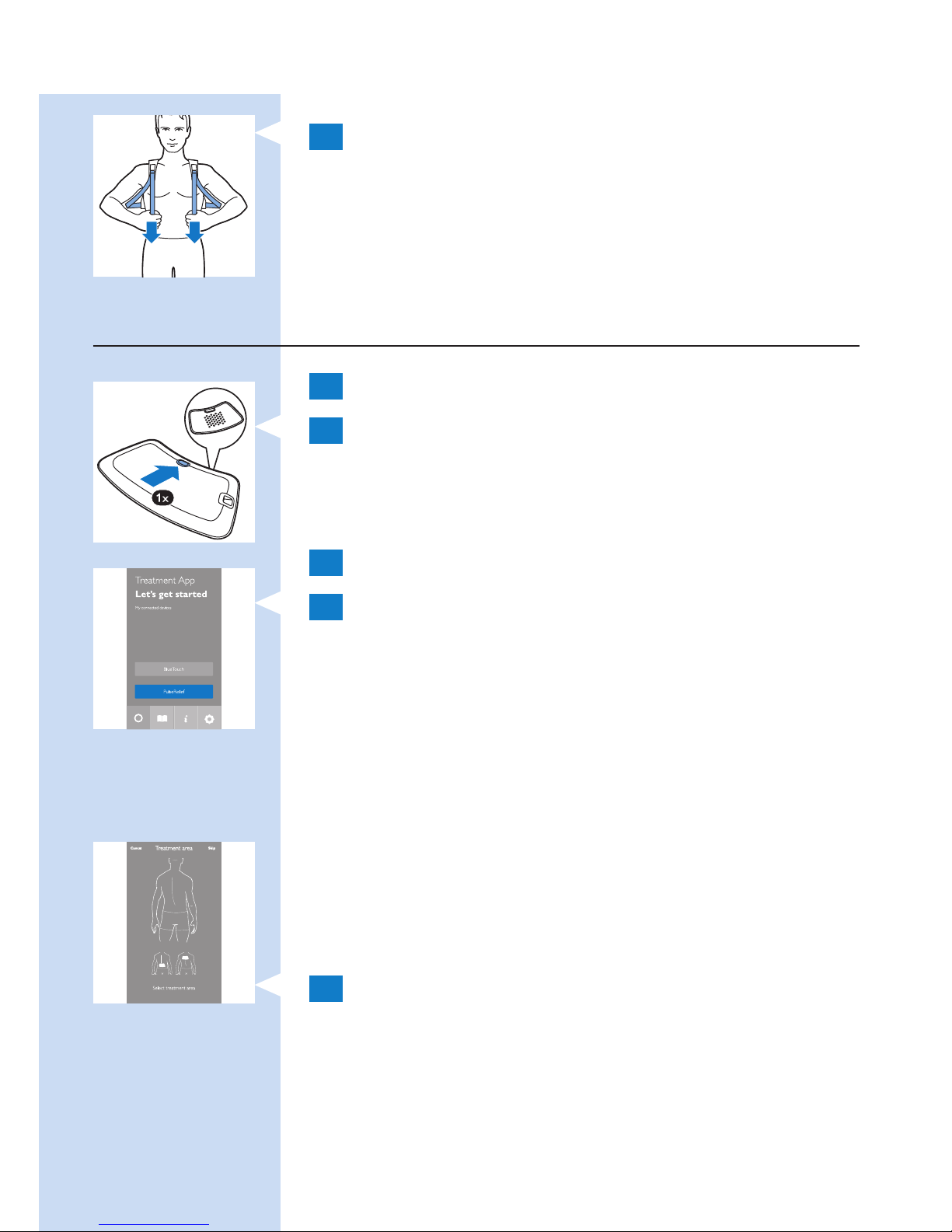
4 Tighten the shoulder slings by pulling the
elastic straps.
Using the app to start and stop a treatment
1 Switch on Bluetooth on your mobile device.
2 Press the on/off button to switch on the
BlueTouch Pain Relief patch and position the
strap with the patch on the part of your back
you want to treat.
3 Open the Philips Treatment App.
4 When you use the app for the rst time,
tap ‘BlueTouch’. When you open the app the
next time, the app will automatically select
BlueTouch if only a BlueTouch Pain Relief Patch
is paired to the app. If both a PulseRelief and
a BlueTouch device are paired to the app, tap
‘BlueTouch’ to select the device.
Selecting a treatment area
At rst-time use, you always have to select a
treatment area. If you have used the device before,
you can choose between ‘Quick Start’ and ‘Select a
treatment area’.
1 Tap on the part of the back you want to treat.
ENGLISH 19
Page 20
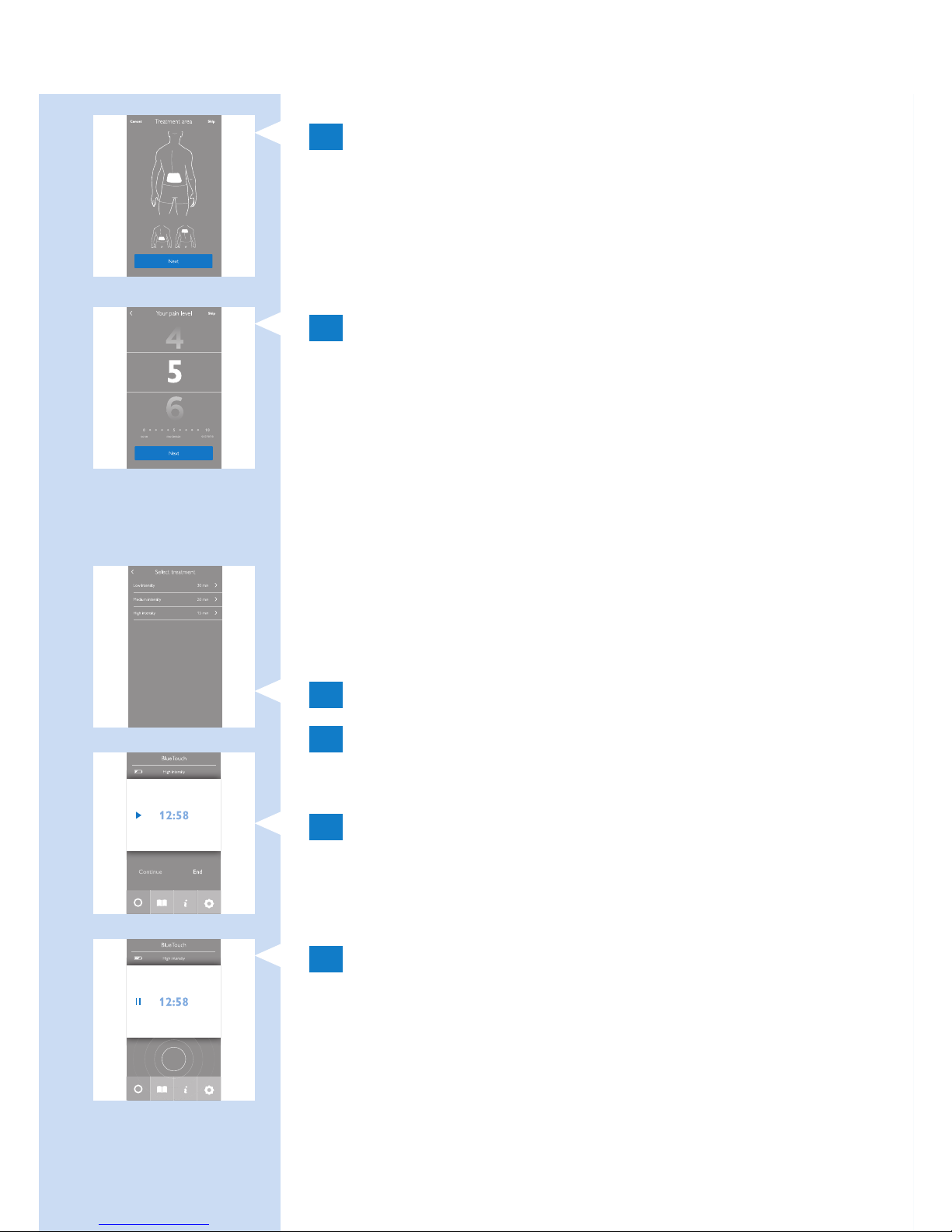
2 The app shows the location of the patch on
the back. Tap ‘Next’ to continue.
Rating your pain intensity
1 Swipe vertically to rate the intensity of your
pain on a scale from 0 to 10. If you experience
no pain tap 0 and if you experience the
worst pain imaginable tap 10. If your pain is
somewhere in between, rate it by tapping the
appropriate number.
Note: The pain intensity you indicate is not used by the
app to determine the treatment mode. The rating is
only stored in your treatment diary. You can switch off
this feature in the settings tab of the app.
Selecting the treatment mode
1 Tap the mode you want to use.
2 The start screen of the treatment appears.
Starting and stopping a treatment
1 Tap the play button on the screen.
, The time starts to count down.
, The status indicator on the device starts to ash
orange.
2 Treatment continues until the timer has
counted down to 0. If you want to stop or
interrupt the treatment before the treatment
time has elapsed, tap the square in the centre
of the pulsing treatment indicator to interrupt
the program.
ENGLISH20
Page 21
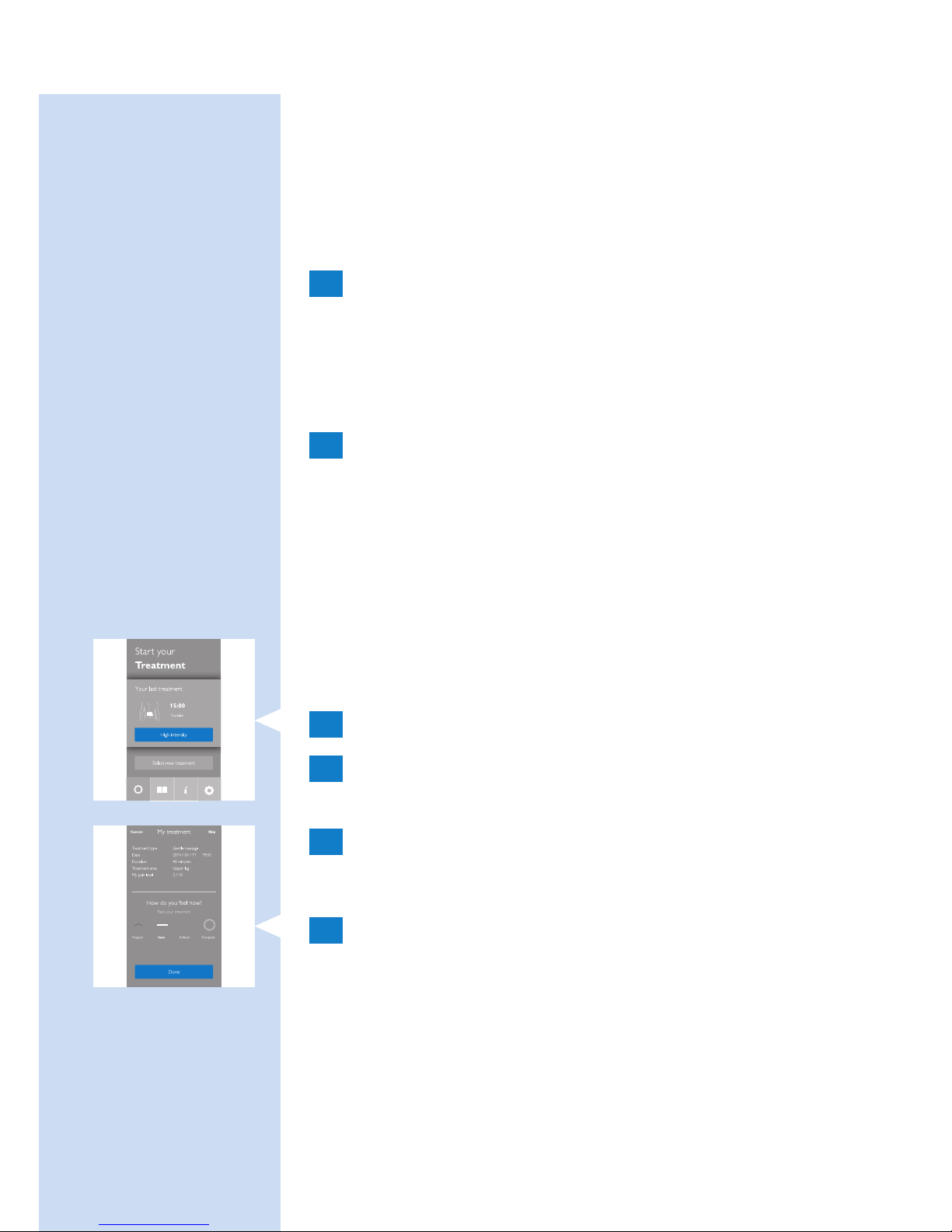
- To resume the program, tap ‘Resume’ or the
arrow next to the time.
- To end the program and switch off the device, tap
‘End treatment’.
Switching to another treatment mode
1 If you want to switch to another treatment
mode, tap the name of the current treatment
mode.
The list of treatment modes opens. Tap the
treatment mode you want to use.
2 The selected new treatment mode appears
on the screen. Tap the play button to start the
treatment.
Note: The timer automatically recalculates the
remaining treatment time based on the new mode.
Quick start
Quick start immediately starts the treatment mode
you used before.
1 Select quick start.
2 Swipe vertically to rate the intensity of your
pain on a scale from 0 to 10.
3 Tap the play button to start the treatment.
Other app features
1 After the program nishes, you get to a screen
that asks you to describe how you feel by
tapping one of the icons.
ENGLISH 21
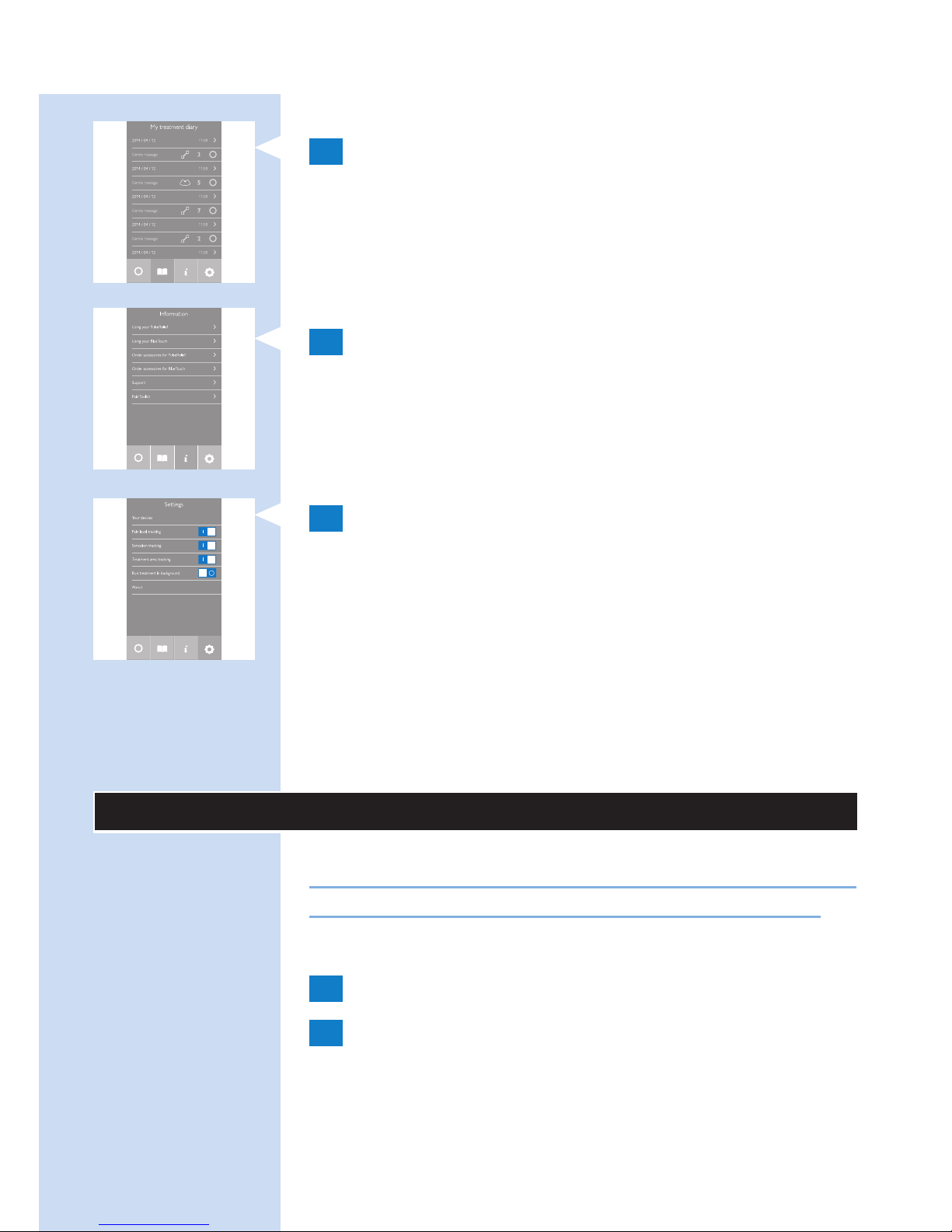
Page 22
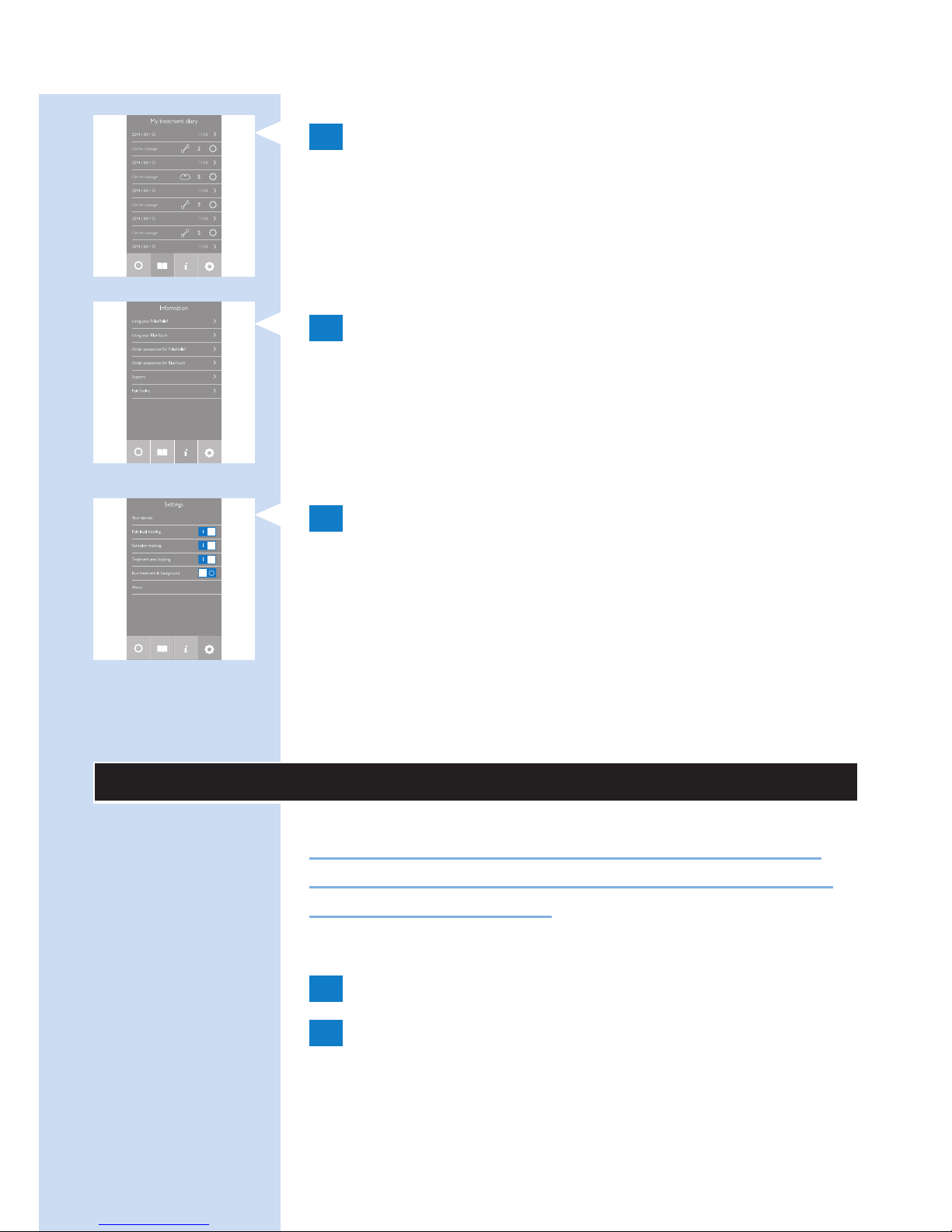
2 Tap the book symbol to open your diary.
The diary shows when treatments took place,
which treatment mode you used and how long
the treatment lasted.
- Tap the arrow to see more details.
3 Tap the ‘i’ to open the information screen.
This screen contains the following items:
- Using your BlueTouch device
- Contact us
4 Tap the settings symbol to open the settings
screen. This screen contains the following items:
- Your devices
- Pain level tracking
- Sensation tracking
- Treatment area tracking
- Run treatment in background
- About
After treatment
Caution: Make sure that you end the treatment
in the app before you remove the strap with the
device from your back.
1
Loosen the strap and remove it from your back.
2 Recharge the BlueTouch Pain Relief Patch if
the charging light is solid orange (see chapter
‘Charging the device’). Remove the BlueTouch
Pain Relief Patch from the strap before you
start to recharge it.
ENGLISH22
Page 23
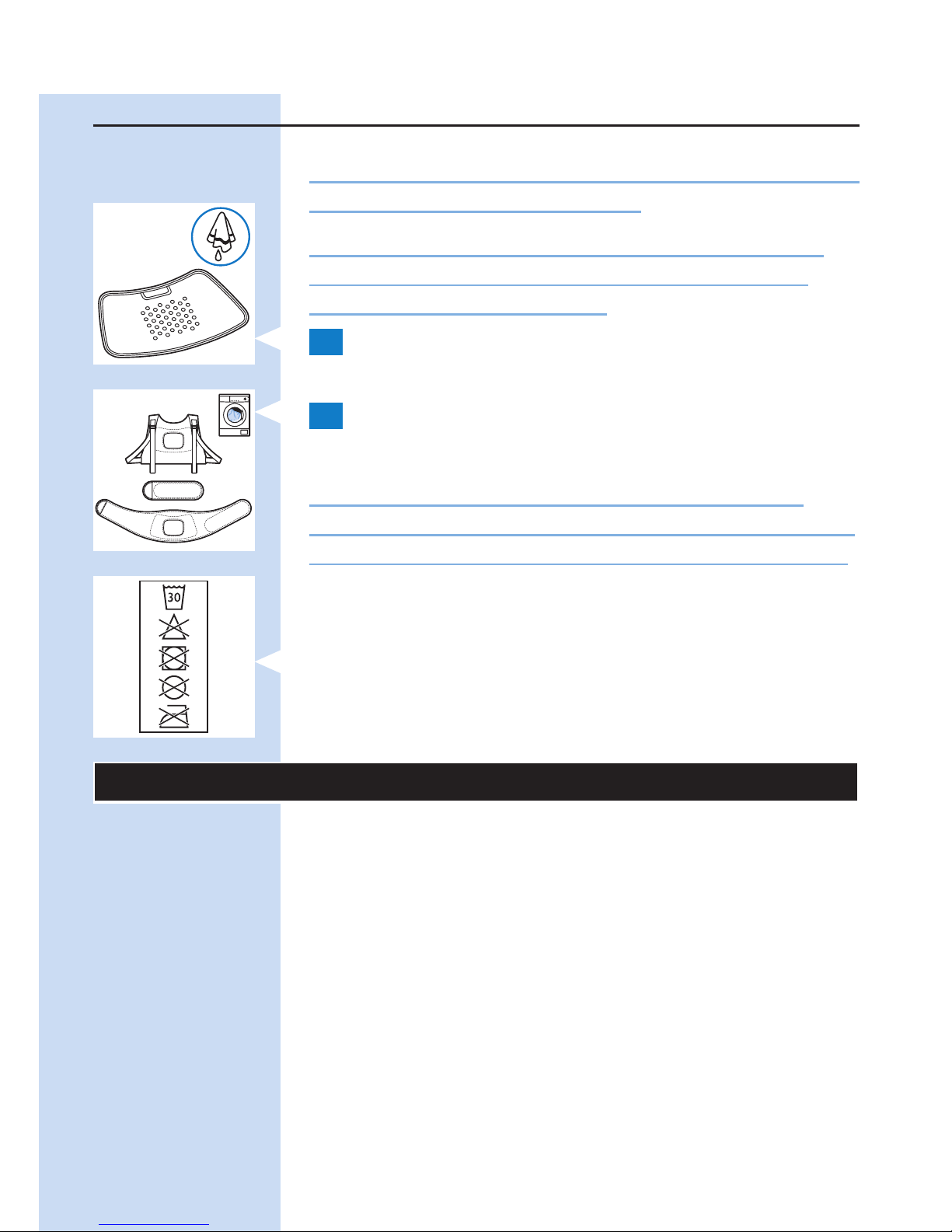
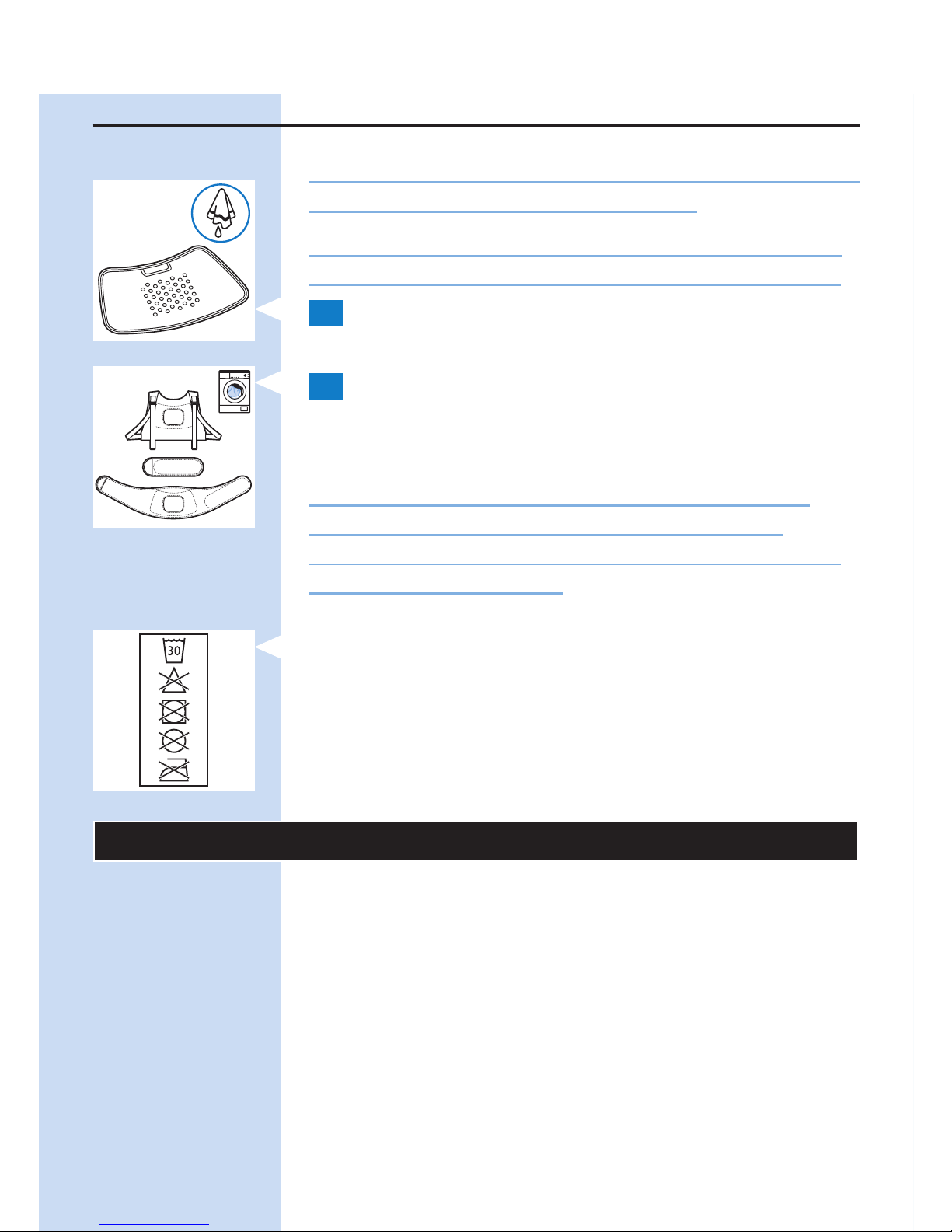
Cleaning
Do not immerse the BlueTouch Pain Relief Patch in
water or rinse it under the tap.
Always remove the BlueTouch Pain Relief Patch
from the strap before you put the strap in the
washing machine to clean it.
1 Clean the BlueTouch Pain Relief Patch with a
damp cloth after use.
2 You can wash the BlueTouch Pain Relief straps
in the washing machine when they are dirty.
Caution: To prevent damage to the BlueTouch
Pain Relief straps and other clothes in the washing
machine, wash the straps in a ne-mesh washing bag.
Note: Use a gentle cycle and a temperature of 30°C
maximum. Dry the BlueTouch Pain Relief straps on the
air and not in the tumble dryer. Do not iron the straps.
Troubleshooting
This chapter summarises the most common
problems you could encounter with the BlueTouch
Pain Relief Patch. If you are unable to solve the
problem with the information below, contact Philips.
ENGLISH 23
Page 24

Problem Possible cause Solution
The BlueTouch
Pain Relief
Patch suddenly
switches off during
treatment.
The pre-set
treatment time
has elapsed.
The BlueTouch Pain Relief
Patch is programmed to
switch off automatically after
the treatment time at the
selected treatment mode has
elapsed. Just before it switches
off you hear a triple tone
(high to low).
The BlueTouch Pain
Relief Patch does
not appear to work
for me, for I notice
no effect.
It may take
two weeks
before the
effects become
noticeable.
Be patient and allow more
time for the effects to become
noticeable.
The BlueTouch
Pain Relief Patch
switches to a lower
intensity.
The
temperature
of the device is
too high.
Remove the BlueTouch Pain
Relief Patch from your body,
switch it off and let it cool
down. Make sure that you
do not wear too many or
too thick clothes over the
BlueTouch Pain Relief Patch
during treatment.
The charging light
turns solid red
for 8 seconds and
the BlueTouch
Pain Relief Patch
switches off.
The
rechargeable
battery is
empty.
Charge the BlueTouch Pain
Relief Patch (see chapter
‘Charging the device’).
ENGLISH24
Page 25

Problem Possible cause Solution
The charging light is
solid orange.
The battery
is low and
does not
contain enough
energy for one
treatment.
Charge the BlueTouch Pain
Relief Patch (see chapter
‘Charging’ the device).
The adapter
becomes warm
during charging.
This is normal. No action required.
A piece of medical
equipment
malfunctions
when the device
is switched on or
during operation.
The device is
too close to
the medical
equipment.
Do not use the device near
medical equipment.
The charging light
does not start
ashing green when
I insert the micro
USB plug into the
micro USB socket
on the connection
panel.
You have not
inserted the
adapter or have
not inserted it
properly into
the wall socket.
Insert the adapter into the
wall socket properly.
You have not
inserted the
standard USB
plug or have
not inserted it
properly into
the adapter.
Insert the standard USB plug
into the adapter properly.
ENGLISH 25
Page 26

Problem Possible cause Solution
The wall socket
into which you
have inserted
the adapter is
not live.
Connect another appliance
to the same socket to check
if the socket is live. If the
wall socket is live, but the
BlueTouch Pain Relief Patch
does not charge, contact
Philips.
An error
occurred during
charging.
Press the button on the
BlueTouch Pain Relief Patch to
restart charging.
The adapter is
connected to the
BlueTouch Pain
Relief Patch and
the charging light is
not solid or ashing
green.
An error
occurred during
charging.
Press the button on the
BlueTouch Pain Relief Patch to
restart charging.
The BlueTouch
Pain Relief Patch
becomes warm
during use.
This is normal. No action required.
I can’t make
connection with
the BlueTouch Pain
Relief Patch.
Bluetooth is
not on.
Make sure that you switch
on Bluetooth on your smart
device.
Perhaps you
have not
selected
BlueTouch in
the app.
Run the app, tap ‘Settings, then
‘Your devices’ and check if
‘BlueTouch’ is in the list. If not,
click ‘Add new BlueTouch’ and
switch on the BlueTouch Pain
Relief patch to pair the patch
to your smart device.
ENGLISH26
Page 27
Signals on the device
Sound signals during treatment
- A dual tone (low to high) sounds when the
treatment starts and the intensity increases from
power-save mode to the intensity of the mode
selected.
- A triple tone (high to low) sounds when the
treatment ends.
Battery level signals
- The charging light is solid green when the battery
contains enough energy for at least one treatment.
- The charging light ashes green slowly and
regularly during charging.
- The charging light is solid orange when the
battery is low and does not contain enough
energy for one treatment.
- The charging light turns solid red for 8 seconds
and the device switches off when the battery is
empty.
Ordering accessories
To buy accessories or spare parts, visit
www.shop.philips.com/service or go to your
Philips dealer. You can also contact the Philips
Consumer Care Centre in your country. The type
number of this device is PR3740.
Spare straps
- Lower back straps are available under type
number PR3723.
- Upper back straps are available under type
number PR3721.
ENGLISH 27
Page 28

Guarantee and support
Your device has been designed and developed with
the greatest possible care to guarantee an expected
service life of 5 years.
If you need service or information or if you have a
problem, please visit our website at www.philips.com/
support or contact the Philips Consumer Care
Centre. Its telephone number is:
- Denmark: 35 44 41 30 (Monday to Friday
09:00 - 18:00)
- Finland: 09 88 62 50 41 (Monday - Friday
09:00 - 18:00)
- Norway: 22 97 19 50 (Monday to Friday
09:00 - 18:00)
- Portugal: 800 780 903 (free of charge,
Monday - Friday: 09:00 - 18:00)
- Spain: 91 349 65 80 (Monday - Friday:
08:00 - 20:00; Saturday: 09:00 - 18:00)
- Sweden: 08-5792 9067 (Monday to Friday
09:00 - 18:00)
- United Kingdom: 0844 338 04 89 (5p/min. from a
BT landline, other landline and mobile providers
may charge more).
Guarantee restrictions
The guarantee does not cover the straps and
standard wear and tear. The guarantee becomes
invalid if you do not use the BlueTouch Pain Relief
Patch according to the instructions in this user manual.
Manufacturer’s legal address
Philips Consumer Lifestyle B.V.
Tussendiepen 4, 9206 AD Drachten, Netherlands
ENGLISH28
Page 29
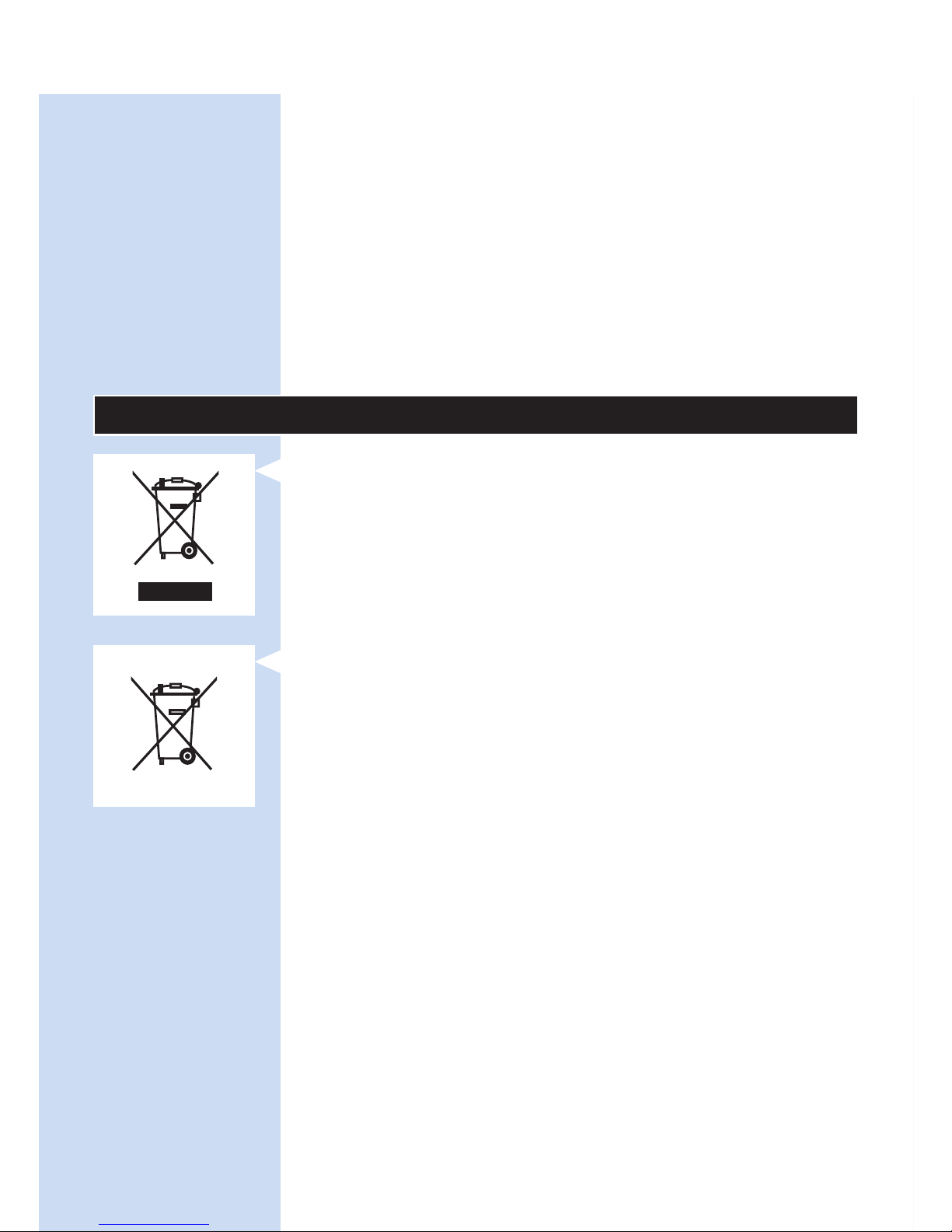
Recycling
- This symbol means that this product shall not
be disposed of with normal household waste
(2012/19/EU).
- This symbol means that this product contains a
built-in rechargeable battery which shall not be
disposed of with normal household waste (2006/66/
EC). Follow the instructions in section ‘Removing the
rechargeable battery’ to remove the battery.
- Follow your country’s rules for the separate
collection of electrical and electronic products
and rechargeable batteries. Correct disposal
helps prevent negative consequences for the
environment and human health.
Removing the rechargeable battery
Note: Always remove the rechargeable battery before
you hand in the device at an ofcial collection point.
If you have trouble removing the battery, you can also
take the device to a Philips service centre, which will
remove the battery for you and will dispose of it in an
environmentally safe way.
1 Make sure the rechargeable battery is empty.
Switch on the device and leave it on until the
charging light turns solid red and the device
switches off automatically. You may have to
repeat this procedure several times until it is
no longer possible to switch on the device.
2 Use a screwdriver to separate the upper part
of the device from the lower part.
ENGLISH 29
Page 30

3 Remove the battery. Dispose of the plastic
parts and the battery separately according to
local rules
Specications
Model PR3740
Rated voltage 100-240 V
Rated frequency 50-60 Hz
Rated input 15 W
Class Medical device Class IIa
Classication Risk Group 1 (according to
IEC60601-2-57)
Ingress of water IP22
Max. daily dose < 108.5 J/cm² if treatment schedule
is followed
Nominal wavelength 453 nm
Maximum radiant power 1.44 W (nominal for program 3)
Average irradiance 21.2 mW/cm²
Maximum temperature (average
user) during treatment
Program 1: 40°C
Program 2: 41°C
Program 3: 42°C
Maximum temperature (all users)
during treatment
Program 1: 45°C
Program 2: 46°C
Program 3: 47°C
ENGLISH30
Page 31
Model PR3740
Peak/average irradiance ratio 2.3
Battery type Li-Ion
Adapter The adapter is specied as part of
the medical system.
Operation conditions
Temperature from +5°C to +35°C
Relative humidity from 15% to 93%
Atmospheric pressure from 700 hPa to 1060 hPa
Storage conditions
Temperature from -20°C to +50°C
Relative humidity up to 93% (non condensing)
Explanation of symbols
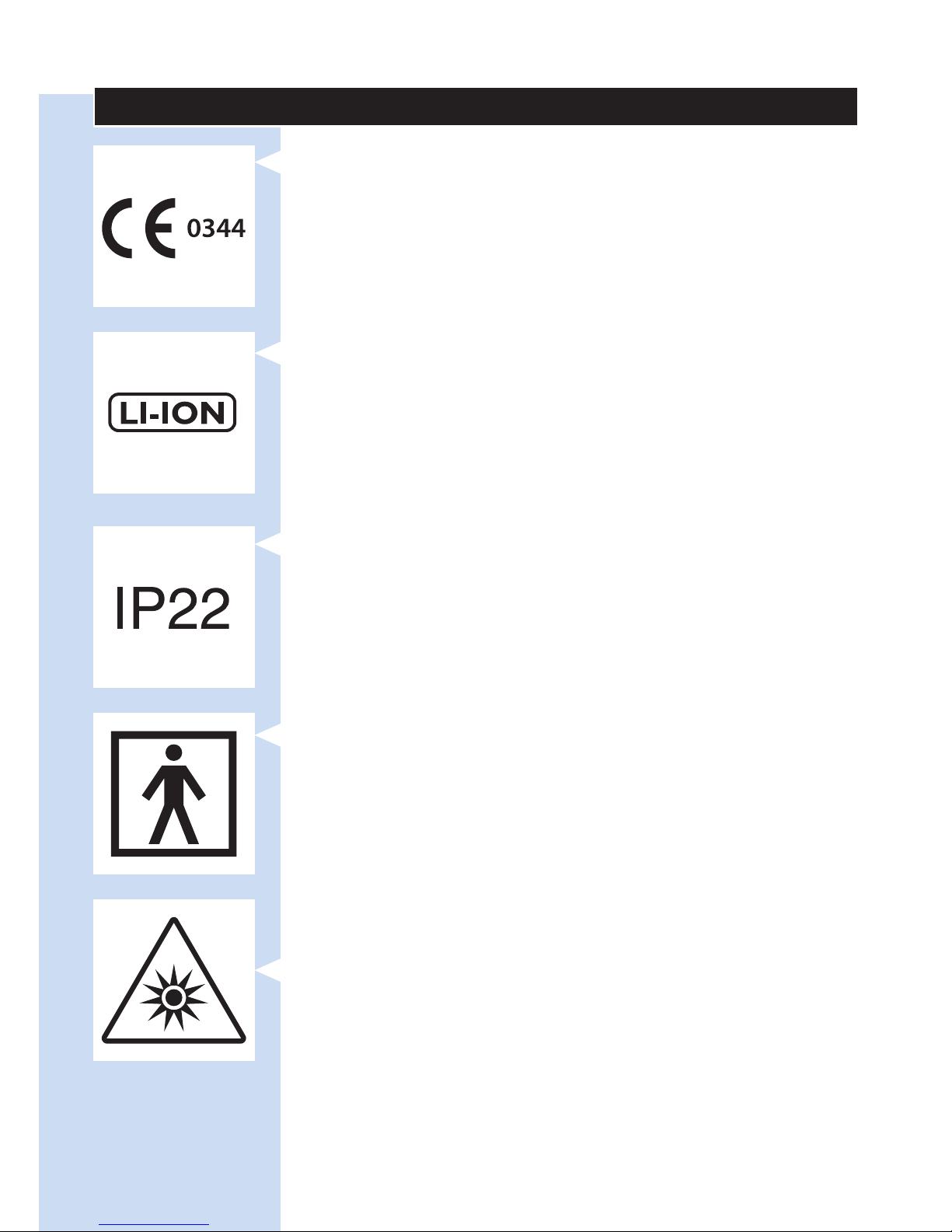
- This symbol means: Conforms to EC Directives.
CE stands for ‘Conformité Européenne’. 0344
indicates the notied body number.
ENGLISH 31
Page 32
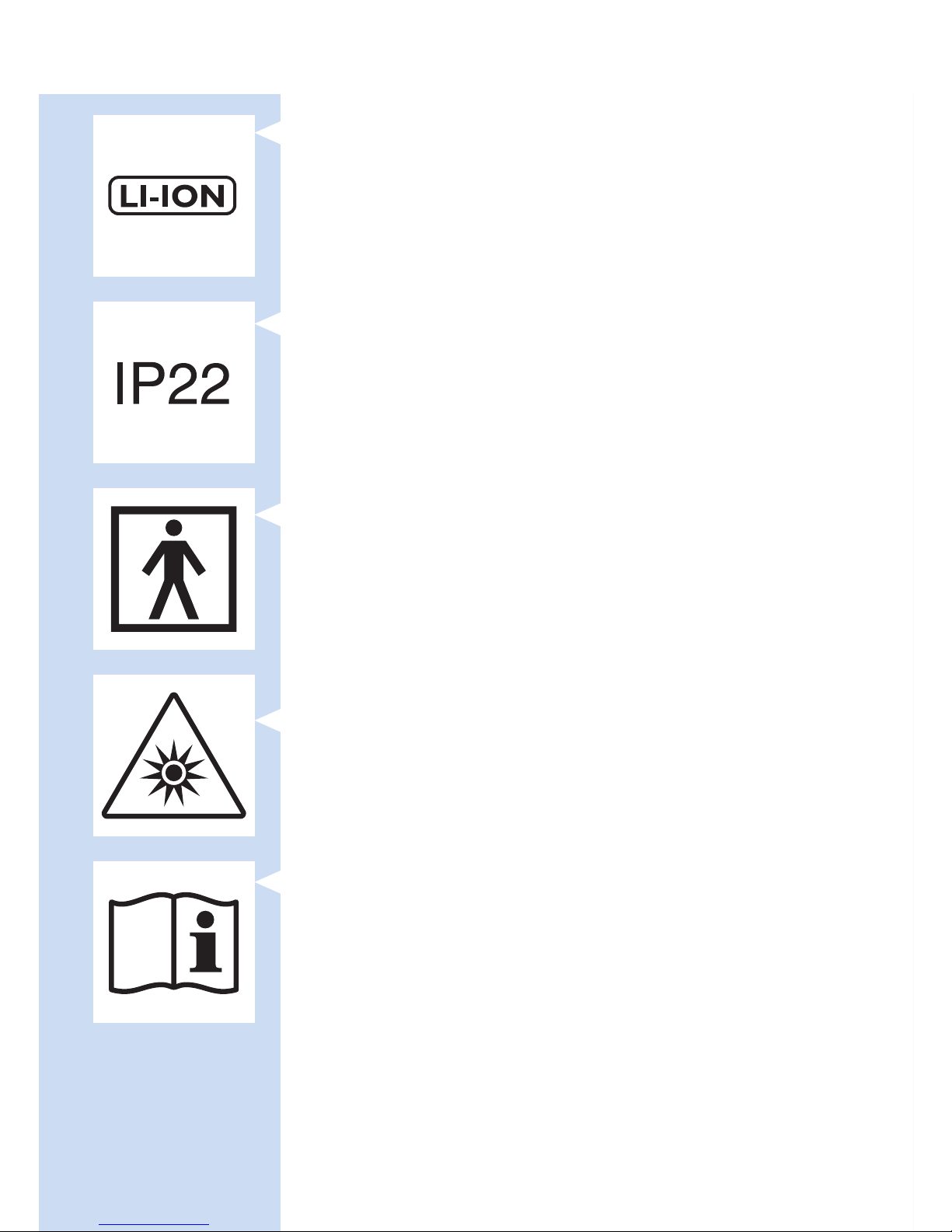
- This symbol means that the device uses LI-ION
rechargeable batteries.
- This symbol means: protected against access to
hazardous parts with a nger and against vertically
falling water drops when tilted up to 15 degrees.
- This symbol means that an applied part that
includes a patient connection intended to deliver
electrical energy or an electrophysiological signal
to or from the patient must be Type BF (Body
Floating) applied, according to IEC 60601-1.
The applied part is the device not including the
charger.
- This symbol means: Do not stare at the light
source. Risk Group 1 product.
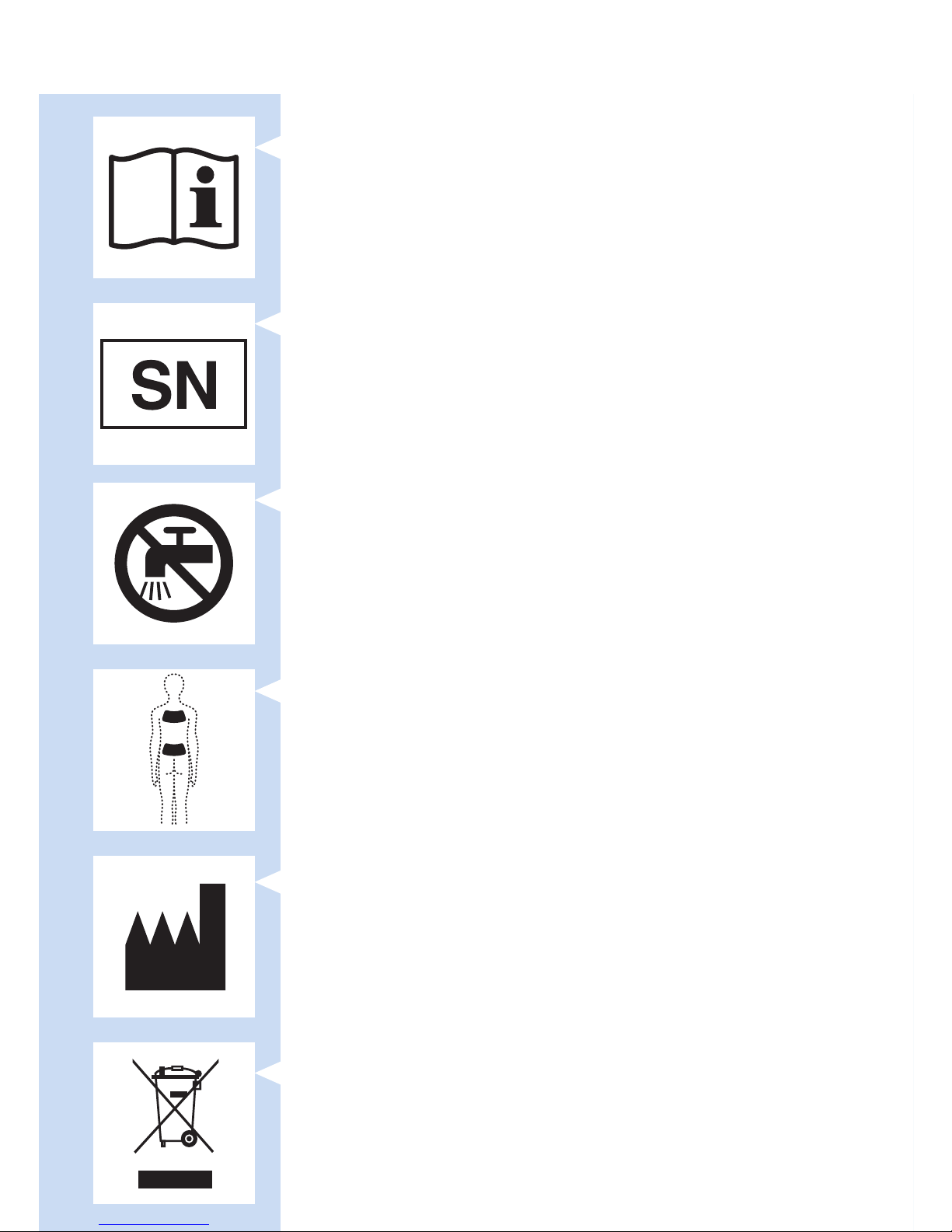
- This symbol means: read the user manual before
you start using the device.
ENGLISH32
Page 33
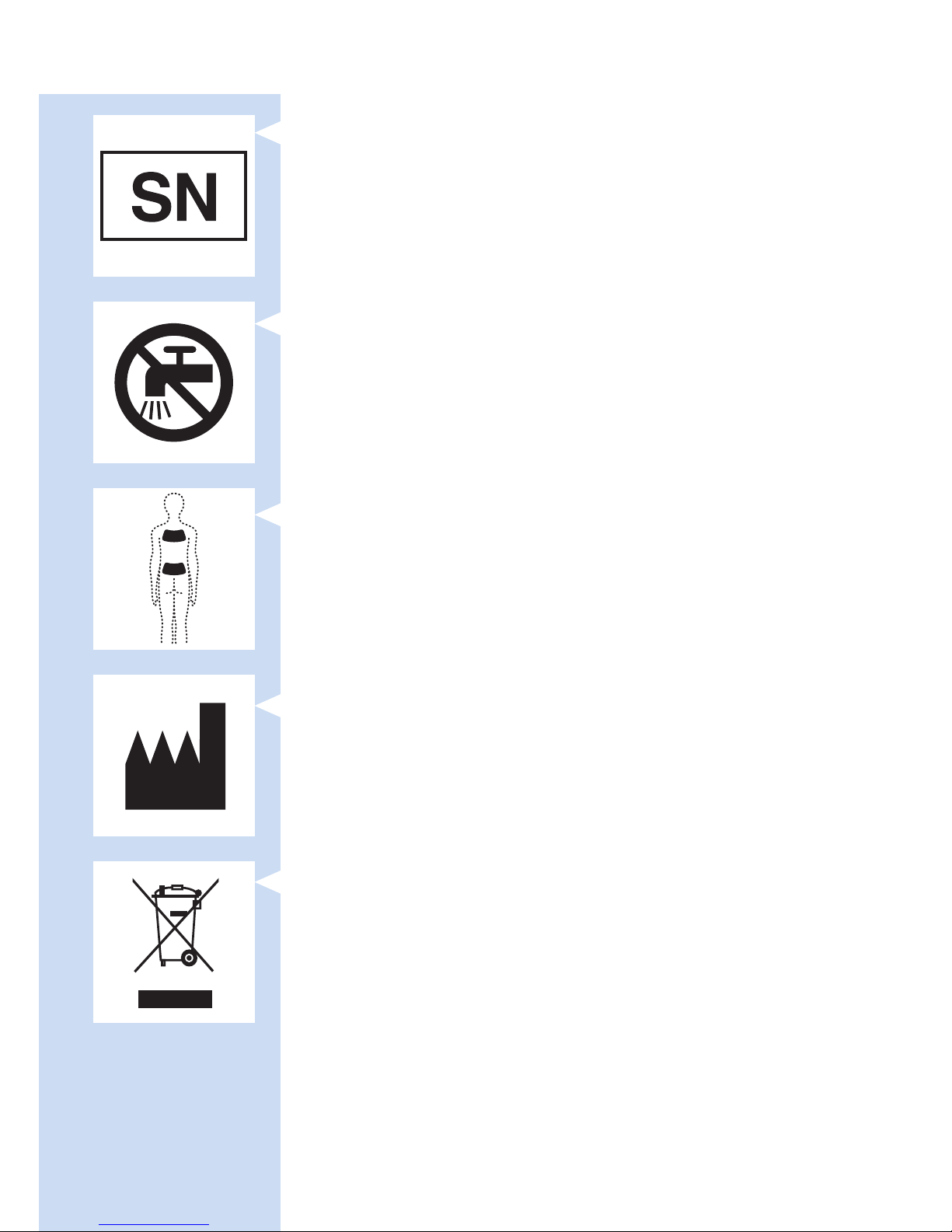
- This is the symbol for serial number. This symbol is
followed by the manufacturer’s serial number.
- This symbol means: Do not clean under a running
tap.
- This symbol indicates the areas where you may
position the BlueTouch Pain Relief Patch.
- This symbol means ‘Manufactured by’ and appears
next to the address of the legal manufacturer.
- This symbol means: Do not throw away with the
normal household waste.
ENGLISH 33
Page 34
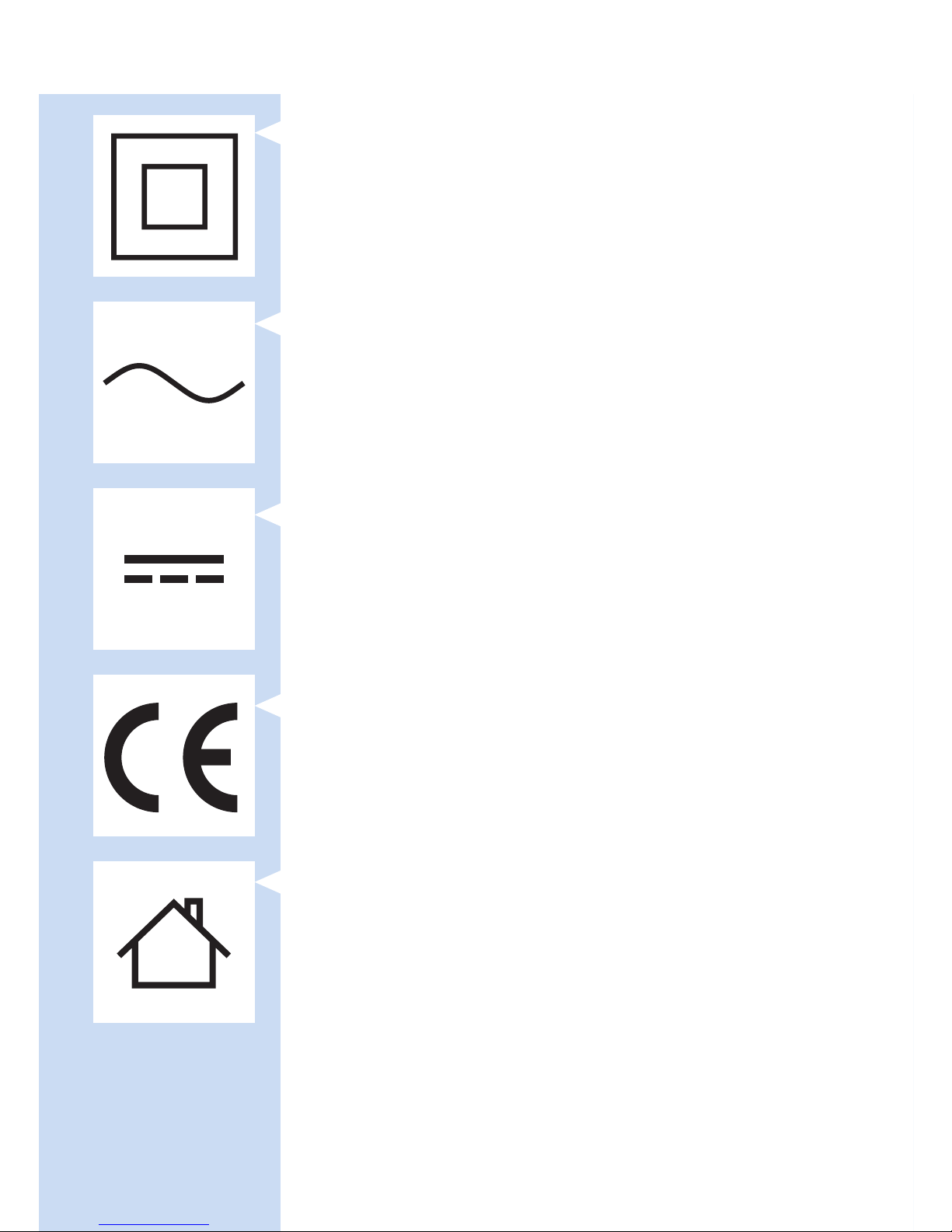
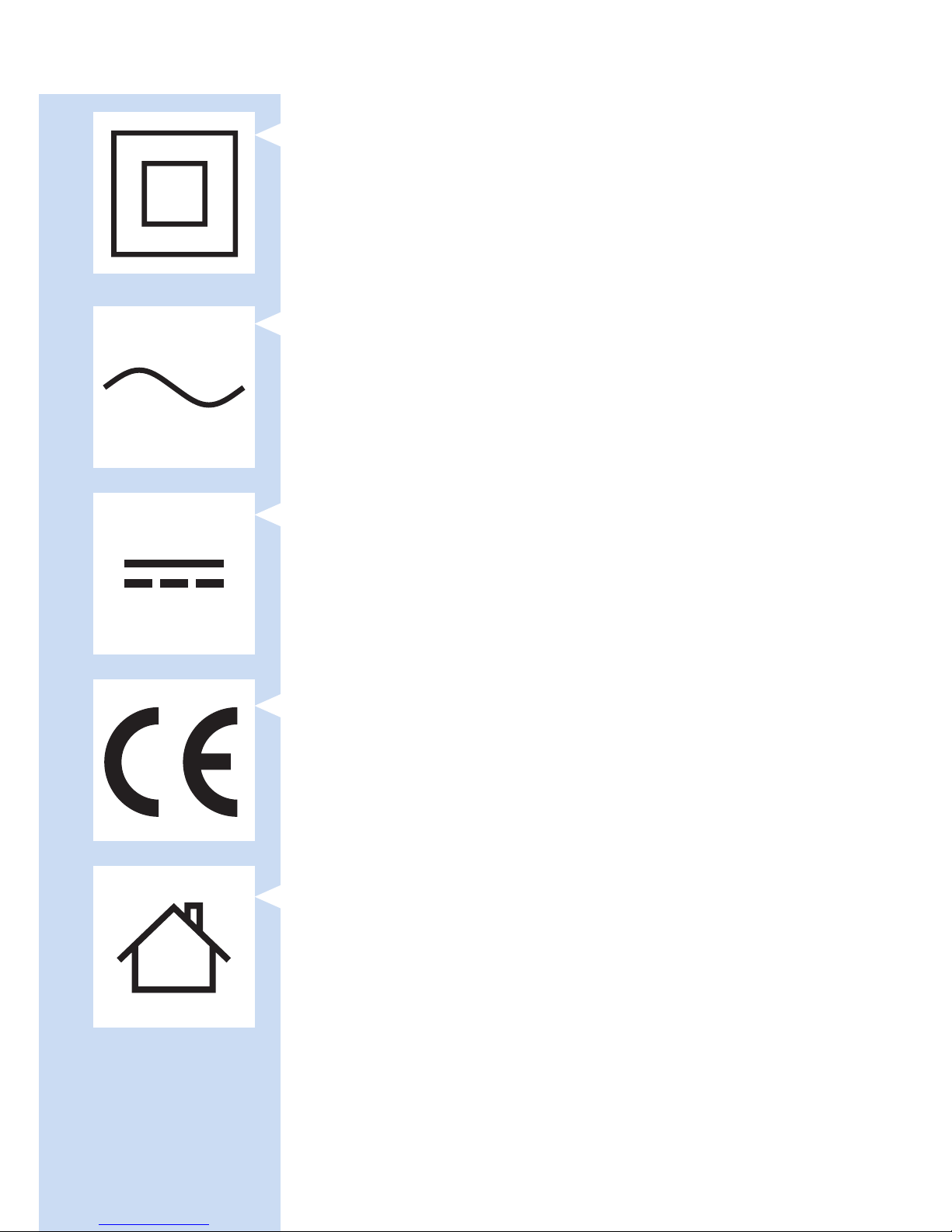
- This symbol indicates that the adapter is double
insulated (Class II), according to IEC 60601-1.
- This symbol means: alternating current.
- This symbol means: direct current.
- This symbol means: Conforms to EC Directives.
CE stands for ‘Conformité Européenne’.
- This symbol means: may only be used indoors.
ENGLISH34
Page 35
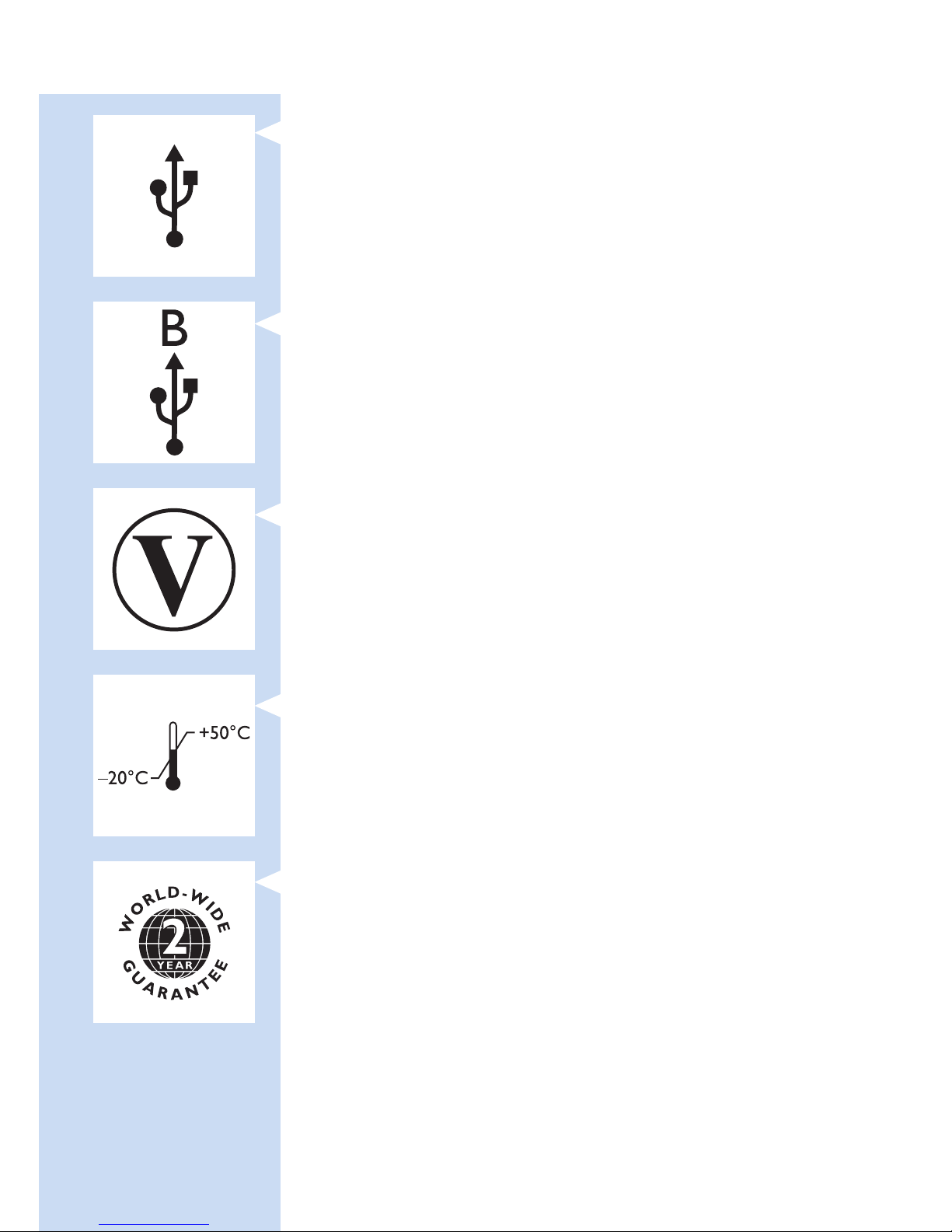
- This symbol means: USB connector.
- This symbol means: micro-USB connector.
- This symbol shows that the no-load power
CEC (California Energy Commission) Efciency
Level is V (ve) in order to meet EU requirements.
- This symbol means that the package and its
contents can be stored at temperatures between
-20°C and +50°C.
- This symbol means that the 2-year worldwide
guarantee applies to this device.
ENGLISH 35
Page 36
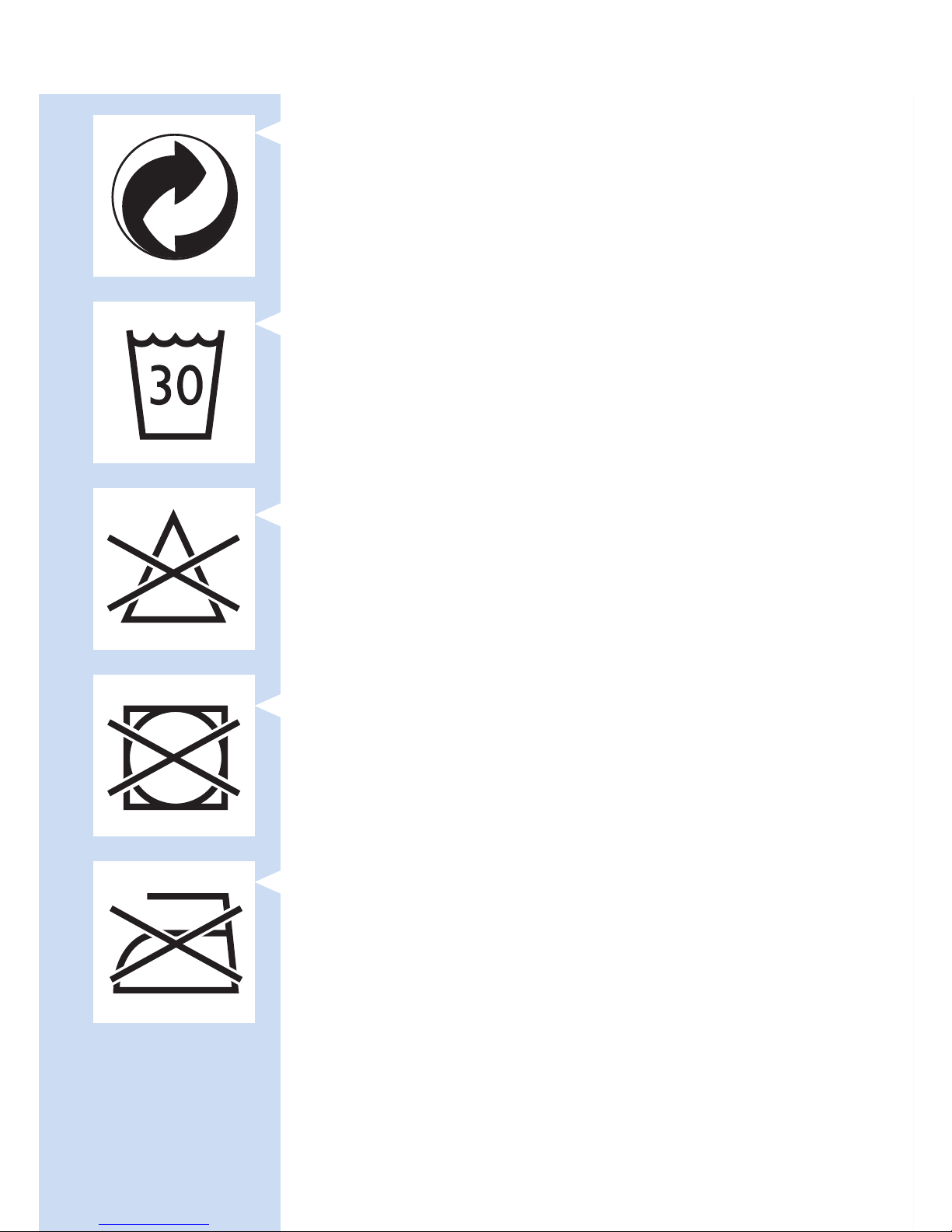
- This symbol refers to the Green Dot scheme,
which is covered under the European Packaging
and Packaging Waste Directive (94/62/EC). Under
this scheme, industry has to pay for recycling the
packaging materials of consumer goods
- This symbol means: Wash at a temperature of
30°C max.
- This symbol means: Do not bleach.
- This symbol means: Do not tumble-dry.
- This symbol means: Do not iron.
ENGLISH36
Page 37
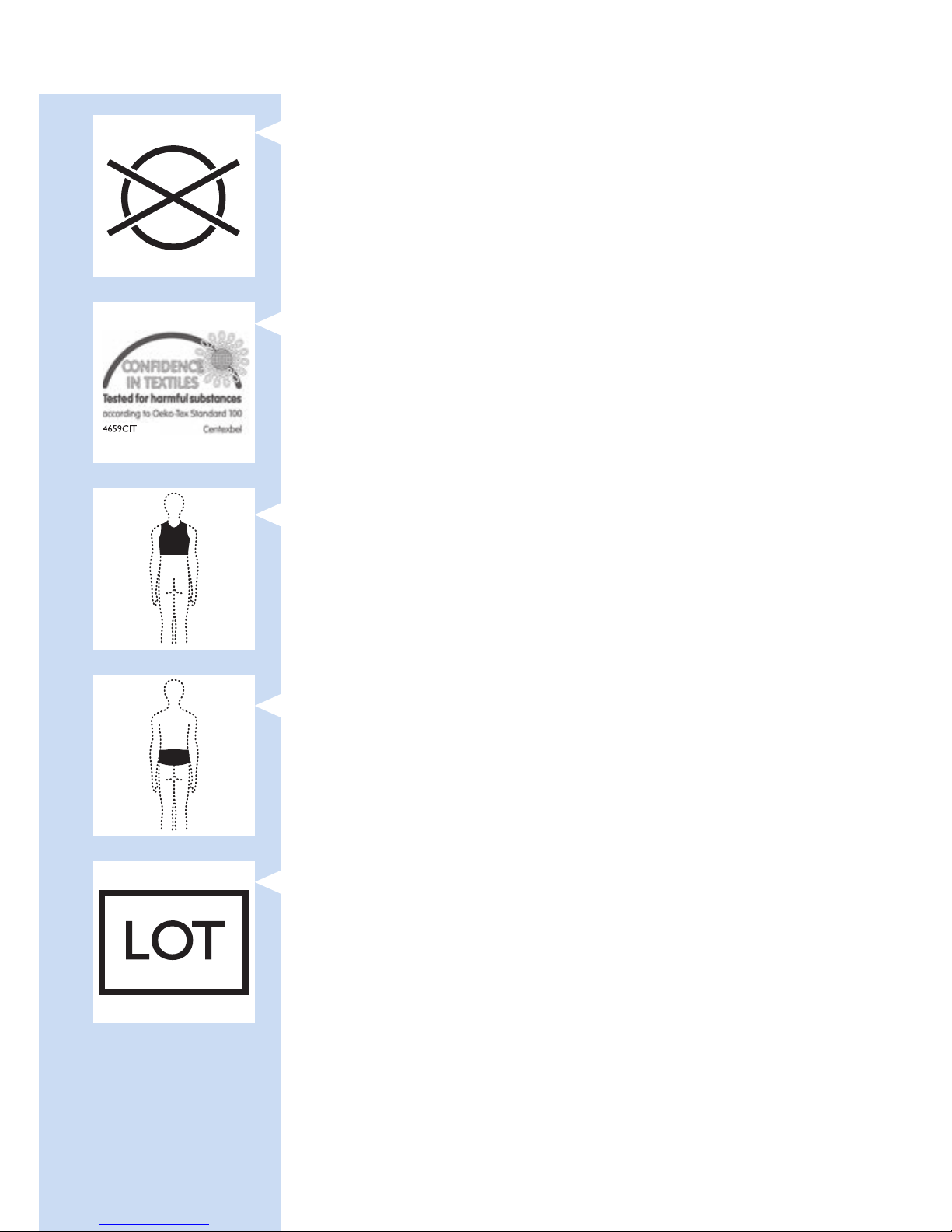
- This symbol means: do not dry clean.
- This symbol means that the material has been
tested for harmful substances according to
Oeko-Tex
®
standard 100.
- This symbol means that you have to use this strap
on the upper back.
- This symbol means that you have to use this strap
on the lower back.
- This symbol indicates the manufacturer’s batch
code so that the batch or lot can be identied.
ENGLISH 37
Page 38

- This symbol means that the packaging material is
recyclable.
ENGLISH38
Page 39

39
Indholdsfortegnelse
Introduktion 39
Kontraindikationer, reaktioner og bivirkninger 40
Vigtige sikkerhedsoplysninger 43
Behandlingsplan og behandlingsindstillinger 49
Produktoversigt 51
Klargøring 51
Brug af apparatet 53
Efter behandling 59
Fejlnding 60
Signaler på apparatet 64
Bestilling af tilbehør 65
Reklamationsret og support 65
Genanvendelse 66
Specikationer 67
Forklaring af symboler 69
Introduktion
Tillykke med dit køb, og velkommen til Philips! For at
få fuldt udbytte af den support, Philips tilbyder, skal
du registrere dit produkt på www.philips.com/
pain-relief/register.
Inden du bruger BlueTouch-smertelindringsenheden,
bør du læse denne brugervejledning grundigt
igennem og gemme den til eventuel senere brug.
Dette medicinske apparat fås uden recept. For at
opnå det optimale behandlingsresultat anbefaler
vi, at du bruger apparatet i overensstemmelse
med behandlingsplanen og anvisningerne i denne
brugervejledning. Hvis du har brug for yderligere
oplysninger eller har spørgsmål, bedes du gå ind på
www.philips.com/pain-relief eller kontakte dit
lokale Philips-kundecenter
BlueTouch er et varemærke tilhørende Koninklijke
Philips N.V.
DANSK
Page 40

Beregnet anvendelse
BlueTouch-smertelindringsenheden er et bærbart,
medicinsk apparat, der er beregnet til brug på
og af personer over 18 år. Apparatet behandler
muskulære rygsmerter ved at sende lys og varme
til kroppen ved hjælp af optisk effekt og termisk
ledningsevne. Dets specielle, blå LED-lys afslapper
og medvirker til at helbrede beskadigede muskler
gennem øget blodcirkulation. Apparatets tilsigtede
behandlingsområde er den øvre og nedre del af ryggen.
Du kan placere apparatet på behandlingsområdet med
en strop og bruge det ved normale hverdagsaktiviteter.
Apparatets strøm kommer fra genopladelige batterier,
der ikke kan udskiftes.
Kontraindikationer, reaktioner og
bivirkninger
Kontraindikationer
Generelle sundhedsmæssige forhold
Brug ikke apparatet, hvis nogle af følgende, generelle
sundhedsmæssige forhold passer på dig:
- Graviditet eller amning
- Feber
- Ukontrolleret højt blodtryk eller en hjerte-karsygdom (slagtilfælde, hjerteinfarkt, hjertekramper,
arteriosklerotisk karsygdom (ASVD), perifer
karsygdom eller (alvorligt) kongestivt hjertesvigt)
- Alvorlig eller ukontrolleret diabetes eller diabetes
med perifer skade
DANSK40
Page 41

- En implanteret medicinsk anordning (skrue osv.)
i eller i nærheden af behandlingsområdet
eller et aktivt, medicinsk implantat, som f.eks.
en pacemaker, debrillator, neurostimulator,
øresneglsimplantat eller en aktiv anordning til
lægemiddelindgivelse hvor som helst i kroppen
- Udbredt smerte
- Generelt dårligt helbred
- Skizofreni, borderlinesyndrom eller alvorlig
depression
- Alvorlig knogleskørhed (T-score på 2,5 og en
historik med 1 eller ere knoglebrud) eller en
anden alvorlig knoglesygdom
Smerterelaterede helbredsproblemer
Brug ikke apparatet, hvis nogle af følgende
smerterelaterede helbredsproblemer passer på dig:
- En mislykket rygoperation eller operation i
overkroppen, hovedet eller ryggen inden for de
seneste 8 uger
- Akut dislokation eller brud inden for de seneste
8 uger
- En degenerativ sygdom i centralnervesystemet,
som f.eks. dissemineret sklerose eller Parkinsons
sygdom
- Spinalstenose, som medfører rygsmerter
- Cauda equina-syndrom eller andre neurologiske
symptomer, som indikerer neuropati
- Sensorisk deprivation eller diagnosticeret
helvedesild eller postherpetisk neuralgi, især i
området midt på rygsøjlen.
- En inammatorisk sygdom eller en kronisk sygdom
eller en infektion, der er kendt for at forårsage
smerte, som f.eks. spondylose, leddegigt, systemisk
lupus erythematosus, lyme borreliose
DANSK 41
Page 42

Dermatologiske eller onkologiske problemer
Brug ikke apparatet, hvis nogle af følgende
dermatologiske eller onkologiske problemer
passer på dig:
- Har haft hudkræft eller anden form for kræft eller
forstadier til kræft eller store modermærker i
behandlingsområdet
- Solallergi
- Brændt eller solskoldet hud
- Hvis du tager lysfølsomhedsfremkaldende
medicin, skal du undlade at bruge apparatet, hvis
indlægssedlen angiver, at medicin kan forårsage
fotoallergiske reaktioner, fototoksiske reaktioner,
eller at du skal undgå soleksponering
- Hvis du tager steroider, da denne medicin gør
huden mere følsom over for irritation
- En hudsygdom som f.eks. porfyri, polymorft
lysudslæt, kronisk aktinitisk dermatitis, aktinitisk
prurigo eller nældefeber, som medfører
fotosensitivitet
- Infektioner, eksem, ikke-helede tatoveringer,
forbrændinger, betændelsestilstande (f.eks.
betændte hårfollikler), ænger, hudafskrabninger,
herpessår, psoriasis, sår, læsioner og hæmatomer i
behandlingsområdet
- Allergi over for BlueTouch-
smertelindringsenhedens overadematerialer
(polyuretan på apparatets kontaktade med huden
og polyester på den overade, der ikke rører ved
huden) eller over for polyester i stropperne
Kontraindikationer og bivirkninger
-
Det er normalt, at huden bliver lidt rød under
behandlingen. Årsagen til denne rødmen på huden
er en øget blodcirkulation på grund af varmen fra
BlueTouch-smertelindringsenheden. Denne rødmen på
huden er uskadelig og forsvinder efter behandlingen
.
DANSK42
Page 43

- Indimellem vil du muligvis opleve, at huden bliver
brun efter behandlingen. Årsagen til denne
bruning er lyspåvirkningen – en tilsvarende
virkning som den forårsaget af sollys – eller
varmepåvirkningen. Denne effekt er uskadelig og
forsvinder af sig selv efter nogle uger og nogle
gange et par måneder. Udsæt behandlingen, indtil
bruningen er forsvundet. For at undgå, at huden
bliver brun, bør behandlingen genoptages ved en
lavere indstilling, og du bør undgå for stort tryk
på BlueTouch-smertelindringsenheden under
behandlingen, f.eks. ved at sidde eller ligge på den
eller ved at læne sig hårdt imod den.
- Blåt lys kan misfarve tatoveringer i
behandlingsområdet.
Vigtige sikkerhedsoplysninger
Advarsel
- Formålet med BlueTouchsmertelindringsenheden er at
behandle rygsmerter. Anvend den
ikke til andre formål.
- Dette er medicinsk udstyr.
Hold apparatet uden for børns
rækkevidde.
- Læs denne brugervejledning
omhyggeligt igennem, og
følg altid behandlings- og
påføringsanvisningerne.
- Brug ikke apparatet på børn eller
babyer pga. deres uudviklede hud.
DANSK 43
Page 44

- Voksne med nedsatte sensoriske
eller mentale evner må ikke
anvende apparatet, da de
muligvis ikke er i stand til at
anvende det i overensstemmelse
med anvisningerne i denne
brugervejledning.
- BlueTouch-smertelindringsenheden
er ikke beregnet til kontinuerlig brug
.
Følg altid behandlingsplanen
i kapitlet “Behandlingsplan og
behandlingsindstillinger”. Undgå at
behandle oftere end to gange om
dagen.
- Hvis behandlingen giver ubehag,
skal du skifte til en lavere
behandlingsindstilling. Hvis
behandlingen stadig føles ubehagelig
ved lav indstilling, skal du slukke for
BlueTouch-smertelindringsenheden
og stoppe med at bruge den.
- Undlad at se ind i lyset, der
udsendes fra BlueTouchsmertelindringsenheden, mens den
er i brug, da dette kan medføre
øjenirritation eller øjenskader.
DANSK44
Page 45

- Efterlad ikke BlueTouchsmertelindringsenheden uden
opsyn, når den er tændt, da dette
kan forårsage øjenirritation eller
øjenskader, når andre personer
ser ind i lyset, der udsendes fra
enheden.
- Undlad at anvende cremer eller
lotion på huden før behandlingen,
da dette kan medføre hudirritation.
- Oplad kun BlueTouchsmertelindringsenheden ved at
slutte USB-kablet og apparatets
medfølgende adapter til en stikkontakt.
- Undlad at bære BlueTouchsmertelindringsenheden, mens den
oplader. Der er risiko for elektrisk stød.
- BlueTouch-smertelindringsenheden
er ikke vandtæt. Brug ikke BlueTouchsmertelindringsenheden i våde
omgivelser. Kom aldrig BlueTouchsmertelindringsenheden i vand, og
skyl den ikke under vandhanen.
- Hold adapteren tør.
DANSK 45
Page 46

- Udsæt aldrig BlueTouchsmertelindringsenheden for et
for stort tryk, f.eks. ved at presse,
ligge, sidde eller stå på den. Læn
dig ikke hårdt imod BlueTouchsmertelindringsenheden, når du
sidder ned. For stort et tryk på
apparatet kan medføre brunfarvning
eller rødmen af huden på det
område, der er i kontakt med
enheden.
- Klem eller sno ikke BlueTouch-
smertelindringsenheden. Hold
BlueTouch-smertelindringsenheden
væk fra skarpe, spidse eller slidende
genstande.
- Undersøg altid BlueTouchsmertelindringsenheden og
adapteren for skader før
brug. Brug ikke BlueTouchsmertelindringsenheden eller
adapteren, hvis du opdager, at den
er blevet beskadiget.
- Få altid en beskadiget adapter
udskiftet med en original adapter
af samme type for at undgå fare.
Kontakt Philips for at få en ny
adapter.
DANSK46
Page 47

- Lav ikke om på BlueTouchsmertelindringsenheden og dens
tilbehør.
- Hvis BlueTouch-
smertelindringsenheden skal efterses
eller repareres, skal du henvende
dig til et Philips-servicecenter, da en
uautoriseret reparation efterfølgende
kan være til fare for brugeren.
- Brug og oplad BlueTouchsmertelindringsenheden ved en
temperatur på mellem +5 °C
og +35 °C. Opbevar BlueTouchsmertelindringsenheden ved en
temperatur på mellem -20 °C og
+50 °C.
- Brug kun BlueTouchsmertelindringsenheden i en af de
specielt designede stropper, der
følger med apparatet.
- Brug ikke apparatet, hvis det er
tættere end 30 cm på trådløst
kommunikationsudstyr, f.eks.
trådløse hjemmenetværksroutere
og walkie-talkier. Dette trådløse
kommunikationsudstyr kan forårsage
elektromagnetiske forstyrrelser, som
forhindrer apparatet i at fungere
korrekt.
DANSK 47
Page 48

Forsigtig
- Udsæt ikke BlueTouchsmertelindringsenheden for kraftige
slag, og tab den ikke.
- Hvis du medbringer BlueTouch-
smertelindringsenheden fra meget
varme omgivelser til koldere
omgivelser, skal du vente i ca.
3 timer, før du bruger den.
- For at undgå at beskadige
vaskemaskinens tromle eller
andet vasketøj i tromlen, vaskes
stropperne i en nmasket
vaskepose.
- Hvis apparatet ikke skal bruges i
ere måneder, skal du genoplade
det regelmæssigt.
Overholdelse af standarder
- Denne BlueTouchsmertelindringsenhed opfylder alle
standarder gældende for elektrisk
medicinsk udstyr og udstyr, der
anvender optisk (LED) stråling til
privat brug (IEC60601-udstyr).
DANSK48
Page 49

Elektromagnetisk stråling og immunitet
- BlueTouch-smertelindringsenheden er godkendt i
overensstemmelse med EMC-sikkerhedsstandarden
EN 60601-1-2. Den er typisk beregnet til
anvendelse i boliger eller kliniske omgivelser.
Behandlingsplan og behandlingsindstillinger
Behandlingsplan
Hold dig altid inden for den behandlingstid, der er
angivet i dette kapitel. Undgå at behandle oftere
end to gange om dagen.
BlueTouch-smertelindringsenheden er velegnet til
daglig brug. Du har den ved hånden, når du føler
smerte, men brug den ikke oftere end to gange om
dagen. Hvis du følger anvisningerne i dette kapitel,
overskrider du ikke den maksimale, daglige lysdosis.
Da effekten af BlueTouch-smertelindringsenheden
generelt ikke mærkes straks, anbefaler vi, at du
afprøver apparatet i mindst to uger, inden du drager
nogen konklusioner om dets effektivitet.
Bemærk: Du kan bruge BlueTouchsmertelindringsenheden to gange i træk til to
behandlinger af 15 minutters, 20 minutters eller
30 minutters varighed. For at starte den anden
behandling skal du trykke på indstillingsknappen
for at tænde for apparatet igen.
DANSK 49
Page 50

Behandlingsindstillinger
Indstillinger Antal behandlinger pr.
dag
Behandlingsvarighed
og lysintensitet
1: Lav 1 eller 2 30 min. ved 50 %
2: Middel 1 eller 2 20 min. ved 75%
3: Høj 1 eller 2 15 min. ved 100%
- Indstilling 1 (lav): Denne indstilling giver en mildt
varmende fornemmelse og stimulerer frigivelsen
af kvælstolte. Du kan bruge denne indstilling to
gange dagligt af 30 minutters varighed pr. gang.
- Indstilling 2 (middel): Denne indstilling giver en
moderat varmende fornemmelse og stimulerer
frigivelsen af kvælstolte. Du kan bruge denne
indstilling to gange dagligt af 20 minutters varighed
pr. gang.
- Indstilling 3 (høj): Denne indstilling giver en
komplet varmende fornemmelse og stimulerer
frigivelsen af kvælstolte. Du kan bruge den to
gange dagligt af 15 minutters varighed pr. gang.
Varmen og kvælstoltene virker afslappende og
medvirker til at helbrede beskadigede muskler
gennem øget blodcirkulation.
DANSK50
Page 51
Produktoversigt (g. 1)
1 BlueTouch-smertelindringsenhed (udvendigt)
2 On/off-knap
3 Tilslutningspanel
4 Opladeindikator med lys
5 Mikro-USB-stik
6 BlueTouch-smertelindringsenhed
(indvendigt mod huden)
7 Behandlingsområde
8 Adapter
9 Standard USB-stikket
10 Mikro-USB-stik
Klargøring
Opladning af apparatet
Du skal oplade BlueTouch-smertelindringsenheden,
før den tages i brug første gang. Du skal også
oplade apparatet, når batterikapaciteten er
lav. Det tager mindre end 5 timer at oplade
BlueTouch-smertelindringsenheden. Når batteriet
er fuldt opladet, har det strøm nok til 4 eller
ere behandlinger. Du kan oplade BlueTouch-
smertelindringsenheden med den medfølgende
adapter og USB-kablet.
Bemærk: Du må ikke anvende BlueTouchsmertelindringsenheden, mens den oplader.
Bemærk: Hvis apparatet ikke er fuldt opladet, før du
påbegynder en behandling, løber batteriet muligvis
tør for strøm under behandlingen. Vi anbefaler, at du
altid oplader apparatet helt, før du påbegynder en
behandling.
1 Sæt standard-USB-stikket i adapterens stik.
DANSK 51
Page 52
2 Sæt adapteren i en stikkontakt (100-240 V).
3 Sæt mikro-USB-stikket i tilslutningsstikket i
BlueTouch-smertelindringsenheden.
Forsigtig: Brug kun dette mikro-USB-stik til
at sætte BlueTouch-smertelindringsenheden i
stikkontakten til opladning. Slut ikke andre kabler
med et mikro-USB-stik til dette stik.
, Når du slutter BlueTouch-
smertelindringsenheden til en stikkontakt,
bipper den en enkelt gang for at indikere, at
opladningen er gået i gang. Opladeindikatoren
på tilslutningspanelet blinker langsomt og
regelmæssigt grønt under opladning.
4 Når batteriet er fuldt opladet, lyser
opladeindikatoren konstant grønt.
5 Tag adapteren ud af stikkontakten, og
træk USB-stikket ud af BlueTouch-
smertelindringsenhedens mikro-USB-stik.
Installation og konguration af Treatment App
Du skal bruge Philips Treatment-app’en til at betjene
enheden. Gå ind på Apple App Store eller Google
Play, søg efter “Philips Treatment”-app’en, og tryk på
installer. Se lynvejledningen for yderligere oplysninger.
Bemærk: Treatment App er en app, som kan bruges
til BlueTouch (PR3743, PR3741) og til PulseRelief
(PR3840). Installeringsproceduren er den samme for
begge apparater.
DANSK52
Page 53
Brug af apparatet
Anbringelse af apparatet
Du anbringer BlueTouch-smertelindringsenheden
på kroppen vha. én af stropperne, som følger med
apparatet. Der ndes en særlig strop til behandling af
den øvre ryg og en særlig strop til behandling af den
nedre ryg.
Bemærk: Undlad at bære ere lag tøj eller stramt eller
tykt tøj over BlueTouch-smertelindringsenheden.
Placering af stroppen til den nedre ryg
Følg nedenstående trin, hvis du vil placere
BlueTouch-smertelindringsenheden i stroppen til
den nedre ryg.
1 Placer stroppen til den nedre ryg og
BlueTouch-smertelindringsenheden foran dig
på et bord. Skub venstre side af BlueTouch-
smertelindringsenheden bag stropåbningens
elastiske kant.
2 Skub derefter den anden ende af BlueTouch-
smertelindringsenheden bag åbningens
modsatte elastiske kant, så hele enheden er
inde i stroppen til den nedre ryg. Kontroller,
at stroppens materiale ikke dækker LED’erne.
Hvis det er nødvendigt, kan du ytte
BlueTouch-smertelindringsenheden en smule.
DANSK 53
Page 54
3 Fjern tøj fra det område, der skal behandles.
Bemærk: Sørg for, at huden på det område, der skal
behandles, er ren, helt tør og fri for cremer og andre
kosmetikprodukter.
4 Vikl stroppen til den nedre ryg med BlueTouch-
smertelindringsenheden inden i rundt om livet
med enhedens behandlingsområde vendt mod
din ryg.
5 Fastgør stroppen til den nedre ryg med
velcrobåndene i begge ender af stroppen til
den nedre ryg.
Bemærk: Sørg for, at BlueTouch-smertelindringsenheden
i stroppen er placeret på det område, der skal
behandles, og at behandlingsområdet er i kontakt
med huden.
6 Hvis stroppen til den nedre ryg ikke kan nå
rundt om din krop, kan du gøre følgende.
1 Sæt forlængerstroppen fast på velcrobåndet på
den ene ende af stroppen til den nedre ryg.
2 Vikl forlængerstroppen til den nedre ryg rundt
om kroppen.
3 Fastgør stroppen til den nedre ryg med
velcrobåndet i en bredde, der føles behagelig.
DANSK54
Page 55
Placering af stroppen til den øvre ryg
1 Hvis du vil lægge BlueTouch-
smertelindringsenheden i stroppen til den
øvre ryg, skal du følge samme procedure som
beskrevet i trin 1 og 2 i afsnittet “Placering af
stroppen til den nedre ryg” ovenfor.
2 Fjern tøj fra det område, der skal behandles.
Bemærk: Sørg for, at huden på det område, der skal
behandles, er ren, helt tør og fri for cremer og andre
kosmetikprodukter.
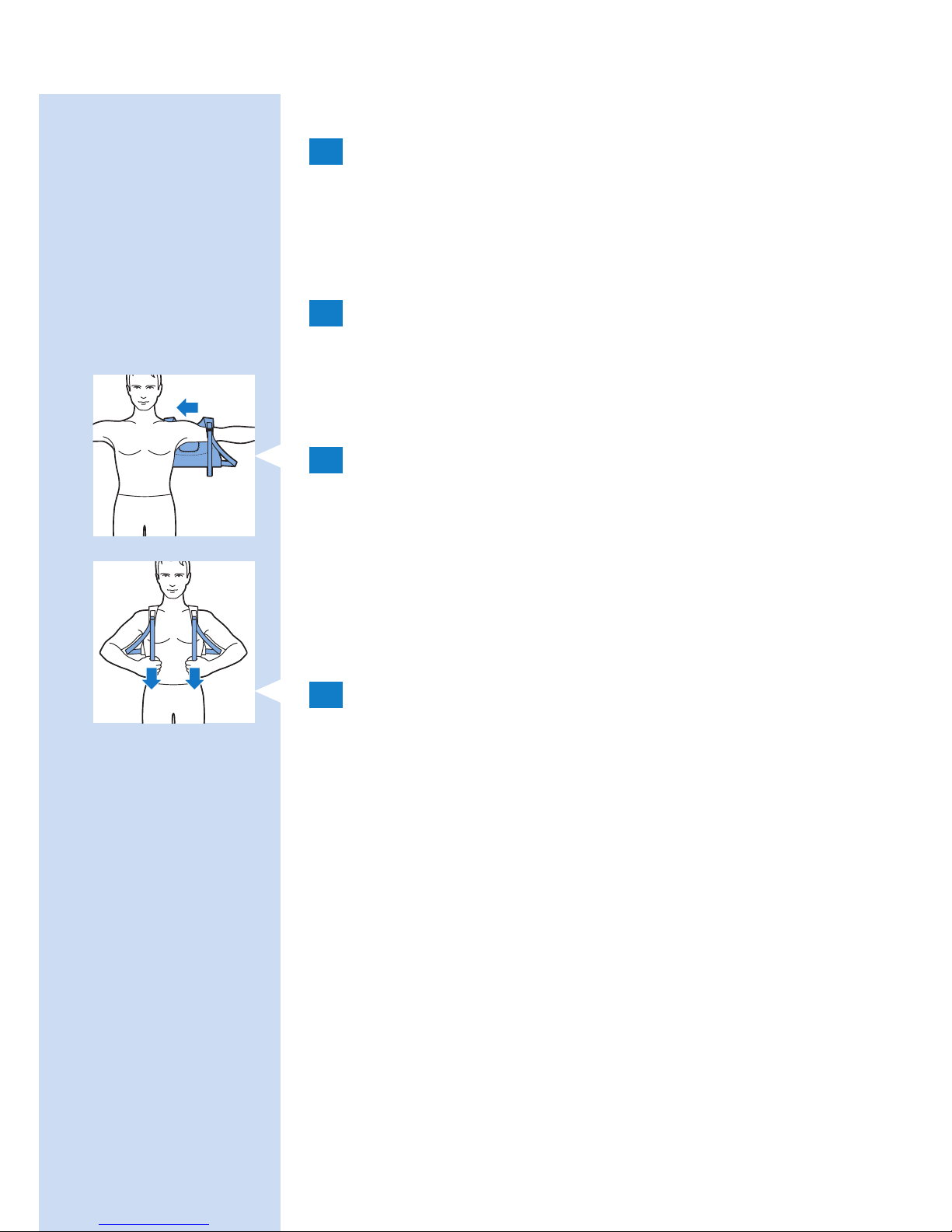
3 Tag stroppen til den øvre ryg på som
en rygsæk. Før først én arm gennem
skulderstroppen på den ene side. Gør derefter
det samme på den anden side.
Bemærk: Sørg for, at BlueTouch-smertelindringsenheden
i stroppen er placeret på det område, der skal
behandles, og at LED-området er i kontakt med huden.
4 Stram skulderstropperne ved at trække i de
elastiske stropper.
DANSK 55
Page 56
Brug app’en til at påbegynde og afslutte en
behandling
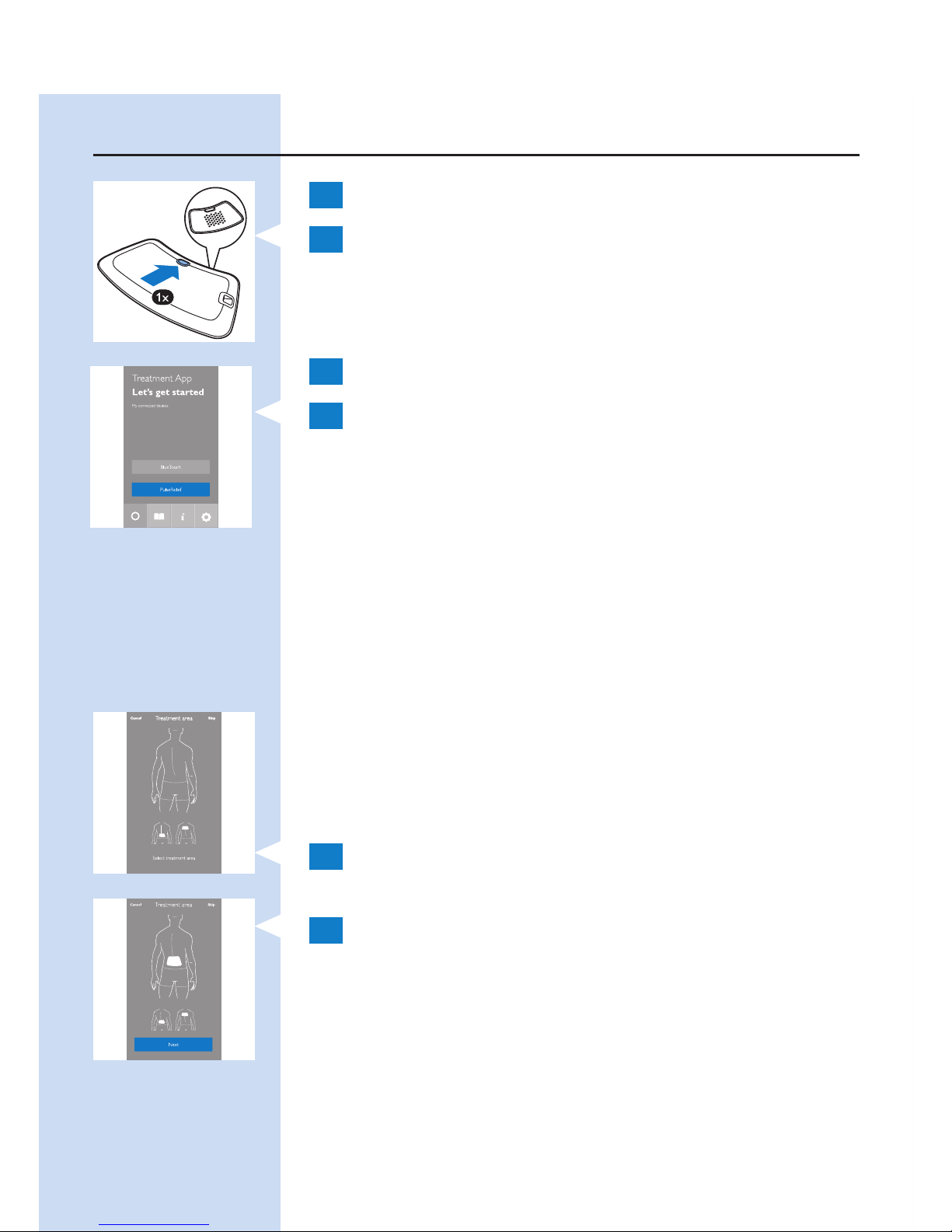
1 Aktiver Bluetooth på din mobile enhed.
2 Tænd for BlueTouch-smertelindringsenheden
ved at trykke på on/off-knappen, og placer
remmen med enheden på den del af ryggen,
du vil behandle.
3 Åbn Philips Treatment App.
4 Når du bruger app’en for første gang, skal
du trykke på “BlueTouch”. Når du åbner
app’en næste gang, vælger app’en automatisk
BlueTouch, hvis der kun er parret en
BlueTouch-smertelindringsenhed med app’en.
Hvis der både parres et PulseRelief-apparat og
et BlueTouch-apparat med app’en, vælger du
enheden ved at trykke på “BlueTouch”.
Valg af et behandlingsområde
Første gang du bruger apparatet, skal du altid
vælge et behandlingsområde. Hvis du har brugt
apparatet før, kan du vælge mellem “Quick Start”
(Hurtig start) og “Select a treatment area” (Vælg et
behandlingsområde).
1 Tryk på den del af ryggen, du vil behandle.
2 App’en viser enhedens placering på ryggen.
Tryk på “Next” (Næste) for at fortsætte.
DANSK56
Page 57
Vurdering af din smerteintensitet
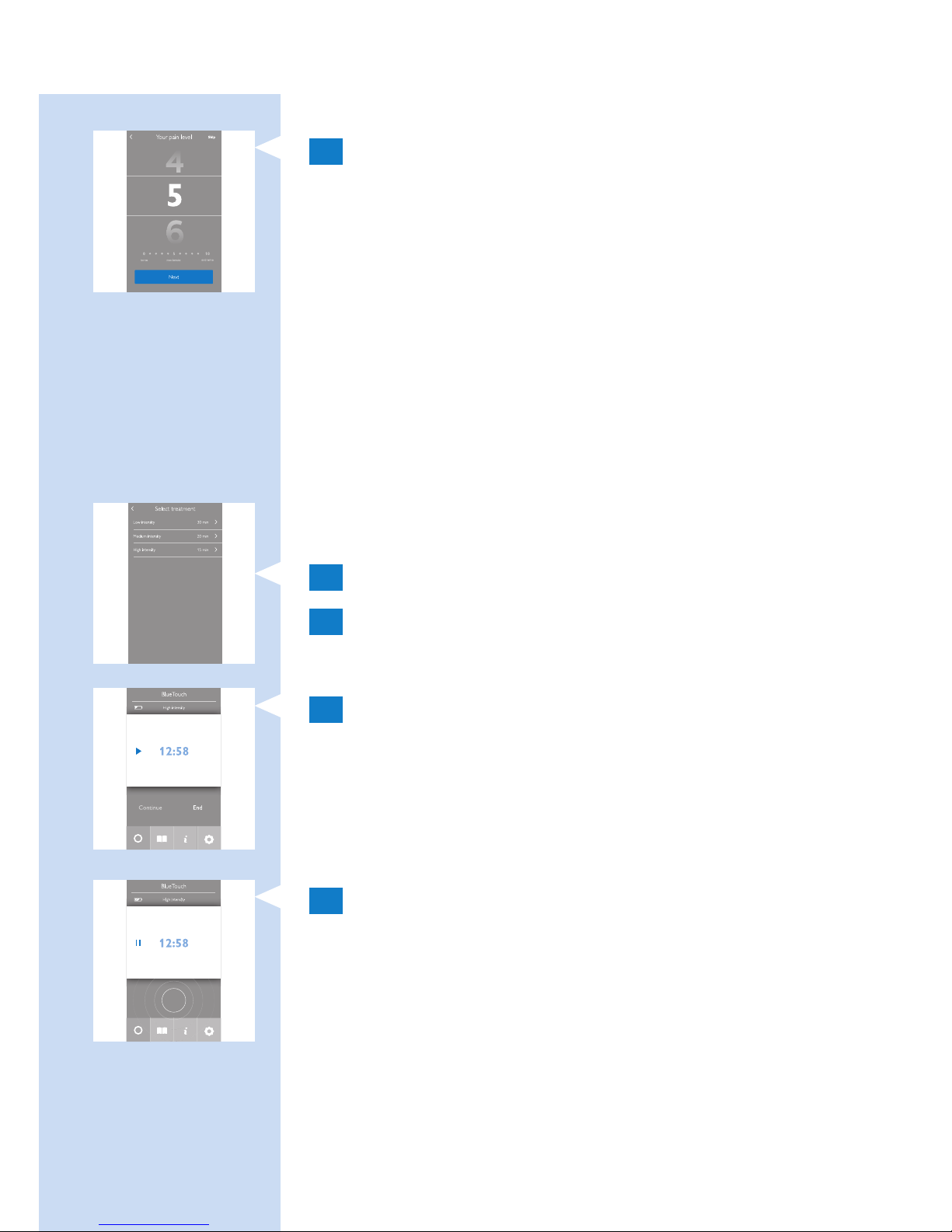
1 Stryg lodret med ngeren for at vurdere
smertens intensitet på en skala fra 0 til 10.
Hvis du ikke oplever nogen smerte, skal du
trykke på 0, og hvis du oplever de værst
tænkelige smerter, skal du trykke på 10. Hvis
din smerte er et sted midt imellem, vurderer
du den ved at trykke på det mest passende tal.
Bemærk: Den smerteintensitet, du angiver, anvendes
ikke af app’en til at vælge behandlingsindstilling.
Vurderingen gemmes kun i din behandlingskalender.
Du kan slå denne funktion fra under fanen “Settings”
(indstillinger) i app’en.
Valg af behandlingsindstilling
1 Tryk på den ønskede indstilling.
2 Startskærmen for behandlingen vises.
Påbegyndelse og afslutning af en behandling
1 Tryk på afspilningsknappen på skærmen.
, Tiden begynder at tælle ned.
, Apparatets statusindikator begynder at blinke
orange.
2 Behandling fortsætter, indtil timeren har talt
ned til 0. Hvis du vil holde pause eller afbryde
behandlingen, før behandlingstiden er gået, skal
du trykke på rkanten i midten af indikatoren
for impulsbehandlingen for at afbryde
programmet.
- For at genoptage programmet skal du trykke på
“Resume” (Genoptag) eller på pilen ved siden af
tidsangivelsen.
DANSK 57
Page 58
- For at afslutte programmet og slukke for apparatet
skal du trykke på “End treatment” (Afslut
behandling).
Skift til en anden behandlingsindstilling
1 Hvis du vil skifte til en anden
behandlingsindstilling, skal du trykke på navnet
på den aktuelle behandlingsindstilling.
Listen over behandlingsindstillinger åbnes. Tryk på
den ønskede behandlingsindstilling.
2 Den valgte nye behandlingsindstilling vises på
skærmen. Tryk på afspilningsknappen for at
påbegynde behandlingen.
Bemærk: Timeren beregner automatisk den resterende
behandlingstid baseret på den nye indstilling.
Hurtig start
Hurtig start påbegynder straks den
behandlingsindstilling, du tidligere har brugt.
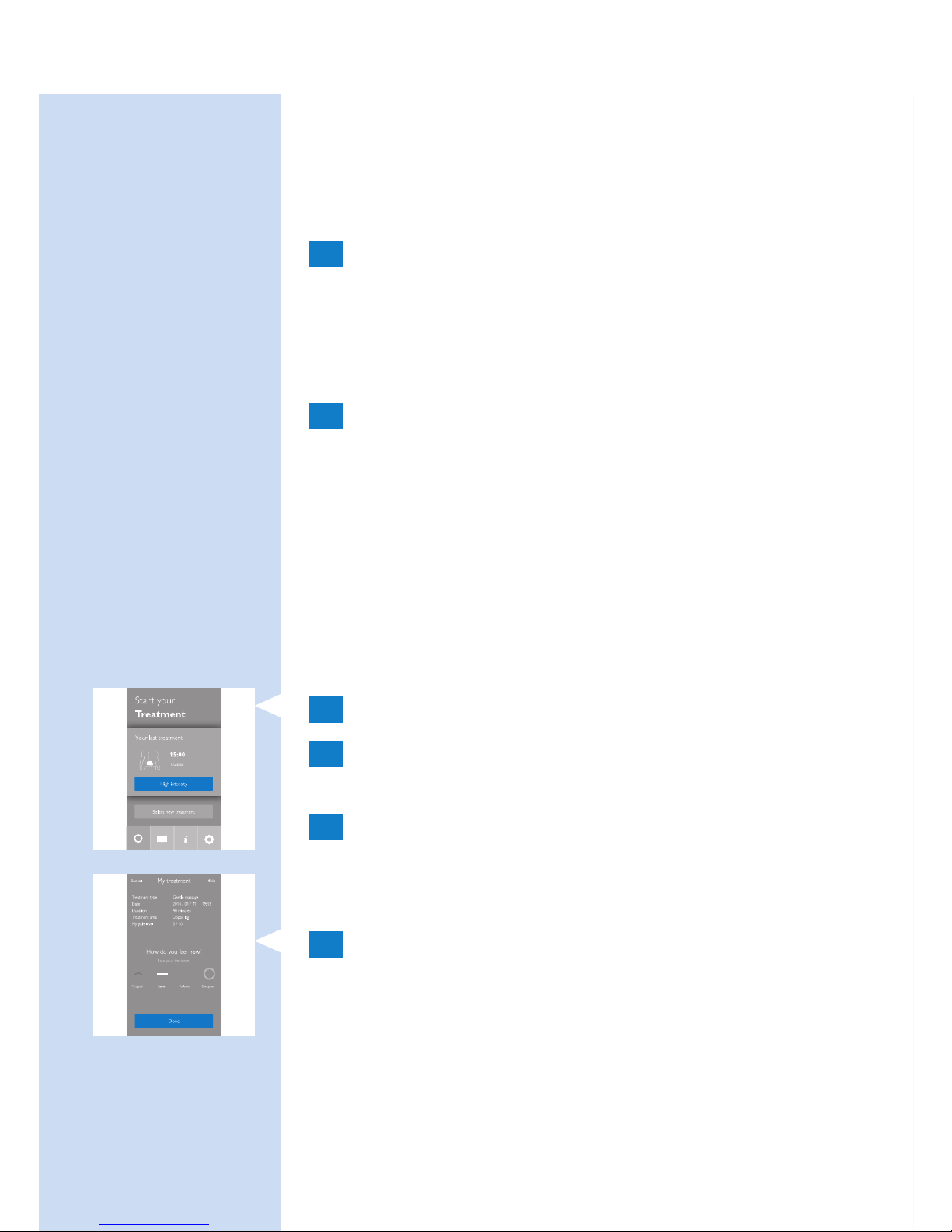
1 Vælg Hurtig start.
2 Stryg lodret med ngeren for at vurdere
smertens intensitet på en skala fra 0 til 10.
3 Tryk på afspilningsknappen for at påbegynde
behandlingen.
Andre app-funktioner
1 Efter programmet er afsluttet, vil du se et
skærmbillede, som anmoder dig om at beskrive,
hvordan du har det, ved at trykke på et af
ikonerne.
DANSK58
Page 59
2 Tryk på bogsymbolet for at åbne din kalender.
Kalenderen viser, hvornår behandlinger har
fundet sted, hvilken behandlingsindstilling du
har brugt, og hvor længe behandlingen har
varet.
- Tryk på pilen for at se ere detaljer.
3 Tryk på “i” for at åbne
informationsskærmbilledet. Skærmbilledet
indeholder følgende punkter:
- Sådan bruger du dit BlueTouch-apparat
- Kontakt os
4 Tryk på symbolet for indstillinger for at åbne
indstillingsskærmbilledet. Skærmbilledet
indeholder følgende punkter:
- Dine enheder
- Registrering af smerteniveau
- Registrering af fornemmelse
- Registrering af behandlingsområde
- Lad behandling køre i baggrunden
- Om
Efter behandling
Forsigtig: Sørg for at afslutte behandlingen i app’en,
før du fjerner remmen med enheden fra ryggen.
1 Løsn stroppen, og tag den af ryggen.
2 Genoplad BlueTouch-smertelindringsenheden,
hvis opladeindikatoren lyser konstant orange
(se kapitlet “Opladning af apparatet”). Tag
BlueTouch-smertelindringsenheden af stroppen,
inden du begynder at genoplade den.
DANSK 59
Page 60
Rengøring
Kom aldrig BlueTouch-smertelindringsenheden ned
i vand, og skyl den under vandhanen.
Fjern altid BlueTouch-smertelindringsenheden fra
stroppen, før du vasker stroppen i vaskemaskinen.
1 Rengør BlueTouch-smertelindringsenheden
med en fugtig klud efter brug.
2 Du kan vaske BlueTouch-
smertelindringsenhedens stropper i
vaskemaskinen, når de er snavsede.
Forsigtig: For at undgå at beskadige BlueTouchsmertelindringsenhedens stropper og andet
vasketøj i vaskemaskinen bør stropperne vaskes i
en nmasket vaskepose.
Bemærk: Brug en skånsom cyklus og en temperatur på
maks. 30 °C. Lad BlueTouch-smertelindringsstropperne
lufttørre – de må ikke tørres i tørretumbleren.
Stropperne må ikke stryges.
Fejlnding
Dette kapitel opsummerer de mest almindelige
problemer, du kan støde på ved brug af BlueTouch-
smertelindringsenheden. Hvis du ikke kan løse
problemet ved hjælp af nedenstående oplysninger,
bedes du kontakte Philips.
DANSK60
Page 61

Problem Mulig årsag Løsning
BlueTouchsmertelindringsenheden
slukker pludseligt under
behandlingen.
Den
forudindstillede
behandlingstid
er gået.
BlueTouchsmertelindringsenheden
er programmeret til
at slukke automatisk,
efter behandlingstiden
i den valgte
behandlingsindstilling er
gået. Lige før den slukker,
vil du kunne høre en
tredobbelt tone
(høj til lav).
BlueTouchsmertelindringsenheden
synes ikke at virke for
mig, for jeg oplever ingen
effekt.
Det kan tage
op til to uger,
før virkningerne
bliver
mærkbare.
Vær tålmodig, og giv
virkningerne mere tid til
at blive mærkbare.
BlueTouchsmertelindringsenheden
skifter til en lavere
intensitet.
Apparatets
temperatur er
for høj.
Tag BlueTouchsmertelindringsenheden
af kroppen, sluk den,
og lad den køle af.
Sørg for ikke at bære
for meget eller for tykt
tøj over BlueTouchsmertelindringsenheden
under behandlingen.
Opladeindikatoren
lyser konstant rødt i 8
sekunder, og BlueTouchsmertelindringsenheden
slukker.
Det
genopladelige
batteri er
aadet.
Oplad BlueTouchsmertelindringsenheden
(se kapitlet “Opladning
af apparatet”).
DANSK 61
Page 62

Problem Mulig årsag Løsning
Opladeindikatoren lyser
konstant orange.
Batteriet er
næsten aadet
og indeholder
ikke tilstrækkelig
batterikapacitet
til én
behandling.
Oplad BlueTouchsmertelindringsenheden
(se kapitlet “Opladning
af apparatet”).
Adapteren bliver varm
under opladning.
Dette er
normalt.
Der kræves ingen
handling.
Et stykke medicinsk
udstyr bliver defekt, når
apparatet tændes eller,
når det anvendes.
Apparatet står
for tæt på det
medicinske
udstyr.
Brug ikke apparatet i
nærheden af medicinsk
udstyr.
Opladeindikatoren
begynder ikke at blinke
grønt, når jeg sætter
mikro-USB-stik i mikroUSB-tilslutningsstikket på
tilslutningspanelet.
Du har ikke
tilsluttet
adapteren
eller ikke sat
den korrekt i
stikkontakten.
Sæt adapteren ordentligt
ind i stikkontakten.
Du har ikke
tilsluttet
standard-USBstikket eller sat
det ordentligt
ind i adapteren.
Sæt standard-USBstikket ordentligt i
adapteren.
DANSK62
Page 63

Problem Mulig årsag Løsning
Stikkontakten,
som du
har sluttet
adapteren til,
virker ikke.
Sæt et andet apparat
i samme stikkontakt
for at kontrollere, om
stikkontakten virker.
Hvis stikkontakten
virker, men BlueTouchsmertelindringsenheden
ikke oplader, bedes du
kontakte Philips.
Der opstod
en fejl under
opladning.
Tryk på knappen
på BlueTouchsmertelindringsenheden
for at genstarte
opladningen.
Adapteren er sluttet
til BlueTouchsmertelindringsenheden,
og opladeindikatoren
lyser ikke konstant eller
blinker ikke grønt.
Der opstod
en fejl under
opladning.
Tryk på knappen
på BlueTouchsmertelindringsenheden
for at genstarte
opladningen.
BlueTouchsmertelindringsenheden
bliver varm under brug.
Dette er
normalt.
Der kræves ingen
handling.
Jeg kan ikke oprette
forbindelse til BlueTouchsmertelindringsenheden.
Bluetooth er
ikke tændt.
Sørg for at tænde
Bluetooth på din
smartenhed.
DANSK 63
Page 64
Problem Mulig årsag Løsning
Måske har
du ikke valgt
BlueTouch i
app’en.
Kør app’en, tryk på
“Settings” (Indstillinger)
og derefter på
“Your devices” (Dine
apparater), og se, om
“BlueTouch” er på
listen. Hvis ikke, parrer
du enheden med din
smartenhed ved at
klikke på “Add new
BlueTouch” (Tilføj
ny BlueTouch) og
tænde for BlueTouchsmertelindringsenheden.
Signaler på apparatet
Lydsignaler under behandlingen
- En dobbelttone (lav til høj) lyder, når behandlingen
starter, og intensiteten stiger fra energibesparende
indstilling til intensiteten for den valgte indstilling.
- En tredobbelt tone (høj til lav) lyder, når
behandlingen afsluttes.
Signaler for batterikapacitet
- Opladeindikatoren lyser konstant grønt, når
batteriet har nok strøm til mindst én behandling.
- Opladeindikatoren blinker langsomt grønt og
regelmæssigt under opladning.
- Opladeindikatoren lyser konstant orange, når
batteriet er næsten aadet og ikke indeholder
tilstrækkelig strøm til én behandling.
- Opladeindikatoren lyser konstant rødt i 8 sekunder,
og apparatet slukker, når batteriet er aadet.
DANSK64
Page 65

Bestilling af tilbehør
Du kan købe tilbehør eller reservedele på
www.shop.philips.com/service eller hos din
Philips-forhandler. Du kan også kontakte det lokale
Philips-kundecenter. Typenummeret for dette apparat
er PR3740.
Ekstra stropper
- Stropperne til den nedre ryg kan fås under
typenummer PR3723.
- Stropperne til den øvre ryg kan fås under
typenummer PR3721.
Reklamationsret og support
Apparatet er designet og udviklet med størst mulig
omhu for at sikre en forventet levetid på 5 år.
Hvis du har brug for hjælp eller oplysninger, eller
hvis der opstår et problem, kan du gå ind på vores
websted på www.philips.com/support, eller du
kan kontakte Philips-kundecenter. Telefonnummeret er:
- Danmark: 35 44 41 30 (mandag til fredag
09:00 - 18:00)
- Finland: 09 88 62 50 41 (mandag til fredag
09:00 - 18:00)
- Norge: 22 97 19 50 (mandag til fredag
09:00 - 18:00)
- Portugal: 800 780 903 (gratis, mandag til fredag:
09:00 - 18:00)
- Spanien: 91 349 65 80 (mandag til fredag:
08:00 - 20:00; lørdag: 09:00 - 18:00)
- Sverige: 08-5792 9067 (mandag til fredag
09:00 - 18:00)
- Storbritannien: 0844 338 04 89 (5p/min. fra en
BT-fastnettelefon, andre fastnet- og mobiludbydere
kan opkræve yderligere).
DANSK 65
Page 66
Gældende forbehold i reklamationsretten
Reklamationsretten dækker ikke stropperne samt
normal slitage. Reklamationsretten bortfalder, hvis
du ikke bruger BlueTouch-smertelindringsenheden
i overensstemmelse med anvisningerne i denne
brugervejledning.
Producentens registrerede adresse
Philips Consumer Lifestyle B.V.
Tussendiepen 4, 9206 AD Drachten, Holland
Genanvendelse
- Dette symbol betyder, at dette produkt ikke
må bortskaffes sammen med almindeligt
husholdningsaffald (2012/19/EU).
- Dette symbol betyder, at produktet indeholder
et indbygget, genopladeligt batteri, som ikke
må bortskaffes sammen med almindeligt
husholdningsaffald (2006/66/EF). Følg
instruktionerne i afsnittet “Udtagning af det
genopladelige batteri” for at fjerne batteriet.
- Følg dit lands regler for særskilt indsamling
af elektriske og elektroniske produkter og
genopladelige batterier. Korrekt bortskaffelse er med
til at forhindre negativ påvirkning af miljø og helbred.
Udtagning af det genopladelige batteri
Bemærk: Fjern altid det genopladelige batteri, før du
aeverer apparatet på den lokale genbrugsstation. Hvis
du har problemer med selv at fjerne batteriet, kan du
aevere apparatet i et Philips-servicecenter, som fjerner
og bortskaffer batteriet for dig på en miljømæssigt
forsvarlig måde.
DANSK66
Page 67
1 Sørg for, at det genopladelige batteri er
aadet. Tænd for apparatet, og lad det være
tændt, indtil opladeindikatoren lyser konstant
rødt, og apparatet slukker automatisk. Du er
muligvis nødt til at gentage denne procedure
ere gange, indtil det ikke længere er muligt at
tænde for apparatet.
2 Brug en skruetrækker til at adskille den
øverste del af apparatet fra den nederste del.
3 Tag batteriet ud. Bortskaf plastikdele og batteri
separat i overensstemmelse med de lokale regler
Specikationer
Model PR3740
Nominel spænding 100-240 V
Nominel frekvens 50-60 Hz
Nominel indgang 15 W
Klasse Medicinsk udstyr i Klasse IIa
Klassikation
Risikogruppe 1 (iht. IEC60601-2-57)
Vandindtrængen IP22
Maks. daglig dosis < 108,5 J/cm², hvis
behandlingsplanen følges
Nominel bølgelængde 453 nm
Maks. strålingseffekt 1,44 W (nominelt for program 3)
Gennemsnitlig indstråling 21,2 mW/cm²
Maks. temperatur (gennemsnitlig
bruger) under behandlingen
Program 1: 40 °C
DANSK 67
Page 68

Model PR3740
Program 2: 41 °C
Program 3: 42 °C
Maks. temperatur (alle brugere)
under behandlingen
Program 1: 45 °C
Program 2: 46 °C
Program 3: 47 °C
Forhold mellem bestrålingsstyrke
ved dets højeste og i gennemsnit
2,3
Batteritype Li-ion
Adapter Adapteren er angivet som en del
af det medicinske system.
Driftsbetingelser
Temperatur Fra +5 °C til +35 °C
Relativ fugtighed fra 15 % til 93 %
Atmosfærisk tryk Fra 700 hPa til 1060 hPa
Opbevaringsbetingelser
Temperatur fra -20°C til +50°C
Relativ fugtighed Op til 93 % (ikke-kondenserende)
DANSK68
Page 69
Forklaring af symboler
- Dette symbol betyder: Overholder EU-direktiver.
CE står for “Conformité Européenne”. 0344
angiver nummeret på det bemyndigede organ.
- Dette symbol betyder, at apparatet indeholder
genopladelige Li-ion-batterier.
- Dette symbol betyder: Beskyttet mod adgang til
farlige dele med ngrene og mod vanddråber, der
ader lodret, når apparatet hælder op til 15 grader.
- Dette symbol betyder, at en anvendt del,
som indeholder en patientforbindelse, der er
beregnet til at levere elektrisk energi eller et
elektrofysiologisk signal til eller fra patienten,
skal være af typen BF (Body Floating) og i
overensstemmelse med IEC 60601-1. Den
anvendte del er apparatet, som ikke omfatter
opladeren.
- Dette symbol betyder: Kig ikke direkte ind i
lyskilden. Produkt i risikogruppe 1.
DANSK 69
Page 70
- Dette symbol betyder: Læs brugervejledningen,
inden apparatet tages i brug.
- Dette er symbolet for serienummeret. Dette
symbol efterfølges af producentens serienummer.
- Dette symbol betyder: Rengør ikke under
rindende vand.
- Dette symbol angiver de områder, hvor du kan
anbringe BlueTouch-smertelindringsenheden.
- Dette symbol betyder “Fremstillet af ” og sidder
ved siden af adressen på den juridiske producent.
- Dette symbol betyder: Smid ikke apparatet ud
sammen med det normale husholdningsaffald.
DANSK70
Page 71
- Dette symbol angiver, at adapteren er
dobbeltisoleret (Klasse II) iht. IEC 60601-1.
- Dette symbol betyder: Vekselstrøm.
- Dette symbol betyder: Jævnstrøm.
- Dette symbol betyder: Overholder EU-direktiver.
CE står for “Conformité Européenne”.
- Dette symbol betyder: Må kun anvendes
indendørs.
DANSK 71
Page 72
- Dette symbol betyder: USB-stik.
- Dette symbol betyder: mikro-USB-stik.
- Dette symbol viser, at strømeffektivitetsniveauet
uden belastning er V (fem) iht.
CEC (den californiske energikommission)
for at opfylde EU-kravene.
- Dette symbol betyder, at emballagen og dens
indhold kan opbevares ved temperaturer mellem
-20 °C og +50 °C.
- Dette symbol betyder, at den
verdensomspændende 2-årige garanti gælder for
denne enhed.
DANSK72
Page 73
- Dette symbol refererer til ordningen Det grønne
punkt, der er omfattet af det europæiske direktiv
om emballage og emballageaffald (94/62/EF).
Under denne ordning skal industrien betale for
genbrug af emballage til forbrugsvarer
- Dette symbol betyder: Vask ved en temperatur på
maks. 30 °C.
- Dette symbol betyder: Må ikke bleges.
- Dette symbol betyder: Må ikke tørretumbles.
- Dette symbol betyder: Må ikke stryges.
DANSK 73
Page 74
- Dette symbol betyder: Må ikke renses kemisk.
- Dette symbol betyder, at materialet er blevet
testet for skadelige stoffer i henhold til Oeko-Tex
®
standard 100.
- Dette symbol betyder, at du skal bruge denne
strop på den øvre ryg.
- Dette symbol betyder, at du skal bruge denne
strop på den nedre ryg.
- Dette symbol angiver producentens sendingskode,
så sendingen eller partiet kan identiceres.
DANSK74
Page 75

- Dette symbol betyder, at emballagen er
genanvendelig.
DANSK 75
Page 76

76
Contenido
Introducción 76
Contraindicaciones, reacciones y efectos
secundarios 77
Información de seguridad importante 80
Programa de tratamiento y modos de
tratamiento 86
Descripción del producto 88
Preparación para su uso 88
Uso del dispositivo 90
Después del tratamiento 96
Guía de resolución de problemas 97
Señales del dispositivo 101
Solicitud de accesorios 101
Garantía y asistencia 102
Reciclaje 103
Especicaciones 104
Explicación de los símbolos 106
Introducción
Enhorabuena por la compra de este producto y
bienvenido a Philips. Para sacar el mayor partido de la
asistencia que Philips le ofrece, registre su producto
en www.philips.com/pain-relief/register.
Lea atentamente este manual de usuario antes
de utilizar el parche de alivio del dolor BlueTouch
y consérvelo por si necesitara consultarlo en el
futuro. Este dispositivo médico está disponible sin
prescripción. Para lograr un tratamiento óptimo, le
recomendamos que utilice el dispositivo de acuerdo
con el programa de tratamiento y las instrucciones
de este manual de usuario. Si necesita más
información o tiene alguna pregunta, visite
www.philips.com/pain-relief o póngase en
contacto con el servicio de atención al cliente de
Philips en su país.
ESPAÑOL
Page 77

BlueTouch es una marca comercial propiedad de
Koninklijke Philips N.V.
Uso indicado
El parche de alivio del dolor BlueTouch es un
dispositivo médico portátil diseñado para su uso en y
por parte de personas mayores de 18 años
de edad.
Trata el dolor muscular de espalda proporcionando
luz y calor al cuerpo por medio de potencia óptica
y conducción térmica. Su luz LED azul especial relaja
y ayuda a curar los músculos dañados mediante la
mejora de la circulación sanguínea. La zona que trata
el dispositivo es la parte superior e inferior de la
espalda. Puede colocar el dispositivo en la zona de
tratamiento con una banda y utilizarlo durante las
actividades diarias normales. La alimentación
del dispositivo proviene de baterías recargables
no intercambiables.
Contraindicaciones, reacciones y efectos
secundarios
Contraindicaciones
Estado general de salud
No utilice el dispositivo si se encuentra en cualquiera
de las situaciones siguientes relacionadas con el
estado general de salud:
- Embarazo o lactancia materna
- Fiebre
- Tensión arterial alta no controlada o enfermedad
cardiovascular (ataque cardíaco, infarto de
miocardio, angina de pecho, enfermedad vascular
aterosclerótica, enfermedad vascular periférica o
insuciencia cardíaca congestiva [grave])
ESPAÑOL 77
Page 78

- Diabetes grave o diabetes no controlada con
daños periféricos
- Presencia de un dispositivo médico implantado
(tornillo, etc.) en o cerca de la zona de tratamiento
o presencia de un dispositivo médico implantable
activo, como un marcapasos, desbrilador,
neuroestimulador, un implante coclear o un
dispositivo de administración de medicamentos
activo, en cualquier parte del cuerpo
- Dolor generalizado
- Mal estado de salud general
- Esquizofrenia, trastorno límite de la personalidad o
depresión grave
- Osteoporosis grave (puntuación T de 2,5 e
historial de una o más fracturas óseas) u otra
enfermedad ósea grave
Problemas de salud relacionados con el dolor
No utilice el dispositivo si padece cualquiera de los
siguientes problemas de salud relacionados con el
dolor:
- Operación quirúrgica infructuosa en la espalda u
operación quirúrgica en el torso, la cabeza o la
espalda en las últimas ocho semanas
- Fractura o luxación aguda en las últimas ocho
semanas
- Enfermedad degenerativa del sistema nervioso
central, como esclerosis múltiple o enfermedad de
Parkinson
- Estenosis espinal que causa dolor de espalda
- Síndrome de cola de caballo u otros síntomas
neurológicos que indican neuropatía
- Privación sensorial o herpes o neuralgia
postherpética diagnosticados, especialmente en la
zona media del tronco
ESPAÑOL78
Page 79

- Enfermedad inamatoria, enfermedad
crónica o infección que produce dolor, como
espondiloartropatía, artritis reumatoide, lupus
eritematoso o borreliosis de Lyme
Problemas dermatológicos u oncológicos
No utilice el dispositivo si padece cualquiera de los
siguientes problemas dermatológicos u oncológicos:
- Historial de cáncer de piel o cualquier otro tipo
de cáncer localizado o presencia de lesiones
precancerosas o lunares grandes en la zona de
tratamiento
- Alergia al sol
- Piel quemada o con quemaduras solares
- Si toma un medicamento fotosensibilizante,
no utilice el dispositivo si el prospecto indica
que el medicamento puede causar reacciones
fotoalérgicas, fototóxicas o que se debe evitar la
exposición al sol
- Si toma medicamentos con esteroides, ya que
provocan que la piel sea más susceptible a la
irritación
- Enfermedad cutánea, como porria, erupción
lumínica polimórca, dermatitis actínica crónica,
prurigo actínico o urticaria solar que provoque
fotosensibilidad
- Infecciones, eccema, tatuajes sin cicatrizar,
quemaduras, inamaciones (por ejemplo, de los
folículos pilosos), laceraciones, abrasiones, herpes
simplex, psoriasis, heridas o lesiones y hematomas
en la zona de tratamiento
- Alergia a los materiales de la supercie de
materiales del parche de alivio del dolor
BlueTouch (poliuretano en la supercie de
contacto con la piel y poliéster en la supercie
que no está en contacto con la piel) o al poliéster
de las bandas
ESPAÑOL 79
Page 80

Reacciones y efectos secundarios
- Es normal que la piel se enrojezca ligeramente
durante el tratamiento. La causa de este
enrojecimiento de la piel es el aumento de la
circulación sanguínea debido al calor que emite
el parche de alivio del dolor BlueTouch. Este
enrojecimiento de la piel es normal, no es dañino
y desaparece paulatinamente después de que el
tratamiento haya nalizado.
- Es posible que, a veces, observe bronceado
después del tratamiento. La causa de este
bronceado es la exposición a la luz (un efecto
similar al de la luz solar) o al calor. Este efecto
es inocuo y desaparece por sí solo después
de varias semanas, a veces unos pocos meses.
Espere hasta que el bronceado haya desaparecido
para proseguir con el tratamiento. Para evitar
el bronceado, reanude el tratamiento en un
modo inferior y evite una presión excesiva en el
parche de alivio del dolor BlueTouch durante el
tratamiento, por ejemplo, sentándose, tumbándose
o apoyándose fuertemente sobre el mismo.
- La luz azul puede producir decoloración en los
tatuajes de la zona de tratamiento.
Información de seguridad
importante
Advertencia
- La nalidad del parche de alivio del
dolor BlueTouch es tratar el dolor
de espalda. No lo utilice con otra
nalidad.
ESPAÑOL80
Page 81

- Este es un dispositivo médico.
Manténgalo fuera del alcance de
los niños.
- Lea atentamente este manual
de usuario y siga siempre las
instrucciones de tratamiento e
instalación.
- No utilice el dispositivo en niños
ni bebés, puesto que su piel es
inmadura.
- Los adultos con capacidades
sensoriales o mentales reducidas
no deben utilizar este dispositivo,
ya que es posible que no puedan
utilizarlo según las instrucciones de
este manual de usuario.
- El parche de alivio del dolor
BlueTouch no es adecuado para
su uso continuo. Siga siempre al
pie de la letra el programa de
tratamiento incluido en el capítulo
“Programa de tratamiento y modos
de tratamiento”. No realice el
tratamiento más de dos veces al día.
- Si el tratamiento le resulta
incómodo, cambie a un modo
de tratamiento inferior. Si el
tratamiento le sigue resultando
ESPAÑOL 81
Page 82

incómodo en un modo inferior,
apague el parche de alivio del dolor
BlueTouch y deje de utilizarlo.
- No mire directamente a la luz
que emite el parche de alivio
del dolor BlueTouch durante el
funcionamiento, ya que podría
provocar irritación ocular o daños
en los ojos.
- No deje el parche de alivio del
dolor BlueTouch funcionando
sin vigilancia, puesto que podría
causar irritación ocular o daños en
los ojos si otras personas miran
directamente a la luz que emite el
dispositivo.
- No aplique cremas ni lociones en la
piel antes de iniciar el tratamiento,
ya que esto podría provocar
irritación en la piel.
- Para cargar el parche de alivio del
dolor BlueTouch, debe conectar el
cable USB y el adaptador que se
suministran con el dispositivo a una
toma de corriente.
- No utilice el parche de alivio del
dolor BlueTouch mientras se esté
cargando. Existe el riesgo de sufrir
una descarga eléctrica.
ESPAÑOL82
Page 83

- El parche de alivio del dolor
BlueTouch no es resistente al agua.
No utilice el parche de alivio del
dolor BlueTouch en ambientes
húmedos. No sumerja el parche de
alivio del dolor BlueTouch en agua
ni lo enjuague bajo el grifo.
- Mantenga el adaptador seco.
- No ejerza nunca demasiada
presión sobre el parche de alivio
del dolor BlueTouch; por ejemplo,
presionándolo, tumbándose sobre
el dispositivo, sentándose en él o
pisándolo. No se apoye demasiado
sobre el parche de alivio del dolor
BlueTouch cuando esté sentado.
Una presión excesiva sobre
el dispositivo puede provocar
oscurecimiento o enrojecimiento
de la piel en la zona que está en
contacto con el parche.
- No apriete ni retuerza el parche
de alivio del dolor BlueTouch.
Mantenga el parche de alivio del
dolor BlueTouch lejos de objetos
alados, puntiagudos o abrasivos.
ESPAÑOL 83
Page 84

- Asegúrese siempre de que
el parche de alivio del dolor
BlueTouch y el adaptador no
estén dañados antes de utilizarlos.
No utilice el parche de alivio del
dolor BlueTouch ni el adaptador si
observa cualquier desperfecto.
- Sustituya siempre el adaptador
dañado por uno del modelo original
para evitar situaciones peligrosas.
Póngase en contacto con Philips
para obtener un nuevo adaptador.
- No modique el parche de
alivio del dolor BlueTouch ni sus
accesorios.
- Para realizar revisiones o
reparaciones, lleve siempre el parche
de alivio del dolor BlueTouch a un
centro de servicio autorizado por
Philips. Las reparaciones llevadas a
cabo por personal no cualicado
pueden dar lugar a situaciones
peligrosas para el usuario.
- Utilice y cargue el parche de
alivio del dolor BlueTouch a una
temperatura entre +5 °C y +35 °C.
Guarde el parche de alivio del dolor
BlueTouch a una temperatura entre
-20 °C y +50 °C.
ESPAÑOL84
Page 85

- Utilice el parche de alivio del dolor
BlueTouch únicamente con una de
las bandas especialmente diseñadas
que se incluyen con el dispositivo.
- No utilice el dispositivo si está a
menos de 30 cm de un equipo
de comunicación inalámbrica,
como routers de red domésticos
inalámbricos y walkie-talkies.
Estos equipos de comunicación
inalámbrica pueden provocar
interferencias electromagnéticas que
impidan que el dispositivo funcione
correctamente.
Precaución
- No deje caer el parche de alivio del
dolor BlueTouch ni lo exponga a
golpes fuertes.
- Si cambia el parche de alivio del
dolor BlueTouch de un ambiente
muy cálido a otro más frío, espere
unas tres horas antes de usarlo.
- Para evitar daños en el tambor de
la lavadora o en otras prendas que
haya en el tambor, lave las bandas
dentro de una bolsa de malla na
para la lavadora.
ESPAÑOL 85
Page 86

- Si el dispositivo no se utiliza durante
varios meses, recárguelo con
regularidad.
Cumplimiento de normativas
- Este parche de alivio del dolor
BlueTouch cumple todas las normas
correspondientes para aparatos
médicos eléctricos y aparatos con
radiación óptica (LED) para uso
doméstico (familia IEC60601).
Emisiones electromagnéticas e inmunidad
- El parche de alivio del dolor BlueTouch se ha
aprobado según la norma de seguridad EN
60601-1-2 de EMC. Se ha diseñado para su uso
típico en entornos domésticos o clínicos.
Programa de tratamiento y modos de
tratamiento
Programa de tratamiento
Respete siempre el tiempo de tratamiento indicado
en este capítulo. No realice el tratamiento más de
dos veces al día.
El parche de alivio del dolor BlueTouch es adecuado
para uso diario. Puede utilizarlo cuando sienta dolor,
pero no lo utilice más de dos veces al día. Si sigue las
instrucciones de este capítulo, no superará la dosis
diaria máxima de luz.
ESPAÑOL86
Page 87

Como el efecto del parche de alivio del dolor
BlueTouch no suele resultar evidente de inmediato,
le recomendamos que pruebe el dispositivo durante
al menos dos semanas antes de sacar conclusiones
sobre su ecacia.
Nota: Puede utilizar el parche de alivio del dolor
BlueTouch dos veces seguidas en dos tratamientos de
15 minutos, 20 minutos o 30 minutos. Para iniciar el
segundo tratamiento, pulse el botón de modo para
volver a encender el dispositivo.
Modos de tratamiento
Modos Número de
tratamientos al día
Duración del tratamiento
e intensidad de la luz
1: bajo 1 o 2 30 minutos al 50 %
2: medio 1 o 2 20 minutos al 75 %
3: alto 1 o 2 15 minutos al 100 %
- Modo 1 (bajo): este modo proporciona una ligera
sensación de calor y estimula la liberación de
óxido nitroso. Puede utilizar este modo dos veces
al día durante 30 minutos cada vez.
- Modo 2 (medio): este modo proporciona una
moderada sensación de calor y estimula la liberación
de óxido nitroso. Puede utilizar este modo dos
veces al día durante 20 minutos cada vez.
- Modo 3 (alto): este modo proporciona una
sensación total de calor y estimula la liberación
de óxido nitroso. Puede utilizarlo dos veces al día
durante 15 minutos cada vez.
El calor y el óxido nitroso relajan y ayudan a curar
los músculos dañados mediante la mejora de la
circulación sanguínea.
ESPAÑOL 87
Page 88
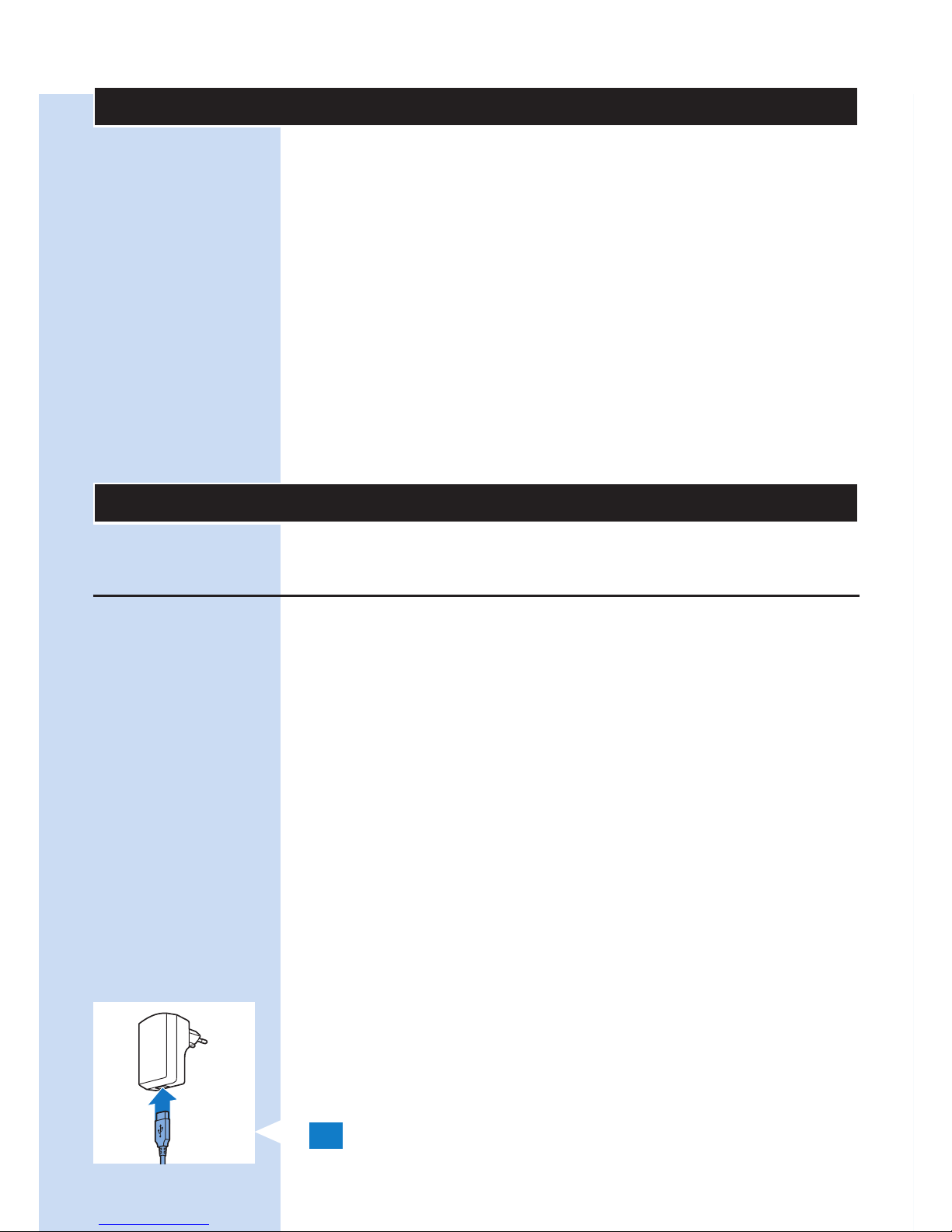
Descripción del producto (g. 1)
1 Parche de alivio del dolor BlueTouch (exterior)
2 Botón de encendido/apagado
3 Panel de conexión
4 Piloto de carga
5 Toma micro USB
6 Parche de alivio del dolor BlueTouch (parte en
contacto con la piel)
7 Zona de tratamiento
8 Adaptador de corriente
9 Conector USB estándar
10 Conector micro USB
Preparación para su uso
Carga del dispositivo
Debe cargar el parche de alivio del dolor BlueTouch
antes de utilizarlo por primera vez. También debe
cargar el dispositivo cuando la batería esté baja.
Se tarda menos de cinco horas en cargar la batería
del parche de alivio del dolor BlueTouch. Cuando
está totalmente cargada, la batería tiene suciente
energía para cuatro o más tratamientos. Puede
cargar el parche de alivio del dolor BlueTouch con
el adaptador y el cable USB suministrados.
Nota: El parche de alivio del dolor BlueTouch no se
puede utilizar mientras se está cargando.
Nota: Si el dispositivo no está totalmente cargado
al iniciar un tratamiento, la batería se puede agotar
durante el mismo. Le recomendamos que cargue
siempre el dispositivo por completo antes de un
tratamiento.
1 Introduzca el conector USB estándar en la
toma del adaptador.
ESPAÑOL88
Page 89
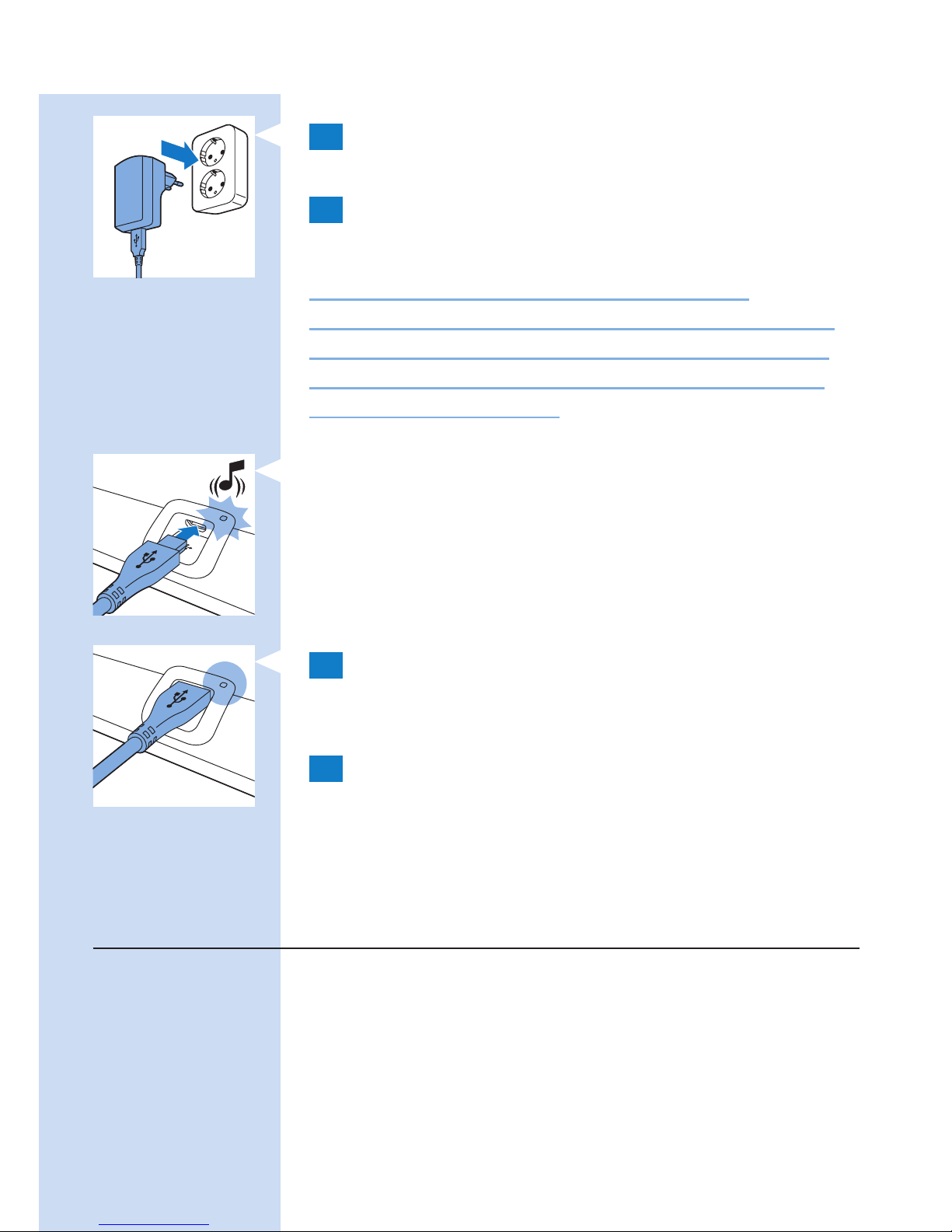
2 Introduzca el adaptador en la toma de
corriente (100 V - 240 V).
3 Introduzca el conector micro USB en la toma
del parche de alivio del dolor BlueTouch.
Precaución: Utilice esta toma micro USB
únicamente para conectar el parche de alivio del
dolor BlueTouch a la red eléctrica para cargarlo.
No conecte ningún otro cable con un conector
micro USB a esta toma.
, Cuando conecte el parche de alivio del dolor
BlueTouch a la red eléctrica, se emitirá un pitido
para indicar que se inicia la carga. El piloto
de carga del panel de conexión parpadea en
verde lentamente y de forma regular durante el
proceso de carga.
4 Cuando la batería se haya cargado
completamente, el piloto de carga se ilumina
en verde de forma permanente.
5 Desenchufe el adaptador de la toma de
corriente y saque el conector USB de la toma
micro USB del parche de alivio del dolor
BlueTouch.
Instalación y conguración de la aplicación
de tratamiento
Se necesita la aplicación de tratamiento de Philips
para utilizar el dispositivo. Vaya a la App Store de
Apple o a Google Play, busque la aplicación y,
a continuación, instálela. Consulte la guía de inicio
rápido para obtener más información.
ESPAÑOL 89
Page 90
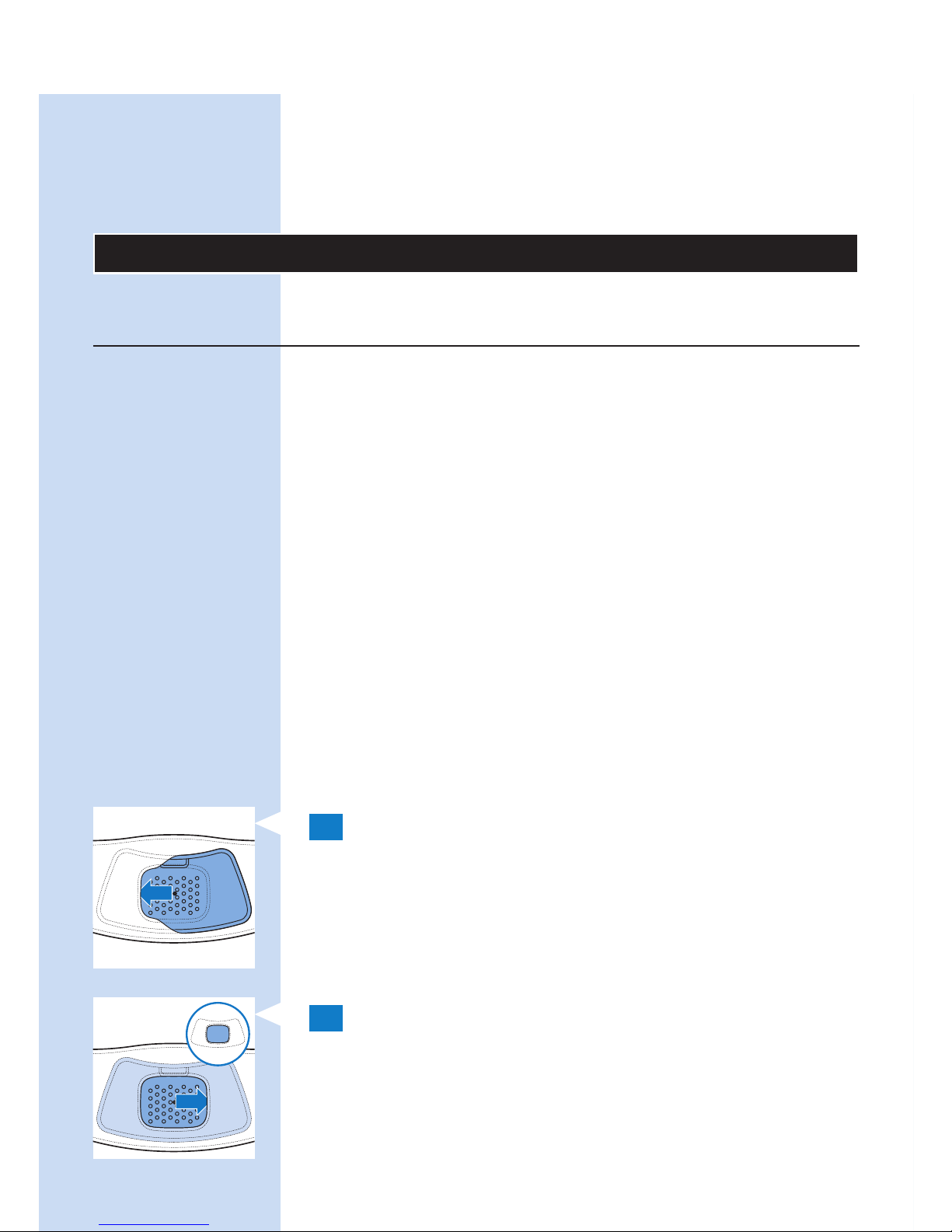
Nota: La aplicación de tratamiento se puede utilizar
con los modelos BlueTouch (PR3743, PR3741)
y PulseRelief (PR3840). El procedimiento de
instalación es el mismo para ambos dispositivos.
Uso del dispositivo
Colocación del dispositivo
Colóquese el parche de alivio del dolor BlueTouch
en el cuerpo con una de las bandas que se
suministran con el dispositivo. Hay una banda
especial para el tratamiento de la parte superior de
la espalda y una banda especial para el tratamiento
de la parte inferior de la espalda.
Nota: No lleve varias capas de ropa o ropa muy
gruesa o ajustada sobre el parche de alivio del dolor
BlueTouch.
Colocación de la banda en la parte inferior
de la espalda
Para colocar el parche de alivio del dolor BlueTouch
en la banda para la parte inferior de la espalda,
siga los pasos que se indican a continuación.
1 Coloque la banda para la parte inferior de
la espalda y el parche de alivio del dolor
BlueTouch en una mesa delante de usted.
Deslice el extremo izquierdo del parche de
alivio del dolor BlueTouch por detrás del
borde elástico de la abertura de la banda.
2 A continuación, deslice el otro extremo
del parche de alivio del dolor BlueTouch
por detrás del borde elástico opuesto de la
abertura para que todo el parche se encuentre
dentro de la banda para la parte inferior de
la espalda. Compruebe que el material de
ESPAÑOL90
Page 91
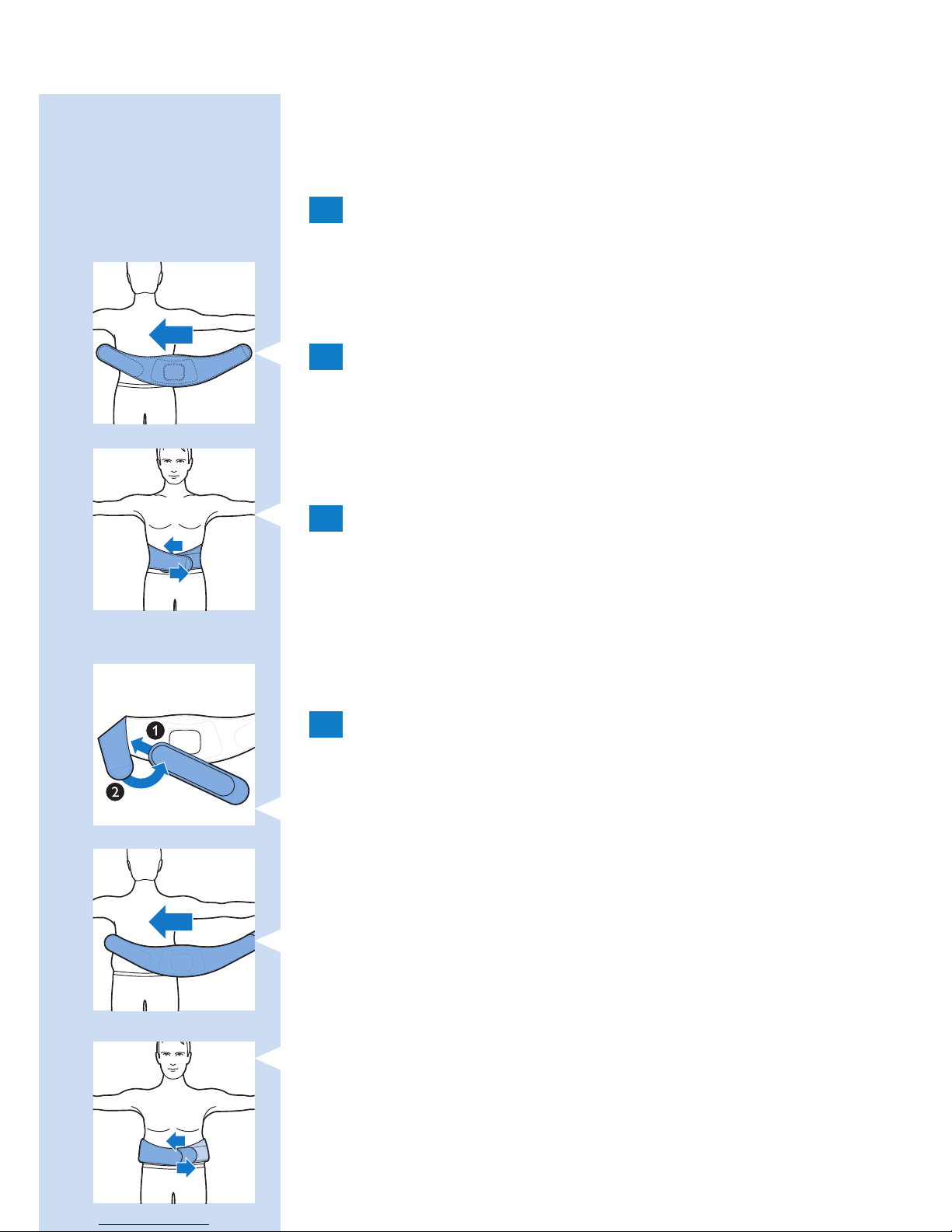
la banda no tapa los LED. Si es necesario,
mueva un poco el parche de alivio del dolor
BlueTouch.
3 Quítese la ropa de la zona que vaya a tratar.
Nota: Asegúrese de que la zona de la piel que va a
tratar esté limpia, completamente seca y sin cremas,
lociones u otros cosméticos.
4 Colóquese la banda para la parte inferior de
la espalda con el parche de alivio del dolor
BlueTouch alrededor de la cintura con la zona
de tratamiento del dispositivo pegada a la
espalda.
5 Fije la banda para la parte inferior de la espalda
con las tiras de velcro de ambos extremos de
las que dispone.
Nota: Asegúrese de que el parche de alivio del dolor
BlueTouch en la banda se encuentra en la zona que se va
a tratar y de que esta zona está en contacto con la piel.
6 Si la banda para la parte inferior de la espalda
no se adapta a su cuerpo, puede hacer lo
siguiente.
1 Una la banda de extensión a un extremo de la
tira de velcro de la banda para la parte inferior
de la espalda.
2 A continuación, colóquese la banda para la parte
inferior de la espalda alrededor del cuerpo.
3 Fije la banda para la parte inferior de la espalda
con la tira de velcro hasta la anchura que le
resulte cómoda.
ESPAÑOL 91
Page 92
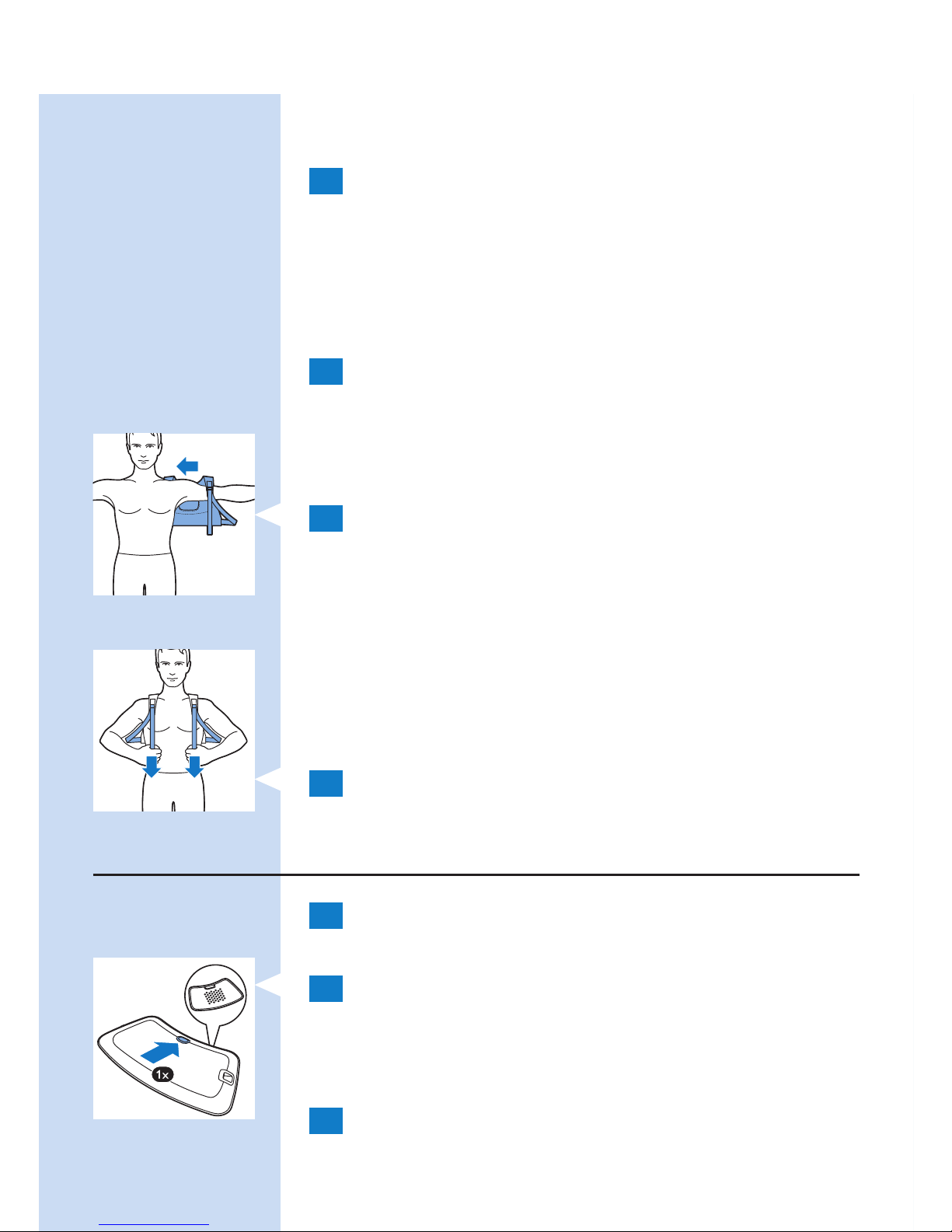
Colocación de la banda en la parte superior
de la espalda
1 Para colocar el parche de alivio del dolor
BlueTouch en la banda para la parte superior
de la espalda, siga el mismo procedimiento que
se describe en los pasos 1 y 2 de la sección
“Colocación de la banda en la parte inferior de
la espalda” que aparece más arriba.
2 Quítese la ropa de la zona que vaya a tratar.
Nota: Asegúrese de que la zona de la piel que va a
tratar esté limpia, completamente seca y sin cremas,
lociones u otros cosméticos.
3 Póngase la banda para la parte superior de la
espalda como si fuera una mochila. Primero
pase un brazo por un asa y, a continuación,
pase el otro brazo por la otra.
Nota: Asegúrese de que el parche de alivio del dolor
BlueTouch en la banda se encuentra en la zona que
se va a tratar y de que la zona de los LED está en
contacto con la piel.
4 Apriete las asas tirando de las tiras elásticas.
Uso de la aplicación para iniciar y detener
un tratamiento
1 Active la función Bluetooth de su dispositivo
móvil.
2 Pulse el botón de encendido/apagado para
encender el parche de alivio del dolor
BlueTouch y coloque la banda con el parche
en la zona de la espalda que desee tratar.
3 Abra la aplicación de tratamiento de Philips.
ESPAÑOL92
Page 93
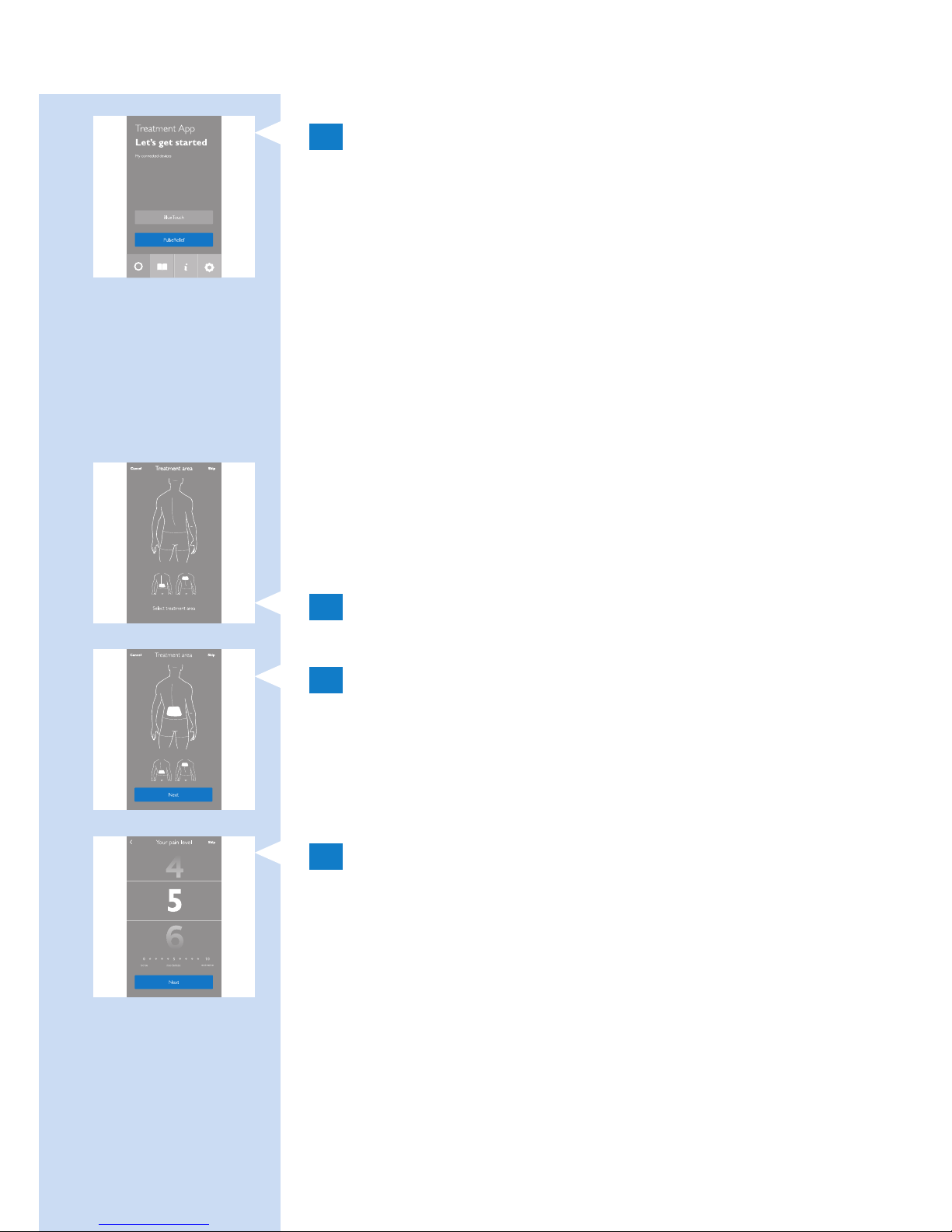
4 Cuando utilice la aplicación por primera vez,
toque “BlueTouch”. La próxima vez que abra la
aplicación, esta seleccionará automáticamente
BlueTouch si solo hay un parche de alivio del
dolor BlueTouch emparejado con la aplicación.
Si hay tanto un dispositivo PulseRelief como
un dispositivo BlueTouch emparejados con la
aplicación, toque “BlueTouch” para seleccionar
dicho dispositivo.
Selección de una zona de tratamiento
Cuando utilice el dispositivo por primera vez, deberá
seleccionar siempre una zona de tratamiento. Si
ha utilizado el dispositivo antes, puede elegir entre
“Quick Start” (Inicio rápido) y “Select a treatment
area” (Seleccionar una zona de tratamiento).
1 Toque la parte de la espalda que desea tratar.
2 La aplicación muestra la ubicación del parche
en la espalda. Toque “Next” (Siguiente) para
continuar.
Valoración de la intensidad del dolor
1 Deslice verticalmente para valorar la intensidad
del dolor en una escala del 0 al 10. Si no
experimenta dolor, toque 0 y si experimenta
un dolor insoportable, toque 10. Si el dolor
es intermedio, clasifíquelo tocando el número
adecuado.
Nota: La aplicación no utiliza la intensidad del dolor
que indica el usuario para determinar el modo del
tratamiento. La valoración solo se almacena en su
diario de tratamientos. Puede desactivar esta función
en la pestaña de conguración de la aplicación.
ESPAÑOL 93
Page 94
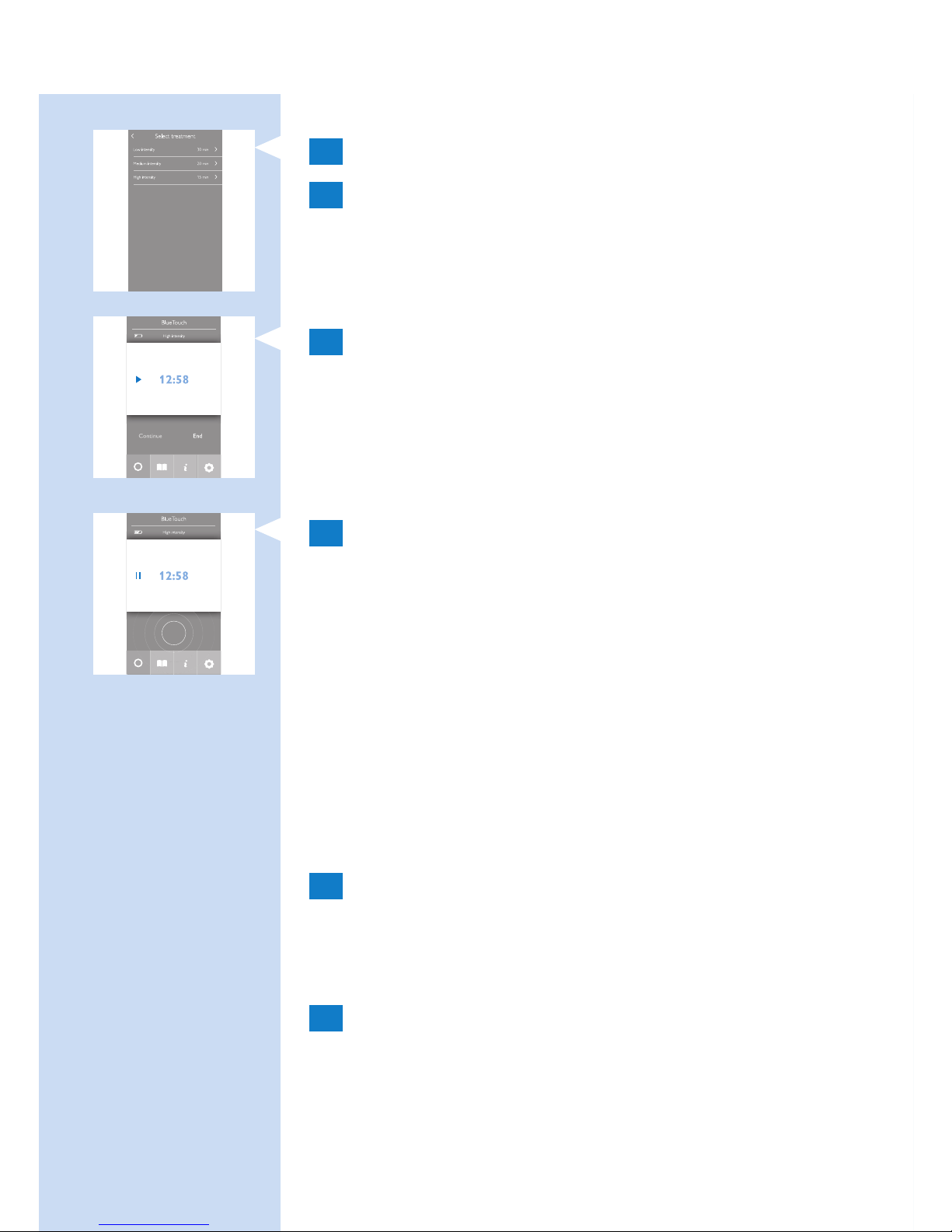
Selección del modo de tratamiento
1 Toque el modo que desea utilizar.
2 Aparece la pantalla de inicio del tratamiento.
Inicio y detención de un tratamiento
1 Toque el botón de reproducción de la pantalla.
, Comienza la cuenta atrás del tiempo.
, El indicador de estado del dispositivo comienza a
parpadear en naranja.
2 El tratamiento continúa hasta que el
temporizador llega a 0. Si desea detener
o interrumpir el tratamiento antes de que
transcurra el tiempo, toque el cuadrado del
centro del indicador de tratamiento pulsante
para interrumpir el programa.
- Para reanudar el programa, toque “Resume”
(Reanudar) o la echa que hay junto al tiempo.
- Para nalizar el programa y apagar el dispositivo,
toque “End treatment” (Finalizar tratamiento).
Cambio a otro modo de tratamiento
1 Si desea cambiar a otro modo de tratamiento,
toque el nombre del modo de tratamiento actual.
Se abre la lista de los modos de tratamiento. Toque
el modo de tratamiento que desea utilizar.
2 El nuevo modo de tratamiento seleccionado
aparece en la pantalla. Toque el botón de
reproducción para iniciar el tratamiento.
Nota: El temporizador recalcula automáticamente el
tiempo de tratamiento restante basado en el nuevo modo.
ESPAÑOL94
Page 95
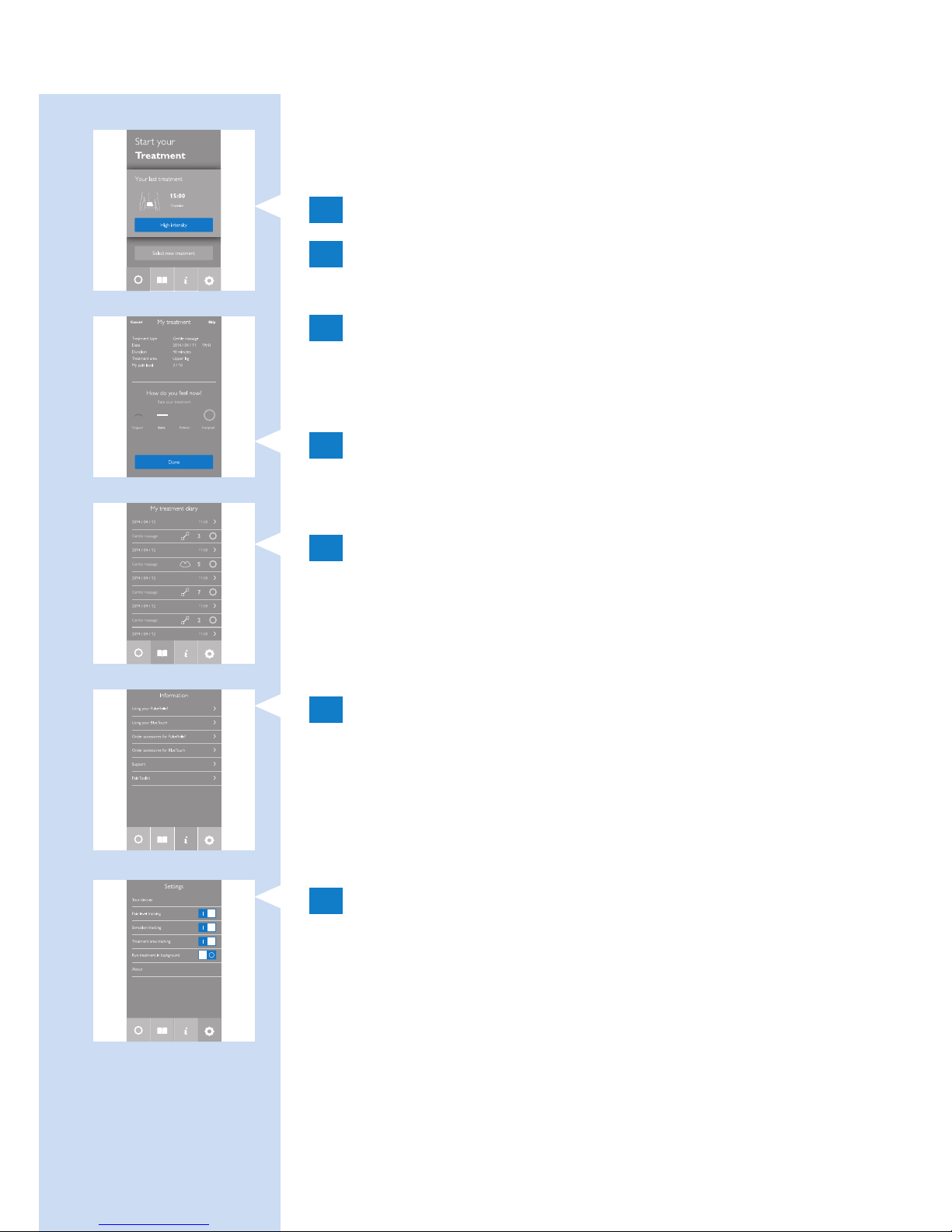
Inicio rápido
El inicio rápido inicia inmediatamente el modo de
tratamiento utilizado con anterioridad.
1 Seleccione “Quick Start” (Inicio rápido).
2 Deslice verticalmente para valorar la
intensidad del dolor en una escala del 0 al 10.
3 Toque el botón de reproducción para iniciar el
tratamiento.
Otras funciones de la aplicación
1 Cuando termine el programa, aparecerá una
pantalla que le pedirá que describa cómo se
siente tocando uno de los iconos.
2 Toque el símbolo del libro para abrir su
diario. El diario muestra cuándo realizó los
tratamientos, qué modo de tratamiento utilizó
y cuánto tiempo duró el tratamiento.
- Toque la echa para ver más detalles.
3 Toque el botón “i” para abrir la pantalla de
información, que contiene los siguientes
elementos:
- Using your BlueTouch device (Uso del dispositivo
BlueTouch)
- Póngase en contacto con nosotros
4 Toque el símbolo de conguración para abrir
la pantalla de conguración, que contiene los
siguientes elementos:
- Los dispositivos
- Control del nivel de dolor
- Control de la sensación
- Control de la zona de tratamiento
- Ejecutar tratamiento en segundo plano
- Acerca de
ESPAÑOL 95
Page 96
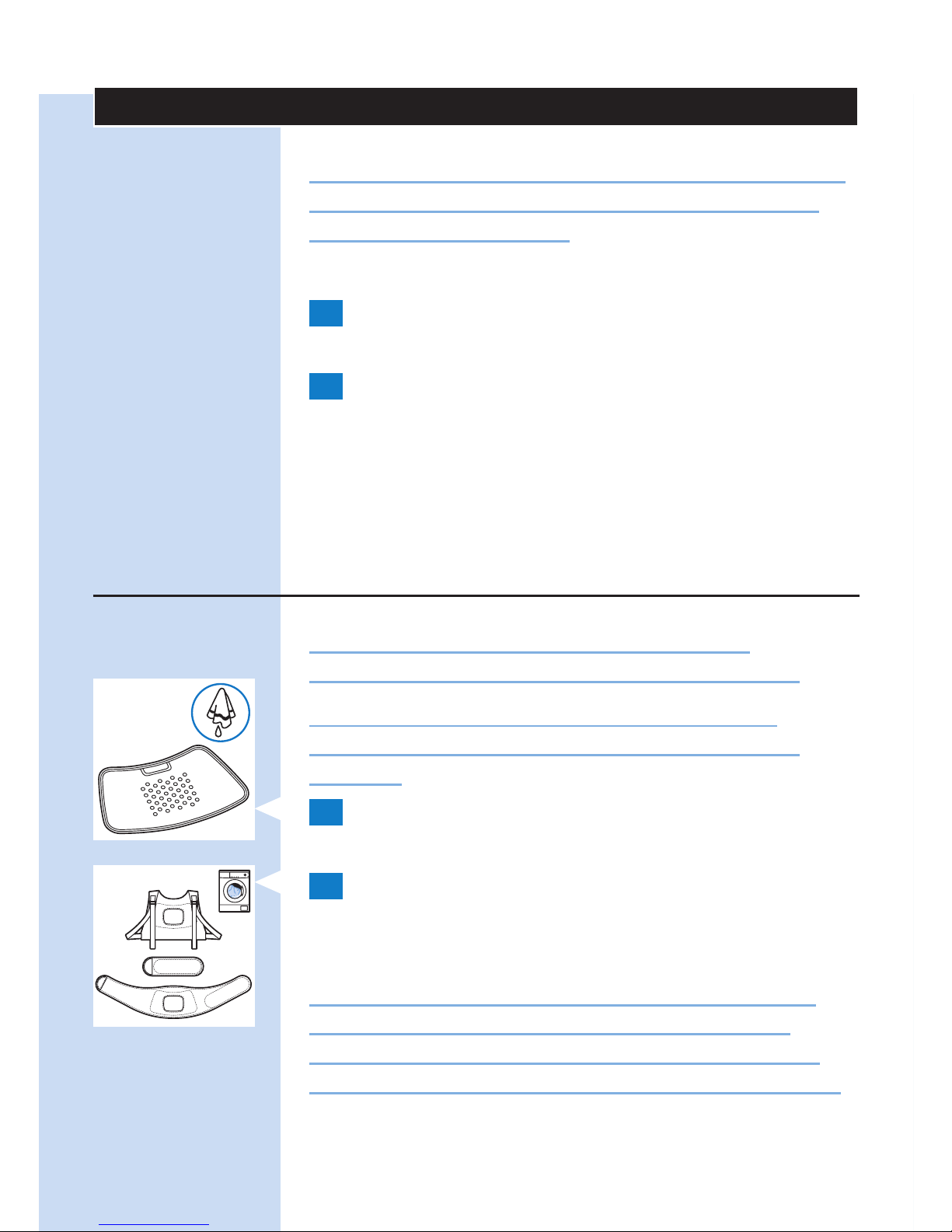
Después del tratamiento
Precaución: Asegúrese de terminar el tratamiento
en la aplicación antes de retirar la banda con el
dispositivo de la espalda.
1 Aoje la banda y quítese el parche de la
espalda.
2 Recargue el parche de alivio del dolor
BlueTouch si el piloto de carga se ilumina
en naranja de forma permanente (consulte
el capítulo “Carga del dispositivo”). Retire el
parche de alivio del dolor BlueTouch de la
banda antes de empezar a cargarlo.
Limpieza
No sumerja el parche de alivio del dolor
BlueTouch en agua ni lo enjuague bajo el grifo.
Quite siempre el parche de alivio del dolor
BlueTouch de la banda antes de meterla en la
lavadora.
1 Limpie el parche de alivio del dolor BlueTouch
con un paño húmedo después de cada uso.
2 Puede lavar las bandas del parche de alivio del
dolor BlueTouch en la lavadora cuando estén
sucias.
Precaución: Para evitar daños en las bandas del
parche de alivio del dolor BlueTouch y otras
prendas que haya en la lavadora, lave las bandas
dentro de una bolsa de malla na para la lavadora.
ESPAÑOL96
Page 97

Nota: Utilice un ciclo de lavado suave y una
temperatura de 30 °C como máximo. Seque las
bandas de alivio del dolor BlueTouch al aire, y no en la
secadora. No planche las bandas.
Guía de resolución de problemas
En este capítulo se resumen los problemas más
frecuentes que pueden surgir con el parche de
alivio del dolor BlueTouch. Si no puede resolver el
problema con la siguiente información, póngase en
contacto con Philips.
Problema Posible causa Solución
El parche de
alivio del dolor
BlueTouch se apaga
repentinamente
durante el
tratamiento.
Ha
transcurrido
el tiempo de
tratamiento
preestablecido.
El parche de alivio del dolor
BlueTouch está programado
para apagarse automáticamente
una vez transcurrido el tiempo
de tratamiento en el modo de
tratamiento seleccionado. Justo
antes apagarse se oirá un tono
triple (de alto a bajo).
Parece que el
parche de alivio del
dolor BlueTouch no
funciona en mi caso,
porque no noto
ningún efecto.
Pueden pasar
dos semanas
hasta que
se noten los
efectos.
Tenga paciencia y deje que
transcurra más tiempo para
que se noten los efectos.
ESPAÑOL 97
Page 98

Problema Posible causa Solución
El parche de alivio
del dolor BlueTouch
cambia a una
intensidad inferior.
La
temperatura
del dispositivo
es demasiado
alta.
Quítese el parche de alivio del
dolor BlueTouch, apáguelo y
deje que se enfríe. Asegúrese
de que no lleva demasiada
ropa ni ropa demasiado gruesa
sobre el parche de alivio del
dolor BlueTouch durante el
tratamiento.
El piloto de carga se
ilumina en rojo de
forma permanente
durante ocho
segundos y el
parche de alivio del
dolor BlueTouch se
apaga.
La batería
recargable está
descargada.
Cargue el parche de alivio del
dolor BlueTouch (consulte
el capítulo “Carga del
dispositivo”).
El piloto de carga
se ilumina en
naranja de forma
permanente.
La batería se
está agotando
y no tiene
suciente
energía
para un
tratamiento.
Cargue el parche de alivio del
dolor BlueTouch (consulte
el capítulo “Carga del
dispositivo”).
El adaptador se
calienta durante la
carga.
Esto es
normal.
No tiene que preocuparse de
nada.
ESPAÑOL98
Page 99

Problema Posible causa Solución
Un equipo médico
no funciona
correctamente
cuando el
dispositivo está
encendido o
mientras este
funciona.
El dispositivo
está
demasiado
cerca del
equipo
médico.
No utilice el dispositivo cerca
de equipos médicos.
El piloto de carga
no comienza a
parpadear en
verde cuando
se introduce el
conector micro
USB en la toma
micro USB del
panel de conexión.
No ha
introducido
el adaptador
o no lo ha
introducido
correctamente
en la toma de
corriente.
Introduzca correctamente
el adaptador en la toma de
corriente.
No ha
introducido
el conector
USB estándar
o no lo ha
introducido
correctamente
en el
adaptador.
Introduzca correctamente el
conector USB estándar en el
adaptador.
La toma de
corriente
en la que ha
introducido el
adaptador no
está activa.
Conecte otro aparato a la
misma toma para comprobar
si está activa. Si la toma de
corriente está activa, pero
el parche de alivio del dolor
BlueTouch no se carga, póngase
en contacto con Philips.
ESPAÑOL 99
Page 100

Problema Posible causa Solución
Se ha
producido un
error durante
la carga.
Pulse el botón del parche de
alivio del dolor BlueTouch para
reiniciar la carga.
El adaptador está
conectado al parche
de alivio del dolor
BlueTouch y el
piloto de carga no
está en verde ni de
forma permanente
ni con parpadeo.
Se ha
producido un
error durante
la carga.
Pulse el botón del parche de
alivio del dolor BlueTouch para
reiniciar la carga.
El parche de alivio
del dolor BlueTouch
se calienta durante
su uso.
Esto es
normal.
No tiene que preocuparse de
nada.
No se puede
realizar la conexión
con el parche de
alivio del dolor
BlueTouch.
El Bluetooth
no se
enciende.
Asegúrese de haber activado
la función de Bluetooth en el
dispositivo inteligente.
Es posible
que no haya
seleccionado
BlueTouch en
la aplicación.
Ejecute la aplicación, toque
“Settings” (Ajustes) y, a
continuación, “Your devices” (Sus
dispositivos) y compruebe que
la opción “BlueTouch” está en
la lista. Si no, haga clic en “Add
new BlueTouch” (Añadir nuevo
BlueTouch) y encienda el parche
de alivio del dolor BlueTouch
para emparejar el parche con el
dispositivo inteligente.
ESPAÑOL100
 Loading...