

Page 1
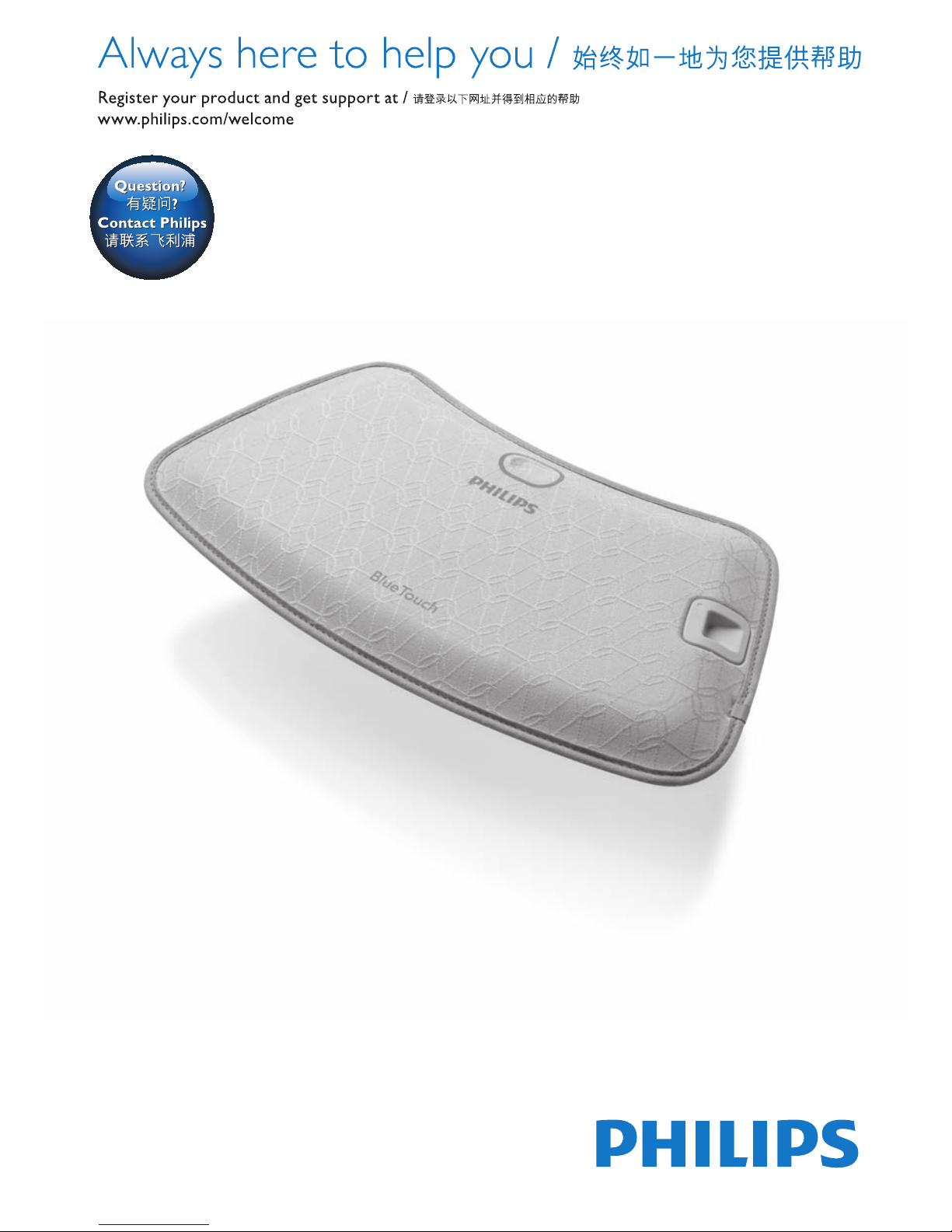
PR3092
Page 2

Page 3
23
Page 4

Page 5

PR3092
ENGLISH 6
繁體中文 26
简体中文 44
Page 6
6
Introduction
Read this user manual carefully before you use the BlueTouch Pain Relief
Patch and save it for future reference. This medical device is available
without prescription. To achieve the optimal treatment success, you have
to use the device according to the treatment schedule and the instructions
in this user manual. In case of any further questions, please ask your
pharmacist or doctor.
BlueTouch is a trademark owned by Koninklijke Philips N.V.
Intended use
The BlueTouch Pain Relief Patch is a wearable medical device that intends
to treat back pain during normal daily activities by supplying light and heat
to the body by means of optical power and thermal conduction. Special
blue LED light relaxes and helps heal damaged muscles through improved
blood circulation. The BlueTouch Pain Relief Patch is intended to be used
on the upper or lower back and can be positioned and adjusted on the
treatment area by means of a fabric strap. The device is powered by
built-in, non-exchangeable rechargeable batteries. The BlueTouch Pain Relief
Patch is intended to be only used and operated by persons older than 18.
It should always be used in accordance with the safety procedures and
operating instructions included in this user manual and for the purpose for
which it is designed.
Important
Important safety information
Danger
- Keep the adapter dry.
Warning
- Do not immerse the BlueTouch Pain Relief Patch in water nor rinse it
under the tap.
- Do not use the BlueTouch Pain Relief Patch in wet surroundings.
- The BlueTouch Pain Relief Patch is not intended for use by persons
younger than 18 and persons with reduced physical, sensory or mental
capabilities.
- THIS IS A MEDICAL DEVICE. KEEP THE DEVICE OUT OF THE
REACH OF CHILDREN.
- Make sure children do not play with the BlueTouch Pain Relief Patch.
- Always adhere to the treatment schedule in chapter ‘Using your
BlueTouch Pain Relief Patch’. Do not treat more than twice a day.
- Only charge the BlueTouch Pain Relief Patch by connecting the USB
cable and the adapter supplied with the device to a wall socket or by
connecting the USB cable to a computer.
- Always check the BlueTouch Pain Relief Patch and the adapter for
damage before use.
- Do not use the BlueTouch Pain Relief Patch or the adapter if either is
damaged.
- If the adapter is damaged, always have it replaced with one of the original
type in order to avoid a hazard. Contact Philips to obtain a new adapter.
- Do not modify the BlueTouch Pain Relief Patch and its accessories.
ENGLISH
Page 7
- Do not intentionally touch the sensor in the centre of the BlueTouch
Pain Relief Patch when it is switched on.
- Do not place any object on the sensor in the centre of the BlueTouch
Pain Relief Patch when it is switched on.
- Never leave the BlueTouch Pain Relief Patch unattended when it is
switched on or charging.
- Always return the BlueTouch Pain Relief Patch to a service centre
authorised by Philips for examination or repair. Repair by unqualied
people could cause a hazardous situation for the user.
Caution
- The BlueTouch Pain Relief Patch is specically designed to treat back
pain during normal daily activities, such as working on the computer,
reading, watching TV, gardening and performing household tasks,
for instance cooking. Do not use it for any other purpose.
- If treatment becomes uncomfortable, switch to a lower treatment
mode. If treatment is still uncomfortable in low mode, switch off the
BlueTouch Pain Relief Patch and stop using it.
- Never exert excessive pressure on the BlueTouch Pain Relief Patch,
for instance by pressing, lying, sitting or standing on it. Do not lean
heavily against the BlueTouch Pain Relief Patch when sitting.
- Use the BlueTouch Pain Relief Patch in one of the Philips straps that
has been specially designed for it. The straps are not supplied with the
patch and have to be obtained separately.
- Do not subject the BlueTouch Pain Relief Patch to heavy shocks or
drop it.
- Do not squeeze or twist the BlueTouch Pain Relief Patch.
- Keep the BlueTouch Pain Relief Patch away from sharp, pointed or
abrasive objects.
- Do not wear the BlueTouch Pain Relief Patch while it is charging.
- Do not apply any creams or lotions to the skin before treatment.
- Blue light may discolour tattoos in the treatment area.
- Use, charge and store the BlueTouch Pain Relief Patch at a temperature
between 10°C and 35°C and at a relative humidity between
30% and 90%.
- If you take the BlueTouch Pain Relief Patch from a very warm
environment to a colder environment, wait approximately 3 hours
before you use it.
- Do not look directly into the light emitted by the BlueTouch Pain Relief
Patch when it is switched on.
- Do not use the BlueTouch Pain Relief Patch if you have a fever or if you
have a health condition and/or use medication or cosmetics that may
cause adverse skin reactions in combination with the BlueTouch
Pain Relief Patch. Read section ‘Contra-indications’ in this chapter to
nd out if any apply to you before you start using the BlueTouch
Pain Relief Patch.
- To disconnect the BlueTouch Pain Relief Patch from the mains, remove
the adapter from the wall socket.
- The BlueTouch Pain Relief Patch is intended for non-continuous use.
The exact usage time is stated in chapter ‘Using your BlueTouch
Pain Relief Patch’, section ‘Treatment modes, duration and intensity’.
ENGLISH 7
Page 8

- Always install the BlueTouch Pain Relief Patch according to the
instructions in this user manual. Make sure wireless communication
devices, such as wireless home network routers, mobile phones,
cordless phones and their base stations, and walkie-talkies, are kept
at least 2 metres away from the BlueTouch Pain Relief Patch, as these
devices may affect its working.
- Clean the infrared sensor with a damp cloth after each treatment to
ensure it continues to function properly.
- To prevent damage to the drum of the washing machine or to other
laundry in the drum, wash the straps in a ne-mesh washing bag.
Contra-indications
Do not use the BlueTouch Pain Relief Patch:
- If your skin is burnt or sunburnt.
- If you have a fever.
- If you have a known sun allergy.
- If you are allergic to the surface materials of the BlueTouch Pain
Relief Patch (polyurethane for the skin contact surface, stainless steel
for the infrared sensor and a polyamide/elastane mix for the surface
that does not touch the skin) or to the DriRelease polyester/cotton
mix of the straps.
- If you have any known disease or idiopathic dermatosis such as
porphyria, polymorphic light eruption, chronic actinic dermatitis,
actinic prurigo or solar urticaria that causes photosensitivity.
- If you have active skin cancer, if you have a history of skin cancer or
any other localised cancer in the areas to be treated, if you have
pre-cancerous lesions or large moles in the areas to be treated.
- If you are taking photosensitising agents or medications, check the
package insert of your medicine and never use the appliance if it is
stated that it can cause photo-allergic reactions, photo-toxic reactions
or if you have to avoid sun when taking this medicine.
- If you are on steroids. This medication makes the skin more susceptible
to irritation.
- If you have infections, eczema, unhealed tattoos, burns, inammation
of hair follicles, open lacerations, abrasions, herpes simplex, psoriasis,
wounds or lesions and haematomas in the areas to be treated.
- If you have severe or uncontrolled diabetes or diabetes with
peripheral damage.
- If you have uncontrolled arterial hypertension, a history of stroke,
myocardial infarction, angina pectoris, arteriosclerotic vascular disease
(ASVD), or peripheral vascular disease.
- If you are pregnant or breastfeeding.
- If you have any inammatory disease that causes pain or any
other chronic disease or infection known to cause pain, such as
spondyloarthopathy, rheumatoid arthritis, lupus erythematodes,
Lyme borreliosis.
- If you have a degenerative central nervous system disease such as
multiple sclerosis or Parkinson’s disease, or a spinal stenosis that
contributes to or causes back pain, or cauda equina syndrome or other
neurological symptoms that indicate neuropathy.
- If you have schizophrenia, borderline syndrome or severe depression.
- If you have any sensory deprivation or have been diagnosed with
shingles or post-herpetic neuralgia, especially in the mid-trunk area.
ENGLISH8
Page 9
- If you have any anatomical pathology or other physical limitation which
would prevent you from placing the BlueTouch Pain Relief Patch
successfully.
- If you have an active implanted device, such as a cardiac pacemaker,
debrillator, neurostimulator, cochlear implant, or an active drug
administration device.
- If you have a history of severe osteoporosis (T score of 2.5 and a
history of 1 or more bone fractures), or another severe bone disease.
- If you have had an acute dislocation or fracture within the previous
8 weeks.
- If you have had any failed back surgery or any surgery to torso,
head or back within the previous 8 weeks.
- If you have widespread pain.
- If you are in poor general health.
Compliance with standards
- This BlueTouch Pain Relief Patch meets all standards relevant for
electrical medical appliances and appliances using optical (LED)
radiation for home use.
- This BlueTouch Pain Relief Patch complies with all applicable standards
and regulations regarding exposure to electromagnetic elds.
Explanation of symbols
BlueTouch Pain Relief Patch
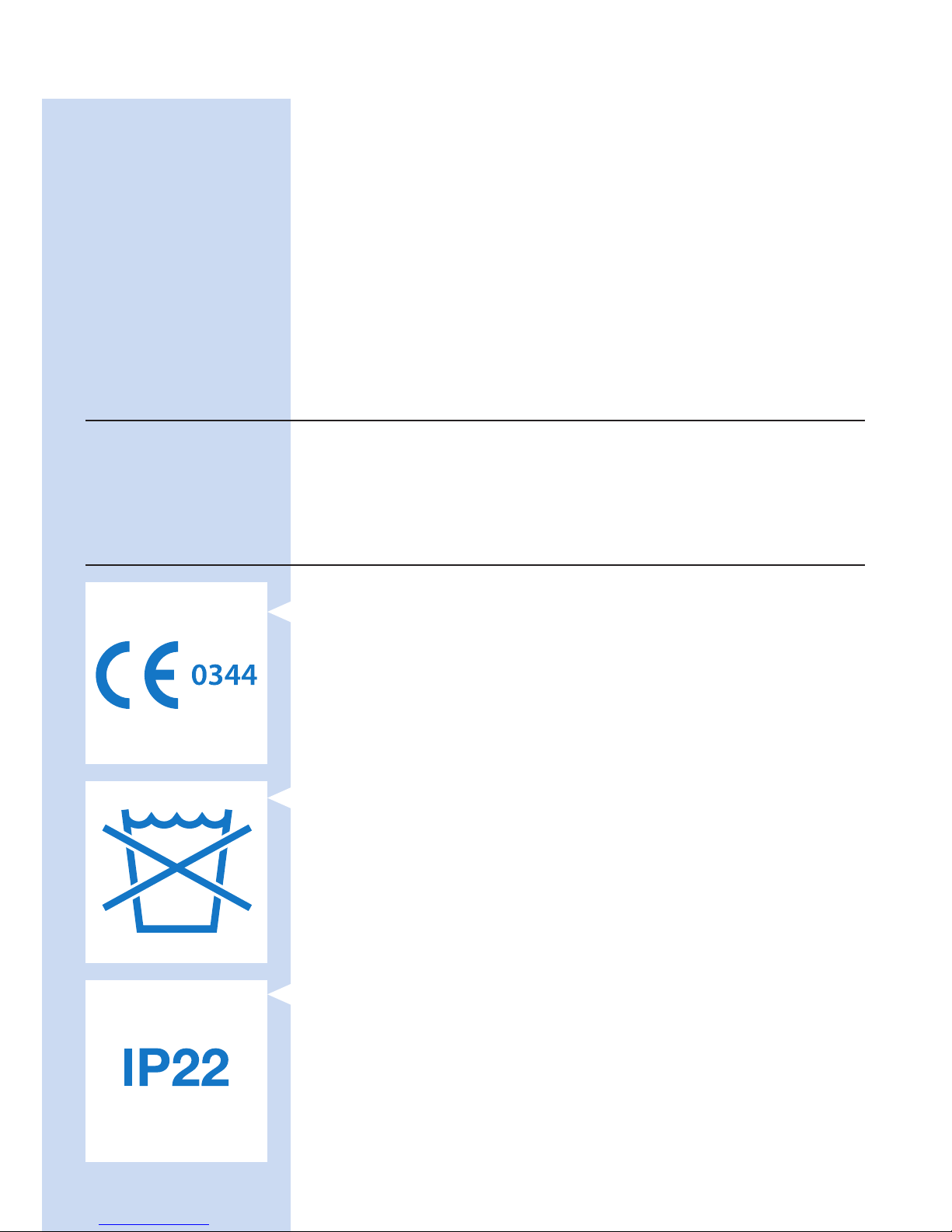
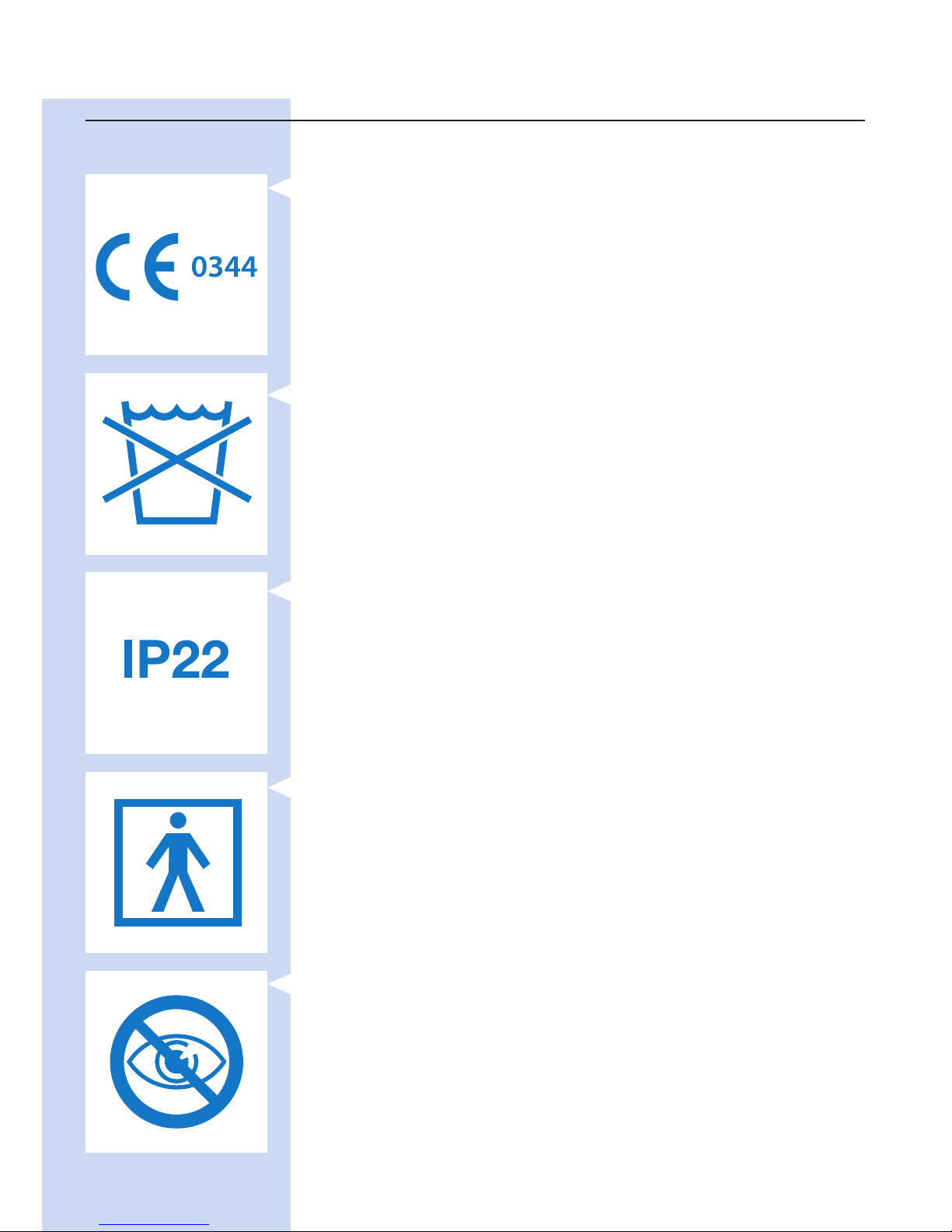
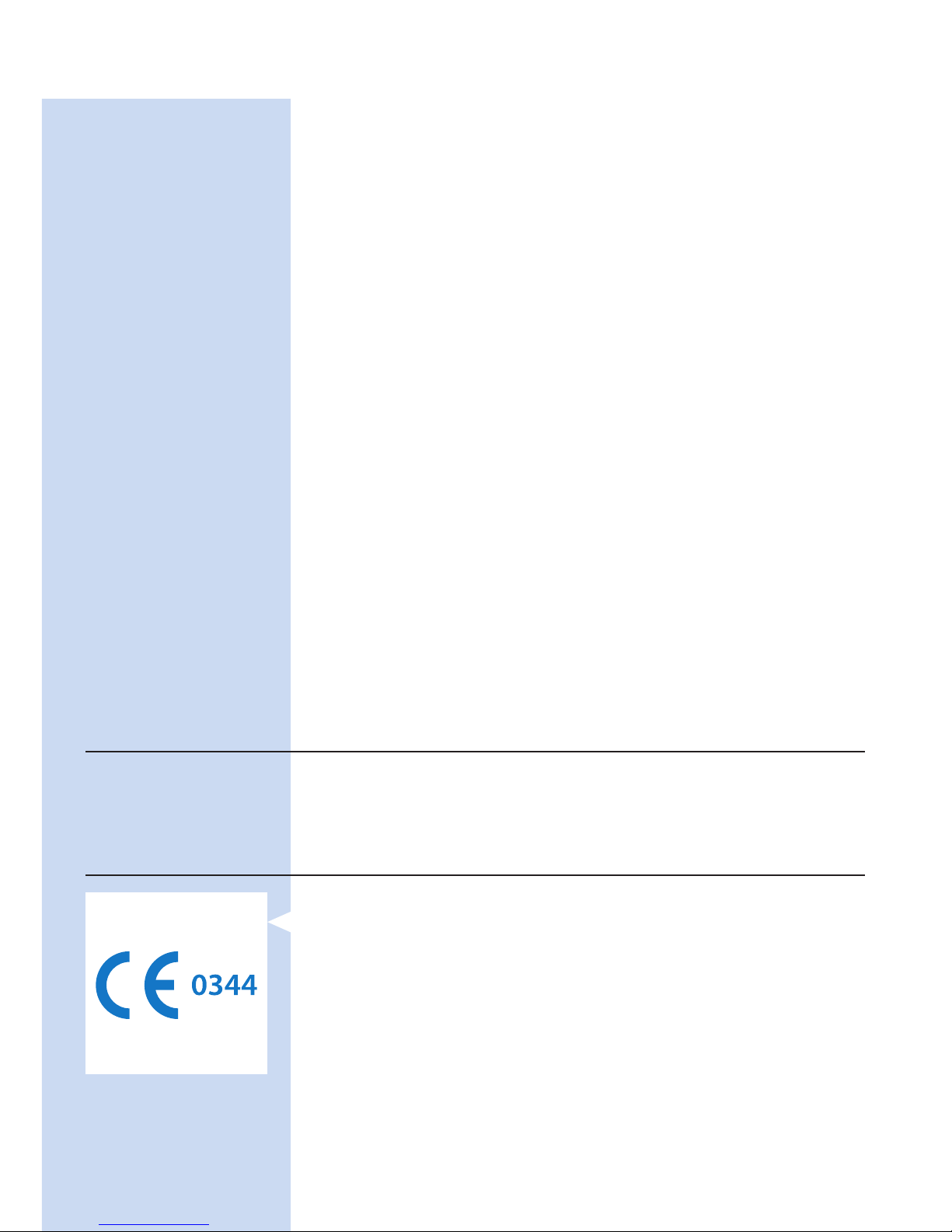
- This symbol means: Conforms to EC Directives. CE stands for
‘Conformité Européenne’.
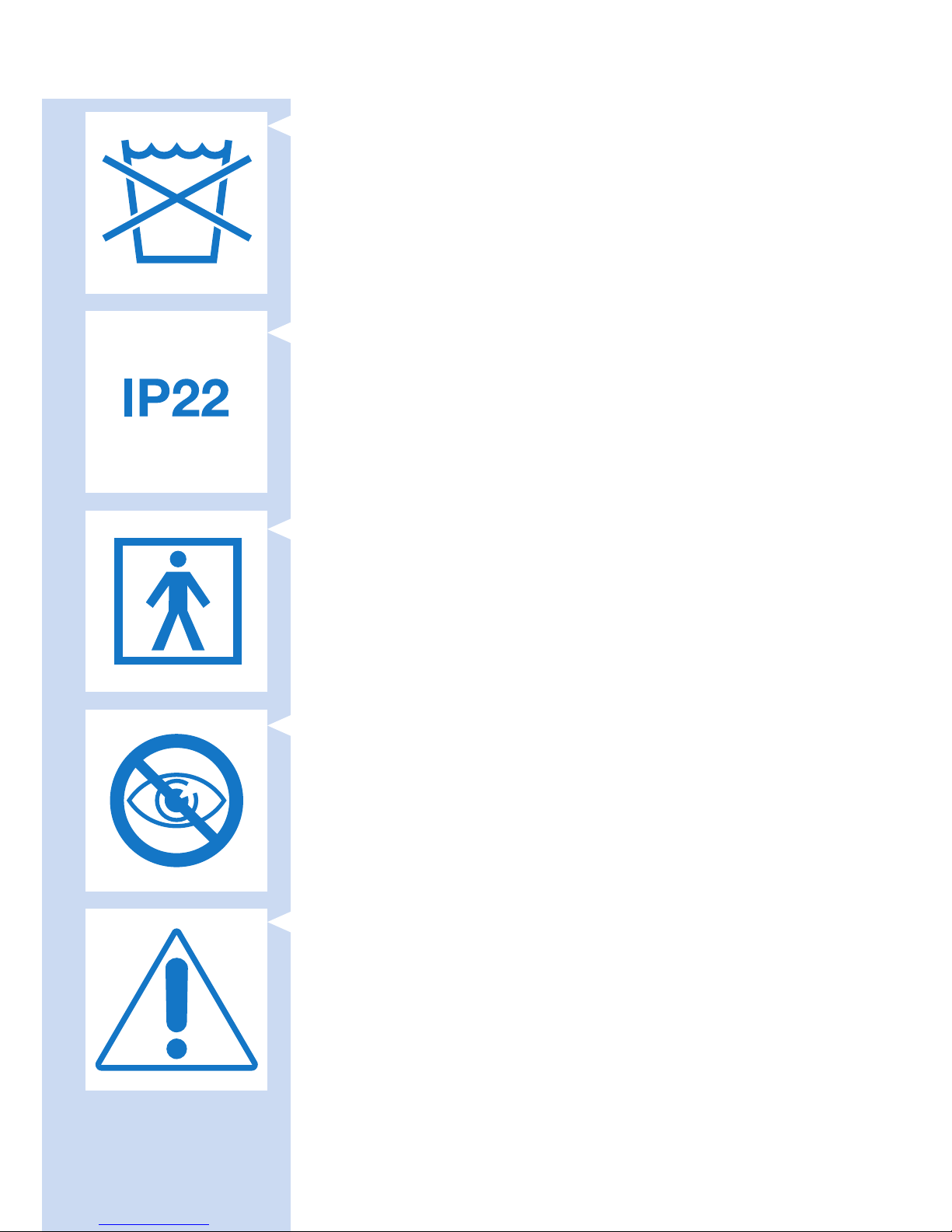
- This symbol means: Do not put the BlueTouch Pain Relief Patch in the
washing machine.
- This symbol means that the device is protected against dripping water.
ENGLISH 9
Page 10
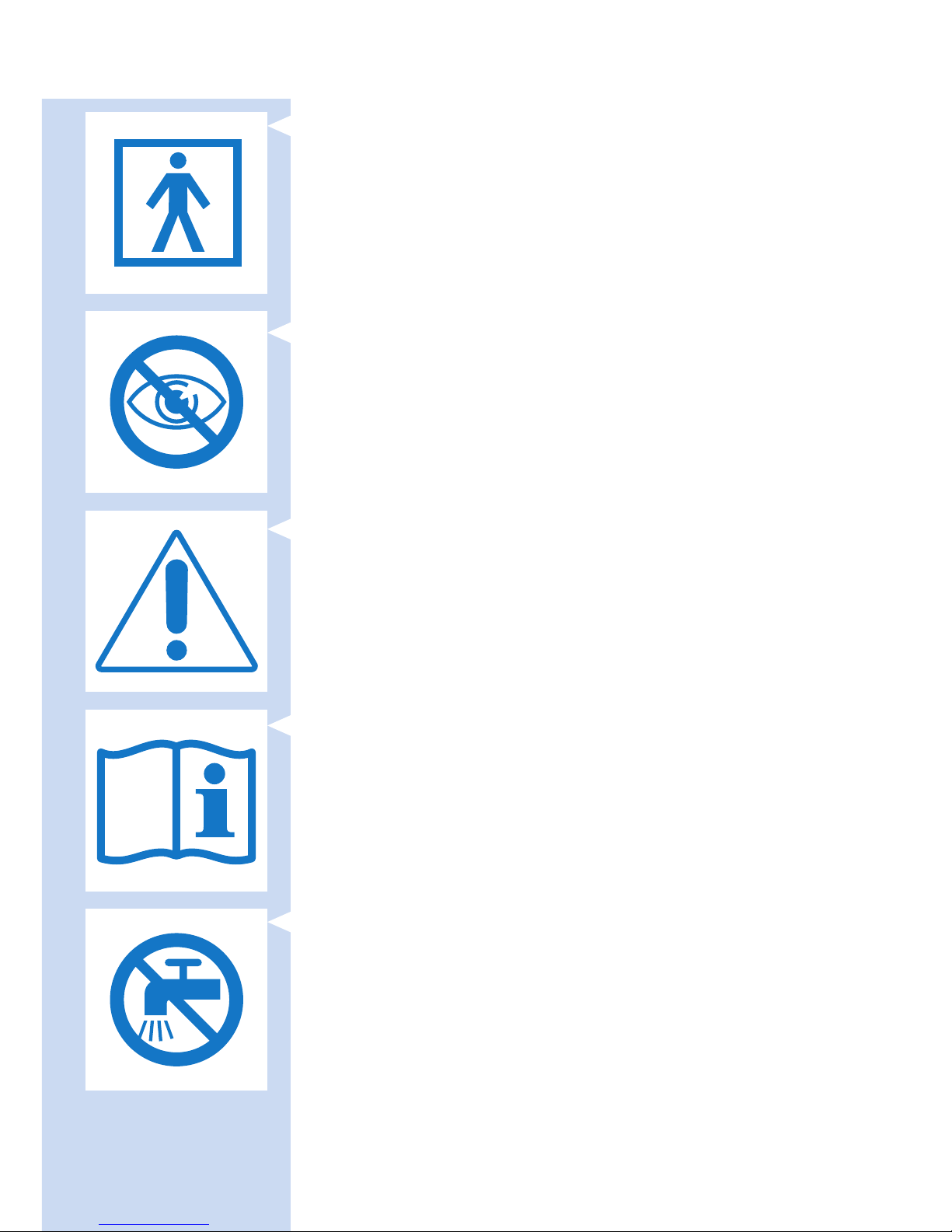
- This symbol means: Type BF (Body Floating) applied part.
- This symbol means: Do not stare into the beam of light.
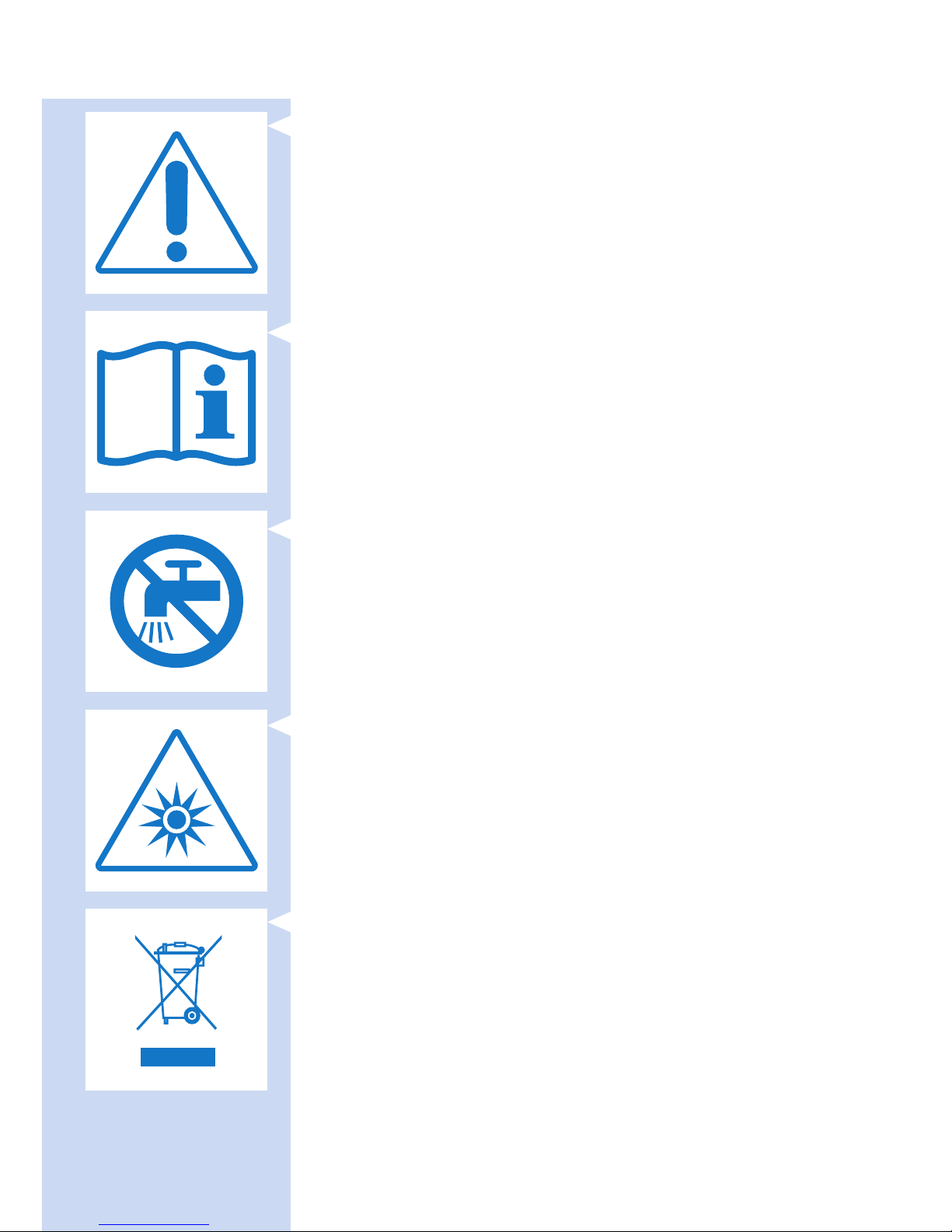
- This symbol is a warning to read the enclosed documents before use
and take all safety precautions required.
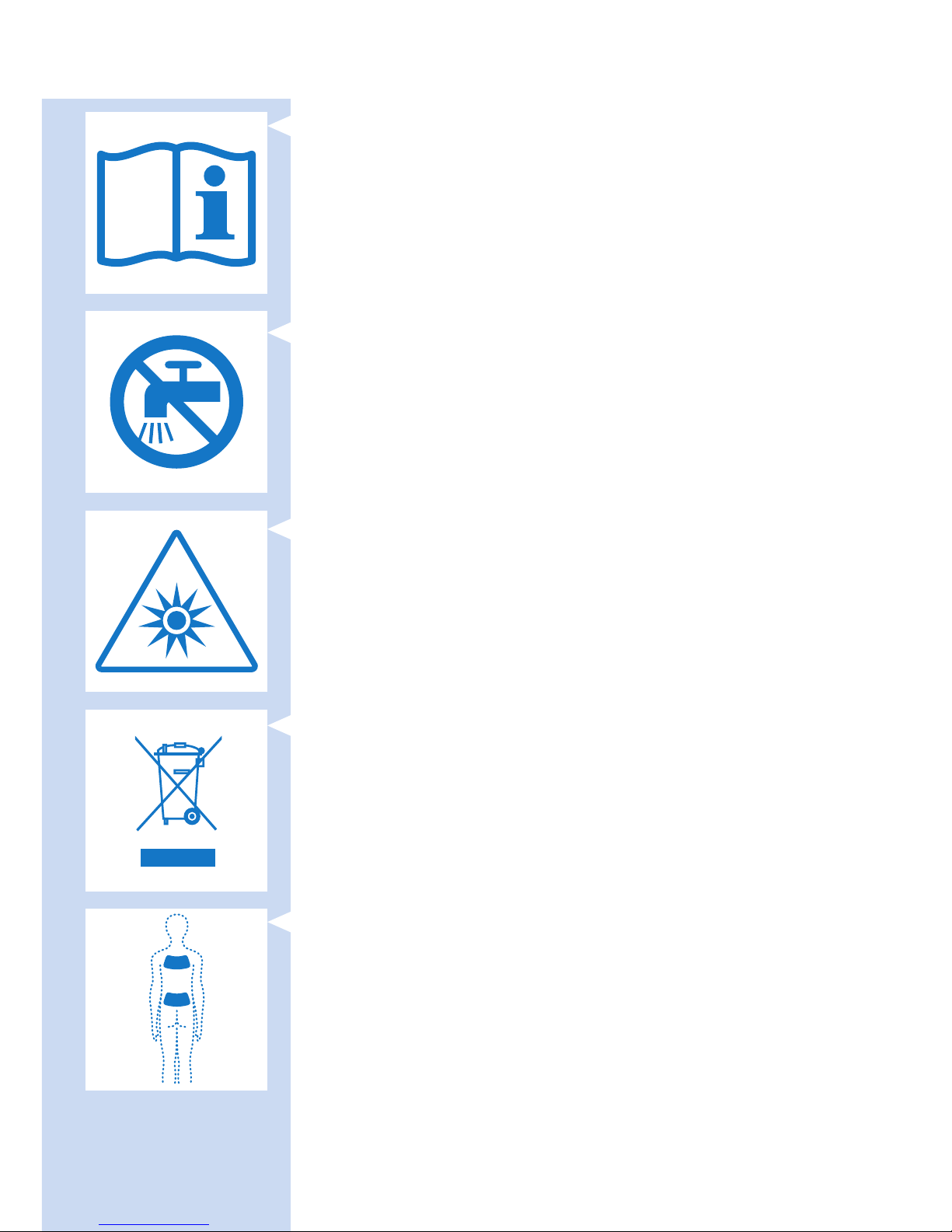
- This symbol means: Read the user manual before you start using the
BlueTouch Pain Relief Patch.
- This symbol means: Do not clean under a running tap.
ENGLISH10
Page 11
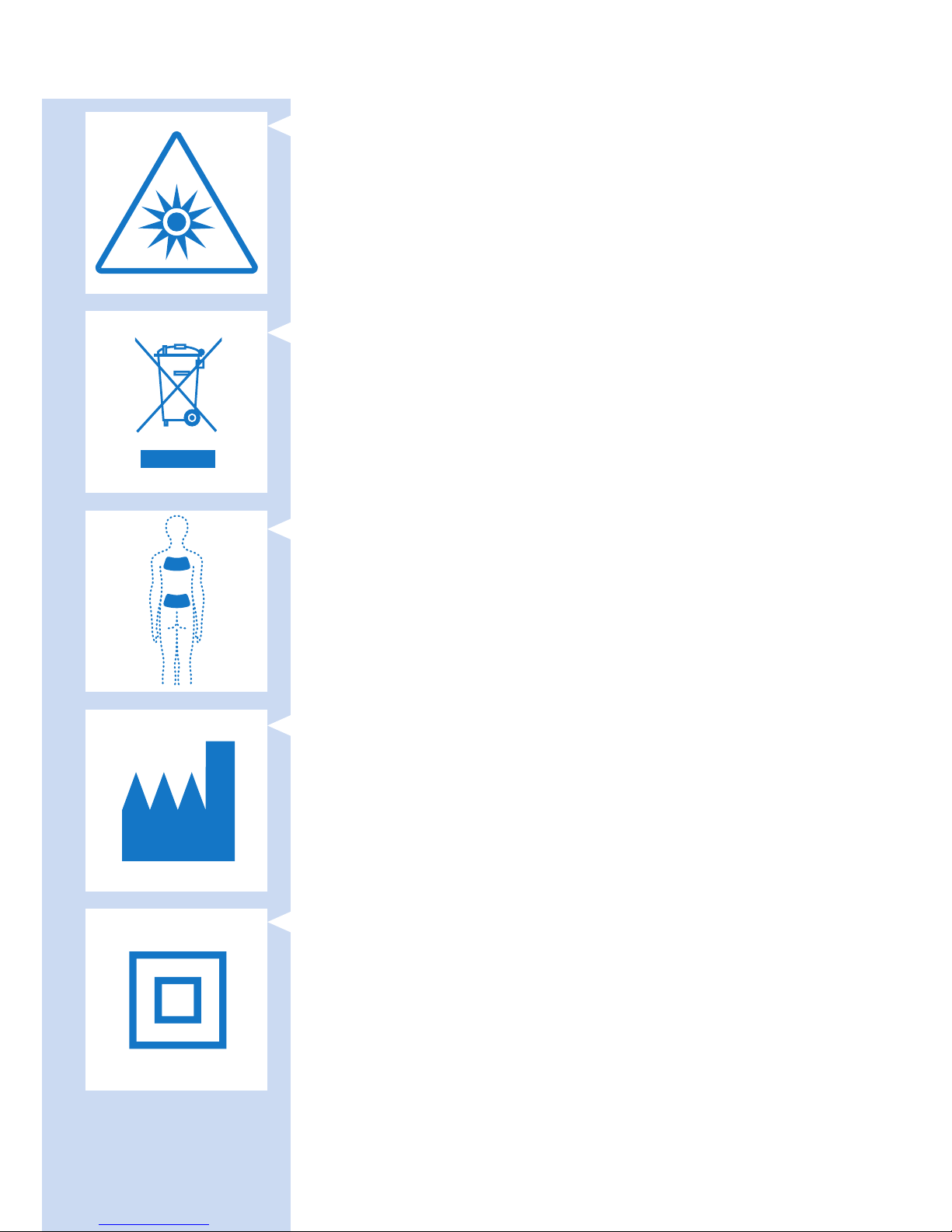
- This symbol means: Do not stare at the light source.
Risk Group 1 product (IEC60601-2-57:2011).
- This symbol means: Do not throw away with the normal household
waste. For further instructions, see chapter ‘Environment’.
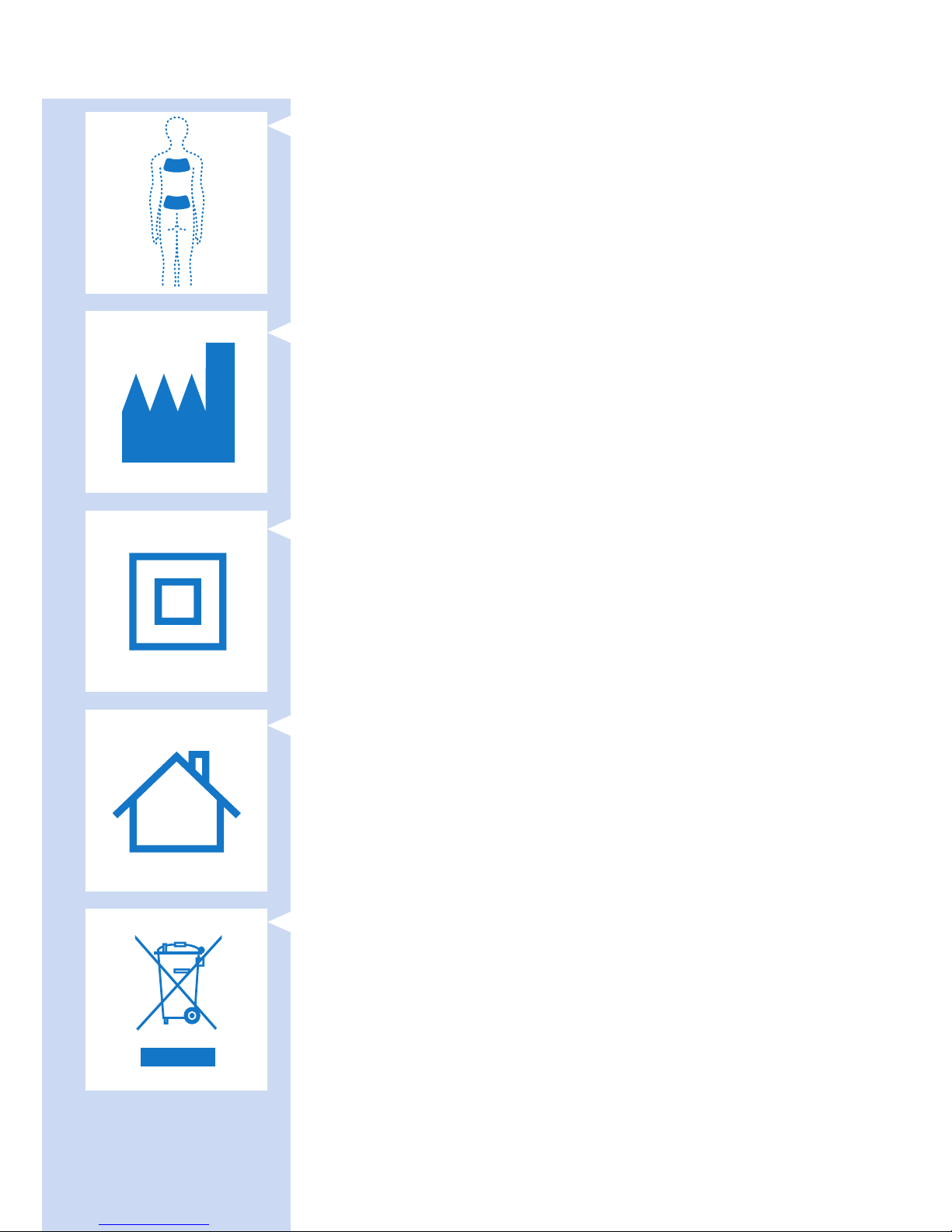
- This symbol indicates the areas where the BlueTouch Pain Relief Patch
may be positioned.
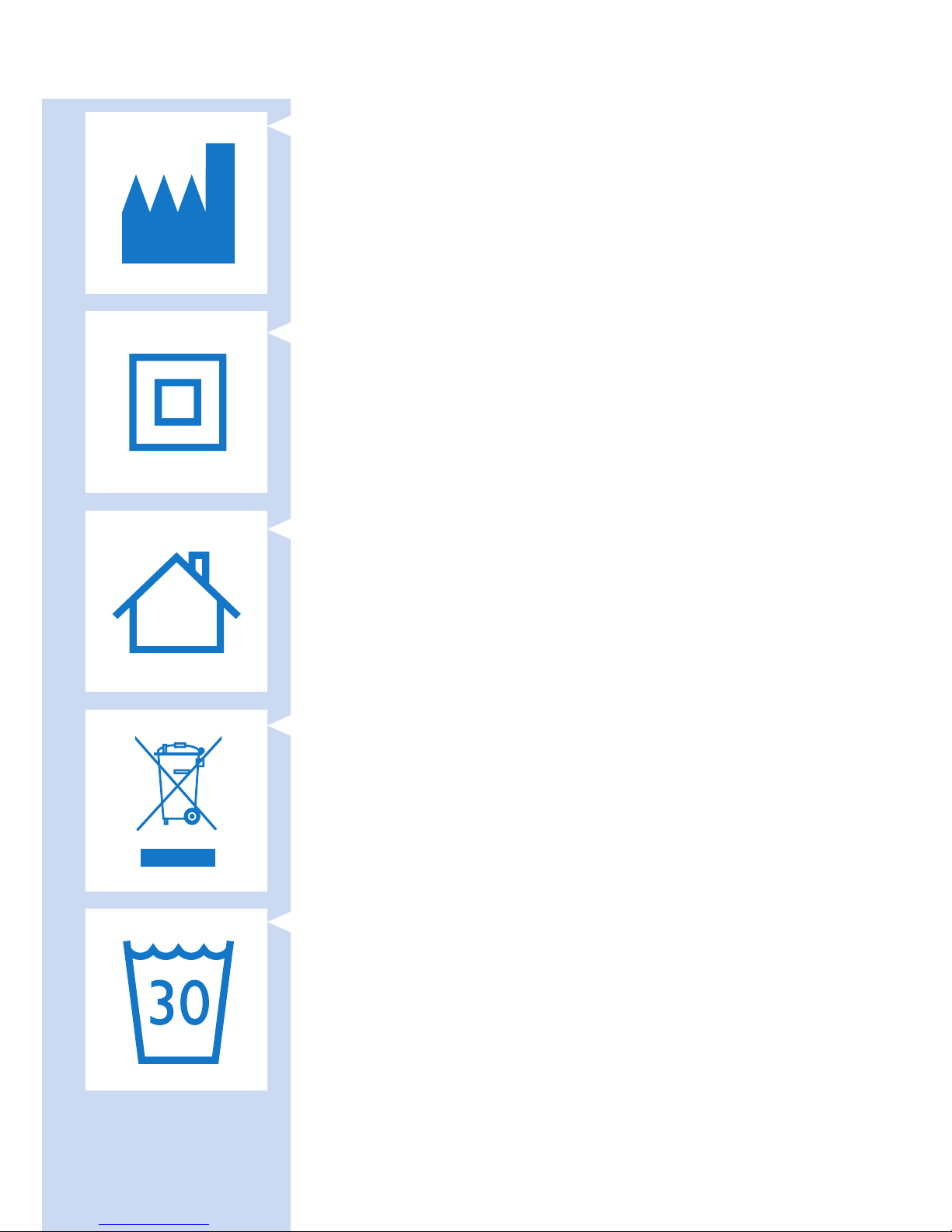
- This symbol means ‘Manufactured by’ and provides the address of
the legal manufacturer.
Adapter
- This symbol indicates that the adapter is double insulated (Class II).
ENGLISH 11
Page 12
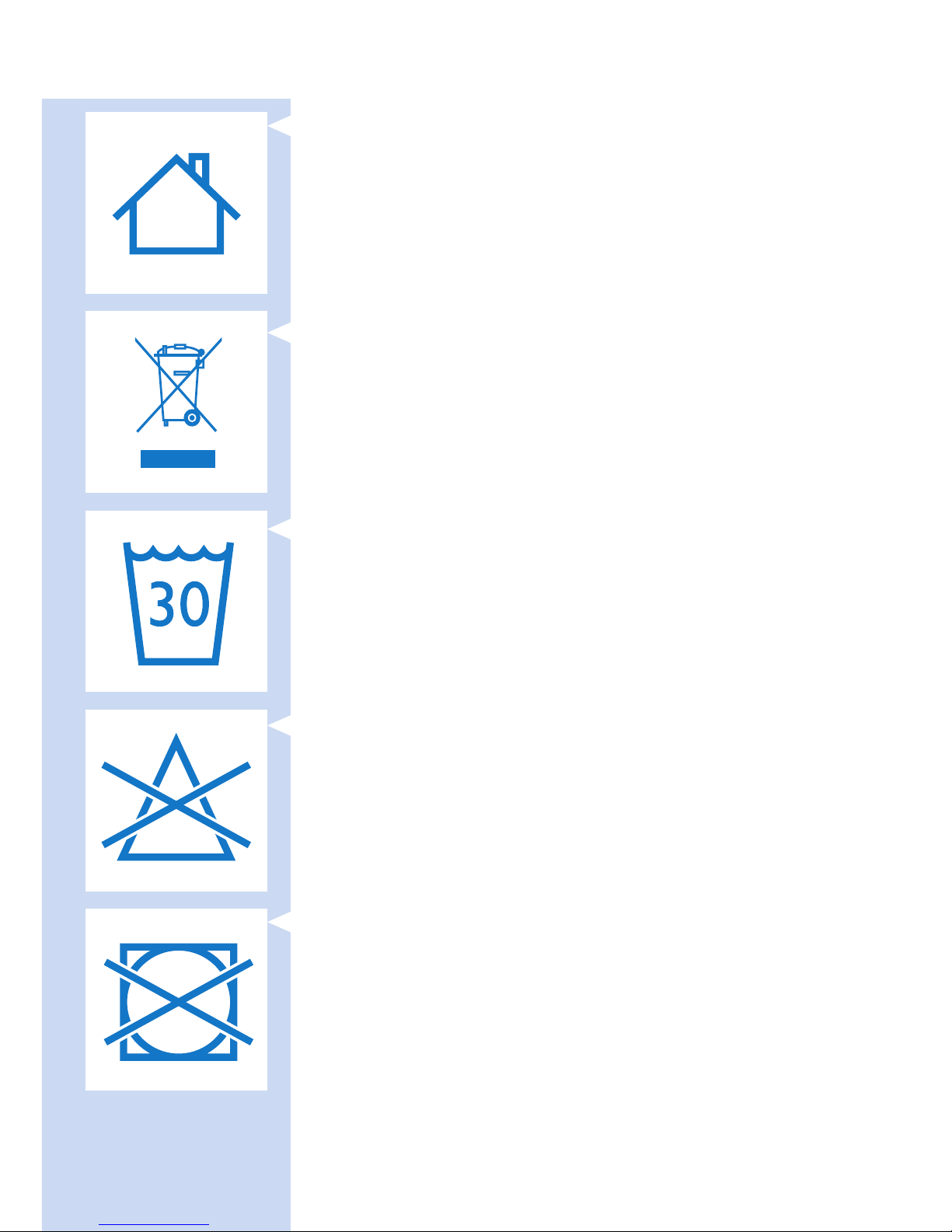
- This symbol indicates that the adapter may only be used indoors.
- This symbol means: Do not throw away with the normal household
waste. For further instructions, see chapter ‘Environment’.
Straps
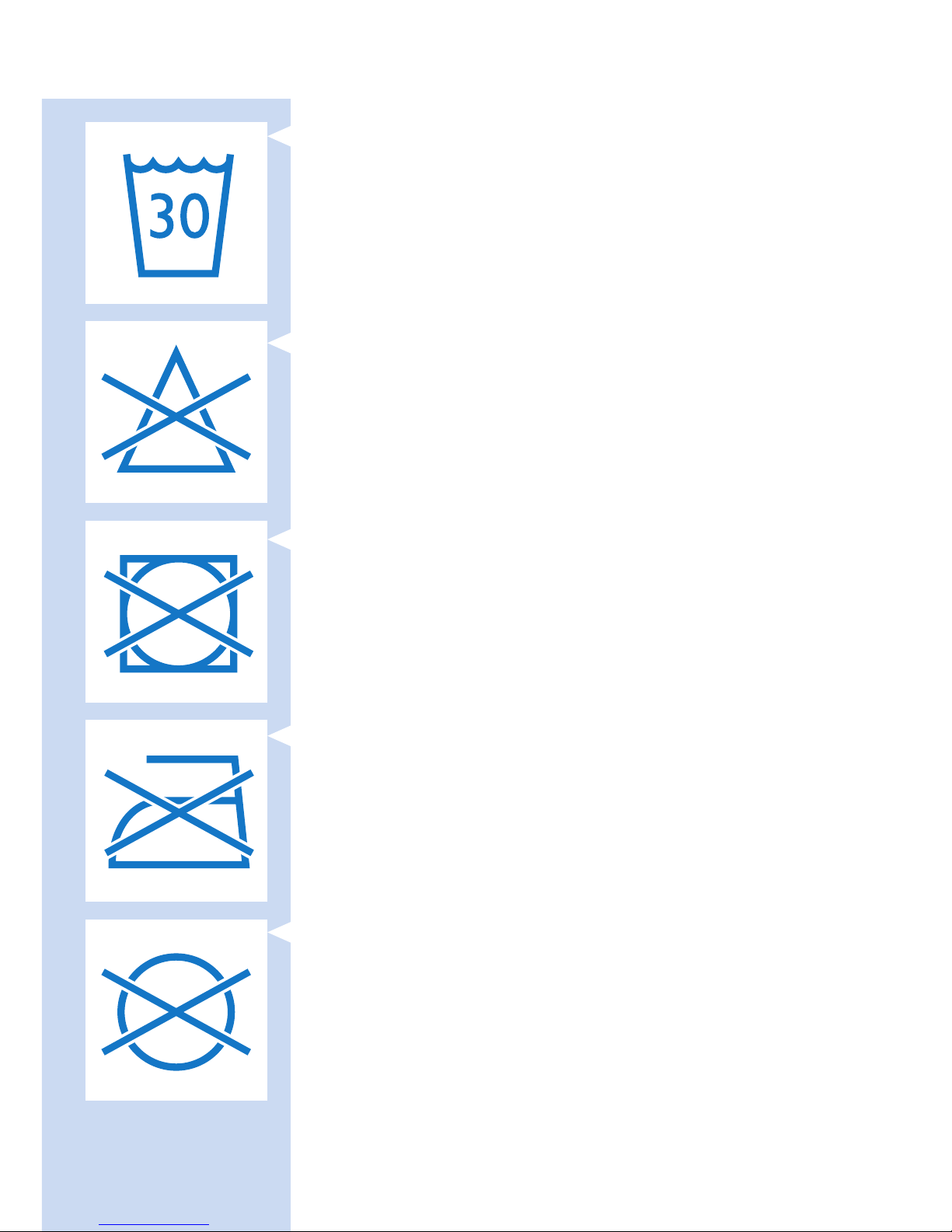
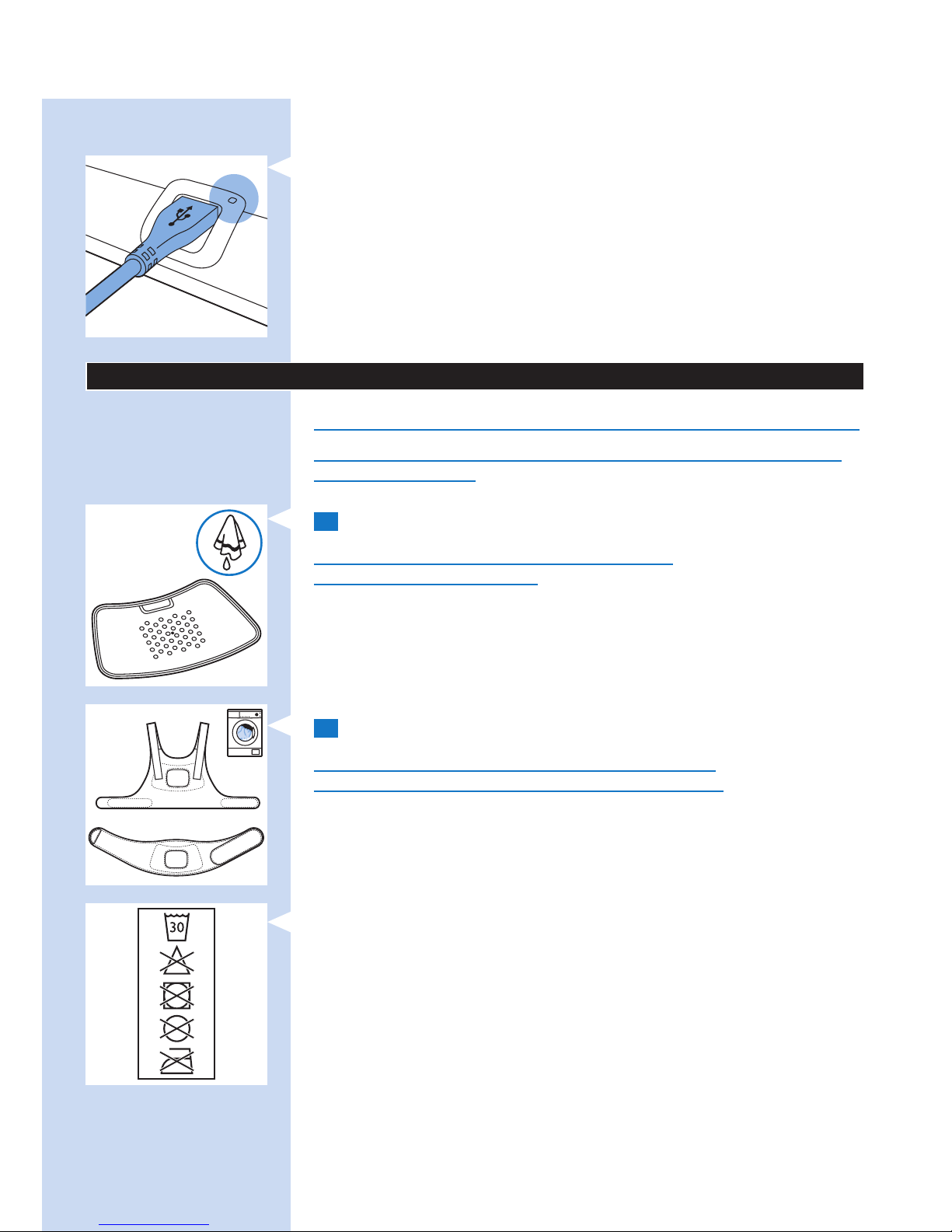
- This symbol means: Wash at a temperature of 30°C max.
- This symbol means: Do not bleach.
- This symbol means: Do not tumble-dry.
ENGLISH12
Page 13
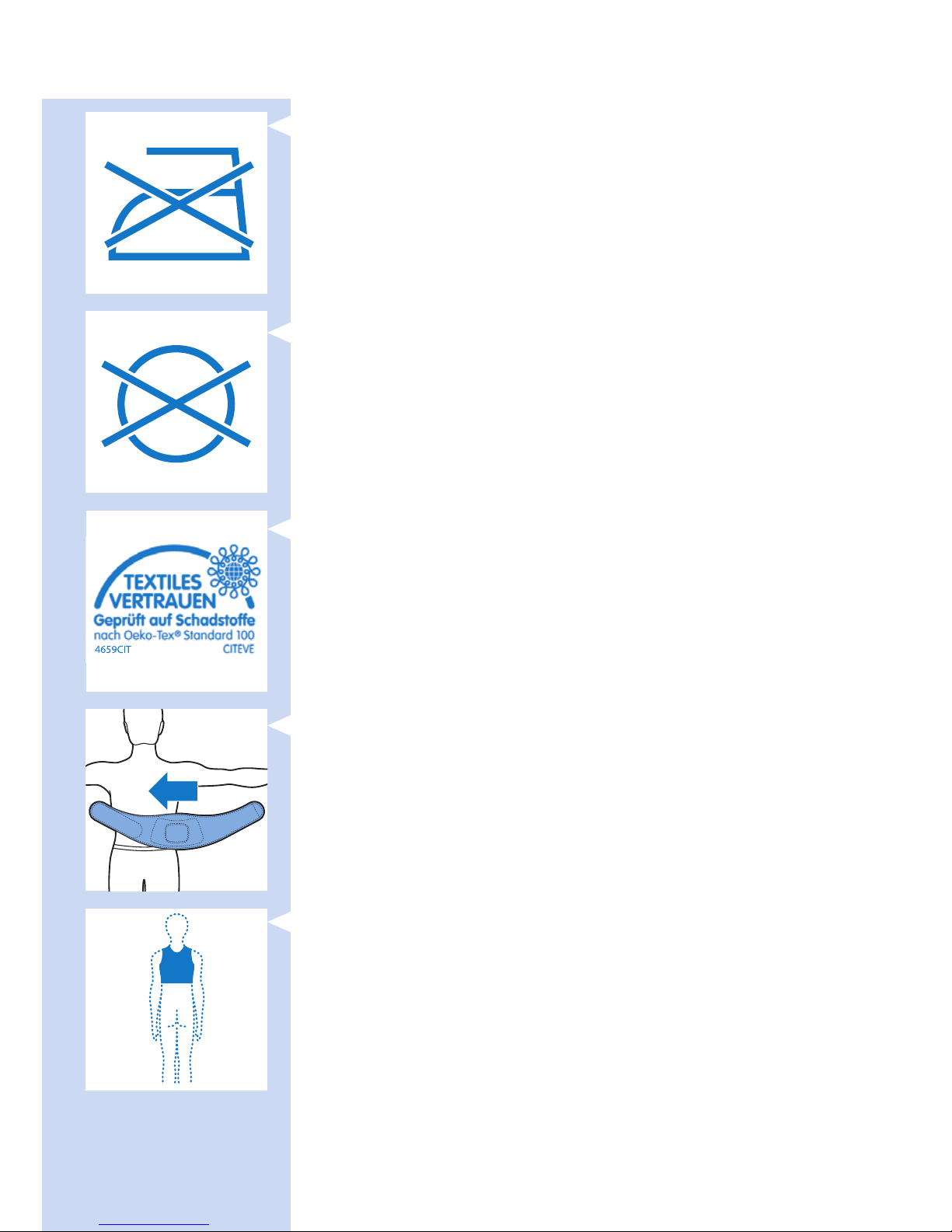
- This symbol means: Do not iron.
- This symbol means: Do not dry clean.
- This symbol means that the material has been tested for harmful
substances according to Oeko-Tex
®
standard 100.
- This symbol means that this strap is to be used on the lower back.
- This symbol means that this strap is to be used on the upper back.
ENGLISH 13
Page 14
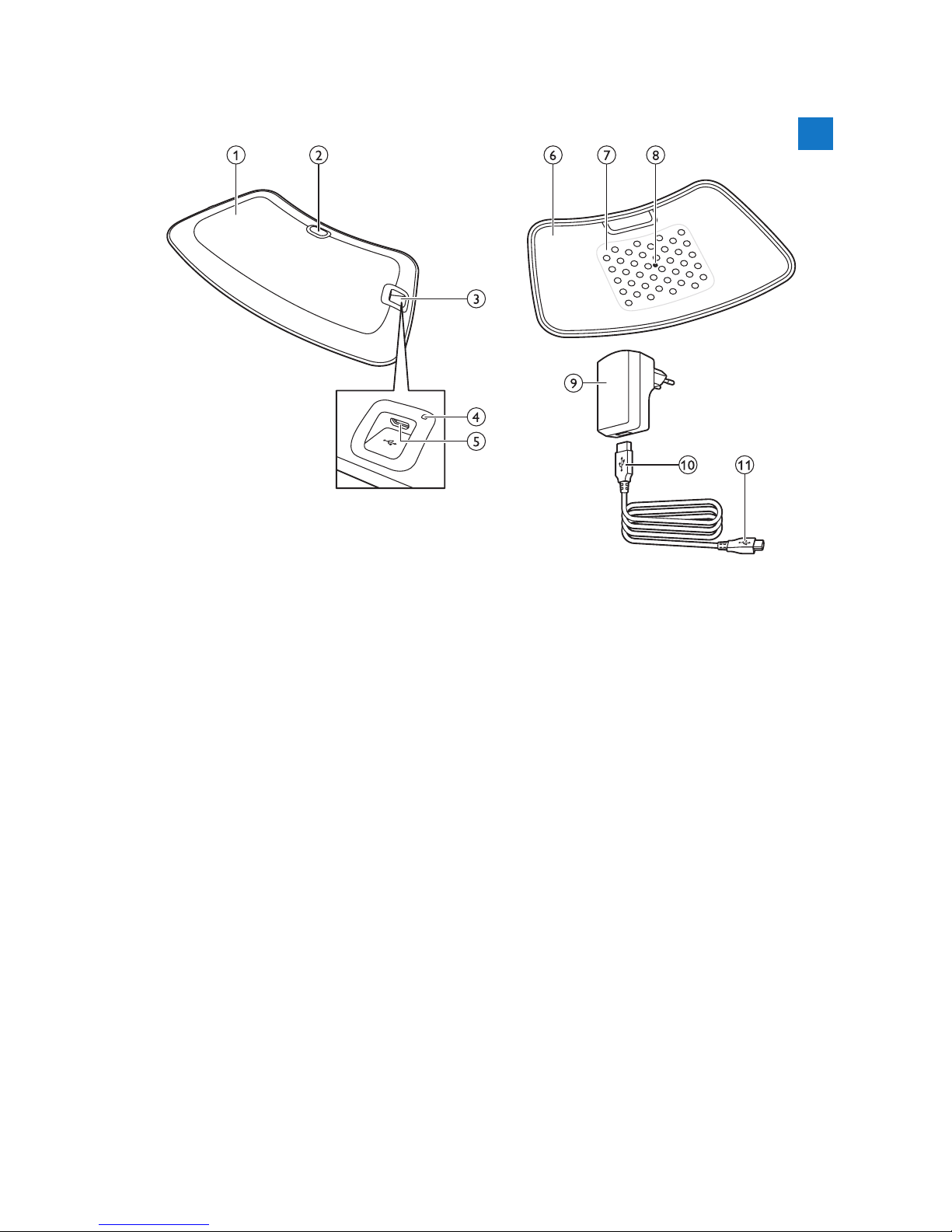
General description (Fig. 23)
1 BlueTouch Pain Relief Patch (outside)
2 Mode button
3 Connection panel
4 Charging light
5 Micro USB socket
6 BlueTouch Pain Relief Patch (skin side)
7 Treatment area
8 Infrared sensor
9 Adapter
10 Standard USB plug
11 Micro USB plug
Charging
Fully charge the BlueTouch Pain Relief Patch for the rst time and when
its power is low. When fully charged, the BlueTouch Pain Relief Patch has
enough power for 4 or more treatments. You can charge the BlueTouch
Pain Relief Patch with the adapter and USB cable supplied.
Note: Treatment is not possible when the BlueTouch Pain Relief Patch is charging.
Charging with the adapter
When you charge the BlueTouch Pain Relief Patch with the adapter,
it takes about 3 hours to fully charge the BlueTouch Pain Relief Patch.
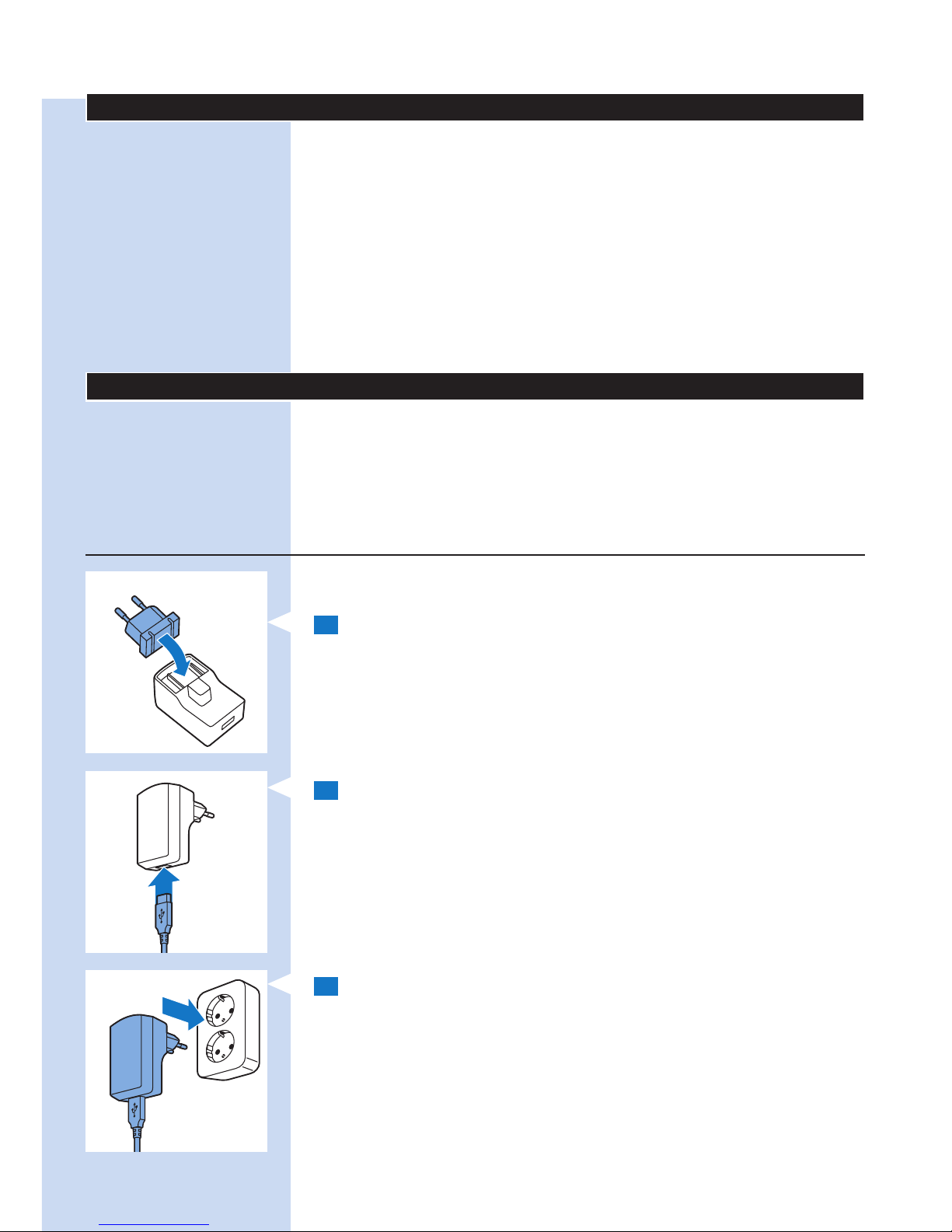
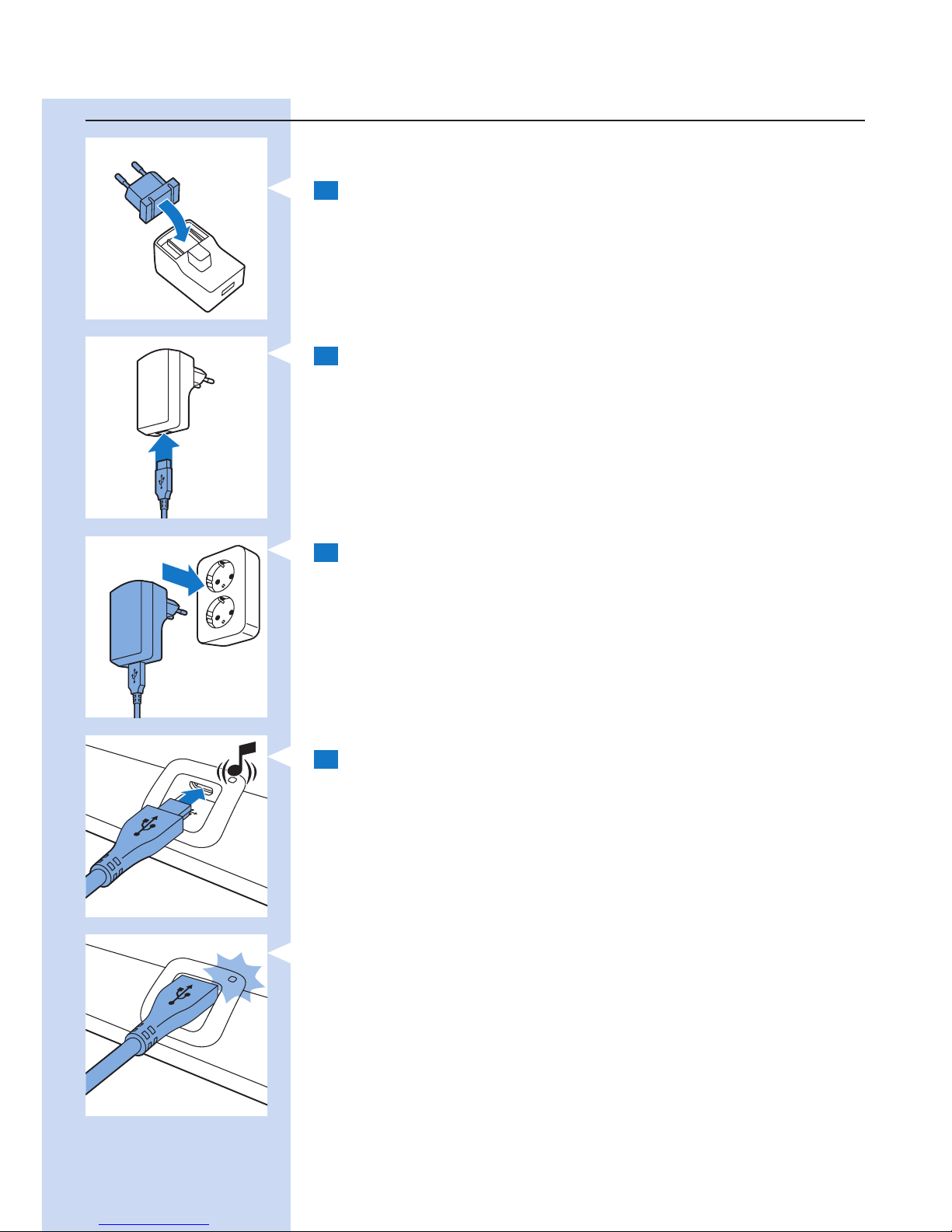
1 The adapter comes with a removable mains plug. Before you use the
adapter, rst assemble the mains plug into the adapter and lock it
into place with the locking slide.
2 Insert the standard USB plug into the socket on the adapter.
3 Insert the adapter into a wall socket (100V-240V).
ENGLISH14
Page 15
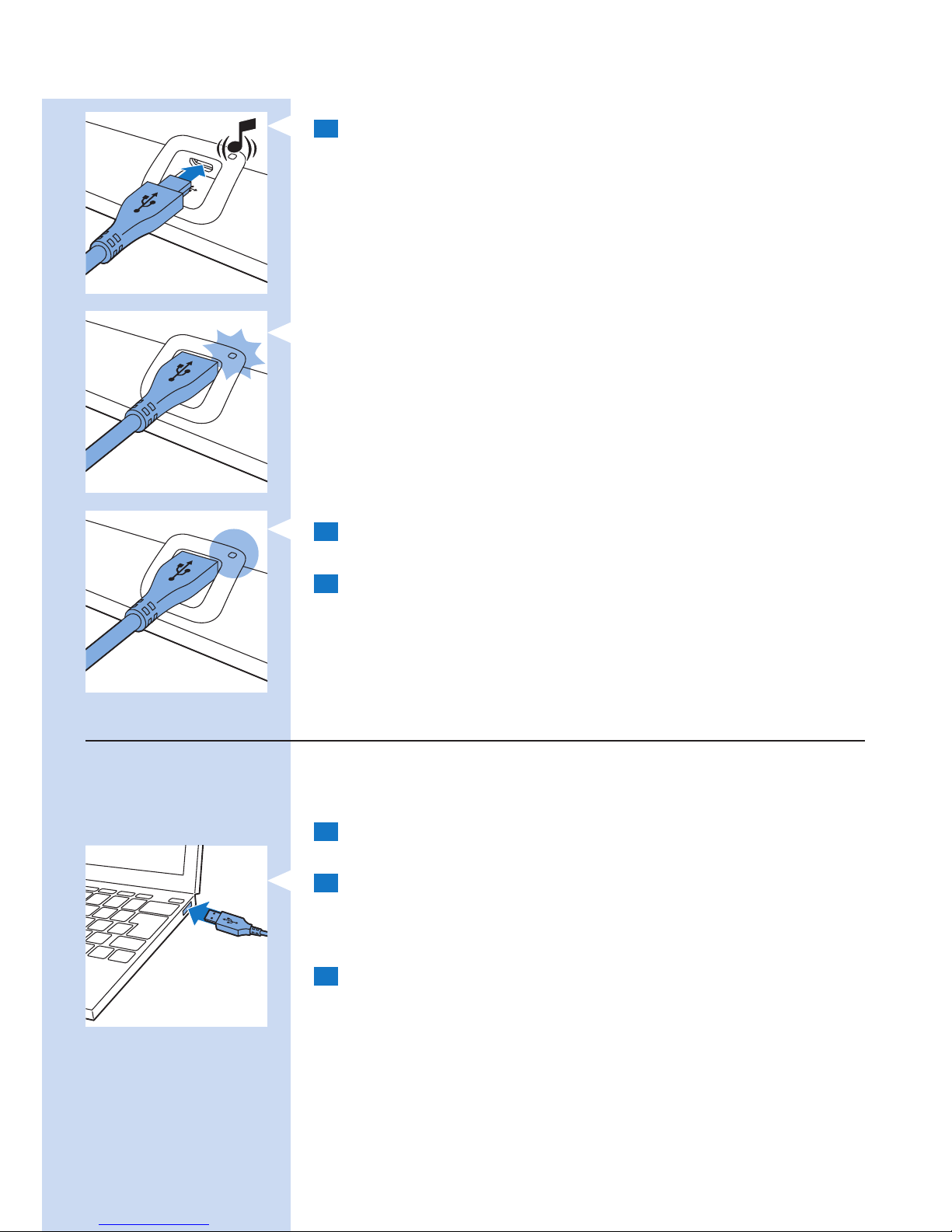
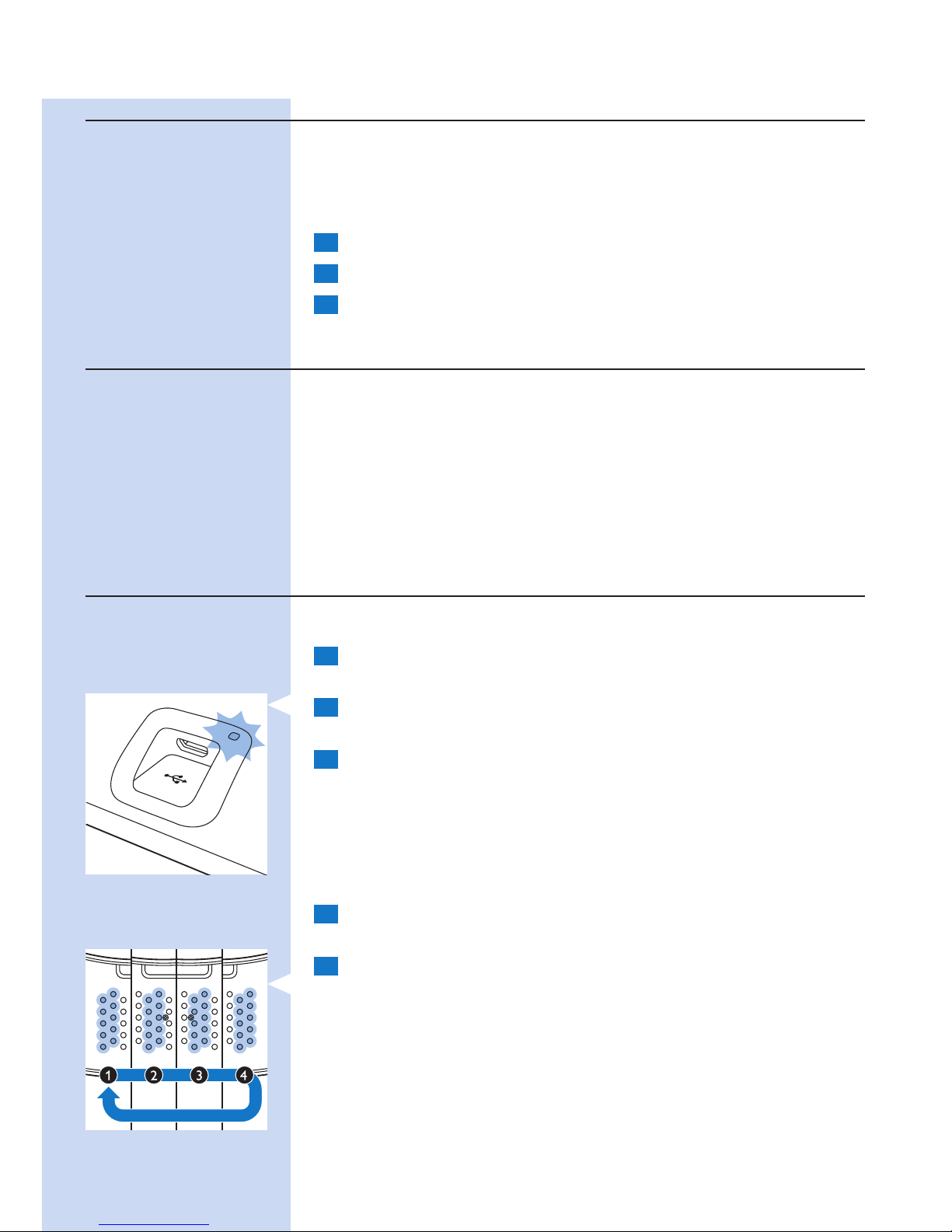
4 Insert the micro USB plug into the socket on the BlueTouch Pain
Relief Patch.
, When the BlueTouch Pain Relief Patch is connected to the mains,
it beeps once to indicate that charging has started.
, The charging light on the connection panel ashes green slowly and
regularly while the BlueTouch Pain Relief Patch is charging.
5 When the BlueTouch Pain Relief Patch is fully charged, the charging
light turns solid green.
6 Remove the adapter from the wall socket and pull the USB plug out
of the micro USB socket on the BlueTouch Pain Relief Patch.
Charging using the micro USB socket
You can also charge the BlueTouch Pain Relief Patch by plugging the
USB plug into a USB port on your computer. Charging with the USB cable
connected to the computer can take up to 8 hours.
1 Insert the micro USB plug into the USB socket on the BlueTouch
Pain Relief Patch.
2 Insert the standard USB plug into a USB port on your computer.
, When the micro USB cable is connected properly, the BlueTouch
Pain Relief Patch beeps once and the charging light starts ashing
green slowly.
3 Remove the micro USB cable from the micro USB socket on the
BlueTouch Pain Relief Patch when the charging light turns solid green
to show that charging is completed.
ENGLISH 15
Page 16
Using your BlueTouch Pain Relief Patch
Treatment schedule
Always stick to the treatment schedule in section ‘Treatment modes,
duration and intensity’ in this chapter. Do not treat more than twice a day.
The BlueTouch Pain Relief Patch has been designed for daily use. You can
use it when you feel pain. It is important, however, that you stick to the
treatment schedule in section ‘Treatment modes, duration and intensity’
in this chapter and do not treat more often than twice a day. If you follow
this treatment schedule, you do not exceed the maximum daily light dose
of 90 J/cm².
Treatment options
The following treatment options are possible:
- two treatments of the lower back per day
- two treatments of the upper back per day
- one treatment of the lower back and one treatment of the upper
back per day
Note: You can use the BlueTouch Relief patch twice in a row for two treatments
of 15 minutes, 20 minutes or 30 minutes with a short break. To start the
second treatment, press the mode button to switch on the device again.
Treatment modes
Treatment modes, duration and intensity
Modes No. of treatments per day and
treatment duration
Intensity
1: low 2 x 30 min. 50%
2: medium 2 x 20 min. 75%
3: high 2 x 15 min. 100%
Selecting the treatment modes
The BlueTouch Pain Relief Patch has three modes and an OFF setting.
You have to press the mode button one or more times to select one of
the three treatment modes. When you press the mode button a fourth
time, you switch off the BlueTouch Pain Relief Patch.
1 Mode 1 (low): press once
2 Mode 2 (medium): press twice
3 Mode 3 (high): press three times
ENGLISH16
Page 17
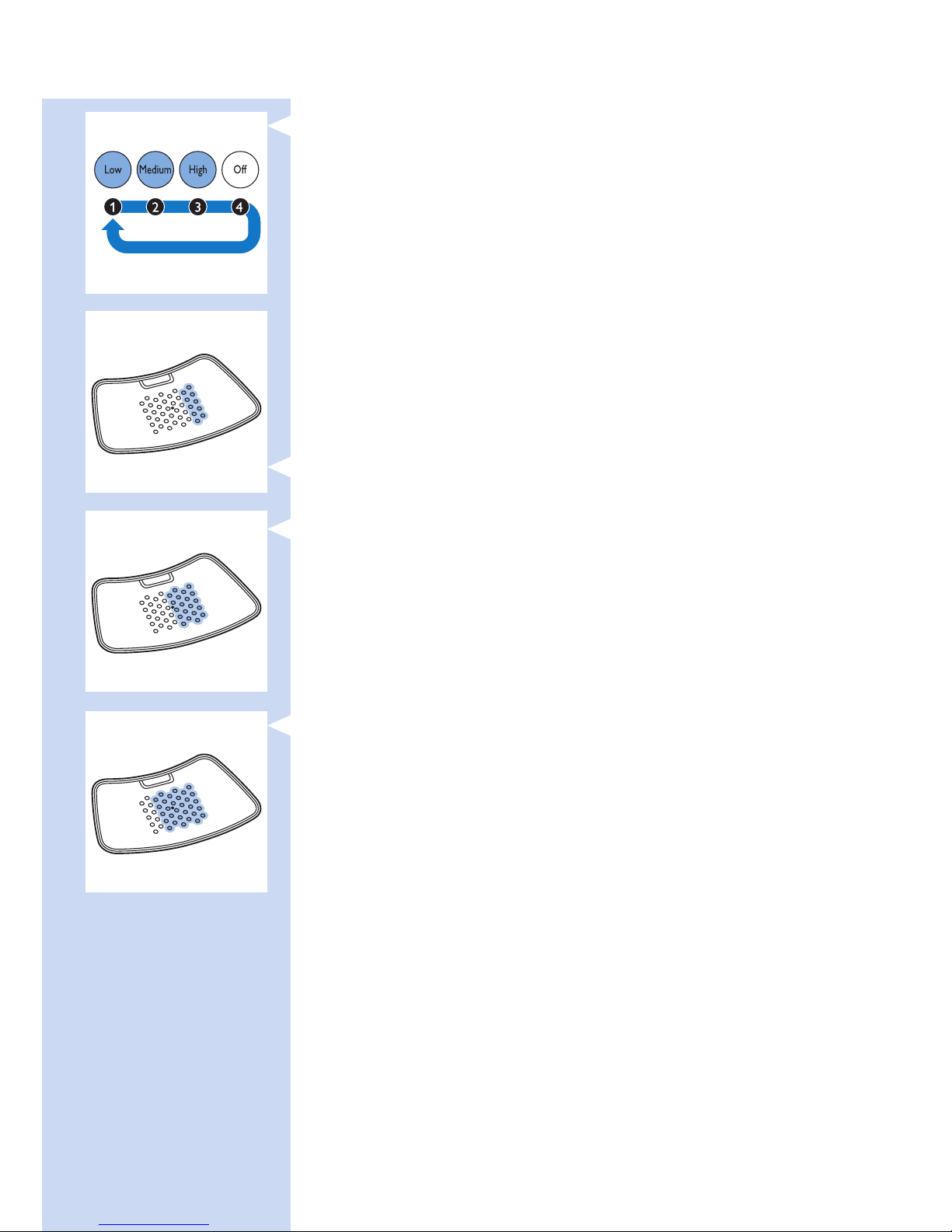
4 O (OFF): press four times
Note: If you want to switch from mode 3 to mode 1 or 2 or from mode
2 to mode 1, you have to press the mode button as many times as required
to reach the mode you want to select.
Note: If you select another mode by switching through the OFF setting within
2 seconds, the treatment timer is not reset to the treatment of the newly
selected mode but continues to count down at the point where you switched
to the other mode. This means that the remaining treatment time is
recalculated for the intensity and the treatment time of the newly selected
mode. For example, if you switch from mode 3 to mode 1 and the remaining
treatment time in mode 3 was 5 minutes, the remaining treatment time in
mode 1 is 10 minutes. In mode 1 the intensity is 50% of that in mode 3,
which means that the treatment in mode 1 lasts twice as long as in mode 3.
Treatment intensity
When you select a treatment mode, you get audible and visible feedback.
, In mode 1 (low), two rows of LEDs light up. The BlueTouch Pain
Relief Patch beeps once.
, In mode 2 (medium), four rows of LEDs light up. The BlueTouch Pain
Relief Patch beeps twice.
, In mode 3 (high), six rows of LEDs light up. The BlueTouch Pain Relief
Patch beeps three times.
, After you select a mode, the BlueTouch Pain Relief Patch switches
on in power-save mode. In this mode all LEDs are on at their lowest
intensity.
, When you place the BlueTouch Pain Relief Patch on the skin,
treatment starts at the intensity of the mode selected
(100% for mode 3, 75% for mode 2 and 50% for mode 1) and you
get audible feedback.
ENGLISH 17
Page 18
Preparing the BlueTouch Pain Relief Patch for use
The preferred method for fastening the Pain Relief Patch to the body is by
means of one of the BlueTouch Pain Relief straps. There is a special strap
for treatment of the upper back and a special strap for treatment of the
lower back.
- Lower back straps are available separately under type number PR3083,
depending on your size.
- Upper back straps are available separately under type number PR3081,
depending on your size.
Note: Do not wear multiple layers of clothing or tight or thick clothing over
the BlueTouch Pain Relief Patch to prevent the device from switching off
before the treatment has been completed. If you wear too tight or thick
clothing, the infrared sensor will measure a too high temperature and switch
off the device.
Positioning the lower back strap
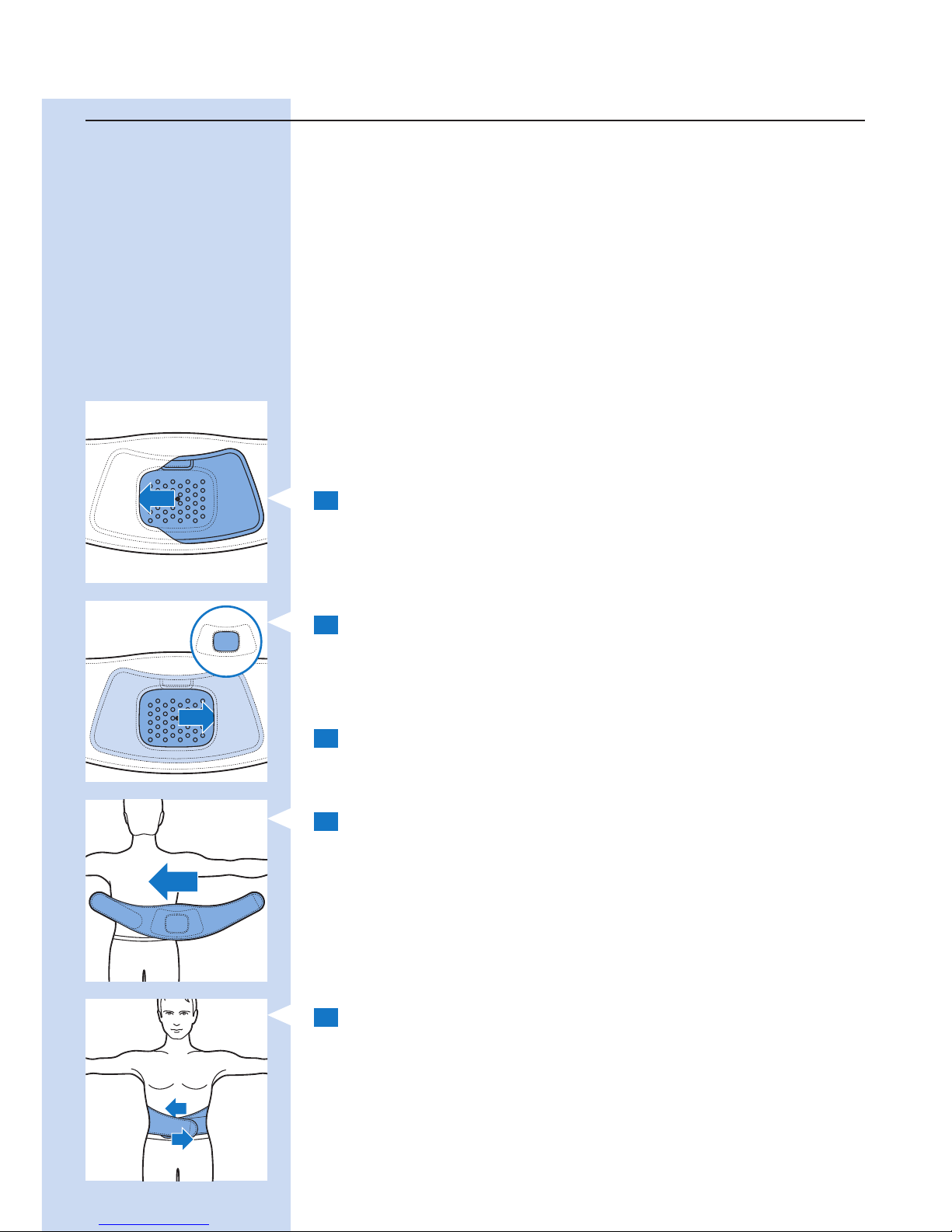
To place the BlueTouch Pain Relief Patch in the strap,
follow the steps below.
1 Put the lower back strap and the BlueTouch Pain Relief Patch in front
of you on a table. Slide the left side of the BlueTouch Pain Relief
Patch behind the elastic edge of the opening in the strap.
2 Then slide the other end of the BlueTouch Pain Relief Patch behind
the opposite elastic edge of the opening so that the whole patch
is inside the lower back strap. Check to make sure that the LEDs
are not covered by the material of the strap. If necessary, shift the
BlueTouch Pain Relief Patch a little.
3 Remove clothing from the area to be treated.
Note: Make sure the skin in the area to be treated is clean, entirely dry and
free from creams, lotions and other cosmetics.
4 Wrap the lower back strap with the BlueTouch Pain Relief Patch in it
around your waist with the opening of the strap facing your back.
5 Fasten the lower back strap with the Velcro strips on both ends of
the lower back strap.
Note: Make sure the BlueTouch Pain Relief Patch in the strap is located on the
area to be treated and the LED area is in contact with the skin.
ENGLISH18
Page 19
Positioning the upper back strap
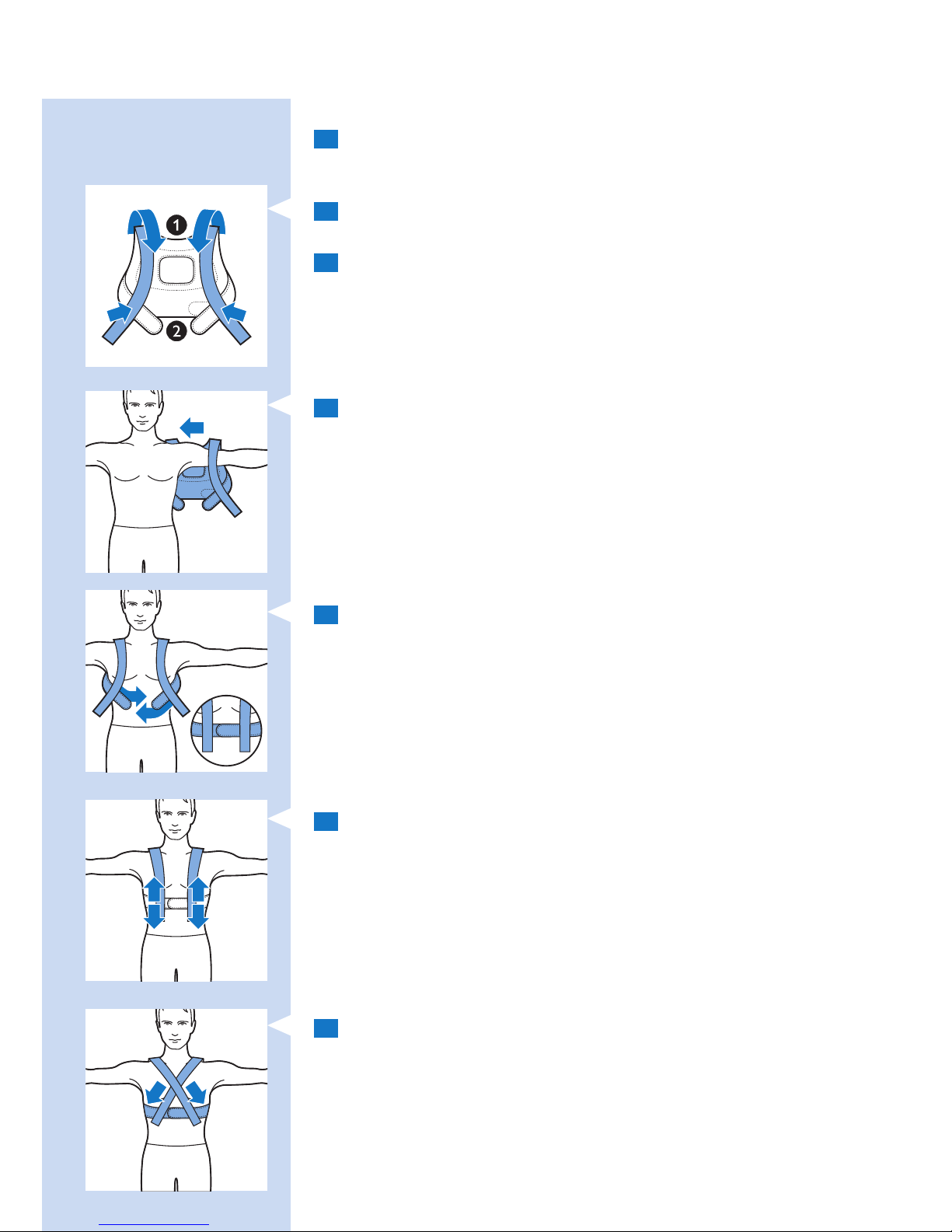
1 To put the BlueTouch Pain Relief Patch in the upper back strap,
follow the same procedure as described in steps 1 and 2 in section
‘Positioning the lower back strap’ above.
2 Pull the shoulder slings forward (1) and fasten them to the Velcro
strips on the waistband (2).
3 Remove clothing from the area to be treated.
Note: Make sure the skin in the area to be treated is clean, entirely dry and
free from creams, lotions and other cosmetics.
4 Put the upper back strap on like a jacket. First put one arm through
the shoulder sling attached to the waistband on one side and then
do the same on the other side.
Note: Make sure the BlueTouch Pain Relief Patch in the strap is located on the
area to be treated and the LED area is in contact with the skin.
5 Fasten the waistband with the Velcro strips.
6 Adjust the shoulder slings to the preferred length.
7 Alternatively, you can rst put the upper back strap on your back,
fasten the waistband and then attach the Velcro strips of the shoulder
slings crosswise to the waistband. This may provide a better t for
some individuals.
ENGLISH 19
Page 20
Treatment procedure
1 Press the mode button one or more times to select one of the three
treatment modes.
2 After you have selected the treatment mode (see section ‘Selecting
the treatment modes’ in this chapter), the BlueTouch Pain Relief
Patch beeps and all LEDs come on in power-save mode.
3 Treatment starts after the BlueTouch Pain Relief Patch has been
placed on the skin and the sensor of the patch senses a temperature
of at least 33°C for at least 5 seconds.
, All LEDs light up at the intensity of the selected mode (see section
‘Treatment modes, duration and intensity’ in this chapter).
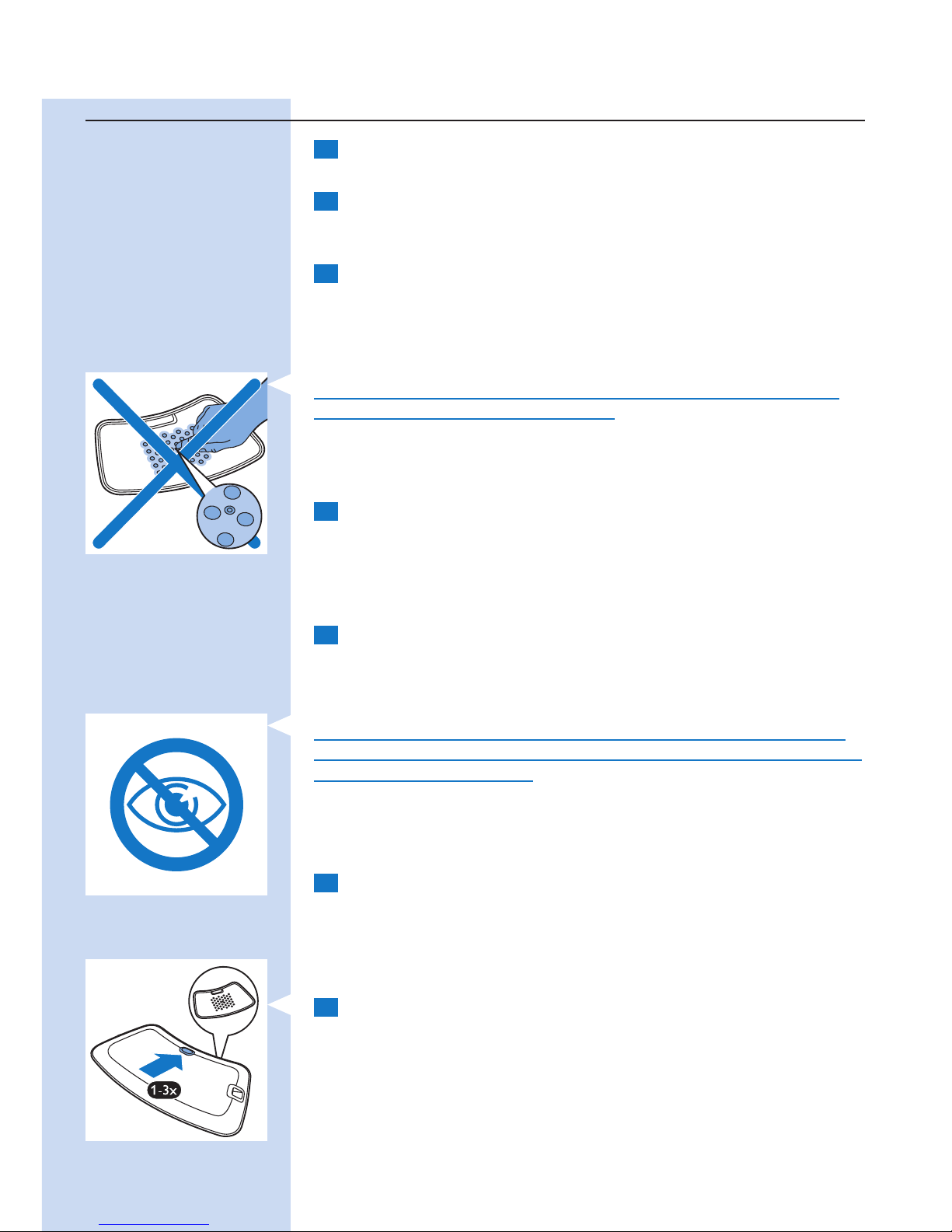
Do not intentionally touch the sensor in the centre of the BlueTouch
Pain Relief Patch when it is switched on.
Note: You can also place the patch on your back and then press the mode
button to select the treatment mode. In that case, the Blue Touch Pain Relief
Patch switches on in the selected mode within ve seconds.
4 The BlueTouch Pain Relief Patch automatically switches off after
the treatment time in the selected mode has elapsed. For the
treatment times, see section ‘Treatment modes, duration and
intensity’ in this chapter.
Interrupting treatment
1 If you want to interrupt the treatment briey, simply remove the
Pain Relief Patch from the skin.
, The LEDs of the BlueTouch Pain Relief Patch automatically switch
back to power-save mode.
Caution: Do not look directly into the light emitted by the LEDs, even
when the BlueTouch Pain Relief Patch operates in power-save mode and
the treatment time is paused.
Note: After 10 minutes in power-save mode, the BlueTouch Pain Relief Patch
switches off.
2 To resume the treatment after a brief interruption, place the
BlueTouch Pain Relief Patch back onto the skin.
, The LEDs automatically come on at the intensity selected and the
treatment time continues to count down.
Switching off
1 If you want to switch off the Pain Relief Patch before the treatment
time has elapsed, press the mode button one or more times until the
LEDs switch off.
, A sequence of two different tones indicates that the BlueTouch Pain
Relief Patch switches off.
Note: The number of times you have to press the mode button until the
BlueTouch Pain Relief Patch switches off depends on the mode you selected.
ENGLISH20
Page 21
After treatment
Treatment ends automatically after the treatment time in the selected
mode has elapsed, unless you remove the BlueTouch Pain Relief Patch and
press the mode button to stop treatment earlier.
Note: A sequence of two different tones indicates that the BlueTouch Pain
Relief Patch switches off and treatment has ended.
1 Loosen the strap and remove it from your back.
2 Remove the BlueTouch Pain Relief Patch from the strap.
3 Recharge the BlueTouch Pain Relief Patch if necessary
(see section ‘Battery level signals’).
Possible reactions and side-effects
- It is normal for the skin to become a little red during treatment.
This skin redness is caused by increased blood circulation due to
the warmth of the BlueTouch Pain Relief Patch. This skin redness is
harmless and fades after the treatment has ended.
- In some cases tanning may be visible after treatment. This tanning is
caused by melanin concentrations in the skin and is a similar effect
to that caused by exposure to sunlight. It is harmless and fades away
within 48 to 72 hours. Postpone treatment until the tanning has
disappeared. To prevent tanning, resume treatment in a lower mode
and avoid excessive pressure on the BlueTouch Pain Relief Patch during
treatment, for example by sitting or lying on it or by leaning heavily
against it.
Light and sound signals during use
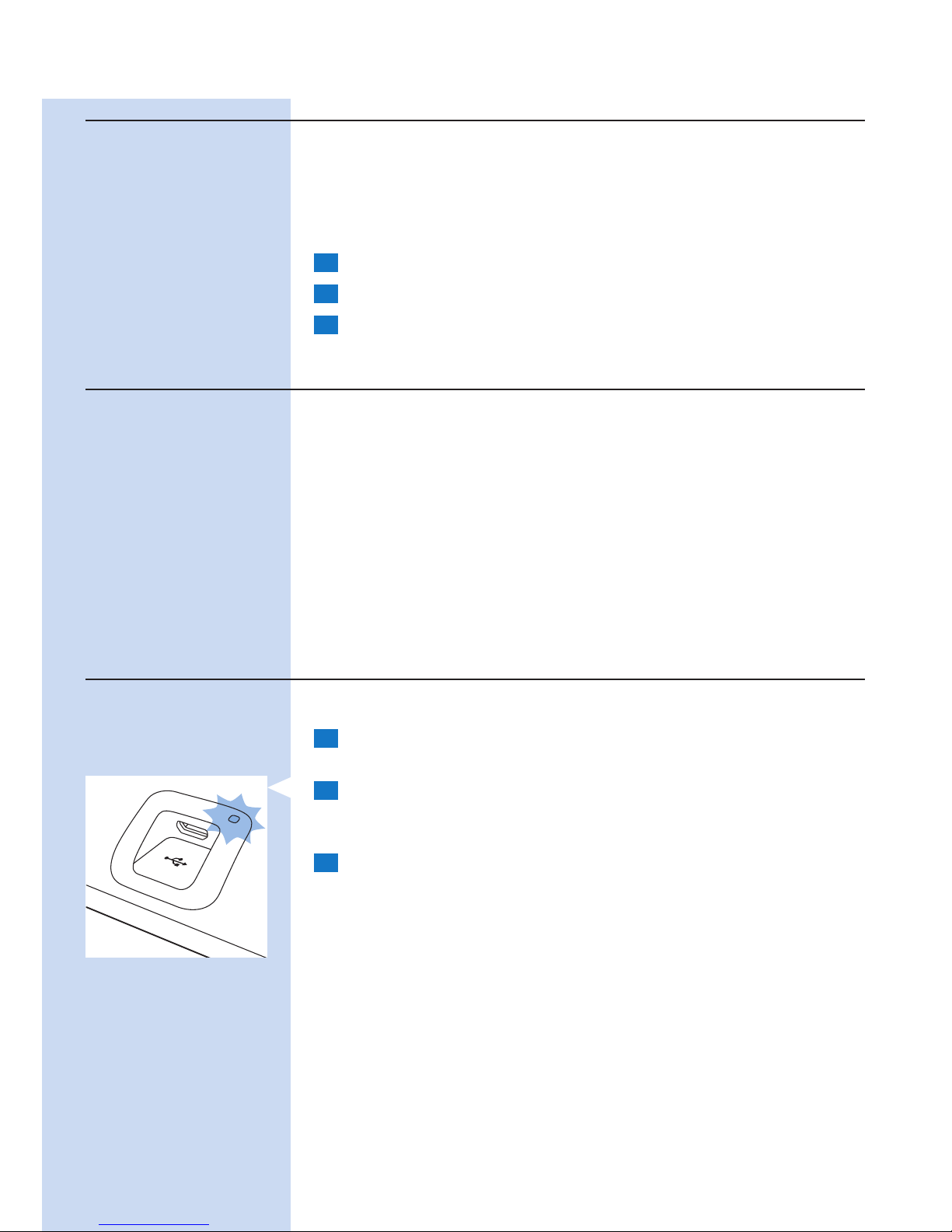
Overheating signal
1 If the sensor measures a too high temperature, the BlueTouch Pain
Relief Patch switches off for safety reasons.
2 If you try to restart the BlueTouch Pain Relief Patch within the
standard cooling-down time of 10 minutes after switching off,
the charging light ashes red three times.
3 After the standard cooling-down time of 10 minutes, the BlueTouch
Pain Relief Patch can be switched on again and the timer starts
counting down where it stopped.
Note: If treatment is not resumed within 2 hours, the timer is automatically reset.
ENGLISH 21
Page 22
Resetting signal
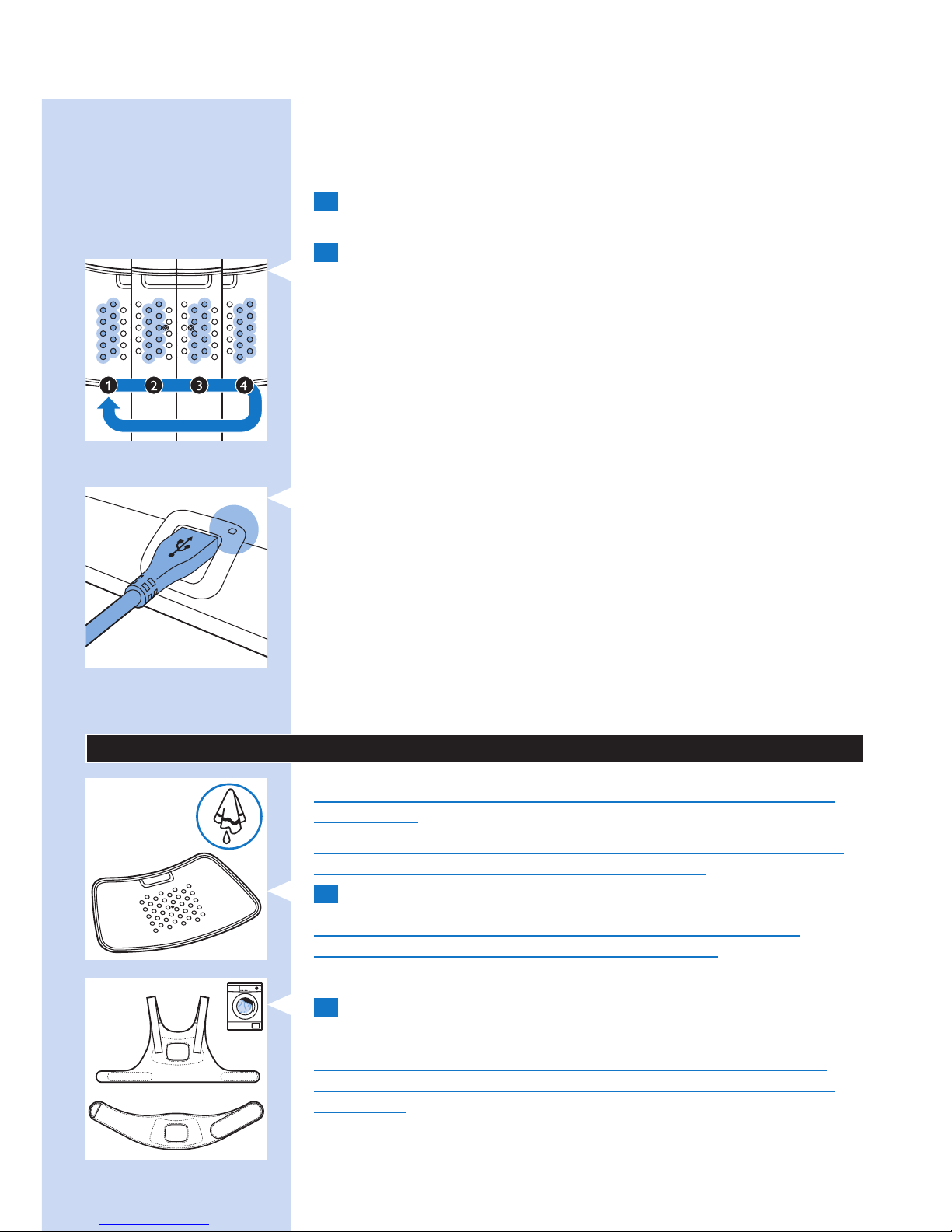
When the software of the BlueTouch Pain Relief Patch no longer responds
or another unexpected failure occurs, you can reset the BlueTouch Pain
Relief Patch.
1 Connect the BlueTouch Pain Relief Patch to the mains with the
adapter or connect it to a USB port of a computer.
2 Press the mode button for 5 seconds.
, First the rst two rows of LEDs light up briey. When they go out,
the third and fourth row light up briey. When the third and fourth
row go out, the fth and sixth row light up briey. When the fth and
sixth row go out, the seventh and eighth row light up briey.
, After this the BlueTouch Pain Relief Patch is reset and works
normally again.
Battery level signals
When you press the mode button, the charging light shows the battery
status. The charging light goes out when the sensor senses skin contact or
when the device is switched off.
1 When the batteries contain enough energy for two or more
treatments, the charging light is solid green.
, You can select a mode and start treatment.
2 When the batteries contain just enough energy for one treatment,
the charging light is solid orange.
, You can select a mode and complete just one treatment.
3 When the batteries are empty, the charging light turns solid red for
5 seconds and the BlueTouch Pain Relief Patch produces 3 beeps
when you press the mode button.
, You cannot select any mode. You have to charge the batteries before
you can start a treatment.
Cleaning
Do not immerse the BlueTouch Pain Relief Patch in water or rinse it
under the tap.
Always remove the BlueTouch Pain Relief Patch from the strap before
you put the strap in the washing machine to clean it.
1 Clean the BlueTouch Pain Relief Patch with a damp cloth.
Caution: Clean the infrared sensor with a damp cloth after each
treatment to ensure it continues to function properly.
2 The BlueTouch Pain Relief straps can be washed in the washing
machine.
Caution: To prevent damage to the BlueTouch Pain Relief straps and
other clothes in the washing machine, wash the straps in a ne-mesh
washing bag.
ENGLISH22
Page 23
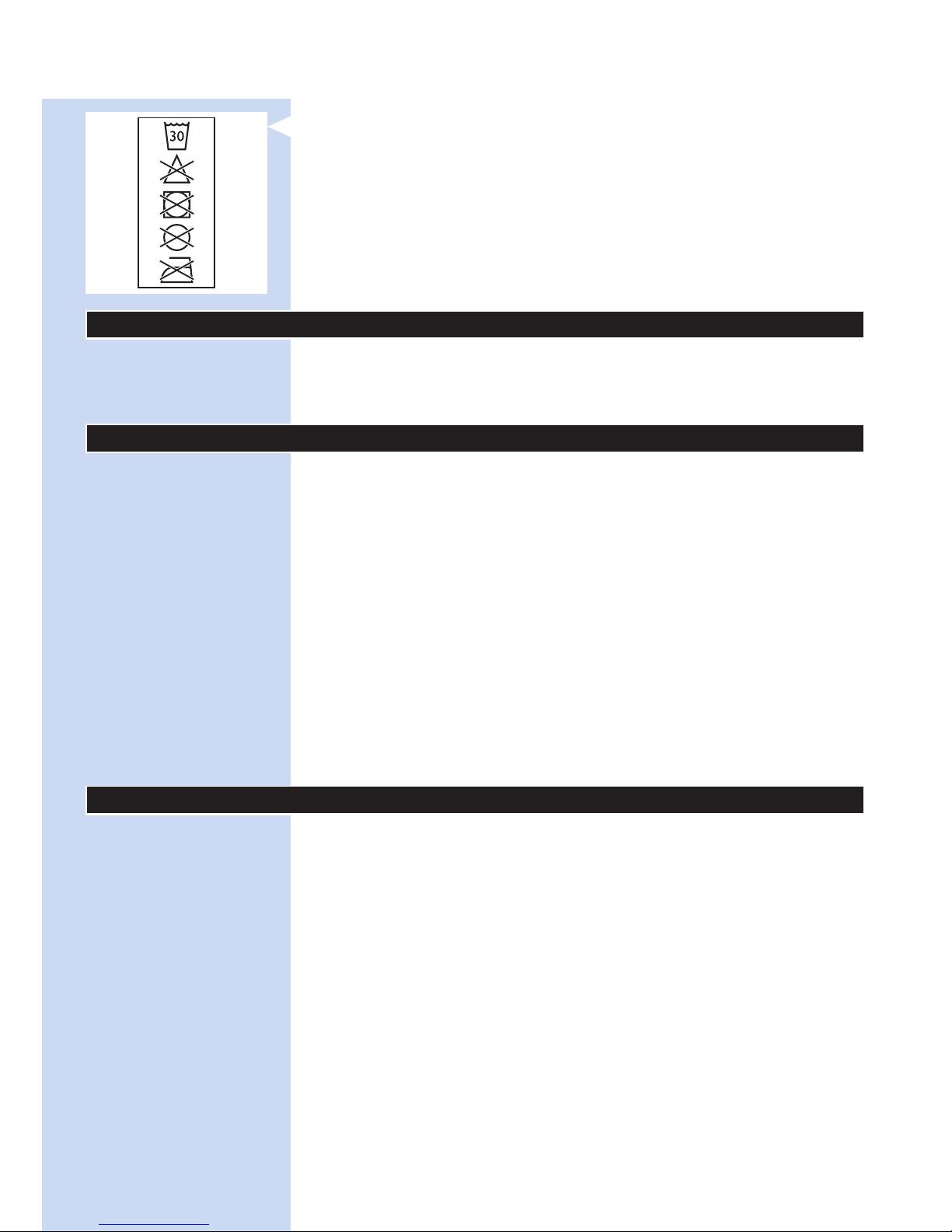
Note: Use a gentle cycle and a temperature of 30°C maximum.
Dry the BlueTouch Pain Relief straps on the air and not in the tumble dryer.
Do not iron the straps.
Environment
Do not throw away the appliance with the normal household waste at
the end of its life, but hand it in at an ofcial collection point for recycling.
By doing this, you help to preserve the environment.
Guarantee and support
If you need information or support, please visit
www.philips.com/support, read the separate worldwide guarantee
leaet or contact the Philips Consumer Care Centre. Its telephone number is:
- United Kingdom: 0844 338 0489 (5p/min. from a BT landline, other
landline and mobile providers may charge more).
- Hong Kong: 852 2619 9663 (free of charge for landline calls).
Guarantee restrictions
The guarantee does not cover standard wear and tear. The guarantee
becomes invalid if the BlueTouch Pain Relief Patch is not used according to
the instructions in this user manual.
Manufacturer’s legal address
Philips Consumer Lifestyle B.V.
Tussendiepen 4 9206 AD Drachten
The Netherlands
Troubleshooting
This chapter summarises the most common problems you could
encounter with the BlueTouch Pain Relief Patch. If you are unable to solve
the problem with the information below, contact Philips.
ENGLISH 23
Page 24

Problem Possible cause Solution
The BlueTouch Pain
Relief Patch suddenly
switches off during
treatment.
The preset treatment time is
nished.
The BlueTouch Pain Relief Patch has been
programmed to switch off automatically
after the treatment time in the selected
treatment mode has elapsed.
The infrared sensor is blocked. Check the position of the patch in the
strap. Make sure the strap does not cover
the infrared sensor. If the infrared sensor is
not covered but the BlueTouch Pain Relief
Patch still switches off, it is probably broken.
In that case, contact Philips.
The skin temperature is too high. Check if you do not wear too many or too
thick clothes over the BlueTouch Pain Relief
Patch during treatment.
The BlueTouch Pain
Relief Patch switched off
and the charging light
ashes red.
The skin temperature is too
high. If the infrared sensor
senses a too high temperature,
the BlueTouch Pain Relief Patch
switches off.
Let the BlueTouch Pain Relief Patch cool
down for 10 minutes. After 10 minutes, the
LEDs go on in power-save mode. Put the
BlueTouch Pain Relief Patch back on your
skin and continue your treatment.
The charging light turns
solid red for 5 seconds,
the BlueTouch Pain
Relief Patch beeps and
it is not possible to
select a mode.
The rechargeable batteries
are empty.
Charge the BlueTouch Pain Relief Patch
(see chapter ‘Charging’).
The charging light is
solid orange.
The batteries contain just
enough energy for one
treatment.
Complete the treatment and charge
BlueTouch Pain Relief Patch after use
(see chapter ‘Charging’).
The adapter becomes
warm during charging.
This is normal. No action required.
The charging light does
not start ashing green
when the micro USB
plug is inserted into the
micro USB socket on
the connection panel.
The adapter is not inserted or
not inserted properly into the
wall socket.
Insert the adapter into the wall socket
properly.
The standard USB plug is
not inserted or not inserted
properly into the adapter.
Insert the standard USB plug into the
adapter properly.
The wall socket into which the
adapter is not live.
Connect another appliance to the same
socket to check if the socket is live. If the
wall socket is live, but the BlueTouch
Pain Relief Patch does not charge,
contact Philips.
ENGLISH24
Page 25

Problem Possible cause Solution
The charging light does
not start ashing green
when I connect the USB
cable to the computer.
The micro USB plug is not
inserted into the micro
USB socket properly or the
standard USB plug is not
inserted into the USB port of
your computer properly.
Insert the micro USB plug into the micro
USB socket properly and check the
connection to the computer. Make sure
the computer is switched on.
The standard USB plug is
not inserted or not inserted
properly into the USB port of
the computer.
Insert the standard USB plug into the
USB port of the computer properly.
The battery of the laptop into
which you have plugged the
USB cord is running low.
Connect the laptop to the mains.
The BlueTouch Pain
Relief Patch becomes
warm during use.
This is normal. No action required.
Specications
Model PR3092
Rated voltage (V) 100-240
Rated frequency (Hz) 50-60
Rated input (W) 15
Class Medical device Class IIa
Classication Risk Group 1
Ingress of water IP22
Max. daily dose (J/cm²) < 90 if treatment schedule is followed
Battery type Li-Ion
Operation conditions
Temperature from +10°C to +35°C
Relative humidity from 30% to 90%
Storage conditions
Temperature from -20°C to +35°C
Relative humidity from 30% to 90% (no condensation)
ENGLISH 25
Page 26
26
簡介
使用 BlueTouch 酸痛舒緩墊之前,請先仔細閱讀本使用手冊,
並保留手冊以供日後參考。這款醫療裝置不需處方箋即可購得。
若要獲得最佳的治療效果,請務必根據療程時間表與本使用手冊的
說明來使用裝置。如有進一步問題,請洽詢您的藥劑師或醫師。
BlueTouch 商標為 Koninklijke Philips N.V. 所有。
適合用途
BlueTouch 酸痛舒緩墊是穿戴式的醫療裝置,藉由光能與熱傳導,
提供身體光線與熱能,以治療由一般日常活動所引起的背部酸痛。
特殊的 LED 藍光可改善血液循環,有放鬆肌肉及治療肌肉損傷的效
果。BlueTouch 酸痛舒緩墊主要使用於上背部或下背部,並可透過
布質固定帶放置於治療部位並進行調整。本裝置是由不可更換的內
建式充電電池供電。BlueTouch 酸痛舒緩墊僅適合 18 歲以上的人
士使用和操作。使用時,務必隨時遵守本使用手冊所載之安全程序
和操作指示,並將本產品用於其設計用途。
重要事項
重要安全資訊
危險
- 請保持轉換器乾燥。
警示
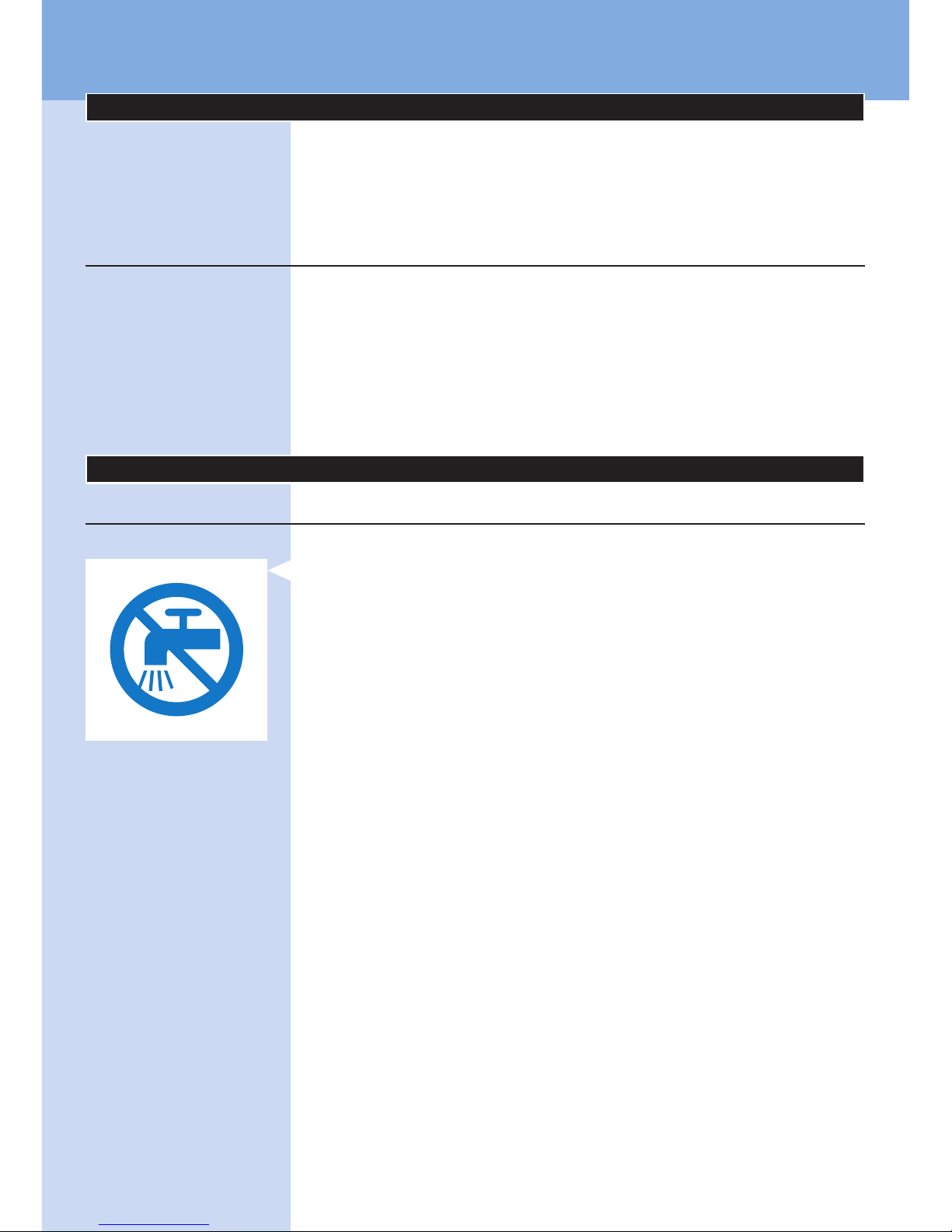
- 請勿將 BlueTouch 酸痛舒緩墊浸泡在水中,或者在水龍頭下沖
洗。
- 請勿在潮濕環境中使用 BlueTouch 酸痛舒緩墊。
- BlueTouch 酸痛舒緩墊不適合下列人士使用:18 歲以下的人
士,以及身體、官能或心智能力退化者。
- 此為醫療裝置。請將裝置放在兒童拿不到的地方。
- 請確定不要讓兒童將 BlueTouch 酸痛舒緩墊當成玩具。
- 請務必遵守「使用您的 BlueTouch 酸痛舒緩墊」單元中的療程
時間表。一天請勿使用超過兩次。
- 請務必將 USB 纜線和本裝置隨附的轉換器連接至牆上插座,
或將 USB 纜線連接至電腦,僅以此方式為 BlueTouch 酸痛舒緩
墊充電。
- 使用前,請一律檢查 BlueTouch 酸痛舒緩墊與轉換器是否損
壞。
- BlueTouch 酸痛舒緩墊或轉換器受損時,請勿繼續使用。
- 如果轉換器損壞,請務必使用原型號的轉換器進行更換,
以免發生危險。請與飛利浦聯絡以取得新轉換器。
- 請勿擅自改造 BlueTouch 酸痛舒緩墊及其配件。
- BlueTouch 酸痛舒緩墊電源開啟時,請勿刻意觸摸 BlueTouch
酸痛舒緩墊中央的感測器。
- BlueTouch 酸痛舒緩墊電源開啟時,請勿將任何物品放在
BlueTouch 酸痛舒緩墊中央的感測器上。
- 請勿在無人看顧的情況下,讓 BlueTouch 酸痛舒緩墊保持電源
開啟或進行充電。
- 請將 BlueTouch 酸痛舒緩墊送回飛利浦授權的服務中心檢查或
維修。由不合格的人員進行維修可能導致使用上的危險。
繁體中文
Page 27
警告
- BlueTouch 酸痛舒緩墊專為治療由一般日常活動所引起的背痛
所設計,這些活動包括打電腦、閱讀、看電視、整理庭院,
以及煮飯等家務。請勿用作其他用途。
- 如果療程讓您感到不舒服,請切換至較低階的治療模式。
如果仍然不舒服,請關閉 BlueTouch 酸痛舒緩墊並停止使用。
- 請勿對 BlueTouch 酸痛舒緩墊過度施力,例如按壓、臥躺、
坐或站在產品上。坐下時,請勿重靠在 BlueTouch 酸痛舒緩墊
上。
- 請搭配特殊設計的飛利浦固定帶使用 BlueTouch 酸痛舒緩墊。
購買舒緩墊時未隨附固定帶,必須另外購買。
- 請勿讓 BlueTouch 酸痛舒緩墊承受巨大震動或讓其摔落。
- 請勿擠壓或扭轉 BlueTouch 酸痛舒緩墊。
- 請讓 BlueTouch 酸痛舒緩墊遠離銳利、尖銳或磨蝕性的物品。
- BlueTouch 酸痛舒緩墊充電時,請勿將其穿戴在身上。
- 治療前,請勿在皮膚上塗抹任何乳霜或乳液。
- 藍光可能會讓治療部位的刺青變色。
- 請在溫度介於 10°C 和 35°C 之間與相對溼度介於 30% 和
90% 之間的環境中使用、充電及收納 BlueTouch 酸痛舒緩墊。
- 若您將 BlueTouch 酸痛舒緩墊自高溫攜至寒冷的環境中,請等
待 3 小時之後再使用。
- BlueTouch 酸痛舒緩墊電源開啟時,請勿直視 BlueTouch 酸痛
舒緩墊所發射出的光線。
- 若您發燒、有健康狀況及/或有使用藥品或化妝品,而在使用
BlueTouch 酸痛舒緩墊的情況下可能會導致皮膚有不良反應,
則請勿使用 BlueTouch 酸痛舒緩墊。開始使用 BlueTouch 酸痛
舒緩墊之前,請參閱本單元中的「禁忌症」一節,看看是否有符
合您情況的任何項目。
- 若要從主電源拔下 BlueTouch 酸痛舒緩墊,請將轉換器由牆上
插座拔下即可。
- BlueTouch 酸痛舒緩墊的設計是採非連續使用方式。確切的使
用時間標示在「使用您的 BlueTouch 酸痛舒緩墊」單元的「療
程模式、持續時間和強度」一節中。
- 請務必依照本使用手冊的指示安裝 BlueTouch 酸痛舒緩墊。
請確認無線通訊裝置,例如無線家庭網路路由器、行動電話、
無線電話及其機座,以及對講機,與 BlueTouch 酸痛舒緩墊保
持至少 2 公尺的距離,因為這些裝置可能會影響其運作。
- 在每次療程後,請以濕布清潔紅外線感測器,以確保產品能持續
正常使用。
- 為避免損壞洗衣機的洗衣槽或洗衣槽裡的其他衣物,請將固定帶
放入細網格洗衣袋中洗滌。
禁忌症
請勿使用 BlueTouch 酸痛舒緩墊:
- 如果您的皮膚灼傷或曬傷。
- 如果您發燒。
- 如果您對太陽光過敏。
- 如果您對 BlueTouch 酸痛舒緩墊的表面材質 (接觸皮膚表面的
聚胺酯、紅外線感測器的不鏽鋼,以及未接觸皮膚表面的聚醯
胺混合物) 過敏,或對固定帶的 DriRelease 聚酯纖維/棉混合材
質過敏。
繁體中文 27
Page 28

- 患有任何已知疾病或原發性皮膚病的患者,例如紫質症、多形性
日光疹、慢性日光性皮膚炎、日光性癢疹,或是會導致光過敏的
日光蕁麻疹。
- 患有皮膚癌的患者、治療部位曾有皮膚癌或局部癌症病史者、
治療部位有癌症初期病變或大胎塊 (痣) 者。
- 服用光敏劑或藥物者,請參見藥盒內說明,若標示可能產生光過
敏反應、光毒性反應或服藥後應避免照射日光等說明,請勿使用
本產品。
- 服用類固醇者。此藥物易導致皮膚過敏。
- 治療部位有感染、濕疹、未癒合的刺青傷口、灼傷、毛囊發炎、
開放性撕裂傷、擦傷、單純皰疹、牛皮癬、創傷、病變、血腫
者。
- 患有嚴重或無法控制之糖尿病,或末梢組織受損之糖尿病患者。
- 患有無法控制之高動脈壓、有中風病史、心肌梗塞、心絞痛、
動脈硬化血管疾病,或末梢血管疾病者。
- 懷孕或哺乳者。
- 患有造成疼痛之發炎疾病,或任何其他慢性病或感染,例如脊椎
關節炎、類風濕性關節炎、紅斑性狼瘡、萊姆症患者。
- 患有中樞神經系統變性疾病,例如多發性硬化症或帕金森氏症,
或導致背部疼痛的脊椎狹窄症,或馬尾症候群,或其他神經病變
的神經系統症狀者。
- 患有精神分裂症、邊緣型症候群或重度憂鬱症者。
- 患有任何感覺剝奪,或曾被診斷患有帶狀皰疹或皰疹後神經痛,
尤其是在身體中間部位者。
- 患有因任何解剖病理學或其他因肢體受限而無法成功放置
BlueTouch 酸痛舒緩墊之患者。
- 目前裝有植入裝置,例如心律調整器、心臟除顫器、神經電極刺
激器、人工電子耳,或主動給藥裝置者。
- 曾有嚴重骨質疏鬆病史 (T 評分為 2.5 以及一或多次骨折記錄),
或其他重度骨頭疾病之患者。
- 患有急性脫臼,或過去 8 週內曾骨折之患者。
- 曾有任何失敗的背部手術,或過去 8 週內曾進行任何軀幹、
頭部或背部手術之患者。
- 患有廣泛性疼痛者。
- 健康狀況不佳者。
符合標準
- 這款 BlueTouch 酸痛舒緩墊符合電子醫療器材及家用光學
(LED) 輻射器材的所有相關標準。
- 這款 BlueTouch 酸痛舒緩墊符合所有電磁場暴露的相關適用標
準和法規。
繁體中文28
Page 29
符號說明
BlueTouch 酸痛舒緩墊
- 此符號表示:符合 EC 指令,CE 是 Conformité Européenne
(符合歐盟規定) 的縮寫。
- 此符號表示:請勿將 BlueTouch 酸痛舒緩墊放入洗衣機洗滌。
- 此符號表示此裝置受保護可防止滴水滲入。
- 此符號表示:BF (基體浮動) 型零件。
- 此符號表示:請勿直視光束。
繁體中文 29
Page 30
- 此符號是提醒在使用產品前,必須先閱讀隨附的文件,
並採取所有必要安全防護措施。
- 此符號表示:開始使用 BlueTouch 酸痛舒緩墊前,
必須先閱讀使用手冊。
- 此符號表示:請勿在水龍頭下清洗。
- 此符號表示:請勿直視光源。風險類別 1 產品
(IEC60601-2-57:2011)。
- 此符號表示:請勿與一般家庭廢棄物一併丟棄。如需更進一
步說明,請參閱「環境」單元。
繁體中文30
Page 31
- 此符號表示 BlueTouch 酸痛舒緩墊可放置的部位。
- 此符號表示「製造商」,並提供法定製造商的地址。
轉換器
- 此符號表示轉換器採用雙重絕緣 (Class II)。
- 此符號表示轉換器僅供室內使用。
- 此符號表示:請勿與一般家庭廢棄物一併丟棄。如需更進一
步說明,請參閱「環境」單元。
繁體中文 31
Page 32
固定帶
- 此符號表示:洗滌水溫最高不得超過 30°C。
- 此符號表示:請勿漂白。
- 此符號表示:請勿使用烘乾機烘乾。
- 此符號表示:請勿熨燙。
- 此符號表示:請勿乾洗。
繁體中文32
Page 33
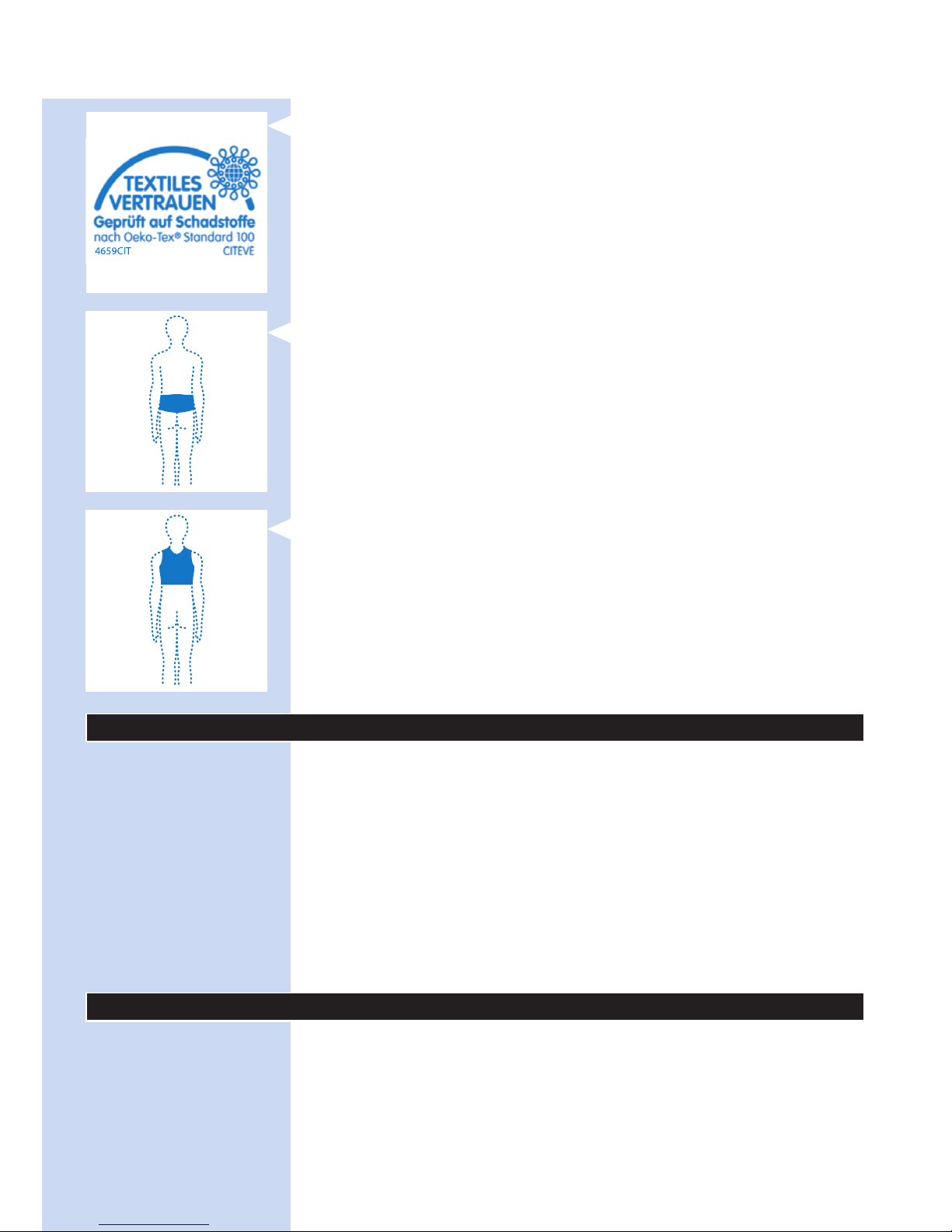
- 此符號表示此材質已依據 Oeko-Tex® Standard 100 進行有害物質
測試。
- 此符號表示本固定帶應使用於下背部。
- 此符號表示本固定帶應使用於上背部。
一般說明 (圖 23)
1 BlueTouch 酸痛舒緩墊 (外側)
2 模式按鈕
3 連線面板
4 充電指示燈
5 Micro USB 插孔
6 BlueTouch 酸痛舒緩墊 (皮膚側)
7 治療部位
8 紅外線感測器
9 轉換器
10 標準 USB 插頭
11 Micro USB 插頭
充電
初次使用 BlueTouch 酸痛舒緩墊以及當其電力不足時,請充滿電
力。電力充滿後,BlueTouch 酸痛舒緩墊有足夠電力可進行 4 次或
更多次療程。您可以使用隨附的轉換器和 USB 纜線為 BlueTouch
酸痛舒緩墊充電。
注意: BlueTouch 酸痛舒緩墊充電時,無法進行療程。
繁體中文 33
Page 34
使用轉換器充電
使用轉換器為 BlueTouch 酸痛舒緩墊充電時,完全充滿電大概需要
3 小時的時間。
1 轉換器隨附可拆式電源插頭。使用轉換器之前,請先將電源插頭
插入轉換器,並使用鎖定滑鈕將其鎖至定位。
2 將標準 USB 插頭插入轉換器上的插孔。
3 將轉換器插至牆上插座 (100V-240V)。
4 將 Micro USB 插頭插入 BlueTouch 酸痛舒緩墊上的插孔。
, BlueTouch 酸痛舒緩墊連接到主電源時會發出嗶一聲,表示已
經開始充電。
, BlueTouch 酸痛舒緩墊進行充電時,連線面板上的充電指示燈
會慢慢且規律地閃綠燈。
繁體中文34
Page 35
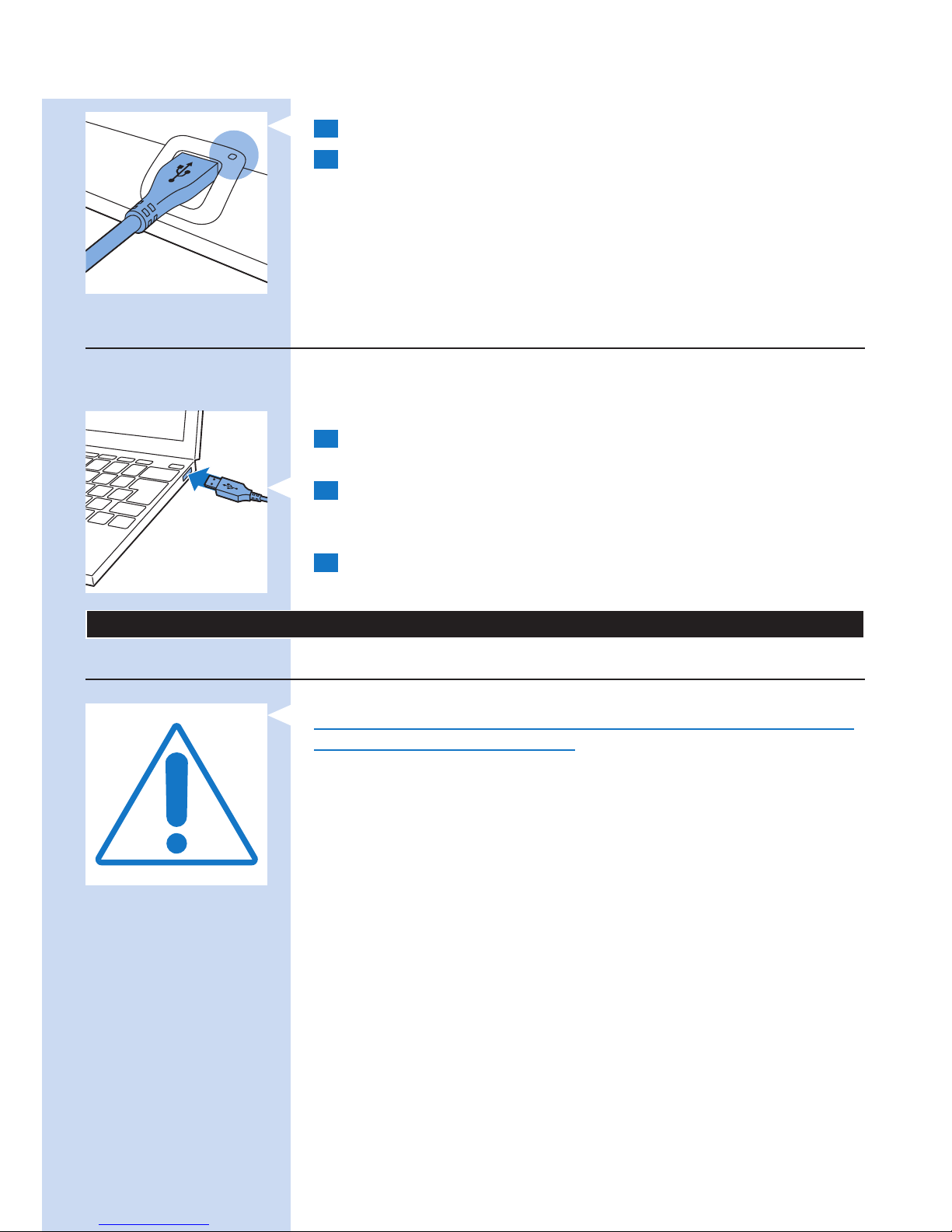
5 BlueTouch 酸痛舒緩墊充飽電後,充電指示燈會持續亮綠燈。
6 將轉換器拔離牆上插座,並將 USB 插頭從 BlueTouch 酸痛舒緩
墊的 USB 插孔拔除。
使用 Micro USB 插孔充電
您也可以將 USB 插頭插入電腦的 USB 連接埠,為 BlueTouch
酸痛舒緩墊充電。使用 USB 纜線連接至電腦進行充電,會需要長達
8 小時的時間。
1 將 Micro USB 插頭插入 BlueTouch 酸痛舒緩墊上的 USB
插孔。
2 將標準 USB 插頭插入電腦上的 USB 連接埠。
, 當 Micro USB 纜線妥善連接時,BlueTouch 酸痛舒緩墊會發出
嗶一聲,充電指示燈會開始慢慢地閃綠燈。
3 當充電指示燈持續亮綠燈時,表示充電完成,請將 Micro USB
纜線從 BlueTouch 酸痛舒緩墊的 Micro USB 插孔拔除。
使用您的 BlueTouch 酸痛舒緩墊
療程時間表
請務必遵守本單元「療程模式、持續時間和強度」一節中的療程時
間表。一天請勿使用超過兩次。
BlueTouch 酸痛舒緩墊的設計可供每日使用。當您感到酸痛時即
可使用。但重要的是,您需遵守本單元「療程模式、持續時間和強
度」一節中的療程時間表,一天請勿使用超過兩次。若遵照此療程
時間表,您接受的劑量便不會超過每日 90 J/cm² 的光線劑量上限。
療程選項
可用的療程選項如下:
- 每日兩次下背部療程
- 每日兩次上背部療程
- 每日一次下背部療程和一次上背部療程
注意: BlueTouch 酸痛舒緩墊可以連續進行兩次療程,療程時間分
別為 15 分鐘、20 分鐘或 30 分鐘,中間有短暫休息時間。若要開
始第二次療程,請按下模式按鈕以重新開啟裝置電源。
繁體中文 35
Page 36
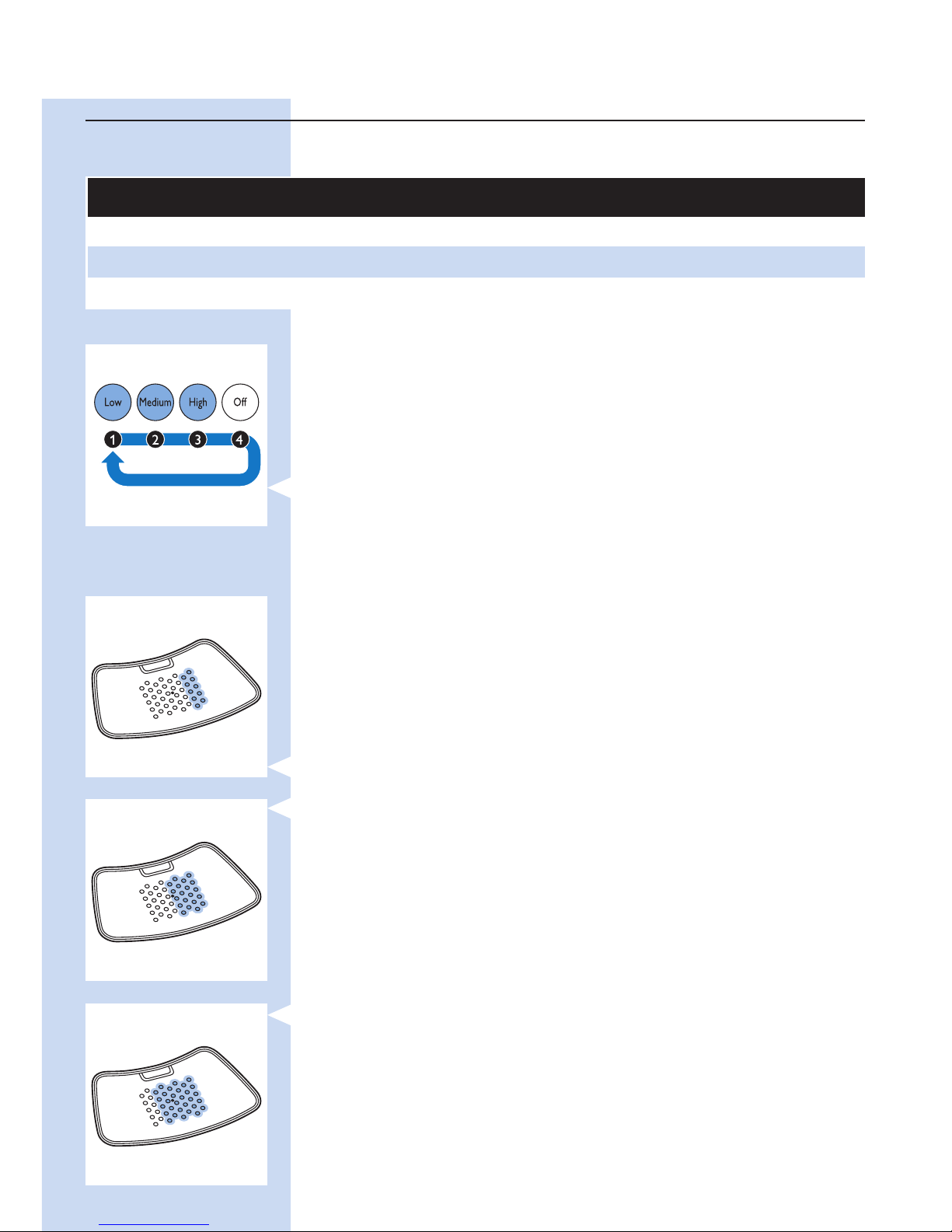
療程模式
療程模式、持續時間和強度
模式 每日療程次數和療程持續時間 強度
1:低 2 x 30 分鐘 50%
2:中 2 x 20 分鐘 75%
3:高 2 x 15 分鐘 100%
選擇療程模式
BlueTouch 酸痛舒緩墊有三種模式與一個「關閉」設定。您必須按
一下或按多下模式按鈕,以選擇這三種療程模式的其中一種。
按模式按鈕第四下時,即會關閉 BlueTouch 酸痛舒緩墊。
1 模式 1 (低):按一下
2 模式 2 (中):按兩下
3 模式 3 (高):按三下
4 O (關閉):按四下
注意: 若要從模式 3 切換到模式 1 或 2,或從模式 2 切換到模式
1,您必須依需要按多下模式按鈕,直到出現您要的模式為止。
注意: 選擇其他模式時,若有切換到「關閉」設定並在 2 秒內跳離
此設定,則療程計時器不會重設為新選模式的療程,但會繼續從您
切換到其他模式的時間點倒數。這表示裝置會根據新選模式之強度
與療程時間重新計算剩餘療程時間。例如,若您從模式 3 切換到模
式 1,而在模式 3 的剩餘療程時間為 5 分鐘,則在模式 1 的剩餘時
間為 10 分鐘。模式 1 強度是模式 3 強度的 50%,這表示模式 1 的
療程時間會是在模式 3 時的兩倍。
療程強度
當您選擇療程模式時,會聽見和看見回饋。
, 在模式 1 (低) 時會亮兩排 LED。BlueTouch 酸痛舒緩墊會發出
嗶一聲。
, 在模式 2 (中) 時會亮四排 LED。BlueTouch 酸痛舒緩墊會發出
嗶兩聲。
, 在模式 3 (高) 時會亮六排 LED。BlueTouch 酸痛舒緩墊會發出
嗶三聲。
, 選擇模式後,BlueTouch 酸痛舒緩墊會切換為省電模式。此模
式中的所有 LED 會使用最低強度。
, 當您將 BlueTouch 酸痛舒緩墊放在皮膚上時,即會依所選模式
的強度 (模式 3 為 100%,模式 2 為 75%,模式 1 為 50%) 開始
療程,而您可聽見音效回饋。
繁體中文36
Page 37
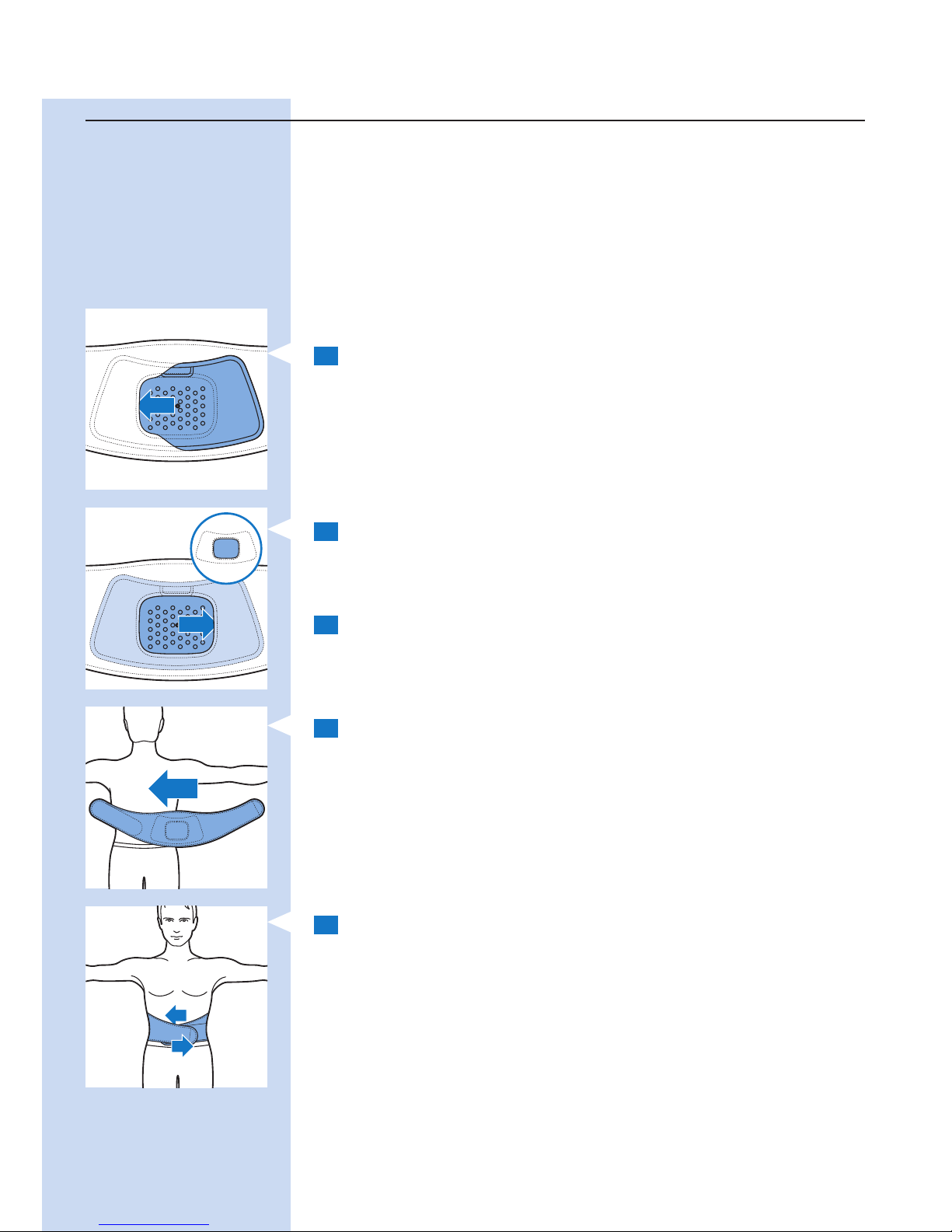
準備使用 BlueTouch 酸痛舒緩墊
將酸痛舒緩墊固定於身體上的建議方法為使用 BlueTouch 酸痛舒緩
固定帶。上背部療程與下背部療程各有一條特殊固定帶。
- 依據您的體型大小,可另外購買型號 PR3083 的下背部固定帶。
- 依據您的體型大小,可另外購買型號 PR3081 的上背部固定帶。
注意: 在 BlueTouch 酸痛舒緩墊上,請勿穿著多層衣物、緊身或厚
重衣物,以免在療程完成前裝置關閉。如果您穿著過緊或太厚的衣
物,紅外線感測器會因測量到過高溫度而關閉裝置。
放置下背部固定帶
要將 BlueTouch 酸痛舒緩墊放置於固定帶中,請依照下列步驟。
1 將下背部固定帶與 BlueTouch 酸痛舒緩墊放在前方桌面上。
將 BlueTouch 酸痛舒緩墊左側,滑入固定帶開口處的鬆緊帶邊
緣後方。
2 接著,將 BlueTouch 酸痛舒緩墊的另一邊滑入對面開口處的
鬆緊帶邊緣後方,讓整個舒緩墊安置在下背部固定帶中。請
檢查確定 LED 未被固定帶布料包覆住。必要時,可稍微調整
BlueTouch 酸痛舒緩墊。
3 移開治療部位的衣物。
注意: 請確定治療部位的肌膚乾淨且完全乾燥,未塗抹乳霜、
乳液或其他化妝品。
4 將安放好的 BlueTouch 酸痛舒緩墊的下背部固定帶環繞在腰
上,固定帶開口處面向背部。
5 使用下背部固定帶兩端的黏束帶固定下背部固定帶。
注意: 請確定固定帶內的 BlueTouch 酸痛舒緩墊位於治療部位,
且 LED 區域與肌膚完全接觸。
繁體中文 37
Page 38
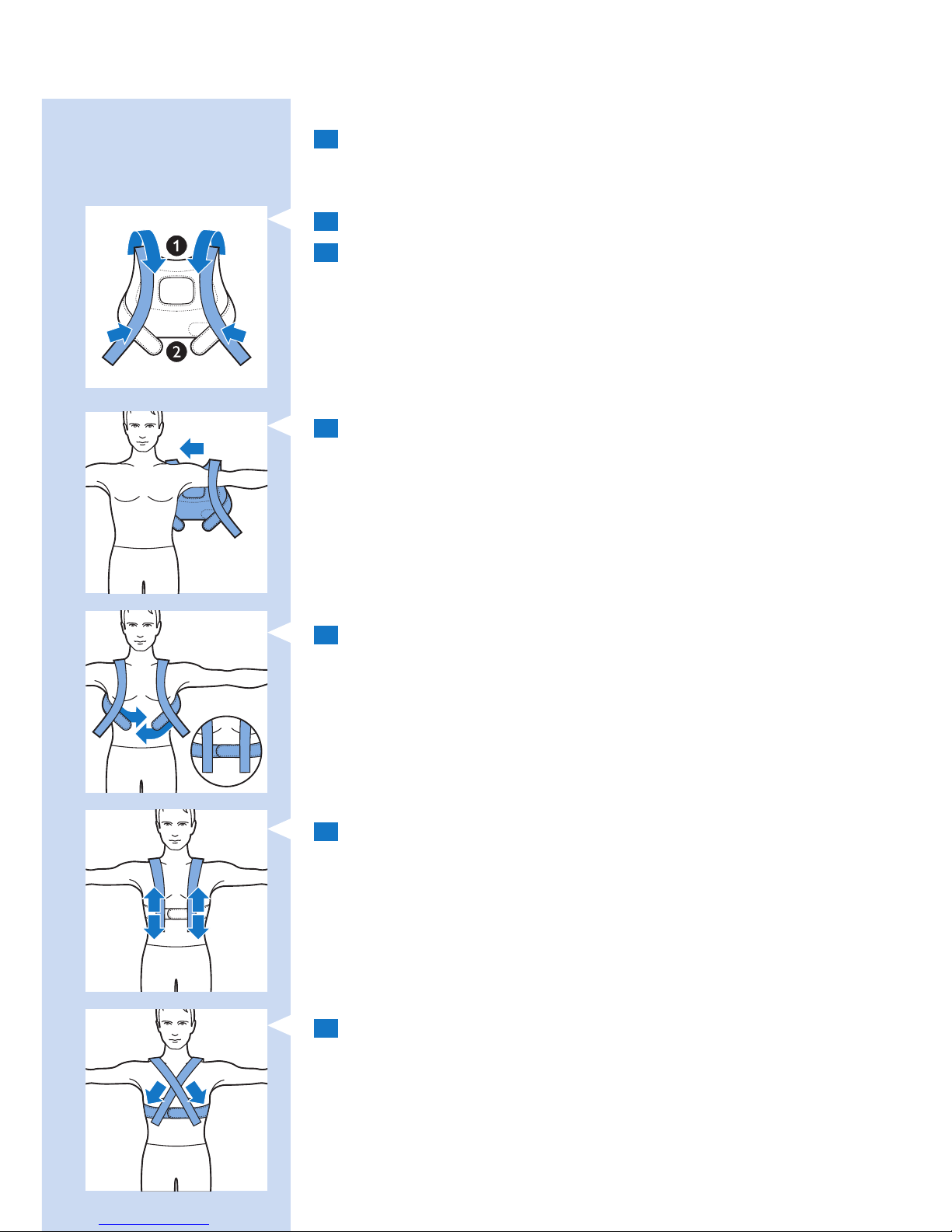
放置上背部固定帶
1 要將 BlueTouch 酸痛舒緩墊放置於上背部固定帶內,請依照前
文「放置下背部固定帶」一節中步驟 1 和 2 所述的相同程序來
進行。
2 將肩膀吊帶往前拉 (1),並將吊帶固定於腰帶的黏束帶條上 (2)。
3 移開治療部位的衣物。
注意: 請確定治療部位的肌膚乾淨且完全乾燥,未塗抹乳霜、
乳液或其他化妝品。
4 將上背部固定帶像外套一樣穿上。先將一隻手臂穿過固定在一
側腰帶上的肩膀吊帶,接著以同樣動作穿過另一側吊帶。
注意: 請確定固定帶內的 BlueTouch 酸痛舒緩墊位於治療部位,
且 LED 區域與肌膚完全接觸。
5 以黏束帶條固定腰帶。
6 將肩膀吊帶調整到適合的長度。
7 或者,您也可以先將上背部固定帶放在背上,固定腰帶,
接著將肩膀吊帶的黏束帶條交叉固定在腰帶上。對某些人而言,
此作法可能可提供更佳貼合度。
繁體中文38
Page 39
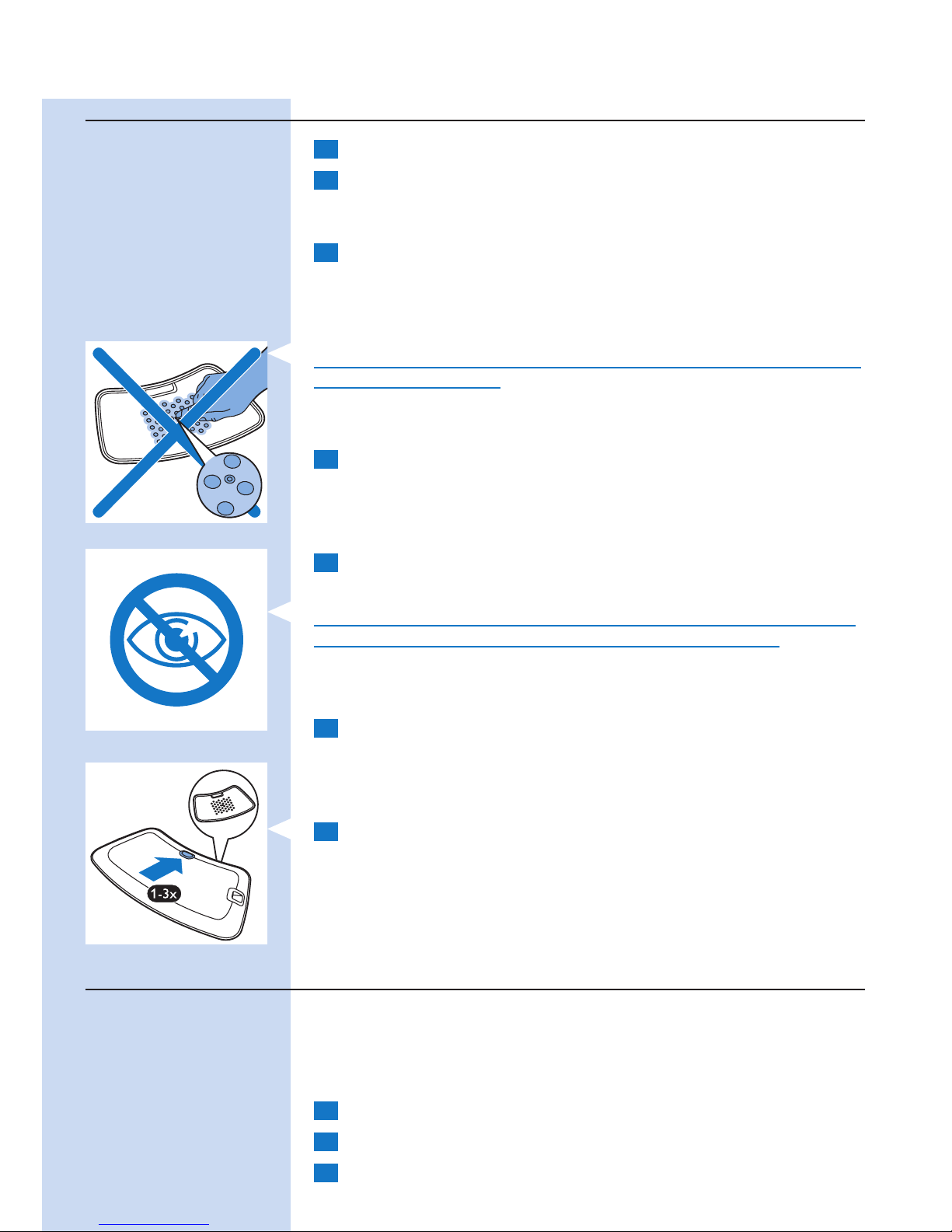
療程程序
1 按一下或多下模式按鈕以選擇這三種療程模式的其中一種。
2 選擇療程模式之後 (請參閱本單元「選擇療程模式」一節)
,BlueTouch 酸痛舒緩墊會發出嗶聲,且所有 LED
會進入省電模式。
3 將 BlueTouch 酸痛舒緩墊放到皮膚上後療程便會開始,
而舒緩墊感測器至少 5 秒鐘會感應溫度至少 33°C。
, 所有的 LED 會以所選模式的強度亮起 (請參閱本單元的「療程
模式、持續時間和強度」一節)。
,
BlueTouch 酸痛舒緩墊電源開啟時,請勿刻意觸摸 BlueTouch 酸痛
舒緩墊中央的感測器。
注意: 您也可以將舒緩墊放在背上,然後再按模式按鈕選擇療程模
式。若是如此,BlueTouch 酸痛舒緩墊會在五秒內以所選模式啟動。
4 所選模式的療程時間結束時,BlueTouch 酸痛舒緩墊會自動關
閉。如需療程時間的相關資訊,請參閱本單元的「療程模式、持
續時間和強度」一節。
中斷療程
1 若要暫時中斷療程,只需將酸痛舒緩墊從皮膚上移開即可。
, BlueTouch 酸痛舒緩墊的 LED 會自動切換回省電模式。
警告: 請勿直視 LED 所發射出的光線,即使 BlueTouch 酸痛舒緩
墊是在省電模式下運作,及療程時間暫停的情況下亦然。
注意: 進入省電模式 10 分鐘後,BlueTouch 酸痛舒緩墊即會關閉。
2 暫時中斷後若要繼續療程,請將 BlueTouch 酸痛舒緩墊重新放
回皮膚上。
, LED 會依所選強度自動亮起,療程時間則會繼續倒數。
關閉電源
1 若要在療程時間結束之前關閉酸痛舒緩墊,請按一下或多下模式
按鈕,直到 LED 關閉為止。
, 會有兩種不同音效依序響起,表示 BlueTouch 酸痛舒緩墊已
關閉。
注意: 按模式按鈕以關閉 BlueTouch 酸痛舒緩墊時,按壓次數是依
據您所選的模式而定。
療程結束後
所選模式的療程時間結束之後,療程即會自動結束,除非您移開
BlueTouch 酸痛舒緩墊,並按模式按鈕以提早停止療程。
注意: 會有兩種不同音效依序響起,表示 BlueTouch 酸痛舒緩墊已
關閉且療程已結束。
1 鬆開固定帶並將其從背部拿開。
2 將 BlueTouch 酸痛舒緩墊從固定帶中取出。
3 視需要為 BlueTouch 酸痛舒緩墊充電 (請參閱「電池電量訊
號」一節)。
繁體中文 39
Page 40
可能的反應和副作用
- 療程期間皮膚稍微變紅,這是正常現象。皮膚變紅是因為
BlueTouch 酸痛舒緩墊的熱度會加速血液循環。皮膚變紅現象
是無害的,會在療程結束之後消退。
- 在某些情況下,療程結束後可能會有皮膚曬黑的現象。曬黑現象
是由於皮膚黑色素聚集所引起,與曬太陽所造成的效果類似。此
現象是無害的,且會在 48 到 72 小時之內消退。您可以延後療
程,直到曬黑現象消失為止。若要避免曬黑,請以較低階的模式
繼續療程,且在療程期間避免重壓 BlueTouch 酸痛舒緩墊,例
如坐、躺或重靠在上面。
使用時的光和音效訊號
過熱訊號
1 如果感測器偵測到溫度太高,為了安全起見,BlueTouch 酸痛
舒緩墊會關閉。
2 BlueTouch 酸痛舒緩墊關閉之後,若要在標準冷卻時間
10 分鐘之內重新啟動,則充電指示燈會閃紅燈三次。
3 標準冷卻時間 10 分鐘過後,您即可重新啟動 BlueTouch 酸痛舒
緩墊,計時器也會從其停止的時間開始倒數計時。
注意: 如果療程未在 2 小時內繼續,計時器會自動重設。
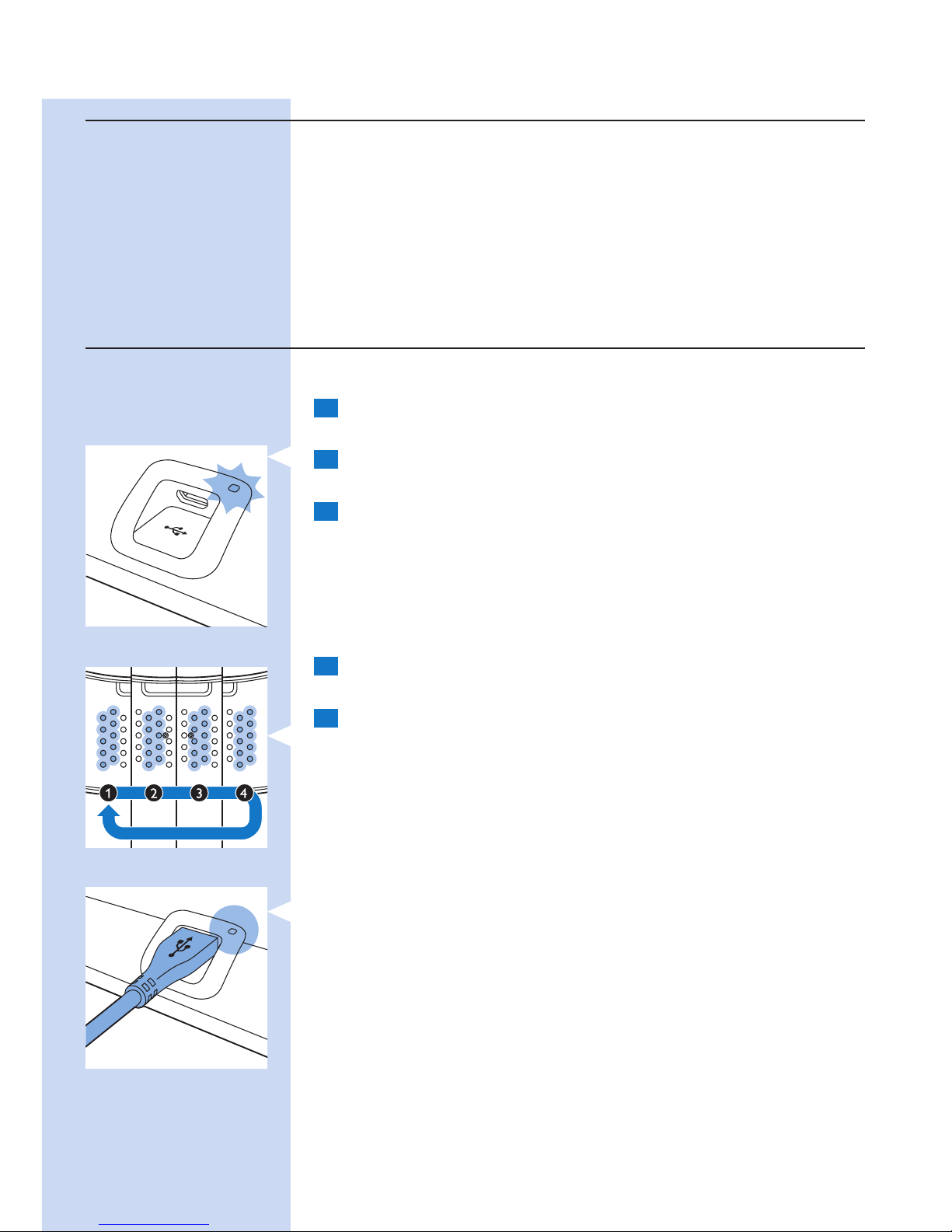
重設訊號
當 BlueTouch 酸痛舒緩墊的軟體停止回應,或發生其他非預期的失
敗,您可以重設 BlueTouch 酸痛舒緩墊。
1 使用轉換器將 BlueTouch 酸痛舒緩墊連接到主電源,或將其連
接至電腦的 USB 連接埠。
2 按住模式按鈕 5 秒鐘。
, 起先,前兩排的 LED 會短暫亮起。當它們熄滅時,第三和第四
排的燈會短暫亮起。當第三和第四排的燈熄滅時,第五和第六排
的燈會短暫亮起。當第五和第六排的燈熄滅時,第七和第八排的
燈會短暫亮起。
, 在此之後,BlueTouch 酸痛舒緩墊即重設完畢,可恢復正常運作。
電池電量訊號
當您按模式按鈕時,充電指示燈會顯示電池狀態。若感測器感應到
皮膚接觸或當裝置關閉時,充電指示燈便會熄滅。
1 當電池電力足夠進行兩次或以上的療程時,充電指示燈會持續亮
綠燈。
, 您可以選擇模式並開始療程。
2 當電池電力只夠進行一次療程時,充電指示燈會持續亮橘燈。
, 您可以選擇模式,並只能完成一次療程。
3 當電池電力完全耗盡時,充電指示燈會持續亮紅燈 5 秒鐘,而
BlueTouch 酸痛舒緩墊會在您按模式按鈕時發出 3 聲嗶聲。
, 您無法選擇任何模式。您必須為電池充電才可以開始療程。
繁體中文40
Page 41
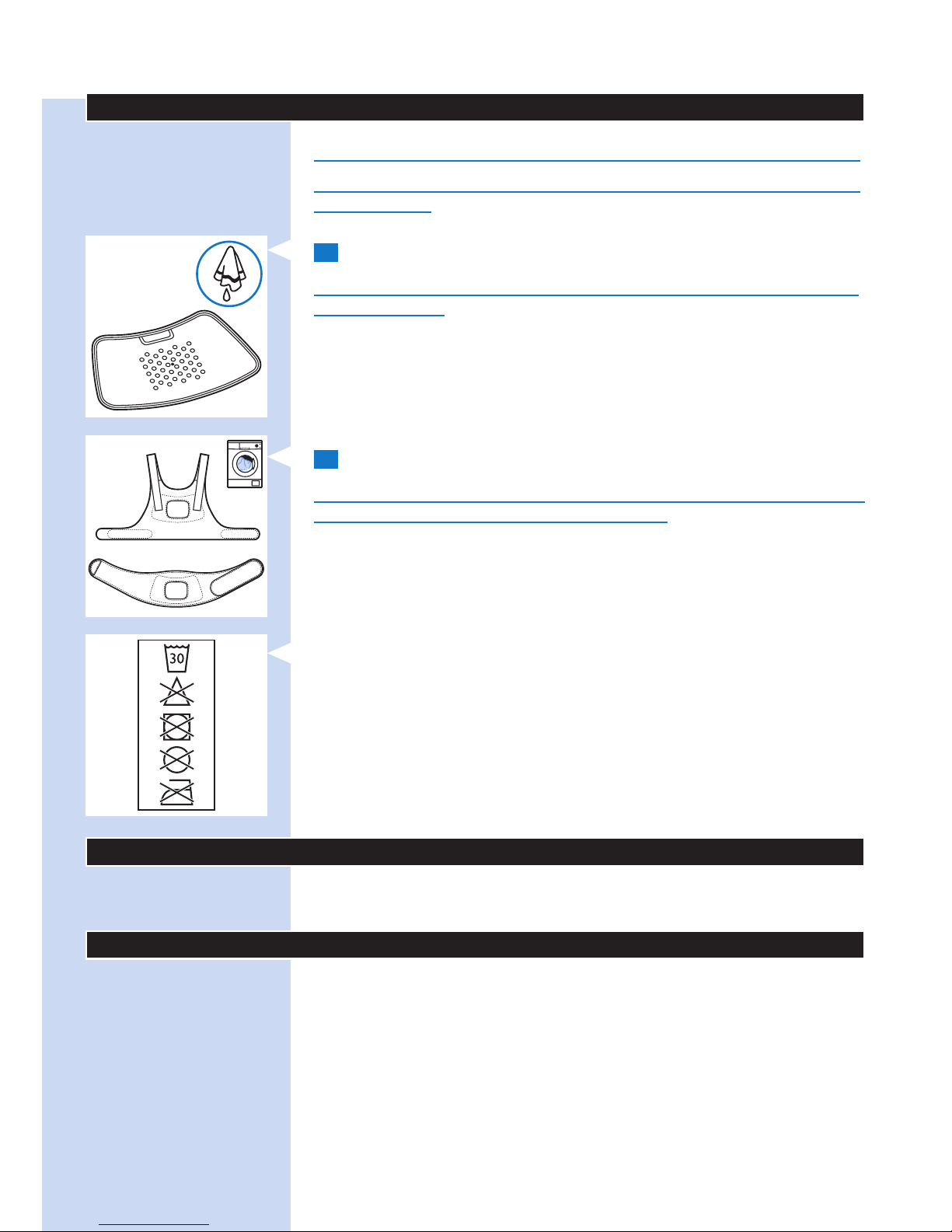
清潔
請勿將 BlueTouch 酸痛舒緩墊浸泡在水中,或者在水龍頭下沖洗。
將固定帶放入洗衣機清洗時,請務必先取下固定帶上的 BlueTouch
酸痛舒緩墊。
1 請以濕布清潔 BlueTouch 酸痛舒緩墊。
警告: 在每次療程後,請以濕布清潔紅外線感測器,以確保產品能
持續正常使用。
2 BlueTouch 酸痛舒緩固定帶可用洗衣機清洗。
警告: 為避免損壞 BlueTouch 酸痛舒緩固定帶或洗衣機裡的其他衣
物,請將固定帶放入細網格洗衣袋中清洗。
注意: 請使用溫和的洗衣行程,水溫最高不超過 30°C。
讓 BlueTouch 酸痛舒緩固定帶自然風乾,請勿以烘乾機烘乾。
請勿熨燙固定帶。
環境保護
本產品使用壽命結束時,請勿與一般家庭廢棄物一併丟棄。
請將本產品送至政府指定的回收站,此舉能為環保盡一份心力。
保固與支援
如需相關資訊或支援,請造訪 www.philips.com/support、
另行參閱全球保證書或聯絡飛利浦客戶服務中心。電話號碼如下:
- 英國:0844 338 0489 (BT 市話通話每分鐘 5P,其他市話和手
機電信業者費用可能更高)。
- 香港:852 2619 9663 (區內免費電話)。
保固限制
此保固不包含一般磨損與破損。如未依照本使用手冊使用
BlueTouch 酸痛舒緩墊,將導致保固失效。
繁體中文 41
Page 42

製造商法定地址
Philips Consumer Lifestyle B.V.
Tussendiepen 4 9206 AD Drachten
The Netherlands
疑難排解
本單元概述使用 BlueTouch 酸痛舒緩墊時最常遇到的問題。
若您無法利用以下資訊解決您遇到的問題,請聯絡飛利浦。
問題 可能原因 解決方法
療程進行期
間,BlueTouch 酸痛舒
緩墊突然關閉。
預設的療程時間已結束。 BlueTouch 酸痛舒緩墊的程式設計是
在所選療程模式的療程時間結束後自動
關閉。
紅外線感測器被擋住。 請檢查舒緩墊在固定帶內的位置。確定
固定帶未蓋住紅外線感測器。若紅外線
感測器未被蓋住,但 BlueTouch 酸痛舒
緩墊仍舊關閉,則產品可能損壞。
此時,請聯絡飛利浦。
皮膚溫度太高。 請檢查您在療程期間是否穿了過多或太
厚的衣物,以致遮蓋 BlueTouch 酸痛
舒緩墊。
BlueTouch 酸痛舒緩墊
關閉,且充電指示燈閃
紅燈。
皮膚溫度太高。若紅外
線感測器感應到溫度過
高,BlueTouch 酸痛舒緩
墊即會關閉。
讓 BlueTouch 酸痛舒緩墊冷卻 10 分
鐘。10 分鐘後,LED 會以省電模式亮
起。將 BlueTouch 酸痛舒緩墊放回您的
皮膚上,並繼續療程。
充電指示燈持續亮紅燈
5 秒鐘、BlueTouch 酸
痛舒緩墊發出嗶聲,
且無法選擇模式。
充電式電池電量耗盡。 請為 BlueTouch 酸痛舒緩墊充電
(請參閱「充電」一節)。
充電指示燈持續亮橘
燈。
電池所含電力只能夠進行
一次療程。
請完成療程,並在使用後為 BlueTouch
酸痛舒緩墊充電 (請參閱「充電」一節)
。
轉換器在充電時變得
溫熱。
這是正常現象。 無須採取任何動作。
將 Micro USB 插頭插
入連線面板上的 Micro
USB 插孔時,充電指
示燈未開始閃綠燈。
轉換器未插入牆上插座
中,或未正確插入。
請將轉換器正確插入牆上插座。
標準 USB 插頭未插入轉換
器中,或未正確插入。
請將標準 USB 插頭正確插入轉換器中。
轉換器所插入的牆上插座
沒有電。
請將其他電器插入相同的牆上插座,
檢查該插座是否有電。若插座有電,
但 BlueTouch 酸痛舒緩墊並未充電,
請聯絡飛利浦。
繁體中文42
Page 43

問題 可能原因 解決方法
當我連接 USB 纜線至
電腦時,充電指示燈未
開始閃綠燈。
Micro USB 插頭未正確插
入 Micro USB 插孔,或標
準 USB 插頭未正確插入電
腦的 USB 連接埠。
請將 Micro USB 插頭正確插入 Micro
USB 插孔,並檢查與電腦的連線狀況。
確定電腦已開啟。
標準 USB 插頭未插入電腦
的 USB 連接埠中,或未正
確插入。
請將標準 USB 插頭正確插入電腦的
USB 連接埠。
您插入 USB 纜線的筆記型
電腦電力不足。
將筆記型電腦連接至主電源。
BlueTouch 酸痛舒緩墊
在使用時變得溫熱。
這是正常現象。 無須採取任何動作。
規格
型號 PR3092
額定電壓 (V) 100-240
額定頻率 (Hz) 50-60
額定輸出功率 (W) 15
級別 醫療裝置級別 IIa
分類 風險類別 1
防水等級 IP22
每日劑量上限 (J/cm²) < 90 (若遵照療程時間表)
電池種類 鋰電池
作業條件
溫度 從 +10°C 到 +35°C
相對濕度 從 30% 到 90%
保存條件
溫度 從 -20°C 到 +35°C
相對濕度 從 30% 到 90% (無凝結)
繁體中文 43
Page 44
44
简介
使用 BlueTouch Pain Relief Patch 之前,仔细阅读本用户手册并妥
善保管以供日后参考。本医疗器械无需处方即可使用。要获得最佳
照射效果,您必须按照照射方案和本用户手册中的说明使用设备。
如有任何疑问,请咨询药剂师或医生。
BlueTouch 是属于 Koninklijke Philips N.V. 所有的商标
预期用途
BlueTouch Pain Relief Patch 是一款佩带式医疗器械,旨在在正常
的日常活动中通过光能和热传导对身体施加光和热来治疗背部疼
痛。专用蓝色 LED 灯可通过改善血液循环放松并有助于治愈受损的
肌肉。BlueTouch Pain Relief Patch 仅适用于上背或下背部,并可
利用织物带定位和调整照射区。该设备通过内置的不可更换充电电
池供电。BlueTouch Pain Relief Patch 仅供 18 岁以上人士使用和操
作。应始终按照本用户手册中的安全步骤和使用说明及其设计用途
使用本设备。
注意事项
重要安全信息
危险
- 保持适配器干燥。
警告
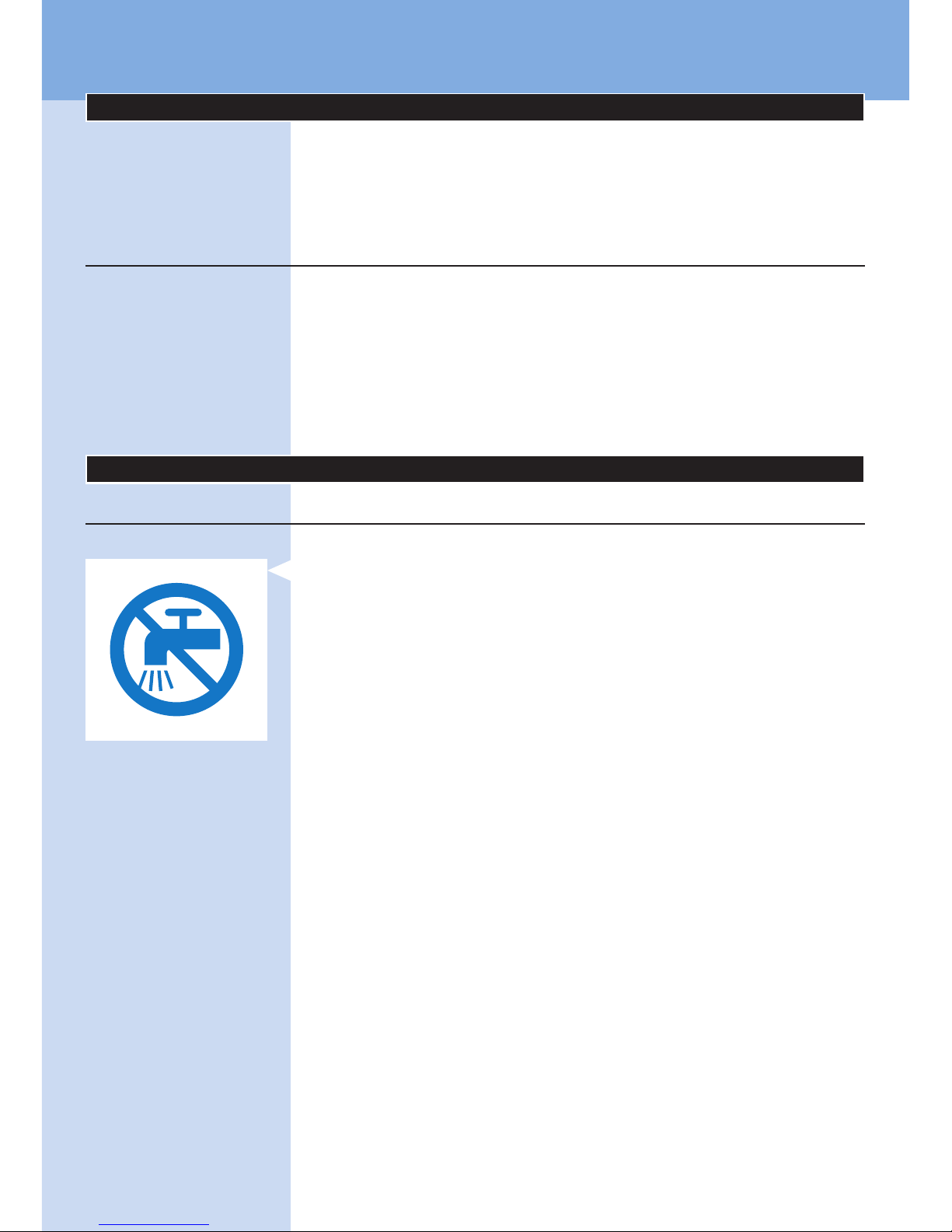
- 切勿将 BlueTouch Pain Relief Patch 浸入水中或在水龙头下冲
洗。
- 切勿在潮湿的环境中使用 BlueTouch Pain Relief Patch。
- BlueTouch Pain Relief Patch 不适合由 18 岁以下肢体不健全、
感觉或精神上有障碍的人士使用。
- 这是医疗器械。将该器械置于儿童接触不到的地方。
- 确保儿童不要玩耍 BlueTouch Pain Relief Patch。
- 始终遵循“使用 BlueTouch Pain Relief Patch”一章中的照射方
案进行照射。每日照射次数不得超过 2 次。
- 只能通过将 USB 线缆连接至设备随附的适配器,然后连接至插
座或将 USB 线缆连接至电脑来充电。
- 使用前,必须先检查 BlueTouch Pain Relief Patch 及其适配器
是否损坏。
- 如果任一存在损坏,请勿使用 BlueTouch Pain Relief Patch
或适配器。
- 如果适配器已损坏,则务必用原装型号替换,以免发生危险。
请联系飞利浦购买新适配器。
- 请勿改装 BlueTouch Pain Relief Patch 及其附件。
- 请勿在开机后有意触摸 BlueTouch Pain Relief Patch 中央的传
感器。
- 请勿在开机后将任何物体置于 BlueTouch Pain Relief Patch
中央的传感器上。
- 开机或充电时,必须有人看管 BlueTouch Pain Relief Patch。
- 只能将 BlueTouch Pain Relief Patch 送到飞利浦授权的维修
中心检修。由不合格人员进行修理可能将用户置于极度危险的
境地。
简体中文
Page 45
注意
- BlueTouch Pain Relief Patch 专为在操作电脑、阅读、看电视、
做园艺和做家务(如烹饪)等正常的日常活动中治疗背部疼痛而
设计。请勿将其用作任何其他用途。
- 如果照射时出现不适,请切换至低光能照射模式。如果用低光能
照射模式仍然感觉不适,请关闭 BlueTouch Pain Relief Patch,
停止使用。
- 请勿对 BlueTouch Pain Relief Patch 施加过大压力,例如按
压、躺、坐或站在上面。坐下时请勿紧靠在 BlueTouch Pain
Relief Patch 上。
- 将 BlueTouch Pain Relief Patch 与专用飞利浦绑带配合使用。
Patch 未随附绑带,需单独购买。
- 请勿让 BlueTouch Pain Relief Patch 受到剧烈震动或使其跌落。
- 请勿挤压或扭曲 BlueTouch Pain Relief Patch。
- 将 BlueTouch Pain Relief Patch 远离尖锐、突出或磨蚀性物体。
- 请勿在充电时佩带 BlueTouch Pain Relief Patch。
- 照射前,请勿在皮肤上涂抹任何乳霜或乳液。
- 蓝光灯可能会使照射部位的纹身褪色。
- 在 10°C 和 35°C 之间的温度及 30% 和 90% 之间的相对湿度
下使用、存放和为 BlueTouch Pain Relief Patch 充电。
- 如果将 BlueTouch Pain Relief Patch 从很温暖的环境带到偏冷
环境,等待约 3 小时后再使用。
- 请勿在开机后直视 BlueTouch Pain Relief Patch 发出的光。
- 请勿在发烧或健康状况不佳和/或使用与 BlueTouch Pain Relief
Patch 配合使用可造成不良肌肤反应的药物或化妆品时使用
BlueTouch Pain Relief Patch。开始使用 BlueTouch Pain Relief
Patch 之前,阅读本章中的“禁忌症”部分以了解是否存在适用
情况。
- 要断开 BlueTouch Pain Relief Patch 的电源,请从插座上拔下
适配器。
- BlueTouch Pain Relief Patch 仅限于非连续使用。“使用
BlueTouch Pain Relief Patch”一章中的“照射模式、时长和强
度”部分规定了确切使用时间。
- 务必按照本用户手册中的说明安装 BlueTouch Pain Relief
Patch。确保无线家庭网络路由器、手机、无绳电话及其基座、
对讲机等无线通信设备与 BlueTouch Pain Relief Patch 至少保
持 2 米距离,因为这些设备会影响其工作。
- 每次照射后用湿布清洁红外传感器,以确保其能继续正常使用。
- 为防止损坏洗衣机的滚筒或滚筒中的其他衣物,请将绑带放入细
孔洗衣袋中洗涤。
禁忌症
请勿在下述情况下使用 BlueTouch Pain Relief Patch:
- 皮肤烫伤或晒伤。
- 发烧。
- 已知阳光过敏。
- 对 BlueTouch Pain Relief Patch 的表层材料(皮肤接触面采用
聚氨酯;红外传感器采用不锈钢材料;不接触皮肤处采用聚酰
胺/氨纶混合材料)或 DriRelease 聚酯纤维/棉混合材料过敏。
- 患有任何可导致光敏性的已知疾病或先天皮肤病,如卟啉症、
多形性日光疹、慢性光化性皮炎、光化性痒疹或日光性荨麻疹。
- 需要照射的部位患有活性皮肤癌,或曾患有皮肤癌症或任何其他
原位癌,或在需要照射的部位有癌前病变或大痣。
简体中文 45
Page 46
- 如果服用了光敏剂或光敏药物,请检查药物的包装说明书,如果
声明了可能造成光过敏反应、光毒性反应或在服用药物时要避免
日晒,切勿使用本产品。
- 正在服用类固醇。此类药物会使皮肤更易过敏。
- 需要照射的部位存在感染、湿疹、未愈合的纹身、烧伤、毛囊
发炎、开放性撕裂伤、擦伤、牛皮癣、单纯疱疹、伤口或病变
和血肿。
- 患有严重或不可控型糖尿病或伴有外围损伤的糖尿病。
- 患有不可控的高血压、中风史、心肌梗死、心绞痛、动脉硬化性
血管疾病 (ASVD)、周围血管疾病。
- 如果您怀孕或正在哺乳。
- 患有任何会引起疼痛的炎症性疾病或任何其他慢性病或会引起
疼痛的感染,如脊柱关节病、类风湿关节炎、红斑狼疮、螺旋
体病。
- 患有中枢神经系统退行性疾病,如多发性硬化症或帕金森氏症,
或会导致背部疼痛的椎管狭窄,或马尾神经综合征或其他神经病
预兆症状。
- 患有精神分裂症、临界综合征或重度抑郁。
- 患有感觉剥夺或已确诊为带状疱疹或带状疱疹后神经痛,
尤其是在躯干中部。
- 存在任何妨碍顺利放置 BlueTouch Pain Relief Patch 的解剖病
理或其他身体限制。
- 体内存在有源植入式装置,如心脏起搏器、除颤器、神经刺激
器、人工耳蜗或主动给药装置。
- 有骨质疏松症史(骨密度为 2.5 且曾有 1 次或多次骨折史)
或其他严重骨病。
- 前 8 周内患有急性脱位或骨折。
- 前 8 周内曾经历背部手术失败或做过躯干、头部或背部手术。
- 患有广泛疼痛。
- 总体健康状况很差。
符合标准
- BlueTouch Pain Relief Patch 符合电子医疗器械和家用光 (LED)
辐射电器的所有相关标准。
- 这款 BlueTouch Pain Relief Patch 符合所有有关暴露于电磁场
的适用标准和法规。
符号说明
BlueTouch Pain Relief Patch
- 此符号表示:符合 EC 指令。CE 表示
“Conformité Européenne”。
简体中文46
Page 47
- 此符号表示:请勿将 BlueTouch Pain Relief Patch 放入洗衣
机。
- 此符号表示设备具有防滴水保护。
- 此符号表示:BF 型(浮体)应用部件。
- 此符号表示:请勿直视光束。
- 此符号是警告您在使用之前先阅读附带的文档并采取所需的一
切安保措施。
简体中文 47
Page 48
- 此符号表示:在开始使用 BlueTouch Pain Relief Patch 之前阅
读用户手册。
- 此符号表示:请勿在水龙头下清洗。
- 此符号表示:请勿直视光源。第一级危险群产品
(IEC60601-2-57:2011)。
- 此符号表示:不要将其与普通生活垃圾一同丢弃。
有关详细说明,请参阅“环保”一章。
- 此符号表示可放置 BlueTouch Pain Relief Patch 的部位。
简体中文48
Page 49
- 此符号表示“制造商”并提供法定制造商的地址。
适配器
- 此符号表示适配器为双重绝缘(II 级标准)。
- 此符号表示适配器只能在室内使用。
- 此符号表示:不要将其与普通生活垃圾一同丢弃。
有关详细说明,请参阅“环保”一章。
绑带
- 此符号表示:最高洗涤温度为 30°C。
简体中文 49
Page 50
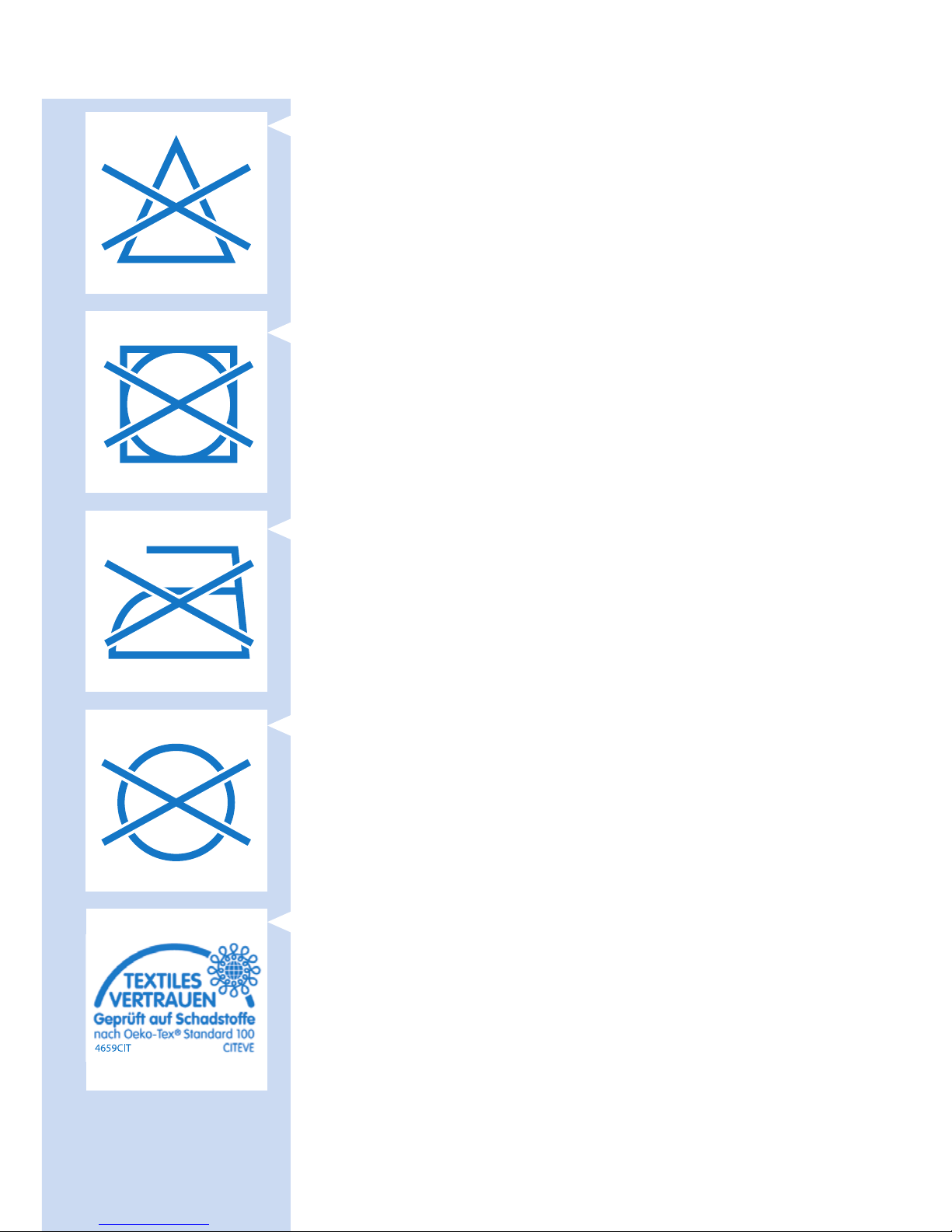
- 此符号表示:不可漂白。
- 此符号表示:不可甩干。
- 此符号表示:不可熨烫。
- 此符号表示:不可干洗。
- 此符号表示已根据 Oeko-Tex
®
standard 100
对材料进行有害物质测试。
简体中文50
Page 51
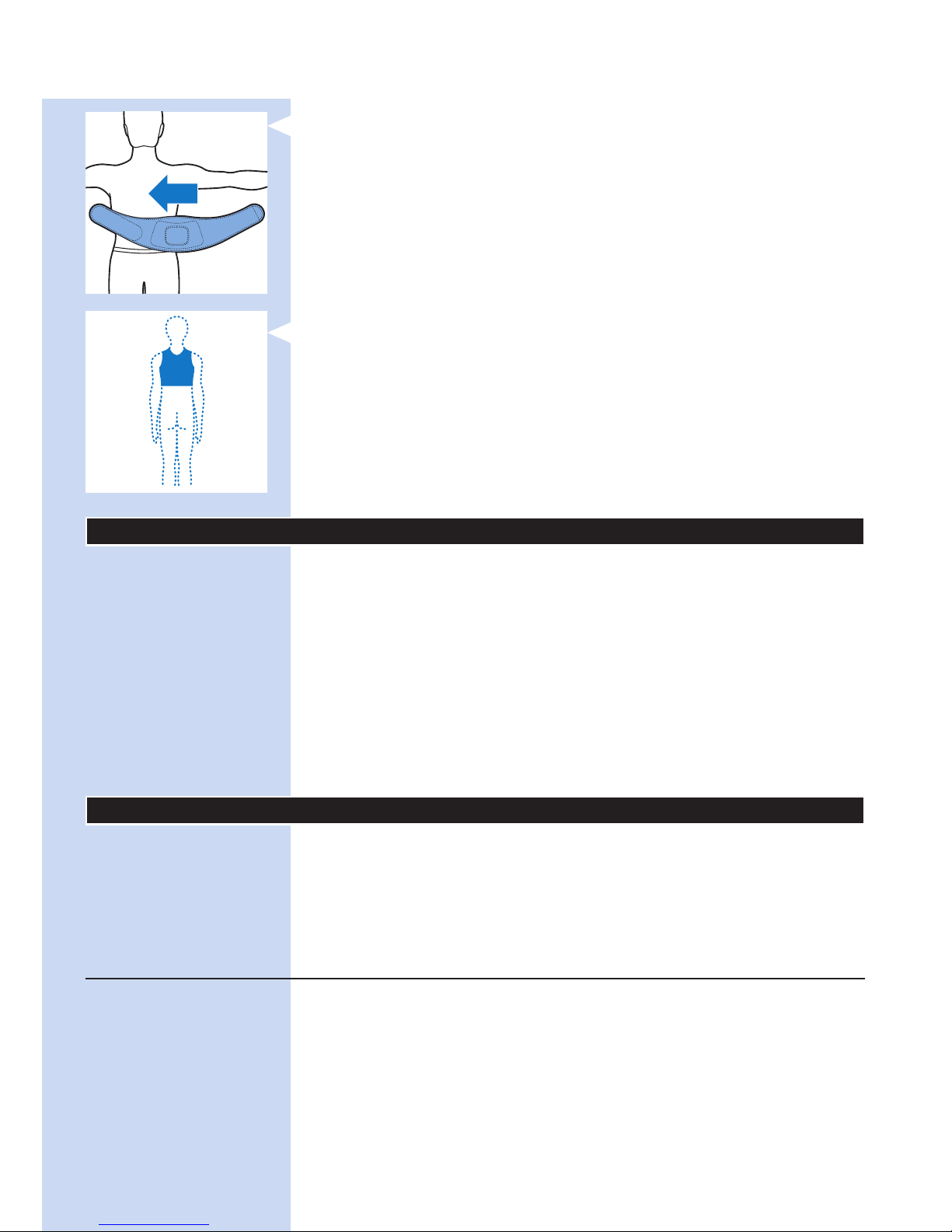
- 此符号表示此绑带用于下背部。
- 此符号表示此绑带用于上背部。
基本说明 (图 23)
1 BlueTouch Pain Relief Patch(外侧)
2 模式按钮
3 接线面板
4 充电指示灯
5 微型 USB 插孔
6 BlueTouch Pain Relief Patch(皮肤侧)
7 照射面积
8 红外传感器
9 适配器
10 标准 USB 插头
11 微型 USB 插头
充电
首次使用及电池电量不足时需为 BlueTouch Pain Relief Patch
充满电。充满电后,BlueTouch Pain Relief Patch 的电量足够完
成 4 次或更多次照射。您可以使用随附的适配器和 USB 线缆为
BlueTouch Pain Relief Patch 充电。
注意: BlueTouch Pain Relief Patch 在充电时无法进行照射。
使用适配器充电
用适配器为 BlueTouch Pain Relief Patch 充电时,
充满电约需 3 小时。
简体中文 51
Page 52
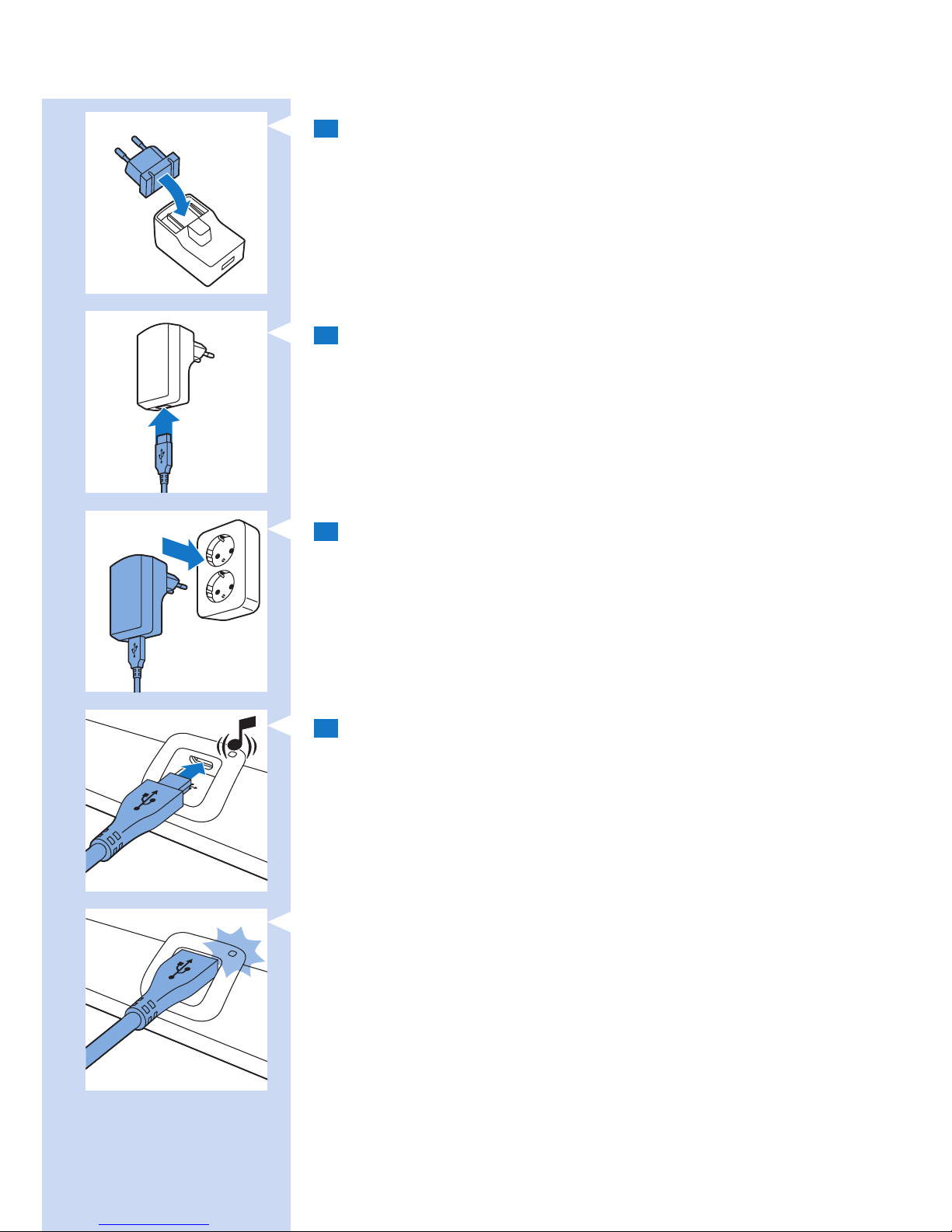
1 适配器配有可分离式电源插头。使用之前,
先将电源插头装入适配器并用锁定滑钮将其锁定到位。
2 将标准 USB 插头插入适配器上的插孔。
3 将适配器插入电源插座(100 伏-240 伏)。
4 将微型 USB 插头插入 BlueTouch Pain Relief Patch 上的插孔。
, BlueTouch Pain Relief Patch 接通电源后会发出一声蜂鸣音,
表示已开始充电。
, BlueTouch Pain Relief Patch 充电时,接线面板上的充电指示灯
会有规律地呈绿色缓慢闪烁。
简体中文52
Page 53
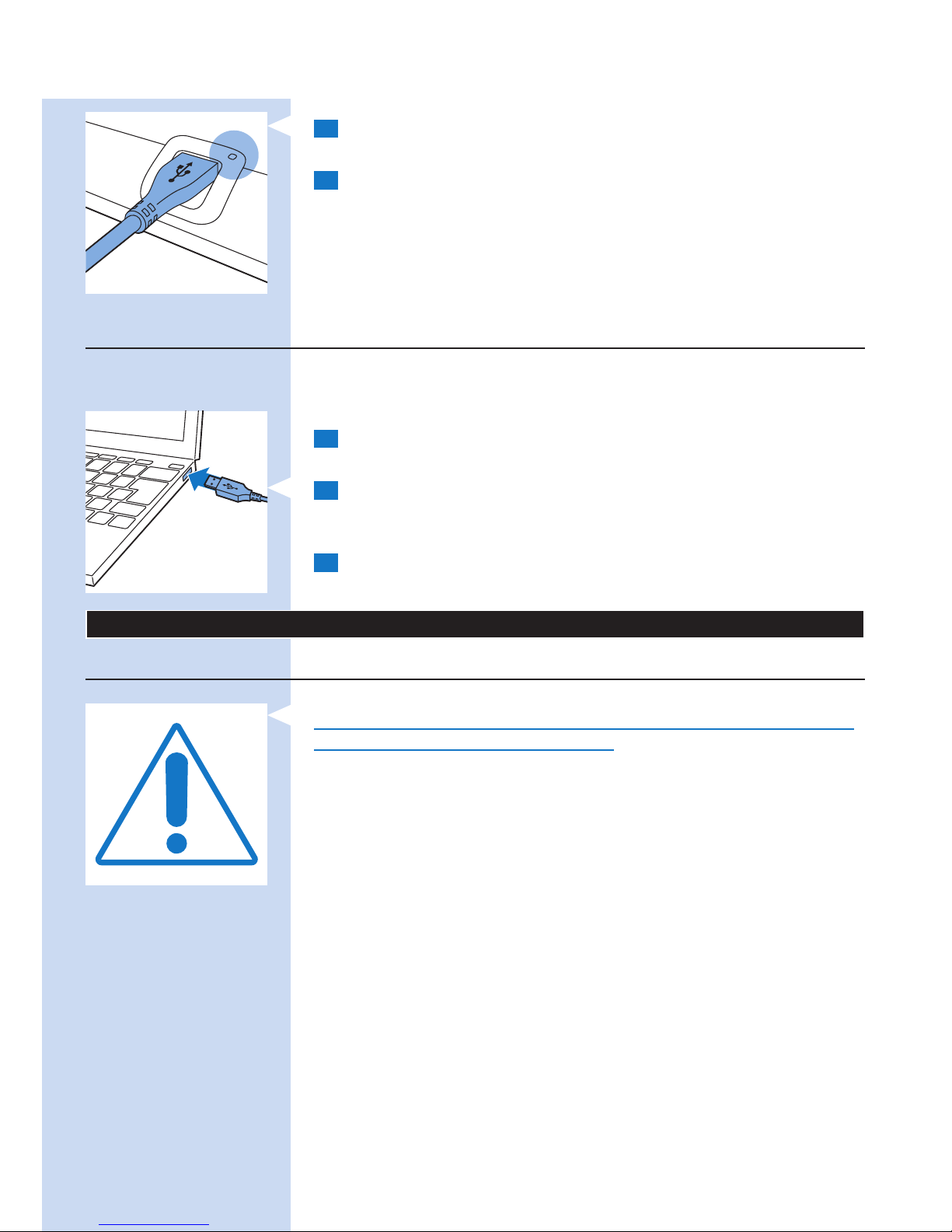
5 BlueTouch Pain Relief Patch 充满电后,充电指示灯会呈绿色持
续亮起。
6 将适配器从电源插座上拔下,然后从 BlueTouch Pain Relief
Patch 的微型 USB 插孔中拔出 USB 插头。
使用微型 USB 插孔充电
您也可以通过将 USB 插头插入电脑上的 USB 端口来为
BlueTouch Pain Relief Patch 充电。用 USB 线缆连接电脑充电可能
需要 8 小时。
1 将微型 USB 插头插入 BlueTouch Pain Relief Patch
上的 USB 端口。
2 将标准 USB 插头插入电脑的 USB 端口。
, 正确连接微型 USB 线缆后,BlueTouch Pain Relief Patch
会发出一声蜂鸣音,充电指示灯开始呈绿色缓慢闪烁。
3 充电指示灯呈绿色持续亮起时表明充电已完成,请从 BlueTouch
Pain Relief Patch 的 USB 端口拔出 USB 线缆。
使用 BlueTouch Pain Relief Patch
照射方案
始终遵循本章中“照射模式、时长和强度”部分中的照射方案进行
照射。每日照射次数不得超过 2 次。
BlueTouch Pain Relief Patch 专为日常使用而设计。您可以在感觉
疼痛时使用。不过,您要遵循本章中“照射模式、时长和强度”
部分中的照射方案且每日照射次数不得超过 2 次,这一点非常重
要。遵循该照射方案便不会超过每日 90 J/cm² 的最大光剂量。
照射选项
以下照射选项均可实施:
- 每日照射下背部 2 次
- 每日照射上背部 2 次
- 每日照射上、下背部各 1 次
注意: 您可以连续两次使用 BlueTouch Relief Patch,进行两次
15 分钟、20 分钟或 30 分钟照射,中间休息片刻。要开始第二
次照射,请按模式按钮重新打开设备。
简体中文 53
Page 54
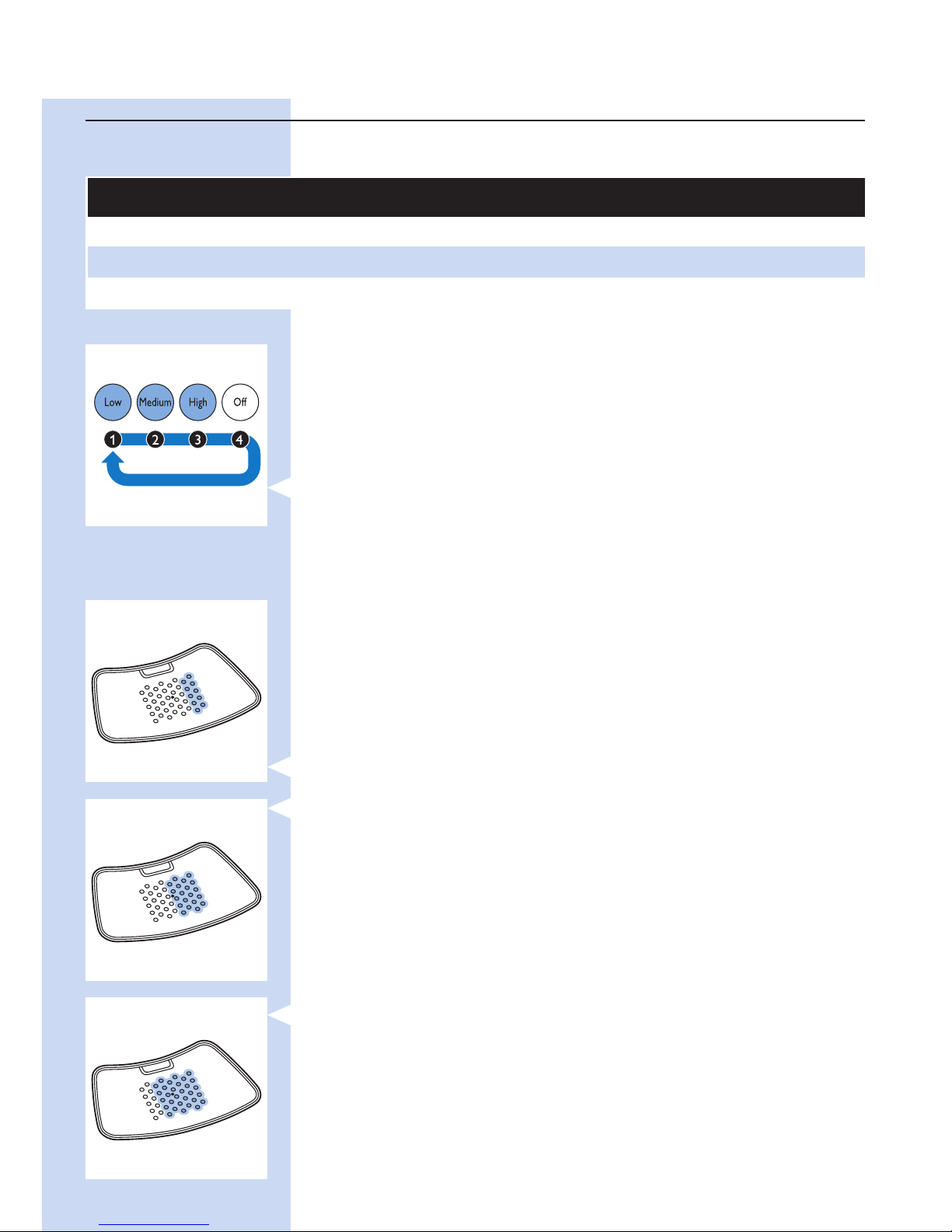
照射模式
照射模式、时长和强度
模式 每日照射次数和照射时长 强度
1:低 2 x 30 分钟。 50%
2:中 2 x 20 分钟。 75%
3:高 2 x 15 分钟。 100%
选择照射模式
BlueTouch Pain Relief Patch 具有 3 种模式和 OFF(关)档。
您需按一次或多次模式按钮以选择 3 种照射模式之一。
第 4 次按下模式按钮即可关闭 BlueTouch Pain Relief Patch。
1 模式 1(低):按 1 次
2 模式 2(中):按 2 次
3 模式 3(高):按 3 次
4 O (OFF)(关):按 4 次
注意: 如果想从模式 3 切换至模式 1 或 2 或从模式 2 切换至模式
1,则需根据达到要选择的模式所需的次数按模式按钮。
注意: 如果通过在 2 秒钟内切换 OFF(关)档选择其他模式,
则照射计时器不会根据新选定的照射模式进行重置,而是在切换至
其他模式的时间点继续倒计时。这意味着设备会根据新选定模式的
强度和照射时间重新计算剩余照射时间。例如,如果从模式 3 切换
至模式 1,模式 3 的剩余照射时间是 5 分钟,模式 1 的剩余照射时
间则为 10 分钟。模式 1 的照射强度是模式 3 的 50%,这意味着模
式 1 的照射时长是模式 3 照射时长的 2 倍。
照射强度
选择照射模式时可获得声光反馈。
, 在模式 1(低)下,2 排 LED 会亮起。BlueTouch Pain Relief
Patch 会发出 1 声蜂鸣音。
, 在模式 2(中)下,4 排 LED 会亮起。BlueTouch Pain Relief
Patch 会发出 2 声蜂鸣音。
, 在模式 3(高)下,6 排 LED 会亮起。BlueTouch Pain Relief
Patch 会发出 3 声蜂鸣音。
, 选择模式后,BlueTouch Pain Relief Patch 会以节能模式打开。
在该模式下,所有 LED 均以最低强度亮起。
, 将 BlueTouch Pain Relief Patch 放在皮肤上后,便会以所选模
式强度开始照射(模式 3 为 100%;模式 2 为 75%;
模式 1 为 50%)并提供声音反馈。
简体中文54
Page 55
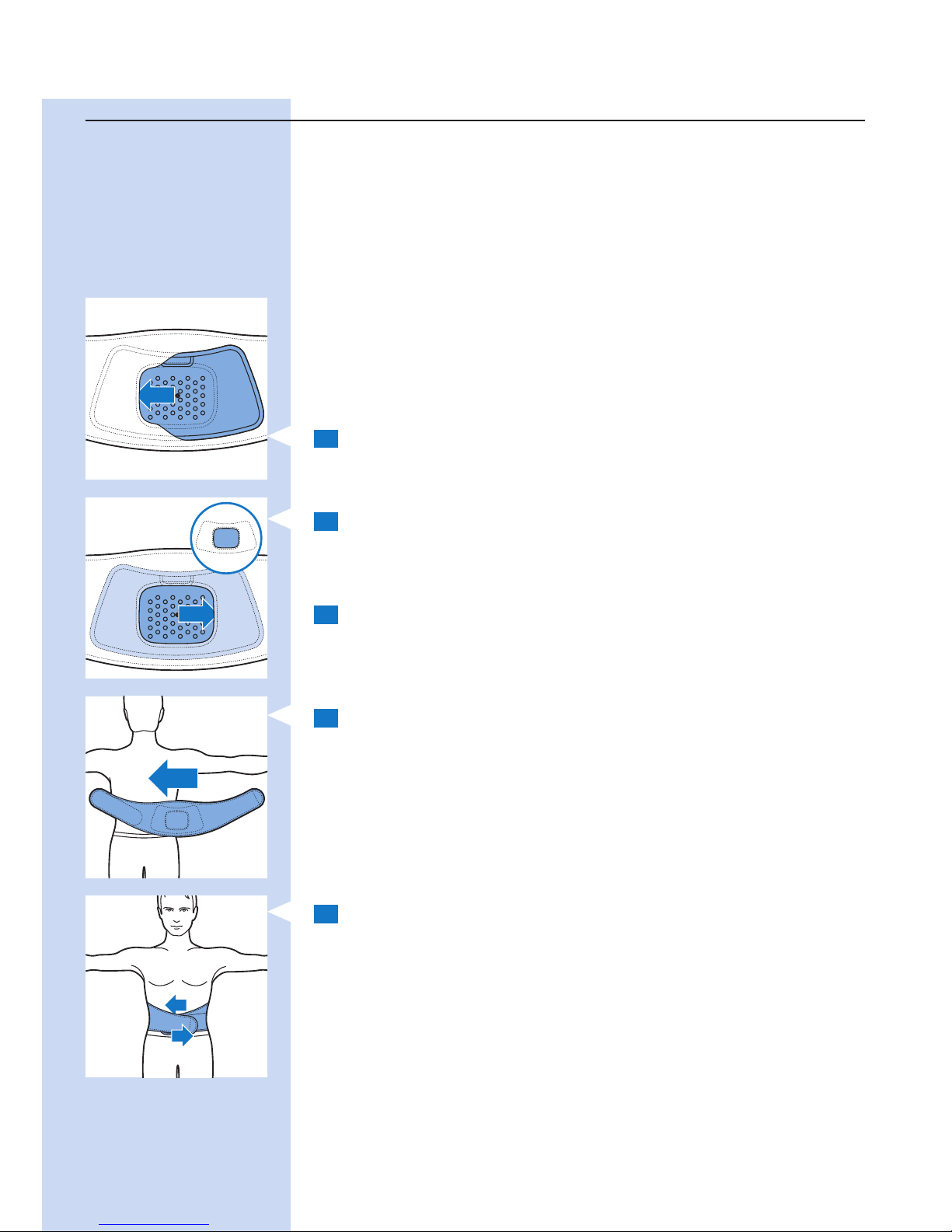
BlueTouch Pain Relief Patch 使用准备
将 Pain Relief Patch 固定在身体上的首选方法是使用专用
BlueTouch Pain Relief 绑带。绑带分为上背部照射专用绑带和下背
部照射专用绑带。
- 下背部绑带可以另购,其供应型号为 PR3083,
视您的尺码而定。
- 上背部绑带可以另购,其供应型号为 PR3081,
视您的尺码而定。
注意: 不要在 BlueTouch Pain Relief Patch 上覆盖多层衣物或绷紧
或较厚的衣物,以防止设备在照射完成前关闭。如果您穿着的衣物
太紧或太厚,红外传感器测得的温度会过高,从而关闭设备。
定位下背部绑带
要用绑带固定 BlueTouch Pain Relief Patch,请按照以下步骤操
作。
1 将下背部绑带和 BlueTouch Pain Relief Patch 放在您面前的桌
子上。将 BlueTouch Pain Relief Patch 的左侧滑入绑带开口松
紧带边缘的后面。
2 然后,将 BlueTouch Pain Relief Patch 的另一端滑入对应的松
紧带边缘后面,使整个理疗仪穿入下背部绑带。检查以确保绑
带材料未遮挡 LED。如有必要,可适当调整 BlueTouch Pain
Relief Patch 的位置。
3 脱掉要治疗部位的衣物。
注意: 确保要治疗部位的皮肤清洁、完全干燥且未使用乳霜、
润滑液和其他化妆品。
4 将下背部绑带连同 BlueTouch Pain Relief Patch 围着腰部缠
绕,绑带的开口面向背部。
5 用维可牢带将下背部绑带的两端绑定。
注意: 确保绑带中的 BlueTouch Pain Relief Patch 位于要治疗的部
位且 LED 区与皮肤接触。
简体中文 55
Page 56
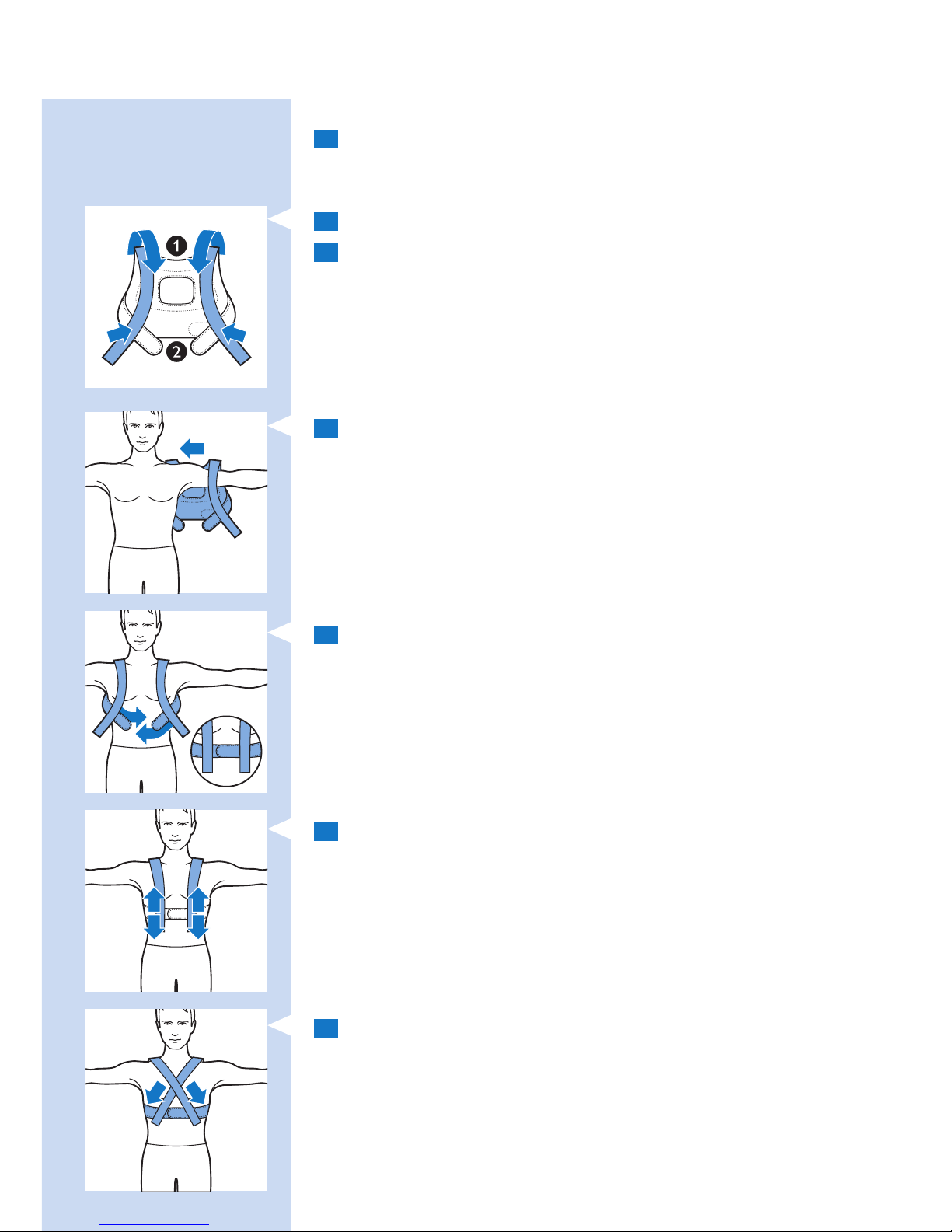
定位上背部绑带
1 要将 BlueTouch Pain Relief Patch 放入上背部绑带中,
请按照与上述“定位下背部绑带”部分中的步骤 1 和 2 中所述
相同程序进行操作。
2 将肩吊带向前拉 (1) 并将其固定至腰带上的维可牢带上 (2)。
3 脱掉要治疗部位的衣物。
注意: 确保要治疗部位的皮肤清洁、完全干燥且未使用乳霜、
润滑液和其他化妆品。
4 像穿夹克一样穿上上背部绑带。先将一只手臂穿过固定在腰带一
侧的肩吊带,然后在另一侧重复相同操作。
注意: 确保绑带中的 BlueTouch Pain Relief Patch 位于要治疗的部
位且 LED 区与皮肤接触。
5 用维可牢带固定腰带。
6 将肩吊带调节至所需长度。
7 或者,您可以先将上背部绑带放在背部,固定腰带后将肩吊带上
的维可牢带以交叉方式固定至腰带。对于某些人来说,这种方式
会更为贴合。
简体中文56
Page 57
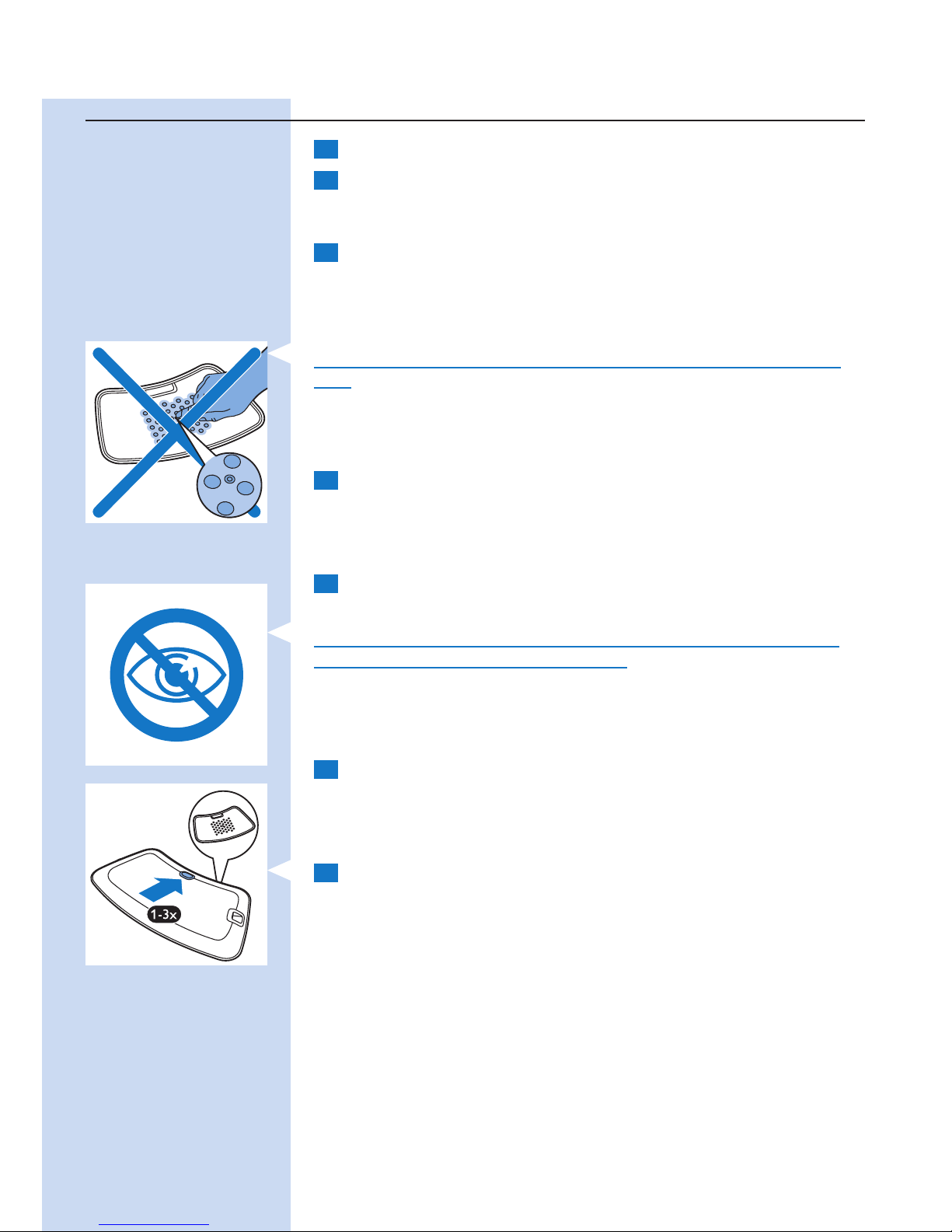
照射过程
1 按一次或多次模式按钮以选择 3 种照射模式之一。
2 选择照射模式(请参阅本章中的“选择照射模式”部分)
后,BlueTouch Pain Relief Patch 会发出蜂鸣音,所有 LED 均
以节能模式亮起。
3 将 BlueTouch Pain Relief Patch 置于皮肤上且理疗仪传感器检
测到最低 33°C 的温度至少持续 5 秒钟后即开始照射。
, 所有 LED 均以所选模式的强度亮起(请参阅本章中“照射模
式、时长和强度”部分)。
请勿在开机后有意触摸 BlueTouch Pain Relief Patch 中央的传感
器。
注意: 您也可以先将理疗仪置于背部后再按模式按钮选择照射模
式。在这种情况下,BlueTouch Pain Relief Patch 会在 5 秒钟内以
选定的模式打开。
4 到达选定模式的照射时间后,BlueTouch Pain Relief Patch
会自动关闭。有关照射时间,请参阅本章中“照射模式、
时长和强度”部分。
暂停照射
1 如果想暂停照射,只需将疼痛缓解理疗仪从皮肤上取下即可。
, BlueTouch Pain Relief Patch 的 LED 会自动切换回节能模式。
注意: 请勿直视 LED 发出的光,即使在 BlueTouch Pain Relief
Patch 处于节能模式以及暂停照射时。
注意: BlueTouch Pain Relief Patch 处于节能模式 10 分钟后会关
闭。
2 要在暂停后恢复照射,请将 BlueTouch Pain Relief Patch 重新
放在皮肤上。
, LED 会以选定的强度自动亮起,照射时间继续倒计时。
关闭
1 如果要在照射时间结束前关闭疼痛缓解理疗仪,按一次或多次模
式按钮,直至 LED 熄灭。
, 两种不同音调序列表示 BlueTouch Pain Relief Patch 已关闭。
注意: 在 BlueTouch Pain Relief Patch 关闭前按模式按钮的次数取
决于选定的模式。
简体中文 57
Page 58
护理之后
照射会在到达选定模式的照射时间后自动结束,除非您取下
BlueTouch Pain Relief Patch 并按模式按钮提前停止照射。
注意: 两种不同音调序列表示 BlueTouch Pain Relief Patch 已关
闭,照射已停止。
1 松开并从背部取下绑带。
2 从绑带上取下 BlueTouch Pain Relief Patch。
3 必要时为 BlueTouch Pain Relief Patch 充电(请参阅“电池电
量信号”部分)。
可能发生的反应和副作用
- 照射期间皮肤可能会稍稍变红是正常的。这种皮肤发红是由
BlueTouch Pain Relief Patch 加热引起血液循环增强造成的。
这种皮肤发红是无害的,照射停止后便会消失。
- 在某些情况下,照射后皮肤可能会呈褐色。这种褐色是由皮肤中
的黑色素集中造成的,与在阳光下暴晒的效果相似。这种褐色
是无害的,在 48 至 72 小时内会消失。推迟照射,直至褐色消
失。为防止皮肤呈褐色,以低光能模式恢复照射并避免在照射过
程中对 BlueTouch Pain Relief Patch 施加过大压力,例如坐、
躺或紧靠在器械上。
使用过程中的声光信号
过热信号
1 如果传感器测定温度过高,则 BlueTouch Pain Relief Patch
会出于安全原因关闭。
2 关闭后,如果在 10 分钟标准冷却时间内尝试重启 BlueTouch
Pain Relief Patch,则充电指示灯会呈红色闪烁 3 次。
3 10 分钟标准冷却时间过后可重新打开 BlueTouch Pain Relief
Patch,计时器会从停止时间点开始倒计时。
注意: 如果在 2 小时内未恢复照射,则计时器会自动重置。
重置信号
BlueTouch Pain Relief Patch 的软件不再响应或出现其他意外故障
时,可以重置 BlueTouch Pain Relief Patch。
1 用适配器将 BlueTouch Pain Relief Patch 连接至电源或将其连
接至电脑的 USB 端口。
2 按模式按钮 5 秒钟。
, 前两排 LED 先短暂亮起后熄灭,而后第三排和第四排 LED 会短
暂亮起后熄灭,接着第五排和第六排 LED 会短暂亮起后熄灭,
最后第七排和第八排 LED 会短暂亮起。
, 在此之后,BlueTouch Pain Relief Patc 会重置并重新正常工
作。
简体中文58
Page 59
电池电量信号
按下模式按钮后,充电指示灯会显示电池状态。当传感器检测到接
触皮肤后或设备关闭后,充电指示灯会熄灭。
1 当电池包含的电量足以完成一次照射或多次照射时,充电指示灯
会呈绿色持续亮起。
, 您可以选择模式并开始照射。
2 当电池包含的电量仅够完成一次照射时,充电指示灯会呈橙色持
续亮起。
, 您可以选择模式并只完成一次照射。
3 电池电量耗尽时,充电指示灯会呈红色持续亮起 5 秒钟,按模
式按钮时,BlueTouch Pain Relief Patch 会发出 3 声蜂鸣音。
, 您无法选择任何模式。必须为电池充电后才可开始照射。
清洁
切勿将 BlueTouch Pain Relief Patch 浸入水中或在水龙头下冲洗。
将绑带放入洗衣机清洗之前,请务必先从绑带上取下 BlueTouch
Pain Relief Patch。
1 用湿布清洁 BlueTouch Pain Relief Patch。
注意: 每次照射后用湿布清洁红外传感器,
以确保其能继续正常使用。
2 可用洗衣机清洗 BlueTouch Pain Relief Patch 绑带。
注意: 为防止损坏 BlueTouch Pain Relief Patch
绑带及其他衣物,将绑带放入细孔洗衣袋中洗涤。
注意: 使用轻柔周期和最高 30°C 水温清洗。将 BlueTouch Pain
Relief Patch 绑带晾干,不可甩干。切勿熨烫绑带。
简体中文 59
Page 60

环保
弃置产品时,请不要将其与一般生活垃圾扔在一起,应将其交给指
定的回收中心,这样做有利于环保。
保修和支持
如果您需要信息或支持,请访问 www.philips.com/support,
阅读单独的全球保修卡或联系飞利浦客户服务中心。其电话号码为:
- 英国:0844 338 0489(BT 固定电话通话 5 便士/分钟。
其他固定电话和移动服务提供商可能收费更多)。
- 香港:852 2619 9663(固定电话免费)。
保修条款
保修不含正常磨损。如果未按照本用户手册中的说明使用
BlueTouch 疼痛缓解理疗仪,则保修将失效。
制造商法定地址
Philips Consumer Lifestyle B.V.
Tussendiepen 4 9206 AD Drachten
The Netherlands
故障种类和处理方法
本章归纳了您在使用 BlueTouch Pain Relief Patch 时最常遇到的
问题。如果无法根据以下信息解决问题,请联系飞利浦。
问题 可能的原因 解决方法
BlueTouch Pain Relief
Patch 在照射期间突然
关闭。
预设照射时间已结束。 BlueTouch Pain Relief Patch 被设置为
达到选定照射模式下的照射时间后自动
关闭。
红外传感器被堵塞。 检查 Patch 在绑带中的位置。确保绑带
未遮挡红外传感器。如果红外传感器未被
遮挡但 BlueTouch Pain Relief Patch 仍
然关闭,则其可能已损坏。在此情况下,
请联系飞利浦。
皮肤温度过高。 检查是否穿着过多或照射期间 BlueTouch
Pain Relief Patch 上覆盖的衣物太厚。
BlueTouch Pain Relief
Patch 关闭且充电指示
灯呈红色闪烁。
皮肤温度过高。如果红
外传感器检测到温度过
高,则 BlueTouch Pain
Relief Patch 会关闭。
让 BlueTouch Pain Relief Patch 冷却
10 分钟。10 分钟后,LED 会以节能模
式亮起。将 BlueTouch Pain Relief Patch
重新放在皮肤上,继续进行照射。
充电指示灯呈红色
持续亮起 5 秒钟,
BlueTouch Pain Relief
Patch 发出蜂鸣音且无
法选择模式。
充电电池耗尽。 为 BlueTouch Pain Relief Patch 充电
(请参阅“充电”一章)。
充电指示灯呈橙色持续
亮起。
电池包含的电量足以完成
一次照射。
完成照射及使用后为 BlueTouch Pain
Relief Patch 充电(请参阅“充电”一
章)。
充电时适配器发热。 这是正常的。 不需要采取措施。
简体中文60
Page 61

问题 可能的原因 解决方法
当微型 USB 插头插
入接线面板上的微型
USB 插孔时,充电指
示灯未开始呈绿色闪
烁。
适配器未插入或未正确插
入电源插座。
将适配器正确插入电源插座。
标准 USB 插头未插入或
未正确插入适配器。
将标准 USB 插头正确插入适配器。
适配器插入的电源插座未
通电。
将其他产品连接至同一插座以检查插座
是否有电。如果插座有电但 BlueTouch
Pain Relief Patch 无法充电,请联系飞
利浦。
将 USB 线缆连接至电
脑后充电指示灯未开始
呈绿色闪烁。
微型 USB 插头未正确插
入微型 USB 插孔或标准
USB 插头未正确插入电
脑的 USB 端口。
将 USB 插头正确插入 USB 插孔并检查
电脑连接。确保电脑已开机。
标准 USB 插头未正确插
入电脑的 USB 端口。
将标准 USB 插头正确插入电脑的
USB端口。
插入 USB 线缆的笔记本
电脑的电池电量不足。
将笔记本电脑连接至电源。
BlueTouch Pain Relief
Patch 在使用时发热。
这是正常的。 不需要采取措施。
规格
型号 PR3092
额定电压(伏) 100-240
额定频率(赫兹) 50-60
额定输入(瓦) 15
级别 医疗器械 IIa 级
分类 第一级危险群
入水口 IP22
每日最大光剂量 (J/cm²) < 90,遵循照射方案时
电池类型 锂电池
简体中文 61
Page 62

操作条件
温度 从 +10°C 到 +35°C
相对湿度 从 30% 到 90%
存储条件
温度 从 -20°C 至 +35°C
相对湿度 从 30% 到 90%(非压缩)
简体中文62
Page 63

Page 64

Page 65

Page 66

4222.100.3119.1
 Loading...