

Page 1

PM435
Universal
Remote
Page 2

Table of Contents
Introduction
Introduction ...................................................... 3
Setup ............................................................... 4
Battery Installation ....................................... 4
Battery Saver ............................................... 4
Code Saver ................................................. 4
Power-On default ........................................ 5
TV Punch Through ....................................... 5
VCR Punch Through .................................... 5
Code Setup ................................................. 5
Button Functions ............................................... 6
Advanced DVD and SAT Button Functions ....... 8
TV/VCR Punch-Through ..................................9
TV/VCR and TV/DVD Combo units ................ 9
Code Entry ..................................................... 10
Direct Code Entry ...................................... 10
Code Search ............................................. 11
Code Identification ..................................... 12
Sleep Timer .................................................... 13
Code List ....................................................... 13
Product Operation .......................................... 18
Troubleshooting .............................................. 19
Congratulations on your purchase of Philips
Magnavox Universal Remote Control. Philips
Magnavox Universal Remotes let you replace a
broken or lost remote or combine more than one
remote into one.
This remote control operates the common features
of most but not all models and brands of IR
Infrared Controlled Video Equipment. This
remote may provide functions that are not
available on your equipment. Some functions of
your particular equipment (e.g. menu functions)
may not be controlled by this remote. In such
cases, use the original remote control for your
equipment. Please use this manual to become
familiar with your Philips Magnavox Universal
Remote. After you are familiar with your remote
the first thing you need to do is to install batteries
and setup your remote for your particular product
and brand.
Thank you for buying a Philips Magnavox remote
and we hope it will give you many years of
service.
32
Page 3

Setup
Battery Installation
1. On the back of the remote,
push down on the tab and
lift the cover off.
2. Match the batteries to the
+ and - marks inside the
battery case, then insert 2
AAA Alkaline batteries.
3. Press the battery cover
back into place.
Battery Saver
Your remote automatically
times out if the buttons are
depressed more than 30
seconds. This will save your
batteries should your remote
get stuck in a place where the
buttons remain depressed
(e.g., between the sofa
cushions).
Power-On Default
The remote powers on in TV mode.
TV Volume/Mute Punch-Through
The TV Volume/Mute punch-through feature lets you
control the Volume and Mute function of your TV in any
mode programmed to be a VCR, DVD, or SAT device,
without needing to change to TV mode.
VCR Punch-Through
Punch-through to VCR mode is only allowed in TV, and
VCR modes. SAT is dedicated for satellite mode.
Code Setup
The Code Search button is used to setup the remote.
You can either setup the remote using the code for your
brand of product, from the code tables, or you can
search through the library of codes until you find a
code that works for your product.
Code Saver
You will have up to 10 minutes to change the batteries
in your remote without losing codes you have
programmed. However, do not press any buttons until
batteries are installed in the remote. If buttons are
pressed without batteries in the remote, all codes will be
lost.
NOTE: You can store any kind of code under any mode
(except TV). I.E. you can store a VCR code under the
SAT key, or a DVD code under the VCR key, etc.
However, you can only store TV codes under the TV
key.
DVD
DVD
DVDDVD
VCR
VCR
Code Search.
CODE
CODE
CODECODE
SEARCH
SEARCH
SEARCHSEARCH
SLEEP
SLEEP
SLEEPSLEEP
VCRVCR
TV
TV
TVTV
CHAN
CHAN
CHANCHAN
MUTE
MUTE
MUTEMUTE
CCCCHHHHAAAANNNN
POWER
POWER
POWERPOWER
PIP
PIP
PIPPIP
TOGGLE
TOGGLE
TOGGLETOGGLE
SAT
SAT
SATSAT
++++
PREV
PREV
PREVPREV
CHAN
CHAN
CHANCHAN
VV
VO
V
OO
OL
LL
L
++
+
+
REPEAT
REPEAT
REPEATREPEAT
SUBTITLE
SUBTITLE
SUBTITLESUBTI TLE
CCCCCCCC
54
Page 4

Button Functions
Some buttons on the remote might have functions that
are referred to by different names on the device you are
controlling. E.G. Prev. Ch. may be called RECALL, or
ENTER may be called DISPLAY. These differences
depend on the brand and model of your product. Also,
this remote can only operate features that exist on your
product. E.G., your product must be equipped with Prev.
Ch. ability for the Prev. Ch. button to operate this
feature.
MUTE Turns off
the TV sound
while the
picture remains.
TV, VCR, DVD,
SAT Selects
product to be
operated.
Code Search
For setup.
POWER Turns
TV
TV
TVTV
product On or Off.
SLEEP Turns off the
TV after a period of 1
CODE
CODE
CODECODE
SEARCH
SEARCH
SEARCHSEARCH
to 99 minutes.
PIP TV Picture-in-
SLEEP
SLEEP
SLEEPSLEEP
Picture control.
NUMBERS
Enter numbers for direct
channel selection. Some
products require Enter to
be pressed after channel
selection.
ENTER
Used after direct
channel number
INFO/
INFO/
INFO/INFO/
SELECT
SELECT
SELECTSELECT
entry to immediately
change to the
MENU
MENU
MENUMENU
selected channel.
INFO/Select
SSSSCCCCAAAANNNN
displays/selects
on-screen channel
information, etc.
MENU Access the
Menu functions of
the device you are
controlling.
OK
Selects menu items for the
device you are controlling.
Note: The REC button must be pressed TWICE to record
from your VCR. For some brands of VCRs, you might
need to press the REC button once, then press it again
for three seconds.
Indicator light
Lights when any
button is pressed.
DVD
DVD
DVDDVD
VCR
VCR
VCRVCR
++++
CHAN
CHAN
CHANCHAN
VV
VO
V
OO
OL
LL
L
MUTE
MUTE
MUTEMUTE
++
+
+
CCCCHHHHAAAANNNN
POWER
POWER
POWERPOWER
PIP
PIP
PIPPIP
TOGGLE
TOGGLE
TOGGLETOGGLE
INPUT
INPUT
INPUTINPUT
TV/VCR
TV/VCR
OK
OK
OKOK
CHAPTE R
CHAPTE R
CHAPTE RCHAPTE R
PLAY
PLAY
PLAYPLAY
STOP
STOPREC
STOPSTOP
TV/VCRTV/VCR
++++
SCAN
SCAN
SCANSCAN
PAUSE
PAUSEPAUS E
ENT ER
ENT ER
ENT EREN TER
REC PAUSE
RECREC
GUI DE
GUI DE
GUI DEGUI DE
QUI T
QUI T
QUI TQUIT
CCCCCCCC
++++
SAT
SAT
SATSAT
PREV
PREV
PREVPREV
CHAN
CHAN
CHANCHAN
REPEAT
REPEAT
REPEATREPEAT
SUBTITLE
SUBTITLE
SUBTITLESUBTI TLE
Button Functions, cont.
CHANNEL Up/
Down Changes
the channels.
VCR
VCR
VCRVCR
TV
TV
TVTV
CODE
CODE
CODECODE
SEARCH
SEARCH
SEARCHSEARCH
SLEEP
SLEEP
SLEEPSLEEP
PIP
PIP
PIPPIP
ENT ER
ENT ER
ENT EREN TER
INFO/
INFO/
INFO/INFO/
SELECT
SELECT
SELECTSELECT
MENU
MENU
MENUMENU
SSSSCCCCAAAANNNN
REC PAUSE
RECREC
CHAPTER +/- controls DVD
track selection i.e. DVD Track
Skip Up/Down (in DVD and
SAT modes). Note the VCR
Transport keys also control
DVD when in DVD Mode.
VOLUME Up/
Down Changes the
volume level of
the product,
normally the TV.
DVD
DVD
DVDDVD
++++
CHAN
CHAN
CHANCHAN
VV
VO
V
OO
OL
LL
L
MUTE
MUTE
MUTEMUTE
++
+
+
CCCCHHHHAAAANNNN
POWER
POWER
POWERPOWER
TOGGLE
TOGGLE
TOGGLETOGGLE
INPUT
INPUT
INPUTINPUT
TV/VCR
TV/VCR
TV/VCRTV/VCR
OK
OK
OKOK
QUI T
QUI T
QUI TQUIT
++++
CHAPTE R
CHAPTE R
CHAPTE RCHAPTE R
SCAN
SCAN
PLAY
PLAY
SCANSCAN
PLAYPL AY
STOP
STOPREC
PAUSE
STOPSTOP
PAUSEPAUS E
CCCCCCCC
GUI DE
GUI DE
GUI DEGUI DE
++++
SAT
SAT
SATSAT
PREV
PREV
PREVPREV
CHAN
CHAN
CHANCHAN
REPEAT
REPEAT
REPEATREPEAT
SUBTITLE
SUBTITLE
SUBTITLESUBTI TLE
Prev. Ch.
Returns to the
previously
selected channel,
or DVD repeat
toggle.
CC (Subtitle)
TV Closed
Caption (if your
TV has this
feature) or DVD
Subtitle toggle.
TOGGLE Swaps
TV PIP screens.
TV/VCR/input toggle
For some TVs, press
repeatedly to select
from available viewing
sources (antenna,
VCR, etc.).
GUIDE displays
on-screen
program guide.
QUIT Used to exit
menu functions.
RECORD, PLAY,
STOP, REW, FF,
PAUSE VCR control
buttons operate
your VCR even
when the remote is
set to operate the
TV. Also operates
DVD Scan -/+.
76
Page 5

Advanced Button Functions
DVD
Scan+ and Scan- buttons control the speed of Fast
Forward and Reverse Playback respectively.
Chapter+ and Chapter- buttons respectively locate the
succeeding or preceding Chapters or Tracks on a disc.
Subtitle button brings up DVD Subtitle Menu for
Subtitle selection and display.
Repeat button performs DVD players “A-B Repeat” (or
RPT A.B) function for repeat play of current Chapter or
Track.
Info/Select button brings up DVD Display or Control
Menu for Chapter/Track/Title number, Time remaining/
elapsed indication, system information, etc.
Menu brings up the DVD disc Menu screen - use with
the Up, Down, Left & Right navigation buttons.
OK button is used for on-screen Menu selection. Note
some DVD players require the Play button to be used.
Quit button is used to Exit or Clear on-screen Menu
displays.
Play button is used to start Disc playback and for Menu
selection on some DVD players.
Stop button stops Disc playback.
Pause button will pause Disc playback - press Play to
resume.
Note - in DVD Mode the INPUT button activates the
DVD Players SETUP Menu.
SAT
Guide button displays on-screen Satellite Channel
Guide.
Chapter+ and Chapter- buttons perform the “Page+”
and “Page-” function for on-screen Guide Menus used
by some Satellite systems.
Info/Select button brings up Satellite Display screen for
current Channel and system information.
Menu brings up the Satellite Menu screen - use with the
Up, Down, Left & Right navigation buttons.
OK button is used for on-screen Menu selection.
Quit button is used to Exit or Clear on-screen Menu
displays.
Input button performs the Satellite TV/SAT function.
TV/VCR Punch-Through
VCR Punch-through is only available in TV mode, i.e. the
6 VCR keys (Play, Pause, Stop, Record, FF and Rewind)
will punch-through to the device programmed under
VCR when in TV mode.
The TV/VCR/INPUT button performs the TV/VCR
antenna switch function when in VCR Mode.
The TV/VCR/INPUT button performs the TV/SAT
switch function when in SAT Mode.
The TV/VCR/INPUT button performs the INPUT source
switch function when in TV Mode.
The TV/VCR/INPUT button performs the DVD Setup
function when in DVD Mode.
Misc.
SELECT means same as OKAY - some manufacturers
use OKAY label and others use SELECT label on their
remotes.
CC will activate the Closed Caption feature if your
device has that feature.
PIP (Picture-in-Picture) and TOGGLE buttons operate
your television’s Picture-in-Picture features. Use PIP to
activate the feature and TOGGLE to swap between the
displayed pictures on your TV.
TV/VCR and TV/DVD Combo units
Note that for some TV/VCR and TV/DVD combo units
you might need to set up two different buttons to
control both parts of the combo unit. E.G., (referring to
the Direct Code Entry section on the following page)
you might need to set up a code under the TV button to
control the TV part of the combo unit AND a separate
code for the VCR or DVD under any other button you
choose.
98
Page 6
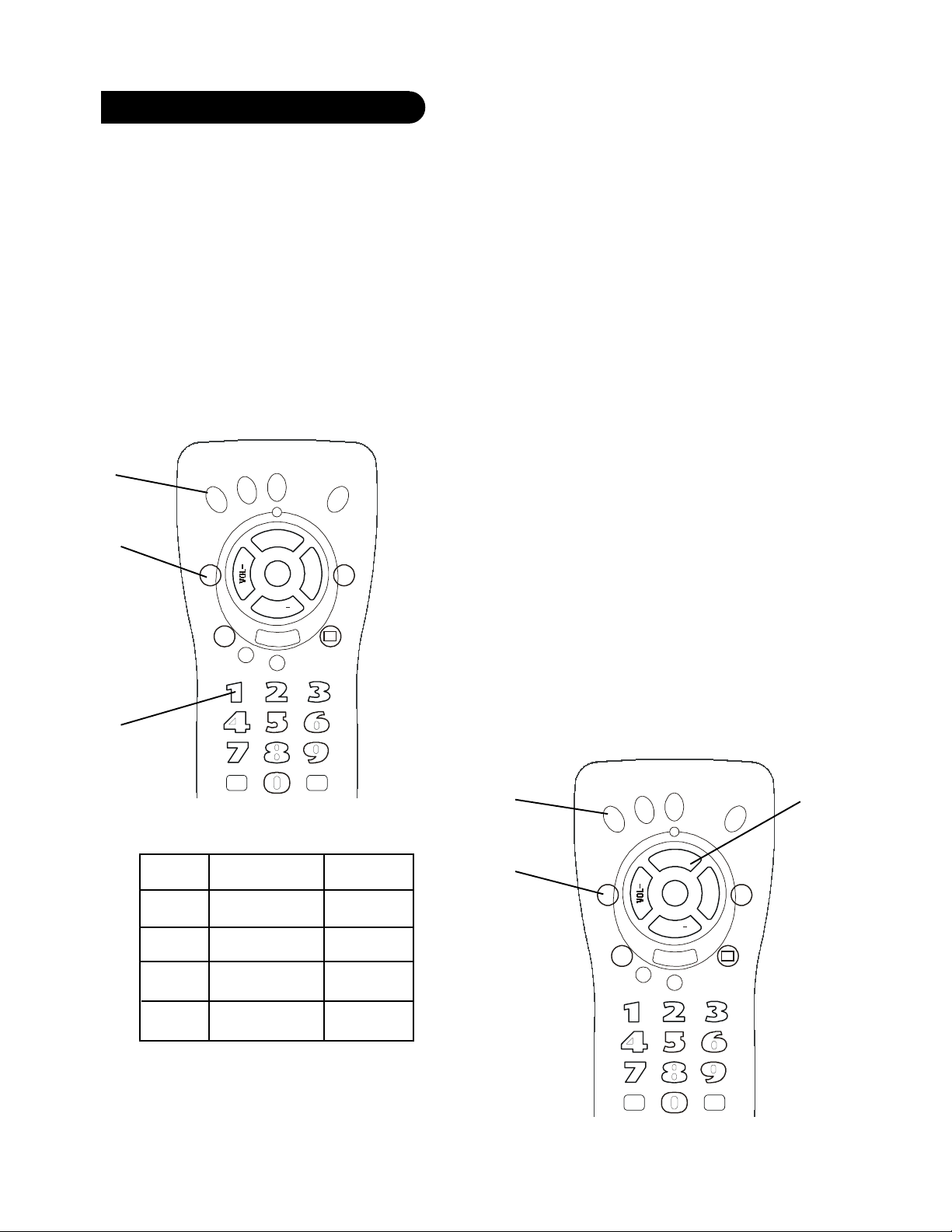
Code Entry
Direct Code Entry
1. Press and hold the Code Search button until the red
indicator stays on. Release the Code Search button.
2. Press and release the desired mode button (TV, VCR,
etc.).
The red indicator blinks, then stays lit.
3. Enter the 3 digit code from the code tables. Note:
after a valid code entry, the red indicator turns off.
For an invalid code, the red indicator flashes.
4. With your device on, press CHANNEL Up. If the
device responds, no further programming is
required. Note: If some buttons do not operate your
equipment, try one of the other codes for your
brand.
2.
TV
TV
TVTV
1.
CODE
CODE
CODECODE
SEARCH
SEARCH
SEARCHSEARCH
SLEEP
SLEEP
SLEEPSLEEP
3.
Write your codes down here for easy reference later.
ENT ER
ENT ER
ENT EREN TER
VCR
VCR
VCRVCR
PIP
PIP
PIPPIP
DVD
DVD
DVDDVD
CHAN
CHAN
CHANCHAN
MUTE
MUTE
MUTEMUTE
CCCCHHHHAAAANNNN
POWER
POWER
POWERPOWER
TOGGLE
TOGGLE
TOGGLETOGGLE
SAT
SAT
SATSAT
++++
VV
VO
V
OO
OL
LL
L
++
+
+
INPUT
INPUT
INPUTINPUT
TV/VCR
TV/VCR
TV/VCRTV/VCR
CCCCCCCC
PREV
PREV
PREVPREV
CHAN
CHAN
CHANCHAN
REPEAT
REPEAT
REPEATREPEAT
SUBTITLE
SUBTITLE
SUBTITLESUBTI TLE
Programming with Code Search
If your device does not respond after you have tried all
the codes for your brand, or if your brand is not listed,
try searching for your code by following these steps.
1. Manually turn on the device (TV, VCR, etc.) to be
controlled.
2. Press and hold Code Search button until the red
indicator stays on. Release the Code Search button.
3. Press and release the desired mode button (TV, VCR,
etc.). The red indicator blinks, then stays lit.
4. Press the Channel Up button repeatedly (up to 300
times) until the device to be controlled changes
channel. The red indicator blinks, then stays lit. If
you accidentally overshoot the code required, press
the Channel Down button to backtrack through the
library until the device changes channel. Pressing
Channel Up changes direction to forward again.
Press and release Mute to install the code.
The above assumes that you want to store VCR codes
under the VCR button, DVD codes under DVD, etc. If
you want to store a VCR code under DVD, etc., first
follow the procedure on page 10 and try ANY DVD code
from the code tables, e.g. press DVD in step 2, page 10,
and then enter ANY VCR code. Then follow the steps
above.
Note: If the device does not have a Channel Up button,
use Play (VCR only) or Power instead. Code Search
starts from the currently stored three digit number
under that mode.
3.
TV
TV
TVTV
VCR
VCR
VCRVCR
DVD
DVD
DVDDVD
SAT
SAT
SATSAT
4.
Type Type stored Code
TV TV
VCR
DVD
SAT
++++
CHAN
CHAN
ENT ER
ENT ER
ENT EREN TER
CHANCHAN
MUTE
MUTE
MUTEMUTE
CCCCHHHHAAAANNNN
POWER
POWER
POWERPOWER
PIP
PIP
PIPPIP
TOGGLE
TOGGLE
TOGGLETOGGLE
VV
VO
V
OO
OL
LL
L
++
+
+
INPUT
INPUT
INPUTINPUT
TV/VCR
TV/VCR
TV/VCRTV/VCR
CCCCCCCC
PREV
PREVPREV
CHAN
CHAN
CHANCHAN
REPEAT
REPEAT
REPEATREPEAT
SUBTITLE
SUBTITLE
SUBTITLESUBTI TLE
PREV
2.
CODE
CODE
CODECODE
SEARCH
SEARCH
SEARCHSEARCH
SLEEP
SLEEP
SLEEPSLEEP
1110
Page 7
Code Identification
Sleep Timer
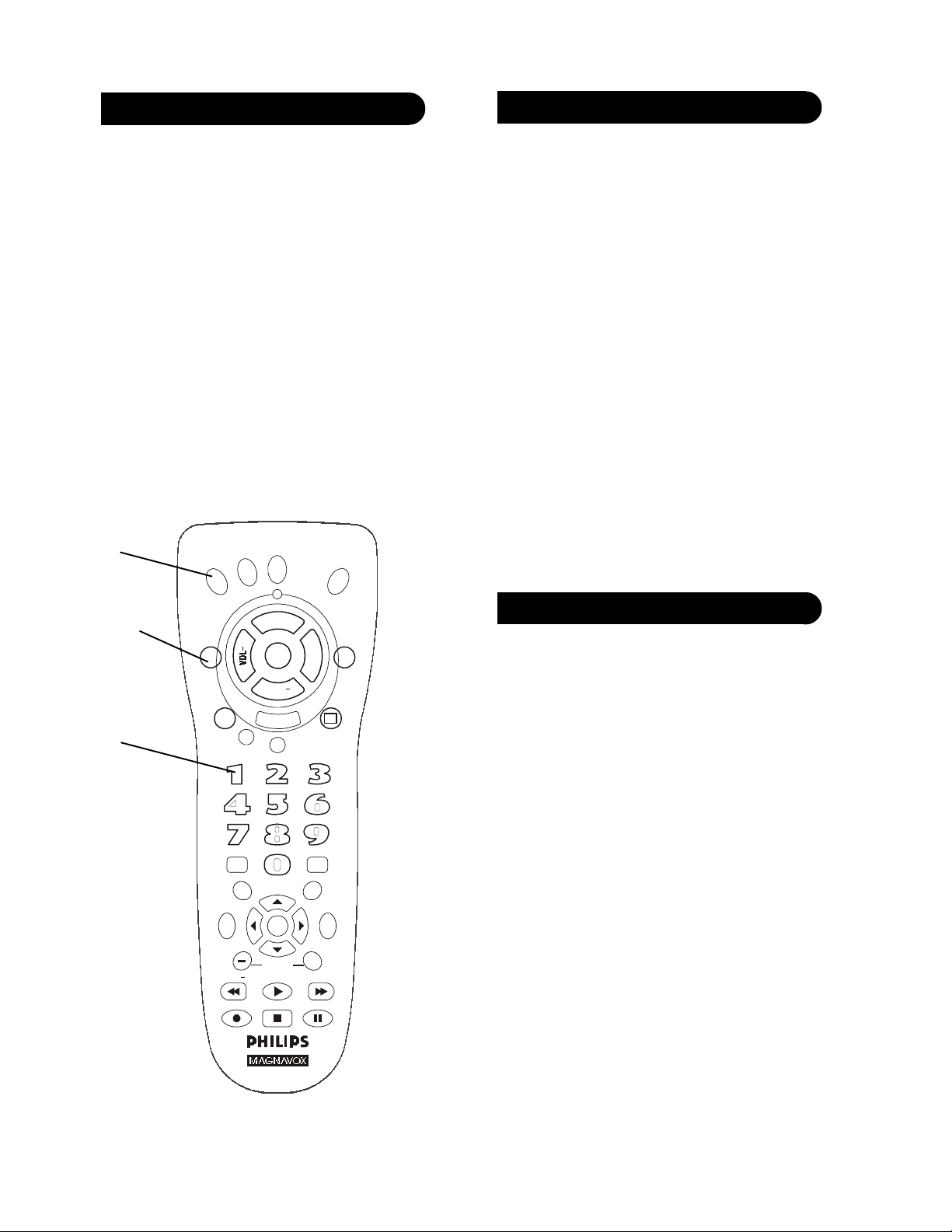
Code Identification
1. Press and hold Code Search button until the red
indicator stays on. Release the Code Search button.
2. Press and release the desired mode button (TV, VCR,
etc.).
The red indicator blinks, then stays lit.
3. Press and release the Code Search button. The
indicator light blinks off.
4. To find the first digit for the code stored under the
mode key pressed in step 2, press each numeric key
from 0-9 in turn. When the indicator light blinks off
the number you pressed is the first digit for the code
you are searching for.
5. To find the second digit, repeat step 4, this time
when the indicator light blinks off this is the second
digit.
6. Repeat step 4 again to find the third digit.
2.
DVD
DVD
DVDDVD
VCR
VCR
1, 3.
4.
VCRVCR
TV
TV
TVTV
CODE
CODE
CODECODE
SEARCH
SEARCH
SEARCHSEARCH
SLEEP
SLEEP
SLEEPSLEEP
PIP
PIP
PIPPIP
ENT ER
ENT ER
ENT EREN TER
INFO/
INFO/
INFO/INFO/
SELECT
SELECT
SELECTSELECT
MENU
MENU
MENUMENU
SSSSCCCCAAAANNNN
REC PAUSE
RECREC
CHAN
CHAN
CHANCHAN
MUTE
MUTE
MUTEMUTE
CCCCHHHHAAAANNNN
POWER
POWER
POWERPOWER
TOGGLE
TOGGLE
TOGGLETOGGLE
OK
OK
OKOK
CHAPTE R
CHAPTE R
CHAPTE RCHAPTE R
PLAY
PLAY
PLAYPL AY
STOP
STOPREC
STOPSTOP
SAT
SAT
SATSAT
++++
VV
VO
V
OO
OL
LL
L
++
+
+
INPUT
INPUT
INPUTINPUT
TV/VCR
TV/VCR
TV/VCRTV/VCR
CCCCCCCC
GUI DE
GUI DE
GUI DEGUI DE
QUI T
QUI T
QUI TQUIT
PREV
PREV
PREVPREV
CHAN
CHAN
CHANCHAN
REPEAT
REPEAT
REPEATREPEAT
SUBTITLE
SUBTITLE
SUBTITLESUBTI TLE
++++
++++
SCAN
SCAN
SCANSCAN
PAUSE
PAUSEPAUS E
The Sleep feature enables the remote to turn off the TV
after a period of 1 to 99 minutes. Remote is to be in TV
mode to set a Sleep Timer. This feature works even if
your TV does not have this feature.
1. Press and release the TV Mode key.
2. Press and hold the Sleep button until LED remains
on (occurring after approx. 2-3 seconds).
3. Release Sleep button.
4. Press and release the numeric keys (01-99) for the
time required. The LED will blink off to indicate
keypress acceptance and remain off after second
keypress.
5. TV Sleep Timer now set.
6. Leave the Remote pointing towards the TV with an
unobstructed path.
To cancel the Sleep Timer, press and hold the Sleep key
until the LED blinks or press and release the Power key
in TV Mode.
Code List
TV
ABEX ................................. 1 2 0
ADMIRAL ................. 701 918
ADVENTURA .................. 0 1 9
AIKO ................................. 407
AI WA ..........................121 221
ALLERON ........................ 206
AMARK ............................. 603
AMTRON.......................... 90 6
AKAI ................................. 801
AMSTRAD ........................ 5 2 0
ANAM NATIONAL .104 805
............................. 901 906 920
AOC ............ 002 003 102 119
..................... 217 302 502 814
ARCHER ........................... 6 0 3
AUDIOVOX ...................... 906
BANG & OLUFSEN ......... 62 0
BELCOR ............................ 002
BELL & HOWELL .......... 5 0 6
..................................... 601 701
BRADFORD ...................... 9 0 6
BROKSONIC ..............215 316
BROKWOOD .................... 002
CANDLE .... 002 019 402 502
CAPEHART...................... 11 9
CELEBRITY ..................... 8 0 1
CENTURION .................... 502
CETRONIC ....................... 8 0 5
CITIZEN ....002 112 319 402
..... 407 502 512 701 805 906
CLAIRTONE .................... 0 0 3
CLASSIC ............................ 8 05
CL P .................................... 0 2 1
CLP CLASSIC .... 018 004 002
COLORTYME ... 002 502 602
CONCERTO ...............002 502
CONCIERGE ..................... 713
CONTEC/CONY ....... 003 802
............................. 805 902 906
CRAIG ......................... 805 906
CROWN ...................... 805 906
CURTIS MATHES ............ 0 0 2
..................... 103 112 502 506
..................... 512 601 701 704
CXC .............................805 906
DAEWOO .......... 002 102 110
..................... 214 303 311 314
............. 403 407 415 502 503
............. 611 614 805 809 909
DAYTRON .................002 502
DIMENSIA .................601 704
DUMONT ..................002 713
DYNASTY ........................ 8 0 5
ELEKTRA ........................ 70 1
ELECTROBAND ...... 003 801
ELECTROHOME .....002 502
............................. 803 901 914
1312
Page 8

EMERSON ......... 002 003 004
..... 005 104 105 106 115 204
..... 205 206 213 304 305 316
..... 319 405 502 505 506 519
..... 604 605 705 804 805 903
............................. 904 905 906
ENVISION ..................002 502
FISHER 506 522 606 619 902
FUJITSU .....................206 321
FUNAI ................ 206 805 906
FUTURETEC ............805 906
GE ........ 002 006 007 018 107
..... 114 310 312 502 601 704
..... 719 803 806 810 901 911
GIBRALTER .............. 002 713
GOLDSTAR 002 102 117 207
............. 217 307 502 818 914
GRUNDY ....................206 906
HALLMARK ............. 002 502
HARVARD ......................... 9 0 6
HITACHI.... 002 016 116 216
............. 315 410 502 507 515
............. 519 607 615 622 701
..... 707 710 715 815 902 915
IMA .................................... 9 0 6
INFINITY ......................... 8 0 7
INTEQ ............................... 713
JANEIL .............................. 0 1 9
JBL ..................................... 8 0 7
JCB ..................................... 80 1
JC PENNY ......... 002 007 102
..................... 107 112 310 312
............. 402 502 512 601 704
............. 719 803 806 818 907
JENSEN ......................002 502
JVC ...................... 007 107 108
..................... 308 510 607 902
KAWASHO ......... 002 502 801
KAYPANI .......................... 119
KEC .................................... 80 5
KENWOOD ....... 002 502 914
KLOSS NOVABEAM ....... 019
..................................... 408 508
KONKA ......................203 208
..................... 219 306 317 417
KTV .................... 003 213 319
..................... 608 703 805 906
LODGENET .............. 601 701
LOEWE ......................722 807
LOGIK ........................ 601 701
LUXMAN ................... 002 502
LX I .............. 002 312 502 506
............. 512 601 704 719 807
MAGNAVOX ..... 002 009 109
............. 118 209 309 402 408
..... 502 508 510 807 914 917
MAJESTIC ................. 601 701
MARANTZ ........ 002 502 807
MEGATRON ......002 502 507
ME I .................................... 0 0 3
MEMOREX 002 115 206 502
..................... 506 601 701 706
MGA .................... 002 102 206
..................... 502 619 803 914
MIDLAND ......... 007 107 312
............................. 713 719 818
MINUTZ ........................... 80 6
MITSUBISHI ............. 002 102
..................... 206 502 510 619
..................... 709 803 814 914
MONTGOMERY WARD 60 1
............................................ 70 1
MOTOROLA .............901 918
MTC ....................002 003 102
............................. 112 502 512
MULTITECH ................... 9 0 6
MULTIVISION ................. 0 1 0
NAD ............ 002 120 502 512
NEC ............. 002 102 110 111
..................... 502 510 602 901
NIKEI ................................ 8 05
NIKKO ............... 002 407 502
NT C ................................... 407
ONKING ............................ 8 0 5
ON WA ........................ 805 906
OPTIMUS ..................120 618
OPTONICA ...............111 918
ORION ................105 115 713
PANASONIC ...... 007 107 416
..... 516 608 618 718 807 901
PHILCO ...... 002 009 102 109
..................... 309 402 408 502
..................... 508 807 901 914
PHILIPS ..... 002 009 020 109
............. 122 202 209 210 222
............. 310 322 402 408 422
............. 508 510 807 822 901
..................... 914 917 919 922
PHILIPS/MAGNAVOX ... 020
............................. 422 919 922
PILOT ............................... 00 2
PIONEER ...................002 120
............................. 502 519 610
PORTLAND ..............002 102
..................................... 407 502
PRECISION ....................... 2 1 8
PRICE CLUB .................... 11 2
PRISM ................................ 1 0 7
PROSCAN .. 312 601 704 719
PROTON ............ 002 119 220
............................. 502 820 910
PULSAR ............................ 713
PULSER ............................. 0 0 2
QUASAR .... 007 107 416 516
............. 608 618 718 807 901
RADIO SHACK/REALISTIC .
............. 002 021 111 117 406
............. 502 506 601 618 704
............. 705 805 818 906 914
RCA ..... 002 021 011 102 211
..... 302 312 318 320 406 409
..... 411 420 502 511 514 519
..... 601 702 711 719 809 811
............. 901 909 911 912 914
RHAPSODY ...................... 0 0 3
RUNCO .............................. 7 1 3
SAMPO ....... 002 119 502 818
SAMSUNG .. 002 012 102 103
..... 112 212 502 512 818 914
SAMSUX ........................... 50 2
SANSUI .......................115 215
SANYO ............... 002 412 506
..................... 522 612 619 902
SCOTCH .....................002 502
SCOTT ............... 002 004 105
..................... 206 502 805 906
SEARS . 002 112 206 312 502
............. 506 512 520 601 612
............. 619 704 719 902 914
SHARP 002 013 014 111 502
..... 509 712 812 813 913 918
SHOGUN ........................... 00 2
SIGNATURE ...... 601 701 903
SIMPSON .......................... 4 0 2
SONIC ................................ 00 3
SONY .......... 202 414 708 801
SOUNDESIGN ... 002 206 402
............................. 502 805 906
SPECTRAVISION ............ 92 1
SQUAREVIEW ................. 5 2 0
SSS ....................... 002 805 906
STARLITE ........................ 9 0 6
SUPREMACY ................... 019
SUPREME ......................... 8 0 1
SYLVANIA ......... 002 009 109
............. 209 309 402 408 502
............. 508 717 807 914 917
SYMPHONIC .....520 904 906
TANDY ............................. 9 1 8
TATUNG ........................... 90 1
TECHNICS .................007 107
TECHWOOD............. 002 007
..................................... 107 502
TEKNIKA .. 002 019 102 112
..... 206 209 402 407 502 512
..... 601 618 701 805 902 906
TELECAPTION .............. 3 1 3
TELERENT ............... 601 701
TERA .......................... 002 220
TM K ...........................002 502
TOSHIBA ...112 313 413 419
..... 506 510 512 517 613 902
UNIVERSAL .............. 310 806
VICTOR ............................. 607
VIDTECH ........... 002 102 502
VIKING .............................. 0 1 9
WARDS ....... 002 004 009 102
............. 109 111 206 209 310
............. 408 502 508 513 601
............. 701 704 806 807 914
WHITE WESTINGHOUSE ...
..................................... 311 611
YAMAHA ... 002 102 502 914
ZENITH .............002 008 115
..................... 215 405 407 507
............. 601 701 713 903 916
VCR
ADMIRAL ........................ 224
ADVENTURA .................. 7 2 6
AIKO ................................. 826
AI WA .......... 126 324 528 726
AKAI .......... 027 235 335 424
..................... 524 624 724 924
ALLEGRO ..........326 534 925
AMERICAN HIGH .... 130 226
ASHA ................................. 42 5
AUDIO DYNAMICS . 025 436
AUDIOVOX ...................... 525
DAEWOO ......................... 5 2 9
BELL & HOWELL .......... 428
BEAUMARK .................... 425
BROKSONIC ..............227 325
............................. 530 626 632
CALIX ............................... 52 5
CANDLE ............ 025 026 425
..................... 525 625 725 825
CANNON ... 130 226 535 635
CAPEHART............... 135 534
CARVER ............................ 3 3 0
CCE ............................. 230 826
CITIZEN ....025 026 425 525
..................... 625 725 825 826
COLORTYME .................. 0 2 5
CO LT ................................. 230
CRAIG ......... 230 425 426 525
CURTIS MATHES ............ 0 2 5
..................... 124 130 226 324
..................... 425 526 635 725
CYBERNEX ...................... 425
DAEWOO ..026 135 625 626
..................... 726 825 826 926
DAYTRON ........................ 135
DBX ............................ 025 436
DIMENSIA ........................ 1 2 4
DYNATECH .............. 324 726
ELECTROHOME .....027 525
ELECTROPHONIC ......... 5 2 5
EMERSON ......... 027 028 127
............. 128 130 226 227 228
............. 324 325 327 427 428
............. 525 526 527 528 625
..... 626 627 628 630 634 724
..... 726 727 735 827 828 927
FISHER ....... 025 029 129 328
..................... 330 426 428 928
FUJI .....................130 226 524
FUNAI ................ 324 726 924
GARRARD ........................ 7 26
GE ................ 124 130 136 226
..................... 425 429 635 835
GOLDSTAR ........ 025 236 525
GRADIENTE .................... 7 2 6
GO-VIDEO ......... 139 438 537
HARLEY DAVIDSON ..... 7 2 6
HARMAN KARDON 025 930
HARWOOD....................... 230
HEADQUARTER ............. 428
HITACHI.... 136 235 324 336
............. 538 629 638 829 834
HI-Q ................................... 4 2 6
INSTANT REPLAY ......... 13 0
..................................... 226 924
INTEQ ............................... 525
JCL .............................. 130 226
JC PENNEY .......025 130 235
..................... 425 428 436 525
..................... 629 635 834 935
JENSEN ...................... 235 629
JVC ...................... 025 235 239
..................... 326 339 428 436
1514
Page 9

KENWOOD ...............025 235
............................. 428 436 725
KLH ............................230 237
KODAK ..............130 226 525
LLOYD ....................... 324 726
LOGIK ............................... 23 0
LX I ..................................... 52 5
MAGNAVOX ..... 130 226 330
..................... 534 536 635 734
MAGNIN ........................... 42 5
MARANTZ ........ 025 130 226
..... 330 428 436 530 535 725
MARTA ............................. 525
MATSUSHITA ........... 130 226
ME I ............................. 130 226
MEMOREX ........ 130 224 226
..................... 324 335 425 426
..................... 428 525 534 726
MGA ............................ 027 630
MGN TECHNOLOGY ..... 42 5
MIDLAND ........................ 4 2 9
MINOLTA .................. 629 834
MITSUBISHI ..... 027 031 131
............. 229 231 329 431 436
............. 531 629 630 730 930
MONTGOMERY WARD 22 4
............................................ 63 1
MOTOROLA ..... 130 224 226
MTC ....................324 425 726
MULTITECH ............324 425
............................. 726 429 230
NEC ..... 025 235 428 526 530
............. 725 731 831 931 436
NIKKO .............................. 525
NOBLEX ........................... 4 2 5
OLYMPUS ................. 130 226
OPTIMUS .......... 035 224 525
..................... 537 737 837 937
OPTONICA ...............537 631
ORION ............................... 2 2 7
PANASONIC ...... 035 039 130
............. 226 635 636 937 938
PENTAX .... 136 629 725 834
PENTEX RESEARCH ..... 02 5
PHILCO ...... 130 226 330 635
PHILIPS ............. 130 226 330
..................... 430 434 439 536
............. 631 734 738 934 937
PHILIPS/MAGNAVOX ... 43 4
............................................ 93 4
PILOT ............................... 5 25
PIONEER ... 132 232 436 629
PORTLAND ..............026 135
..................................... 725 825
PROSCAN ......................... 124
PROTEC ........................... 23 0
PULSAR ............................ 53 4
QUARTER ........................ 4 28
QUARTZ ........................... 4 2 8
QUASAR .................... 039 130
............................. 635 636 937
RCA ..... 033 124 130 133 136
............. 226 233 332 424 425
............. 432 532 629 636 732
............. 832 834 835 837 932
RADIOSHACK .. 027 029 035
..... 124 129 130 224 226 324
..... 335 425 426 428 525 631
..... 635 726 737 835 837 937
RADIX ............................... 52 5
RANDEX ........................... 5 2 5
REALISTIC ........ 027 029 035
............. 124 129 130 224 226
..... 324 335 425 426 428 525
..... 631 635 726 737 837 937
REPLAY ............................ 9 3 8
RICOH ............................... 936
RUNCO .............................. 5 3 4
SAMSUNG .. 037 335 425 427
............. 429 537 624 625 629
SANKY ....................... 224 534
SANSUI ............... 235 333 436
SANYO ....... 328 425 426 428
SCOTT ....... 325 327 433 625
..................... 626 630 735 927
SEARS ......... 029 129 130 226
..................... 330 426 428 525
..................... 629 834 928 935
SHARP ........ 027 224 324 338
..................... 631 637 737 825
SHINTOM ..................230 337
............................. 524 629 936
SHOGUN ........................... 42 5
SIGNATURE ..................... 3 2 4
SINGER ............... 130 226 230
SONY .................. 034 038 138
..................... 238 524 838 936
STS .............. 130 226 629 834
SYLVANIA ......... 130 324 330
..................... 536 630 635 726
SYMPHONIC ..... 225 324 726
TANDY ......................324 428
TASHIKO .......................... 5 2 5
TATUNG ........................... 23 5
TEAC .................. 235 324 726
TECHNICS .........035 130 226
TEKNIKA .......... 130 134 226
............................. 324 525 726
TiVo ............................ 738 838
TOSHIBA ........... 029 330 433
..................... 625 629 630 735
TOTEVISION ............425 525
TM K ................... 425 526 828
UNITECH ......................... 4 2 5
VECTOR RESEARCH ..... 0 2 5
............................. 436 625 725
VICTOR ............................. 4 3 6
VIDEO CONCEPTS ..025 027
............................. 436 625 725
VIDEOSONIC ................... 42 5
WARDS ....... 027 130 224 226
..... 230 234 324 425 426 525
..... 625 629 631 726 735 834
WHITE WESTINGHOUSE ...
..................................... 324 924
XR-1000 ..... 130 226 230 726
YAMAHA...025 235 428 436
ZENITH ..... 030 036 125 326
..... 436 437 524 525 534 632
..... 638 729 824 925 929 936
DVD
AI WA ................................. 0 4 3
AKAI ................................. 141
APEX ................................. 044
DAEWOO .......... 046 645 745
DENON ...................... 641 743
ELTA .......................... 045 145
EMERSON ........................ 2 4 1
FISHER .............................. 24 3
GE ....................................... 644
GO-VIDEO ................. 244 342
HITACHI............ 042 543 545
HARMAN/KARDON ....... 3 4 4
JVC .............................. 242 443
INTEGRA .......................... 843
KENWOOD ...............544 641
KONKA ...... 642 742 842 942
MAGNAVOX ............. 441 442
MARANTZ ................441 442
MITSUBISHI .................... 841
MUSTEK ........................... 7 4 4
NAD ................................... 94 4
NAKAMICHI .................... 844
ONKYO ............................. 8 4 3
OPTIMUS ..................042 545
ORITRON ......................... 1 43
PANASONIC .............. 641 741
PHILIPS ............. 441 442 943
PIONEER ...................042 545
PROSCAN ......................... 941
RADIOSHACK .......... 835 945
RCA ............. 644 835 941 945
SAMSUNG ......................... 34 2
SAMPO .............................. 3 4 3
SEG ..................................... 44 4
SHARP ............................... 34 1
SHERWOOD ..................... 1 4 4
SHINCO ............................. 64 4
SONY ................................. 54 1
TEAC .......................... 042 545
THETA DIGITAL ..... 042 545
TOSHIBA ...................245 411
WHARFEDALE ............... 8 4 5
ZENITH .............142 241 345
YAMAHA ...................641 643
YAMAK AWA ................... 44 5
Laser Disc
DENON ............................. 13 2
PIONEER .......................... 1 3 2
PROSCAN ......................... 432
RCA .................................... 4 3 2
SANYO .............................. 82 4
SONY ................................. 93 3
ZENITH ............................ 8 2 4
SAT
AMPLICA ......................... 1 5 9
CHANNEL MASTER ...... 35 9
..................................... 459 559
CHAPPARAL .... 657 659 757
CHEYENNE ..................... 757
DRAKE ............... 059 360 857
DISH NETWORK .....067 366
..... 460 464 466 560 660 962
DX ANTENNA ......... 458 859
ECHOSPHERE ................. 464
ECHOSTAR........ 067 366 460
..................... 464 560 660 962
EXPRESSVU .............. 067 366
..................................... 464 962
FUJITSU .....................760 860
GE ................................265 863
GENERAL INSTRUMENTS .
..................... 058 066 158 166
............. 258 665 865 960 965
HITACHI DSS ............ 765 864
HUGHES SATELLITE DSS ...
............. 465 564 664 864 964
JANEIL .............................. 2 6 1
JERROLD .......................... 3 6 1
JVC ..................................... 466
KENWOOD ...................... 4 6 1
LUXOR .............................. 5 6 1
MAGNAVOX DSS ............ 259
..................................... 565 862
MACOM STATE .............. 661
NORSTAT ..................761 861
PACE .................. 063 163 266
PANASONIC DSS ......260 264
PRIMESTAR.............. 364 665
PHILIPS ............. 259 565 862
PHILIPS/MAGNAVOX ... 25 9
..................................... 565 862
PIONEER .......................... 0 6 0
PROSCAN .................. 265 863
RCA DSS ..... 265 566 866 966
REALISTIC ................ 358 961
SAMSUNG ......................... 06 1
SCIENTIFIC ATLANTA 362
SHARP ............................... 06 2
“SIERRA I II III” ............. 7 5 7
SONY DSS .................. 160 963
STARCHOICE ........... 364 665
STAR SIGHT..................... 96 4
STAR TRAK ..................... 4 6 2
STS .............. 458 558 658 758
SUPER GUIDE ................. 562
THOMSON ....................... 06 3
TOSHIBA .......................... 8 5 8
TOSHIBA DSS ...064 164 764
UNIDEN .....................762 958
UNIDEN DSS .................... 96 4
VIDEO CIPHER II ........... 05 9
ZENITH ..... 059 065 163 165
..................... 266 360 857 957
1716
Page 10
Product Operation
MENU
MENUMENU
MENU
PLAY
PLAYPLAY
PLAY
STOP
STOPSTOP
STOP
REC
RECREC
REC
PAUSE
PAUSEPAUSE
PAUSE
PREV
PREVPREV
PREV
CHAN
CHANCH AN
CHAN
MUTE
MUTEMUTE
MUTE
V
VV
VO
OO
OL
LL
L
+
++
+
POWER
POWERPOWER
POWER
VCR
VCRVCR
VCR
TV
TVTV
TV
CODE
CODECOD E
CODE
SEARCH
SEARCHSEARCH
SEARCH
QUIT
QUITQUIT
QUIT
OK
OKOK
OK
SCAN
SCANSCAN
SCAN
+
++
+
S
SS
SC
CC
CA
AA
AN
NN
N
ENTER
ENTERENTER
ENTER
TV/VCR
TV/VCRTV/VCR
TV/VCR
SAT
SATSAT
SAT
PIP
PIPPIP
PIP
DVD
DVDDVD
DVD
CHAN
CHANCHAN
CHAN
+
++
+
C
CC
CH
HH
HA
AA
AN
NN
N
TOGGLE
TOGGLETOGGLE
TOGGLE
C
CC
CC
CC
C
REPEAT
REPEATREPEAT
REPEAT
SUBTITLE
SUBTITLESUBTITLE
SUBTITLE
SLEEP
SLEEPSLEEP
SLEEP
+
++
+
CHAPTER
CHAPTERCHAPTER
CHAPTER
INPUT
INPUTINPUT
INPUT
INFO/
INFO/INFO/
INFO/
SELECT
SELECTSELECT
SELECT
GUIDE
GUIDEGUIDE
GUIDE
Troubleshooting
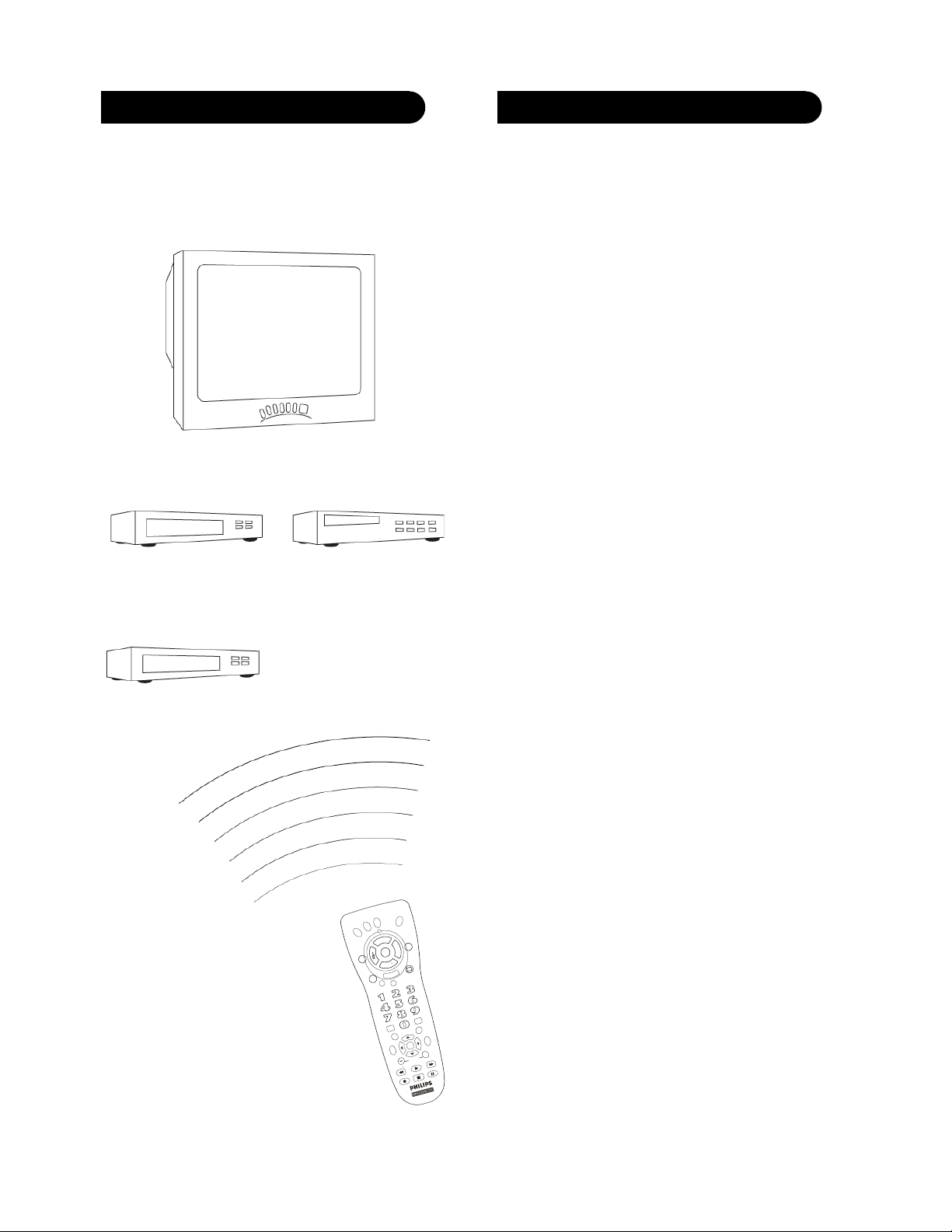
After the batteries are installed and you have
programmed the remote for the codes that operate your
products, you can use your remote to operate a TV, VCR,
DVD, Satellite System, etc.
TV (Press TV First)
VCR
(Press VCR First)
DVD Player
(Press DVD first)
Remote does not operate your product.
• Press the mode button of the product you want to
control.
• Program the remote with a new code.
• Install new batteries. (You might have to reprogram
your remote after installing new batteries.)
• Remote may not be compatible with your product.
Remote does not operate some features of your product.
• Program remote with a new code.
• Remote may not be able to operate all features of
your product or button names might be different
than your product.
Indicator light blinks after you program a product
code.
• Remote did not accept the code.
• Try to program the code again or try a different
code.
Satellite System
(Press SAT first)
CD Player
(Press CD first)
To Operate:
1. Press the TV, VCR, DVD, SAT,
etc. button (depending on
which product you want to
operate).
2. Aim the remote at the product.
3. Press POWER to turn on the
product.
4. Press other buttons to operate
the features of your product.
1918
Page 11

90 Day Warranty
This product is manufactured to PHILIPS MAGNAVOX
specifications and is free from defects in material,
workmanship and assembly. This warranty extends only
to the original purchaser and is nontransferable. Should
a defect occur under normal operating conditions within
90 days from the date of purchase, PHILIPS
MAGNAVOX will provide a comparable replacement free
of charge within the warranty period, to the original
purchaser. Defective product must be returned, with the
dated proof of purchase, to the place of purchase for
replacement. This warranty does not extend to the
product if it has been damaged or rendered defective as
a result of accident, misuse, abuse, tampering with or
modification. THIS WARRANTY IS IN LIEU OF ALL
OTHER WARRANTIES, EXPRESS OR IMPLIED,
INCLUDING THE IMPLIED WARRANTIES OF MERCHANTABILITY OR FITNESS FOR A PARTICULAR
PURPOSE. IN NO EVENT SHALL PHILIPS
MAGNAVOX BE LIABLE FOR SPECIAL, INDIRECT,
INCIDENTAL OR CONSEQUENTIAL DAMAGES,
WHETHER IN CONTRACT, TORT OR NEGLIGENCE.
Some States do not allow limitations on how long an
implied warranty lasts, so the above limitation may not
apply to you. Some States do not allow exclusion or
limitation of incidental or consequential damages, so the
above limitation or exclusion may not apply to you. This
warranty gives you specific rights and you may also
have other rights, which vary from State to State.
Made in China-TC, Quality Assured in USA
Clifton, NJ 07014-1115
PM435
PM435S
PM435P
PM430G
Back
Cover Art
 Loading...