

Page 1
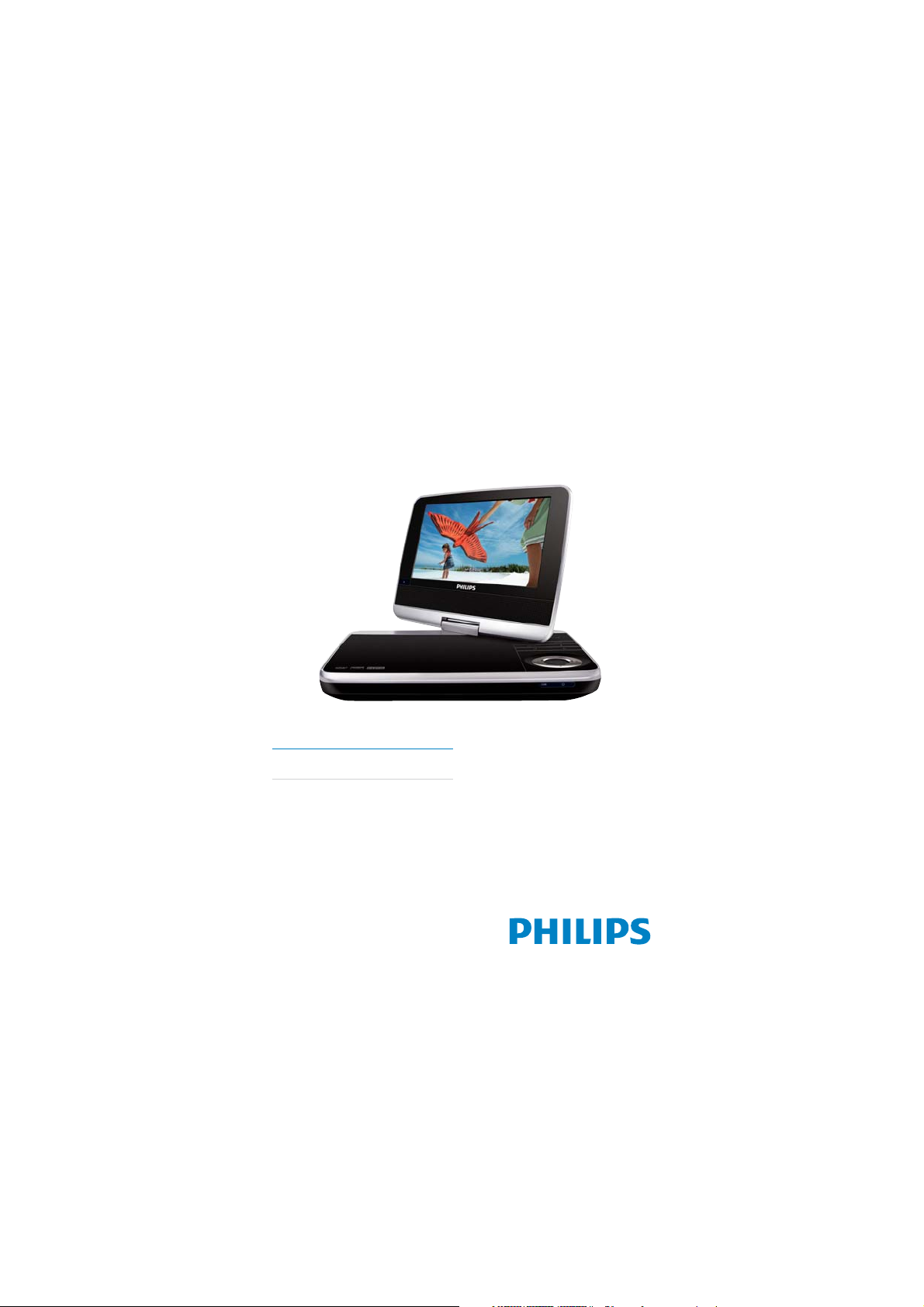
Register your product and get support at
www.philips.com/welcome
EN User manual
PD7040
Page 2

Contents
1 Important 4
Important Safety Instructions 4
Notice 7
2 Your portable DVD player 10
Introduction 10
What’s in the box 10
Overview of the main unit 11
Overview of the remote control 13
3 Get started 15
Charge the battery 15
Install remote control battery 16
Connect additional equipment 17
4 Use your player 17
Turn on 17
Select OSD language 17
Play discs 18
Play from USB 18
Play options 18
Adjust brightness of screen backlight 19
5 Adjust settings 20
6 Product information 21
7 Troubleshooting 22
English
Page 3

1 Important
Important Safety Instructions
a Read these instructions.
b Keep these instructions.
c Heed all warnings.
d Follow all instructions.
e Do not use this apparatus near water.
f Clean only with dr y cloth.
g Do not block any ventilation openings. Install in accordance with
the manufacturer’s instructions.
h Do not install near any heat sources such as radiators, heat
registers, stoves, or other apparatus (including amplifi ers) that
produce heat.
i For countries with a polarized mains, do not defeat the safety
purpose of the polarized or grounding-type plug. A polarized plug
has two blades with one wider than the other. A grounding type
plug has two blades and a third grounding prong. The wide blade or
the third prong are provided for your safety. If the provided plug
does not fi t into your outlet, consult an electrician for replacement
of the obsolete outlet.
Caution: To prevent electric shock, match the wide blade of the plug
to the wide slot, fully inser t.
j Protect the power cord from being walked on or pinched,
particularly at plugs, convenience receptacles, and the point where
they exit from the apparatus.
k Only use attachments/accessories specifi ed by the manufacturer.
l Use only with the cart, stand, tripod, bracket, or table specifi ed by
the manufacturer or sold with the apparatus. When a car t is used,
use caution when moving the cart/apparatus combination to avoid
injury from tip-over.
4
EN
Page 4
m Unplug this apparatus during lightning storms or when unused for
long periods of time.
n Refer all servicing to qualifi ed service personnel. Servicing is
required when the apparatus has been damaged in any way, such
as power-supply cord or plug is damaged, liquid has been spilled
or objects have fallen into the apparatus, the apparatus has been
exposed to rain or moisture, does not operate normally, or has
been dropped.
o Batteries (batter y pack or batteries installed) shall not be exposed
to excessive heat such as sunshine, fi re or the like.
p Apparatus shall not be exposed to dripping or splashing.
q Do not place any sources of danger on the apparatus (e.g. liquid
fi lled objects, lighted candles).
r This product may contain lead and mercury. Disposal of these
materials may be regulated due to environmental considerations.
For disposal or recycling information, please contact your local
authorities or the Electronic Industries Alliance: www.eiae.org.
s Where the MAINS plug or an appliance coupler is used as the
disconnect device, the disconnect device shall remain readily
operable.
Warning
Never remove t he cas ing of this apparatus. •
Never lubricate any par t of this a ppar atus.•
Never place this apparatus on other elec trical equipment.•
Keep this apparatus away fr om direct sunlight, nake d fl ames or heat . •
Never look into the laser bea m insid e this apparatus.•
Ensur e that you alway s have easy acces s to the power cord, plug or adaptor to •
disconnect this appara tus from the power.
English
EN
5
Page 5

Hearing safety
Listen at a moderate volume.
Using headphones at a high volume can impair your hearing. This •
product can produce sounds in decibel ranges that may cause hearing
loss for a normal person, even for exposure less than a minute. The
higher decibel ranges are offered for those that may have already
experienced some hearing loss.
Sound can be deceiving. Over time your hearing ‘comfor t level’ •
adapts to higher volumes of sound. So after prolonged listening, what
sounds ‘normal’ can actually be loud and harmful to your hearing. To
guard against this, set your volume to a safe level before your hearing
adapts and leave it there.
To establish a safe volume level:
Set your volume control at a low setting. •
Slowly increase the sound until you can hear it comfor tably and •
clearly, without distortion.
Listen for reasonable periods of time:
Prolonged exposure to sound, even at normally ‘safe’ levels, can also •
cause hearing loss.
Be sure to use your equipment reasonably and take appropriate •
breaks.
Be sure to observe the following guidelines when using your
headphones.
Listen at reasonable volumes for reasonable periods of time.•
Be careful not to adjus t the volume as your hearing adapts.•
Do not turn up the volume so high that you can’t hear what’s around •
you.
You should use caution or temporarily discontinue use in potentially •
hazardous situations. Do not use headphones while operating a
motorized vehicle, cycling, skateboarding, etc.; it may create a traffi c
hazard and is illegal in many areas.
Caution
Use of controls or adjustments or perfo rmance of procedures other than herein •
may res ult in hazar dous r adiation exposure or othe r unsafe operation .
6
EN
Page 6

Notice
Any changes or modifi cations made to this device that are not expressly
approved by Philips Consumer Lifestyle may void the user’s author ity to
operate the equipment.
This product complies with the radio interference requirements of the
European Community.
Environmental information
All unnecessary packaging has been omitted. We have tried to make
the packaging easy to separate into three materials: cardboard (box),
polys tyrene foam (buffer) and polyethylene (bags, protective foam sheet.)
Your system consists of materials which can be recycled and reused
if disassembled by a specialized company. Please observe the local
regulations regarding the disposal of packaging materials, exhaus ted
batteries and old equipment.
Recycling
Your product is designed and manufactured with high quality materials and
components, which can be recycled and reused.
When you see the crossed-out wheel bin symbol at tached to a product, it
means the product is covered by the European Directive 2002/96/EC:
English
Never dispose of your product with other household waste. Please inform
yourself about the local rules on the separate collection of electrical
and electronic products. The correct disposal of your old product helps
prevent potentially negative consequences on the environment and human
health.
EN
7
Page 7
Your product contains batteries covered by the European Directive
2006/66/EC, which cannot be disposed of with normal household waste.
Please inform yourself about the local rules on separate collection of
batteries. The correct disposal of batteries helps prevent potentially
negative consequences on the environment and human health.
Always bring your product to a professional to remove the built-in battery.
The making of unauthorized copies of copy-protected material, including
computer programs, fi les, broadcasts and sound recordings, may be
an infringement of copyrights and cons titute a criminal offence. This
equipment should not be used for such purposes.
Recording and playback of material might require consent. See Copyright
Act 1956 and The Performer’s Protection Acts 1958 to 1972.
This product incorporates copyright protection technology that is
protected by method claims of cer tain U.S . patents and other intellectual
property rights owned by Macrovision Corporation and other r ights
owner s. Use of this copyright protec tion technology must be authorized
by Macrovision Corporation, and is intended for home and other
limited viewing uses only unless otherwise authorized by Macrovision
Corporation. Reverse engineering or disassembly is prohibited.
8
EN
Page 8
“DivX, DivX” Certifi ed, and associated logos are trademark s of DivX, Inc.
and are used under license.
Manufactured under license from Dolby Laboratories.
“Dolby” and the double-D symbol are trademarks of Dolby Laboratories.
Norge
Typeskilt fi nnes på apparatens underside.
Observer: Nettbr yteren er sekundert innkoplet. Den innebygde
netdelen er derfor ikke frakoplet nettet så lenge apparatet er tilsluttet
nettkontakten.
For å redusere faren for brann eller elektrisk støt, skal apparatet ikke
utsettes for regn eller fuktighet.
This apparatus includes this label:
English
EN
9
Page 9

2 Your portable DVD player
Congratulations on your purchase, and welcome to Philips! To fully benefi t
from the support that Philips offers, register your product at www.philips.
com/welcome.
Introduction
Your por table DVD player plays digital video discs that conform to the
universal DVD Video standard. With it, you can play movies with true cinema
picture quality and stereo or multi-channel sound (depending on disc and
playback set-up).
You can also select sound track, subtitle languages, and some play options.
Besides, you can restrict the play of discs that are not suitable for children.
You can play the following discs on the DVD player (including CD-R , CDRW, DVD±R and DVD±RW):
DVD-Video•
Video CD•
Audio CD•
MP3 CD•
DivX•
Discs with JPEG fi les•
What’s in the box
Check and identify the contents of your package:
Portable DVD player•
AC power adaptor, ASUC12E-090080 (Philips)•
Car adaptor•
Mounting bag•
Composit AV cable•
User Manual•
Quick Star t Guide•
10
EN
Page 10
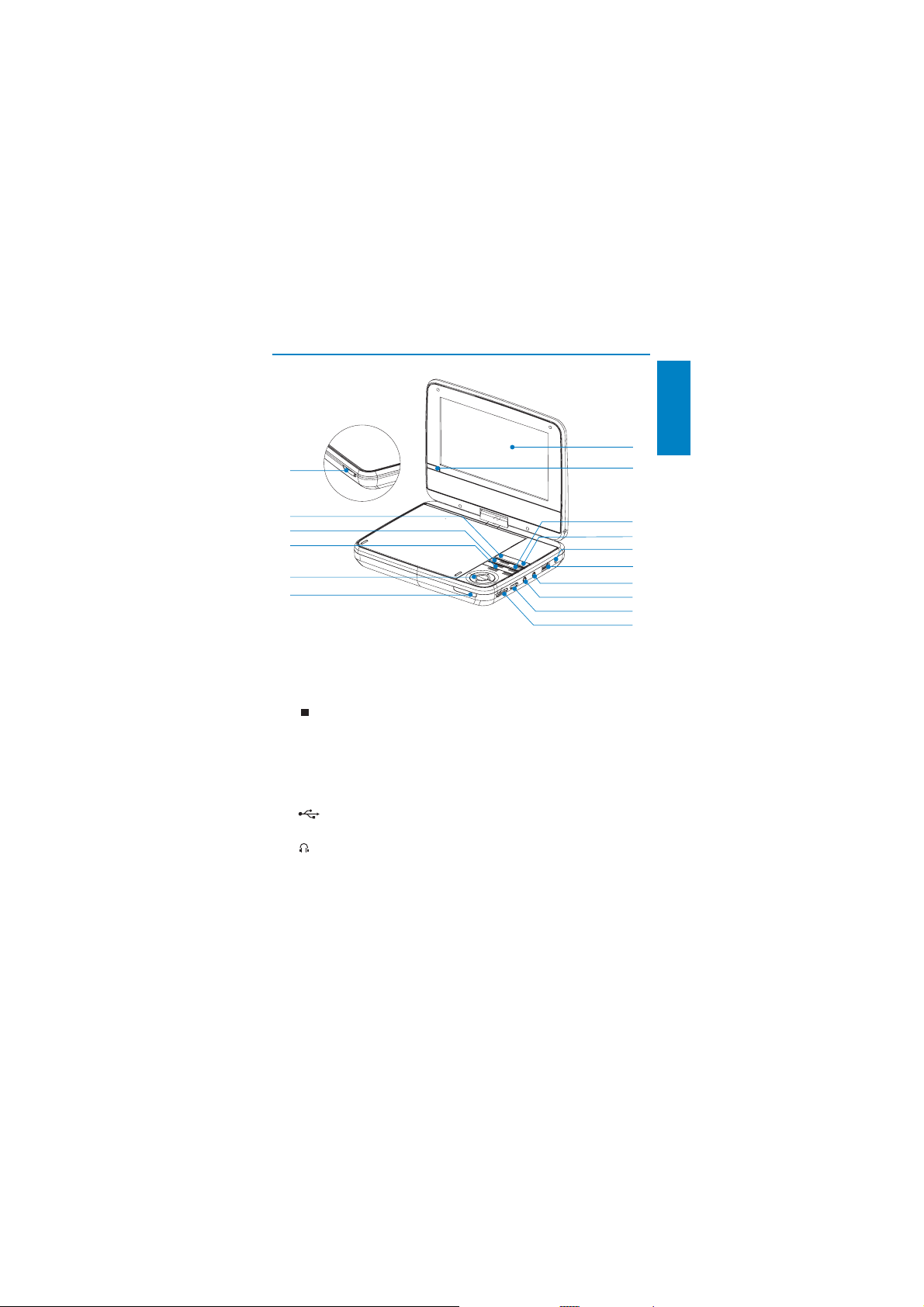
Overview of the main unit
p
English
a
b
o
n
m
l
k
a Display panel
b IR
Remote control sensor.•
c
Stops disc play.•
d OPTIONS
Accesses options relating to the current activity or selection.•
e DC IN
Power supply socket.•
f
Connects a USB device.•
g
Headphone jack.•
h AV OUT
Audio/video output jack.•
EN
c
d
e
f
g
h
i
j
11
Page 11

i VOLUME
j POWER ON/OFF (CHR)
k CHR /
l
m
n DISC MENU
o SOURCE
p OPEN
Increases or decreases volume.•
Turns on/off DVD player.•
Charging indicator/Power indicator.•
, , ,
Navigates menus.•
,
Searches backward/forward at different speeds. •
/OK
Confi rms an entr y or selection.•
Star ts, pauses or resumes disc play.•
,
Skips to the previous or next title, chapter, or track.•
For DVD, accesses or exits disc menu.•
For VCD, turns on or of f PBC (Playback Control) mode.•
For VCD version 2.0 or SVCD with PBC turned on, returns to •
the menu.
Switches between DVD and USB•
Opens the disc compartment.•
12
EN
Page 12
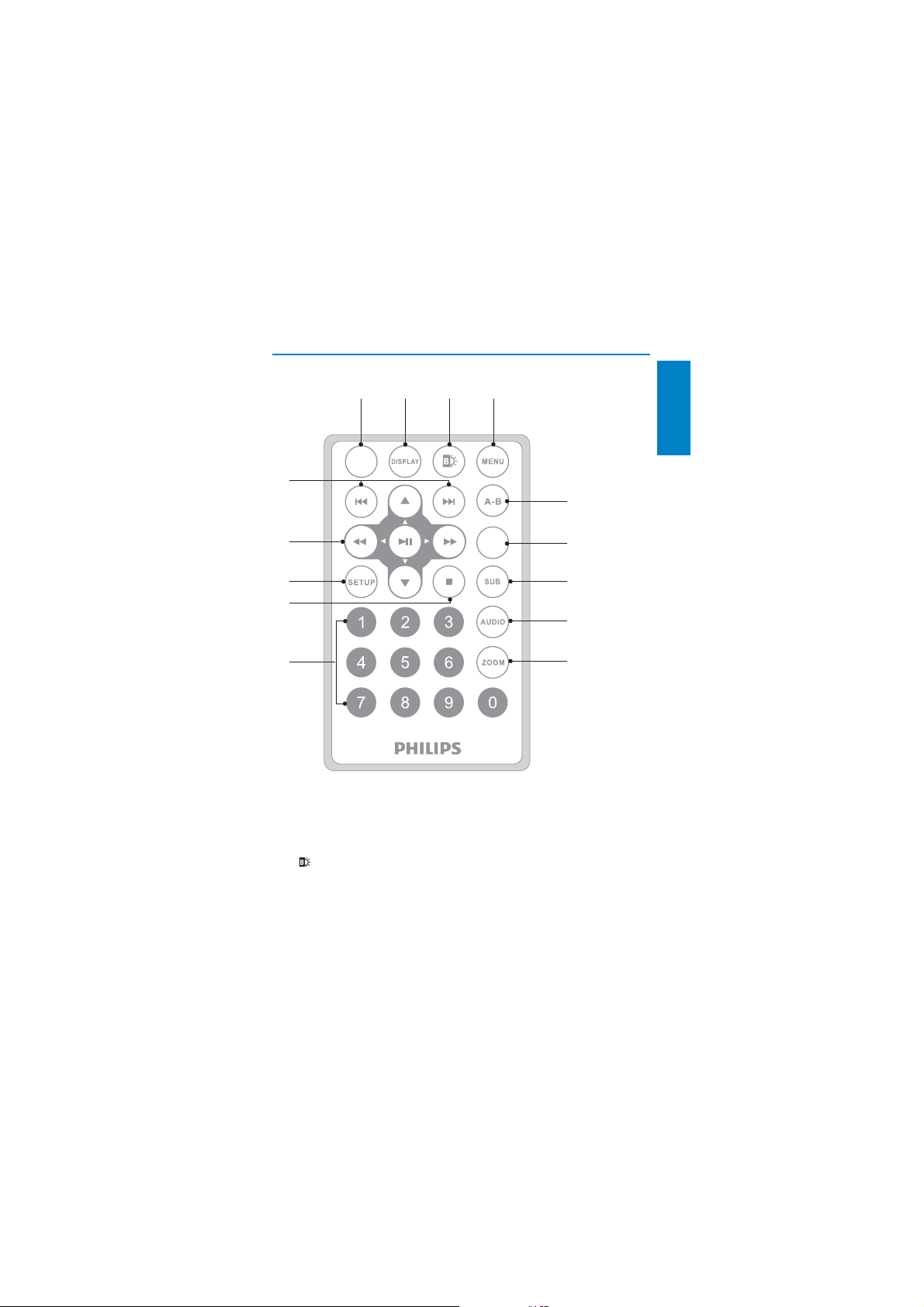
Overview of the remote control
abcd
SOURCE
n
English
e
m
l
k
j
a SOURCE
Switches between DVD and USB. •
b DISPLAY
Displays play information.•
c
Adjusts brightness of the screen backlight.•
OPTIONS
f
g
h
i
EN
13
Page 13

d MENU
e A-B
f OPTION
g SUB
h AUDIO
i ZOOM
j 0-9
k
l SETUP
m
n
For DVD, accesses or exits disc menu.•
For VCD, turns on or of f PBC (Playback Control) mode.•
For VCD version 2.0 or SVCD with PBC turned on, returns to •
the menu.
For a USB device, accesses or exits the fi le menu.•
Marks the section for repeat play.•
Accesses options relating to the current activity or selection.•
Selects a DVD subtitle language.•
For DVD, selects an audio language.•
For VCD, selects an audio mode. •
Zooms into a video scene or picture.•
Inputs numbers.•
Stops disc play.•
Accesses or exits the setup menu.•
, , ,
Navigates menus.•
,
/OK
Confi rms an entr y or selection.•
Star ts, pauses or resumes disc play.•
/
Skips to the previous or next title, chapter, or track.•
Searches backward/forward at different speeds. •
14
EN
Page 14
3 Get started
Caution
Use the controls only as stated in this user manual.•
Always follow t he ins tructions in this chapte r in sequence.•
If you contact Philips, you will be asked for the model and serial number of
your player. The model number and serial number are on the bottom of your
player. Write the numbers here:
Model No. __________________________
Serial No. ___________________________
Charge the battery
Caution
Risk of produ ct damage! Ensure t hat the power supply voltage corresponds to the •
voltage printed on the bot tom of the player.
Use onl y the supplied AC adapto r to char ge the battery.
•
Note
The type plate is located on the bottom of the player.•
You can only charge the player when it is in power- off mode.•
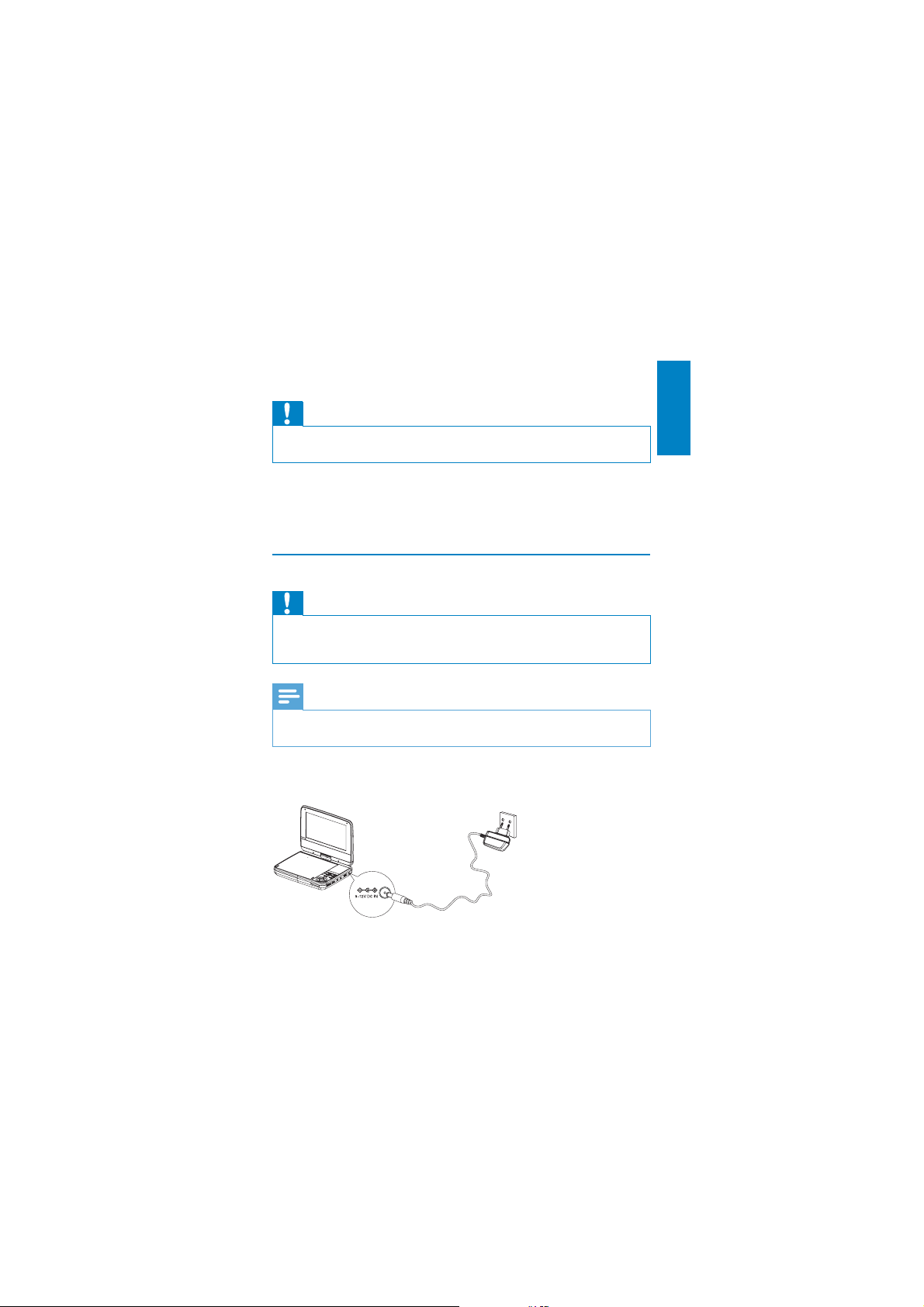
1 Slide the POWER ON/OFF (CHR) switch to OFF position.
2 Connect the supplied AC adaptor to the player and to the AC outlet.
English
EN
15
Page 15
The charge indicator turns on. It takes about 7.0 hours to fully »
charge the battery.
When the battery is fully charged, the charge indicator turns off.»
Install remote control battery
Caution
Risk of explosion! Keep bat ter ies away from he at, su nshin e or fi re . Never discard •
batteries in fi re.
•
Risk of decre ased batte ry life! Never mix differ ent br ands or types of batteries.
Risk of produ ct damage! W hen the remote contr ol is not used for long periods, •
remove the batter ies.
•
Dange r of explosion if battery is incorrectly replaced . Repla ce only with the same or
equivalent type.
•
Perchlorate Material - special handli ng may apply. See w ww.d tsc.ca.gov/
hazardouswaste/perchlorate.
For fi rst-time use:
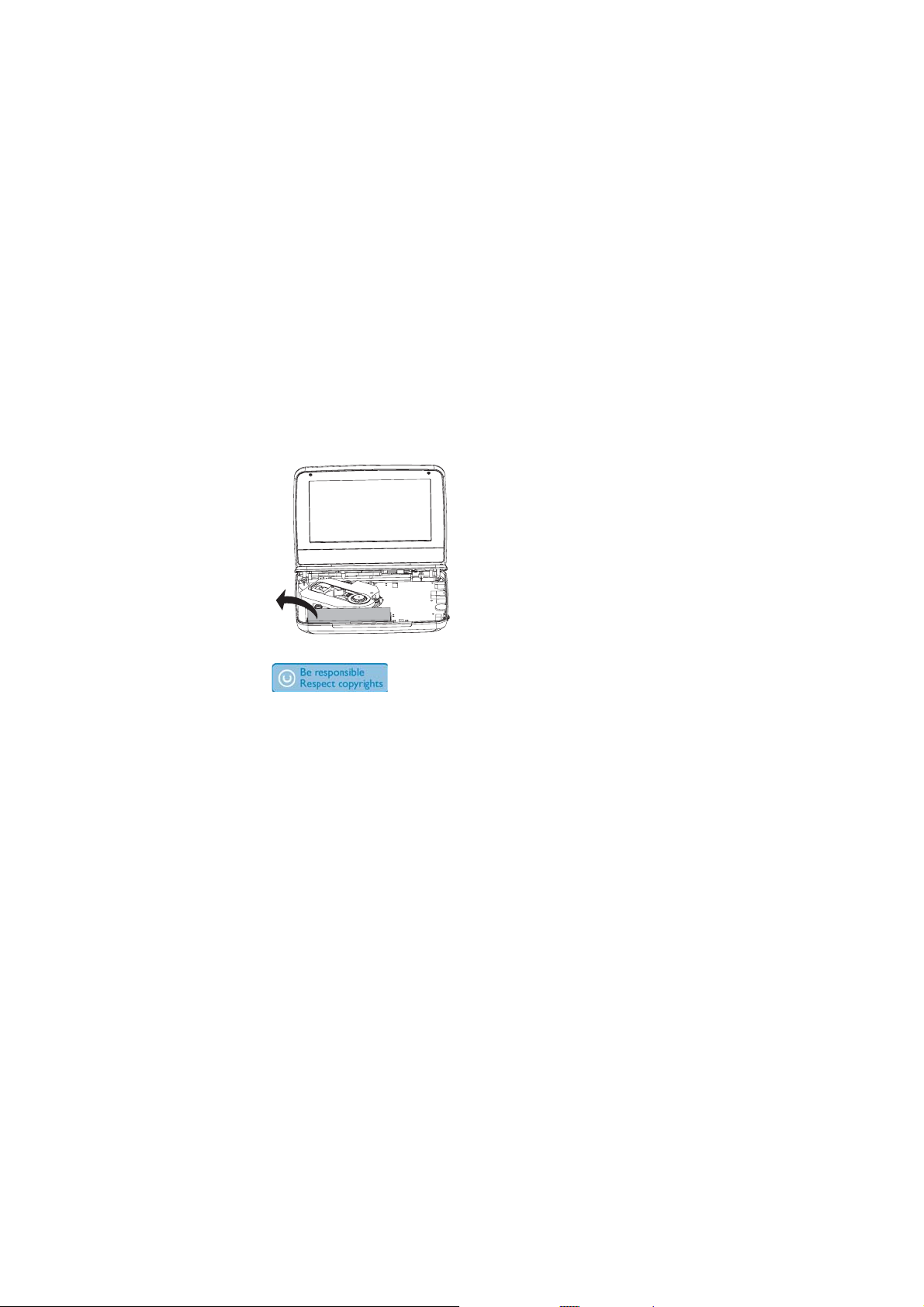
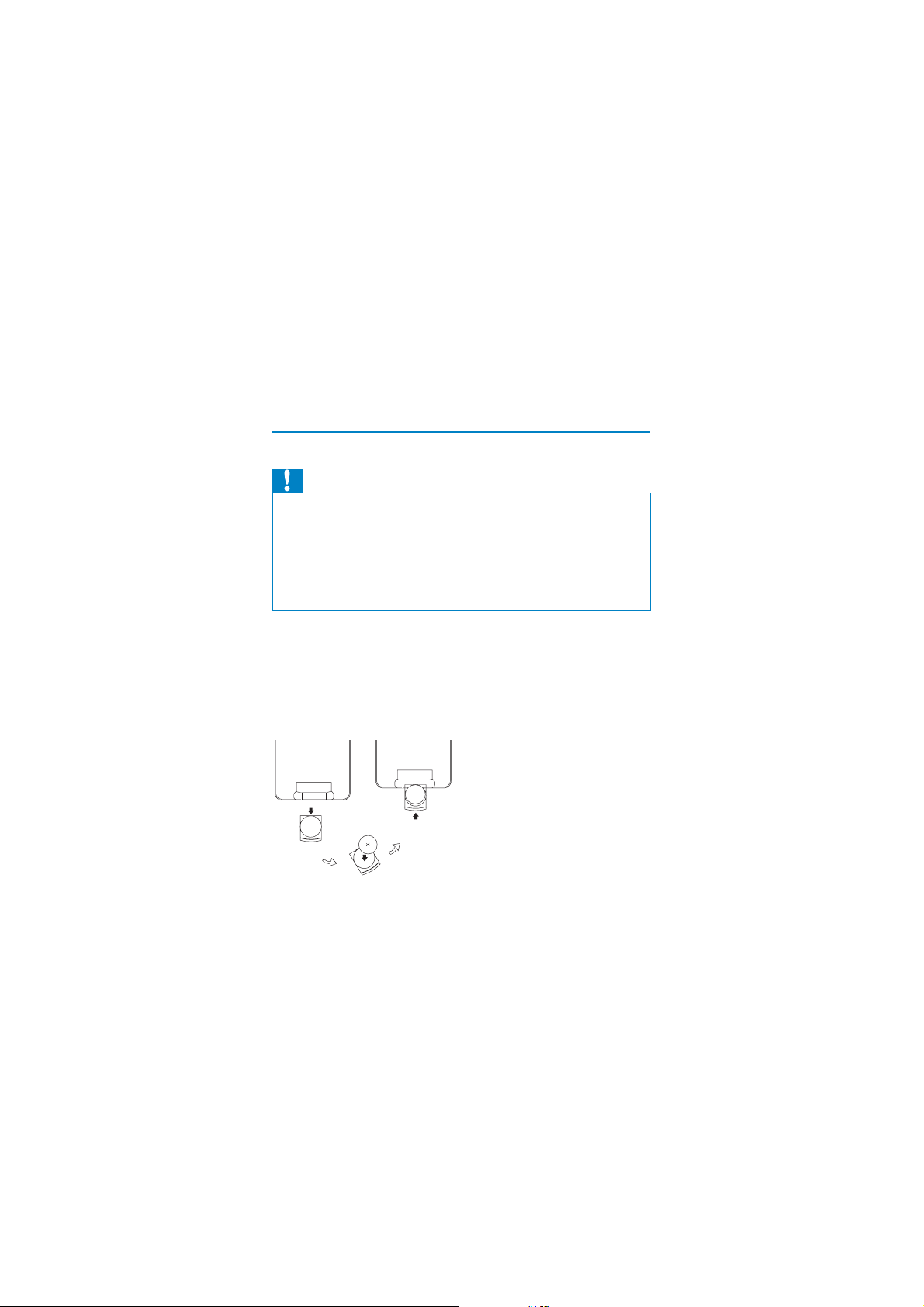
1 Remove the protective tab to activate the remote control bat ter y.
To replace the remote control battery:
2 Open the battery compartment.
3 Insert 1 CR2025 bat ter y with correct polarity (+/-) as indicated.
4 Close the batter y compartment.
16
EN
Page 16
Connect additional equipment
Caution
Turn off your playe r befor e connecting to any add itional equipment.•
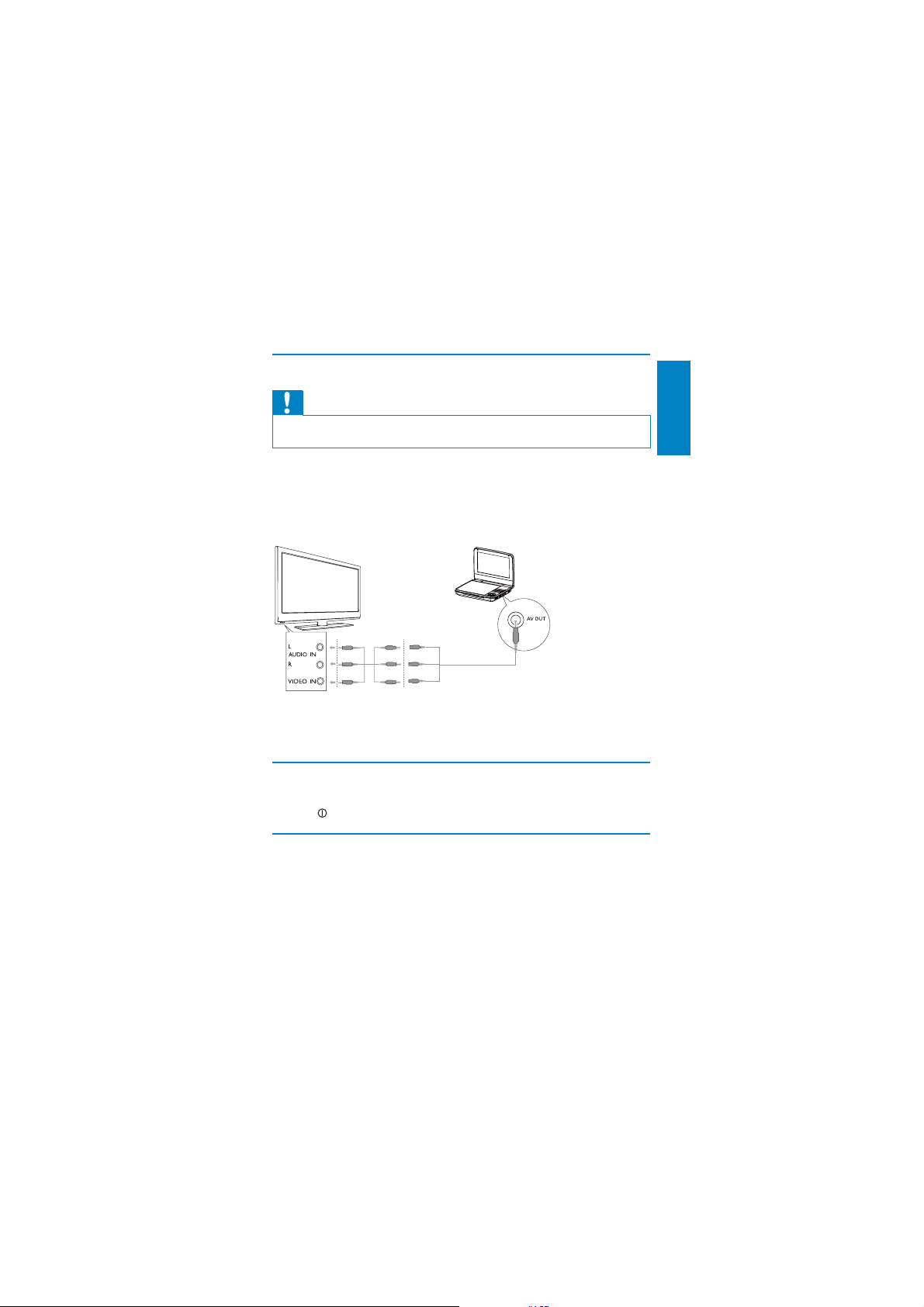
You can connect the player to a TV or an amplifi er to enjoy DVDs or
Karaoke.
Match the color of the AV cables (not supplied) with the jacks:
the yellow cable is for the yellow video jack.•
the red/white cables are for the red/white audio jacks.•
TV
not supplied
4 Use your player
Turn on
Slide the POWER ON/OFF (CHR) switch to the ON position.
The» indicator turns on.
English
Select OSD language
You can choose a different language for the on-screen display text.
1 Press SETUP.
The setup menu appears.»
EN
17
Page 17
2 Select [General] > [Language].
3 Press to select an option.
4 Press OK to confi rm.
5 Press SETUP to exit.
Play discs
1 Slide OPEN on the player.
2 Insert the disc with label side facing up.
3 Push down to close the disc compartment.
Play starts automatically. If not, press » /OK.
If a menu appears, select an item, then press •
play.
To pause, press • /OK. Press again to resume play.
To stop, press • STOP twice.
To select the previous/next item, press • or .
To star t search within video/audio, press • or once or more.
/OK to start
Play from USB
This player plays/views DivX, VOB, MP3, or JPEG fi les that are stored on USB
devices.
1 Press SOURCE to switch to USB mode.
2 Connect the USB device to the player.
The content menu appears.»
3 Select a fi le, then press .
Play starts.»
4 To stop play, press or remove the USB device.
Play options
1 During play, press OPTIONS to select some play options.
2 Follow the on-screen instructions.
18
EN
Page 18
Adjust brightness of screen backlight
Note
You can adjusts b rightness of the scr een backlig ht to match light ing conditio ns. •
English
During play, press
repeatedly to select an option.
• [Bright]
• [Normal]
• [Dim]
Tip
To achieve the longe st play time, select • [Dim].
To achieve the best view, select
• [Bright].
EN
19
Page 19

5 Adjust settings
To maximize your play experience, use SETUP to fi ne tune your settings.
1 Press SETUP.
2 Use navigation keys to select an option and press OK to confi rm.
3 Press to go back to the previous menu.
4 Press SETUP to exit.
The setup menu is displayed.»
[General]
[Language] Select on-screen display language
[PBC settings] Set playback control function on/off.
[DivX (VOD)] Get DivX registration code.
[DivX subtitles] Select DivX subtitle language.
[Parental(DVD)] Select parental options.
[Set password] Change existing password.
[Factory settings] Restore factor y settings.
[Video]
[LCD Display] Set screen display aspect ratio.
[TV standard] Set video output format to T V
system.
[Brightness] Adjust screen brightness.
[Contrast] Adjust screen contrast.
[ Audio]
[Dolby] Set Dolby output.
[Version] Check the ver sion information.
20
EN
Page 20
6 Product information
Note
Product informa tion is subjec t to change wit hout prior notice.•
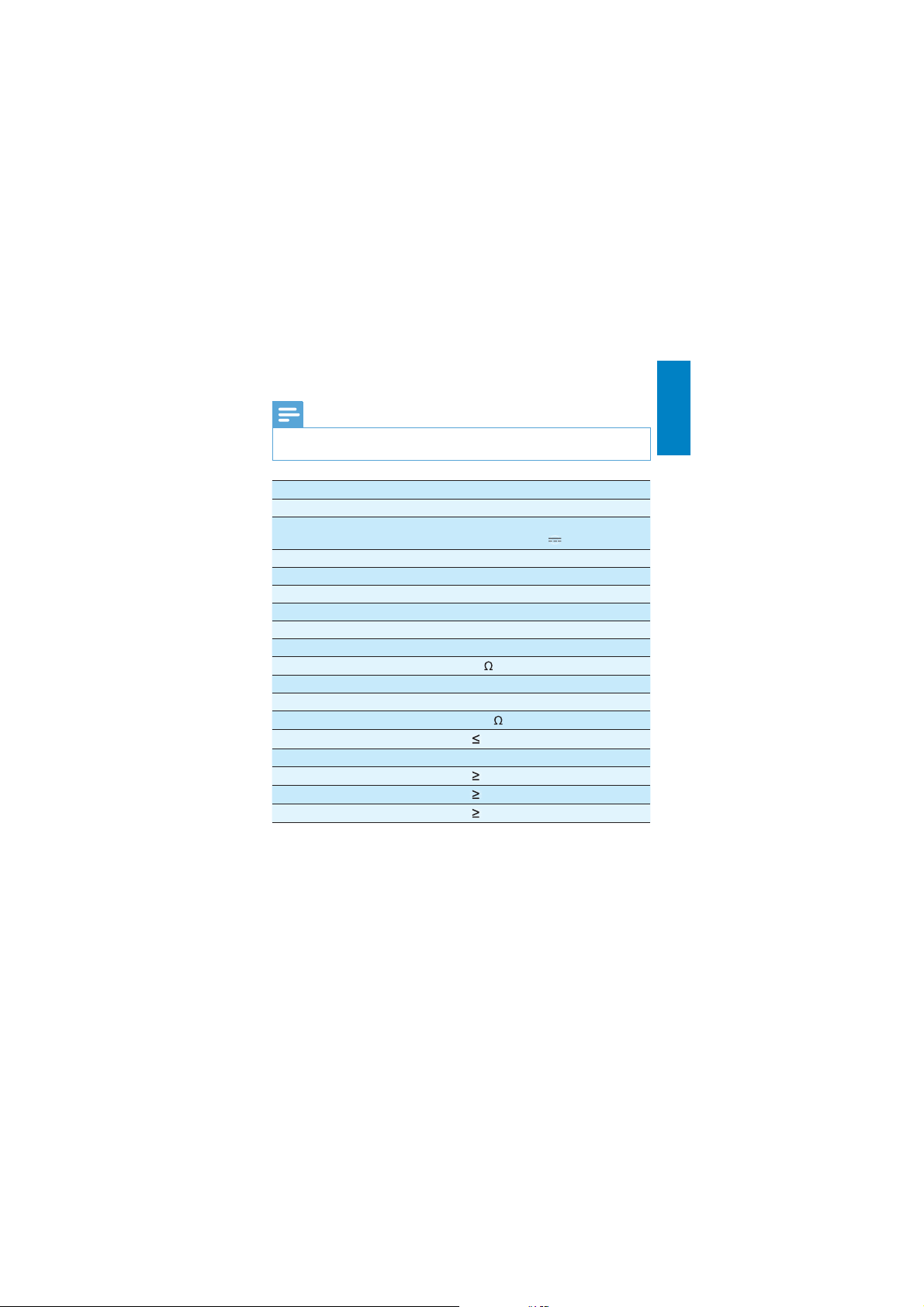
Dimensions 210 x 41 x 160 mm
Weight 0.73 kg
Power supply Input: 100-240V~ 50/60Hz
Power consumption 9 W
Operating temperature range 0-45°C
Laser wavelength 650 nm
Video output
Format PAL & NTSC
Output level 1Vp - p ± 20%
Load impedance
Audio line out
Audio out (analog audio) Output level: 2V ± 10%
Load impedance
Audio distor tion + noise
Frequency response 20Hz-20KHz ± 1dB
Signal/noise ratio
Channel separation
Dynamic range
Output: DC 9V
75
10 K
-80 (1KHz)
80 dB
80 dB
80 dB
0.8A
English
EN
21
Page 21
7 Troubleshooting
Warning
Risk of electric s hock. Never r emove t he casing of the player. •
To keep the warranty valid, never try to repair the system yourself.
If you encounter problems when using the player, check the following points
before requesting service. If the problem remains unsolved, register your
player and get support at www.philips.com/welcome.
No power
Ensure that both plugs of the mains cord are properly connected.•
Ensure that there is power at the AC outlet.•
Check if the built-in battery is drained.•
No sound
Ensure that the AV cable is connected correctly.•
Distorted picture
Clean the disc. With a clean, soft, lint-free cloth, wipe the disc •
outwards from the center.
Make sure that the video output format of the disc is compatible with •
the TV.
Change the video output format to match your T V or program.•
The LCD is manufactured using high precision technology. You may, •
however, see tiny black points and/or br ight points(red, blue, green)
that continuously appear on the LCD. This is a normal result of the
manufacturing process and does not indicate a malfunction.
Cannot play disc
Ensure the disc label is upwards.•
Clean the disc. With a clean, soft, lint-free cloth, wipe the disc •
outwards from the center.
Check if the disc is defective by trying another disc.•
22
EN
Page 22

No response to the remote control
Ensure that the path between the remote control and the player is •
clear from obstacles.
From a close distance, point the remote control directly at the player.•
Replace the remote control bat teries.•
The function does not work for this disc. Refer to the disc •
instructions.
The player feels warm
When the player is in use for a long period of time, its surface will be •
heated. This is normal.
English
EN
23
Page 23

© 2010 Koninklijke Philips Electronics N.V.
All rights reserved.
PD7040_05_UM_V1.0
 Loading...