

Page 1
Always there to help you
Register your product and get support at
www.philips.com/support
Question?
Contact
Philips
PD7012G
Mode d’emploi 27
Manual del usuario 53User manual 3
Page 2

Page 3

Contents
1 Important 7
Important Safety Instructions 7
Hearing safety 9
Notice 9
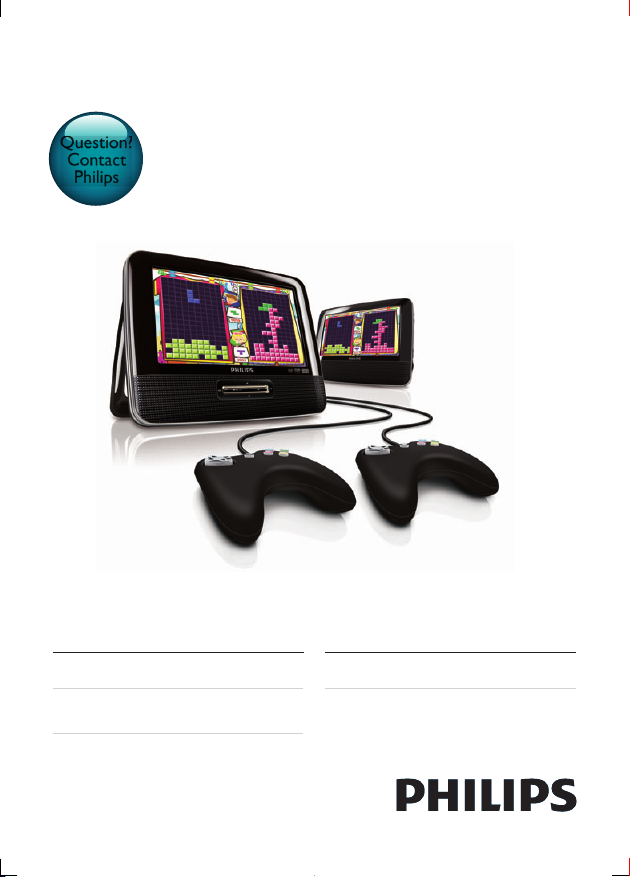
2 Your portable DVD player 12
Introduction 12
What's in the box 12
Overview of the main unit 13
Overview of the second screen 15
3 Get started 16
Mount the unit in your car 16
Connect the second screen 17
Connect power 17
4 Use your player 19
Turn on 19
Select OSD language 19
Play discs 19
Play options 20
English
3EN
Page 4

5 Adjust settings 21
Set the main unit 21
Set the second screen 22
6 Use more of your player 22
Play games 22
Connect additional equipment 23
Connect power from household source 24
7 Product information 25
8 Troubleshooting 26
4 EN
Page 5
Register online at www.philips.com/welcome today to
get the very most from your purchase.
Registering your model with PHILIPS makes you eligible for all of the valuable benefits listed below,so don't miss out.
Register online at www.philips.com/welcome to ensure:
*Product Safety Notification *Additional Benefits
By registering your product, you'll receive notification - directly
from the manufacturer.
Congratulations on your purchase,
and welcome to the “family!”
Dear PHILIPS product owner:
Thank you for your confidence in PHILIPS.Yo u’ve selected one of
the best-built, best-backed products available today.We ’ll do everything in our power to keep you happy with your purchase for many
years to come.
As a member of the PHILIPS “family,” you’re entitled to protection
by one of the most comprehensive warranties in the industry.
What’s more, your purchase guarantees you’ll receive all the
information and special offers for which you qualify, plus easy access
to accessories from our convenient home shopping network.
Most importantly, you can count on our uncompromising commitment to your total satisfaction.
All of this is our way of saying welcome - and thanks for investing
in a PHILIPS product.
P. S. To get the most from your PHILIPS purchase, be
sure to register online at:
www.philips.com/welcome
Registering your product guarantees that you'll receive all of
the privileges to which you’re entitled, including special moneysaving offers.
This “bolt of lightning” indicates unin-
sulated material within your unit may
cause an electrical shock. For the safety of
everyone in your household,please do not
remove product covering.
The “exclamation point” calls atten-
tion to features for which you should
read the enclosed literature closely to prevent operating and maintenance problems.
WARNING: To reduce the risk of fire or
electric shock, this apparatus should not be
exposed to rain or moisture and objects
filled with liquids,such as vases, should not
be placed on this apparatus.
CAUTION: To prevent electric shock,
match wide blade of plug to wide slot,fully
insert.
ATTENTION:Pour éviter les choc électriques, introduire la lame la plus large de la
fiche dans la borne correspondante de la
prise et pousser jusqu’au fond.
For Customer Use
Enter below the Serial No. which is located on the rear of the cabinet.Retain this
information for future reference.
Model No.__________________________
Serial No. ________________________
English
5EN
Page 6

PHILIPS LIMITED WARRANTY
ONE (1) YEAR
WARRANTY COVERAGE:
PHILIPS warranty obligation is limited to the terms set forth
below.
WHO IS COVERED:
Philips warrants the product to the original purchaser or the person receiving the product as a gift against defects in materials and
workmanship as based on the date of original purchase
(“Warranty Period”) from an Authorized Dealer. The original
sales receipt showing the product name and the purchase date
from an authorized retailer is considered such proof.
WHAT IS COVERED:
The Philips warranty covers new products if a defect in material
or workmanship occurs and a valid claim is received by Philips
within the Warranty Period. At its option, Philips will either (1)
repair the product at no charge, using new or refurbished
replacement parts, or (2) exchange the product with a product
that is new or which has been manufactured from new, or serviceable used parts and is at least functionally equivalent or most
comparable to the original product in Philips current inventory,
or (3) refund the original purchase price of the product.
Philips warrants replacement products or parts provided under
this warranty against defects in materials and workmanship from
the date of the replacement or repair for ninety (90) days or for
the remaining portion of the
whichever provides longer coverage for you. When a product or
part is exchanged, any replacement item becomes your property
and the replaced item becomes Philips’ property. When a refund
is given, your product becomes Philips’ property.
Note: Any product sold and identified as refurbished or
renewed carries a ninety (90) day limited warranty.
Replacement product can only be sent if all warranty
requirements are met. Failure to follow all requirements
can result in delay.
WHAT IS NOT COVERED - EXCLUSIONS AND
LIMITATIONS:
This Limited Warranty applies only to the new products manufactured by or for Philips that can be identified by the trademark,
trade name, or logo affixed to it. This Limited Warranty does not
apply to any non-Philips hardware product or any software, even
if packaged or sold wi
suppliers, or publishers may provide a separate warranty for their
own products packaged with the bundled product.
Philips is not liable for any damage to or loss of any programs,
data, or other information stored on any media contained within
the product, or any non-Philips product or part not covered by
this warranty. Recovery or reinstallation of programs, data or
other information is not covered under this Limited Warranty.
This warranty does not apply (a) to damage caused by accident,
abuse, misuse, neglect, misapplication, or non-Philips product, (b)
to damage caused by service performed by anyone other than
Philips or Philips Authorized Service Location, (c) to a product
a part that has been modified without the written permission of
original product’s warranty,
th the product. Non-Philips manufacturers,
Philips, or (d) if any Philips serial number has been removed or
defaced, or (e) product, accessories or consumables sold “AS IS”
without warranty of any kind by including refurbished Philips
product sold “AS IS” by some retailers.
This Limited Warranty does not cover:
• Shipping charges to return defective product to Philips.
• Labor charges for installation or setup of the product, adjust-
ment of customer controls on the product, and installation or
repair of antenna/signal source systems outside of the product.
• Product repair and/or part replacement because of improper
installation or maintenance, connections to improper voltage
supply, power line surge, lightning damage, retained images or
screen markings resulting from viewing fixed stationary content for extended periods, product cosmetic appearance items
due to normal wear and tear, unauthorized repair or other
cause not within the control of Philips.
• Damage or claims for products not being available for use, or
for lost data or lost software.
• Damage from mishandled shipments or transit accidents when
returning product to Philips.
• A product that requires modification or adaptation to enable
it to operate in any country other than the country for which
it was designed, manufactured, approved and/or authorized, or
repair of
products damaged by these modifications.
• A product used for commercial or institutional purposes
(including but not limited to rental purposes).
• Product lost in shipment and no signature verification receipt
can be provided.
• Failure to operate per Owner’s Manual.
TO OBTAIN ASSISTANCE IN THE U.S.A.,
PUERTO RICO, OR U.S. VIRGIN ISLANDS…
Contact Philips Customer Care Center at:
1-866-309-0845
REPAIR OR REPLACEMENT AS PROVIDED UNDER THIS
WARRANTY IS THE EXCLUSIVE REMEDY FOR THE CONSUMER. PHILIPS SHALL NOT BE LIABLE FOR ANY INCIDENTAL OR CONSEQUENTIAL DAMAGES FOR BREACH OF
ANY EXPRESS OR IMPLIED WARRANTY ON THIS PRODUCT. EXCEPT TO THE EXTENT PROHIBITED BY APPLICABLE
LAW, ANY IMPLIED WARRANTY OF MERCHANTABILITY OR
FITNESS FOR A PARTICULAR PURPOSE ON THIS PRODUCT
IS LIMITED IN DURATION TO THE DURATION OF THIS
WARRANTY.
Some states do not allow the exclusions or limitation of incidental or consequential damages, or allow limitations on how long an
implied warranty lasts, so the above limitations or exclusions may
not apply to you.
or
This warranty gives you specific legal rights. You may have other rights which vary from state/province to state/province.
P&F USA, Inc. PO Box 2248, Alpharetta, GA 30023-2248
CANADA,
3140 035 51091
6 EN
Page 7

1 Important
Important Safety Instructions
a Read these instructions.
b Keep these instructions.
c Heed all warnings.
d Follow all instructions.
e Do not use this apparatus near water.
f Clean only with dry cloth.
g Do not block any ventilation openings. Install in accordance with the
manufacturer's instructions.
h Do not install near any heat sources such as radiators, heat registers,
stoves, or other apparatus (including ampliers) that produce heat.
i Do not defeat the safety purpose of the polarized or grounding-type
plug. A polarized plug has two blades with one wider than the other. A
grounding type plug has two blades and a third grounding prong. The wide
blade or the third prong are provided for your safety. If the provided plug
does not t into your outlet, consult an electrician for replacement of the
obsolete outlet.
j Protect the power cord from being walked on or pinched, particularly at
plugs, convenience receptacles, and the point where they exit from the
apparatus.
k Only use attachments/accessories specied by the manufacturer.
l Unplug this apparatus during lightning storms or when unused for long
periods of time.
English
7EN
Page 8
m Refer all servicing to qualied service personnel. Servicing is required
when the apparatus has been damaged in any way, such as power-supply
cord or plug is damaged, liquid has been spilled or objects have fallen into
the apparatus, the apparatus has been exposed to rain or moisture, does
not operate normally, or has been dropped.
n Apparatus shall not be exposed to dripping or splashing.
o Do not place any sources of danger on the apparatus (e.g. liquid lled
objects, lighted candles).
p This product may contain lead and mercury. Disposal of these materials
may be regulated due to environmental considerations. For disposal
or recycling information, please contact your local authorities or the
Electronic Industries Alliance: www.eiae.org.
q Where the plug of the Direct Plugin Adapter is used as the disconnect
device, the disconnect device shall remain readily operable.
Caution
• Use of controls or adjustments or performance of procedures other than herein may result in
hazardous radiation exposure or other unsafe operation.
Warning
• Never remove the casing of this apparatus.
• Never lubricate any part of this apparatus.
• Never place this apparatus on other electrical equipment.
• Keep this appar atus away from direct sunlight, naked ames or heat.
• Never look into the laser beam inside this apparatus.
• Ensure that you always have easy access to the power cord, plug or adaptor to disconnect this
apparatus from the power.
8 EN
Page 9

Hearing safety
Listen at a moderate volume.
• Using headphones at a high volume can impair your hearing. This product can
produce sounds in decibel ranges that may cause hearing loss for a normal
person, even for exposure less than a minute. The higher decibel ranges are
offered for those that may have already experienced some hearing loss.
• Sound can be deceiving. Over time your hearing 'comfort level' adapts to
higher volumes of sound. So after prolonged listening, what sounds 'normal'
can actually be loud and harmful to your hearing. To guard against this, set
your volume to a safe level before your hearing adapts and leave it there.
To establish a safe volume level:
• Set your volume control at a low setting.
• Slowly increase the sound until you can hear it comfortably and clearly,
without distortion.
Listen for reasonable periods of time:
• Prolonged exposure to sound, even at normally 'safe' levels, can also cause
hearing loss.
• Be sure to use your equipment reasonably and take appropriate breaks.
Be sure to observe the following guidelines when using your headphones.
• Listen at reasonable volumes for reasonable periods of time.
• Be careful not to adjust the volume as your hearing adapts.
• Do not turn up the volume so high that you can't hear what's around you.
• You should use caution or temporarily discontinue use in potentially
hazardous situations. Do not use headphones while operating a motorized
vehicle, cycling, skateboarding, etc.; it may create a trafc hazard and is illegal
in many areas.
Notice
English
Any changes or modications made to this device that are not expressly approved
by Philips Consumer Lifestyle may void the user’s authority to operate the
equipment.
Notice for the USA
9EN
Page 10
This equipment has been tested and found to comply with the limits for a Class
B digital device, pursuant to part 15 of the FCC Rules. These limits are designed
to provide reasonable protection against harmful interference in a residential
installation. This equipment generates, uses, and can radiate radio frequency energy
and, if not installed and used in accordance with the instruction manual, may cause
harmful interference to radio communications.
However, there is no guarantee that interference will not occur in a particular
installation. If this equipment does cause harmful interference to radio or television
reception, which can be determined by turning the equipment off and on, the user
is encouraged to try to correct the interference by one or more of the following
measures:
• Relocate the receiving antenna.
• Increase the separation between equipment and receiver.
• Connect the equipment into an outlet on a circuit different from that to
which the receiver is connected.
• Consult the dealer or an experienced radio/TV technician for help.
Disposal of your old product and batteries
Your product is designed and manufactured with high quality materials and
components, which can be recycled and reused.
Never dispose of your product with other household waste. Please inform
yourself about the local rules on the separate collection of electrical and electronic
products. The correct disposal of these products helps prevent potentially negative
consequences on the environment and human health.
Please visit www.recycle.philips.com for additional information on a recycling
center in your area.
Environmental information
All unnecessary packaging has been omitted. We have tried to make the packaging
easy to separate into three materials: cardboard (box), polystyrene foam (buffer)
and polyethylene (bags, protective foam sheet.)
Your system consists of materials which can be recycled and reused if disassembled
by a specialized company. Please observe the local regulations regarding the
disposal of packaging materials, exhausted batteries and old equipment.
10 EN
Page 11
The making of unauthorized copies of copy-protected material, including computer
copyrights and constitute a criminal offence. This equipment should not be used
for such purposes.
Recording and playback of material might require consent. See Copyright Act 1956
and The Performer’s Protection Acts 1958 to 1972.
This item incorporates copy protection technology that is protected by U.S.
patents and other intellectual property rights of Rovi Corporation. Reverse
engineering and disassembly are prohibited.
Manufactured under license from Dolby Laboratories.
"Dolby" and the double-D symbol are trademarks of Dolby Laboratories.
This apparatus includes this label:
English
11EN
Page 12

2 Your portable DVD player
Congratulations on your purchase, and welcome to Philips! To fully benet from
the support that Philips offers, register your product at www.philips.com/welcome.
Introduction
Your por table DVD player plays digital video discs that conform to the universal
DVD Video standard. With it, you can play movies with true cinema picture quality
and stereo or multi-channel sound (depending on disc and playback set-up).
You can also select sound track, subtitle languages, and different angle of view
(again depending on DVD disc). Besides, you can restrict the play of discs that are
not suitable for children.
You can play the following discs on the DVD player (including CD-R, CD-RW,
DVD±R and DVD±RW):
• DVD-Video
• Video CD
• Audio CD
• MP3 CD
• Discs with JPEG les
What's in the box
Check and identify the contents of your package:
• Main unit x 1
• Second screen x 1
• AC power adaptor x 1, ASUC12A-090080 (Philips)
• Car adaptor x 1
• AV cable x 1
• Fastening strap x 2
• Game pad x 2
• Game disc x 1
• User manual x 1
12 EN
Page 13
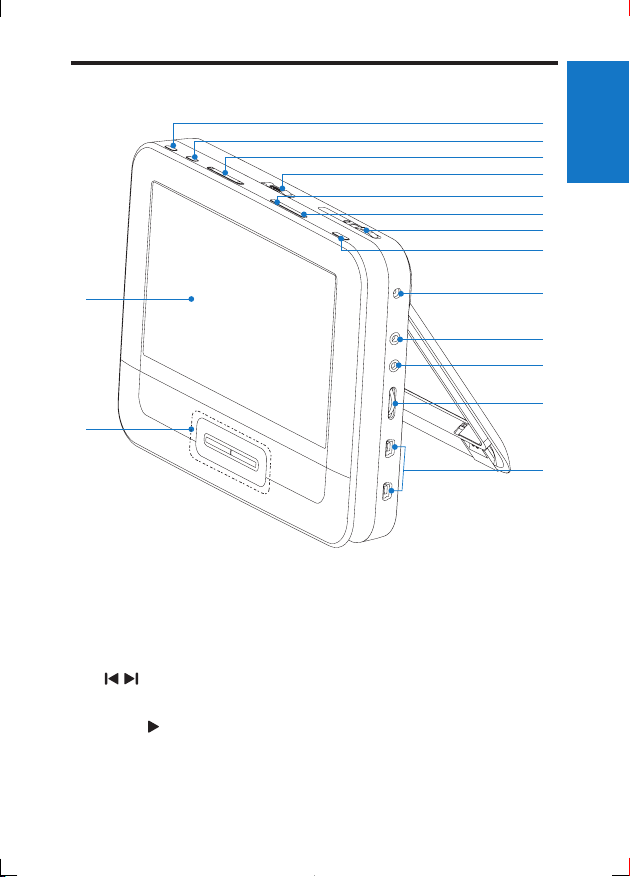
Overview of the main unit
a
English
b
c
d
e
f
g
h
o
n
a BRIGHTNESS
• Adjusts screen brightness.
b SETUP
• Accesses or exits the setup menu.
c ,
• Skips to the previous or next title, chapter, or track.
d OPEN
• Opens the disc compartment.
e DISC MENU
i
j
k
l
m
13EN
Page 14
• For DVD, accesses or exits disc menu.
• For VCD, turns on or off PBC (Playback Control) mode.
• For VCD version 2.0 or SVCD with PBC turned on, returns to the menu.
• For game discs, returns to the game list.
f OPTIONS
• Accesses options relating to the current activity or selection.
g ON/OFF
• Turns on/off DVD player.
h AV MODE
• Switches between PAL and NTSC mode.
i DC IN
• Power supply socket.
j AV OUT
• Audio/video output jack.
k
• Headphone jack.
l VOL +/-
• Increases or decreases volume.
m GAME 1P/2P
• Game pad port.
n , , ,
• Navigates menus.
• For games, works as the direction keys of game pad 1.
,
• Searches backward/forward at different speeds.
/OK
• Conrms an entry or selection.
• Starts, pauses or resumes disc play.
• For games, works as the OK button of game pad 1.
• Stops disc play.
o Display panel
14 EN
Page 15
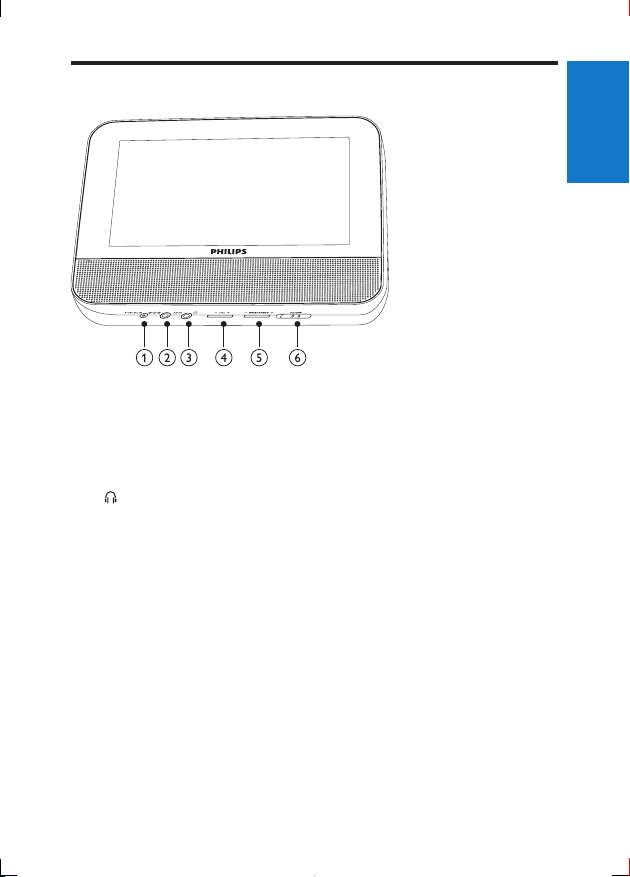
Overview of the second screen
a DC IN
• Power supply socket.
b AV IN
• Audio/video input jack.
c
• Headphone jack.
d VOL -/+
• Decreases or increases volume.
e BRIGHTNESS -/+
• Adjusts screen brightness.
f OFF/ON
• Turns off/on the second screen.
English
15EN
Page 16
3 Get started
Caution
• Use the controls only as stated in this user manual.
• Always follow the instructions in this chapter in sequence.
If you contact Philips, you will be asked for the model and serial number of your
player. The model number and serial number are on the bottom of your player.
Write the numbers here:
Model No. __________________________
Serial No. ___________________________
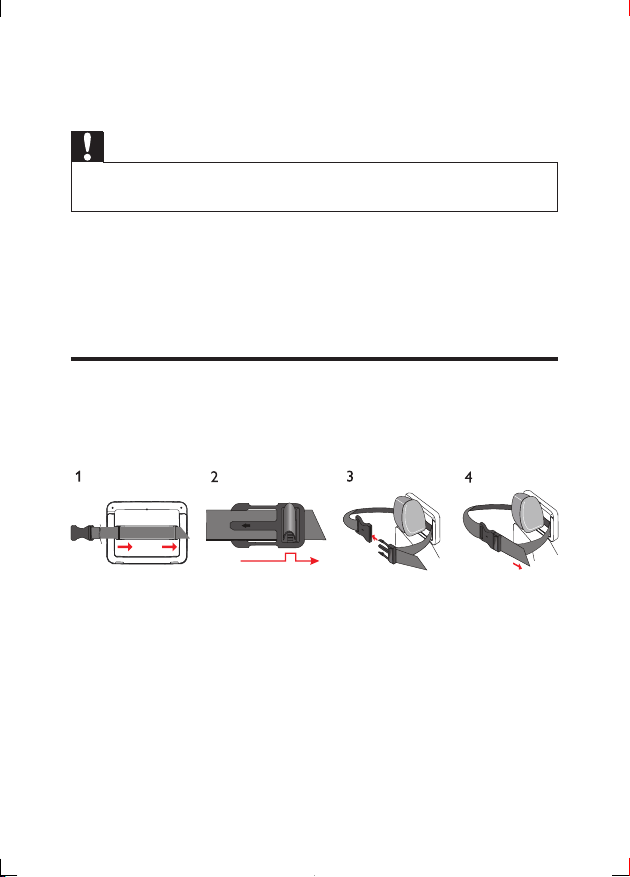
Mount the unit in your car
To use the player in your car, attach the main unit and the second screen to the
back of the front seat headrests.
1 Pull the strap through the loops on the back of the main unit.
2 Hold the buckle with the marked arrow facing you, then attach the buckle
to the strap.
3 Position the main unit at the back of the headrest, then fasten the buckle.
4 Pull the strap to secure the main unit to the headrest.
• To attach the second screen, repeat the above steps.
16 EN
Page 17
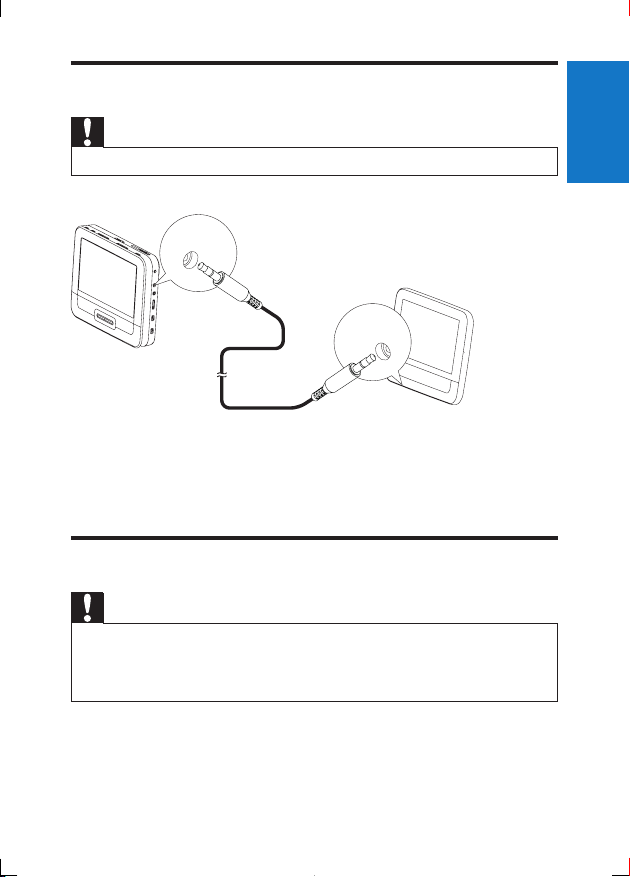
Connect the second screen
Caution
• Turn off your player before you connect the second screen.
AV OUT
A
AV IN
B
A: main unit; B: second screen
1 Connect the supplied AV cable to:
• the AV OUT jack on the main unit.
• the AV IN jack on the second screen.
Connect power
Caution
• Risk of product damage! Ensure that the power supply voltage corresponds to the voltage pointed
on the back or the underside of the player.
• Risk of electric shock! When you unplug the AC adapter, always pull the plug from the socket.
Never pull the cable.
English
17EN
Page 18
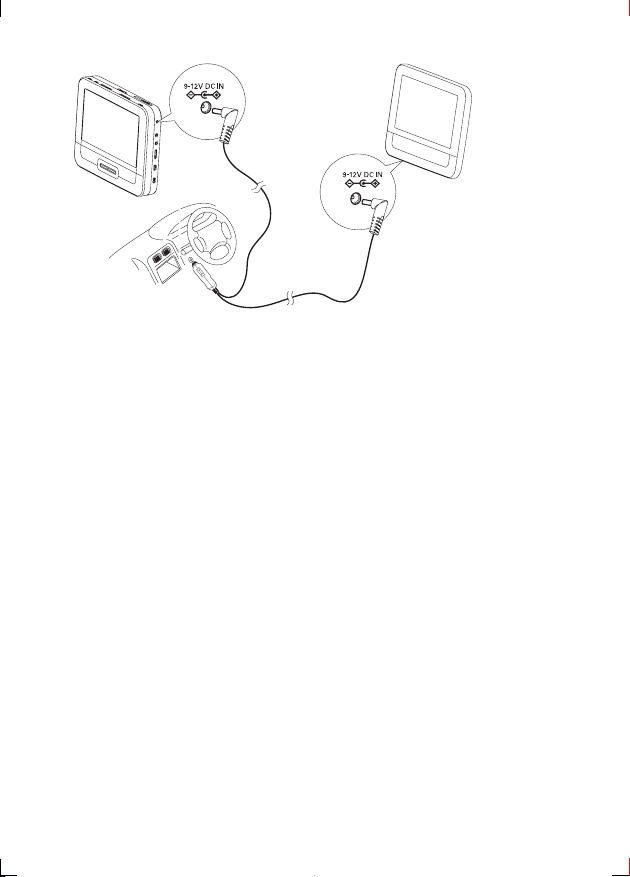
A
C
B
A: main unit; B: second screen; C: car cigarette lighter
1 Connect one end of the double-connector end of the AC cable to the DC
IN jack on the main unit.
2 Connect the other end of the double-connector end of the AC cable to the
DC IN jack on the second screen.
3 Connect the one-connector end to the car cigarette lighter socket.
18 EN
Page 19
4 Use your player
Turn on
1 Slide the ON/OFF switch on the main unit to the ON position.
• To turn on the second screen, slide the OFF/ON switch on the second
screen to the ON position.
Select OSD language
You can choose a different language for the on-screen display text.
1 Press SETUP.
» The setup menu is displayed.
2 Go to [General] > [Language].
3 Press / to select a language option.
4 Press /OK to conrm.
5 Press SETUP to exit.
Play discs
1 Slide OPEN on the main unit.
2 Inser t the disc with label side facing up.
3 Push down to close the disc compartment.
» Play starts automatically. If not, press /OK.
• If a menu appears, select an item, then press /OK to start play.
• To pause, press /OK. Press again to resume play.
• To stop, press twice.
English
19EN
Page 20

• To select the previous/next item, press or .
• To star t search within video/audio, press or once or more.
Play options
1 During play, press OPTIONS to select some play options.
2 Follow the on-screen instructions.
20 EN
Page 21

5 Adjust settings
Set the main unit
To maximize your play experience, use SETUP to ne tune your settings.
1 Press SETUP.
» The setup menu is displayed.
2 Use navigation keys to select an option and press /OK to conrm.
• To go back to the previous menu, press
[General]
[Language] Select on-screen display language
[PBC settings] Set playback control function on/off.
[Power save] Set power saving mode.
[Parental(DVD)] Select parental options.
[Set password] Change existing password (3308 by default).
[Factory settings] Restore factory settings.
[Video]
[LCD Display] Set screen display aspect ratio.
[TV standard] Set video output format to TV system.
[Brightness] Adjust screen brightness.
[Contrast] Adjust screen contrast.
[ Audio]
[Dolby] Set Dolby output.
[Version] Check the version information.
English
3 Press SETUP to exit.
21EN
Page 22
Set the second screen
You can also set the second screen.
• To adjust volume level for the second screen, press VOL -/+ on the second
screen.
• To adjust the brightness of the second screen, press BRIGHTNESS -/+ on
the second screen.
6 Use more of your player
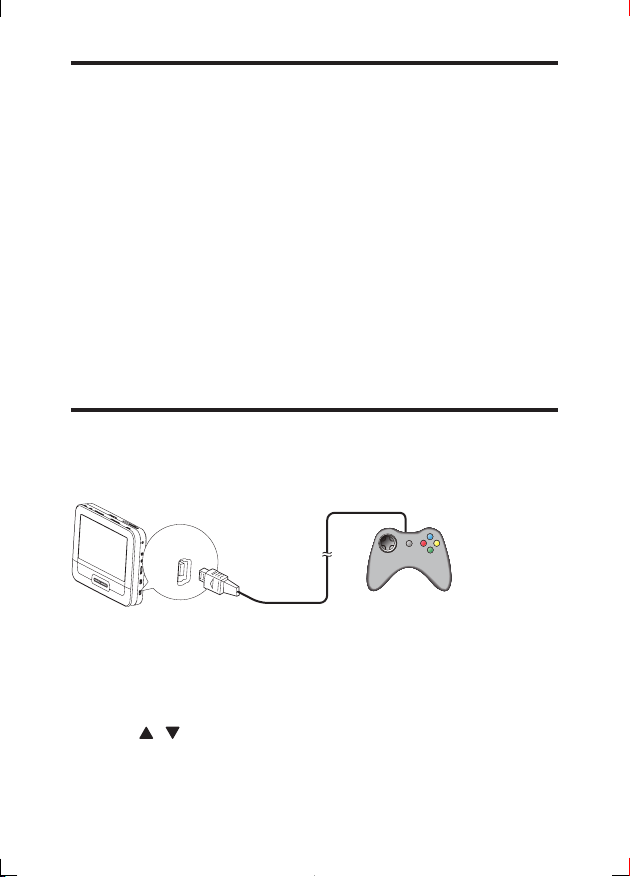
Play games
You can connect the supplied game pads to the player to play games.
GAME 1P
1 Connect the game pad to GAME 1P.
• For two-player games, connect the other game pad to GAME 2P.
2 Load the supplied game disc into the player.
» The game list is displayed.
3 Press / on the game pad of GAME 1P to select a game and press the
red button on this game pad to start playing.
22 EN
Page 23

• To return to the game list, press the button on the game pad of
GAME 1P .
Connect additional equipment
Caution
• Turn off your player before connecting to any additional equipment.
You can connect the player to a TV or an amplier to enjoy DVDs or Karaoke.
R
L
VIDEO IN
1 Connect a AV cable (not supplied) to:
• the AV OUT jack of this player
• the audio/video jacks of your TV.
2 Match the colors of the AV cable with the jacks:
• the yellow cable is for the video jack
• the red/white cable is for the audio jacks.
English
23EN
Page 24
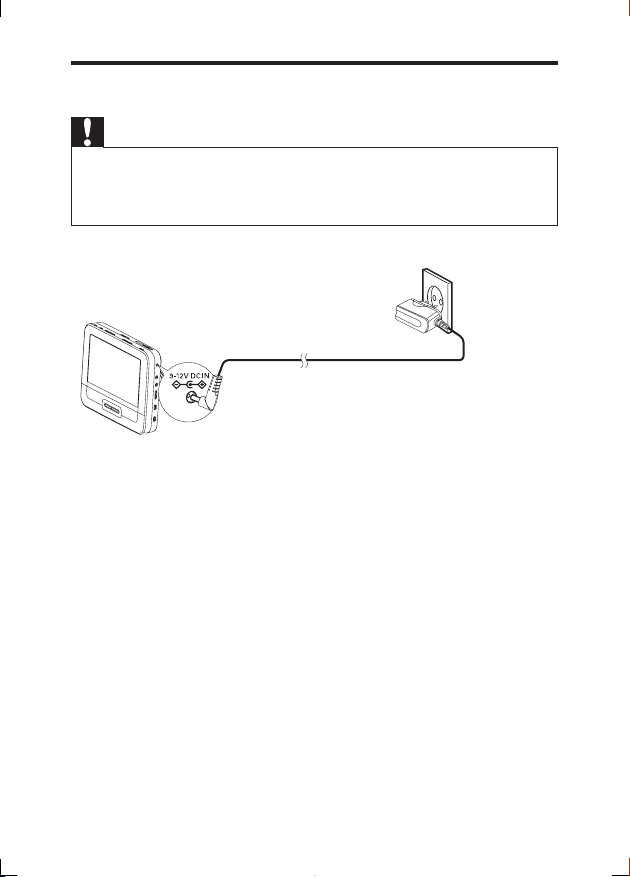
Connect power from household source
Caution
• Risk of product damage! Ensure that the power supply voltage corresponds to the voltage pointed
on the back or the underside of the player.
• Risk of electric shock! When you unplug the AC adaptor, always pull the plug from the socket.
Never pull the cable.
1 Connect the AC adaptor cable to:
• the DC IN jack on the main unit.
• the power outlet.
24 EN
Page 25
7 Product information
Note
• Product information is subject to change without prior notice.
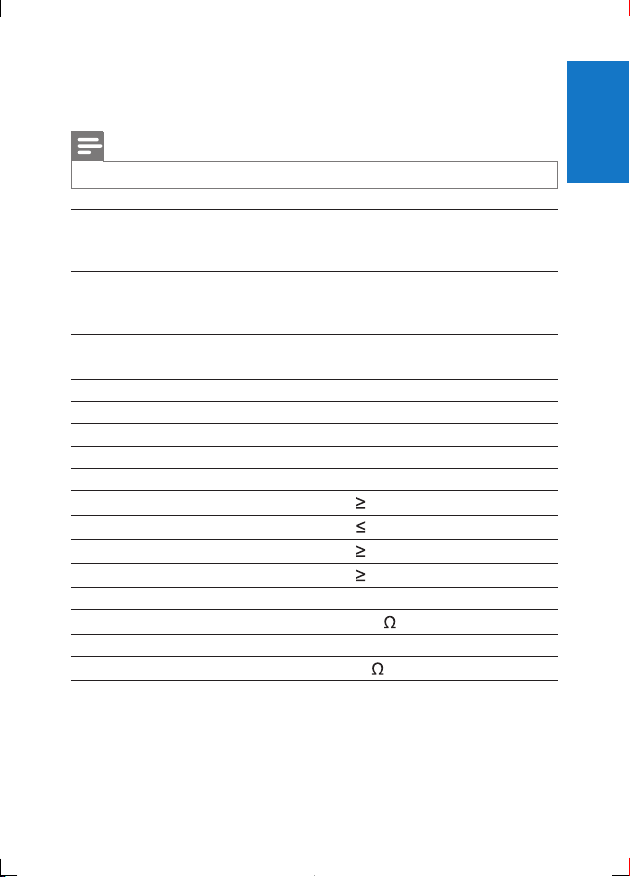
Dimensions
- Main unit
- Second screen
Weight
- Main unit
- Second screen
Power supply Input: 100-240V 50/60Hz 0.3A
Power consumption 7.2 W
Operating temperature range 0-45°C
Laser wavelength 650 nm
Video system NTSC & PAL
Frequency response 20Hz-20KHz ± 1dB
Signal/noise ratio
Audio distortion + noise
Channel separation
Dynamic range
Audio out (analog audio) Output level: 2V ± 10%
Load impedance
Video out Output level: 1Vp - p ± 20%
Load impedance
200 x 155 x 39 mm
200 x 155 x 21 mm
0.7 kg
0.4 kg
Output: DC 9V 0.8A
80 dB
-80 (1KHz)
80 dB
80 dB
10 K
75
English
25EN
Page 26
8 Troubleshooting
Warning
• Risk of electric shock. Never remove the casing of the player.
To keep the warranty valid, never try to repair the system yourself.
If you encounter problems when using the player, check the following points
before requesting service. If the problem remains unsolved, register your player
and get support at www.philips.com/welcome.
No power
• Ensure that both plugs of the mains cord are properly connected.
• Ensure that there is power at the car cigarette lighter or AC outlet.
No sound
• Ensure that the AV cable is connected correctly.
Distorted picture
• Clean the disc. With a clean, soft, lint-free cloth, wipe the disc outwards from
the center.
• Make sure that the video output format of the disc is compatible with the TV.
• Change the video output format to match your TV or program.
• The LCD is manufactured using high precision technology. You may, however,
see tiny black points and/or bright points(red, blue, green) that continuously
appear on the LCD. This is a normal result of the manufacturing process and
does not indicate a malfunction.
Cannot play disc
• Ensure the disc label is upwards.
• Clean the disc. With a clean, soft, lint-free cloth, wipe the disc outwards from
the center.
• Check if the disc is defective by trying another disc.
The player feels warm
• When the player is in use for a long period of time, its surface will be heated.
This is normal.
26 EN
Page 27
P&F USA Inc.
PO Box 2248
Alpharetta, GA 30023-2248
Phone 1 866 309 0845
Meet Philips at the Internet
http://www.philips.com/welcome
Specifications are subject to change without notice
© 2012 Koninklijke Philips Electronics N.V.
All rights reserved.
PD7012G _37_UM_V2.0
 Loading...