

Page 1
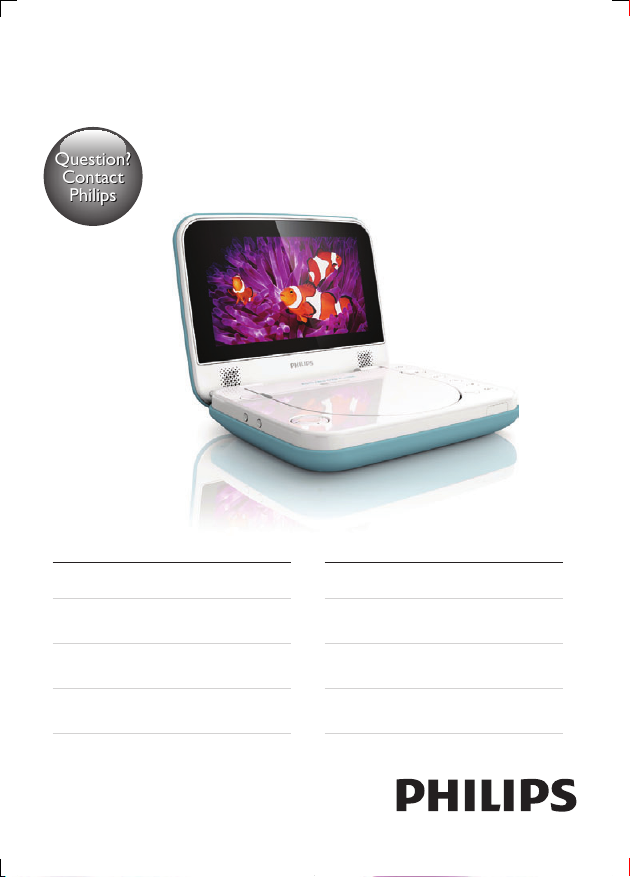
Always there to help you
Question?
Contact
Philips
Register your product and get support at
www.philips.com/welcome
PD7006
User manual 3
Benutzerhandbuch 47
Mode d'emploi 91
Manual del usuario 135
Brugervejledning 25
Gebruiksaanwijzing 69
Manuale utente 113
Användarhandbok 157
Page 2

Contents
1 Important 5
Safety and notice 5
Safety 5
Compliance 6
Care of the environment 7
Copyright 8
Warranty 9
2 Your portable DVD player 10
What's in the box 10
Overview of the main unit 11
Spill-resistant performance of the player 13
3 Get started 14
Mount the unit in your car 14
Charge power 15
Switch on/off 16
Select OSD language 16
4 Play music or movies 17
Play discs 17
Play from USB 20
Connect additional equipment 21
English
3EN
Page 3

5 Adjust settings 22
6 Product information 23
7 Troubleshooting 24
4 EN
Page 4
1 Important
Safety and notice
Read and understand all instructions before you use this product. If damage is
caused by failure to follow the instructions, the warranty does not apply.
Safety
Only use attachments/accessories specied by the manufacturer.
The product shall not be exposed to dripping or splashing.
Do not place any sources of danger on the product (e.g. liquid lled objects,
lighted candles).
Batteries (battery pack or batteries installed) shall not be exposed to excessive
heat such as sunshine, re or the like.
Danger of explosion if battery is incorrectly replaced. Replace only with the same
or equivalent type.
Modication of the product could result in hazardous radiation of EMC or
other unsafe operation.
Warning
• Where the MAINS plug or an appliance coupler is used as the disconnect device, the disconnect
device shall remain readily operable.
Warning
• Never remove the casing of this product.
• Never lubricate any part of this product.
• Never place this product on other electrical equipment.
• Keep this product away from direct sunlight, naked ames or heat.
• Never look into the laser beam inside this product.
• Ensure that you always have easy access to the power cord, plug or adaptor to disconnect the
product from the power.
English
5EN
Page 5
Hearing safety
A pleine puissance, l’écoute prolongée du baladeur peut endommager l’oreille
de l’utilisateur.
Warning
• To prevent possible hearing damage, do not listen at high volume levels for long periods.
The maximum output voltage of the player is not greater than 150 mV.
Compliance
Precisely Right.
“Packaging inside pouch is compliance with sample which is comply with
Annex IV of ECE R21.01regulation conducted by TUV Rheinland (test repor t
no.:85-R21-1410/11)”
This product complies with the radio interference requirements of the European
Community.
This apparatus includes this label:
6 EN
Page 6
Note
• The type plate is located on the bottom of the product.
Care of the environment
Environmental information
All unnecessary packaging has been omitted. We have tried to make the packaging
easy to separate into three materials: cardboard (box), polystyrene foam (buffer)
and polyethylene (bags, protective foam sheet.)
Your system consists of materials which can be recycled and reused if
disassembled by a specialized company. Please observe the local regulations
regarding the disposal of packaging materials, and old equipment.
Your product is designed and manufactured with high quality materials and
components, which can be recycled and reused.
When this crossed-out wheeled bin symbol is attached to a product it means that
the product is covered by the European Directive 2002/96/EC.
Please inform yourself about the local separate collection system for electrical and
electronic products.
Please act according to your local rules and do not dispose of your old products
with your normal household waste. Correct disposal of your old product helps to
prevent potential negative consequences for the environment and human health.
English
Your product contains batteries covered by the European Directive 2006/66/EC,
which cannot be disposed with normal household waste.Please inform yourself
about the local rules on separate collection of batteries because correct disposal
helps to prevent negative consequences for the environmental and human health.
7EN
Page 7
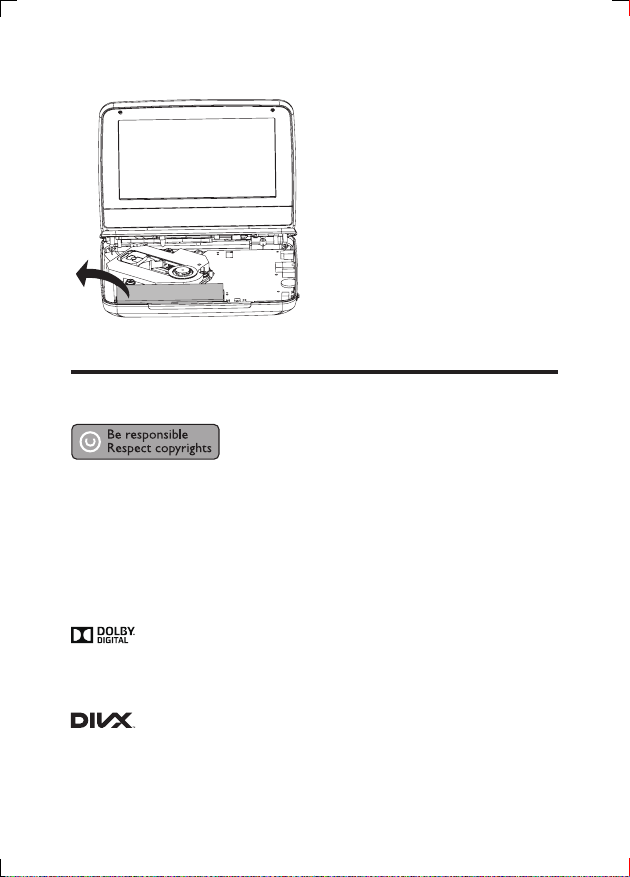
Always bring your product to a professional to remove the built-in battery.
Copyright
This item incorporates copy protection technology that is protected by U.S.
patents and other intellectual property rights of Rovi Corporation. Reverse
engineering and disassembly are prohibited.
Specications are subject to change without notice. Trademarks are the property
of Koninklijke Philips Electronics N.V or their respective owners. Philips reserves
the right to change products at any time without being obliged to adjust earlier
supplies accordingly.
Manufactured under license from Dolby Laboratories.
Dolby and the double-D symbol are trademarks of Dolby Laboratories.
ABOUT DIVX VIDEO: DivX® is a digital video format created by DivX.LLC, a
subsidiary of Rovi Corporation. This is an ofcial DivX Certied® device that plays
8 EN
Page 8

DivX video. Visit divx.com for more information and software tools to convert
your les into DivX videos.
ABOUT DIVX VIDEO-ON-DEMAND: This DivX Cer tied® device must be
registered in order to play purchased DivX Video-on-Demand (VOD) movies.
To obtain your registration code, locate the DivX VOD section in your device
setup menu. Go to vod.divx.com for more information on how to complete your
registration.
Warranty
• Never attempt to repair the product, this could lead to the risk of injury,
damage to the product and will void your warranty.
• Use the product and accessories only as intended by the manufacturer. The
caution sign printed on the back of the product indicates risk of electric
shock.
• Never remove the cover of the product. Always contact Philips Customer
Support for service or repairs.
• Any operation expressly prohibited in this manual, or any adjustments and
assembly procedures not recommended or authorized in this manual shall
void the warranty.
English
9EN
Page 9

2 Your portable DVD player
You can play the following discs on the DVD player (including CD-R, CD-RW,
DVD±R and DVD±RW):
• DVD-Video
• Video CD
• Audio CD
• MP3 CD
• DivX
• Discs with JPEG les
What's in the box
Check and identify the contents of your package:
• Portable DVD player
• AC power adaptor, ASUC12E-090080 (Philips)
• Car adaptor
• * TUV pouch
• User manual
10 EN
Page 10
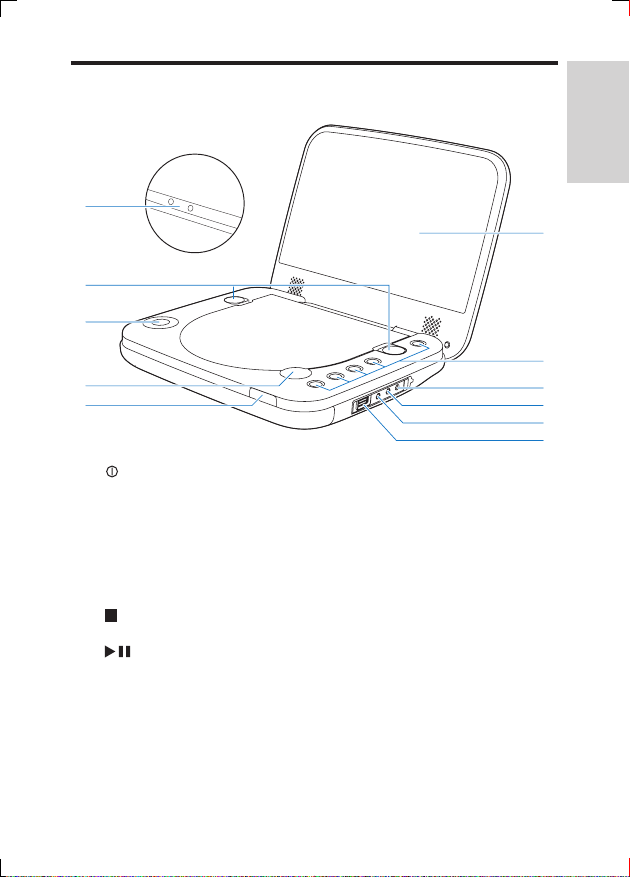
Overview of the main unit
j
i
h
g
f
a
• Turns on/off DVD player.
OPTIONS
• Accesses the setup menu.
• Selects disc or USB source.
• Selects different modes before or during play.
DVD MENU
• For DVD, accesses or exits disc menu.
• Stops disc play.
/OK
• Conrms an entry or selection.
• Starts, pauses or resumes disc play.
b DC IN
• Power supply socket.
English
k
a
b
c
d
e
11EN
Page 11
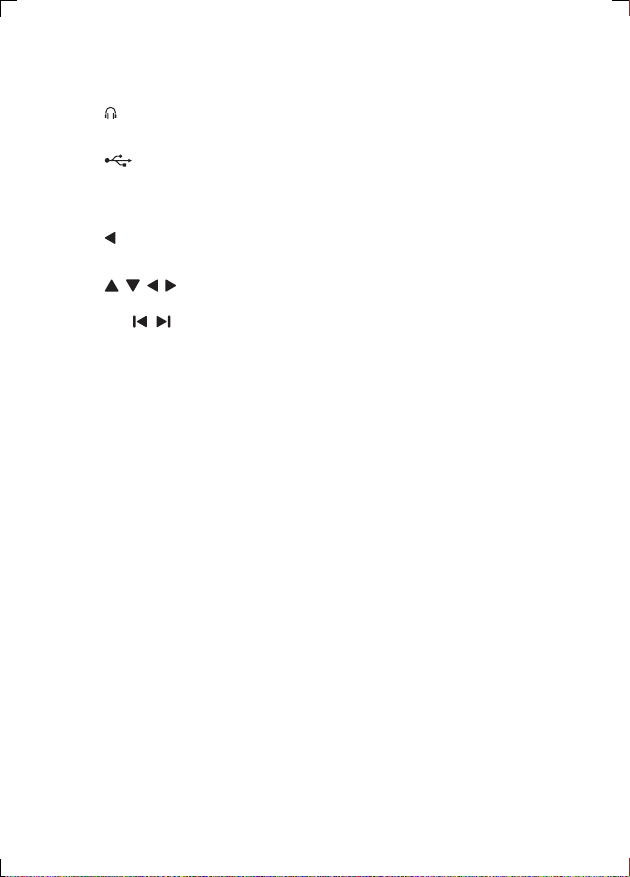
c AV OUT
• Audio/video output jack.
d
• Headphone jack.
e
• Connects a USB storage device.
f Charging indicator/Power indicator
g
OPEN
• Opens the disc compartment.
h
, , ,
• Navigates menus.
• ,
• Skips to the previous or next title, chapter, or track.
i Locks
• Locks the disc panel.
j VOLUME + / -
• Increases or decreases volume.
k Display panel
12 EN
Page 12
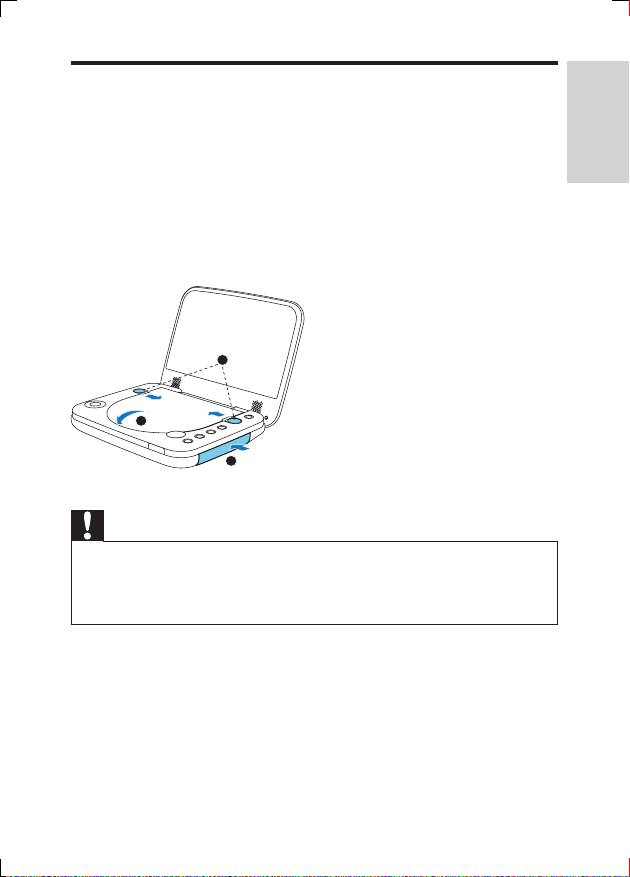
Spill-resistant performance of the player
The spill resistance meets IP4 standard.
This spill-resistant player survives accidental spillages.
To guarantee the spill-resistant result, do the following:
a Close the disc compartment door.
b Shut the locks.
c Make sure that you close the cover of the connectors.
2
1
Caution
• Never immerse the player in water or other liquids.
• Never use the player near a pool or in a shower.
• The supplied adaptor is not waterproof and should be kept from getting wet.
• Never use the supplied AC/DC power adaptor in wet environments.
• Use soft towel to dry your portable DVD player when it gets wet.
3
English
13EN
Page 13
3 Get started
Caution
• Use the controls only as stated in this user manual.
• Always follow the instructions in this chapter in sequence.
If you contact Philips, you will be asked for the model and serial number of your
player. The model number and serial number are on the bottom of your player.
Write the numbers here:
Model No. __________________________
Serial No. ___________________________
Mount the unit in your car
14 EN
Page 14
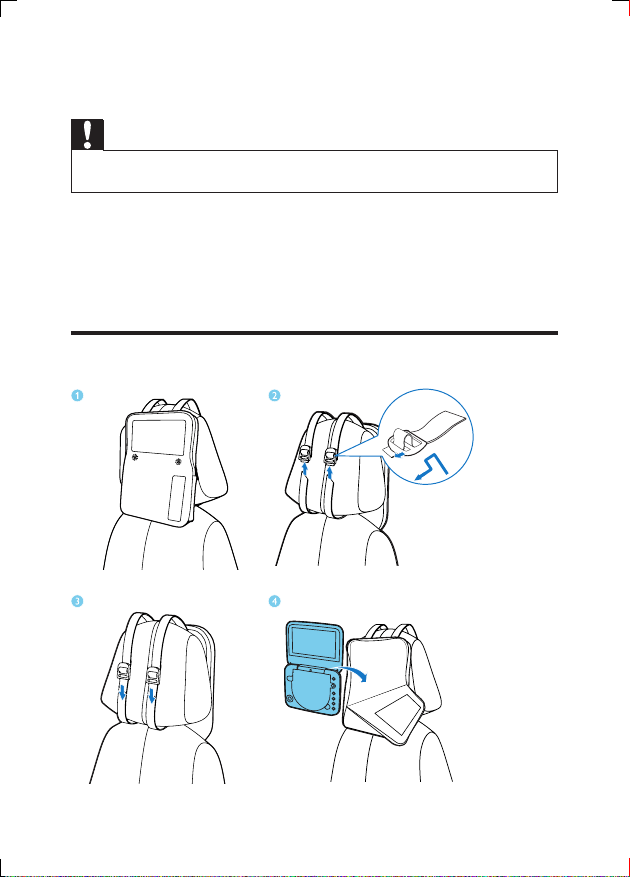
To use the player in your car, attach the player to the back of the front seat
headrests.
1 Position the bag on the back of the headrest.
2 Adjust the position of the bag, and then pull the straps through the bag slider.
3 Pull the straps to secure the bag to the headrest.
4 Put the player into the bag.
Charge power
Charge through car adaptor
Caution
• You can only charge the player when it is in power-off mode.
• The supplied adaptor is not waterproof and should be kept from getting wet.
• Never use the supplied adaptor in wet environments.
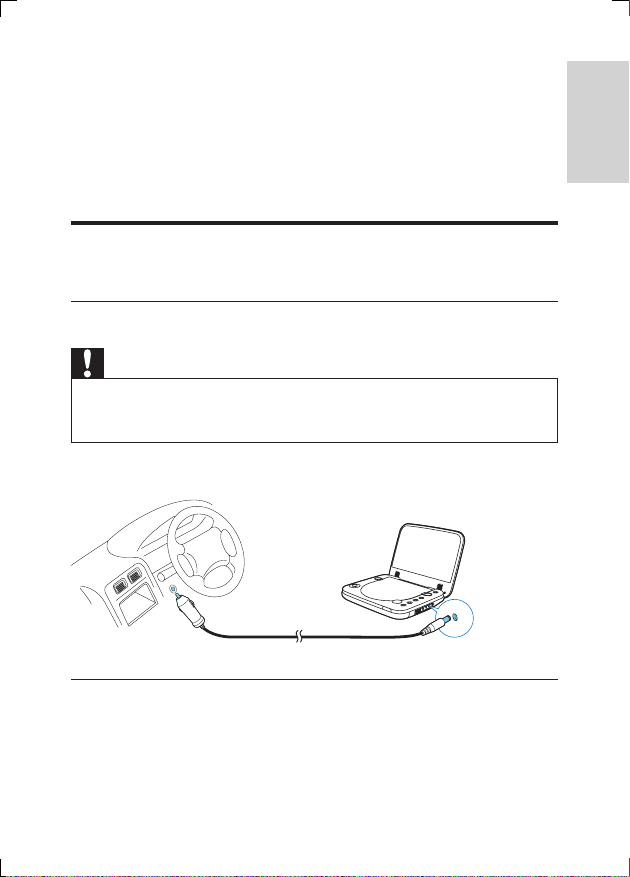
Connect the supplied car adaptor to the player and car cigarette lighter.
English
Charge through the AC adaptor
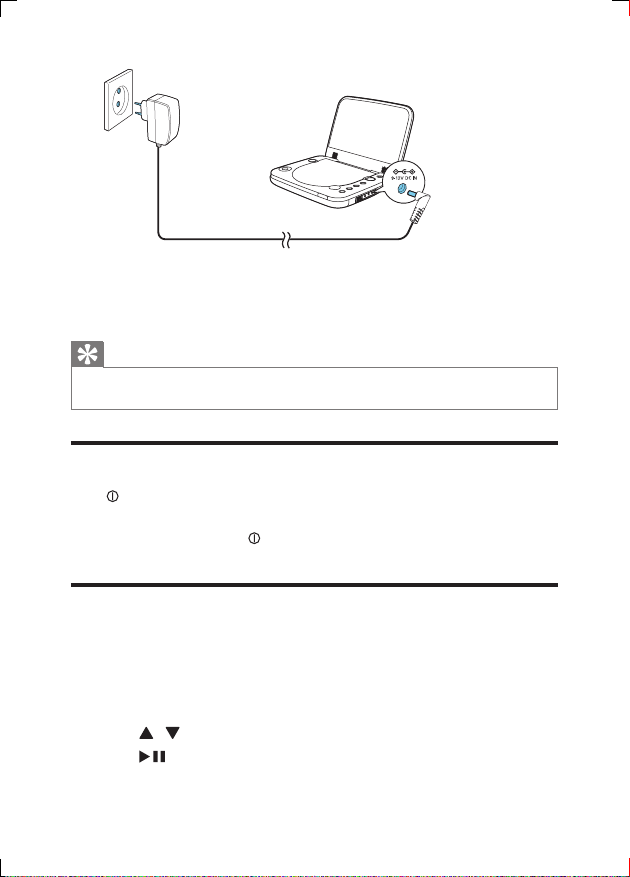
1 Find the DC IN jack of the player.
2 Connect the supplied AC adaptor to the player and to the AC outlet.
15EN
Page 15
» The charging indicator turns on (red).
» When the battery is fully charged, the indicator turns off.
Tip
• To maximize battery life, recharge the battery immediately once the battery is fully discharged. If
you do not use the player for a long time, recharge the battery once every two months.
Switch on/off
Press on the player to switch on.
» The indicator turns on (green).
To switch off the player, press
» The indicator turns off.
Select OSD language
You can choose a different language for the on-screen display text.
1 Press OPTIONS .
» The options menu is displayed.
2 Select [Setup] (setup) > [General] > [Language].
3 Press / to select an option.
4 Press /OK to conrm.
5 Press OPTIONS to exit.
16 EN
.
Page 16
4 Play music or movies
Play discs
Press OPEN on the player to open the disc compartment.
1
2 Insert the disc with label side facing up.
3 Push down to close the disc compartment.
» Play starts automatically. If not, press /OK.
4 Lock the disc compartment door with the left and right locks to prevent
water leaking into the disc compartment.
• If a menu is displayed, select an item, then press /OK to start play.
• To pause, press /OK. Press again to resume play.
• To stop, press twice.
• To select the previous/next item, press or .
Play options
Select subtitle language
For DVDs that contain two or more subtitle languages,
1 Press OPTIONS.
» The option menu is displayed.
2 Select [Subtitles], then press /OK.
3 Press / to select a subtitle.
4 Press /OK to conrm.
5 Press OPTIONS to exit.
Select audio language
For DVDs that contain two or more audio languages.
1 Press OPTIONS.
» The setup menu is displayed.
2 Select [Audio language], then press /OK.
English
17EN
Page 17
3 Press / to select a language.
4 Press /OK to conrm.
Repeat
During play, you can select different repeat options.
1 Press OPTIONS.
» The option menu is displayed.
2 Select [Repeat] and press /OK.
» The repeat options are displayed.
For DVD
• [Repeat A]: the start of the section to repeat
• [Repeat B]: the end of the section to repeat
• [Repeat Chapter]: repeat the current chapter
• [Repeat Title]: repeat the current title or track
• [Repeat all]: repeat all titles on the disc
• [Repeat Off]: switch off the repeat mode
For VCD
• [Repeat A]: the start of the section to repeat
• [Repeat B]: the end of the section to repeat
• [Repeat 1]: repeat the current track
• [Repeat all]: repeat all tracks on the disc
• [Repeat Off]: switch off the repeat mode
For MP3/CD/DivX
• [Repeat 1]: repeat the current track
• [Repeat Folder]: repeat all the tracks in current folder
• [Off]: switch off the repeat mode
3 Select an option, then press /OK to conrm.
Tip
• For VCDs, if PBC is on, you cannot repeat items.
Random play
For audio CDs and MP3 CDs, you can play all tracks in random order.
1 Press OPTIONS.
» The option menu is displayed.
2 Select [Shufe All] and press /OK.
18 EN
Page 18
3 Select [On] or [Off].
4 Press /OK to conrm.
Zoom
For DVDs, VCDs and JPEG CDs, you can zoom in and out for video images or
pictures.
1 Press OPTIONS.
» The option menu is displayed.
2 Select [Zoom & Pan] and press /OK.
3 Press /OK repeatedly to zoom in and out.
4 When the video image or picture is enlarged, press
, , , to pan through it.
Display play information
For DVDs and VCDs, you can view the play information during play.
1 Press OPTIONS.
» The option menu is displayed.
2 Select [Display] and press /OK to conrm.
» For DVDs, title number, chapter number and elapsed play time is
displayed. For VCDs, track number and elapsed play time is displayed.
Select audio mode
When you play VCDs, you can select an audio mode.
1 Press OPTIONS.
» The option menu is displayed.
2 Select [Audio], then press /OK.
3 Press / to select audio channel: [Stereo], [Left-mono] or [Right-mono].
Rotate pictures
For JPEG CDs only. While the JPEG is displayed:
• Press
• Press to ip left/right.
to ip up/down.
English
19EN
Page 19
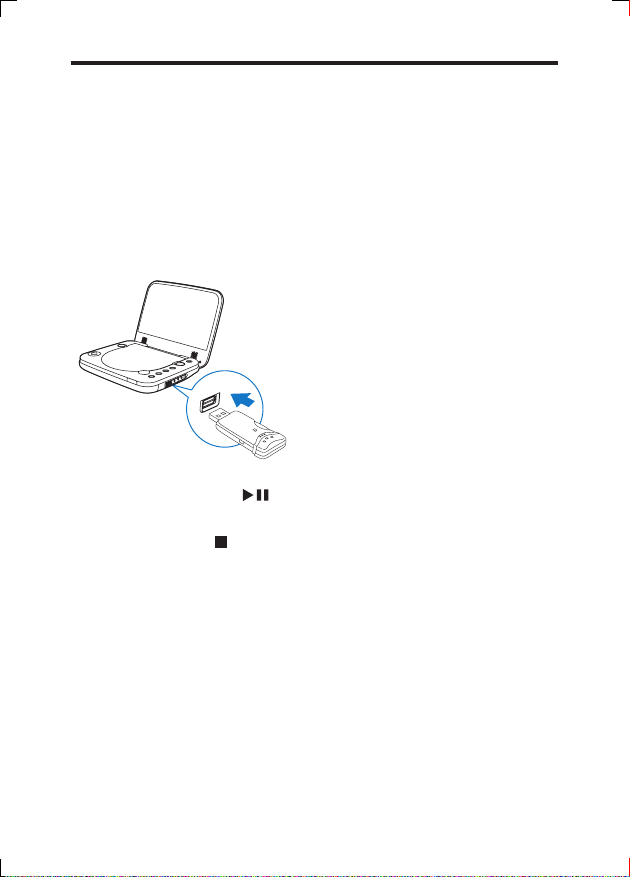
Play from USB
You can play DivX, VOB, MP3, or JPEG les that are stored on a USB storage
device.
1 Press OPTIONS and select [Source] (source).
2 Select [USB] from the menu to choose USB mode.
3 Connect the USB device to the player.
» The content menu is displayed.
4 Select a le, then press /OK.
» Play starts.
5 To stop play, press .
20 EN
Page 20
Connect additional equipment
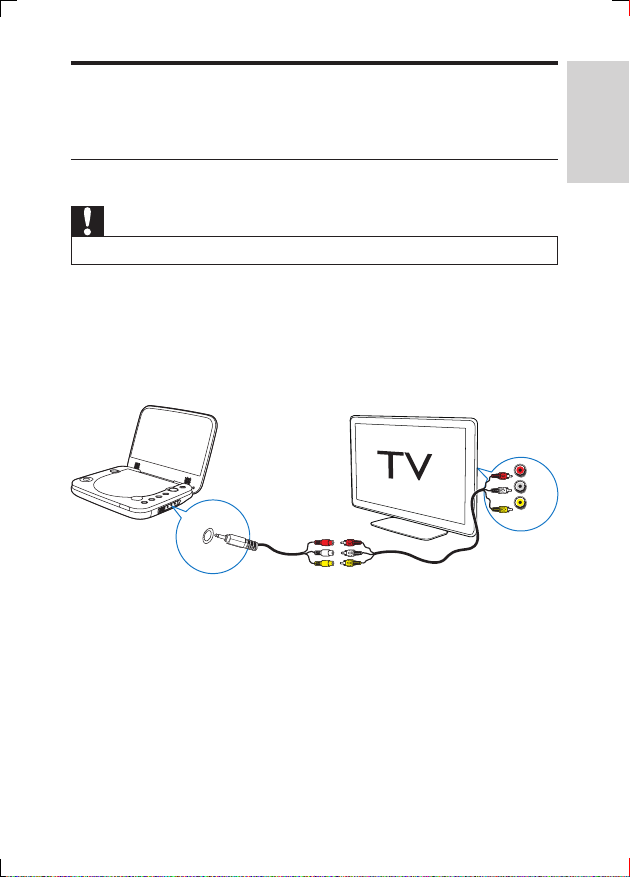
You can connect the player to a TV or an amplier to enjoy DVDs.
Connect to a TV
Caution
• Turn off your player before connecting to any additional equipment.
1 Connect the to the AV cable (not supplied) to the AV OUT jack of the
player.
2 Match the color of the AV cables (not supplied) with the jacks on your TV:
• the yellow cable is for the yellow video jack
• the red/white cable is for the red/white audio jacks.
R
L
AV OUT
VIDEO IN
English
21EN
Page 21
5 Adjust settings
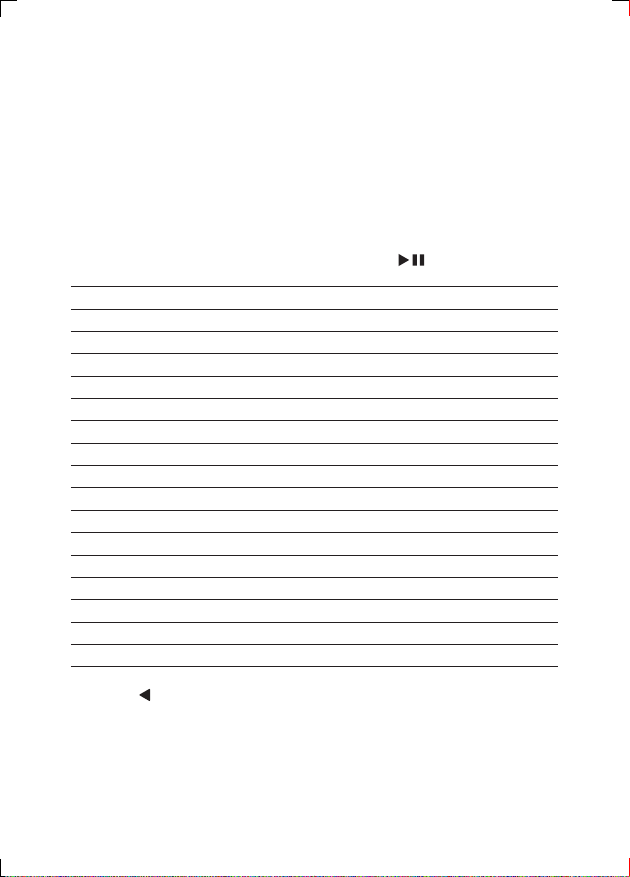
To maximize your play experience, use the setup menu to ne tune your settings.
1 Press OPTIONS .
» The options menu is displayed.
2 Select [Setup].
» The setup menu is displayed.
3 Use navigation keys to select an option and press /OK to conrm.
[General]
[Language] Select on-screen display language
[PBC settings] Set playback control function on/off.
[Power save] Select power save mode.
[DivX (VOD)] Get DivX registration code.
[DivX subtitles] Select DivX subtitle language.
[Parental(DVD)] Select parental options.
[Set password] Change existing password (3308 by default).
[Factory settings] Restore factory settings.
[Video]
[LCD Display] Set screen display aspect ratio.
[TV standard] Set video output format to TV system.
[Brightness] Adjust screen brightness.
[Contrast] Adjust screen contrast.
[ Audio]
[Dolby] Set Dolby output.
[Version] Check the version information.
4 Press to go back to the previous menu.
5 Press OPTIONS to exit.
22 EN
Page 22
6 Product information
Note
• Product information is subject to change without prior notice.
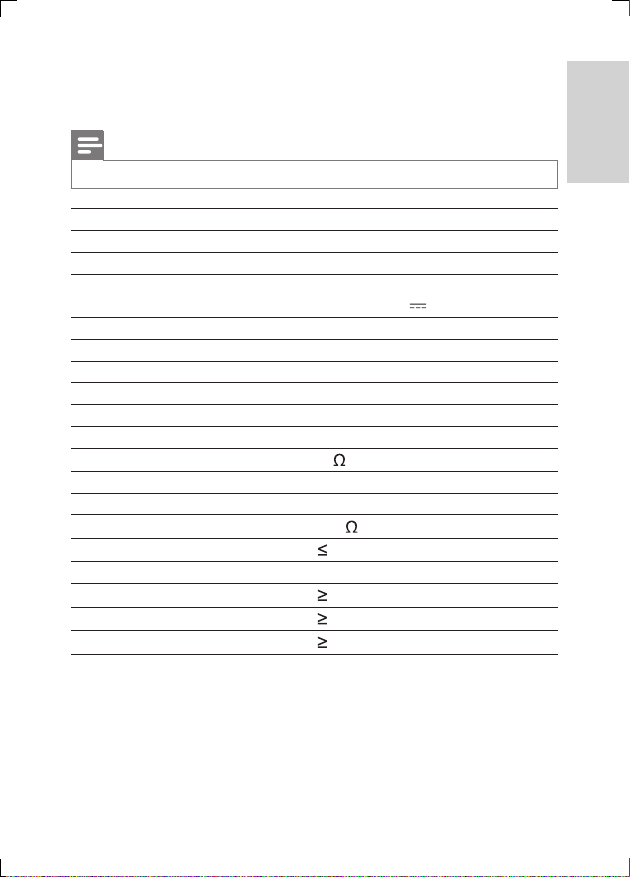
Dimensions 195 x 154 x 37 mm
Weight 0.675 kg
AC power adaptor ASUC12E-090080 (Philips)
Power supply Input: 100-240V~ 50/60Hz
Output: DC 9V
Power consumption 9.0 W
Operating temperature range 0-45°C
Laser wavelength 650 nm
Video output
Format PAL & NTSC
Output level 1Vp - p ± 20%
Load impedance
Audio line out
Audio out (analog audio) Output level: 2V ± 10%
Load impedance
Audio distortion + noise
Frequency response 20Hz-20KHz ± 1dB
Signal/noise ratio
Channel separation
Dynamic range
75
10 K
-80 (1KHz)
80 dB
80 dB
80 dB
0.8A
English
23EN
Page 23

7 Troubleshooting
No power
• Ensure that both plugs of the mains cord are properly connected.
• Ensure that there is power at the AC outlet.
• Check if the built-in battery is drained.
No sound
• Ensure that the AV cable is connected correctly.
Distorted picture
• Clean the disc. With a clean, soft, lint-free cloth, wipe the disc outwards from
the center.
• Make sure that the video output format of the disc is compatible with the TV.
• Change the video output format to match your TV or program.
• The LCD is manufactured using high precision technology. You may, however,
see tiny black points and/or bright points(red, blue, green) that continuously
appear on the LCD. This is a normal result of the manufacturing process and
does not indicate a malfunction.
Cannot play disc
• Ensure the disc label is upwards.
• Clean the disc. With a clean, soft, lint-free cloth, wipe the disc outwards from
the center.
• Check if the disc is defective by trying another disc.
The player feels warm
• When the player is in use for a long period of time, its surface will be heated.
This is normal.
24 EN
Page 24

Specifications are subject to change without notice
© 2012 Koninklijke Philips Electronics N.V.
All rights reserved.
PD7006_12_UM_ERP_V3.0
 Loading...