

Page 1
User manual
Manuel d’utilisation
Manual de usuario
www.philips.com/welcome
Register your product and get support at
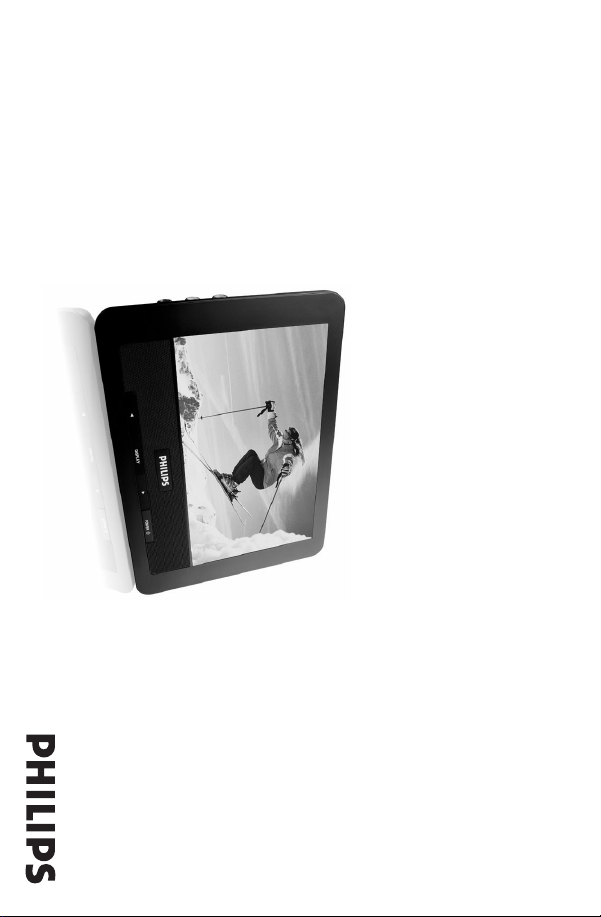
Second LCD screen
PAC132
Page 2

2
Page 3

Canada
English:
This digital apparatus does not exceed the Class B limits for radio
noise emissions from digital apparatus as set out in the Radio
Interference Regulations of the Canadian Department of
Communications. This Class B digital apparatus complies with
Canadian ICES-003.
Français:
Cet appareil numérique n'émet pas de bruits radioélectriques
dépassant les limites applicables aux appareils numériques de
Classe B prescrites dans le Règlement sur le Brouillage
Radioélectrique édicté par le Ministère des Communications du
Canada. Cet appareil numérique de la classe B est conforme à la
norme NMB-003 du Canada.
This product complies with the FCC-Rules, Part 15 and with
21 CFR 1040.10. Operation is subject to the following two
conditions:
1. This device may not cause harmful interference, and
2. This device must accept any interference received, includ-
ing interference that may cause undesired operation.
Español
- - - - - - - - - - - - - - - - - - 18
Français
- - - - - - - - - - - - - - - - - - 11
English
- - - - - - - - - - - - - - - - - - - - 4
3
EnglishEspañol Français
Page 4
4
literature closely to prevent operating
and maintenance problems.
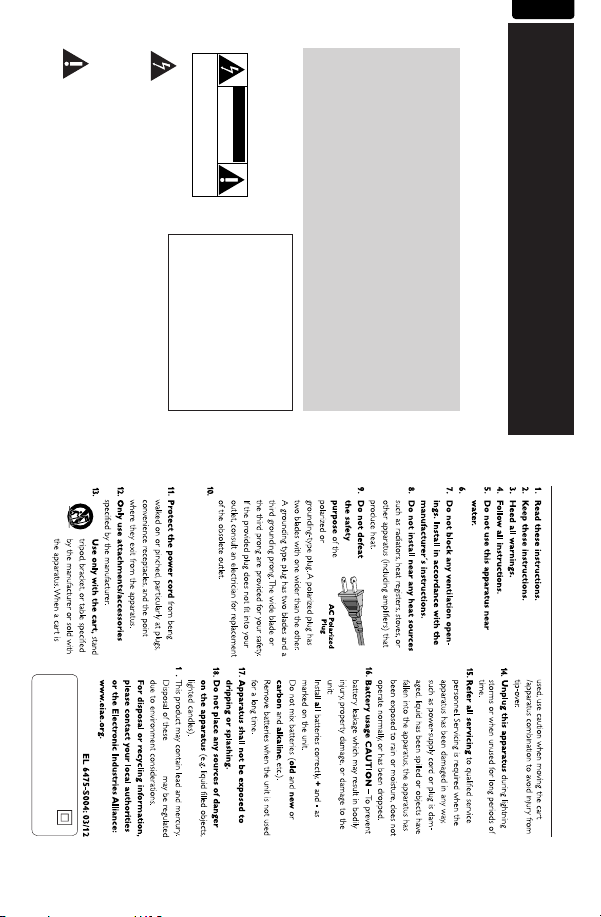
The “exclamation point” calls
attention to features for which
you should read the enclosed
CAUTION: To prevent electric shock,
match wide blade of plug to wide slot,
fully insert.
shock. For the safety of everyone in your
household, please do not remove
product covering.
not be exposed to rain or moisture, and
objects filled with liquids, such as vases,
should not be placed on this apparatus.
INSIDE. REFER SERVICING TO QUALIFIED SERVICE PERSONNEL.
CAUTION: TO REDUCE THE RISK OF ELECTRIC SHOCK, DO NOT
REMOVE COVER (OR BACK). NO USER-SERVICEABLE PARTS
This “bolt of lightning” indicates
uninsulated material within your
unit may cause an electrical
WARNING: To reduce the risk of fire
or electric shock, this apparatus should
CAUTION
RISK OF ELECTRIC SHOCK
DO NOT OPEN
located on the bottom of the cabinet.
Retain this information for future
reference.
Model No. ______________________
Serial No.
______________________
Know these
required from you to obtain
warranty service.
safetysymbols
defect.
Enter below the Serial No. which is
For Customer Use
money-saving offers.
Returning the enclosed card
guarantees that your date of
purchase will be on file, so no
additional paperwork will be
By registering your product, you'll
receive notification - directly from
the manufacturer - in the rare
case of a product recall or safety
Product
Ownership
Registering your product
guarantees that you'll receive
all of the privileges to which
you're entitled, including special
Registering your model with PHILIPS makes you eligible for all of the valuable benefits listed below,so
don't miss out. Complete and return your Product Registration Card at once to ensure:
*Proof of
Purchase
*Product Safety
Notification
*Additional
Benefits of
English
Return your Product Registration Card today
to get the very most from your purchase.
This symbol indicates that the unit has
Class II equipment symbol
a double insulation system
Where the MAINS plug or an appliance
coupler is used as the disconnet device,
the disconnet device shall remain
readily operable.
9
materials
Clean only with dry cloth.
IMPORTANT SAFETY INSTRUCTIONS
Page 5

comparable to the original product in Philips current inventory,
or (3) refund the original purchase price of the product.
Philips warrants replacement products or parts provided under
this warranty against defects in materials and workmanship from
the date of the replacement or repair for ninety (90) days or for
the remaining portion of the original product’s warranty,
whichever provides longer coverage for you. When a product or
part is exchanged, any replacement item becomes your property
and the replaced item becomes Philips’ property. When a refund
is given, your product becomes Philips’ property.
Note: Any product sold and identified as refurbished or
renewed carries a ninety (90) day limited warranty.
Replacement product can only be sent if all warranty
requirements are met. Failure to follow all requirements
can result in delay.
WHAT IS NOT COVERED - EXCLUSIONS AND LIMI-
TATIONS:
This Limited Warranty applies only to the new products manu-
factured by or for Philips that can be identified by the trademark,
trade name, or logo affixed to it. This Limited Warranty does not
apply to any non-Philips hardware product or any software, even
if packaged or sold with the product. Non-Philips manufacturers,
suppliers, or publishers may provide a separate warranty for their
own products packaged with the bundled product.
Philips is not liable for any damage to or loss of any programs,
data, or other information stored on any media contained within
the product, or any non-Philips product or part not covered by
this warranty. Recovery or reinstallation of programs, data or
other information is not covered under this Limited Warranty.
This warranty does not apply (a) to damage caused by accident,
abuse, misuse, neglect, misapplication, or non-Philips product, (b)
to damage caused by service performed by anyone other than
Philips or Philips Authorized Service Location, (c) to a product or
a part that has been modified without the written permission of
This warranty gives you specific legal rights. You may have other rights which vary from state/province to state/province.
WARRANTY COVERAGE:
PHILIPS warranty obligation is limited to the terms set forth
below.
WHO IS COVERED:
Philips warrants the product to the original purchaser or the per-
son receiving the product as a gift against defects in materials and
workmanship as based on the date of original purchase
(“Warranty Period”) from an Authorized Dealer. The original
sales receipt showing the product name and the purchase date
from an authorized retailer is considered such proof.
WHAT IS COVERED:
The Philips warranty covers new products if a defect in material
or workmanship occurs and a valid claim is received by Philips
within the Warranty Period. At its option, Philips will either (1)
repair the product at no charge, using new or refurbished
replacement parts, or (2) exchange the product with a product
that is new or which has been manufactured from new, or ser-
viceable used parts and is at least functionally equivalent or most
Philips, P.O. Box 671539, Marietta, GA. 30006-0026
UCT. EXCEPT TO THE EXTENT PROHIBITED BY APPLICABLE
LAW, ANY IMPLIED WARRANTY OF MERCHANTABILITY OR
FITNESS FOR A PARTICULAR PURPOSE ON THIS PRODUCT
IS LIMITED IN DURATION TO THE DURATION OF THIS
WARRANTY.
Some states do not allow the exclusions or limitation of inciden-
tal or consequential damages, or allow limitations on how long an
implied warranty lasts, so the above limitations or exclusions may
not apply to you.
3121 233 48802
ANY EXPRESS OR IMPLIED WARRANTY ON THIS PROD-
1-888-PHILIPS (1-888-744-5477)
1-800-661-6162 (French Speaking)
1-888-PHILIPS (1-888-744-5477) - (English or Spanish
Speaking)
•A product used for commercial or institutional purposes
(including but not limited to rental purposes).
can be provided.
• Product lost in shipment and no signature verification receipt
• Failure to operate per Owner’s Manual.
TO OBTAIN ASSISTANCE IN THE U.S.A., PUERTO
RICO, OR U.S. VIRGIN ISLANDS…
Contact Philips Customer Care Center at:
TO OBTAIN ASSISTANCE IN CANADA…
REPAIR OR REPLACEMENT AS PROVIDED UNDER THIS
WARRANTY IS THE EXCLUSIVE REMEDY FOR THE CON-
SUMER. PHILIPS SHALL NOT BE LIABLE FOR ANY INCIDEN-
TAL OR CONSEQUENTIAL DAMAGES FOR BREACH OF
•A product that requires modification or adaptation to enable
cause not within the control of Philips.
for lost data or lost software.
returning product to Philips.
it to operate in any country other than the country for which
it was designed, manufactured, approved and/or authorized, or
repair of products damaged by these modifications.
ment of customer controls on the product, and installation or
repair of antenna/signal source systems outside of the product.
installation or maintenance, connections to improper voltage
supply, power line surge, lightning damage, retained images or
screen markings resulting from viewing fixed stationary con-
tent for extended periods, product cosmetic appearance items
due to normal wear and tear, unauthorized repair or other
This Limited Warranty does not cover:
• Shipping charges to return defective product to Philips.
• Labor charges for installation or setup of the product, adjust-
• Product repair and/or part replacement because of improper
• Damage or claims for products not being available for use, or
• Damage from mishandled shipments or transit accidents when
PHILIPS LIMITED WARRANTY
ONE (1) YEAR
Philips, or (d) if any Philips serial number has been removed or
defaced, or (e) product, accessories or consumables sold “AS IS”
without warranty of any kind by including refurbished Philips
product sold “AS IS” by some retailers.
5
English
Page 6
English
6
1
3
2
1
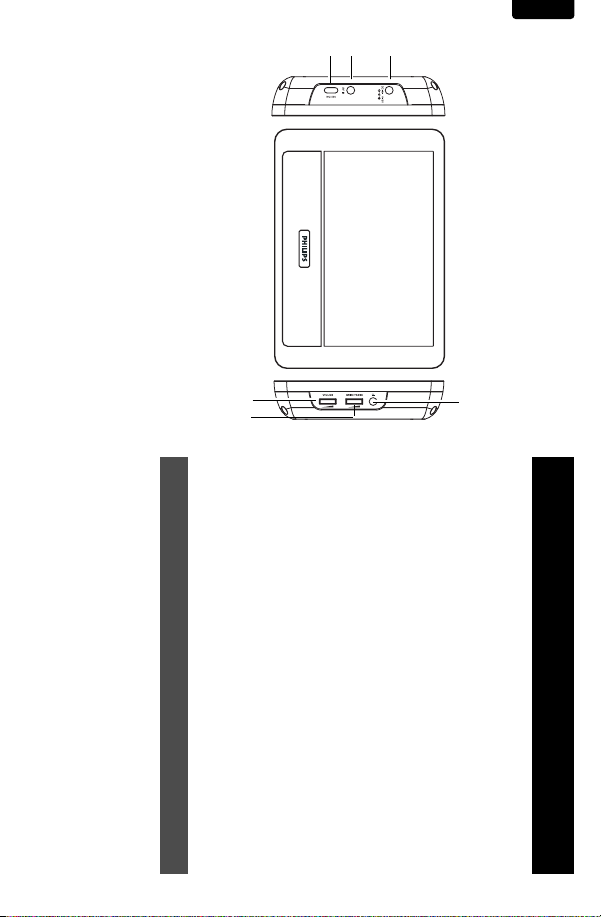
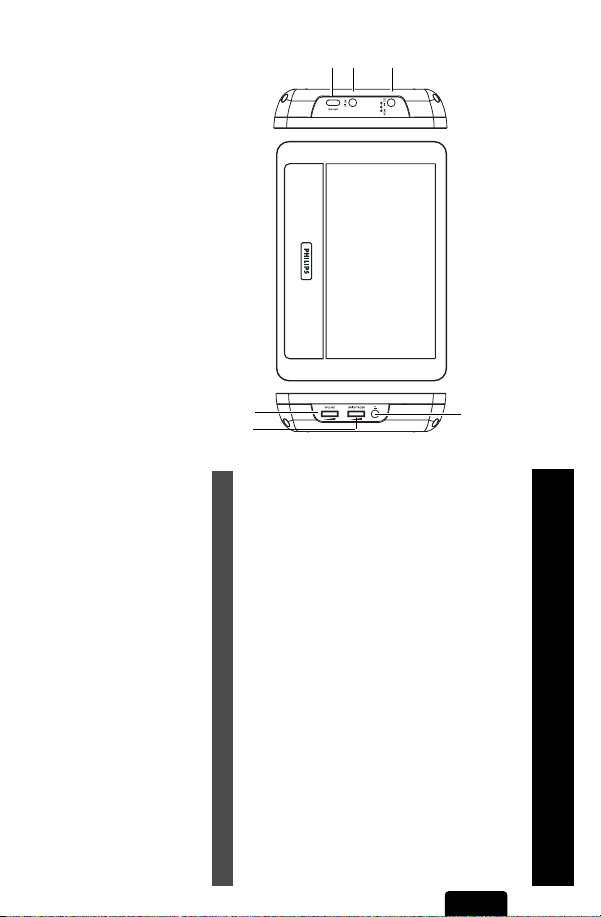
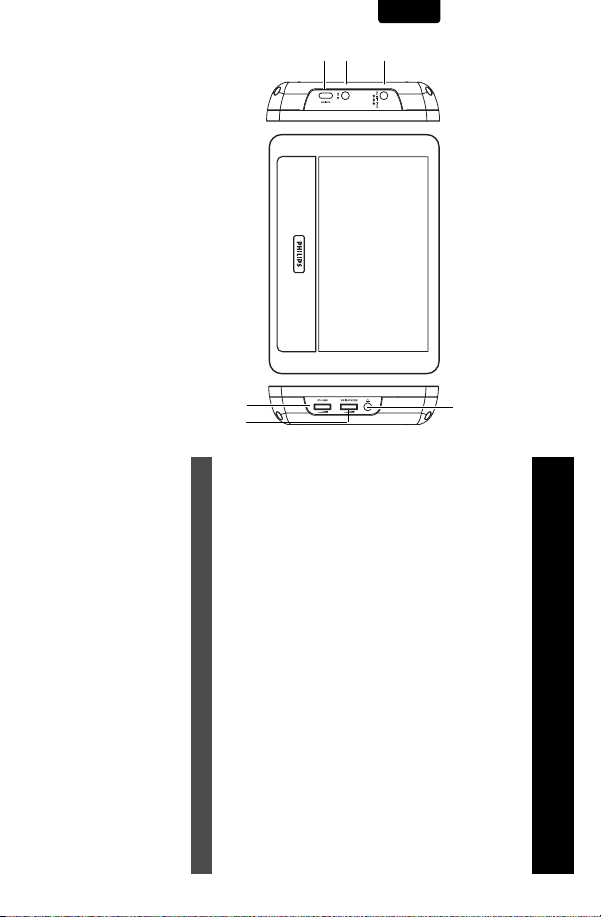
3 ON/OFF Switch the player on / off
2 AV IN Audio/Video input
1.1 Left side of the player (see figure 1)
1 DC IN DC power input jack
6
5
1 Control elements
1.1 Left side of the player
1.2 Right side of the player
2 General information
3 Connection
3.1 Use in a car
3.2 Connect to headphone
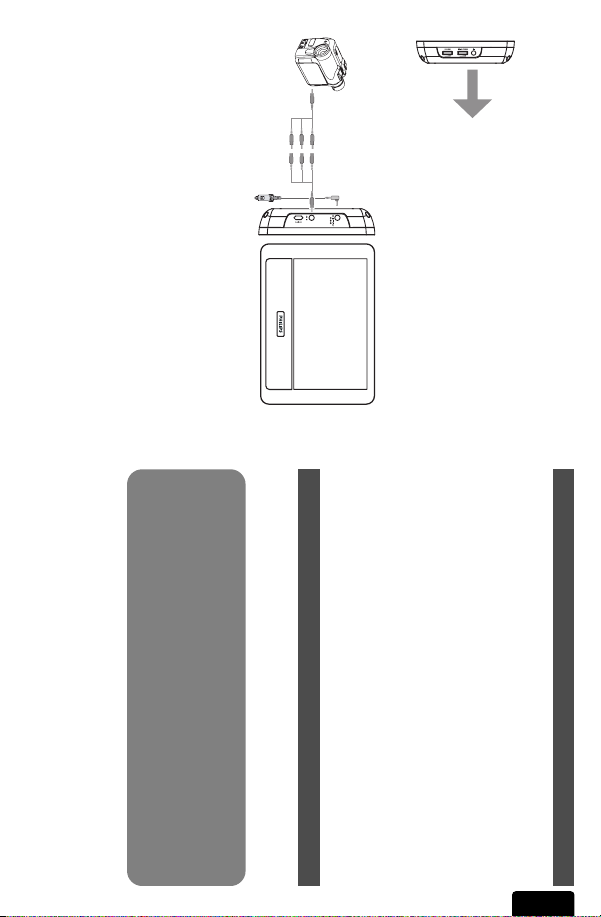
3.3 Connect to camcorder
1 Control elements and functional components
and functional com-
ponents
4 Enjoyment
4.1 Power on
4.2 Volume control
4.3 Screen brightness
5Troubleshooting
6Technical data
4
To fully benifit from the support that Philips offers, reg-
ister your product at www.philips.com/welcome.
Content
Congratulations on your purchase and welcome to Philips!
English
Page 7

• Unplug the AC adaptor to cut the power if liquid or objects get
•Take care not to drop the unit or subject it to strong shocks,
•Any service should be done by qualified service personnel.
inside the unit.
which may cause malfunction.
• Listen at reasonable volumes for reasonable periods of time.
• Be careful not to adjust the volume as your hearing adapts.
• Do not turn up the volume so high that you can’t hear what’s
•You should use caution or temporarily discontinue use in potenaround you.
tially hazardous situations.
• Unplug the AC adaptor from the outlet or remove the battery
Safety and maintenance
(DVE) or AY4132 (PHILIPS))
Be sure to observe the following guidelines when using
your headphones.
breaks.
• Hold the plug to disconnect the AC adaptor.Do not pull the
Please always use supplied AC/DC adaptor (DSA-9W-09 F
• Be sure to use your equipment reasonably and take appropriate
pack when the unit is not used for long periods of time.
power cord.
• Slowly increase the sound until you can hear it comfortably and
Listen for reasonable periods of time:
•Prolonged exposure to sound, even at normally “safe” levels, can
clearly, without distortion.
also cause hearing loss.
• When connecting with car power (cigarette lighter) adaptor, be
shock.
sure the input voltage of the adaptor is identical with car voltage.
To establish a safe volume level:
• Set your volume control at a low setting.
before your hearing adapts and leave it there.
• Do not touch the AC adaptor with wet hands to prevent electric
with the local voltage. Otherwise, the AC adaptor and unit may
be damaged.
adapts to higher volumes of sound. So after prolonged listening,
what sounds “normal” can actually be loud and harmful to your
hearing.To guard against this,set your volume to a safe level
• Make sure that the input voltage of the AC adaptor is in line
• Sound can be deceiving. Over time your hearing “comfort level”
2 General information
• Using headphones at a high volume can impair your
hearing.This product can produce sounds in decibel
ranges that may cause hearing loss for a normal person, even for
exposure less than a minute.The higher decibel ranges are
offered for those that may have already experienced some hear-
ing loss.
4 Headphone jack
5 Brightness Finetune the TFT screen brightness
6VOLUME Volume control
Power Sources
This unit operates on the supplied AC adaptor or car adapter.
1.2 Right side of the player (see figure 1)
Hearing Safety
Listen at a moderate volume.
7
English
Page 8
English
• Do not use headphones while operating a motorized vehicle,
8
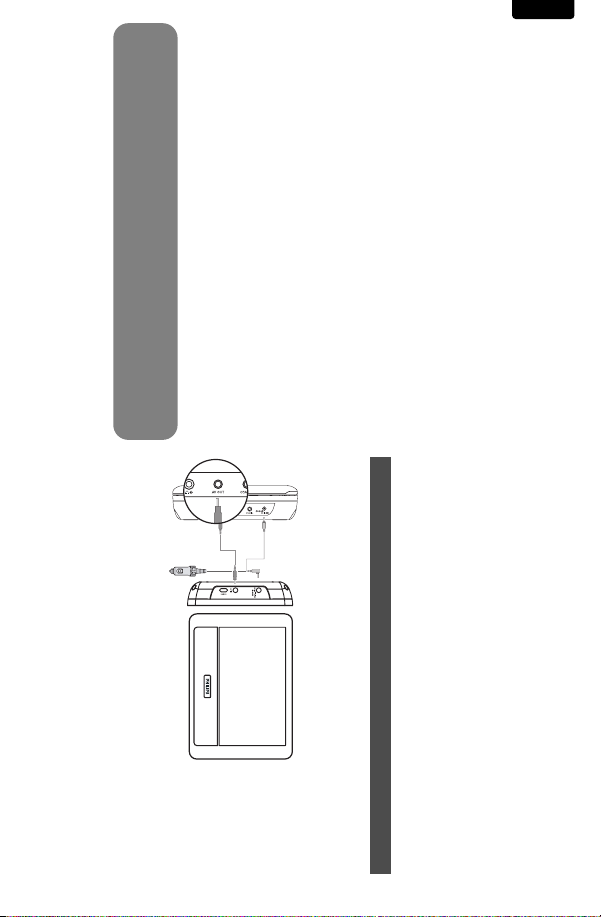
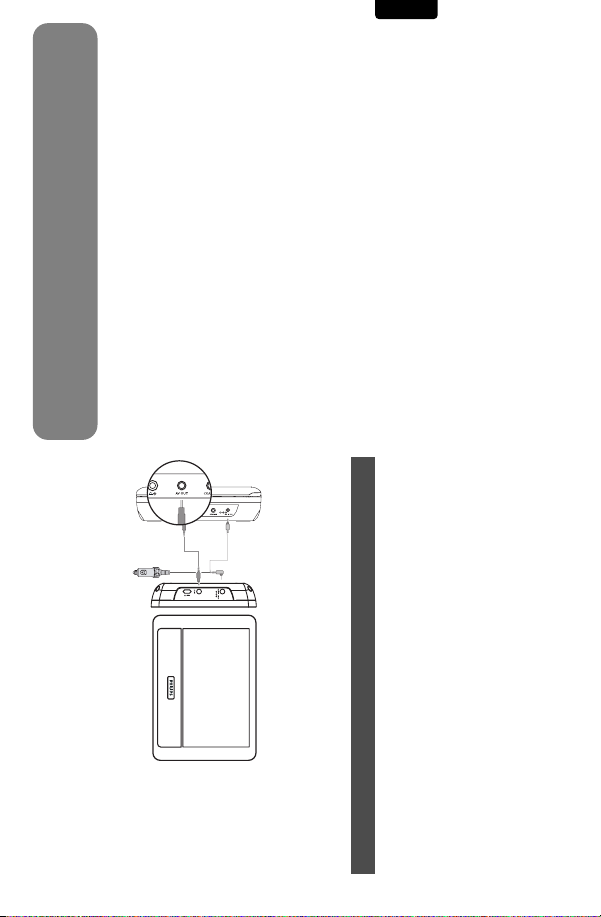
3 Connect the audio/visual cable to the devices.
face will be heated.This is normal.
When the player is in use for a long period of time, the sur-
1 Mount the devices to the headrest with the mounting kits.
2 Connect the power plug of the car adaptor to PAC132 and
PET716.
Primary DVD player PAC132
• Apparatus shall not be exposed to dripping or splashing. Do not
place any sources of danger on the appartus (e.g. liquid filled
objects,lighted candles)
3
2
zene, or abrasives as these may harm the player.
submersed in water.Water entering the player may cause major
damage.
cause an accident.
or direct sunlight.
Make sure that the primary DVD player, secondary LCD screen and
any other electrical equipment are switched off before connection.
3.1 Use in a car
3 Connection
needs replacement, we recommend that you contact your retail-
er to order a model identical to that of the original provided by
Philips.
Copyright information
All other brand and product names are trademarks of their respec-
tive companies or organizations.
•Traffic safety:do not use while driving or cycling as you may
• Do not expose to excessive heat caused by heating equipment
• This product is not waterproof: do not allow your player to be
• Do not use any cleaning agents containing alcohol,ammonia, ben-
• Important (for models with by-packed headphones):Philips guarcycling, skateboarding,etc.; it may create a traffic hazard and is
illegal in many areas.
antees compliance with the maximum sound power of its audio
players as determined by relevant regulatory bodies only with
the original model of provided headphones. In case this one
separate into mono materials: cardboard,PS, PE and PET.
Your set consists of material which can be recycled if disassembled
by a specialized company. Please observe the local regulations to
dispose of packaging, exhausted batteries and old equipment.
Environmental information
We have reduced the packaging to its minimum and made it easy to
Page 9
You can adjust the volume and the brightness of the display screen
during video playback.
ing these hints, consult your dealer or service centre.
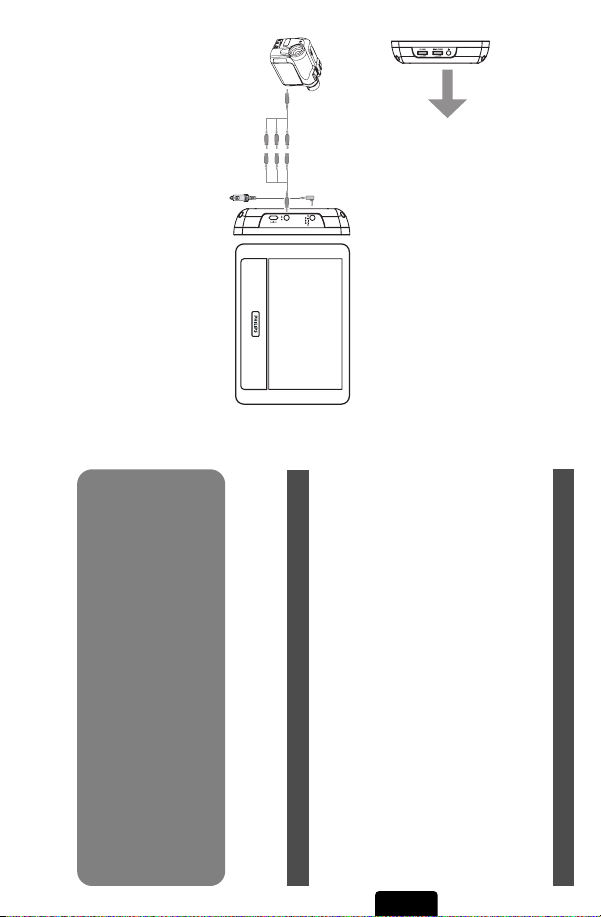
1 Connect PAC132 to the power source.
2 Connect the camcorder to PAC132 using the audio/video cable.
repair the set yourself as this will invalidate the guarantee.
If a fault occurs, first check the points listed, before taking the
set for repair. If you are unable to solve a problem by follow-
You can connect the player to your camcorder to view video on a
bigger screen.
checklist. It may be that something has been overlooked.
WARNING Under no circumstances should you try to
2
1
TFT screen brightness.
5Troubleshooting
If it appears that the DVD-Video player is faulty, first consult this
3.2 Connect to headphone
Connect the headphones to the right side of the player for private
3.3 Connect to camcorder
listening.
p
4.1 Power on
1 Power on the connected device, such as the primary DVD play-
2 Power on PAC132.
3 PAC132 will automatically playback the video content.
4 Power off all the devices after viewing.
4.2 Volume control
Adjust the volume control on the right side of the player.
4.3 Screen brightness
Use the rotary switch on the right side of the unit to finetune the
er, camcorder etc.
4 Enjoyment
9
English
Page 10
Video system NTSC / PAL / AUTO
Power Consumption ≤ 20W
10
Operating temperature range 0 - 50°C (32 - 122°F)
old product with your normal household waste.The correct dispos-
al of your old product will help prevent potential negative conse-
quences to the environment and human health.
TFT screen size 7 inches
Weight 0.37 kg / 0.81 lb
Power supply INPUT: 100-240V 50/60Hz 0.3A
OUTPUT: DC 9V 1A
electrical and electronic products.
Please act according to your local rules and do not dispose of your
6 Technical data
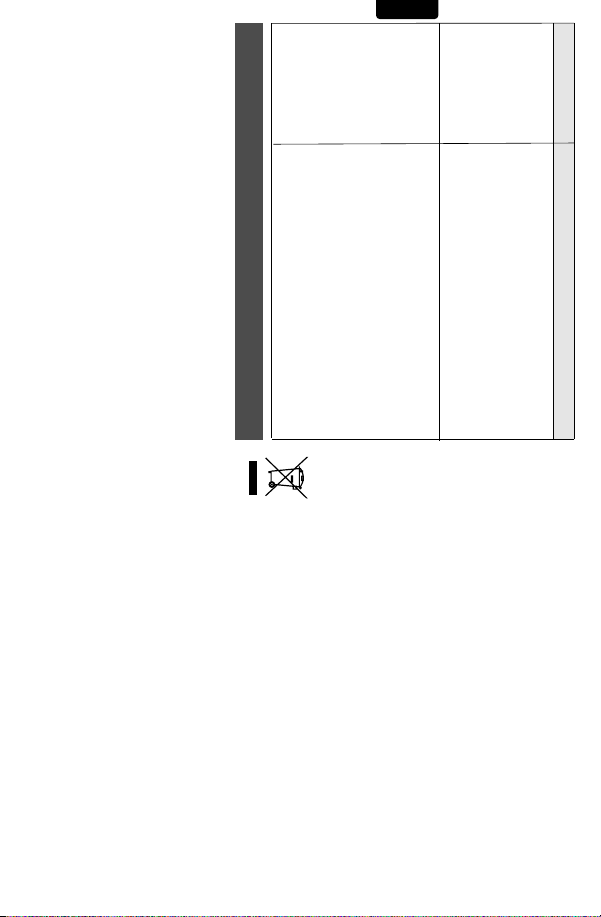
product, it means the product is covered by the European Directive
2002/96/EC.
Please be informed about the local separate collection system for
reused.
When this crossed-out wheeled bin symbol is attached to a
No video • Make sure all the connected devices are
• Make sure that the system is properly
• Make sure that video playback has
• Make sure that the video out function on
already started on the primary device,
such as DVD player, camcorder.
the primary device has been activated.
Disposal of your old product
Your product is designed and manufactured with high quali-
ty materials and components, which can be recycled and
switched on.
connected.
The making of unauthorized copies of copy-protected material,
including computer programmes, files, broadcasts and sound
recordings, may be an infringement of copyrights and constitute a
criminal offence.This equipment should not be used for such pur-
poses.
• Make sure that your system connection
• Make sure the video source is correct.
mode.
is properly connected.
All rights reserved.
Copyright information
English
Symptom Remedy
No sound • Make sure that the LCD screen is
switched on and is in the correct video
PHILIPS reserves the right to make design and specification
changes for product improvement without prior notice.
Modifications not authorized by the manufacturer may
void users authority to operate this device.
Page 11
desquelles vous devez lire soigneusement
la documentation accompagnant l’appareil
afin d’éviter tout problème d’exploitation
ou d’entretien.
Les « points d’exclamation » ont
pour but d’attirer votre attention
sur des caractéristiques à propos
ATTENTION :Pour éviter les chocs
électriques, introduire la lame la plus
large de la fiche dans la borne
correspondante de la prise et pousser à
fond.
choc électrique. Pour assurer la sécurité
des membres de votre famille, veuillez ne
pas enlever le couvercle de votre produit.
s’applique aux matériaux non
isolés présents dans votre
appareil et pouvant causer un
Ce symbole « d’éclair »
A
risques d’incendie ou de choc électrique
pas exposer cet a
midité et les objets r
comme les vases, ne doivent pas être placés
sur le dessus de l’appareil.
VERTISSEMENT :
ppareil à la pluie ou à l’hu-
emplis de liquide,
Afin de réduir
e les
,ne
Sachez reconnaître ces
symboles de
AVIS
sécurité
No. de série :
Entrez ci-dessous le numéro de série
qui se trouve à la base du boîtier du
dispositif. Conservez ces informations
pour référence ultérieure.
No. de modèle : __________________
À l’usage du client
____________________
éviter ainsi le besoin de remplir
d’autres formulaires afin
d’obtenir votre service de
garantie.
la sécurité ou de tout retrait
du produit du marché.
privilèges auxquels vous avez
droit y compris des
offres-rabais spéciales.
Retournez la carte
d’enregistrement ci-incluse
afin de garantir que la date
d’achat de votre produit sera
classée dans nos dossiers et
sécurité des
produits
En enregistrant votre produit,
vous serez avisé - directement
par le fabriquant - de toutes
défectuosités compromettant
additionnels de
l’enregistrement
du produit
L’enregistrement de votre
produit garantit que vous
bénéficierez de tous les
L’enregistrement de votre modèle auprès de PHILIPS confirme votre éligibilité à tous les bénéfices
mentionnés ci-dessous. N’oubliez donc pas de remplir votre carte d’enregistrement de garantie et de
nous la retourner le plus tôt possible afin d’assurer :
*Preuve d’achat
*Avis sur la
*Bénéfices
d’enregistrement de garantie pour profiter
Retournez rapidement votre carte
pleinement de votre achat.
Ce symbole indique que l'appareil est équipé
Symbole d' un appareil de classe II
d'un système à double isolation.
11
Si la prise SECTEUR ou un coupleur
d'appareil est utilisé comme dispositif de
désaccouplage, le dispositif de
désaccouplage doit rester facilement accessible.
Nettoyez avec un chiffon
sec uniquement.
Français
Page 12

12
application ou à un produit non-Philips, (b) aux dommages causés
par un service réalisé par quiconque autre que Philips ou qu’un cen-
tre de service agréé de Philips, (c) à un produit ou pièce ayant été
Cette garantie vous donne des droits légaux spécifiques. Il est possible que vous bénéficiiez de droits supplémentaires variant d'un État/Province à l'autre.
Philips ne saurait être tenu responsable de tout dommage ou perte
de programmes, données ou autres informations mis en mémoire
dans tous médias contenus dans le produit ou de tout produit ou
pièce non-Philips non couvert par cette garantie. La récupération ou
réinstallation des programmes, données ou autres informations n’est
pas couverte par cette garantie limitée.
Cette garantie ne s’applique pas (a) aux dommages causés par un
accident, un abus, un mauvais usage, une négligence, une mauvaise
à retenir. Lorsqu’un produit ou une pièce est échangée, tout article
de rechange devient votre propriété et l’article remplacé devient la
propriété de Philips. Lorsqu’un remboursement est effectué, votre
produit devient la propriété de Philips.
Remarque : tout produit vendu et identifié comme étant
remis à neuf ou rénové porte une garantie limitée de qua-
tre-vingt-dix (90) jours.
Un produit de remplacement ne pourra être envoyé que si
toutes les exigences de la garantie ont été respectées. Tout
manquement de répondre à toutes les exigences pourra
entraîner un délai.
CE QUI N’EST PAS COUVERT - EXCLUSIONS ET LIMI-
TATIONS:
Cette garantie limitée ne s’applique qu’aux nouveaux produits fab-
riqués par ou pour Philips pouvant être identifiés par la marque de
commerce, le nom commercial ou le logo qui y sont apposés. Cette
garantie limitée ne s’applique à aucun produit matériel ou logiciel
non Philips, même si celui-ci est incorporé au produit ou vendu avec
celui-ci. Les fabricants, fournisseurs ou éditeurs non-Philips peuvent
fournir une garantie séparée pour leurs propres produits intégrés au
produit fourni.
Français
Philips garantit le produit au premier acheteur ou à la personne
recevant le produit en cadeau contre tout défaut de matière ou de
main d’œuvre conformément à la date d’achat originale (« Période
de garantie ») d’un distributeur agréé. Le reçu de vente original indi-
quant le nom du produit ainsi que la date d’achat d’un détaillant
agréé est considéré comme une preuve d'achat.
QU'EST-CE QUI EST COUVERT?
La garantie de Philips couvre les nouveaux produits contre tout
défaut de matière ou de main d’œuvre et suivant la réception par
Philips d’une réclamation valide dans les limites de la garantie. Philips
s’engage, à son choix, à (1) réparer le produit gratuitement avec des
pièces de rechange neuves ou remises à neuf, ou à (2) échanger le
produit pour un produit neuf ou ayant été fabriqué à partir de
pièces neuves ou usagées en bon état et au moins fonctionnellement
équivalent ou comparable au produit d’origine dans l’inventaire
actuel de Philips, ou à (3) rembourser le prix d’achat initial du pro-
duit.
Philips garantit les produits ou pièces de remplacement prévus sous
cette garantie contre tout défaut de matière ou de main d’œuvre à
partir de la date de remplacement ou de réparation pour une péri-
ode de quatre-vingt-dix (90) jours ou pour la portion restante de la
garantie du produit d’origine, la plus longue de ces couvertures étant
COUVERTURE DE GARANTIE:
La provision pour garanties de PHILIPS se limite aux termes
énumérés ci-dessous.
QUI EST COUVERT?
Philips, P.O. Box 671539, Marietta, GA. 30006-0026
CONSOMMATEUR. PHILIPS N’EST AUCUNEMENT RESPONS-
ABLE DE TOUT DOMMAGE ACCESSOIRE OU INDIRECT
RÉSULTANT DE LA VIOLATION DE TOUTE GARANTIE
EXPRESSE OU IMPLICITE SUR CE PRODUIT. SAUF DANS LA
MESURE INTERDITE PAR LES LOIS APPLICABLES, TOUTE
GARANTIE IMPLICITE DE QUALITÉ LOYALE ET MARCHANDE
OU D’UTILITÉ PARTICULIÈRE DU PRODUIT EST LIMITÉE DANS
LE TEMPS À LA DURÉE DE CETTE GARANTIE.
Certains états ne reconnaissent pas l'exclusion ou la limitation de la
responsabilité pour dommages indirects ou accessoires, ou
autorisent des limitations sur la durée d’une garantie implicite, il est
donc possible que les limitations ou exclusions mentionnées ci-
dessus soient sans effet dans votre cas.
3121 233 48882
• un produit nécessitant une modification ou adaptation afin de per-
mettre l'utilisation dans tout pays autre que celui pour lequel il était
désigné, fabriqué, approuvé et/ou autorisé ou toute réparation du
produit endommagé par ces modifications.
• un produit utilisé à des fins commerciales ou institutionnelles (y
compris mais non de façon limitative les fins de location).
• un produit perdu lors de l’expédition sans preuve signée de la
réception.
• tout manquement d’exploiter le produit selon le manuel de l’utilisa-
teur.
POUR OBTENIR DE L’AIDE AUX ÉTATS-UNIS, À PUER-
TO RICO OU AUX ÎLES VIERGES AMÉRICAINES …
Communiquez avec le centre de service à la clientèle de Philips au:
1-888-PHILIPS (1-888-744-5477)
POUR OBTENIR DE L’AIDE AU CANADA…
1-800-661-6162 (pour un service en français)
1-888-PHILIPS (1-888-744-5477) (pour un service en anglais ou en
espagnol)
LA RÉPARATION OU LE REMPLACEMENT CONFORMÉMENT À
CETTE GARANTIE CONSTITUE LE SEUL REMÈDE POUR LE
lants.
Cette garantie limitée ne couvre pas:
• les frais d'expédition pour le renvoi du produit défectueux à
Philips.
• les frais de main-d'œuvre pour l'installation ou la configuration du
produit, le réglage des commandes sur le produit du client ainsi que
l'installation ou la réparation du système d'antenne/source sonore
externe au produit.
• la réparation du produit et/ou le remplacement des pièces à cause
d'une mauvaise installation ou entretien, d'un raccordement à une
alimentation électrique incorrecte, d’une surtension temporaire, de
dommages occasionnés par la foudre, d’une rémanence de l’image
ou de marques à l’écran résultant de l’affichage d’un contenu station-
naire fixe pour une période de temps prolongée, de l’aspect esthé-
tique du produit causé par une usure normale, d'une réparation non
autorisée ou de toute autre cause non contrôlable par Philips.
• tout dommage ou réclamation pour des produits non disponibles à
l’utilisation ou pour des données perdues ou logiciel perdu.
• tout dommage causé par un mauvais acheminement du produit ou
par un accident encouru lors du renvoi du produit à Philips.
GARANTIE LIMITÉE PHILIPS
UN (1) AN
modifié sans la permission écrite de Philips, ou (d) si tout numéro de
série de Philips a été supprimé ou défiguré, ou (e) à un produit,
accessoire ou produit non durable vendu « TEL QUEL » sans
garantie de quelque description que ce soit par l’inclusion de pro-
duits remis à neuf Philips vendu « TEL QUEL » par certains détail-
Page 13
1
3
2
1
6
5
2AV IN
1.1 Côté gauche du lecteur (voir figure 1)
1 DC IN Connecteur d’entrée CC
3 ON/OFF Allume/éteint le lecteur
1.2 Côté droit du lecteur (voir figure 1)
4 Connecteur des écouteurs
5 Brightness Pour affiner le réglage de la luminosité de l'écran TFT.
6VOLUME Contrôle le volume
Entrée audio/vidéo
13
1 Éléments de contrôle et composants fonctionnels
3.1 Utilisation en voiture
3.2 Connexion des
écouteurs
6 Données techniques
1.1 Côté gauche du lecteur
1.2 Côté droit du lecteur
2 Généralités
3 Connexion
trôle et composants
fonctionnels
4 Prise en main
4.1 Mise en marche
4.2 Contrôle du volume
4.3 Luminosité de l'écran
5 Dépannage
caméscope
4
Félicitations pour votre achat et bienvenue sur le site Philips!
Pour profiter pleinement de l'assistance Philips, enreg-
istrez votre produit sur le site à l'adresse suivante:
www.philips.com/welcome
Sommaire
1 Éléments de con-
3.3 Connexion à un
Français
Français
Page 14

14
• Ne changez pas le réglage de votre volume alors que votre audi-
• Ne réglez pas le volume à un niveau tel que vous ne puissiez plus
tion s’adapte.
entendre ce qui se passe autour de vous.
Sécurité et Maintenance
• Débranchez l’adaptateur secteur si un liquide ou des objets ont
• Ne donnez pas de chocs au le lecteur. Les chocs violents et les
pénétré dans l’appareil.
vibrations importantes peuvent provoquer des dysfonctionnements.
Observez les recommandations suivantes lorsque vous
utilisez votre casque.
• Écoutez à des niveaux de volume raisonnables et pendant des
périodes raisonnables.
faites des pauses appropriées.
(DSA-9W-09 F (DVE) / AY4132 (PHILIPS)) fourni
Utilisez votre appareil uniquement avec l’adaptateur CA/CC
Écoutez pendant des périodes raisonnables :
• Une exposition prolongée au son,même à un niveau normalement
• Assurez-vous d’utiliser votre équipement de façon raisonnable et
“sûr”, peut aussi entraîner une perte d’audition.
puissiez entendre le son confortablement et clairement, sans dis-
torsion.
Français
allume-cigares ou un boîtier de piles rechargeables (le tout étant
fourni).
•Tenez la prise pour débrancher l’adaptateur secteur. Ne tirez pas
si vous n’utilisez pas l’appareil pendant un certain temps.
sur le cordon d’alimentation.
Pour déterminer un niveau de volume sûr:
• Réglez le volume à une faible valeur.
• Augmentez progressivement le volume jusqu’à ce que vous
vous risquez une électrocution.
que la tension d’entrée de l’adaptateur est identique à celle de la
voiture.
d’écoute s’adapte à des volumes plus élevés. Par conséquent,
après une écoute prolongée, ce qui semble être un volume “nor-
mal” peut en fait être un volume élevé pouvant causer des dom-
mages à votre audition.Afin de vous protéger de ceci, réglez le
volume à un niveau sûr avant que votre audition ne s’adapte, et
n’augmentez pas ce niveau.
• Ne touchez pas l’adaptateur secteur si vos mains sont mouillées:
• Si vous connectez l’appareil à l’adaptateur allume-cigares, vérifiez
• Débranchez l’adaptateur secteur de la prise ou le boîtier de piles
• Contrôlez si la tension secteur indiquée sur la plaquette signalé-
tique à la base de l’équipement correspond à la tension secteur
locale.Toute autre source d’alimentation pourrait endommager
l’adaptateur secteur et l’appareil.
• Le son peut tromper. Avec le temps, votre “niveau confortable”
nes ayant déjà subi une perte partielle de leur audition.
votre audition. La puissance du son que peut produire
cet équipement peut entraîner une perte d’audition chez une
personne normale, même si celle-ci y est exposée pendant moins
d’une minute. La puissance élevée est disponible pour les person-
Alimentation
L’a ppareil fonctionne avec un adaptateur secteur, un adaptateur
2 Généralités
Sécurité d’écoute
Écoutez à un volume modéré.
•L’utilisation du casque à fort volume peut endommager
Page 15
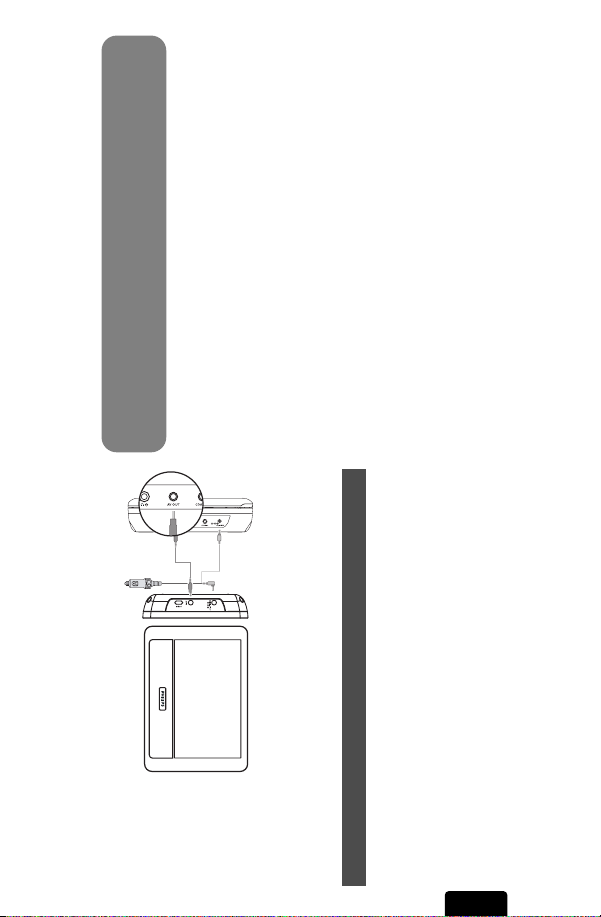
1 Installez les unités sur le repose-tête à l’aide des kits de montage.
3
2
2 Branchez le cordon d’alimentation de l’adaptateur pour voiture
au PAC132 & PET716.
Lecteur de DVD principal PAC132
une période prolongée. Cette réaction est normale.
Remarque: La surface du lecteur chauffe s’il est utilisé pendant
•L’appareil ne doit pas etre exposé a des égouttements ou des
éclaboussures. Ne posez aucun élément pouvant etre source de
danger sur l’appareil. (ex. des objets contenant du liquide, des
bougies allumèes).
• Évitez d’utiliser des agents nettoyants contenant de l’alcool,de
ment l’appareil et d’entraîner la formation de rouille.
l’ammoniac, du benzène ou des substances abrasives susceptibles
d’endommager le lecteur.
nexion.
3.1 Utilisation en voiture
• Cet appareil n’étant pas étanche, évitez de plonger le lecteur
jamais l’appareil au volant ou à vélo.
appareil de chauffage ou au rayonnement direct du soleil.
dans l’eau.Toute infiltration d’eau risque d’endommager sérieuse-
Vérifiez que le lecteur de DVD principal, l’écran LCD secondaire et
les autres unités électriques sont allumés avant -d’effectuer la con-
3 Connexion
rigine fournis avec ces produits. Pour remplacer vos écouteurs,
demandez à votre revendeur de commander un modèle identique
à celui qui vous a été fourni initialement par Philips.
épuisées et matériel usé.
Information sur le droit d’auteur
Les marques et noms de produits sont des marques commerciales
appartenant à leurs sociétés ou organisations respectives.
• Sécurité routière: pour éviter tout risque d’accident,n’utilisez
• Ne pas exposer l’appareil à une chaleur excessive causée par un
• Important (pour les modèles fournis avec des écouteurs) : Philips
ou cessez temporairement d’utiliser l’équipement.
moteur, faites du vélo,de la planche à roulettes, etc.
garantit que ses lecteurs audio sont conformes aux seuils de
tolérance audio maximale définis par les organismes de régulation
désignés uniquement lorsqu’ils sont utilisés avec les écouteurs d’o-
Informations relatives à l’environnement
Nous n’avons pas utilisé de matériaux d’emballage non néces-
saires.Vous pouvez facilement séparer les matériaux d’emballage en
éléments principaux: carton, polystyrène extensible et polyéthylène.
L’a ppareil est constitué de matériaux qu’il est possible de recycler,
s’il est démonté par une société spécialisée.Veuillez avoir l’oblig-
eance de respecter les réglementations locales concernant la
manière de se débarrasser des matériaux d’emballage, piles
• Dans des situations pouvant présenter un danger, soyez prudent
• N’utilisez pas le casque lorsque vous conduisez un véhicule à
15
Français
Page 16
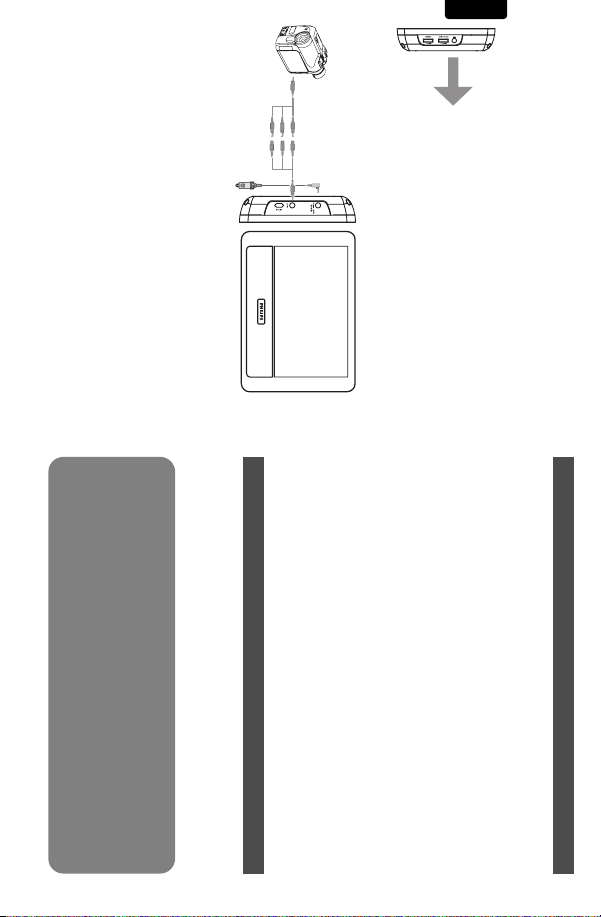
16
lecture d’une vidéo.
audio/vidéo.
Vous pouvez connecter le lecteur à un caméscope afin de regarder
vos vidéos sur un plus grand écran.
1 Branchez le PAC132 à la source électrique.
2 Connectez le caméscope au PAC132 à l’aide des câbles
Vous pouvez ajuster le volume et la luminosité de l’écran pendant la
3.3 Connexion à un caméscope
2
Français
3 Connectez les câbles audio/visuel aux unités
3.2 Connexion des écouteurs
Connectez les écouteurs sur le côté droit du lecteur pour écouter
sans gêner personne.
p
1
4.1 Mise en marche
1 Allumez l’unité connectée, par exemple le lecteur de DVD prin-
2 Allumez le PAC132.
3 Le PAC132 démarre automatiquement la lecture du contenu
4 Éteignez toutes les unités lorsque vous ne voulez plus visualiser
4.2 Contrôle du volume
Ajustez le niveau du son à l’aide du contrôle placé sur la droite du
lecteur.
4.3 Luminosité de l'écran
La roulette à gauche de l'appareil permet de régler la luminosité de
l'écran TFT.
Si votre lecteur DVD vidéo ne fonctionne pas correctement,
procédez d’abord aux contrôles suivants. Il se peut que quelque
chose ait été oubliée.
ou un centre de service.
AVERTISSEMENT N’essayez jamais de réparer vous-même
votre lecteur sous peine de perdre tout droit à la garantie.
Si vous constatez un défaut de fonctionnement, procédez aux
contrôles suivants et uniquement ensuite amenez-le pour
réparation. Si le problème subsiste, consultez votre revendeur
5 Dépannage
cipal, un caméscope, etc.
vidéo.
de vidéo.
4 Prise en main
Page 17
PHILIPS se réserve le droit de modifier le design et les car-
actéristiques de ce produit à tout moment.
Les modifications non autorisées par le fabricant peuvent
annuler le droit des utilisateurs à utiliser cet appareil.
Tous droits réservés.
Information sur le droit d’auteur
Toute copie d’une oeuvre protégée par un droit d’auteur, ce inclu-
ant les programmes informatiques, les enregistrements d’images et
de sons, peut être une contrefaçon d’un droit d’auteur et con-
stituer un délit. Cet appareil ne doit pas être utilisé à cette fin.
Windows Media et le logo de Windows sont des marques déposées
ou enregistrées de Microsoft Corporation pour les États-Unis et/ou
autres pays.
Plage de température de fonctionnement
Système vidéo NTSC / PAL / AUTO
Dans un souci constant d’amélioration de ses produits,
0 - 50°C (32 - 122°F)
Consommation électrique ≤ 20W
OUTPUT: DC 9V 1A
6 Données techniques
Taille de l’écran TFT 7” pouces
Poids 0.37 kg / 0.81 lb
Alimentation INPUT: 100-240V 50/60Hz 0.3A
2002/96/EC.
Veuillez vous renseigner sur les systèmes locaux de collecte des
produits électriques ou électroniques.
Veillez à respecter les réglementations locales ; ne mettez pas au
rebut vos anciens produits comme des déchets ménagers. La mise
au rebut citoyenne de votre ancien produit permet de protéger
l’environnement et la santé.
ce dernier est conforme à la directive européenne
Mise au rebut de votre ancien produit
Votre produit a été conçu et fabriqué à l’aide de matériaux
et composants de haute qualité, recyclables et réutilisables.
Le symbole de poubelle barrée sur un produit indique que
17
Français
Page 18
18
atención en la literatura adjunta para
evitar problemas operativos y de
mantenimiento.
El “signo de exclamación” llama
la atención hacia funciones
sobre las que debería leer con
PRECAUCIÓN: Para evitar descargas
eléctricas, haga que la paleta ancha del
enchufe coincida con la ranura ancha e
introdúzcala hasta el fondo.
una descarga eléctrica. Para la seguridad
de todos en su hogar,por favor no retire
la cubierta del producto.
Este “relámpago” indica
material no aislado dentro
de la unidad que puede causar
ADVERTENCIA Para reducir el riesgo
de incendios o de descarga eléctrica, este
aparato no se debe exponer a la lluvia ni
a la humedad, y no se le deben colocar
encima objetos llenos de líquido como
jarrones.
Nº de modelo. __________________
Nº de serie.
____________________
Conozca estos símbolos de
seguridad
AVISO
Escriba a continuación el Nº de serie,
el cual se ubica en la parte base
del gabinete. Guarde esta información
para futura referencia.
Sólo para uso del cliente
más papeleo para obtener el
servicio de garantía.
(directamente del fabricante)
en el raro caso de un retiro
de productos o de defectos
en la seguridad.
Registrar su producto garantiza
que recibirá todos los privile-
gios a los cuales tiene derecho,
incluyendo las ofertas espe-
ciales para ahorrar dinero.
Español
*Comprobante
de Compra
La devolución de la tarjeta
incluida garantiza que se
archive la fecha de compra,
de modo que no necesitará
*Seguridad del
producto
Notificación
Al registrar su producto,
recibirá la notificación
*Beneficios
adicionales de la
propiedad del
producto
Al registrar su modelo con PHILIPS usted cumplirá con los requisitos para obtener todos los valiosos
beneficios que se indican a continuación, ¡no se los pierda! Llene y devuelva su tarjeta de registro del
producto ahora mismo para garantizar:
Devuelva su tarjeta de registro de producto hoy
mismoy obtenga lo mejor de su compra.
Este símbolo indica que la unidad tiene un
Símbolo del equipo Clase II
sistema doble de aislamiento.
Cuando se usa el conector MAINS u otro
dispositivo acoplador como dispositivo de
desconexión, debe estar siempre disponible.
9
el mando a distancia:
el mando a distancia.
Utilice sólo un paño seco para
la limpieza.
INSTRUCCIONES IMPORTANTES DE SEGURIDAD
Page 19

dos por Philips o para Philips que se pueden identificar por la
marca registrada, el nombre comercial o por tener el logotipo
correspondiente. Esta garantía limitada no se aplica a ningún pro-
ducto de hardware ni de software que no sea Philips, incluso si
viene empacado con el producto o si se vende junto con éste.
Los fabricantes, proveedores o editores que no sean Philips
pueden proporcionar una garantía por separado para sus propios
productos empacados con el producto Philips.
Philips no es responsable por ningún daño o pérdida de progra-
mas, datos u otra información almacenados en algún medio con-
tenido en el producto, ni por ningún producto o pieza que no sea
Philips que no esté cubierta por esta garantía. La recuperación o
la reinstalación de programas, datos u otra información no está
cubierta por esta garantía limitada.
Esta garantía no se aplica (a) a daños causados por accidente,
abuso, mal uso, negligencia, mala aplicación o a productos que no
sean Philips; (b) a daño provocado por servicio realizado por
Esta garantía le otorga derechos legales específicos. Usted puede tener otros derechos que varían entre los diferentes estados y provincias.
utilizables, y que sea al menos funcionalmente equivalente o lo
más parecido al producto original del inventario actual de Philips;
o (3) reembolsará el precio de compra original del producto.
Philips garantiza productos o piezas de repuesto proporcionados
bajo esta garantía contra defectos en los materiales y en la mano
de obra durante noventa (90) días o por el resto de la garantía
del producto original, lo que le promocione más cobertura.
Cuando se cambia un producto o una pieza, el artículo que usted
recibe pasa a ser de su propiedad y el que le entrega a Philips
pasa a ser propiedad de éste último. Cuando se proporcione un
reembolso, su producto pasa a ser propiedad de Philips.
Nota: Cualquier producto que se venda y que esté identi-
ficado como reacondicionado o renovado tiene una
garantía limitada de noventa (90) días.
El producto de reemplazo sólo se puede enviar si se
cumplen todos los requisitos de la garantía. El
incumplimiento de tales requisitos puede ocasionar un
retardo.
LO QUE NO SE CUBRE: EXCLUSIONES Y LIMITA-
CIONES:
La garantía limitada se aplica sólo a los productos nuevos fabrica-
COBERTURA DE GARANTÍA:
La obligación de la garantía PHILIPS se limita a los términos
establecidos a continuación.
QUIÉNES ESTÁN CUBIERTOS:
Philips le garantiza el producto al comprador original o a la per-
sona que lo recibe como regalo contra defectos en los materiales
y en la mano de obra, a partir de la fecha de la compra original
("período de garantía") en el distribuidor autorizado. El recibo de
ventas, donde aparecen el nombre del producto y la fecha de la
compra en un distribuidor autorizado, se considerará compro-
bante de esta fecha.
LO QUE ESTÁ CUBIERTO:
La garantía Philips cubre productos nuevos si se produce algún
defecto en el material o la mano de obra y Philips recibe un
reclamo válido dentro del período de garantía. A su propia dis-
creción, Philips (1) reparará el producto sin costo, usando piezas
de repuesto nuevas o reacondicionadas; (2) cambiará el producto
por uno nuevo o que se ha fabricado con piezas nuevas o usadas
Philips P.O. Box 671539, Marietta, GA. 30006-0026
CLIENTE. PHILIPS NO SERÁ RESPONSABLE DE LOS DAÑOS
INCIDENTALES O INDIRECTOS QUE INFRINJAN ALGUNA
GARANTÍA EXPRESA O IMPLÍCITA SOBRE ESTE PRODUCTO.
CON EXCEPCIÓN DE LO QUE PROHÍBA LA LEY VIGENTE,
TODA GARANTÍA IMPLÍCITA DE COMERCIABILIDAD Y
ADECUACIÓN PARA UN PROPÓSITO PARTICULAR EN ESTE
PRODUCTO ESTÁ LIMITADA EN DURACIÓN A LO QUE
ESPECIFIQUE ESTA GARANTÍA.
Algunos estados no permiten las exclusiones ni la limitación de
los daños incidentales o indirectos, ni permiten limitaciones sobre
la duración de la garantía implícita, de modo que las limitaciones
o exclusiones anteriores pueden no aplicarse a usted.
3121 233 48842
• Daños debido a mala manipulación en el transporte o acci-
dentes de envío al devolver el producto a Philips.
• Un producto que requiera modificación o adaptación para per-
mitir su funcionamiento en algún país que no sea el país para el
que se diseñó, fabricó, aprobó y/o autorizó o la reparación de
productos dañados por estas modificaciones.
• Un producto que se use para propósitos comerciales o institu-
cionales (lo que incluye, entre otros, los de alquiler).
• La pérdida del producto en el envío y cuando no se pueda pro-
porcionar una firma que verifique el recibo.
• No operar según el Manual del propietario.
PARA OBTENER AYUDA EN LOS EE.UU., PUERTO
RICO O EN LAS ISLAS VÍRGENES DE LOS EE.UU...
Comuníquese con el Centro de Atención al Cliente al:
PARA OBTENER AYUDA EN CANADÁ…
LA REPARACIÓN O EL REEMPLAZO, SEGÚN LO DISPONE
ESTA GARANTÍA, ES LA SOLUCIÓN EXCLUSIVA PARA EL
1-888-PHILIPS (1-888-744-5477)
1-800-661-6162 (si habla francés)
1-888-744-5477 - (Si habla inglés o español)
poco se aplica la garantía a (e) productos, accesorios o insumos
vendidos TAL COMO ESTÁN sin garantía de ningún tipo, lo que
incluye productos Philips vendidos TAL COMO ESTÁN por
algunos distribuidores.
Esta garantía limitada no cubre:
• Los costos de envío al devolver el producto defectuoso a
Philips.
• Los costos de mano de obra por la instalación o configu-
ración del producto, el ajuste de controles del cliente en el
producto y la instalación o reparación de sistemas de antena o
fuente de señal externos al producto.
• La reparación del producto o el reemplazo de piezas debido a
instalación o mantenimiento inadecuada, a conexiones hechas a
un suministro de voltaje inadecuado, sobrevoltaje de la línea de
alimentación, daño causado por relámpagos, imágenes retenidas o
marcas en la pantalla producto de la visualización de contenido
fijo durante períodos prolongados, reparaciones cosméticas
debido al desgaste normal, reparaciones no autorizadas u otras
causas que no se encuentren bajo el control de Philips.
• Daños o reclamos por productos que no están disponibles para
su uso, por datos perdidos o por pérdida de software.
GARANTÍA LIMITADA PHILIPS
UN (1) AÑO
cualquier persona distinta de Philips o de un establecimiento de
servicio autorizado de Philips; (c) a productos o piezas que se
hayan modificado sin la autorización por escrito de Philips; (d) si
se ha retirado o desfigurado el número de serie de Philips; y tam-
19
Español
Page 20
20
3
2
Español
1
1
5 Brightness Ajusta el brillo de la pantalla TFT.
6VOLUME Control de volumen
6
5
2AV IN
1.1 Parte izquierda del reproductor (ver figura 1)
1 DC IN Conector de entrada de alimentación CC
3 ON/OFF Enciende y apaga el reproductor
1.2 Parte derecha del reproductor (ver figura 1)
4 Conector de auriculares
Conector de entrada de audio y vídeo.
1 Elementos de control y componentes funcionales
auriculares
2 Información general
3 Conexión
3.1 Uso en un coche
3.2 Conexión a los
6 Datos técnicos
problemas
1.1 Parte izquierda del
1.2 Parte derecha del
funcionales
reproductor
reproductor
4 Disfrute
4.1 Encendido
4.2 Control de volumen
4.3 Brillo de la pantalla
5 Resolución de
trol y componentes
vídeo
4
Felicidades por la adquisición y bienvenido a Philips!
Para sacar el mayor partido a la asistencia que propor-
ciona Philips, registre el producto en:
www.philips.com/welcome
Contenido
1 Elementos de con-
3.3 Conexión a cámara de
Español
Page 21

Seguridad y Mantenimiento
• Desenchufe el adaptador de CA para cortar la alimentación si se
• No deje caer el reproductor ni deje caer ningún objeto sobre la
derrama líquido o caen objetos en el interior de la unidad.
misma. Los golpes fuertes y las vibraciones pueden causar averías.
Asegúrese de tener en cuenta las siguientes directrices al
utilizar los auriculares.
• Escuche a un volumen razonable y durante un período de tiem-
•Tenga la precaución de no ajustar el volumen a medida que se
po moderado.
ajuste su oído.
los descansos adecuados.
9W-09 F (DVE) / AY4132 (PHILIPS))
Utilice siempre el adaptador de CA/CC suministrado (DSA-
del cable de alimentación.
• Aumente el sonido lentamente hasta que pueda escucharlo de
Escuche durante períodos de tiempo razonables:
• La exposición prolongada al sonido, incluso a niveles normal-
• Asegúrese de utilizar el equipo de forma razonable y de tomarse
capacidad auditiva.
mente “seguros”, pueden provocar también la pérdida de la
forma clara y cómoda, sin distorsión.
• Desenchufe el adaptador de CA de la toma o retire el paquete
• Sujete el enchufe para desconectar el adaptador de CA. No tire
• Establezca su control de volumen en un ajuste bajo.
da del adaptador es igual a la del automóvil.
de baterías cuando la unidad no se utilice durante largos perío-
dos de tiempo.
Para establecer un nivel de volumen seguro:
capacidad auditiva. Para protegerse frente a esta situación,
establezca el volumen a un nivel seguro antes de que su oído se
adapte y mantenga este nivel.
Fuente de alimentación
Esta unidad funciona con el adaptador de CA suministrado, adapta-
dor del automóvil o paquete de baterías recargables.
• No toque el adaptador de CA con las manos mojadas para evi-
• Cuando conecte el adaptador de alimentación del automóvil
tar descargas eléctricas.
(encendedor de cigarrillos), asegúrese de que la tensión de entra-
• El sonido puede ser engañoso.A medida que pasa el tiempo, el
“nivel de comodidad” se adapta a niveles de volumen más altos.
Por lo tanto, tras una escucha prolongada, lo que parece “nor-
mal” podría ser un nivel de volumen alto,y podría dañar su
• Compruebe que el voltaje que se indica en la placa tipo situada
en las base del aprato coincide con el del suministro de la red
local. De lo contrario,el adaptador de CA y la unidad podrían
resultar dañados.
Escuche a un volumen moderado.
• La utilización de auriculares a alto volumen puede
reducir su capacidad de escucha. Este producto puede
producir sonidos en intervalos de decibelios que podrían provo-
car la pérdida de la audición a personas normales, incluso con la
sola exposición durante un minuto. Los intervalos de decibelios
más altos se ofrecen para las personas cuya capacidad auditiva
sea limitada.
2 Información general
Advertencia de seguridad
21
Español
Page 22
22
3
2
largo período de tiempo, la superficie se calienta. Esto es normal.
Observación: Cuando el reproductor está en uso durante un
entes con líquidos,velas encendidas).
1 Monte los dispositivos en el reposacabezas utilizando los kits de
2 Conecte el enchufe del adaptador de coche al PAC132 & PET716.
Reproductor de DVD principal PAC132
montaje.
• No debe exponer el aparato a gotas ni salpicaduras. no coloque
co, benceno o abrasivos ya que pueden dañar el acabado del
reproductor.
ningún objeto peligroso sorbe el aparato. (por ejemplo recipi-
amente el reproductor. La entrada de agua en el reproductor
puede provocar daños importantes y oxidarla.
tema de calefacción o por la exposición directa a la luz solar.
• No exponga el aparato a temperaturas altas, causadas por un sis-
• No sumerja el reproductor al agua. El agua puede dañar seri-
• No utilice productos de limpieza que contengan alcohol, amonía-
3.1 Uso en un coche
Español
• Seguridad vial: No utilice el aparato mientras conduce o monta
istrado. En caso de necesitar sustituirlos, le recomendamos que se
ponga en contacto con su proveedor para solicitar un modelo
idéntico al original, suministrado por Philips.
en bicicleta, ya que puede provocar un accidente.
Asegúrese de que el reproductor de DVD principal, la pantalla LCD
secundaria y el resto de dispositivos eléctricos están apagados antes
de realizar las conexiones.
3 Conexión
• Importante (para modelos con auriculares incluidos): Philips
un riesgo para el tráfico y, en muchas zonas, es ilegal.
garantiza la conformidad con la máxima potencia de sonido de
sus reproductores de audio, tal y como determinan los cuerpos
reguladores, sólo con el modelo original de auriculares sumin-
materiales, pilas usadas y equipos desechables.
Información de Copyright
Todas las marcas y nombres de productos son marcas registradas
de las empresas u organizaciones correspondientes.
• No suba el volumen a un nivel en el que no pueda escuchar el
• Debe tener cuidado o dejar de utilizar el dispositivo en situa-
• No utilice los auriculares mientras utiliza un vehículo motorizado,
sonido de los alrededores.
ciones potencialmente peligrosas.
monta en bicicleta, va en monopatín, etc., dado que podría crear
Información medioambiental
Se ha prescindido de cualquier material de embalaje innecesario. El
embalaje esta compuesto de materiales fácilmente separables:
cartón, PS,PE. El aparato está fabricado con materiales que se
pueden reciclar si son desmontados por una empresa especializada.
Observe las normas locales concernientes a la eliminación de estos
Page 23
el vídeo en una pantalla de mayor tamaño.
1 Conecte el PAC132 a la fuente de alimentación.
2 Conecte la cámara de video al PAC132 con los cables de
Durante la reproducción de vídeo es posible ajustar el volumen y
el brillo de la pantalla.
audio/vídeo.
tar reparar el dispositivo por sus propios medios, ya que esto
anulará la garantía. Si se produce un fallo, consulte en primer
lugar los siguientes puntos antes de llevar el dispositivo para
su reparación. Si es incapaz de resolver algún problema sigu-
iendo estas sugerencias, consulte con su distribuidor o centro
de servicio.
ADVETENCIA No intente bajo ninguna circunstancia inten-
Es posible conectar el reproductor a su cámara de vídeo para ver
3.3 Conexión a cámara de vídeo
2
para escuchar la reproducción de forma privada.
3 Conecte los cables de audio y vídeo a los dispositivos.
3.2 Conexión a los auriculares
Conecte los auriculares a la parte lateral derecha del reproductor
p
1
Si piensa que el reproductor de DVD-Vídeo está defectuoso,
consulte esta lista de comprobación. Puede que haya pasado algo
por alto.
para ajustar el brillo de la pantalla TFT.
5 Resolución de problemas
Ajuste el control de volumen desde el lateral derecho del reproductor.
4.3 Brillo de la pantalla
Utilice el rueda giratoria situada en el lado izquierdo de la unidad
3 El PAC132 reproducirá automáticamente el contenido de vídeo.
4 Apague todos los dispositivos tras completar la visualización.
4.2 Control de volumen
2 Encienda el PAC132.
ductor de DVD principal, la cámara de vídeo, etc.
4.1 Encendido
1 Encienda el dispositivo conectado, como por ejemplo el repro-
4 Disfrute
23
Español
Page 24
24
Sistema de vídeo NTSC / PAL / AUTO
OUTPUT: DC 9V 1A
0 - 50°C (32 - 122°F)
eléctricos y electrónicos.
Cumpla con la normativa local y no deseche los productos antiguos
con los desechos domésticos. El desecho correcto del producto
antiguo ayudará a evitar consecuencias negativas para el medioam-
biente y la salud humana.
6 Datos técnicos
• Asegúrese de que se ha activado la función
ya ha comenzado en el dispositivo principal,
como por ejemplo reproductor de DVD,
cámara de vídeo.
de salida de vídeo en el dispositivo principal.
debe ser utilizado para dicho propósito.
muestra en un producto indica que éste cumple la directiva euro-
pea 2002/96/EC.
Obtenga información sobre la recogida selectiva local de productos
Cuando este símbolo de contenedor de ruedas tachado se
Desecho del producto antiguo
El producto se ha diseñado y fabricado con materiales y
componentes de alta calidad, que se pueden reciclar y
volver a utilizar.
• Asegúrese de que la reproducción de video
chos de propiedad intelectual y constituir un delito. Este equipo no
Tamaño de la pantalla TFT 7 pulgadas
Peso 0.37 kg / 0.81 lb
Alimentación INPUT: 100-240V 50/60Hz 0.3A
Consumo eléctrico ≤ 20W
Rango de temperatura de funcionamiento
Español
No hay vídeo • Asegúrese de todos los dispositivos conec-
• Asegúrese de que el sistema está correcta-
mente conectado.
contra copias, incluyendo programas de ordenador, archivos, emi-
siones y grabaciones de sonido, puede ser una violación de dere-
• Asegúrese de que la fuente de vídeo es la
tados están encendidos.
adecuada.
Información de copyright
La realización de copias no autorizadas de materiales protegidos
positivo.
Todos los derechos reservados.
No hay sonido • Asegúrese de que la pantalla LCD está
Síntoma Solución
• Asegúrese de que las conexiones del sisencendida y de que está en el modo de
vídeo adecuado.
tema son las correctas.
PHILIPS se reserva el derecho a realizar cambios en el dis-
eño y en las especificaciones sin previo aviso para mejorar el
producto.
Las modificaciones no autorizadas por el fabricante puede
invalidar la facultad de los usuarios para utilizar este dis-
Page 25

25
Page 26
26
PDCC-2007
C Royal Philips Electronics N.V. 2007
Printed in China
Need help?
Online
Go to www.philips.com/support
Meet Philips at the Internet
http://www.philips.com
 Loading...