

Page 1
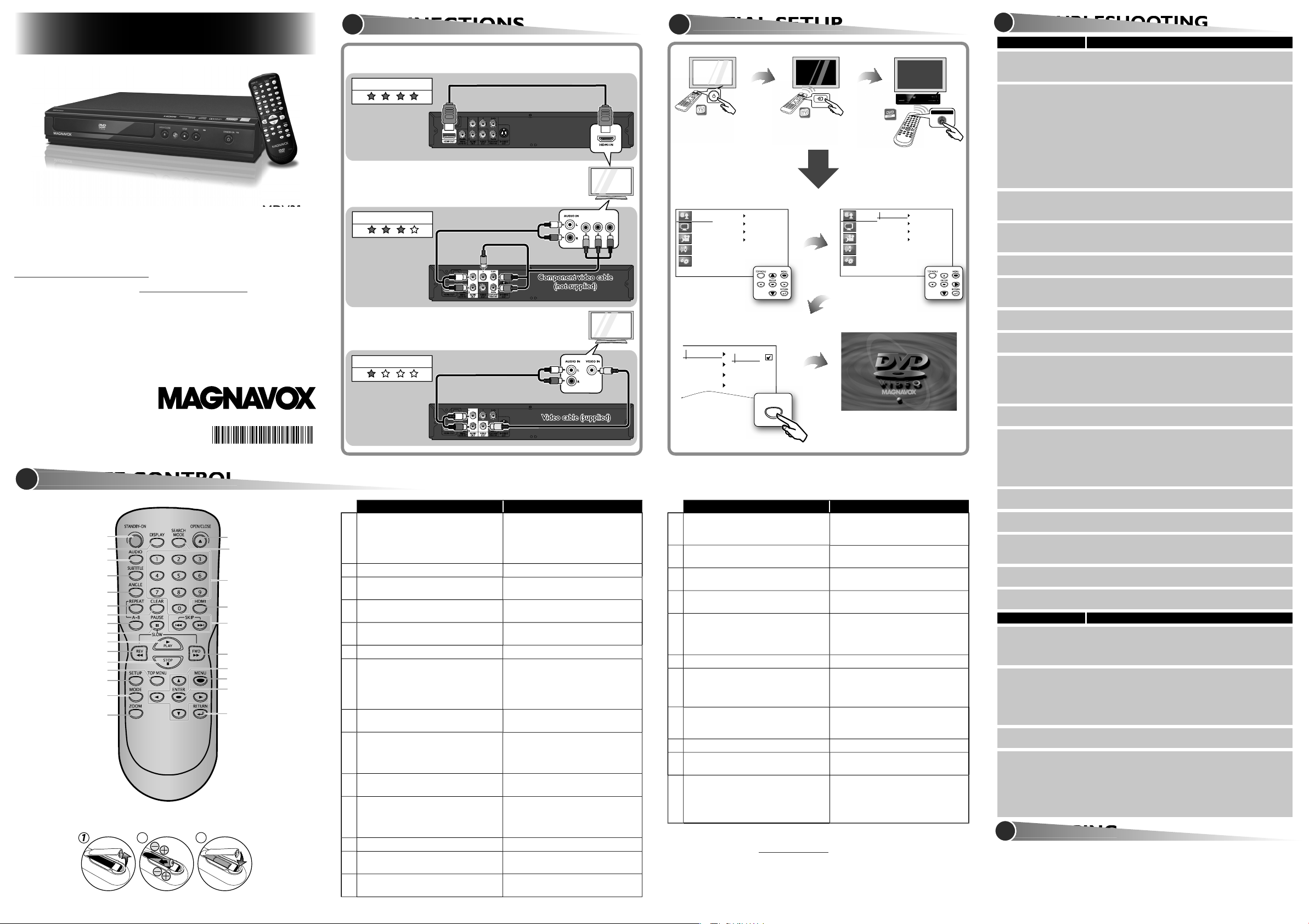
COMPONENT VIDEO IN
Y PB/CB PR/CR
CONNECTIONS
Language
Display
Video
Audio
Others
Player Menu
Subtitle
Audio
Disc Menu
Language
Display
Video
Audio
Others
Player Menu
Subtitle
Audio
Disc Menu
Player Menu
Subtitle
Audio
Disc Menu
English
Français
Español
&8&
AV/SOURCE
STANDBY/ON
SETUP
HDMI Out
Video & Audio Out
Component Video Out
HDMI cable (not supplied)
SETUP MANUAL
If you have any questions or issues with our product, please refer to the
“TROUBLESHOOTING” section of this “SETUP MANUAL”, or visit our website for the
Online Owner’s Manual at
. If additional support is required please
contact our Customer Service line at 1-800-605-8610.
© 2012 Funai Electric Co., Ltd.
Printed in China
E6MY3UD/E6MY3UH
1VMN32613
★★★★★
Audio cable (supplied)
Audio cable (supplied)
Component video cable
Component video cab
Component video cable
Component video cable
(not supplied)
ot suppli
(not supplied)
(not supplied)
MAGNAVOX is a registered trademark of Philips Electronics North America
Corporation and is used by Funai Electric Co., Ltd. and Funai Corporation, Inc. under
license from Philips Electronics North America.
No power.
Check if the AC power cord is properly connected.
Unplug the outlet once, and wait for 5-10 seconds and
then plug it in again.
No sound or picture.
Check if the TV is switched on.
Check the video connection.
Check the audio / video cable connections to the TV.
When “Progressive” is “On”, video signals from the unit’s
VIDEO OUT and S-VIDEO OUT jacks will be distorted
or not be output at all.
Check whether the connected TV or other device
supports HDCP. (This unit will not output a video signal
unless the other device supports HDCP.)
Press and hold
B
on the front panel for 5
when disc is removed.
the unit stops responding.
the AC outlet for 5-10 seconds.
the lens before sending the unit for repair.
when the title is selected.
vuelva a conectarlo.
video de los conectores de la VIDEO OUT y S-VIDEO
B
en el tablero
Vuelva a introducir las pilas con su polaridades (signos
TROUBLESHOOTING
19
1
4
9
7
2
11
15
16
5
23
25
17
18
11
22
14
13
3
12
10
20
6
8
21
24
REMOTE CONTRO
the unit into standby mode. (To
A-B. (DVD / CD / MP3)
time. (DVD)
JPEG)
track directly.
When file list / folder list is shown, press
to switch between pages. (MP3 / JPEG)
When file list is shown, press to switch
SERVICIN
G
yourself. There are no user-serviceable parts inside. Eject the disc
Video cable (supplied)
ideo cable (suppli
Video cable (supplied)
Video cable (supplied)
See the Online Owner’s Manual for details:
www.MAGNAVOX.com
Step 1 Please visit by web www.MAGNAVOX.com
Step 2 Select Download.
Step 3 Type in the Model # “MDV3300”, and click “Search”.
Step 4 Select the Manual, and click on “Download”.
1
Connection to the TV
or
Component video cable
or
2
Problem Tip
(not supplied)
Video cable (supplied)
*1VMN32613*
ENGLISH ESPANÕL
1.
2.
3.
4.
5.
6.
7.
8.
9.
10.
15.
16.
17.
18.
19.
20.
21.
22.
23.
24.
25.
ENGLISH ESPANÕL
Problema Solución
.
11.
12.
13.
14.
www.magnavox.com
See the Online Owner’s Manual for details: www.MAGNAVOX.com
Page 2
LIMITED WARRANTY
warranty.
warranty does not apply to any product not purchased and used in the United States.
WARRANTY IS MADE IN LIEU OF ALL OTHER WARRANTIES, EXPRESS OR IMPLIED, AND OF
ALL OTHER LIABILITIES ON THE PART OF FUNAI, ALL OTHER WARRANTIES INCLUDING
ARE HEREBY DISCLAIMED BY FUNAI AND ITS REPRESENTATIVES IN THE UNITED STATES.
ALL WARRANTY INSPECTIONS AND REPAIRS MUST BE PERFORMED BY AN AUTHORIZED
IF NO PROOF OF PURCHASE IS ATTACHED, THE WARRANTY WILL
ATTENTION:
WITHOUT PRIOR NOTICE.
WARRANTY STATEMENT REGARDING NON AUTHORIZED REPAIRS:
AUTHORIZED SERVICE CENTER. FUNAI CORP. will not reimburse you for any service done
www.magnavox.com/support
pg p
SAFETY INSTRUCTIONS
WARNING:
RISK OF ELECTRIC SHOCK
to alert the user to the presence of uninsulated “dangerous voltage” within the
the presence of important operating and maintenance (servicing) instructions in the
the manufacturer’s instructions.
guardar el modelo y el número de serie para consultarlos, si los necesita, en el futuro.
gabinete.
tiene la finalidad de avisar al usuario de la presencia de “tensión peligrosa” dentro
type plug. A polarized plug has two blades with one wider than
the other. A grounding type plug has two blades and a third
grounding prong. The wide blade or the third prong are provided
when unused for long periods of time.
yp qp g
to Part 15 of the FCC Rules. These limits are designed to provide reasonable protection against harmful
to radio communications. However, there is no guarantee that interference will not occur in a particular
pp
yp
the same or equivalent type.
WARNING:
,
the cover or attempt to service this apparatus, due to possible eye injury.
those specified herein may result in hazardous radiation exposure.
ventilation is provided. Make sure to leave a space of 3.9 inches (10cm) or more around this apparatus.
®
is a joint program of the U.S. Environmental
y una tercera clavija con conexión a tierra. La clavija ancha del enchufe
Asegúrese de proteger el cable de alimentación de las pisadas o
torsiones especialmente en la zona de la clavija, en el receptáculo
y en el punto donde el cable sale del aparato.
junto con el aparato. Cuando utilice un carro, sea
técnico es necesario cuando el aparato sufre algún tipo de daño,
pp p p g
gpyp
TAA
OAO
the HDMI Logo are trademarks
is a trademark of DVD Format / Logo Licensing Corporation.
SPECIFICATION
Weight
Audio output (Analog)
Video output (RCA jack x 1)
Y: 1Vp-p (75Ω) C: 286mVp-p (75Ω)
Y: 1Vp-p (75Ω)
pp( )
REGION CODES
world. A DVD-video labeled for a specific region can only be
PLAYABLE DISCS
UNPLAYABLE DISCS
SUPPLIED ACCESSORIES
DO NOT OPEN
RISK OF ELECTRIC SHOCK
DO NOT OPEN
Type of media
Mark (logo)
General
Recorded signals
digital audio
or
MP3 / JPEG
JPEG
Connection Specifics
See the Online Owner’s Manual for details: wwwwww.MAGNAVOX.com
 Loading...