

Page 1
Elite+_4235_021_0686_1_BOOKLET_A6_bl.pdf 1 07-12-15 11:39
Always here to help you
Register your product and get support at
www.philips.com/welcome
Elite+
Page 2
Page 3
1
2
3
4
5
6
1
Page 4

Page 5

English 6
한국의 16
Page 6

English
6
Introduction
Congratulations on your purchase and welcome to Philips! To fully
benefit from the support that Philips offers, register your product at
www.philips.com/welcome.
Important
Read this user manual carefully before you use the appliance and
save it for future reference.
Danger
-
Keep the charger away from water. Do not place or store it over or
near water contained in a bathtub, washbasin, sink etc. Do not
immerse the charger in water or any other liquid. After cleaning,
make sure the charger is completely dry before you connect it to
the mains.
Warning
-
The mains cord cannot be replaced. If the mains cord is damaged,
discard the charger.
-
Always have the charger replaced with one of the original type in
order to avoid a hazard.
-
Do not use the charger outdoors or near heated surfaces.
-
If the appliance is damaged in any way (brush head, toothbrush
handle or charger), stop using it. This appliance contains no
serviceable parts. If the appliance is damaged, contact the
Consumer Care Centre in your country (see chapter ‘Guarantee
and support').
-
This appliance is not intended for use by persons (including
children) with reduced physical, sensory or mental capabilities, or
lack of experience and knowledge, unless they have been given
supervision or instruction concerning use of the appliance by a
person responsible for their safety.
English
Page 7

English
-
Children should be supervised to ensure that they do not play with
the appliance.
Caution
-
Do not clean the brush head, the handle or the charger in the
dishwasher.
-
If you have had oral or gum surgery in the previous 2 months,
consult your dentist before you use the toothbrush.
-
Consult your dentist if excessive bleeding occurs after using this
toothbrush or if bleeding continues to occur after 1 week of use.
Also consult your dentist if you experience discomfort or pain
when you use the Philips Sonicare.
-
The Philips Sonicare toothbrush complies with the safety
standards for electromagnetic devices. If you have a pacemaker or
other implanted device, contact your physician or the device
manufacturer of the implanted device prior to use.
-
If you have medical concerns, consult your doctor before you use
the Philips Sonicare.
-
This appliance has only been designed for cleaning teeth, gums
and tongue. Do not use it for any other purpose. Stop using the
appliance and contact your doctor if you experience any
discomfort or pain.
-
The Philips Sonicare toothbrush is a personal care device and is
not intended for use on multiple patients in a dental practice or
institution.
-
Stop using a brush head with crushed or bent bristles. Replace the
brush head every 3 months or sooner if signs of wear appear. Do
not use other brush heads than the ones recommended by the
manufacturer.
-
If your toothpaste contains peroxide, baking soda or bicarbonate
(common in whitening toothpastes), thoroughly clean the brush
head with soap and water after each use. This prevents possible
cracking of the plastic.
7
Page 8

English
8
Electromagnetic fields (EMF)
This Philips appliance complies with all applicable standards and
regulations regarding exposure to electromagnetic fields.
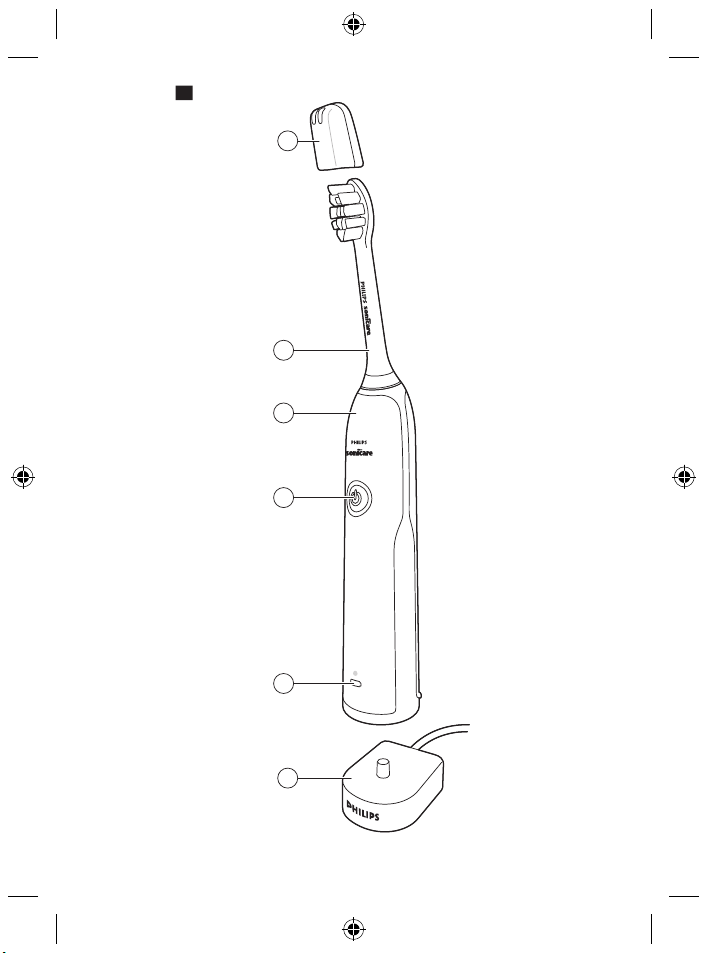
General description (Fig. 1)
1 Hygienic travel cap
2 Brush head
3 Handle
4 Power on/off button
5 Battery level indicator
6 Charger
Note: The content of the box may vary based on the model
purchased.
Preparing for use
Attaching the brush head
1 Align the brush head so the bristles point in the same direction as
the front of the handle (Fig. 2).
2 Firmly press the brush head down onto the metal shaft until it
stops.
Note: Philips Sonicare brush heads are imprinted with icons to easily
identify your brush head (Fig. 3).
Charging your Philips Sonicare
1 Plug the charger into a live electrical outlet.
2 Place the handle on the charger.
-
The light of the battery level indicator flashes and the appliance
beeps twice. This indicates that the toothbrush is charging.
Page 9
English
Note: It can take up to 24 hours to fully charge the battery, but you
can use the Philips Sonicare toothbrush before it is fully charged.
Using your Philips Sonicare toothbrush
Brushing instructions
1 Wet the bristles and apply a small amount of toothpaste.
2 Place the toothbrush bristles against the teeth at a slight angle (45
degrees), pressing firmly to make the bristles reach the gumline or
slightly beneath the gumline (Fig. 4).
Note: Keep the center of the brush in contact with the teeth at all
times.
3 Press the power on/off and mode button to turn on the Philips
Sonicare.
4 Gently keep the bristles placed on the teeth and in the gumline.
Brush your teeth with small back and forth motion so the bristles
reach between the teeth. Continue this motion throughout your
brushing cycle.
Note: The bristles should slightly flare. Do not scrub.
5 To clean the inside surfaces of the front teeth, tilt the brush handle
semi-upright and make several vertical overlapping brushing
strokes on each tooth (Fig. 5).
Note: To make sure you brush evenly throughout the mouth,
divide your mouth into 4 sections using the Quadpacer feature
(see chapter ‘Features’).
6 Begin brushing in section 1 (outside upper teeth) and brush for 30
seconds before you move to section 2 (inside upper teeth).
Continue brushing in section 3 (outside lower teeth) and brush for
30 seconds before you move to section 4 (inside lower teeth (Fig.
6)).
9
Page 10

English
10
7 After you have completed the brushing cycle, you can spend
additional time brushing the chewing surfaces of your teeth and
areas where staining occurs. You can also brush your tongue, with
the toothbrush turned on or off, as you prefer (Fig. 7).
Your Philips Sonicare toothbrush is safe to use on:
-
Braces (brush heads wear out sooner when used on braces)
-
Dental restorations (fillings, crowns, veneers)
Note: Ensure that braces or dental restorations are properly adhered
and not compromised. If not, braces or dental restorations may be
damaged when they come into contact with the brush head.
Note: When the Philips Sonicare toothbrush is used in clinical studies,
the handle should be fully charged and the Easy-start feature
deactivated.
Battery status (when handle is not on charger)
This Philips Sonicare toothbrush is designed to provide at least 20
brushing sessions, each session lasting 2 minutes. The battery level
indicator shows the battery status when you complete the 2-minute
brushing session, or when you pause the Philips Sonicare toothbrush
for 30 seconds while brushing by pressing the power on/off button.
Brushing
sessions
20-6 Green Solid -
Battery
status color
Light Beeps
5-2 Orange Flashing 3 beeps
1 Orange Flashing 2 sets of 3
beeps
Page 11

English
Note: When the battery is completely empty, the Philips Sonicare
toothbrush turns off. Place the Philips Sonicare toothbrush on the
charger to charge it.
Note: To keep the battery fully charged at all times, you may keep
your Philips Sonicare toothbrush on the charger when not in use.
Features
Smartimer
The Smartimer indicates that your brushing cycle is complete by
automatically turning off the toothbrush at the end of the brushing
cycle.
Dental professionals recommend brushing no less than 2 minutes
twice a day.
Note: If you press the power on/off button after you started the
brushing cycle, the toothbrush will pause. After a pause of 30
seconds, the Smartimer resets.
Easy-start
The Easy-start feature gently increases power over the first 14
brushings to help you get used to brushing with the Philips Sonicare
toothbrush. This Philips Sonicare toothbrush comes with the Easystart feature activated.
Activating or deactivating the Easy-start feature:
Place the handle in the plugged-in charger.
-
To activate Easy-start:
Press and hold the power on/off button for 2 seconds. You hear 2
beeps and the battery level indicator lights up green to indicate
that the Easy-start feature has been activated.
11
Page 12

English
12
-
To deactivate Easy-start:
Press and hold the power on/off button for 2 seconds. You hear 1
beep and the battery level indicator lights up yellow to indicate
that the Easy-start feature has been deactivated.
Note: Each of the first 14 brushings must last at least 1 minute to move
through the Easy-start ramp-up cycle properly.
Note: Use of the Easy-start feature beyond the initial ramp-up period
is not recommended and reduces the effectiveness of the Philips
Sonicare toothbrush in removing plaque.
Quadpacer
-
The Quadpacer is an interval timer that has a short beep and
pause to remind you to brush the 4 sections of your mouth evenly
and thoroughly. This Philips Sonicare toothbrush comes with the
Quadpacer feature activated (Fig. 8).
Charger confirmation
The handle beeps and vibrates briefly when it is placed on the
charger base. This Philips Sonicare toothbrush comes with the
charger confirmation feature activated.
Cleaning
You should clean your Philips Sonicare toothbrush regularly to
remove toothpaste and other residue. Failure to clean your Philips
Sonicare toothbrush may result in an unhygienic product and
damage to it may occur.
Warning: Do not clean brush heads, the handle or the charger in the
dishwasher.
Page 13

English
13
Toothbrush handle
1 Remove the brush head and rinse the metal shaft area with warm
water. Make sure you remove any residual toothpaste (Fig. 9).
Caution: Do not push on the rubber seal on the metal shaft with
sharp objects, as this may cause damage.
2 Wipe the entire surface of the handle with a damp cloth.
Brush head
1 Rinse the brush head and bristles after each use (Fig. 10).
2 Remove the brush head from the handle and rinse the brush head
connection with warm water at least once a week. Rinse the travel
cap as often as needed.
Charger
1 Unplug the charger before you clean it.
2 Wipe the surface of the charger with a damp cloth.
Storage
If you are not going to use the product for a long time, unplug it, clean
it (see chapter 'Cleaning') and store it in a cool and dry place away
from direct sunlight.
Replacement
Brush head
Replace Philips Sonicare brush heads every 3 months to achieve
optimal results. Use only Philips Sonicare replacement brush heads.
Page 14

English
14
Recycling
-
Do not throw away the product with the normal household waste
at the end of its life, but hand it in at an official collection point for
recycling. By doing this, you help to preserve the environment.
Removing the rechargeable battery
Warning: Only remove the rechargeable battery when you
discard the appliance. Make sure the battery is completely
empty when you remove it.
Warning: Please note that this process is not reversible.
To remove the rechargeable battery, you need a towel or cloth, a
hammer and a flat-head (standard) screwdriver. Observe basic safety
precautions when you follow the procedure outlined below. Be sure
to protect your eyes, hands, fingers, and the surface on which you
work.
1 To deplete the rechargeable battery of any charge, remove the
handle from the charger, turn on the Philips Sonicare toothbrush
and let it run until it stops. Repeat this step until you can no longer
turn on the Philips Sonicare toothbrush.
2 Remove and discard the brush head. Cover the entire handle with
a towel or cloth (Fig. 11).
3 Hold the top of the handle with one hand and strike the handle
housing 0.5 inch above the bottom end. Strike firmly with a
hammer on all 4 sides to eject the end cap (Fig. 12).
Note: You may have to hit on the end several times to break the
internal snap connections.
4 Remove the end cap from the toothbrush handle. If the end cap
does not release easily from the housing, repeat step 3 until the
end cap is released (Fig. 13).
Page 15

English
5 Holding the handle upside down, press the shaft down on a hard
surface. If the internal components do not easily release from the
housing, repeat step 3 until the internal components are released
(Fig. 14).
6 Remove the inner assembly from the housing by fully inserting a
small flat-head screwdriver into the slot opposite the circuit board
and pry until it comes apart (Fig. 15).
7 Grab the battery and pull it out of the internal assembly (Fig. 16).
Caution: Be aware of the sharp edges of the battery tabs so as to
avoid injury to your fingers.
8 Cut the battery wires from the circuit board close to the battery
(Fig. 17).
9 Cover the battery contacts with tape to prevent any electrical short
from residual battery charge. The rechargeable battery can now be
recycled and the rest of the product discarded appropriately.
15
Guarantee and support
If you need information or support, please visit
www.philips.com/support or read the separate worldwide guarantee
leaflet.
Guarantee restrictions
The terms of the international guarantee do not cover the following:
-
Brush heads.
-
Damage caused by use of unauthorised replacement parts.
-
Damage caused by misuse, abuse, neglect, alterations or
unauthorised repair.
-
Normal wear and tear, including chips, scratches, abrasions,
discolouration or fading.
Page 16

한국의
16
소개
필립스 제품을 구입해 주셔서 감사합니다! 필립스가 드리는 지원 혜택을
최대한 누리시려면 www.philips.com/welcome에서 제품을
등록하십시오.
중요 사항
본 제품을 사용하기 전에 이 사용 설명서를 주의 깊게 읽고 나중에 참조할
수 있도록 잘 보관하십시오.
위험
-
충전기를 물기가 있는 곳에 두지 마십시오. 욕조, 세면대, 싱크대 등,
물이 가까이 있는 곳에서 사용하거나 보관하지 마십시오. 또한 물이나
기타 액체에 담그지 마십시오. 세척한 경우 충전기를 완전히 건조시킨
다음에 다시 전원에 연결하십시오.
경고
-
전원 코드는 교체할 수 없습니다. 전원 코드가 손상되면 충전기를
폐기해야 합니다.
-
위험할 수 있으므로 충전기는 반드시 정품으로 교체하여 사용하십시오.
-
충전기를 실외 또는 발열되는 표면 근처에서 사용하지 마십시오.
-
제품에 손상된 부분(칫솔모, 칫솔 손잡이 또는 충전기)이 나타나면
사용을 중단하십시오. 본 제품은 서비스를 받을 수 있는 부품이
없습니다. 제품이 손상될 경우 해당 지역의 고객 상담실에
문의하십시오('보증 및 지원' 부분 참조).
-
신체적인 감각 및 인지능력이 떨어지거나 경험과 지식이 풍부하지 않은
성인 및 어린이는 혼자 제품을 사용하지 말고 제품 사용과 관련하여
안전에 책임질 수 있도록 지시사항을 충분히 숙지한 사람의 도움을
받으십시오.
-
어린이가 제품을 가지고 놀지 못하도록 지도해 주십시오.
주의
-
칫솔모, 손잡이 또는 충전기를 식기세척기로 세척하지 마십시오.
Page 17

한국의
-
최근 2개월 이내에 구강 또는 잇몸 수술을 받은 경우에는 칫솔을
사용하기 전에 치과 전문의와 상의하십시오.
-
본 제품을 사용한 후 출혈이 심하거나 1주일이 지나도 증상이 호전되지
않는다면 치과 전문의와 상의하십시오. 필립스 소닉케어를 사용하면서
불편함을 느끼거나 통증이 있을 경우 치과 전문의와 상의하십시오.
-
필립스 소닉케어 칫솔은 국내 안전 기준에 따라 전자파 장해 검정을
받은 제품입니다. 심장 박동 보조기 등 보조 기구를 이식 받은 경우에는
주치의나 해당 이식 기기의 제조업체에 문의하여 충분히 이해한 후
사용하십시오.
-
의료적 문제가 있을 경우 필립스 소닉케어를 사용하기 전에 치과
전문의와 상의하십시오.
-
본 제품으로는 치아와 잇몸 그리고 혀만 세정할 수 있으므로 다른
용도로는 사용하지 마십시오. 사용 중 불편함이나 통증이 느껴지면 제품
사용을 중단하고 의사와 상의하십시오.
-
필립스 소닉케어 칫솔은 개인 용품이므로 치과나 기타 의료 시설에서
공용으로 이용하지 마십시오.
-
칫솔모의 솔이 눕거나 휘면 사용을 중단하십시오. 3개월마다 또는
마모의 흔적이 보이면 그 전이라도 칫솔모를 교체하십시오.
제조업체에서 권장한 제품 이외의 칫솔모를 사용하지 마십시오.
-
사용하는 치약 성분에 과산화수소, 탄산수소나트륨, 중탄산염(미백 치약
주성분)이 포함된 경우, 칫솔질을 하고 난 후 칫솔모를 비누로 닦고 물로
깨끗이 씻어 내십시오. 이렇게 해야 플라스틱 부분의 손상을 방지할 수
있습니다.
EMF(전자기장)
이 제품은 EMF(전자기장)와 관련된 모든 기준 및 규정을 준수합니다.
17
구성품 명칭(그림 1)
1 위생 칫솔모 캡
2 칫솔모
3 칫솔 손잡이
4 전원 버튼
5 배터리 잔량 표시등
6 충전기
Page 18

한국의
18
참고: 제품 구성품은 구입한 모델에 따라 다릅니다.
사용 준비
칫솔모 부착 방법
1 칫솔모가 손잡이 (그림 2) 앞부분을 향하도록 맞춥니다.
2 칫솔모를 금속 몸체에 꼭 눌러 고정시킵니다.
참고: 필립스 소닉케어 칫솔모에는 아이콘이 각인되어 있어 각자의 칫솔모
(그림 3)를 쉽게 식별할 수 있습니다.
필립스 소닉케어 충전 방법
1 충전기를 전원 콘센트에 꽂으십시오.
2 충전기에 손잡이를 꽂으십시오.
-
배터리 충전 표시들이 깜박거리고 신호음이 두 번 울립니다. 그러면
칫솔이 충전되고 있는 것입니다.
참고: 배터리가 완전히 충전되려면 최대 24시간이 걸리지만 필립스
소닉케어 칫솔은 완전히 충전되지 않아도 사용할 수 있습니다.
필립스 소닉케어 칫솔 사용
칫솔질 방법
1 칫솔모에 소량의 치약을 바르십시오.
2 칫솔모를 잇몸 (그림 4)에 45도 정도로 살짝 비스듬하게 올려 놓고 잇몸
경계 부분이나 그 약간 아래에 칫솔모가 닿도록 누릅니다.
참고: 항상 칫솔모 중앙이 치아에 닿아야 합니다.
3 전원 버튼을 눌러 필립스 소닉케어의 전원을 켭니다.
Page 19

한국의
4 치아와 잇몸에 칫솔모를 가볍게 올려 놓습니다. 칫솔모가 치간을 닦을
수 있도록 앞뒤로 작게 움직이면서 치아를 닦습니다. 이 방식으로 치아
전체를 닦습니다.
참고: 칫솔모가 살짝 퍼지도록 해야 합니다. 문지르지 마십시오.
5 앞니의 안쪽 표면을 닦으려면 칫솔 손잡이를 수직 상태에서 살짝 기울인
후 각 치아 (그림 5)에 수직으로 여러 번 반복하여 칫솔질을 합니다.
참고: 입 안을 골고루 양치할 수 있도록 Quadpacer(쿼드페이서) 기능을
사용하여 입안을 4구간으로 나누십시오(‘기능’ 부분 참조).
6 1구역(윗니 바깥쪽)부터 칫솔질을 시작하여 30초 동안 닦은 후
2구역(윗니 안쪽)을 닦습니다. 그런 다음에는 3구역(아랫니 바깥쪽)을
30초 동안 닦고 4구역(아랫니 (그림 6) 안쪽)을 닦습니다.
7 칫솔질이 모두 끝나면 치아의 씹는 면과 착색이 있는 부분을 추가로
닦습니다. 혀도 닦을 수 있습니다. 혀를 닦을 때는 칫솔을 켜거나 끈 상태
중 선호 (그림 7)하는 방법을 선택하십시오.
필립스 소닉케어 칫솔은 다음에 사용하기에 안전합니다.
-
치아 교정기(교정기에 사용하는 경우 칫솔모가 보다 빨리 마모될 수
있습니다.)
-
치아 보철물(신경치료, 크라운, 라미네이트)
참고: 치아 교정기나 보철물이 제대로 접착되고 손상되지 않도록 합니다.
그렇지 않을 경우 치아 교정기나 보철물이 칫솔모와 접촉할 때 손상될 수
있습니다.
19
참고: 필립스 소닉케어 칫솔을 임상 연구용으로 사용할 경우, 칫솔 손잡이를
완전히 충전하고 이지 스타트 기능을 반드시 해제해야 합니다.
배터리 상태(칫솔 손잡이를 충전기에 꽂아 두지 않았을 때)
본 필립스 소닉케어 칫솔은 1회당 2분씩 20회 이상의 칫솔질을 할 수
있습니다. 2분의 칫솔질을 마치거나 칫솔질 도중에 전원 버튼을 눌러서
필립스 소닉케어 칫솔을 30초 동안 일시 중지시키면 배터리 충전 표시등이
배터리 잔량을 알려 줍니다.
Page 20

20
한국의
칫솔질 배터리 잔량
표시등 신호음
표시등 색상
20-6 녹색 불이 켜짐 -
5-2 주황색 깜박임 3회
1 주황색 깜박임 3회씩 두 번
참고: 배터리가 완전히 방전될 경우 필립스 소닉케어 칫솔이 꺼집니다.
필립스 소닉케어 칫솔을 충전기에 꽂고 충전하십시오.
참고: 배터리를 항상 완전히 충전된 상태로 유지하려면 필립스 소닉케어
칫솔을 사용하지 않을 때 충전기에 꽂아 두십시오.
기능
스마트타이머
스마트타이머는 칫솔질이 끝나면 칫솔을 자동으로 꺼서 칫솔질이
완료되었음을 나타냅니다.
치과 전문의는 하루에 두 번씩 2분 이상 칫솔질 하는 것을 권장합니다.
참고: 이를 닦기 시작한 후 전원 버튼을 누르면 칫솔 작동이 일시
중지됩니다. 30초 후에 스마트타이머가 재설정됩니다.
이지스타트
이지스타트 기능은 최초 14회 양치하는 동안 서서히 출력을 높여서 필립스
소닉케어 칫솔을 이용한 양치질에 익숙해지도록 도와줍니다. 이 필립스
소닉케어 칫솔은 이지스타트 기능이 활성화되어 제공됩니다.
이지스타트 기능 설정 또는 해제 방법:
전원에 연결된 충전기에 칫솔 손잡이를 꽂으십시오.
Page 21

한국의
-
이지스타트 기능 작동:
전원 버튼을 2초 동안 누릅니다. 신호음이 두 번 울리고 배터리 충전
표시등에 녹색 불이 들어오면 이지스타트 기능이 활성화된 것입니다.
-
이지스타트 기능 해제:
전원 버튼을 2초 동안 누릅니다. 신호음이 한 번 울리고 배터리 충전
표시등에 노란색 불이 들어오면 이지스타트 기능이 해제된 것입니다.
참고: 이지스타트 점증 사이클을 원활히 작동하기 위해서는 최소 14회의
칫솔질을 할 때 매번 최소 1분 이상 닦아야 합니다.
참고: 최초 점증 기간 이후에 이지스타트 기능을 사용하는 것은 필립스
소닉케어의 플라그 제거 효과를 저하시키므로 사용하지 않는 것이
좋습니다.
쿼드페이서
-
쿼드페이서는 입 안을 골고루 깔끔하게 양치할 수 있도록 짧은 신호음과
함께 일시 중지하는 간격 타이머입니다. 필립스 소닉케어 칫솔은
쿼드플레이서 기능이 활성화 (그림 8)되어 제공됩니다.
충전기 확인
칫솔 본체를 충전기에 꽂으면 신호음이 울리고 짧게 진동합니다. 이 필립스
소닉케어 칫솔은 충전 확인 기능이 활성화되어 제공됩니다.
21
세척
필립스 소닉케어 칫솔을 정기적으로 세척하여 치약과 기타 잔여물을
제거해야 합니다. 필립스 소닉케어 칫솔을 청결하게 관리하지 않을 경우
제품이 비위생적인 상태가 되고 손상될 수 있습니다.
경고: 칫솔모, 손잡이 또는 충전기를 식기세척기로 세척하지 마십시오.
칫솔 손잡이
1 칫솔모를 제거하고 금속 몸체 부분을 따뜻한 물로 헹굽니다. 남아 있는
치약 (그림 9)을 모두 제거해야 합니다.
Page 22

한국의
22
주의: 손상될 수 있으므로 금속 몸체 주위의 고무 덮개를 날카로운 물체로
누르지 마십시오.
2 젖은 천으로 손잡이의 표면을 전체적으로 닦으십시오.
칫솔모
1 사용 (그림 10) 후에는 항상 칫솔모를 물로 헹구십시오.
2 칫솔 손잡이에서 칫솔모를 제거하고 매주 1회 칫솔모와 손잡이 사이의
연결 부분을 따뜻한 물로 닦아 냅니다. 필요 시 여행용 마개를
세척합니다.
충전기
1 청소하기 전에 항상 충전기의 전원 코드를 뽑으십시오.
2 젖은 천으로 충전기의 표면을 닦으십시오.
보관
오랫동안 제품을 사용하지 않을 경우 제품의 전원을 뽑고 세척('청소' 부분
참조)한 다음, 직사광선이 없는 건냉한 곳에 보관하십시오.
교체
칫솔모
최적의 결과를 얻으려면 3개월에 한 번씩 필립스 소닉케어 칫솔모로
교체하십시오. 필립스 소닉케어 교체용 칫솔모만 이용하십시오.
재활용
-
수명이 다 된 제품은 일반 가정용 쓰레기와 함께 버리지 말고 지정된
재활용품 수거 장소에 버리십시오. 이를 준수함으로써 환경 보호에
동참할 수 있습니다.
Page 23

한국의
충전식 배터리를 분리하는 방법
경고: 제품을 폐기할 때에만 충전식 배터리를 분리하십시오. 제거
시 배터리가 완전히 소모되었는지 확인하십시오.
경고: 이 과정은 원상태로 되돌릴 수 없습니다.
충전용 배터리를 분리하려면 수건이나 헝겊 및 망치와 일자형(표준)
드라이버가 필요합니다. 아래의 절차를 수행할 경우 기본적인 안전 주의
사항을 준수하십시오. 눈, 손, 손가락 및 작업대 표면을 보호하십시오.
1 완전히 방전되지 않은 충전식 배터리를 방전시키려면 충전기에서
손잡이를 분리하고 필립스 소닉케어 칫솔의 전원을 켜서 작동하지 않을
때까지 둡니다. 필립스 소닉케어 칫솔의 전원이 켜지지 않을 때까지 이
과정을 반복하십시오.
2 칫솔모를 분리하여 폐기합니다. 수건이나 헝겊 (그림 )으로 손잡이
부분을 전체를 감쌉니다.
3 한 손으로 손잡이의 윗부분을 잡고 손잡이 케이스 하단에서 0.5인치
윗부분을 망치로 두드립니다. 네 면을 모두 망치로 강하게 내리쳐서
엔드 캡 (그림 12)을 꺼냅니다.
참고: 내부의 스냅형 연결부를 분리하려면 끝 부분을 여러 차례 쳐야 할
수도 있습니다.
4 칫솔 손잡이에서 엔드 캡을 분리합니다. 케이스에서 엔드 캡이 쉽게
분리되지 않으면 엔드 캡이 분리 (그림 13)될 때까지 3단계를
반복합니다.
5 손잡이를 거꾸로 잡고 단단한 표면에 내리칩니다. 내부 부품이
케이스에서 쉽게 분리되지 않으면 내부 부품이 분리 (그림 14)될 때까지
3단계를 반복합니다.
6 소형 일자 드라이버를 회로판 반대쪽의 슬롯에 완전히 넣고 들어 올려서
분리 (그림 15)하면 내부 부품과 케이스가 분리됩니다.
7 배터리를 잡고 당겨서 내부 부품 (그림 16)으로부터 꺼냅니다.
주의: 배터리 탭의 날카로운 모서리에 손가락이 다치지 않도록
주의하십시오.
23
Page 24

한국의
24
8 배터리 (그림 17) 옆에 있는 회로판에서 배터리 전선을 잘라 냅니다.
9 배터리 접촉면에 테이프를 붙여서 남아 있는 배터리 충전으로 인한
감전을 예방합니다. 충전식 배터리를 재활용 폐기물로 분리하고 제품의
나머지 부분은 적절하게 폐기하십시오.
보증 및 지원
보다 자세한 정보나 지원이 필요한 경우에는 필립스
웹사이트(www.philips.com/support)를 방문하시거나 제품 보증서를
참조하십시오.
보증 제한
국제 보증 약관에서 제외되는 항목은 다음과 같습니다.
-
칫솔모
-
정품이 아닌 교체품의 사용으로 인한 손상
-
오용, 남용, 부주의, 개조 또는 무단 수리로 인한 손상
-
쪼개짐, 긁힘, 마멸, 변색, 탈색 등, 일반적인 마모 또는 손상
Page 25

Page 26

2 3 4 5
1
3
6
2
4
7 8 9
1
2
4
3
10 11 12 13
14 15 16 17
Page 27

Page 28

Elite+_4235_021_0686_1_BOOKLET_A6_bl_back.pdf 1 07-12-15 12:55
www.philips.com/Sonicare
©2015 Koninklijke Philips N.V. (KPNV). All rights reserved.
Philips and the Philips shield are trademarks of KPNV.
Sonicare and the Sonicare logo are trademarks
of Philips Oral Healthcare, LLC and/or KPNV.
75% recycled paper
4235.021.0686.1 (12/2015)
>
 Loading...