

Page 1
QUICK START GUIDE
HTS3050
12nc: 3139 245 22061
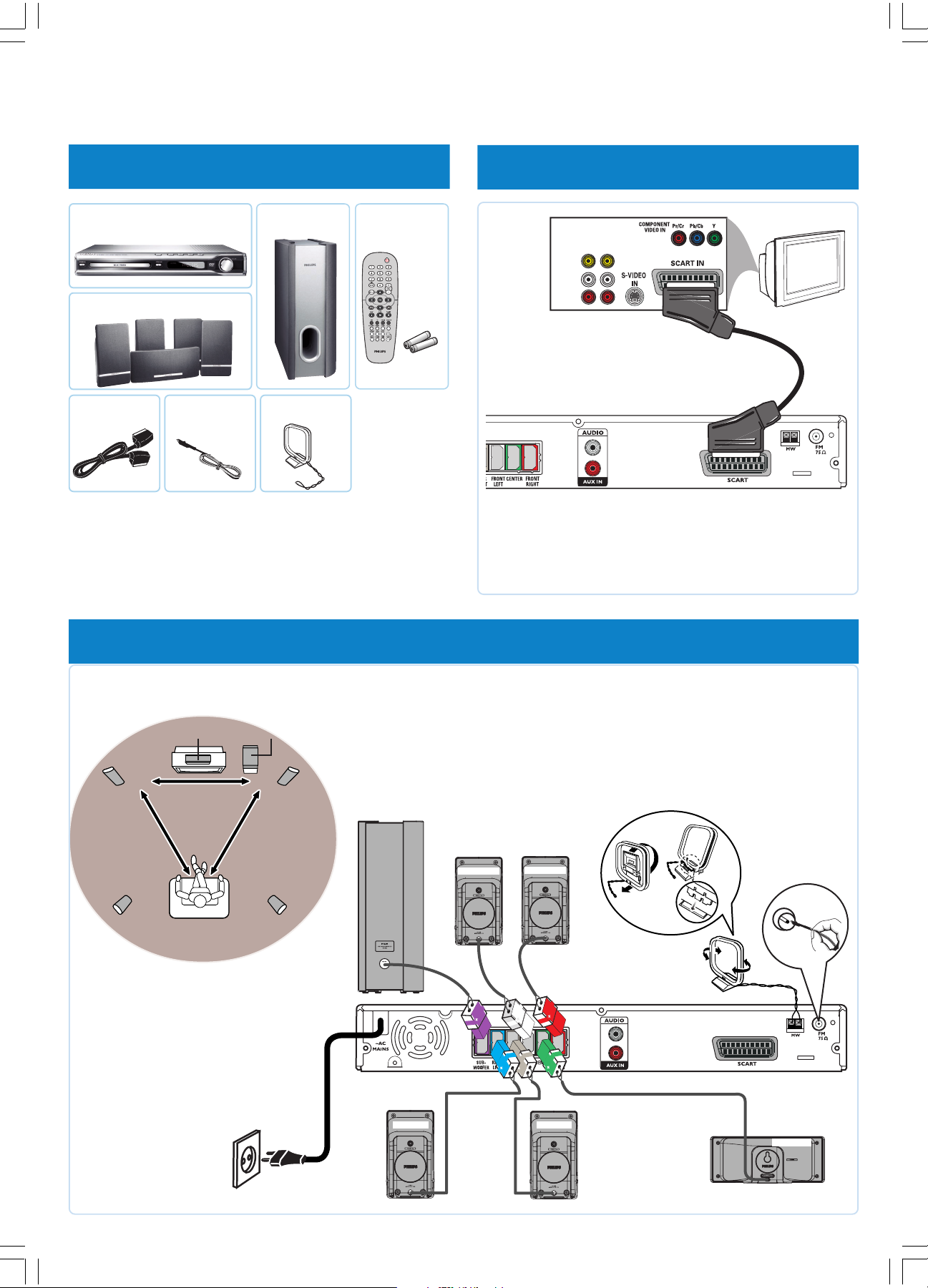
1 what’s in the box
main unit
A
Front/Rear/Center speakers
D
Scart cable
E
FM wire
FG
antenna
B
Subwoofer
MW loop
antenna
Remote control
C
includes 2x AA batteries
2 connect TV
OUT IN
VIDEO
AUDIO
L
R
TV
E
A
3 connect subwoofer, speakers and antennas
3a Placement of speakers
CENTER
TV
FRONT L
REAR L
Subwoofer
FRONT R
REAR R
3b Connect the speakers
and subwoofer to the
DVD system
(refer to the user manual for
“Individual speaker volume
adjustment”)
FRONT L
FRONT R
L
R
➠
3c Connect the
FM and MW
antennas
G
F
3d Connect the mains
cord to the power
supply
HTS3050-16-QSG-Eng 5/1/06, 9:36 AM1
REAR L
C
A
REAR R
CENTER
Page 2
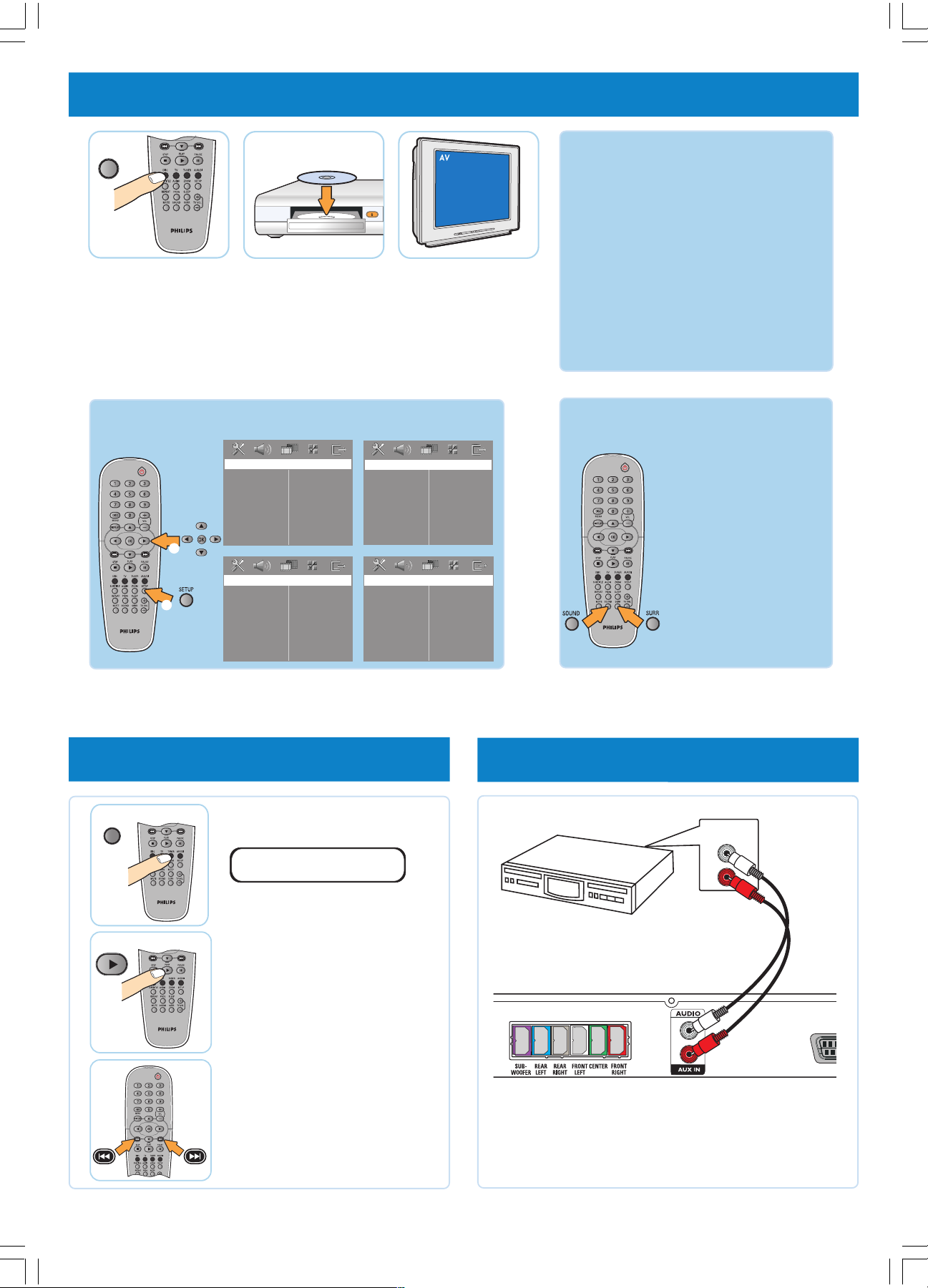
4 play a disc
DISC
4a Press DISC.
Point the remote control
towards the DVD system.
More settings and features GET SOUND
2
1
4b Load in a disc
Press OPEN CLOSE to
open and close the disc
tray.
General Setup Page
Disc Lock
Display Dim
Program
OSD Language
Screen Saver
DIVX(R) VOD Code
Video Setup Page
TV Type
TV Display
Picture Setting
4c Select correct
AV In channel
Switch to the correct
input source by using the
TV remote control.
Audio Setup Page
Speakers Volume
Speakers Delay
Night Mode
CD Upsampling
Preference Page
Audio
Subtitle
Disc Menu
Parental
PBC
MP3/JPEG Nav
Password
DivX Subtitle
Default
GET PICTURE
Check the connection of the DVD system
•
to TV is in place (see 2 Connect TV).
• Check the AV mode on TV. It may be
called FRONT, A/V IN, or VIDEO. Choose
the different modes using TV remote
control.
• Or, use the TV remote control to select
Channel 1 on TV, then press Channel down
button until you get the picture.
• See your TV manual for more details.
No sound from rear
speakers?
Press SURR button to select
“Multi-Channel”.
To enhance the sound
quality
Press SOUND button to
select a predefined digital
sound effect.
Refer to chapter “DVD Setup Menu Options” in the user manual
for detailed descriptions.
5 programme radio stations
TUNER
PLAY
5a Press TUNER.
AUTO INSTALL PRESS PLAY
Note: This feature is only available
for first time setup.
5b Press and hold PLAY 2
until “START ...” appears.
It will start to programme
all available radio stations.
5c Once complete, use
S / T to select a
preset radio station.
Detailed playback features and additional
functions are described in the user manual.
6 connect other device (optional)
Audio/Video device
AUDIO OUT
L
R
Note: Connect the AUDIO OUTPUT of other audio/video
device to this DVD system in order to use the Home
Theatre Audio System’s surround sound capabilities.
Press AUX/DI on the remote control in order to
listen to the playback.
NEEDS HELP? Visit our website www.philips.com/support
HTS3050-16-QSG-Eng 5/1/06, 9:37 AM2
Page 3

Guía de inicio rápida Español
1 Contenido del paquete
2 Conexión del televisor
3 Conexión del subwoofer, los altavoces y las antenas
Ubicación de los altavoces
3a
3b Conecte los altavoces y el subwoofer al sistema de DVD (consulte la sección del manual del usuario acerca del ajuste individual del
volumen de los altavoces).
3c Conecte las antenas FM y MW.
3d Conecte los cables de alimentación al suministro eléctrico.
4 Reproducción de discos
Pulse DISC.
4a
Dirija el control remoto hacia el sistema de DVD.
4b Introduzca un disco.
Pulse OPEN CLOSE para abrir y cerrar la bandeja de discos.
4c Seleccione el canal de entrada AV correcto.
Seleccione la fuente de entrada correcta por medio del control remoto del televisor.
OBTENER IMAGEN
• Compruebe que la conexión del sistema de DVD al televisor está correctamente instalada (consulte la sección 2 Conexión del televisor).
• Compruebe el modo AV en el televisor. Es posible que se denomine FRONT, A/V IN o VIDEO. Seleccione los diferentes modos por medio
del control remoto.
• También puede utilizar el control remoto del televisor para seleccionar el canal 1 y, a continuación, pulsar el botón de disminución de canal
hasta que aparezca la imagen.
• Consulte el manual del televisor para obtener más información.
OBTENER SONIDO
Los altavoces posteriores no producen sonido.
Pulse SURR para seleccionar MULTI-CHANNEL.
Mejor calidad de sonido?
Pulse el botón SOUND para seleccionar un efecto de sonido predefinido.
En el manual del usuario adjunto se describen detalladamente las funciones adicionales y de reproducción.
Otros ajustes y funciones
Consulte los capítulos de opciones del menú de instalación de DVD del manual del usuario para obtener descripciones detalladas.
5 Programación de emisoras de radio
5a Pulse TUNER.
Nota: esta función sólo está disponible en el caso de la primera configuración.
5b Mantenga pulsado PLAY 2 hasta que aparezca “START ...” (Iniciar). Se iniciará la programación de todas las emisoras de radio disponibles.
5c Una vez finalizado el proceso, use S / T para seleccionar una presintonía de radio.
6 Conexión de otro dispositivo (opcional)
Nota: Conecte la salida de sonido AUDIO OUTPUT de otro dispositivo de audio/vídeo a este sistema de DVD para utilizar las funciones de sonido
Surround del sistema Home Theatre. Pulse AUX/DI en el control remoto para poder escuchar la reproducción.
HTS3050-16-QSG-Eng 5/1/06, 9:37 AM3
¿NECESITA AYUDA?
Visite nuestro sitio Web www.philips.com/support
 Loading...