

Page 1
Training HDMI
Euroservice
Service Training
<< HDMI >>SERVICE TRAINING
<< HDMI >>
Theo Heijnen
September 2007 V5
PERSONAL NOTES:
PERSONAL NOTES:
page: 1
Page 2
Content
•Objective
•What is HDMI
• DVI and benefits HDMI
• Different HDMI category products
• Versions HDMI
•HDCP
•CEC
<< HDMI >>SERVICE TRAINING
<< HDMI >>
• Data Flow
•FAQ
Philips CE Europe, Euroservice, SE&T
HDMI basics Slide 2
PERSONAL NOTES:
PERSONAL NOTES:
page: 2
Page 3
<< HDMI >>SERVICE TRAINING
<< HDMI >>
Course Objective
HDMI (High Definition Multimedia Interface) is gaining
popularity in CE industry and it is projected to be as a
standard interface in near future.
This training is made with the intention of providing some
understandings and guidelines to readers who may be
directly or indirectly involved in products with HDMI.
Philips CE Europe, Euroservice, SE&T
HDMI basics Slide 3
PERSONAL NOTES:
PERSONAL NOTES:
page: 3
Page 4
Content
•Objective
•What is HDMI
•DVI
• Different HDMI category products
• Versions HDMI
•HDCP
•CEC
<< HDMI >>SERVICE TRAINING
<< HDMI >>
• Data Flow
•FAQ
Philips CE Europe, Euroservice, SE&T
HDMI basics Slide 4
PERSONAL NOTES:
PERSONAL NOTES:
page: 4
Page 5
<< HDMI >>SERVICE TRAINING
<< HDMI >>
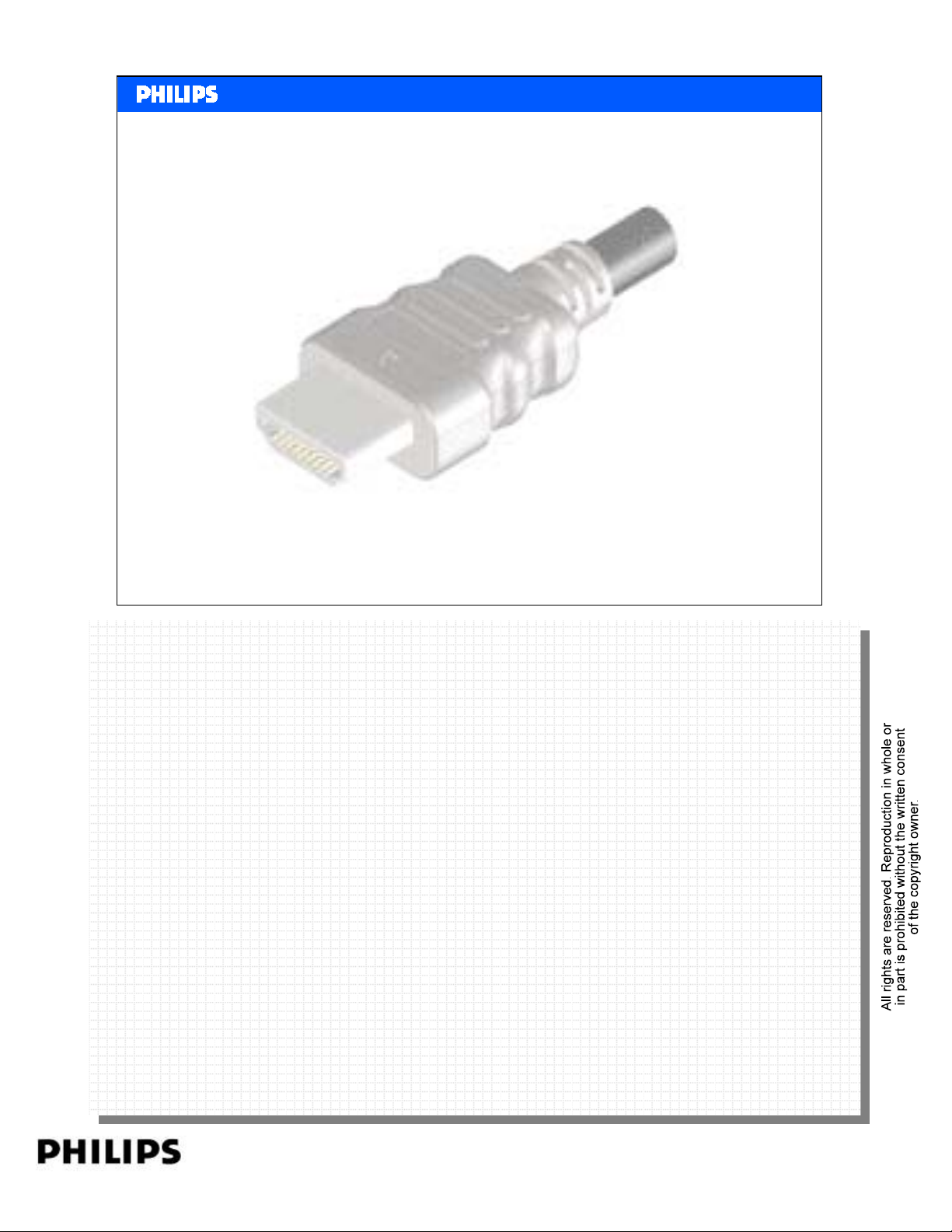
What is HDMI
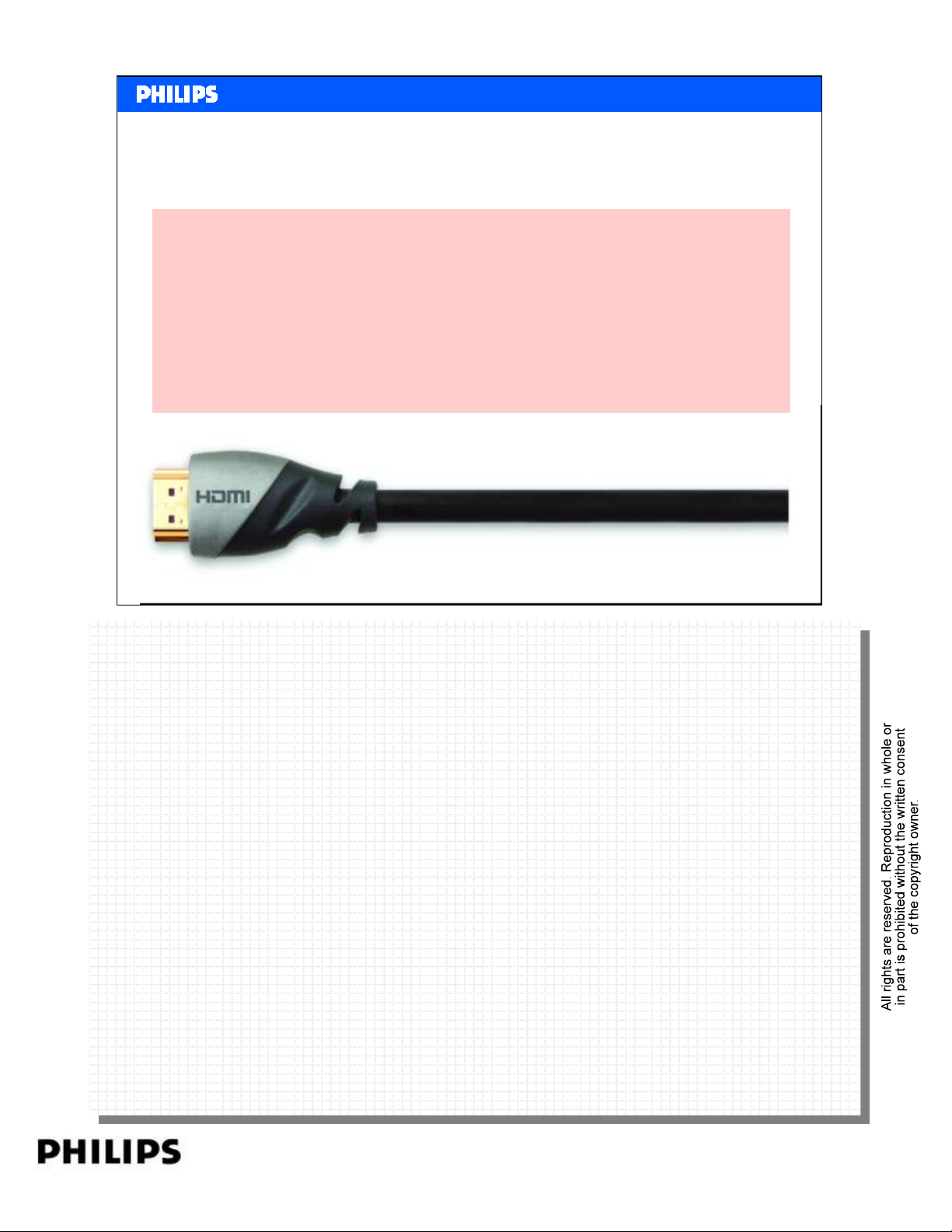
HDMI is High Definition Multimedia Interface and it the
first and only digital interface for Consumer Electronics
that can carry:
¾ Uncompressed high-definition video (with
encryption)
¾ Compressed or uncompressed multi-channel audio
¾ Intelligent format and command data
Philips CE Europe, Euroservice, SE&T
HDMI basics Slide 5
PERSONAL NOTES:
PERSONAL NOTES:
page: 5
Page 6
Content
•Objective
•What is HDMI
• DVI and benefits HDMI
• Different HDMI category products
• Versions HDMI
•HDCP
•CEC
<< HDMI >>SERVICE TRAINING
<< HDMI >>
• Data Flow
•FAQ
Philips CE Europe, Euroservice, SE&T
HDMI basics Slide 6
PERSONAL NOTES:
PERSONAL NOTES:
page: 6
Page 7
DVI
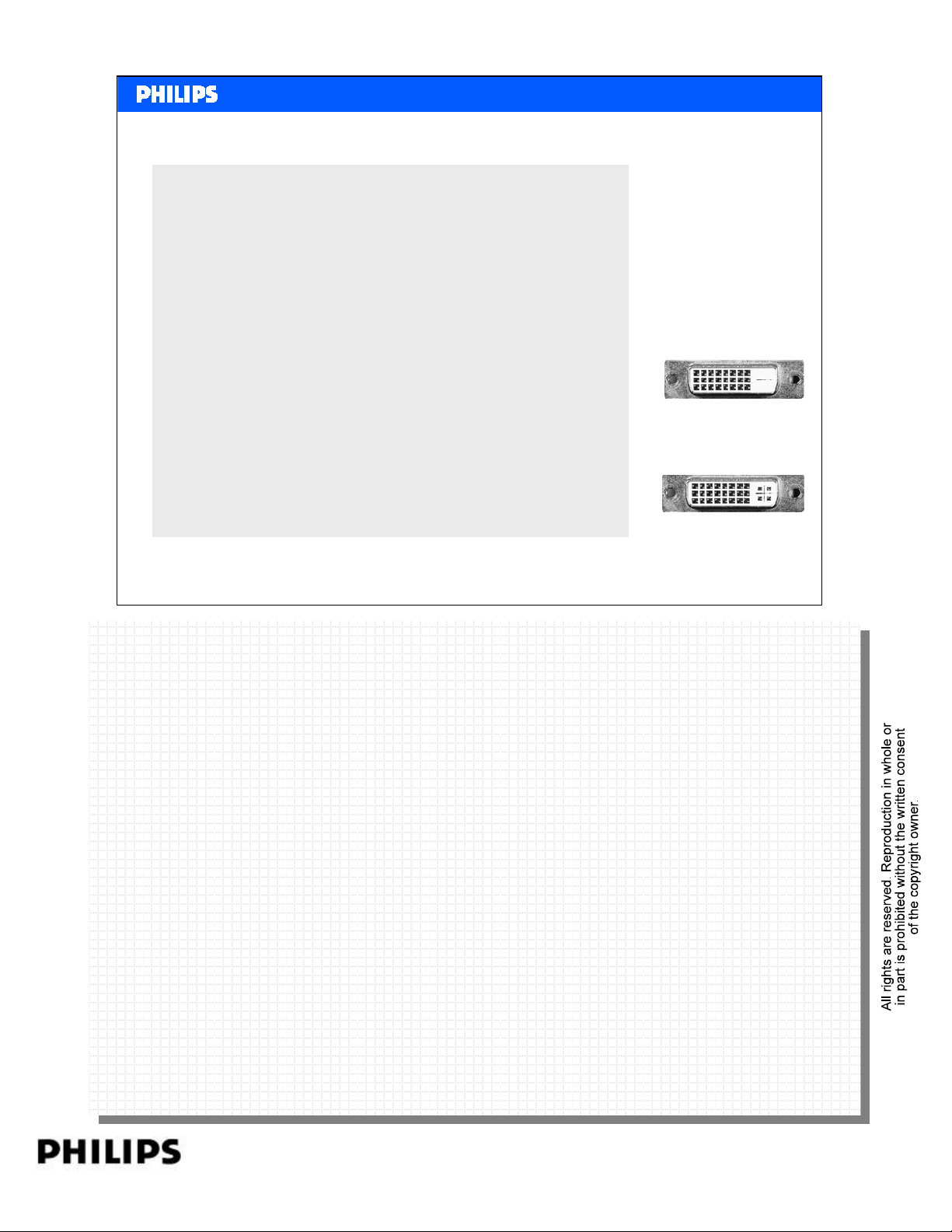
Before HDMI
•DVI-A
– Analog video connection
– Compatible with PC-VGA
•DVI-D
– Digital video connection
– Used for LCD monitors and some TVs
•DVI-I
– Combination of DVI-A and DVI-D on one
<< HDMI >>SERVICE TRAINING
<< HDMI >>
DVI
connector
Philips CE Europe, Euroservice, SE&T
HDMI basics Slide 7
PERSONAL NOTES:
PERSONAL NOTES:
page: 7
Page 8
<< HDMI >>SERVICE TRAINING
<< HDMI >>
Why do we want to have products
equipped with HDMI?
1HDMI digital interconnect provides superior, uncompressed digital
video and audio quality for source-to-display transfer (thus, avoiding
needless conversions from digital to analog and back again as with
CVBS, S-Video or YPbPr connections.)
2A single cable solution with user-friendly connector to replace the maze
of cabling behind the entertainment center as what we have now.
3 Integrated remote control for entire home theatre system equipped with
advanced control CEC.
4 TV and AV Receivers can adjust for best viewing experience (surround
sound and best aspect ratio) without consumer intervention.
With HDCP encryption, HDMI is able to transfer high-definition
content. HDMI-HDCP opens the floodgate of digital content from
major motion picture producers
Philips CE Europe, Euroservice, SE&T
The benefits provided above are considered as ‘pull’ factors and in line with ‘Sense &
The benefits provided above are considered as ‘pull’ factors and in line with ‘Sense &
Simplicity’ direction. Beside these, there are the ‘push’ factors.
Simplicity’ direction. Beside these, there are the ‘push’ factors.
1The need for content protection to reduce piracy is addressed by HDCP, without which
1The need for content protection to reduce piracy is addressed by HDCP, without which
MPAA(*) would not endorse DVI or HDMI for CE equipment.
MPAA(*) would not endorse DVI or HDMI for CE equipment.
2 Larger screens DTV with higher resolution are fueling the demand for high definition
2 Larger screens DTV with higher resolution are fueling the demand for high definition
source. In not so long ago, DVI is the solution. However, in North America, HDMI DTV has
source. In not so long ago, DVI is the solution. However, in North America, HDMI DTV has
out shipped DVI models in 2004.
out shipped DVI models in 2004.
3 The direction for DTV and STB is towards HDMI and standards are pushing as well.
3 The direction for DTV and STB is towards HDMI and standards are pushing as well.
MPAA: Motion Picture Association America
MPAA: Motion Picture Association America
HDMI basics Slide 8
PERSONAL NOTES:
PERSONAL NOTES:
page: 8
Page 9
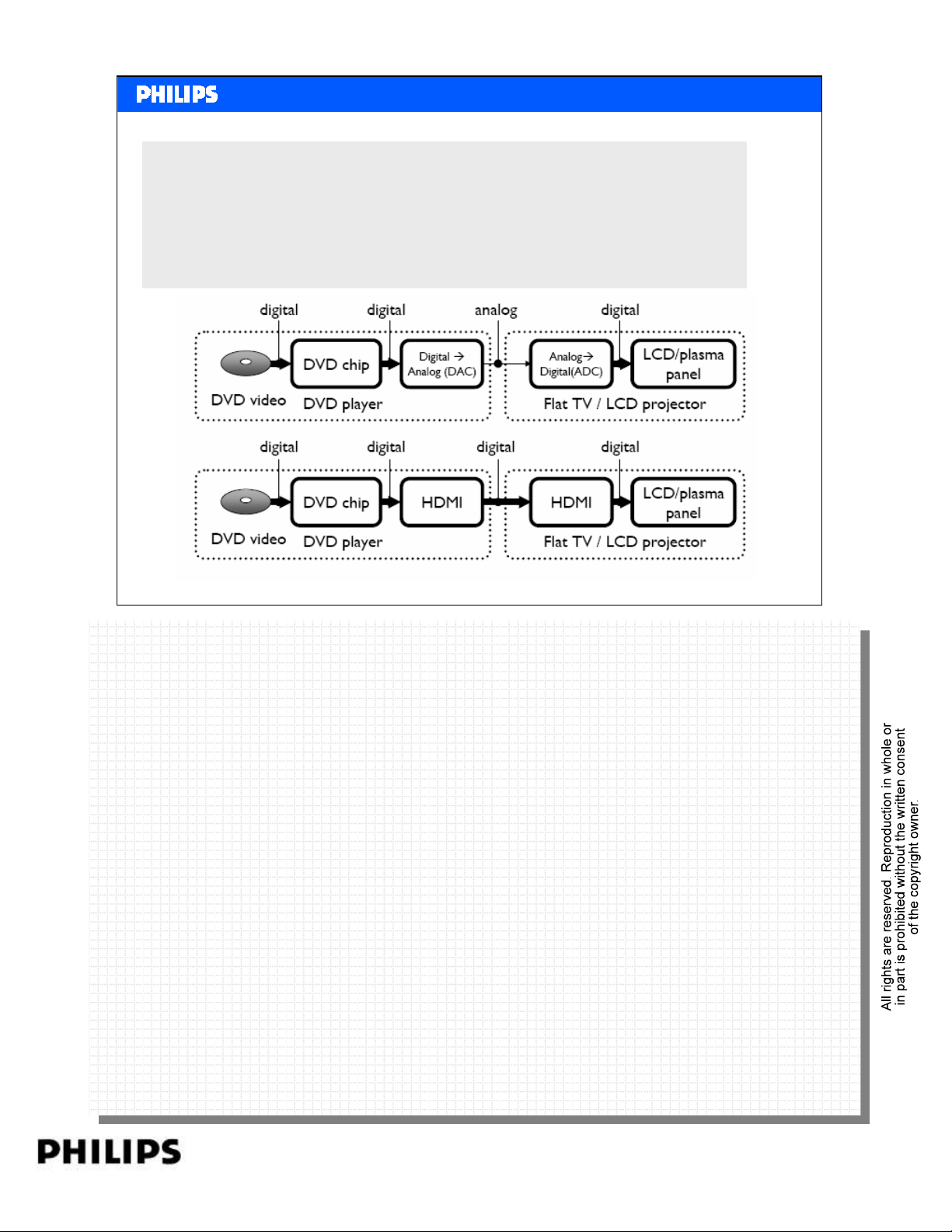
HDMI Benefits
Digital signal transmission
• Signal on DVD is digital
• Signal inside Flat TV is digital
• When connecting via analog connection, video noise is
added and resolution is lost.
<< HDMI >>SERVICE TRAINING
<< HDMI >>
Philips CE Europe, Euroservice, SE&T
HDMI basics Slide 9
PERSONAL NOTES:
PERSONAL NOTES:
page: 9
Page 10
Content
•Objective
•What is HDMI
•DVI
• Different HDMI category products
• Versions HDMI
•HDCP
•CEC
<< HDMI >>SERVICE TRAINING
<< HDMI >>
• Data Flow
•FAQ
Philips CE Europe, Euroservice, SE&T
HDMI basics Slide 10
PERSONAL NOTES:
PERSONAL NOTES:
page: 10
Page 11
<< HDMI >>SERVICE TRAINING
<< HDMI >>
What type or category of HDMI device/product?
HDMI system architecture is defined to consist of Sources,
Sinks, Repeaters and Cable Assemblies.
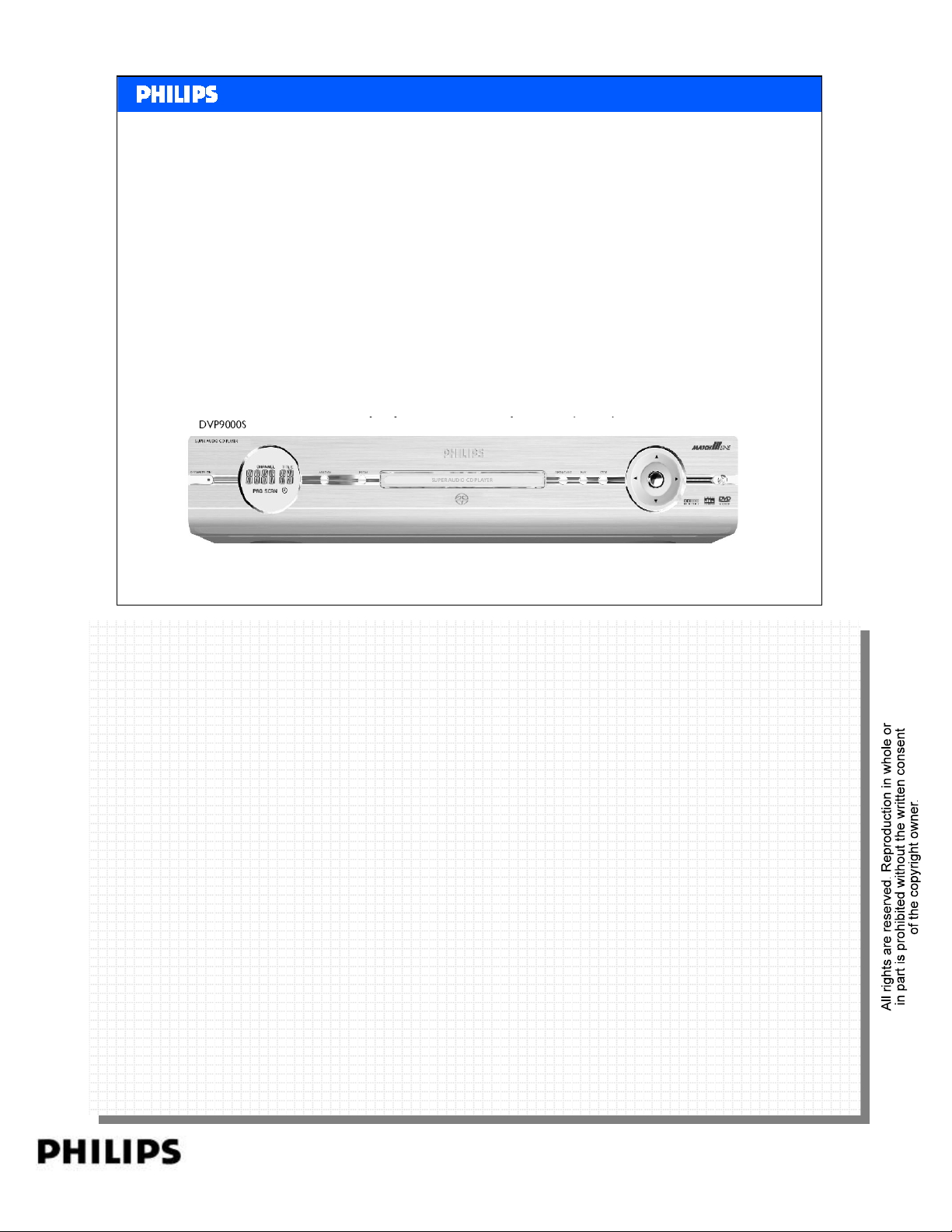
Source
¾Device with one or more HDMI outputs.
¾Equipped with HDMI Transmitter chip.
¾Used to render content out to display,
like DVD player & Set Top Box (STB).
Philips CE Europe, Euroservice, SE&T
HDMI basics Slide 11
PERSONAL NOTES:
PERSONAL NOTES:
page: 11
Page 12
Sink
<< HDMI >>SERVICE TRAINING
<< HDMI >>
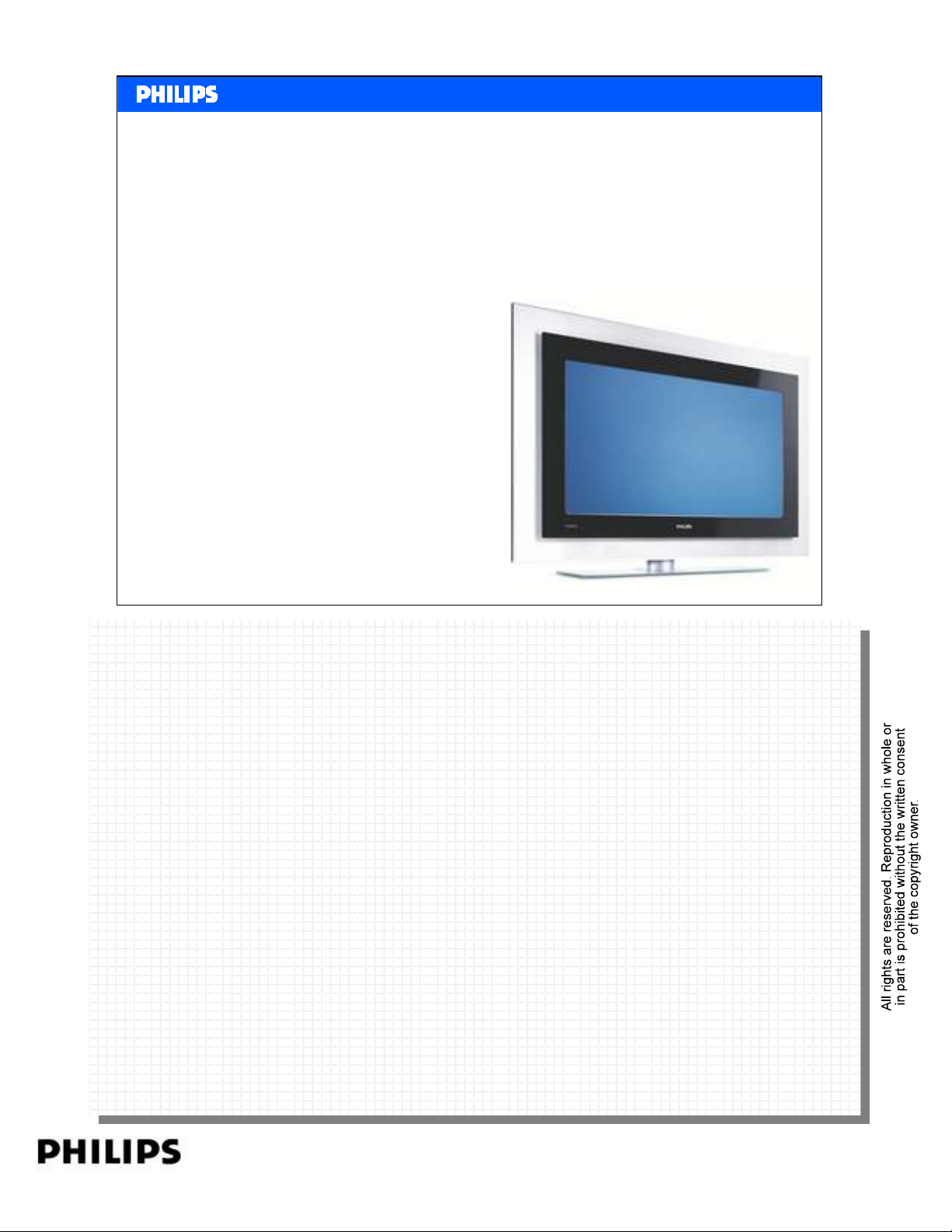
Sink
¾Device with one or more HDMI inputs.
¾Equipped with HDMI Receiver chip.
¾Used to accept and display content for consumer
consumption, like Digital TV, Projector,
Plasma Display Panel & LCD-TV.
Philips CE Europe, Euroservice, SE&T
HDMI basics Slide 12
PERSONAL NOTES:
PERSONAL NOTES:
page: 12
Page 13
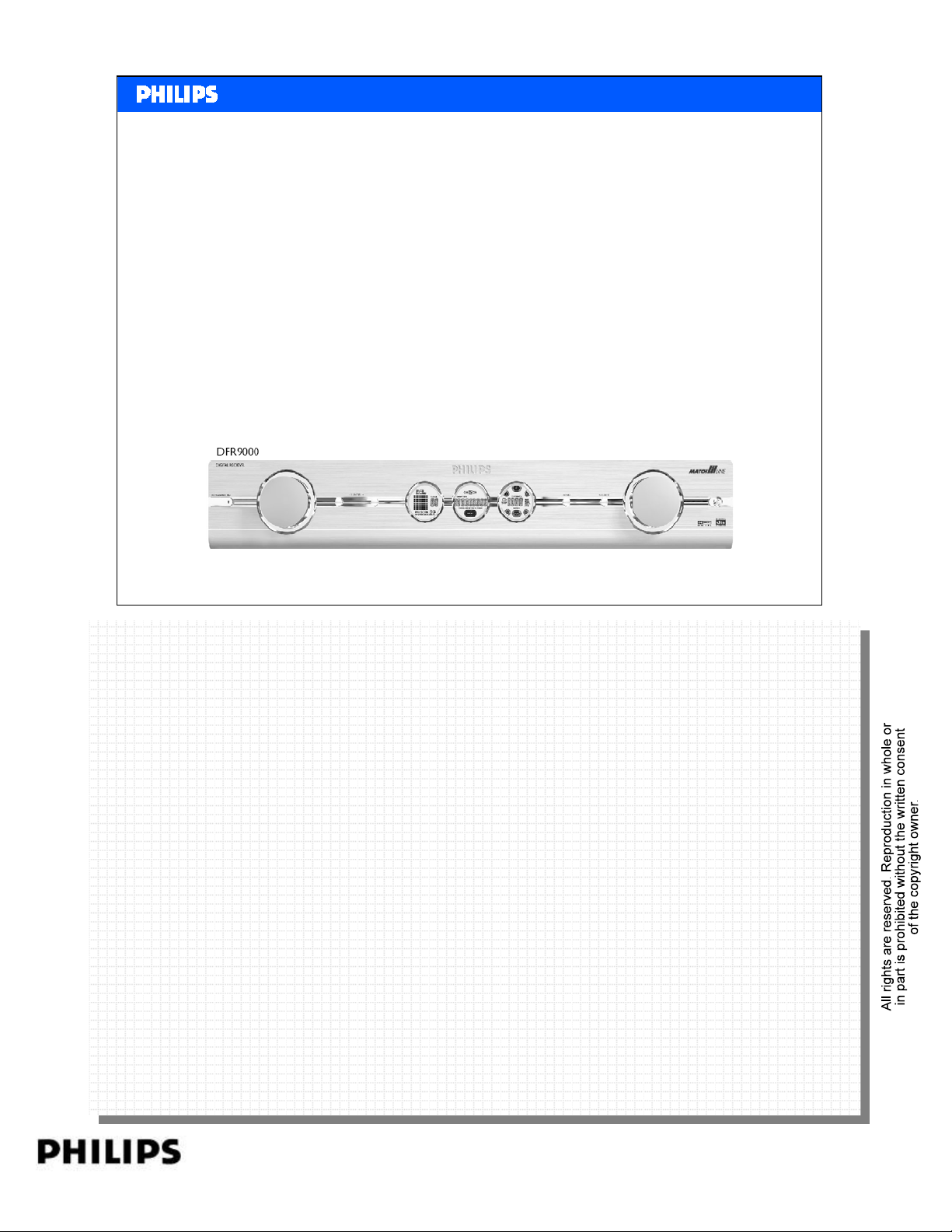
Repeater
¾Device with at least one HDMI input and at least one
HDMI output, and a retransmission function.
¾Equipped with HDMI Receiver chip and HDMI
Transmitter chip.
¾Must also perform most of the tasks associated with
HDMI Source and Sink.
<< HDMI >>SERVICE TRAINING
<< HDMI >>
Repeater
Philips CE Europe, Euroservice, SE&T
A Repeater has at least one of following functions: –
A Repeater has at least one of following functions: –
a) Repeat function:
a) Repeat function:
– Single-input, single-output (also known as “Extension”) and used primarily
– Single-input, single-output (also known as “Extension”) and used primarily
b) Switch function:
b) Switch function:
– Multiple-input, single-output and used primarily to select among multiple Sources.
– Multiple-input, single-output and used primarily to select among multiple Sources.
c) Distributor function:
c) Distributor function:
– Single-input, multiple-output, where only one output is active. Used primarily
– Single-input, multiple-output, where only one output is active. Used primarily
to select among multiple displays or Sinks.
to select among multiple displays or Sinks.
d) Duplicator function:
d) Duplicator function:
– Single-input, multiple-output, where more than one output is active. Used
– Single-input, multiple-output, where more than one output is active. Used
e) Combinations of the above.
e) Combinations of the above.
for cable extension.
for cable extension.
for signal distribution.
for signal distribution.
HDMI basics Slide 13
PERSONAL NOTES:
PERSONAL NOTES:
page: 13
Page 14
Content
•Objective
•What is HDMI
•DVI
• Different HDMI category products
• Versions HDMI
•HDCP
•CEC
<< HDMI >>SERVICE TRAINING
<< HDMI >>
• Data Flow
•FAQ
Philips CE Europe, Euroservice, SE&T
HDMI basics Slide 14
PERSONAL NOTES:
PERSONAL NOTES:
page: 14
Page 15
Different versions on HDMI.
HDMI 1.2
HDMI 1.1
<< HDMI >>SERVICE TRAINING
<< HDMI >>
HDMI 1.3
HDMI 1.0
Philips CE Europe, Euroservice, SE&T
HDMI basics Slide 15
PERSONAL NOTES:
PERSONAL NOTES:
page: 15
Page 16
<< HDMI >>SERVICE TRAINING
<< HDMI >>
What are the HDMI spec version 1.x?
The HDMI 1.0 spec was the initial release (Dec 2002) for
HDMI system. Subsequently, HDMI 1.1 spec was released in
May 2004.
The main update in HDMI 1.1 includes adding ACP and ISRC
Packet definitions to support DVD-Audio via HDMI.
Philips CE Europe, Euroservice, SE&T
ACP: Audio Copy Protection packet. A Source may use the ACP Packet to convey content-
ACP: Audio Copy Protection packet. A Source may use the ACP Packet to convey content-
related information regarding the active
related information regarding the active
audio stream.
audio stream.
ISRC: A Source may handle an International Standard Recording Code (ISRC) and/or UPC/EAN
ISRC: A Source may handle an International Standard Recording Code (ISRC) and/or UPC/EAN
describing the origin or owner details for each track of content on the medium. These values may
describing the origin or owner details for each track of content on the medium. These values may
be transmitted using the ISRC1 and ISRC2 packets.
be transmitted using the ISRC1 and ISRC2 packets.
HDMI basics Slide 16
PERSONAL NOTES:
PERSONAL NOTES:
page: 16
Page 17
<< HDMI >>SERVICE TRAINING
<< HDMI >>
HDMI spec version 1.2
• In August 2005 the HDMI 1.2 specification is released.
HDMI 1.2 adds features and capabilities that increase
HDMI's appeal for use in both the CE and PC industries.
For CE products the most important modification
includes:
• Support for One Bit Audio format, such as Super Audio
CD's DSD (Direct Stream Digital).
• HDMI 1.2a main change: Consumer Electronic Control
(CEC) features and command sets and CEC compliance
tests are now fully specified.
Philips CE Europe, Euroservice, SE&T
HDMI basics Slide 17
PERSONAL NOTES:
PERSONAL NOTES:
page: 17
Page 18
<< HDMI >>SERVICE TRAINING
<< HDMI >>
HDMI spec version 1.3
Version V1.3 is released June 2006.
• Higher speed, Increase bandwidth to 340 MHz (10.2
Gbps)
• Deep Color, HDMI 1.3 supports 10-bit, 12-bit and 16-bit
(RGB or YCbCr) color depths,
• Broader color space.
• New mini connector.
• Lip Sync.
• New HD lossless audio formats.
Philips CE Europe, Euroservice, SE&T
Higher speed: Although all previous versions of HDMI have had more than enough bandwidth to
Higher speed: Although all previous versions of HDMI have had more than enough bandwidth to
support all current HDTV formats, HDMI 1.3 increases its single-link bandwidth to 340 MHz (10.2
support all current HDTV formats, HDMI 1.3 increases its single-link bandwidth to 340 MHz (10.2
Gbps) to support the demands of future HD display devices, such as higher resolutions, Deep
Gbps) to support the demands of future HD display devices, such as higher resolutions, Deep
Color and high frame rates. In addition, built into the HDMI 1.3 specification is the technical
Color and high frame rates. In addition, built into the HDMI 1.3 specification is the technical
foundation that will let future versions of HDMI reach significantly higher speeds.
foundation that will let future versions of HDMI reach significantly higher speeds.
Deep Color: HDMI 1.3 supports 10-bit, 12-bit and 16-bit (RGB or YCbCr) color depths, up from
Deep Color: HDMI 1.3 supports 10-bit, 12-bit and 16-bit (RGB or YCbCr) color depths, up from
the 8-bit depths in previous versions of the HDMI specification.
the 8-bit depths in previous versions of the HDMI specification.
Broader color space: HDMI 1.3 adds support for “x.v.Color™” which removes current color
Broader color space: HDMI 1.3 adds support for “x.v.Color™” which removes current color
space limitations and enables the display of any color viewable by the human eye.
space limitations and enables the display of any color viewable by the human eye.
New mini connector: With small portable devices demanding seamless connectivity to HDTVs,
New mini connector: With small portable devices demanding seamless connectivity to HDTVs,
HDMI 1.3 offers a new, smaller form factor connector option.
HDMI 1.3 offers a new, smaller form factor connector option.
Lip Sync: HDMI 1.3 incorporates automatic audio synching capabilities that allows devices to
Lip Sync: HDMI 1.3 incorporates automatic audio synching capabilities that allows devices to
perform this synchronization automatically with total accuracy.
perform this synchronization automatically with total accuracy.
New HD lossless audio formats: In addition to HDMI’s current ability to support high-
New HD lossless audio formats: In addition to HDMI’s current ability to support high-
bandwidth uncompressed digital audio and all currently-available compressed formats (such as
bandwidth uncompressed digital audio and all currently-available compressed formats (such as
Dolby® Digital and DTS®), HDMI 1.3 adds additional support for new lossless compressed digital
Dolby® Digital and DTS®), HDMI 1.3 adds additional support for new lossless compressed digital
audio formats Dolby TrueHD and DTS-HD Master Audio™.
PERSONAL NOTES:
PERSONAL NOTES:
audio formats Dolby TrueHD and DTS-HD Master Audio™.
HDMI basics Slide 18
page: 18
Page 19
480p or 576p
2ch LPCM
Compatible with DVI
Mandatory
<< HDMI >>SERVICE TRAINING
<< HDMI >>
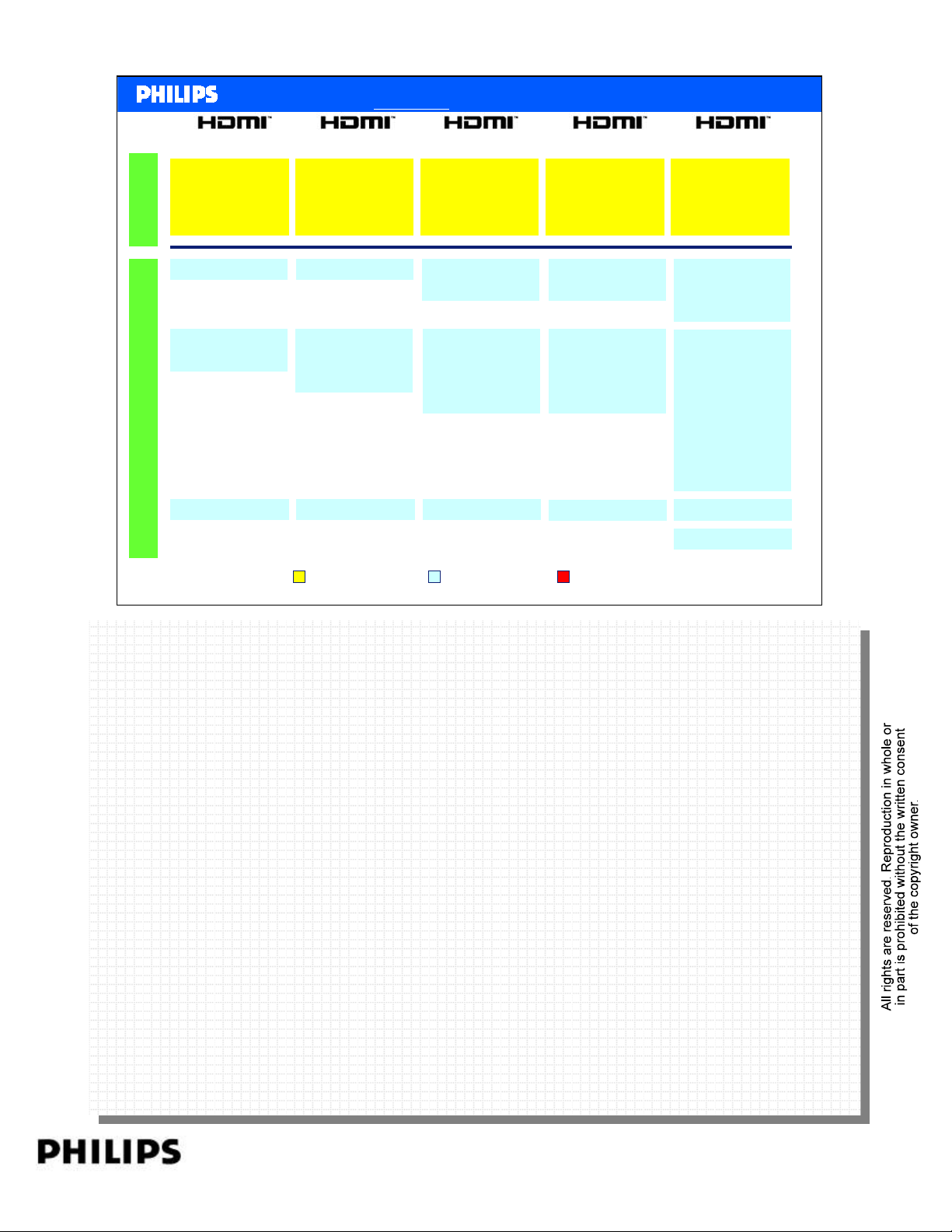
HDMI source features: Mandatory vs Optional
1.0 1.1 1.2 1.2a 1.3
480p or 576p
2ch LPCM
Compatible with DVI
480p or 576p
2ch LPCM
Compatible with DVI
480p or 576p
2ch LPCM
Compatible with DVI
480p or 576p
2ch LPCM
Compatible with DVI
720p 1080i 1080p
8-ch PCM
Compressed audio
Optional
CEC
Philips CE Europe, Euroservice, SE&T
720p 1080i 1080p
8-ch PCM
Compressed audio
DVD-Audio
CEC
720p 1080i 1080p
PC resolution
8-ch PCM
Compressed audio
DVD-Audio
SACD
CEC
720p 1080i 1080p
PC resolution
8-ch PCM
Compressed audio
DVD-Audio
SACD
CEC 1.2a
New feature in specsMandatory feature Optional feature
720p 1080i 1080p
PC resolution
Deep color
8-ch PCM
Compressed audio
DVD-Audio
SACD
Compressed DSD
High bit-rate audio
Auto lip sync
correction
CEC 1.2a
Mini connector
HDMI basics Slide 19
2
PERSONAL NOTES:
PERSONAL NOTES:
page: 19
Page 20
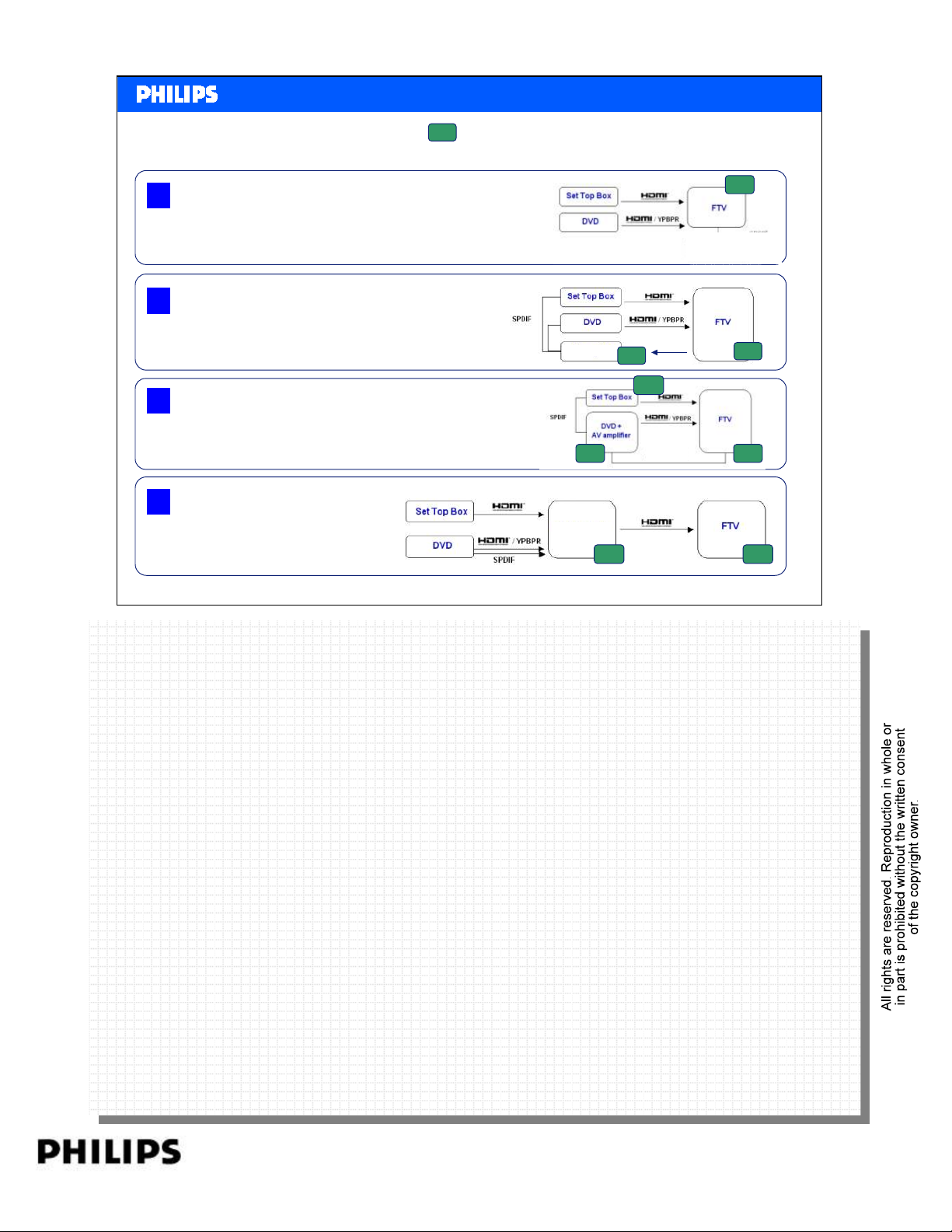
Lip Sync
LS
: Lip sync features needed
<< HDMI >>SERVICE TRAINING
<< HDMI >>
1 TV Star Topology
2 Audio Star Topology
3 HTS Star Topology
4 Audio Video Star Topology
Philips CE Europe, Euroservice, SE&T
AV receiver
LS LS
AV receiver
audio
LS
LS
audio
HDMI basics Slide 20
LS
LS
LSLS
Topology 1:
Topology 1:
It is a Legacy issue & can happen with ANY type of connectivity (dig/Ana)
It is a Legacy issue & can happen with ANY type of connectivity (dig/Ana)
LS can only be solved in TV.
LS can only be solved in TV.
Topology 2:
Topology 2:
We can have there also legacy issue with ANY type of connectivity (Dig/Ana)
We can have there also legacy issue with ANY type of connectivity (Dig/Ana)
Your TV still need to have LS. At the moment you disconnect Video & Audio, you
Your TV still need to have LS. At the moment you disconnect Video & Audio, you
have to have a second correction in AV receiver.
have to have a second correction in AV receiver.
Topology 3:
Topology 3:
Same, But there is also an option to have it in the STB.
Same, But there is also an option to have it in the STB.
Topology 4:
Topology 4:
PERSONAL NOTES:
PERSONAL NOTES:
Topology 4 automatic lipsync correction possible with ease of use due to HDMI 1.3
Topology 4 automatic lipsync correction possible with ease of use due to HDMI 1.3
page: 20
Page 21
Content
•Objective
•What is HDMI
•DVI
• Different HDMI category products
• Versions HDMI
•HDCP
•CEC
<< HDMI >>SERVICE TRAINING
<< HDMI >>
• Data Flow
•FAQ
Philips CE Europe, Euroservice, SE&T
HDMI basics Slide 21
PERSONAL NOTES:
PERSONAL NOTES:
page: 21
Page 22

<< HDMI >>SERVICE TRAINING
<< HDMI >>
What are HDCP and HDCP Licensing?
High-bandwidth Digital Content Protection (HDCP) is a technology
developed by Digital Content Protection, LLC (a subsidiary of Intel)
to protect digital entertainment content. HDCP has been
implemented across both DVI and HDMI interfaces. The HDCP
specification provides a cost-effective and transparent method for
transmitting and receiving the highest quality digital entertainment
content to DVI/HDMI-compliant digital displays
Philips CE Europe, Euroservice, SE&T
HDMI basics Slide 22
PERSONAL NOTES:
PERSONAL NOTES:
page: 22
Page 23
<< HDMI >>SERVICE TRAINING
<< HDMI >>
How to handle non-HDCP devices?
During Authentication and Key Exchange (first phase of HDCP protocol) initiated by
HDCP transmitter, a set of secret device keys is exchanged, to affirm HDCP receiver
(Sink) is authorized to receive HDCP content. If Sink is non-HDCP compliance,
authentication fails and protected content shall not be output.
Unprotected content, including diagnostic messages to the user, may still be sent to the
display in the event of failed authentication.
Philips CE Europe, Euroservice, SE&T
HDMI basics Slide 23
PERSONAL NOTES:
PERSONAL NOTES:
page: 23
Page 24
<< HDMI >>SERVICE TRAINING
<< HDMI >>
Are all HDMI devices are HDCP
compliance?
Unfortunately, HDMI devices do not by default are HDCP
compliance.
In HDMI spec, content protection capability is only a
recommendation.
While the HDMI specification supports HDCP, HDCP is not a
requirement and is not currently tested by HDMI Authorized
Testing Centers as part of the HDMI Compliance Test
Specification.
Philips CE Europe, Euroservice, SE&T
HDMI basics Slide 24
PERSONAL NOTES:
PERSONAL NOTES:
page: 24
Page 25
HDCP handling
<< HDMI >>SERVICE TRAINING
<< HDMI >>
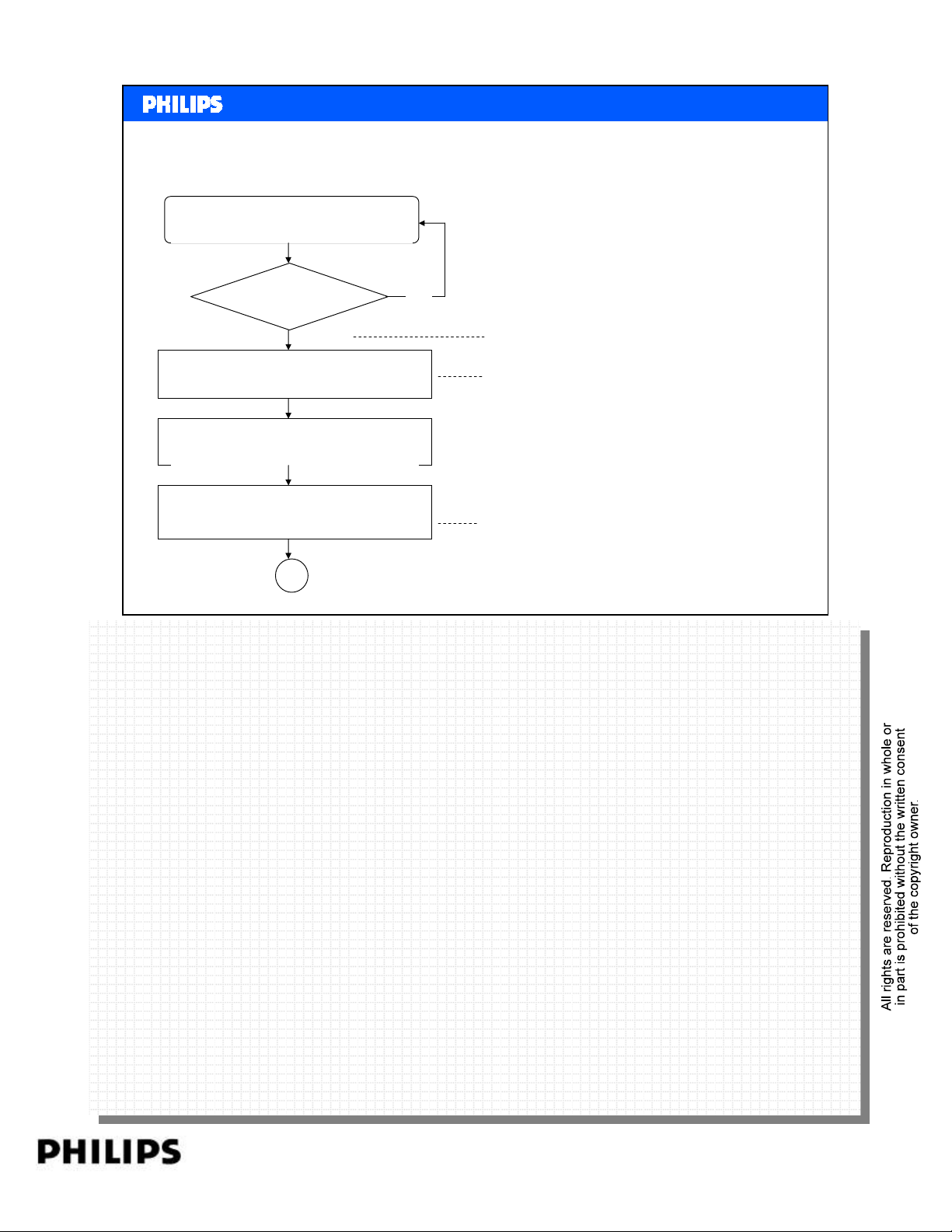
Transmitter Chip is active before HDCP start.
Init & Configure transmitter chip as per EDID
Philips CE Europe, Euroservice, SE&T
HDCP keys are exchanged via DDC lines. One very important is to note is that HDCP
HDCP keys are exchanged via DDC lines. One very important is to note is that HDCP
initialization requires a valid video stream from Source into the Sink. If up-scaling chip is used (like
initialization requires a valid video stream from Source into the Sink. If up-scaling chip is used (like
FLI2310), always ensure its output is valid and stable.
FLI2310), always ensure its output is valid and stable.
Poll for HPD
HPD
asserted?
Y
Read
EDID
Check UI setting.
Init & Configure HDMI Tx.
Send AVMUTE
B
N
Source should check if Sink is active by checking
RSEN bit.
Reading EDID. Source shall check if Sink is HDMI or
DVI device.
Some Sink may display blue or Green screen before
authentication completes.
AVMUTE is command issued by Source to Sink to
disable encryption and to mute audio video content.
Source should check H_RES, V_RES
HDMI basics Slide 25
HDCP is always initiated by Source.
HDCP is always initiated by Source.
Note that the HDCP protocol is different (with more steps) between Source and Repeater.
Note that the HDCP protocol is different (with more steps) between Source and Repeater.
HDP = Hard Plug Detect. Via this line the system detect if there is a set connected.
HDP = Hard Plug Detect. Via this line the system detect if there is a set connected.
EDID = Extended display identification data is a data structure provided by a display (TV or
EDID = Extended display identification data is a data structure provided by a display (TV or
monitor) to describe its capabilities to the display resolutions.
monitor) to describe its capabilities to the display resolutions.
PERSONAL NOTES:
PERSONAL NOTES:
page: 25
Page 26
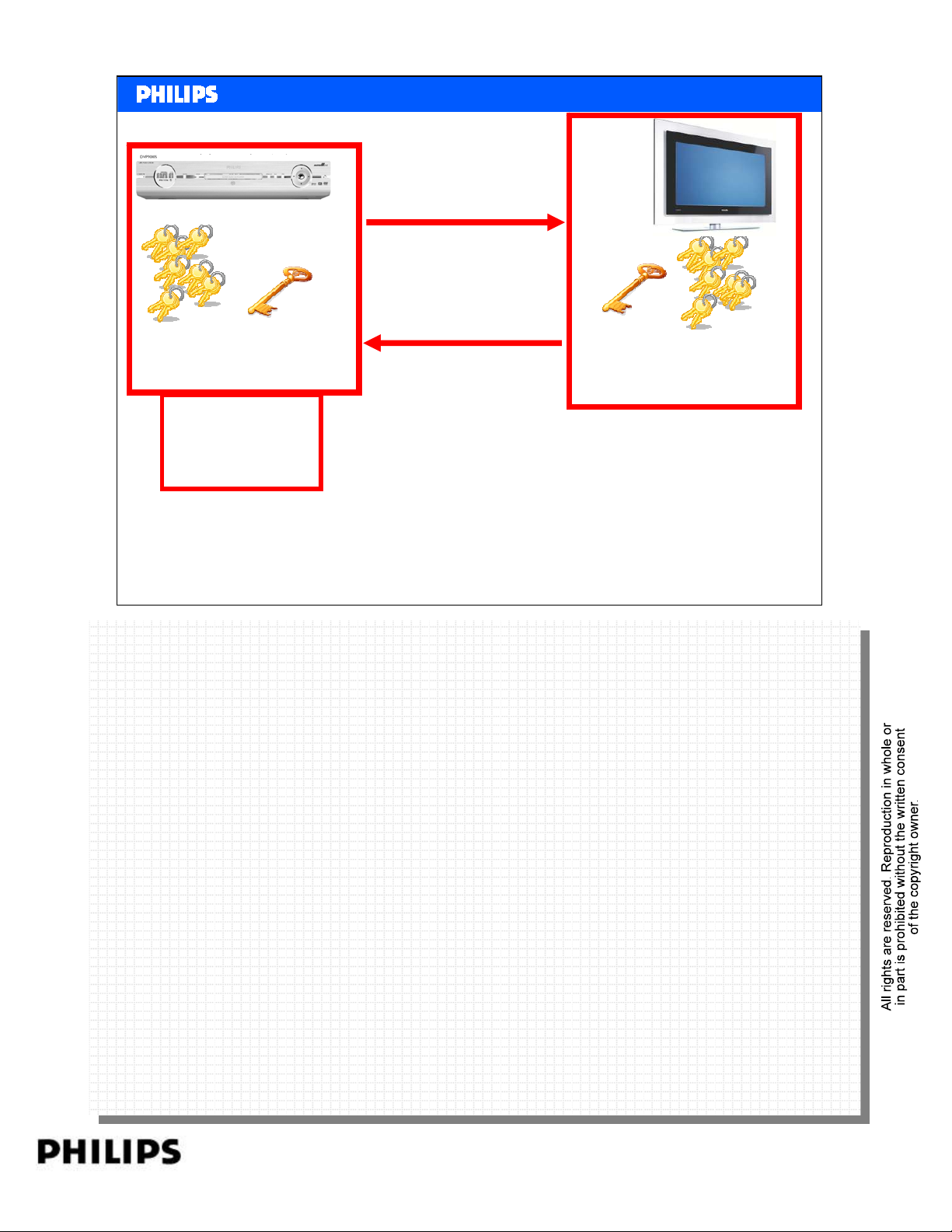
40 keys
(56 bit)
Generate 64 bit
Key Vector
value An
AKSV
AKSV + An
1
BKSV + repeater bit
2
Key Vector
BKSV
<< HDMI >>SERVICE TRAINING
<< HDMI >>
Key Exchange
40 keys
(56 bit)
Philips CE Europe, Euroservice, SE&T
HDMI basics Slide 26
PERSONAL NOTES:
PERSONAL NOTES:
page: 26
Page 27
<< HDMI >>SERVICE TRAINING
<< HDMI >>
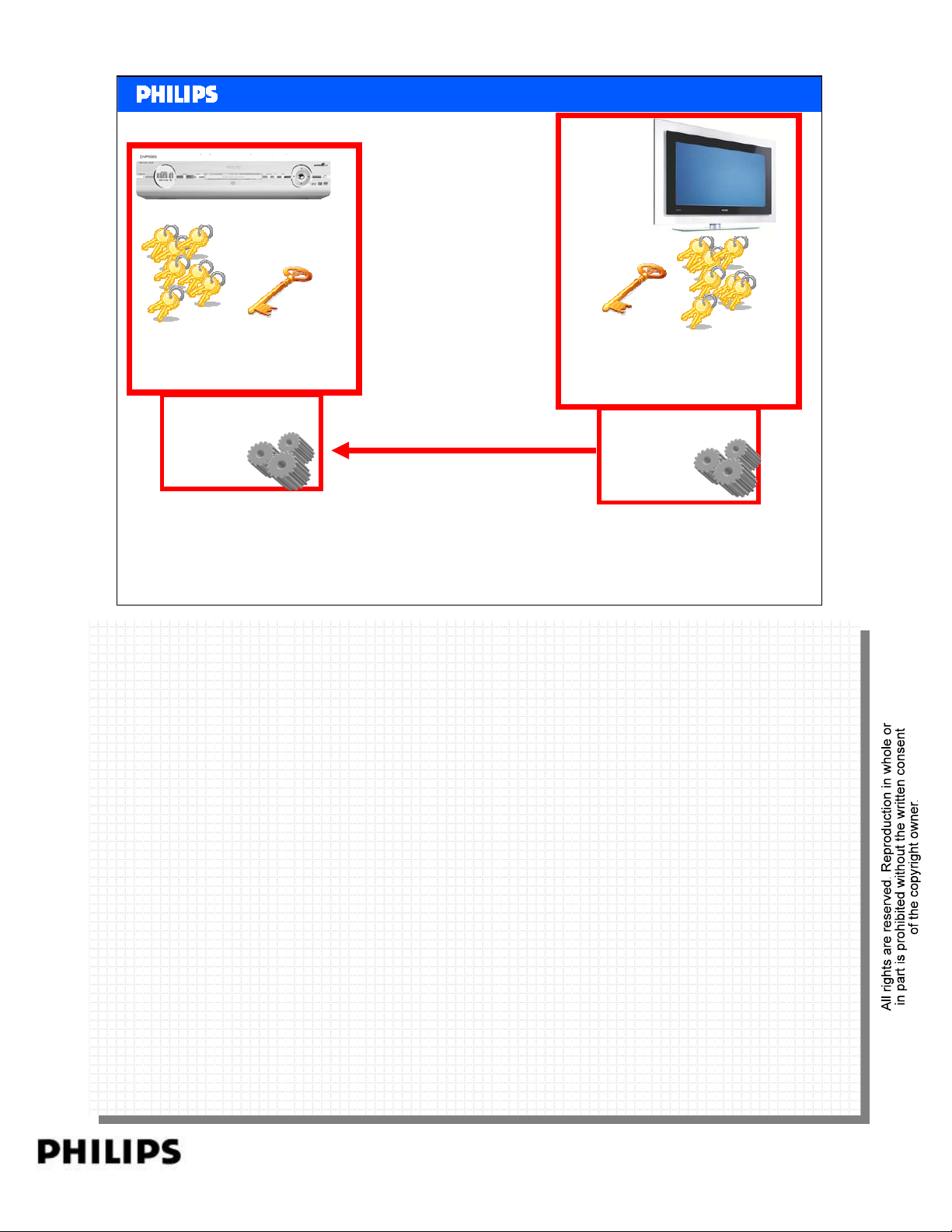
Key Exchange
40 keys
Key Vector
AKSV
(56 bit)
Calculate R0
Philips CE Europe, Euroservice, SE&T
R0’
If value R0’ is correct
video is decrypted.
Key Vector
BKSV
Calculate R0’
40 keys
(56 bit)
HDMI basics Slide 27
PERSONAL NOTES:
PERSONAL NOTES:
page: 27
Page 28
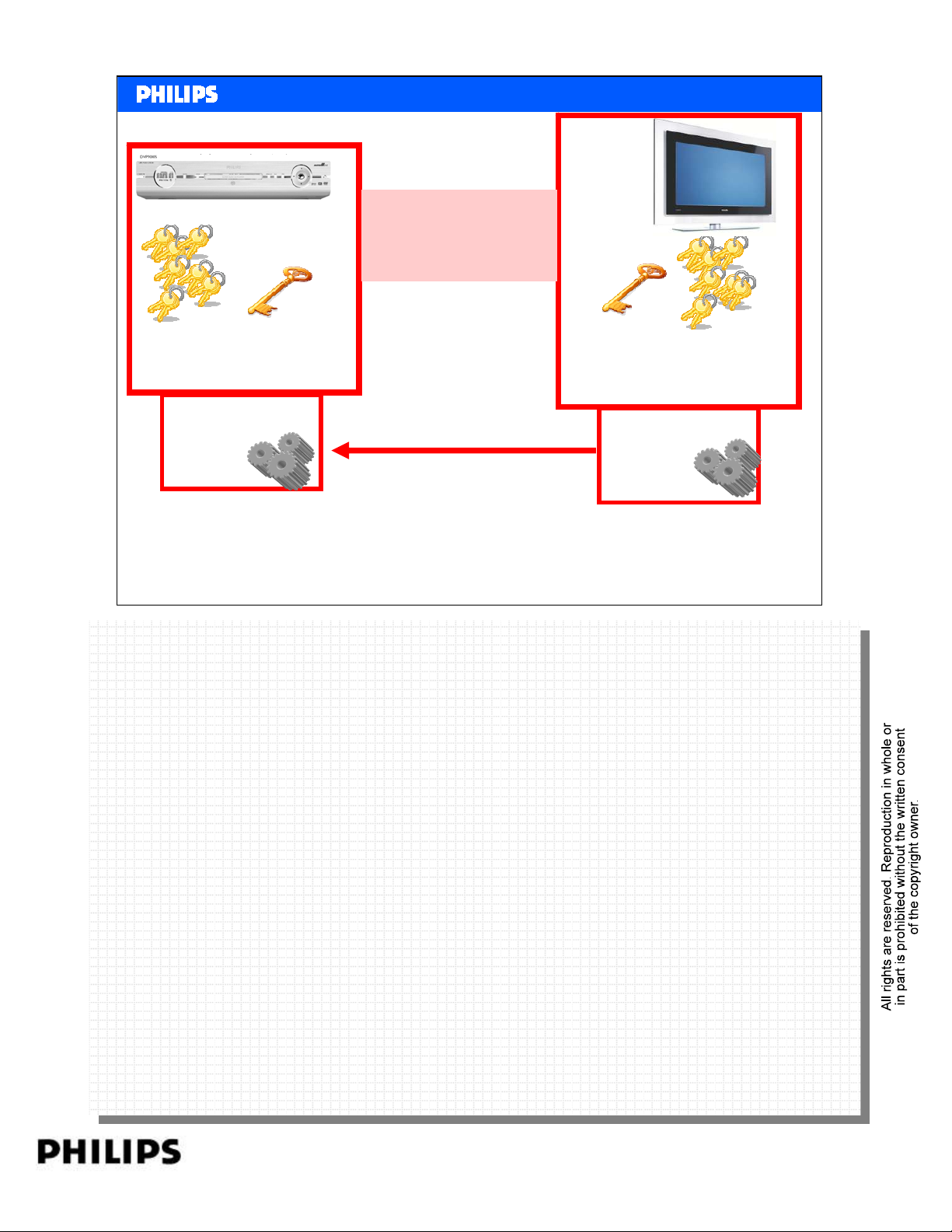
Every 2 seconds a
new R is calculated
and checked.
<< HDMI >>SERVICE TRAINING
<< HDMI >>
Key Exchange
40 keys
Key Vector
AKSV
(56 bit)
Calculate Rn
Philips CE Europe, Euroservice, SE&T
Rn’
If value Rn’ is correct
video is decrypted.
Key Vector
BKSV
Calculate Rn’
40 keys
(56 bit)
HDMI basics Slide 28
PERSONAL NOTES:
PERSONAL NOTES:
page: 28
Page 29
Content
•Objective
•What is HDMI
•DVI
• Different HDMI category products
• Versions HDMI
•HDCP
•CEC
<< HDMI >>SERVICE TRAINING
<< HDMI >>
• Data Flow
•FAQ
Philips CE Europe, Euroservice, SE&T
HDMI basics Slide 29
PERSONAL NOTES:
PERSONAL NOTES:
page: 29
Page 30
<< HDMI >>SERVICE TRAINING
<< HDMI >>
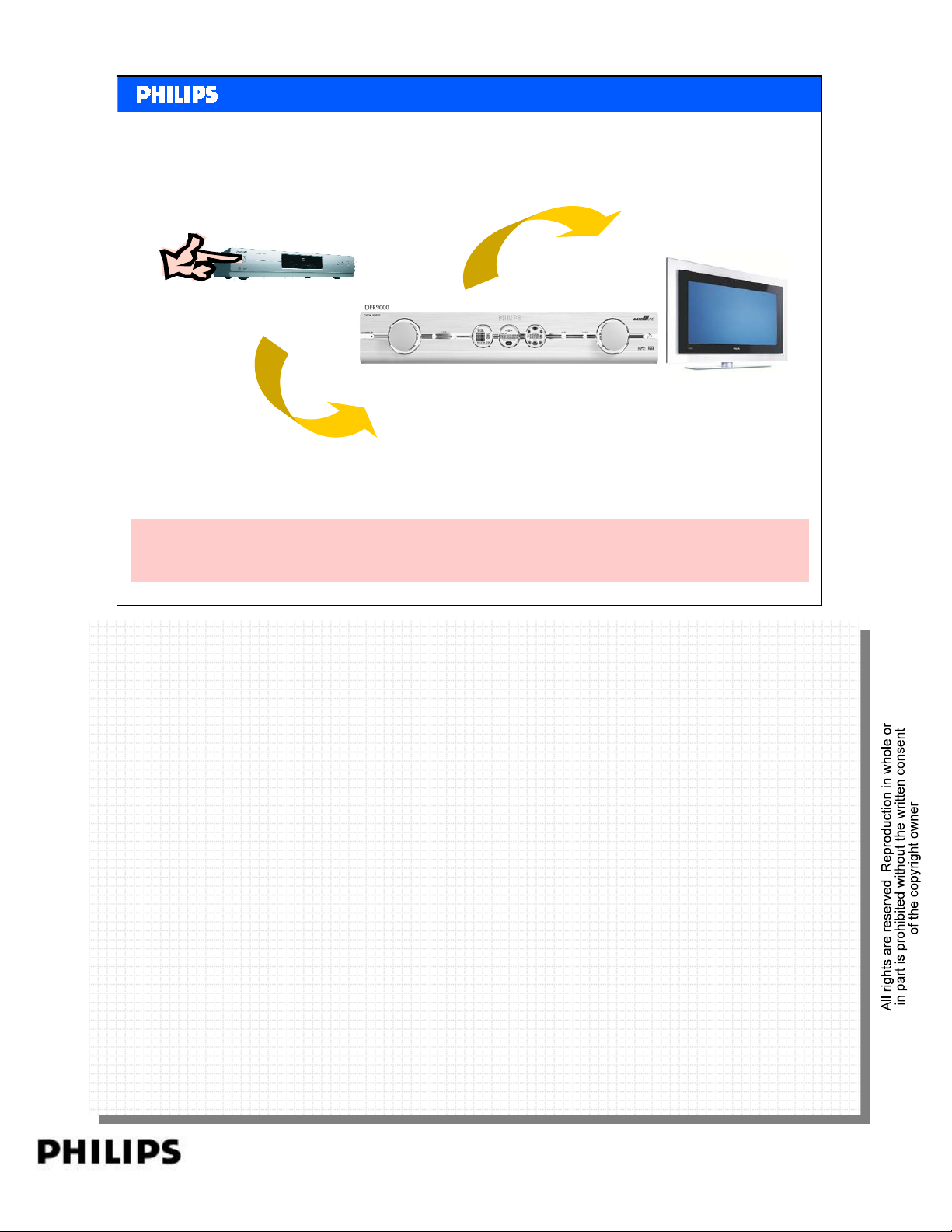
Consumer Electronic Control [CEC]
Press Play on DVD
And then…
Plays DVD
CEC is a protocol that provides high-level control functions between
all of the various audiovisual products in a user’s environment
Philips CE Europe, Euroservice, SE&T
One Touch Play - Allows a device to be played and become the active source with a single button press.
One Touch Play - Allows a device to be played and become the active source with a single button press.
• System Standby - Enables the user to switch all devices to standby with one button press.
• System Standby - Enables the user to switch all devices to standby with one button press.
• Preset Transfer - Enables any tuner device to download the same set of presets as the TV. It is used to auto
• Preset Transfer - Enables any tuner device to download the same set of presets as the TV. It is used to auto
configure a devices presets so no manual setup is required.
configure a devices presets so no manual setup is required.
• One Touch Record - Offers a What You See Is What You Record (WYSIWYR) facility, meaning that whatever is
• One Touch Record - Offers a What You See Is What You Record (WYSIWYR) facility, meaning that whatever is
shown on the TV screen is recorded on a selected recording device.
shown on the TV screen is recorded on a selected recording device.
• Timer Programming - Allows a device (e.g. the TV) to set a timer recording on a recording device.
• Timer Programming - Allows a device (e.g. the TV) to set a timer recording on a recording device.
• System Information - Queries the system to determine device addresses and configurations (e.g. language and
• System Information - Queries the system to determine device addresses and configurations (e.g. language and
country)
country)
• Deck Control - Enables a device to control (e.g. play, fast forward etc.) and interrogate a playback device (a deck).
• Deck Control - Enables a device to control (e.g. play, fast forward etc.) and interrogate a playback device (a deck).
• Tuner Control - Allows a device to control the tuner of another device.
• Tuner Control - Allows a device to control the tuner of another device.
• Vendor Specific Commands - Allows a set of vendor-defined commands to be used between devices of that
• Vendor Specific Commands - Allows a set of vendor-defined commands to be used between devices of that
vendor.
vendor.
• OSD Display - Enables a device to use the on-screen display of the TV to display text strings.
• OSD Display - Enables a device to use the on-screen display of the TV to display text strings.
• Device Menu Control - Enables a device to control the menu of another device by passing
• Device Menu Control - Enables a device to control the menu of another device by passing
through user interface commands.
through user interface commands.
• Routing Control - Allows the control of CEC Switches for streaming of a new source device.
• Routing Control - Allows the control of CEC Switches for streaming of a new source device.
• Remote Control Pass Through - Enables remote control commands to be passed through
• Remote Control Pass Through - Enables remote control commands to be passed through
PERSONAL NOTES:
PERSONAL NOTES:
to other devices within the system.
to other devices within the system.
• Device OSD Name Transfer - Enables devices to upload their preferred OSD name to the
• Device OSD Name Transfer - Enables devices to upload their preferred OSD name to the
TV. The TV can then use this name in any menus associated with that device.
TV. The TV can then use this name in any menus associated with that device.
Automatically…
Turns on TV
Automatically…
Turns on A/V Rcvr
Automatically…
Switches to correct input
(from DVD player)
Automatically…
Switches to correct input
(from A/V Receiver)
HDMI basics Slide 30
page: 30
Page 31
<< HDMI >>SERVICE TRAINING
<< HDMI >>
Mandatory messages in HDMI-CEC 1.3a
1. One Touch Play User Features
2. System Standby
3. Routing control
4. System Information* Behind-the-scene messages
5. Power status
Philips CE Europe, Euroservice, SE&T
One Touch Play - Allows a device to be played and become the active source with a single
One Touch Play - Allows a device to be played and become the active source with a single
button press.
button press.
• System Standby - Enables the user to switch all devices to standby with one button press.
• System Standby - Enables the user to switch all devices to standby with one button press.
HDMI basics Slide 31
PERSONAL NOTES:
PERSONAL NOTES:
page: 31
Page 32
Content
•Objective
•What is HDMI
•DVI
• Different HDMI category products
• Versions HDMI
•HDCP
•CEC
<< HDMI >>SERVICE TRAINING
<< HDMI >>
• Data Flow
•FAQ
Philips CE Europe, Euroservice, SE&T
HDMI basics Slide 32
PERSONAL NOTES:
PERSONAL NOTES:
page: 32
Page 33
<< HDMI >>SERVICE TRAINING
<< HDMI >>
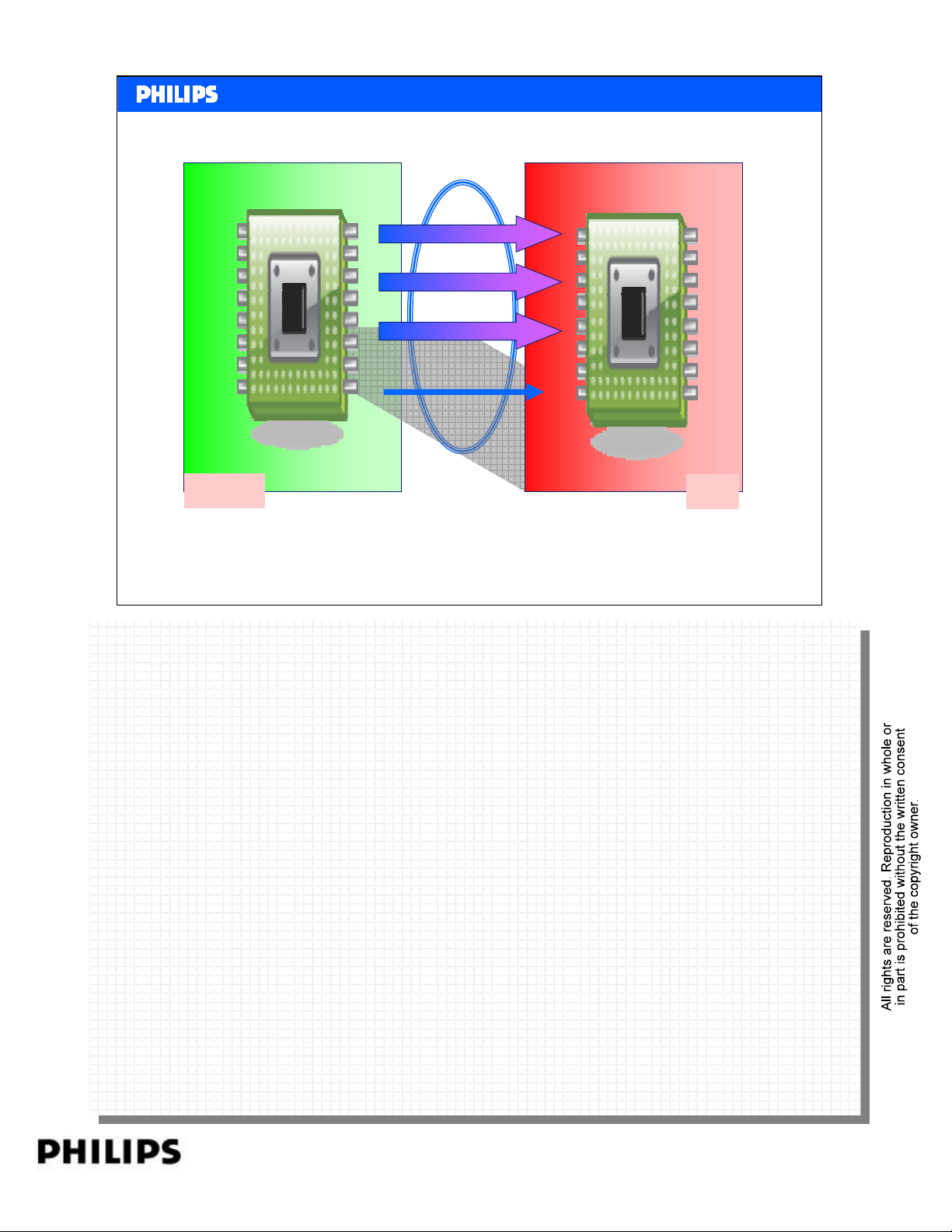
HDMI Data Flow
TMDS: Transition Minimized Differential Signaling
TMDS Channel 0
TMDS Channel 1
TMDS Channel 2
TMDS Clock Channel
Source
Philips CE Europe, Euroservice, SE&T
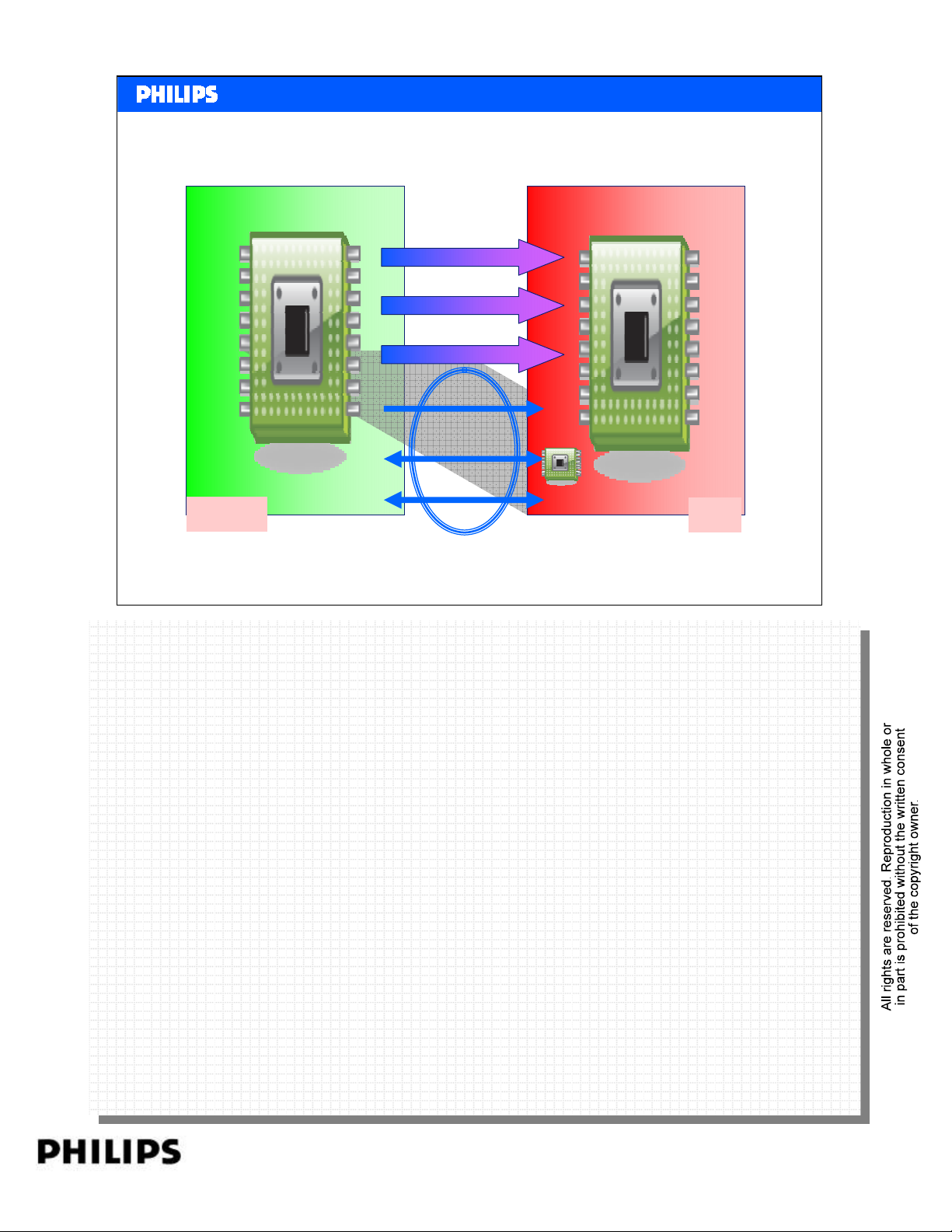
As shown in Figure the HDMI cable and connectors carry four differential pairs that make
As shown in Figure the HDMI cable and connectors carry four differential pairs that make
up the TMDS data and clock channels. These channels are used to carry video, audio and
up the TMDS data and clock channels. These channels are used to carry video, audio and
auxiliary data.
auxiliary data.
Sink
HDMI basics Slide 33
PERSONAL NOTES:
PERSONAL NOTES:
page: 33
Page 34
DDC: Display Data Channel
CEC: Consumer Electronic Control
TMDS Channel 0
TMDS Channel 1
TMDS Channel 2
TMDS Clock Channel
DDC: Display Data Channel
CEC Data
<< HDMI >>SERVICE TRAINING
<< HDMI >>
HDMI Data Flow
EDID ROM
Source
Philips CE Europe, Euroservice, SE&T
In addition, HDMI carries a VESA DDC channel. The DDC is used for configuration and
In addition, HDMI carries a VESA DDC channel. The DDC is used for configuration and
status exchange between a single Source and a single Sink. The optional CEC protocol
status exchange between a single Source and a single Sink. The optional CEC protocol
provides high-level control functions between all of the various audiovisual products in a
provides high-level control functions between all of the various audiovisual products in a
user’s environment.
user’s environment.
Sink
HDMI basics Slide 34
PERSONAL NOTES:
PERSONAL NOTES:
page: 34
Page 35
<< HDMI >>SERVICE TRAINING
<< HDMI >>
Signalling.
Philips CE Europe, Euroservice, SE&T
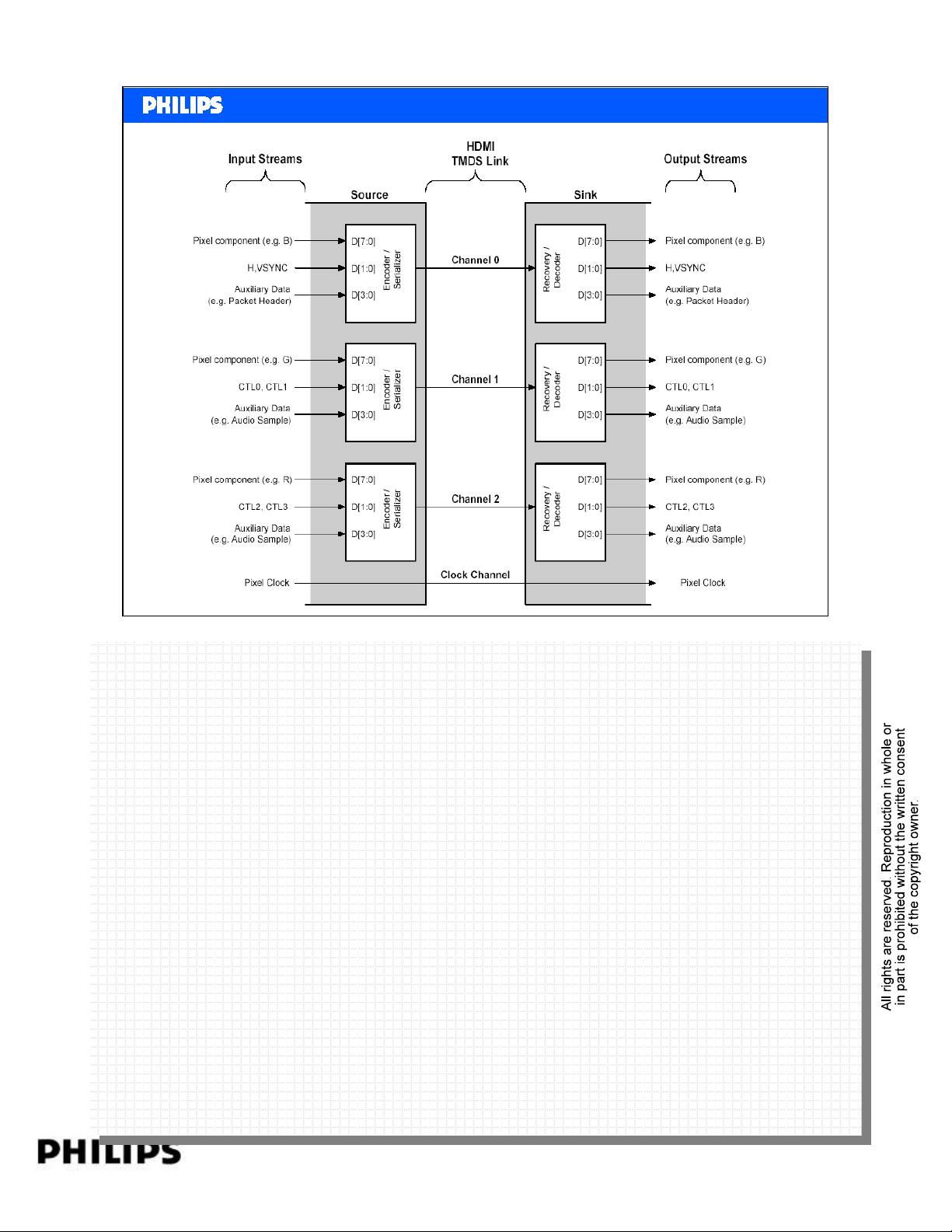
As shown in Figure, an HDMI link includes three TMDS Data channels and a single TMDS
As shown in Figure, an HDMI link includes three TMDS Data channels and a single TMDS
Clock channel. The TMDS Clock channel constantly runs at the pixel rate of the
Clock channel. The TMDS Clock channel constantly runs at the pixel rate of the
transmitted video. During every cycle of the TMDS Clock channel, each of the three TMDS
transmitted video. During every cycle of the TMDS Clock channel, each of the three TMDS
data channels transmits a 10-bit character. T his 10-bit word is encoded using one of
data channels transmits a 10-bit character. T his 10-bit word is encoded using one of
several different coding techniques.
several different coding techniques.
The input stream to the Source.s encoding logic will contain video pixel, packet and
The input stream to the Source.s encoding logic will contain video pixel, packet and
control data. The packet data consists of audio and auxiliary data and associated error
control data. The packet data consists of audio and auxiliary data and associated error
correction codes.
correction codes.
These data items are processed in a variety of ways and are presented to the TMDS
These data items are processed in a variety of ways and are presented to the TMDS
encoder as either 2 bits of control data, 4 bits of packet data or 8 bits of video data per
encoder as either 2 bits of control data, 4 bits of packet data or 8 bits of video data per
TMDS channel. The Source encodes one of these data types or encodes a Guard Band
TMDS channel. The Source encodes one of these data types or encodes a Guard Band
character on any given clock cycle.
character on any given clock cycle.
HDMI basics Slide 35
PERSONAL NOTES:
PERSONAL NOTES:
page: 35
Page 36
TMDS Periods
<< HDMI >>SERVICE TRAINING
<< HDMI >>
TMDS
Periods
Philips CE Europe, Euroservice, SE&T
TMDS:
TMDS:
Transition Minimized Differential Signalling
Transition Minimized Differential Signalling
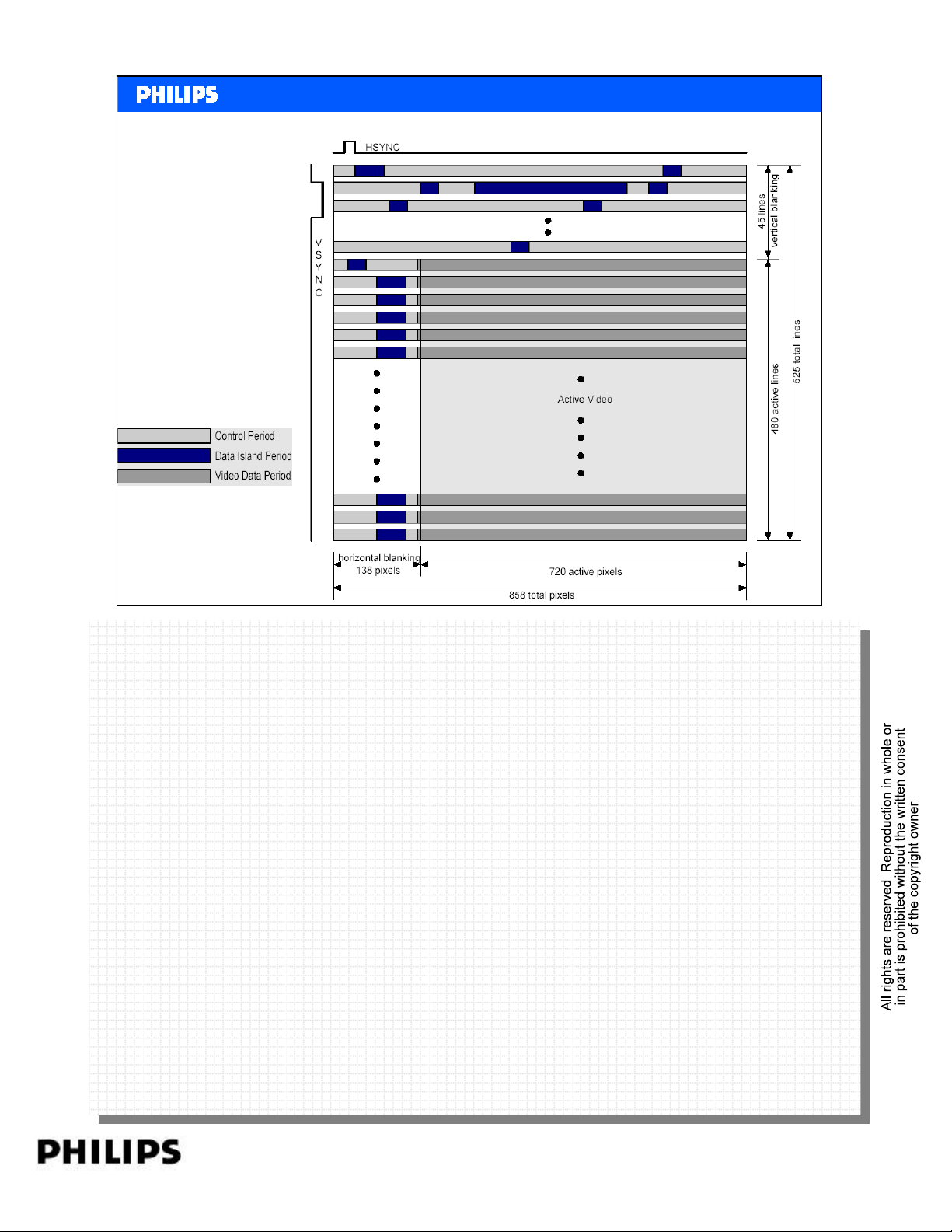
The HDMI link operates in one of three modes: Video Data Period, Dat a Island period, and
The HDMI link operates in one of three modes: Video Data Period, Dat a Island period, and
Control period. During the Video Data Period, the active pixels of an active video line are
Control period. During the Video Data Period, the active pixels of an active video line are
transmitted. During the Data Island period, audio and auxiliary data are transmitted using a
transmitted. During the Data Island period, audio and auxiliary data are transmitted using a
series of packets. The Control period is used when no video, audio, or auxiliary data needs
series of packets. The Control period is used when no video, audio, or auxiliary data needs
to be transmitted. A Control Period is required between any other two periods.
to be transmitted. A Control Period is required between any other two periods.
HDMI basics Slide 36
PERSONAL NOTES:
PERSONAL NOTES:
page: 36
Page 37
<< HDMI >>SERVICE TRAINING
<< HDMI >>
Video
HDMI allows a wide variety of explicitly defined video
format timings to be transmitted and displayed.
These video format timings define the pixel and line counts
and timing, synchronization pulse position and duration,
and whether the format is interlaced or progressive.
The video pixels carried across the link shall be in one of
three different pixel encodings:
RGB 4:4:4,
YCBCR 4:4:4
Philips CE Europe, Euroservice, SE&T
YCBCR 4:2:2.
HDMI basics Slide 37
PERSONAL NOTES:
PERSONAL NOTES:
page: 37
Page 38
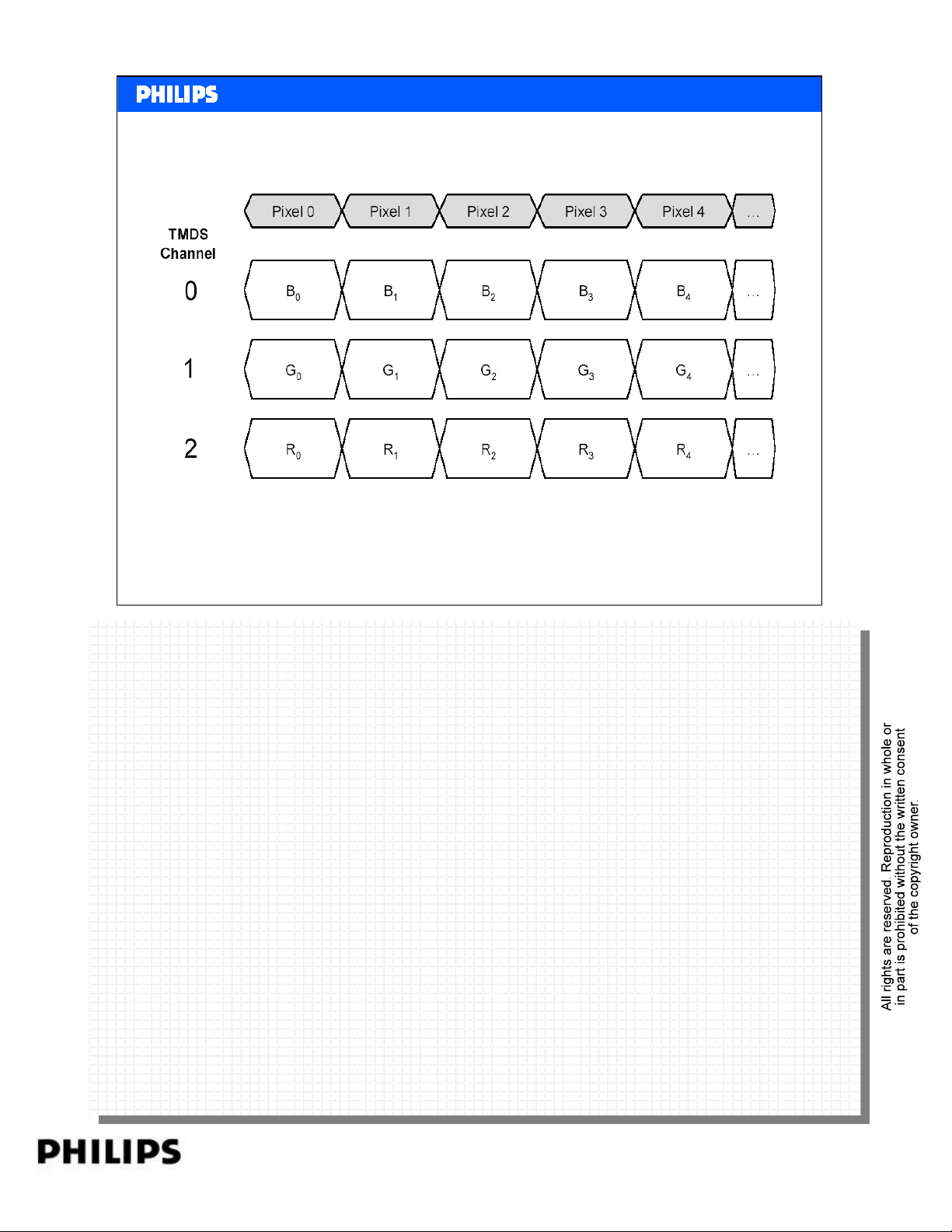
RGB 4:4:4
<< HDMI >>SERVICE TRAINING
<< HDMI >>
Philips CE Europe, Euroservice, SE&T
Figure shows the default encoding, RGB 4:4:4. The R, G, and B components of the first
Figure shows the default encoding, RGB 4:4:4. The R, G, and B components of the first
pixel for a given line of video are transferred on the first pixel of the video data period
pixel for a given line of video are transferred on the first pixel of the video data period
following the Guard Band characters.
following the Guard Band characters.
HDMI basics Slide 38
PERSONAL NOTES:
PERSONAL NOTES:
page: 38
Page 39
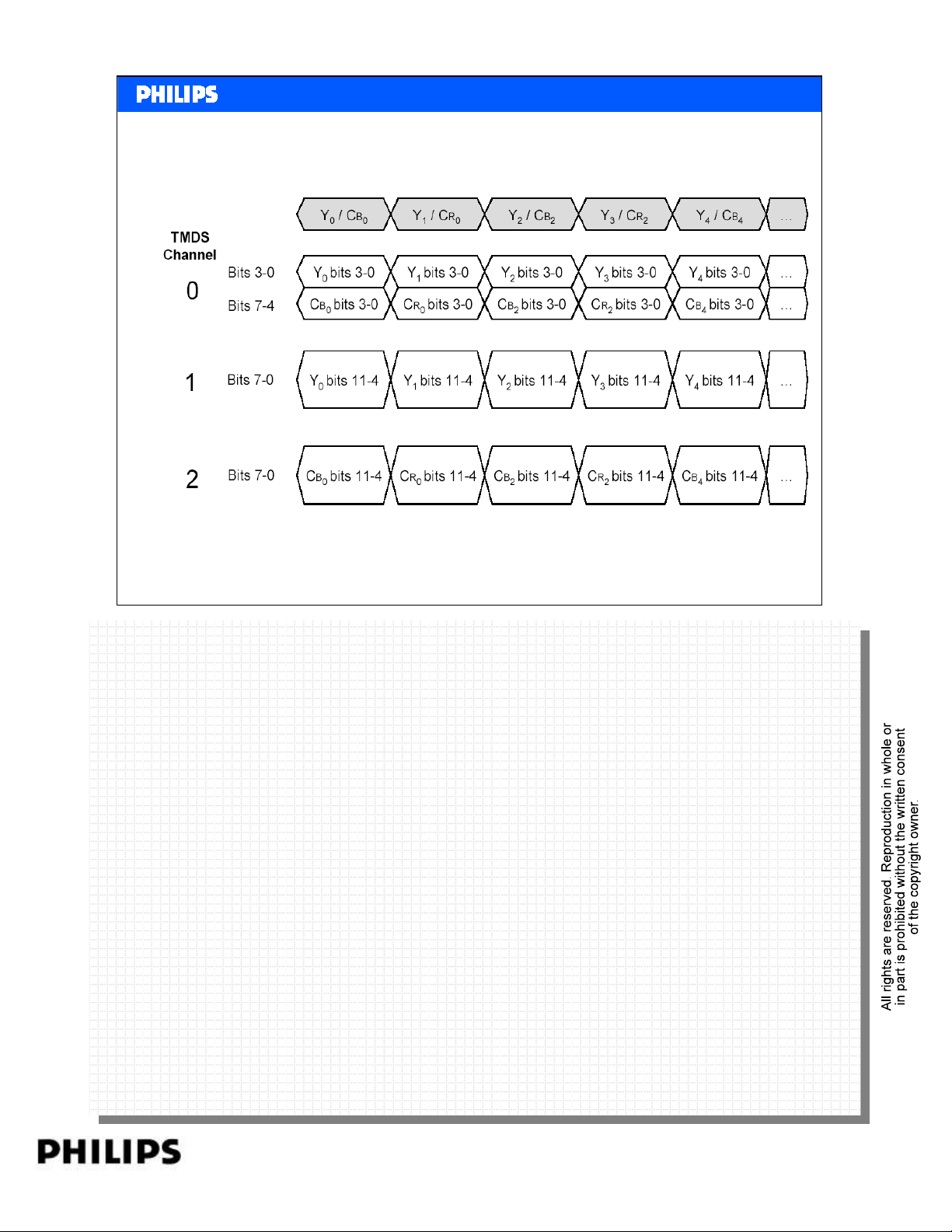
YCBCR 4:2:2
<< HDMI >>SERVICE TRAINING
<< HDMI >>
Philips CE Europe, Euroservice, SE&T
Figure shows the signal mapping and timing for transferring YCBCR 4:2:2 data across
Figure shows the signal mapping and timing for transferring YCBCR 4:2:2 data across
HDMI. Because 4:2:2 data only requires two components per pixel c l oc k , more bits are
HDMI. Because 4:2:2 data only requires two components per pixel c l oc k , more bits are
allocated per component. The available 24 bits are split into 12 bits for the Y component
allocated per component. The available 24 bits are split into 12 bits for the Y component
and 12 bits for the C components.
and 12 bits for the C components.
HDMI basics Slide 39
PERSONAL NOTES:
PERSONAL NOTES:
page: 39
Page 40
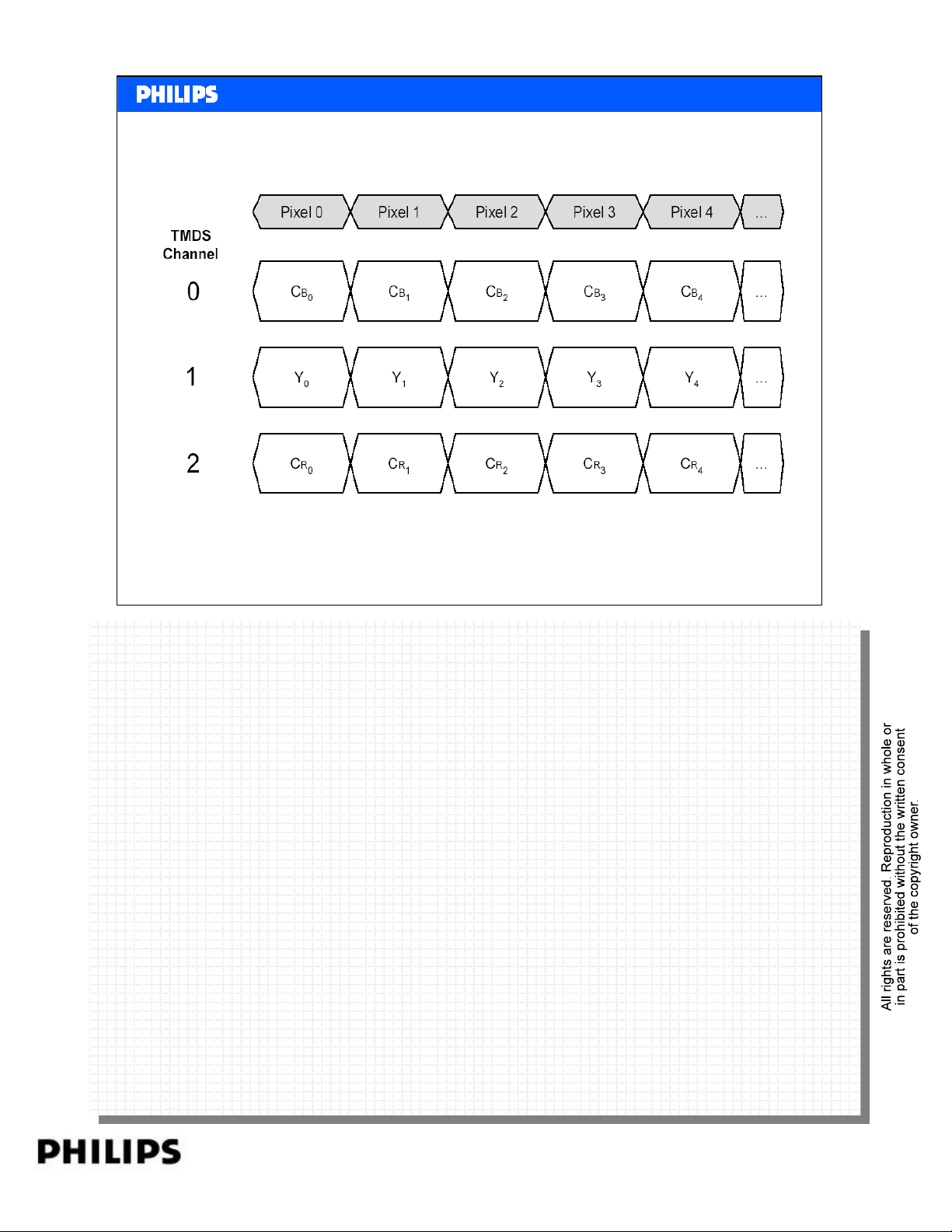
YCBCR 4:4:4
<< HDMI >>SERVICE TRAINING
<< HDMI >>
Philips CE Europe, Euroservice, SE&T
HDMI basics Slide 40
PERSONAL NOTES:
PERSONAL NOTES:
page: 40
Page 41
Content
•Objective
•What is HDMI
•DVI
• Different HDMI category products
• Versions HDMI
•HDCP
•CEC
<< HDMI >>SERVICE TRAINING
<< HDMI >>
• Data Flow
•FAQ
Philips CE Europe, Euroservice, SE&T
HDMI basics Slide 41
PERSONAL NOTES:
PERSONAL NOTES:
page: 41
Page 42
<< HDMI >>SERVICE TRAINING
<< HDMI >>
What is the maximum cable length to be
supported?
In order to allow cable manufacturers to improve their products
through the use of new technologies, HDMI specifies the
required performance of a cable (at 700pF capacitive load) but
does not specify a maximum cable length, as long the cable is
HDMI compliance.
Remark:
Because of the higher bitrate in the HDMI 1.3 version, streaming
High Definition video will require higher spec cable.
Philips CE Europe, Euroservice, SE&T
Recently, HDMI Licensing, LLC announced that cables would be tested as Standard or High-Speed
Recently, HDMI Licensing, LLC announced that cables would be tested as Standard or High-Speed
cables.
cables.
Standard (or “category 1”) cables have been tested to perform at speeds of 75Mhz, which is the
Standard (or “category 1”) cables have been tested to perform at speeds of 75Mhz, which is the
equivalent of a 1080i signal.
equivalent of a 1080i signal.
High-Speed (or “category 2”) cables have been tested to perform at speeds of 340Mhz, which is
High-Speed (or “category 2”) cables have been tested to perform at speeds of 340Mhz, which is
the highest bandwidth currently available over an HDMI cable and can successfully handle 1080p
the highest bandwidth currently available over an HDMI cable and can successfully handle 1080p
signals including those at increased color depths and/or increased refresh rates. High-Speed cables
signals including those at increased color depths and/or increased refresh rates. High-Speed cables
are also able to accommodate higher resolution displays, such as WQXGA cinema monitors
are also able to accommodate higher resolution displays, such as WQXGA cinema monitors
(resolution of 2560 x 1600).
(resolution of 2560 x 1600).
HDMI basics Slide 42
PERSONAL NOTES:
PERSONAL NOTES:
page: 42
Page 43
<< HDMI >>SERVICE TRAINING
<< HDMI >>
What are the video format timings
supported?
An HDMI Source shall support at least one of the following:
· 640x480p @ 59.94/60Hz
· 720x480p @ 59.94/60Hz
· 720x576P @ 50Hz
An HDMI Sink that accepts 60Hz video formats shall support the
640x480p and 720x480p @ 59.94/60Hz video format timings, and
1280x720p or 1920x1080i @ 59.94/60Hz if HD-capable.
An HDMI Sink that accepts 50Hz video format timings shall
support the 640x480p @ 59.94/60Hz and 720x576p @ 50Hz, and
1280x720p or 1920x1080i @ 50Hz if HD-capable.
Philips CE Europe, Euroservice, SE&T
Many video format timings are available but usually these the primary video format timings.
Many video format timings are available but usually these the primary video format timings.
· 640 x 480p @ 59.94/60Hz
· 640 x 480p @ 59.94/60Hz
· 720 x 480p @ 59.94/60Hz
· 720 x 480p @ 59.94/60Hz
· 1920 x 1080i @ 59.94/60Hz
· 1920 x 1080i @ 59.94/60Hz
· 1280 x 720p @ 59.94/60Hz
· 1280 x 720p @ 59.94/60Hz
· 720(1440) x 480i @ 59.94/60Hz
· 720(1440) x 480i @ 59.94/60Hz
· 720 x 576p @ 50Hz
· 720 x 576p @ 50Hz
· 1920 x 1080i @ 50Hz
· 1920 x 1080i @ 50Hz
· 1280 x 720p @ 50Hz
· 1280 x 720p @ 50Hz
· 720(1440) x 576i @ 50Hz
· 720(1440) x 576i @ 50Hz
HDMI basics Slide 43
Video formats with pixel rates below 25 Mpixels/sec require pixel-repetition to be carried across
Video formats with pixel rates below 25 Mpixels/sec require pixel-repetition to be carried across
HDMI interface. For instance, 720 x 480i is referred as (1440) x 480i.
HDMI interface. For instance, 720 x 480i is referred as (1440) x 480i.
PERSONAL NOTES:
PERSONAL NOTES:
page: 43
Page 44
<< HDMI >>SERVICE TRAINING
<< HDMI >>
What are the audio formats supported?
An HDMI Source shall support 2-channel L-PCM using an IEC
60958, with either 32kHz, 44.1kHz or 48kHz sampling rate and a
sample size of 16 bits or more. Higher sample rates of 88.2kHz,
96kHz, 176.4kHz and 192kHz, using either IEC 60958 format or
IEC 61937 format, is permitted.
HDMI Sink capable of accepting audio is required to accept 2channel IEC 60958-formatted L-PCM at sample rates of 32kHz,
44.1kHz and 48kHz.
Philips CE Europe, Euroservice, SE&T
Multi-channel PCM and DVD-Audio are supported using Silicon Image 2nd generation chips (e.g.
Multi-channel PCM and DVD-Audio are supported using Silicon Image 2nd generation chips (e.g.
SII9030, Sii9031).
SII9030, Sii9031).
Similar to video formats, any audio formats to be supported must be possible depending the
Similar to video formats, any audio formats to be supported must be possible depending the
capability of the HDMI chips used. All chips support the basic mandatory format but may not
capability of the HDMI chips used. All chips support the basic mandatory format but may not
support the optional formats in HDMI spec.
support the optional formats in HDMI spec.
HDMI basics Slide 44
PERSONAL NOTES:
PERSONAL NOTES:
page: 44
Page 45
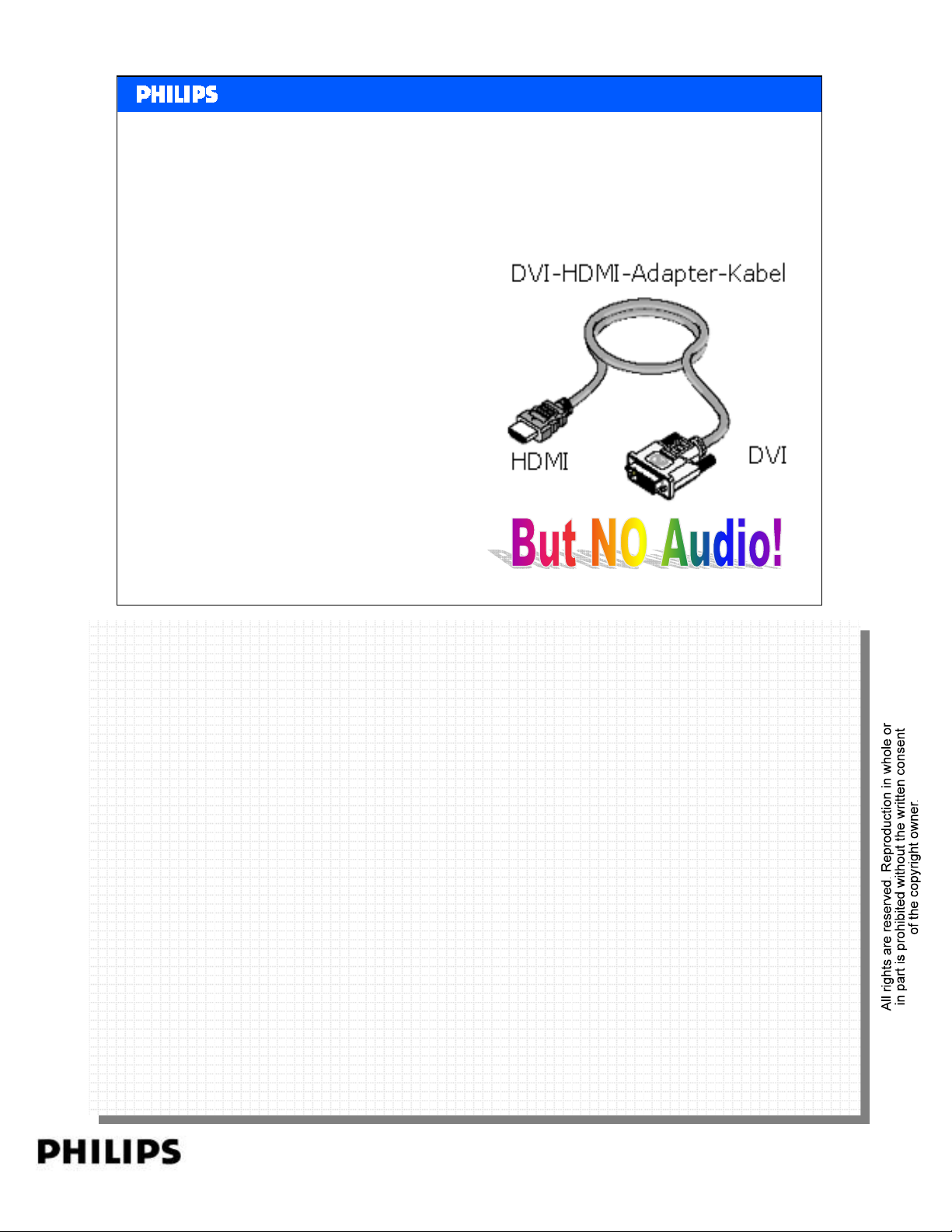
Is HDMI compatible with DVI
All HDMI Sources shall be
compatible with DVI 1.0
compliant sink devices (i.e.
monitors or displays.) through
the use of a passive cable
converter. Likewise, all HDMI
Sinks shall be compatible with
DVI 1.0 compliant sources (i.e.
systems or hosts.) through the
<< HDMI >>SERVICE TRAINING
<< HDMI >>
use of a similar cable converter.
Philips CE Europe, Euroservice, SE&T
HDMI basics Slide 45
PERSONAL NOTES:
PERSONAL NOTES:
page: 45
Page 46
<< HDMI >>SERVICE TRAINING
<< HDMI >>
Copy Protection.
Can I make a Digital Copy via HDMI ?
No, HDCP (High-bandwidth Digital Content Protection)
Prevents making a Digital Copy.
Philips CE Europe, Euroservice, SE&T
HDMI basics Slide 46
PERSONAL NOTES:
PERSONAL NOTES:
page: 46
Page 47
<< HDMI >>SERVICE TRAINING
<< HDMI >>
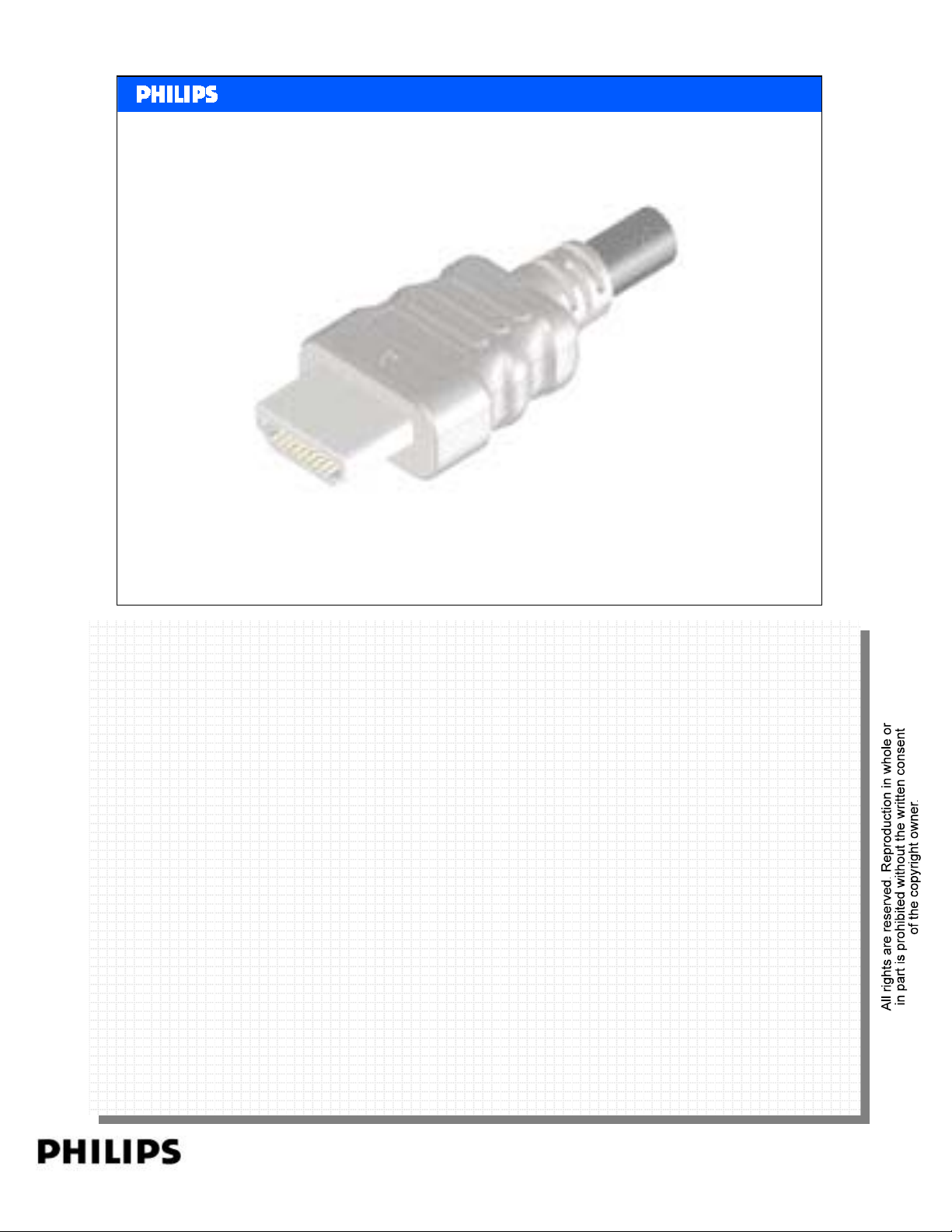
Hot Plug Detect.
An HDMI Sink shall not assert high voltage level on its
Hot Plug Detect pin (pin 18) when the E-EDID is not available
for reading.
The Hot Plug Detect pin may be asserted only when the
+5V Power line (pin18) from the Source is detected.
Philips CE Europe, Euroservice, SE&T
HDMI basics Slide 47
PERSONAL NOTES:
PERSONAL NOTES:
page: 47
Page 48
<< HDMI >>SERVICE TRAINING
<< HDMI >>
No multi channel audio.
• Q. If you have an HDMI source such as a DVD player, and
connect it to your display via HDMI or Home cinema set,
customer is complaining he is not be able to get 5.1 digital
bitstreams.
• A. When the Home Cinema set or TV has HDMI v1.0 or
HDM I v1.1
These versions do not support multi channel bitstream.
Philips CE Europe, Euroservice, SE&T
HDMI basics Slide 48
PERSONAL NOTES:
PERSONAL NOTES:
page: 48
Page 49
<< HDMI >>SERVICE TRAINING
<< HDMI >>
Connect sets with different versions
• Q. My DVD player has HDMI version 1.1
My TV sets has HDMI v1.3. Are those compatible?
• A. Yes. But the features are limited to the features of the
lowest version.
Philips CE Europe, Euroservice, SE&T
HDMI basics Slide 49
PERSONAL NOTES:
PERSONAL NOTES:
page: 49
Page 50
<< HDMI >>SERVICE TRAINING
<< HDMI >>
Were to see the HDMI version of the set.
• Q. How do I know which HDMI version my set has?
• A. In the new leaflets mostly the version is mentioned.
But It will not give details because only some features are
mandatory. The version number will not explain which extra
features are used.
Features like CEC, Deep Colour etc must be indicated
separately.
Philips CE Europe, Euroservice, SE&T
HDMI basics Slide 50
PERSONAL NOTES:
PERSONAL NOTES:
page: 50
Page 51
<< HDMI >>SERVICE TRAINING
<< HDMI >>
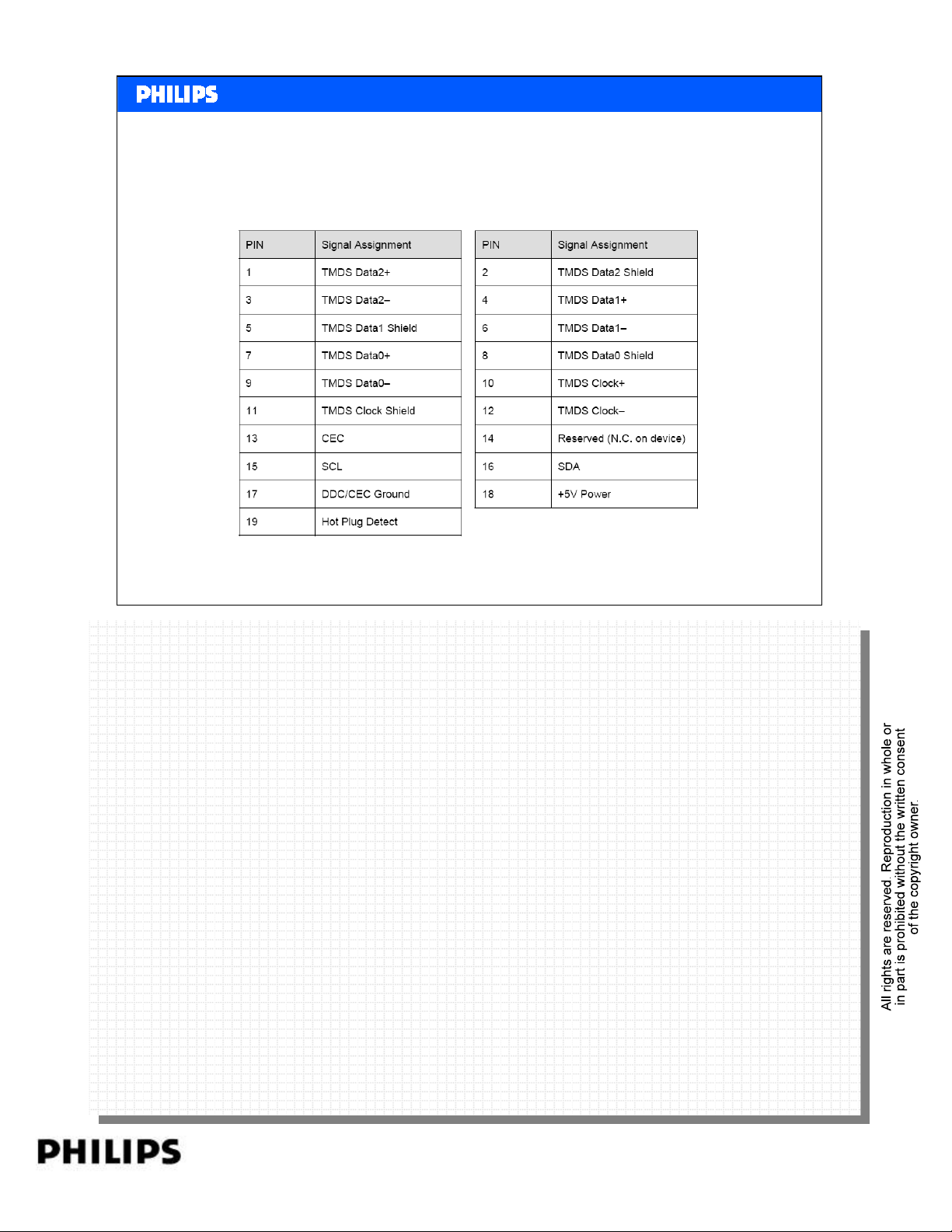
What’s on the pins of an HDMI connector?
Philips CE Europe, Euroservice, SE&T
HDMI basics Slide 51
PERSONAL NOTES:
PERSONAL NOTES:
page: 51
Page 52
<< HDMI >>SERVICE TRAINING
<< HDMI >>
PERSONAL NOTES:
PERSONAL NOTES:
page: 52
 Loading...