

Page 1
Philips body analysis scale with Bluetooth® Smart
DL8781, DL8780
EN-US
Page 2

Page 3
1
3 4
1
6 7 8 9
2
10
5
11
12
Page 4

Page 5

English 6
Page 6

English
6
Contents
Introduction 7
General 7
Explanation of symbols 8
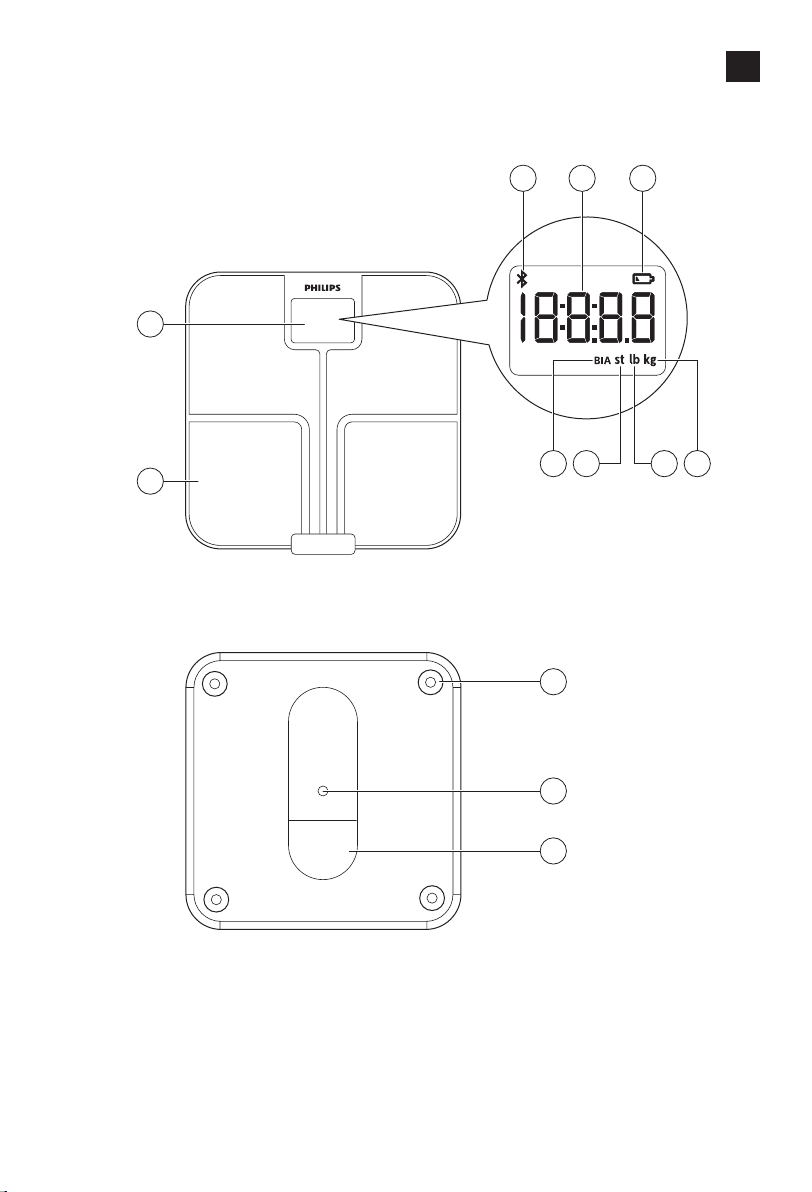
General description (Fig. 1) 9
Intended use 9
IMPORTANT SAFEGUARDS 9
Contraindications 9
Warnings 10
Caution 10
SAVE THESE INSTRUCTIONS 11
Compliance with standards 11
Using the body analysis scale 11
Preparing for use 11
Inserting/removing the batteries 11
Placing the carpet feet 12
Setting the measurement unit 13
Pairing the body analysis scale to your mobile device and create a user prole 13
Measuring weight and body fat 14
Tips for proper measurement 14
Performing a measurement 15
Performing a measurement with app 15
Performing a measurement without app 16
Factory reset 17
Cleaning and storage 18
Accessories 18
Disposal 18
Assistance 18
Full Two-Year Warranty 19
Troubleshooting 19
Specications 21
Electromagnetic emissions and immunity 22
EMC Guidance 22
Table 1 Guidance and manufacturer's declaration – electromagnetic emissions - for all
ME equipment and ME systems
Table 2 Guidance and manufacturer's declaration – electromagnetic immunity – for all
ME equipment and ME systems
Table 4 Guidance and manufacturer's declaration – electromagnetic immunity –for ME
equipment and ME systems that are not life supporting
Table 6 Recommended separation distances between portable and mobile RF
communications equipment and the ME equipment or ME system – for ME equipment
and ME systems that are not life supporting
FCC Compliance information 25
Radio interference 25
RF Radiation exposure statement 25
BlueTooth wordmark 26
App Store and iPhone 26
Google Play and Android 26
22
23
23
24
Page 7

Introduction
General
English
Congratulations on your purchase and welcome to Philips!
To fully benet from the support that Philips oers, register your product
at www.philips.com/welcome.
This Philips body analysis scale oers you a convenient tool to measure
your weight.
The scale enables you to perform a body weight and fat measurement.
It also transmits data via Bluetooth® Smart to your mobile device and to
calculate and display weight, BMI and body fat percentage in the Philips
HealthSuite health app. The scale has a maximum weighing capacity
of 28 st 5 lb (397 lb) / 180 kg.
Note: Only weight measurement is displayed on the scale. BMI and body fat
percentage are only shown in the app.
This user manual contains important safety information and provides
step-by-step instructions for using the device.
Read this information carefully before you use the device and save it for
future reference.
Features:
- Memory for up to 40 measurements per user for 8 separate users.
- Measures body fat with BIA (bioelectrical impedance analysis)
technology.
- User recognition based on weight.
- Automatic activation of the scale when you step on it thanks to the
Sense-On technology.
- LCD display.
7
Page 8
English
8
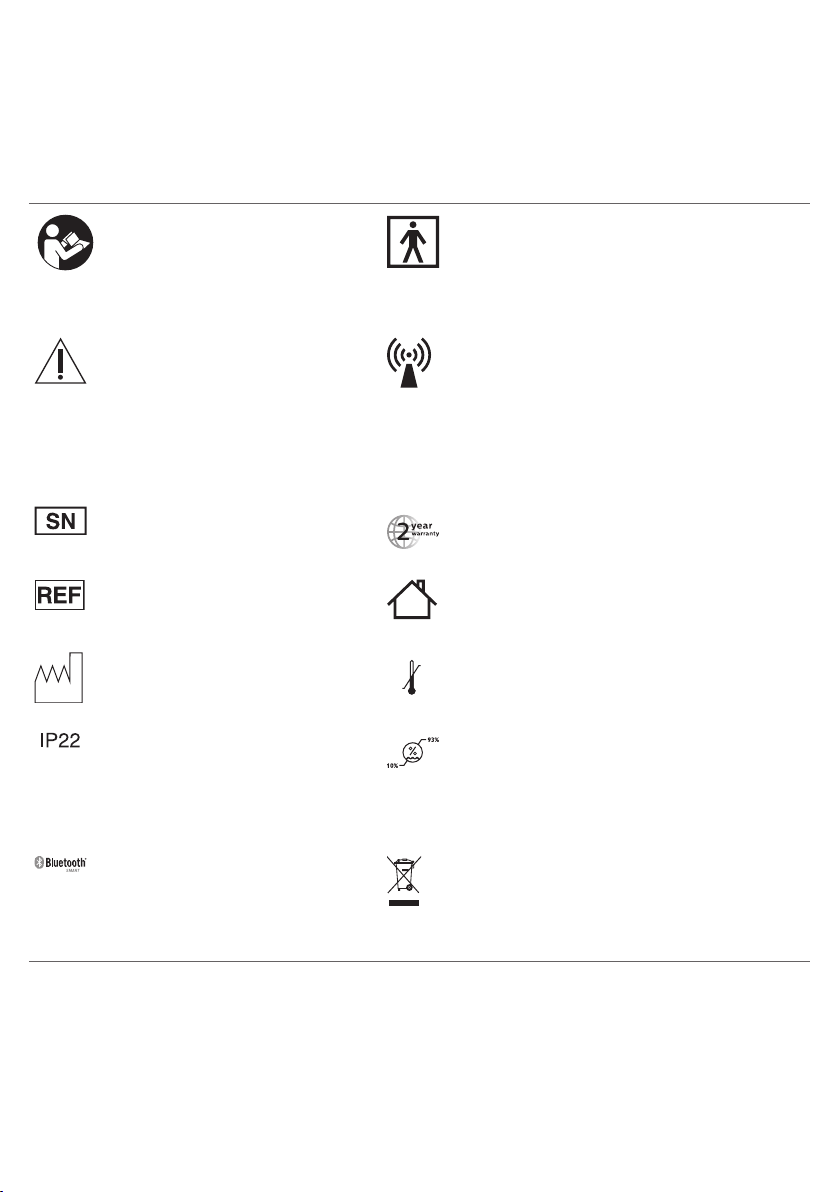
Explanation of symbols
The warning signs and symbols are essential to ensure that you use this
product safely and correctly and to protect you and others from injury.
Following is the meaning of the warning signs and symbols on the label
and in the user manual.
Symbol indicates the need
Type BF applied part
for the user to consult the
instructions for use
Indicates the need for the user
to consult the instructions for
use for important cautionary
information such as warnings
This symbol means that this device emits
nonionizing radiation. All devices with RF
transmitters or that use RF electromagnetic
energy must have a label with this symbol.
and precautions that cannot,
for a variety of reasons, be
presented on the medical
device itself.
Indicates the manufacturer's
Symbol for the 2 year Philips warranty.
serial number so that a specic
device can be identied.
Indicates manufacturer's
For indoor use only.
catalog number of the
appliance.
Indicates manufacturing date Indicates the temperature limits to which the
140ºF
–4ºF
device can be safely exposed: -4°F to 140°F /
-20°C to 60°C.
This symbol on the device
means: protected against
access to hazardous parts with
Indicates the relative humidity limits to which
the device can be safely exposed: 10% to
93%.
a nger and against vertically
falling water drops when tilted
up to 15 degrees.
Symbol for the 'Bluetooth
Combination mark'. The
device uses Bluetooth for
communication.
Compliant with the Waste Electrical and
Electronic Equipment/Restriction of the Use
of Certain Hazardous Substances in Electrical
and Electronic Equipment (WEEE) recycling
directives.
Page 9
General description (Fig. 1)
1 Display
2 Measurement platform
3 Bluetooth® symbol
4 Measurement results
5 Battery low symbol
6 Bioelectrical impedance analysis (BIA)
7 Stone (st)
8 Pound (lb)
9 Kilogram (kg)
10 Feet of the scale
11 Measurement unit button
12 Battery compartment
Intended use
The Philips body analysis scale measures body weight and
uses bioelectrical impedance analysis (BIA) technology to estimate body
fat percentage of healthy adults.
The device is intended for use in the home/domestic environment only.
IMPORTANT SAFEGUARDS
Waning: READ ALL INSTRUCTIONS BEFORE USING
English
9
When using battery-operated products, basic safety precautions should
always be followed, including the following:
Contraindications
- This device is contraindicated for women who are pregnant or think they
are pregnant. The eects of this device on the fetus are unknown.
- This device is contraindicated for any person who is connected to a
wearable or implanted electronic medical device or instrument such as a
pacemaker or debrillator. This device can cause the electronic medical
device to malfunction.
Page 10

English
10
Warnings
Caution
- Keep the device out of reach of infants, children or pets, since inhalation
or swallowing of small parts (e.g. carpet feet, batteries) can be dangerous
or even fatal.
- Do not step on the device when your body or feet are wet, especially
after bathing or showering to prevent slipping.
- Always check the device before you use it. Do not use the device if it is
damaged, as this may cause injury.
- Only use this device for its intended use as described in this user manual.
- If the device will not be used on a regular basis, remove the batteries to
prevent possible damage due to chemical leakage. If battery does leak,
remove it carefully. Do not allow bare skin to touch leaking uid.
- The device requires no calibration.
- The manufacturer does not require such preventive inspections by other
persons.
- The device contains no user serviceable parts.
- Any information provided by this device is in no way meant to treat, cure
or prevent any disease or illness. If in doubt, contact your physician.
- This device should not be used by anyone who is acutely or chronically
ill, suering from a disease or taking medications that aect the amount
of water in your body. The accuracy of readings for these patients has
not been veried. Specic medical advice should be obtained from a
physician.
- This device is equipped with a data transmission function. It may
emit electromagnetic energy so as to perform its intended function.
Nearby portable and mobile Radio Frequency (examples include cell
phones, Bluetooth® equipped music players, speakers and headsets
as well as Wi access points) communication equipment can aect the
performance of the device. The device can also interfere with electrical
equipment in the vicinity. Therefore do not keep it in close proximity of
portable and mobile Radio Frequency communication equipment.
- Use and store the device as described in the user manual.
- Do not expose the device to extreme temperatures, direct sunlight,
moist or a corrosive environment (see 'Specications').
- Do not expose the batteries to ames or res, otherwise batteries may
explode.
- No modications of this device are allowed.
- Do not use the device on a slippery oor.
- Treat the scale with care. Do not drop it or jump on it.
- This device is not washable. Never immerse the device in water and do
not rinse it under the tap.
SAVE THESE INSTRUCTIONS
Page 11
Compliance with standards
- The device meets the relevant standards for this type of Class II electrical
medical equipment for home use.
- This Philips device complies with all applicable standards and regulations
regarding exposure to electromagnetic elds and complies with IEC
60601-1-2.
- This Philips device complies with applicable standards and regulations of
the FCC Rules.
Using the body analysis scale
This Philips body analysis scale automatically switches on as soon as you
step on the measurement platform. The device applies BIA (bioelectrical
impedance analysis) technology. Weak current ows through the human
body to measure the bioelectrical impedance and estimate body fat
percentage. The electrical current is small and may not be felt. This BIA
technology is non-invasive. The electrical current mentioned above is less
than 1mA.
Preparing for use
Inserting/removing the batteries
Insert new batteries (4x 1.5V AAA alkaline) before the rst use.
Replace weak batteries before they discharge completely.
English
11
Note: Data will be lost when the battery is completely empty.
If you do not intend to use the device for a long period of time, it is advised
to remove the batteries before storing.
Caution: Replace all four batteries at the same time. Do not mix
the old batteries with the new ones.
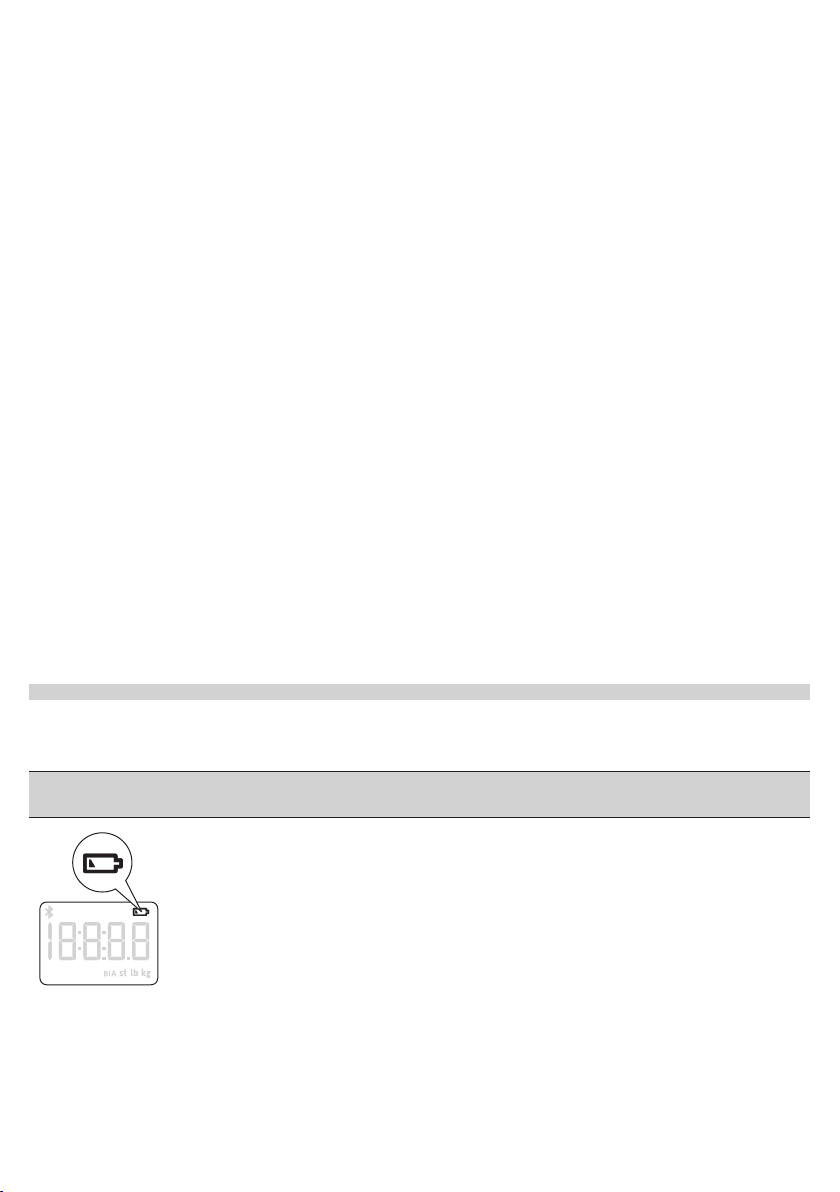
This device has a battery low indication. When the battery level is below
operating value, this will be indicated by the low battery icon after which
the device shall switch o within 4 sec.
Page 12
12
English
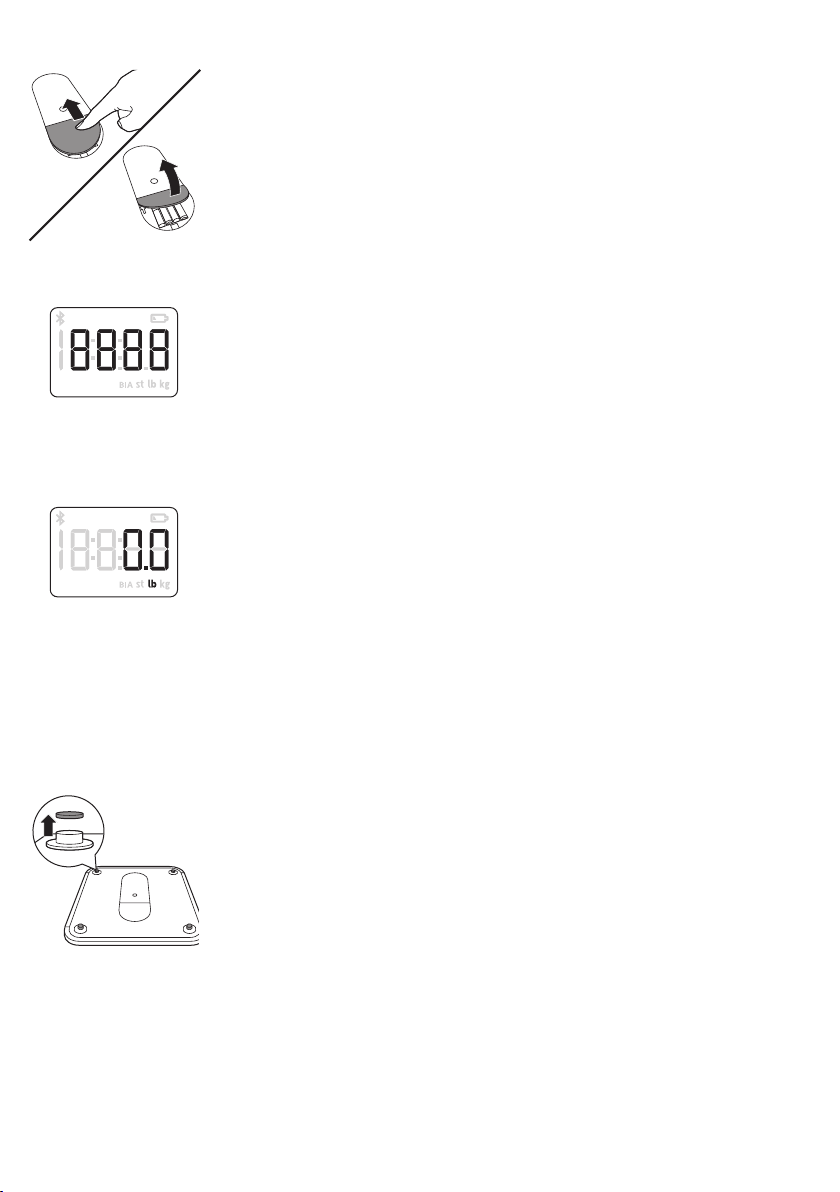
1 Open the battery compartment at the back of the device.
2 Insert the batteries (4x 1.5V AAA alkaline) into the battery compartment
according to the polarity indications marked inside the compartment.
- The digits “8888” will show on the display.
3 Close the battery compartment and wait until the digits “0.0lb” are
shown on the display. You can change measurement 'Setting the
measurement unit' section.
Placing the carpet feet
Soft surfaces such as carpet will aect the performance of the device.
Always install the supplied carpet feet in case you place the device on a soft
surface to prevent the soft surface from aecting the performance.
1 Remove the non-slip pads from the feet of the device.
Page 13
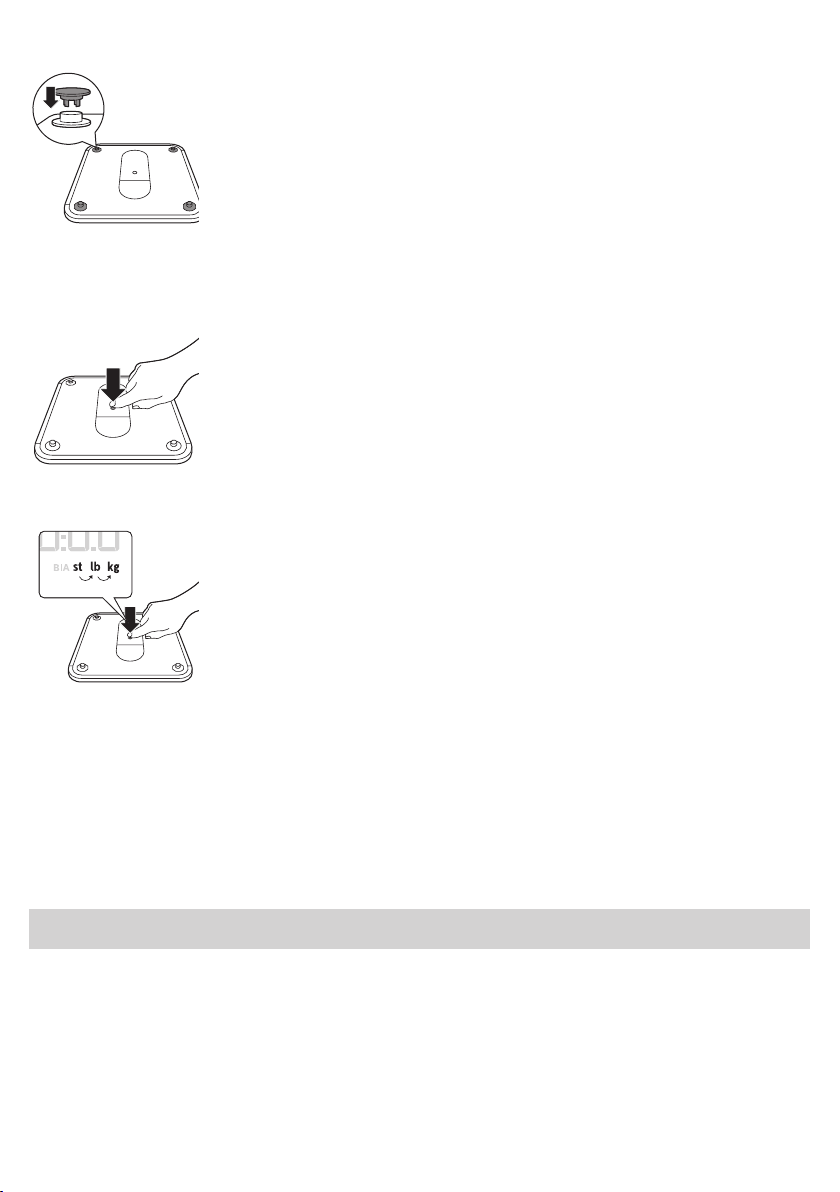
2 Fit the carpet feet rmly onto the feet of the device.
1x 1x
Setting the measurement unit
1 Press the measurement unit button in the bottom of the device to select
the measurement unit.
2 Press the measurement unit button again to switch between the
available measurement units: kilograms, pounds and stones.
English
13
Pairing the body analysis scale to your mobile device and
create a user prole
Your Philips body analysis scale is equipped with Bluetooth® Smart.
Download the Philips HealthSuite health app from the App store or Google
Play. Use the search term 'Philips HealthSuite health app'. The app is
available for iOS
Note: You can only use the Philips HealthSuite health app to communicate
with the scale. It is not possible to use third party applications.
1 Download the Philips HealthSuite health app on your mobile device, start
the Setup wizard and follow the steps to create a user prole and add the
scale.
2 Make sure the app is open and Bluetooth® is on when pairing is in
progress.
- Keep the mobile device and the scale at transmission distance
(no more than 16 feet / 5 meters from each other, in the same room).
®
8.0+ and Android
TM
4.4+.
Page 14
English
14
3 To start the pairing process press the measurement unit button for
3 seconds.
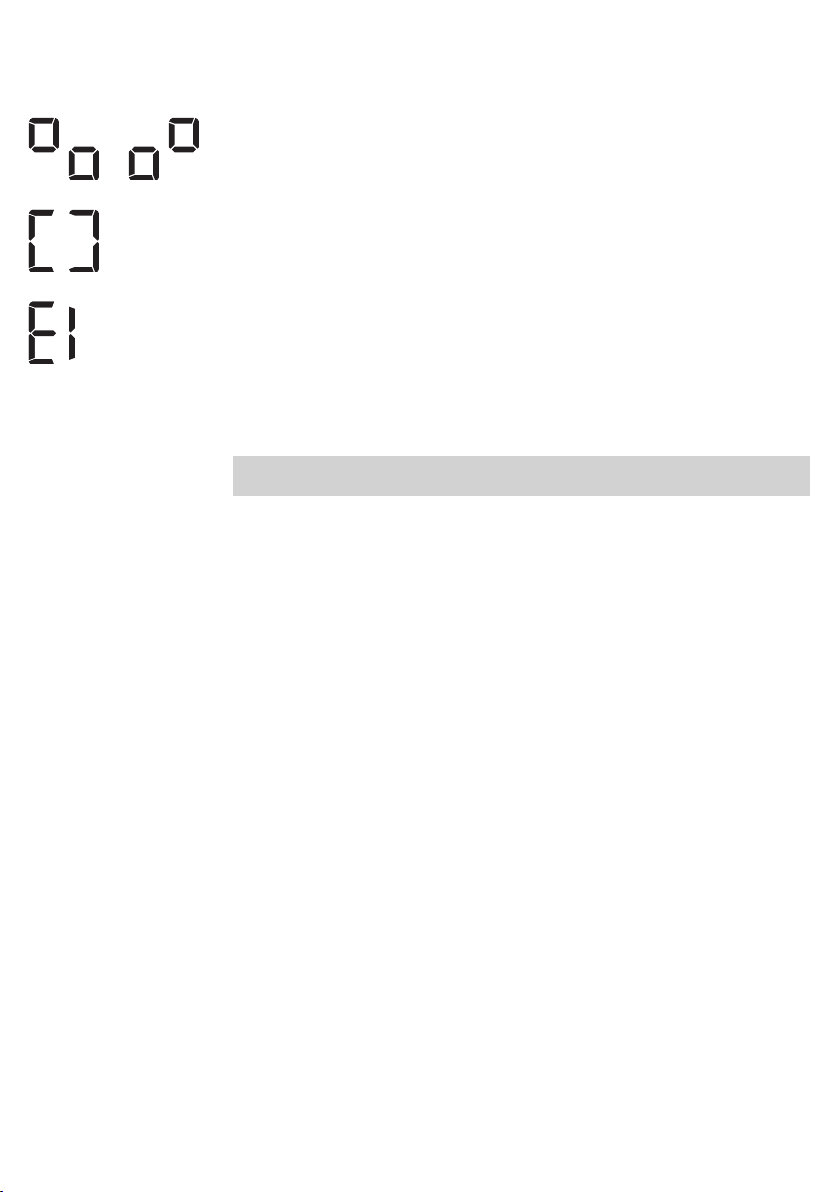
- These symbols are shown on the display alternately, indicating that the
connection is being established.
- If the connection has been established successfully, the display shows
this symbol.
- If the connection has failed, the display shows this symbol.
4 In the app, create the prole you want to use for the connection.
- The scale can create 8 user proles.
- If all proles are in use, choose an existing prole to overwrite.
5 Step on the scale barefoot to do an initial weighing. That weight is
assigned to your user prole. The scale switches o automatically.
Note: If you want to edit your user prole later on, make sure the scale is
turned on and connected to the health app.
Measuring weight and body fat
Tips for proper measurement
To ensure accurate measurements, please follow these instructions when
you start measuring.
- Place the device on a at, hard surface. Soft surfaces such as carpet
aect the performance of the device. If you use the device on a soft
surface, make sure you attach the carpet feet supplied to the feet of the
device (see 'Placing the carpet feet'). This helps to prevent soft surfaces
from aecting the performance of the device.
- A bioelectrical impedance analysis (BIA) measurement can only be
performed if you are barefoot.
- Step onto the device barefoot, make sure your feet are slightly damp and
clean. Stand still and keep full contact with the measurement platform
until the measurement is complete. Be careful not to slip. The condition
of the skin of the soles of your feet can aect the measurement. The
natural eects of aging or activity can make this skin hard.
- Do not stand on the edge of the scale as you may fall or receive
inaccurate measurements.
- Do not use the device on an uneven oor as it may result in unreliable data.
- Replace batteries before they are completely empty.
- For a meaningful comparison, try to measure under similar conditions.
For example, take measurements at approximately the same time, on
the same surface. Body fat percentage estimates will vary as a result of
the amount of water in the body, and can be aected by dehydration
or over-hydration due to such factors as alcohol consumption,
menstruation, illness, intense exercise, etc.
Page 15
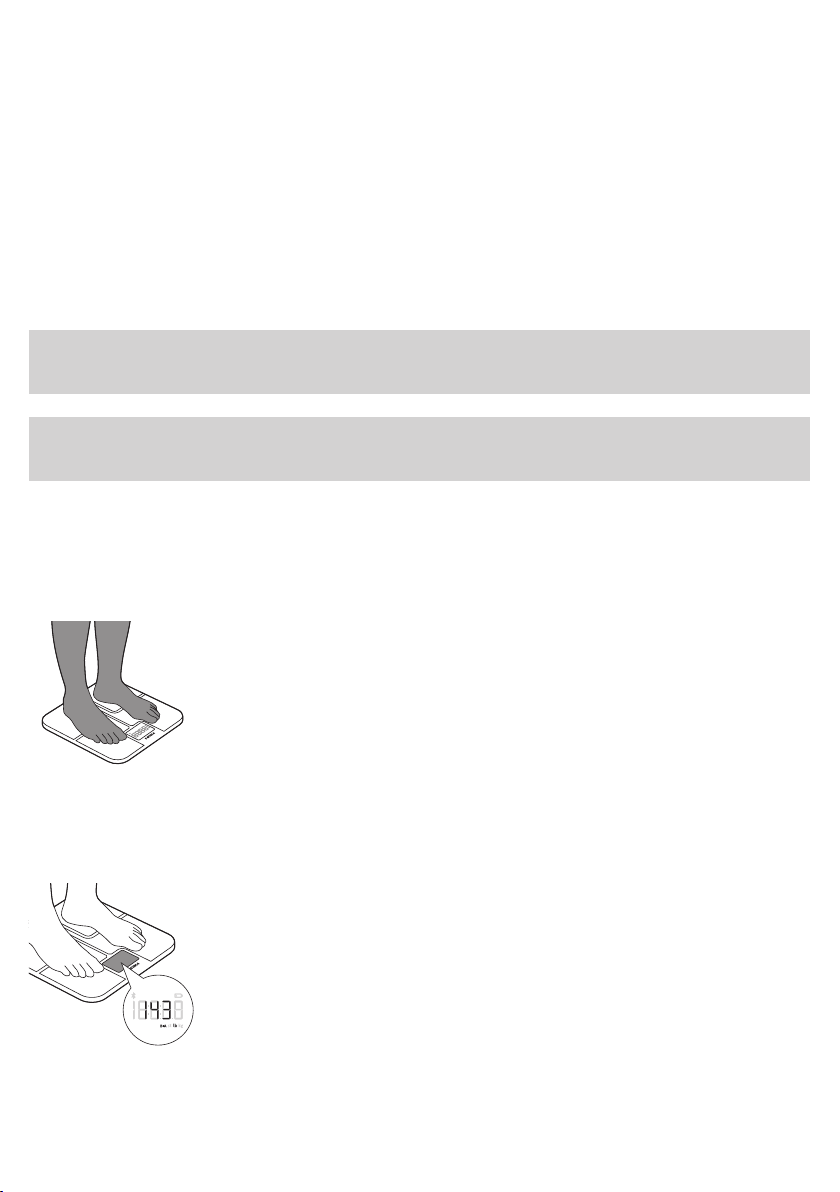
We advise you not to use the scale in the following circumstances, as this
may cause inaccurate measurements:
- Immediately after strenuous exercise.
- Immediately after a sauna or bath.
- Immediately after eating or drinking.
Performing a measurement
Performing a measurement with app
Note: Your personal measurement data can only be stored and displayed
via the Philips body analysis scale and Philips HealthSuite health app and
not by use of third party apps.
Note: When the scale is connected via Bluetooth® to the app of a user, the
scale will automatically select that user and measurements can only be
done for that user.
1 Switch on Bluetooth® on your mobile device and open the health app.
- Keep the mobile device and the scale at transmission distance
(no more than 16 feet / 5 meters from each other, in the same room).
- The Bluetooth® symbol lights up when the scale is connected
to the mobile device. The Bluetooth® symbol ashes when data
transmission has succeeded.
2 Step onto the scale to switch it on. The scale beeps to indicate that it is
ready for weighing. The scale is equipped with user prole recognition
and automatically selects the user when the health app is connected.
- You can take a measurement barefoot. The scale is able to perform
the weight measurement and the BIA measurement and store this
measurement data in the health app. Make sure your feet are clean
and slightly damp.
- You can also take a measurement wearing footwear. The scale is
only able to perform the weight measurement and not the body fat
estimation and BMI calculation. Your measurement results will not be
stored or sent to the health app.
3 Weight measurement starts.
- Weight is shown on the display of the scale after weight
measurement ends.
English
15
Page 16
English
16
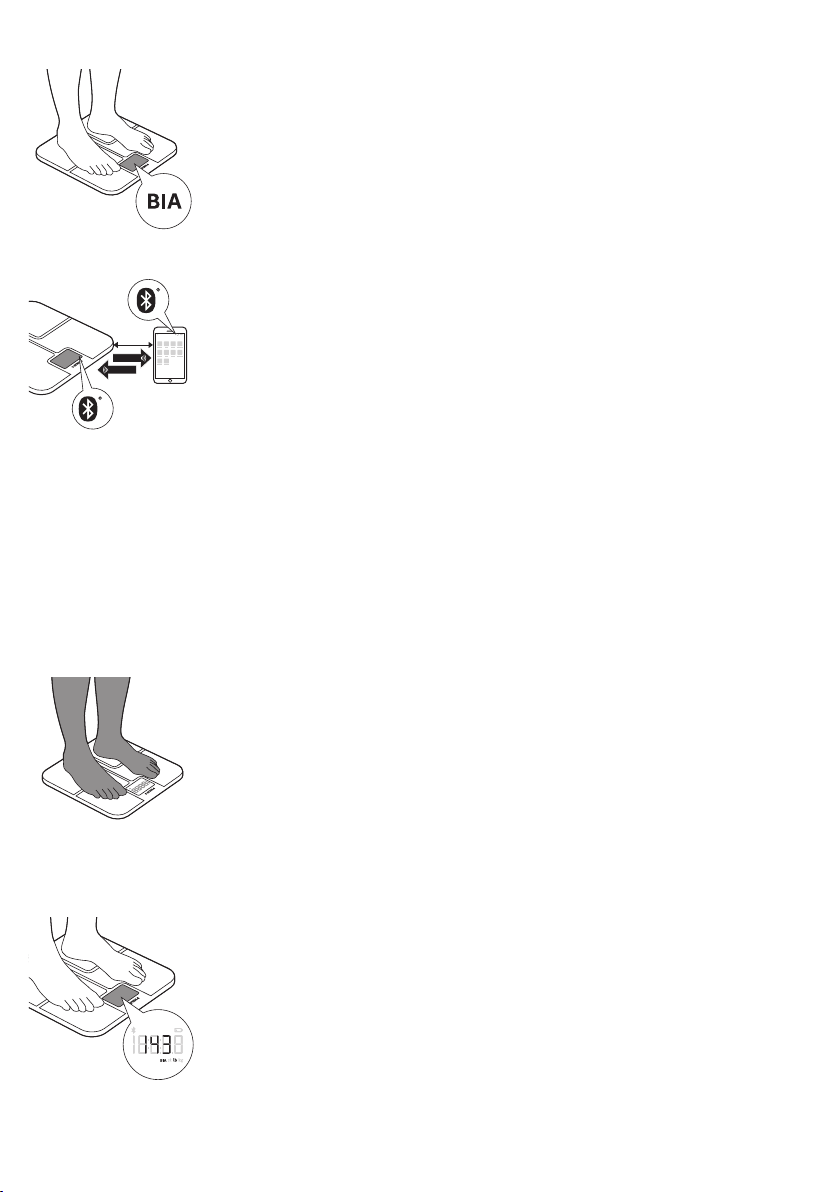
4 BIA measurement starts (when measuring barefoot).
- The symbol 'BIA' ashes on the display to indicate the scale is
analyzing your data.
5 Stand still and keep full contact with the measurement platform until
the symbol ‘BIA’ stops ashing. The device beeps to indicate that the
measurement is completed. The results of the BIA are shown in the app.
6 With the scale successfully connected to your mobile device, the
measurement data is automatically transmitted to your mobile device via
< 16ft
Bluetooth® Smart.
- The Bluetooth® symbol on the scale ashes while the measurement
data is transmitted to the app.
- The measurement results are shown and stored in the health app.
7 After measuring, step o the scale. The scale switches o automatically.
Performing a measurement without app
The scale can be used without the app. This allows you to measure your
weight. When you have created a user prole in the scale, you can measure
your weight and perform BIA. You can also upload your measurement
data to the health app later on, when the scale and your mobile device
are connected. Results of the body analysis measurement can only be
accessed using the Philips HealthSuite health app. The scale cannot directly
communicate BIA results to the user.
1 Step onto the scale barefoot to switch it on. The device beeps to indicate
it is ready for weighing.
- You can take a measurement barefoot. The device is able to perform
the weight measurement and the BIA measurement and later on store
the measurement data in the health app. Make sure your feet are
clean and slightly damp.
- You can also take a measurement wearing footwear. The scale is
only able to perform the weight measurement and not the body fat
estimation and BMI calculation. Your measurement results will not be
stored or sent to the health app.
2 Weight measurement starts.
- Weight is shown on the display of the device after weight
measurement ends.
Page 17
English
3 BIA measurement starts (when measuring barefoot).
- The symbol 'BIA' ashes on the display to indicate the device is
analyzing your data.
4 Stand still and keep full contact with the measurement platform until
the symbol ‘BIA’ stops ashing. The device beeps to indicate that the
measurement is completed. The results of the BIA will not be shown on
the display.
5 The device is equipped with user prole recognition and automatically
selects the user based on their weight.
- When the device immediately displays the weight: no user is
recognized and results are not stored. See below for instructions.
- When the device shows multiple users: more users are recognized
based on your weight. See below for instructions.
6 The measurement results are stored in the device in case of a successful
BIA.
- The device can store up to 40 measurement results for each user
prole. The oldest results will be replaced by new measurement
results.
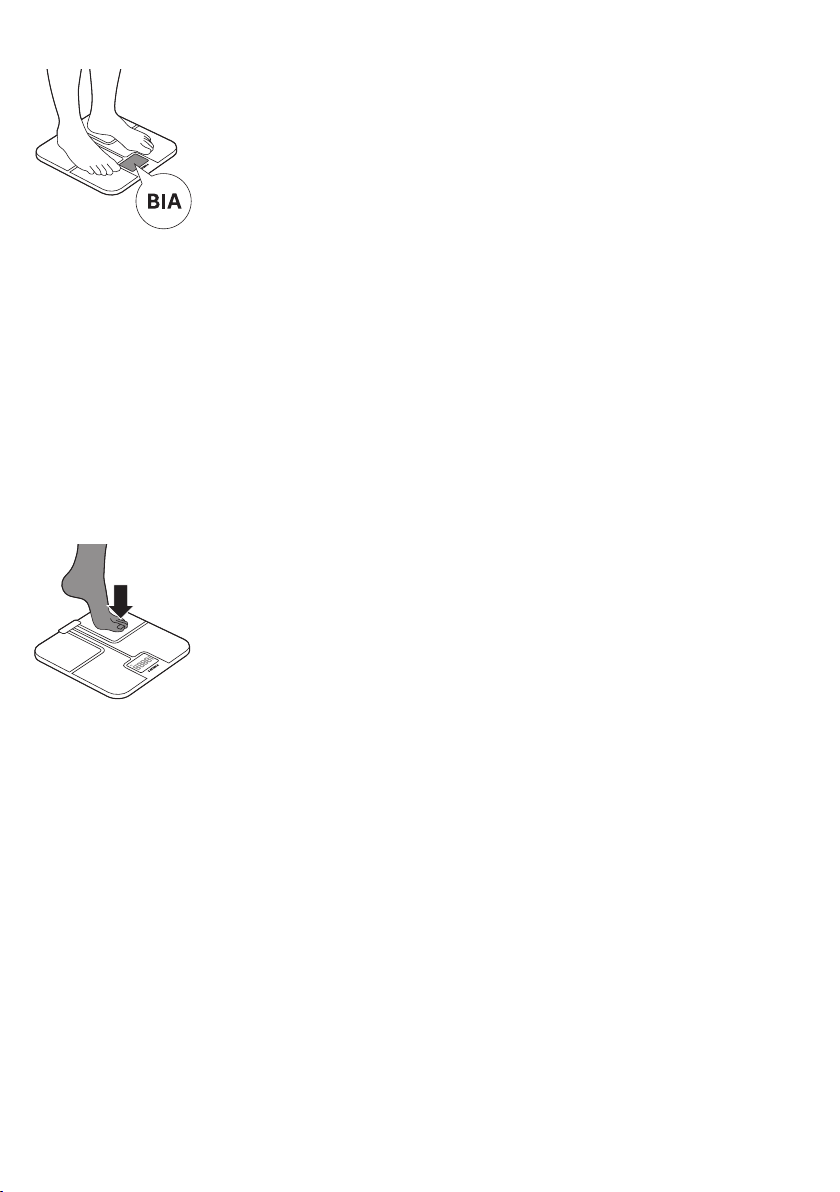
7 After measuring, step o the device. It switches o automatically.
17
When the device does not automatically recognize the correct
user prole:
- To select the correct user prole, step o the device and tap on the
measurement platform to conrm the correct user prole.
- All proles will be shown alternately on the display. Tap on the scale to
conrm your user prole.
- Make sure that you select the correct user.
Factory reset
To add up to 8 new user proles or delete all measurement results from the
device, you can perform a factory reset. With the factory reset the device is
cleared from all existing user proles and measurement results.
1 With the device turned on, press and hold the measurement unit button
located on the bottom of the device for 20 seconds, until "FACt" is shown
on the display. Now all data is deleted.
- After resetting the scale will automatically turn o.
- You can now create new users proles (see 'Pairing the body analysis
scale to your mobile device and create a user prole').
Page 18

English
18
Cleaning and storage
Caution: Never immerse the device in water and do not rinse it
under the tap.
1 Wipe the surface of the device with a cloth.
- Use a dry cloth to wipe dust o the surface of the device.
- Use a slightly damp cloth to wipe dirt o the surface of the device. Dry
the surface with a dry cloth after cleaning.
Accessories
Disposal
Caution: Do
the device in order to avoid discoloration or malfunction of the scale.
2 Store the device in a dry, dust-free place away from direct sunlight or
other heat sources. Avoid surroundings with uctuating temperatures
(see Specications').
Caution: Do not drop the device.
This device has no other user-serviceable parts. For assistance
call 1-844-531-6861.
Philips accessories may be purchased at a store near you, or on our website
www.philips.com/store.
This product contains batteries:
- Dispose of batteries properly. Do not incinerate. Batteries may explode if
overheated.
- Do not wrap in metal or aluminum foil. Tape the waste battery terminals
before discarding.
- It is suggested that you contact your local town or city to determine
proper battery recycling site(s) in your area.
- Battery must be removed from the device before discarding.
not use propellant, abrasive or other chemicals to clean
Assistance
For assistance, visit our website:
www.philips.com/support or call toll free 1-844-531-6861
Page 19

Full Two-Year Warranty
Philips Electronics North America Corporation warrants each new
Philips product, models DL8781, DL8780, against defects in materials or
workmanship for a period of two years from the date of purchase and
agrees to repair or replace any defective product without charge.
IMPORTANT: This warranty does not cover damage resulting from accident,
misuse or abuse, lack of reasonable care, the axing of any attachment not
provided with the product or loss of parts or subjecting the product to any
but the specied voltage.*
NO RESPONSIBILITY IS ASSUMED FOR ANY SPECIAL, INCIDENTAL OR
CONSEQUENTIAL DAMAGES.
In order to obtain warranty service, simply go to www.philips.com/support
or call toll-free 1-844-531-6861. It is suggested that for your protection you
return shipments of product by insured mail, insurance prepaid. Damage
occurring during shipment is not covered by this warranty. NOTE: No other
warranty, written or oral, is authorized by Philips Electronics North America
Corporation. This warranty gives you specic legal rights, and you may also
have other rights which vary from state to state. Some states do not allow
the exclusion or limitation of incidental or consequential damages, so the
above exclusion and limitations may not apply to you.
* Read enclosed instructions carefully.
Manufactured for: Philips Consumer Lifestyle, A division of Philips Electronics
North America Corporation, P.O. Box 10313, Stamford, CT 06904.
PHILIPS and Philips Shield are registered trademarks of Koninklijke Philips N.V.
English
19
Troubleshooting
This chapter summarizes the most common problems you could encounter
with the device. If you are unable to solve the problem with the information
below, visit www.philips.com/support for a list of frequently asked
questions or call 1-844-531-6861 for assistance.
Problem Possible cause Solution
The display shows ---and shuts down.
The display shows the
battery low symbol and
switches o after a few
seconds.
The display shows E1. Pairing has failed. Check if Bluetooth® on your mobile
Maximum weight limit is
reached. The scale has a
weight limit of 28st 5 lb
(397 lb) / 180 kg.
The batteries are
almost empty.
The scale can accommodate a maximum
of 28 st 5 lb (397 lb) / 180 kg. Stop using
this device.
Replace all four batteries at the same
time. We advise you to replace batteries
before they are completely empty. Use
4x 1.5V AAA akaline batteries.
device is on, the Philips HealthSuite
health app is open and if the scale and
your mobile device are no more than
16 feet / 5 meters away from each other.
Page 20

English
20
Problem Possible cause Solution
Unexpected measurement
results .
Incorrect posture. Please step on the measurement
platform and stand still. When measuring
barefoot, make sure your feet are clean
and slightly damp.
The device is placed on a soft
Your feet are too dry. Wipe your feet with a damp cloth to
The display remains
blank when the device is
switched on.
The batteries are empty. Replace all four batteries at the same
The device does not
perform measurement/
analysis of body fat.
The device switches o
automatically.
Data transmission failed. Bluetooth® is o. Turn on Bluetooth® on your mobile
The Philips HealthSuite
surface such as a carpet or on
an uneven surface.
There are no batteries in the
device.
You are standing on the
measurement platform
wearing socks or shoes.
The batteries are empty. Replace all four batteries at the same
health app is o.
Place the device on a at, hard surface
or attach the carpet feet supplied to the
feet of the scale.
make sure that they are slightly damp
when you take the measurement.
Insert 4x 1.5V AAA alkaline batteries
(see 'Inserting/removing the batteries').
time with new ones. Use 4x 1.5V AAA
alkaline batteries.
Make sure you are barefoot during the
BIA measurement and keep full contact
with the measurement platform. Make
sure your feet are clean and slightly
damp.
time. We advise you to replace batteries
before they are completely empty.
Use 4x 1.5V AAA alkaline batteries.
device.
Press the icon on your mobile device to
activate the health app.
The scale and your mobile
When the proles were
When the proles were
shown alternately on the
display, you selected the
wrong prole.
device are more than 16 feet
/ 5 meters away from each
other.
shown alternately on the
display, you selected the
wrong prole.
You are standing on the
measurement platform
wearing socks or shoes.
Place your mobile device closer to the
scale.
Repeat the measurement and conrm
the correct user prole by tapping on the
scale.
Make sure you are barefoot during the
BIA measurement and keep full contact
with the measurement platform. Make
sure your feet are clean and slightly
damp.
Page 21

English
Specications
Product name. Philips body analysis scale with Bluetooth®.
Dimensions scale. 12 41/64 x 12 41/64 x 63/64 in / 321 x 321 x 25mm.
Net weight. Approximately 4.4 lb / 1.98 kg (excluding the batteries).
Display. LCD with white LED backlight.
Measurement units. Kilogram / stone / pound.
Measurement range. 5kg to 180kg / 0st: 11lb to 28st: 5lb / 11lb to 397lb .
Graduations. 0.1kg / 0.1lb.
21
Accuracy. 5-50 kg: ±0.3 kg / 11-110 lb: ±0.7 lb.
Measuring method Bioelectrical Impedance Analysis (BIA) for body fat analysis.
Accuracy BIA ±15 ohms in the range of 200 – 1000 ohms.
Operating environment. Temperature: 41°F to 104°F / 4,5°C to 40°C.
Storage and shipping environment. Temperature: -4°F to 140°F / -20°C to 60°C.
Power source. 6V (4x 1.5V AAA alkaline batteries).
Switch-on method. Sense-On technology.
Auto-o. The device turns o after about 10 seconds in case of inactivity.
Accessories. 1. 4x 1.5V AAA alkaline batteries.
Calibration of the device The device requires no calibration.
The manufacturer does not require
such preventive inspections by other
persons.
Mode of operation Continuous operation
50-100 kg: ±0.4 kg / 110-220 lb: ±0.9 lb.
100-150 kg: ±0.5 kg / 220-330 lb: ±1.1lb.
Humidity: 15% RH to 93%RH, atmospheric pressure: 70kPa to
106kPa.
Humidity: ³ 93% RH, atmospheric pressure: 50kPa to 106kPa.
2. User manual.
3. Carpet feet.
The manufacturer does not require such preventive inspections
by other persons.
Degree of protection against harmful
ingress of water of particular matter
Applied part (measurement platform) Type BF
Protection against electric shock Internally powered
The device is not suitable for use in the presence of ammable anesthetic mixtures with air or with
oxygen or nitrous oxide.
IP22
Page 22

English
22
Electromagnetic emissions and immunity
The device is approved according to EMC safety standard EN 60601-1-2.
It is designed to be used in typical domestic environments.
EMC Guidance
- The scale needs special precautions regarding EMC and needs to be
installed and put into service according to the EMC information provided
in the accompanying documents.
- Wireless communications equipment such as wireless home network
devices, mobile phones, cordless telephones and their base stations,
walkie-talkies can aect this equipment and should be kept at least a
distance d = 3.3 m (11ft) away from the equipment.
Note: As indicated in IEC 60601-1-2:2007 for ME equipment, a typical cell
phone with a maximum output power of 2 W yields d = 3.3 m (11ft) at an
immunity level of 3V/m.
Table 1 Guidance and manufacturer's declaration –
electromagnetic emissions - for all ME equipment
and ME systems
Guidance and manufacturer’s declaration – electromagnetic emissions
The device is intended for use in the electromagnetic environment specied
below. The customer or the user of the device should assure that it is used in
such an environment.
Emissions test Compliance Electromagnetic environment -
RF emissions CISPR 11 Group 1 The device must emit electromagnetic energy
guidance
in order to perform its intended function.
Nearby electronic equipment may be
aected.
RF emissions CISPR 11 Class B
Harmonic emissions IEC 610003-2
Voltage uctuations/icker
emissions IEC 61000-3-3
Not applicable
Not applicable
Page 23

Table 2 Guidance and manufacturer's declaration –
electromagnetic immunity – for all ME equipment
and ME systems
Guidance and manufacturer’s declaration – electromagnetic immunity
The device is intended for use in the electromagnetic environment specied
below. The customer or the user of the device should assure that it is used in
such an environment.
Immunity test IEC 60601 test
level
Electrostatic
discharge (ESD)
IEC 61000-4-2
±6 kV contact
±8 kV air
Compliance
level
±6 kV contact
±8 kV air
Electromagnetic environment guidance
Floors should be wood, concrete or
ceramic tile. If oors are covered with
synthetic material, the relative humidity
should be at least 30%.
English
23
Power frequency
(50/60Hz)
magnetic eld IEC
61000-4-8
3A/m 3A/m Power frequency magnetic elds
should be at levels characteristic of a
typical location in a typical commercial
or hospital environment.
Table 4 Guidance and manufacturer's declaration –
electromagnetic immunity –for ME equipment
and ME systems that are not life supporting
Guidance and manufacturer’s declaration – electromagnetic immunity .
The device is intended for use in the electromagnetic environment specied
below. The customer or the user of the device should assure that it is used
in such an environment.
IMMUNITY test IEC 60601 TEST LEVEL Compliance level
Radiated RF
IEC 61000-4-3
3 V/m
80 MHz to 2.5 GHz
3 V/m
Electromagnetic environment - guidance
Portable and mobile RF communications equipment should be used no
closer to any part of the device, including cables, than the recommended
separation distance calculated from the equation applicable to the
frequency of the transmitter.
Recommended separation distance:
d = 1.167 √P
d = 1.167 √P 80 MHz to 800MHz
d = 2.333 √P 800 MHz to 2.5 GHz
where P is the maximum output power rating of the transmitter in watts
(W) according to the transmitter manufacturer and d is the recommended
separation distance in metres (m).
Field strengths from xed RF transmitters, as determined by an
electromagnetic site survey (a), should be less than the compliance level in
each frequency range (b).
Page 24

English
24
Interference may occur in the vicinity of equipment marked with the
following symbol:
NOTE 1 At 80 MHz and 800 MHz, the higher frequency range applies.
NOTE 2 These guidelines may not apply in all situations. Electromagnetic
propagation is aected by absorption and reection from structures, objects
and people.
(a) Field strengths from xed transmitters, such as base stations for radio
(cellular/cordless) telephones and land mobile radios, amateur radio, AM
and FM radio broadcast and TV broadcast cannot be predicted theoretically
with accuracy. To assess the electromagnetic environment due to xed RF
transmitters, an electromagnetic site survey should be considered. If the
measured eld strength in the location in which the device is used exceeds
the applicable RF compliance level above, the device should be observed
to verify normal operation. If abnormal performance is observed, additional
measures may be necessary, such as re-orienting or relocating the device.
(b) Over the frequency range 150 kHz to 80 MHz, eld strengths should be
less than 3V/m.
Table 6 Recommended separation distances between
portable and mobile RF communications equipment and
the ME equipment or ME system – for ME equipment
and ME systems that are not life supporting
Recommended separation distances between portable and mobile
RF communications equipment and the device.
The device is intended for use in an electromagnetic environment in which
radiated RF disturbances are controlled. The customer or the user of the
device can help prevent electromagnetic interference by maintaining a
minimum distance between portable and mobile RF communications
equipment (transmitters) and the device as recommended below, according
to the maximum output power of the communications equipment.
Separation distance according to frequency of transmitter (m)
Rated maximum output
power of transmitter (W)
0.01 0.117 0.117 0.233
0.1 0.369 0.369 0.738
1 1.167 1.167 2.333
10 3.690 3.690 7.378
100 11.67 11.67 23.33
150 kHz to 80 MHz
d = 1.167 √ P
For transmitters rated at a maximum output power not listed above, the
recommended separation distance d in metres (m) can be estimated using
the equation applicable to the frequency of the transmitter, where P is the
maximum output power rating of the transmitter in watts (W) according to
the transmitter manufacturer.
80 MHz to 800 MHz
d = 1.167 √ P
800 MHz to 2.5 GHz
d = 2.333
Page 25

NOTE 1 At 80MHz and 800MHz, the separation distance for the higher
frequency range applies.
NOTE 2 These guidelines may not apply in all situations. Electromagnetic
propagation is aected by absorption and reection from structures, objects
and people.
FCC Compliance information
This device complies with Part 15 of the FCC Rules. Operation is subject
to the following two conditions: (1) this device may not cause harmful
interference, and (2) this device must accept any interference received,
including interference that may cause undesired operation.
FCC ID(2AEFK-DL8780 and 2AEFK-DL8781)
Radio interference
This equipment has been tested and found to comply with the limits for a
Class B digital device, pursuant to Part 15 of the FCC Rules. These limits are
designed to provide reasonable protection against harmful interference in
a residential installation. This equipment generates, uses and can radiate
radio frequency energy and, if not installed and used in accordance with
the instructions, may cause harmful interference to radio communications.
However, there is no guarantee that interference will not occur in a particular
installation.
If this equipment does cause harmful interference to radio or television
reception, which can be determined by turning the equipment o and on,
the user is encouraged to try to correct the interference by one or more of
the following measures:
- Reorient or relocate the receiving antenna.
- Increase the separation between the equipment and receiver.
- Connect the equipment to an outlet on a circuit dierent from that to
which the receiver is connected.
- Consult the dealer or an experienced radio/TV technician for help.
English
25
RF Radiation exposure statement
This equipment complies with FCC RF radiation exposure limits set forth
for an uncontrolled environment. For handheld/body-worn operation, this
equipment has been tested and meets the FCC RF exposure guidelines.
This transmitter must not be co-located or operating in conjunction with
any other antenna or transmitter. Use of other accessories may not ensure
compliance with FCC RF guidelines.
Do not attempt to repair or modify this equipment. Any repairs or alterations
made by the user to the equipment may void the warranty and compliance
of the equipment. Changes or modications made to this equipment not
expressly approved by Philips may void the FCC authorization to operate
this equipment. For assistance visit our website www.philips.com/support
or call toll-free 1-844-531-6861.
Page 26

English
26
BlueTooth wordmark
The BlueTooth® Smart wordmark and logos are registered trademarks
owned by Bluetooth SIG, Inc. and any use of such marks by Philips
is under license.
App Store and iPhone
App Store and iPhone are trademarks of Apple Inc., registered in the U.S.
and other countries. App Store is a service mark of Apple Inc.
Google Play and Android
Google Play and Android are trademarks of Google Inc.
Page 27

Page 28

Page 29

Page 30

Specications are subjec t to change without not ice.
© 2016 Koninklijke Philips N.V.
All rights reserved
Manufactured for:
Philips Consumer Lifestyle
A divis ion of Philips Elec tronics Nor th America Corporat ion
P.O. Box 10313, Stamford, CT 06904
4222.100.6188.1 (03/2016)
>75% recycled paper
 Loading...