

Page 1

DC199/DC199B
Quick Start Guide
What’s in the Box?
You should find these items upon opening the box.
FM antenna Remote Control
AC power adaptor
4 X iPod dock adaptors
2
User Manual
User manual
Quick Start Guide
Quick Start Guide
1
Pull out the plastic
Pull out the plastic
protective sheet
protective sheet
before use.
before use.
Page 2

1
Connect the FM antenna.
2
Connect the AC power adaptor of the system.
3
Connect the speakers.
Tip
See the User Manual for how to
connect other equipment to this
system.
Note:
– Position the FM antenna away from the
speaker wires to avoid electrical
interference.
Speaker (right) Speaker (left)
3
FM wire antenna
1
2
AC power adaptor
Setting the clock
1
In standby mode, press PROG/CLOCK for more than two seconds.
➜ The clock digits flash.
2
Press ALBUM/PRESET 3/4 to set the minutes.
3
Press S/T to set the hours.
4
Press PROG/CLOCK to confirm the time.
/
Page 3
C
Enjoy
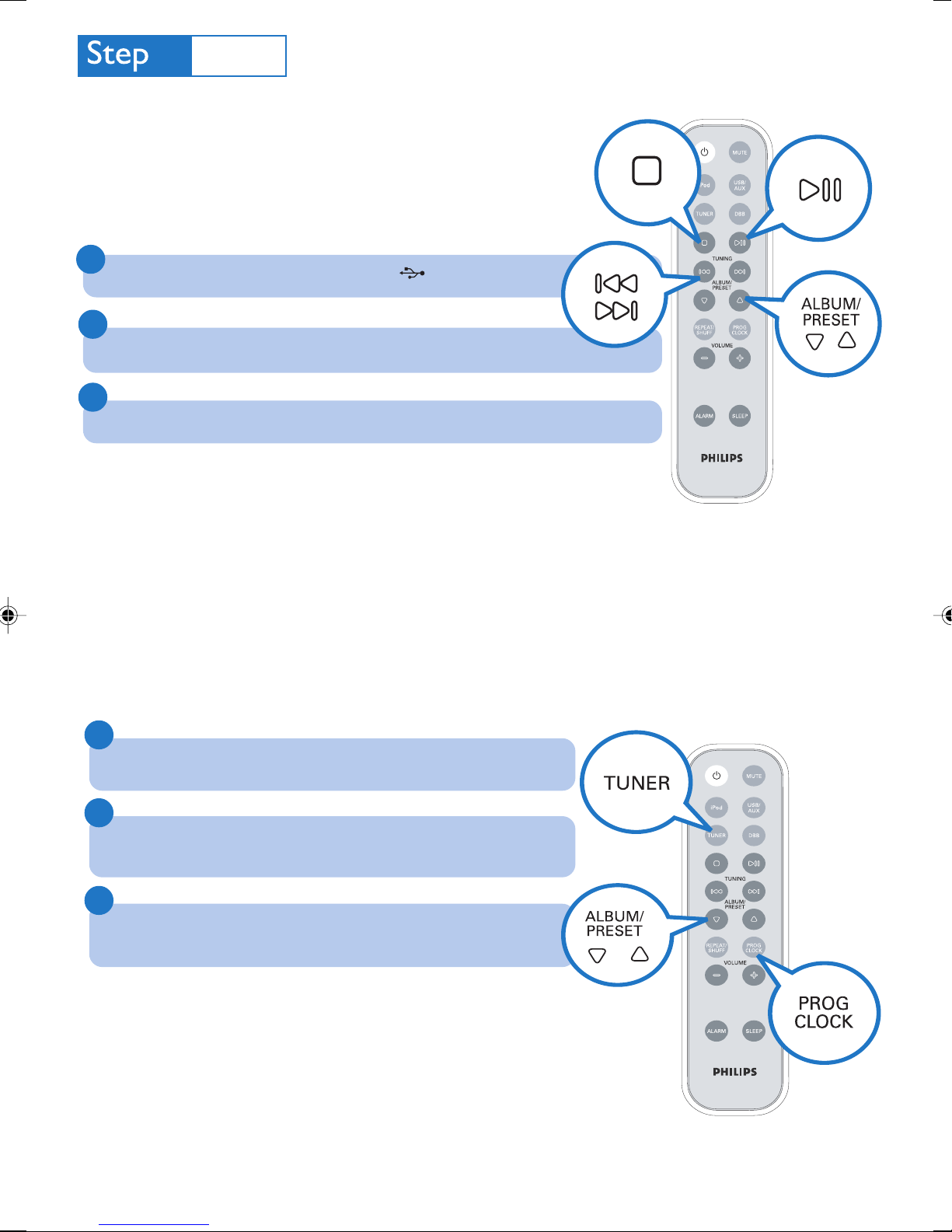
Playing a USB mass storage device
With the system, you can use USB flash memory (USB 2.0 or USB1.1),
USB flash players
card reader to work with this system).
1
Insert the USB device’s USB plug into the socket on the set.
(USB 2.0 or USB1.1), memory cards (requires an additional
2
Press USB/AUX once or more to select USB.
3
Play the USB’s audio files.
Programming and tuning to radio stations
1
Press TUNER to select the tuner source.
2
Press PROG/CLOCK for more than 3 seconds to program all
available stations.
3
Press ALBUM/PRESET 3 / 4 until the desired preset station is
displayed.
/
Page 4
C
Enjoy
Playing Apple iPod using DC199/DC199B
1
Select the correct dock adaptor, as indicated on each adaptor, then fit it in
the dock.
2
Correctly place the compatible iPod player into the dock.
3
Press iPod to select the iPod source.
4
Power on your iPod player.
5
Select and play your favourite songs stored in the iPod player.
Notes for remote control:
– First select the source you wish to control by pressing one of the source select keys on the remote
control (for example USB/ AUX).
– Then select the desired function (for example
Tip
Detailed playback features and additional functions are described in the User
Manual.
ÉÅ
, S , T ).
C Royal Philips Electronics N.V. 2008
All rights reserved.
PDCC-JS/WP-0822
 Loading...