

Page 1
Register your product and get support on our website
www.philips.com/support
D630
D650
Short user manual
Important safety instructions
Warning
• The electrical network is rated as dangerous. The
only way to turn off the charger is to unplug the
power at the outlet. You must therefore ensure
that the electrical outlet is always easily
accessible.
• Refer to the safety information before using the
product.
• This product complies with European directive
RED2014/53/EU.
• Use only the power supply type listed in the user
instructions.
• Use only the battery type listed in the user
instructions.
• Do not allow the product to come into contact
with liquids.
• Risk of explosion if an incorrect battery type is
inserted in the device.
• Dispose of used batteries according to the
instructions.
• When the handset rings or when the handsfree is
activated, keep the handset away from your ear
to avoid hearing damage.
When using the phone as a baby monitor
• Ensure that children do not play with the
appliance.
• Make sure the baby unit and the cord are always
out of reach of the baby (at least 1 meter).
• Keep the parent unit at least 1.5 meters from the
baby unit to prevent acoustic feedback.
• Never place the baby unit inside the baby’s bed
or playpen.
• Never cover the parent unit and the baby unit
with anything (e.g. a towel or blanket). Always
make sure the cooling vents of the baby unit are
free.
• This appliance is not intended for use by persons
(including children) with reduced physical,
sensory or mental capabilities, or lack of
experience and knowledge, unless they have
been given supervision or instruction concerning
use of the appliance by a person responsible for
their safety.
• If you place the parent unit next to a transmitter
or other DECT appliance (e.g. a DECT telephone
or wireless router for the internet), the connection
with the baby unit may be lost. Move the baby
monitor further away from the other wireless
appliances until the connection is restored.
• This baby monitor is intended as an aid. It is not a
substitute for responsible and proper adult
supervision and should not be used as such.
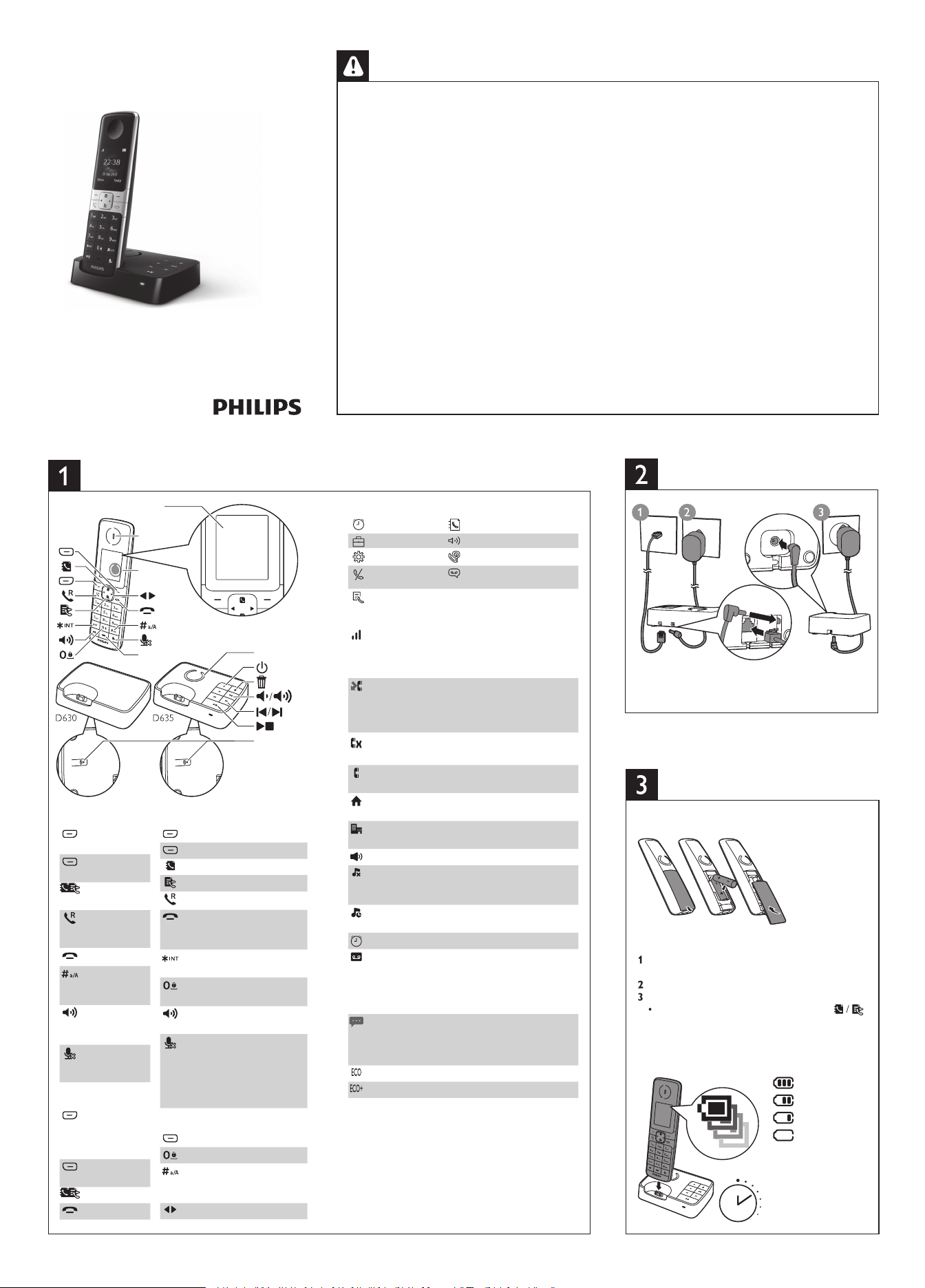
Overview
Icons
Earpiece
Loudspeaker
(back)
Microphone
During a call Standby
Phonebook /
redial list
Change the
sound prole.
Adjust the
volume.
Recall
(network
dependent).
End calls.
Enter a pause
(press and
hold the key).
Mute/unmute
the
loudspeaker.
Mute/unmute
the
microphone.
In menu
Confirm /
Select /
Enter the
option menu.
Cancel /
Back
Up / Down
Exit menu.
Access the main menu.
Access the redial list.
Phonebook
Call log
Make and answer calls.
Switch the handset on
or off (press and hold
the key).
Make an intercom call
(press and hold the key).
Lock/unlock the keypad
(press and hold the key).
Make and receive calls
through the loudspeaker.
D635 only : Press to play
a new message
recorded in the
answering machine /
Access to the answering
machine menu.
In text input
Delete text.
Enter a space.
Switch upper/lower
case (press and hold
the key).
Left / Right
Loudspeaker
Find
handset
(bottom)
Main menu icons
Alarm Phonebook
Services Sounds
Settings Baby monitor
Privacy
mode
Incoming calls (D630 only)
Icons
It shows the connection status between
the handset and base station. The more
bars are shown, the better the signal
strength is.
It flashes when there is a new missed call.
It remains steadily on when browsing
unread missed calls in call log, or when
browsing the read missed calls in call log.
It remains steadily on when browsing
blocked calls in the call log.
It flashes when there is an incoming
mobile number call.
It flashes when there is an incoming
home number call.
It flashes when there is an incoming
mobile number call.
The loudspeaker is on.
The ringer is off. The silent mode is set
and within active period (the phone does
not ring).
The silent mode is set, but is outside of
active period.
Activated alarm.
D635 only : Answering machine: this
symbol flashes when there is a new
message or when the memory is full. It is
displayed when the answering machine
is turned on.
Voice message indicator: it flashes for
new messages, it is steady for reviewed
messages.
* This is network dependent.
The ECO mode is activated.
The ECO+ mode is activated.
Answering machine
(D635 only)
Connection
Multi-handset
version only.
Get started
Inserting the batteries
Phone setup
When using your phone for the first time, you
see a welcome message (country dependent).
Set the country and language if prompted.
Set the date and time.
If the time is in 12-hour format, press
key to select [am] or [pm] (country
dependent).
Charge your phone
> 70%
40% - 70%
10% - 40%
Flashing: low
battery
Scrolling: charging
in progress.
Charge the device
for 8 hours.
Page 2
Operation
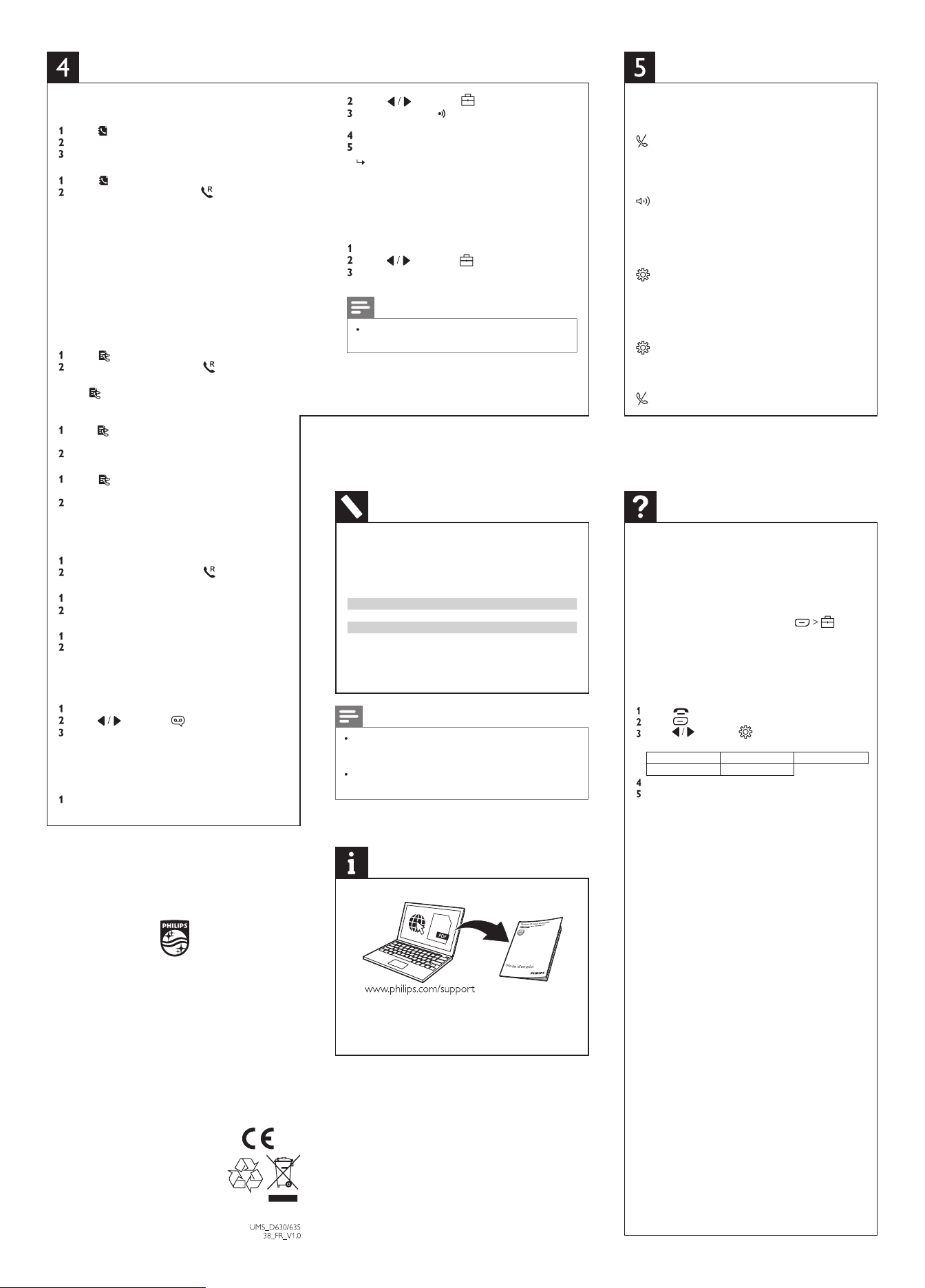
Learn more
Phonebook
Add record
Press .
Select [Option] > [Add new].
Follow on-screen instructions.
Call from the phonebook
Press .
Select a record and press .
Direct access memory
You have up to 9 direct access memories
(keys 1 to 9). To dial the saved phone
number automatically, press and hold on
the keys in standby mode.
Depending on your country, keys 1 and 2 are
preset to the voice mail number and
information service number of your service
provider respectively (network dependent).
Call log
Call from the call log
Press .
Select a record and press .
View record
Press > [Incoming calls] (D635 only) >
[Option] > [View].
Save record
Press > [Incoming calls] (D635 only) >
[Option] > [Save number].
Follow on-screen instructions.
Delete record
Press > [Incoming calls] (D635 only) >
[Option] > [Delete].
Follow on-screen instructions.
Redial list
Call from the redial list.
Press [Redial].
Select a record and press .
Save record
Press [Redial] > [Option] > [Save number].
Follow on-screen instructions.
Delete record
Press [Redial] > [Option] > [Delete].
Follow on-screen instructions.
Record an announcement
(for D635 only)
Press [Menu].
Press to select > [Announcement].
Follow on-screen instructions.
Register additional handsets
You can register additional handsets to
the base station.
Press [Menu].
This symbol on a product indicates that the
device is compliant with the European
Directive 2012/19/EU.
2019 © MMD Hong Kong Holding Limited
All rights reserved.
This product has been manufactured by and
is sold under the responsibility of MMD Hong
Kong Holding Limited. MMD Hong Kong
Holding Limited is the warrantor in relation to
this product.
Philips and the Philips Shield Emblem are
registered trademarks of Koninklijke Philips
N.V. and are used under license from
Koninklijke Philips N.V.
Press to select [Register].
Press and hold key on the base station
for 10 seconds.
Enter the system PIN/Passcode (0000).
Press [OK] to confirm PIN/Passcode.
Registration is complete in less than
2 minutes.
Restore default settings
You can reset your phone settings to the
original factory settings.
Press [Menu].
Press to select [Reset].
Follow on-screen instructions.
Note
You can recover the initial PIN/Passcode
by following this procedure.
Technical
data
Battery
Philips: 2 x AAA NiMH 1.2 V Rechargeable
650 mAh batteries.
Use only the supplied batteries.
Adapter (base and charger)
Input:
Output: 6 Vdc, 500mA
Phonebook: 100 entries
Call log: 50 entries
Talk time: 18 hours‚
Standby time: 250 hours‚
Note
You can install a DSL (digital subscriber line)
filter to prevent noise and caller ID problems
caused by the DSL interference.
You can find the Declaration of Conformity
on www.p4c.philips.com.
To access the user instructions online, use the
reference model number written on the product
label at the bottom of the base station.
Tenpao: S003GV0600050
100-240 V~, 50/60 Hz 150 mA
Silent mode
You can enable the silent mode for a
specified duration.
> [Silent mode]
Sound prole
Allows you to customize the sound of voices
to your liking.
> [Sound prole]
Eco mode
Reduces power consumption / transmission
power; reduces radiation and range by
approximately 60%.
> [Eco mode]
Eco+ mode
Eliminates radiation in standby mode
(2 seconds ring delay, 50% shorter standby
time).
> [Eco+ mode]
Privacy mode
Blocks incoming calls / block outgoing calls.
> [Call barring]/[Call block]
Frequently
Asked
Question
No signal bar is displayed on the screen.
• The handset is out of range. Move it closer to the
base station.
• If the handset displays [Register your Handset],
register your handset. (See the section on
“Register additional handsets”).
If I fail to pair (register) the additional handsets to
the base station, what do I do?
• Your base memory is full. Access >
[Unregister] to unregister the unused handsets
and try again.
• If registration fails, unplug the power adapter from
the base station and plug it back. Wait for 15
seconds, and then repeat the registration procedure.
I have chosen a wrong language which I cannot
read, what do I do?
Press to go back to the standby screen.
Press to access the main menu screen.
Press to select . Then you see one of the
following texts appear on the screen:
[Language] [Langue]
[Lingua] [Dil]
Select them to access the language options.
Select your own language.
My handset is in searching or unavailable status,
what do I do?
• Make sure that the base station has power supply.
• Register the handset to the base station.
• Move the handset closer to the base station.
I cannot change the settings of my voice mail. What
do I do?
The voice mail service is managed by your service
provider but not the phone itself. Contact your
service provider to change the settings.
No display
• Make sure the batteries are charged.
• Make sure there are power and phone
connections.
The handset on the charger does not charge.
• Make sure the batteries are inserted correctly.
• Make sure the handset is placed properly on the
charger. The battery icon animates when charging.
• Make sure the docking tone setting is turned on.
When the handset is placed correctly on the
charger, you can hear a docking tone.
• The charging contacts are dirty. Disconnect the
power supply first and clean the contacts with a
damp cloth.
• Batteries are defective. Purchase new ones with
the same specifications.
Bad audio (crackles, echo, etc.)
• The handset is almost out of range. Move it closer
to the base station.
• The phone receives interference from the nearby
electrical appliances. Move the base station away.
• The walls are too thick. Move the base station
away.
The handset does not ring.
Make sure the handset ringtone is turned on.
The caller ID does not display.
• The service is not activated. Check with your
service provider.
• The caller’s information is withheld or unavailable.
[Sprache]
 Loading...