

Page 1

Basic Training DVD
V1.0
Service Engineering and Training
Theo Heijnen
<< Basics DVD >>SERVICE TRAINING
<< Basics DVD >>
Mai 2007
PERSONAL NOTES:
PERSONAL NOTES:
page: 1
Page 2
Agenda.
• Introduction from CD to DVD
• Requirements for the DVD
• Region Coding
• Main features on a DVD
• About Titles and Chapters
• The basics of optical reading with
a laser
• Physical specifications of a DVD
• The DVD video signal (What is
MPEG)
•Audio on a DVD
• Copy Protection
<< Basics DVD >>SERVICE TRAINING
<< Basics DVD >>
• The files on a DVD
Philips CE Europe, Euroservice, Mai 2006
Basic DVD Slide 2
PERSONAL NOTES:
PERSONAL NOTES:
page: 2
Page 3
<< Basics DVD >>SERVICE TRAINING
<< Basics DVD >>
Introduction
• Compact Disc has become the distribution medium of
choice for Music, Multimedia, Movies, computer operating
and application software, and data distribution.
• The motion picture industry decided that a new optical disc
should be able to store full-length movies
quality comparable to that of broadcast pictures, in both
regular and wide-screen
sound and sub-titles in several languages.
• These were the pressures that produced a new highcapacity, universally applicable optical standard: DVD.
formats, with digital surround
, with a picture
Philips CE Europe, Euroservice, Mai 2006
Basic DVD Slide 3
PERSONAL NOTES:
PERSONAL NOTES:
page: 3
Page 4

<< Basics DVD >>SERVICE TRAINING
<< Basics DVD >>
Requirements of the DVD
• The Movie industry requirements
The basic requirement was that the capacity of a single disc
should be sufficient to hold a full-length motion picture,
with a picture quality comparable to broadcast quality.
Further features:
Audio
formats, including the 5.1 channel digital surround sound
systems.
Multiple sound channels
Subtitles
Multiple screen aspect ratios
Parental control, regional control and copy
protection.
Philips CE Europe, Euroservice, Mai 2006
had to be compatible with existing surround sound
: in 4-6 languages.
to store 3-5 dubbed languages
,
Basic DVD Slide 4
PERSONAL NOTES:
PERSONAL NOTES:
page: 4
Page 5
<< Basics DVD >>SERVICE TRAINING
<< Basics DVD >>
Region Coding
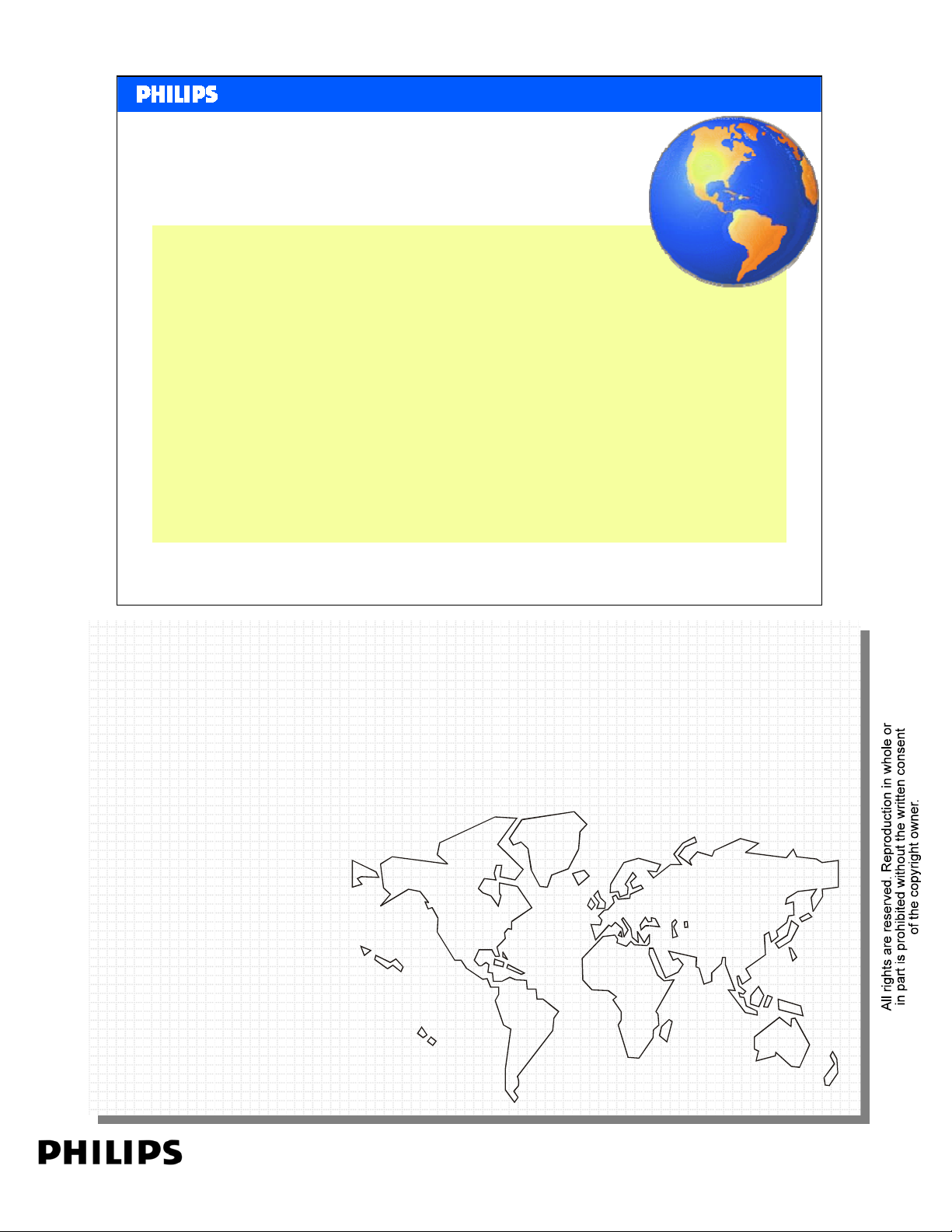
The world is sub divided in six regions:
1 USA + Canada
2 Europe + Japan + South Africa + Middle East
3 South East Asia e.g. Korea, Taiwan, Thailand and
Indonesia
4 Middle and South America + Australia + New
Zealand
5 Former Soviet Union + India + Pakistan + Africa
6 People’s Republic of China
Philips CE Europe, Euroservice, Mai 2006
As all know, movies are not shown at the same time in the whole world.
As all know, movies are not shown at the same time in the whole world.
Therefore the marketing organizations have the possibility to commercialized
Therefore the marketing organizations have the possibility to commercialized
the movies at they best way.
the movies at they best way.
This step by step release could mean that a movie, which is straight shown in
This step by step release could mean that a movie, which is straight shown in
Europe, is in the USA already on DVD available.
Europe, is in the USA already on DVD available.
To prevent this, that the DVD movies are taken from the USA to Europe, a
To prevent this, that the DVD movies are taken from the USA to Europe, a
system with regional codes was developed. Whether the regional codes are
system with regional codes was developed. Whether the regional codes are
used is the responsibility of the publisher. DVD-discs with older movies haven’t
used is the responsibility of the publisher. DVD-discs with older movies haven’t
this code usually and could see on every DVD-player in the whole world.
this code usually and could see on every DVD-player in the whole world.
PERSONAL NOTES:
PERSONAL NOTES:
Basic DVD Slide 5
5
1
1
4
2
5
2
6
3
2
4
page: 5
Page 6

<< Basics DVD >>SERVICE TRAINING
<< Basics DVD >>
Main Features on a DVD
•Widescreen movies on standard or widescreen TVs (4:3 and 16:9
aspect ratios).
•Up to 8 tracks of digital audio (for multiple languages, commentaries,
etc.).
Dolby Digital (= AC3), DTS, PCM (uncompressed audio),
MPEG-1 Layer2. One audio track must have MPEG-1, DD or
PCM Audio.
•Up to 32 subtitle/karaoke tracks.
•Up to 9 camera angles (different viewpoints can be selected during
playback).
•On-screen menus and simple interactive features (for games, quizzes,
etc.).
Philips CE Europe, Euroservice, Mai 2006
Basic DVD Slide 6
PERSONAL NOTES:
PERSONAL NOTES:
page: 6
Page 7
Titles and Chapters.
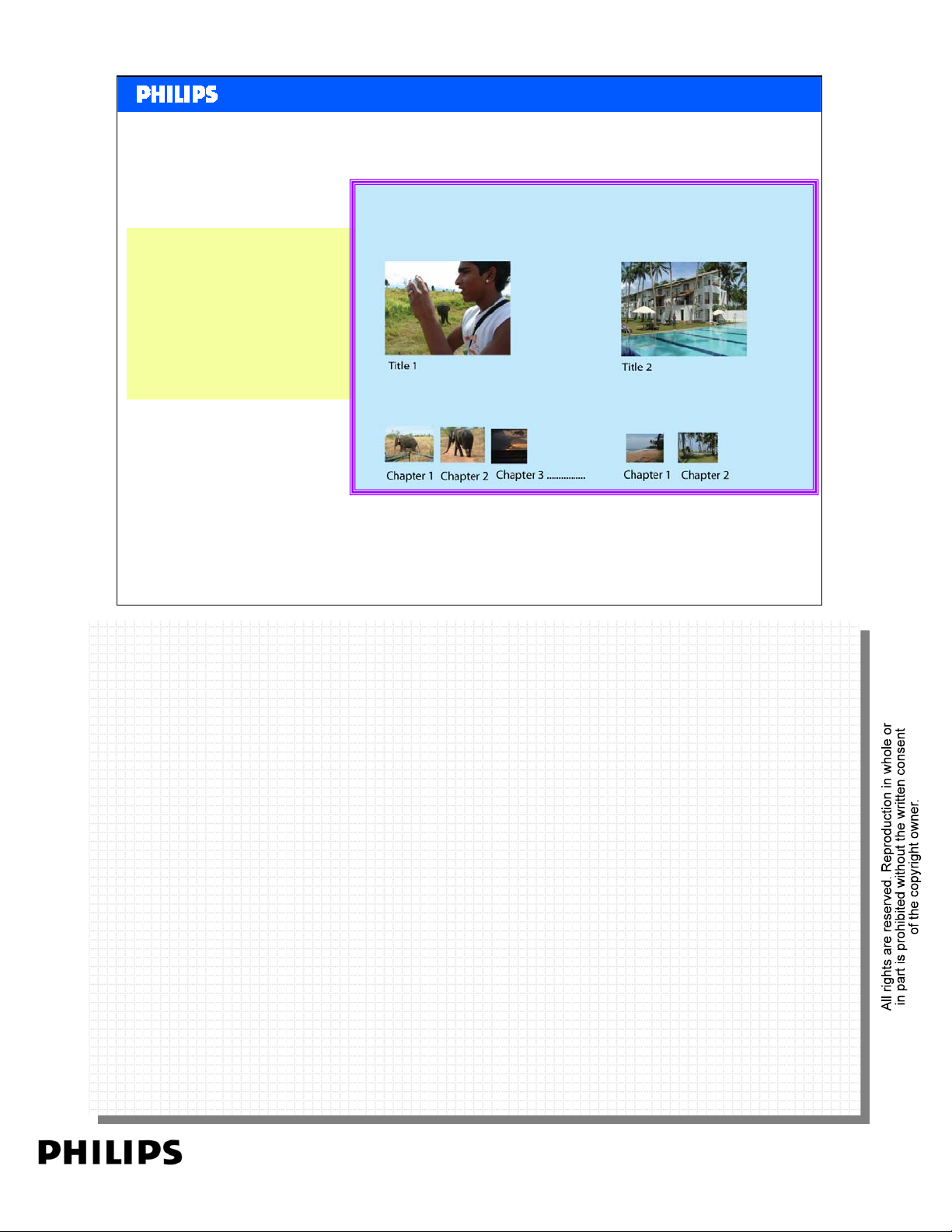
A disc can store more
titles (max99).
Each title can be
divided in more
chapters.
<< Basics DVD >>SERVICE TRAINING
<< Basics DVD >>
Start Menu
Philips CE Europe, Euroservice, Mai 2006
Basic DVD Slide 7
PERSONAL NOTES:
PERSONAL NOTES:
page: 7
Page 8
<< Basics DVD >>SERVICE TRAINING
<< Basics DVD >>
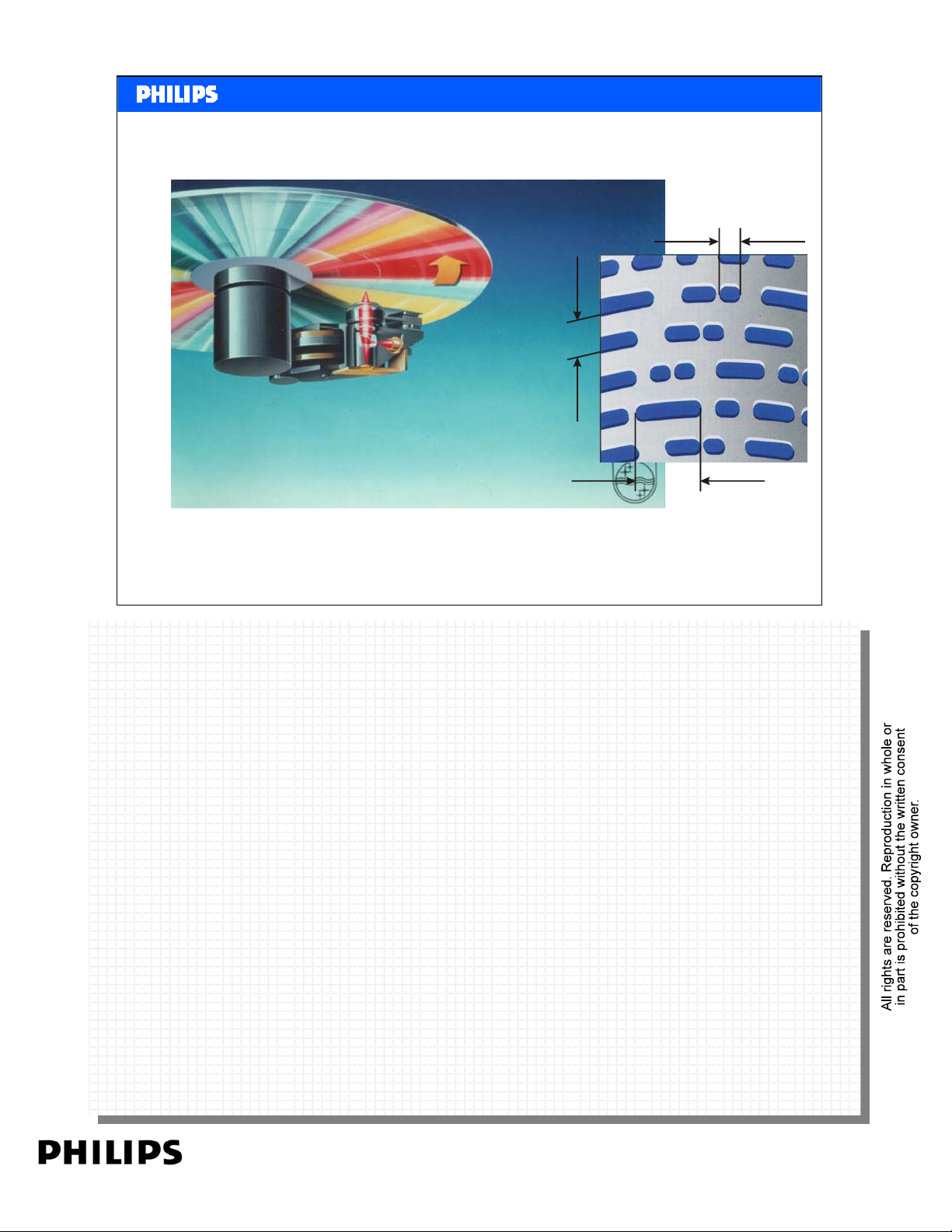
The basics of optical reading
1,6 µm
track pitch
3,054 µm max.
0,83 µm min.
Philips CE Europe, Euroservice, Mai 2006
During production, millions of “pits” are embossed in a reflective layer. For a
During production, millions of “pits” are embossed in a reflective layer. For a
CD the length of a pit is between 0.83µm and 3.054 µm. (A human hear is
CD the length of a pit is between 0.83µm and 3.054 µm. (A human hear is
between 40 and 60 µm).
between 40 and 60 µm).
A laser beam is focused to the layer. Because of the reflective layer the beam
A laser beam is focused to the layer. Because of the reflective layer the beam
reflects to the laser unit. Because of the embossed pits, the reflected signal is
reflects to the laser unit. Because of the embossed pits, the reflected signal is
interrupted every time there is a pit on the disc. This means Signal or No
interrupted every time there is a pit on the disc. This means Signal or No
signal.
signal.
The total information flow contains signal or no signal, meaning a digital bit or
The total information flow contains signal or no signal, meaning a digital bit or
no bit.
no bit.
Example: 100111010001011101000010111100011110010101
Example: 100111010001011101000010111100011110010101
Basic DVD Slide 8
PERSONAL NOTES:
PERSONAL NOTES:
page: 8
Page 9
<< Basics DVD >>SERVICE TRAINING
<< Basics DVD >>
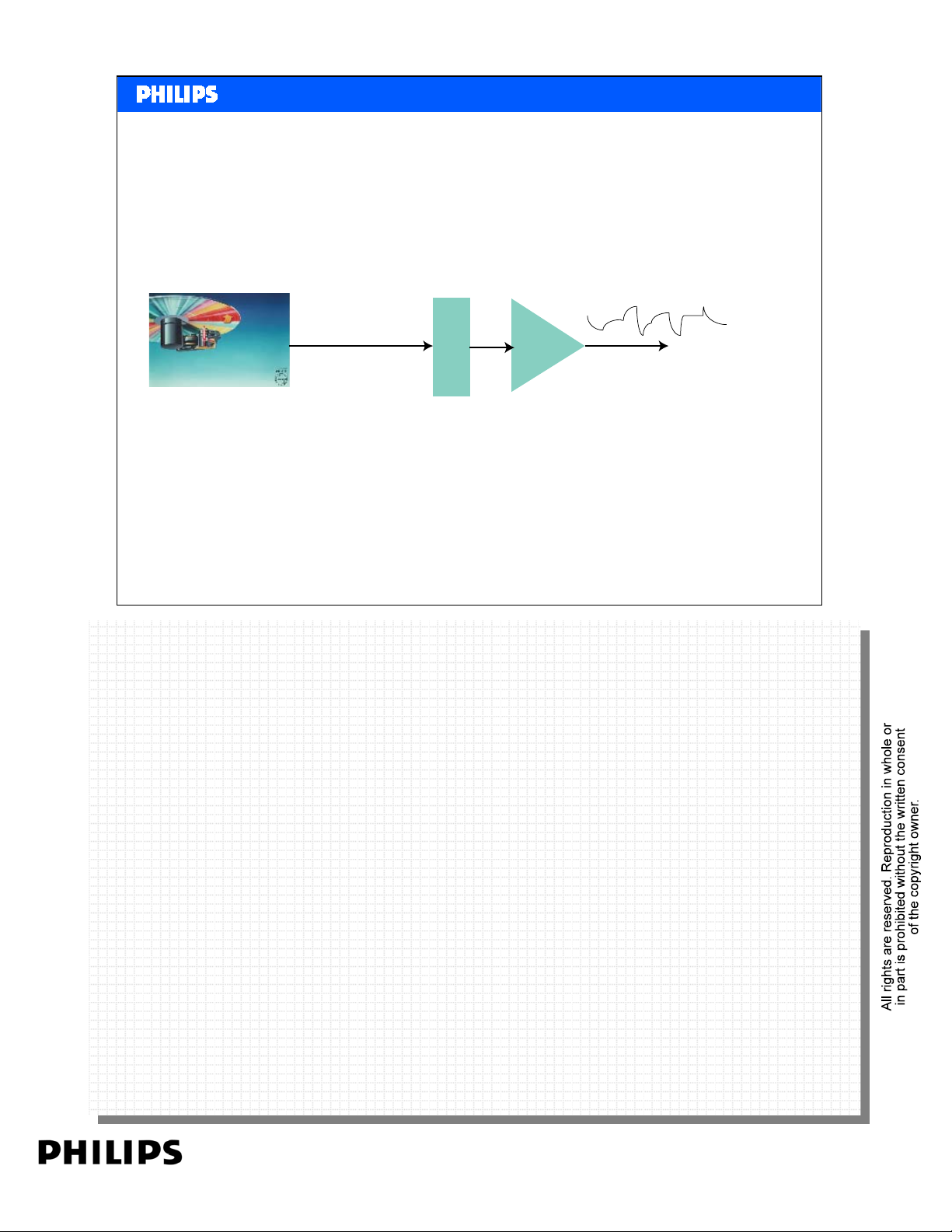
Reading the CD Signal
Signa l from CD
10010100010101
CD Decoder
Chip
Philips CE Europe, Euroservice, Mai 2006
When reading the CD with the laser, the laser unit delivers only the bits as
When reading the CD with the laser, the laser unit delivers only the bits as
they are embossed on the CD. This Is a very complex data signal, including
they are embossed on the CD. This Is a very complex data signal, including
error correction etc. An chip inside the player analyses the signal and convert
error correction etc. An chip inside the player analyses the signal and convert
it to the original digital signal as it was recorded in the studio. A chip DA
it to the original digital signal as it was recorded in the studio. A chip DA
(Digital to Analogue Converter ) makes again an analogue signal, ready to
(Digital to Analogue Converter ) makes again an analogue signal, ready to
connect to an amplifier.
connect to an amplifier.
A na logue s ignalto output
10010100010101
DA
Basic DVD Slide 9
PERSONAL NOTES:
PERSONAL NOTES:
page: 9
Page 10
<< Basics DVD >>SERVICE TRAINING
<< Basics DVD >>
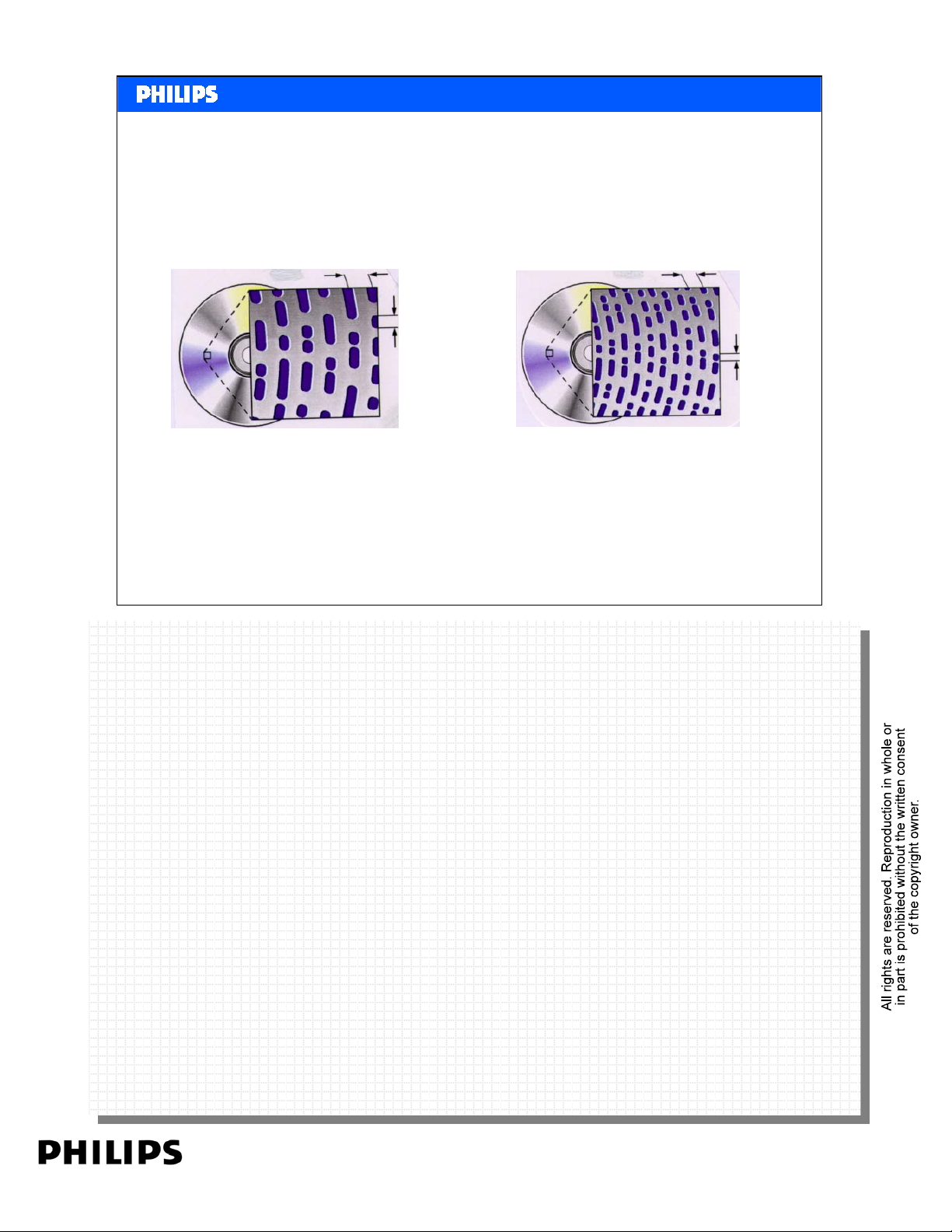
CD and DVD Compared
1,6 μm
0,74μm
0,83μm
0,4μ
m
CD DVD
Philips CE Europe, Euroservice, Mai 2006
Reading a CD is done with a infra red laser. By using a RED laser, the
Reading a CD is done with a infra red laser. By using a RED laser, the
wavelength is even smaller. This gives the opportunity to read out smaller pits
wavelength is even smaller. This gives the opportunity to read out smaller pits
compared with the CD. The DVD Disc has pits half the size of a CD. At the
compared with the CD. The DVD Disc has pits half the size of a CD. At the
same time the track is half the size. This increases the amount of data that can
same time the track is half the size. This increases the amount of data that can
be stored on the disc up to 4,7GBytes. (Per layer).
be stored on the disc up to 4,7GBytes. (Per layer).
Basic DVD Slide 10
PERSONAL NOTES:
PERSONAL NOTES:
page: 10
Page 11
<< Basics DVD >>SERVICE TRAINING
C
o
<< Basics DVD >>
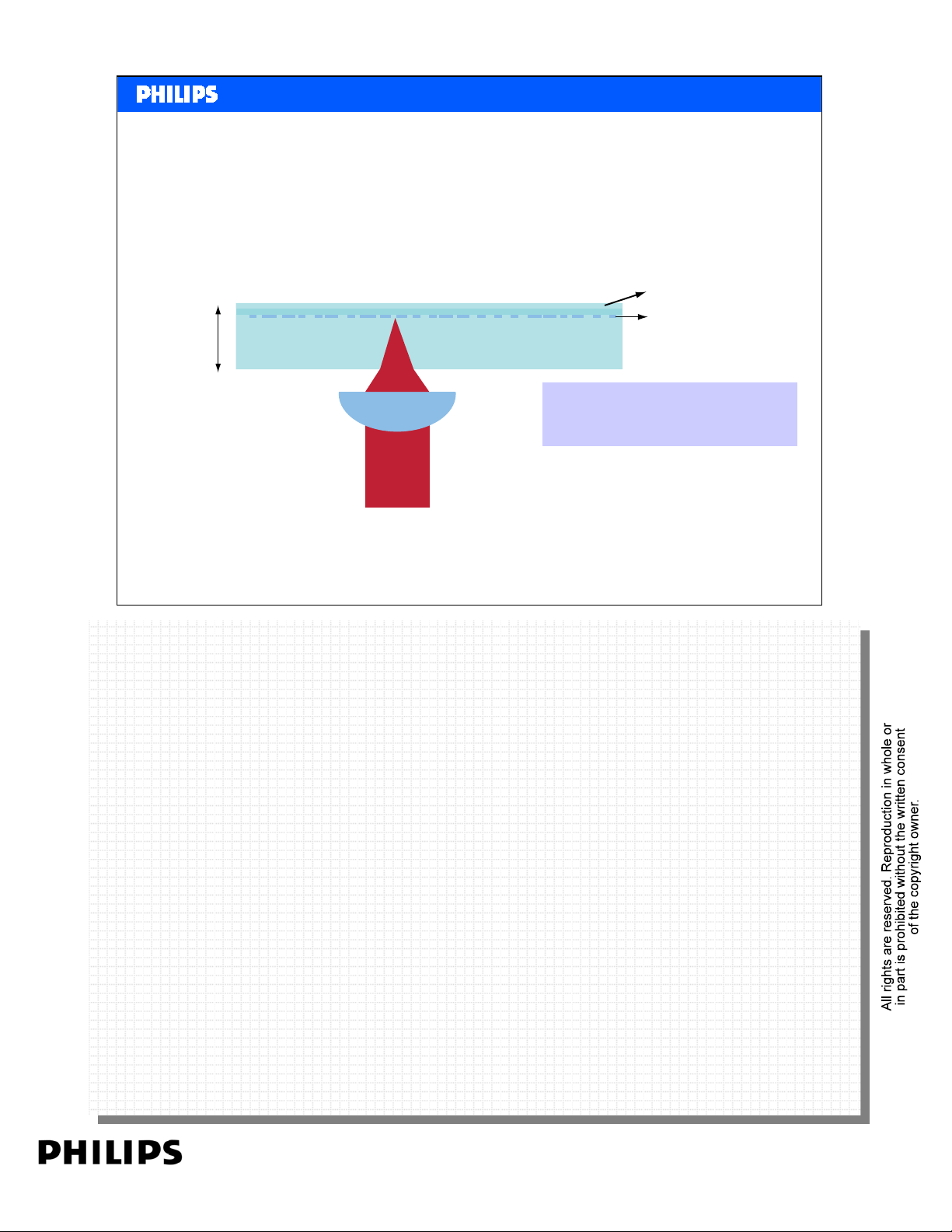
Physical
Specifications
Back to the basics of the CD
1.2mm
a ting and L a be l
Information Layer
Laser Beam
Philips CE Europe, Euroservice, Mai 2006
Lens
Information Layer is
just below the label!
Basic DVD Slide 11
PERSONAL NOTES:
PERSONAL NOTES:
page: 11
Page 12
<< Basics DVD >>SERVICE TRAINING
r
<< Basics DVD >>
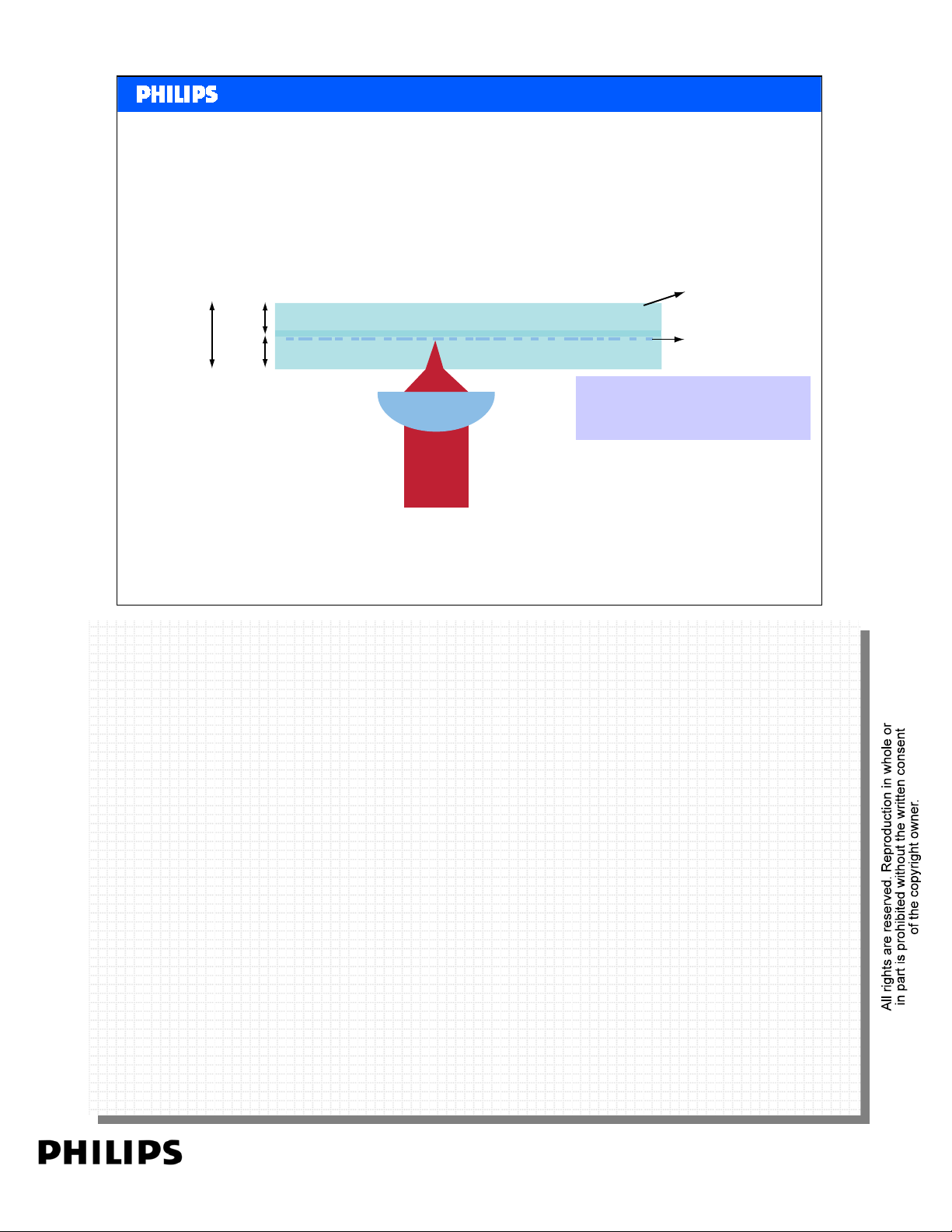
DVD Layout. Single Sided Single Layer
(SS/SL) or DVD-5
Label
1.2mm
0.6mm
0.6mm
Lens
Information Laye
Information Layer
in the middle!
Laser Beam
Single-sided, single-layer disc, having a maximum storage capacity
of 4.7 GBytes for a 12cm disc; playback time: about 133 minutes
Philips CE Europe, Euroservice, Mai 2006
Basic DVD Slide 12
PERSONAL NOTES:
PERSONAL NOTES:
page: 12
Page 13
<< Basics DVD >>SERVICE TRAINING
r
<< Basics DVD >>
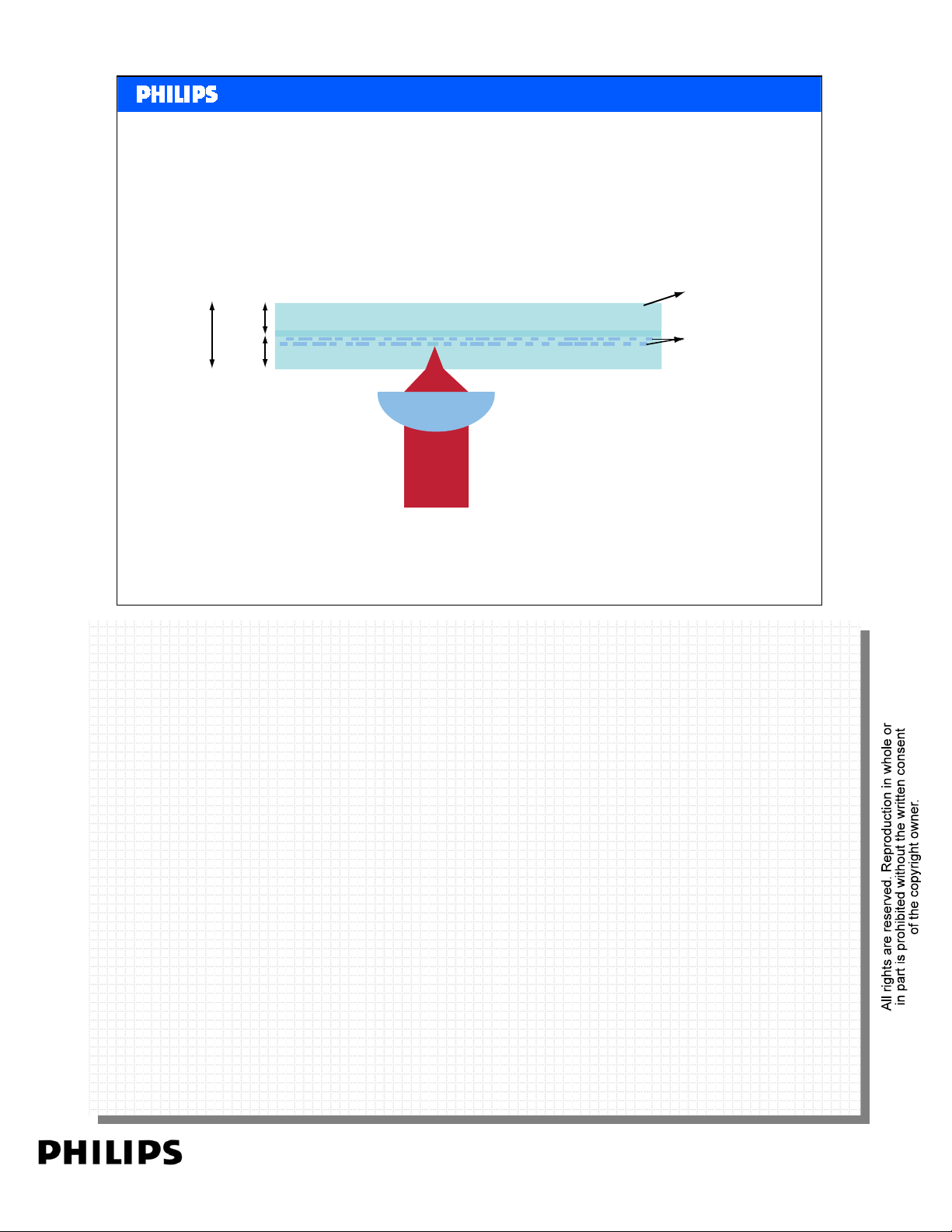
DVD9
DVD Layout. Single Sided Dual Layer
(SS/DL) or DVD-9
Label
1.2mm
0.6mm
Information Laye
0.6mm
Lens
Laser Beam
Single-sided, dual-layer disc, with a maximum storage capacity
of 8.5 GBytes; playback time: about 241 minutes
Philips CE Europe, Euroservice, Mai 2006
On a dual-layer disc, two information layers are separated by a thin space
On a dual-layer disc, two information layers are separated by a thin space
layer. The first layer (layer 0) is partially transparent, allowing the second
layer. The first layer (layer 0) is partially transparent, allowing the second
layer (layer 1) to be read out through layer 0. If the spacer thickness is much
layer (layer 1) to be read out through layer 0. If the spacer thickness is much
bigger than the focal depth of the imaging optics, both layers can be read out
bigger than the focal depth of the imaging optics, both layers can be read out
from the same side, and individual layers can be accessed by simply stepping
from the same side, and individual layers can be accessed by simply stepping
the focus of the lens.
the focus of the lens.
Basic DVD Slide 13
PERSONAL NOTES:
PERSONAL NOTES:
page: 13
Page 14
<< Basics DVD >>SERVICE TRAINING
s
c
<< Basics DVD >>
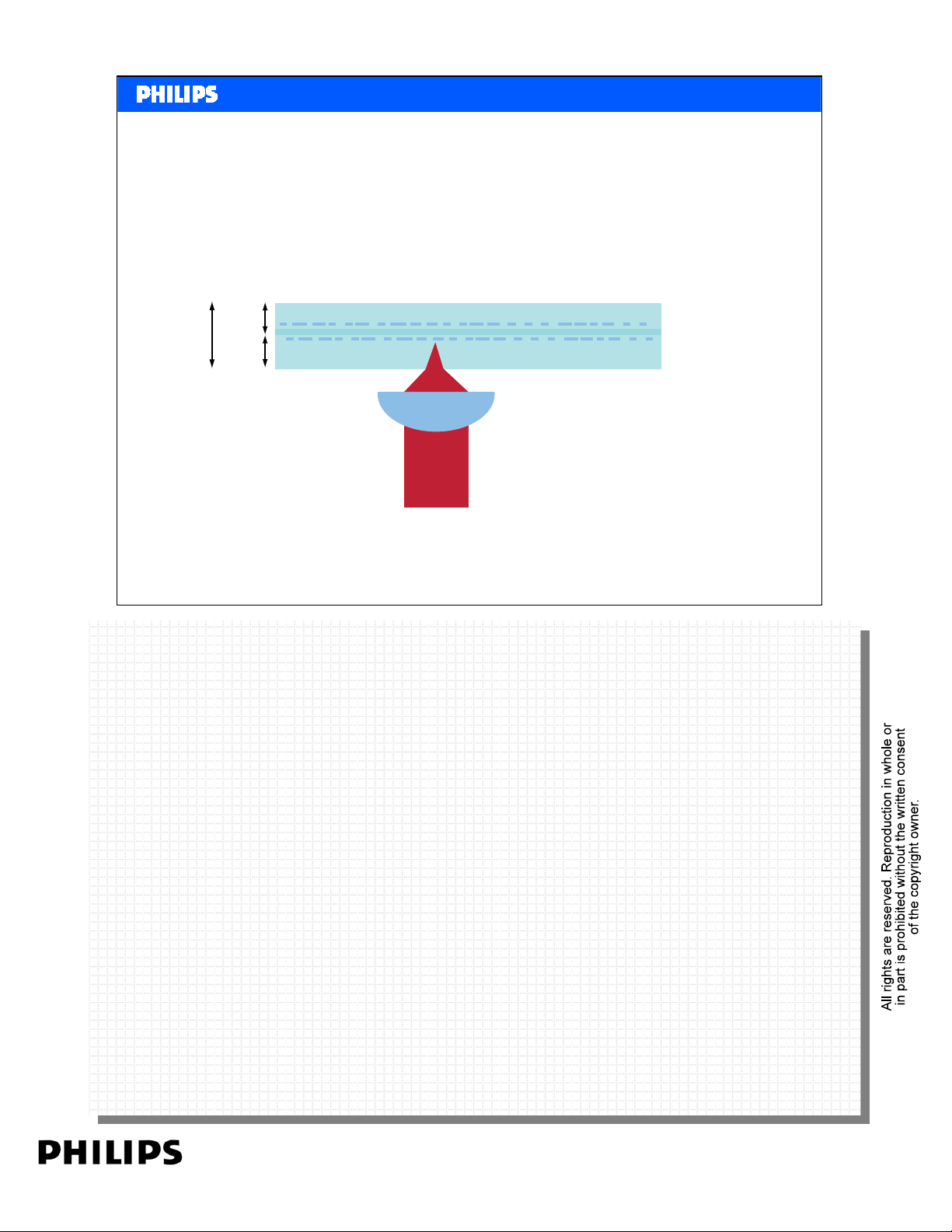
DVD10
DVD Layout. Dual Sided Single Layer
(DS/SL) or DVD-10
No Label!
1.2mm
0.6mm
Information Layer
0.6mm
Lens
Laser Beam
Double-sided, single-layer disc, having a maximum storage capa
of 9.4 GBytes; playback time: about 266 minutes
Philips CE Europe, Euroservice, Mai 2006
Basic DVD Slide 14
PERSONAL NOTES:
PERSONAL NOTES:
page: 14
Page 15
<< Basics DVD >>SERVICE TRAINING
s
<< Basics DVD >>
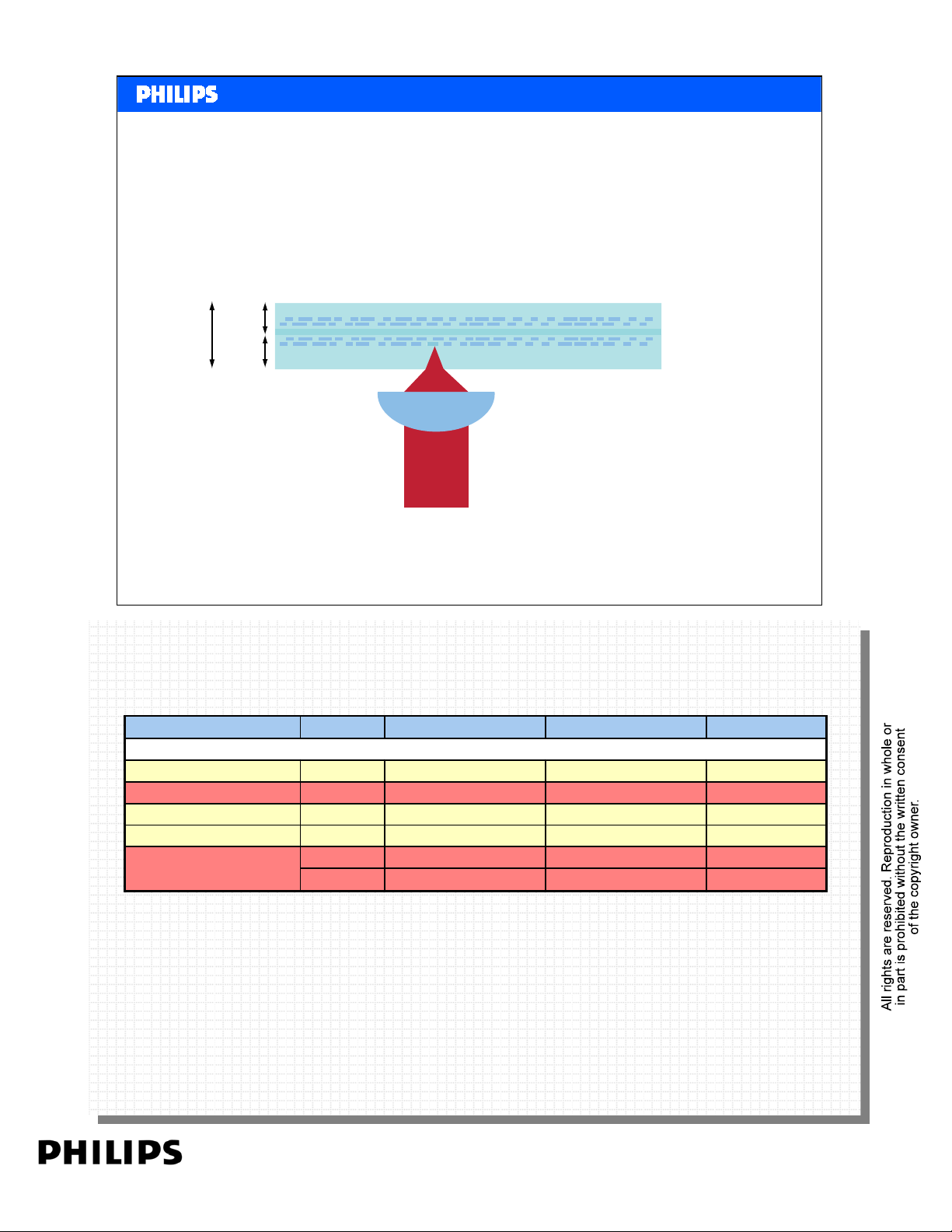
DVD Layout. Dual Sided Dual Layer
(DS/DL) or DVD-18
No Label!
DVD18
1.2mm
0.6mm
Information Layer
0.6mm
Lens
Laser Beam
Double-sided, dual-layer disc, with a maximum storage capacity
of over 17 GBytes; playback time: about 482 minutes
Philips CE Europe, Euroservice, Mai 2006
Parameter Units DVD CD remarks
Basic DVD Slide 15
thickness of substrat mm 0,6 1,2
disc thickness mm 1,2 1,2
disc weight gram 13 to 20 14 to 33 12 cm disc
thickness of spacing µm 40 to 70 - DL
layer in Dual Layer
PERSONAL NOTES:
PERSONAL NOTES:
gram 6 to 9 - 8 cm disc
page: 15
Page 16
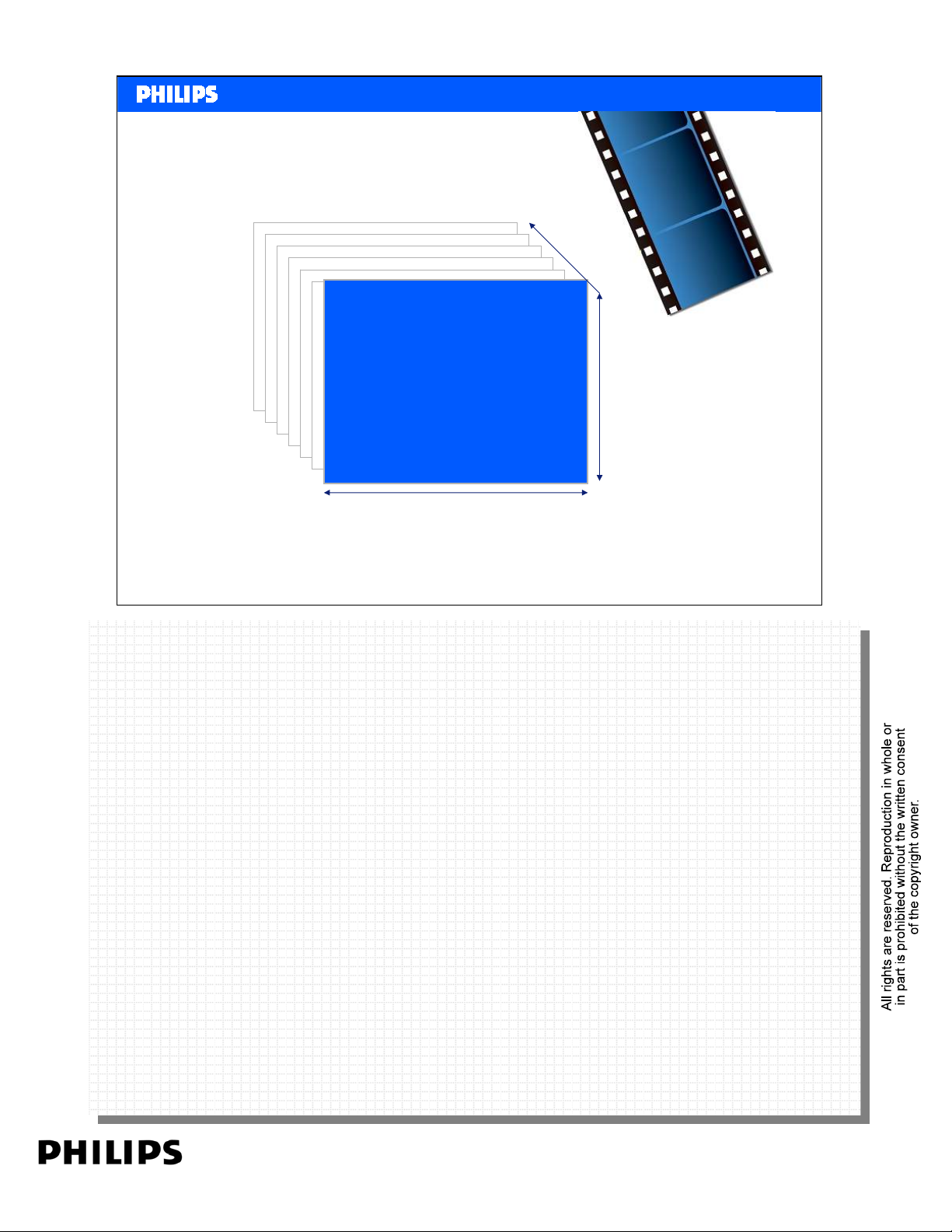
Resolution and frame rate
What is a video picture……
A video is a series of pictures played
back one after another.
A picture is made up of “pixels”.
A pixel is a tiny dot of color on the
screen.
The size of a video is the no. of
pixels on a row (width) by the no. of
pixels in Height e.g 640x480 means
640 pixels wide and 480 pixels high.
In video, a picture is called a Frame”
A picture appears to move by
quickly playing one Frame after
another. This is known as Frame per
Second.e.g. 30fps
Width
<< Basics DVD >>SERVICE TRAINING
<< Basics DVD >>
What is Video?
fps
Height
That’s why people talk about video in e.g. 640x480 at 30fps
Philips CE Europe, Euroservice, Mai 2006
Basic DVD Slide 16
PERSONAL NOTES:
PERSONAL NOTES:
page: 16
Page 17
<< Basics DVD >>SERVICE TRAINING
<< Basics DVD >>
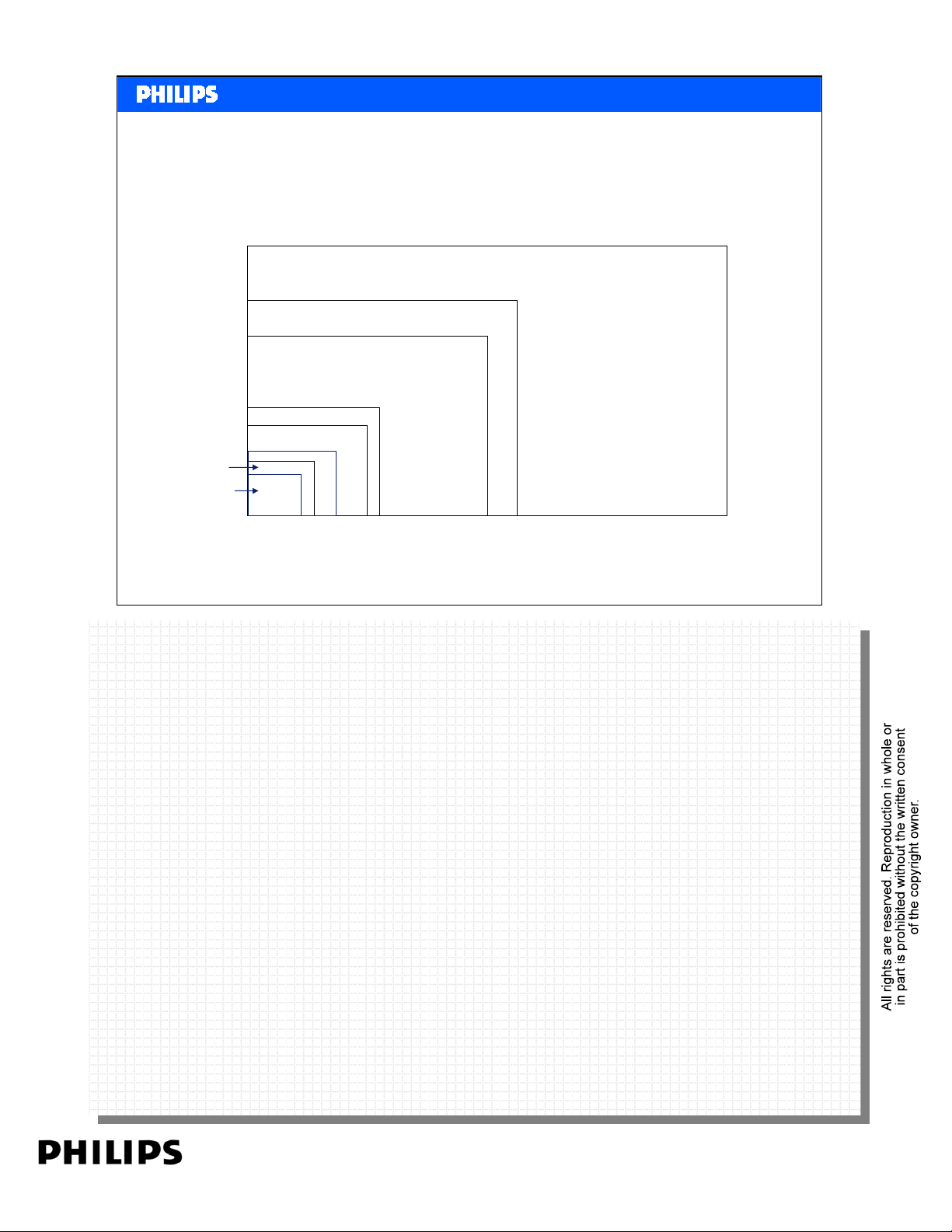
Video Resolution
Video resolutions
There are many different resolutions because of many uses of
video.….
HD: 1280 x 720
D1: 720 x 576 @ 25fps
D1: 720 x 480 @ 30fps
VGA: 640 x 480
CIF: 252 x 288
QVGA: 320 x 240
QCIF: 176 x 144
QQVGA: 160 x 128
QCIF+: 220 x 176
Philips CE Europe, Euroservice, Mai 2006
Basic DVD Slide 17
PERSONAL NOTES:
PERSONAL NOTES:
page: 17
Page 18

<< Basics DVD >>SERVICE TRAINING
<< Basics DVD >>
Video Technologies
Video technologies
The information in a video file is stored in a special
format. Each format tries to store the information
in more compact way. The more compact the file,
the smaller the file size, the more you can fit onto
a disc or other medium. However very compact
files are more complex to play and need higher
processing power from the player.
The most popular video format is called MPEG.
This format is owned by the Motion Picture Experts
Group - an industry consortium.
Philips CE Europe, Euroservice, Mai 2006
Basic DVD Slide 18
PERSONAL NOTES:
PERSONAL NOTES:
page: 18
Page 19
<< Basics DVD >>SERVICE TRAINING
<< Basics DVD >>
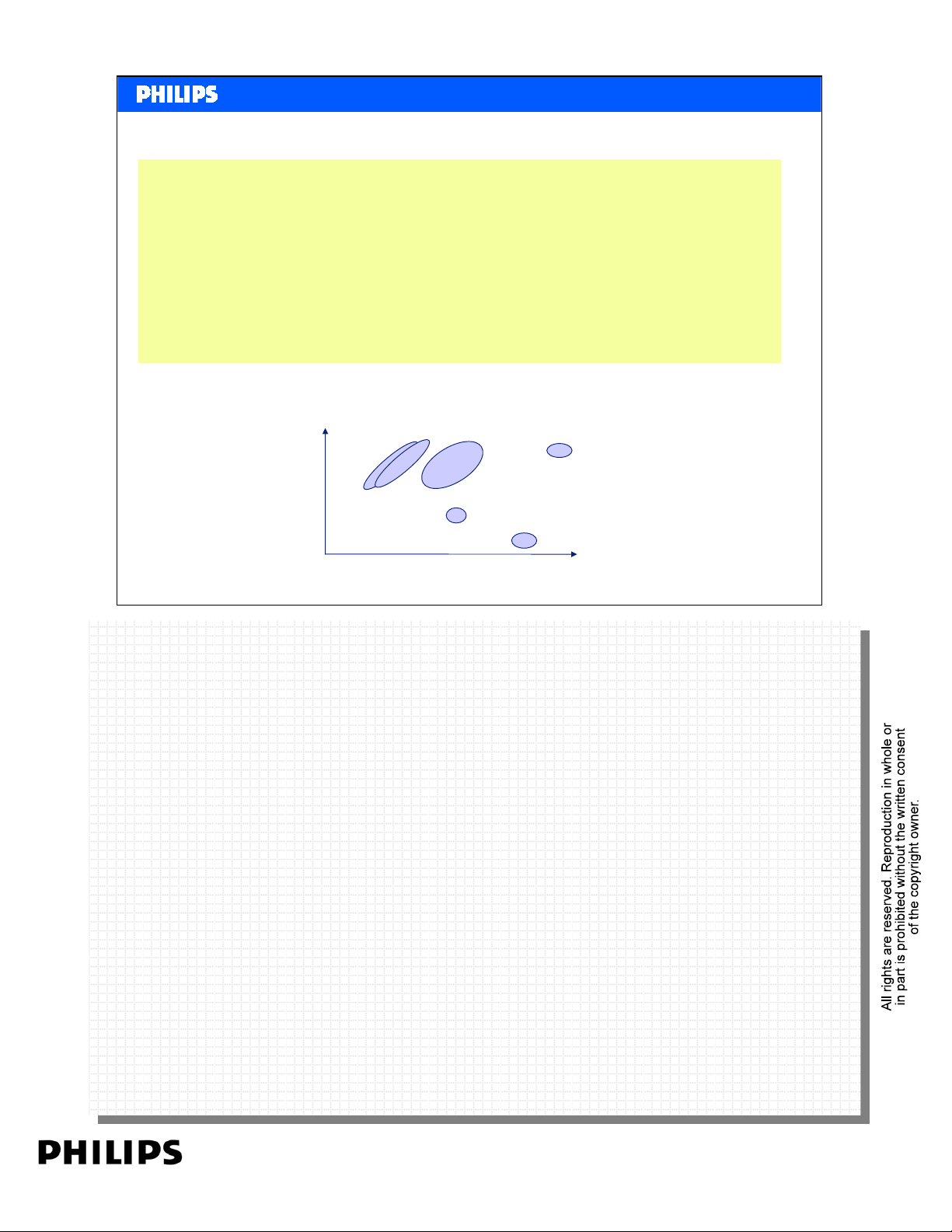
Video Technologies
Video technologies
Motion JPEG: Very easy to create and playback also ideal for editing
MPEG1: An old standard, QVGA (low resolution 320x240), used to store video on a CD
MPEG2: The DVD standard and is also widely used in digital video broadcasting (called
MPEG3: Originally designed as “High Definition” but MPEG2 was so good it was eventually
MPEG4: Originally designed for video telephony but has become so good it will replace
H264 (AVC): This also had its roots in video telephony and represents the state of the art for
WMV (VC-1): Microsoft Video Technology comparable to the MPEG H264 performance
(Video CD)
DVB)
cancelled
MPEG2
compression. H264 are the smallest files and therefore the most difficult to play
back
Quality
Philips CE Europe, Euroservice, Mai 2006
H264
/
WMV
MPEG-4
MPEG-1
File size
MPEG-2
Motion JPEG
Basic DVD Slide 19
PERSONAL NOTES:
PERSONAL NOTES:
page: 19
Page 20

<< Basics DVD >>SERVICE TRAINING
<< Basics DVD >>
File Formats
File formats
A file is actually a container. Normally it just stores your text (or your PowerPoint
etc.) However, video files store both the images (frames) and the audio and both
need to be linked to make sure that the audio plays back in time with the video.
There are many containers
- AVI the most widely used format for portable devices
- AVS special version to allow accurate streaming of video over a network.
- MOV Widely used by Apple as their “Quicktime” format
- MP2 Used for MPEG2 files
- VOB Used for MPEG2 files as stored on a DVD
- MP4 File format specified by MPEG consortium for MPEG 4 / H264 video
- WMV Microsoft media container for video files
Because a video file contains both video and audio information which can both be in
multiple formats, two files that both have the same extension e.g. .avi may contain
different combinations of audio and video formats and resolutions.
So if you have two files with the same extension (for example .avi) a situation may
occur where only one of them can be played back by the device while the other
cannot.
Philips CE Europe, Euroservice, Mai 2006
Basic DVD Slide 20
PERSONAL NOTES:
PERSONAL NOTES:
page: 20
Page 21
<< Basics DVD >>SERVICE TRAINING
<< Basics DVD >>
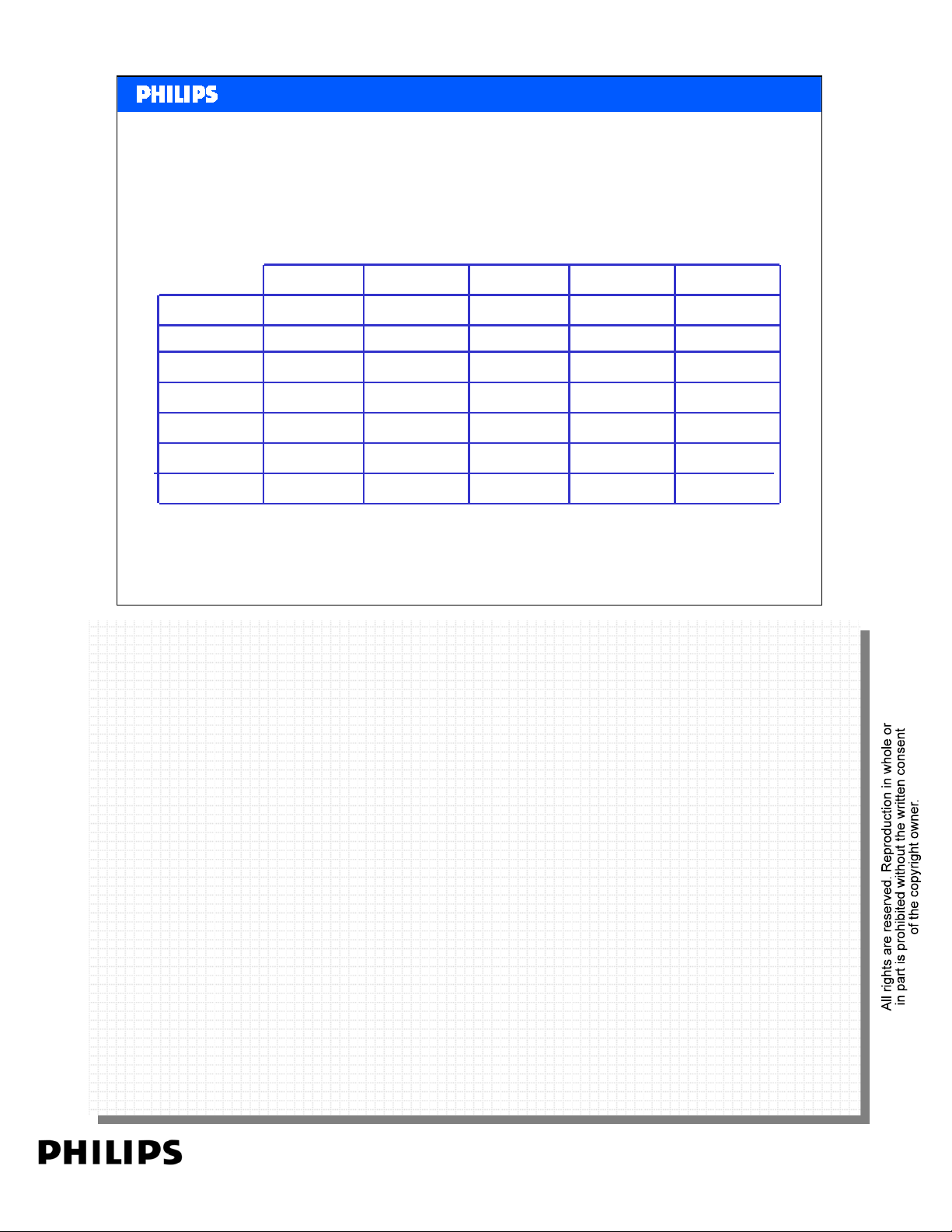
Comparison between different
qualities
DVD Video
Horizontal
resolution
Vertical
resolution
Programme
length
Coding
Speed
Audio Samp.
frequency
Audio
Philips CE Europe, Euroservice, Mai 2006
720 lines 240 lines 400 lines 430 lines 288 lines
576 lines 576 lines 576 lines 576 lines 352 lines
135 min * 240 min 180 min 60 min 74 min
1-10 Mbits/s n.a. n.a n.a. 1.44 Mbits/s
96 kHz
20 bit 20 bit
8 channels 1/2 channels 1/2 channels 2 channels
VHS S-VHS Laserdisc Video CD
analogue
n.a. n.a.n.a.
analogueanalogue MPEG IMPEG 2
stereo or
2 channel5.1 / 7.1 stereo / HiFi stereo / HiFi CD audio
Basic DVD Slide 21
96 kHz
PERSONAL NOTES:
PERSONAL NOTES:
page: 21
Page 22

<< Basics DVD >>SERVICE TRAINING
<< Basics DVD >>
The DVD signal.
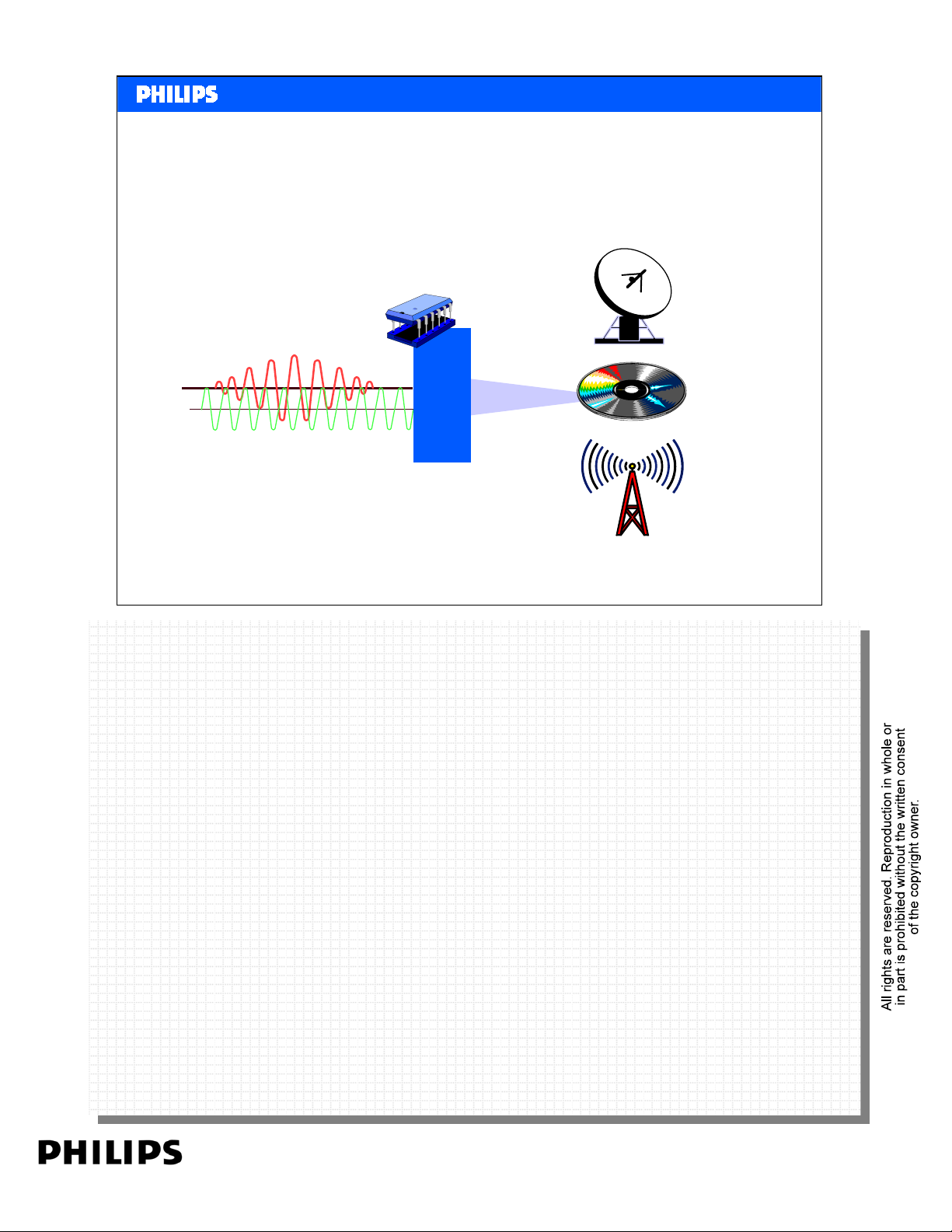
•What is MPEG2?
When converting a analogue video signal to a digital
signal (only 1 or 0) the amount of data is huge.
Even a DVD disc with 4,7GBytes can only store a
few minutes of a movie.
The Motion Picture Expert Group developed
compression Techniques to reduce the file size
enormous.
Philips CE Europe, Euroservice, Mai 2006
Basic DVD Slide 22
PERSONAL NOTES:
PERSONAL NOTES:
page: 22
Page 23
MPEG2
<< Basics DVD >>SERVICE TRAINING
<< Basics DVD >>
011100100101011
Encodin
g
Philips CE Europe, Euroservice, Mai 2006
Basic DVD Slide 23
PERSONAL NOTES:
PERSONAL NOTES:
page: 23
Page 24

<< Basics DVD >>SERVICE TRAINING
<< Basics DVD >>
Basics MPEG
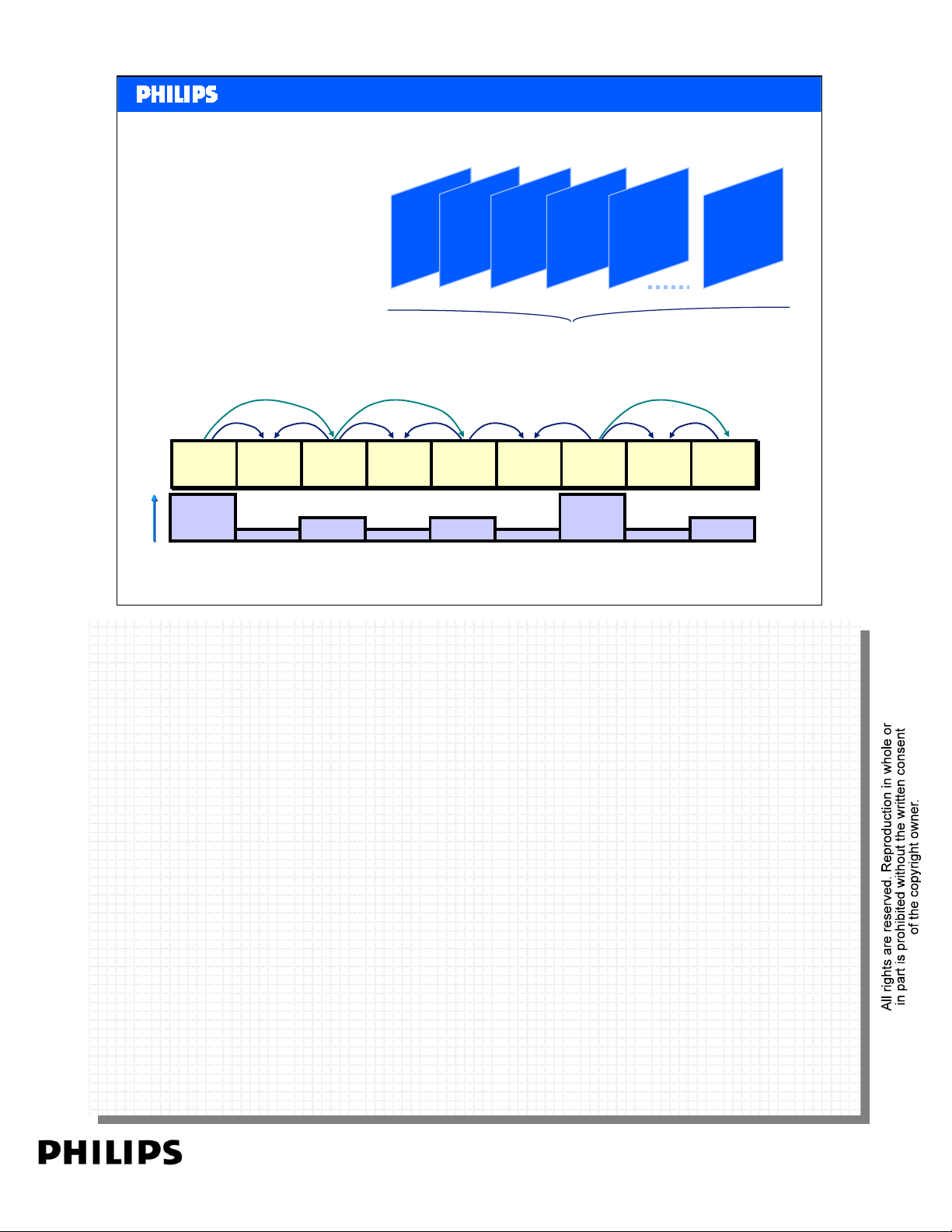
The power of the digital compression is:
• deleting the content we can not observe.
• Use only the differences of next frames
and do not encode every frame again.
Philips CE Europe, Euroservice, Mai 2006
Basic DVD Slide 24
PERSONAL NOTES:
PERSONAL NOTES:
page: 24
Page 25
Basics MPEG
Picture progression
I
<< Basics DVD >>SERVICE TRAINING
<< Basics DVD >>
B
IP B P
Group Of Pictures
I
I
I
Relative size of MPEG frames
Relative size of MPEG frames
Philips CE Europe, Euroservice, Mai 2006
Compression technique:
Compression technique:
The running movie frames are grouped in blocks. Mostly 12 frames in one
The running movie frames are grouped in blocks. Mostly 12 frames in one
group:
group:
Group of Pictures. (GOP)
Group of Pictures. (GOP)
B
B
B
P
P
P
B
B
B
P
P
P
B
B
B
I
I
I
B
B
B
P
Basic DVD Slide 25
P
P
PERSONAL NOTES:
PERSONAL NOTES:
page: 25
Page 26
B lock 8 x 8 pixels
Ma cro B lock
<< Basics DVD >>SERVICE TRAINING
<< Basics DVD >>
Philips CE Europe, Euroservice, Mai 2006
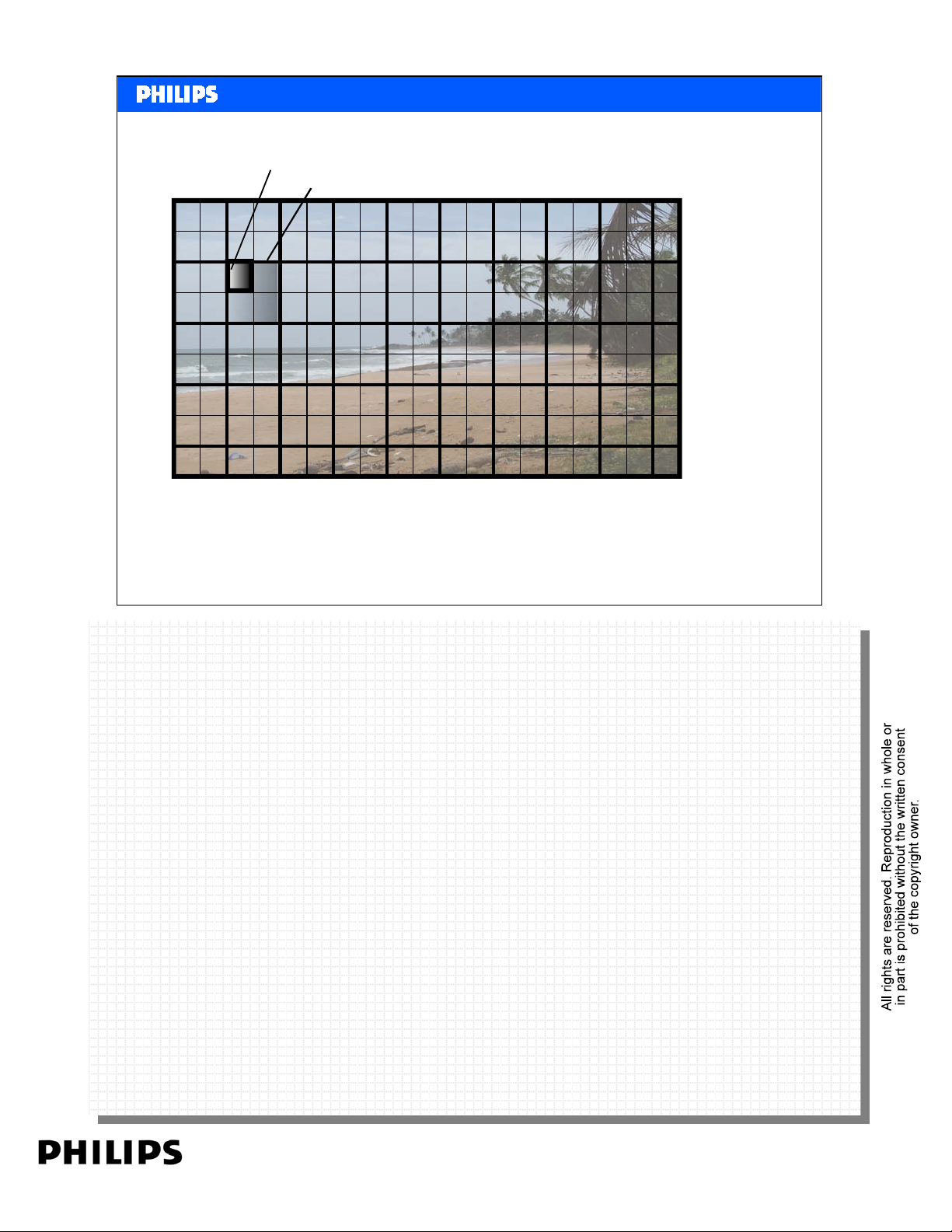
Compression starts with the first frame. This frame is divided into blocks of
Compression starts with the first frame. This frame is divided into blocks of
8x8 pixels.
8x8 pixels.
Every block is encoded. At the same time the frame is divided into blocks of
Every block is encoded. At the same time the frame is divided into blocks of
16x16 pixels. These are the Macro Blocks. The first frame is the I frame: Intra
16x16 pixels. These are the Macro Blocks. The first frame is the I frame: Intra
Coded Picture.
Coded Picture.
Some frames in the GOP are P frames. (Predicted Frames).
Some frames in the GOP are P frames. (Predicted Frames).
To encode these frames only the movements of the macro blocks are encoded,
To encode these frames only the movements of the macro blocks are encoded,
compared with the previous frame.
compared with the previous frame.
To give even a higher compression, between the P frames B frames are added.
To give even a higher compression, between the P frames B frames are added.
(Bi Directional Frames.) The content of these frames depend on previous AND
(Bi Directional Frames.) The content of these frames depend on previous AND
coming frames.
coming frames.
Basic DVD Slide 26
PERSONAL NOTES:
PERSONAL NOTES:
page: 26
Page 27

<< Basics DVD >>SERVICE TRAINING
<< Basics DVD >>
Audio on the DVD
A DVD-Video disc can have up to 8 audio tracks (streams)
associated with each video track (or each video angle).
Each audio track can be in one of three formats:
• Dolby Digital (AC-3): 1 to 5.1 channels
• MPEG-2 audio: 1 to 5.1 or 7.1 channels
• PCM: 1 to 8 channels
An optional format provided: DTS.
DTS require the appropriate decoder and is not supported
by all players! DTS is available at the digital audio output
(optional).
Philips CE Europe, Euroservice, Mai 2006
Linear PCM is uncompressed (lossless) digital audio, the same format used on CDs and most studi o
Linear PCM is uncompressed (lossless) digital audio, the same format used on CDs and most studi o
masters. It can be sampled at 48 or 96 kHz with 16, 20, or 24 bits/sample. (Audio CD is limited to 44.1
masters. It can be sampled at 48 or 96 kHz with 16, 20, or 24 bits/sample. (Audio CD is limited to 44.1
kHz at 16 bits.) There can be from 1 to 8 channels. The maximum bit rate is 6.144 Mbps, which limits
kHz at 16 bits.) There can be from 1 to 8 channels. The maximum bit rate is 6.144 Mbps, which limits
sample rates and bit sizes when there are 5 or more channels. It's generally felt that the 120 dB dynamic
sample rates and bit sizes when there are 5 or more channels. It's generally felt that the 120 dB dynamic
range of 20 bits combined with a frequency response of around 22,000 Hz from 48 kHz sampling is
range of 20 bits combined with a frequency response of around 22,000 Hz from 48 kHz sampling is
adequate for high-fidelity sound reproduction. However, additional bits and higher sampling rates are
adequate for high-fidelity sound reproduction. However, additional bits and higher sampling rates are
useful in audiophile applications, studio work, noise shaping, advanced digital processing, and three-
useful in audiophile applications, studio work, noise shaping, advanced digital processing, and three-
dimensional sound field reproduction. DVD players are required to support all the variations of LPCM, but
dimensional sound field reproduction. DVD players are required to support all the variations of LPCM, but
many subsample 96 kHz down to 48 kHz, and some may not use all 20 or 24 bits. The signal provided on
many subsample 96 kHz down to 48 kHz, and some may not use all 20 or 24 bits. The signal provided on
the digital output for external digital-to-analog co nverters may be limited to less than 96 kHz and less
the digital output for external digital-to-analog co nverters may be limited to less than 96 kHz and less
than 24 bits.
than 24 bits.
Dolby Digital is multi-channel digital audio, using lossy AC-3 coding technology from PCM source with a
Dolby Digital is multi-channel digital audio, using lossy AC-3 coding technology from PCM source with a
sample rate of 48 kHz at up to 24 bits. The bitrate is 64 kbps to 448 kbps, with 384 or 448 being the
sample rate of 48 kHz at up to 24 bits. The bitrate is 64 kbps to 448 kbps, with 384 or 448 being the
normal rate for 5.1 channels and 192 being the typical rate for stereo (with or without surround
normal rate for 5.1 channels and 192 being the typical rate for stereo (with or without surround
encoding). The channel c ombinations are (front/surro und): 1/0, 1+1/0 (dual mono), 2/ 0, 3/0, 2/1, 3/1,
encoding). The channel c ombinations are (front/surro und): 1/0, 1+1/0 (dual mono), 2/ 0, 3/0, 2/1, 3/1,
2/2, and 3/2. The LFE channel is option al with all 8 combinations. Dolby Digital is the format used for
2/2, and 3/2. The LFE channel is option al with all 8 combinations. Dolby Digital is the format used for
audio tracks on almost all DVDs.
audio tracks on almost all DVDs.
MPEG audio is multi-channel digital audio, using lossy compression from original PCM format with
MPEG audio is multi-channel digital audio, using lossy compression from original PCM format with
sample rate of 48 kHz at 16 or 20 bits. Both MPEG-1 and MPEG-2 formats are supported. The variable bit
sample rate of 48 kHz at 16 or 20 bits. Both MPEG-1 and MPEG-2 formats are supported. The variable bit
rate is 32 kbps to 912 kbps, with 384 being the normal average rate. MPEG-1 is limited to 384 kbps.
rate is 32 kbps to 912 kbps, with 384 being the normal average rate. MPEG-1 is limited to 384 kbps.
Channel combinations are (front/surround): 1/0, 2/0, 2/1, 2/2, 3/0, 3/1, 3/2, and 5/2. The LFE channel
Channel combinations are (front/surround): 1/0, 2/0, 2/1, 2/2, 3/0, 3/1, 3/2, and 5/2. The LFE channel
is optional with all combinations. The 7.1 channel format adds left-center and right-center channels..
is optional with all combinations. The 7.1 channel format adds left-center and right-center channels..
MPEG-2 surround channels are in an extension stream matrixed onto the MPEG-1 stereo channels, which
MPEG-2 surround channels are in an extension stream matrixed onto the MPEG-1 stereo channels, which
makes MPEG-2 audio backwards compatible with MPEG-1 hardware (an MPEG-1 system will only see the
makes MPEG-2 audio backwards compatible with MPEG-1 hardware (an MPEG-1 system will only see the
two stereo channels.) MPEG audio is not used much on DVDs, although some inexpensive DVD recording
two stereo channels.) MPEG audio is not used much on DVDs, although some inexpensive DVD recording
software programs use MPEG audio, even on NTSC discs, which goes against the DVD standard and is not
software programs use MPEG audio, even on NTSC discs, which goes against the DVD standard and is not
supported by all NTSC players.
PERSONAL NOTES:
PERSONAL NOTES:
supported by all NTSC players.
DTS (Digital Theater Systems) Digital Surround is an optional multi-channel digital audio format, using
DTS (Digital Theater Systems) Digital Surround is an optional multi-channel digital audio format, using
lossy compression from PCM at 48 kHz at up to 24 bits. The data rate is from 64 kbps to 1536 kbps, with
lossy compression from PCM at 48 kHz at up to 24 bits. The data rate is from 64 kbps to 1536 kbps, with
typical rates of 754.5 and 1509.25 for 5.1 channels and 377 or 754 for 2 channels. DVD also doe s not
typical rates of 754.5 and 1509.25 for 5.1 channels and 377 or 754 for 2 channels. DVD also doe s not
allow DTS sampling rates other than 48 kHz.). Channel combina tions are (front/surround): 1/0, 2/0, 3/0,
allow DTS sampling rates other than 48 kHz.). Channel combina tions are (front/surround): 1/0, 2/0, 3/0,
2/1, 2/2, 3/2. a Dolby Surround EX compatible matrixed rear center channel, 2) a discrete 7th channel.
2/1, 2/2, 3/2. a Dolby Surround EX compatible matrixed rear center channel, 2) a discrete 7th channel.
DTS also has a 7.1-channel mode (8 discrete channels). The 7-channel and 8-channel modes require a
DTS also has a 7.1-channel mode (8 discrete channels). The 7-channel and 8-channel modes require a
new decoder. The DVD standard includes an audio stream format reserved for DTS, but many older
new decoder. The DVD standard includes an audio stream format reserved for DTS, but many older
players ignore it.
players ignore it.
Basic DVD Slide 27
page: 27
Page 28
Copy Protection
<< Basics DVD >>SERVICE TRAINING
<< Basics DVD >>
I like to copy you
Sorry I am
protected!
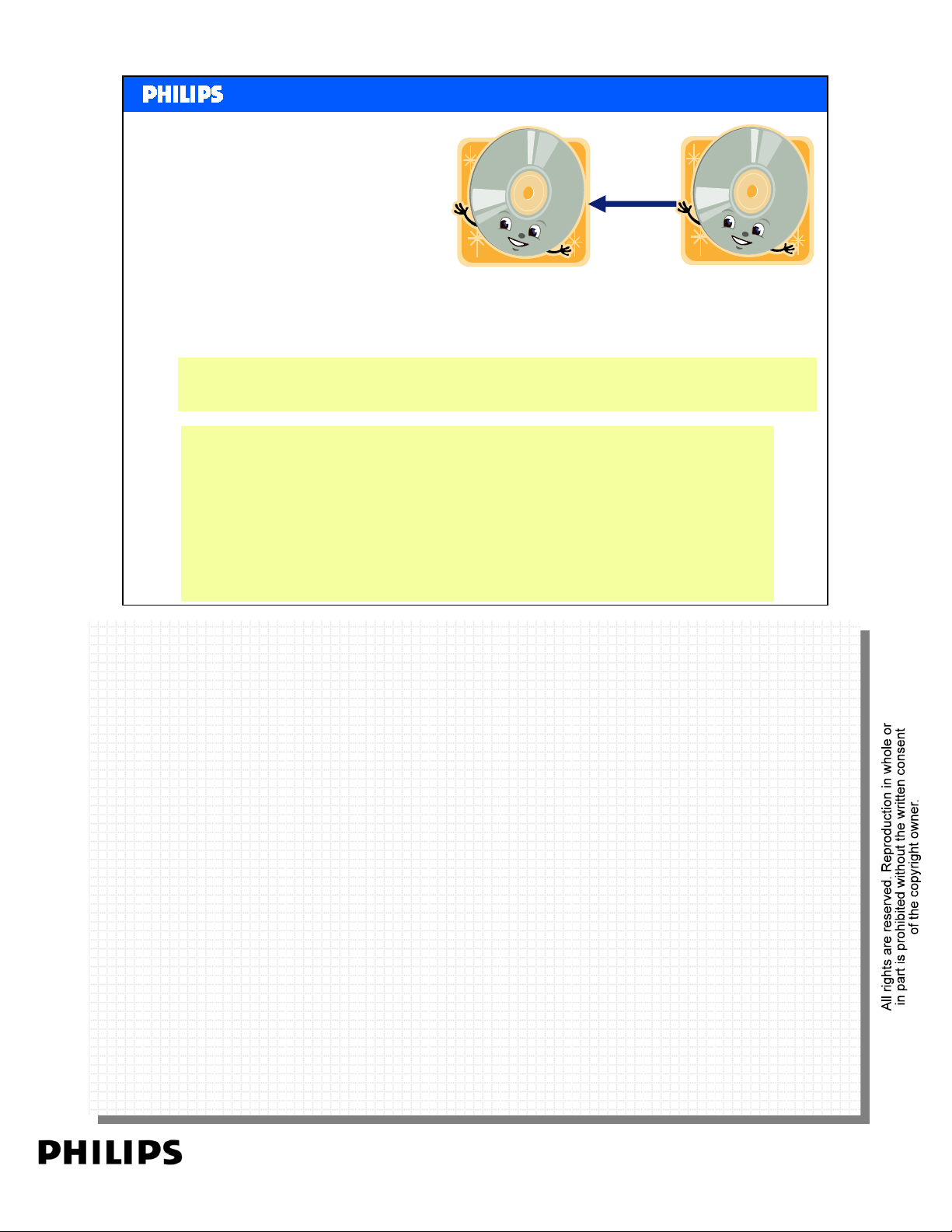
There are many forms of content protection that apply to DVD
In order to protection of analog and digital outputs, and so on.
Read the notes page in the training manual for:
CGMS
Macrovision
Content Scramble System (CSS)
Philips CE Europe, Euroservice, Mai 2006
CGMS
CGMS
Each disc contains information specifying if the contents can be copied. This is a copy
Each disc contains information specifying if the contents can be copied. This is a copy
management system (SCMS) designed to prevent initial copies or generational copies (copies
management system (SCMS) designed to prevent initial copies or generational copies (copies
of copies). The CGMS information is embedded in the outgoing video signal. For CGMS to
of copies). The CGMS information is embedded in the outgoing video signal. For CGMS to
work, the equipment making the copy must recognize and respect the CGMS information.
work, the equipment making the copy must recognize and respect the CGMS information.
CGMS-A is recognized by recorders and by some computer video capture cards (they will flash
CGMS-A is recognized by recorders and by some computer video capture cards (they will flash
a message such as "recording inhibited .
a message such as "recording inhibited .
Basic DVD Slide 28
Analog CPS (Macrovision)
Analog CPS (Macrovision)
Videotape (analog) copying is prevented with a Macrovision 7.0 or similar circuit in every
Videotape (analog) copying is prevented with a Macrovision 7.0 or similar circuit in every
player. Macrovision may show up as stripes of color, distortion, rolling, black & white picture,
player. Macrovision may show up as stripes of color, distortion, rolling, black & white picture,
and dark/light cycling.
and dark/light cycling.
Macrovision changes the composite video and s-video output in two ways: the Colorstripe
Macrovision changes the composite video and s-video output in two ways: the Colorstripe
technique creates a rapidly modulated colorburst signal, and the AGC t echnique inserts pulses
technique creates a rapidly modulated colorburst signal, and the AGC technique inserts pulses
in the vertical blanking signal. This confuses the synchronization and auto matic-recording-
in the vertical blanking signal. This confuses the synchronization and auto matic-recording-
level circuitry in 95% of consumer VCRs. Unfortunately, it can degrade the picture, especially
level circuitry in 95% of consumer VCRs. Unfortunately, it can degrade the picture, especially
with old or nonstandard equipment. Macrovision was not present on analog component video
with old or nonstandard equipment. Macrovision was not present on analog component video
output of early players, but is now required on component output (AGC only, since there is no
output of early players, but is now required on component output (AGC only, since there is no
burst in a component signal). The discs themselves contain "trigger bits" telling the player
burst in a component signal). The discs themselves contain "trigger bits" telling the player
whether or not to enable Macrovision AGC, with the optional addition of 2-line or 4-line
whether or not to enable Macrovision AGC, with the optional addition of 2-line or 4-line
Colorstripe.
PERSONAL NOTES:
PERSONAL NOTES:
Colorstripe.
Content Scramble Syst em (CSS )
Content Scramble Syst em (CSS )
Because of the potential for perfect digital c opies, paranoid movie studios forced a deeper
Because of the potential for perfect digital c opies, paranoid movie studios forced a deeper
copy protection requirement into the DV D standard. Content Scramble System (CSS) is a data
copy protection requirement into the DV D standard. Content Scramble System (CSS) is a data
encryption and authentication scheme intended to prevent copying video files directly from
encryption and authentication scheme intended to prevent copying video files directly from
DVD-Video discs.
DVD-Video discs.
page: 28
Page 29
<< Basics DVD >>SERVICE TRAINING
<< Basics DVD >>
Files on a DVD
What exactly is on a DVD disc? What are VOB, IFO and BUP
files?
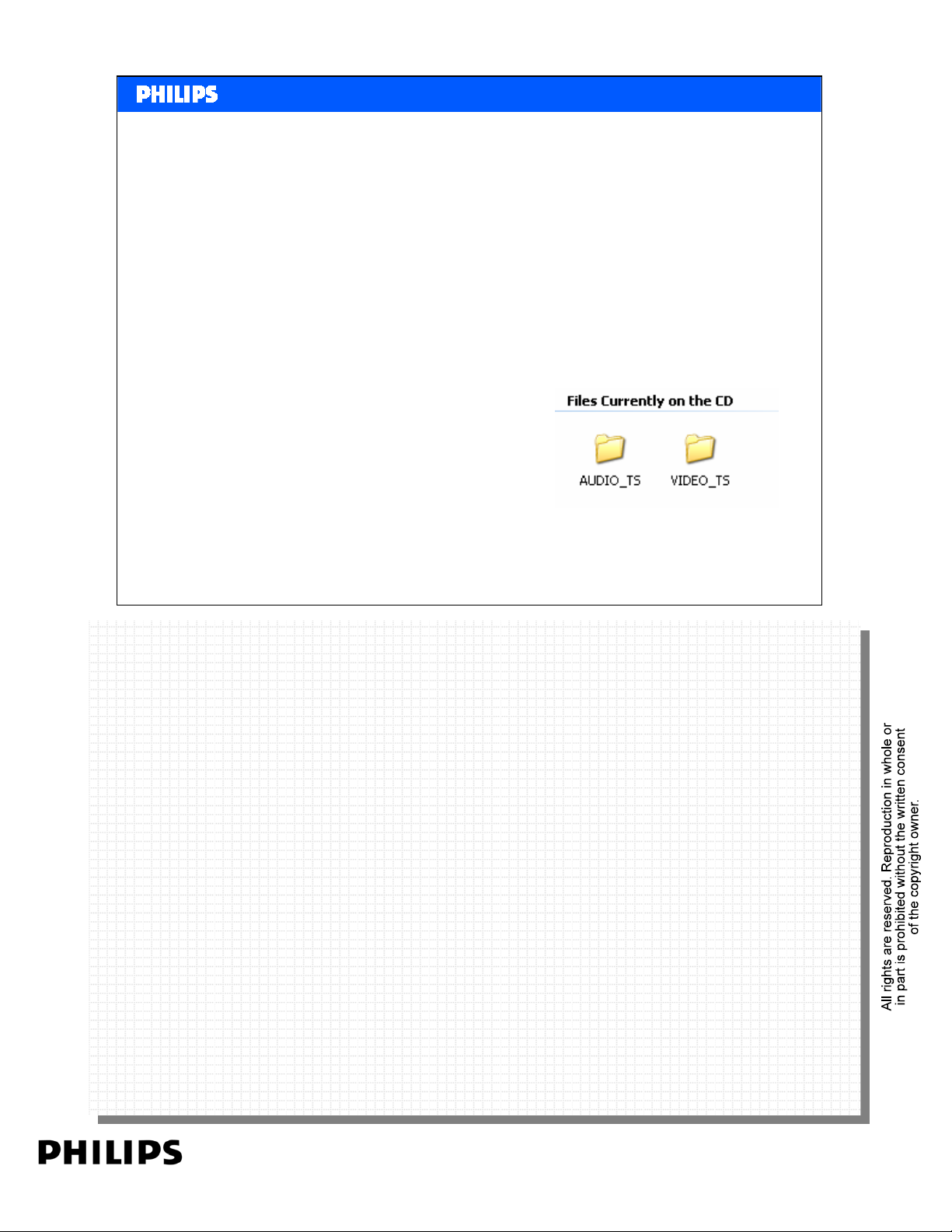
When you put a DVD in a computer and watch the explorer
you'll see at least 2 directories:
Philips CE Europe, Euroservice, Mai 2006
Others than you expect: the Audio_TS folder is empty! AUDIO_TS is used for
Others than you expect: the Audio_TS folder is empty! AUDIO_TS is used for
DVD Audio and contains the audio files, whereas VIDEO_TS is used to store
DVD Audio and contains the audio files, whereas VIDEO_TS is used to store
all data for the movie. In the video content, all other data like audio, subtitles
all data for the movie. In the video content, all other data like audio, subtitles
are integrated in the video files.
are integrated in the video files.
Basic DVD Slide 29
PERSONAL NOTES:
PERSONAL NOTES:
page: 29
Page 30
Files on a DVD
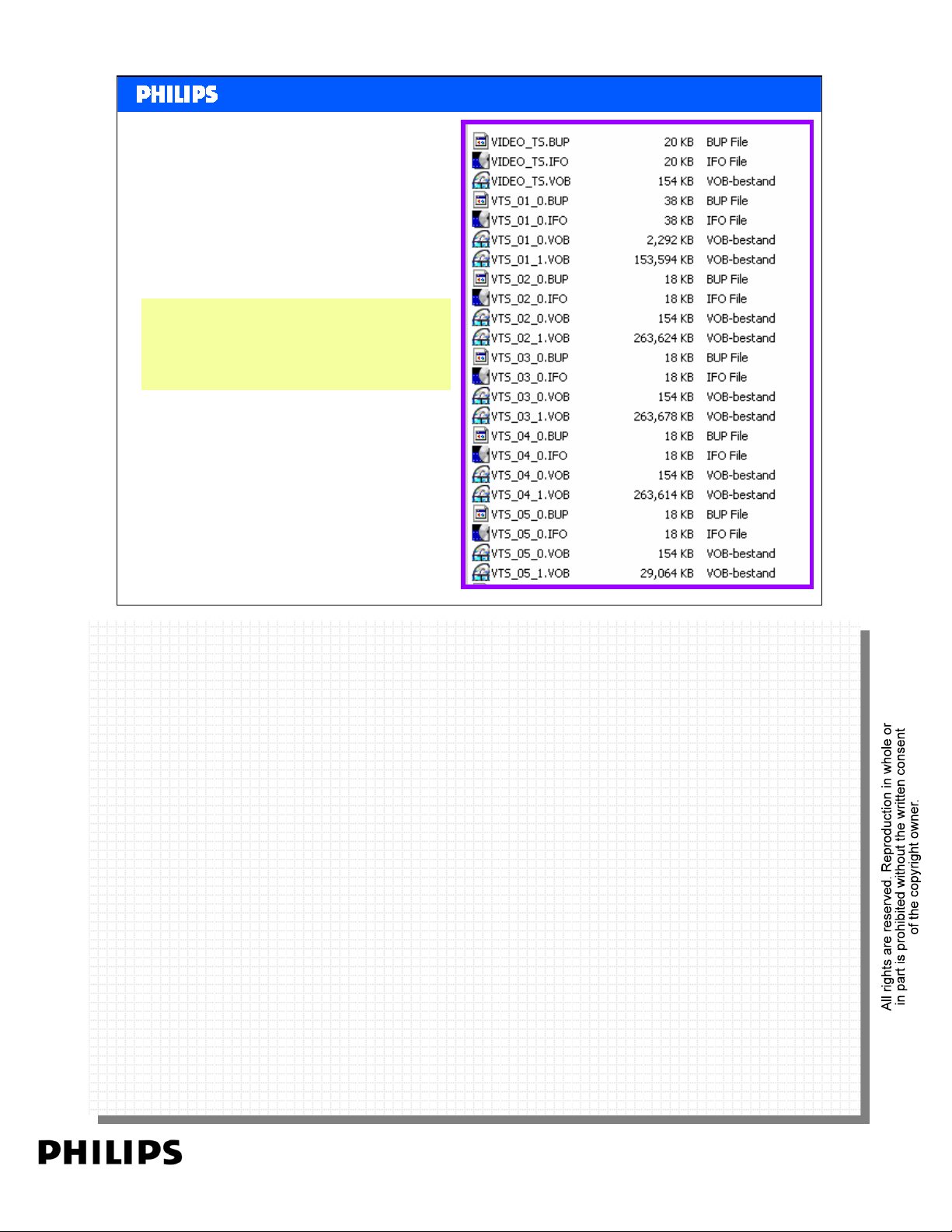
Looking at the files on a
DVD there are VOB, IFO
and BUP Files.
<< Basics DVD >>SERVICE TRAINING
<< Basics DVD >>
Philips CE Europe, Euroservice, Mai 2006
VOBs - Video OBjects
VOBs - Video OBjects
A VOB contains several streams multiplexed together: Video, Audio and
A VOB contains several streams multiplexed together: Video, Audio and
Subtitles.
Subtitles.
A VOB can contain one main video stream and several multi-angle streams,
A VOB can contain one main video stream and several multi-angle streams,
allowing you to switch the perspective during the movie. In the example there
allowing you to switch the perspective during the movie. In the example there
are more VOB files on the disc. This because a DVD video can be divided into
are more VOB files on the disc. This because a DVD video can be divided into
more titles and chapters.
more titles and chapters.
IFOs - InFOrmation
IFOs - InFOrmation
IFO Files give the player important navigational information, like where a
IFO Files give the player important navigational information, like where a
chapter starts, where a certain audio or subtitle stream is located, etc.
chapter starts, where a certain audio or subtitle stream is located, etc.
BUPs - BackUP
BUPs - BackUP
BUP files are just backup files off the IFO files.
BUP files are just backup files off the IFO files.
The VIDEO_TS.* files represent the first play item. This is an item being set
The VIDEO_TS.* files represent the first play item. This is an item being set
during authoring and is the first thing being played when the disc is inserted in
PERSONAL NOTES:
PERSONAL NOTES:
during authoring and is the first thing being played when the disc is inserted in
the player. Usually this is just a copyright notice, but it could also be a menu
the player. Usually this is just a copyright notice, but it could also be a menu
where to select the language of the menu, some trailers, etc. The video_ts.vob
where to select the language of the menu, some trailers, etc. The video_ts.vob
contains the video and audio data, the video_ts.ifo the navigational data and
contains the video and audio data, the video_ts.ifo the navigational data and
video_ts.bup is the backup for video_ts.ifo.
video_ts.bup is the backup for video_ts.ifo.
Basic DVD Slide 30
page: 30
Page 31
<< Basics DVD >>SERVICE TRAINING
<< Basics DVD >>
The end of the DVD session.
Philips CE Europe, Euroservice, Mai 2006
Basic DVD Slide 31
PERSONAL NOTES:
PERSONAL NOTES:
page: 31
 Loading...