

Page 1

<< Basics DVD recording >>SERVICE TRAINING
<< Basics DVD recording >>
Basic Training DVD Recording
V1.0
Service Engineering and Training
Theo Heijnen
April 2007
PERSONAL NOTES:
PERSONAL NOTES:
page: 1
Page 2
<< Basics DVD recording >>SERVICE TRAINING
<< Basics DVD recording >>
Agenda.
• DVD Video Systems
• Writing principle
•DVD-r and DVD+r
•Dual Media
•Smart Algo
• Ultimate simplicity
• background+VR
Philips CE Europe, Euroservice, Mai 2006
Media Center PC Slide 2
PERSONAL NOTES:
PERSONAL NOTES:
page: 2
Page 3

<< Basics DVD recording >>SERVICE TRAINING
<< Basics DVD recording >>
DVD Video Systems
–
read-only
•DVD-Video
–
recordable / rewritable
•DVD-R(W)
•DVD+R(W)
•DVD-RAM
disks
disks
Philips CE Europe, Euroservice, Mai 2006
Like recording on a CD, recording on a DVD was the next step after introduction of the DVD.
Like recording on a CD, recording on a DVD was the next step after introduction of the DVD.
While DVD is one world standard, DVD recordable has more standards.
While DVD is one world standard, DVD recordable has more standards.
There are five kinds of writable DVD technology (DVD-R, DVD+R, DVD-RW, DVD+RW and DVD-RAM). Similar to
There are five kinds of writable DVD technology (DVD-R, DVD+R, DVD-RW, DVD+RW and DVD-RAM). Similar to
CD-Recordable (CD-R), DVD-R and DVD+R discs are write-once incorporating a dye recording layer to which
CD-Recordable (CD-R), DVD-R and DVD+R discs are write-once incorporating a dye recording layer to which
information is irreversibly written by means of a laser heating. DVD-RAM also uses this technology but can be rewritten
information is irreversibly written by means of a laser heating. DVD-RAM also uses this technology but can be rewritten
roughly 100,000 times. With its hard sectors, random access capabilities and optional cartridge, DVD-RAM more
roughly 100,000 times. With its hard sectors, random access capabilities and optional cartridge, DVD-RAM more
closely resembles traditional disc-based storage media than do DVD-RW and DVD+RW. This separates DVD-RAM
closely resembles traditional disc-based storage media than do DVD-RW and DVD+RW. This separates DVD-RAM
somewhat from the prerecorded DVD format that provides the basis for most DVD discs.
somewhat from the prerecorded DVD format that provides the basis for most DVD discs.
Due to technological limitations when it was introduced in 1997, DVD-R could store 3.95 GB per 12 cm disc (DVD-R
Due to technological limitations when it was introduced in 1997, DVD-R could store 3.95 GB per 12 cm disc (DVD-R
version 1.0). Capacity was increased to 4.7 GB per disc in 1999 (DVD-R version 1.9). In 2000, DVD-R was split (DVD-R
version 1.0). Capacity was increased to 4.7 GB per disc in 1999 (DVD-R version 1.9). In 2000, DVD-R was split (DVD-R
for Authoring version 2.0 and DVD-R for General version 2.0). DVD-R (Authoring) continues to use a 635 nm laser and
for Authoring version 2.0 and DVD-R for General version 2.0). DVD-R (Authoring) continues to use a 635 nm laser and
remains available in limited form as do 3.95 GB discs for some highly specialized applications while the less expensive
remains available in limited form as do 3.95 GB discs for some highly specialized applications while the less expensive
DVD-R (General) is more widely used and employs the same 650 nm laser wavelength as other DVD formats.
DVD-R (General) is more widely used and employs the same 650 nm laser wavelength as other DVD formats.
In 1999 DVD-RW was introduced only in Japan (version 1.0) with 4.7 GB 12 cm.
In 1999 DVD-RW was introduced only in Japan (version 1.0) with 4.7 GB 12 cm.
DVD-RAM first appeared in 1998 offering 2.6 GB of storage per 12 cm disc (version 1.0) growing to 4.7 GB in 1999
DVD-RAM first appeared in 1998 offering 2.6 GB of storage per 12 cm disc (version 1.0) growing to 4.7 GB in 1999
(version 2.0). A 1.46 GB 8 cm disc was introduced in 2000 (version 2.1).
(version 2.0). A 1.46 GB 8 cm disc was introduced in 2000 (version 2.1).
Originally, a 3.0 GB version of DVD+RW was proposed but no products were ever released. DVD+RW came to
Originally, a 3.0 GB version of DVD+RW was proposed but no products were ever released. DVD+RW came to
market in 2001 with a capacity of 4.7 GB per 12 cm disc while DVD+R arrived in 2002.
market in 2001 with a capacity of 4.7 GB per 12 cm disc while DVD+R arrived in 2002.
Media Center PC Slide 3
PERSONAL NOTES:
PERSONAL NOTES:
page: 3
Page 4

<< Basics DVD recording >>SERVICE TRAINING
<< Basics DVD recording >>
Writing on an empty disc
Writing on a complete
empty disc is like driving on
a road with high speed and
there are no markers on the
road.
Philips CE Europe, Euroservice, Mai 2006
Media Center PC Slide 4
PERSONAL NOTES:
PERSONAL NOTES:
page: 4
Page 5
<< Basics DVD recording >>SERVICE TRAINING
<< Basics DVD recording >>
Pregroove on (Re)Writable Discs
wobbled
pregroove
(Re)Writable Disk
laser
beam
land
empty
track
written
track
mark
(data)
Philips CE Europe, Euroservice, Mai 2006
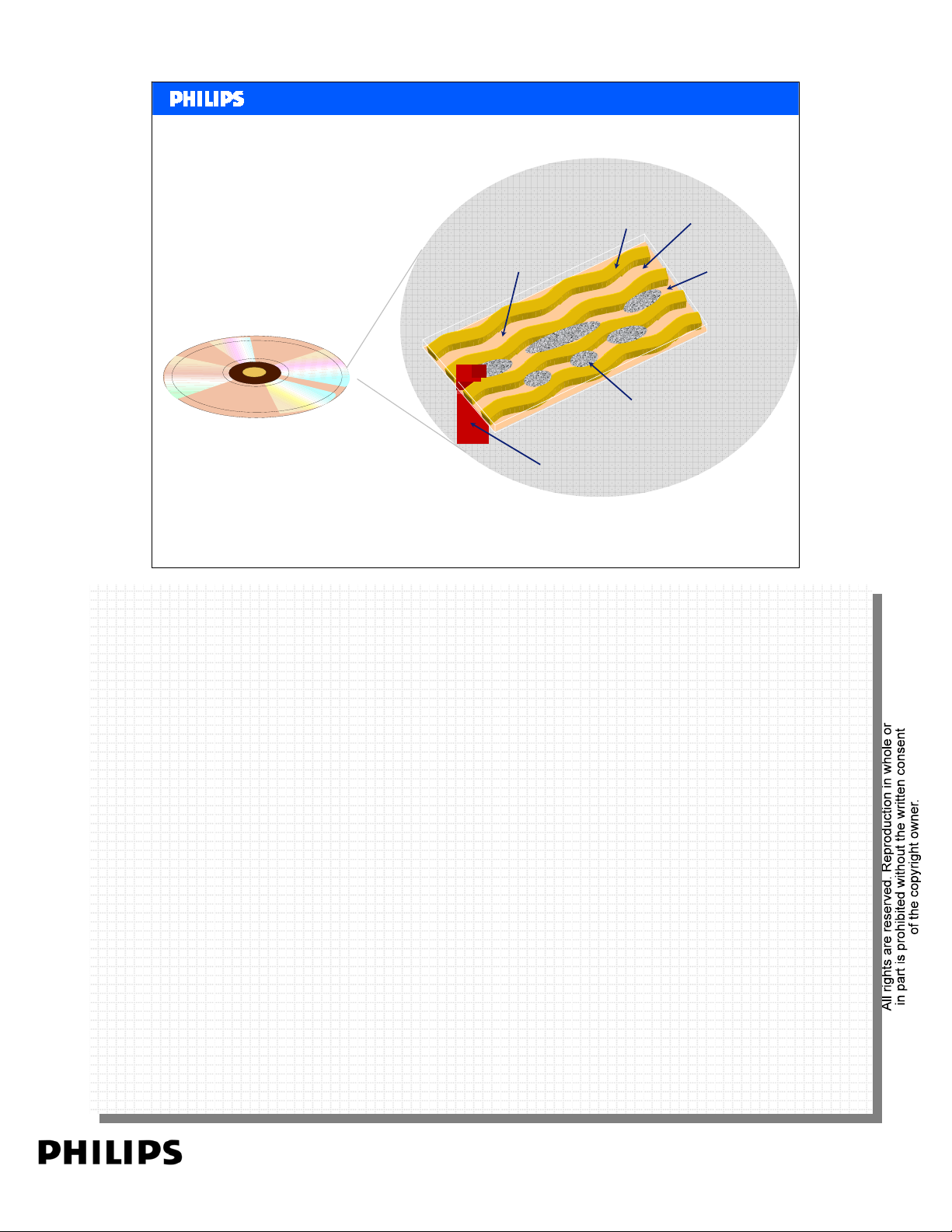
Assume you insert a absolute empty disc in the recorder. The laser unit has to write the pits and
Assume you insert a absolute empty disc in the recorder. The laser unit has to write the pits and
make perfect tracks. Without any markers (see it as driving on a big road without markers) it is
make perfect tracks. Without any markers (see it as driving on a big road without markers) it is
impossible. At the same time, when a new disc is inserted, the recorder need to know:
impossible. At the same time, when a new disc is inserted, the recorder need to know:
Is it a DVD+RW disc, a DVD+R disc, 12mm or 8mm.
Is it a DVD+RW disc, a DVD+R disc, 12mm or 8mm.
So next to the tracks, the recorder need some details from the disc.
So next to the tracks, the recorder need some details from the disc.
For this reason a new, empty disc contains already some data.
For this reason a new, empty disc contains already some data.
At production of an empty DVDR grooves are added. During recording the recorder can put the
At production of an empty DVDR grooves are added. During recording the recorder can put the
new pits between the grooves.
new pits between the grooves.
Because the grooves are wobbled, during writing the recorder can measure the recording speed of
Because the grooves are wobbled, during writing the recorder can measure the recording speed of
the disc.
the disc.
On the DVD+R the wobbled grooves contains extra data by changing the phase. The recorder can
On the DVD+R the wobbled grooves contains extra data by changing the phase. The recorder can
read out this data during recording. On the DVD-R extra data is embossed on the grooves.
read out this data during recording. On the DVD-R extra data is embossed on the grooves.
Media Center PC Slide 5
PERSONAL NOTES:
PERSONAL NOTES:
page: 5
Page 6
<< Basics DVD recording >>SERVICE TRAINING
<< Basics DVD recording >>
DVD-R (minus R) Addressing unrecorded Disc.
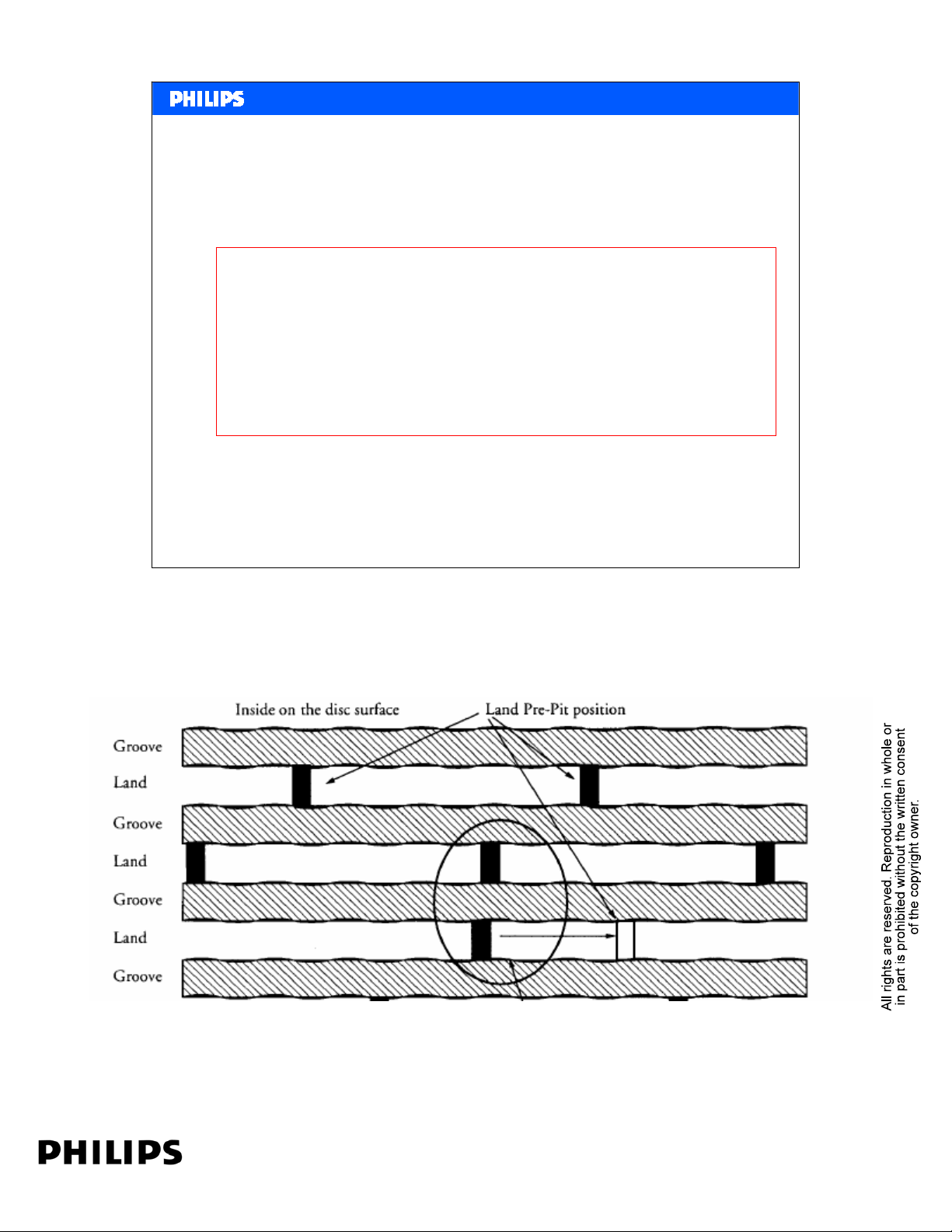
The track of the Unrecorded Zone is formed by a continuous
spiral pre-groove that extends from the inner part of the
disk to the outer diameter of the disk.
The precise address information for an unrecorded disk is
embossed on the land between adjacent grooved regions.
Philips CE Europe, Euroservice, Mai 2006
Media Center PC Slide 6
PERSONAL NOTES:
PERSONAL NOTES:
page: 6
Page 7
<< Basics DVD recording >>SERVICE TRAINING
<< Basics DVD recording >>
DVD+RW (Plus R) Addressing unrecorded Disc
The wobble of a DVD+R is modulated by wobble cycles.
The information contained in the wobble modulation
is called Address-in-Pregroove or ADIP.
ADIP contains time information, disc manufacturer,
writing parameters, writing speed and many more.
Philips CE Europe, Euroservice, Mai 2006
Media Center PC Slide 7
PERSONAL NOTES:
PERSONAL NOTES:
page: 7
Page 8
<< Basics DVD recording >>SERVICE TRAINING
<< Basics DVD recording >>
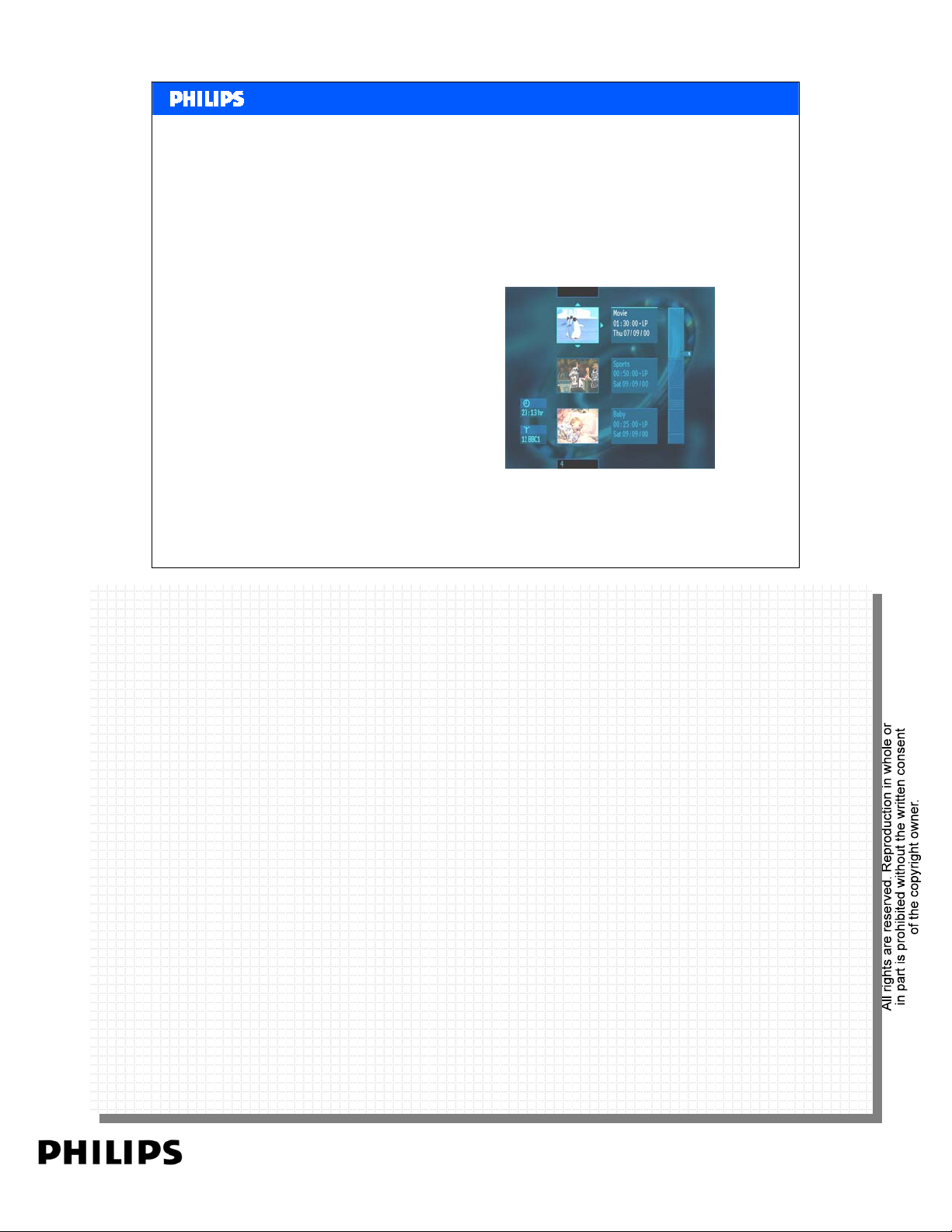
Features when writing on a DVD+R(W)
• Maximum compatibility due to higher reflectivity
• Features identical to DVD+RW video
– Menu on disc
– Change Index Pictures
– Add and delete recordings
– Rename recordings
– Favourite Scene Selection
VBR
–
• Only difference +R with a +RW:
picture quality
– no overwriting
Philips CE Europe, Euroservice, Mai 2006
VBR Picture Quality:
VBR Picture Quality:
When studying the video content, details and movements in a movie change continue. When
When studying the video content, details and movements in a movie change continue. When
encoding and writing the video with a constant speed (CBR = Constant Bit Rate), fast movements
encoding and writing the video with a constant speed (CBR = Constant Bit Rate), fast movements
and many details in the video will get lost. Result in blocking effect and loss of details.
and many details in the video will get lost. Result in blocking effect and loss of details.
With the VBR (Variable Bit Rate) technology used in DVD+R, the encoded DataStream changes
With the VBR (Variable Bit Rate) technology used in DVD+R, the encoded DataStream changes
dependant on the video content. This means when there are less details or fast movements the data
dependant on the video content. This means when there are less details or fast movements the data
stream is low. More details or fast movements will result in a higher bit stream.
stream is low. More details or fast movements will result in a higher bit stream.
Media Center PC Slide 8
PERSONAL NOTES:
PERSONAL NOTES:
page: 8
Page 9

<< Basics DVD recording >>SERVICE TRAINING
<< Basics DVD recording >>
DVD+R Video Finalization
• DVD+R finalization closes disc to make it DVD
playback compatible
– Only one minute finalizing time
• Format of finalised disc is fully compliant with
DVD+RW Video format, making it compatible
with DVD-Video and DVD-ROM
Philips CE Europe, Euroservice, Mai 2006
What is finalizing:
What is finalizing:
When inserting a DVD-disc in a DVD player , the first the DVD player need to know is what’s on
When inserting a DVD-disc in a DVD player , the first the DVD player need to know is what’s on
the disc. How many titles-chapters and were to find them on the disc.
the disc. How many titles-chapters and were to find them on the disc.
Every DVD disc contains a file with this title information. See for more details the Basic DVD
Every DVD disc contains a file with this title information. See for more details the Basic DVD
training.
training.
When writing a video title on a DVD+RW disc, the recorder writes the menu title. Adding a new
When writing a video title on a DVD+RW disc, the recorder writes the menu title. Adding a new
title later on i s no problem. The existing menu title is erased and the new title written This makes
title later on i s no problem. The existing menu title is erased and the new title written This makes
the DVD+RW disc always compatible with DVD players. No finalization needed..
the DVD+RW disc always compatible with DVD players. No finalization needed..
That’s different with a DVD+R disc because a menu title can not be erased. Once written it
That’s different with a DVD+R disc because a menu title can not be erased. Once written it
remains. When writing a title on a DVD+R after finished the recorder makes a temporary menu
remains. When writing a title on a DVD+R after finished the recorder makes a temporary menu
title. Playback in the recorder is no problem since the recorder can read the temporary file. Any
title. Playback in the recorder is no problem since the recorder can read the temporary file. Any
DVD-player can not read this file, so gives Disc Error.
DVD-player can not read this file, so gives Disc Error.
The finalization process ‘collects’ all the temporary titles and burns the original menu title.
The finalization process ‘collects’ all the temporary titles and burns the original menu title.
The disc is closed now and nothing can be added anymore.
The disc is closed now and nothing can be added anymore.
Media Center PC Slide 9
PERSONAL NOTES:
PERSONAL NOTES:
page: 9
Page 10
<< Basics DVD recording >>SERVICE TRAINING
<< Basics DVD recording >>
DVD+RW Disc layout
DVD+RW disc layout
Menu
VMGI VTSI
VOBS
Lead
in
32MB
DVD+RW disc layout
Menu
VMGI VTSI
VOBS
Lead
in
32MB
Philips CE Europe, Euroservice, Mai 2006
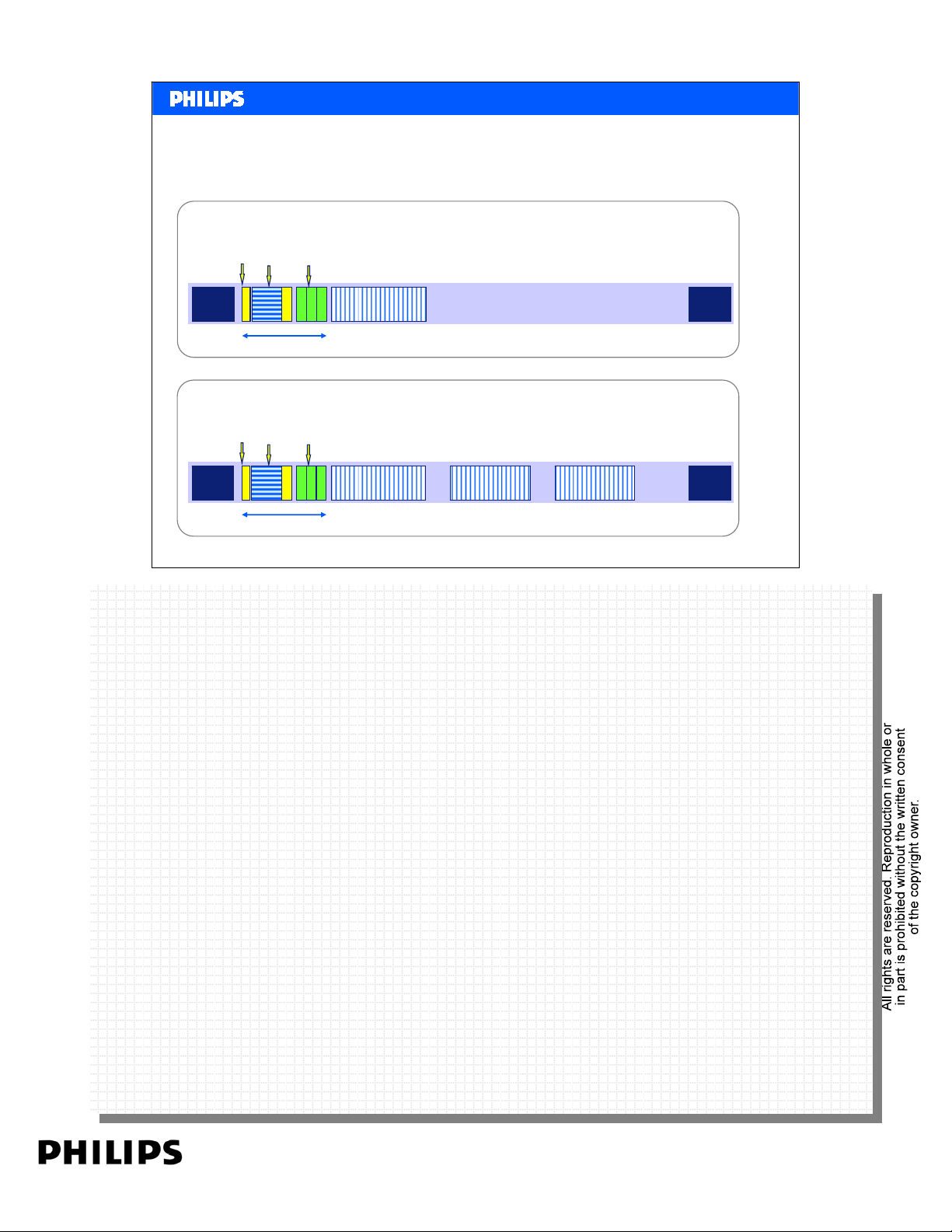
The upper picture shows a DVD+RW with one title. After burning the title it makes the Menu
The upper picture shows a DVD+RW with one title. After burning the title it makes the Menu
VOB’s.
VOB’s.
Below the DVD+RW after adding two titles more. Original menu VOB is erased and replaced.
Below the DVD+RW after adding two titles more. Original menu VOB is erased and replaced.
Title 1
Title 1 Title 2
Title 3
Lead
out
Lead
out
Media Center PC Slide 10
PERSONAL NOTES:
PERSONAL NOTES:
page: 10
Page 11
<< Basics DVD recording >>SERVICE TRAINING
<< Basics DVD recording >>
DVD+R Disc layout
Unfinalized DVD+R disc (open)
Virtually
Virtually
Virtually
+RW
+RW
+RW
RSAT
RSAT
RSAT
Lead
Reserved
in
32MB
Finalized DVD+R disc (closed)
Menu
VMGI
Lead
in
Philips CE Europe, Euroservice, Mai 2006
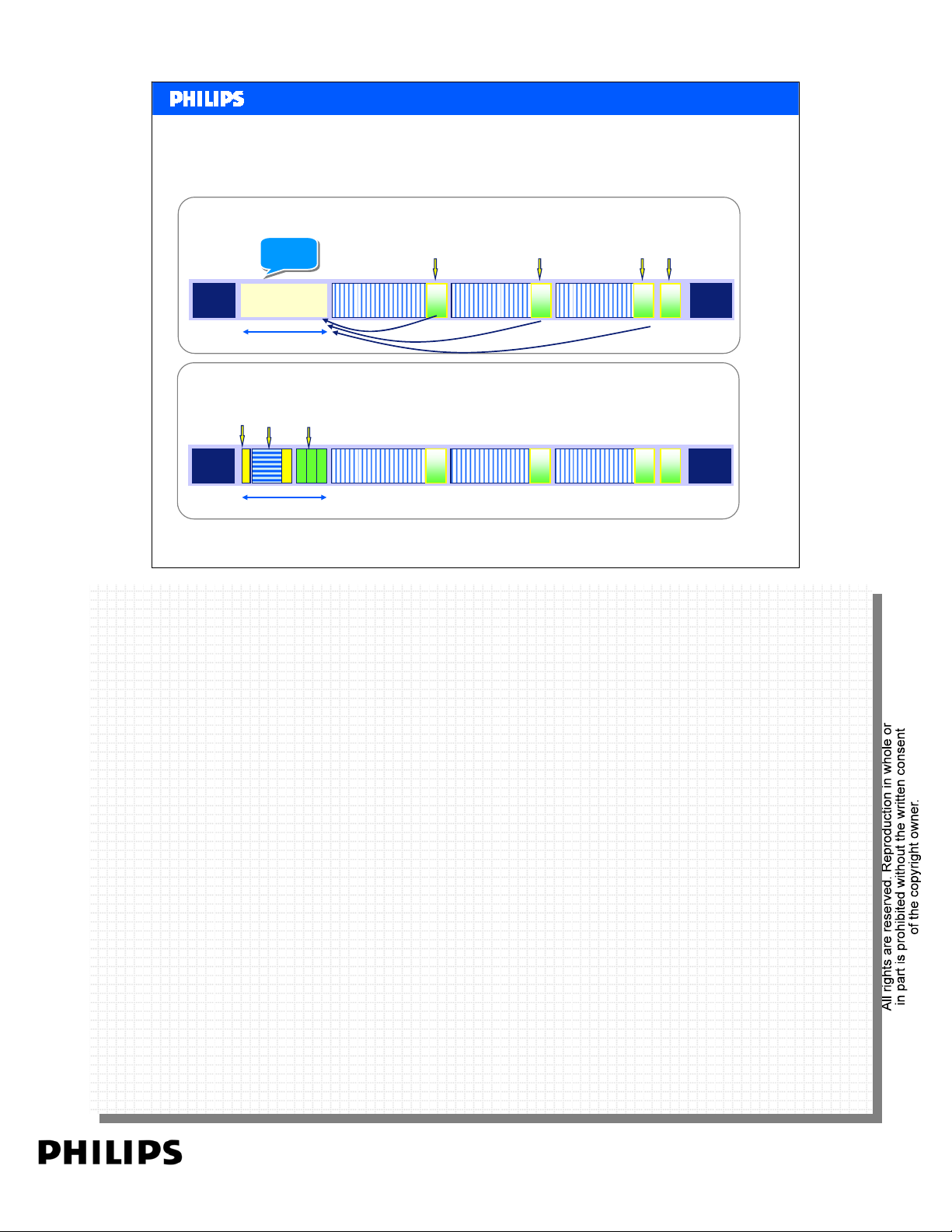
Upper picture:
Upper picture:
After burning a title the temporary menu (RSAT) is written.
After burning a title the temporary menu (RSAT) is written.
Lower picture:
Lower picture:
This shows the finalization process. Main menu VOB is written and the disc is closed.
This shows the finalization process. Main menu VOB is written and the disc is closed.
VOBS
32MB
VTSI
Title 1
Title 2
Title 1 Title 2
Title 3
Title 3
Lead
out
Lead
out
Media Center PC Slide 11
PERSONAL NOTES:
PERSONAL NOTES:
page: 11
Page 12

<< Basics DVD recording >>SERVICE TRAINING
<< Basics DVD recording >>
Compatibility
Recording format compatibility with DVD Video players.
Recording format +RW +R +RW +R
on '-' disc
Disc media
DVD-V compatible * * *
* finalization required
+RW/+R -RW/-R
-RW RAM
-VM-VR-VM-VRRW R
-R
RAM
•So DVD+RW is still the most compatible and easy to use format.
•3 other formats can be made compatible after finalization.
•DVD-RAM is compatible with some, mainly Panasonic DVD-V players.
Philips CE Europe, Euroservice, Mai 2006
Media Center PC Slide 12
PERSONAL NOTES:
PERSONAL NOTES:
page: 12
Page 13
Dual Media
<< Basics DVD recording >>SERVICE TRAINING
<< Basics DVD recording >>
Philips CE Europe, Euroservice, Mai 2006
Media Center PC Slide 13
PERSONAL NOTES:
PERSONAL NOTES:
page: 13
Page 14

<< Basics DVD recording >>SERVICE TRAINING
<< Basics DVD recording >>
Contents
• Recording made easy
– Beyond Playability
–Dual Media
–SmartAlgo
• Consumer benefits
– Ultimate simplicity
– Pure simplicity in recording
– Pure simplicity in playback
– Reliable and excellent recording
• Competitive advantage
– Records smart & simple
– Plays always
– Plays always proof (compatibility benchmark)
TM
Philips CE Europe, Euroservice, Mai 2006
Media Center PC Slide 14
PERSONAL NOTES:
PERSONAL NOTES:
page: 14
Page 15

<< Basics DVD recording >>SERVICE TRAINING
<< Basics DVD recording >>
Beyond playability…
• Philips DVD Players are known for their multi-format playability;
“you have it, we play it”.
• Philips DVD Recorders offer this same playback guarantee, and more…
• Philips 2005 Recorders, not only play it, they also record it all;
“Records all, plays all”
• Thanks to
Dual Media
SmartAlgo
Philips CE Europe, Euroservice, Mai 2006
TM
support and Philips’ patented technology
Media Center PC Slide 15
PERSONAL NOTES:
PERSONAL NOTES:
page: 15
Page 16

<< Basics DVD recording >>SERVICE TRAINING
<< Basics DVD recording >>
Dual Media
What is it ?
Philips DVD Recorders support ‘dual media’ recording, which is the ability to create
fully compatible recordings on + and - discs (R and RW).
Why do I need it?
Philips DVD Recorders offer the ultimate simplicity by allowing to record on + and discs. No matter which of the two media types you choose, you will always create
compatible recordings, which can be played back on any DVD player.
How does it work?
By always using the ‘+VR’ format recording irrespective of the type of disc used, Philips
dual media recording offers full playback compatibility with existing DVD Players.
Glossary
Philips DVD Recorders support ‘dual media’ recording - the ability to create recordings
on + and - discs (DVD+R/+RW/-R/-RW). Now you can buy any disc and the Philips
recorder will always create fully compatible recordings, which can be played by any
DVD player.
Philips CE Europe, Euroservice, Mai 2006
Media Center PC Slide 16
PERSONAL NOTES:
PERSONAL NOTES:
page: 16
Page 17

<< Basics DVD recording >>SERVICE TRAINING
<< Basics DVD recording >>
Philips DVD recorder and Dual Media.
AV products
• D4.3 laser drive can deliver Dual Media read/write.
• This means that the following products support Dual Media:
– DVDR3305; DVDR3355 and DVDR3365
– DVDR3300H; DVDR3330H; DVDR5330H
– DVDR5350H; DVDR7300H
– And all new recorders introduced later.
• Products not supported:
– DVDR3320V.
– Products launched in 2004 or before, so including DVD725/520H; DVDR61x;
DVDR7xx.
Philips CE Europe, Euroservice, Mai 2006
Media Center PC Slide 17
PERSONAL NOTES:
PERSONAL NOTES:
page: 17
Page 18

<< Basics DVD recording >>SERVICE TRAINING
<< Basics DVD recording >>
What is it ?
The Philips SmartAlgoTMis a patented software algorithm, which intelligently chooses the most appropriate and
optimal ‘Write Strategy’ (WSG) for the particular disc that is being used for recording, resulting in significantly
improved recording quality and playback compatibility on widely available recordable disc media.
Why do I need it?
Today’s market knows increasing availability of non-standardized media. These discs when used for recording,
cause poor recordability and corrupt discs, leading to playback compatibility issues. SmartAlgo
problem, by significantly improving recording quality and playback compatibility. .
How does it work?
When a new blank media is inserted into the disc tray for recording, SmartAlgoTM first analyses the media
characteristics. Based on a patented self-learning adaptive technology, it will then choose the optimal write strategy
from a database of possible write strategies and apply it to the optical writing head. This results in always the best
and optimal recording for the particular media type, no matter which brand and what quality of the disc being used.
Glossary
SmartAlgoTM ensures quality recordings, regardless of disc format or quality. Its patented self-learning adaptive
technology chooses the optimal write strategy for the particular disc that is being used. By doing this, it significantly
improves the reliability of the recording, ensuring zero failures when recording and guaranteeing playback
compatibility.
Philips CE Europe, Euroservice, Mai 2006
SmartAlgo
TM
TM
solves this
Media Center PC Slide 18
PERSONAL NOTES:
PERSONAL NOTES:
page: 18
Page 19
<< Basics DVD recording >>SERVICE TRAINING
<< Basics DVD recording >>
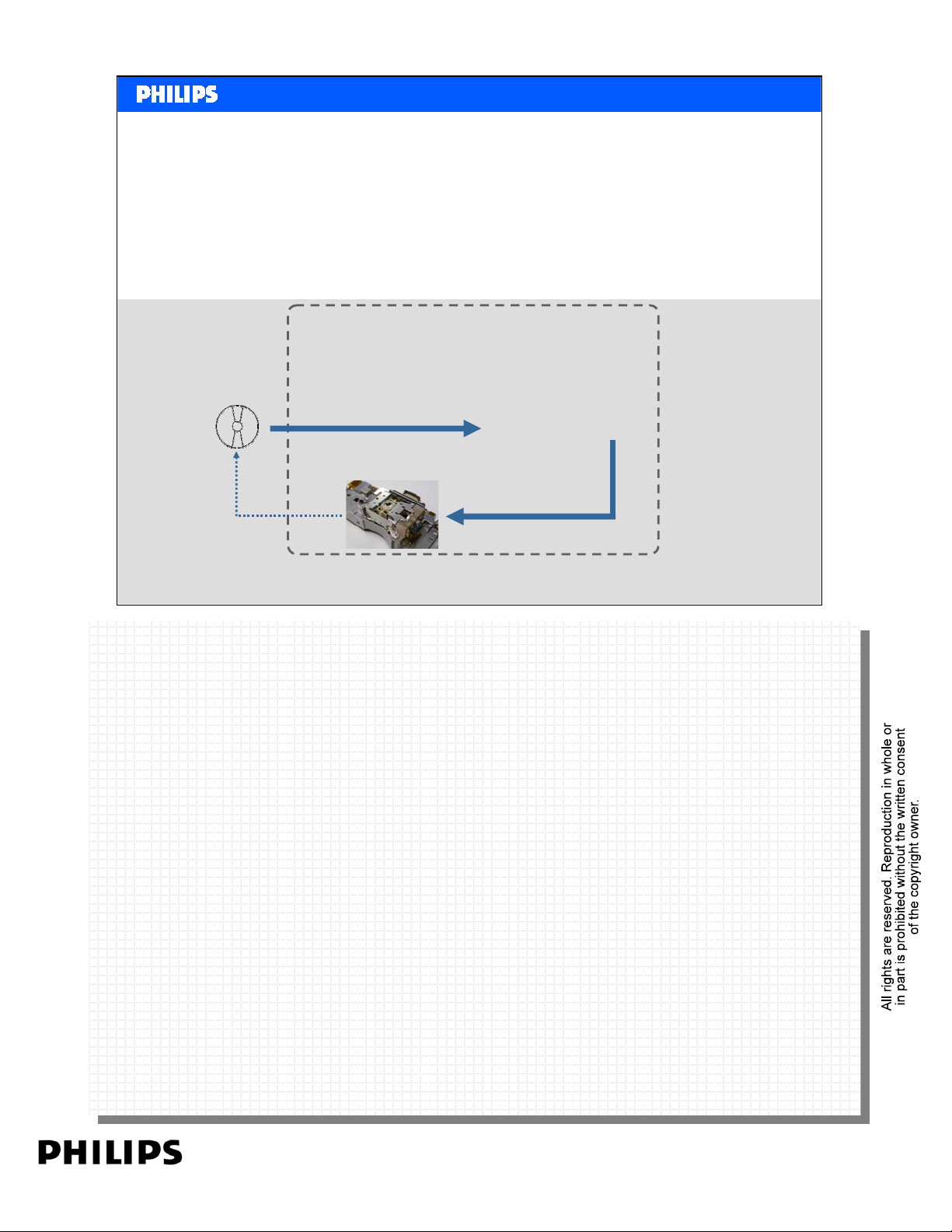
Drive without SmartAlgo
TM
• The Recorder simply records using the default available ‘write strategy’ (WSG).
• Good quality discs give good recordings, but poor quality discs fail to record, or fail
to playback after recording.
Recorder drive
Blank disc for
recording
apply WSG* to the OPU*
Record
on media
OPU
control laser parameters
*WSG = write strategy
*OPU = optical writing head
Philips CE Europe, Euroservice, Mai 2006
Media Center PC Slide 19
PERSONAL NOTES:
PERSONAL NOTES:
page: 19
Page 20
<< Basics DVD recording >>SERVICE TRAINING
<< Basics DVD recording >>
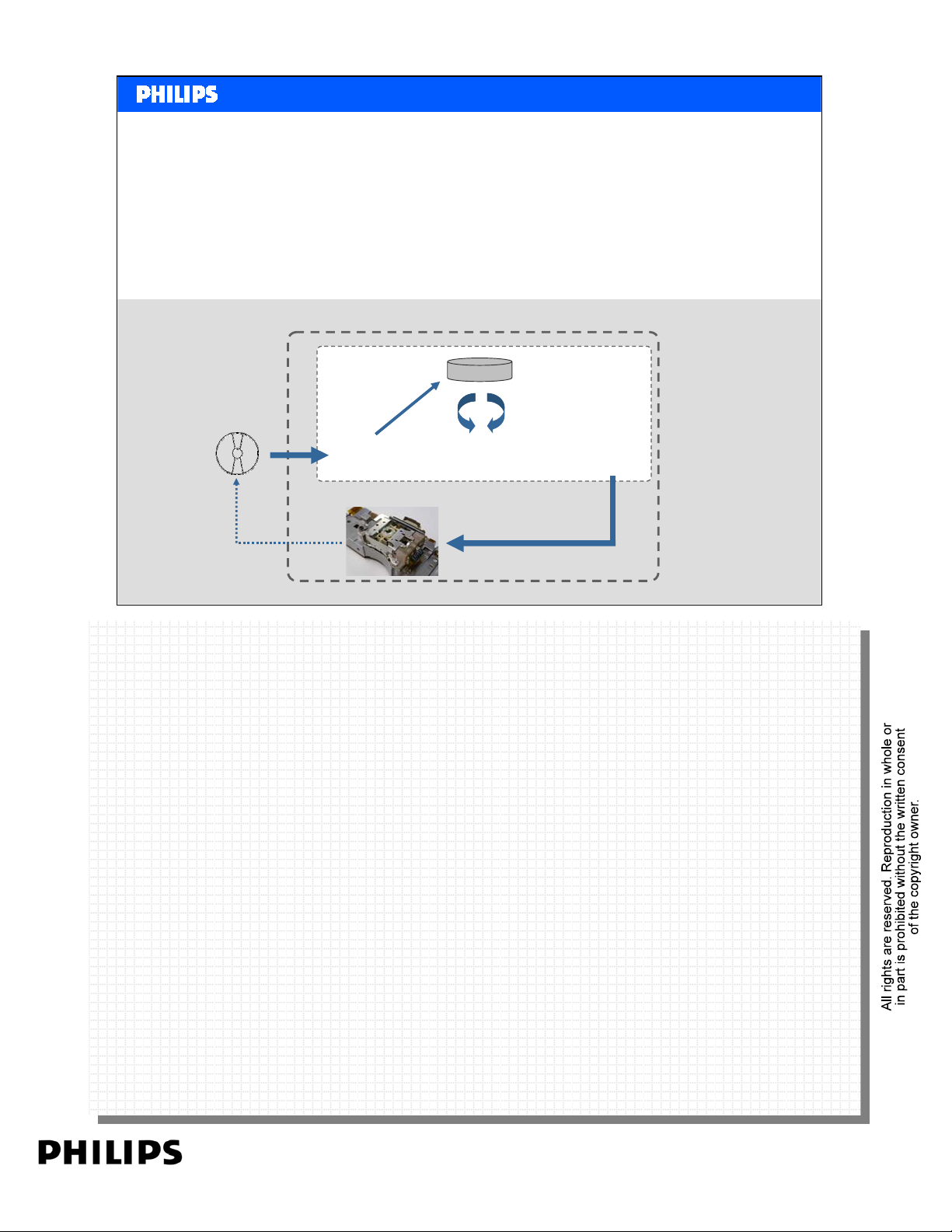
Philips Recorder drive with SmartAlgo
• The Recorder always chooses the best (optimal) WSG depending on the input disc
type/quality/characteristics.
• Always good and playback-compatible recordings, no matter the quality of the disc.
Recorder drive
TM
Blank disc for
recording
Record
on media
Philips CE Europe, Euroservice, Mai 2006
SmartAlgo
characteristics
analyze
media
media
OPU
database
choose optimal
WSG*
control laser parameters
apply chosen
WSG* to OPU*
Media Center PC Slide 20
TM
*WSG = write strategy
*OPU = optical writing head
PERSONAL NOTES:
PERSONAL NOTES:
page: 20
Page 21
<< Basics DVD recording >>SERVICE TRAINING
<< Basics DVD recording >>
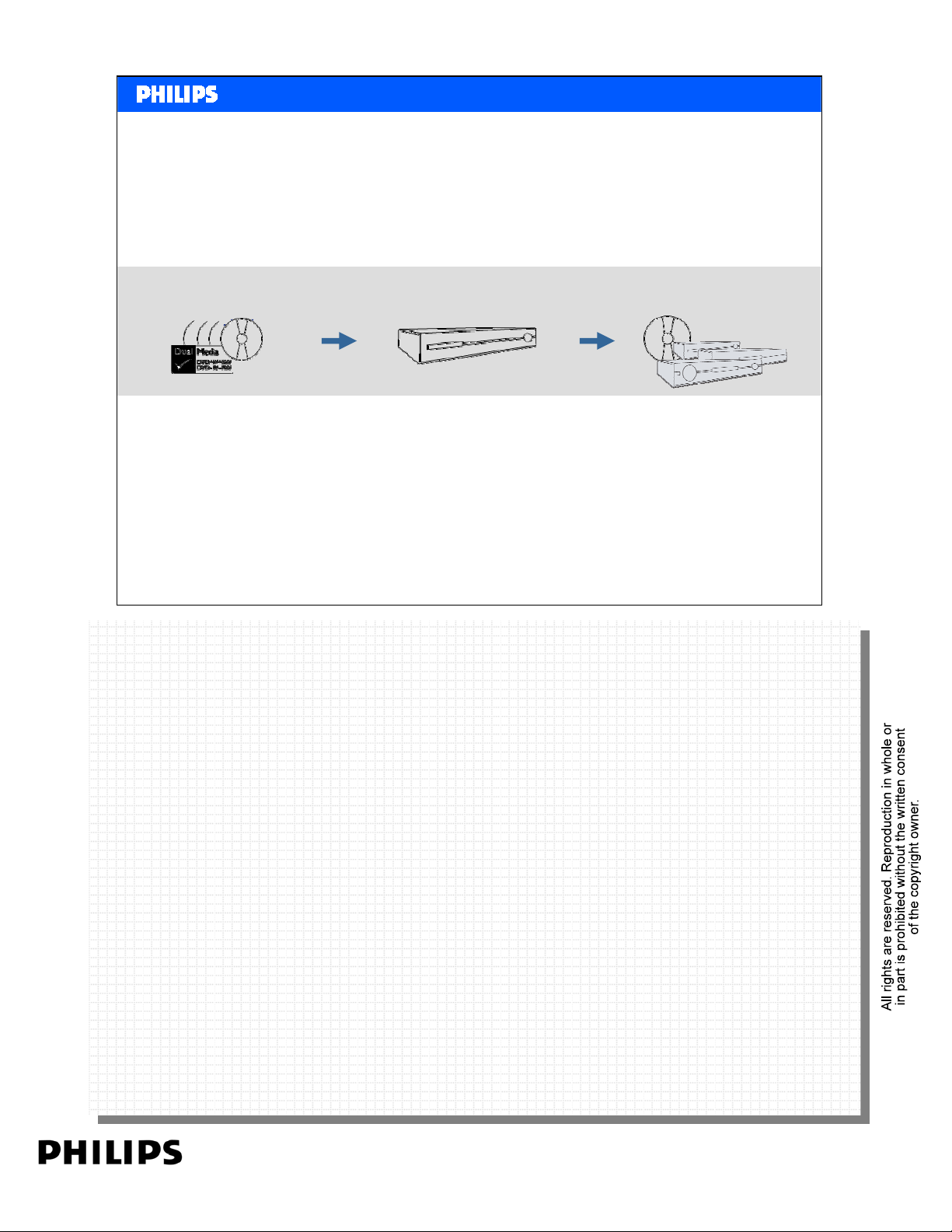
Ultimate Simplicity
simplicity in
recording
+RW +R –RW -R
Philips CE Europe, Euroservice, Mai 2006
Pure simplicity in recording
Pure simplicity in recording
Records on DVD+RW/+R, DVD-RW/-R discs
Records on DVD+RW/+R, DVD-RW/-R discs
Consistent finalization; only required for recordable discs (+R/-R)
Consistent finalization; only required for recordable discs (+R/-R)
Start recording directly, without choosing mode or setting
Start recording directly, without choosing mode or setting
reliable & excellent
recording
Guaranteed high quality
simplicity in playback
Philips & any other DVD
player
Media Center PC Slide 21
Pure simplicity in playback
Pure simplicity in playback
Plays DVD, CD, DVD+R/RW, DVD-R/RW, (S)VCD, SACD discs
Plays DVD, CD, DVD+R/RW, DVD-R/RW, (S)VCD, SACD discs
Plays MP3, WMA, JPEG, DivX® 3.11/4.x/5.x, XviD and MPEG-4 files
Plays MP3, WMA, JPEG, DivX® 3.11/4.x/5.x, XviD and MPEG-4 files
Playback compatibility of recordings on any other DVD player or PC drive
Playback compatibility of recordings on any other DVD player or PC drive
Consistency in disc menu, while playback on any other DVD player
Consistency in disc menu, while playback on any other DVD player
Reliable & excellent recording
Reliable & excellent recording
SmartAlgoTM ensures quality recordings, regardless of disc format or quality
SmartAlgoTM ensures quality recordings, regardless of disc format or quality
PERSONAL NOTES:
PERSONAL NOTES:
page: 21
Page 22

<< Basics DVD recording >>SERVICE TRAINING
<< Basics DVD recording >>
Pure Simplicity in Recording
• Free to choose any discs you like (plus or minus)
• Consistent and easy to remember finalization for
recordable and re-writable discs
• No need to chose any Mode or Setting before pressing
the record button (like DVD-R recorders)
Philips CE Europe, Euroservice, Mai 2006
Philips DVD Recorders support ‘Dual Media’ recording, which is the ability to create fully
Philips DVD Recorders support ‘Dual Media’ recording, which is the ability to create fully
compatible recordings on + and - discs (DVD+R/+RW and DVD-R/-RW). No matter which of the
compatible recordings on + and - discs (DVD+R/+RW and DVD-R/-RW). No matter which of the
two media types you choose, you will always create playback compatible recordings with any
two media types you choose, you will always create playback compatible recordings with any
other DVD player.
other DVD player.
In addition, Philips Dual Media allows you to record on any disc without having to choose a Mode
In addition, Philips Dual Media allows you to record on any disc without having to choose a Mode
or Setting before pressing the record button. As opposed to the competition, where you’d have
or Setting before pressing the record button. As opposed to the competition, where you’d have
to choose –VR or -VM mode before you can start recording, Philips let’s you record without
to choose –VR or -VM mode before you can start recording, Philips let’s you record without
thinking. Just press the button.
thinking. Just press the button.
Last but not least, even your post-recording or finalisation is easy and consistent; all recordable
Last but not least, even your post-recording or finalisation is easy and consistent; all recordable
(+R/-R) discs require finalising, and the re-writable (+RW/-RW) discs won't.
(+R/-R) discs require finalising, and the re-writable (+RW/-RW) discs won't.
Media Center PC Slide 22
PERSONAL NOTES:
PERSONAL NOTES:
page: 22
Page 23

<< Basics DVD recording >>SERVICE TRAINING
<< Basics DVD recording >>
Pure Simplicity in Playback
• Hassle free playback of your own-recorded discs in any
DVD player or PC drive
• Get the same disc menu, no matter where you playback
the recorded disc
Philips CE Europe, Euroservice, Mai 2006
Philips Hard Disk and DVD Recorders offer the ultimate simplicity by guaranteeing playback of
Philips Hard Disk and DVD Recorders offer the ultimate simplicity by guaranteeing playback of
your own-recorded discs in any other DVD player or PC drive. By always using the ‘+VR’ format
your own-recorded discs in any other DVD player or PC drive. By always using the ‘+VR’ format
while recording -irrespective the type of disc used- Philips Dual Media offers full playback
while recording -irrespective the type of disc used- Philips Dual Media offers full playback
compatibility with all existing DVD Players, allowing you to share your recordings with whom
compatibility with all existing DVD Players, allowing you to share your recordings with whom
ever, where ever.
ever, where ever.
In addition, recording in ‘+VR’ format also allows the disc menu to be written onto the disc, which
In addition, recording in ‘+VR’ format also allows the disc menu to be written onto the disc, which
ensures consistency and 'ease of use' during playback, by always providing the same disc menu, no
ensures consistency and 'ease of use' during playback, by always providing the same disc menu, no
matter where you playback your recorded disc.
matter where you playback your recorded disc.
Media Center PC Slide 23
PERSONAL NOTES:
PERSONAL NOTES:
page: 23
Page 24

<< Basics DVD recording >>SERVICE TRAINING
<< Basics DVD recording >>
Reliable and Excellent Recording
• Guaranteed recording, regardless the quality or format of
your disc
• Optimized recording quality, tailored to each specific disc,
thanks to advanced writing strategy
Philips CE Europe, Euroservice, Mai 2006
With the patented algorithm SmartAlgoTM, a Philips DVD Recorder will always record, no
With the patented algorithm SmartAlgoTM, a Philips DVD Recorder will always record, no
matter what quality or type of disc you choose to use. Empowered by SmartAlgo
matter what quality or type of disc you choose to use. Empowered by SmartAlgo
recorders adapt their writing strategy and parameters to the nature and quality of the
recorders adapt their writing strategy and parameters to the nature and quality of the
media and thus ensuring the best possible quality recording for that specific disc - even the
media and thus ensuring the best possible quality recording for that specific disc - even the
cheap or bad quality ones.
cheap or bad quality ones.
SmartAlgoTM significantly improves reliability and quality of your recording, resulting in
SmartAlgoTM significantly improves reliability and quality of your recording, resulting in
successful recording on blank media, no matter where it’s bought or which brand.
successful recording on blank media, no matter where it’s bought or which brand.
Media Center PC Slide 24
TM
, Philips
TM
, Philips
PERSONAL NOTES:
PERSONAL NOTES:
page: 24
Page 25
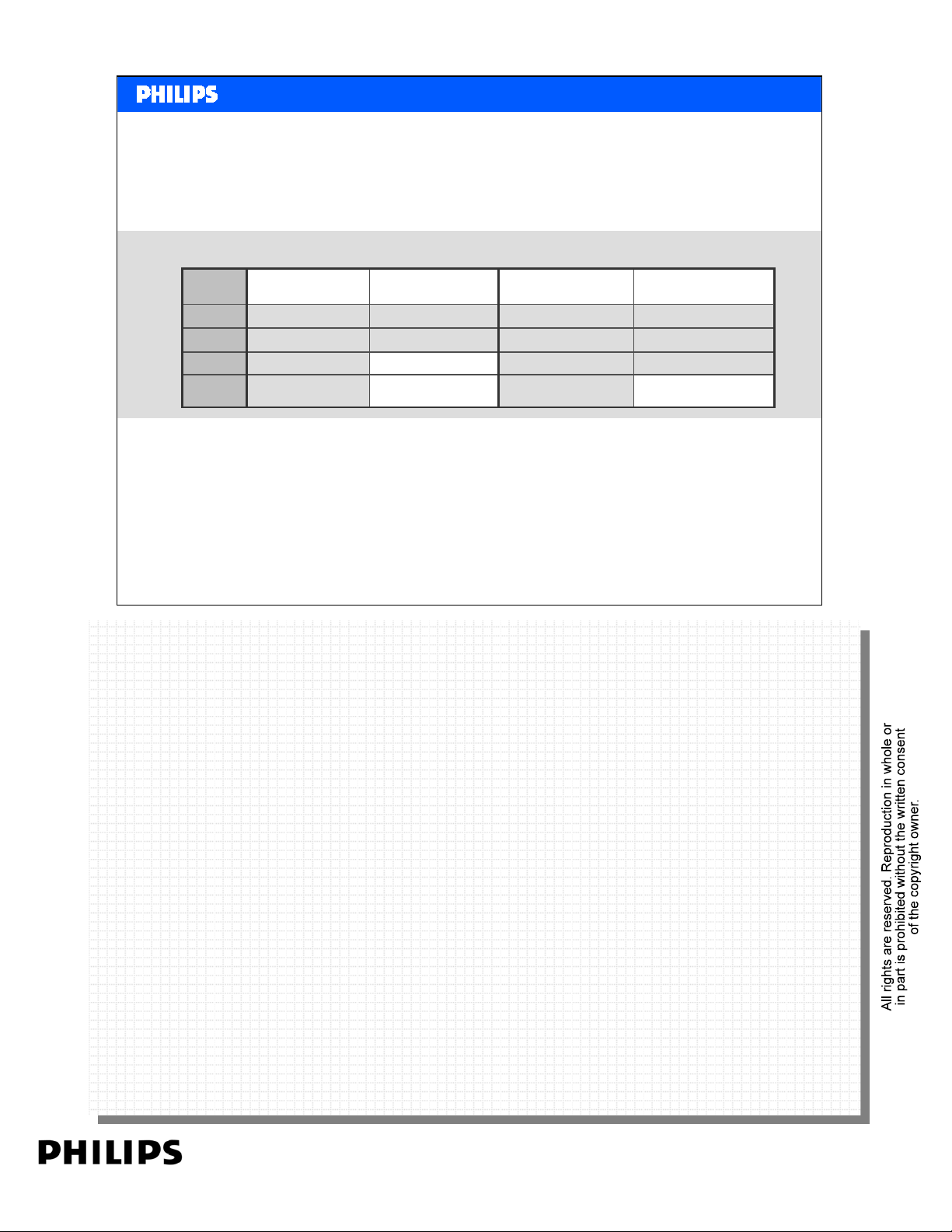
Disc
Type
+R
+RW
-R
-RW
<< Basics DVD recording >>SERVICE TRAINING
<< Basics DVD recording >>
Records smart & simple
getting started getting finished
Dual Format
Recorders
No mode selection
No mode selection
Only –VR mode is possible
Must chose between –VR
and -VM
Philips Recorders
No mode selection
No mode selection
No mode selection
No mode selection
Dual Format
NO finalisation (if –VR)
Recorders
Philips Recorders
Always finaliseAlways finalise
NO finalisationNO finalisation
Always finaliseAlways finalise
NO finalisationAlways finalise (if –VM)
Philips CE Europe, Euroservice, Mai 2006
Philips Recorders offer a very consistent and easy to remember recording and finalization
Philips Recorders offer a very consistent and easy to remember recording and finalization
protocol.
protocol.
When recording, you do not have to choose a Mode or Setting. As opposed to the competition,
When recording, you do not have to choose a Mode or Setting. As opposed to the competition,
where you’d have to choose –VR or -VM mode before you can start recording, Philips let’s you
where you’d have to choose –VR or -VM mode before you can start recording, Philips let’s you
record without thinking.
record without thinking.
Simply press the button. Pure simplicity in recording!
Simply press the button. Pure simplicity in recording!
Philips post-recording or finalization protocol is easy and consistent. All recordable (+R/-R) discs
Philips post-recording or finalization protocol is easy and consistent. All recordable (+R/-R) discs
require finalising, and the re-writable (+RW/-RW) discs won't.
require finalising, and the re-writable (+RW/-RW) discs won't.
Simple finalization. Pure simplicity in recording!
Simple finalization. Pure simplicity in recording!
Media Center PC Slide 25
PERSONAL NOTES:
PERSONAL NOTES:
page: 25
Page 26

<< Basics DVD recording >>SERVICE TRAINING
<< Basics DVD recording >>
More Background on +VR
VM = Video Mode.
When recording in this mode, the disc is finalized
and looks for a player just like a DVD-Video format.
It cannot be opened anymore for appending.
When recorded in this mode, the disc can be read out on any
player.
However, the recording quality might not be very good.
Philips CE Europe, Euroservice, Mai 2006
Media Center PC Slide 26
PERSONAL NOTES:
PERSONAL NOTES:
page: 26
Page 27

<< Basics DVD recording >>SERVICE TRAINING
<< Basics DVD recording >>
More Background on +VR
-VR = Dash Video Recording.
This format is very versatile and can be edited.
All kinds of editing features are defined and a video recorder
or a data drive that supports -VR can do a lot of tricks with this
format.
It is used for DVD-RW and DVD-RAM discs.
A disc that is recorded in -VR mode can only be read out on
players that are prepared for this feature and not on any player
(e.g. not on cheap DVD-Video players).
Philips CE Europe, Euroservice, Mai 2006
Media Center PC Slide 27
PERSONAL NOTES:
PERSONAL NOTES:
page: 27
Page 28

<< Basics DVD recording >>SERVICE TRAINING
<< Basics DVD recording >>
More Background on +VR
+VR = Plus Video Recording.
This is the Philips recording mode and ensures compatibility
of a recorded disc, even if it's not closed, with any DVD-Video
player (theoretically, because there are players based on
reference designs from Japan that cannot handle +RW media
and therefore neither +VR).
Philips CE Europe, Euroservice, Mai 2006
Media Center PC Slide 28
PERSONAL NOTES:
PERSONAL NOTES:
page: 28
 Loading...