

Page 1
Quick Use
Quick Use
Guide
Guide
AZ1830
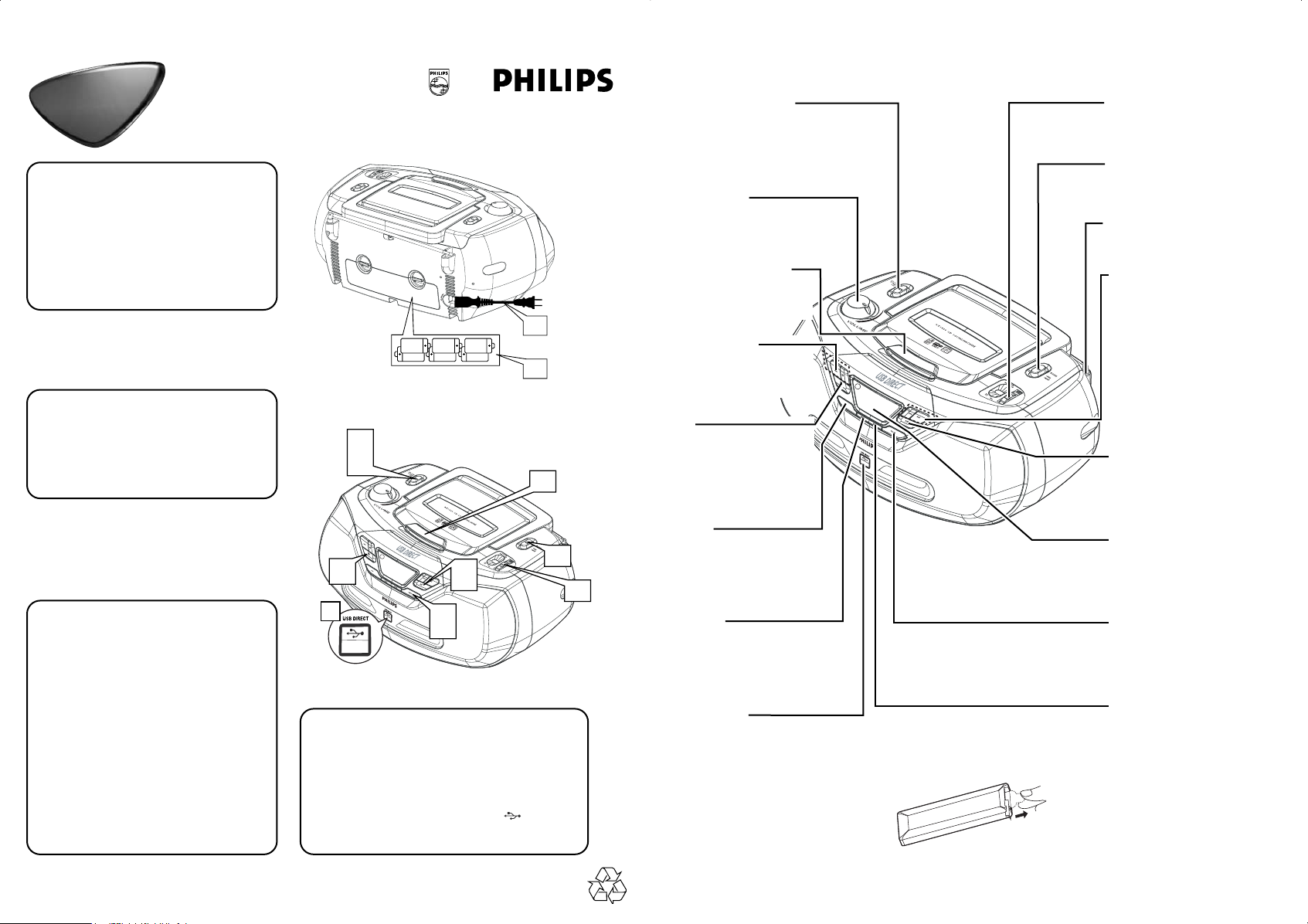
Choosing Power Supply
1
a Connect the AC power cord to the
AC~ Mains inlet and the wall socket.
-ORb Open the battery door and insert 6
x C batteries (not included).
Listening to the Radio
2
Push the source selector to TUNER.
a
b Adjust
cTurn TUNING to tune to a station.
BAND
to
MW
or FM.
6 x R14 • UM-2 • C-CELLS
R-14, UM-2 or C-cells
(not included)
2a
3a
4a
1a
1b
3c
Source selector
Slide to select
function: CD/MP3
(or USB mode), or radio
VOLUME
Turn to adjust volume level
LIFT TO OPEN
Lift to open the disc
door
ALBUM+/-
For MP3-CD/USB play:
Press to select albums
9
Press to stop disc/USB
playback, or erase a disc
program
TUNING
Turn to tune to a
station
BAND
Slide to select waveband
Telescopic antenna
Improves FM reception
∞, §
Briefly press to skip to
the beginning of the
current/previous/
later disc track;
During disc playback,
press and hold to find a
particular passage
backward/forward.
38
Press to start or pause
disc/USB playback
Playing a disc
3
This player plays Audio Discs including
CD-R/CD-RW, and MP3-CD.
a Adjust the source selector to
CD/USB.
bPress CD/USB to enter CD mode if
USB DIRECT is displayed.
c Open the disc door.
d Insert a disc with the printed side
facing up and close the door.
ePress 38 to start playback.
fTo stop disc playback, press 9.
2b
4c
3f
3e
4d
3b
4b
Playing a USB device
4
a Push the source selector to CD/USB.
bPress CD/USB to enter USB mode if USB
DIRECT is NOT displayed.
c Plug a compatible USB mass storage device
to AZ1830’s USB port marked
dPress
2; on your AZ1830 to start playback.
.
2c
DBB
T
urns the bass
enhancement on/off
PROG
Use to program disc
tracks and review a disc
program.
USB Port
Connects an external
USB mass storage device
Removing the insulation plastic tab
Display
Shows disc/USB functions
CD/USB
Press to enter disc or
USB mode
MODE
Press to
play modes, such as
REPEAT or SHUFFLE
(random order)
select different
 Loading...