

Page 1
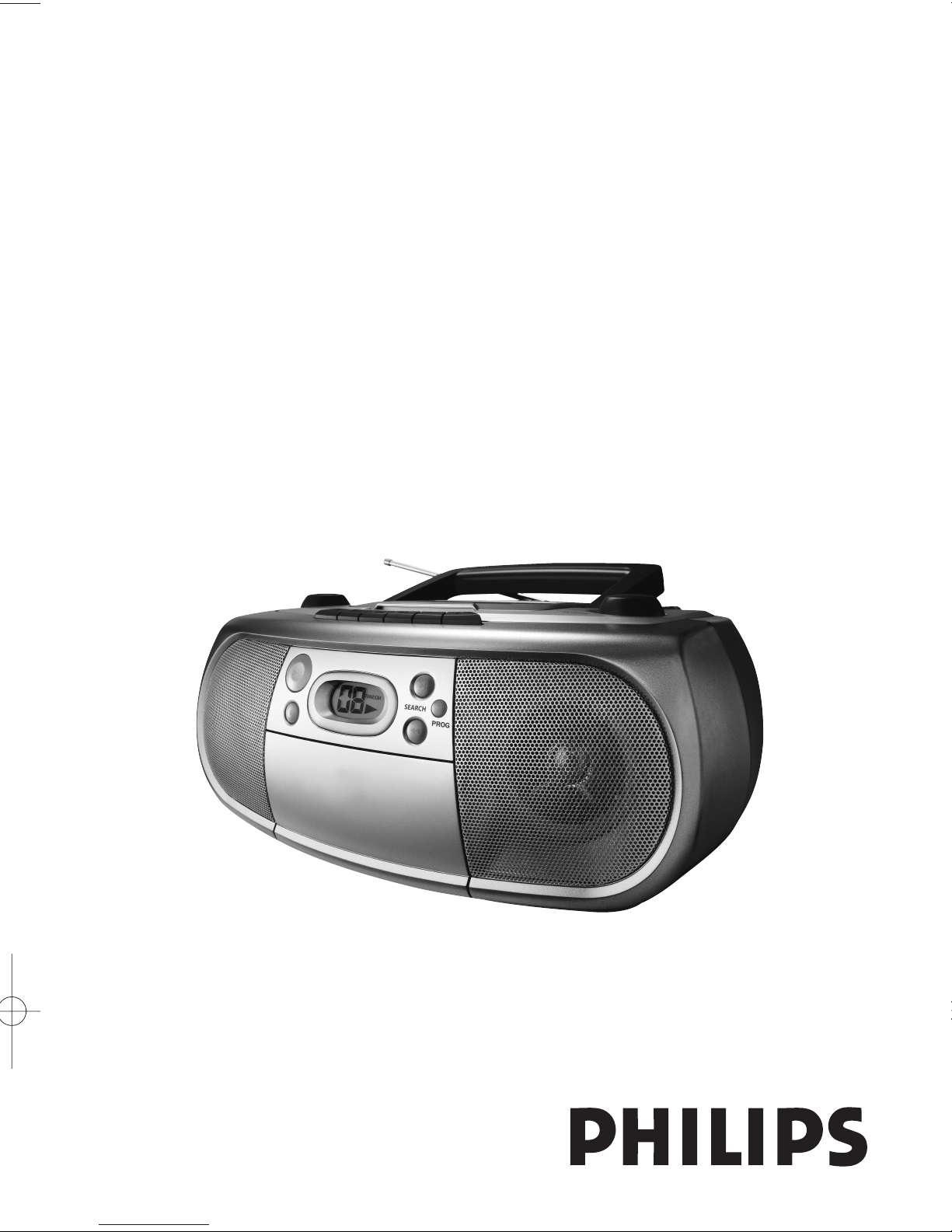
AZ1006
CD Soundmachine
User Manual
Page 2
Mexico
Es necesario que lea cuidadosamente su instructivo de manejo.
Descripción: Radio grabadora AM/FM con reproductor de CD
Modelo: AZ 1006/01
Alimentación: 110–127/220–240 V~; 50–60 Hz
Consumo: 12 W
Importador: Philips Mexicana, S.A. de C.V
Domicilio: Av. La Palma No. 6
Col. San Fernando La Herradura
Huixquilucan
Localidad y Telefono: Edo. de México C.P. 52784
Tel. 52 69 90 00
Exportador: Philips Electronics HK, Ltd.
País de Origen: China
Nº de Serie: ______________________________________
LEA CUIDADOSAMENTE ESTE INSTRUCTIVO ANTES DE USAR SU APARATO.
No abrir, riesgo de choque eléctrico
Verifique que el voltaje de alimentación
sea el requerido para su aparato
ATENCIÓN
Para evitar el riesgo de choque eléctrico, no quite la tapa.
En caso de requerir servicio, dirijase al personal calificado.
PRECAUCIÓN - ADVERTENCIA
AVISO IMPORTANTE
Philips Mexicana, S.A. de C.V. no se hace responsable por daños o
desperfectos causados por:
– Maltrato, descuido o mal uso, presencia de insectos o roedores
(cucarachas, ratones etc.).
– Cuando el aparato no haya sido operarado
de acuerdo con el instructivo del uso, fuera
de los valores nominales y tolerancias de las tensiones (voltaje),
frecuencia (ciclaje) de alimentación eléctrica y las características
que deben reunir las instalaciones auxiliares.
– Por fenómenos naturales tales como: temblores, inundaciones,
incendios, descargas eléctricas, rayos etc. o delitos causados por
terceros (choques asaltos, riñas, etc.).
Page 3
0
9
7
8
6
5
4
3
2
1
!
#
@
$
1
Page 4
A AB
C
X
2
3
7
4
5
6
Page 5

Supplied accessories
AC mains lead
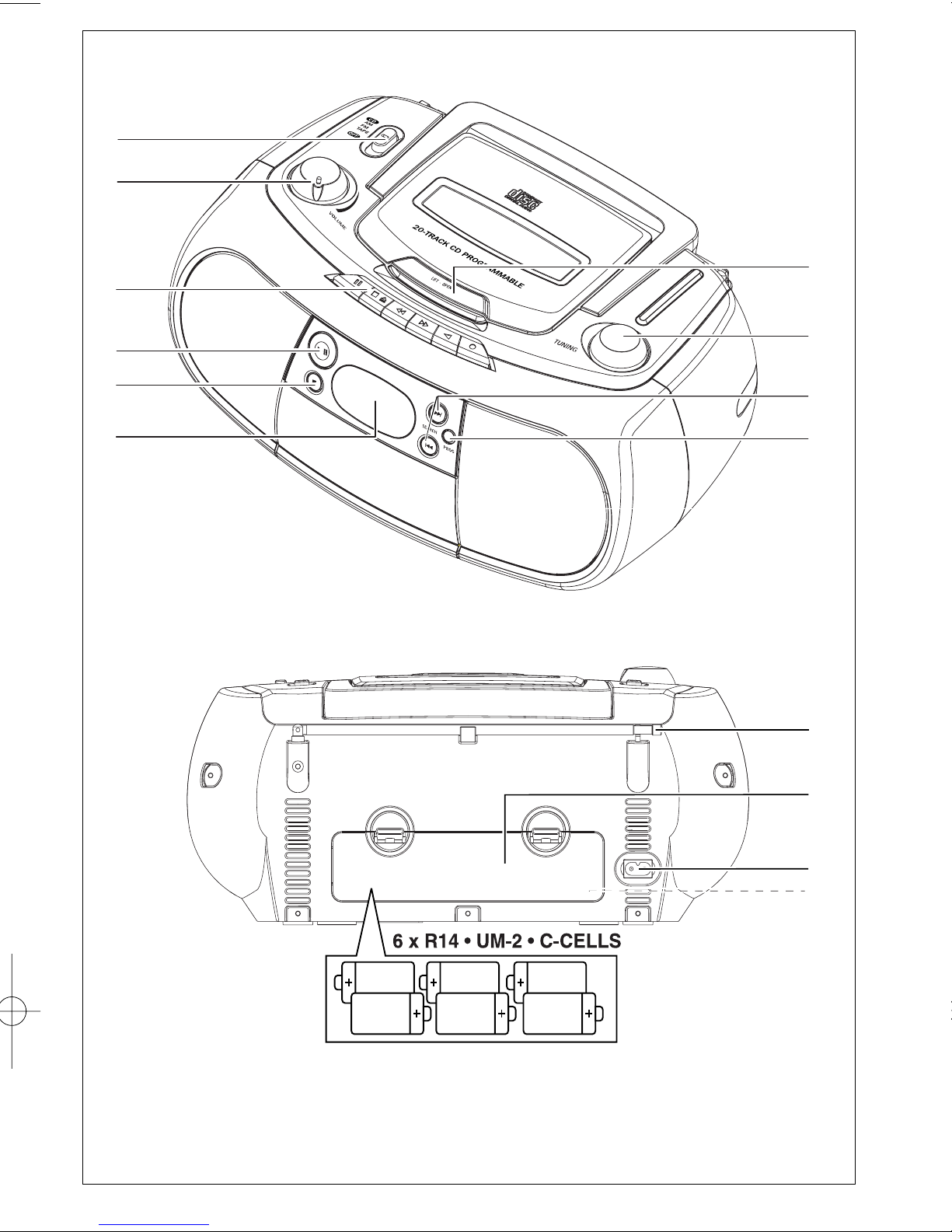
Top and front panels (See 1)
1
Source selector : CD, MW, FM,
TAPE/OFF
–
selects CD, tuner (MW or FM) or tape
source of sound
–
switch off switch
2
VOLUME– adjusts volume level
3
Cassette recorder keys:
;–pauses playback or recording
9
/ –
stops the tape;
–
opens the cassette holder
5 or 6–fast winds/ rewinds tape
1–starts playback
0–starts recording
4
2; - starts or pauses CD playback.
59–
stop playback;
–
erases a CD program.
6
CD Display–shows the CD functions
7 PROG – programs and reviews
programmed track numbers
8 SEARCH ∞,§–skips or searches a pas-
sage/track backwards
9 TUNING
– tunes to radio stations
0 LIFT•OPEN
– lift here to open the disc
door
Back panel
!
Telescopic antenna - improves FM
reception.
@ Battery door - open to insert 6 x 1.5V
R-14/ UM2/ C-cells.
# AC MAINS - inlet for power cord.
$ Voltage selector – (inside the battery com-
partment, not all versions) adjust to match
the local voltage 110/220V before plugging in
the set.
CAUTION
Use of controls or adjustments or
performance of procedures other
than herein may result in hazardous
radiation exposure or other unsafe
operation.
Power Supply
Whenever convenient, use the mains supply
cord if you want to conserve battery life.
Make sure you remove the plug from the set
and wall outlet before inserting batteries.
Batteries (not included)
1 Open the battery compartment and insert
six batteries, type R-14, UM-2 or C-cells,
(preferably alkaline) with the correct polarity
as indicated by the "+" and "–" symbols inside
the compartment. (See 1)
2 Replace the compartment door, making sure
the batteries are firmly and correctly in place.
The set is now ready to operate.
Batteries contain chemical substances, so
they should be disposed of properly.
English Controls/Power Supply
Page 6

• Incorrect use of batteries can cause
electrolyte leakage and will corrode the
compartment or cause the batteries to burst:
• Do not mix battery types: e.g. alkaline with
carbon zinc. Only use batteries of the same
type for the set.
• When inserting new batteries, do not tr y to
mix old batteries with the new ones.
• Remove the batteries if the set is not to be
used for a long time.
Using AC Mains
1 Check if the power/mains voltage, as shown
on the type plate located on the
bottom of the set, corresponds to your
local power supply. If it does not, consult your
dealer or service center
2 If your set is equipped with a voltage selector,
adjust the selector so that it matches with the
local mains.
3 Connect the power cord to the AC MAINS
inlet and the wall socket.The mains lead is
now connected and ready for use.
4 To switch the set off completely, withdraw the
power cord from the wall socket.
• Disconnect the mains lead from the wall
socket to protect your set during heavy
thunderstorms.
The type plate is located on the bottom
of the set.
Helpful hints : To avoid unnecessary energy
consumption, always adjust the source
selector to
TAPE/OFF
after using the set.
Also check that the tape deck keys are
released.
General operation
1 To select your sound source adjust the
source selector to : CD, MW, FM or
TAPE/OFF
.
2 Adjust the sound with the VOLUME
control.
3 To switch off the set, adjust the source selec-
tor to
TAPE/OFF
position and check the
cassette keys are released.
Radio reception
1 Adjust the source selector to
MW or
FM
.
2 Tur n TUNING to tune to a station.
• For FM, extend and turn the telescopic
antenna for best reception. Reduce its length
if the signal is too strong.
• For MW, the set uses a built-in antenna.
Direct this antenna for best reception by
turning the whole set.
3 To switch off the radio, adjust the source
selector to
TAPE/OFF
position and check
the cassette keys are released.
Power Supply
General operation/Radio
Page 7

Playing a CD
This CD player plays Audio Discs including
CD-Recordables and CD-Rewritable.
• MP3 CD-ROMs, CD-I, CDV,VCD, DVD or
computer CDs are not possible for playback
on this set.
IMPORTANT!
• CDs encoded with copyright protection
technologies by some record companies may
be unplayable by this product.
1 Adjust the source selector to CD.
2 Insert a CD/ CD-R(W) with the printed side
facing up and press the CD door gently
close.
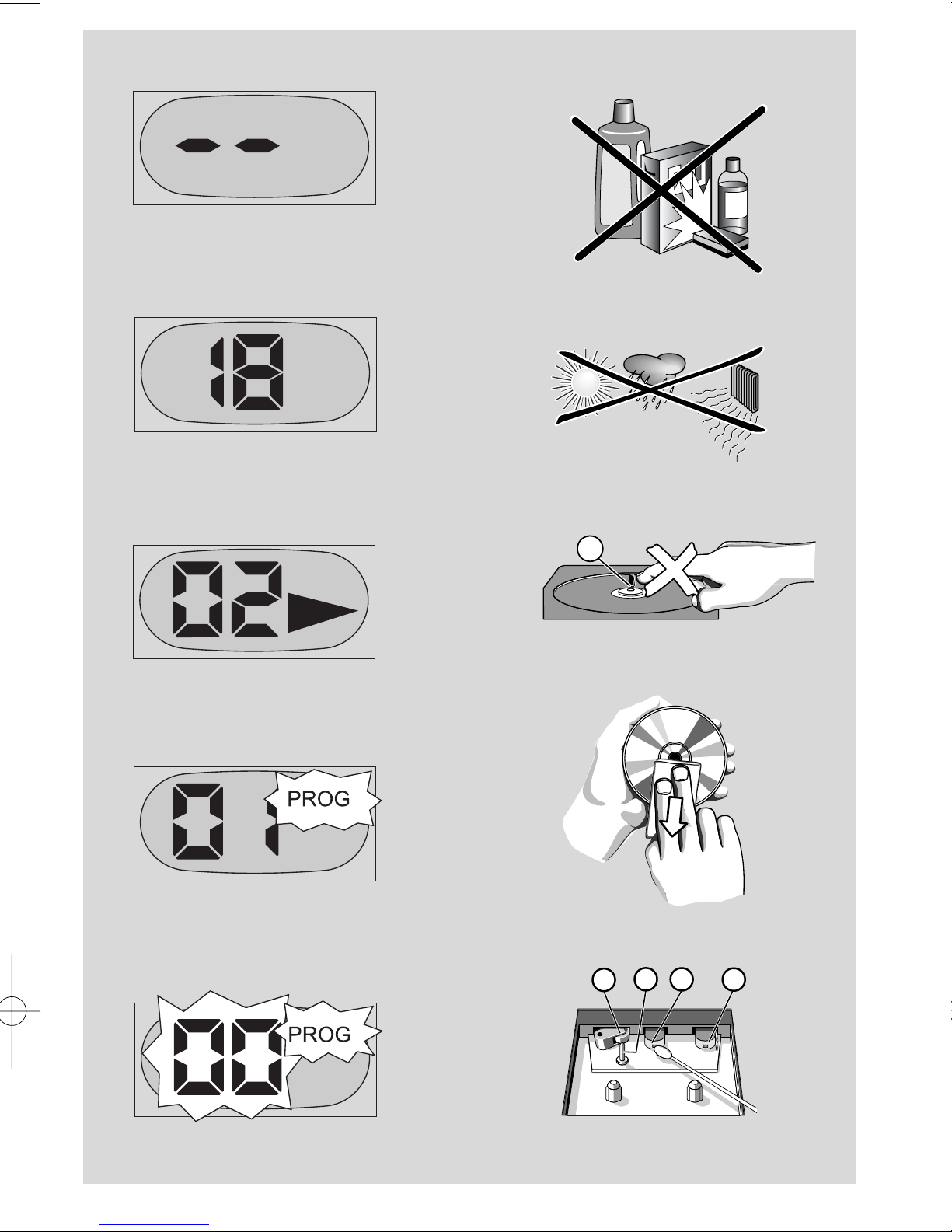
➜ Display shows -- and later, the total
number of tracks. (See 2, 3)
3 Press 2;on the set to start playback.
➜Display:
2
and the current track number.
(See 4)
4 To pause playback press
2;
. Press
2;
again
to resume playback.
5 To stop CD play, press9.
6 To switch off the set, adjust the source
selector to
TAPE/OFF
position and check
the cassette keys are released.
Helpful hints : CD play will also stop when:
- you open the CD compartment;
- you select
MW, FM,
or
TAPE/OFF
sound
source;
- the CD has reached the end of playback.
Selecting a different track
• Press SEARCH
∞ or §
once or repeatedly
until the desired track number appears in the
display.
• In the pause/stop position, press 2; to start
playback.
Finding a passage within a
track
1 During playback, press and hold down
∞ /
§
.
➜ The CD is played at high speed and low
volume.
2 When you recognize the passage you want
release
∞ / §
.
➜ Normal playback resumes.
Helpful hints : When searching within a final
track and you reach the end of the last track,
the CD goes to stop mode.
Programming track
numbers
You may store up to 20 tracks in the desired
sequence. If you like, store any track more
than once.
1 In the stop position, press PROG to activate
programming.
➜ Display: PROG and 00 flash.
2 Press ∞or §to select your desired track
number.
➜ Display: PROG and your desired track
number flash. (see 5)
3 Press PROG to store the desired track
number.
➜ Display: PROG and 00 flash for you to
program the next track. (see 6)
4 Repeat steps 2 to 3 to select and store all
desired tracks in this way.
5 To play your program, press2;.
➜ Display: PROG flashes during program
playback
Helpful hints : If you tr y to store more than
20 tracks, the display will show --.
CD Player
Page 8

To review a program
• In the stop position, press PROG repeatedly
to see your stored track numbers.
Erasing a program
You can erase the contents of the memory
by:
– Pressing
STOP 9
(twice during playback or
once in the stop position)
– Selecting MW, FM or
TAPE/OFF
sound
source;
– opening the CD door;
➜Display: PROG disappears.
Cassette playback
1 Adjust the source selector to
TAPE/OFF
.
2 Press 9/ to open the cassette holder and
insert a cassette and close the deck.
3 Press 1to start playback.
4 To pause playback press ;.
5 To resume, press ;again.
6 To stop the tape, press 9/.
Fast forwarding/rewinding
1 Press
5 or 6
until you reach your desired
passage.
2 Press 9/ to stop rewinding/fast forwarding.
Helpful hints :
- During playback, the keys are automatically
released at the end of a tape and the set is
switched off (unless PAUSE mode
;
has been
activated.)
- During fast forwarding/rewinding, the keys will
not be released at the end of a tape.To switch
off the set, make sure the cassette keys are
also released.
General information on recording
• Recording is permissible insofar as copyright
or. other rights of third parties are not
infringed.
• For recording, use only NORMAL type cassettes (IEC type I) on which the tabs have not
yet been broken.This deck is not suited for
recording on CHROME (IEC II) or METAL
(IEC IV) type cassettes.
• The best recording level is set automatically.
Altering the VOLUME will not affect the
recording.
•To protect a tape from accidental erasure,
break out the tabs. If you wish to record
again, cover the tabs with a piece of adhesive
tape.
CD synchro start recording
1 Select CD source.
2 Insert a CD and if desired, program track
numbers.
3 Press
9
/ to open the cassette holder. Insert
a blank tape and close the deck.
4 Press0to start recording.
➜ Playing of the CD/program starts auto-
matically from the beginning. It is not
necessary to start the CD player separately.
5 For brief interruptions press ;.To resume
recording, press ;again.
6 To stop recording, press 9/.
CD Player Cassette Recorder
Page 9

Recording from the Radio
1 Adjust the Source selector to MW or
FM to select your desired waveband.
2 Tune to the desired radio station (see Radio
reception).
3 Follow steps 3-6 under CD sychro start
recording.
Precautions & General
Maintenance (See 7)
• Place the set on a hard, flat and stable surface
so that the system does not tilt.
• Do not expose the set, batteries, CDs to
humidity, rain, sand or excessive heat caused
by heating equipment or direct sunlight.
• The apparatus shall not be exposed to dripping or splashing.
• Adequate ventilation with a minimum gap of
15 cm between the ventilation holes and surrounding surfaces is necessary to prevent
heat build-up.
• The ventilation should not be impeded by
covering the ventilation openings with items,
such as newspapers, table-cloths, curtains, etc..
• No objects filled with liquids, such as vases,
shall be placed on the apparatus.
• No naked flame sources, such as lighted candles, should be placed on the apparatus.
• The mechanical parts of the set contain
self-lubricating bearings and must not be oiled
or lubricated.
•To clean the set, use a dr y cloth. Do not use
any cleaning agents containing alcohol,
ammonia, benzene or abrasives as these may
harm the housing.
Ta pe deck maintenance (See 7)
To ensure quality recording and playback of
the tape deck, clean par ts A, B and C as
shown, once a month. Use a cotton bud
slightly moistened with alcohol or a special
head cleaning fluid to clean the deck.
1 Open the cassette holder by pressing
9
/.
2 Press
1
and clean the roller C.
3 Press
;
and clean the heads A, and the
capstan B.
4 After cleaning, press 9.
➜ Cleaning of the heads can also be done by
playing a cleaning cassette through once.
CD player and CD handling (See 7)
• If the CD player cannot read CDs correctly,
use a cleaning CD to clean the lens before
taking the set to repair.
• The lens of the CD player should never be
touched!
• Sudden changes in the surrounding
temperature can cause condensation on the
lens of your CD player. Playing a CD is then
not possible. Do not attempt to clean the
lens but leave the set in a warm environment
until the moisture evaporates.
•Always close the CD-tape door to avoid dust
on the lens.
•To clean the CD, wipe in a straight line from
the center towards the edge using a soft,
lint-free cloth. Do not use cleaning agents as
they may damage the disc.
• Never write on a CD or attach any stickers
to it.
Cassette Recorder Maintenance
Page 10
Problem
– Possible cause
• Remedy
No sound /power
– Volume not adjusted
• Adjust the VOLUME
– Power cord not securely connected
• Connect the AC power cord properly
– Batteries dead/ incorrectly inserted
• Insert (fresh) batteries correctly
– CD contains non-audio files
• Press
SEARCH ∞ , §
once or more to skip to
a CD audio track, instead of the data file.
Display does not function properly/ No
reaction to operation of any of the controls
– Electrostatic discharge
• Switch off and unplug the set. Reconnect after a
few seconds
The CD skips tracks
– CD damaged or dirty
• Replace or clean CD
– Program is active
• Quit program mode
- - indication
– No CD inserted
•
Insert a CD
– CD badly scratched or dirty
•
Replace/ clean CD, see Maintenance
– Laser lens steamed up
•Wait until lens has cleared
– CD-R(W) is blank or not finalized
•
Use a finalized CD-R(W) or suitable CD Audio
disc only
Note:
Make sure the CD is not encoded with
Copyright protection technologies, as some
do not conform to the Compact
Disc standard.
Poor cassette sound quality
– Dust and dirt on the heads, etc.
• Clean deck parts, see Maintenance
– Use of incompatible cassette types (METAL or
CHROME)
• Only use NORMAL (IEC I) for recording
Recording does not work
– Cassette tab(s) may be broken
• Apply adhesive tape over the missing tab space
Troubleshooting
Environmental information
All unnecessary packaging material has been omitted. The packaging can be easily separated
into three materials: cardboard, polystyrene and plastic.
Your set consists of materials which can be recycled if disassembled by a
specialized company. Please observe the local regulations regarding the
disposal of packaging, dead batteries and old equipment.
If a fault occurs, first check the points listed below before taking the set for repair.
If you are unable to remedy a problem by following these hints, consult your dealer or service centre.
WARNING: Do not open the set as there is a risk of electric shock. Under no cir-
cumstances should you try to repair the set yourself, as this will invalidate the guarantee.
Page 11

These warranty conditions are valid for the
following consumer electronics products: Colour
Televisions,Video Cassette Recorders, CD Players
and Recorders, DVD Players and Recorders,Audio
Systems and Portable Audio.
The benefits given to the purchaser by this
warranty are in addition to all other rights and
remedies which the purchaser has in respect of
the product under the Trade Practices Act or
other Commonwealth or State Law.
Philips Consumer Electronics warrants its products to the
purchaser as follows and subject to the stated conditions.
3 YEARS free Repair Service
Colour Televisions, CD Players and Recorders, DVD Players
and Recorders and Audio Systems.
3 YEARS free Replacement – at your Retailer
All Portable Audio products and all Video Cassette
recorders (VCR’s) only.
Conditions of Repair Warranty
1. All claims for warranty service should be made to your
nearest Philips Authorised Service Centre. Reasonable
evidence of date of purchase must be provided.
2. This warranty extends only to defects in material or
workmanship occurring under normal use of the product
when operated in accordance with the instructions.
3. This warranty applies for original purchase only. It is not
transferable if sold.
4. Home service within the normal service area of one of our
Authorised Service Centres will only be provided for
television receivers with screen size 48 cm and above. All
other products are to be taken or sent to the workshop of
your nearest Authorised Service Centre (at Consumer’s
expense).
5. This Manufacturers Warranty is limited to 3 months for
above listed Consumer Electronics products if used in
commercial applications.
6. Philips may, at its discretion choose to replace rather than
repair any product covered by this warranty.
7. This Manufacturers W
arranty is neither transferable nor
valid in countries other than Australia.
This warranty does not cover:
a) Mileage or trav
elling time, pickup or delivery, installations
and cost of insurance.
b) Mileage or travel outside the normal service area
covered by selected Authorised Ser vice Centre.
c) Service costs arising from failure to correctly adjust the
controls of the product or to observe the instructions, or
inspections that reveal that the product is in normal
working order.
d) Product failures caused by misuse, neglect, accidental
breakage, transit damage, inexper t repairs or modification
by un-authorised persons, external fires, lightning strikes,
floods, vermin infestation or liquid spillage.
e) Cleaning of video or audio heads.
f) Inadequate receiving antennae.
g) Replacement of worn or used batteries or other
consumables.
h) Consumer products used in commercial applications
(This warranty is limited to 3 months only).
i) Second hand products.
The conditions contained in this warranty card replace and
override the provision of the Philips World-Wide Guarantee
for products purchased in Australia and used in Australia.
Philips Authorised Service Centres
Service is provided through 200 accredited Authorised
Service Centres throughout Australia. For direct contact
with your nearest recommended Authorised Service
Centre in major cities:
Adelaide Launceston
Brisbane
Melbourne
Canberra Newcastle
Geelong Perth
Gold Coast Sydney
Hobart Wollongong
or to find the location of your nearest recommended
Authorised Service Centre outside the above cities
please call our National Service telephone number :
1300 361 392
Please record the following information for your records
and keep in a safe place.
Model number:....................................................
Serial number:....................................................
Date of purchase:....................................................
Retailer:....................................................
We recommend you r
etain your purchase receipt to
assist in any warr
anty claim.
Philips Consumer Electronics
a division of Philips Electronics Australia Limited
ABN 24 008 445 743,
Level 2, 65 Epping Road NORTH RYDE NSW 2113
AUSTRALIA- Philips 3 years Manufacturers Warranty for Australia only
3 year War
ranty valid for all new products purchased after 1
st
July 2002
Page 12

NEW ZEALAND -
Guarantee and Service for New Zealand
Thank-you for purchasing this quality Philips product.
Philips New Zealand Ltd guarantees this product against defective components and faulty
workmanship for a period of 12 months. Any defect in materials or workmanship occurring
within 12 months from the date of purchase subject to the following conditions will be rectified
free of charge by the retailer from whom this product was purchased.
Conditions
1. The product must have been purchased in New Zealand.As proof of purchase, retain the
original sales docket indicating the date of purchase.
2. The guarantee applies only to faults caused by defective components, or faulty workmanship
on the part of the manufacturer.
3. The guarantee does not cover failures caused by misuse, neglect, normal wear and tear,
accidental breakage, use onthe incorrect voltage, use contrary to operating instructions,
or unauthorised modification to the product or repair by an unauthorised technician.
4. Reasonable evidence (in the form of a sales docket) must be supplied to indicate that the
product was purchased no more than 12 months prior to the date of your claim.
5. In the event of a failure, Philips shall be under no liability for any injury, or any loss or
damage caused to property or products other than the product under guarantee.
This guarantee does not prejudice your rights under common law and statute,
and is in addition to the normal responsibilities of the retailer and Philips.
How to claim
Should your Philips product fail within the guarantee period, please return it to the
retailer from whom it was purchased. In most cases the retailer will be able to
satisfactorily repair or replace the product.
However, should the retailer not be able to conclude the matter satisfactorily, or if you
have other difficulties claiming under this guarantee, please contact
The Guarantee Controller
Philips New Zealand Ltd.
4 P.O. Box 41.021
Auckland
3 (09) 84 94 160
fax 3
(09) 84 97 858
Page 13

POLIZA DE GARANTIA
ESTA POLIZA ES GRATUITA
Este aparato ha sido cuidadosamente diseñado y se ha fabricado con los mejores materiales bajo un
estricto control de calidad, garantizando su buen funcionamiento por los periodos establecidos según el
aparato (ver lista en la parte inferior) a partir de la entrega del aparato al consumidor.
Esta póliza incluye la reparación o reposición gratuita de cualquier parte o componente
que eventualmente fallase y la mano de obra necesaria para su reparación, misma que se
hará efectiva en cualquiera de nuestros centros de servicio autorizados en el país.
Si su aparato llegase a requerir de nuestro servicio de garantía, acuda al centro de servicio más
cercano a su domicilio, de tener alguna duda por favor llame a nuestra CENTRAL DE SERVICIO
al Tel.: 52 69 90 86, y en el interior del país LADA sin costo al 01800 506 92 00 en donde con gusto le
indicaremos el centro de servicio autorizado más cercano a su domicilio.
PHILIPS MEXICANA S.A. de C.V. a través de sus centros de servicio autorizados reparará y devolverá
a usted su aparato en un plazo no mayor a 20 días hábiles, contados a partir de la fecha de
ingreso, impresa en la orden de ser vicio de cualquiera de nuestros centros de servicio autorizados.
La garantía de esta póliza cubre cualquier desperfecto o daño eventualmente
ocasionado por los trabajos de reparación y/o traslado del aparato en el interior de
nuestros centros de servicio autorizados.
Esta póliza sólo tendrá validez, si está debidamente requisitada, sellada por la casa
vendedora, en caso de extravío de esta póliza, podrá hacer efectiva su garantía con la presentación
de su factura de compra.
ESTA POLIZA NO SE HARA EFECTIVA EN LOS SIGUIENTES CASOS:
● Cuando el aparato sea utilizado en condiciones distintas a las normales.
● Cuando el aparato no haya sido operado de acuerdo con el instructivo de uso que se le acompaña.
● Cuando la causa de la falla o mal funcionamiento sea consecuencia de una reparación inadecuada o
alteración producida por personas no autorizadas por PHILIPS MEXICANA S.A. de C.V.
PERIODOS DE GARANTIA
36 MESES. – Monitores para computadora.
12 MESES. –Televisores con y sin reproductor de video digital DVD, videocassetteras, reproductores de
discos de video digital DVD, grabadores reproductores de disco de video digital DVD,
grabadores reproductores de disco compacto, video proyectores (excepto la lámpara),
cámaras de video, decodificadores de señal (IRD), televisores para hotel, sistemas de
observación, televisores de proyección, teléfonos celulares, pagers, minisistemas de audio,
microsistemas de audio, equipos modulares, sintoamplificadores, facsímils, LNB, antenas de
recepción de satélite, DVD ROM, CDR ROM y CDRW ROM para computadora.,
6 MESES. – Radiograbadoras con y sin reproductor de disco compacto, reproductores de cassette
portátil, reproductores de disco compacto portátil, radio relojes, radios A.M./F.M.,
reproductores de audio digital MP3 (internet), auto estéros y teléfonos inalámbricos.
3 MESES. – Accesorios, controles remotos, bocinas, cinta para fax y para cámaras de videoconferencia.
MC-719-ARCO
Page 14
Philips Mexicana, S.A. de C.V.
MODELO_________________________________ Nº DE SERIE ___________________________
La presente garantía contará a partir de: DIA_____________ MES ____________ AÑO____________
En caso que en su producto se produzca alguna falla, acuda al centro de ser vicio más cercano a su domicilio (según listado de talleres),
de tener alguna duda, por favor llame a nuestra CENTRAL DE SERVICIO, en donde con gusto le atenderemos.
Así mismo, cuando requiera refacciones y par tes originales para su producto, acuda a los centros de servicio. Para hacer efectiva la garantía
de su producto, es necesario que presente usted esta póliza debidamente requisitada, o de lo contrario, presentar su factura de compra.
CENTROS DE SERVICIO
NOTA: Los Centros que tengan (S) solo proporcionan Servicio y los que tengan (SR) venden Refacciones y
proporcionan Servicio.
Producto importado por:
Philips Mexicana, S.A. de C.V.
Av. La Palma No. 6
Col. San Fernando La Herradura
Huixquilucan, Edo. de México C. P. 52784
Tel. 52 69 90 00
Información General
Centro de Información al Consumidor
Lada 01 800 504 62 00
CENTRAL DE SERVICIO
Tel. 52 69 90 86
Lada 01 800 506 92 00
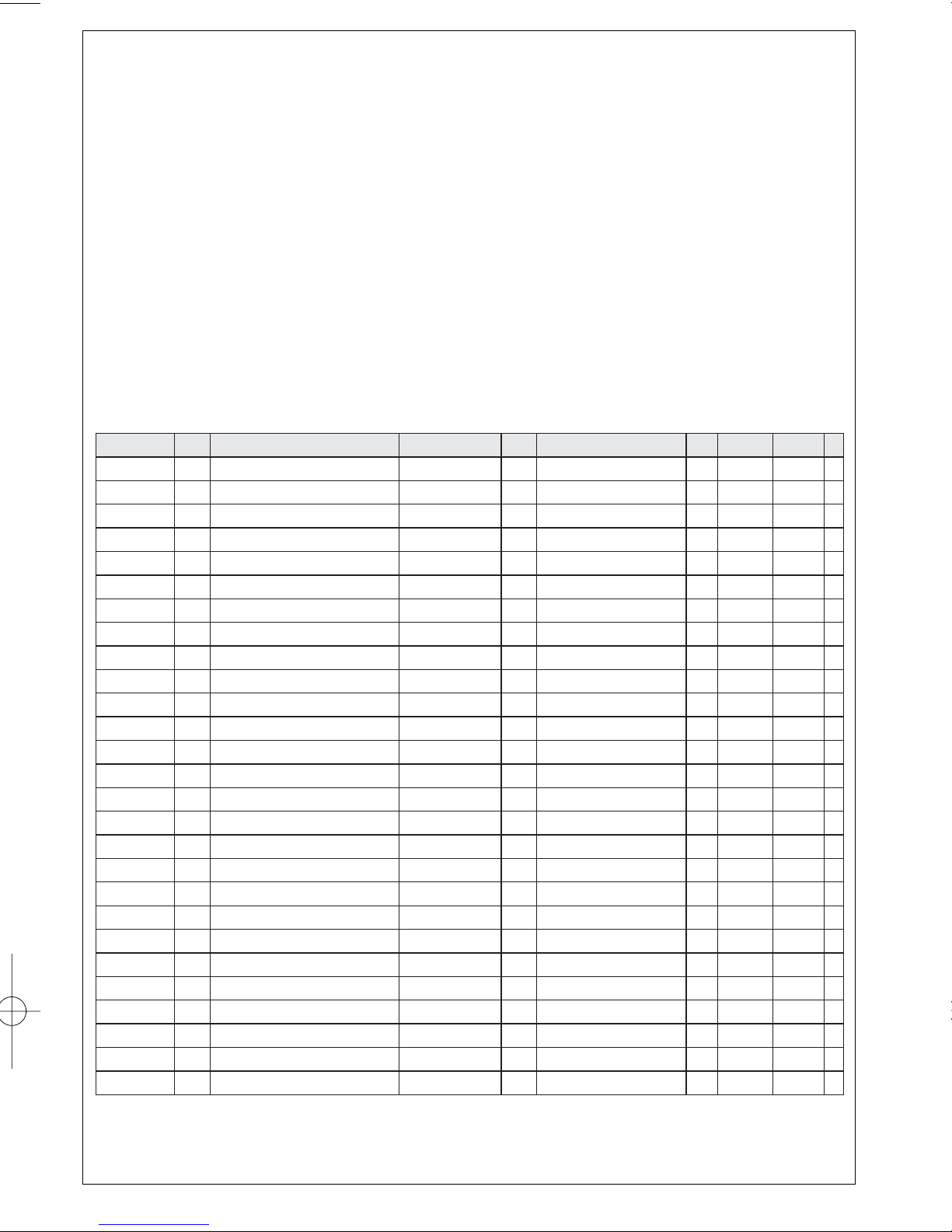
Ciudad EDO Calle y Nº Colonia C.P. Nombre Comercial Lada Telefono Fax
Acapulco GRO Av. Revolucion Nº 28 M. Aleman 39300 Servicio Electronico Profesional 744 83 32 96 – S
Cd. Juarez CHIH. Rancho el Becerro 3011 Pradera Dorada 32610 Teleservicio Dominguez 656 18 21 28 18 21 28 S
Reynosa TAMPS Tiburcio Garza Nº 401 Rodriguez 88630 Teleservicio Pepe 899 22 59 86 – S
Chihuahua CHIH. Tr asviña y Retes Nº 3503-A San Felipe 31240 Zener Electronica 614 14 01 16 14 33 51 S
Colima COL Francisco I. Madero Nº 426 Centro 28000 TV Antenas de Colima 312 403 01 403 01 S
Culiacan SIN Ve nustiano Carranza Nº 140-A Nte. Centro 80090 Estereo Voz 667 16 15 10 – S
Guadalajara JAL Av.Vallarta Nº 2250 Ladron de Guevara 44600 Leecom S.A. de C.V. 33
616 18 88
616 01 26
615 72 62 SR
Leon GTO Hernandez Alvarez Nº 726 San Juan de Dios 37480 Tecnicos Especializados 477 70 26 99 15 58 64 S
Merida YUC Calle 70 Nº 443 X 49 Depto. 8 Centro 97000 Servicentro 999 28 59 05 23 39 97 S
Mexicali B.C.N. Calzada Cuahutemoc Nº 816-2 Cuahutemoc Norte 21200 Baja Electronic’s 686
61 98 08
61 98 08
– S
Mexico D.F. Nor te 1 D Nº 4634
Defensores de la
Republica
7780 Tecnologia y Servicio S.A. de C.V. 55 5368 30 21 5368 30 21 S
SR
SR
SR
S
S
S
SR
S
S
SR
S
S
S
S
S
S
Mexico D.F. Calz.Vallejo Nº 1045-03 Esq. Pte. 124 Nueva Vallejo 02300 Electronica Chyr S.A. de C.V. 55
567 19 92
567 22 56
56 79 62
Mexico D.F.
Nicolas San Juan Nº 806,
Esq. div
. del Norte
Del Valle 03100 Centro de Servicio Electronico 55
536 71 03
536 25 75
5687 13 05
Monterrey N.L. Juan Mendez Nº 825 Nte. Centro 64000
Monterrey Centro Electronico S.A.
81
375 16 17
400 54 03
375 34 86
400 54 04
Morelia MICH. Lago de Patzcuaro Nº 500-A Ventura Puente 58020
Multiserv. Profesionales de Zamora
443 12 03 17 –
Oaxaca OAX Huzares Nº 207 Centro 68000 El Francistor S. de R.L. de C.V. 951 647 37 472 97
Pachuca HGO Pza. de las
Americas Lote 28 Nucleo D
Valle de Sn Ja
vier
42086 Frazare Electronica 771 14 15 81 18 86 72
Puebla PUE Av
. 10 Pte. Nº 2902-B
San Alejandro 72090 Selcom 222 48 77 64 31 63 77
Queretaro QRO Bolivia 32 Lomas de Queretaro 76190 Electronica Zener 442 610 09 –
San Luis Potosi S.L.P. Dr. Salvador Nava Nº 2755 Balcones del Valle 78280 Servicios Electronicos 444 534 07 –
Tampico TAMPS Laredo Nº 105 Mainero 89060 Concesionario Philips Tampico 833 12 36 04 –
Toluca
EDO
MEX
Calle Toluca Nº 505 Sanchez 50040 Concesionario Philips Toluca 722 14 83 09 1703 20 21
Tijuana B.C.N. Av.
Negrete 1613
Centro 22000
Sistemas Inalambricos de
Com
unicacion
666 85 23 22 85 23 22
To r reon COAH Mariano Lopez Ortiz Nº 1126 Nte. Centro 27000 Electronica Jomar 871 22 00 05
1702 19 76
Tuxtla Gutierrez CHIS 10 Nte. Ote 153-A Centro 29000 KC-Video 961 18 19 08 –
Ver acruz VER Guerrero Nº 1877 Entre Cortez y Canal Centro 91700 Antza Comunicaciones 229
32 78 23
32 44 44
31 91 66
Villahermosa TA B Sanchez Marmol Nº 206 Centro 86000 Tecnicentro 993
14 31 36
14 61 67
Page 15
Meet Philips at the Internet
http://www.audio.philips.com
AL-450-1
W
CLASS 1
LASER PRODUCT
AZ 1006
English
 Loading...