

Page 1
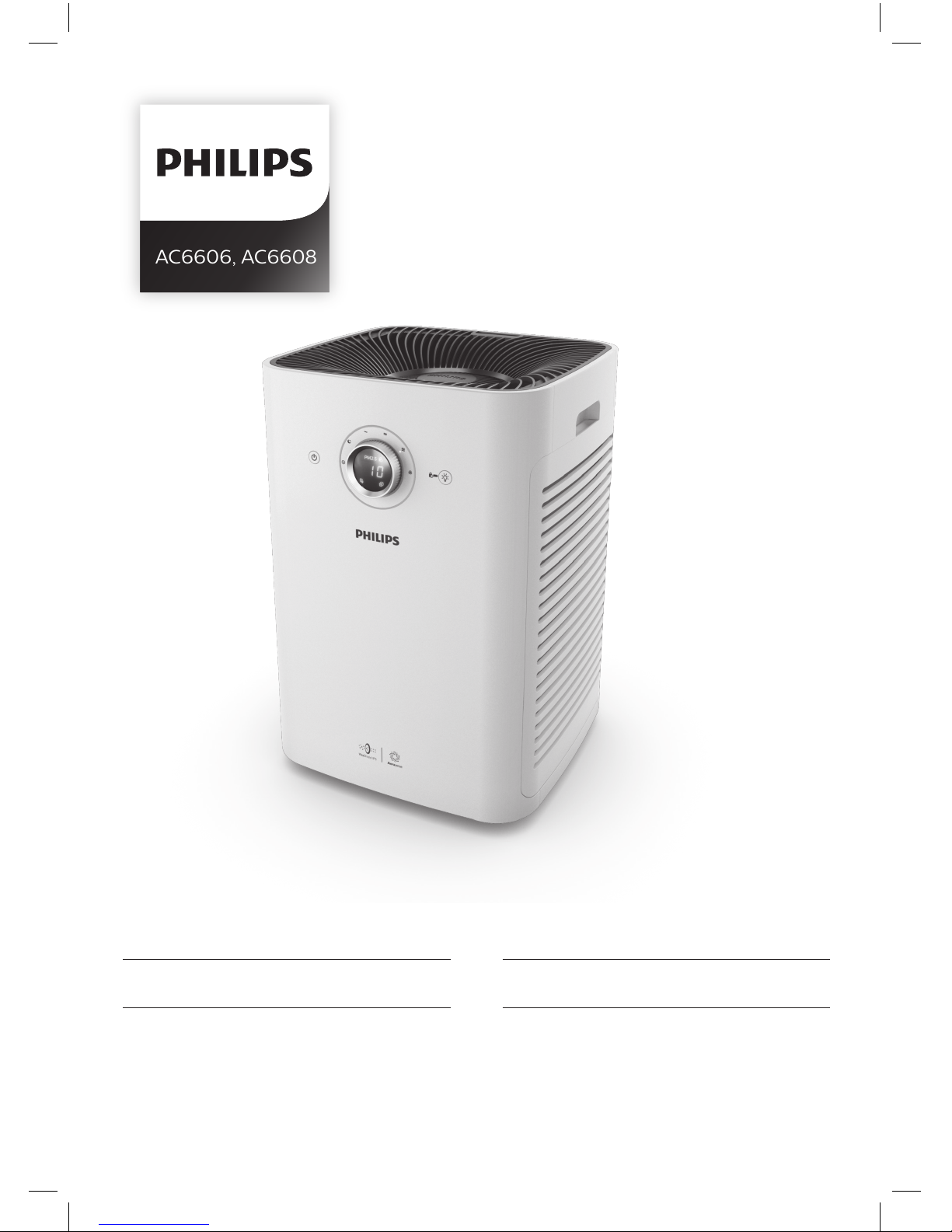
AC6606, AC6608
ZH-S 用户手册 3 EN User manual 19
Page 2

Page 3
3
ZH-S
简体中文
目录
1
重要事项
4
安全
4
2
您的空气净化器
6
产品概述
6
控件概述
7
3
使用入门
8
安装过滤网
8
4
使用产品
9
了解空气质量指示灯
9
启动产品
9
更改风速
10
儿童锁
11
使用灯光开/关功能
11
5
清洁
12
清洁计划
12
清洗产品机身
12
清洁出风口盖
12
清洁空气质量传感器
13
清洁预过滤网
13
6
更换空气净化滤网
14
了解健康空气智能锁
14
更换空气净化滤网
15
7
重置滤网使用寿命计数器
16
8
故障排除
17
9
保修与服务
18
订购部件或附件
18
10
注意事项
18
电磁场
(EMF) 18
回收
18
Page 4

4
ZH-S
1
重要事项
安全
使用本产品之前,请仔细阅读本使用说
明书,并保留备用。
危险
•
切勿让水或任何其它液体或
易燃性清洁剂进入产品,以
免发生触电和/或火灾。
•
切勿用水或任何其它液体或
(易燃性)清洁剂来清洁产
品,以免发生触电和/或
火灾。
•
切勿在产品周围喷洒杀虫剂
或香水等任何可燃材料。
警告
•
在将产品连接电源之前,请
先检查产品所标电压与当地
的供电电压是否相符。
•
如果电源软线损坏,为避免
危险,必须由制造厂或其维
修部或类似的专职人员来
更换。
•
如果插头、电源线或产品本
身受损,请勿再使用本产品。
•
本产品不打算由肢体残障、
精神障碍或缺乏相关经验和
技能的人(包括儿童)使用,
除非有负责安全的人员对他
们进行产品使用的相关指导
或说明,方可使用本产品。
•
请勿堵塞进风和出风口,例
如不要将物体放置在出风口
上或进风口前方。
•
确保异物未通过出风口进入
产品内部。
注意
•
本产品不能替代正常通风、
日常吸尘或者在烹饪时使用
的抽油烟机。
•
如果连接产品的电源插座接
触不良,则产品的插头可能
会变得很热。确保所连接的
电源插座接触良好。
•
一定要在干燥、稳固、平整
且水平的表面上放置和使用
本产品。
•
产品的后侧及两侧均要留出
至少
20
厘米的空间,产品
上方至少要留出
30
厘米的
空间。
•
切勿在本产品上放置任何
物品。
•
请勿坐在或站在产品上面。
产品配有全向轮。坐在或站
在产品上面可能导致潜在的
人身伤害。
•
切勿将产品直接放在空调下
方,以防冷凝水滴到产品中。
•
打开产品电源之前,务必
确保已经正确安装所有
过滤网。
Page 5

5
ZH-S
简体中文
•
只能使用飞利浦专门为本产
品设计的原装过滤网。切勿
使用任何其它过滤网。
•
燃烧过滤网可能会导致对人
体或其他生物的不可逆伤
害。请勿将过滤网用作燃料
或类似用途。
•
请勿用硬物敲击本产品(尤
其是进风口和出风口)。
•
请务必通过产品两端的手柄
提起或移动产品。
•
请勿将手指或物体插入出风
口或进风口,以防止产品出
现物理损坏或发生故障。
•
当您使用室内喷雾式驱虫剂
或在充满油污、易燃气体或
化学烟雾的地方时,请勿使
用本产品。
•
请勿在气体用具、加热装置
或火炉附近使用本产品。
•
使用之后和清洁产品或执行
其他维护之前,务必将电源
插头拔掉。
•
请勿在温度变化较大的房间
内使用本产品,因为这可能
导致产品内部的冷凝。
•
为防止产生干扰,产品与使
用无线电波的电器(例如电
视机、收音机和无线电控制
时钟)之间至少应保持
2
米
距离。
•
本产品仅限于家用并在正常
运行条件下使用。
•
请勿在潮湿环境或高温环境
中(例如浴室、卫生间或厨
房)使用本产品。
•
本产品不能去除一氧化碳
(CO)
或氡
(Rn),
因此在发
生燃烧和危险化学品事故
时,不能作为安全设备使用。
•
如果需要移动产品,请先断
开产品的电源。产品配有全
向轮,便于移动。
•
移动产品时,务必缓慢,不
要快速推动。
•
请勿通过拉扯电源线来移动
产品。
Page 6
6
ZH-S
2
您的空气净化器
感谢您的惠顾,欢迎光临飞利浦!
为了您能充分享受飞利浦提供的支持,请在
www.philips.com/welcome
上注册
您的产品。
本产品为过滤式空气净化器。使用本产品之前,请仔细阅读本使用说明书,并保留
备用。
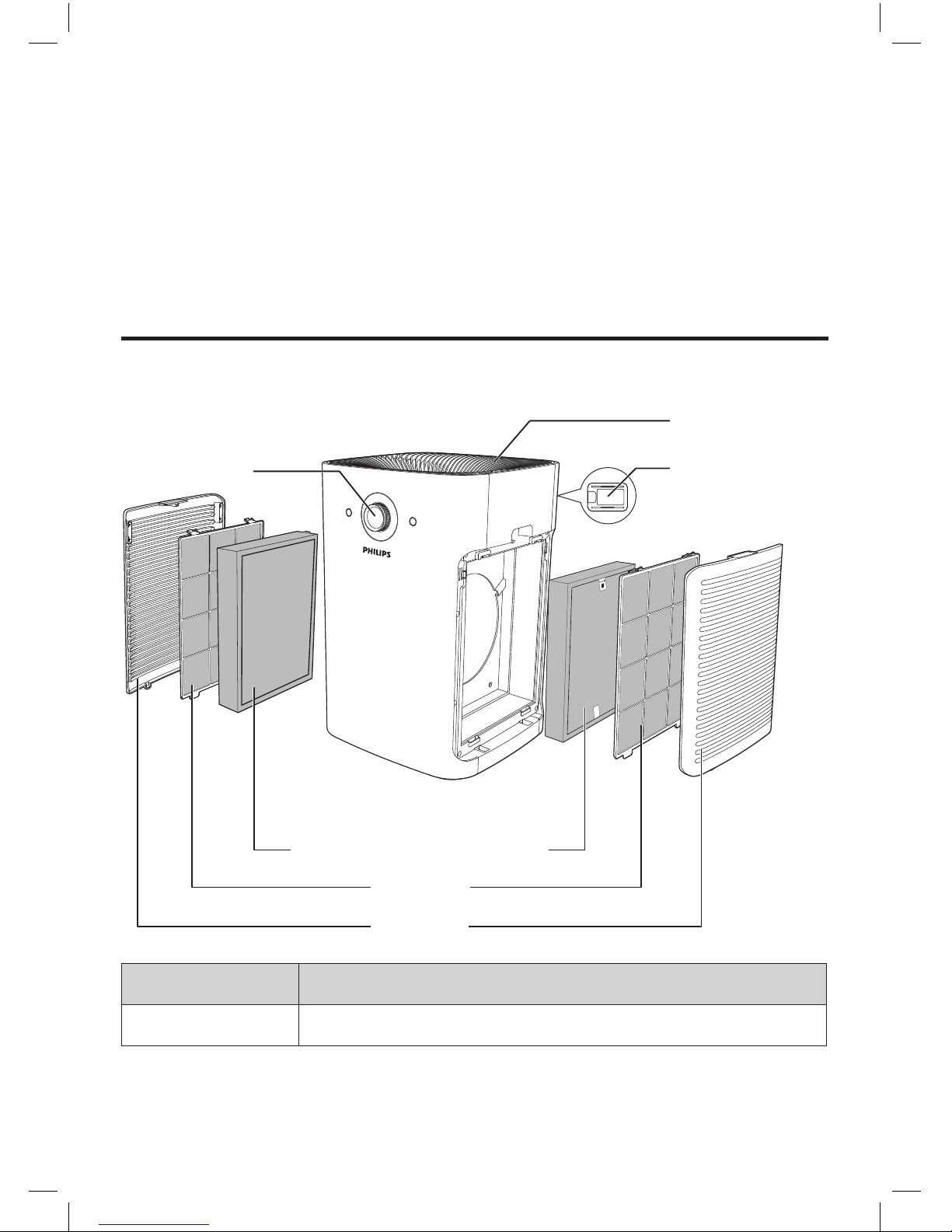
产品概述
出风口盖
速度旋钮
纳米级劲护滤网
–
专业
S3
型
预过滤网
侧面板
空气质量
感应器
型号 过滤网
FY6177
纳米级劲护滤网
–
专业
S3型*
*
在下文统称为“空气净化滤网”。
Page 7
7
ZH-S
简体中文
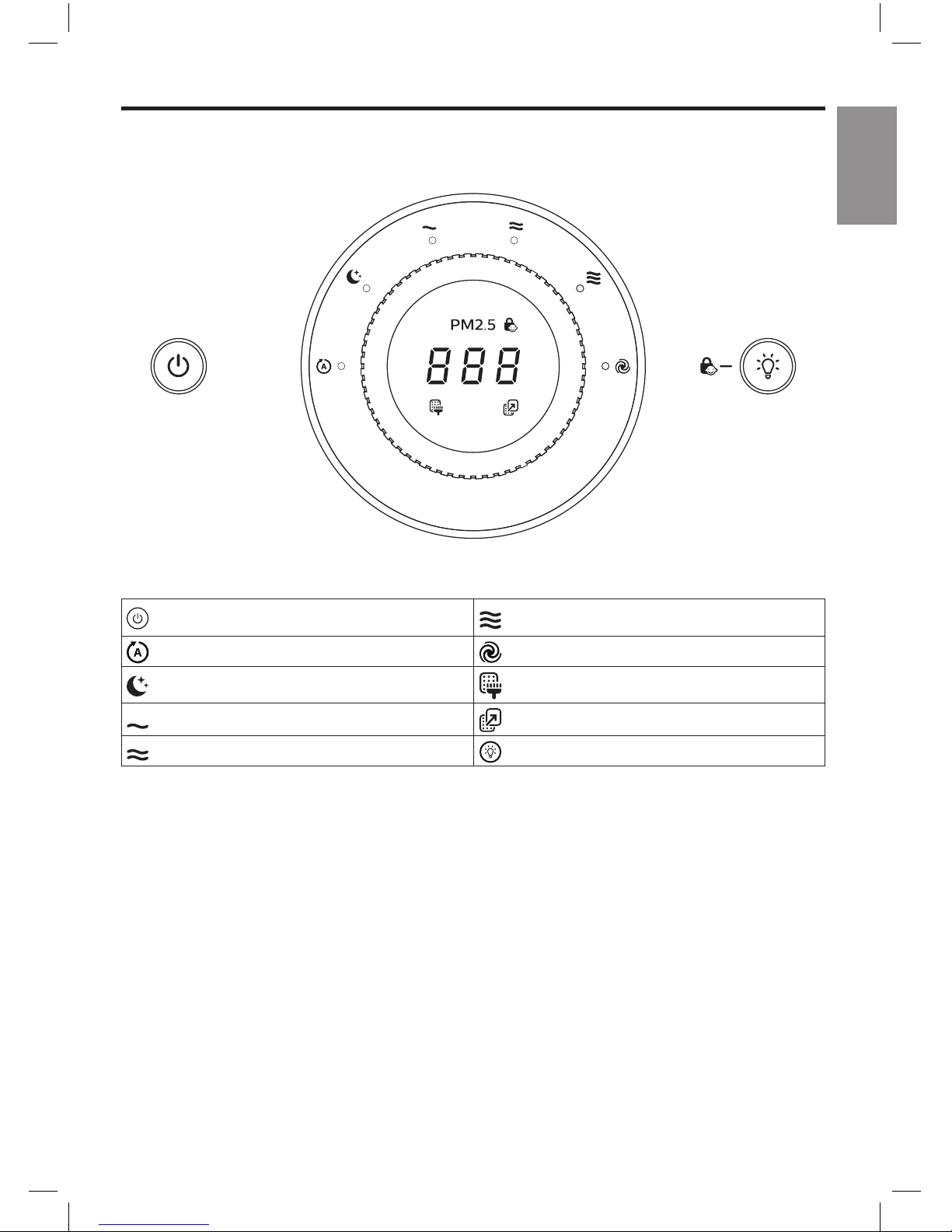
控件概述
:电源开关/过滤网重置按钮
:三档风速
:自动风速
:强力风速(仅限
AC6608
)
:静音风速
:清洁预过滤网提醒
:一档风速
:更换空气净化过滤网提醒
:二档风速
:灯光开关/儿童锁按钮
Page 8
8
ZH-S
3
使用入门
安装过滤网
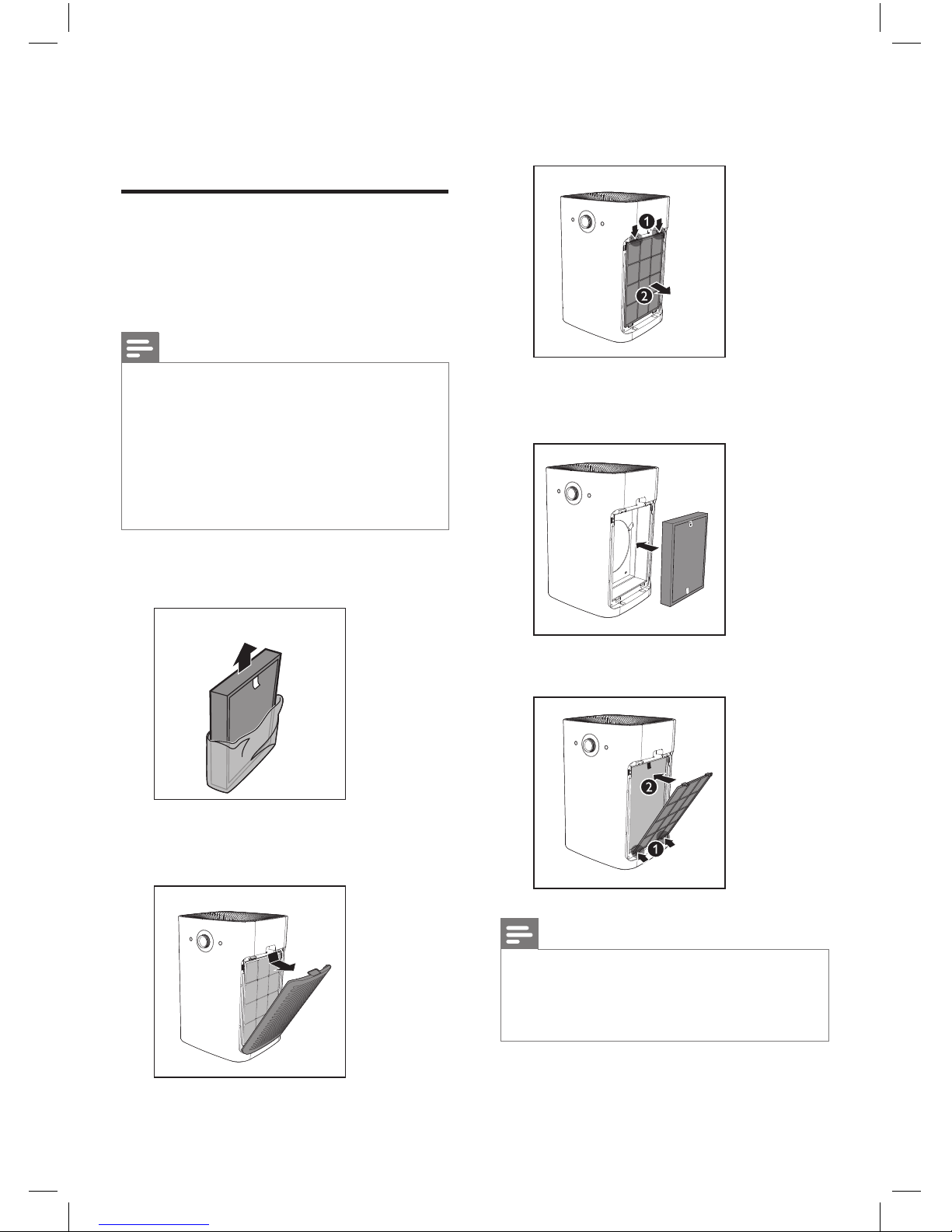
在使用本产品之前,先拆掉过滤网的所
有包装。请按以下所述拆掉过滤网的包
装,然后将其放入产品中:
注意
•
产品的两侧各有一组滤网。每侧均
配备一块预过滤网和一块空气净化
滤网。
•
确保先在产品内放入空气净化滤
网,然后再放置预过滤网。
•
确保带拉片的一面朝向您。
1
拆掉空气净化滤网的所有包装
材料。
2
拉出侧面板的上半部分以将其从产
品上卸下。
3
向下按两个固定夹,然后朝您自己
的方向拉动预过滤网。
4
将拆去包装的空气净化滤网放回
产品内。
5
将预过滤网放回产品内部。
注意
•
确保带两个固定夹的一面朝向您,
并确保预过滤网的所有挂钩均已正
确连接到净化器上。
Page 9
9
ZH-S
简体中文
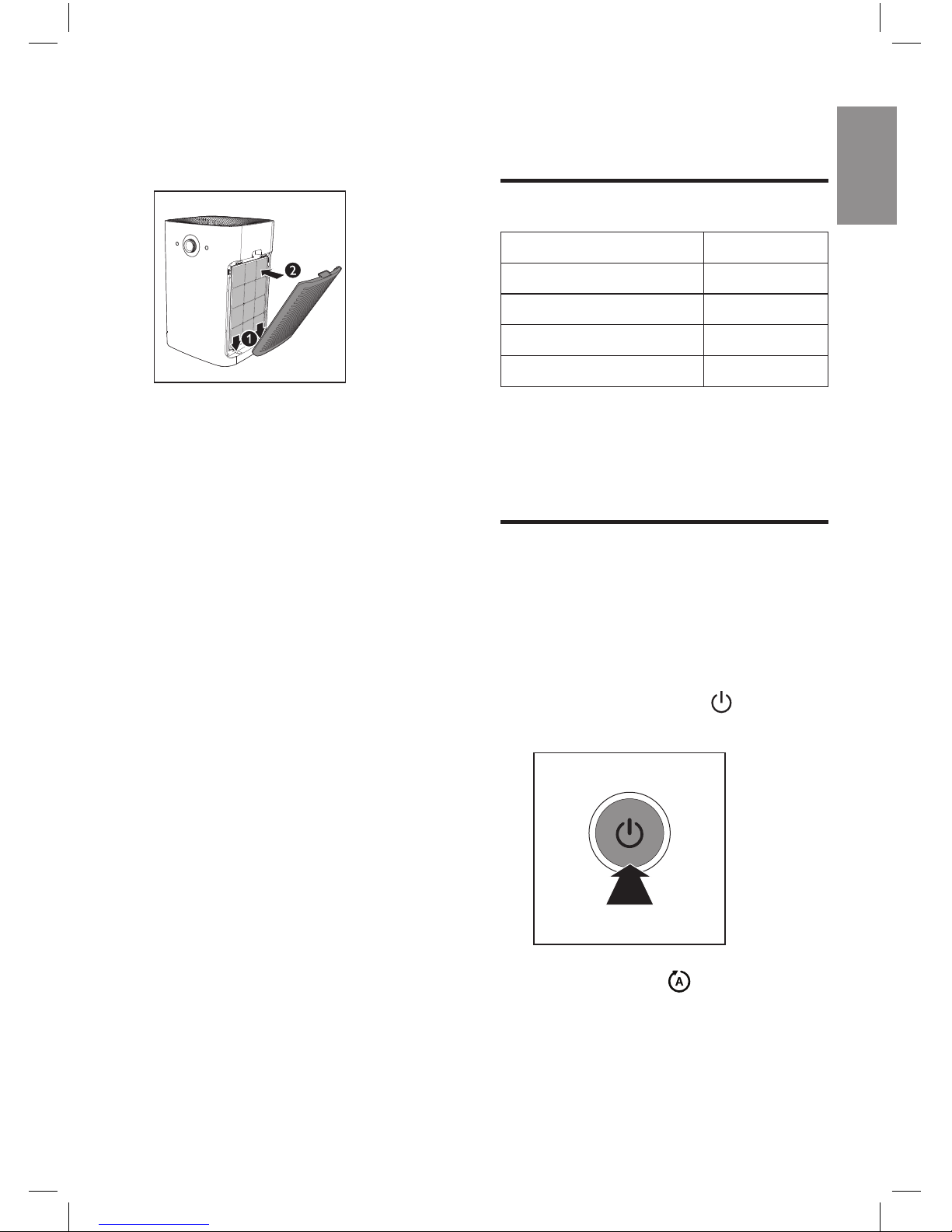
6
要重新安装侧面板,请先将面板安
装到产品的底部
(1)
。然后,朝产品
机身方向轻推面板
(2)
。
7
重复上述步骤,组装产品另一侧的
空气净化滤网。
4
使用产品
了解空气质量指示灯
空气质量指示灯的颜色 空气质量级别
蓝色 良好
蓝紫色 一般
紫红色 不健康
红色 非常不健康
在打开本产品时,空气质量指示灯将自
动打开,并按顺序亮起所有颜色。
在片刻后,空气质量传感器会选择与环
境空气质量相对应的颜色。
启动产品
1
将产品插头插入电源插座。
»
产品发出蜂鸣音。
»
所有指示灯均亮起一次,然后再
熄灭。
2
按下电源开/关按钮
可启动
产品。
»
默认风速为 (自 动)。
Page 10
10
ZH-S
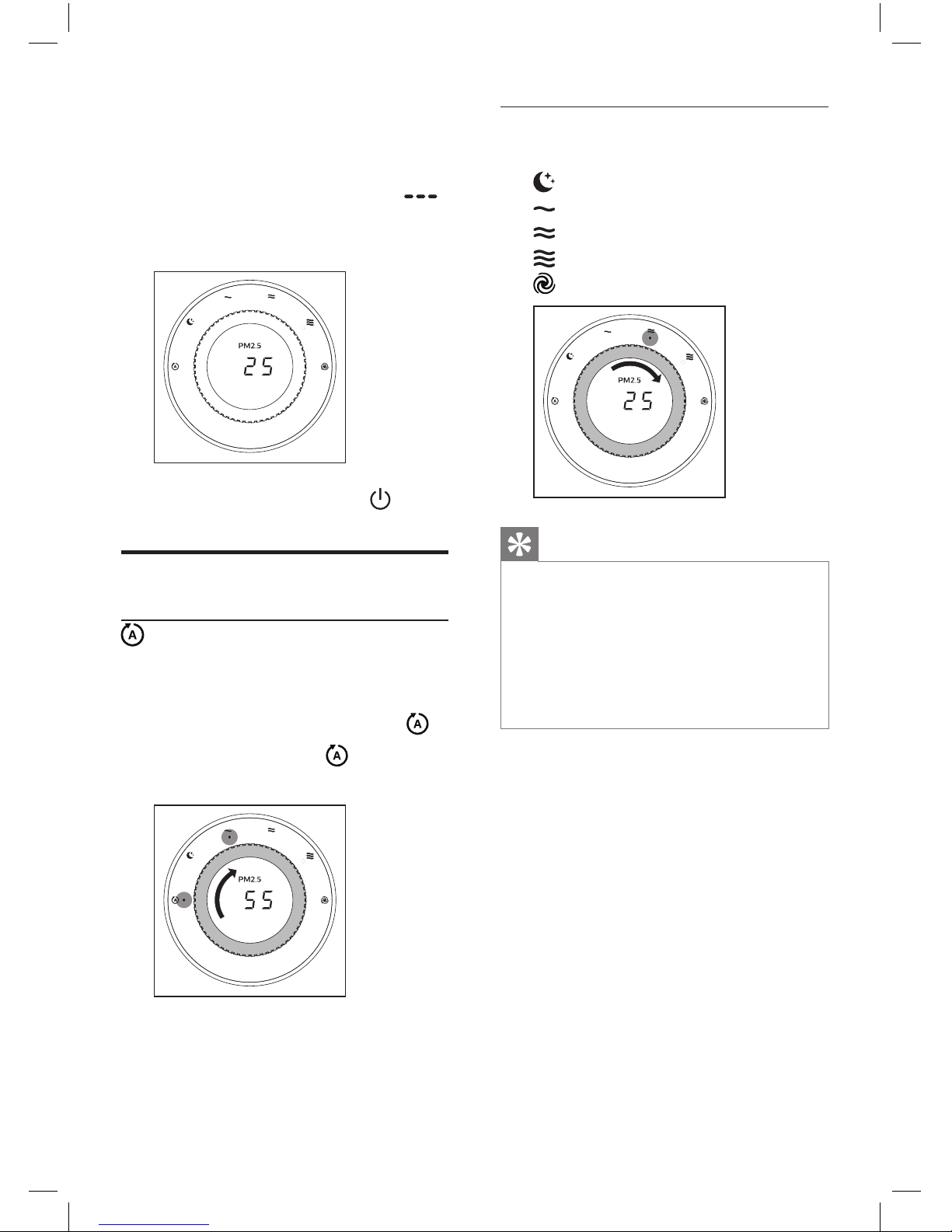
»
测量空气质量片刻后,空气质量
传感器会自动选择空气质量指
示灯的颜色。
»
机器测量
PM2.5
数值时,
在 屏 幕 上 滚 动 显 示 ,测 量 完 毕 后
屏幕显示当前
PM2.5
数值。
3
再次按下电源开/关按钮
可关
闭产品。
更改风速
(自动)
在自动模式下,产品会根据环境空气质
量选择风扇速度。
1
转动速度旋钮可选择自动速度 。
»
自动模式指示灯
以及当前风
速档指示灯会亮起
。
手动
1
转动速度旋钮可选择所需的风速:
(静音风速)
(一档风速)
(二档风速)
(三档风速)
(强力风速,仅限
AC6608
)
提示
•
如果空气质量指示灯呈蓝色亮起,
表明空气质量良好,您可以选择较
低的风速。另一方面,如果空气质
量指示灯呈紫红或红色亮起,则表
明空气质量不健康,您可以选择较
高的风速,以便更快地净化空气。
Page 11
11
ZH-S
简体中文
儿童锁
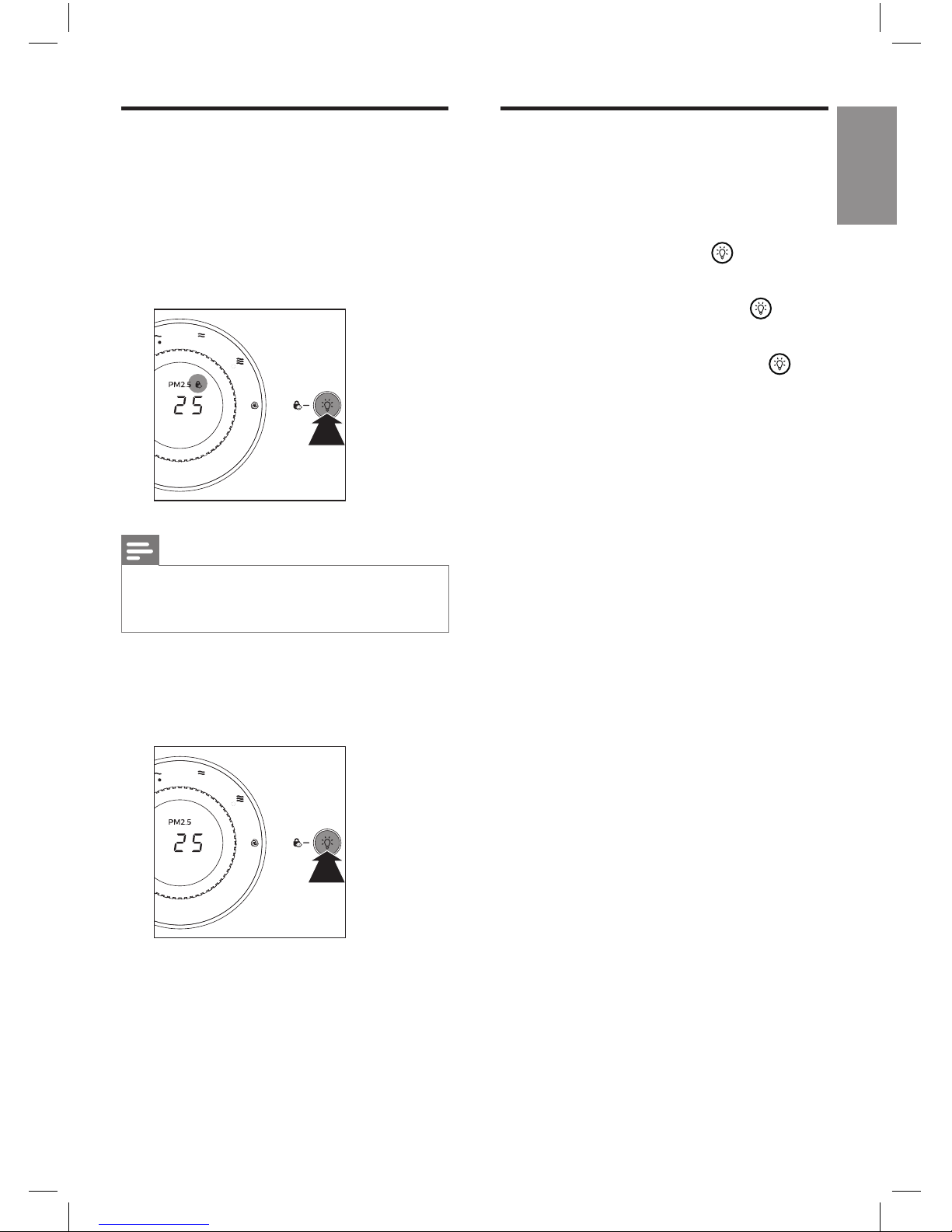
为了防止儿童使用本产品,或者为了避
免误操作,您可以激活儿童锁。
1
按住灯光开光按钮
3
秒钟。
»
此时儿童锁指示灯将在屏幕上
亮 起 ,表 明 已 激 活 儿 童 锁 。
3S
注意
•
激活儿童锁后,速度旋钮和所有按
钮都不再对任何操作做出响应。
2
要关闭儿童锁,请再次按住灯光开
关按钮
3
秒钟。
»
此时儿童锁指示灯将熄灭。
3S
使用灯光开/关功能
使用灯光开/关功能,您可以打开或关
闭空气质量指示灯和显示屏(如果需
要)。
1
轻触灯光开/关按钮
一次,空
气质量指示灯和显示屏将熄灭。
2
再次轻触灯光开/关按钮 ,风
速指示灯将熄灭。
3
第三次轻触灯光开/关按钮 ,显
示屏和所有指示灯都将重新亮起。
Page 12
12
ZH-S
清洗产品机身
定期清洁产品的内侧和外侧,防止灰尘
积聚。
1
使用柔软的干布擦去产品机身上的
灰尘。
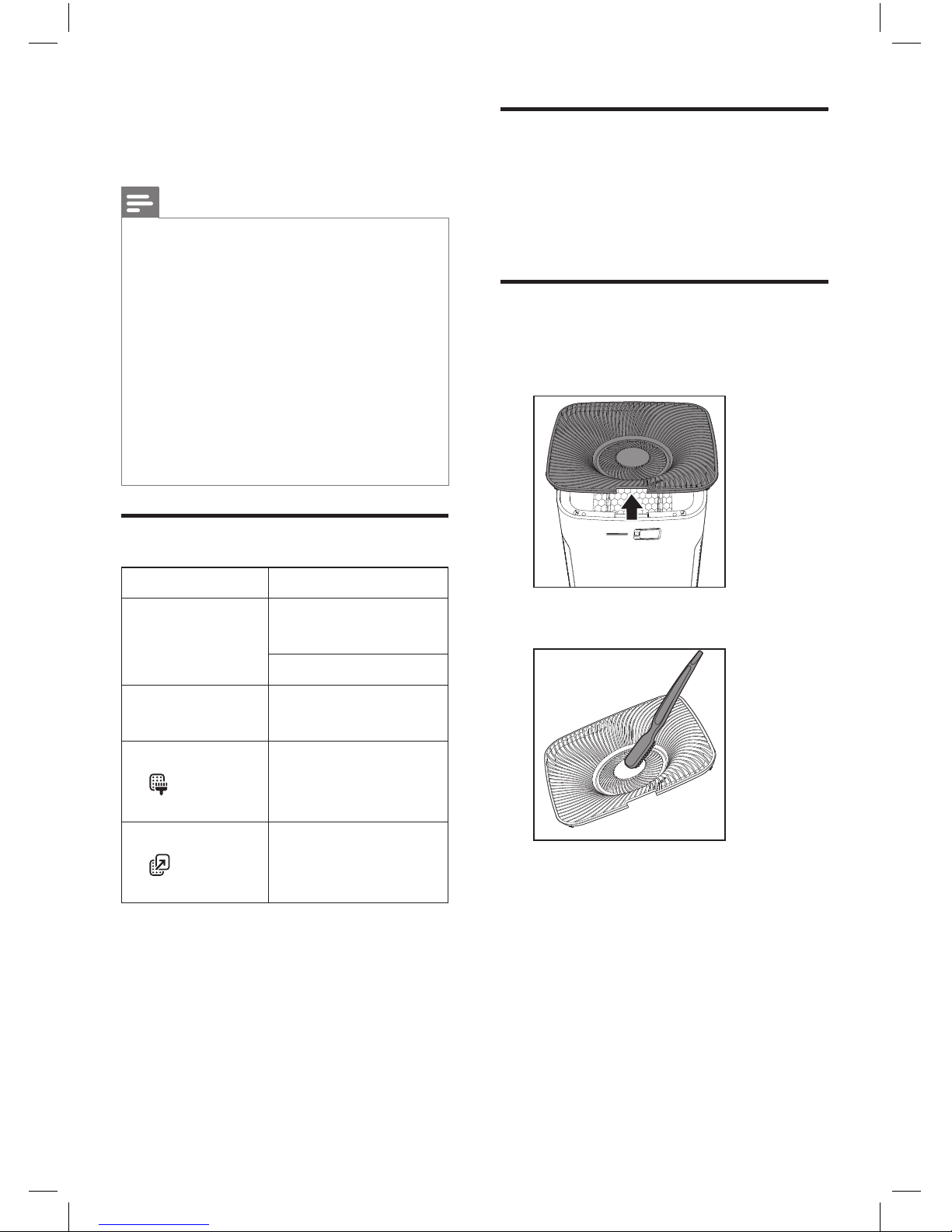
清洁出风口盖
1
要打开出风口盖,请握住盖子上的
手柄,然后向上拉动。
2
用刷子清洁出风口盖。
5
清洁
注意
•
清洁产品前,务必先将电源插头
拔掉。
•
切勿将本产品浸入水中或任何其它
液体中。
•
切勿使用研磨性、腐蚀性或易燃性
清洁剂(例如漂白剂或酒精)清洁
本产品的任何部件。
•
只有预过滤网可以用水清洗。空气
净化器滤网不可水洗,也不可用吸
尘器清洁。
清洁计划
频率 清洁方法
必要时
使用干软布清洁产
品表面
清洁出风口盖
每两个月
使用干棉签清洁空
气质量传感器
当滤网清洁指示
灯
在屏幕上
亮起时
清洁预过滤网
当滤网更换指示
灯
在屏幕上
亮起时
更换空气净化滤网
Page 13
13
ZH-S
简体中文
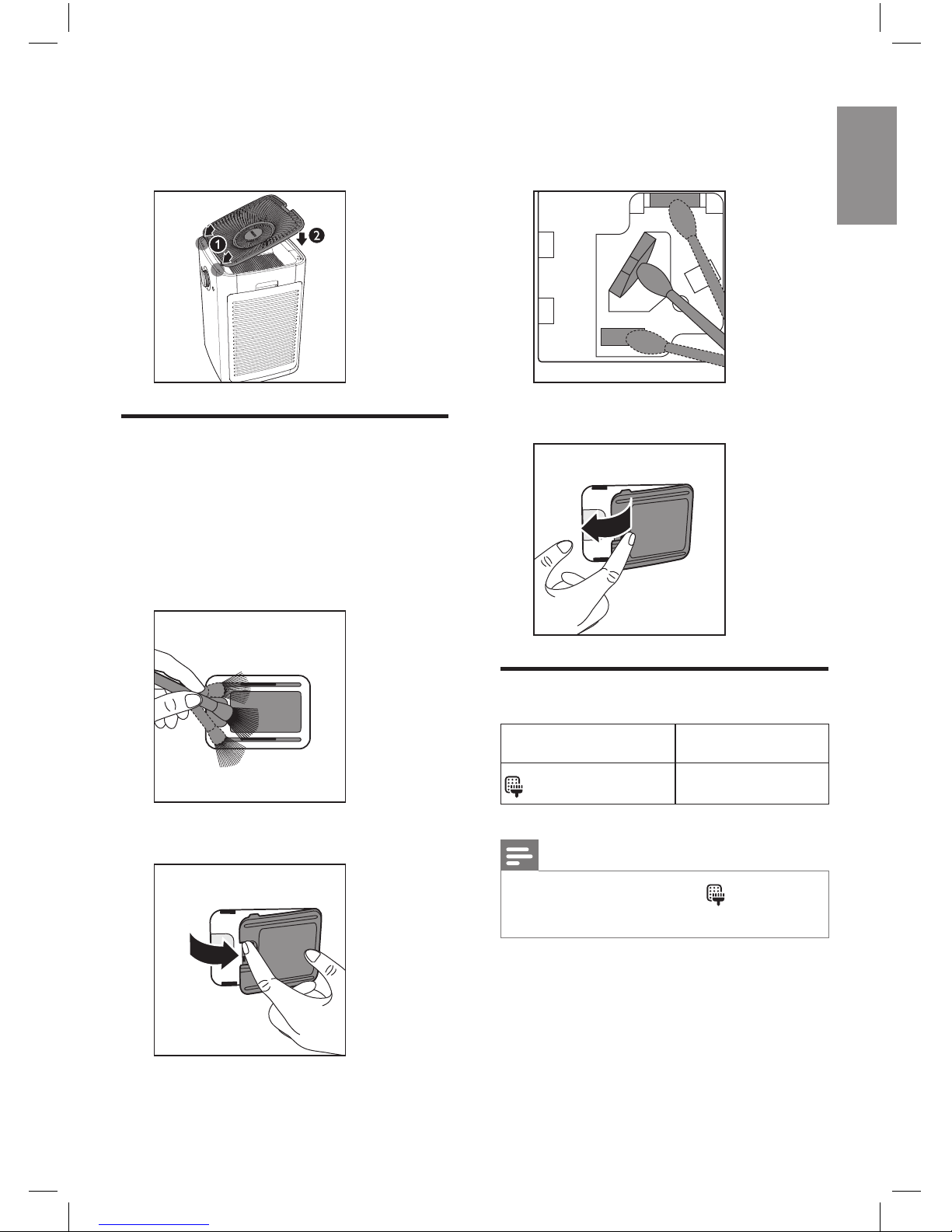
3
要重新安装出风口盖,请先将一侧
装到产品顶部,然后将手柄一侧向
下推动。
清洁空气质量传感器
每
2
个月清洁一次空气质量传感器,
确保产品以最佳性能运行。如果产品用
在多尘的环境中,请经常进行清洁。
1
使用软刷清洁空气质量传感器的进
风口和出风口。
2
打开空气质量传感器的盖子。
3
使用稍微浸湿的棉签清洁传感器、
进风口和出风口,最后用干棉签
擦干。
4
关闭传感器盖。
清洁预过滤网
滤网提示灯状态 按此操作
在屏幕上亮起
清洁预过滤网
注意
•
清洁预过滤网指示灯
大约每
2
周亮起一次。
Page 14
14
ZH-S
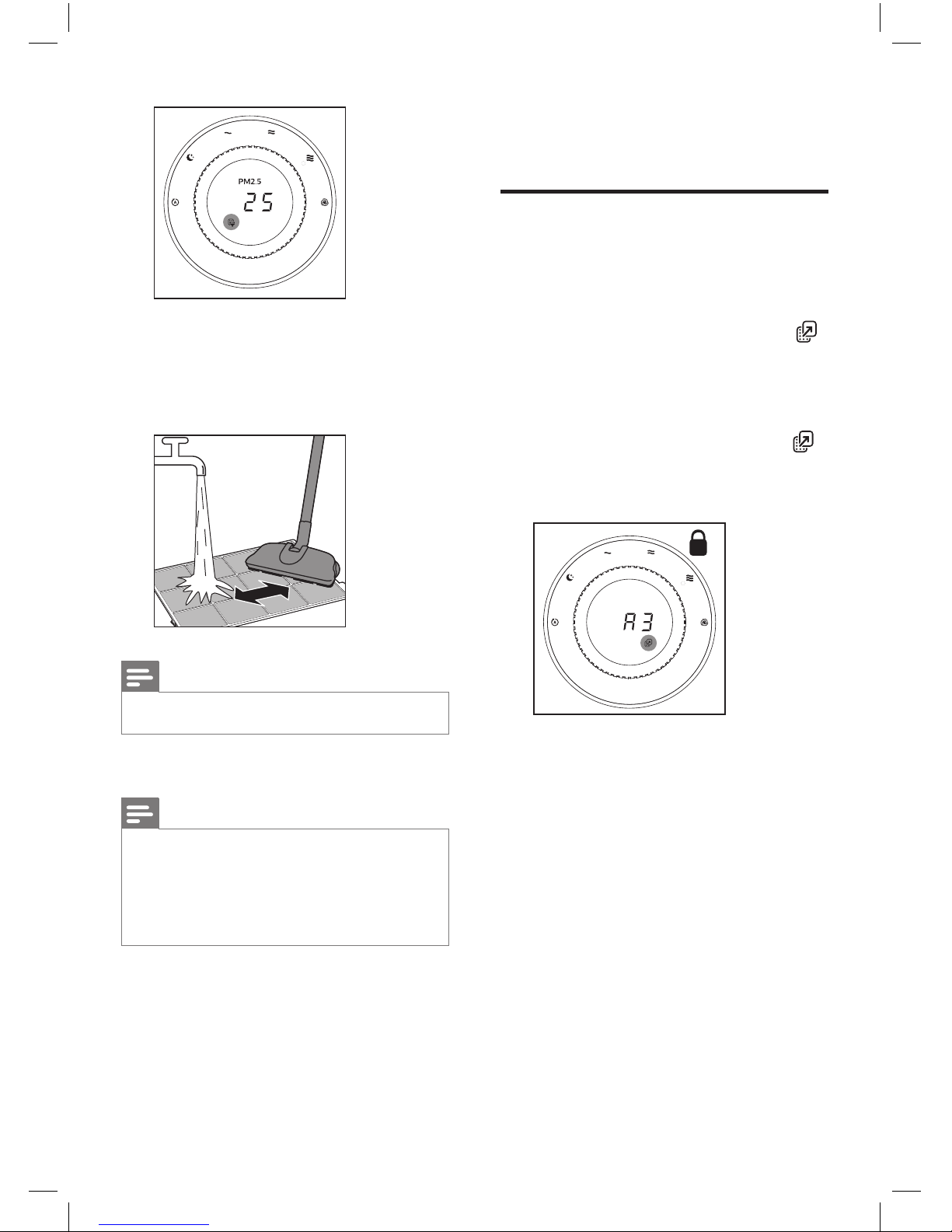
1
用自来水冲洗预过滤网。如果预过
滤网很脏,请使用真空吸尘器或软
毛刷清除灰尘,然后再在水龙头下
冲洗。
注意
•
确保冲洗产品两侧的预过滤网。
2
将预过滤网晾干。
注意
•
确保预过滤网完全干燥后再将其放
回产品。如果仍然是湿的,细菌可
能会乘虚而入,从而缩短预过滤网
的使用寿命。
3
将预过滤网正确放回产品后,重置
滤网使用寿命计数器。
(请参阅第
7
章“重置滤网使用寿
命计数器”。)
6
更换空气净化滤网
了解健康空气智能锁
本产品具有健康空气智能锁,旨在确保
产品运行过程中,空气净化滤网在最佳
条件下工作。当两块滤网使用寿命即将
结束时,空气净化滤网更换指示灯
(
)
将在屏幕上亮起,这意味着您必须更换
两块空气净化滤网。
如果您不及时更换滤网:
»
空气净化滤网更换指示灯
( )
将一直亮起。
»
产品将停止运行并且锁定。
Page 15
15
ZH-S
简体中文
更换空气净化滤网
注意
•
空气净化滤网不可水洗,也不可用
真空吸尘器清洁。
•
本产品的默认空气净化滤网为纳米
级劲护滤网
–
专业
S3型 (A3)
。
如果您想要尝试使用其他过滤网,
请参阅滤网包装内随附的单页,了
解如何为本产品应用新过滤网。
滤网提示灯状态 按此操作
亮起,并且
A3
显示在屏幕上
更换纳米级劲护
滤网
–
专业
S3
型
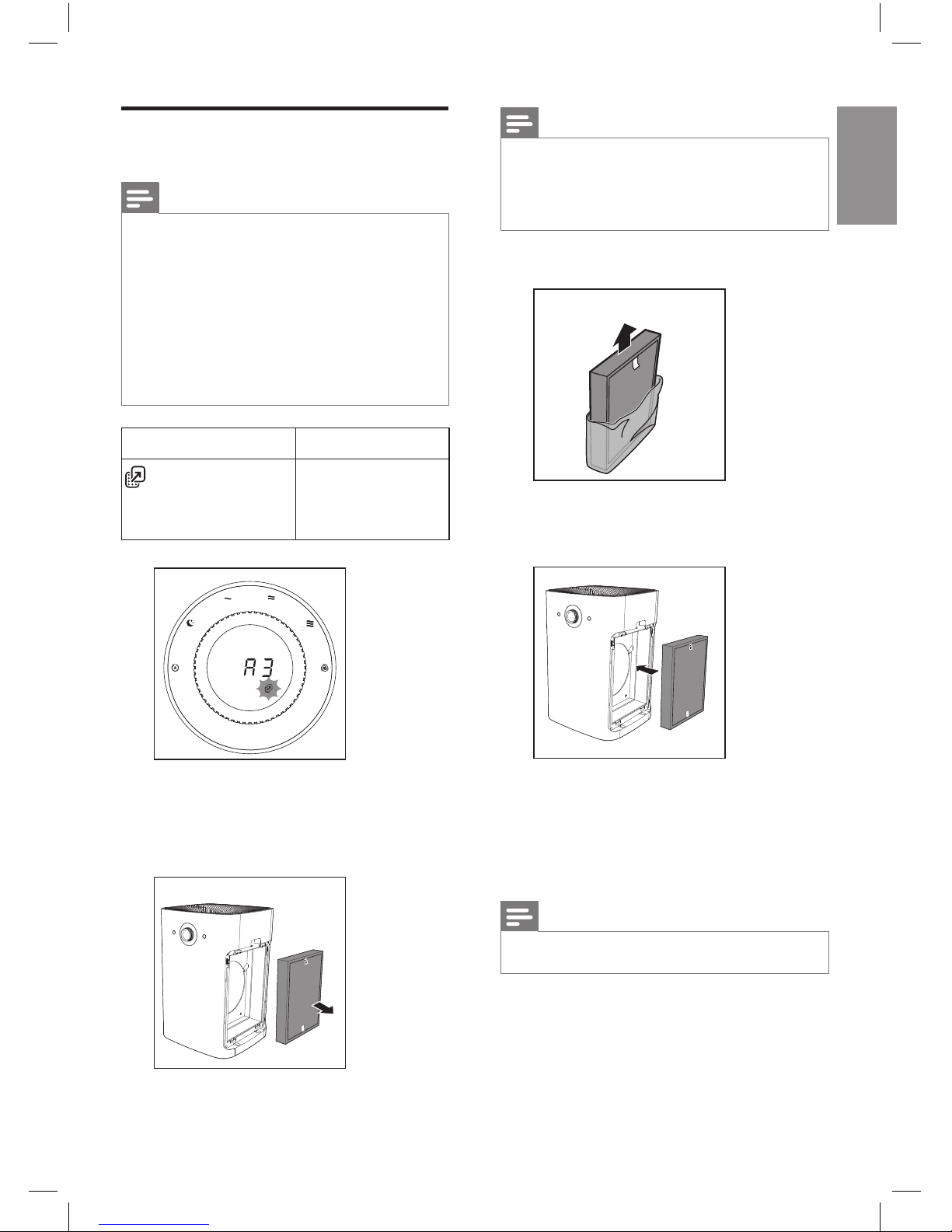
1
取出产品两侧的预过滤网。
2
取出需要更换的过滤网,然后轻轻
将其放入垃圾桶。
注意
•
请勿接触滤网的褶皱面,或闻滤网
的气味,因为其包含从空气中收集
的污染物。
3
拆掉新滤网上的所有包装材料。
4
将拆去包装的空气净化滤网放回产
品内。
5
将预过滤网正确放回产品后,重置
滤网使用寿命计数器。
(请参阅第
7
章“重置滤网使用寿
命计数器”。)
注意
•
更换过滤网完毕后,请清洗双手。
Page 16
16
ZH-S
7
重置滤网使用寿
命计数器
在清洁预过滤网或更换空气净化滤网
后,请务必也重置过滤网使用寿命计数
器。这可使产品与过滤网使用寿命同步。
1
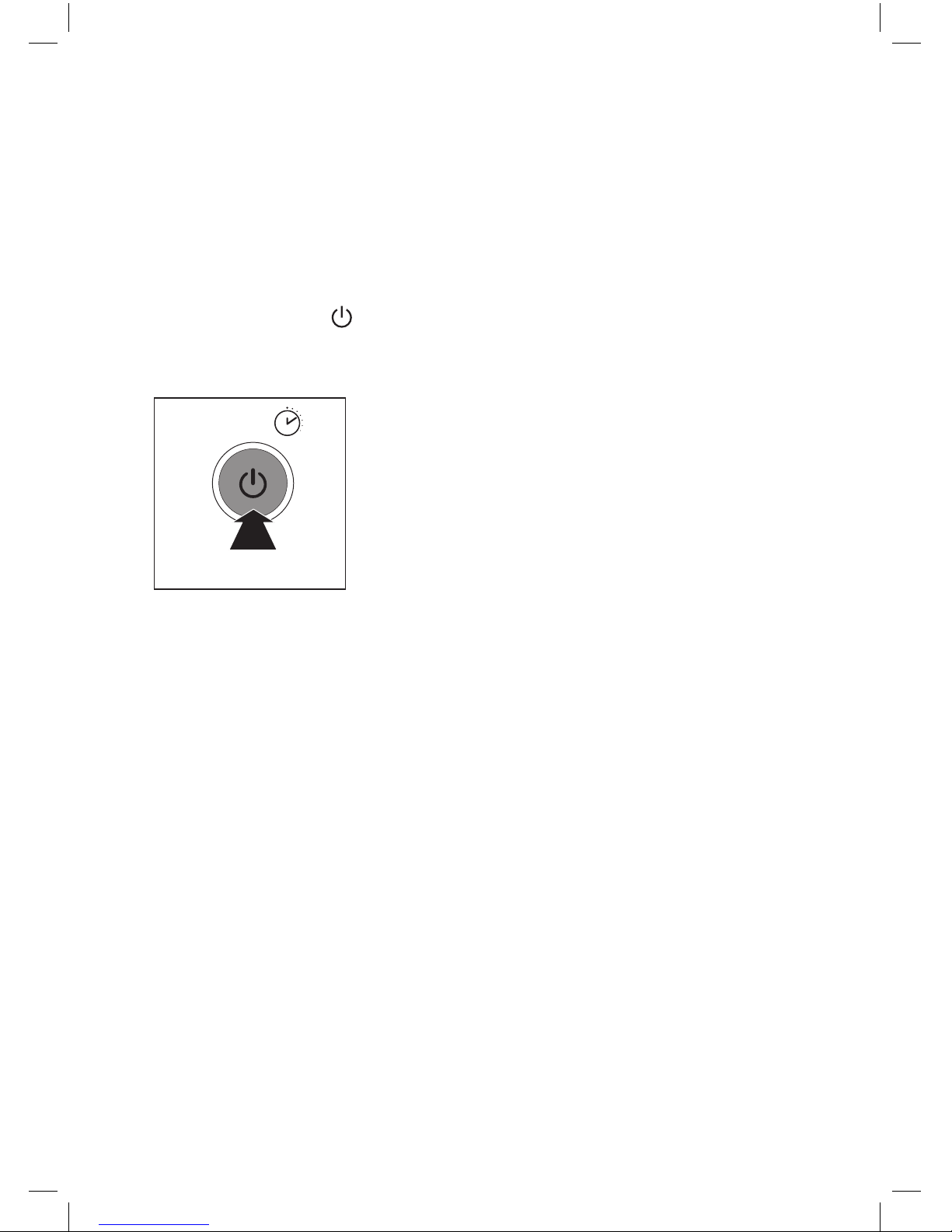
按住电源开/关按钮
3
秒钟。
»
滤网指示灯熄灭,产品将自动恢
复工作。
3秒
3S
Page 17
17
ZH-S
简体中文
8
故障排除
本章归纳了您在使用产品时最常遇到的问题。如果您无法根据下面的信息解决问题,
请与您所在国家/地区的客户服务中心联系。
问题 可能的解决方法
产品即使接通电源也无
法工作。
过滤网更换指示灯持续亮起,但您尚未更换相应的过滤
网,因此产品已被锁定。在此情况下,请更换过滤网并
重置过滤网使用寿命计数器。
出风口排出的气流比之
前明显减弱。
•
预过滤网变脏。清洁预过滤网(请参阅“清洁”一章)。
即使在产品已经运行很
长时间以后,空气质量
也未见显著改善。
•
某一过滤网可能没有放在产品内部。确保按以下顺序
正确安装所有过滤网,首先从最里面的过滤网开始:
1)
空气净化滤网;
2)
预过滤网。
•
空气质量传感器湿度过高。室内湿度过高,因此形成
了冷凝水。确保空气质量传感器清洁干燥(请参阅“清
洁”一章)。
空气质量指示灯的颜色
始终保持不变。
空气质量传感器变脏。清洁空气质量传感器(请参阅“清
洁”一章)。
产品散发出一种奇怪的
味道。
前几次使用产品时,其可能会产生塑料味。这是正常的。
不过,如果产品发出烧焦的气味,请联系飞利浦经销商
或经授权的飞利浦服务中心。当滤网很脏时,产品也可
能会发出难闻的气味。在这种情况下,请清洁或更换相
关的滤网。
产品声音过大。 如果产品声音太大,您可以将风速更改为较低的风速级
别。夜晚在卧室内使用时可将风速调为静音模式。
我已经更换过了过滤网,
但是产品还是一直指示
需要更换滤网。
可能是您未重置滤网使用寿命计数器。启动产品。然后
按住电源开/关按钮
3
秒钟。
产品停止工作,空气
质量指示灯变为蓝色并
闪烁。
空气质量传感器出现故障。请联系飞利浦经销商或经授
权的飞利浦服务中心。
Page 18
18
ZH-S
10
注意事项
电磁场
(EMF)
本飞利浦产品符合所有有关暴露于电磁
场的适用标准和法规。
符合
EMF
标准
Koninklijke Philips N.V.
主要面向广大
消费者制造和销售各类产品,包括通
常能发射和接收电磁信号的各种电子设
备。
飞利浦的主要业务原则之一就是要对自
己的产品采取各种必要的健康和安全措
施,使其符合所有相应的法律要求,
并在制造产品时严格遵照适用的
EMF
标准。
飞利浦致力于开发、生产和销售对人体
健康无任何危害的产品。飞利浦确认,
据目前的科学证明,如果其产品使用得
当,则对人体毫无危害。
长期以来,
Philips
始终在国际
EMF
和安全标准的制定工作中扮演着积极的
角色,这就使
Philips
总能预知标准的
发展趋势,并率先应用到其产品中去。
回收
弃置产品时,请不要将它与一般生活垃
圾一同丢弃,应将其交给官方指定的回
收中心。这样做有利于环保。
问题 可能的解决方法
产品停止工作,一档和
二档,或者二档和三档
风速指示灯闪烁。
产品电机出现故障。请联系飞利浦经销商或经授权的飞
利浦服务中心。
9
保修与服务
如果您需要了解信息或有任何疑问,
请访问飞利浦网站
www.philips.com
或联系您所在国家/地区的飞利浦客
户服务中心(可在全球保修卡中找到
飞利浦客户服务中心的电话号码)。
如果您所在的国家/地区没有飞利浦
客户服务中心,请向当地的飞利浦经
销商求助。
订购部件或附件
如果您必须更换部件或需要购买额外
的部件,请转到您的飞利浦经销商或
访问
www.philips.com/support
。
如果获取部件有问题,请与您所在国
家/地区的飞利浦客户服务中心联系
(可在全球保修卡中找到其电话号码)。
Page 19
English
19
EN
Contents
1 Important 20
Safety 20
2 Your air purier 23
Product Overview 23
Controls overview 24
3 Getting started 25
Install lters 25
4 Using the appliance 26
Understand the air quality
light 26
Switch on 26
Change the fan speed 27
Child lock 28
Using the light On/O
function 29
5 Cleaning 30
Cleaning schedule 30
Clean the body of the
appliance 30
Clean the air outlet cover 30
Clean the air quality sensor 31
Clean the pre-lter 32
6 Replacing the air
purication lter 33
Understand the healthy air
protect lock 33
Replace the air purication
lter 33
7 Resetting the lter lifetime
counter 35
8 Troubleshooting 36
9 Guarantee and service 38
Order parts or accessories 38
10 Notices 38
Electromagnetic elds (EMF) 38
Recycling 39
Page 20

20
EN
1 Important
Safety
Read this user manual carefully
before you use the appliance, and
save it for future reference.
Danger
• Do not let water or any
other liquid or flammable
detergent enter the
appliance to avoid electric
shock and/or a fire
hazard.
• Do not clean the
appliance with water,
any other liquid, or a
(flammable) detergent to
avoid electric shock and/
or a fire hazard.
• Do not spray any
flammable materials
such as insecticides or
fragrance around the
appliance.
Warning
• Check if the voltage
indicated on the
appliance corresponds to
the local power voltage
before you connect the
appliance.
• If the power cord is
damaged, you must have
it replaced by Philips, a
service center authorized
by Philips, or similarly
qualified persons in order
to avoid a hazard.
• Do not use the appliance
if the plug, the power
cord, or the appliance
itself is damaged.
• This appliance can be
used by children aged
from 8 years and above
and persons with reduced
physical, sensory or
mental capabilities or
lack of experience and
knowledge if they have
been given supervision or
instruction concerning use
of the appliance in a safe
way and understand the
hazards involved. Child
shall not play with the
appliance. Cleaning and
maintenance shall not be
made by children without
supervision.
• Do not block the air inlet
and outlet, e.g. by placing
items on the air outlet or
in front of the air inlet.
• Make sure that foreign
objects do not fall into the
appliance through the air
outlet.
Page 21

English
21
EN
Caution
• This appliance is not
a substitute for proper
ventilation, regular
vacuum cleaning, or use
of an extractor hood or
fan while cooking.
• If the power socket used
to power the appliance
has poor connections,
the plug of the appliance
becomes hot. Make
sure that you plug the
appliance into a properly
connected power socket.
• Always place and use the
appliance on a dry, stable,
level, and horizontal
surface.
• Leave at least 20cm free
space behind and on both
sides of the appliance
and leave at least 30cm
free space above the
appliance.
• Do not place anything on
top of the appliance.
• Do not sit or stand on the
appliance. The appliance
is equipped with omni
wheels. Sitting or standing
on the appliance may
lead to potential injuiry.
• Do not place the
appliance directly below
an air conditioner to
prevent condensation
from dripping onto the
appliance.
• Make sure all filters
are properly installed
before you switch on the
appliance.
• Only use the original
Philips filters specially
intended for this
appliance. Do not use any
other filters.
• Combustion of the filter
may cause irreversible
human hazard and/or
jeopardize other lives. Do
not use the filter as fuel or
for similar purpose.
• Avoid knocking against
the appliance (the air inlet
and outlet in particular)
with hard objects.
• Always lift or move
the appliance by both
handles at the sides of the
appliance.
• Do not insert your fingers
or objects into the air
outlet or the air inlet to
prevent physical injury
or malfunctioning of the
appliance.
Page 22

22
EN
ambient temperatures,
such as the bathroom,
toilet, or kitchen.
• The appliance does
not remove carbon
monoxide (CO) or radon
(Rn). It cannot be used
as a safety device in
case of accidents with
combustion processes
and hazardous chemicals.
• If you need to move the
appliance, disconnect the
appliance from the power
supply first. The appliance
is equipped with omni
wheels and is easy to
move.
• When moving the
appliance, do it slowly
and do not push it rapidly.
• Do not move the
appliance by pulling its
power cord.
• Do not use this appliance
when you have used
indoor smoke-type insect
repellents or in places
with oily residues, burning
incense, or chemical
fumes.
• Do not use the appliance
near gas appliances,
heating devices or
fireplaces.
• Always unplug the
appliance after use
and before cleaning
or carrying out other
maintenance.
• Do not use the appliance
in a room with major
temperature changes,
as this may cause
condensation inside the
appliance.
• To prevent interference,
place the appliance
at least 2m away from
electrical appliances that
use airborne radio waves
such as TVs, radios, and
radio-controlled clocks.
• The appliance is only
intended for household
use under normal
operating conditions.
• Do not use the appliance
in wet surroundings or in
surroundings with high
Page 23
English
23
EN
2 Your air purifier
Congratulations on your purchase, and welcome to Philips!
To fully benefit from the support that Philips offers, register your product at
www.philips.com/welcome.
This appliance works with an air filtration system. Read this user manual
carefully before you use the appliance, and save it for future reference.
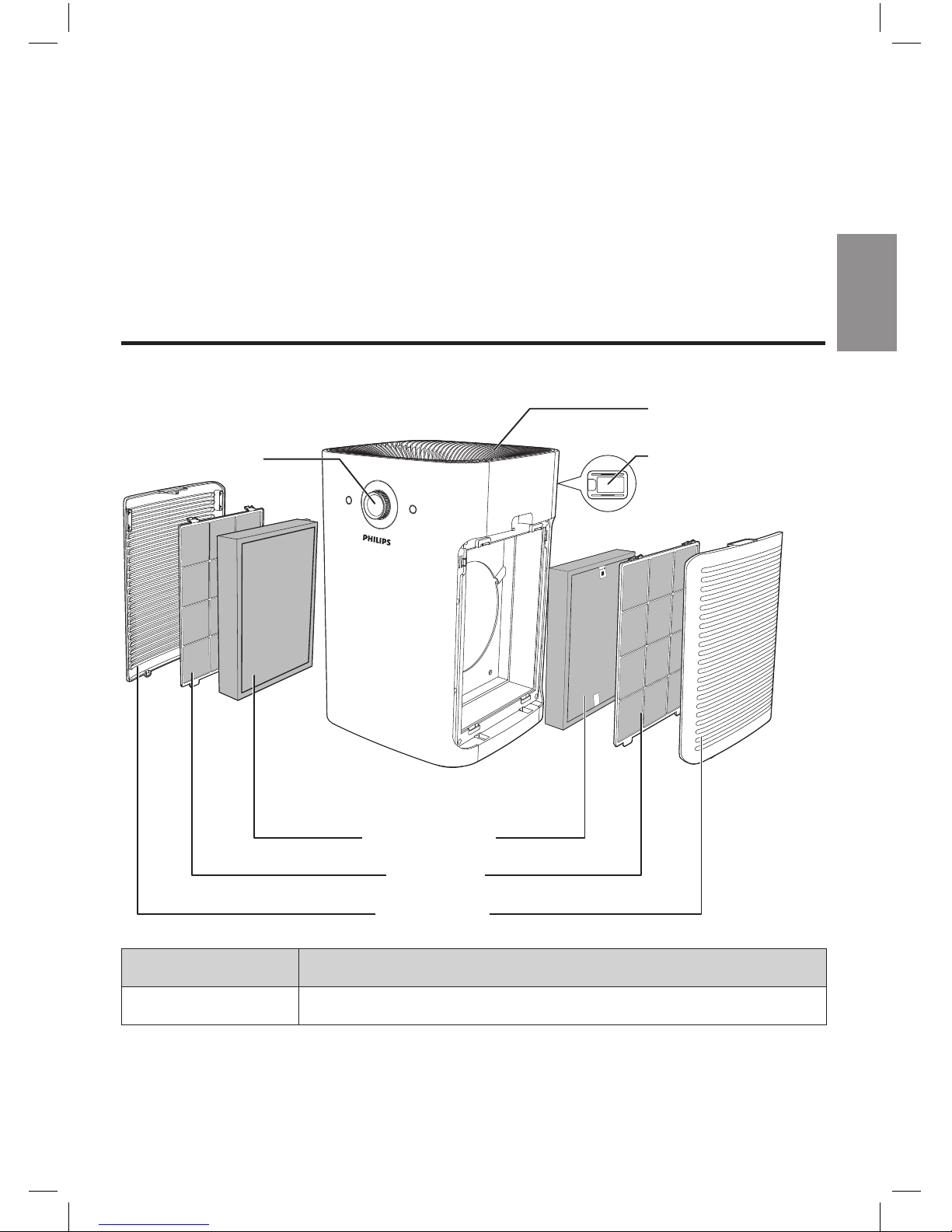
Product Overview
Air outlet cover
Speed knob
NanoProtect
Pro S3 filter
Pre-filter
Side panels
Air quality sensor
Type number Filter
FY6177 NanoProtect Pro S3*
*Hereinafter referred to as "air purification filter".
Page 24
24
EN
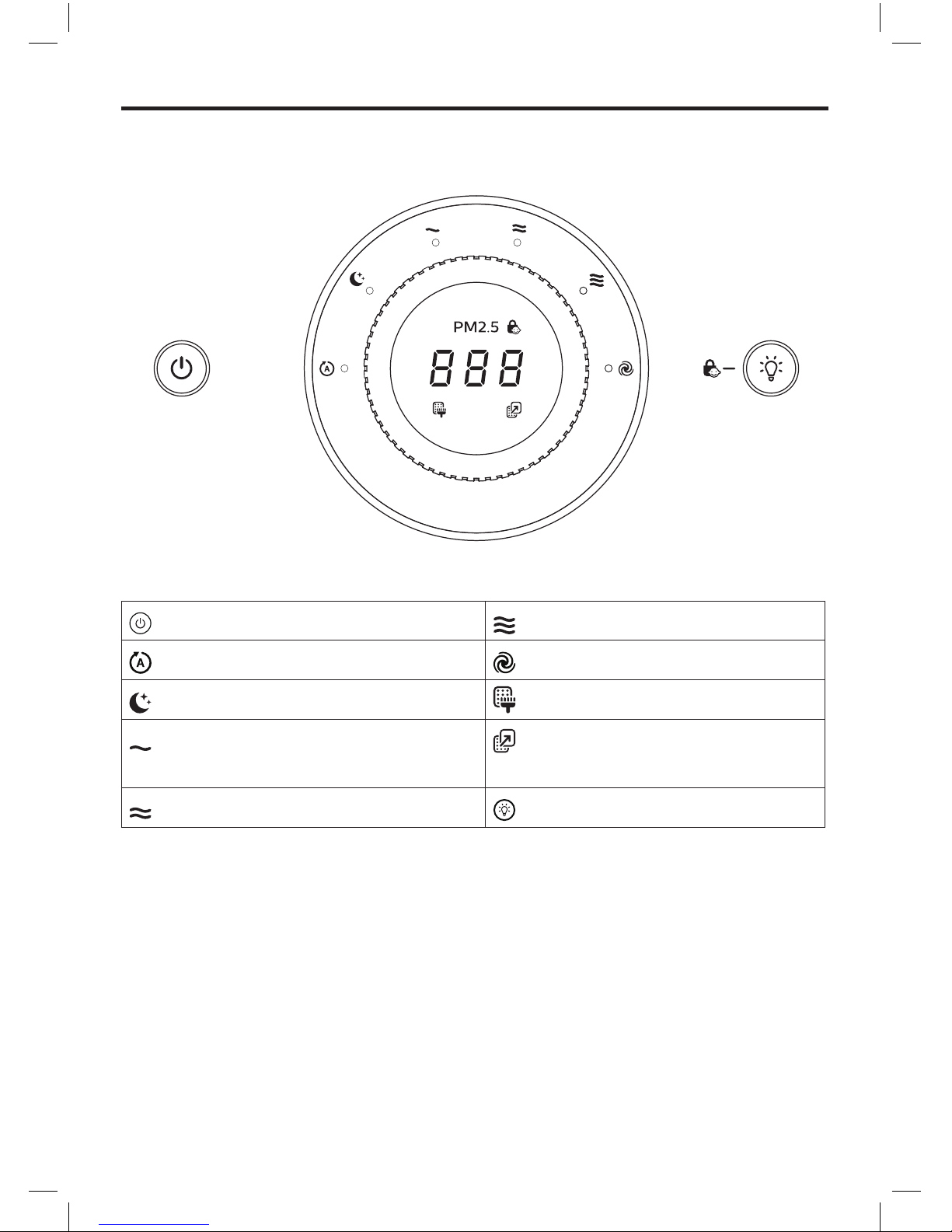
Controls overview
: Power On/Off (filter reset) button : Speed 3
: Auto speed : Turbo speed (AC6608 only)
: Silent speed : Pre-filter cleaning alert
: Speed 1 : Air purification filter
replacement alert
: Speed 2 : Light On/Off (child lock) button
Page 25
English
25
EN
3 Getting started
Install filters
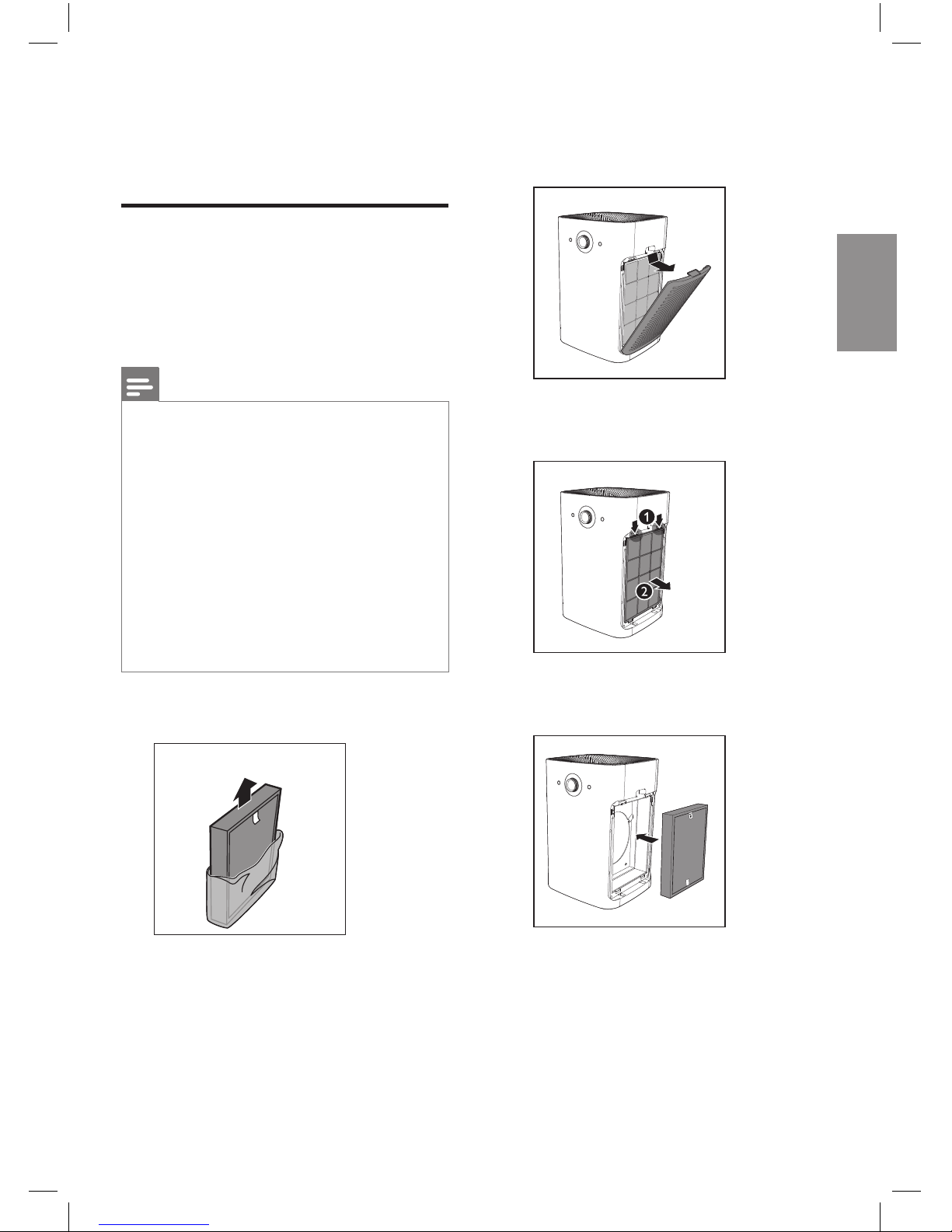
Remove all packaging of the filters
before using the appliance. Unpack
them and place them into the
appliance described as follows:
Note
• There is one set of filters on
each side of the appliance.
Each side is equipped with
one pre-filter and one air
purification filter.
• Make sure that you place the
air purification filter in the
appliance first and then the
pre-filter.
• Make sure that the side with the
tag is pointing towards you.
1 Remove all packaging materials
of the air purification filters.
2 Pull the top part of the side
panel to remove it from the
appliance.
3 Press the two clips down and
pull the pre-filter towards you.
4 Put the unpacked air purification
filter back into the appliance.
Page 26
26
EN
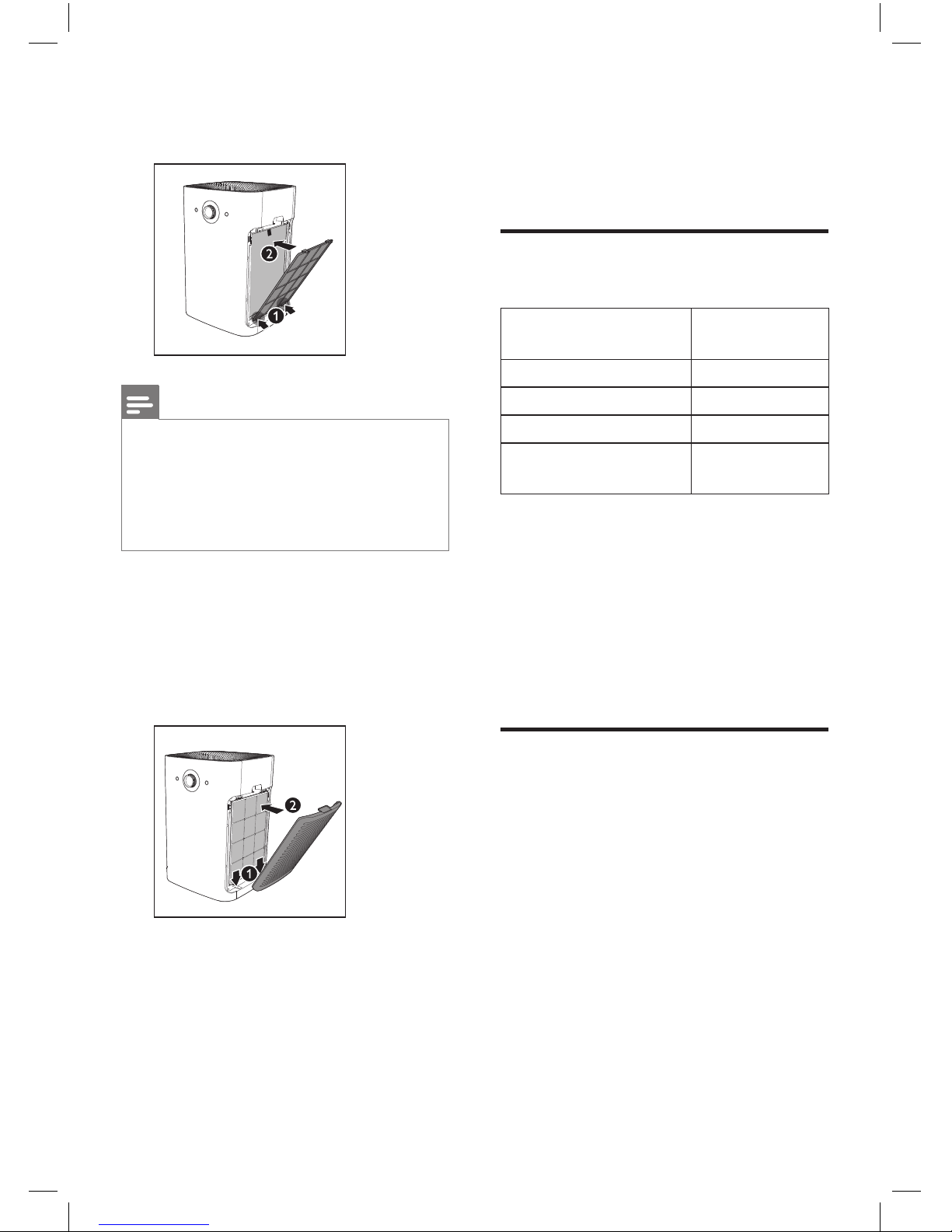
5 Put the pre-filter back into the
appliance.
Note
• Make sure that the side with the
two clips is pointing towards
you, and that all hooks of the
pre-filter are properly attached
to the purifier.
6 To reattach the side panel,
mount the panel onto the
bottom of the appliance first
(1). Then, gently push the
panel against the body of the
appliance (2).
7 Repeat the above steps and
assemble the air purification
filter for the other side of the
appliance.
4 Using the
appliance
Understand the air
quality light
Color of the air
quality light
Air quality
level
Blue Good
Blue-violet Fair
Red-purple Unhealthy
Red Very
unhealthy
The air quality light automatically
goes on when the appliance is
switched on, and lights up all colors
in sequence.
In a short time the air quality
sensors select the color that
corresponds to the ambient air
quality.
Switch on
1 Put the plug of the appliance
into the wall socket.
» The appliance beeps.
» All lights go on once and
then go out again.
Page 27
English
27
EN
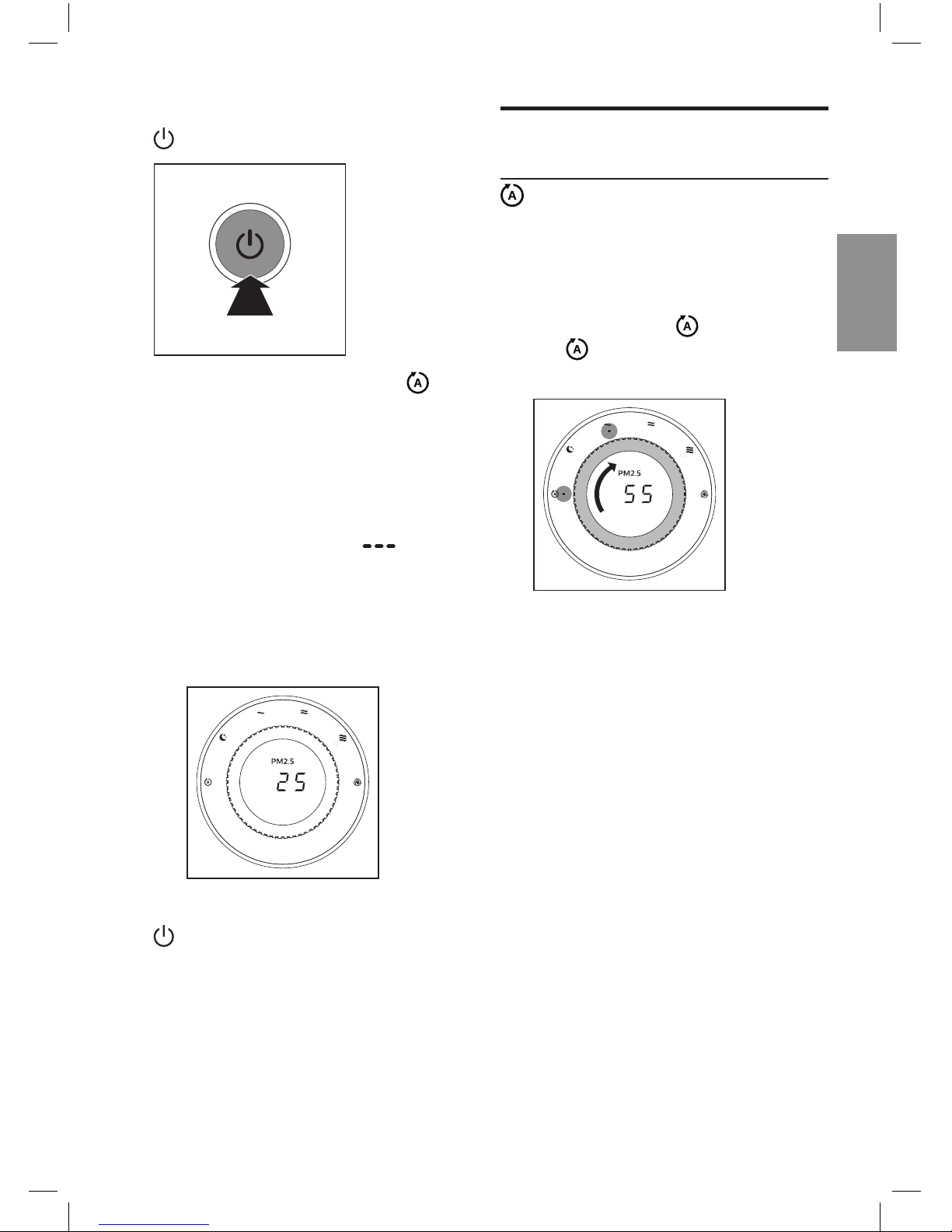
2 Press the power On/Off button
to switch on the appliance.
» The default fan speed is
(AUTO).
» After measuring the air
quality for a short time,
the air quality sensor
automatically selects the
color of the air quality light.
» The running strips " "
displays on the screen when
the appliance is measuring
the PM2.5 level. After a short
time the actual PM2.5 level
will display on the screen.
3 Press the power On/Off button
again to switch off the
appliance.
Change the fan speed
(AUTO)
In auto mode, the appliance selects
the fan speed in accordance with
the ambient air quality.
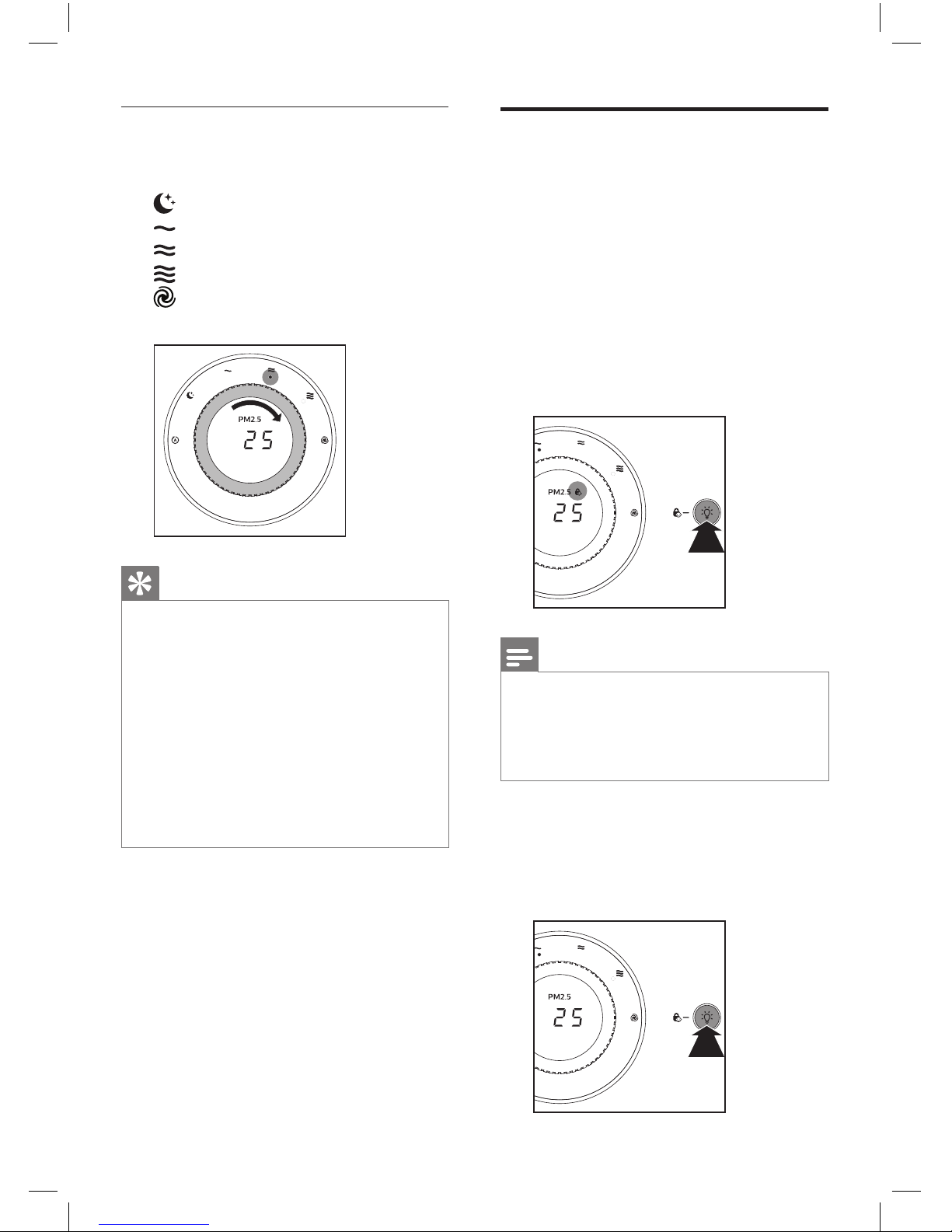
1 Turn the speed knob to select
the auto speed .
» and the current fan
speed indicator lights up.
Page 28
28
EN
Child lock
To keep children from using
the appliance, or to avoid any
misoperation, you can activate child
lock.
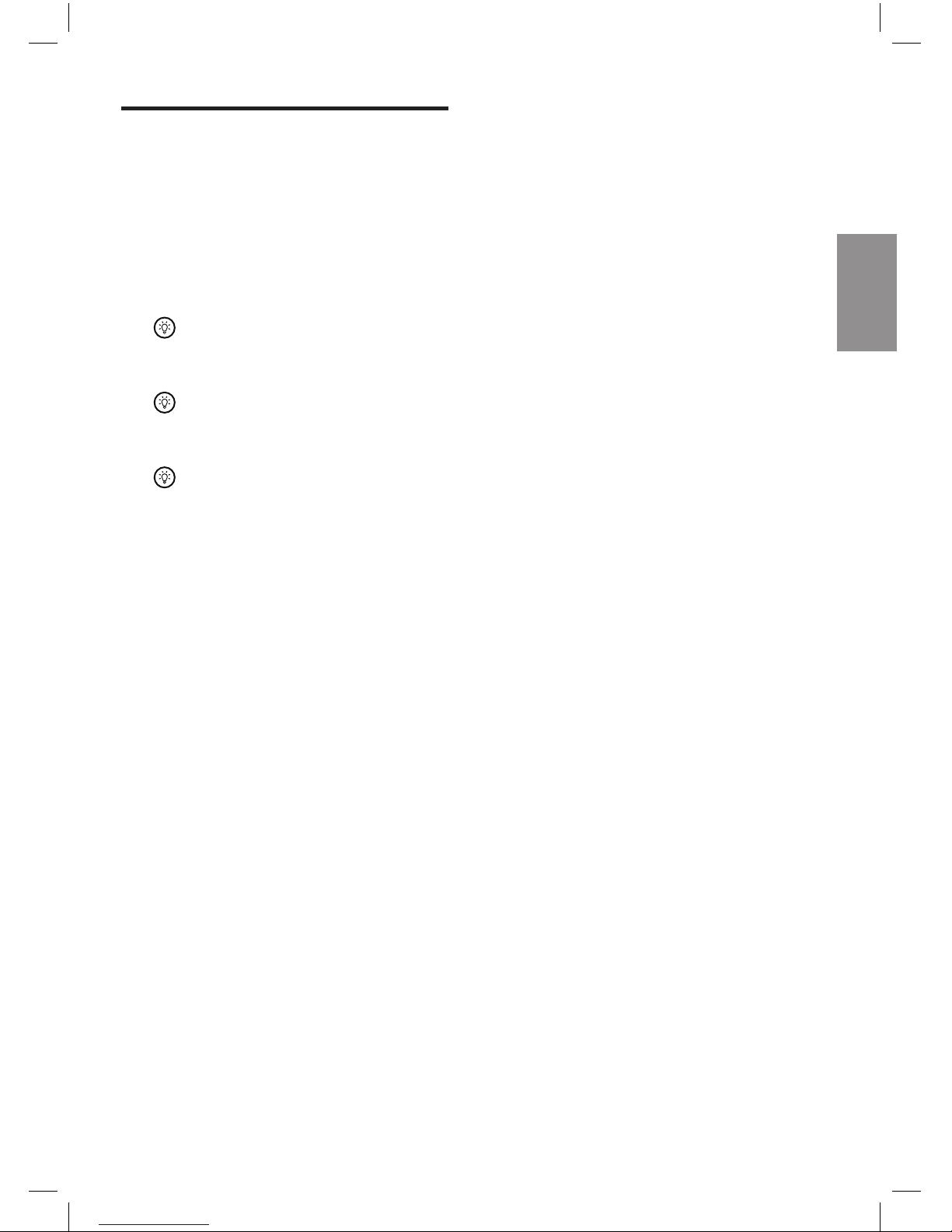
1 Press and hold the light On/Off
button for 3 seconds.
» The child lock indicator
lights up on the screen to
show that the child lock has
been activated.
3S
Note
• When the child lock is
activated, the speed knob
and all buttons will no longer
respond to any operation.
2 To deactivate the child lock,
press and hold the light On/Off
button for 3 seconds again.
» The child lock indicator goes
of f.
3S
Manual
1 Turn the speed knob to select
the fan speed you need:
(Silent speed)
(Speed 1)
(Speed 2)
(Speed 3)
(Turbo speed, for AC6608
only)
Tip
• If the air quality light lights up
blue, it indicates that the air
quality is good, and you can
select a lower fan speed. On
the other hand, if the air quality
light lights up red-purple or red,
it indicates that the air quality is
unhealthy, and you can select
a higher fan speed to purify the
air more quickly.
Page 29
English
29
EN
Using the light On/Off
function
With the light On/Off button, you
can switch on or off the air quality
light and the display screen if
needed.
1 Touch the light On/Off button
once, the air quality light and
display screen will go out.
2 Touch the light On/Off button
again. the fan speed
indicator will go out.
3 Touch the light On/Off button
for the third time, all lights
and the display screen will go
on again.
Page 30
30
EN
5 Cleaning
Note
• Always unplug the appliance
before you clean it.
• Never immerse the appliance in
water or any other liquid.
• Never use abrasive, aggressive,
or flammable cleaning agents
such as bleach or alcohol to
clean any part of the appliance.
• Only the pre-filter is washable.
The air purifier filter is not
washable nor vacuum
cleanable.
Cleaning schedule
Frequency Cleaning method
When
necessary
Wipe the surface
of the appliance
with a soft dry
cloth
Clean the air outlet
cover
Every two
months
Clean the air
quality sensor with
a dry cotton swab
When the
filter cleaning
indicator
lights up on
the screen
Clean the pre-filter
When the filter
replacement
indicator
lights up on
the screen
Replace the air
purification filters
Clean the body of the
appliance
Regularly clean the inside and
outside of the appliance to prevent
dusts from collecting.
1 Wipe away dust with a soft
dry cloth from the body of the
appliance.
Clean the air outlet cover
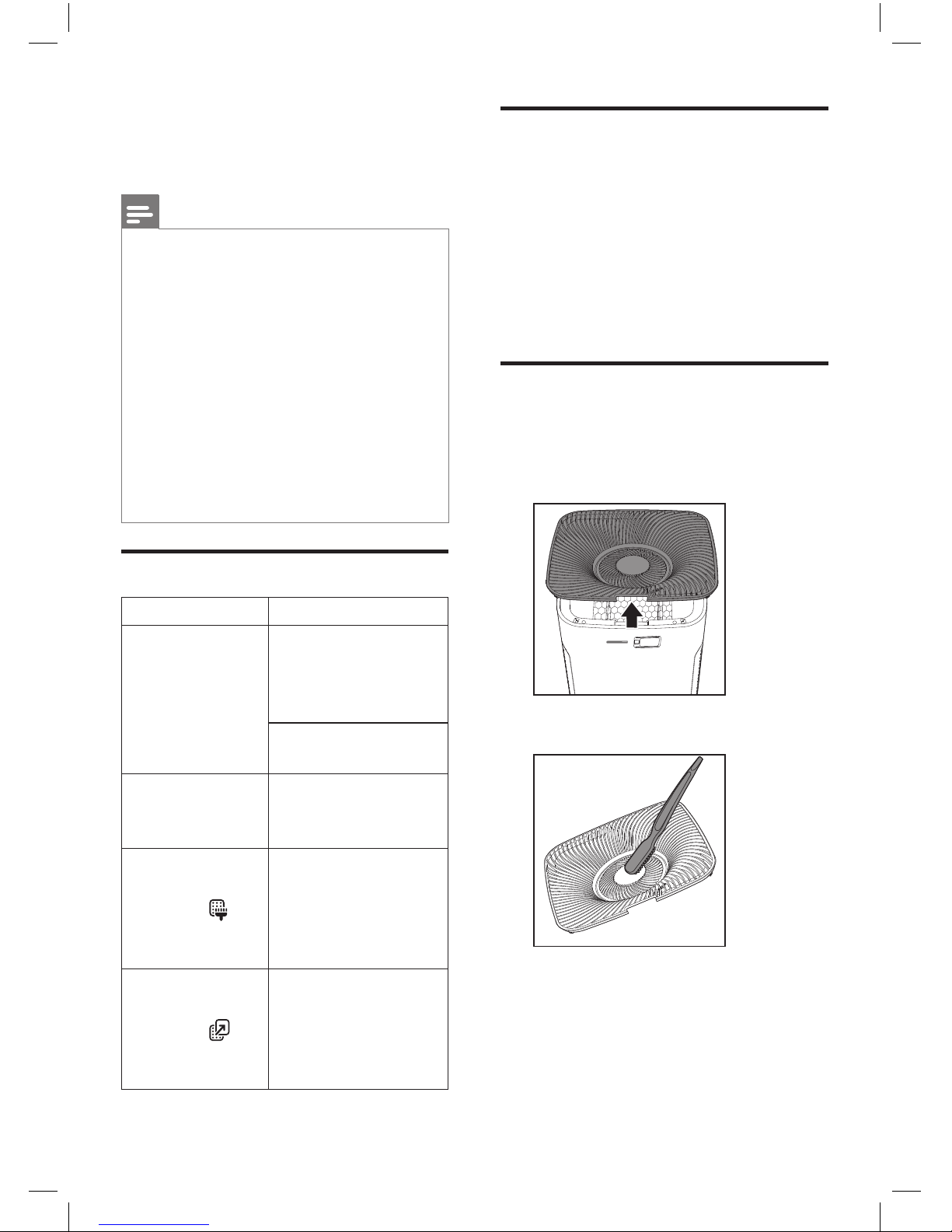
1 To unlock the air outlet cover,
grab the handle on the cover
and pull the cover up.
2 Clean the cover with a brush.
Page 31
English
31
EN
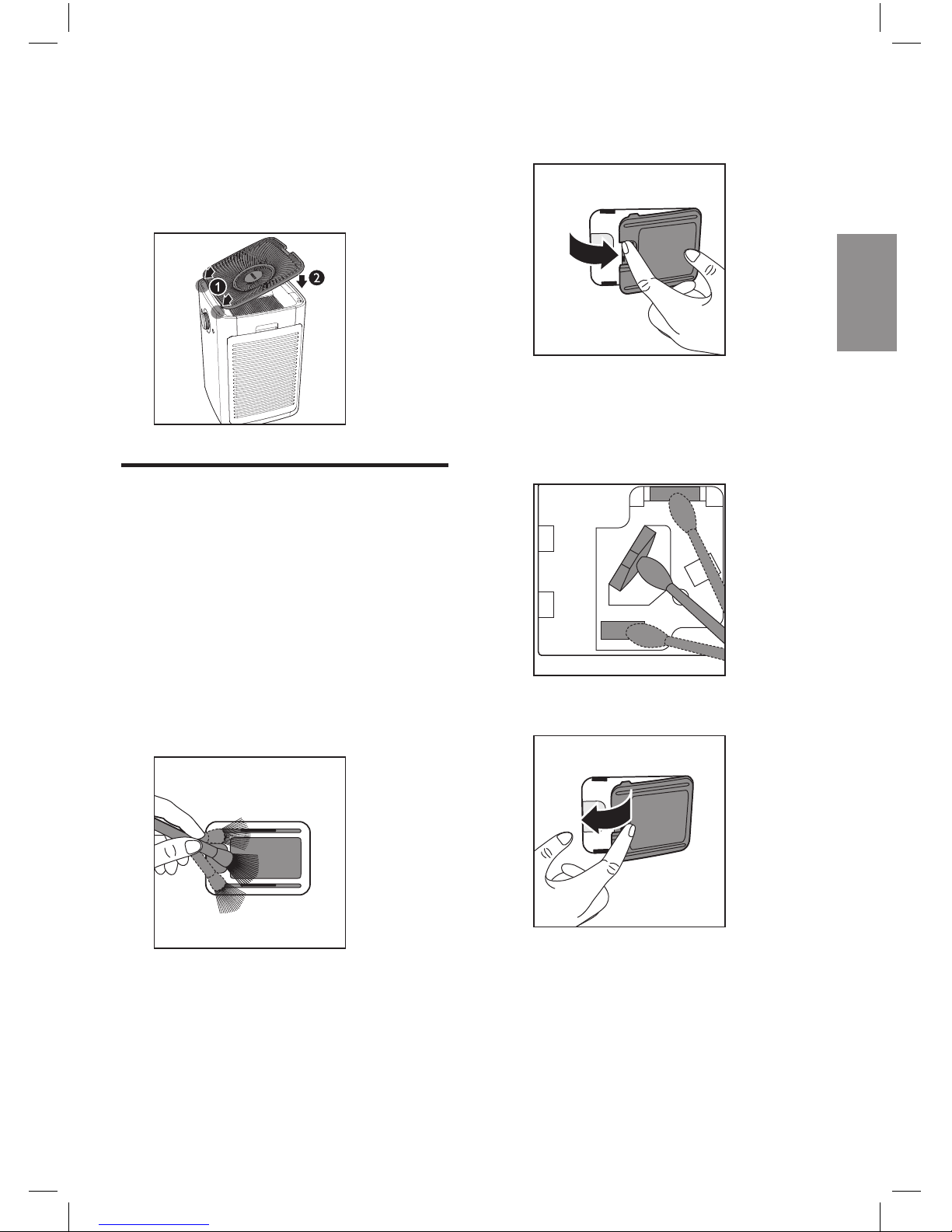
3 To reattach the cover, mount it
onto the top of the appliance
first, and then push the side
with the handle towards the
appliance.
Clean the air quality
sensor
Clean the air quality sensor every
two months for optimal functioning
of the appliance. Clean it more
frequently if you use the appliance
in a dusty environment.
1 Clean the inlet and outlet of
the air quality sensor with a soft
brush.
2 Open the cover of the air quality
sensor.
3 Clean the sensor, the dust
inlet and outlet with a lightly
moistened cotton swab, and
finish with a dry cotton swab.
4 Close the sensor cover.
Page 32
32
EN
Clean the pre-filter
Filter alert light
status
Follow this
lights up on the
screen
Clean the prefilter
Note
• Filter light lights up
approximately once every two
weeks.
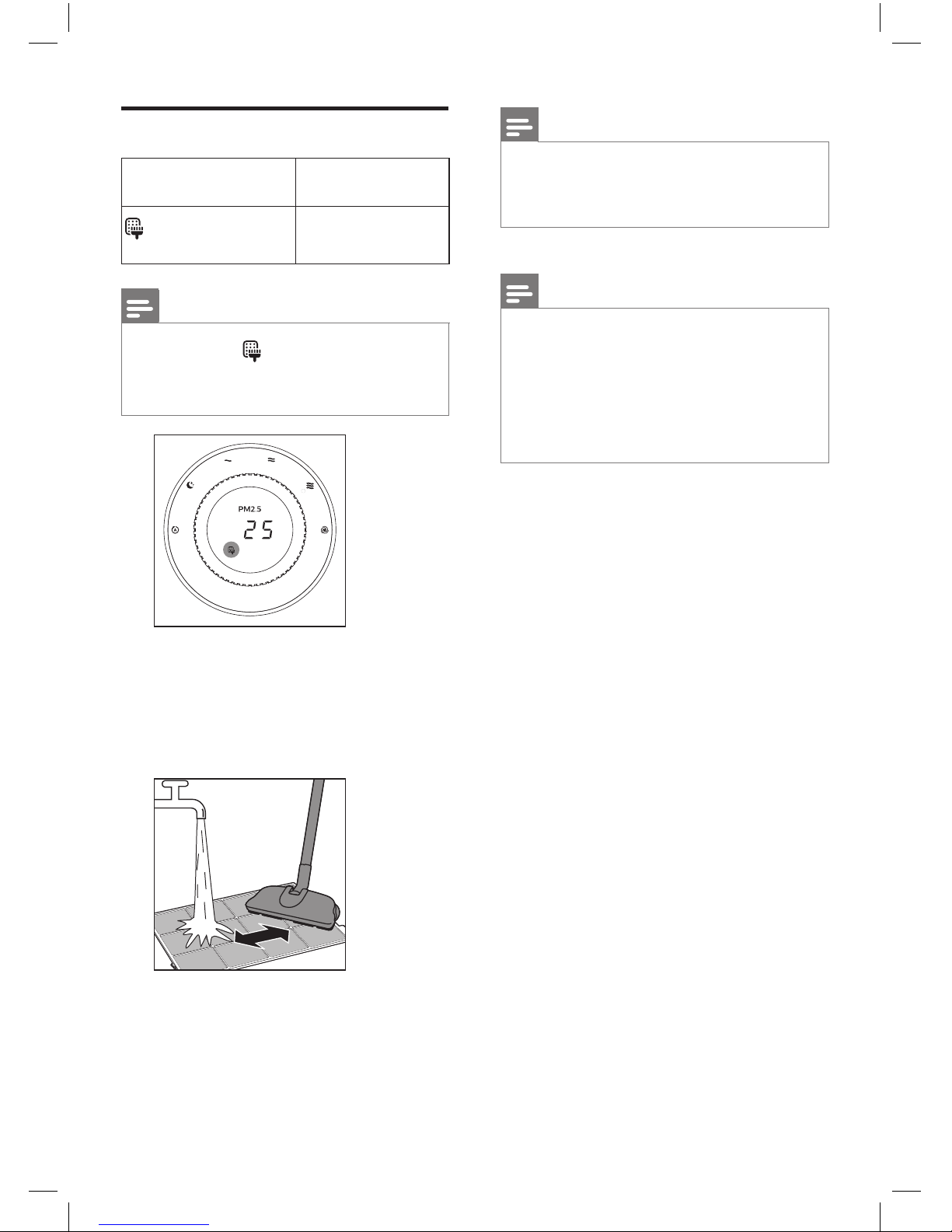
1 Rinse the pre-filters under a
running tap. If the pre-filters are
very dirty, use a vacuum cleaner
or soft brush to remove the dust
before rinsing under the tap.
Note
• Make sure to rinse the prefilters equipped in both sides of
the appliance.
2 Air dry the pre-filters.
Note
• Make sure that the pre-filters
are completely dry before you
put them back in the appliance.
If they are still wet, bacteria may
multiply in them and shorten
the lifetime of the pre-filters.
3 After the pre-filters are properly
put back in the appliance, reset
the filter lifetime counter. (Refer
to chapter 7 "Resetting the filter
lifetime counter".)
Page 33
English
33
EN
6 Replacing the
air purification
filter
Understand the healthy
air protect lock
This appliance is equipped with
the healthy air protect lock to make
sure that the filters are in optimal
condition when the appliance is
operating. When the filters are
almost expired, the air purification
filter replacement light ( ) lights up
on the screen to indicate that the
filters have to be replaced.
If you do not replace the filters in
time:
» The air purification filter
replacement light ( )
remains on.
» The appliance stops
operating and is locked.
Replace the air
purification filter
Note
• The air purification filters are
not washable nor vacuum
cleanable.
• The default air purification
filter for this appliance is
NanoProtect Pro S3 (A3). If you
want to try and use other filters,
refer to the separate leaflet
included in the filter packaging
on how to apply new filters to
this appliance.
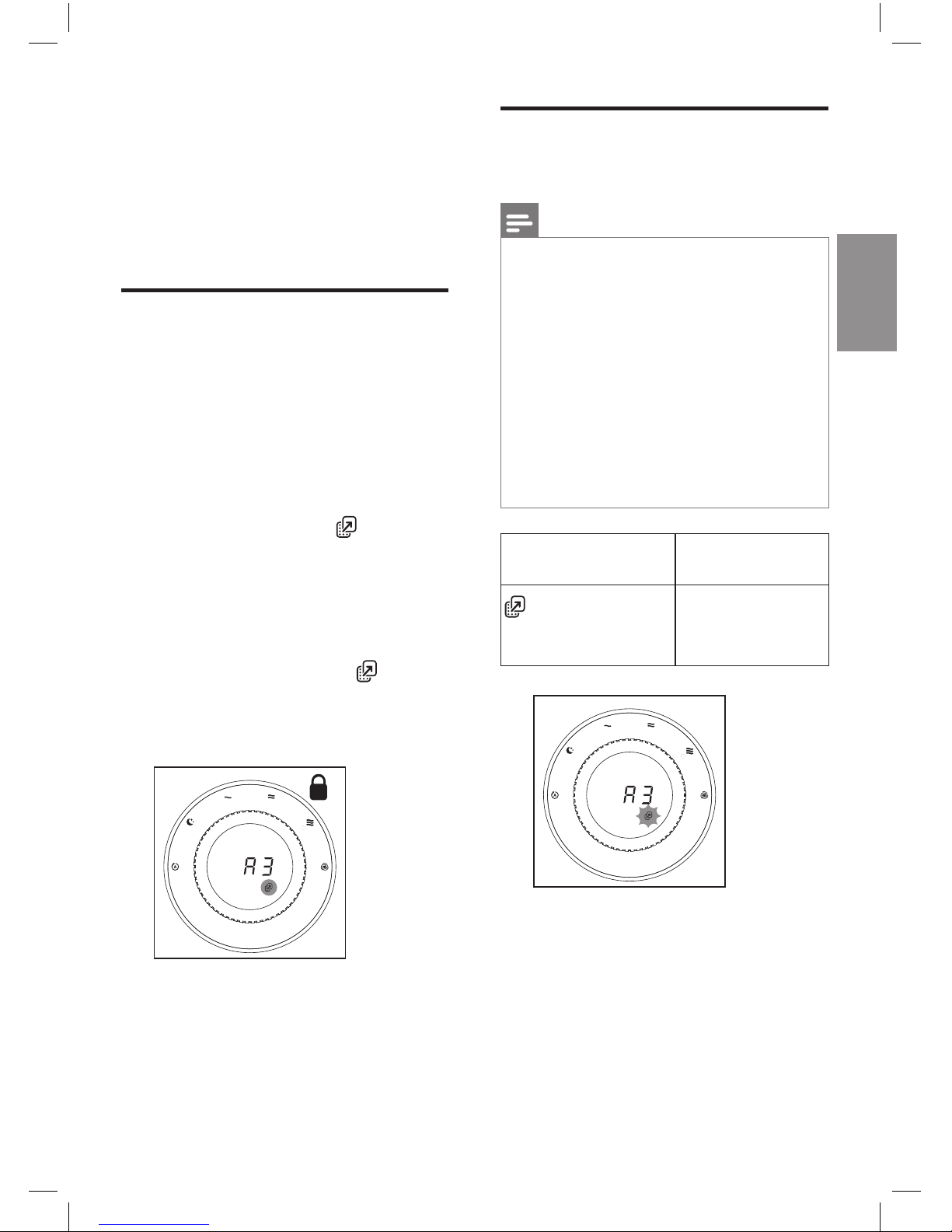
Filter alert light
status
Follow this
lights up, and
A3 displays on
the screen
Replace the
NanoProtect
Pro S3 filter
Page 34
34
EN
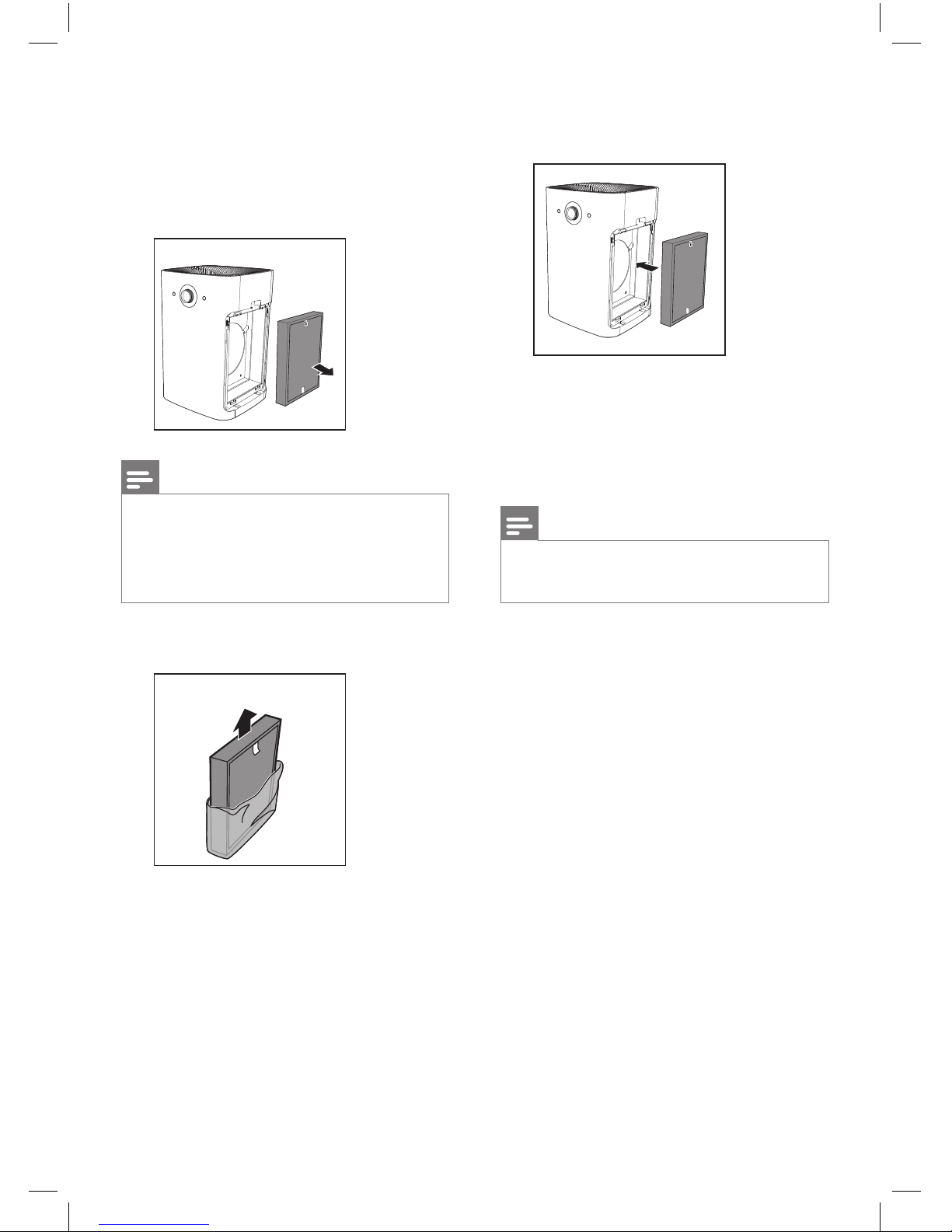
4 Put the unpacked air purification
filters back into the appliance.
5 After the pre-filters are properly
put back in the appliance, reset
the filter lifetime counter. (Refer
to chapter 7 "Resetting the filter
lifetime counter".)
Note
• Cleanse your hands after
changing filter.
1 Take out the pre-filters on both
sides of the appliance.
2 Take out the expired filters, and
gently put them into the trash
bin.
Note
• Do not touch the pleated filter
surface, or smell the filter as it
has collected pollutants from
the air.
3 Remove all packaging material
of the new filters.
Page 35
English
35
EN
7 Resetting the
filter lifetime
counter
After you have cleaned the prefilter, or replaced the air purification
filters, it is important that you also
reset the filter lifetime counter
afterwards. This allows the
appliance to be in sync with the
filter lifetime.
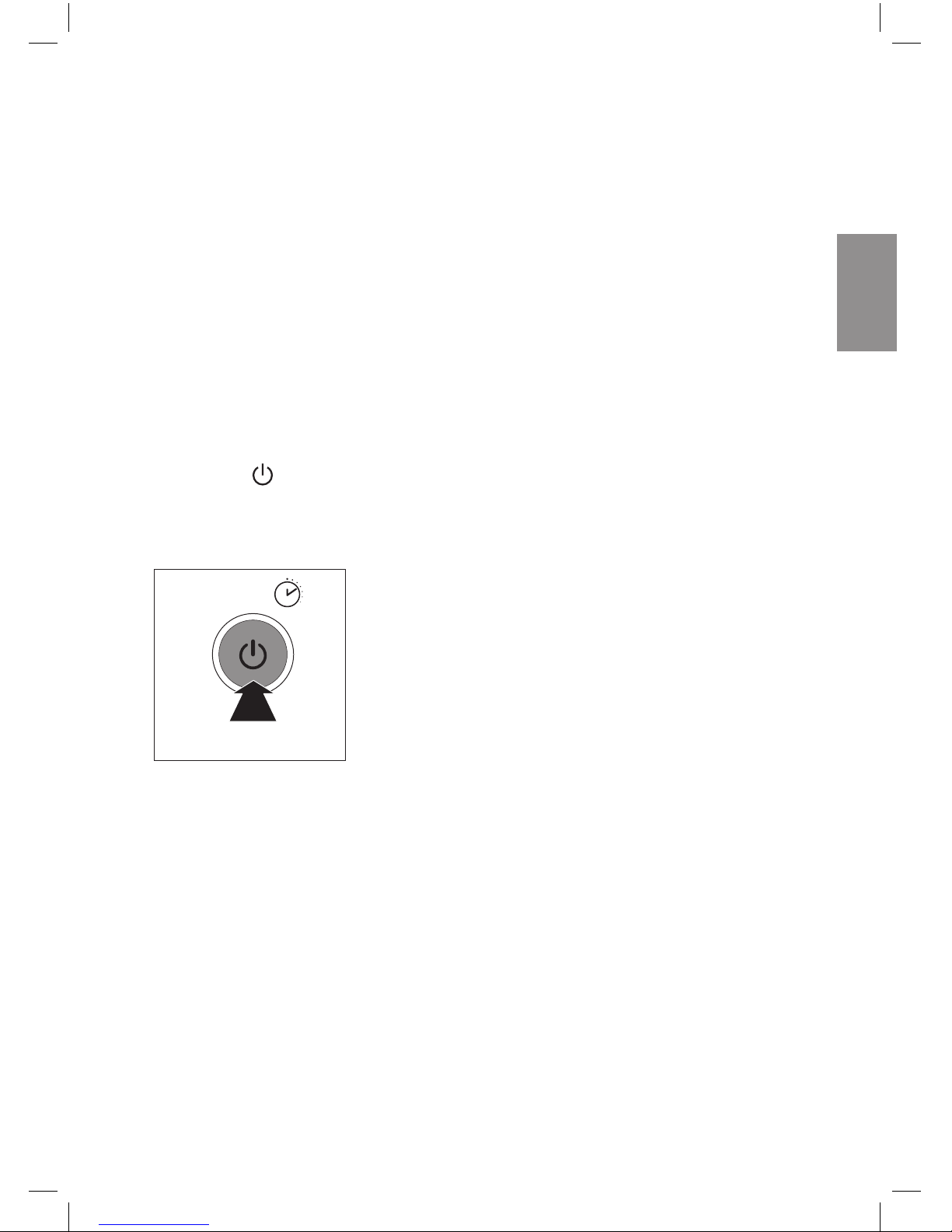
1 Press and hold the power On/
Off button for 3 seconds.
» The filter light goes out,
and the appliance resumes
working automatically.
3秒
3S
Page 36
36
EN
8 Troubleshooting
This chapter summarizes the most common problems you could encounter
with the appliance. If you are unable to solve the problem with the information
below, contact the Consumer Care Center in your country.
Problem Possible solution
The appliance
does not work
even though it is
plugged in.
The filter replacement light has been on continuously
but you have not replaced the corresponding filter. As a
result, the appliance is now locked. In this case, replace
the filter and reset the filter lifetime counter.
The airflow that
comes out of
the air outlet
is significantly
weaker than
before.
The pre-filter is dirty. Clean the pre-filter (see the
chapter "Cleaning").
The air quality
does not
improve, even
though the
appliance has
been operating
for a long time.
• One of the filters has not been placed in the
appliance. Make sure that all filters are properly
installed in the following order, starting with the
innermost filter: 1) air purification filter; 2) pre-filter.
• The air quality sensor is wet. The humidity level in your
room is high and causes condensation. Make sure that
the air quality sensor is clean and dry (see the chapter
"Cleaning").
The color of the
air quality light
always stays the
same.
The air quality sensor is dirty. Clean the air quality sensor
(see the chapter "Cleaning").
Page 37
English
37
EN
Problem Possible solution
The appliance
produces a
strange smell.
The first few times you use the appliance, it may
produce a plastic smell. This is normal. However, if the
appliance produces a burnt smell, contact your Philips
dealer or an authorized Philips service center. The
appliance may also produce an unpleasant smell when
one of the filters is dirty. In this case, clean or replace the
filter concerned.
The appliance is
extra loud.
If the appliance is too loud, you can change the fan
speed to a lower fan speed level. When using the
appliance in a bedroom at night, choose the silent
speed.
The appliance
still indicates that
I need to replace
a filter,
but I already did.
Perhaps you did not reset the filter lifetime counter.
Switch on the appliance. Then press and hold the power
On/Off button for 3 seconds.
The appliance
stops working,
and the air
quality light
blinks blue.
The sensor has malfunctions. Contact your Philips
dealer or an authorized Philips service center.
The appliance
stops working,
the fan speed
indicators 1 and 2,
or 2 and 3 blink.
The motor has malfunctions. Contact your Philips dealer
or an authorized Philips service center.
Page 38

38
EN
9 Guarantee and
service
If you need information or if you
have a problem, please visit the
Philips website at www.philips.com
or contact the Philips Consumer
Care Center in your country (you
can find its phone number in the
worldwide guarantee leaflet). If
there is no Consumer Care Center
in your country, go to your local
Philips dealer.
Order parts or
accessories
If you have to replace a part or
want to purchase an additional
part, go to your Philips dealer or
visit www.philips.com/support.
If you have problems obtaining the
parts, please contact the Philips
Consumer Care Center in your
country (you can find its phone
number in the worldwide guarantee
leaflet).
10 Notices
Electromagnetic fields
(EMF)
This Philips appliance complies
with all applicable standards and
regulations regarding exposure to
electromagnetic fields.
Compliance with EMF
Koninklijke Philips N.V.
manufactures and sells many
products targeted at consumers,
which, like any electronic apparatus,
in general have the ability to emit
and receive electromagnetic signals.
One of Philips' leading Business
Principles is to take all necessary
health and safety measures for
our products, to comply with all
applicable legal requirements
and to stay well within the EMF
standards applicable at the time of
producing the products.
Philips is committed to develop,
produce and market products that
cause no adverse health effects.
Philips confirms that if its products
are handled properly for their
intended use, they are safe to use
according to scientific evidence
available today.
Philips plays an active role in the
development of international EMF
and safety standards, enabling
Philips to anticipate further
developments in standardization for
early integration in its products.
Page 39

English
39
EN
Recycling
Do not throw away the product with
the normal household waste at the
end of its life, but hand it in at an
official collection point for recycling.
By doing this, you help to preserve
the environment.
Page 40
产品保用卡
此保用卡在中国适用
用户请保留此卡
保修条例:
* 在购买日期后二年内,凡经本公司特约维修站人员确认为
正常使用情况下,因制造工艺或元器件造成之损坏,您都
将获得免费保 修 服 务。
* 此免费服务不包括需时常更换的易耗零配件(吸尘机纸袋,
布袋,空气清新机滤网,滤芯,活性碳,咖啡壶过滤网)及
附件(如须刀网膜、刀头,咖啡杯,食品加工机杯/刀具等),
辅助装置,运输费及维修人员上门服务费。
* 用户请保留此联。
* 维修时请携同此证及发票正本。
* 此证若经涂改即作废。
* 此证须联同发票正本使用方为有效。
* 以下情况将不能获得免费服务
1.
使用不当引起的人为损坏,例如接入不适当电源、使用不
适 当 配 件 、不 适 当 之 安 装 、不 依 说 明 书 使 用 、错 误 使 用 或
疏忽而造 成损坏等。因运输及其他意外而造成之损坏。
非经本公司认可之维修和改装。其他因不可抗力(如自然
灾害、电压异常等)造成的损坏。
2.
一般家庭以外使用(如工业、商业用)而造成的损坏。
3.
正常使用引起的产品老化、磨损等,但不影响产品的正常
使用。
* 此证仅在中国境内有效。
* 保修证作为在规定期限及条件之内进行免费维修的保证,
并不限制消费者的法定权利。
保修及服务:
此产品是一件设计精良,用高品质元件制造之家用电器,在
正常使用及保养下应能发挥其优越性能。在购买日期后二
年内,若发生任何因制造工艺或元器件造成之损坏,飞利浦
中国维修服务中心将为持证用户提供免费门市维修服务,
视情况更换零件或整个产品。
无论在保期中或保期后,只要飞利浦正式行销该产品的任
何国家皆可获得维修服务。
若飞利浦在当地无行销该项产品,飞利浦同样提供维修服务,
但可能因未储备所需零件,维修时间可能较长,敬请见谅。
请联络当地飞利浦经销商,或飞利浦服务部门。
若您需洽询相关资讯,或遇困难事项时,请联络当地飞利浦
维修服务中心,或向飞利浦服务热线咨询。
中国顾客服务热线:
4008 800 008
(用 户 需 承 担 本 地 通 话 费 )。
网址:
http://www.philips.com.cn
网上会员注册与产品注册:
1) 登陆
http://www.philips.com.cn/welcome
2) 点击“创建新账户”,创建您的飞利浦账号
3) 点击“注册产品”,通过产品名称或产品型号查找产品,
完成产品注册
服务须知
需要 此 产 品 的 售后 服 务,
拨打服务热线:
4008 800 008
在维修服务过程中有任何意见,
欢迎致函飞利浦优质生活
服务办事处解决疑难。
飞利浦(中国)投资有限公司
飞利浦优质生活客户服务部
中国上海市田林路
888弄10
号
飞利浦创新科技园
1
号楼
邮政 编码:
200233
传真:
(021)5445 2663
Page 41
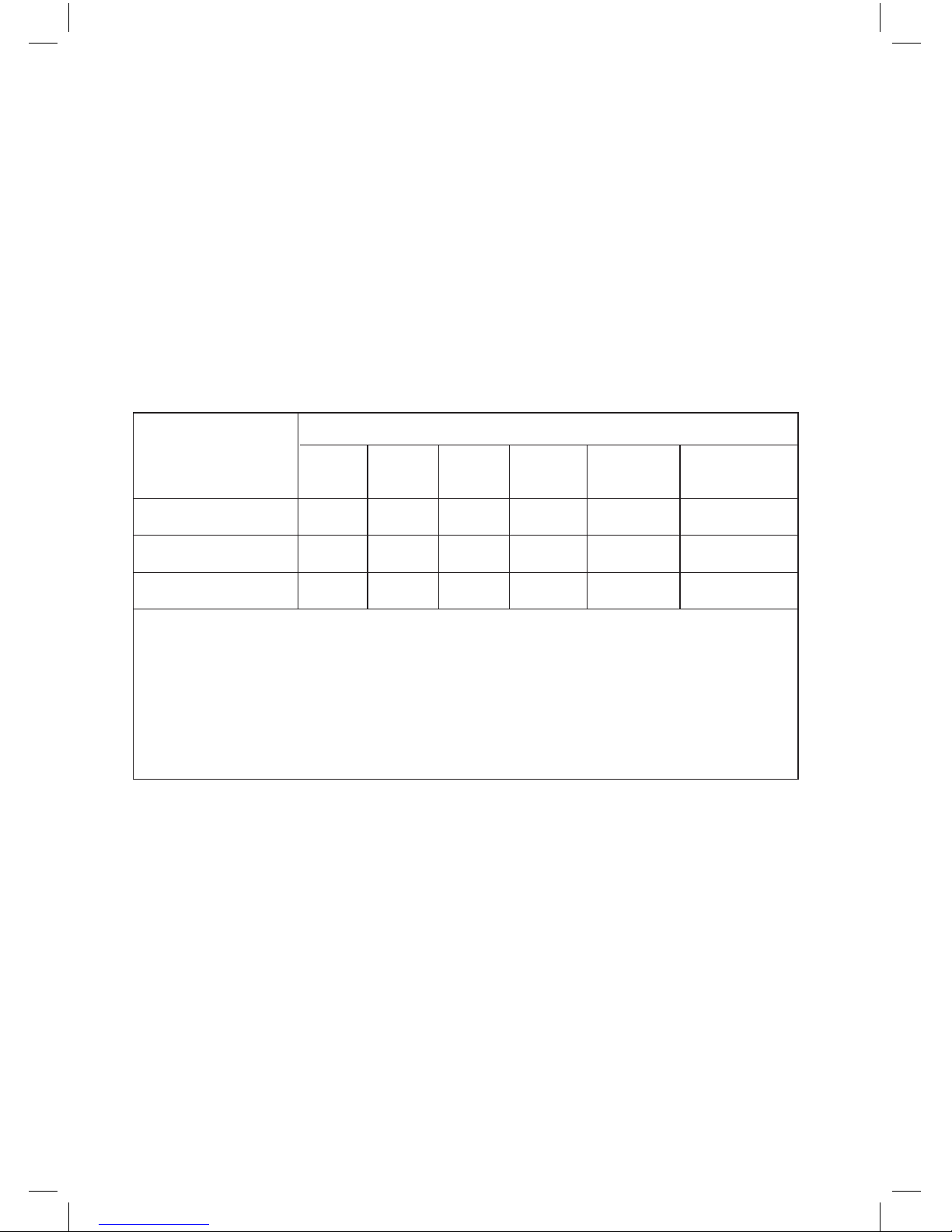
产品中有害物质的名称及含量
本表格依据SJ/T 11364的规定编制。
○
表示该有害物质在该部件所有均质材料中的含量均在GB/T 26572
规定的限量要求以下。
×
表示该有害物质至少在该部件的某一均质材料中的含量超出
GB/T 26572规定的限量要求。
部件名称
铅(Pb) 汞(Hg) 镉(Cd)
六价铬
(Cr(VI))
多溴联苯
(PBB)
多溴二苯醚
(PBDE)
有害物质
主电路板组件
电源电路板组件
变压器板组件
× ○
× × ×
× ○ ○
○
○
○
○
○
○
○
○
○
○
Page 42
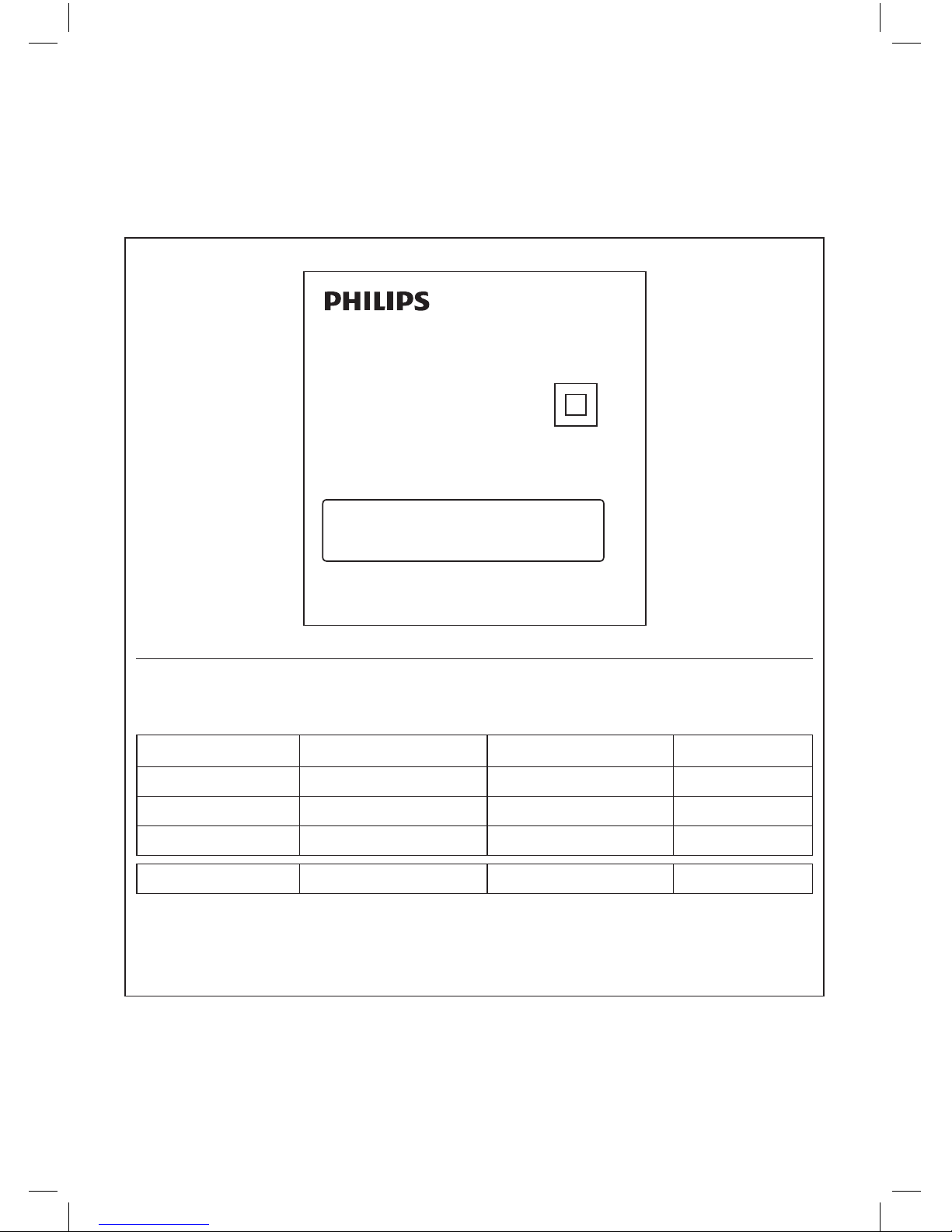
产品性能指标
目标污染物
洁净空气量
(CADR)
累计净化量
(CCM)
净化能效等级
颗粒物
669 m
3
/h P4
高效级
甲
醛
>400 m3/h F4
高效级
甲
苯
>400 m
3
/h
━ 高效级
噪声(声功率级
) 62 dB(A)
适用面积
* 47 - 80 m
2
*
适用面积是按照国标
GB/T18801-2015
根据颗粒物洁净空气量计算得出
以上性能指标数据是在第三方试验室按照国标
GB/T18801-2015
,以特定的烟尘
颗粒物或气态污染物为目标污染物测试得出
产品 :飞利浦空气净化器
AC6606
型号 :
KJ600F-F01
额定电压 :
220V
~
额定频率 :
50Hz
额定输入功率:
60W
生产日期 :请见产品本体
产地 :韩国
经销单位:飞利浦(中国)投资有限公司
上海市天目西路
218号1602-1605
全国顾客服务热线:
4008 800 008
本产品根据国标
GB4706.1-2005,GB4706.45-
2008
制造
Page 43
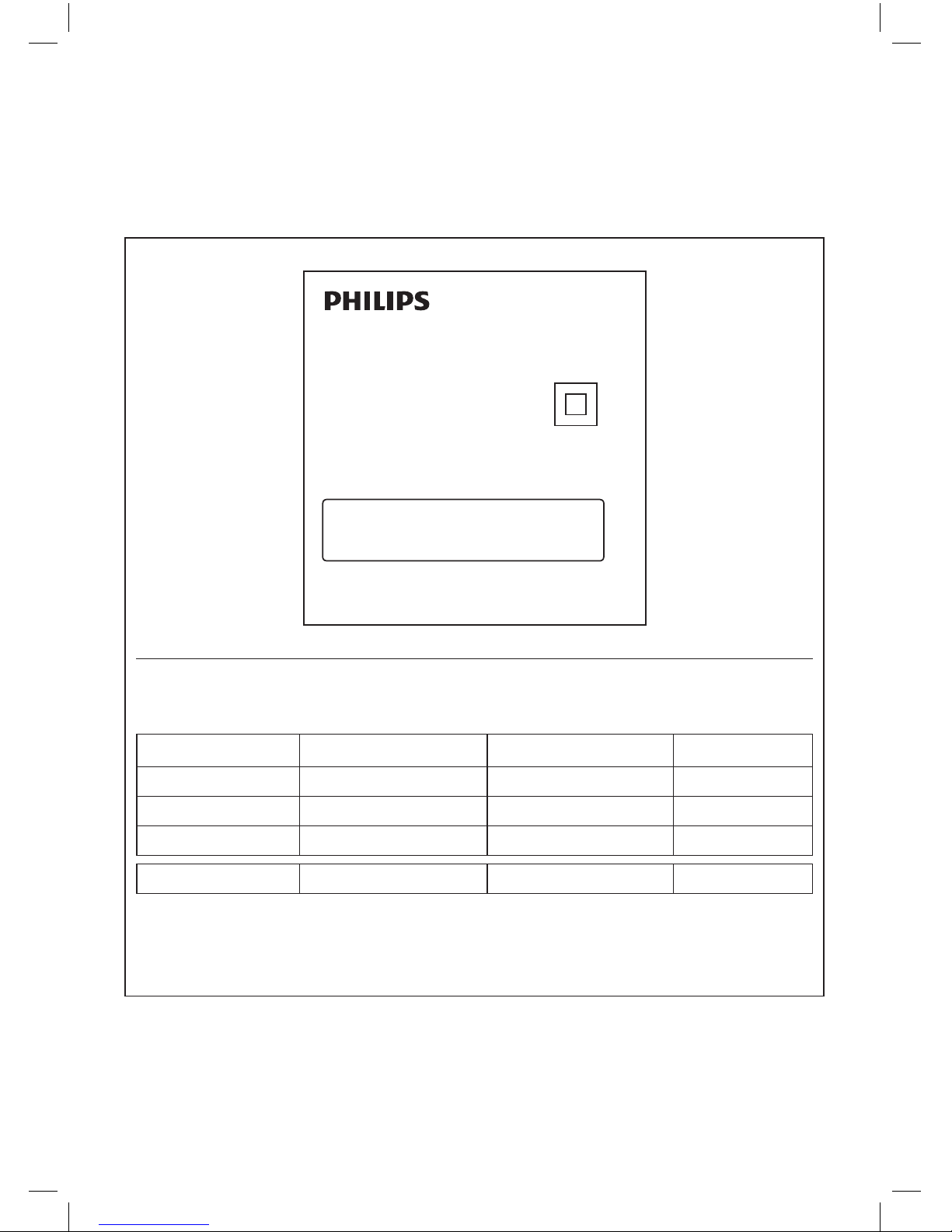
保留备用
出版日期:2016-11-08
产品性能指标
目标污染物
洁净空气量
(CADR)
累计净化量
(CCM)
净化能效等级
颗粒物
710 m
3
/h P4(>50000mg)
高效级
甲
醛
>400 m
3
/h F4
高效级
甲
苯
>400 m
3
/h
━ 高效级
噪声(声功率级
) 65 dB(A)
适用面积
* 50 - 85 m
2
*
适用面积是按照国标
GB/T18801-2015
根据颗粒物洁净空气量计算得出
以上性能指标数据是在第三方试验室按照国标
GB/T18801-2015
,以特定的烟尘
颗粒物或气态污染物为目标污染物测试得出
产品 :飞利浦空气净化器
AC6608
型号 :
KJ650F-F02
额定电压 :
220V
~
额定频率 :
50Hz
额定输入功率:
75W
生产日期 :请见产品本体
产地 :韩国
经销单位:飞利浦(中国)投资有限公司
上海市天目西路
218号1602-1605
全国顾客服务热线:
4008 800 008
本产品根据国标
GB4706.1-2005,GB4706.45-
2008
制造
Page 44
© 2016 Koninklijke Philips N.V.
保留所有权利
4241 210 82183
 Loading...