

Page 1
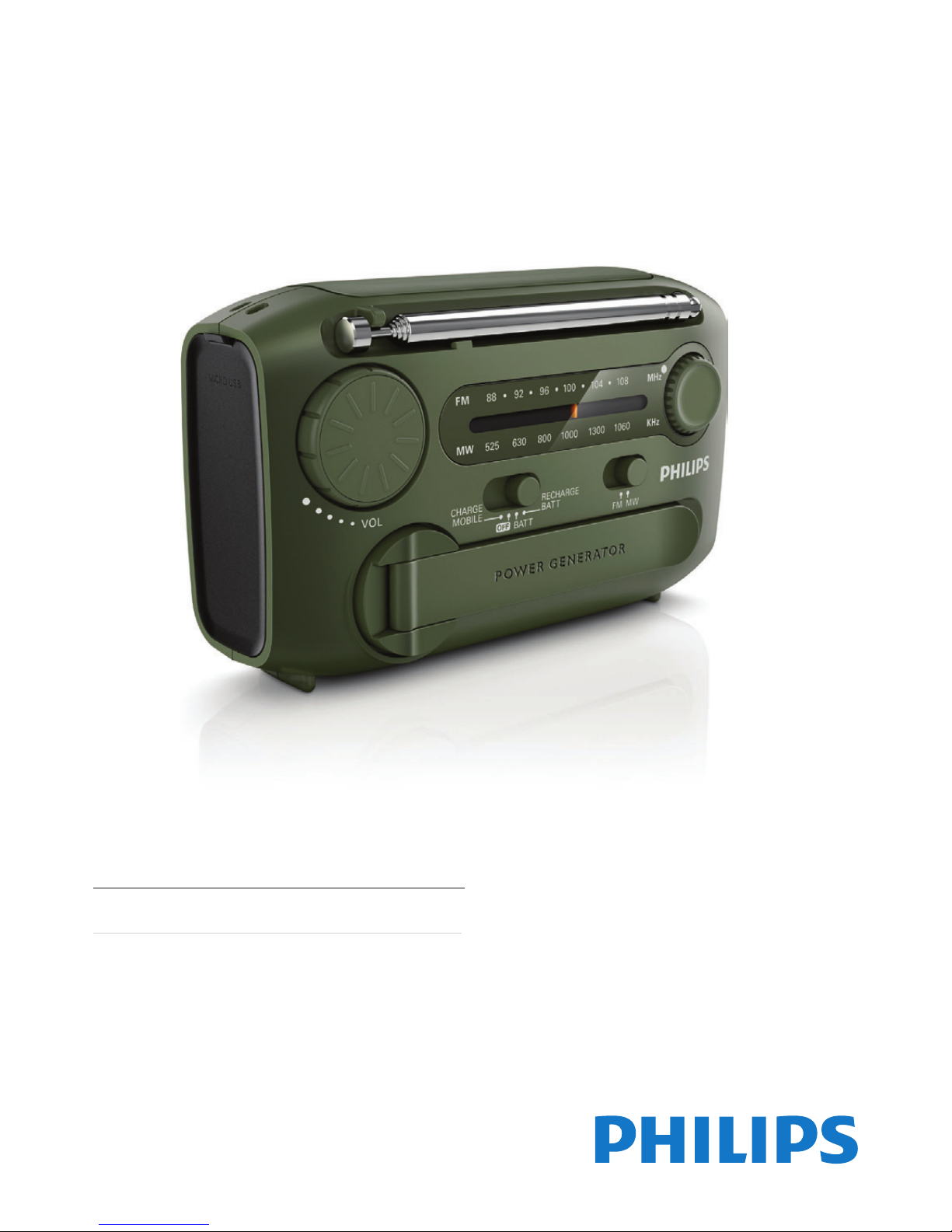
Register your product and get support at
www.philips.com/welcome
AE1120
EN User manual
Page 2

2EN
Contents
1 Important 3
2 Your Portable Radio 4
What's in the box 4
Power supply 4
Turn off 5
3 Use your portable radio 5
Listen to FM/MW radio 5
Charge mobile phone 6
Charge the Ni-MH battery pack 6
Turn the ashlight on 7
Turn the alarm on 7
4 Product information 8
5 Troubleshooting 8
6 Notice 9
Page 3
3 EN
1 Important
• Read these instructions.
• Heed all warnings.
• Follow all instructions.
• Do not use this apparatus near water.
• Do not install near any heat sources such
as radiators, heat registers, stoves, or
other apparatus (including ampliers) that
produce heat.
• Only use attachments/accessories specied
by the manufacturer.
• Refer all servicing to qualied service
personnel. Servicing is required when
the apparatus has been damaged in any
way, such as liquid has been spilled or
objects have fallen into the apparatus, the
apparatus has been exposed to rain or
moisture, does not operate normally, or
has been dropped.
• Battery usage CAUTION – To prevent
battery leakage which may result in bodily
injury, proper ty damage, or damage to the
unit:
• Install all batteries correctly, + and - as
marked on the unit.
• Do not mix batteries (old and new or
carbon and alkaline, etc.).
• Remove batteries when the unit is not
used for a long time.
• Batteries (battery pack or batteries
installed) shall not be exposed to excessive
heat such as sunshine, re or the like.
• Apparatus shall not be exposed to
dripping or splashing.
• Do not place any sources of danger on the
apparatus (e.g. liquid lled objects, lighted
candles).
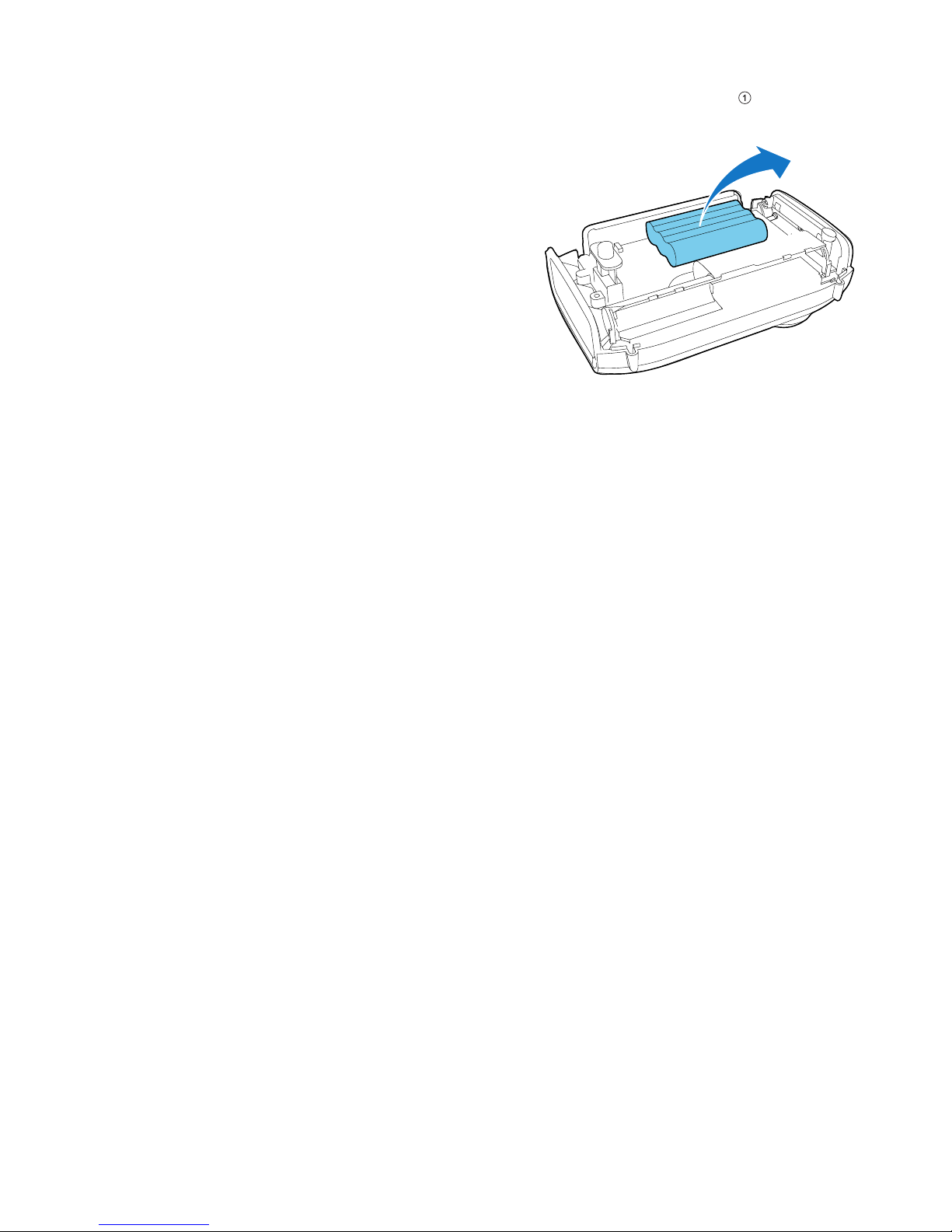
Always bring your product to a professional to
remove the built-in battery. (Fig.
)
a
Page 4
4EN
2 Your Portable
Radio
Congratulations on your purchase, and
welcome to Philips! To fully benet from the
support that Philips offers, register your product
at www.philips.com/welcome.
What's in the box
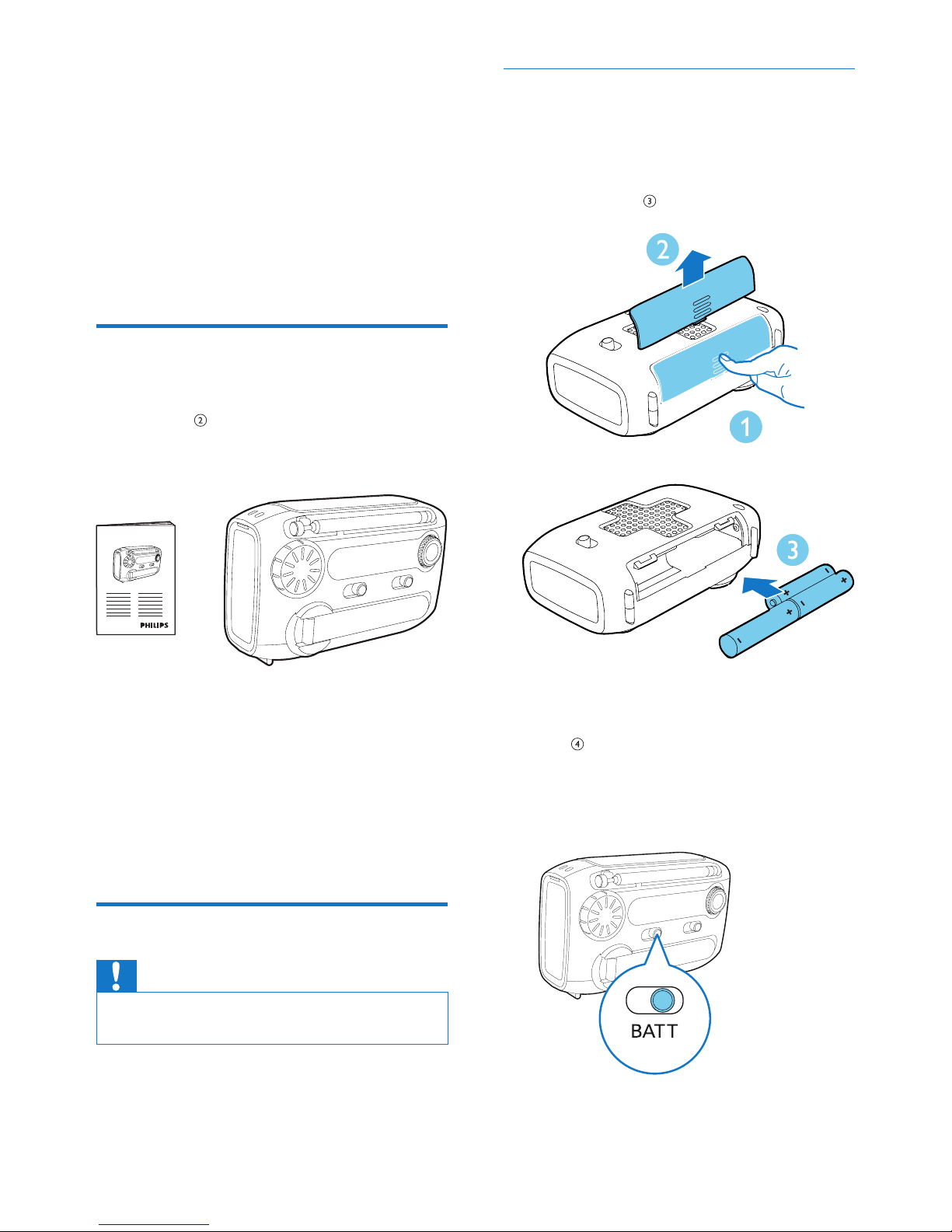
Check and identify the contents of your
package. (Fig.
)
If you contact Philips, you will be asked for the
model and serial number of this apparatus. The
model number and serial number are on the
bottom of the apparatus. Write the numbers
here:
Model No. __________________________
Serial No. ___________________________
Power supply
Caution
•
The batteries contain chemical substances, so they
should be disposed of properly.
To operate the por table radio, you can use
either alkaline batteries or built-in Ni-MH
battery pack.
b
Operate on alkaline batteries
1 Open the battery compartment.
2 Insert 3 x 1.5 V AAA batteries (not
supplied) with correct polarity (+/-) as
indicated. (Fig.
)
3 Close the battery compartment.
4 Slide the power source selector to B ATT .
(Fig.
)
» The portable radio is operated on the
alkaline batteries.
c
d
Page 5
5 EN
Tip
•
To make sure that the built-in battery has enough
power to support the alarm and ashlight function in
emergency case, you are recommended to use alkaline
batteries in normal times.
Operate on Ni-MH battery
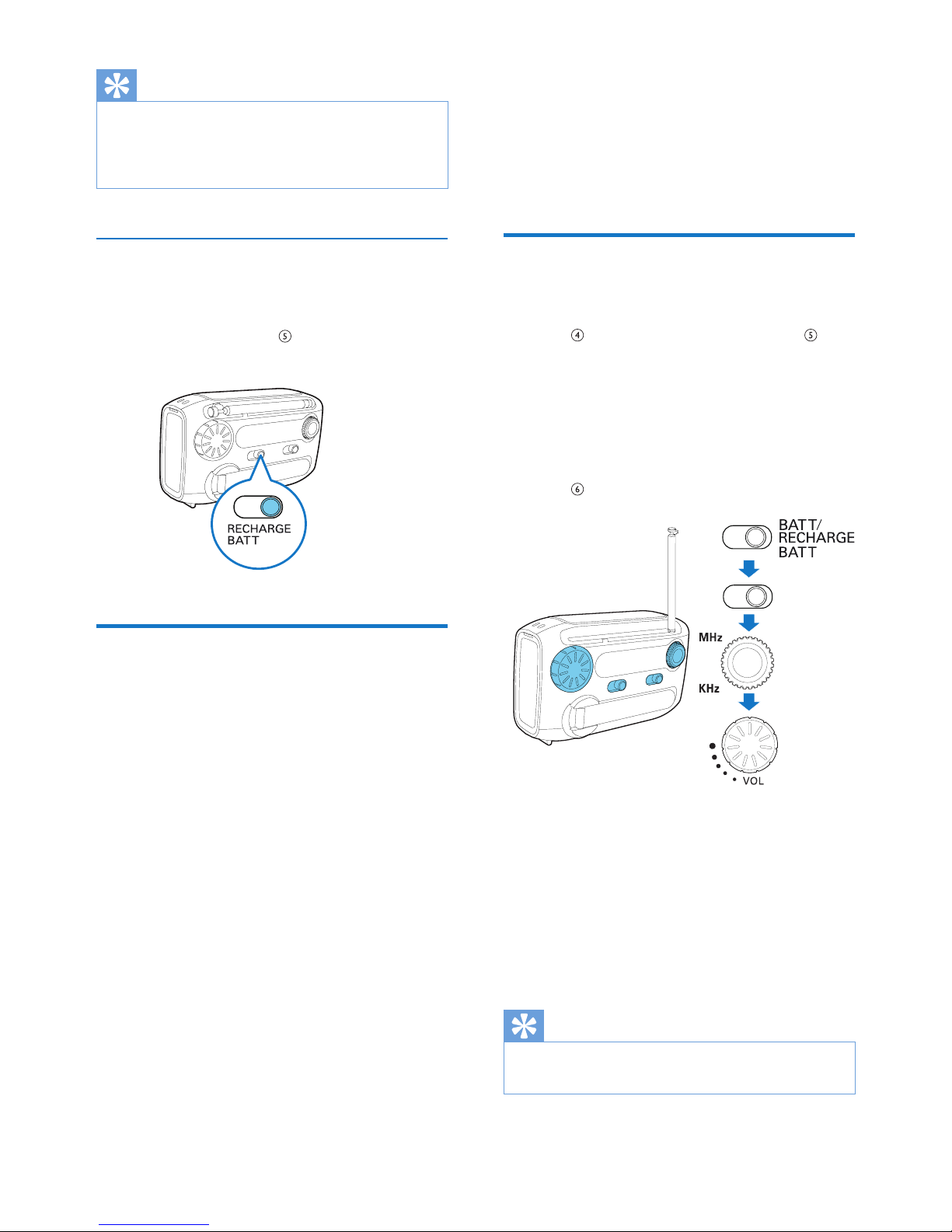
To operate on the rechargeable Ni-MH battery
pack, slide the power source selector to
RECHARGE BATT. (Fig.
)
Turn off
After use, slide the power source selector to
OFF.
e
3 Use your
portable radio
Listen to FM/MW radio
1
Slide the power source selector to BATT
(Fig.
) or RECHARGE BATT. (Fig. )
2 Adjust the FM•MW slider to select FM or
MW tuner.
3 Rotate the tuning knob to tune to a radio
station.
4 Rotate the volume knob to adjust volume.
(Fig.
)
To achieve better radio reception:
• Position the antenna as far as possible from
TV, VCR, or other radiation sources to
prevent interference;
• Put the radio near window or in a spacious
place.
• Change the length and direction of the
antenna.
Tip
•
To avoid radio interference, do not listen to the radio
while charging your phone or built-in battery.
f
FM/MW
Page 6
6EN
Charge mobile phone
This portable radio can also serve as an
emergency charger for your mobile phone.
In places where AC outlet is unavailable, your
phone will never run out of power with this
device.
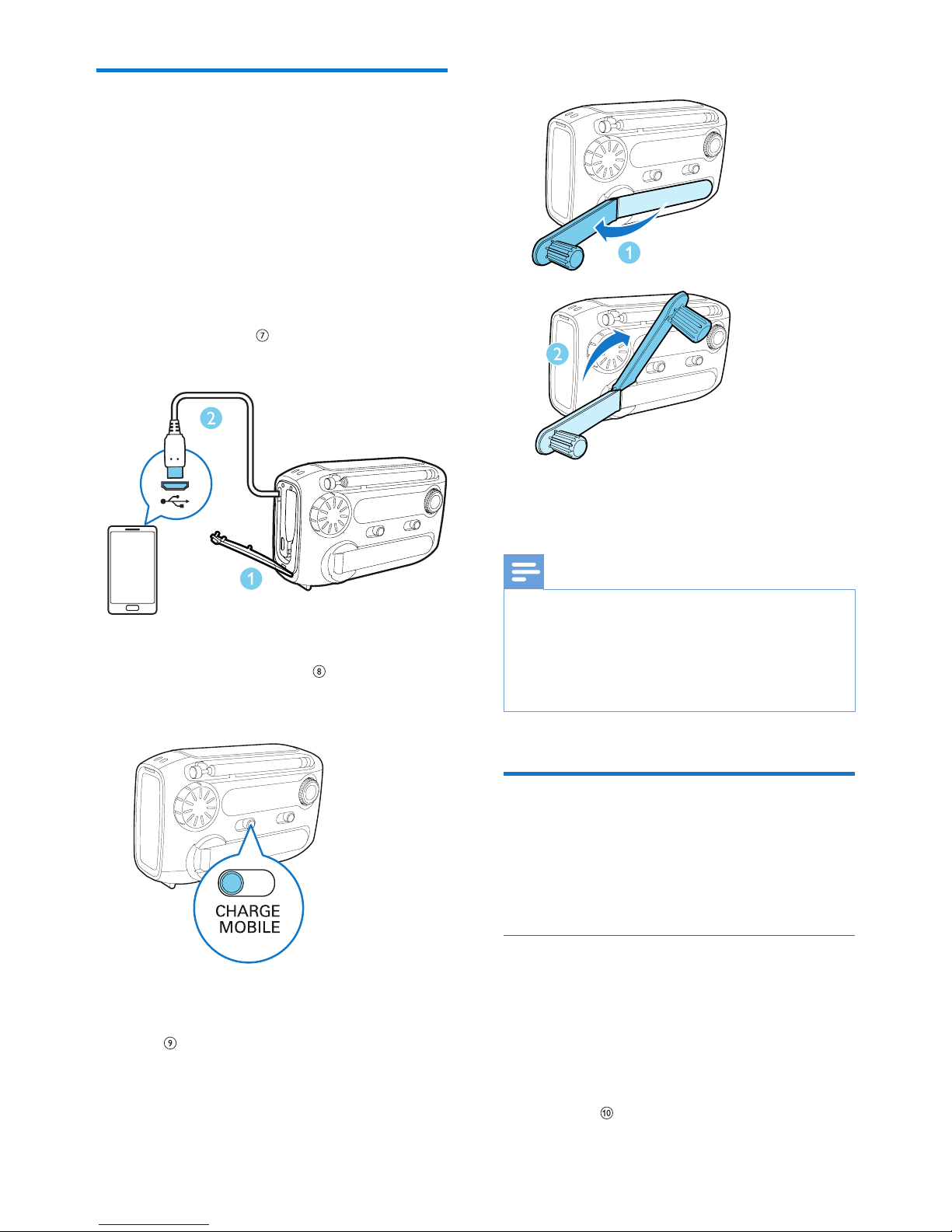
1 Open the MICRO USB cover and take out
the supplied USB cable.
2 Plug the USB cable into a USB socket on
your phone. (Fig.
)
3 Slide the power source selector to
CHARGE MOBILE. (Fig.
)
4 Pull out the POWER GENERATOR, then
rotate it quickly to charge your phone.
(Fig.
)
g
h
» The charing indication appears on your
phone.
Note
•
If the supplied USB cable does not match the USB
socket on your phone, plug it into a USB convertor
(not supplied) rst, and then connect to your phone.
• For some mobile phones that have special
requirements on the charging current or voltage,
charging may be unsuccessful.
Charge the Ni-MH battery
pack
You have two ways to charge the built-in NiMH battery pack.
Charge through USB socket
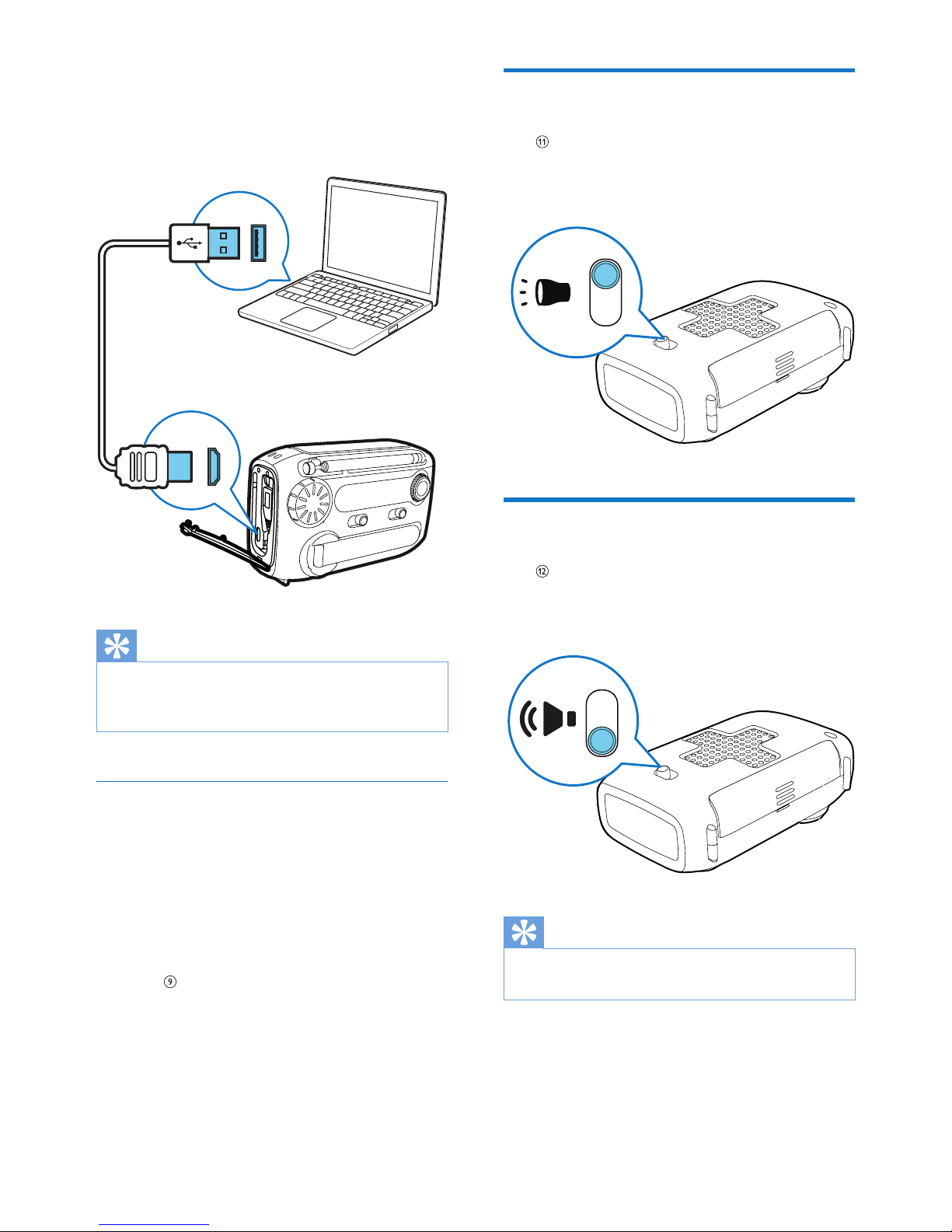
1 Slide the power source selector to OFF,
BAT T, or RECHARGE BATT.
2 Connect a USB cable (not supplied) to :
• the USB socket of your computer.
• the USB socket of the portable radio.
(Fig.
)
i
Page 7
7 EN
» The portable radio begins charging the
Ni-MH battery.
Tip
•
It takes 8 hours to fully charge the battery.
• Fully charge the built-in battery if the radio has not
been used for more than 3 months.
Charge through power generator
In emergency situation, you can charge the
built-in battery through the power generator.
1 Switch the power source selector to OFF,
BAT T, or RECHARGE BATT.
2 Pull out the POWER GENERATOR, then
rotate it quickly to generate power.
(Fig.
)
» The generated power is stored in the
Ni-MH battery.
j
Turn the ashlight on
(Fig. )
Turn the alarm on
(Fig. )
Tip
•
To avoid children being frightened by the sudden
strident ringing, keep children away from the radio.
k
l
Page 8
8EN
4 Product
information
Note
•
Product information is subject to change without prior
notice.
Tuner
Tuning range FM: 87.0 - 108 MHz
MW: 522 - 1620 kHz
General information
Power supply
- Rechargeable battery
- Alkaline battery
Ni-MH battery pack
3 X AAA batteries
Dimensions
- Main Unit
(W x H x D)
120 x 76 x 47 mm
Weight
- With Packing
- Main Unit
0.32 kg
0.26 kg
5 Troubleshooting
Warning
•
Never remove the casing of this device.
To keep the warranty valid, never try to repair
the system yourself.
If you encounter problems when using this
device, check the following points before
requesting service. If the problem remains
unsolved, go to the Philips Web page
(www.philips.com/support). When you contact
Philips, make sure that the device is nearby
and the model number and serial number are
available.
No power
• Make sure that you have selected the
correct power source.
• Make sure that the alkaline batteries are
installed properly.
• Charge the built-in battery.
Poor radio reception
• Keep the radio away from other electronic
devices to avoid radio interference
• Change the length and direction of the
antenna.
No sound
• Adjust the volume.
Cannot charge the phone or Ni-MH battery
• Rotate the power generator as fast as you
can.
• Check if you have selected the correct
power source.
• The USB cable does not match the USB
socket of your phone. Try a USB convertor
to connect your phone.
• Due to different product techniques
of the mobile phone, charging may be
unsuccessful.
Page 9
9 EN
6 Notice
Any changes or modications made to this
device that are not expressly approved by
Philips Consumer Lifestyle may void the user’s
authority to operate the equipment.
This product complies with the radio
interference requirements of the European
Community.
Your product is designed and manufactured
with high quality materials and components,
which can be recycled and reused.
When this crossed-out wheeled bin symbol is
attached to a product it means that the product
is covered by the European Directive 2002/96/
EC.
Please inform yourself about the local separate
collection system for electrical and electronic
products.
Please act according to your local rules and
do not dispose of your old products with your
normal household waste. Correct disposal of
your old product helps to prevent potential
negative consequences for the environment and
human health.
Your product contains batteries covered by
the European Directive 2006/66/EC, which
cannot be disposed with normal household
waste.Please inform yourself about the local
rules on separate collection of batteries
because correct disposal helps to prevent
negative consequences for the environmental
and human health.
Note
•
The type plate is located on the bottom of the
apparatus.
Environmental information
All unnecessary packaging has been omitted.
We have tried to make the packaging easy to
separate into three materials: cardboard (box),
polystyrene foam (buffer) and polyethylene
(bags, protective foam sheet.)
Your system consists of materials which can
be recycled and reused if disassembled by
a specialized company. Please observe the
local regulations regarding the disposal of
packaging materials, exhausted batteries and old
equipment.
Page 10

Specifications are subject to change without notice
© 2012 Koninklijke Philips Electronics N.V.
All rights reserved.
AE1120_00_UM_V1.0
 Loading...