

Page 1
User Manual
Automotive Driving Recorder
Page 2

1. Product overview………………………………………………..
……….………...1
2. Quick start………………………………………………………………….
………...….…2
3. Connecting the GoSure app...…………….………...….……….……
………..…….4
4. Using the GoSure app………………..…………………..…………
………..…….5
5. GoSure app system settings………………..…………….……..
………..…….6
6. GoSure ADR820 User Interface……………….……...………..
.………..……7
7. GoSure ADR820 system settings………………..……….…….
……….…...8
7.1 Set date and time…………………………..……..
……………..8
7.2 Function settings……………………..…………….
………..…….9
8. Device operating instructions………………………..….….…………
…………….11
8.1 Device button icons…………..………………………….
…………...11
8.2 Recording video………………….….….….…….
…………….11
9. Additional functions………………………..……….…………………..
……………...12
9.1 Driver fatigue alert……………………………..…
…………...12
10. Updating the device's firmware…………………………………..….……..……...……
…………….13
10.1 Firmware download……………………...……….…….
…………...13
10.2 How to update firmware…………….…………………..
…………..13
11. Technical specifications………………………….………………
…………..14
Contents
Page 3
1
Page 4
2
Page 5

3
Page 6
4
Page 7
4
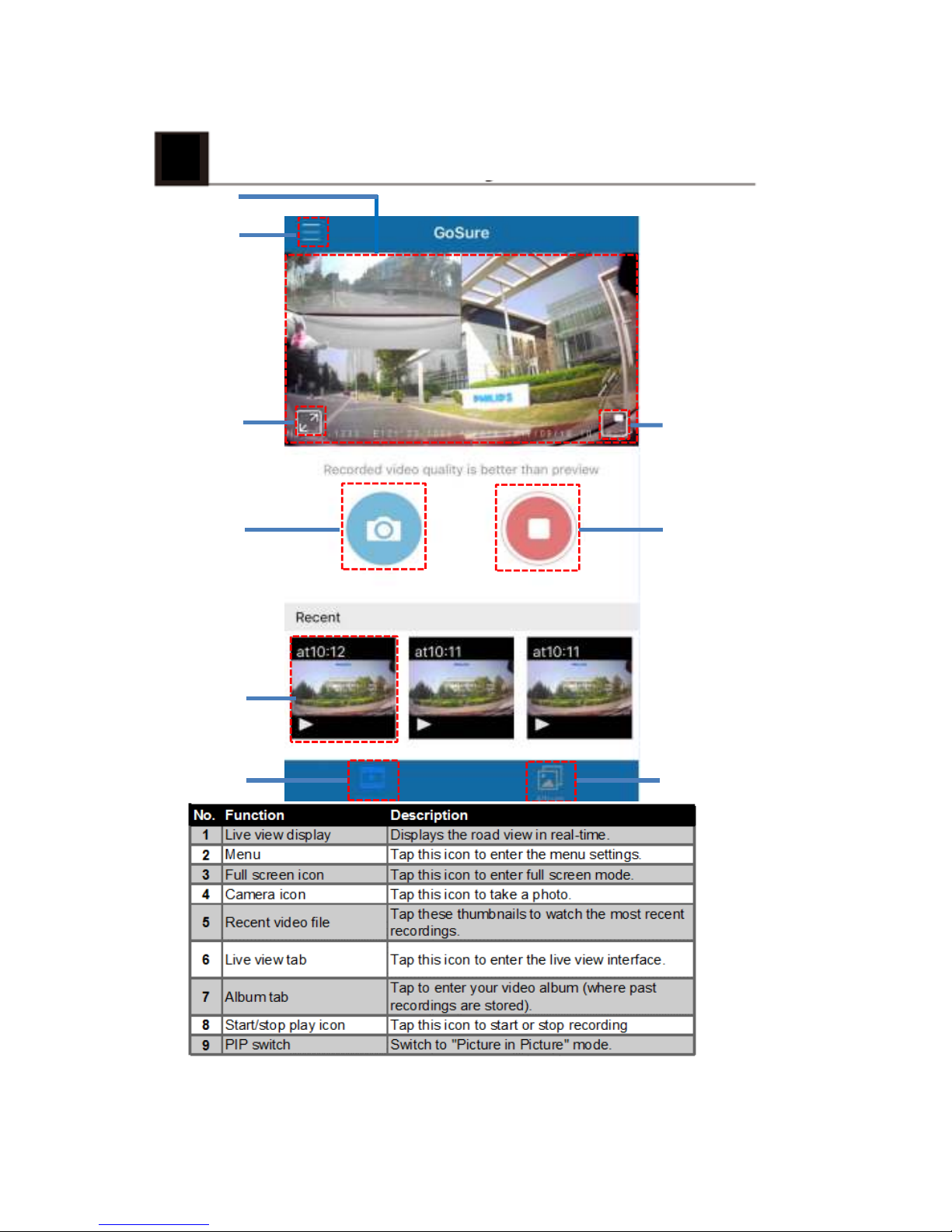
Using the GoSure App
1
2
3
4
5
6 7
8
9
5
Page 8
5
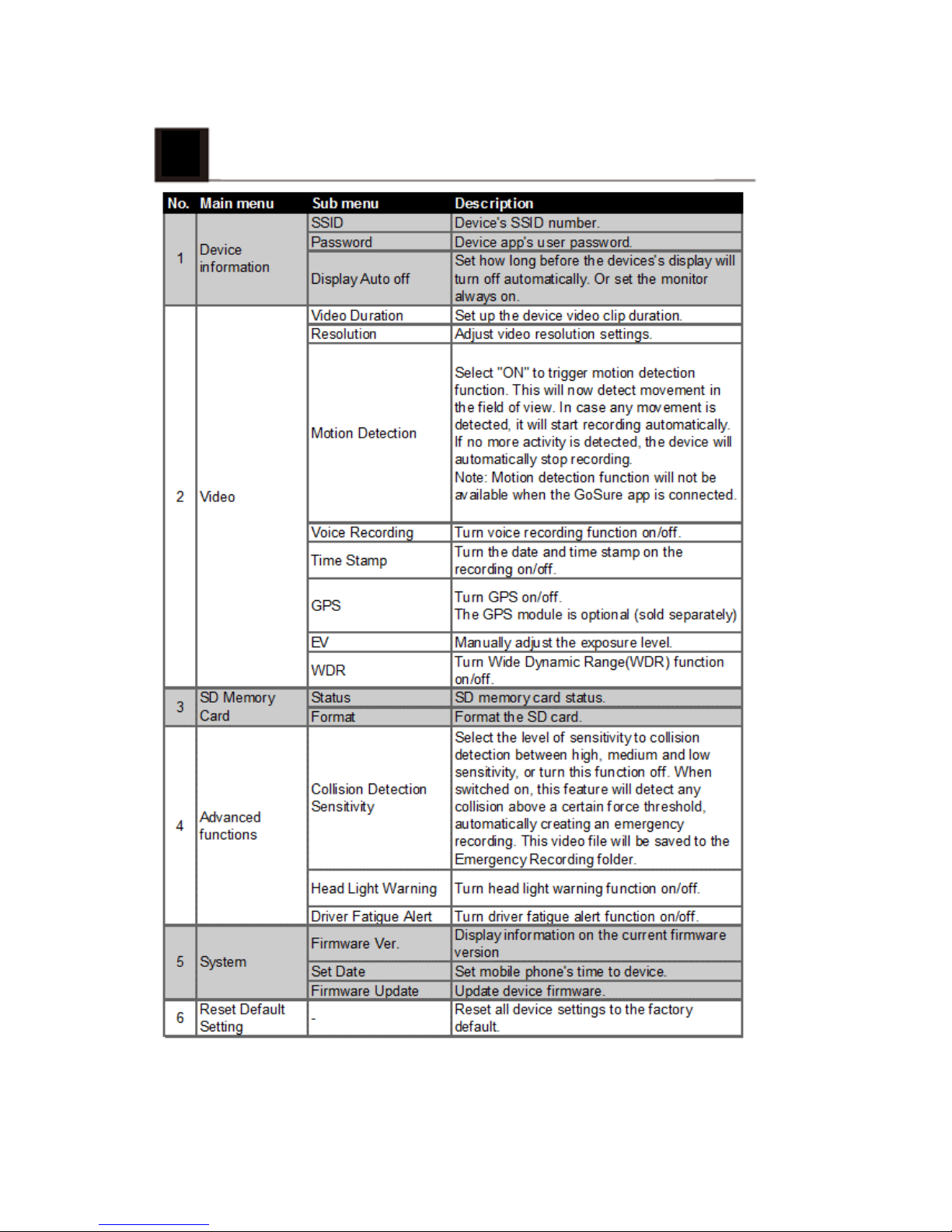
GoSure app system settings
6
Page 9
6
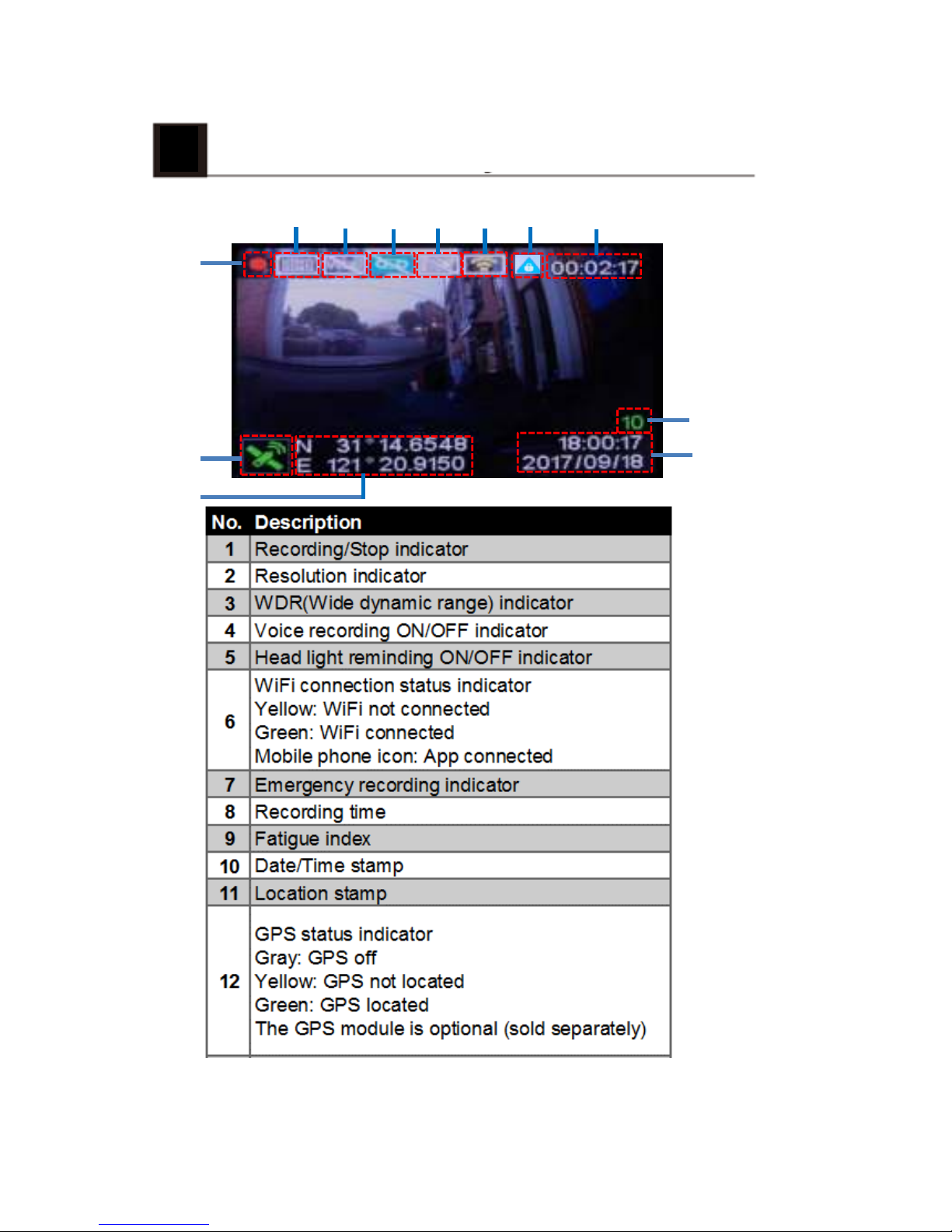
GoSure ADR820 user interface
1
2 3 4
5
6 7
8
9
10
11
12
7
Page 10
7
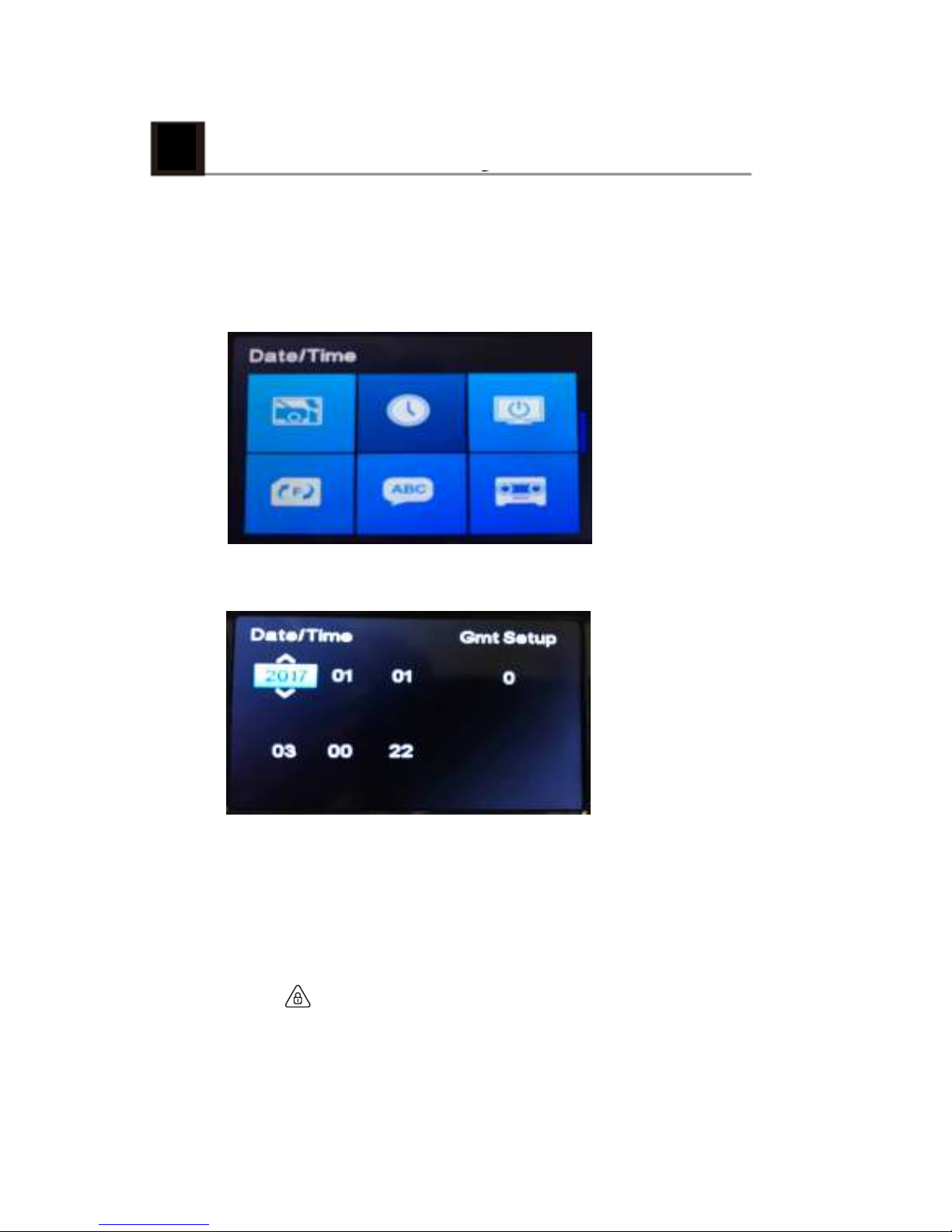
GoSure ADR820 system settings
Press the OK button to open the menu list, allowing you
to adjust various device settings.
7.1 Set the Date and Time
1. Press OK to open the on-screen display menu.
2. Press ▲/▼ to select clock icon and then press OK to
enter date and time setting page.
3. To adjust date and time field, press ▲/▼ to select the
field.
4. Press▲/▼ to select the value.
5. Repeat steps 3-4 to adjust other fields.
6. Press to save your changes.
8
Page 11
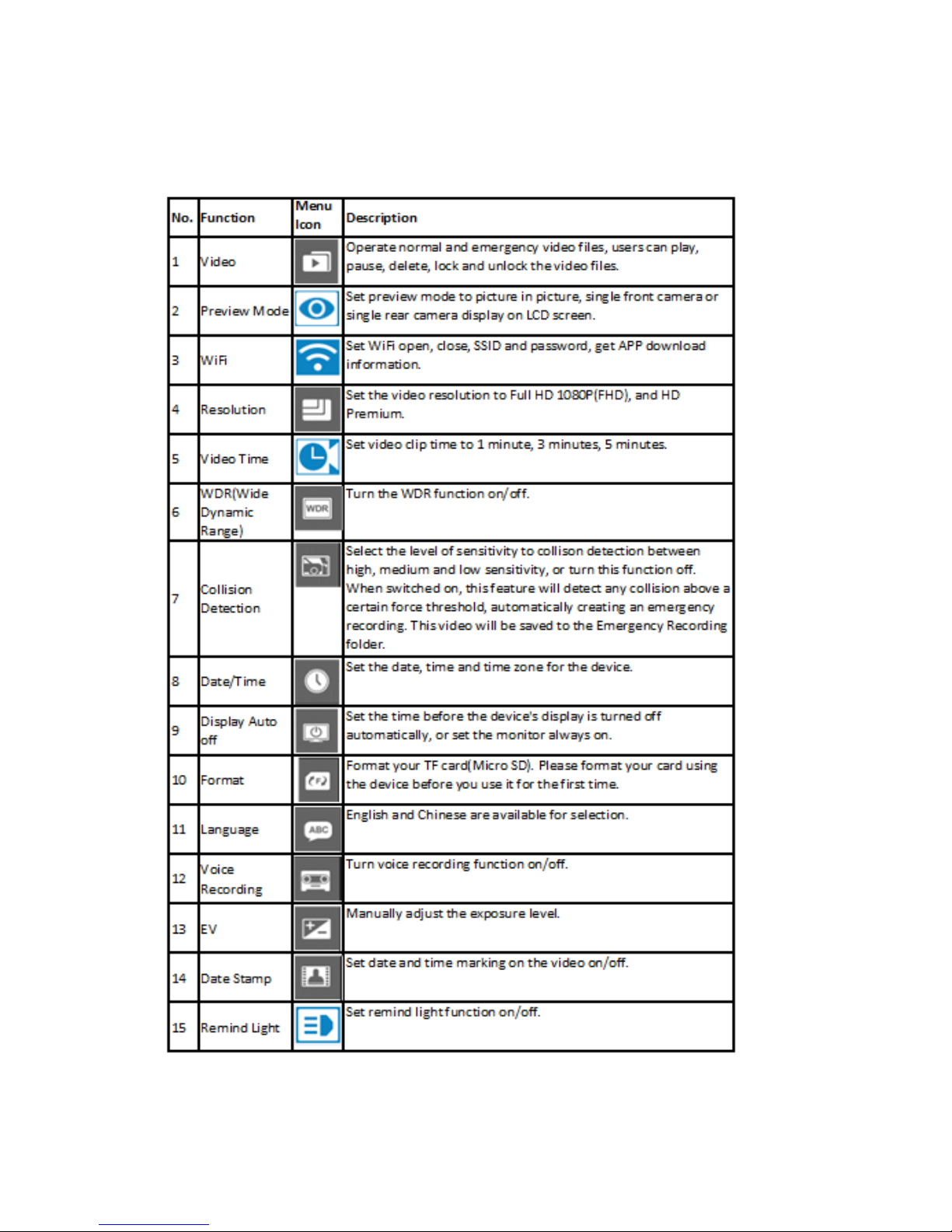
7.2 Function settings
9
Page 12
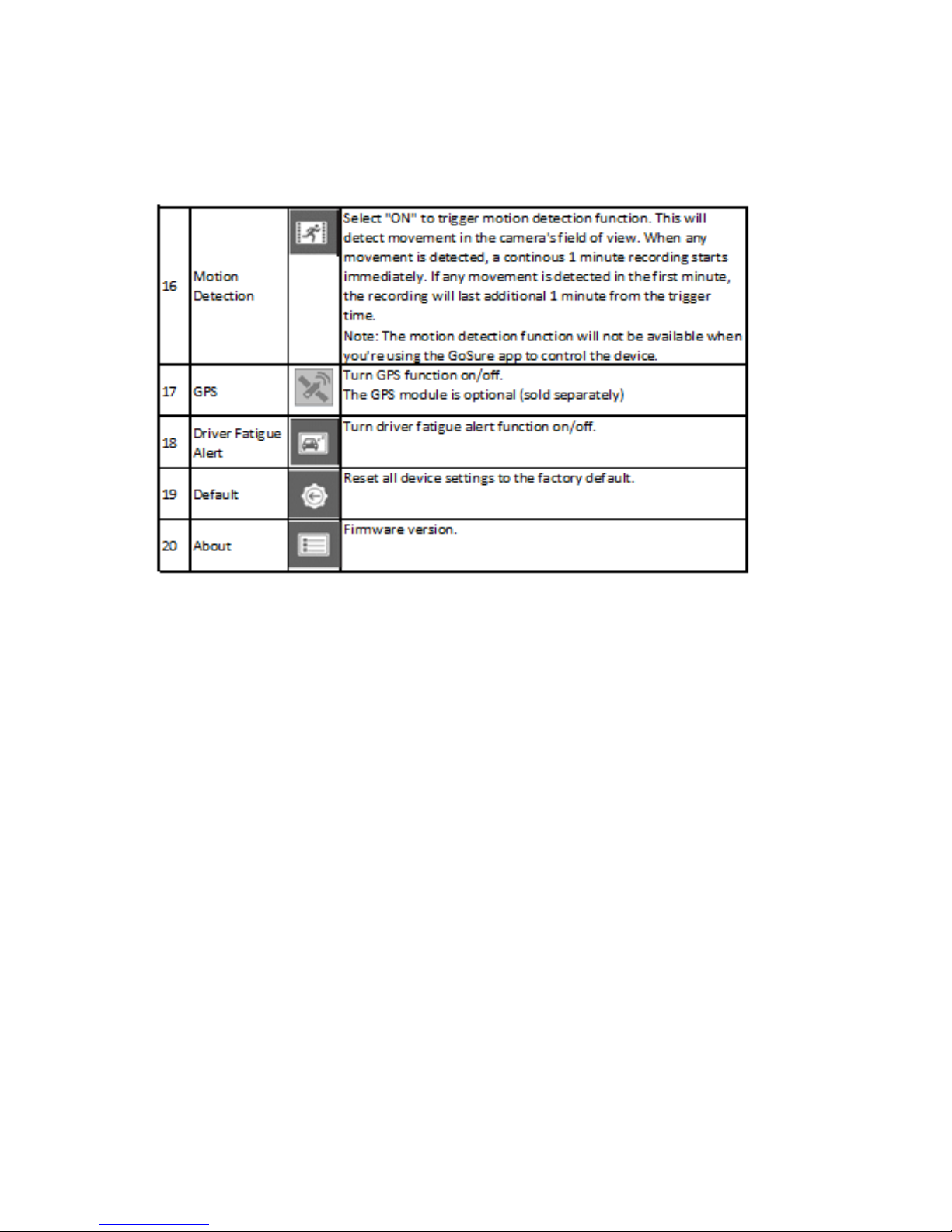
10
Page 13

8
Operating instructions
8.1 Device button icons:
button: Emergency button/Return button
▲ button: Up button/Voice recording on/off button
OK button: Enter/Action button
▼ button: Down button/PIP mode button
8.2 Record video:
8.2.1 Normal video recording
With a MicroSD memory card inserted, every time you turn
on the device, it will automatically start recording with the
default settings. When you switch your vehicle engine off,
the camera will stop recording automatically. A normal
video recording file is saved in the "NORMAL" folder
(viewable in the GoSure app). The file name is the system
time (hour, minute, second) as a prefix.
8.2.2 Emergency video recording
An emergency file will be automatically generated when you
either press the emergency button (see 8.1) or the device
detects a collision above a certain force threshold. This file
will be stored in the "EMGREC" folder (again, viewable in
you GoSure app).
11
Page 14

9
Additional functions
9.1 Driver fatigue alert
To help drivers keep track of how tired they might be
getting, the device comes with a fatigue alert. This takes
into account various physiological and journey related
parameters; for example, it considers the time of day and
the time spent driving. The device will alert you every two
hours of driving, to remind you that fatigue could be
becoming an issue.
As well this alert, there is also a fatigue indicator on the
device’s display. With a low fatigue rating below 60, the
indicator is green. When the fatigue rating is between 60
and 80 the indicator is yellow and a warning alert sounds.
When the fatigue rating reaches 80, the indicator turns red
and three warning beeps sound.
When you switch on this driver fatigue feature, it’s
important that you set correct system time (so it knows at
what time of day you’re driving). If you have this feature
switched off, the fatigue rating will not be displayed on the
screen.
12
Page 15

13
10
Updating the device's firmware
10.1 Firmware download
To update the firmware (the device’s in-built software),
please download the latest file version from Philips.com or
contact Philips Consumer Care for assistance.
10.2 How to update firmware
1. Copy the firmware (ADR820.bin) to your SD memory card
root folder.
2. Then insert the memory card into the device and press the
emergency button, before plugging in the power cable to the
device.
3. A green LED will then blink, indicating the device is
updating automatically.
4. When the device restarts it means the update was
sucessful, please enter the menu and check the firmware
version in "About".
Page 16
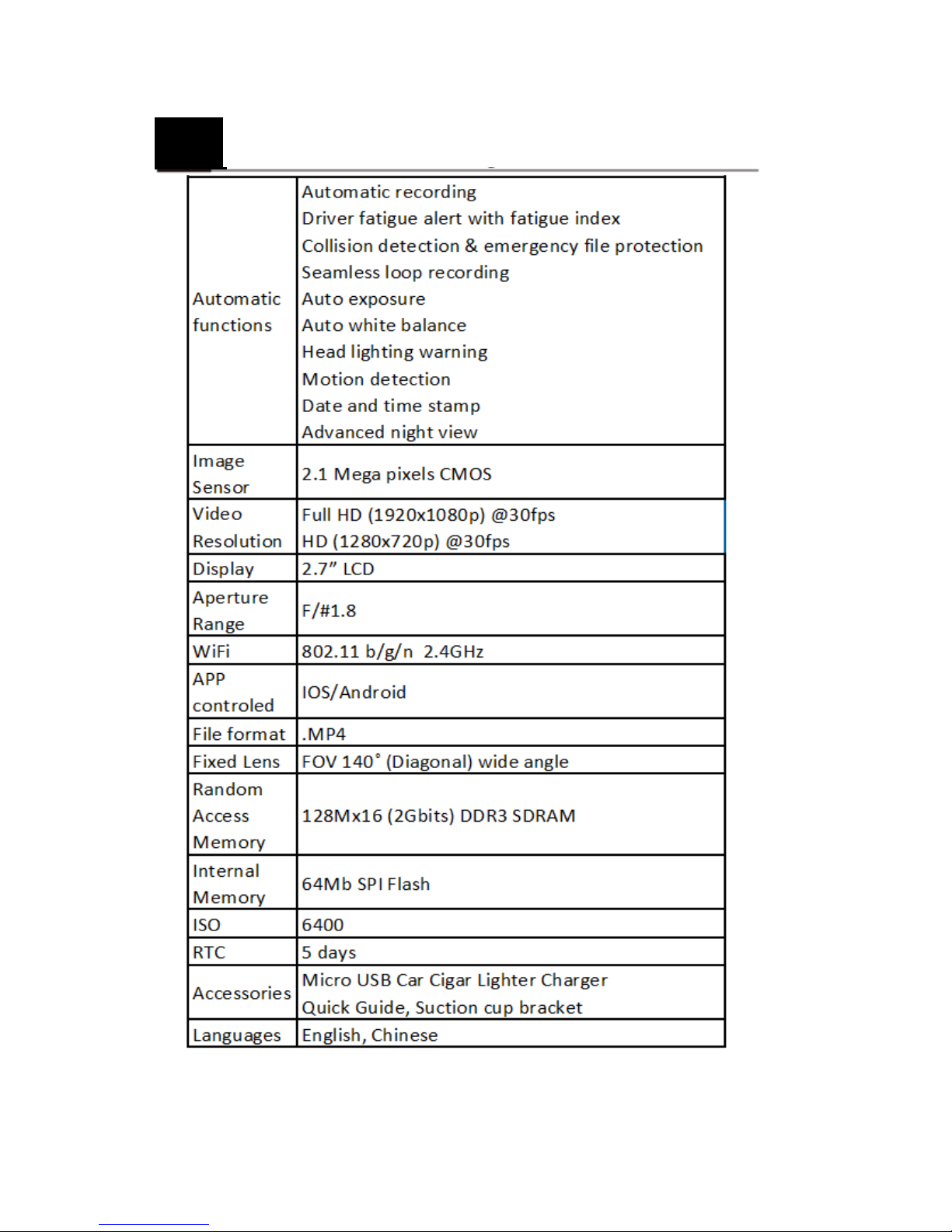
11
Technical specifications
14
Page 17

Lumileds is the warrantor of this product. The Philips
trademarks are used under license from Koninklijke Philips
N.V. (2017). © Lumileds Holding B.V. 2017. All rights
reserved.
Document order number: 3211 008 21298
 Loading...