

Page 1
RO Dispenser
ADD6920
User Manual
說明書
Page 2
English
CONTENTS
Important Notes
1 01
2 03
Product speci�cations
3 03
Product overview
4 04
User interface
Usage instructions6
7 Daily maintenance
8 10
Filter replacement
Error codes9
05
10
12
Installation
5
04
Trouble shooting10
11 Packing list
13
14
Page 3

1. Important Notes
Note: All contents of this part relate to safety. The dangers, harmfulness, and potential accidents are
explained herein. All users must strictly follow the instructions.
• Misuse may cause injury.
• The heating element surface is subject to residual heat after use.
• This appliance is intended for household and indoor use only.
• Do not immerse the appliance in any liquid.
• Do not use accessories which are not authorised by the manufacturer. The warranty will terminate
automatically if machine failure is caused by unauthorised accessories.
• Please check for machine damages and verify all parts are included after unpacking.
• Use municipal tap water as the water source.
• Please do not pour unknown liquids, water from sources of unknown quality or other extraneous
• Please handle the machine with care to avoid injury or damages resulting from dropping the
appliance.
• This appliance is not intended for use by persons (including children) with reduced physical,
sensory or mental capabilities, or lack of experience and knowledge, unless they have been given
super vision or instruction concerning use of the appliances by a person responsible for their safety.
• This appliance can be used by children aged from 8 years and above and persons with reduced
physical, sensory or mental capacities or lack of experience and knowledge if they have been
given supervision or instruction concerning use of the appliance in a safe way and understand the
hazards involved.
• Children shall not play with the appliance add space and user maintenance shall not be made by
children without supervision.
• Place the machine in a cool and dry place, away from direct sunlight. Do not place it near any form
of heat sources.
• To avoid electric shock, do not touch the power plug with wet hands.
• To avoid damage, do not disassemble or modify the machine, or put any heav y objects on it.
• If the dispenser will not be used for a long time, please make sure it is disconnected from the
• The inlet water temperature should be 5-38. If the temperature is higher than 38
cartridge will be damaged and be unable to work. If the temperature is lower than 5, the
01
Page 4

dispenser might be frozen and the elements of the dispenser will be damaged.
• The dispenser can only be installed and used indoor, and with power supply of reliable grounding.
dispenser.
• Organic solvent such as gasoline shall not be used for wiping the housing of the dispenser.
If cleaning is required, please gently wipe the surface of the product with a wet cloth after it is
disconnected from power supply.
• If there is any abnormality, unplug the product from power supply immediately, and do not leave
the defective dispenser in working mode.
actual product, and the actual produc t shall govern in this case.
• If the user intends to extract ambient water or water of 45 immediately after extracting hot
water, some hot water may come out at the beginning, if so please watch out to avoid being burnt
by the hot water. It is recommended to extract ambient water for 10 seconds to cool down the
heating element.
• If the power cord appears to be damaged, please stop using the product. To avoid risks of danger,
the power cord must be replaced by personnels authorised by the manufacturer.
• Do not disassemble or repair the dispenser by yourself, nor hand it over to any person not
authorized to repair, as improper repairing may cause risks of danger.
• The manufacturer will not bear responsibility for any consequences that are results of failure to
operate the appliance in accordance with the above guidelines.
Page 5
2. Product speci�cations
Product name
Model
Water heating capacity
Applicable water source
Inlet water pressure
Applicable water temperature
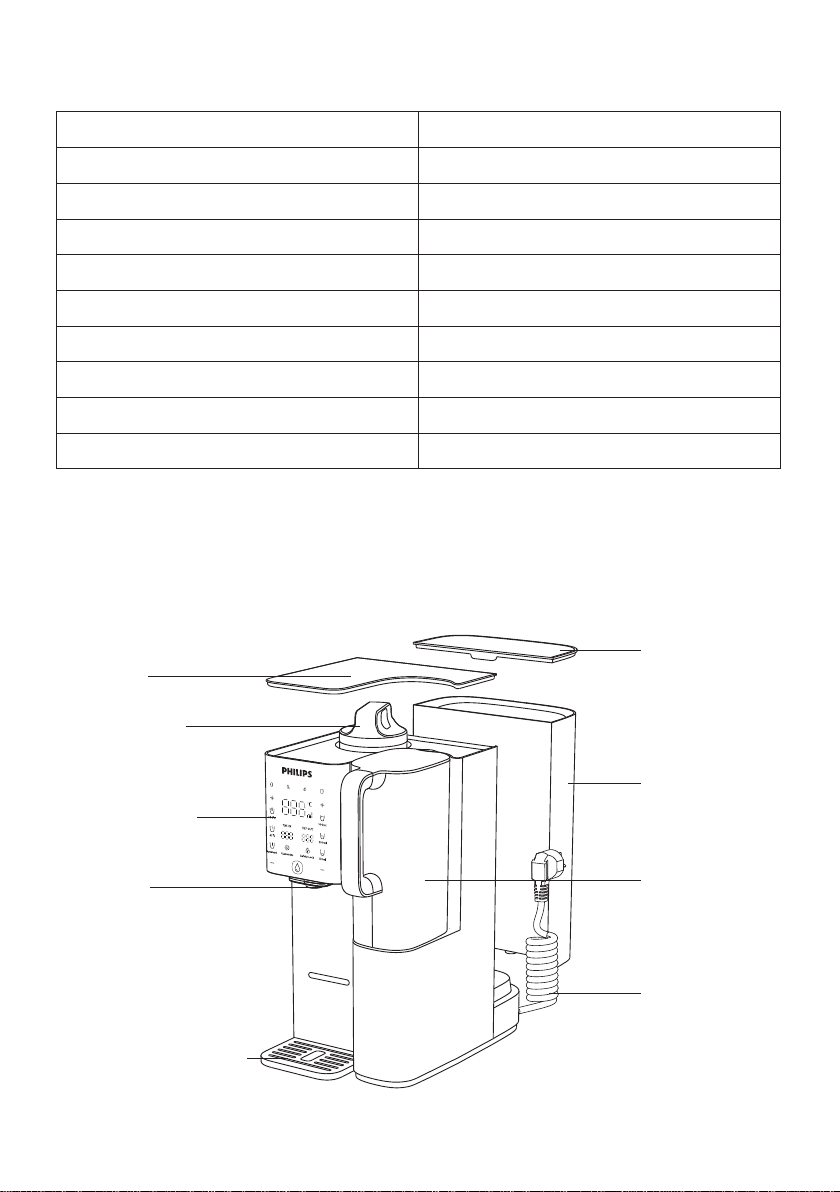
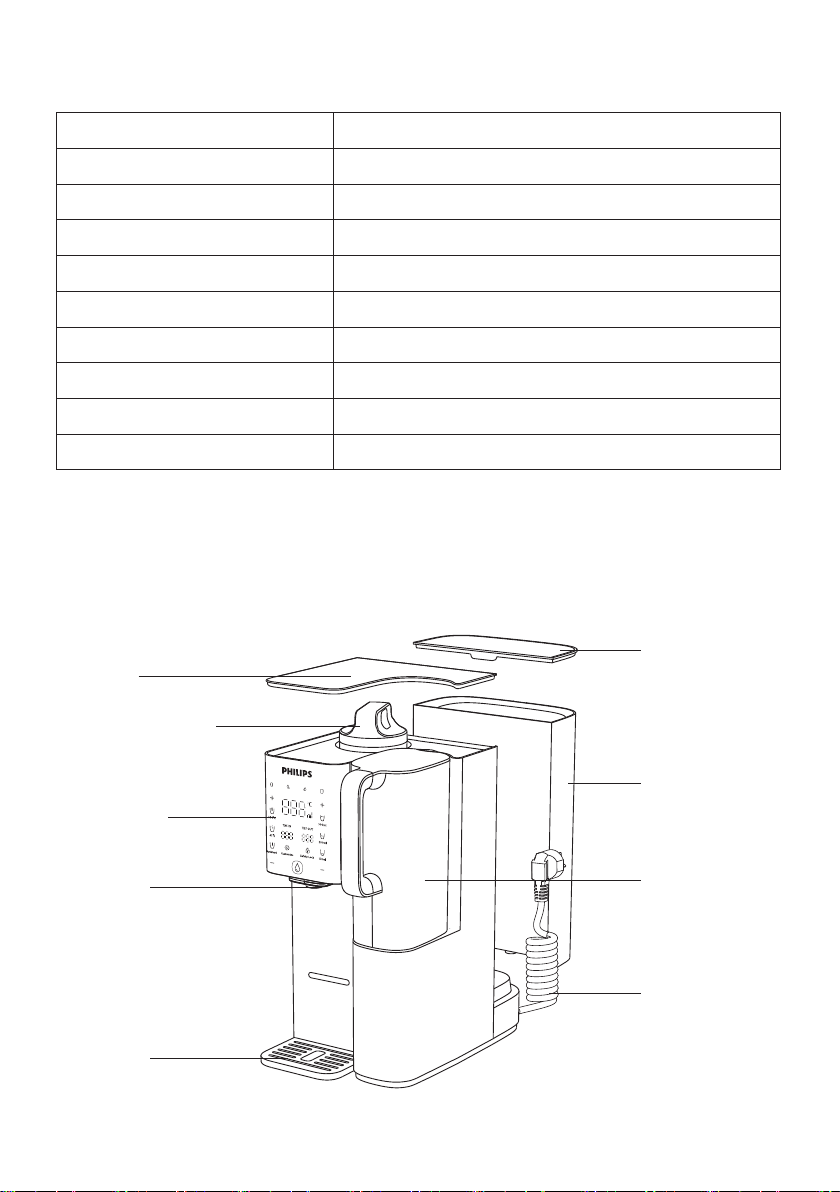
3. Product overview
Top lid
Display panel
( Max .100 )
Municipal tap water
0 - 0.06MPa
5-38
Nozzle
Filtered water jug
Power cord
03
Page 6
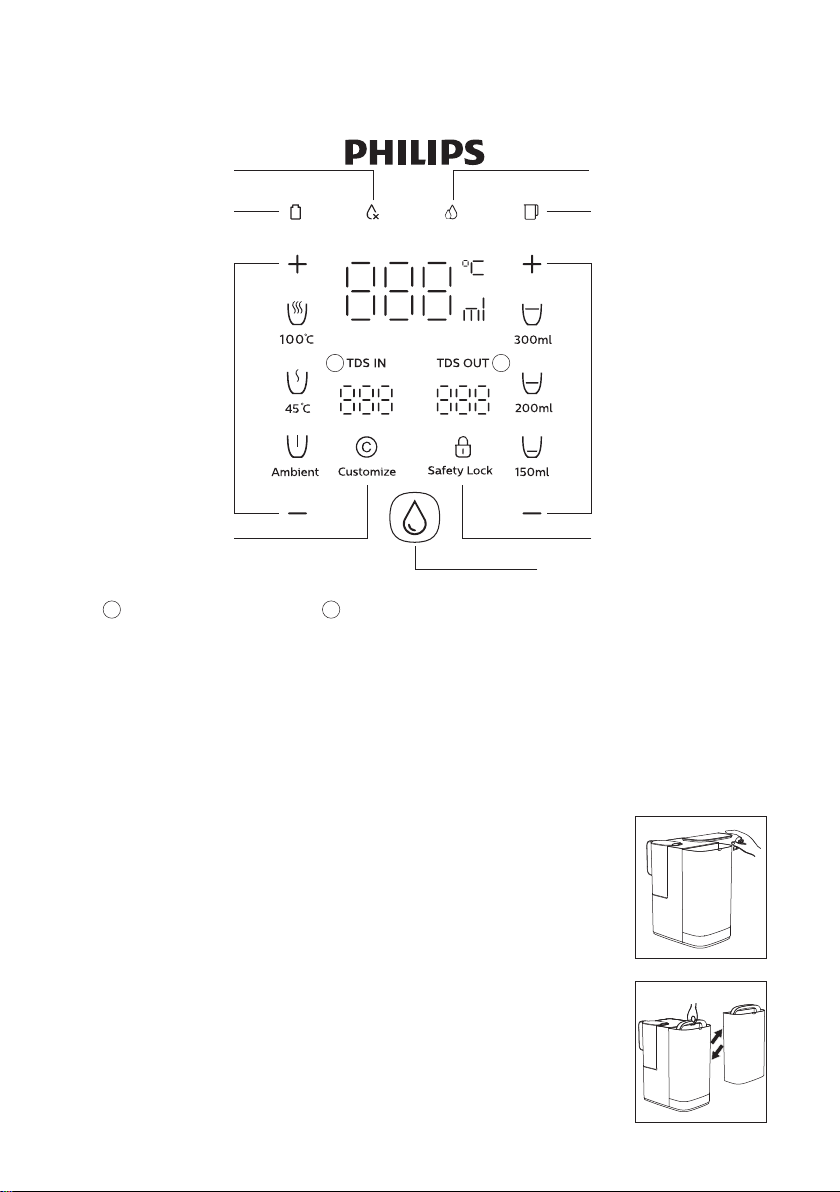
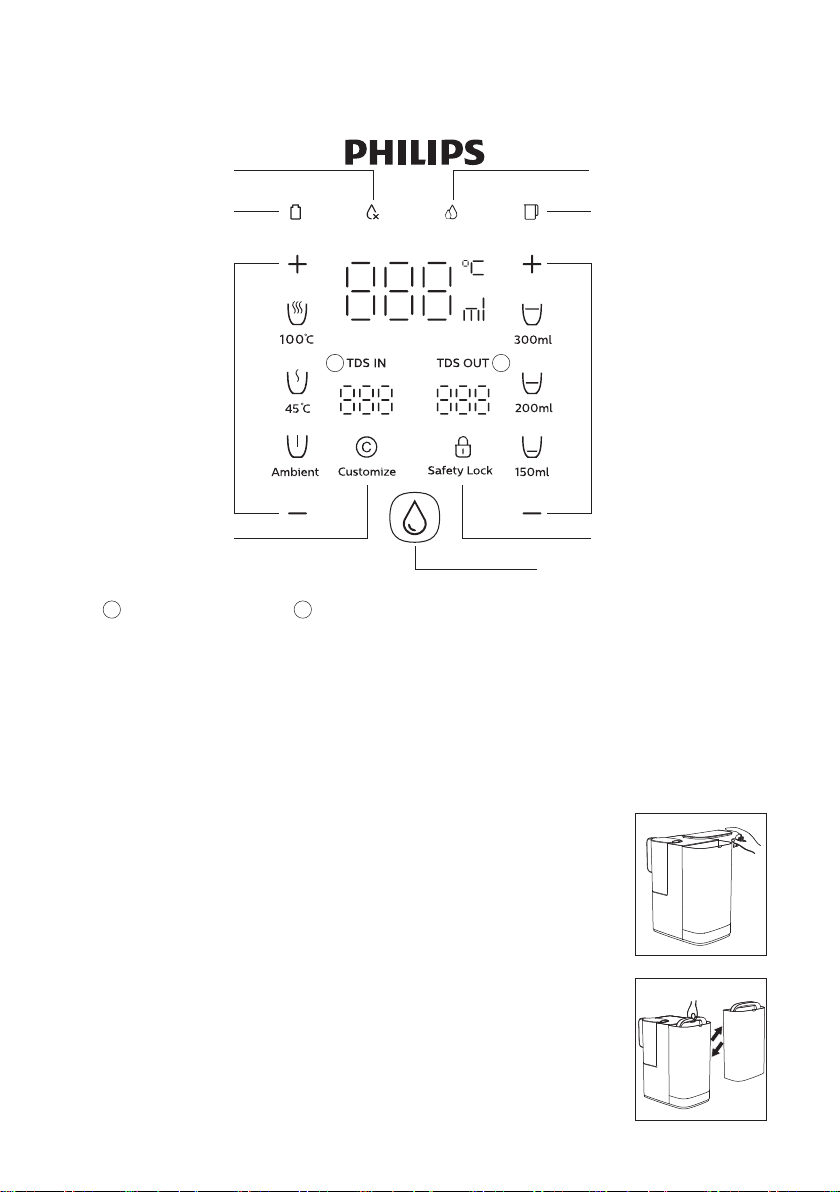
4. User interface
Changing water
indicator
Filter lifetime indicator
Temperature
selection button
1
There could be a temperature deviation of ±3℃, There could be a volume deviation of ±10%,
the actual temperature and volume depends on usage environment and local tap water quality.
1 2
2
Filtered water TDS valueTap water TDS value
Filtered water jug
indicator
Customize
Water extraction button
5. Installation
Setup
• Place the machine on a cool and stable surface with good ventilation, and
far away from any heat source.
•
tank with tap water and place it back to the machine, then place the lid
back to the raw water tank properly.
• Plug the power cord into a power socket, the machine will make a “beep”
sound then the display panel will light up, indicating that the machine is
working.
04
Page 7
First time use
•
around the dispenser. If there is any strange noise, burnt smell or smoke
coming out from the product, please disconnect the power cord
above.
•
•
causing the water in the pure water jug appears white and cloudy. This is a normal phenomenon.
• In order to avoid dry-heating and protect the machine, please extract some ambient water before
extracting hot water.
•
is done and extracting water at 100
and the boiling point calibration will be completed automatically. This procedure will last for
60 seconds. A container with a volume not less than 500ml should be placed under the nozzle
during this procedure.
Note: Steam might be ejected during automatic boiling point calibration, please be aware of burn
hazards.
6. Usage instructions
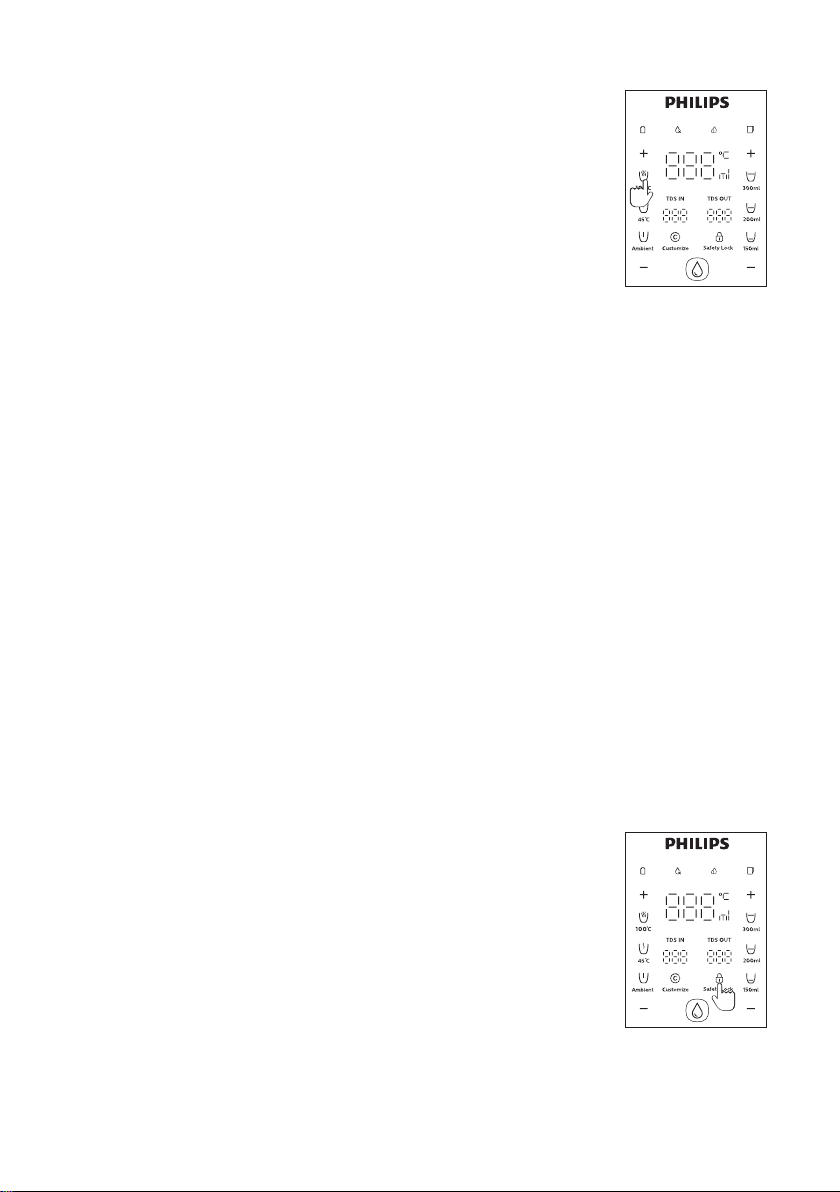
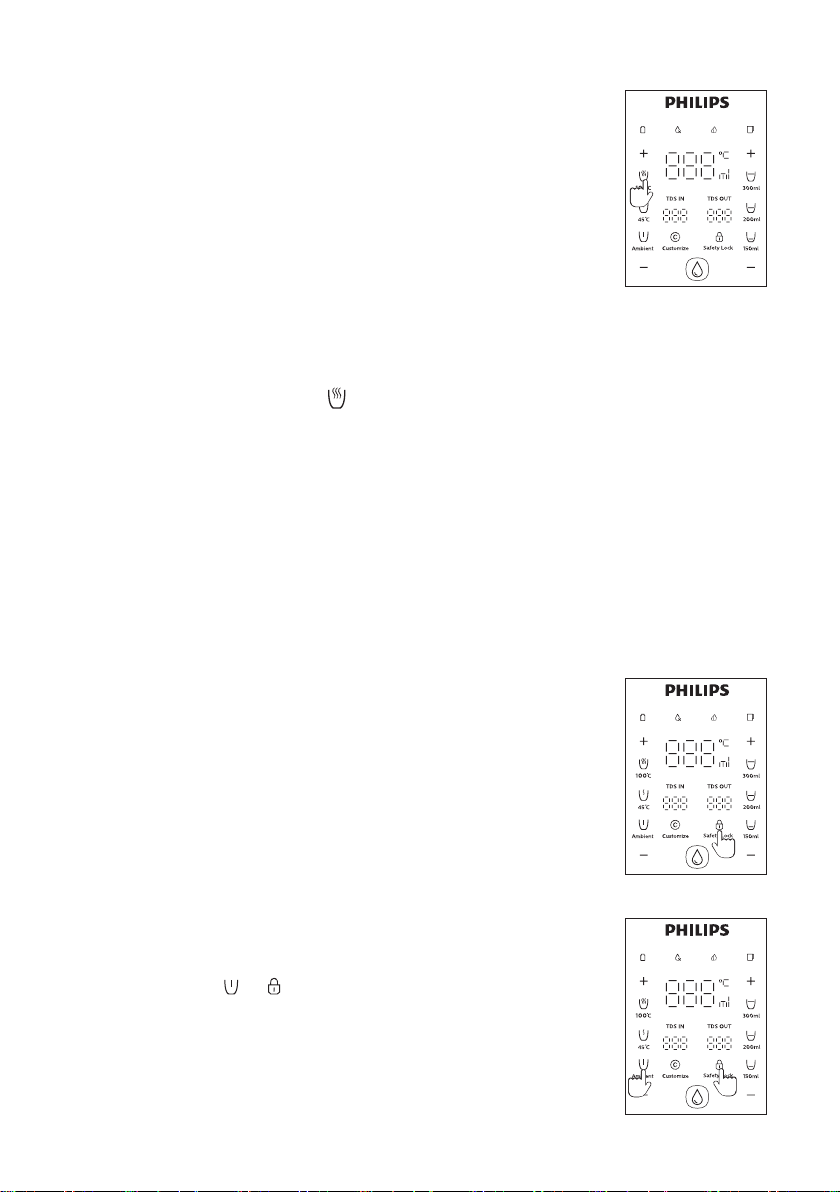
Safety lock
• Safety lock and temperature memory enabled mode: The machine will
memorize the last selected water temperature preset, unlocking is required
temperature memory enabled mode is the default factory setting.
• Press the safety lock key for 10 seconds to disable the safety lock and
temperature memory. The temperature selection will return to “ambient”
after 10 seconds automatically. Press the safety lock key for 10 seconds to
enable the safety lock and temperature memor y again.
05
Page 8
Rinsing
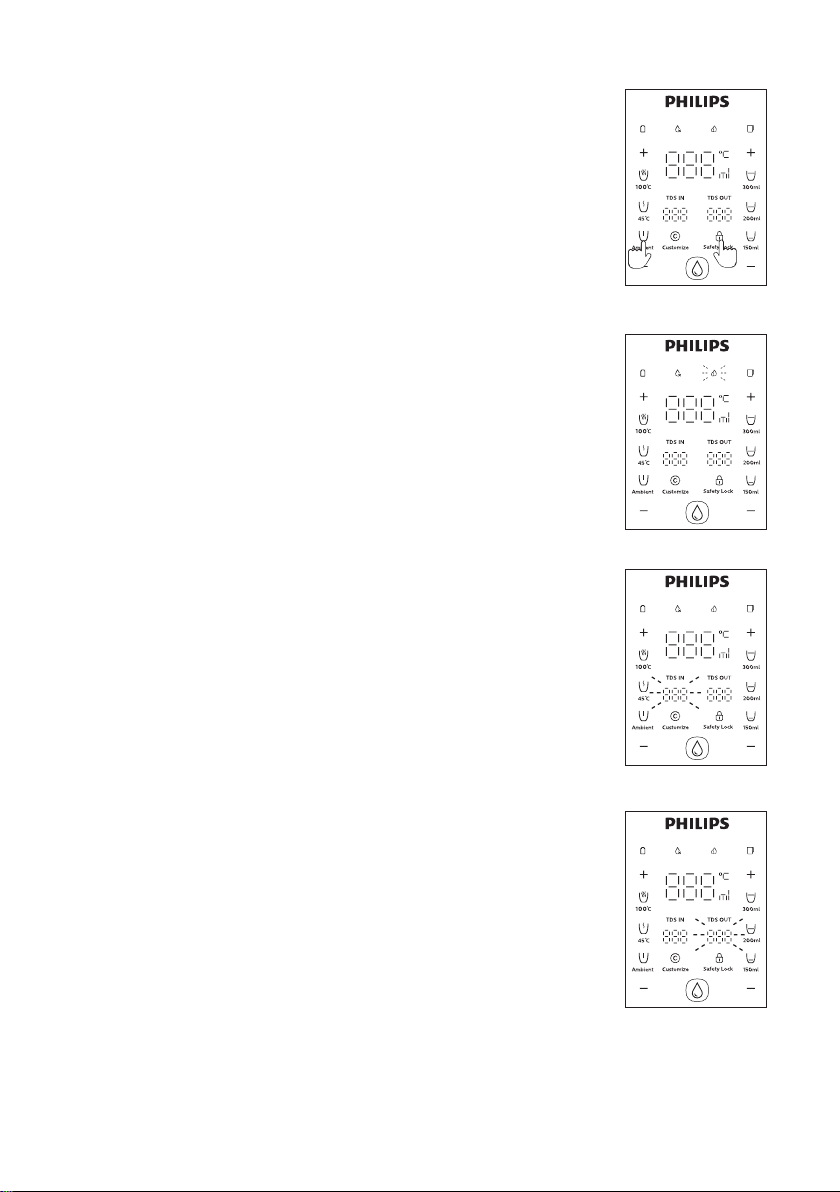
•
• Forced rinsing: long press “Ambient” + “Safety lock” for 3 seconds and the
dispenser will rinse for 3 minutes. Forced rinsing cannot be performed
Water �ltration
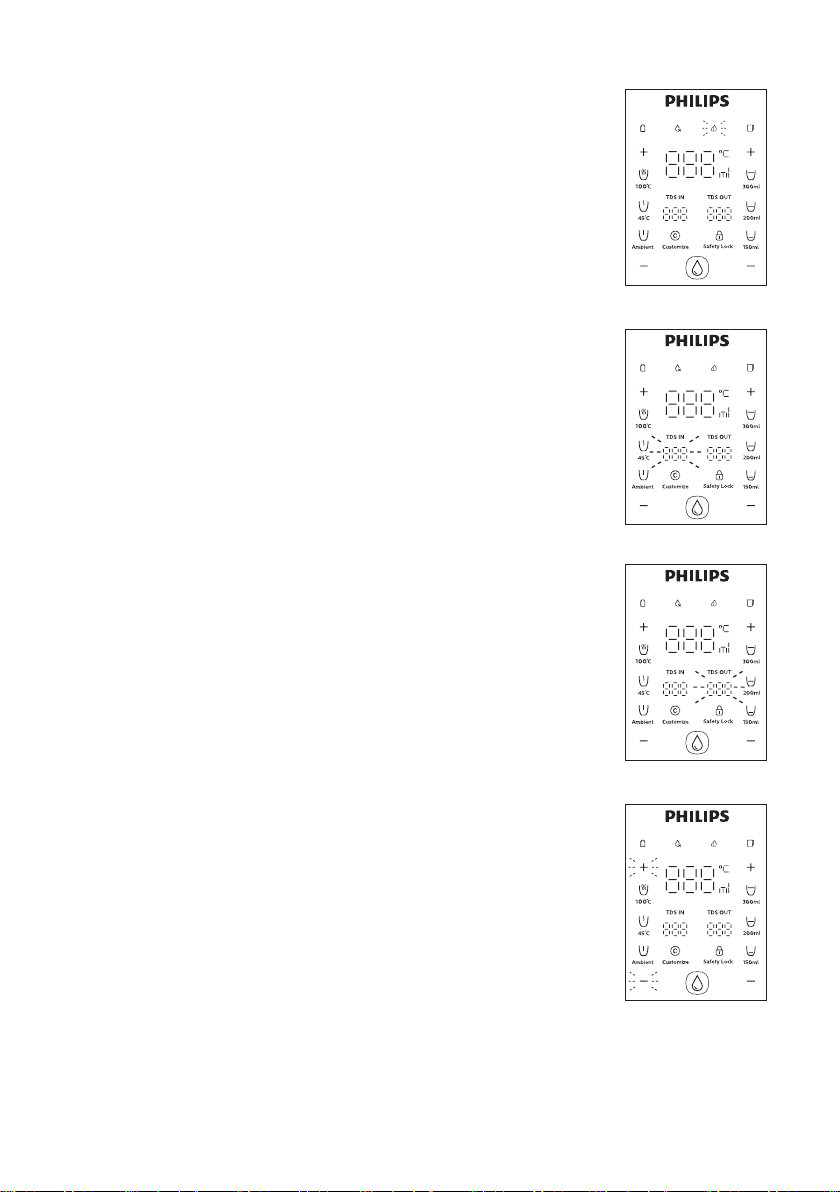
•
Displaying TDS value of the raw water
•
the raw water.
3s3s
Displaying TDS value of the �ltered water
•
water extraction.
06
Page 9
Water temperature adjustment
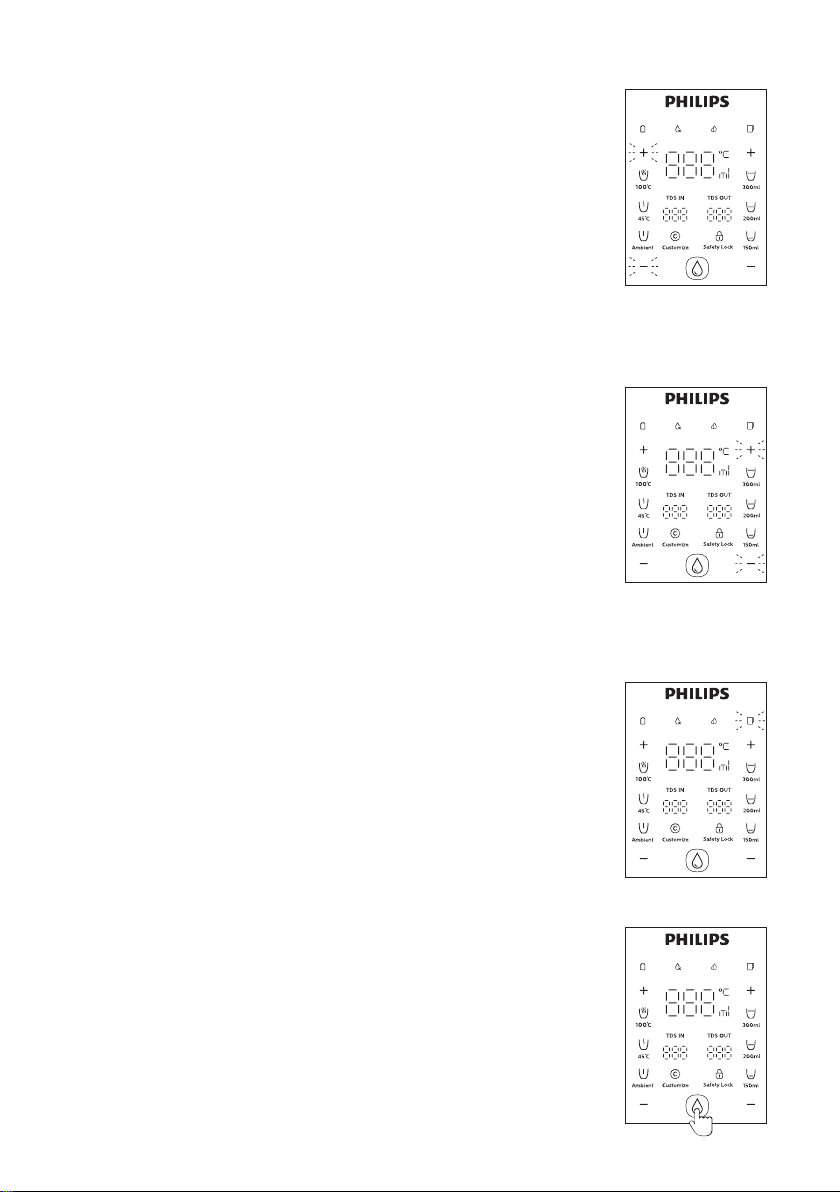
• Water temperature presets: there are three water temperature presets for
selection - ambient, 45 and 100.
• Stepless temperature control: Select a water temperature preset, the
“+” or “-” key can increase or decrease the temperature by 1 each time.
rapidly. The range of stepless temperature adjustment is 45 to the boiling
point.
Water volume adjustment
• Water volume presets: There are three water volume presets for selection:
• Stepless volume control: Select a water volume preset, the display will show
water volume is lower than 150ml, pressing the “+” or “-” key will adjust the
adjust the water volume rapidly.
Filtered water jug indicator
•
Extracting water
• Select the water temperature and volume needed, the screen will display
the selected temperature and volume. Press the safety lock button to
unlock (automatic unlocking for ambient water). Press the extraction
button once to extract water. Press it again or press any other buttons to
stop.
Note: To avoid being scalded, keep the distance from the nozzle when
extracting hot water.
07
Page 10
Customization
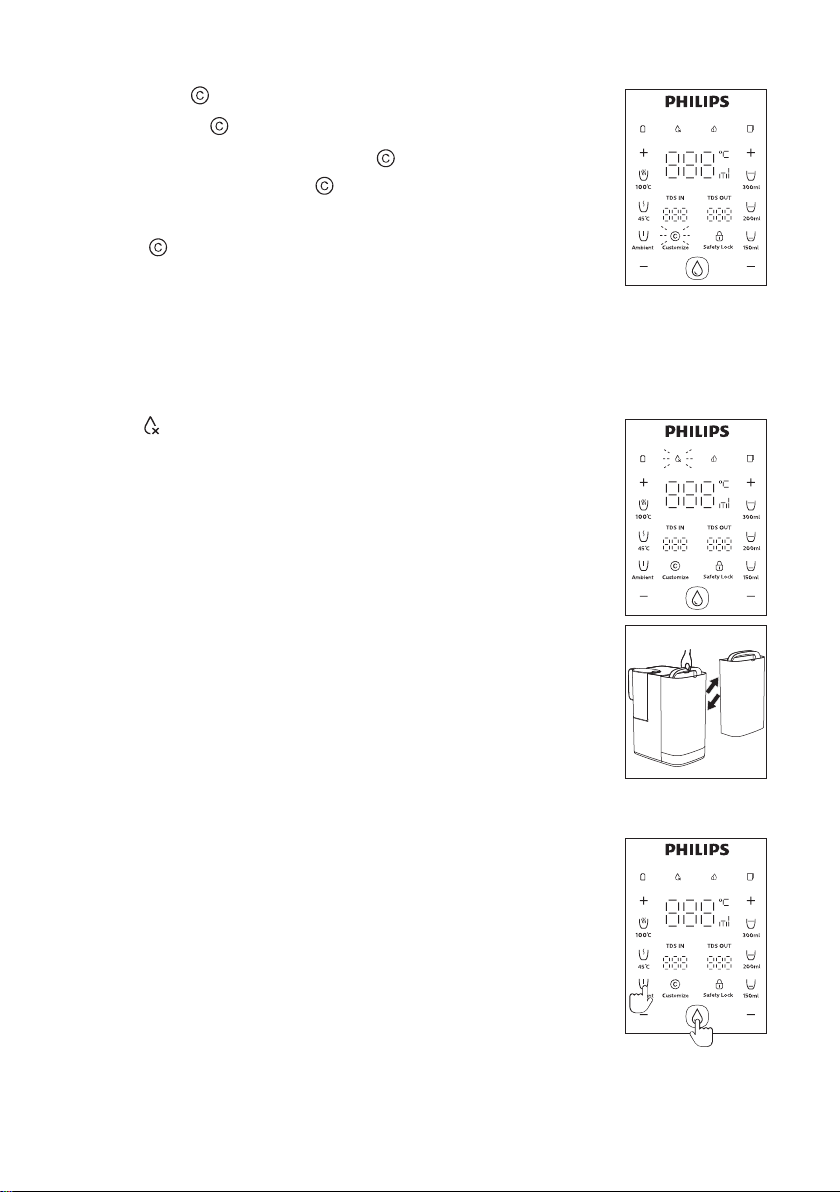
•
temperature and volume, then press the “ ” button again, the machine
will make a beep sound and the “ ” indicator will light up constantly. The
intelligent memory setup is completed.
• Press the “ ” button, the screen will display the stored water temperature
and water volume, press the safety lock button to unlock (this step is not
needed if ambient water is selected), the dispenser will extract the
customized water when you press the extraction button.
Changing water
water tank needs to be changed, which will happen in the following
conditions:
• The water level of raw water tank is under or reaches the lowest water level
• The TDS value of raw water is high
• The water in the raw water tank is not changed within 48 hours
To change the water, open the lid of the raw water tank, lift the raw water
tap water, place it back to the machine and close the lid properly.
Note: Do not add water into the raw water tank without discarding the
residual waste water.
Winter mode
• When the ambient temperature is lower than 10, winter mode can be set.
•
single use.
08
3s
Page 11
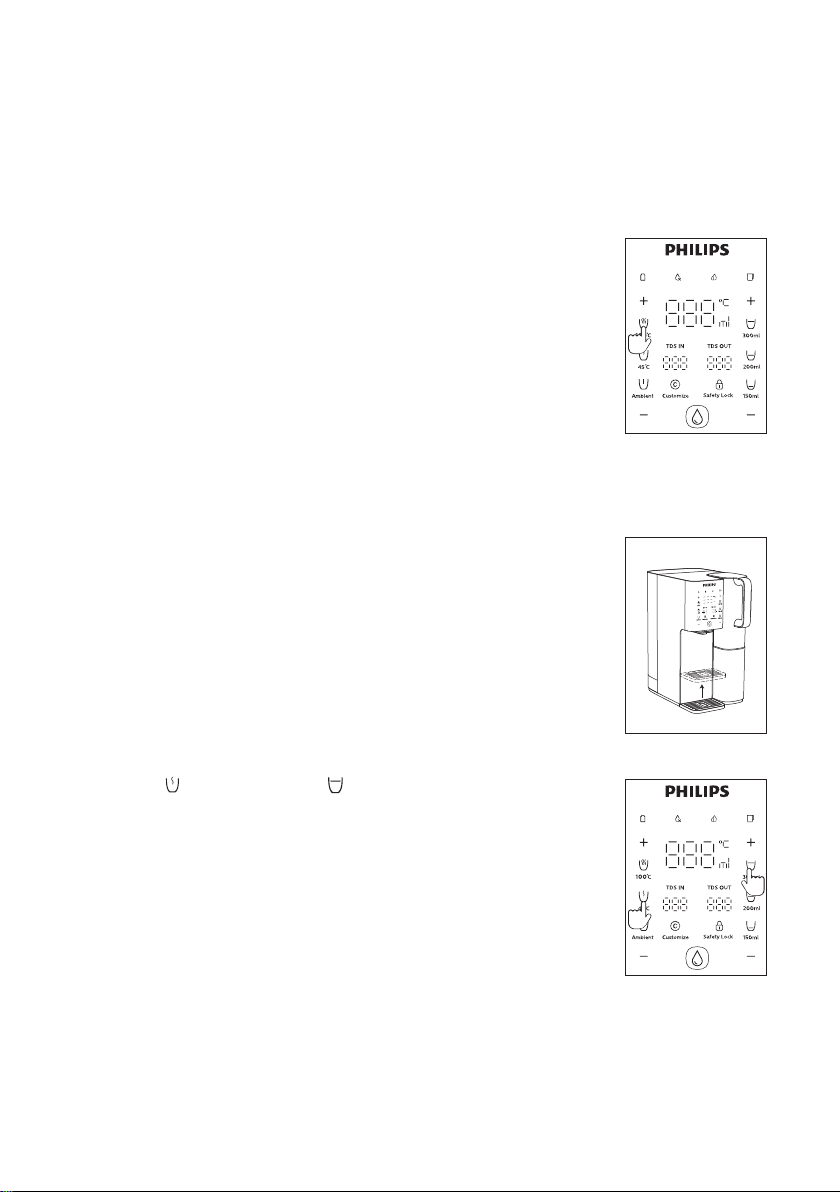
Sleep mode
• If no operation in 1 minute, the dispenser will automatically go to sleep mode.
•
• Touch any button to end the sleep mode.
Boiling point calibration
• To prevent excess steam, the local boiling point should be checked and
for the
calibration will be completed automatically. This procedure will last for
about 60 seconds. A container with a volume not less than 500ml should be
placed under the nozzle during this procedure.
Note: There might be steam ejection during the boiling point calibration,
please be aware of burn hazards.
Removeable drip tray
• If a small cup is used, the removable drip tray can be adjusted to a higher
position by pulling it out and putting it at the higher position directly.
One-key emptying
•
are empty.
Note: In order to avoid dry-heating, after one-key emptying, please extract
some ambient water before extracting hot water.
3s
3s
Page 12
7. Daily Maintenance
If the dispenser will not be used for over one week, please empty the water in it and disconnect the
use.
Cleaning the raw water tank and the �ltered water jug
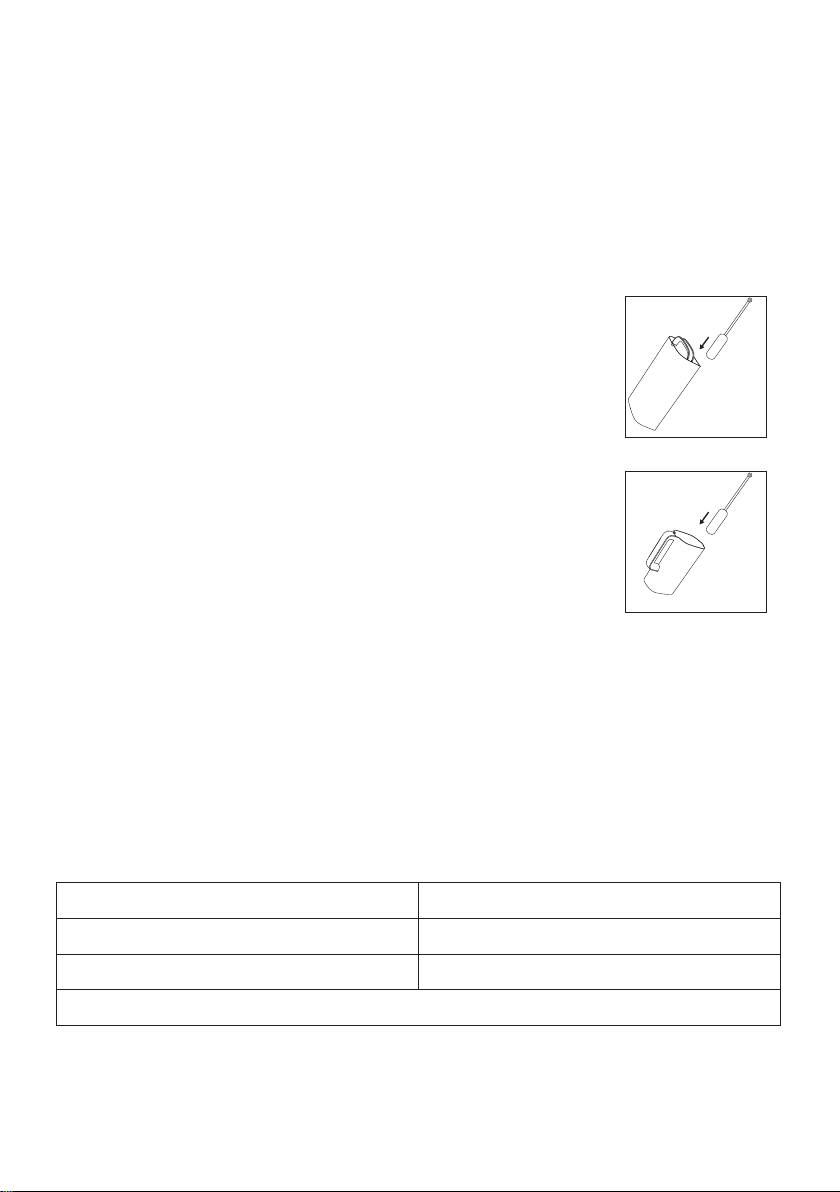
• If there are obvious impurities at the bottom of the raw water tank or
least once per week.
Descaling of raw water tank
• It is recommended to descale the raw water tank ever y 3 months to avoid
serious scaling in the raw water tank.
•
back to the dispenser). Then discard the citric acid solution and clean the
entire water tank with tap water.
* Please buy the cleaning brush and citric acid yourself
8. Filter replacement
retailers and service centers. The model is ADD583.
Name
ADD583Model
1 year
10
Page 13
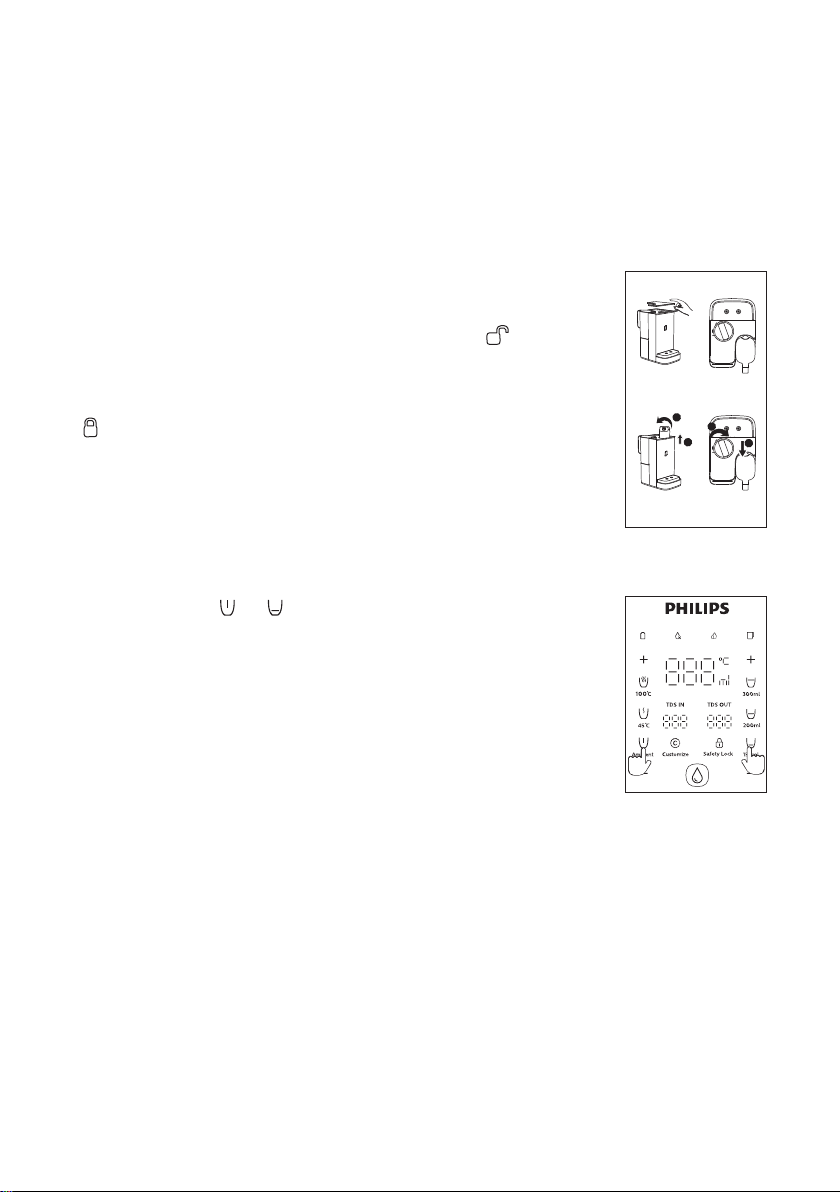
Filter lifetime indicator
•
-
-
-
Filter cartridge replacement instructions
•
•
•
•
1
2
2
•
Take out
Reset the �lter lifetime
•
1
Put in
3s3s
11
Page 14

9. Error codes
E1: Water temperature sensor abnormality
Solutions:
if the problem cannot be solved.
E2: Outlet water temperature sensor abnormality
Solutions: Extract 300ml of ambient water. Please contact customer ser vices if the problem cannot
be solved.
E4: Heating element temperature sensor abnormality
Solutions: Stop using the dispenser or extract 300ml of ambient water, let the heating element to
cool down to normal temperature and then extract hot water. Please contact customer
services if the problem cannot be solved.
E6: Filtration abnormality
Solutions:
properly, then reconnect the power. Please contact customer services if the problem
cannot be solved.
EU: Display panel malfunction
Solutions:
services if the problem cannot be solved.
Page 15
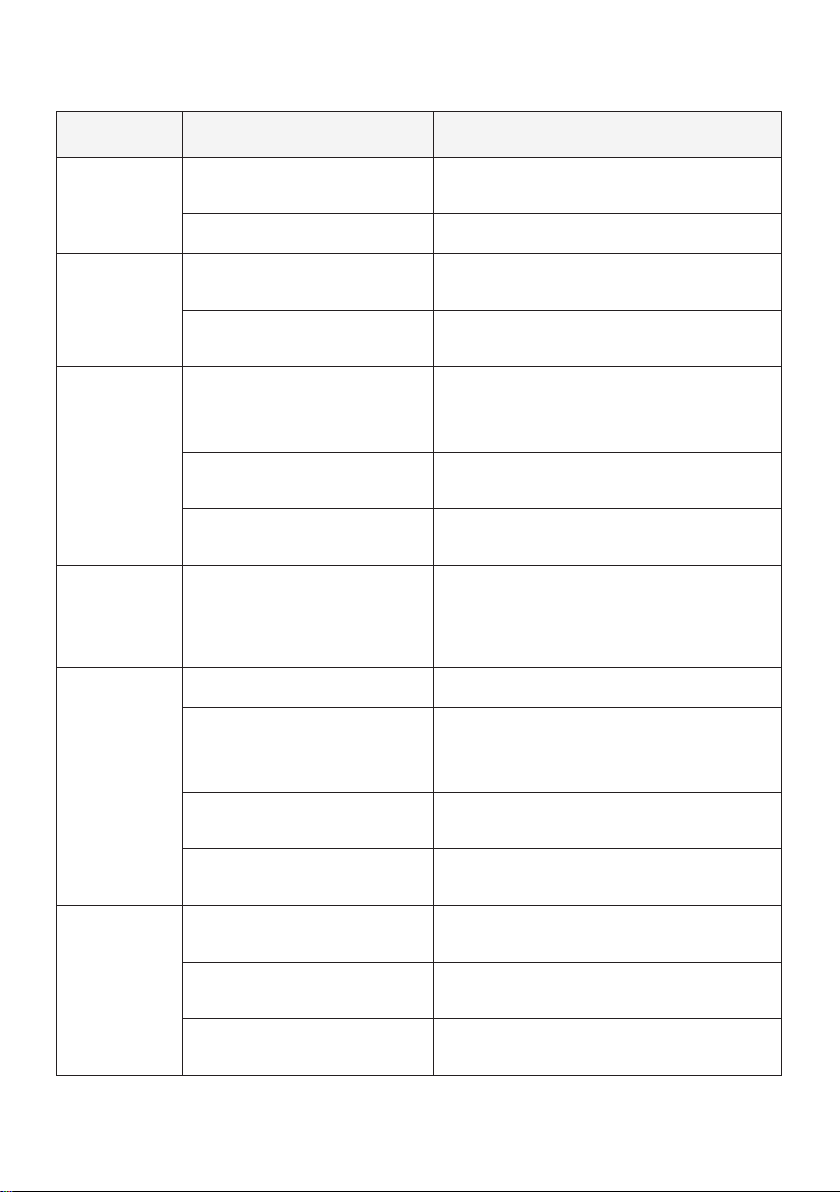
10. Trouble shooting
Error Causes Solutions
Cannot extract
ambient water
Cannot extract
hot water
water
Strange
noise when
Water leakage
The product is not connected with
the power supply
The dispenser is dry-heating
jug is at low level
Filter cartridge is not installed
properly
The water in the raw water
tank is at low water level
The raw water tank is not
installed properly
The quality of the raw water
does not meet the requirement
blocked earlier than expected
The removable drip tray is full
The check valve on raw water
tank base is blocked or at wrong
position
The sealing valve at the bottom
of the raw water tank is blocked
Check if the dispenser is well connected with
power supply
Press the water extraction button again
Extract ambient water for several times,
and then extract hot water
Disconnect the dispenser from the power
supply. Open the machine top lid and take out
Take out the raw water tank and change
water
Check the raw water tank and install it
properly
Empty the removable drip tray
Put the check valve back to the original
position with a thimble, or contact customer
services to change it
Odd taste of
the water
Water oozes from the dispenser
been cleaned
The dispenser has not been used
for a long time
Filter cartridge is not changed as
required
13
use
use
Page 16

electricity
The power cord is damaged Please contact customer services
Three-core plug with reliable grounding
must be used
panel does not
respond
Damaged parts
The system halts
Please contact customer services
Disconnect the dispenser from power supply
11. Packing list
1xDispenser
1x
1xUser manual
Filtered water jug
Within two years from the date of purchase, you will receive free warranty service for any damage
caused by manufacturing process problems, or any damage to components under normal use
Warranty service excludes frequently replaced consumables, auxiliary equipment, shipping costs
and door-to-door service. Please show proof of purchase to service personnel when servicing.
Please keep this user manual for future reference.
14
Page 17

繁體中文
目錄
重要事項
1 16
2 18
主要技術參數
3 18
結構示意圖
4 19
操作與顯示界面
使用說明6
7 日常保養
8 25
濾芯更換
故障碼9
20
24
26
5
安裝步驟
19
故障排除10
11 裝箱清單
27
28
Page 18

1. 重要事項
16
Page 19

17
Page 20
2. 主要技術參數
3. 結構示意圖
( Max .100℃)
0 - 0.06MPa
5-38
18
Page 21
4. 操作與顯示界面
1
1 2
2
5. 安裝步驟
安裝飲水機
“
Page 22
首次使用
注意:
6. 使用說明
童鎖
沖洗
3s
3s
Page 23
濾水
原水TDS值顯示
純淨水TDS值顯示
水溫調節
Page 24
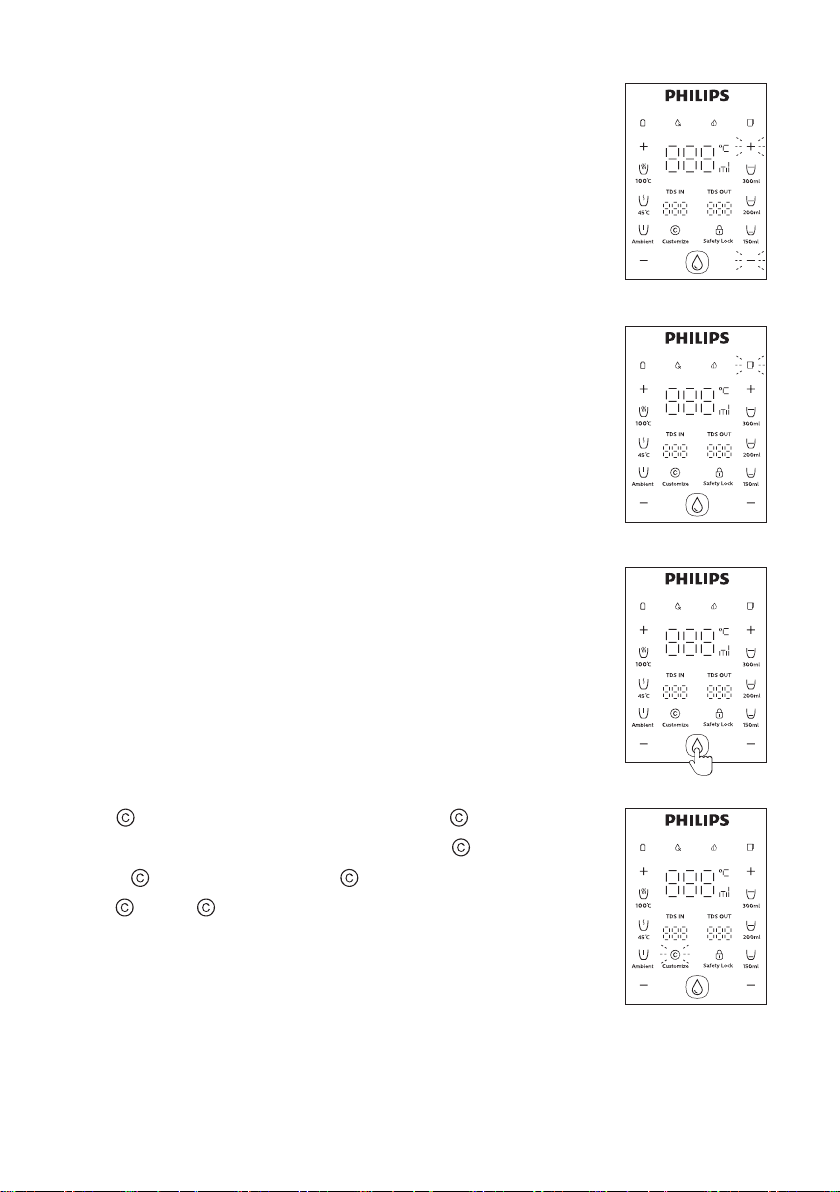
水量調節
純淨水壺指示燈
取水
注意:
智能記憶取水
Page 25
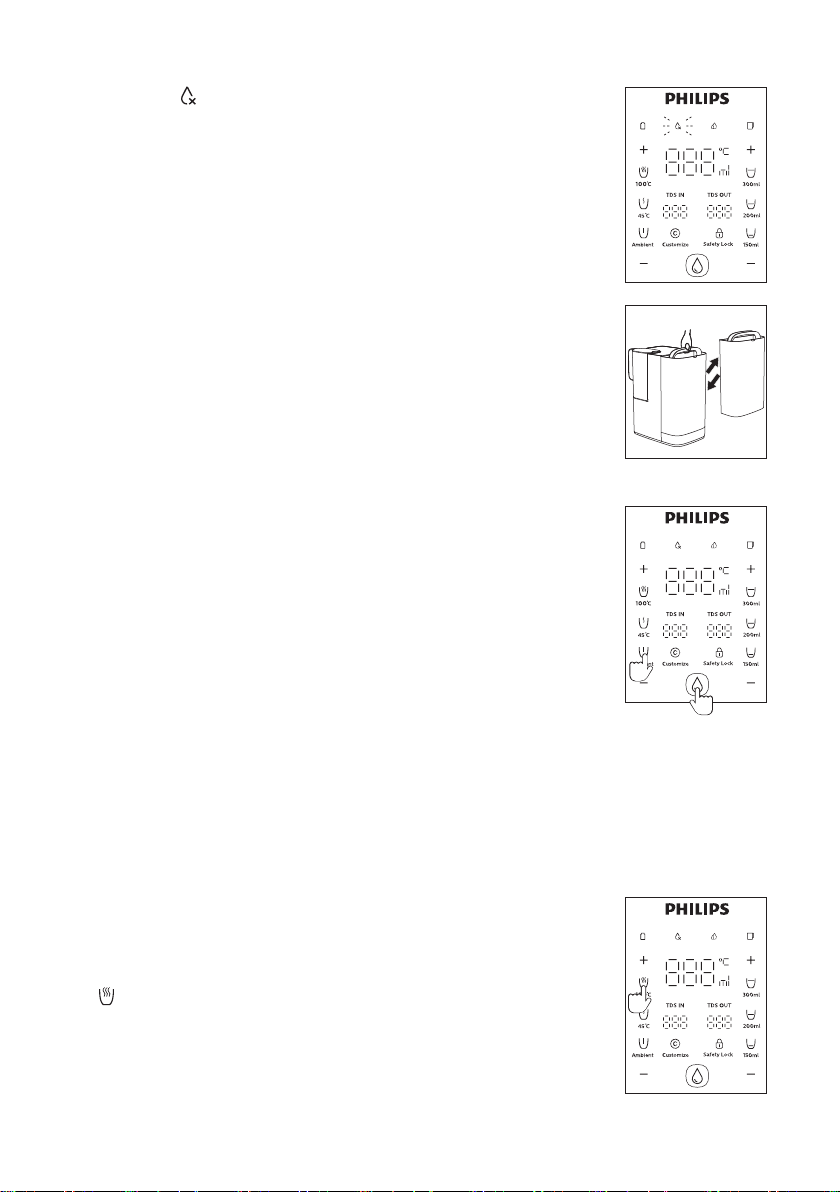
換水
注意:
冬季模式
休眠模式
注意:
3s
Page 26
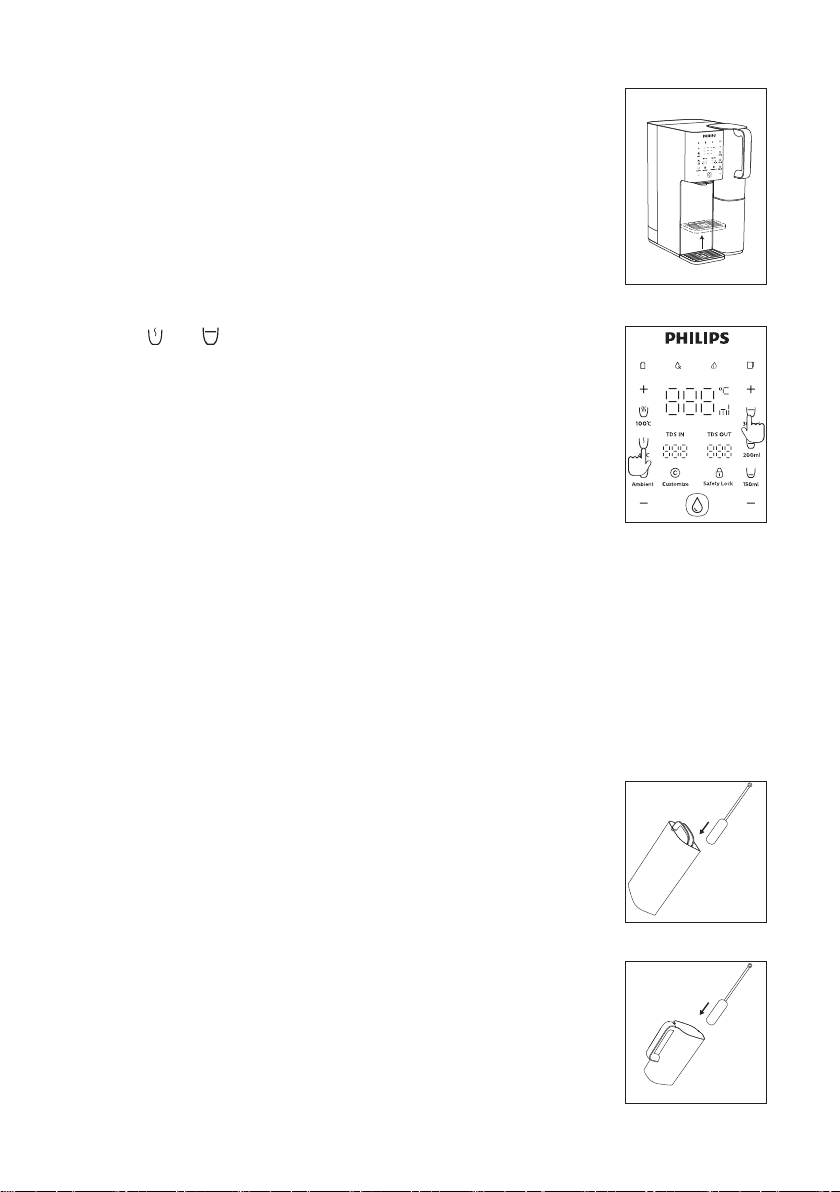
接水盤
一鍵排空
注意:
3s
7. 日常保養
原水箱及純淨水壺清洗
原水箱除垢
* 檸檬酸与清潔刷請自行購買
3s
Page 27
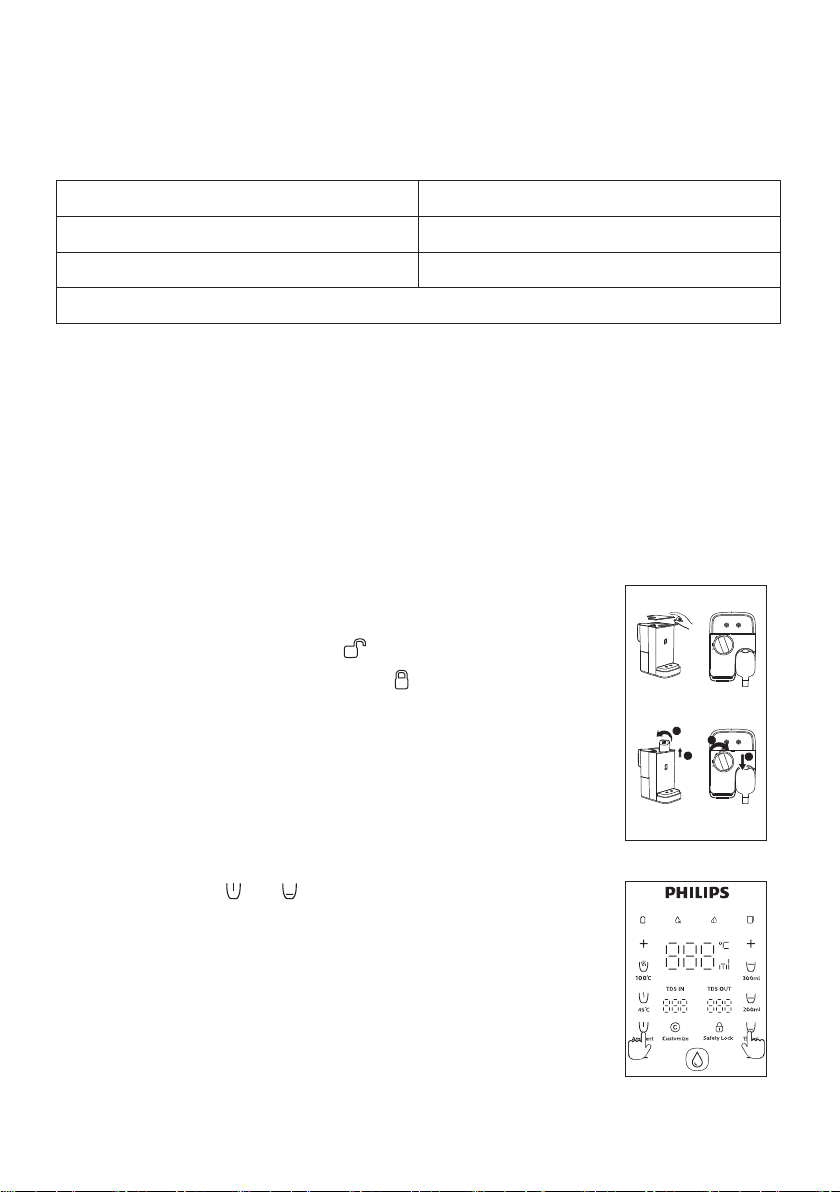
8. 濾芯更換
ADD583
濾芯壽命顯示
濾芯更換步驟
1
2
2
1
重置濾芯壽命計算器
Take out
Put in
3s3s
Page 28

9. 故障碼
E1:水溫度探測器異常
處理方法:
E2:出水溫度探測器異常
處理方法:
E4:加熱體溫度探測器異常
處理方法:
E6:濾水異常報警
處理方法:
E U :顯 示 面 板 失 靈
處理方法:
Page 29
10. 故障排除
故障現象 故障可能的原因 解決方法
Page 30

11. 裝箱清單
1x
1x
1x
Page 31

Page 32

Register your product and learn more in the website link below:
www.philips.com/water
All rights reserved.
This product has been manufactured by and is sold under the responsibility of
 Loading...