

Page 1
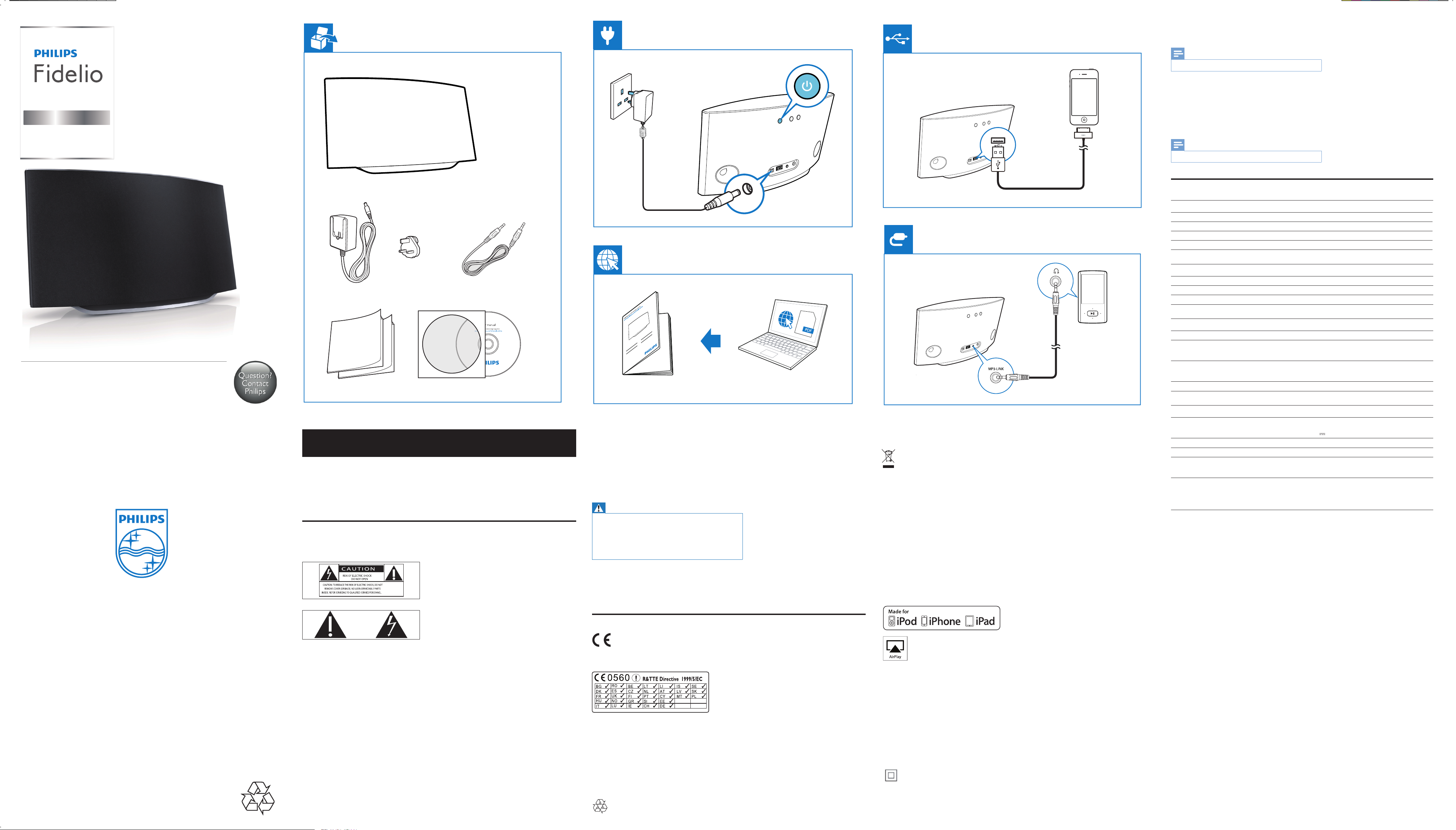
CLASS II apparatus with double insulation, and no protective earth provided.
SoundAvia
wireless speaker with
AirPlay
AD6000W
DC IN
Note
The type plate is located on the bottom of the apparatus.
•
Product information
Note
Product information is subject to change without prior notice.
•
Specications
Amplier
Rated Output Power 2 X 5 W RMS
Frequency Response 63 Hz - 18 kHz, ±3 dB
Signal to Noise Ratio > 90 dB
MP3 Link 600 mV RMS 20 kohm
Quick start guide
Always there to help you
Register your product for further support at
www.philips.com/welcome
EN
Important
Safety
Information for Europe:
Know these safety symbols
www.philips.com/support
k Do not install near any heat sources such as radiators, heat registers, stoves, or other electrical
equipment (including ampliers).
l Do not place any other electrical equipment on the product.
m Do not place any sources of danger on the product (e.g. objects containing liquids, burning candles).
n Where the mains plug or an appliance coupler is used as the disconnect device, the disconnect device
shall remain readily operable.
Warning
•
Never remove the casing of this apparatus.
• Never lubricate any part of this apparatus.
• Never place this apparatus on other electrical equipment.
• Keep this apparatus away from direct sunlight, naked ames or heat.
• Ensure that you always have easy access to the power cord, plug or
adaptor to disconnect this apparatus from the power.
Risk of overheating! Never install this apparatus in a conned space. Always leave a space of at least four inches
around this apparatus for ventilation. Ensure curtains or other objects never cover the ventilation slots on this
apparatus.
Your product is designed and manufactured with high quality materials and components, which can be recycled
and reused.
When this crossed-out wheeled bin symbol is attached to a product it means that the product is covered by the
European Directive 2002/96/EC.
Please inform yourself about the local separate collection system for electrical and electronic products.
Please act according to your local rules and do not dispose of your old products with your normal household
waste. Correct disposal of your old product helps to prevent potential negative consequences for the
environment and human health.
Environmental information
All unnecessary packaging has been omitted. We have tried to make the packaging easy to separate into three
materials: cardboard (box), polystyrene foam (buffer) and polyethylene (bags, protective foam sheet.)
Your system consists of materials which can be recycled and reused if disassembled by a specialized company.
Please observe the local regulations regarding the disposal of packaging materials, exhausted batteries and old
equipment.
Speakers
Speaker Impedance 8 ohm
Speaker Driver 66 mm full range
Sensitivity 82 dB/m/W
Wireless
Wireless standard 802.11b/g
Wireless security WEP (64 or 128 bit),
WPA/WPA2 (8-63 characters)
Frequency range 2412 - 2462 MHz (CH1-CH11) (for /79, /37, /55, /97)
2412 - 2472 MHz (CH1-CH13) (for /12, /10, /05)
PBC (one button push) Ye s
General information
AC power Input: 100 - 240 V~, 50/60 Hz 1A/1 2 A
Output: 12 V
Operation Power Consumption 25 W
Power Consumption in Standby Mode < 0 5 W
Dimensions
- Main Unit (L x W x H)
Weight
- With Packing
- Main Unit
298 x 98 x 168 mm
2.02 kg
1.36 kg
3.0 A
All registered and unregistered trademarks are property
of their respective owners.
© 2012 Koninklijke Philips Electronics N.V.
All rights reserved.
AD6000W 05 QSG V1.0
The ‘exclamation mark’ calls attention to features for which you should carefully read the supplied literature to
prevent operating and maintenance problems.
The ‘lightening bolt’ symbol indicates uninsulated components within the product that can cause an electric
shock.
To reduce the risk of re or electric shock, do not expose the product to rain or moisture and do not place any
objects lled with liquids, such as vases, on the product.
a Read these instructions.
b Keep these instructions.
c Heed all warnings.
d Follow all instructions.
e Do not use this product near water.
f Clean only with dry cloth.
g Do not block any ventilation openings. Install in accordance with the manufacturer’s instructions.
h Do not remove the casing of this product.
i Do not expose the product to dripping / splashing water, rain or high humidity.
j Keep this product away from direct sunlight, naked ames or heat.
Notice
This product complies with the radio interference requirements of the European Community.
The device can be operated in the EU without restrictions indoor, but cannot be operated outdoors in France
in the whole of the band until further notice.
This product complies with the requirement of the 1999/5/EC directive.
Modications
Modications not authorized by the manufacturer may void user’s authority to operate this product.
“Made for iPod,” “Made for iPhone,” and “Made for iPad” mean that an electronic accessory has been designed
to connect specically to iPod, iPhone, or iPad, respectively, and has been certied by the developer to meet
Apple performance standards. Apple is not responsible for the operation of this device or its compliance with
safety and regulatory standards. Please note that the use of this accessory with iPod, iPhone, or iPad may affect
wireless performance.
AirPlay, iPod, and iPhone are trademarks of Apple Inc., registered in the U.S. and other countries. iPad is a
trademark of Apple Inc.
Class II equipment symbol:
Page 2
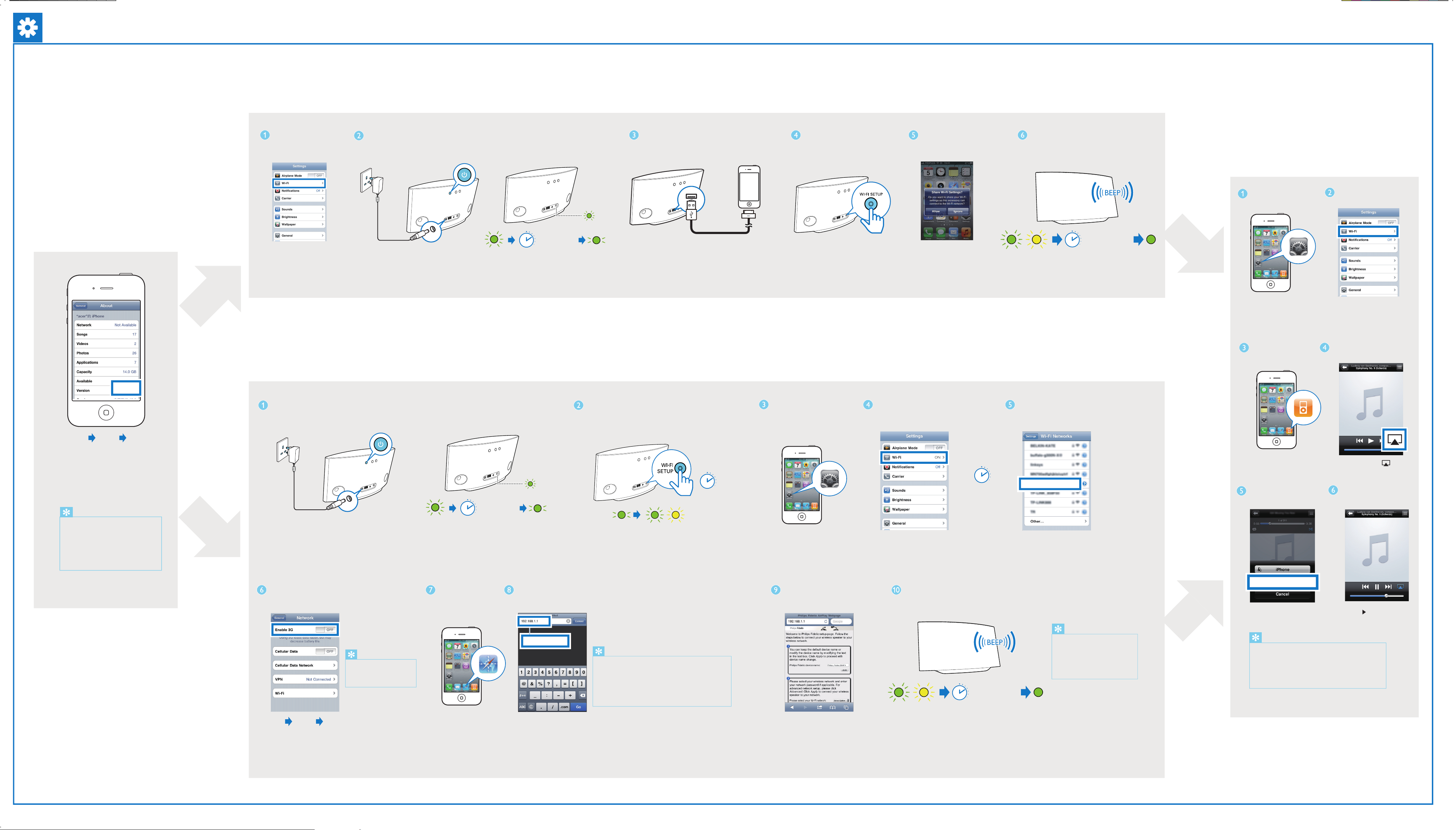
Option 1: Set up through Wi-Fi network login sharing (recommended)
Your Wi Fi Network
Start to enjoy your AirPlay
Check your iOS version
4.3.X
5.X
DC IN
Connect your iPod touch/iPhone/iPad
to your home Wi Fi network.
Connect power.
Wait for 35 seconds until the green light
blinks slower.
Option 2: Set up through web page configuration
Wait 35sec
Connect your iPod touch/iPhone/iPad to
AD6000W through an Apple USB cable
(not supplied).
Press WIFI SETUP to initiate
Wi Fi sharing.
Tap ALLOW (allow) to share your
Wi Fi settings with AD6000W.
Wait< 1min
Wait for up to 1 minute until the light stops
flashing and you hear a confirmation tone.
Open Settings.
Your Wi Fi Network
Check that your router is
selected.
SettingsGeneral About
Upgrade your iPod touch, iPhone, or iPad to
iOS 4.3 or above.
Note: Make sure that Wi Fi is enabled on your
iPod touch, iPhone, or iPad.
Before setup, you are recommended to upgrade
your iPod touch/iPhone/iPad to the latest iOS
version. For iPhone 4S users, please upgrade to
iOS 5.1 or above for optimal performance.
If your Wi-Fi router has a WPS button, you can
connect the device to the router through WPS.
1. Press WIFI SETUP, then the light blinks yellow
and green alternately.
2. Press the WPS button on the Wi-Fi router.
3. Wait up to 2 minutes until the light stops
blinking and you hear a confirmation tone
4.3
DC IN
Connect power.
Wait 35sec
Wait for 35 seconds until the green light
blinks slower.
5sec
Press and hold Wi Fi SETUP for 5 seconds, then
the light alternates between green and yellow.
Open Settings.
Tap Wi Fi.
Wait< 30sec
Philips Fidelio AirPlay
Wait up to 30 seconds until “Philips
Fidelio AirPlay” is detected. Then,
tap it.
Open iPod application.
Philips Fidelio xxx
Select your device.
Tap AirPlay icon .
Tap to play music.
SettingsGeneral Network
Disable the 3G network.
Remember to turn on the
3G network after successful
AirPlay connection.
Open Safari.
192.168.1.1
Enter the IP address
192.168.1.1.
If it takes more than 2 minutes to see the screen of
a
step 9, try to turn on/off the Airplane mode (Settings
> Airplane Mode) and start from step 3 again.
If the problem remains, restart your iPhone and start
b
from step 3 again.
Follow the on screen instructions to
configure the Wi Fi settings for the
device.
Wait< 1min
Wait up to 2 minutes until the light stops flashing and
you hear a confirmation tone.
If the light does not turn solid
green after 2 minutes, power off
and power on to restart the
device, then repeat steps from
the beginning.
If the AirPlay icon does not appear or there is no sound output,
try the following ways:
Turn on and off the Airplane Mode in Settings.
a
Restart your iPhone.
b
It is recommended to restart your home router.
c
 Loading...