

Page 1
Mars DI TW_EN
90x127mm
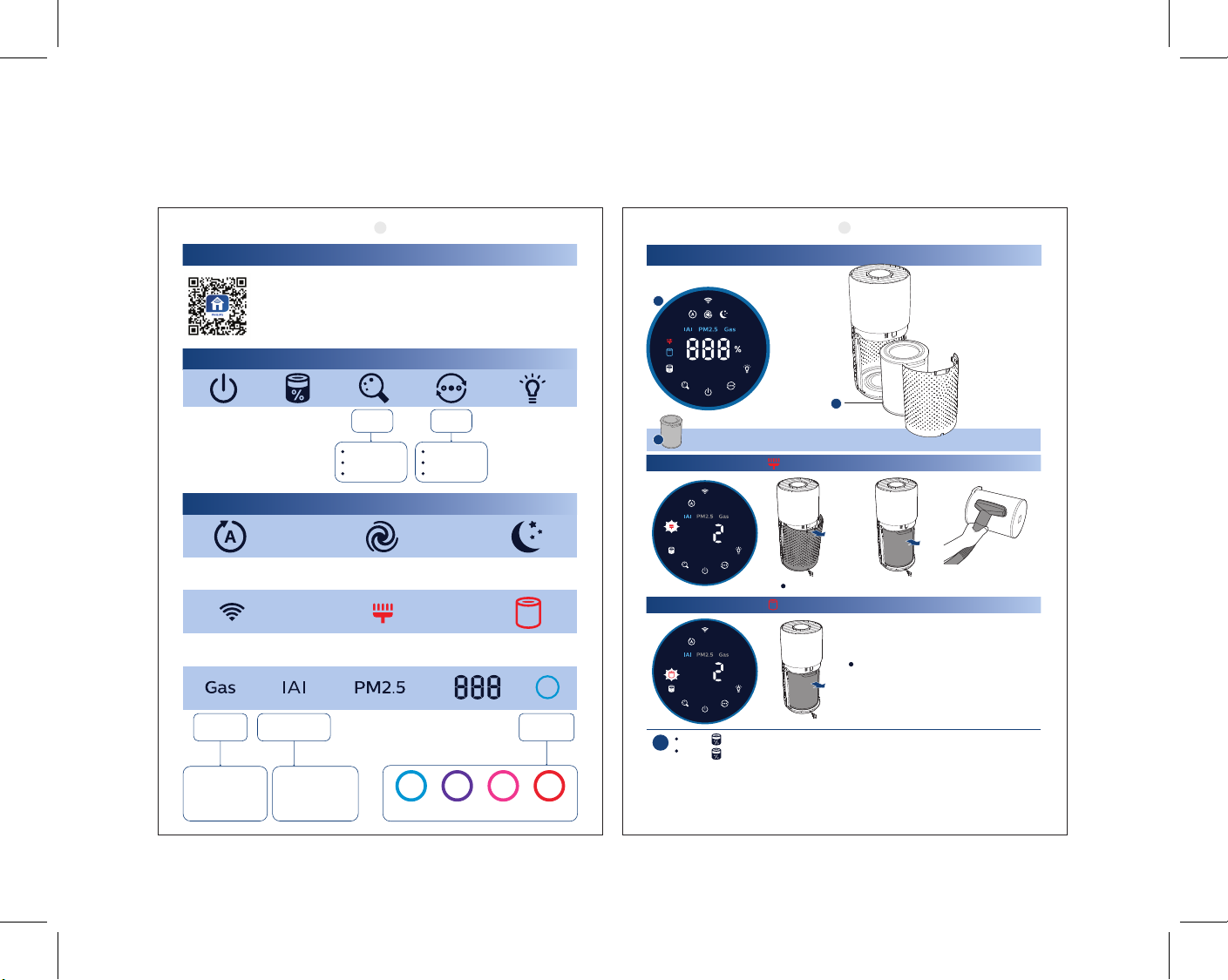
Connectivity
You can use the app to control the purier and check air quality.
Download and install the Philips app
Clean Home+
Open the app and click on "Connect a New Device" or press
the "+" button to connect your device. Please follow the steps
in the app.
Control
Power Light
Filter status/
reset
Display
switch
IAI
PM2.5
Gas
Mode
switch
Auto
Turbo
Sleep
Display
Auto mode
Wi-Fi
indicator
Gas
indicator
Gas index
from L1-L4,
L1 indicates
best air quality
Indoor allergen
index
Allergen index
1-12, 1 indicates
best air quality
Turbo mode Sleep mode
Filter cleaning
alert
PM2.5
indicator
Good Poor Very poorFair
Filter replacement
3-digit display
IAI /
Gas / PM2.5
on/o
alert
Air quality
light
Maintenance
1
2
2
NanoProtect lter Series 3 (FY3430/30)
When di splay shows
Time to clean the NanoProtect lter Series 3
When display shows
Time to replace the NanoProtect
lter Series 3
Press to check lter lifetim e status.
!
Press fo r 3 seconds to re set after cle aning or rep lacing lte r.
The lter may produce smell after being used for a while because of the
absorption of indoor air. Remove the lter and place it where it has direct
sunlight and ventilation for several hours. Re-install and try using it again.
If the odor remains, please replace the lter.
3000 048 96142-1
Page 2
Mars DI TW_ZHT
90x127mm
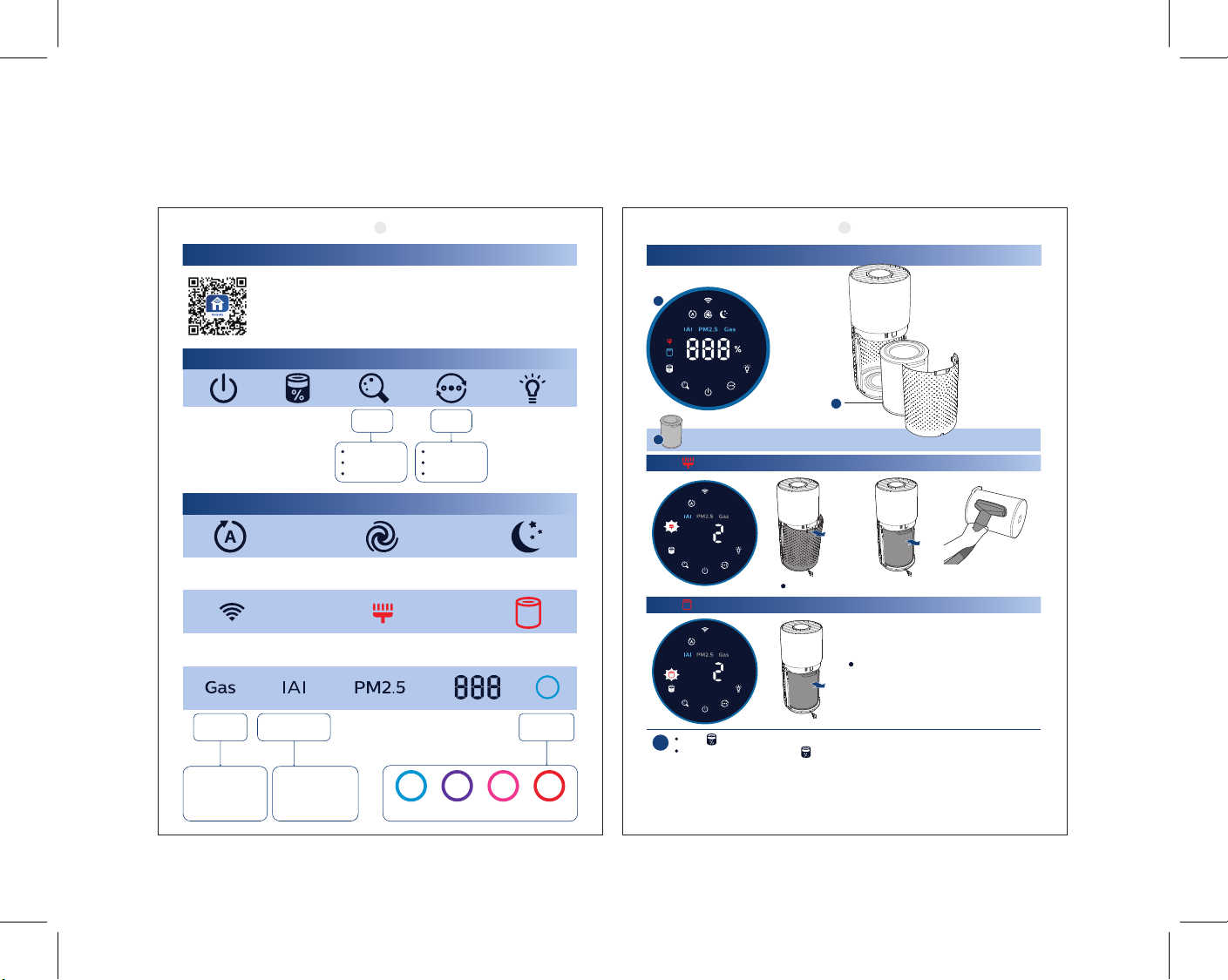
連線
您可以使用應用程式控制清淨機並檢查空氣品質。
下載並安裝飛利浦應用程式
Clean Home+
開啟應用程式,並按一下「連接新裝置」或按下「+」按鈕即可連接
您的裝置。請按照應用程式中的步驟操作。
控制
電源 燈光開關顯示
顯示
自動模式
氣體
指示燈
氣體指數 L1 到
L4,L1 表示空氣
品質最佳
濾網狀態/
重設
室內過敏原
指數
過敏原指數 1 到
12,1 表示空氣
品質最佳
切換
IAI
PM2.5
氣體
超高速模式 睡眠模式
濾網清潔警示 濾網更換警示Wi-Fi 指示燈
PM2.5 指示燈 空氣品質
模式
切換
自動
超高速
睡眠
3 位數顯示
IAI /氣體 /
良好 不佳 非常差普通
PM2.5
指示燈
維護
1
2
2
奈米級勁護濾網S3 型 (FY3430/30)
顯示 時
需清潔奈米級勁護濾網S3 型
顯示 時
需更換奈米級勁護濾網S3 型
按下 檢查濾網 使用壽命狀態。
!
清潔或 更換濾 網後請 按下 3 秒鐘 以 進 行 重 設。
濾網使用一段時間之後,可能會因為吸收室內氣體而產生異味。 取出濾網,放在陽光
直射且通風良好處數小時。重新安裝並嘗試再次使用。若仍會有味道,請更換濾網。
3000 048 96142-2
 Loading...