

Philips 3000 LED SERIES, 32PFL30x7D, 32PFL35x7D, 47PFL30x7D, 32PFL40x7D Quick Start Manual
...Page 1

Quick start guide
3000 LED series
Page 2

English Before using your product, read all accompanying
Português Antes de usar o produto, leia todas as infor-
Español Antes de usar el producto, lea la información de
safety information
mações de segurança em anexo.
seguridad adjunta
Page 3
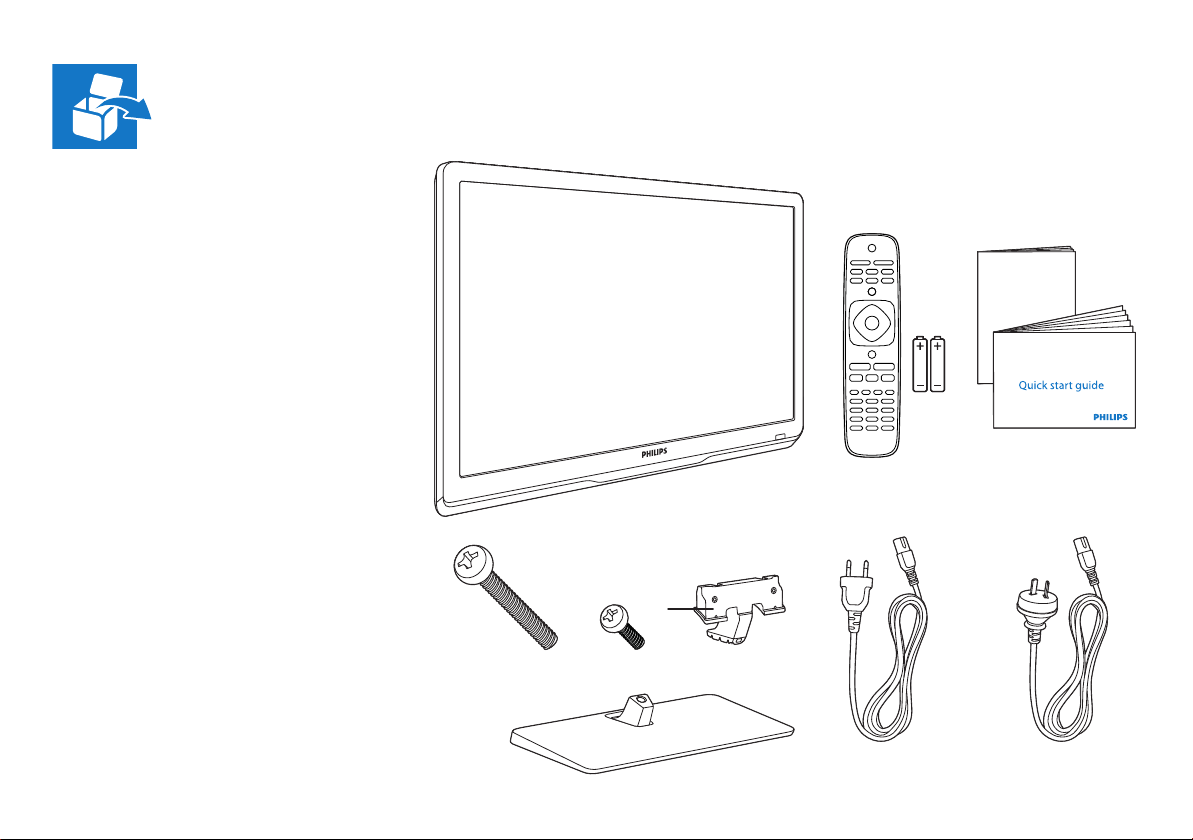
English What’s in the box
Português Conteúdo da embalagem
Español Contenido de la caja
User manual
2x
M4 x 28mm
2x
Ø3 x 12mm
(AR)(BR)
Page 4
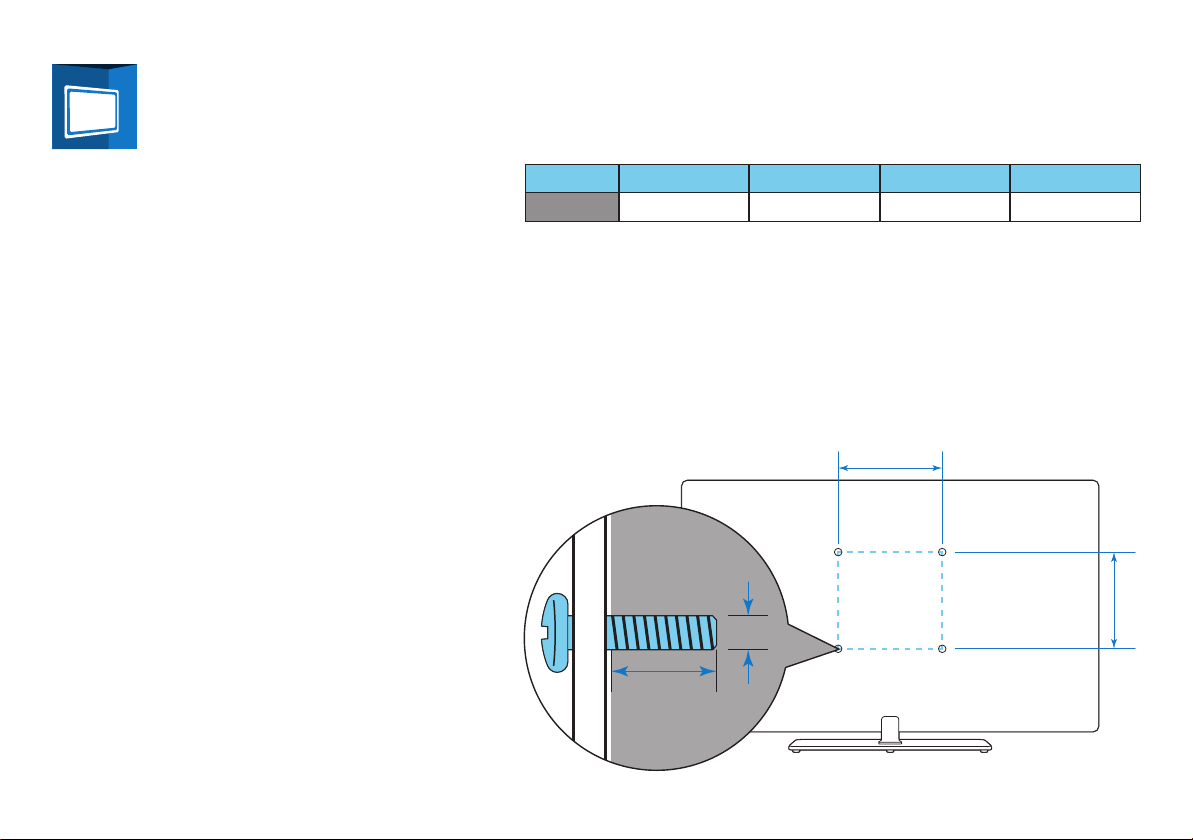
y
x
English To wall mount, purchase a suitable bracket.
Português Para fazer a montagem na parede, compre um
Español Para instalar el montaje de pared, adquiera un
suporte adequado
soporte adecuado.
TV H V x y
22” - 24” 75 mm 75 mm M4 9-10 mm
H
V
Page 5
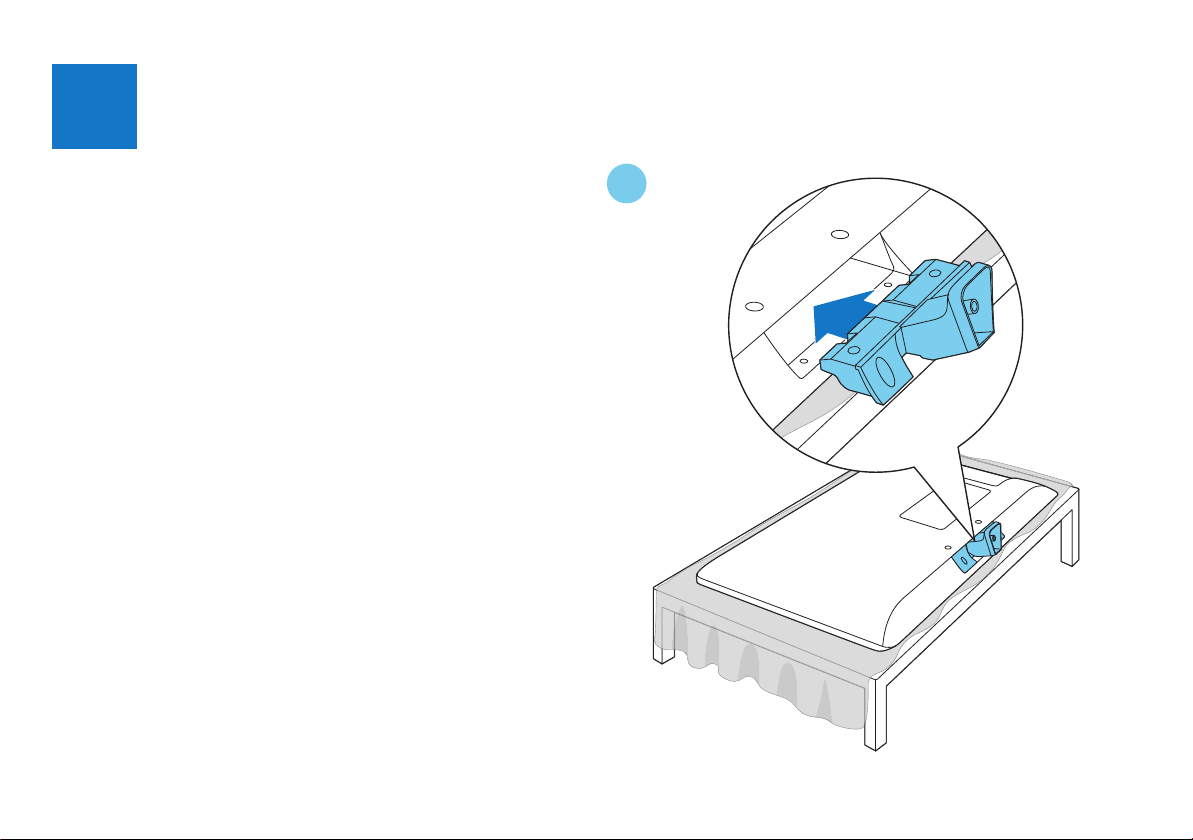
1
English Mount the stand
Português Monte o pedestal
Español Monte el soporte
1
Page 6

2 3
2x
2x
M4 x 28mm
Ø3 x 12mm
Page 7

4
Page 8

2
English Connect
Português Conectar
Español Conexión
R
L
CVBS
USB
SERV.U
AUDIO IN
DVI/VGA
YPb
LR
VGA
HDMI 1
ANTENNA
ANTENNA
Pr
SPDIF
OUT
IN 1
(AIR)
HDMI 3
ARC
IN 2
(CABLE)
HDMI 2
Page 9

ANTENNA
IN
AC IN ~
TV ANTENNA
Page 10

HDMI
HDMI
VGA
AUDIO IN
DVI/VGA
VGA
RLYPbPr
CVBS L R
R
L
RLYPbPr
VIDEO
Page 11

USB
HDMI
ANTENNA
IN
HDMI
OUT
ANTENNA
IN
Page 12

3
English Manage cables
Português Gerenciar cabos
Español Orden de los cables
Page 13

4
English Insert batteries
Português Insira as pilhas
Español Inserte las baterías
1 2
3 4
Page 14

5
English Select your language and follow
Português Selecione o idioma e siga as
Español Seleccione el idioma y siga las
the onscreen instructions
instruções na tela.
instrucciones en la pantalla.
Select your language
English
Español
Português
Page 15

English Play buttons
List
Control playback of media fi les
Português Botões Reproduzir
Controlar a reprodução de arquivos de mídia
Español Botones de reproducción
Controle la reproducción de archivos multimedia
English TV
Switch source to watch TV
Português TV
Alterar a fonte para assistir TV
Español TV
Cambie la fuente para ver TV
English Source
Access a connected device
Português Fonte
Acessar um dispositivo conectado
Español Fuente
Acceda a un dispositivo conectado
English Format
Change picture format
Português Formato
Alterar o formato da imagem
Español Formato
Cambie el formato de imagen
English Home
Access the Home menu
Português Início
Acessar o menu Início
Español Inicio
Acceda al menú Inicio
English
Português Lista
Español Lista
List
Access the TV channel list
Acessar a lista de canais da TV
Acceda a la lista de canales de TV
Page 16

English Adjust
Adjust TV settings
Português Ajustar
Ajustar confi gurações da TV
Español Ajustar
Ajuste la confi guración de TV
English Options
Access currently available options
Português Opções
Acessar as opções disponíveis no momento
Español Opciones
Acceda a las opciones disponibles
English Navigation
Navigate through menus and select items
Português Navegação
Navegar pelos menus e selecionar itens
Español Navegación
Navegue por el menú y haga selecciones
Page 17

English For sustainability, the user manual is not printed
Português Para fi ns de sustentabilidade, o manual do usuário
Español Para mantenimiento, el manual del usuario no
and available in your product as onscreen help. A
printable user manual as well as product updates
is available from www.philips.com/support
não é impresso e está disponível no seu produto
como ajuda na tela. O manual do usuário como
também as atualizações do produto estão disponíveis no www.philips.com/support.
se encuentra impreso y está disponible en su
producto como ayuda en pantalla. Un manual del
usuario imprimible, así como las actualizaciones
de productos se encuentran disponibles en www.
philips.com/support.
www.philips.com/support
1
2
Page 18

Non-contractual images. / Images non contractuelles. / Außervertragliche Bilder.
All registered and unregistered trademarks are proper ty of their respective owners.
Specifi cations are subject to change without notice.
Trademarks are the proper ty of Koninklijke Philips Electronics N.V. or their respective owners.
2012 © Koninklijke Philips Electronics N.V. All rights reserved.
www.philips.com
 Loading...