

Page 1
EN
To obtain assistance, contact Philips Customer Care Center at
México D.F. and Área Metropolitana;
,p
blica;
4
0
México D.F. y Área Metropolitana;
,
blica;
4
0
7
7
egister your product and get support a
t
t
l
o
www.philips.com/suppor
2PFL250
9PFL250
ser Manua
To obtain a more detailed electronic copy of
this User Manual, go to www.philips.com/support
ES
anual del Usuari
Para obtener una copia electrónica más detallada
de este manual, visite www.philips.com/support
: For further assistance, call the customer support service in your
country.
nterior de la Repu
osta Rica;
olombia;
ES: Para obtener más información, llame al servicio de soporte al cliente de
u país.
ara obtener asistencia, póngase en contacto con CENTRO DE
INFORMACION AL CLIENTE,
nterior de la Repu
osta Rica;
olombia;
1 800 052 156
1 800 952 064
1 800 052 156
1 800 952 064
1 800 839 19 89
1 800 839 19 89
8 87 97 36
8 87 97 36
Page 2
Return your Product Registration Card or visit at
http://www.productrecords.com/philips/ today to get the very most from your purchase.
Registering your model with Philips makes you eligible for all of the valuable benefits listed below, so don't miss out.
Complete and return your Product Registration Card at once or visit at www.philips.com/support to ensure:
*Product Safety Notification *Additional Benefits
By registering your product, you'll receive notification directly from the manufacturer - in the rare case of a
product recall or safety defect.
Registering your product guarantees that you'll receive
all of the privileges to which you're entitled, including
special money-saving offers.
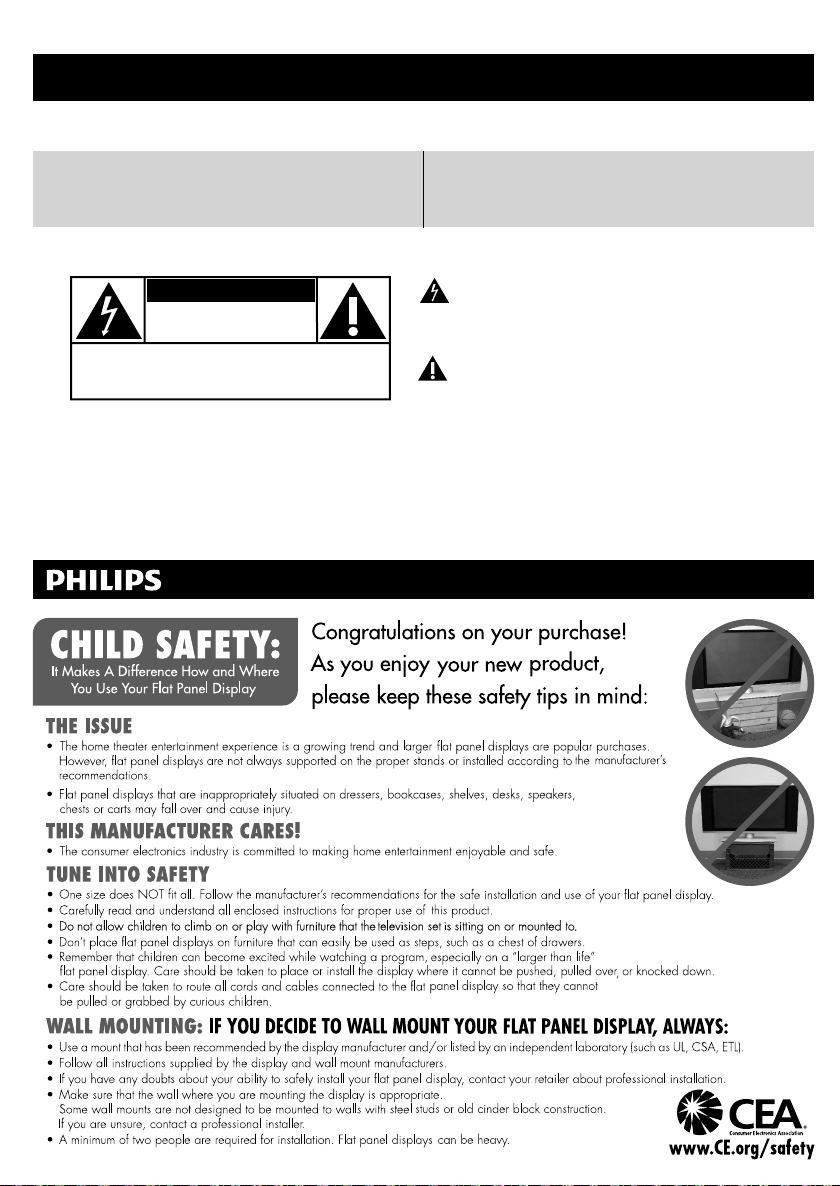
Know these safety symbols
CAUTION
RISK OF ELECTRIC SHOCK
DO NOT OPEN
CAUTION: TO REDUCE THE RISK OF ELECTRIC SHOCK, DO NOT
REMOVE COVER (OR BACK). NO USER-SERVICEABLE PARTS
INSIDE. REFER SERVICING TO QUALIFIED SERVICE PERSONNEL.
The caution marking is located on the rear or bottom of the cabinet.
WARNING: To reduce the risk of fire or electric shock, do not expose this apparatus to rain or moisture. Apparatus shall
CAUTION: To prevent electric shock, match wide blade of plug to wide slot, fully insert.
ATTENTION
not be exposed to dripping or splashing and no objects filled with liquids, such as vases, shall be placed on the
apparatus.
: Pour éviter les choc électriques,introduire la lame la plus large de la fiche dans la borne correspondante de la
prise et pousser jusqu’au fond.
Visit our World Wide Web Site at www.philips.com/support
The lightning flash with arrowhead symbol, within an equilateral
triangle, is intended to alert the user to the presence of
uninsulated “dangerous voltage” within the apparatus’s enclosure
that may be of sufficient magnitude to constitute a risk of
electric shock to persons.
The exclamation point within an equilateral triangle is intended to
alert the user to the presence of important operating and
maintenance (servicing) instructions in the literature accompanying
the apparatus.
Page 3
E
li
h
Important Safety Instructions
.
.
.
.
.
.
.
w
g
t
.
.
t
Unpl
.
l
illed
lly
d.
T
r
.
A
A
E
P
Wall M
t
7
b
)
l
7
V
s
)
T
.
.
t
to i
he B
.
The Wall M
.
ll.
t
.
t
.
Wall M
.
hile y
l
y.
Wh
T
)
.Read these instructions
2.Keep these instructions
.Heed all warnings
4.Follow all instructions
.Do not use this apparatus near water.
. Clean only with dry cloth
. Do not block any ventilation openings. Install in
accordance with the manufacturer’s instructions
8. Do not install near any heat sources such as radiators,
heat registers, stoves, or other apparatus (including
amplifi ers) that produce heat
9. Do not defeat the safety purpose of the polarized or
grounding-type plug. A polarized plug has two blades
ith one wider than the other. A grounding type plu
as two blades and a third grounding prong. The wide
blade or the third prong are provided for your safety. If
he provided plug does not fi t into your outlet, consult
an electrician for replacement of the obsolete outlet
0. Protect the power cord from being walked on or
pinched particularly at plugs, convenience receptacles,
and the point where they exit from the apparatus
1. Only use attachments / accessories specifi ed by the
manufacturer.
2. Use only with the cart, stand, tripod, bracket, or
able specifi ed by the manufacturer, or
sold with the apparatus. When a cart
s used, use caution when moving the
art / apparatus combination to avoid
njury from tip-over.
ount Bracket Ki
Brand: SANUS
9PFL250
2PFL250
he recommended Wall Mount Bracket Kit (sold
separately) allows the mounting of the TV on the wall
or detailed information on installing the wall mount,
refer to the Wall Mount Instruction Book
&F
he product or injury to yourself or others if you elect
nstall the TV Wall Mount Bracket or mount the TV
onto t
Model # Screw dimension
AN10
packed with Wall Mount Bracket Kit.
For 32 inch TVs, you need to purchase screws
y with dimensions described below.
separate
M200
M4 x 0.472” (12mm
Do NOT use screws
M4 x 0.472” (12mm
exicana is not responsible for any damage to
racket on your own
ount Bracket must be installed by experts
13.
14. Refer all servicing to qualifi ed service personnel.
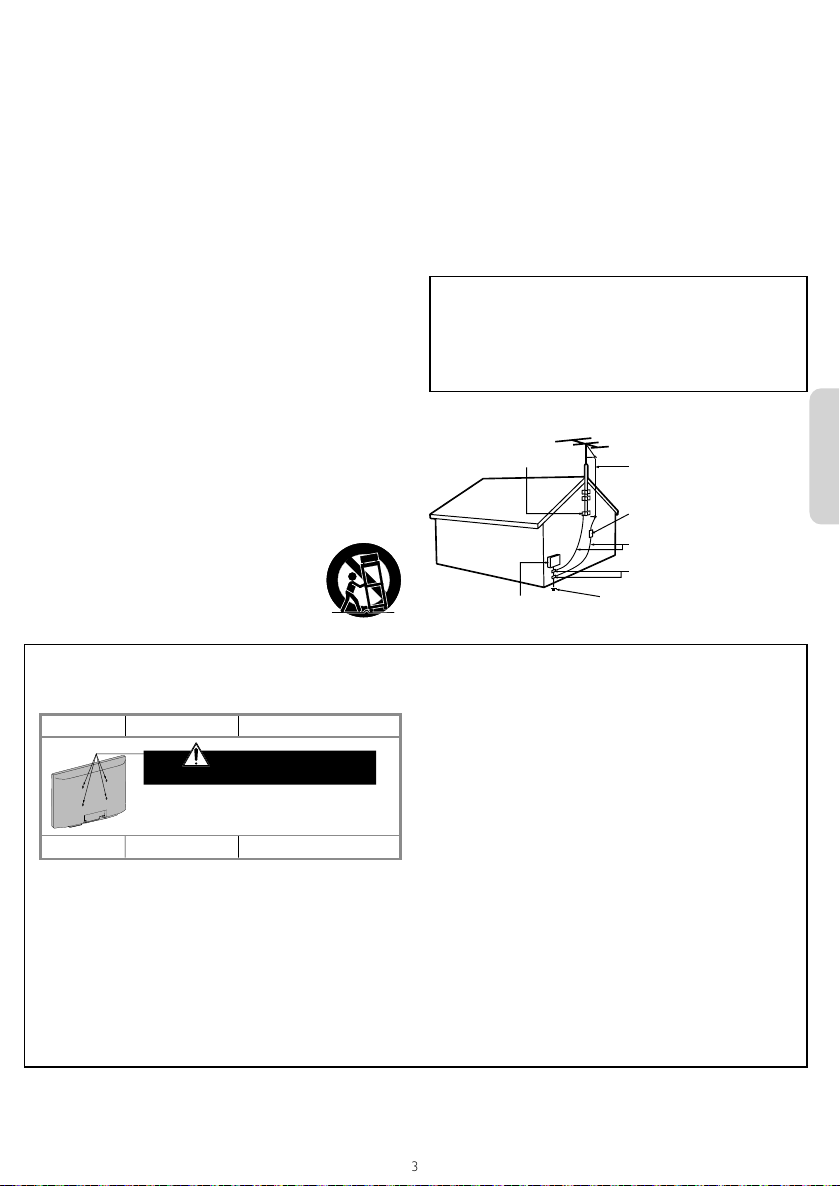
Example of Antenna Grounding as per NEC - National
Electric Code
or injury noted below.
ug this apparatus during lightning storms or when
unused for long periods of time
ervicing is required when the apparatus has been
amaged in any way, such as power-supply cord or
p
ug is damaged, liquid has been sp
or objects
have fallen into the apparatus, the apparatus has
een exposed to rain or moisture, does not operate
norma
, or has been droppe
Note to the CATV system installer:
his reminder is provided to call the CATV system installer’s
attention to Article 820-40 of the NEC that provides guidelines fo
proper grounding and, in particular, specifies that the cable ground
shall be connected to the grounding system of the building, as close
to the point of cable entry as practical
ROUND CLAM
ELECTRIC SERVICE EQUIPMENT
&F
exicanais not liable for these types of accidents
nstall the Wall Mount Bracket on a sturdy vertical wa
If installed onto a ceiling or slanted wall, the TV and Wall
Mount Bracket may fall which could result in a severe injury.
o not use screws that are longer or shorter than their
specifi ed length. If screws too long are used this may cause
mechanical or electrical damage inside the TV set. If screws
oo short are used this may cause the TV set to fall
Do not fasten the screws by excessive force. This may
amage the product or cause the product to fall, leading
o an injury
or safety reasons use 2 people to mount the TV onto a
ounting Bracket
o not mount the TV onto the Wall Mounting Bracket
our TV is plugged in or turned on. It may result in
w
an e
ectrical shock injur
en installing the unit on the wall, allow this much space.
op: 11.8 inches30cm
Left and right side: 5.9 inches(15cm)
ottom: 3.9 inches(10cm)
NTENNA LEAD IN WIR
NTENNA DISCHARGE UNIT
NEC SECTION 810-20)
ROUNDING CONDUCTORS
NEC SECTION 810-21)
ROUND CLAMPS
OWER SERVICE GROUNDING ELECTRODE
SYSTEM (NEC ART 250, PART H)
ng
s
English English
Page 4
1 Notice
T
thei
reserves the right to change products at any time
with
bliged
.
T
a
warrants that the material itself does not infringe any United
.
a
cannot be held responsible neither for any errors in
t
will be
blished
support website as soon
ible.
s
T
.
W
t
w
plied.
A
dj
d
.
f
Th
g
lled
,
t
t
.
iver
.
t
.
Trade N
S
.
7
A
A
Teleph
s
T
T
.
s
p
.
t
A
thei
.
Th
HDMI
HDMI High
,
he HDMI L
h
.
D
.
T
.
g
peak
.
f
rademarks are the proper ty of Koninklijke Philips Electronics N.V. or
r respective owners.
&F
out being o
he material in this User Manual is believed adequate for the
ntended use of the system. If the product or its individual modules or
rocedures are used for purposes other than those specifi ed herein,
onfi rmation of their validity and suitability must be obtained. P&F
exican
tates patents. No further warranty is expressed or implied
&F
exican
he content of this document nor for any problems as a result of the
ontent in this document. Errors repor ted to P&F
adapted and pu
as poss
ixel characteristic
his LCD product has a high number of color pixels. Although it has
effective pixels of 99.999% or more, black dots or bright points of light
(red, green or blue) may appear constantly on the screen. This is a
structural proper ty of the display (within common industry standards)
and is not a malfunction
arranty
o components are user serviceable. Do not open or remove covers
o the inside of the product. Repairs may only be done by Service
enters and offi cial repair shops. Failure to do so shall void any
arranty, stated or im
ny operation expressly prohibited in this User Manual, any
a
ustments or assembly procedures not recommended or authorize
n this User Manual shall void the warranty
Federal Communications Commission Notice
This equipment has been tested and found to comply with the limits
or a Class B digital device, pursuant to part 15 of the FCC Rules.
ese limits are designed to provide reasonable protection against
harmful interference in a residential installation. This equipment
enerates, uses and can radiate radio frequency energy and, if not
insta
and used in accordance with the instructions, may cause
harmful interference to radio communications. However
is no guarantee that interference will not occur in a particular
installation. If this equipment does cause harmful interference to
adio or television reception, which can be determined by turning
he equipment off and on, the user is encouraged to try to correct
he interference by one or more of the following measures:
eorient or relocate the receiving antenna
ncrease the separation between the equipment and the
rece
onnect the equipment into an outlet on a circuit different
from that to which the receiver is connected
onsult the dealer or an experienced radio or television
echnician for help
to adjust earlier supplies accordingly
on the P&F
there
.
Modifi cation
his apparatus may generate or use radio frequency energy. Changes
r modifi cations to this apparatus may cause harmful interference
nless the modifi cations are expressly approved in the User Manual.
he user could lose the authority to operate this apparatus if an
nauthorized change or modifi cation is made
able
onnections to this device must be made with shielded cables with
metallic RFI / EMI connector hoods to maintain com
ules and Regulations
liance with FCC
opyrigh
ll other registered and unregistered trademarks are the proper ty of
r respective owners
e terms
ortions of this software are copyright © The FreeType Project
www.freetype.org).
The American Academy of Pediatrics discourages television viewing
or children younger than two years of age.
Definition Multimedia Interface
t
or registered trademarks of HDMI
Licensing LLC in the United States and
ot
er countries
aboratories. Dolby and the double-
symbol are trademarks of Dolby
aboratories
ruSurround XT technology is
ncorporated under license from SRS
abs, Inc
RS TruSurround XT® creates a truly
mmersive surround sound experience
with rich bass and clear dialo
two s
and
ogo are trademarks
ers
and
from only
-
Declaration of Conformity
ame :
esponsible Party :
odel :
ddress :
one Number : 52 (55) 52 69 90 00
HILIP
&F Mexicana, S.A. de C.V
2PFL2507, 19PFL250
v. La Palma No. 6, Col. San Fernando La
erradura. Huixquilucan, Edo. de México.
.P. 52787
Page 5
E
li
h
2 Important
TV.
y
.
ition.
ib
.
temp
g
.
.
.
t
t
.
.
.
.
A
f
Th
to turn the unit on and go into standby mode.
d
:
he lik
:
T
ly
T
T
h
.
ycle.philip
s
i
.
s
The b
y
T
:
t
.
A
.
.
”.
Positioning the TV
Environmental care
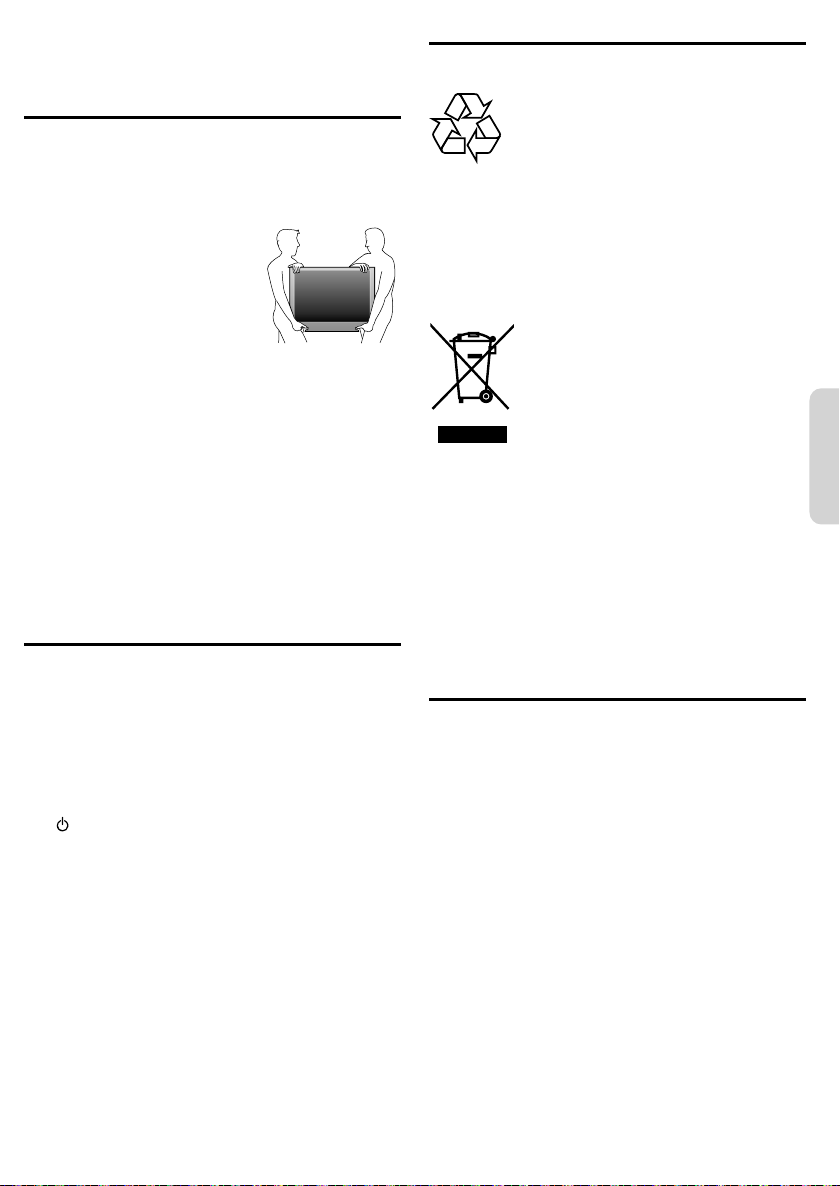
Large screen TVs are heavy. 2 people are required to carry and
andle a large screen
Make sure to hold the upper and bottom frames of the unit
as illustrated
fi rml
nstall the unit in a horizontal and stable
pos
o not install the unit in direct sunlight
r in a place subject to dust or strong
ration
v
epending on the environment, the
erature of this unit may increase
htly. This is not a malfunction
sli
Avoid a place with drastic temperature changes
Do not place anything directly on top or bottom of the unit
Depending on your external devices, noise or disturbance of
he picture and / or sound may be generated if the unit is placed
oo close to them. In this case, please ensure enough space
etween the external devices and the unit
Do not insert the AC power cord into the power socket outlet
before all the connections are made
Ensure that you always have easy access to the AC power cord
r plug to disconnect the TV from the power.
Before you move the TV, disconnect attached cables to prevent
amage to connectors
Be sure to unplug the AC power cord from the AC outlet
before moving or carrying the unit
Regulatory notices
Do not place the unit on the furniture that is capable of being tilted
by a child and an adult leaning, pulling, standing or climbing on it.
alling unit can cause serious injury or even death.
is apparatus should not be placed in a built-in installation such as
bookcase or rack unless proper ventilation is provided.
Make sure to leave a space of 4 inches (10cm) or more around this
pparatus.
ress
To completely turn off the unit, you must unplug the AC power
cor
.
Disconnect the AC plug to shut the unit off when trouble is found
or not in use. The AC plug shall remain readily available.
ever use a gas duster on this TV.
The gas trapped inside of this unit may cause ignition and explosion.
AUTION:Danger of explosion if battery is incorrectly replaced.
WARNING
WARNING
eplace only with the same or equivalent type.
Batteries (battery pack or battery installed) shall not
be exposed to excessive heat such as sunshine, fi re
or t
e.
o prevent injury, this apparatus must be secure
ttached to the furniture / wall in accordance with the
instructions.
cause injury / death.
ipping, shaking or rocking the unit may
he packaging of this product is intended to be recycled.
ontact your local authorities for information about how to recycle
t
e packaging
or product recycling information, please visit -
www.rec
s.com
End of life directive
Philips pays a lot of attention to produce environment-friendly
products in green focal areas. Your new TV contains materials
which can be recycled and reused. At the end of its life, specialized
compan
es can dismantle the discarded TV to concentrate the
reusable materials and to minimize the amount of materials to be
isposed of. Please ensure you dispose of your old TV according to
ocal regulations
Disposal of used batterie
atteries supplied do not contain the heavy metals mercur
nd cadmium. Nevertheless, in many areas batteries may not be
isposed of with your household waste. Please ensure you dispose
of batteries according to local regulations.
Downloading an electronic copy
o obtain a more detailed electronic copy of this User Manual
oint your browser to www.philips.com/suppor
hoose your country of location with language
Enter the product name or number in the search fi eld.
lternatively, you can browse the catalog
lick the Description or Model
4
nder Product support, click “User manual
ng
s
English English
Page 6
Contents
5
5
5
5
7
7
7
9
9
Viewi
A
.
A
.
E
ca
ibl
.
Audio L/R + video cab
Audio L/R + video cable
.
ill
.
3 Get started
1 Notice 4
2 Important 5
ositioning the TV
egulatory notices
nvironmental care
ownloading an electronic copy
3 Get started 6
onnecting the antenna or the cable 6
4 Use your TV 7
Watching channels from an external device
witching audio mode
hanging picture and sound settings
hanging picture format 8
aption settings
hild and ratings lock
etting your location to home 10
ng photos and watching videos
n a USB Memory Stick 10
5 Install channels 10
utoprogram 10
6 Troubleshooting 11
7 Specifi cations 12
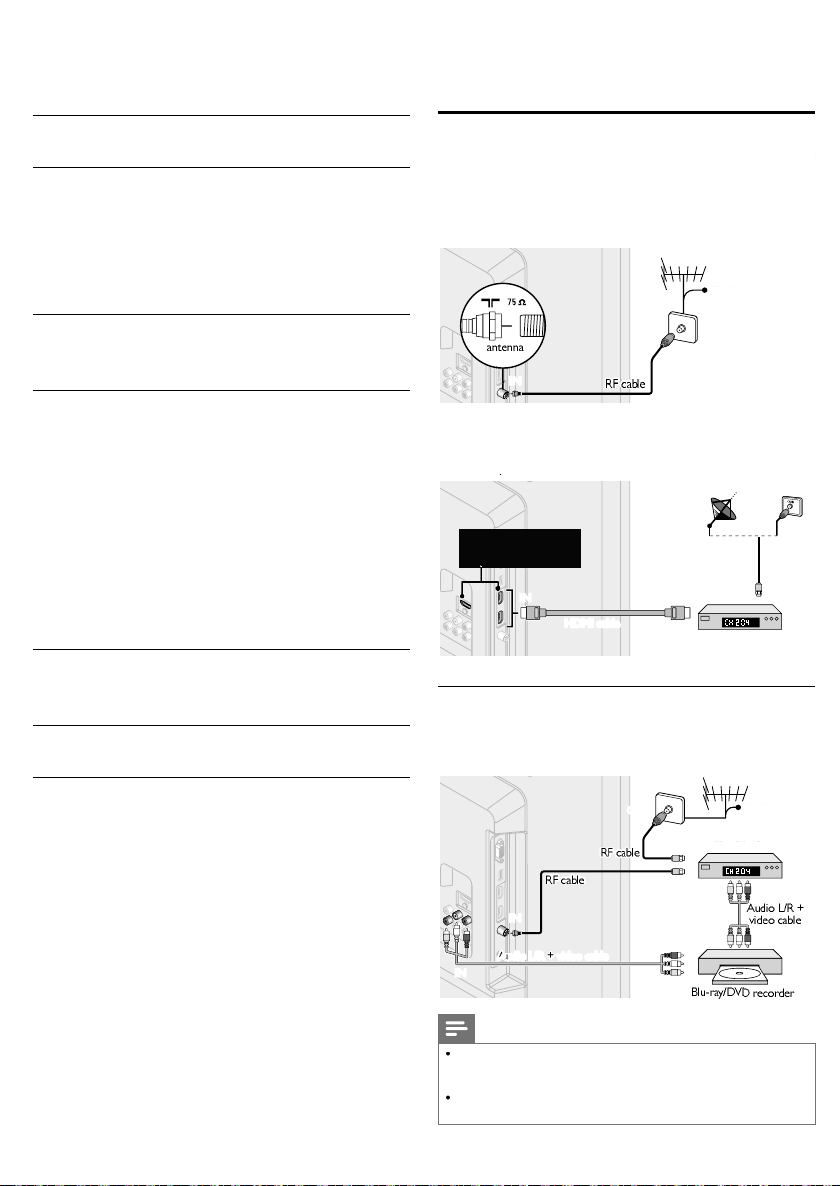
Connecting the antenna or the cable
e sure your antenna or other device is connected properly
efore plugging in the AC power cord
If you connect to an antenna through RF cable
ny DTV programs that are broadcasted in your area can
e received for free through an antenna connection
OUT
If you connect a set-top box through HDMI
If the TV is connected to a cable or satellite set-top box via
HDMI, make sure you select the correct Source by using
SOURC
Connecting a set-top box, Blu-ray / DVD recorder
via composite connectors and analog audio
ecause some recorders can be suscept
ININ
These HDMI Inputs are
available on 26 inch and
larger screen size TVs.
ININ OUT
IN
o not place your recorder too close to the screen
e to signals
OUT
OUT
IN
OUT
ININ
OUT
OUT
ININ
OUT
IN
Note
nly the left loudspeaker reproduces sound for mono
equipment. Use a mono to stereo adapter (not supplied) for
ound reproduction via all internal loudspeakers
If there is no input signal and no operation for 15 minutes, the
nit w
go into standby mode automatically
Page 7

E
li
h
4 Use your TV
T
.
T
igh
lly
.
dly
t
.
.
to display the currently
ilable l
.
repeatedly to cycle through the available
.
A
.
is displayed when the audio language cannot be acquired
glish, F
.
to display the currently selected audio mode.
di
.
Y
.
.
▼
l
th
A
t
o
)
ht
t
t
kligh
ighter
t
to d
s
to d
s
to i
s
to d
to i
Tint
t
d
t
s
t
t
A
s
t
a
)
Watching channels from an external device
urn On a set-top box or the connected device
he picture from your set-top box or the connected device
m
t appear automatica
If the picture does not appear
on the TV screen
Changing picture and sound settings
ou must set
therwise, personalized picture and sound settings will not
be memorized after the unit goes into Standby mode
Changing picture settings
ress
omeinocation (refer to page 10)
and use ▲▼ to select
icture, then press
Press SOURCE repeate
to select the set-top box or
he connected device and wait a few seconds till the
cture appears
Use the remote control of the set-top box or the
onnected device to select channels to view
Switching audio mode
Digital TV operation
Press
selected language and the number of
ava
anguages
Press
2
audio languages
Note
vailable languages differ depending on the broadcast
or the acquired languages are other than En
anish
Analog/Cable TV operation
ress
While receiving an MTS broadcast, press
2
repeatedly to cycle through the available
au
o channels
11.1
English 1/3
rench or
11
SAP / STEREO
Picture Settings assistant
Sound
Setup
Features
Language
USB
se ▲
Auto picture
Backlight
Contrast
Brightness
Color
Tint
Sharpness
Advanced settings
► to se
ect the item you want to adjust,
Personal
18
50
30
30
0
2
en press
ettings assistantto guide you through the best picture setting
uto picture
acklig
ontras
rightnes
olor
Sharpnes
dvanced setting
o select the desired setting, then press
ersonal Standard Vivid Sports
ame and
c
ursor
o reduce power
onsumption
ecrease contrastto increase contrast
ecrease
rightnes
ecrease color
ntensity
o add re
o soften
o select the desired setting, then press
olor alignment
ack stretch
ursor
o set the bac
r
ncrease brightnes
ncrease color
ntensity
o add green
o sharpen
oise reduction
and
ovie
amm
ng
s
English English
t
Page 8
Changing sound settings
▼
l
th
A
d
t
s
)
t
t
®
to Onfft
®
to Off
A
t
th
s
t
TV
s
t
s
’
s
k
t
y
HDMI link devices
o
t
o
t
t
m
.
.
l
d
Wid
Z
d
Thi
l
.
.
.
d
V
.
T
.
Z
v
.
Wid
.
T
.
l
d
Wid
Z
d
Thi
9
l
.
.
.
d
.
T
.
Z
.
T
.
Wid
t
.
l
dull
T
t
for
ll.
.
l
.
.
.
.
ress
Picture Auto sound Standard
Sound Equalizer
Setup SRS TruSurround XT Off
Features Auto volume leveling On
Language TV speakers On
USB Audio Setting Stereo
and use ▲▼ to select
ound,then press
ormalriginal size
4:3
ovie expan
oom
hortened horizontally
idebars appear on both edges of the screen
ertically stretched to fi ll the screen
his only crops out the top of the picture
aximum size without changing its horizontal and
ertical ratio
orizontally stretched picture
e
his crops out the left and right sides of the picture
For 4:3 video signal
Use ▲
► to se
ect the item you want to adjust,
en press
uto soun
qualizer
SRS TruSurround XT
uto volume leveling
speaker
Audio Setting
o select the desired setting, then press
ersonal Standard Vivid Sports
usic andew
o select the specifi c frequency and use
▲▼ to adjust the level, then press
o setRS TruSurround XT
n
o setRS TruSurround XT
o reduce volume differences
n
etween the TV commercials and
e program
o remove the auto volume
ff
eveling
o output sound from the unit’s
n
speaker
not to output sound from the
ff
unit
Speakers
asyLin
Stere
SAP
s speaker
o control Audio Output from
our connected
o output stereo-audio
on
o output mono-audio
o output second audio progra
ovie
Changing picture format
splay modes can be selected when your TV receives a
6:9 or 4:3 video signal. Three types of display modes can
be selected for a PC Input signal
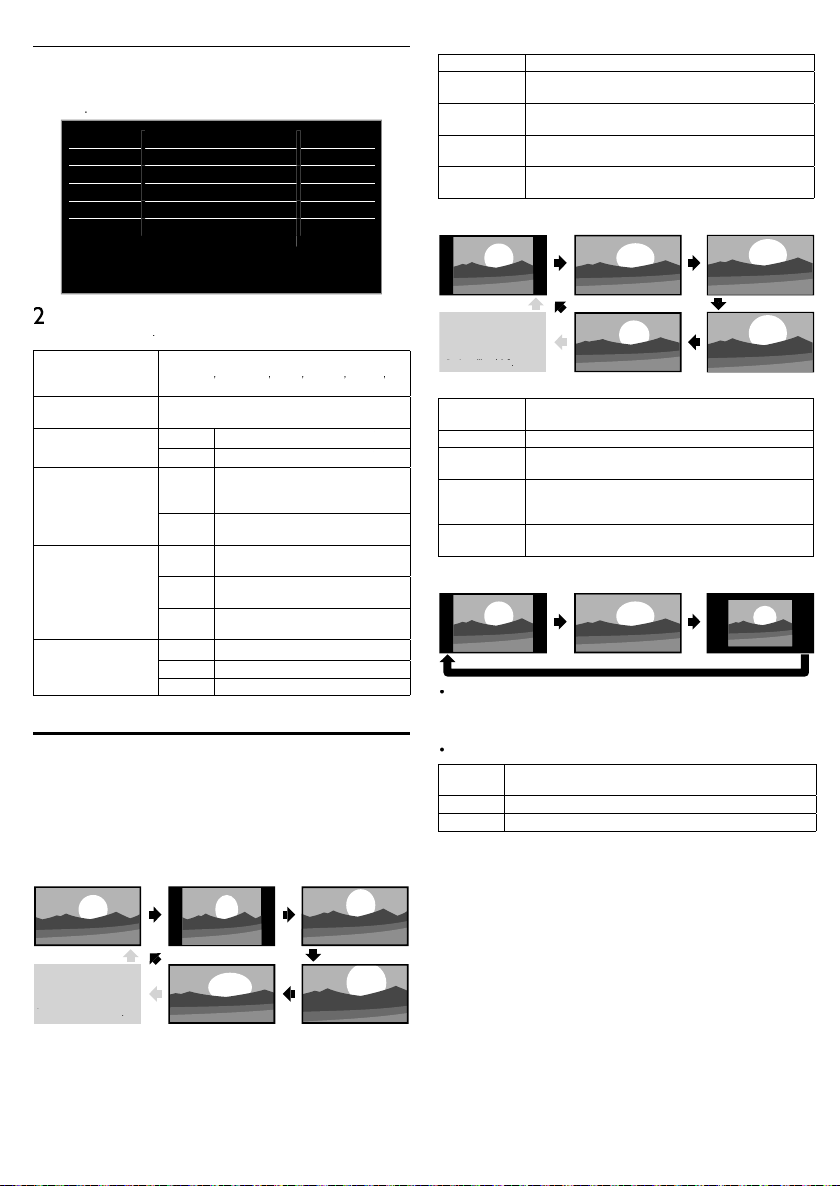
ress FORMAT repeatedly to switch the TV aspect ratio
For 16:9 video signal
For PC Input signal
orma
ull can also be selecte
after Wide if an HDMI
evice is selected.
:
(HDMI device only)
ull
orma
6:9
ovie expan
oom
e
s
riginal size
idebars appear on both edges of the screen
tretched horizontally to fi ll the screen
tretched more vertically at the top of the screen
his crops out the top of the picture
aximum size that is more vertically stretched to
fi ll the screen
his crops out the top and bottom of the picture
riginal size and the edges stretched horizontally
o fi ll the screen
16:9
e
orma
his unit can also be connected to your PC that has a DVI
erminal. Use an HDMI-DVI conversion cable for this Video
connection and it requires stereo mini plug conversion cable
analog audio signal as we
Refer to 16:9 video signal on this page if PC has HDMI Output
roportionately stretched picture
orma
idebars appear on both edges of the screen
ovie expan
nscale
ulltretched out of proportion to fi ll the screen
nscaledriginal size
oom
orma
ull can also be selecte
after Wide if an HDMI
evice is selected.
ull
s
orma
(HDMI device only)
4:3
e
ovie expan
oom
8
Page 9

E
li
h
Caption settings
.
th
.
ygp
.
.
yp
1
1
Th
ioni
T
).
)
.
T
.
pg ygg
4
.
:
.
.
pyoll-up
).
)
Y
.
lli
ill
.
lling
N
d
lly
t
.
.
buttons
.
Wh
PIN
0
0
Wh
PIN
menu is displayed.
k
ibl
.
repeatedly to switch between view
k.
A
d.
A
d.
s
.
.
dly
k.
p
g.
A
.
A
.
gs
g
gs
g
A
g
g
TV-Y
A
TV-Y7
A
r
d
3
4
7
d
X
A
s
.
dly
k.
A
.
A
.
losed captioning displays the audio portion of
programming as text superimposed over the video
ress
press
se ▲▼ to select
igital caption service
se ▲▼ to select
se ▲▼ to select the desired digital caption service,
en press
ff
S-1 to
S-6
Analog/Cable TV operation
aption service
se ▲▼ to select
Use ▲▼ to select the desired closed caption, then
ress
ff
C-
andT-
C-3
andT- 3
C-2, CC-4,
T- 2 andT-
There are 3 display modes according to programs
aint-on
op-on
aption style
ou can choose the size, font, color, background and other
characteristics of the caption text
se ▲▼ to select
se ▲▼ to select
se ▲▼ to select
se ▲▼ to select an item and press
▲▼ to select the desired setting and press
Note
Closed captioning service may not be controlled by this unit’s menu
options if you are watching television through an external cable or
te set-top box. In which case you w
sate
options on the external set-top box to control closed captioning
The captions do not always use correct spe
ot all TV programs and product commercials include close
caption information. Refer to your area TV program listings for the TV
channels and times of closed caption shows. The captioned programs
are usua
Not all captioning services are used by a TV channel during the
ransmission of a closed caption program
and use ▲▼ to select
eatures then
aption settings, then press
Digital TV operation
igital caption service, then press
elect if you do not want digital caption service
elect one of these before changing any other item
n
aption settings menu. Choose
normal circumstances
S-1 under
aption service, then press
elect if you do not want caption service
e primary caption and text services. The
ng or text is displayed in the same language
capt
as the program’s dialog (up to 4 lines of script on the
V screen
erve as the preferred data channels
he captioning or text is often a secondary language
arely available and broadcasters use them only in
special conditions, such as when
T-1 and T- 3 are not available
splays input characters on the TV screen immediately
nce characters are stored in memory, they are
splayed all at once
Displays the characters continuously by scrolling (max.
4 lines
C-1 andC-3 or
aption style, then press
ser setting, then press
n, then press
then use
need to use the menu
and grammar.
noted in the TV listings with service marks such as
Child and ratings lock
You can prevent your children from watching certain
programs or certain channels by locking the TV controls
and by using ratings
ress
1
press
se ▲▼ to select
2
se the
for your PIN code
hannel loc
articular channels or external input modes can be invis
n this function
se ▲▼ to select
se ▲▼ to select the particular channels or external
nput, then press
and bloc
box with “
ocke
n empty box indicates that the channel or Input Source is
ot locke
Setting US movie and TV rating
US movie ratings lock is the rating system created by MPAA
US TV ratings lock has controlled access to individual
programs based on their age ratings and content rating
se ▲▼ to select
4
atings lock, then press
se ▲▼ to select the desired rating, then press
repeate
or US TV ratings, you can further set the sub ratings to block
s
ecifi c elements of programmin
box with “
n empty box indicates that the rating is not locked
US movie
atin
G TV-PG
G-13
NC-1
anadian English or Canadian French rating
You can select the rating for Canadian English or Canadian
rench broadcasting
se ▲▼ to select
rench rating, then press
se ▲▼ to select the desired rating, then press
repeate
box with “
n empty box indicates that the rating is not locked
and use ▲▼ to select
hild lock, then press
to enter the 4-digit numbers
en you have not set up your
en the
code is correct,
code, enter
hannel lock, then press
” indicates that the channel or Input Source is
to switch between view and bloc
or “/
indicates that the rating is locked
US TV
atin
L
TV-G
TV-14nsuitable for children under 1
TV-M
escription
ll ratings locked including no ratin
one
o ratin
ppropriate for all children
ppropriate for all children 7 and olde
eneral audience
arental guidance suggeste
nsuitable for children under 1
Restricted under 17 requires
accompanying parent or adult guardian
o one under 17 admitte
ature audience only
to switch between view and bloc
indicates that the rating is locked
eatures then
or
US TV
or
anadian
e
ng
s
English English
Page 10
anadian
g
gg
g
g
A
s
hild
+
+
d
+
3
4
+
+
+
A
y
T
A
Y
l
.
Y
g
.
Y
v
.
T
y
again.
T
ired.
l
Video
s
A
M
)
()
.
T
.
A
TV.
.
A
.
d
y
.
P
ki
PIN
PIN i
d
l
.
Wh
a
i
y
Wh
,
.
Wh
ized ch
ill be displ
d.
Foll
.
nglish ratin
8
G
4
8
anadian
rench ratin
LL
8ans
13ans
16ans
18ans
escription
ocked all rating
xempt program
or all c
ren
or children over 8
eneral audience
nsuitable for ages under 8
arental guidance suggeste
nsuitable for ages under 1
nsuitable for ages under 1
nsuitable for ages under 16
dult audience onl
Note
he V-Chip can block non rated programs as per “CEA-608-E
sec. L.3”. If the option to block one or
used in US Movie ratings lock US TV ratings lock
nglish rating or
results may occur and the unit may not receive emergency
bulletins or other types of programming” : Emergency Bulletins
(Such as EAS messages, weather warnings and others) / Locally
riginated programming / News / Political / Public Service
nnouncements / Religious / Sports / Weather.
anadian French rating accordingly “unusual
programs is
anadian
se ▲▼ to select the
he fi les recorded under the following specifi cations are
requ
icture (JPEG)
Motion JPEG)
pper limit 24Mpixe
rame rate
udio type LPC
icture or Video, then press
ize
20 x 240 (QVGA)
0fp
32 kHz, 44.1 kHz or 48 kHz
ampling frequency
Note
We cannot be held responsible if your USB Memory Stick is
ot supported, nor will we accept any liability for damage or
oss of stored data
he USB Memory Stick is not supplied with this TV
fi le name exceeding 128 characters or contains a dot
aracter is not supported on this
rogressive JPEG fi les are not supported
nly a Motion JPEG fi le with an “.avi” extension is supported.
n extension “.mov” is not supported
During Motion JPEG playback, “Pause”, “Forward” and “Reverse”
o not work on this unit.
Setting your location to home
ou can set the location of your TV to
hoosing
ome gives you full fl exibility to change
redefi ned settings for picture and sound
ress
and use ▲▼ to select
ress
Picture Caption settings
Sound Child lock
Setup PC settings
Features EasyLink
Language Location Home
USB
se ▲▼ to select
se ▲▼ to select
E-sticker
Software upgrade
ocation, then press
ome, then press
Note
ou must set
settin
ome. Otherwise, personalized picture and sound
s will not be memorized after the unit goes into Standby mode
ome or
eatures then
--
Viewing photos and watching videos on a USB Memory Stick
our TV is fi tted with a USB connection that enables you to
iew photos or watch videos (Motion JPEG fi les) stored on
a USB Memory Stick
ress
Memor
and use ▲▼ to select USB, then press
he highlighted text will move to the name of your USB
Stick, then press
etai
5 Install channels
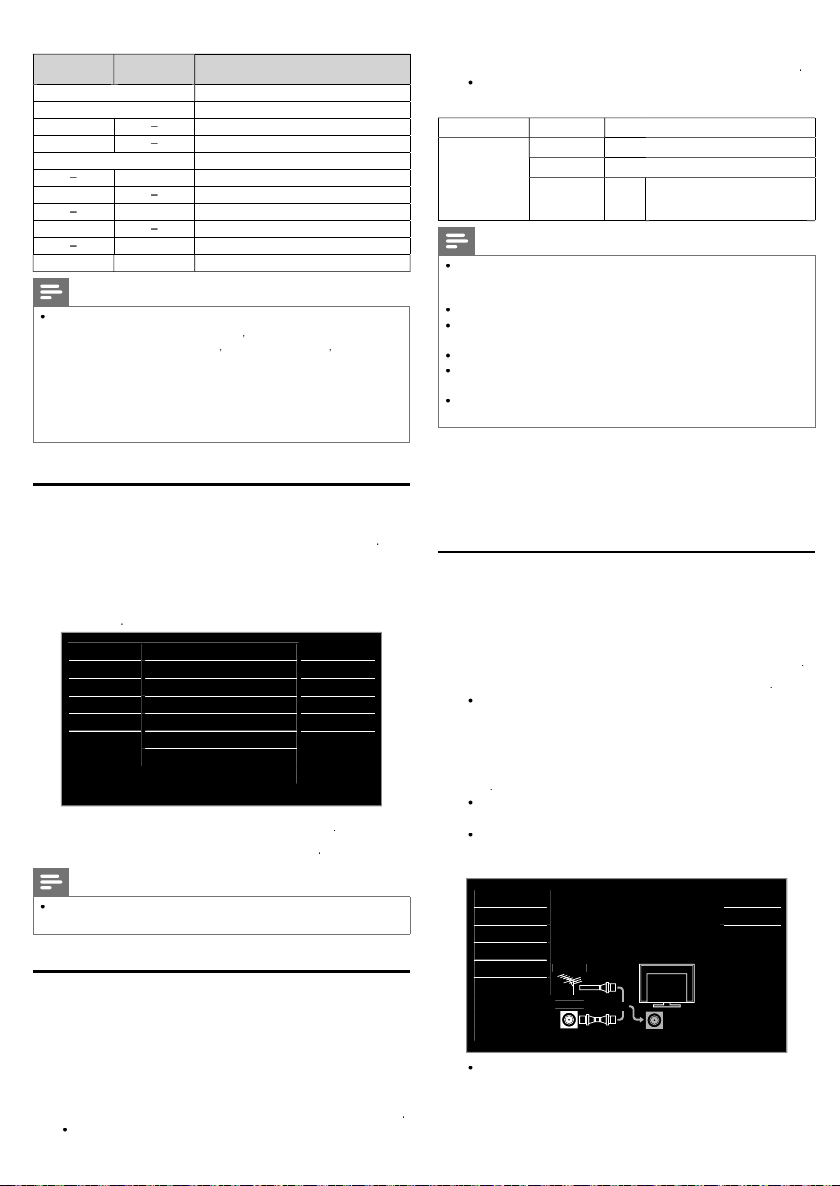
Autoprogram
e sure the RF cable is correctly connected to this unit an
ou are registered with your cable TV provider when you
nstall Cable channels
ress
Use ▲▼ to select Autoprogram, then press
If you runAutoprogram when you have locked channels, a
message appears as
or
ock again after the installation
Use ▲▼ to select an appropriate option, then press
searches for ATSC and NTSC channels available in
cable. It searches for ATSC
n your area
Picture
Sound Antenna
Setup
Features
Language
USB
memor
4
nstallation
0
and use ▲▼ to select
er to complete the installation. You need to set the channe
enAntenn
en
ableis selected, the TV detects signals supplied by
en the scanning and memorizing are completed, the lowest
ng to enter your
s selected, the TV detects antenna signals. It
NTSC and Cable channels available
Autoprogram will rescan all channels.
Auto programming may take more than 20
minutes to complete.
Select your signal source.
Antenna
Cable
Or
annel w
etup, then press
. Enter your
our area.
Back
Cable
ANTENNA IN
aye
ow the on-screen instructions to complete the
n
Page 11

E
li
h
6 Troubleshooting
gg
r
.
.
k.
.
W
.
.
y.
the keyb
d
Vi
ight be limited
h.
.
A
.
Th
setting.
T
r
A
7
d.
t
.
i
HDMI-DVI
.
.
A
.
Y
0
.
t
r
.
Adj
and
7
.
.
r
.
Y
d.
Y
Try
.
Y
.
W
.
th
.
T
.
.
th
.
T
.
The display image d
th
.
s
ly.
p
dly
.
.
.
.
T
.
g.
.
T
T
.
.
If the unit does not perform properly when operated as instructed in this
Symptom Remedy
o powe
emote control buttons do not
wor
ower is On but no screen image
o picture or soun
o colo
o sound or distorted soun
Incorrect Audio Sound is heard when
us
ng the
djusted
are not effective every time the unit
s turned On
code does not work.
ound OK, picture poo
icture OK, sound poo
ou see a distorted picture or hear
an unusual soun
ou see noise or trash on the
screen
You switch to a different Input and
e volume changes
You switch to a different Input and
e screen size changes
e entire screen
aptions are displayed as a white
ox. No caption is displayed in the
closed caption-supported program
ack box is displayed on the TV
screen
connections
icture or Soundsettings
oes not cover
Make sure that the AC outlet supplies the proper voltage, plug another electrical appliance into the AC outlet to
nsure that AC outlet operates normally
If a power failure occurs, unplug the AC power cord for 1 minute to allow the unit to reset itself
Re-insert the batteries with their polarities (+/− signs) as indicated
hen there is an infrared-equipped device such as a PC is near this unit, it may interrupt the remote control
ignal of this unit
heck whether the connection of the antenna, cable receiver or satellite box is connected correctl
heck whether all the cables to the unit are connected to the correct Output jack of your device like
Blu-ray / DVD recorder.
heck if your computer is NOT in sleep mode when the input mode of this unit is in PC mode. Tap any key on
oard to wake up your computer.
heck if the correct input mode is selected by pressing
ew other TV channels. The problem m
nplug the AC power cord and wait for about 1 minute, then plug the AC power cord and turn On the unit again
utoprogram must be completed when you set up the unit for the fi rst time or move it to a location where
previously unavailable channels are broadcast
e selected channel cannot be viewed by the
he unit requires some kind of Input signal. An indoor antenna (VHF / UHF), an external antenna (VHF / UHF) or
an RF coaxial cable from your wall or cable/satellite box signal needs to be plugged into the unit.
djust in
If the HDMI cable is plugged into an HDMI-DVI adaptor cable connect the adaptor Analog Audio L/R jacks into
he Audio L/R IN jacks
Make sure that the Analog Audio signals from the HDMI-DVI device are connected to the Analog Audio Input
L/R jacks
ou must set to
therwise, the settings you adjusted will not be memorized after the unit goes into Standby mode
If a power failure occurs for longer than 10 seconds the child lock setting is retained, but the PIN code is set to
he default code “0000”. Refer to
Electrical interference from nearby appliances may affect picture quality
ust
or the best picture quality, watch "High Defi nition" wide screen programs
If the HD content is not available, watch "Standard Defi nition" programs instead
heck if the audio cable is connected in correctly
ou may be getting NTSC TV signal (not HDTV signal) interference from electrical appliances, automobiles,
motorcycles or fl uorescent lights.
moving the unit to another location to see if this is the cause of the problem
hen the capabilities of the unit exceed the capabilities of the digital broadcasting, the signal will be increased to
match the capabilities of the display of the unit. This may cause noise or trash
his unit will memorize the volume level from the last time you adjusted it
If the volume of the sound from another device is higher or lower, then the loudness will change
his unit will memorize the viewing mode from the last time you used the particular input modes
If you are using the unit as a PC monitor, make sure that
are set correct
If you are watching TV or using the Composite Video, Component Video or HDMI with 480i Input, press
FORMAT re
Interference from buildings or weather conditions may cause captioning to be incomplete
roadcasting station may shorten the program to insert advertisement
he closed caption decoder cannot read the information of the shortened program
aptions that are delayed a few seconds behind the actual dialog are common for live broadcasts.Most captioning
roduction companies can display a dialog to maximum of 220 words per minute. If a dialog exceeds that rate,
elective editing is used to insure that the captions remain up-to date with the current TV screen dialo
he text mode is selected for caption.
elect
Picture settings.
ome
rightnessPicture
eate
to switch various screen modes
C-1
C-2 C-3 C-4or ff
p.
ocationp. 1
hild and ratings lock
ettings.
p. 9
ser Manual
OURCEor using
to the broadcasting station or weak signal strengt
p. 9
p.
orizontal position and Vertical positionC setting
H +/−
p. 9
ng
s
English English
Note
he LCD screen is manufactured to provide many years of useful life. Occasionally a few non active pixels may appear as a fi xed point of
blue, green or red. This is not to be considered a defect in the LCD screen
ome functions are not available in specifi c modes, but this is not a malfunction. Read the description in this
on correct operations
ser Manual for more details
Page 12

7 Specifications
#
7
7
e
T
o
9
V
s
)
)
A
d
o
®
2
2
d
e
t
)
)
)
)
)
w
Vid
k
y
t
t
A
t
t
v
R
B
t
l
t
s
%
e
.
odel
Pictur
ype WXGA (1366 x 768 pixels 60Hz)
Aspect rati
iewing angle
uilt-in digital tuner
Soun
Mono / Stere
ower output (RMS watts) 8 W x
qualizer
Ease of us
D (4:3 source
HD (16:9 source
icture forma
oto slide sho
eo playbac
onnectivit
omponent video input (Y/Pb/Pr)
omposite video inpu
shared terminal with Y of components)
HDMI AV (4:3 source
HDMI AV (16:9 source
C source
2PFL250
6:
70° (V) by 170° (H
TSC / NTSC
Mono, Stereo, SRS TruSurround XT
ban
ormal / 16:9 / Movie expand / Zoom / Wide
ormal / 4:3 / Movie expand / Zoom / Wide
ormal / 16:9 / Movie expand / Zoom / Wide / Full
ormal / 4:3 / Movie expand / Zoom / Wide / Full
ormal / Full / Unscaled
Refer to HDMI AV (16:9 source) above if PC has HDMI output.
JPEG fi les only
Motion JPEG 320 x 240, 30fps and fi le extension “.avi“ only
supporting video signals : 480i/p, 720p, 1080i 60Hz
60° (V) by 170° (H
9PFL250
2W x
inpu
udio L/R inpu
C inpu
US
igital audio outpu
eadphone outpu
ower
ower requirement
emperatur
perating temperature 41 °F (5 °C) to 104 °F (40 °C)
Specifi cations are subject to change without prior notice
supporting video signals :
480i/p, 720p, 1080i/p, 24Hz-60Hz
C-input signal up to WXGA (1360 x 768)
ia VGA, HDMI and HDMI-DVI + Analog Audio L/
supporting Dolby Digita
/8 inches (3.5mm)
20V~ AC +/− 10%, 50Hz / 60Hz +/− 0.5
Page 13

Page 14
P&F Mexicana, S.A. de C.V.
,
O
D
E
A
)
,
,
,
A
O
O
Av. La Palma No. 6
Huixquilucan, Edo. de México. C.P. 52787
Col. San Fernando La Herradura.
TELEVISOR A COLOR DE CRISTAL LIQUIDO (LCD)
MODEL
2PFL2507/F8
9PFL2507/F8
LC
IMAGEN VISIBL
2”(81,28cm) 80,04cm
9”(48,26cm
47,01cm
ENERGI
20V ~ 50Hz / 60Hz 42W
20V ~ 50Hz / 60Hz 26W
omercializado por : P&F MEXICANA, S.A. DE C.V.
IMPORTADOR : P&F MEXICANA
S.A. DE C.V.
Av. La Palma No. 6, Col. San Fernando La Herradura. Huixquilucan
Edo. de México. C.P. 52787 Tel: 52 55 52 69 9000
EXPORTADOR : FUNAI ELECTRIC CO.
HECHO EN :
HIN
LTD.
ARANTIA INCLUIDA EN EL INSTRUCTIVO DE US
LEA CUIDADOSAMENTE ESTE INSTRUCTIV
ANTES DE USAR SU APARATO.
hilips and Philips Shield are used under license of
oninklijke Philips Electronics N.V.
rinted in
EMN30239
hina
 Loading...