

Page 1
Philips
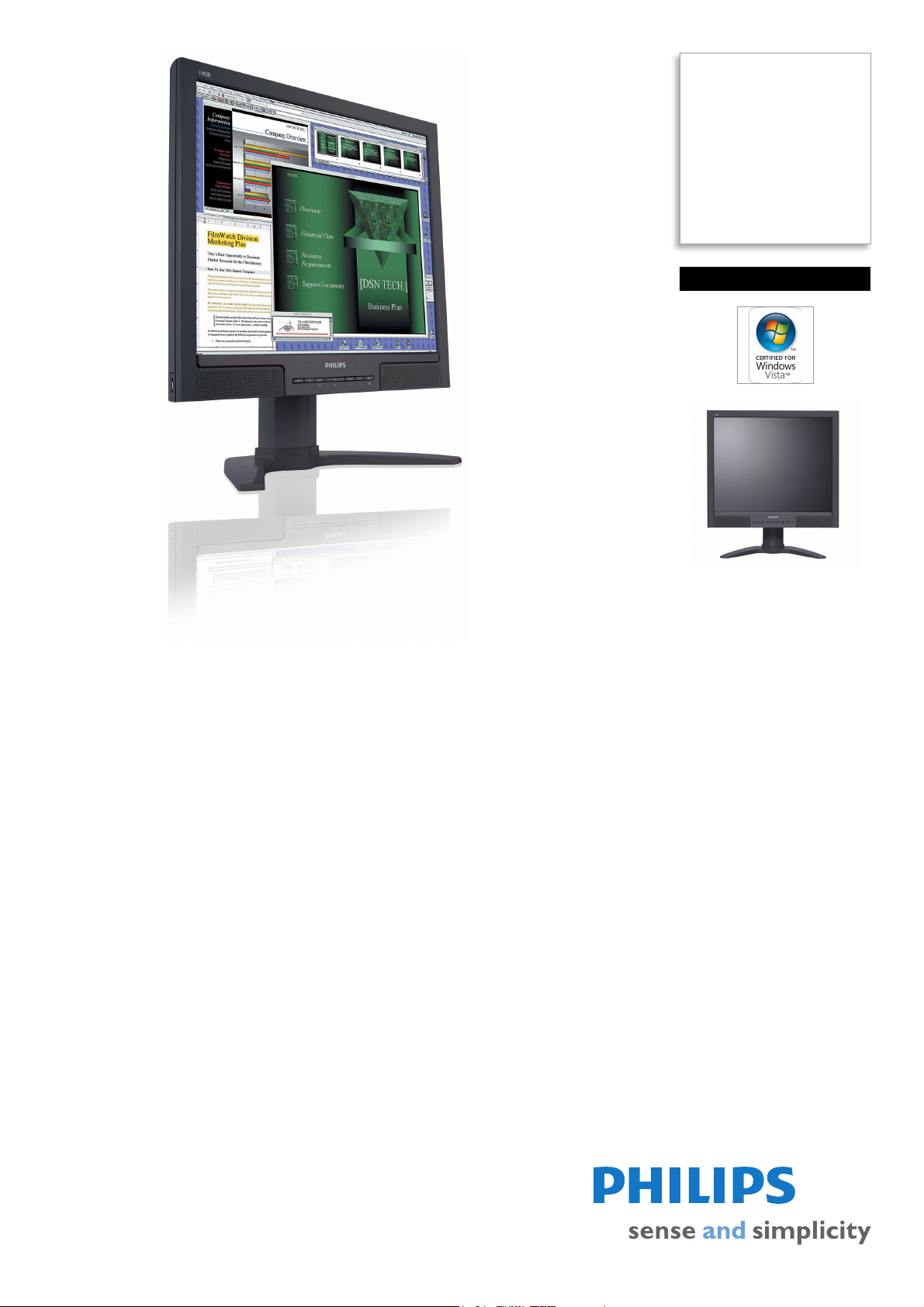
LCD monitor
48 cm (19")
SXGA
190B8CB
High-productivity display,
great convenience
With a full range of handy features that boost productivity, the easy-to-operate Philips
190B8 delivers outstanding convenience for mainstream business applications at an
attractive total cost of ownership.
Best total cost of ownership solution
• SmartManage compatibility enables LAN-based asset management
• PerfecTune ensures top quality LCD display delivered to you
• Zero Bright Dot™ eliminates LCD bright dot defects
• Empowered for Windows Vista
Outstanding front of screen performance
• SmartImage: Optimized user friendly display experience
• SmartContrast: For incredible rich black details
• 5ms fast response time
Maximum comfort for maximum productivity
• Tilt, swivel and height-adjust for an ideal viewing position
Great convenience
• Dual input accepts both analog VGA and digital DVI signals
• Hassle-free display performance tuning with SmartControl II
• Built-in speakers for audio without desktop clutter
Page 2

LCD monitor
48 cm (19") SXGA
Highlights
190B8CB/27
SmartManage enabled
SmartManage is a system for monitoring,
managing and
as well as delivering remote support to users
who experience difficulties - all accomplished
over a LAN.
PerfecTune
PerfectTune is industry-leading, proprietary
Phili
ps testing and algorithm technology for
monitor adjustment and fine tuning, an
extensive process that ensures ultimate display
performance in compliance with a standard
four-times more stringent than Microsoft's
Vista requirements from each and every
monitor that leaves the factory - not just a few
review samples. Only Philips goes to these
lengths to deliver this exacting level of color
accuracy and display quality in every new
monitor.
Zero Bright Dot™
Bright dots are defects in a LCD panel once
th
ought to be an inevitable part of the
manufacturing process. With Zero Bright
Dot™, Philips monitors are guaranteed
without bright dot defects.
Windows Vista ready
Philips Vista-ready monitors are empowered
for vi
brant, exciting display of this new, visually
sophisticated and demanding Windows
operating system, designed to enhance your
entertainment experience, make you more
productive and help you control your
computing experience at home and in the
checking status of display devices
office, making viewing, finding and organizing
information for work or play quick, efficient
and easy.
SmartImage
SmartImage is an exclusive leading edge Philips
te
chnology that analyzes the content displayed
on your screen and gives you optimized display
performance. This user friendly interface
allows you to select various modes like Office,
Image, Entertainment, Economy etc., to fit the
application in use. Based on the selection,
SmartImage dynamically optimizes the
contrast, color saturation and sharpness of
images and videos for ultimate display
performance. The Economy mode option
offers you major power savings. All in real time
with the press of a single button!
SmartContrast
SmartContrast is a Philips t
analyzes the contents you are displaying,
automatically adjusting colors and controlling
backlight intensity to dynamically enhance
contrast for the best digital images and videos
or when playing games where dark hues are
displayed. When Economy mode is selected,
contrast is adjusted and backlighting fine-tuned
for just-right display of everyday office
applications and lower power consumption.
5ms on/off response time
On-Off response time is the period required
for a liqui
to inactive (white) and back to active (black)
again. It is measured in milliseconds. Faster is
d crystal cell to go from active (black)
echnology that
better: Lower response time means faster
transitions and, therefore, results in fewer
visible image artifacts in the display of
transition of texts and graphics. On-Off
response time is a more important measure in
the display of business content like documents,
graphs and photos.
Compact Ergo Base
The Compact Ergo Base is a 'people friendly'
Phil
ips monitor base that tilts, swivels and
height adjusts so each user can position the
monitor for maximum viewing comfort and
efficiency.
Dual input
Dual input provides connectors to
accommoda
digital DVI signals.
SmartControl II
SmartControl II is monitor-based software
w
ith an easy-to-use on-screen graphic
interface that guides you through fine-tuning
resolution, color calibration and other display
settings including brightness, contrast, clock &
phase, position, RGB, white point and - on
models with onboard speakers - volume
adjustments.
Built-in speakers
A pair of stereo speakers built into a display
device.
down firing, top firing, rear firing, etc
depending on model and design.
te input of both analog VGA and
It can be visible front firing, or invisible
Page 3

LCD monitor
48 cm (19") SXGA
Specifications
190B8CB/27
Picture/Display
• LCD panel type: 1280 x 1024 pixels, Anti-glare
polarizer, RGB vertical stripe
• Panel Size: 19"/ 48cm
• Effective viewing area: 14
• Pixel pitch: 0.294 x 0.294 mm
• Brightness: 300 cd/m²
• Contrast ratio (typical): 800:1
• SmartContrast ratio (dynamic): 3000:1
• Display colors: 16.7 M
• Viewing angle: 176º (H) / 170º (V), @ C/R > 5
• Response time (typical): 5 ms
• White Chromaticity, 6500K: x = 0.313 / y = 0.329
• White Chromaticity, 9300K: x = 0.283 / y = 0.297
• Maximum Resolution: 1280 x 1024 @ 75 Hz
• Optimum resolution: 1280 x 1024 @ 60 Hz
• Video Dot Rate: 140 MHz
• Horizontal Scanning Frequency: 30 - 83 kHz
• Vertical Scanning Frequency: 56 -75 Hz
• Picture enhancement: SmartImage
•sRGB
.8 x 11.9 inch
Connectivity
• Signal Input: VGA (Analog ), DVI-D, PC Audio in
• Audio output: Stereo Audio (3.5 mm jack) 1x
• USB: USB 2.0 x 1
• Sync Input: Composite Sync,
on Green
• Video input impedance: 75 ohm
• Sync input impedance: 2.2k ohm
• Video input signal levels: 0.7 Vpp
Separate Sync, Sync
Convenience
• Built-in Audio: 1.5W RMS x 2 stereo speakers
• User convenience: On-screen Display,
SmartManag
• Monitor Controls: SmartImage, Volume control,
Aut
Brightness (Up), Menu (OK)
• OSD Languages: English, Fr
Russian, Portuguese, Simplified Chinese, Spanish
• Other convenience: Kensingto
• Plug & Play Compatibility: DDC/CI, sRGB,
Windo
• Regulatory approvals: CE Mark, EMC, Energy Star,
e enabled, SmartControl II
o (Back), Power On/Off, Input (Down),
ench, German, Italian,
n lock compatible
ws 98/ME/2000/XP/Vista
CC-B, UL, CSA, SEMKO, TCO '03, TÜV/GS,
F
TÜV Ergo
•Swivel: +/- 60°
• Tilt: -5° to 25°
• VESA Mount: 100 x 100 mm
Accessories
• Included accessories: AC Power Cord, Audio
Cable, DVI-D cable, VGA cable
• Optional accessories: Super Ergo Base
• User Manual
Dimensions
•Box dimensions (W x H x D):
503 x 507 x 198 mm
• Box dimensions in inch (W x H x D):
.8 x 20 x 7.8 inch
19
•Set dimensions (W x H x D):
2 x 374.2 x 68.7
42
• Set dimensions in inch (W x H x D):
.6 x 14.7 x 2.7 inch
16
• Set dimensions with stand (W x H x D):
2 x 411.2 x 198.8 mm
42
•Set dimensions with st
16.6 x 16.2 x 7.8 inch
• Height adjustment range: 60 mm
• Height adjustment range (inch): 2.4 inch
• MTBF: 50,000 hrs
• Relative humidity: 20% - 80%
• Temperature range (operation): 0°C to 40°C
• Temperature range (storage): -20°C to 60°C
• Product weight (+stand): 5.86 kg
• Product weight (+stand) (lb): 12.9 lb
• Weight incl. Packaging: 6.77 kg
• Weight incl. Packaging (lb): 14.9
mm
and in inch (W x H x D):
Power
• Complies with: Energy Star
• Consumption (On mode): < 36 W
• Consumption (economy mode): 28 W
•Consumption (Off Mo
• Power LED indicator: Operation - green, Stand by/
eep - Amber
sl
• Power supply: Built-in, 100-240VAC, 50/60Hz
•
de): < 1 W
Issue date 2013-01-31
Version: 7.0.6
12 NC: 8670 000 25464
UPC: 6 09585 12225 3
© 2013 Koninklijke Philips Electronics N.V.
All Rights reserved.
Specifications are subject to change without notice.
Trademarks are the property of Koninklijke Philips
Electronics N.V. or their respective owners.
www.philips.com
 Loading...