

Page 1
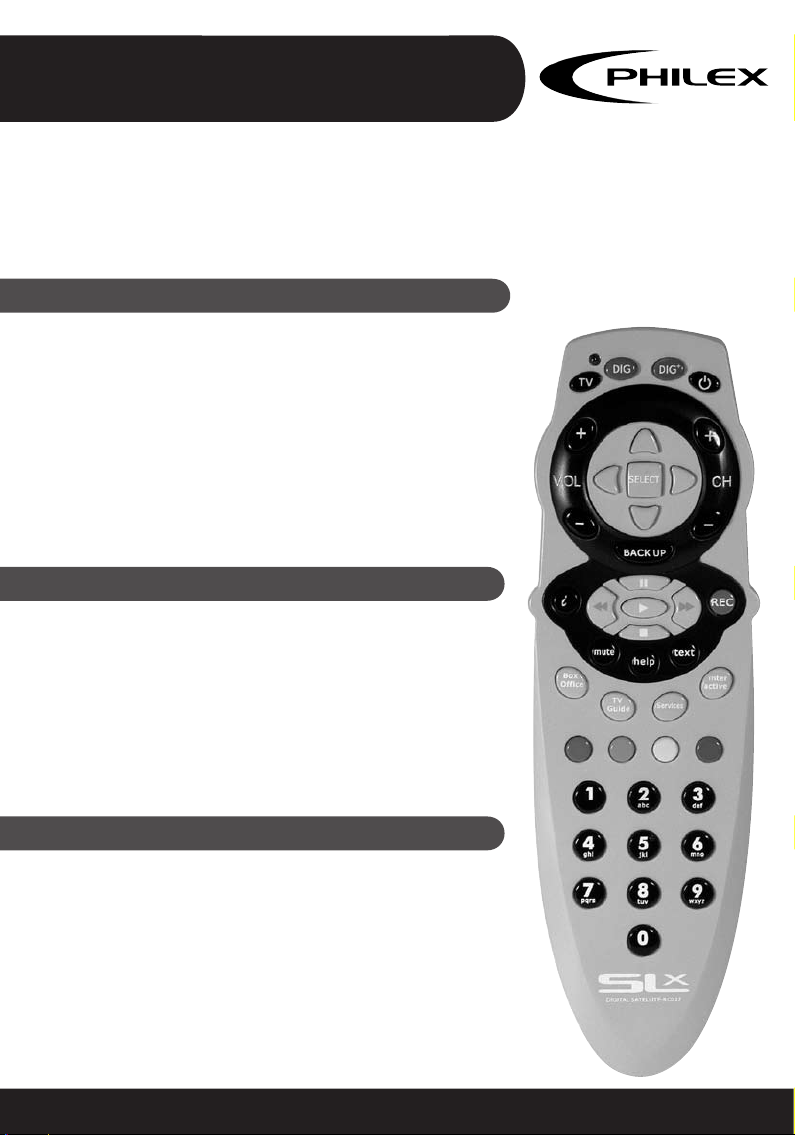
RC027 SLx Digital Satellite Remote
Universal Pre-programmed Remote Control
RC027
27834S+
USER GUIDE
Set up instructions . . . . . . . . . . . . . . . . . . . . . . . . . . . . . . . pages 2-5
Codes for televisions . . . . . . . . . . . . . . . . . . . . . . . . . . . . . pages 6-8
Introduction
The RC027 remote has been designed as a direct replacement for existing digital satellite receiver remote controls
(eg Sky™ and Sky+™)*. All functions are the same and the
layout mirrors that of original remotes to make life as easy
as possible for the user. The RC027 is fully preprogrammed
to operate all digital satellite receivers.The RC027 will also
operate the basic functions of many popular TVs, after the
correct code has been entered, see "How to set up your
RC027" (page 3).
Installing Batteries
Your RC027 requires 2 fresh AAA-size (LR03) batteries
(alkaline batteries recommended) :-
1. Remove the battery cover on the back of your RC027.
2. Insert the batteries ensuring that the polarity
corresponds with the markings in the battery
compartment.
3. Push the battery cover back in place.
Please Note
The TV code set-up procedure will cancel itself if no keys are
pressed for more than 10 seconds (in order to protect your
code against accidental re-programming, and to conserve
battery power). Therefore we advise you to read the
following instructions and to familiarise yourself with the
procedures, before attempting to program your RC027 to
operate TV functions.
Customer Care Line - Tel: 08457 573479 (UK only)
Page 2
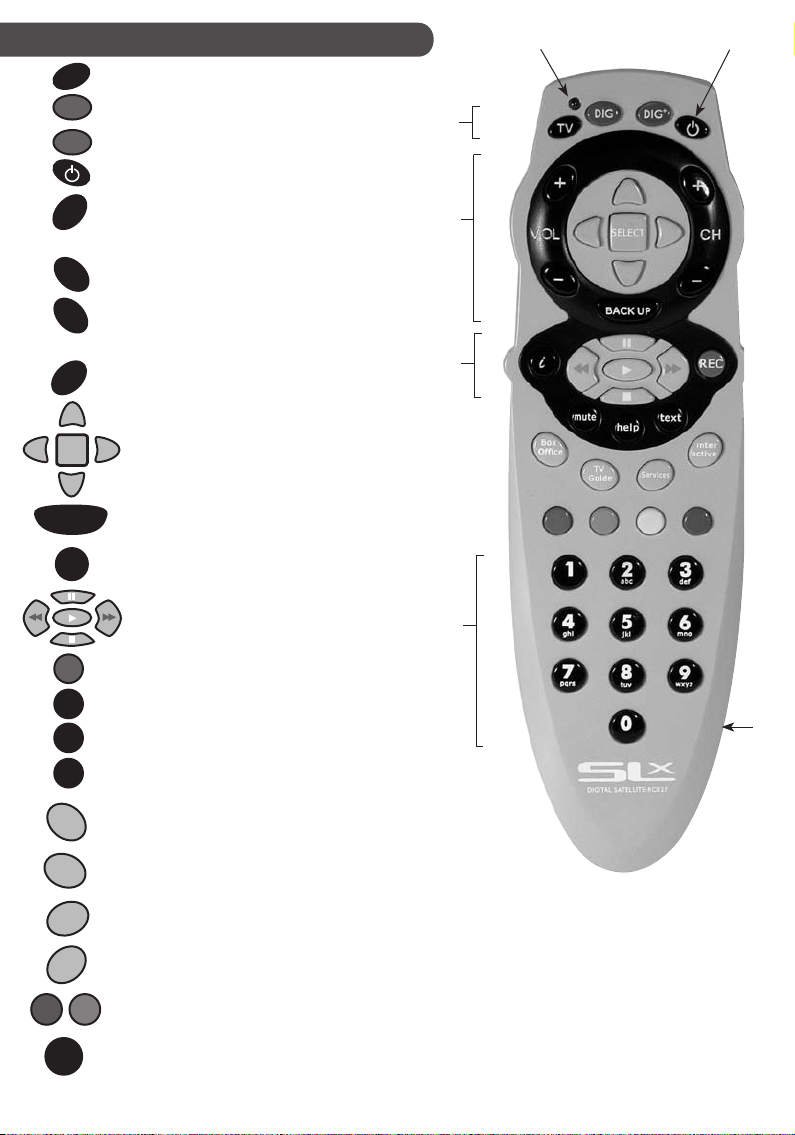
Function keys
1
2
TV
DIG
DIG
+
VOL
-
CH
-
SELECT
BACK UP
i
REC
Sets your RC027 to control your TV
+
Sets the RC027 to control your SKY™ Plus receiver
Sets the RC027 to control your SKY™ receiver
Turns your SKY™ receiver (or TV) on and off
Changes the TV volume
+
Changes the channel
Arrow buttons move the highlight around menu
screens to highlight the option you want
SELECT Chooses the option you have
highlighted or confirms your choice
Shows the previous screen
Shows information about the program
highlighted
Controls recording/playback on SKY™+ box
includes: Pause, Fast Forward, Play, Rewind
and Stop
Records to hard drive on SKY™+ box
7
6
5
4
mute
help
text
Box
Oce
TV
Guide
Services
Inter
active
2
abc
Turns the TV sound off/on
For help on using the Sky Guide
Switches to text mode
Shows the Box Office screen
Shows the TV Guide screen
Shows the customer Services screen
Shows the interactive Services screen
4x colour buttons used to select the
corresponding colour option on-screen
For selecting channel numbers or on-screen
options
2
3
1. Blue status indicator LED
2. Power on/off
3. Battery compartment
4. Number keypad
5. SKY™+ recording/playback keys
6. Screen navigation keys
7. Device Indicator keys
Page 3
How to set up your RC027
The RC027 has 3 Device Modes (TV, SAT & SAT+)
The TV section of your RC027 can be set-up either by entering the appropriate codes from the list of codes supplied
or by using either the Auto or Manual code search facility.
Instructions for all three methods follow.
TV Set up by auto code search
Probably the easiest way to set-up your RC027, especially if
there are a lot of codes listed for your particular brand, is by
Auto Code Search.
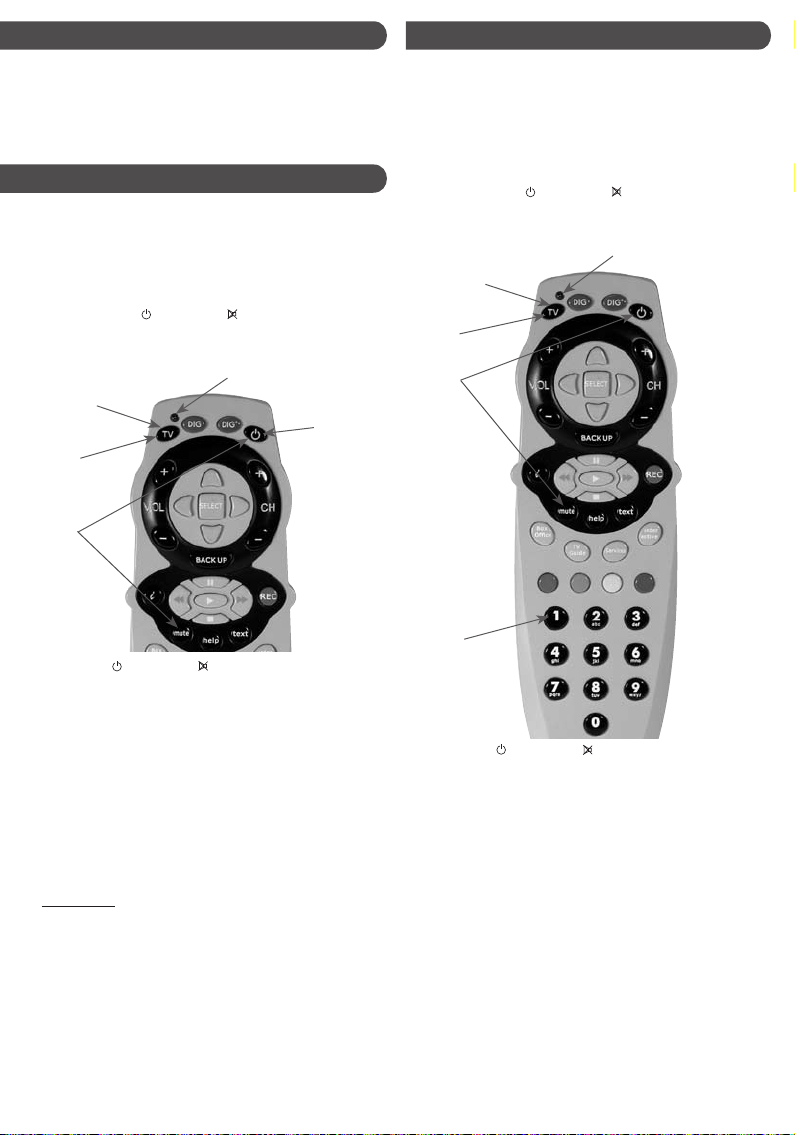
TV SETUP BY AUTO CODE SEARCH
1. Turn on your TV using your original handset, or the
TV set control.
2. Hold down both
RC027 simultaneously until the STATUS INDICATOR LED
lights up and stays blue (about 4 seconds).
TV Device
Indicator key
POWER and MUTE keys on your
Blue Status Indicator
Step 4
&
Step 8
Step 2
Step 6
TV Set up by manually entering code
1. Turn on your TV
2. Look up the brand name of your TV in the DEVICE CODE
List (See pages 6-8).
3. Look up the 3-digit Device Code next to the brand name
of your equipment. If there is more than one code listed
for your brand, start with the first code listed and
follow the instructions below:
4. Hold down both
RC027 simultaneously until the STATUS INDICATOR LED
lights up and stays blue (about 4 seconds).
TV Device
Indicator key
Step 6
Step 4
POWER and MUTE keys on your
Blue Status Indicator
3. Release the
INDICATOR should still be lit. If not repeat step 2.
4. Press the TV key once. The STATUS INDICATOR and the
DEVICE INDICATOR should now both be lit.
5. To search, aim your RC027 at your TV.
6. Hold down the power key for about 8 seconds until the
STATUS INDICATOR begins to flash.
7. The STATUS INDICATOR
remain unlit for 1 second, flash twice and remain unlit
for 1 second. The DEVICE INDICATOR
repeatedly.
8. When a suitable code is found the TV will switch off.
When the TV switches off the TV KEY
immediately to store the correct code (Please Note: if the
TV KEY
will continue).
9. Now press the POWER key. If the TV switches on the code
has been stored and you can check that other functions
work properly.
10. To stop the Auto Code Search at any time press any key
and the remote will go to Manual Code Search.
If you are unable to find a correct code or cannot store the
code fast enough try finding the code either using Manual
Code Search or by using Setup by Entering Device Code
POWER and MUTE keys The STATUS
will repeatedly flash twice then
key will also flash
must be pressed
is not pressed immediately the search
Step 7
5. Release the
INDICATOR LED should still be lit. If not repeat step 4.
6. Press the TV key once. The STATUS INDICATOR LED and the
DEVICE INDICATOR should now both be lit.
7. Use the number keys on your RC027 enter the 3-digit
Device Code. If you have entered a valid code, the
STATUS INDICATOR will flash once. If you have entered a
wrong code, the STATUS INDICATOR will flash twice.
8. Try the keys on your RC027 that correspond to similar keys
on your original remote control, especially those you use
most. (Note that the RC027 will exit the set-up
procedure if you do not press any keys on the RC027 for
more than 10 seconds). If your TV works
on all or most of the keys on your RC027, you have
entered a suitable Device Code. Go to step 11.
(Note: Your RC027 will only operate functions controlled
by your original remote nor are the supplied codes
guaranteed to operate all these functions)
TV Set up by manually entering code continued overleaf
POWER and MUTE keys. The STATUS
3
Page 4
9. If the Device Code does not work properly on your TV,
press the TV INDICATOR KEY once. The STATUS
INDICATOR LED will flash briefly, and remain lit. The TV
INDICATOR key should still be lit. (If either of the
indicators switch off whilst you are still programming
your RC027, you should start again from step 3.)
10. Repeat steps 7-9 with the other codes listed for your
brand of TV until your RC027 operates most or all of the
functions that correspond with the keys on your original
remote control.
11. Once you have found a suitable code, to store it, press
the TV INDICATOR key twice. The TV INDICATOR key will
flash twice and then go out as will the STATUS
INDICATOR LED.
12. If none of the TV codes listed for your brand of TV work
correctly, select the code that provides the best results.
Alternatively, try the Library Search method, which is
fully explained further on in these instructions.
If you cannot identify a suitable Device Code for your
equipment from the Device Code List and have been unable
to store a code when using Auto Code Search you may try our
library search method. (For many lesser known brands codes
may be present but not listed under that brand.) During the
search the selected DEVICE INDICATOR will flash at various
speeds. The entire search procedure may take several minutes
to complete. The following instructions use your television as
an example for set-up using the Manual Code Search method.
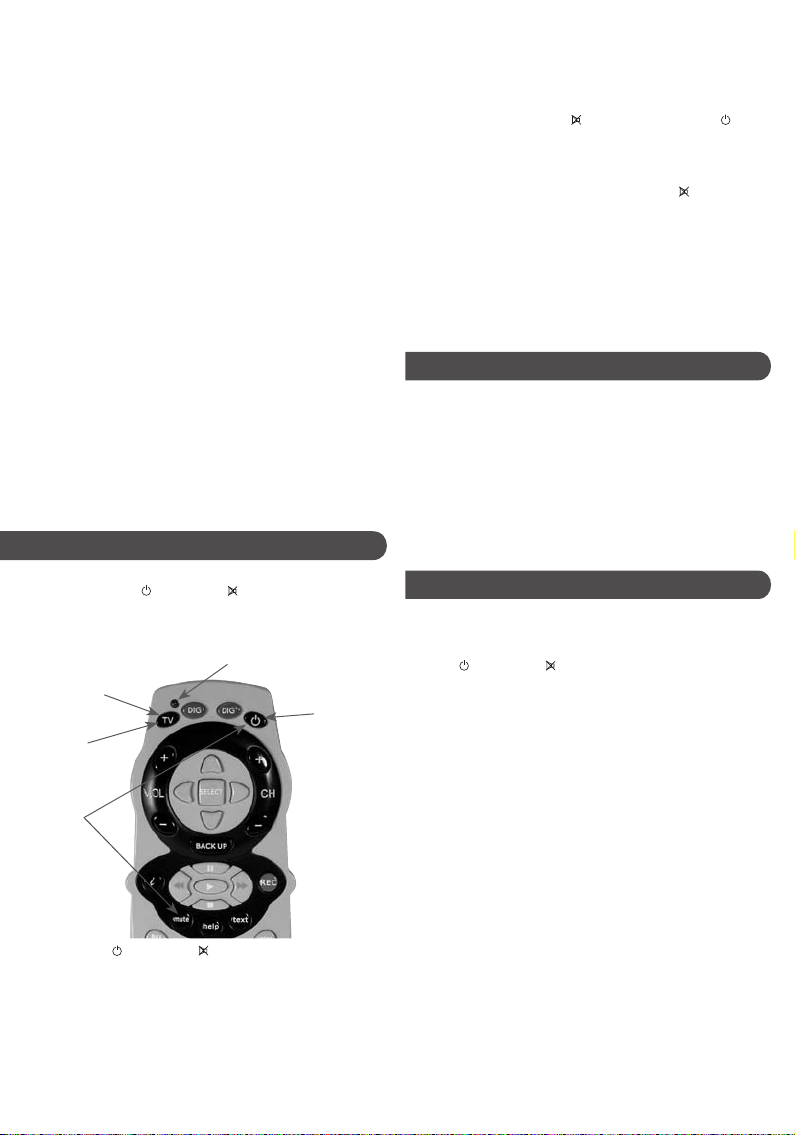
TV set up by library search
1. Turn on your TV
2. Hold down both
RC027 simultaneously until the STATUS INDICATOR LED
lights up and stays blue (about 4 seconds).
TV Device
Indicator key
Step 4
&
Step 8
Step 2
&
Step 7
3. Release the
INDICATOR should still be lit. If not repeat step 2.
4. Press the TV key once. The STATUS INDICATOR and the
DEVICE INDICATOR should now both be RED.
5. To search, aim your RC027 at your TV.
6. Press the POWER key repeatedly for 2 seconds ON and
two seconds OFF, until your TV goes into standby mode
(i.e. the TV switches OFF). Then continue with step 7.
If the TV INDICATOR key flashes twice and then goes out
POWER and MUTE keys on your
Blue Status Indicator
Step 6
POWER and MUTE keys The STATUS
before your TV goes into stanby mode you have reached
the end of the code library. Return to step 2 and repeat
library search one more time.
7. Try the number keypad to see if your device switches ON
again and the keys work correctly. If your device does
not switch ON, press the
Power key to repeat the code so that the TV comes ON.
Now try the number keypad. (NOTE: If you accidentally
skipped a code that turned your TV ON or OFF, you can
return to the skipped code by pressing the
8. If the code you have found does not work correctly,
make sure that the TV key and STATUS INDICATOR LED are
still lit, before you repeat steps 6 and 7 until you find a
better code. If the indicator lights have gone out, repeat
the set-up procedure from step 2.
9. Once you are happy with the code found, press the TV
key once to store the code. The STATUS INDICATOR LED
and TV key LEDs will turn off and set-up is complete.
Mute key and then the
Mute key.)
Operating the RC027
Once you have set up your RC027, it should operate similarly
to your original remote control and per form most or all of
the main functions. To operate, just aim it at your equipment,
press the appropriate DEVICE INDICATOR key and press the
required function key. The DEVICE INDICATOR flashes
during signal transmission to confirm that a function key is
in operation.
Please Note: The RC027 can only duplicate functions that are
on your original remote control. Any extra keys on the RC027
which are not on the original will not function.
TV code recall - 888
The RC027 has a special code which can be entered to find
the code that has been set for your TV. ( e.g. after Code Search
set ups)
1. Press
INDICATOR blue LED lights up and flashes 3 times.
2. Then press the TV key, STATUS INDICATOR LED
will light up Blue.
3. Key in Device Code Recall code 888.
• To find the first digit of your code, press 1 and then
count the number of times the STATUS INDICATOR LED
flashes blue.
• To find the second digit of your code, press 2 and then
count the number of times the STATUS INDICATOR LED
flashes blue.
• To find the third digit of your code, press 3 and then
count the number of times the STATUS INDICATOR LED
flashes blue.
[Note: If the STATUS INDICATOR LED does not flash at all the
digit is zero (duration between flashes is 1 sec.)]
E.G. Code=106, Number 1=1 flash, Number 2=no flash,
Number 3=6 flashes.
5. Press the TV Device key once to exit Device Code Recall.
(Note that the RC027 will exit the Recall procedure if no key is
pressed for 30 seconds)
4
POWER and MUTE keys together until STATUS
& TV key
Page 5
Recording device codes
It is recommended that you record your device code in
case it is lost from storage when the batteries run out or are
changed.
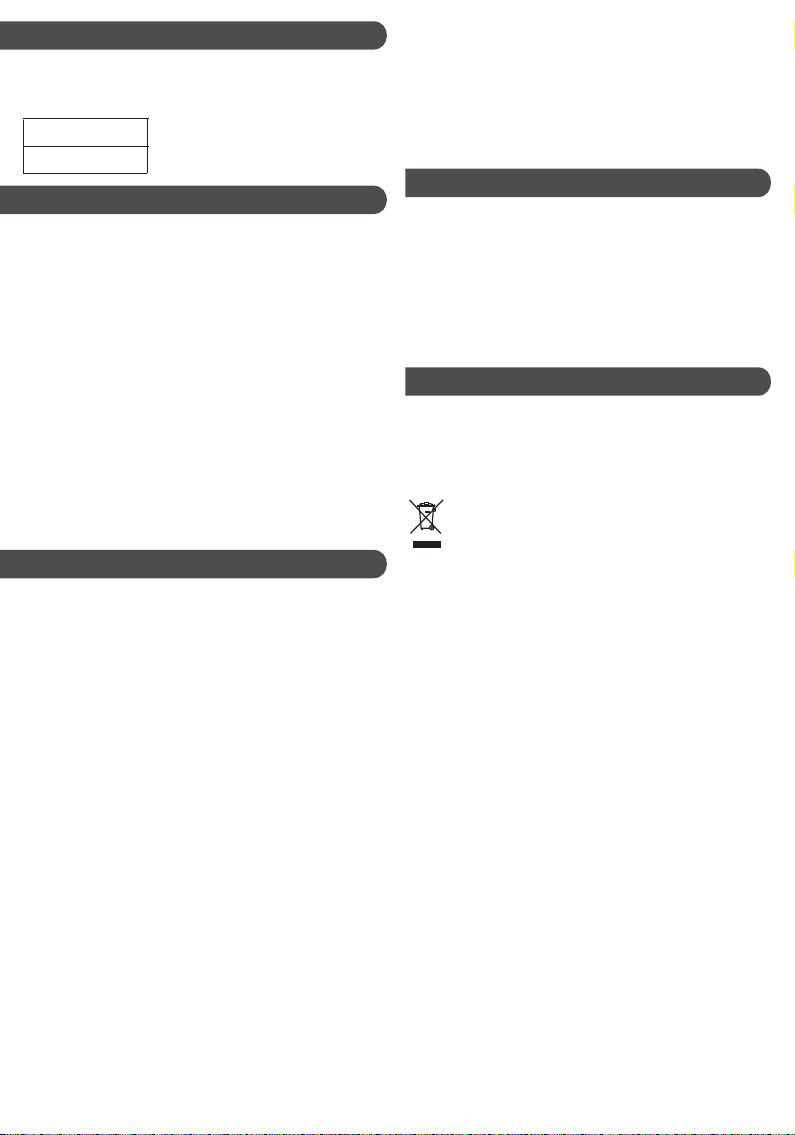
TV DEVICE CODE
Maintenance
LOW BATTERY LEVEL
If the indicator flashes twice slowly after pressing a key
function, the battery level is low and you will need to fit new
batteries. If the batteries are removed, your RC027 will retain
its memory for approximately 10 minutes only.
• Do not use old and new batteries together as old
batteries tend to leak.
• We do not recommend the use of rechargeable batteries.
• Please follow manufacturers instructions when disposing
of used batteries
• Do not expose the RC027 to dust, strong sunlight,
humidity, high temperature or mechanical shock.
• Do not use corrosive or abrasive cleansers on your RC027.
• Keep the unit dust free by wiping it with a soft, dry cloth.
• Do not disassemble your RC027, it contains no user
serviceable parts.
Frequently asked questions
Q. I am unable to program or operate my RC027, but the
indicator lights on my RC027 operate correctly.
A. Check your A/V device. If the device’s mains switch
is turned off, your RC027 can not operate your device.
A. Check if the batteries are low and replace the batteries.
A. If several TV Codes are listed under the brand
name of your A/V device, try each code one by one
until most or all of the keys work correctly.
Q. The STATUS INDICATOR light does not stay ON when
entering set up mode.
A. Make sure both the POWER and MUTE buttons are
pressed simultaneously
Q. My A/V equipment responds only to some commands.
A. You may have selected a code for which only some
commands work correctly. Try the other codes listed
for your brand.
A. Try the Library Search if you are still unsuccessful.
Q. Some of my equipment will not work with any of the
codes listed.
A. Try the Library Search function as some more recent
codes may be available on the RC027 but have not been
listed yet or have not been listed under all applicable
brands.
Disclaimer: Whilst we have tried to supply a comprehensive
library of codes we cannot guarantee that your RC027 will be
fully compatible with all equipment. Some brands, models or
functions may not be available in the code library due to
differences in operation to your original remote or where the
code has not yet been added to the library.
The manufacturer cannot accept any liabilities resulting from
incorrect use of this product.
Specifications
Operating system:- Pre-programmed infra-red remote control
system.
Compatibility:- Operates most brands of infra-red remote
controlled TVs and digital satellite receivers
Power requirement:- 2 x AAA-size alkaline batteries.
Effective range:- 7.65M (25 feet), +/- 25 degrees.
Alkaline battery life:- Normal operation 6 months.
Dimensions:- 199 (L) x 56 (W ) x 24 (H) mm.
Weight without batteries:- 105g
Technical support
Customer Care Line - Tel: 08457 573 479 (UK only)
Technical Support Website: http://technical.philex.com
Technical Enquiries: [email protected]
Waste electrical and electronic products must
not be disposed of with household waste.
Please recycle where facilities exist.
Check with your Local Authority or Retailer for
recycling advice.
5
Page 6
BRAND CODE BRAND CODE BRAND CODE BRAND CODE
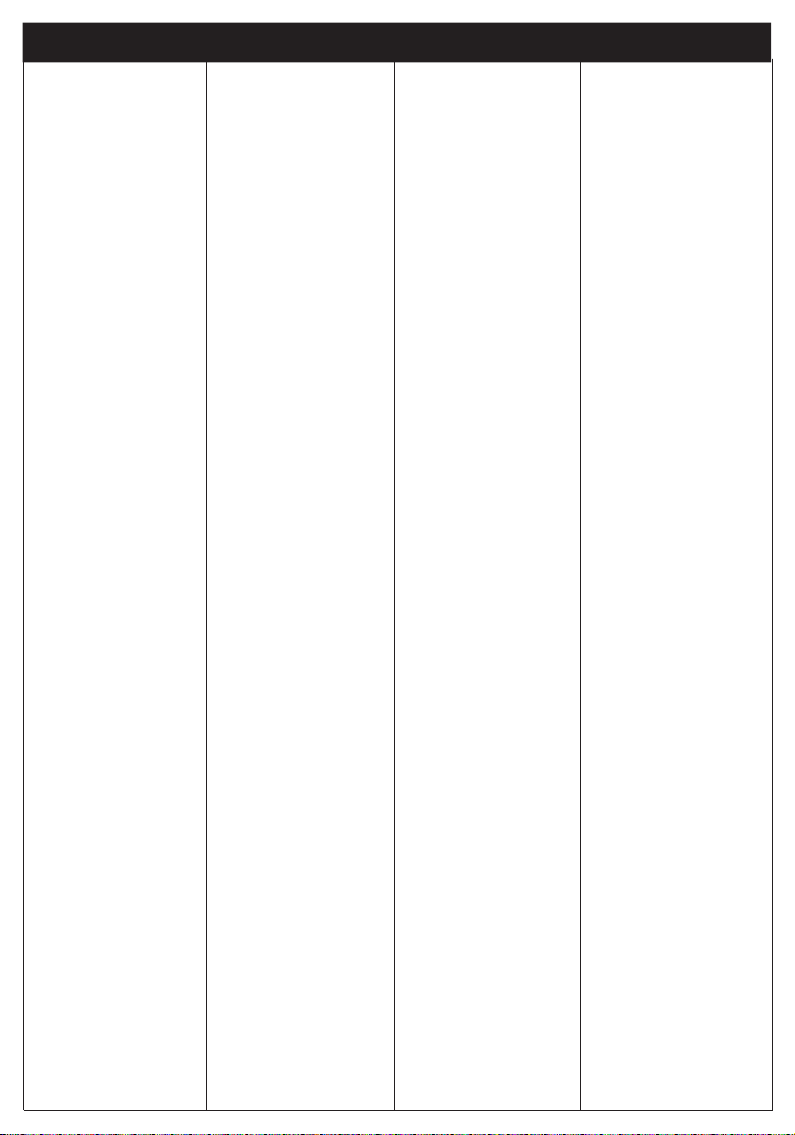
TV CODES
ACTION 049 063 086
090 137 139
196
ACURA 017
ADMIRAL 024 033 196
083 101 102
134 146
ADVENTURA 144
ADYSON 063 196
AGAZI 134
AKAI 010 012 013
025 028 029
033 039 047
063 086 114
117 121 017
132 139 208
114 145 196
AKIBA 117
AKURA 196 117 121
134
ALBA 059 017 083
117 121 067
139 196 266
164
ALLORGAN 062
ALLSTAR 196
AMBASSADOR 145
AMERICAN HIGH 137
AMSTRAD 058 255 031
ANGA 145
ANGLO 139
ANITECH 063 196 134
139
ANSONIC 139 087
AOC 063 196
ARC EN CIEL 090 094
ARISTONA 110 159 187
196
ARTHUR MARTIN 152 126 132
135
ASA 104 101 078
102
ASBERG 176
ASORA 139
ASUKA 117 134 121
ATLANTIC 196
ATORO 139
AUDIO TECHNICA 176
AUDIOSONIC 090 117 196
134
AUDIOVOX 196
AUTOVOX 014 101 078
BAIRD 208
BANG & OLUFSEN 101
BASIC LINE 117 121 139
196
BAUR 013 014 025
029
033 034 045
244 196 139
144 147 151
153
BEC 025 049 086
196
BECRESE 025 033 045
196 047 049
057 063 144
090 104 114
BEKO 007 289 174
196 220 278
277 246
BELL&HOWELL 042 146 196
BENCHMARKBEAUMARK 063 137 139
196
BESTAR 196
BLACKSTRIPE 042 045 177
114 137
BLAUPUNKT 244
BLUE SKY 117 196
BPL 118
BRANDT ELECTRON 090 094 096
249
BRINKMANN 083
BRIONVEGA 102
BRIORRYEGA 101 196
BROKSONIC 033 063 114
144 145
BROKWOOD 033 063 114
144 145
BROTHER 134
BRUNS 029 102 101
BSR 003 062
BTC 117
BUSH 003 025 035
059 196 065
114 117 121
061 142 067
118 266 017
115 164
CAMPLE 033 063 114
144 145
CANDLE 063
CAPEHART 086 114 196
CAPSONIC 134
CARREFOUR 196
CDMARCY'S 114
CENTURION 196
CENTURY 101 102 188
CGE 188 083
CIE 058 143
CIHAN 109
CIMLINE 059 139
CIRCUIT CITY 033 063 114
144 145
CITIZEN 196 063 137
CITY 139
CLATRONIC 139 087 117
COLORTYME 137 196
COMTEL 109
CONCORDE 139
CONDOR 154 196 139
CONIC 049 063 114
196
CONTEC 107 111 114
139
CONTINENTAL EDIS. 090 094 096
CORONADO 063
COSMEL 139
CRAIG 196
CROSLEY 049 196 144
114 101 102
CROWN 033 063 017
196 146 139
087
CS ELECTRONICS 117
CURTIS MATHES 042 196 063
114 137
DAEWOO 063 160 139
143 147 196
202 274 017
115 073 082
DAINICHI 117
DANSAI 063
DAYTRON 045 063 139
DE GRAAF 021 033
DECCA 088 108 109
065 196
DESMET 196
DIXI 139 196
DORIC 103
DTS 139
DUAL 014 093 117
DUMONT 033 063 145
078 144 087
101 102 114
DUMONT-FINLUX 018
DYNATECH 033 063 114
145 144
EATON 137
ECR 114
ELBIT 109 196
ELCIT 101 087
ELECTRATUNE 063
ELECTROBAND 144
ELECTROHOME 033 042 049
063 114 144
145
ELECTRONICA 237
ELEKTA 134
ELEKTRONSKA 196
ELIN 196 104 154
ELITE 137 042 196
063 114 117
ELMAN 087
ELTA 139
EMERSON 033 063 102
114 144 145
EON 114 137
ERRES 110 196
ETRON 041 139
EURO-FEEL 134
EUROMAN 196 134
EUROPHON 087 196
FENNER 139
FERGUSON 071 078 085
097 285 174
269 251 215
244 249
FIDELITY 014
FINLANDIA 023
FINLUX 003 018 046
043 104 196
078 040 088
101
6
FIRST LINE 062 196 139
FISHER 014 042 045
188 113 114
101 111
FLINT 196
FORMENTI-PHOENIX 101 196
FORTRESS 063 101 111
114 146
FRONTECH 025 035 064
139 134
FUJITSU 033 063 086
114 145 144
FUNAI 033 062 063
114 134 144
145 066
GALAXIS 139 083
GBC 024 139
GEC 009 020 049
088
GELOSO 025 139 117
GENEXXA 117 121 196
GOLDHAND 139
GOLDSTAR 003 035 049
063 026 017
086 090 119
134 137 139
154 196
GOODMANS 067 139 143
154 196 266
115 129 017
164
GORENJE 188 122
GPM 117
GRANDIN 196 117 139
GRAETZ 023 025 027
029 135 152
158 161 197
GRANADA 033 047 086
103 110 067
070 196
GRUNDIG 033 092 078
081 195 244
261 120
HALIFAX 134
HALLMARK 033 063 104
114
144 145
HANSEATIC 014 139 025
062 196
HANTAREX 139
HARLEY DAVIDSON 033 063 114
137 144 145
HARRAD 033 063 114
144 145
HARVARD 033 063 114
144 145
HCM 139 117 134
HEATHKIT 144 196
HEMMERMANN 014
HIFIVOX 090 094
HINARI 041 114 117
121 132 139
142 154 196
208 067 017
HISAWA 117
Page 7
BRAND CODE BRAND CODE BRAND CODE BRAND CODE
DEVICE CODES
HIT 102
HITACHI 004 005 009
012 018 020
021 023 025
033 034 045
276 047 049
050 051 052
053 054 055
056 057 063
264 043 086
090 094 095
104 114 060
125 126 142
144 175 180
196 205 217
222 223 225
067 252 260
HORIZONT 196
HORNYPHON 196
HOSHAI 117
HUSPI ELEKTRONIK 083
HYPER 139
HYPSON 196 134
ICE 117 196 139
134
IMA 033 063 114
144 145
IMPERIAL 196 025 188
083 001
INGELEN 135 152 158
161 197
INGERSOL 139
INNO HIT 216 086 117
196 139
INTERBUY 134 139
INTERFUNK 009 015 016
025 028 029
030 033 041
068 158 090
101 102 110
151 152 153
INTERVISION 134 087 117
IRRADIO 196 139 117
IST 117 196
ISUKAI 117 139
ITS 117 139
ITT 024 025 033
045 218 017
ITT-NOKIA 135 152 158
161 171 197
208
ITV 017 077
JASON 088
JBL 196
JCB 144
JET POINT 137
JUMBOTRONIC 196
JVC 114 121 067
142 169 176
193 196
KAIDO 035
KAISUI 117 196 121
139
KAPSCH 009 015 016
025 033
KARCHER 216 196
KATHREIN 122
KENDO 025 059 087
154 196
KENWOOD 063
KLH 033 063 086
114 144 145
KLOSS 137
KOLSTER 196
KONKA 117
KORPEL 196
KORTING 101
KRIESLER 110 159 187
KTV 033 063 114
145 144
KUASHO 063 196
KUBA ELECTR. 014 033
LENCO 134 139 143
196
LENOIR 139
LEYCO 062 086 134
196
LG 003 035 049
063 124 119
086 090 026
134 137 139
154 196 077
017
LIFETEC 134 139
LINTON 063 111 114
146
LLOYD'S 033 063 114
144 145
LOEWE 101 102 153
196 089 091
LOGIK 107 108
LUMA 024 132 196
LUXOR 004 013 023
025 028 029
033 034 047
208 068 086
126 132 171
158
LXI 042 146 177
196
M. ELECTRONIC 139 196 090
104 174
MACYS 063 114
MAGNADYNE 014 102 087
101
MAGNAFON 087
MAGNASONIC 042 063 139
146 154 177
196
MAGNAVOX 049 114 196
MANDOR 134
MANESTH 134 059 196
MARK 196
MATSUI 065 014 035
058 059 085
108 067 017
066 139 031
MATSUI 142 154 196
123 081 228
231 259 261
262 001
MAVA 063
MCMICHAEL 049
MEDIATOR 196
MEGATRON 047
MEMOREX 042 134 139
145
MEMPHIS 086 139
METZ 244 102 101
MGA 145
MIDLAND 063
MINERVA 244 078
MINOKA 196
MITSUBISHI 011 091 101
102 103 074
113 114 122
072 070 142
MITSUBISHI 145 151 153
163 189 196
221 232 244
257 279 280
MITSUBISHI 281 282 092
067 131
MONITOR 137
MOTOROLA 146 196
MRELLI 101
MTC 033 063 137
MULTISTANDARD 087
MULTITECH 025 033 035
063 087 114
188 145 139
144
MURPHY 266 103
NAD 114 177
NAONIS 024
NATIONAL 155 196
NEC 114 137
NECKERMANN 025 033 034
196 188 101
102 154 132
144 147 151
153
NEI 117 196
NEW WORLD 117
NEWTECH 139 196
NIKKAI 196 063 086
117 134 121
NIKKO 154
NISSAN 137
NOBLIKO 078
NOGAMATIC 090 094
NOKIA 004 009 012
013 015 016
022 023 024
025 027 028
029 030 033
036 038 039
041 042 045
068 110 134
135 137 284
152 271 212
158 197 161
219
NORDMENDE 015 090 094
095 101 174
7
185 215 217
249 061
NOVA 800
NOVABEAM 196
OCEANIC 016 023 025
029 033 036
042 062
ONWA 117
OPERA 196
OPTANKA 146
ORBIT 196
ORION 014 123 033
058 059 062
063 107 108
114 130 139
ORION 144 145 196
201 017 031
066
OSAKI 086 117
OSUME 086 111
OTTO VERSAND 003 014 174
025 029 033
034 035 045
059 062 244
154 196 090
114 186 139
144 146 147
151 153
OVP 196
P.T. ACTRON 109
PACIFIC 236 237 238
266
PALLADIUM 025 196 101
151
PANAMA 139 134
PANASONIC 015 025 037
075 116 136
148 150 155
186 196 198
290 291 292
293 294 092
296 128 149
PATHE MARCONI 090 094
PAUSA 139
PCE/PEC 042 045 177
063 114 137
045
PENNEY 137 063
PERFEKT 196
PERFORMANCE 107 114 144
PHILCO 049 196 083
188 101 102
114
PHILIPS 049 115 086
095 098 101
109 110 114
144 147 151
154 159 187
196 216 079
263 077
PHOENIX 101 196
PHONOLA 101 110 159
187 196
PILOT 137
PIONEER 032 090 095
Page 8
BRAND CODE BRAND CODE BRAND CODE BRAND CODE
DEVICE CODES
PIONEER 217 196
PLANTRON 134 196
POPPY 139
PORTLAND 063 144
PRANDONI-PRINCE 024 025
PRIMA 042 196 063
114 137 139
PRINZ 086
PROELCO 196
PROFEX 035 139
PROFILO 164
PROFITRONIC 154 196
PROLINE 164
PROSCAN 137
PROTECH 025 087 196
134
PROTECH 139
PROTON 063 139
PROVISION 154
PULSER 049 063 086
090 137 139
196
PYE 110 159 187
265
PYMI 139
QUELLE 003 014 025
029 030 035
045 058 059
062 063 114
244 147 196
186 078 144
139 154 153
090 152 151
107 111 113
QUESTAR 114
R.LINE 196
RADIALVA 090
RADIOLA 110 159 187
196
RADIOMARELLI 103 101
RADIOSHACK 042 063 146
RADIOTONE 134 139 154
196
RADIX 045
RANK 003 025 035
059 266 142
114 117 121
196
RCA 137
REALISTIC 042
REDIFFUSION 103
REDIFUSION 103
REVOX 196
REX 025 249 093
RFT 102 101
RICE CLUB 137
RMB 063
ROADSTAR 117 134 139
017
RUNCO 137
SABA 009 025 033
041 090 094
095 096 101
249 132 174
185 217
SAISHO 058 059 108
031 017 196
SAKIO 134
SALORA 004 208 013
022 023 025
028 029 033
034 042 152
SALORA 171 086 126
132 135
SAMBERS 087
SAMPO 063
SAMSUNG 064 106 162
086 140 134
137 154 188
195 196 206
216 017 080
SAMSUX 063
SANSUI 107 137 196
SANYO 042 113 044
045 069 046
043 086 088
107 111 067
114 197 208
142 188
SASO 090
SBR 110 196
SCHAUB LORENTZ 023 025 135
152 158 161
197
SCHNEIDER 014 041 159
154 141 093
110 117
196 134 154
212 187
SCOTT 033 063 114
144 145
SEARS 042 177
SEG 063 087 114
117 139 134
SEI-SINUDYNE 014 024 025
058 059 062
087 101 102
144 151 196
SELECO 024 067 093
113 249
SEMUA 063
SENCORA 139
SENTURA 041 117
SHARP 063 111 113
114 142 146
067 214 002
256 156 069
SHINTOM 144 154
SHORAI 062
SIAREM 087 101 102
SIEMENS 021 063 244
111 196
SIERA 110 159 187
SIERRA 196
SIGMAX 137
SIGNATURE 144
SILVER 114 117
SINGER 087 101 102
SINOTEC 154
SKANTIC 025
SKY 297
SNYDER 196
SOLAVOX 041
SONITRON 045
SONOKO 196 134 139
SONOLOR 016
SONTEC 196
SONY 112 107 113
114 017 076
144 069 067
270
SOUND&VISION 087 117
SOUNDESIGN 033 063 114
137 144 145
SPECTRA 143
SPECTRICIAN 063 196
SR2000 042 177
STANDARD 139 117
STERN 025
SUNKAI 059 062 117
SUNSTAR 139
SUNWOOD 196
SUPREME 144
SUPERTECH 014 139
SUTRON 139
SYLVANIA 111 196
SYMPHONIC 033 063 114
144 145
TADISTAR 154
TANDY 086 117 146
121
TASHIKO 035 049 114
142
TATUNG 048 057 086
107 109 065
283 275 196
253 273
TEC 143 139
TECHLINE 087
TECHNICS 155 196
TECHNIMAGEN 236
TECHWOOD 137 144
TECNISON 154
TEKNIKA 063 137 145
TEKON 137 139
TELEAVIA 090 094 099
TELECOM 154
TELEFUNKEN 090 145 174
217 249
TELETECH 139
TELETON 025 033
TELIVA 090
TENSAI 030 196 062
066 104 117
017 046 139
154
TENSON 139
TESLA 196
THOMAS 049 063 086
090 137 139
144 196
THOMSON 006 100 033
090 094 095
096 099 174
185 217 229
8
233 249 073
092
THORN 020 028 029
030
041 044 045
196 049 054
070 046 174
088 090 097
107 113 114
153 138 144
THORN-FERGUSON 071 078
TMK 137
TOKAI 086 196
TOKYO 137
TOSHIBA 042 045 287
157 085 114
127 137 138
067 177 288
286
TOSONIC 137
TOTEVISION 063
TOWADA 025 087
TRILUX 196
TRISTAR 117
TRIUMPH 058
UHER 078 196 087
ULTRAVOX 086 087 101
102 132
UNIMOR 196
UNIVERSUM 018 134 244
196 104
UNIVOX 102
VECTOR/VICTOR 176
VESTEL 196 238 266
105 119
VEXA 139 196
VIDEOLOGIQUE 117
VIDEOTON 004 095 099
196
VISION 196
VOXSON 024 196 101
102
WALTHAM 004 025 099
WARDS 176 196
WATSON 244 117 139
196
WATT RADIO 014 087
WEGA 101 114
WELTBLICK 196
WHITE
WESTINGHOUSE 042
WORLDTECH 143
YOKO 035 196 117
143 134 139
YORK 045 196
YORX 117
ZANUSSI 024
ZENITH 144 196
 Loading...