

Page 1
Page 2
Page 3
Page 4
Page 5
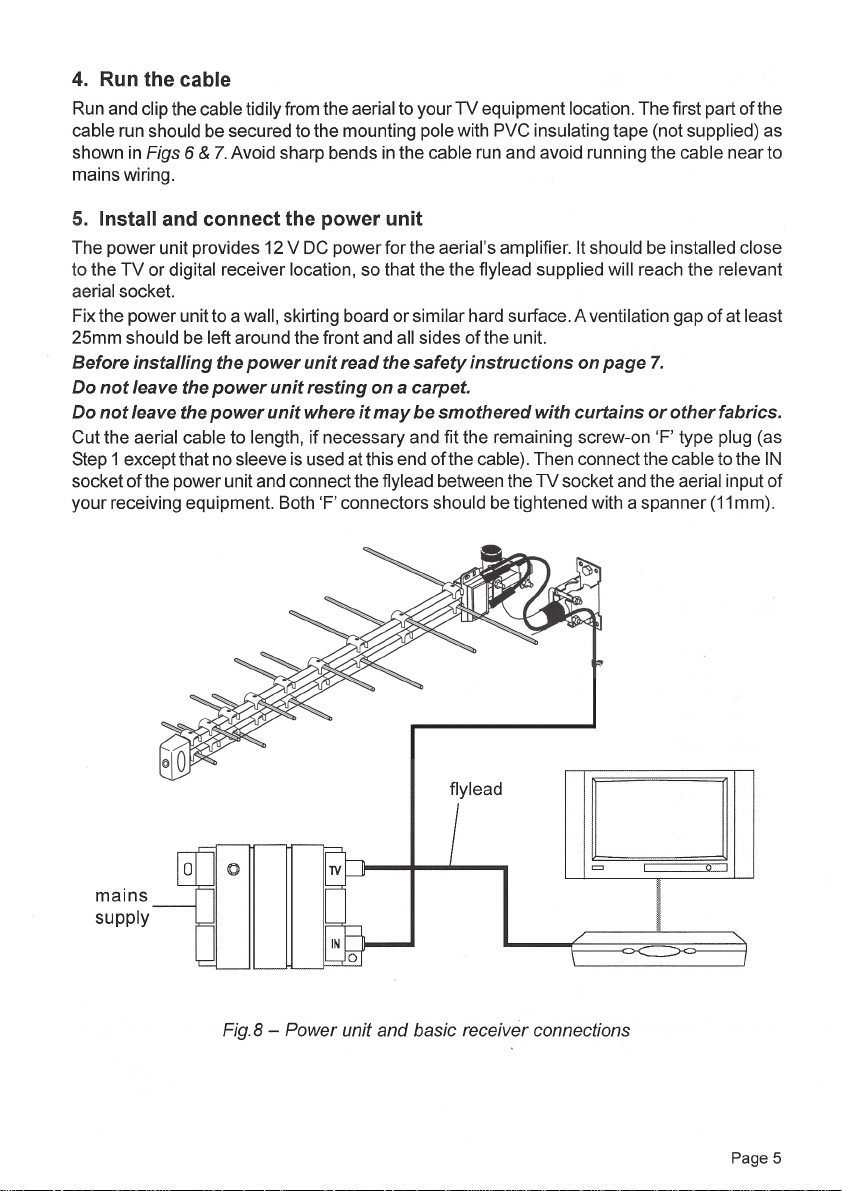
(power unit not included in package)
optional unit
Page 6

6. Testing and adjustment
Plug the power unit’s supply lead into a mains socket and switch on. Your ‘Megaboost’ aerial
system should now be working. Check reception on all analogue and digital channels.
Final adjustment to the aerial pointing can now be made. Most digital receivers have a signal
strength and quality display screen and this can be used with the aid of a helper, to point the
aerial for best reception. On completion, fully tighten the nuts on the aerial mast clamp and
ensure that all other fi xings are secure.
RECEPTION HINTS AND TROUBLESHOOTING
See also the recommendations for the aerial mounting position in Step 2 of the installation
procedure.
If it is not possible to get satisfactory reception on all channels, try moving the aerial to a
different part of the building.
Height is usually the single greatest factor affecting the strength of signal received by an
aerial.
Some areas are covered by two or more transmitters. Experiment to fi nd which gives you
best reception.
Digital reception can be affected by interference from sparking switches and thermostats
etc. To eliminate this mount the aerial outdoors and always use the cable supplied, or a
cable of equivalent quality. If a wall outlet is used it should be fully screened.
Alternative power unit location and signal distribution
The power unit can be installed at any point in the cable run between the aerial and the
receiver, but no other system components should be connected between the power unit
and the aerial. If you wish to distribute the aerial signal to more than one receiver, it is
convenient to install the power unit in the loft. Then use a 2-, 3- or 4-way passive splitter
after the power unit to feed up to four receiver locations. Unless very long cable runs are
involved, do not use distribution amplifi ers (boosters) with the ‘Megaboost’ (excessive
system gain will lead to signal overload problems).
Reception Advice Services
BBC Reception Advice 08709 100123
e-mail: [email protected]
Website: http://www.bbc.co.uk/reception/
Ofcom Engineering information 01962 848647
Website: http://www.ofcom.org.uk/static/reception_advice/index.asp
Page 6
Page 7

Power Unit
General Safety Precautions
TO PREVENT OVERHEATING
The recommended clearances and other precautions given in the installation section of these
instructions must be observed to prevent overheating. In addition, the unit should not be fi xed
where it is likely to become smothered by curtains, or other fabrics, etc., or by thermal insulation
materials in a roof space or similar building void. The unit should not be left resting on a carpet.
OTHER PRECAUTIONS
This appliance is not waterproof. It is for indoor use only and must not be fi xed where it could
be exposed to dripping or splashing water. Objects containing liquids should not be placed on
or near the appliance.
To prevent risk of fi re, no object with a naked fl ame should be placed on or near the appliance,
or the wiring to it.
FITTED MAINS PLUG
This appliance is supplied with a standard fused plug already fi tted. If this is not suitable, refer to
the instructions below. In the unlikely event that you need to change the fuse in this plug, a 3Amp
fuse to 851362 carrying the ASTA or BSI approval mark must be used. Always re-fi t the plastic
fuse carrier when replacing the fuse.
CHANGING THE PLUG
If the fi tted mains plug is not suitable for the socket outlets in use, it should be cut off and an
appropriate new plug fi tted.
Wiring the New Plug: Any instructions supplied with the new plug should be followed (these
may state how much insulation to remove from the wires in the mains cord). The brown wire must
be connected to the live (L) terminal of the plug and the blue wire to the neutral (N) terminal.
Neither wire should be connected to the earth (E) terminal of a 3-pin plug (this appliance does not
require an earth connection). Ensure that the cord grip in the plug is correctly used and clamps
the sheath of the cord fi rmly.
Fuse Rating: If the new plug is a fused type, the fuse fi tted should be rated at not more than
3Amp.
Caution: The old plug should be destroyed promptly since it would be dangerous if plugged into
a live socket.
Contents of Kit
Amplifi ed aerial with mast clamp
Mounting pole (mast) and bracket
High quality coaxial down lead cable - 10 metres
Type-F coaxial plugs, screw-on type - 2
Mains power unit and F connector to coax plug fl ylead optional
Sundry fi ttings and fi xings pack
Instruction leafl et
Page 7
Page 8
Technical data
Antenna
Operating freq. range 470.. 862MHz
Antenna gain 6 dBd approx.
Amplifi er noise fi gure < 2dB
Amplifi er gain 16dB
Output connector Type-F IEC 60169-24
Amp. power requirement 5 .. 12V DC at 25mA approx. Limits 4.8.. 13V
Power unit (unit optional)
Signal frequency range 44.. 862MHz
DC output 12V DC at 100 mA max. Voltage tolerance ± 5 %
Short-circuit protection Indefi nite, with warning
Signal insertion loss 0.5dB
Mains power requirement 230V AC 50Hz at < 3 W Fitted mains plug to BS 1363
Power indicator Green LED - turns red if output is shorted
Operating temp. range 0.. 40˚C
Guarantee
Your Megaboost aerial is guaranteed against faulty components or poor
workmanship for a period of one year from the date of supply.
This guarantee does not cover accidental or malicious damage (including damage
from natural causes such as lightning) and will be invalidated by installation or use
other than in accordance with these instructions, repair or attempted repair other than
by the manufacturer, or opening or removal of the case.
This does not affect your statutory rights as a consumer.
Philex Electronic Limited reserves the right to modify their designs or specifi cations, in
the light of future developments, without prior notice. Performance fi gures quoted are
typical and subject to normal manufacturing tolerances.
Waste electrical and electronic products must not be disposed
of with household waste.
Please recycle where facilities exist.
Check with your Local Authority or Retailer for recycling advice.
For further information contact:
Customer Careline (UK Local Rate): 08457 573479
•
Technical Support website: http://technical.philex.com
•
Technical Support e-mail: [email protected]
•
Page 8
 Loading...