

Page 1
抽濕機
使用說明書
Dehumidifier
User Manual
型號 Model:
PDY25W / PDY25P / PDY25S
請仔細閱讀並妥善保存此說明書
Read and save these instructions
Page 2
2
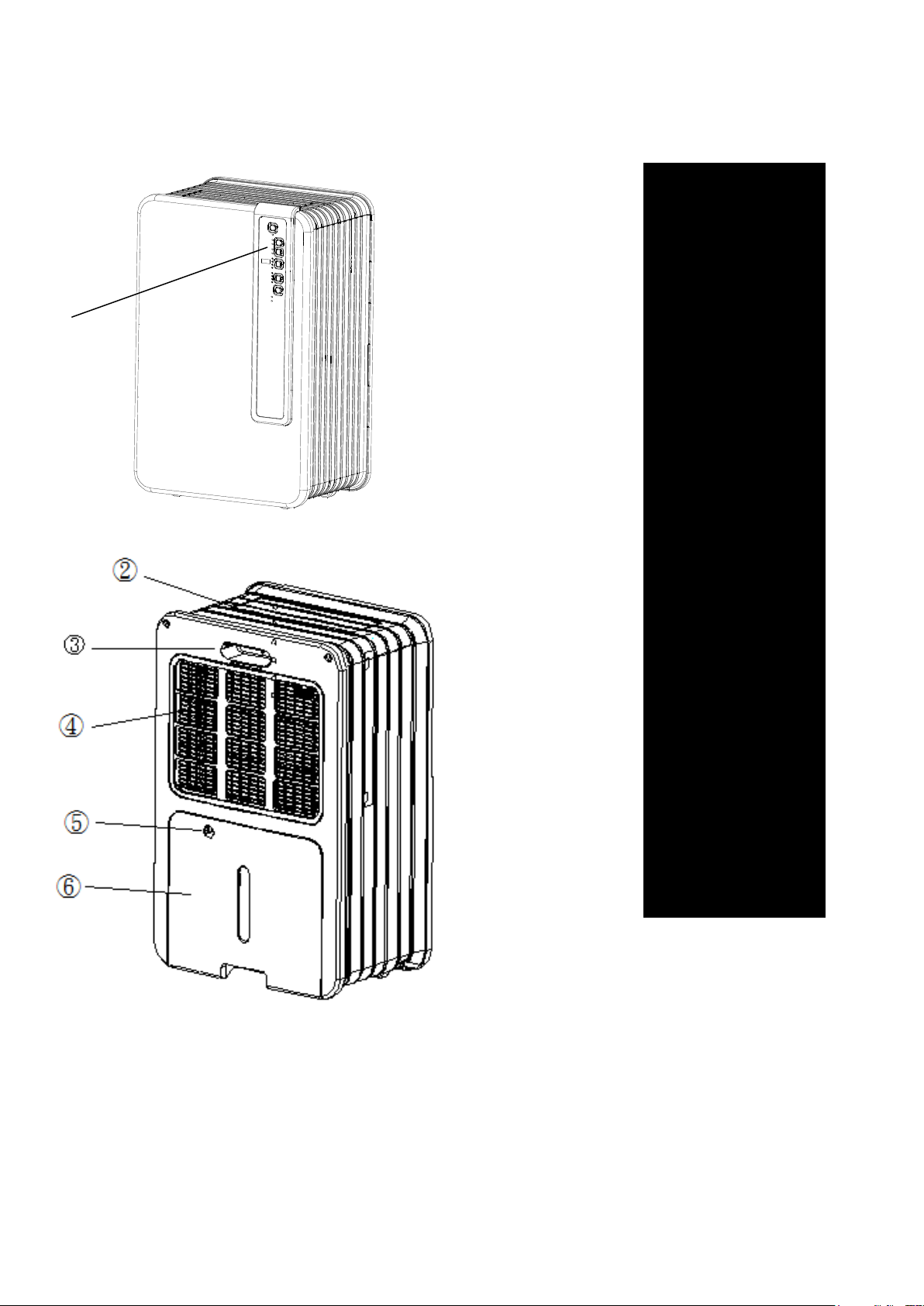
主要部件:
➀ 控制面板
➁ 乾燥空氣出口
➂ 提手
➃ 濾網
➄ 排水管出口
➅ 抽取式水箱
①
Page 3

3
重要安全注意事項
注意
您的除濕機必須直立放置至少兩小時後使用。
提示
該設備務必要連接地線。如果電源沒有連接地線,請不要連接機器。機器接通電源時,務必保證
插頭容易接近。認證閱讀這些說明並嚴格遵守。
注意!
不要使用有損壞的電源線、插頭、機殼或控制面板。請勿捲曲電源線,不要接觸鋒利的器械。
不遵守用戶說明書可能導致該機器的保修無效。
設備的安裝一定要遵守當地的規章,法律和準則。該設備僅適合放置在乾燥地方和室內使用。使用該設
備務必要連接地線和 220-240V / 50 Hz 電壓。
概要
為了使除濕機達到最佳性能,請勿將抽濕機靠近散熱器附近和其它熱源。
為了達到最大功效,請關閉室內所有的窗戶。
抽濕機的除濕能力取決於室內的溫度和濕度。在較低溫度下,只能去除很少潮氣。
務必使網狀濾網長期保持清潔,以免不必要的功率消耗,可達到最佳抽濕效率。
如果電源被中斷,機器將停止運轉 3 分鐘,然後重新啟動。這種自動延遲啟動,可以有效保護壓縮
機不被損壞。
連接電源前,請注意以下事項:
電壓的供應必須和電源標貼上的額定電壓相符合。
插座和電源必須符合電源標貼上的標準。
電源線的插頭必須適合壁上插座。
必須放置在平穩的地方。
電流供應必須符合 CE 安全標準。
不要覆蓋空氣進出口。
移動機器前請倒空水箱裡的水。
務必使機器遠離化學物質。
不要向機器噴灑水或將機器淹沒在水中。
不要將物體插入機器的通風口。
在清洗或更換機器(或機器零部件)時,一定要拔掉電源插頭。
不要在電源在線接其它任何分線。如果插座不合適,請找專業人員安裝合適的壁上插座。
為了安全起見,請勿讓兒童接近或使用本機。
機器的任何維修工作由專業的電工或供貨商來處理。機器的使用和保養一定要按照操作說明進行。
不使用機器時,請拔掉電源插頭。
電源線或電源插頭被損壞時請立即停止使用,並請專業的電工或供貨商更換。
Page 4
4
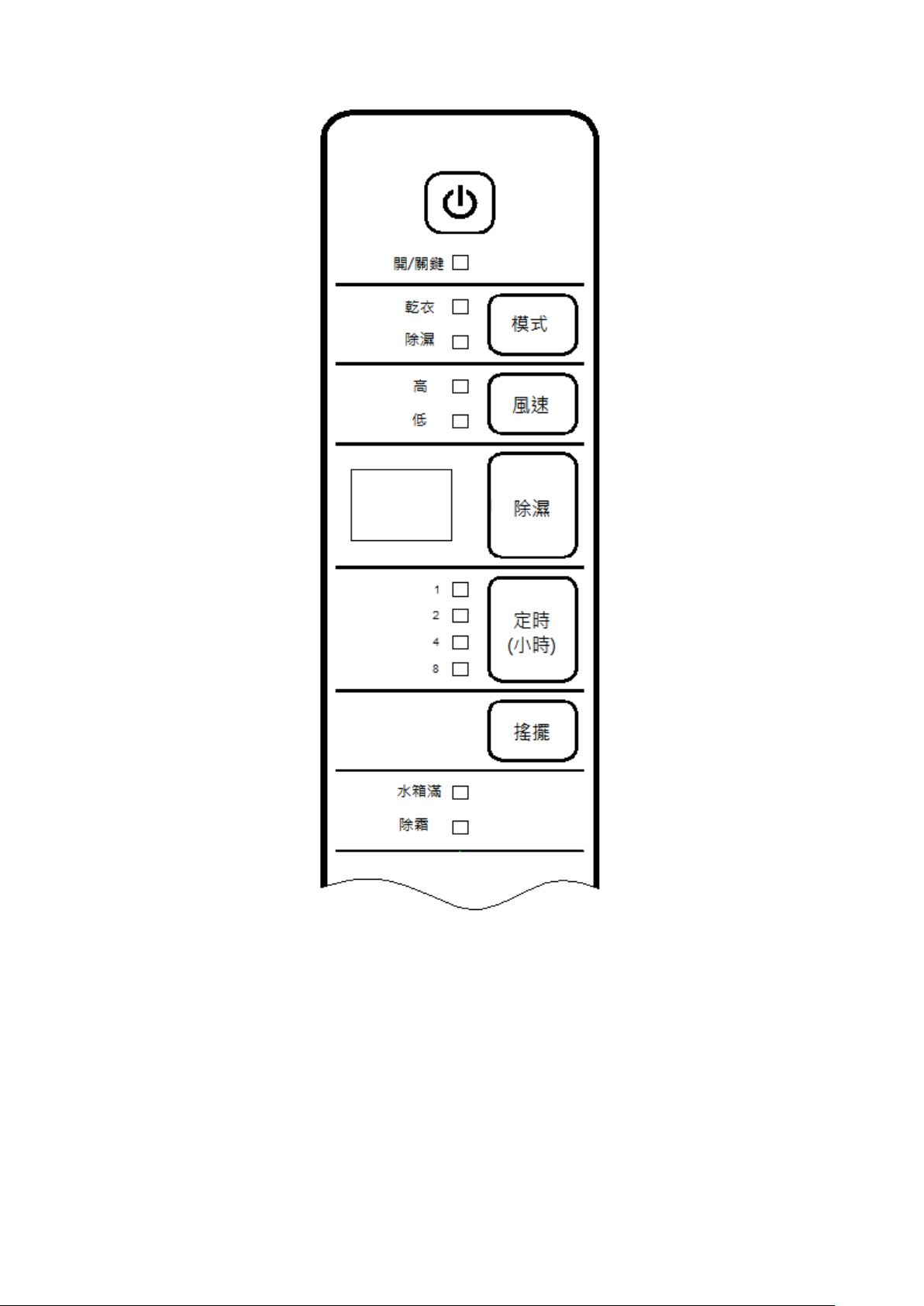
面板上的按鍵及指示燈:
1、POWER—POWER—開/關鍵:控制開機、關機。
2、SPEED—風速鍵:可以切換風扇的高檔或低檔。
3、TIMER(Hr)—定時(小時)鍵:可設置定時開機或關機時間:1h、2h、4h、8h。 (注意:在待機狀態
下設定時間為自動開機時間;在工作狀態下設定時間為自動關機時間)
4、DEHUM—除濕鍵:按此鍵可設置從連續除濕~40%~45%~50%~55%~60%~65%~70%~75%
~80%~連續除濕往返循環。
5、SWING—搖擺鍵:可設置導風板的“擺動”或“靜止”。
6、MODE—模式鍵:可設置乾衣工作模式、除濕工作模式。
7、TIMER(Hr) INDICATOR—定時指示燈:(①、在關機狀況時,相對應指示燈點亮表示機器的定時開
機可選擇在 1h、2h、4h、8h;②、在開機狀況時,相對應指示燈點亮表示機器的定時關機可
Page 5

5
選擇在 1h、2h、4h、8h)。
8、FULL INDICATOR—滿水紅色指示燈:此指示燈點亮表示機器滿水停機。
9、DEFROST INDICATOR—除霜紅色指示燈:【①、除霜指示燈點亮表示機器在除霜;②、除霜指示
燈在閃爍表示蒸發器上溫度傳感器(NTC)開路或短路;③、除霜指示燈在閃爍二次亮一次表
示蒸發器上溫度傳感器(NTC)感應到銅管溫度>40℃;④、運行指示燈與除霜指示燈同時閃
爍表示機器的溫濕度傳感器感應到環境溫度值≥40℃狀況及溫濕度傳感器的 NTC 短路】
10、RUN INDICATOR—運行指示燈:(①、運行指示燈點亮表示機器在工作;②、運行指示燈在閃爍
表示機器的溫濕度傳感器感應到環境溫度值≤5℃;③、運行指示燈與除霜指示燈同時閃爍表示
機器的溫濕度傳感器感應到環境溫度值≥40℃狀況及溫濕度傳感器的 NTC 短路)
11、HIGH INDICATOR—高檔指示燈:此指示燈點亮表示風扇馬達在高檔運轉
12、LOW INDICATOR—低檔指示燈:此指示燈點亮表示風扇馬達在低檔運轉
13、DRY INDICATOR—乾燥指示燈:此指示燈點亮表示機器的風扇馬達在最高檔運轉和壓縮機工作
14、DEHUM INDICATOR—除濕指示燈(此指示燈點亮表示機器會根據設定的濕度值進行恆濕工作或
在連續除濕工作)
15、DIGITAL TUBE—數碼管【①、當沒設置按 DEHUM 鍵時,雙八數碼管在顯示表示機器的環境濕度
值;②、長按 DEHUM 鍵 5 秒鐘顯示環境溫度值,若一直按住 DEHUM 鍵不放會一直顯示環境
溫度值,若鬆開手會立刻顯示環境濕度值;③、在除濕功能時(除濕指示燈點亮),按 DEHUM
鍵會顯示設置濕度值;④、當數碼管顯示 CO 在閃爍表示機器的溫濕度傳感器無連接,但機器仍
然在連續除濕工作狀況】
操作
插上電源,PCB 基板所有 LED 指示燈和數碼管點亮 1 秒後熄滅,同時蜂鳴器警示三聲。
1、POWER—開/關鍵:a)輕按一次開機,此時蜂鳴器警示一聲,運行指示燈、風扇高檔指示燈、除濕
指示燈點亮及數碼管默認在 CO 連續除濕功能,但會顯示環境濕度值,此時機器進入連續除濕模
式運行,並且步進電機會往上(反時針)轉動使導風板在 90°位置;b)按第二次關機,此時蜂鳴
器長響一聲,關閉所有的負載輸出和顯示。
2、SPEED—風速鍵:按第一次為低檔運行;按第二次為高檔運行;並以此為循環
3、DEHUM—除濕鍵:按此鍵可設置從連續除濕~40%~45%~50%~55%~60%~65%~70%~75%
~80%~連續除濕往返循環。 (注意:當按 MODE 鍵使 DEHUM 指示燈點亮時才能設置濕度值)
4、SWING—搖擺鍵:按一次導風板擺動;按第二次導風板靜止;如此循環。
5、MODE—模式鍵:a)按第一次該鍵選擇為乾衣模式,此時 DRY 指示燈點亮,並且風扇的超高檔在運
轉和壓縮機工作及步進電機在工作;b)按第二次該鍵選擇為除濕模式,此時 DEHUM 指示燈點亮,
按除濕鍵可設置從連續除濕~40%~45%~50%~55%~60%~65%~70%~75%~80%~連續除
濕,往返循環。
6、TIMER(Hr)—定時鍵:按一次設定為 1 小時;按第二次設定為 2 小時;按第三次設定為 4 小時;按
第四次設定為 8 小時;按第五次取消定時;如此循環。
(1)、 定時自動關機情況:運行狀態按此鍵可使機器從長期運行轉為定時關機運行。
(2)、 定時自動開機情況:在待機狀態按此鍵可預約定時自動開機。
7、機器工作時水滿情況:
Page 6
6
不論機器設置在自動除濕功能、連續除濕功能或乾燥功能時,若水箱水滿(即水箱內滿水開關斷
請勿在沒有濾網的情况下使用機器。
開),壓縮機、風扇不工作(停機),同時蜂鳴器警示十聲停止,只有滿水紅色指示燈一直在點亮。
8、壓縮機保護功能:
壓縮機停機後,3 分鐘內不得再次啟動。 【注:運行紅色指示燈仍然點亮】
9、機器記憶工作功能:
(1)、 按 POWER 鍵處於關機後(不拔掉機器電源插頭),再重新按 POWER 鍵開機,會記憶關機前工
作模式運行。
(2)、 機器在工作時斷電(即拔掉機器電源插頭),機器重新上電後會進入連續除濕工作模式自動工作。
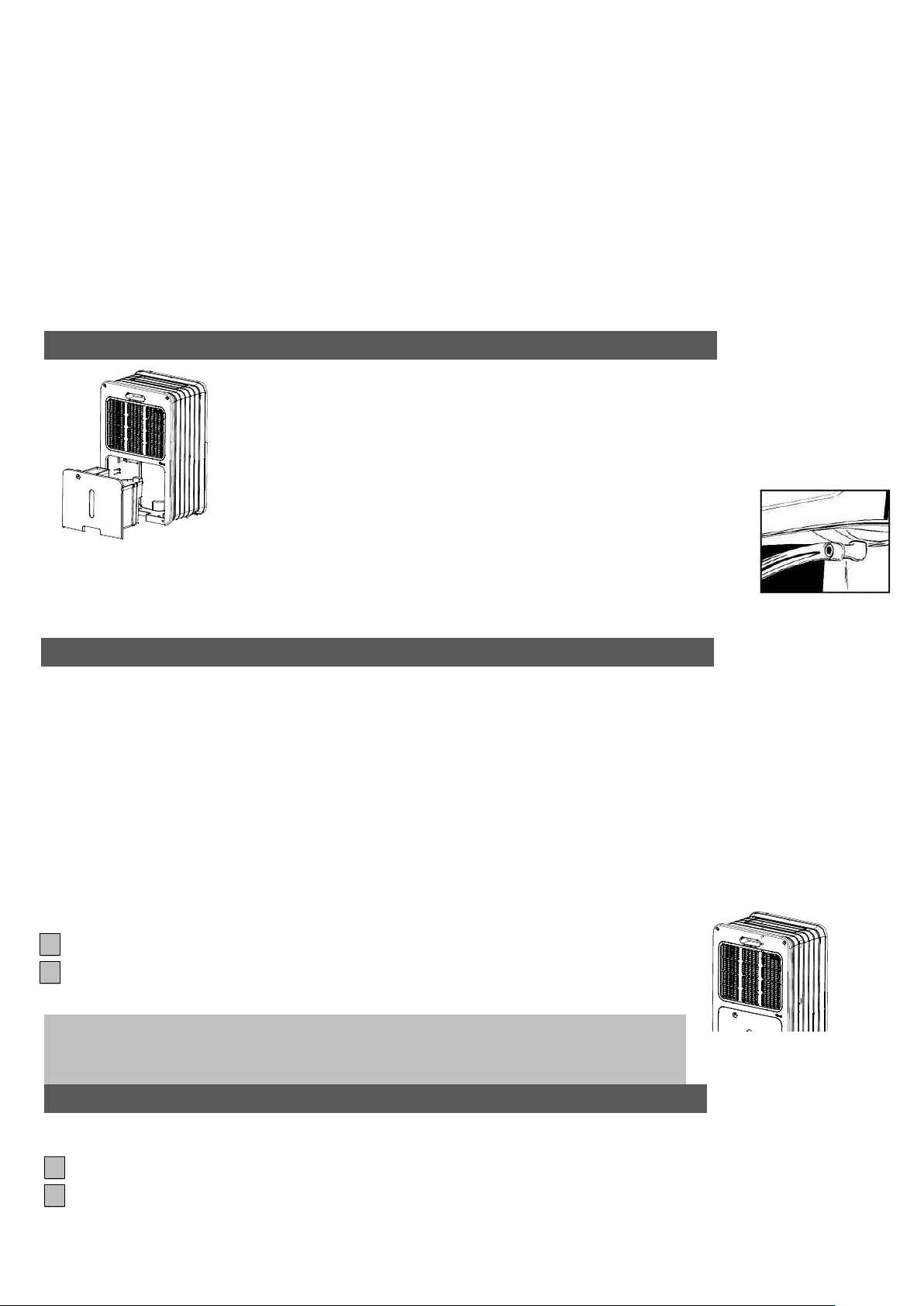
排水裝置
-當水箱水滿時會發出警報信號並且壓縮機自動停止,機器停止除濕。
-將水箱裡的水倒掉,再放回原處,三分鐘後壓縮機自動啟動,機器將繼續除濕。
如果需要永久排水,可以將排水管連接到機器上。將排水管連接到排水口,確
保排水管低於排水口。否則,不僅不能排水,還會造成水災。
請把排水管放置在排水孔處。
當你不需要永久排水裝置時,請從機器上拆下排水管,並確保水箱被正確的放置。
清洗
清洗前請務必關閉機器,並拔掉插座上的插頭。
機器外部清潔
用柔而乾的布清洗機器的外部。如果機器很髒,可以用適量的清潔劑清洗。用濕布輕輕擦洗,不要用水
噴。
空氣過濾網
如果經常使用機器,過濾網有可能被微塵阻塞。因此,過濾網應每兩周清洗一次。步驟如下:
1 取出濾網。
2 用真空吸塵器或水清洗濾網,待濾網變乾後放回原處。
貯藏
如果機器長時間不用,請遵照一下步驟:
1 從插座上拔掉插頭,清空水箱裡的水。使水箱和機器保持乾燥。
2 清洗濾網。
Page 7
7
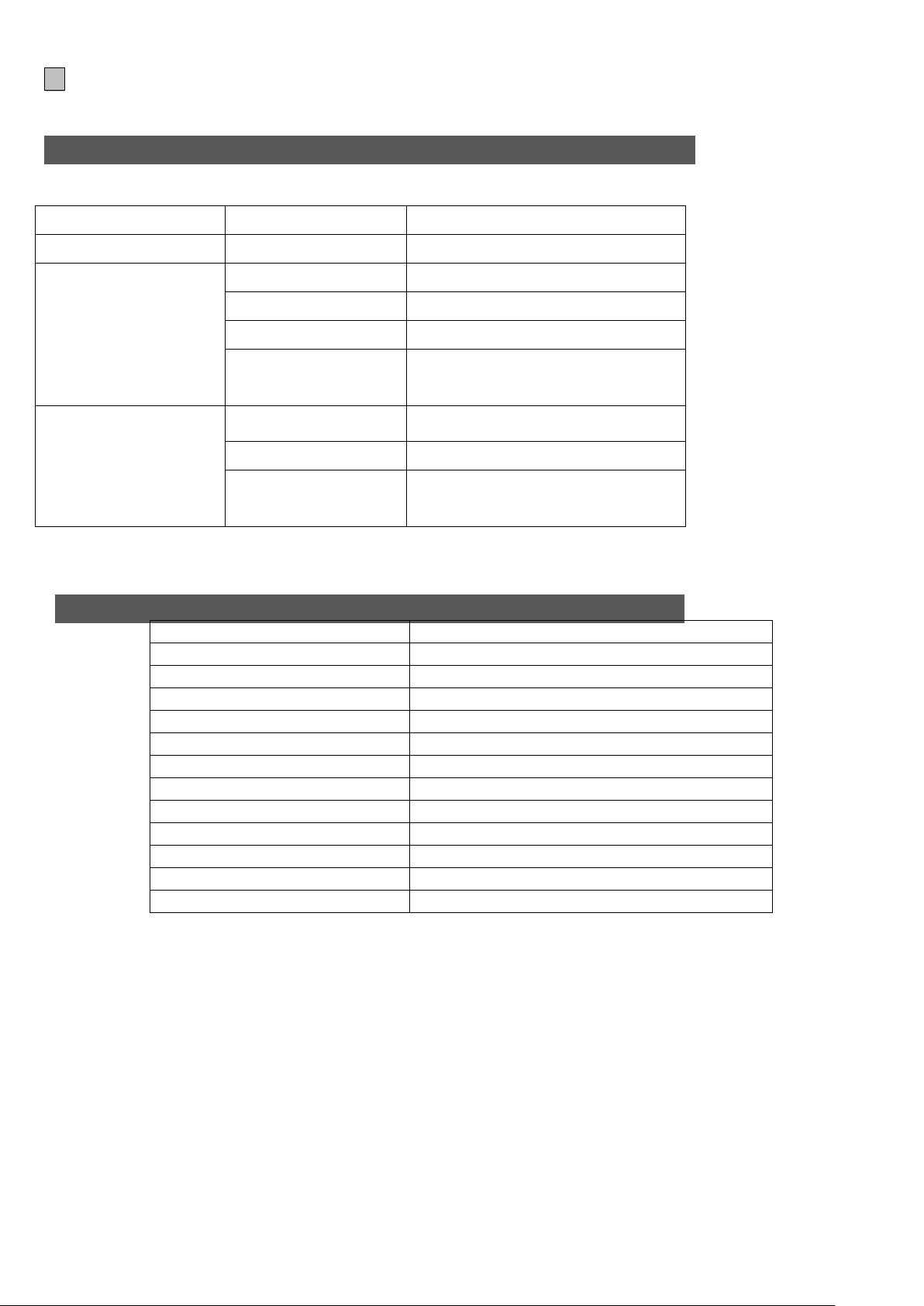
3 把機器放在一個沒有灰塵的地方,最好用塑膠袋包裝起來。
問題點
原因
解決方法
機器不工作
沒有接通電源
把插頭插入到電源插座
機器無法正常除濕
水箱已滿
倒掉水箱裡的水
水箱沒有放置正確
正確的放置水箱
空氣過濾網被堵塞
清洗空氣過濾網
機器工作時,室內的
溫度或濕度太低。
這是正常現象,由於環境溫度和
濕度太低,機器不抽濕。
機器工作但是除濕效
果不佳
房間空間太大
建議您使用更大抽濕量的抽濕機
空氣濕度過密
建議使用較大容量的除濕機。
空氣流通太快
減低空氣流通速度(例如關閉門
和窗)
型號
PDY25W / PDY25P / PDY25S
功率
400W
電壓
220-240V / 1Ph / 50Hz
除濕量
25 Liters / day (at 30℃, 80%RH)
水箱容量
4.2 Liters
適用空間
130-230 m3
工作溫度
5 – 35 ℃
自動除霜
Yes
壓縮類型
Rotary
冷媒類型及用量
R134a (165g)
機器尺寸(W x D x H)
356 x 240 x 593 mm
淨重
13.62kg
毛重
14.72kg
疑難排解
請在維修本機之前先確認以下方法:
技術參數
Page 8
8
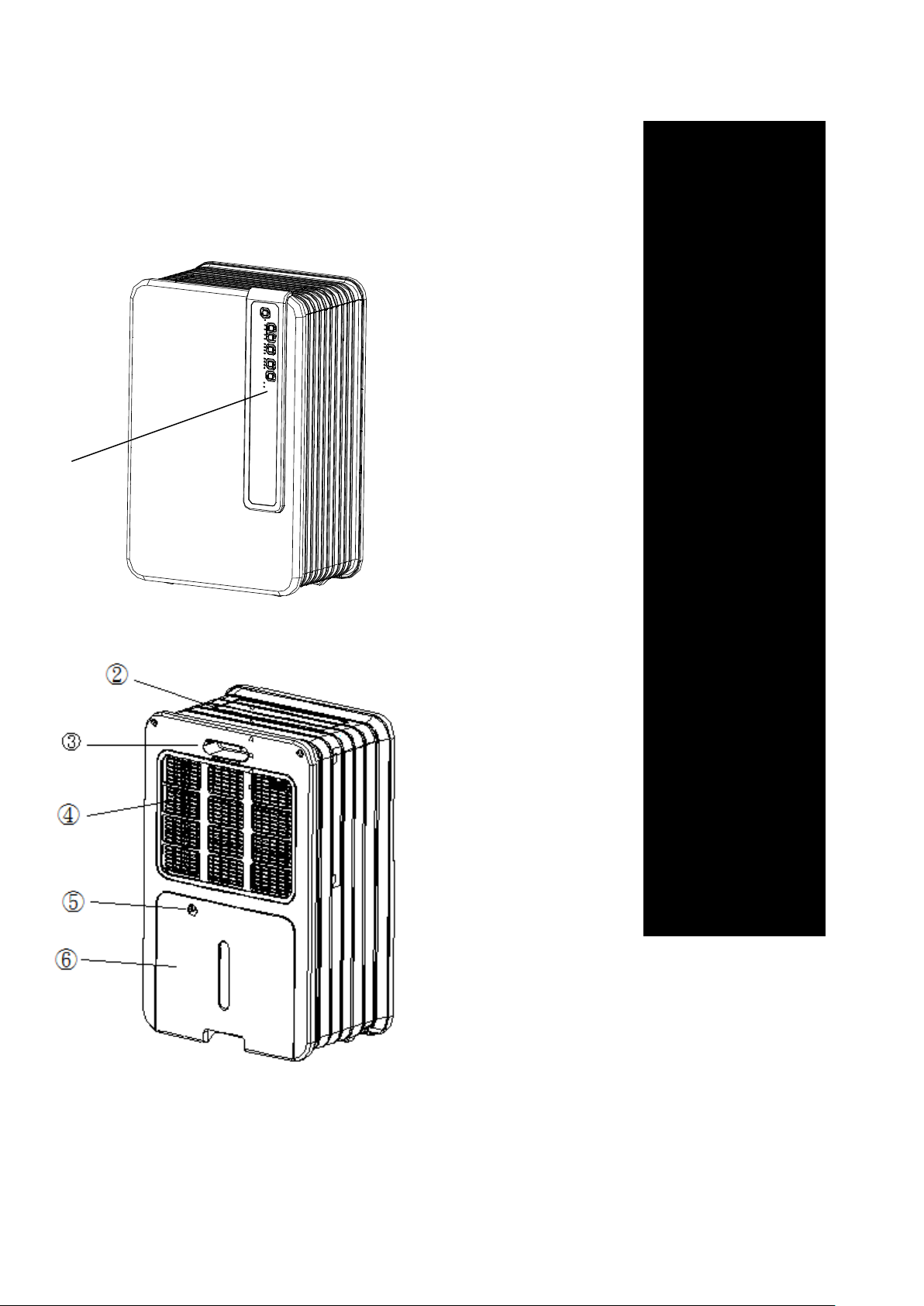
Main components:
➀ Control panel
➁ The Outlet for
dry air
➂ Handle
➃ Filter
➄ Hole for
drainage hose
➅ Removable
water tank
①
Page 9

9
Safety tips
Notice:
The unit must be stand up straightly at least 2 hours before start it up.
Tips:
The installment must be connected with ground wire.Please don’t connect the the machine,if it
isn’t connected with ground wire.
Please read this instruction and observe them strictly.
The installation of the unit must observe the local regulation, law and rule.And the machine only
available to be put on the place which are dry or indoor.The ground wire must be connected and the
voltage and frequency should be 220-240V / 50 Hz.
Tips
In order to make it work in best peformance,pls don’t put the machine nearly the radiator or other
heater
In order to make it work in highest-efficiency,pls close all the window.
The machine’s dehumidification capacity mainly depends on indoor’s temperature and
humidity.Under the lower temperature,the dehumidification is very small.
Always keep the filter clean to avoid unnecesary consumption losing,and then it can arrive the
best dehumidification efficiency.
If the power supply is stopped suddenly,the machine will stop 3 minute,then start up
automaticly.This kind of delay can make the compressor not be damaged.
Before connectting with the power,the below items should be highly noted:
The voltage supplying must coincide with rated voltage on rating lable.
The socket and power must coincide with the standard on rating lable.
The power plug must be suitable for wall socket.
The machine must be put on the flat place.
The current supplying must coincide CE standard.
Don’t cover the air inlet.
Please empty the water on water tank before remove the machine.
Please make the machine far away from the chemical substance.
Don’t spray water on the unit or submerge the unit in the water.
Don’t let other articles blocking machine’s inlet or outlet.
Please pull out the plug when cleaning or replace the components .
Don’t connect any branching with the powercord ,if the socket is not suitable pls contact
specialized technician to install suitable wall socket。
For the sake of safety,don’t let the children to approach or use the unit,
Page 10

10
When repair the unit ,pls contact specialized elctrician or supplier.The operation and maintainess
Notice
Don’t using damaged powercord,plug,out casing and control panel.Don’t curve the
powercord,Don’t make sharp instrument touch the unit,
If the users don’t observe the manual,the warranty of the unit may be unvalid.
should follow the instruction carefully.
Pls unplug the unit when not using the machine.
When the powercord or plug is damaged,pls stop using immediately and ask specialized elctrician
or supplier to replace.
Page 11
11
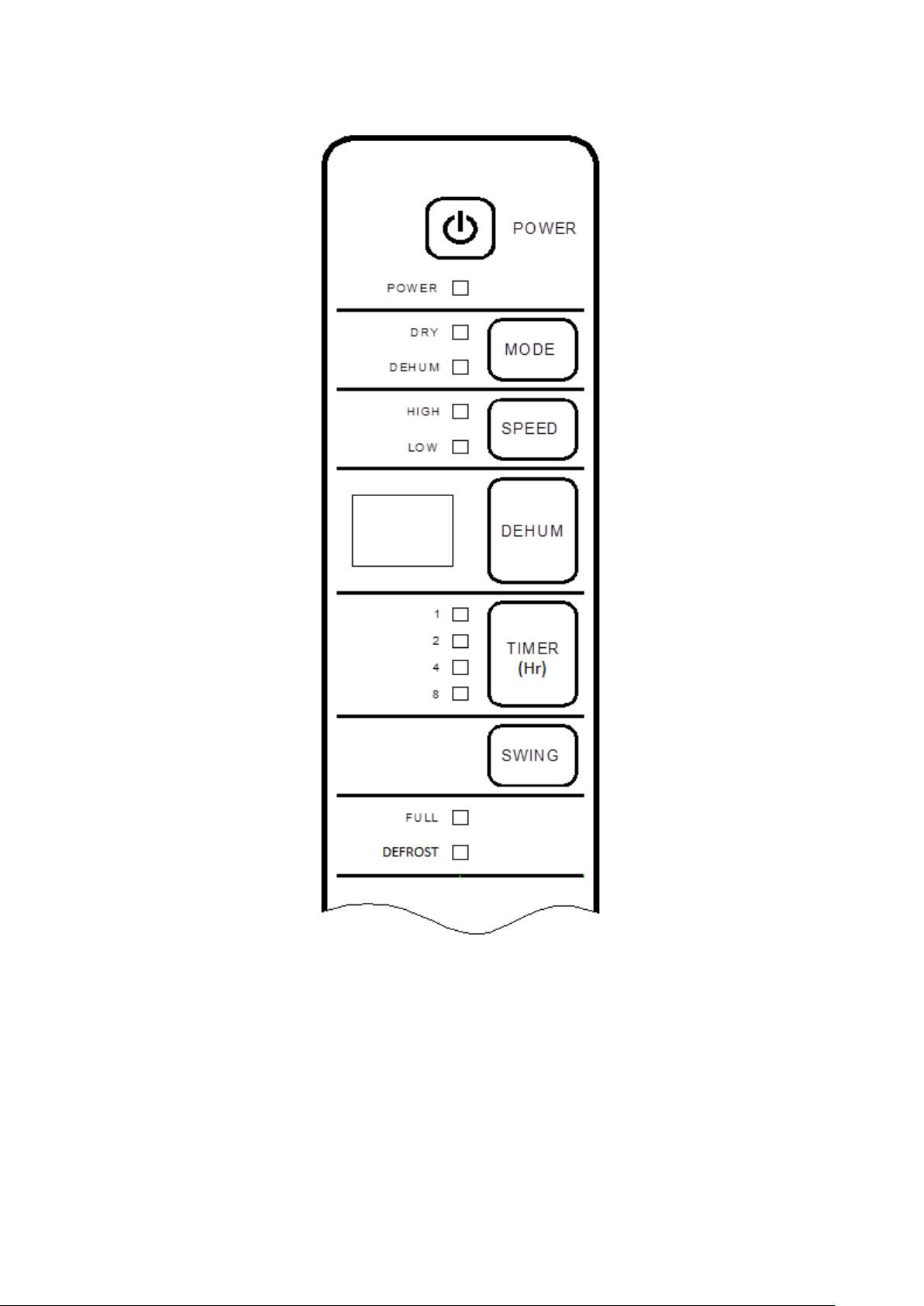
Operation Of Key Pads
1、POWER—Switch on/off the power.
2、SPEED—select the fan blower working at “high speed” level or “Low speed” level and
corresponding indicator will illuminate.(when in dry mode,the speed key is out of
function)
3、TIMER(Hr)—set time for swtich on/off automatically and 1h、2h、4h、8h 、no timer can be setted。
When appliance is powered off or in standby state,press this key to set time for swtich
on,while When appliance is powered on, press this key to set time for swtich off.
Page 12

12
4、DEHUM—press “DEHUM” to make it circulating among
continuous-40%-45%-50%-55%-60%-65%-70%-75%-80% -continuous····
Note:·①、If power supply is cut off when the appliance is running, once power
restoration,the unit is default setted to restart at ②、When in dry mode,the dehumidify and
speed key are out of function,and press dehumidify key for 5 seconds,the ambient
temperature ratio will be displayed on nixie tube.③、Press the dehumidify key to set
desired humidity ratio, The settings will be scrubbed off within 3 seconds of no action and
current ambient humidity will be displayed on digital tube.④、Press dehumidify key for 5
seconds,the ambient temperature ratio will be displayed on nixie tube.⑤、When ambient
humidity<30%RH,“LO”mark will be displayed on nixie tube; When ambient humidity>
90%RH, “HI”mark will be displayed on digital tube.⑥、Each gap of humidity setting is 5%,
⑦、When“DEHUM”indicator illuminates,
5、SWING—setting airplate openning or closing.
Note:①、When in water-full status,the airplate will be closed automatically.②、When the
unit runs,in any mode,the swing can be setted.
6、MODE—Dry mode or dehumidify mode can be setted.
7、TIMER(Hr) INDICATOR
8、FULL INDICATOR—When the watertank is full,this indicator illuminates.
9、DEFROST INDICATOR—①When the unit is defrosting ,the defrost indicator illuminates ②、When
the NTC on the evaporator is open circuit or short circuit, this indicator will twinkle;③、
When the NTC on the evaporator detects the copper’temperature>40℃, the defrost
indicator twinkle 2 times and illuminate 1 time. ④、When the temperature&humidity sensor
detects ambient temperature ≥40℃ and the NTC on the temperature&humidity sensor is
short circuit, the run indicator and the defrost indicator illuminate at the same time.
10、RUN INDICATOR—①、When the unit runs ,this indicator illuminates②、When the T&H sensor
detects ambient temperature≤5℃,this indicator twinkle③、When the temperature&humidity
sensor detects ambient temperature ≥40℃ and the NTC on the temperature&humidity
sensor is short circuit, the run indicator and the defrost indicator illuminate at the same time.
11、HIGH INDICATOR—When the fan motor runs at high speed ,this indicator illuminates
12、LOW INDICATOR—When the fan motor runs at low speed ,this indicator illuminates
13、DRY INDICATOR—When this indicator illuminates ,the fan motor runs at high speed automatically.
14、DEHUM INDICATOR When the unit runs at given humidity or continuous dehumidification, this
indicator illuminates .
15、DIGITAL TUBE—①、When the DEHUM indicator don’t illuminate, press the DEHUM key ,the
ambient temperature is displayed on digital tube②、Press the DEHUM key for 5 seconds, the
digital tube shows ambient temperature, if press the DEHUM key all the time, the digital tube
shows ambient temperature all the time and stop pressing the key ,the digital tube shows
ambient humidity ③、When the DEHUM indicator illuminates, press the DEHUM key, the
ambient humidity is displayed on digital tube④、When the T&H sensor isn’t connected, the
mark “CO” twinkle on the digital tube and the unit keep running at continuous dehumidification
status.
Page 13

13
Operation
When plug into power socket,all indicators and digital tube illuminate and go out after 1
seconds,and the buzzer will alarm 3 times.
1、POWER—switch on/off.
(a)、 Press the “ON/OFF” button to turn on the unit. One time beep signal can be heard. The
airplate startup automatically at 90 degree,and the indicator of run,high speed,dehumidify
illuminate and ambient humidity is displayed on digital tube.and the unit is in the status of
constant dehumidifying
(b)、 Press the “ON/OFF” button again, one time long beep signal can be heard. the unit will stop
working and the airplate close.
2、SPEED—press “SPEED” to make it circulating among low-high-low····
3、DEHUM—press “DEHUM” to make it circulating among
continuous-40%-45%-50%-55%-60%-65%-70%-75%-80% -continuous····
(Note: Press “MODE” to make the dehumidify indicator illuminated before setting humidity ratio)
4、SWING—When appliance is powered on, press to oscillate airplatevautomatically. Press again to fix
a stationary angle.
5、MODE
(a)、 Press the mode key for the first time to choose the dry mode,in this mode,the dry indicator
illuminates and the fan motor runs at high speed .
(b)、 Press the mode key for the second time to choose the DEHUM mode,in this mode, the
dehumidify indicator illuminates and press “DEHUM” to make it circulating among
continuous-40%-45%-50%-55%-60%-65%-70%-75%-80% -continuous····
6、TIMER(Hr)—set time for swtich on/off automatically and 1h、2h、4h、8h 、no timer can be setted。
(a)、 When appliance is powered off or in standby state,press this key to set time circulating among
1h~2h~4h~8h~no timer~1h … for swtich on,and corresponding timer indicator illuminates.
(b)、 When appliance is powered on, press this key to set time circulating among 1h~2h~4h~8h~no
timer~1h … for swtich off. and corresponding timer indicator illuminates.
7、Water-full
When the watertank is full, the compressor and fan stop working and the buzzer will alarm 10
times.the water-full indicator illuminates all the time.
8、Protection of compressor
When the compressor shut off, it takes 3 minutes to rework for protection period.
(Note:The run indicator still illuminates )
9、Memory function
(a)、 When switch on the unit again after switching off (don’t unplug the plug), the unit will memorize
the last setted mode automatically and recover back to the last setted mode.
(b)、 If power supply is cut off when the appliance is running ( unplug the plug) , once power
restoration ,the unit runs at continuous dehumidify mode automatically.
Page 14
14
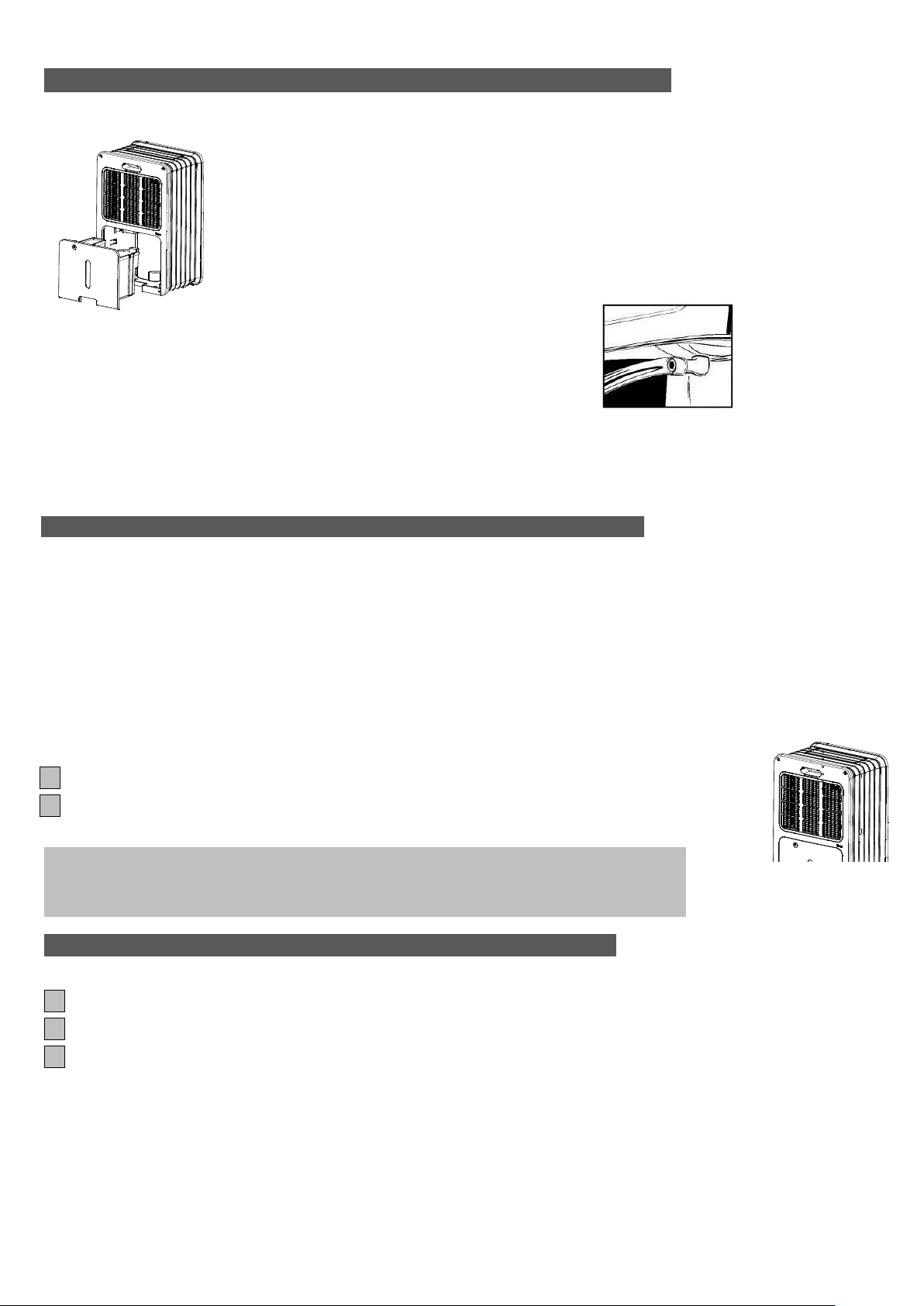
Drainage device :
Never using the machine without the filter
-When the watertank is full,the alarm sound can be heard and the compressor stop
working automatically,the unit stops dehumidifying.
-Remove the watertank and empty the water ,the reinstall the watertank,the
compressor restart after 3 minutes.
If ne If you need continuous drainage, connect the drainage hose to the water outlet
and ensure that the end of the hose is lower than the the water outlet ,
otherwise the water will not drain and flooding may occur.
Place the end of the drainage hose in a water outlet.
When you no longer wish to use the permanent water drainage, disconnect the drainage tube from the
device. Ensure that the water tank is positioned correctly.
Cleaning
Before cleaning ,switch off the unit and unplug the plug.
Cleaning for out casing
Only use a soft clean cloth to clean the out casing,if the machine is very dirty,could add moderate
Cleanser on damp cloth to clean the out casing,never spray water to clean the machine.
Air filter
If often using the machine,the filter is likely to be blocked by tiny dust,so it’s advised to clean the air
filter one time every two weeks as below steps:
1 Remove the filter
2 Using vacuum cleaner or water to clean the filter,then reinstall the filter after it is dry.
Storage
If don’t use the machine for a long time ,pls follow the below stips:
1 Unplug the machine and empty the water of watertank ,keep the watertank and the machine dry
2 Clean the filter
3 Pack it with polybag and put it in dry and ventilated place.
Page 15
15
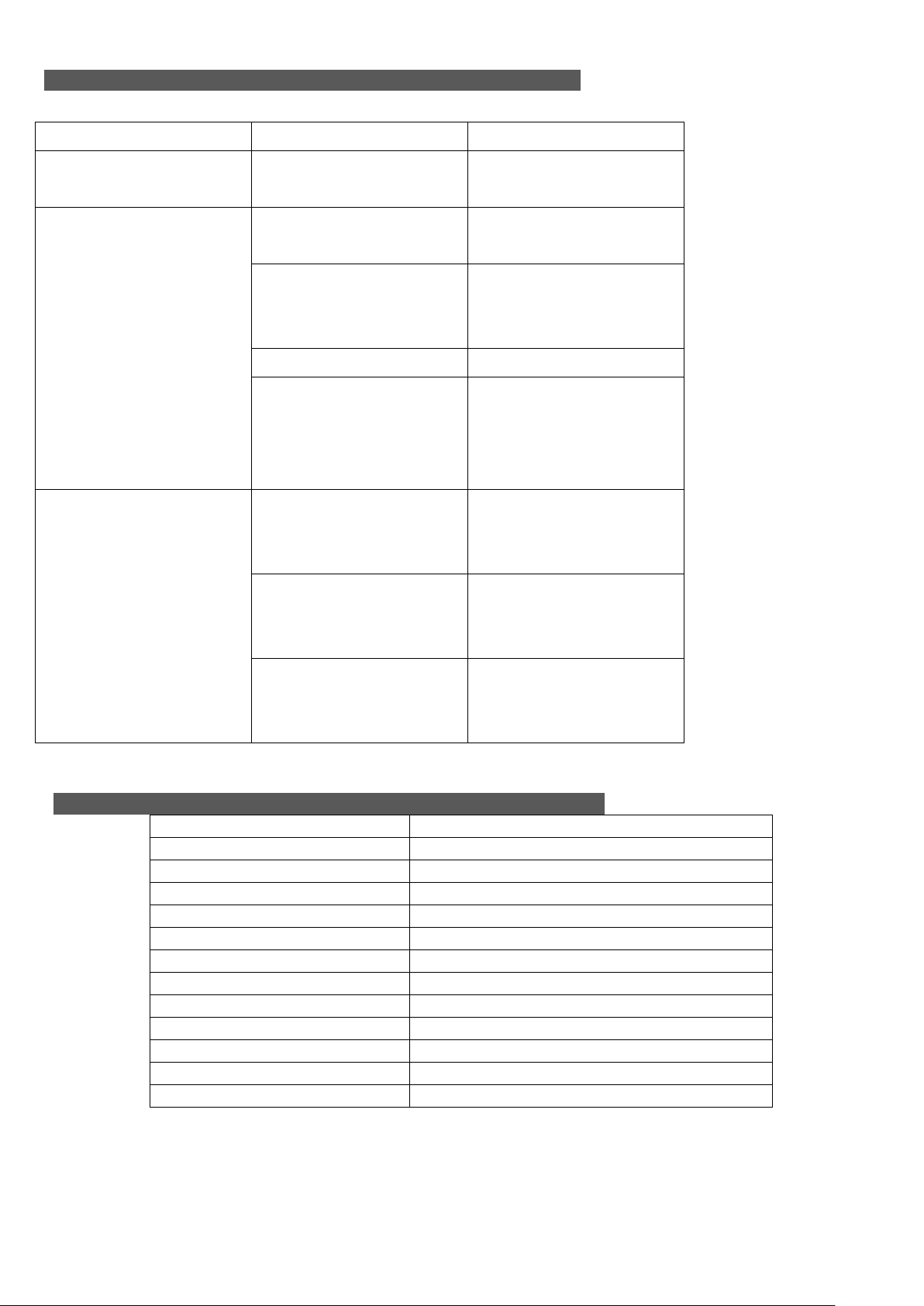
TROUBLE SHOOTING
Problem
Cause
Solution
The unit does not work.
The power is not
connected.
Insert the plug into the
wall outlet.
The device does not
dehumidify.
The water container is
full.
Remove the water from
the container.
The water container has
not been replaced
correctly.
Place the water
container in the correct
position.
The air filter is clogged.
Clean the air filter.
The temperature or
relative humidity in the
room where the device
is operating is too low.
It is normal that the
device does not
dehumidify in these
conditions
The dehumidifier works,
but reduces the relative
humidity insufficiently.
The room is too large.
We recommend using a
dehumidifier with a
greater capacity.
There is too wet or the
humidity is too high.
We recommend using a
dehumidifier with a
greater capacity.
There is too much
ventilation.
Reduce ventilation (e.g.
close windows and shut
doors.)
Model
PDY25W / PDY25P / PDY25S
Power rated
400W
Voltage
220-240V / 1Ph / 50Hz
Dehumidification
25 Liters / day (at 30℃, 80%RH)
Capacity of Water Tank
4.2 Liters
Appliable space
130-230 m3
Working temperature
5 – 35 ℃
Deforst
Yes
Type of compressor
Rotary
Refrigerant
R134a (165g)
Unit dimension (W x D x H)
356 x 240 x 593 mm
Net weight
13.62kg
Gross weight
14.72kg
Check the following before contacting technical support:
Specification
Page 16
16
 Loading...