

Page 1

PHG-100
Product Quick Manual
Page 2
Read this manual and the following instructions carefully before using the product.
Safety warning
·This product contains a lithium-polymer battery. Do not give an impact or damage
the product.
·Do not expose the product to the temperature of 50°C (122°F) or higher.
·Do not disassemble the product, break into pieces, make holes or put in fire or water.
·Do not touch the product or the charger while charging the product.
·Risk of explosion if battery is replaced by an incorrect type. Dispose of used batteries
according to the instructions
Precautions before use
·This product may malfunction near an object containing a magnet.
·This product needs a device with the Phigolf application.
·The figures shown in this manual can be different with the actual product.
This manual is subject to change without a prior notice for improvement of performance.
7
Precautions
Caution
Page 3
8
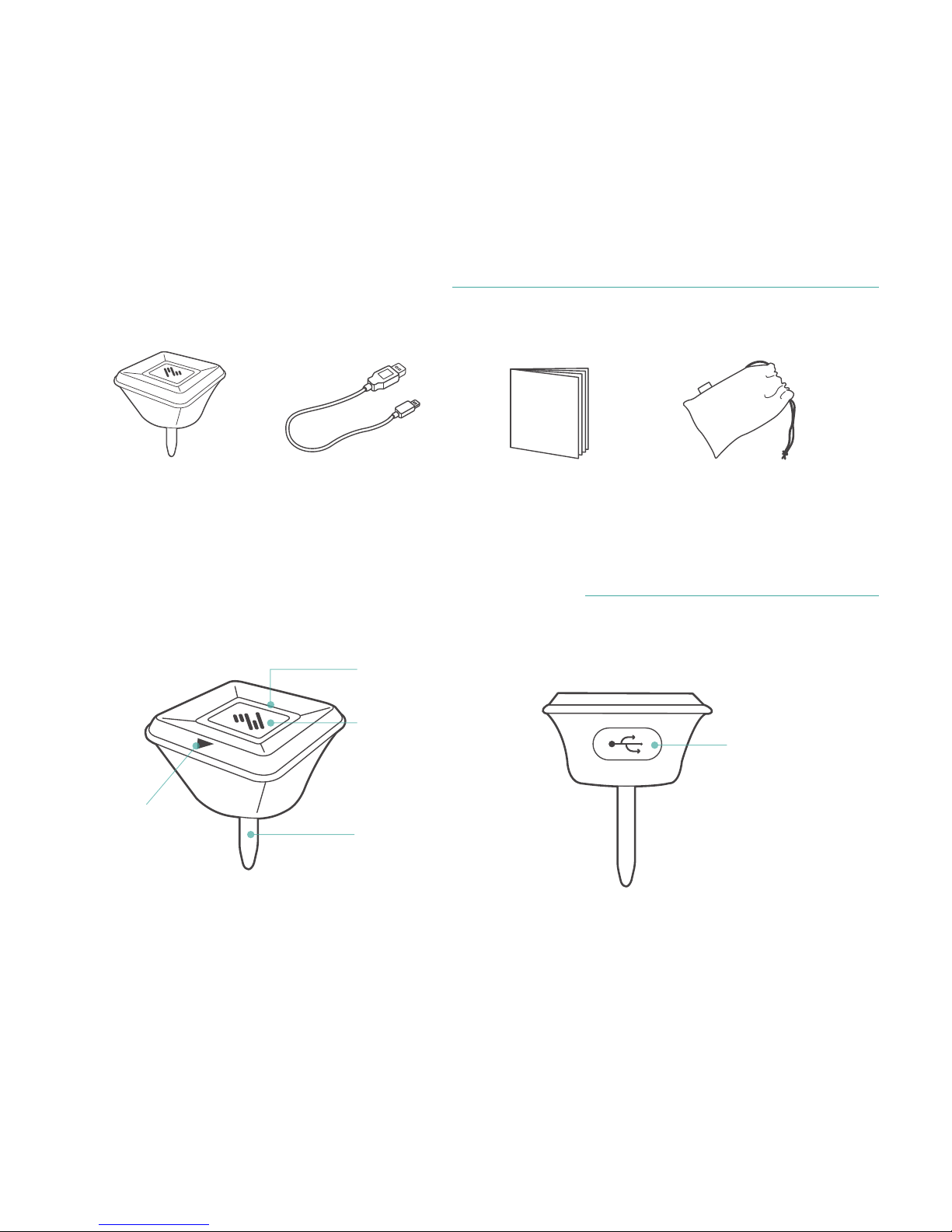
Contents of the package
Names and functions of the parts
Phigolf Sensor
Direction marker
Status LED
Power button
Club insert
Micro USB port
Micro USB cableQuick manualPouch
Page 4
9
How to use
How to mount
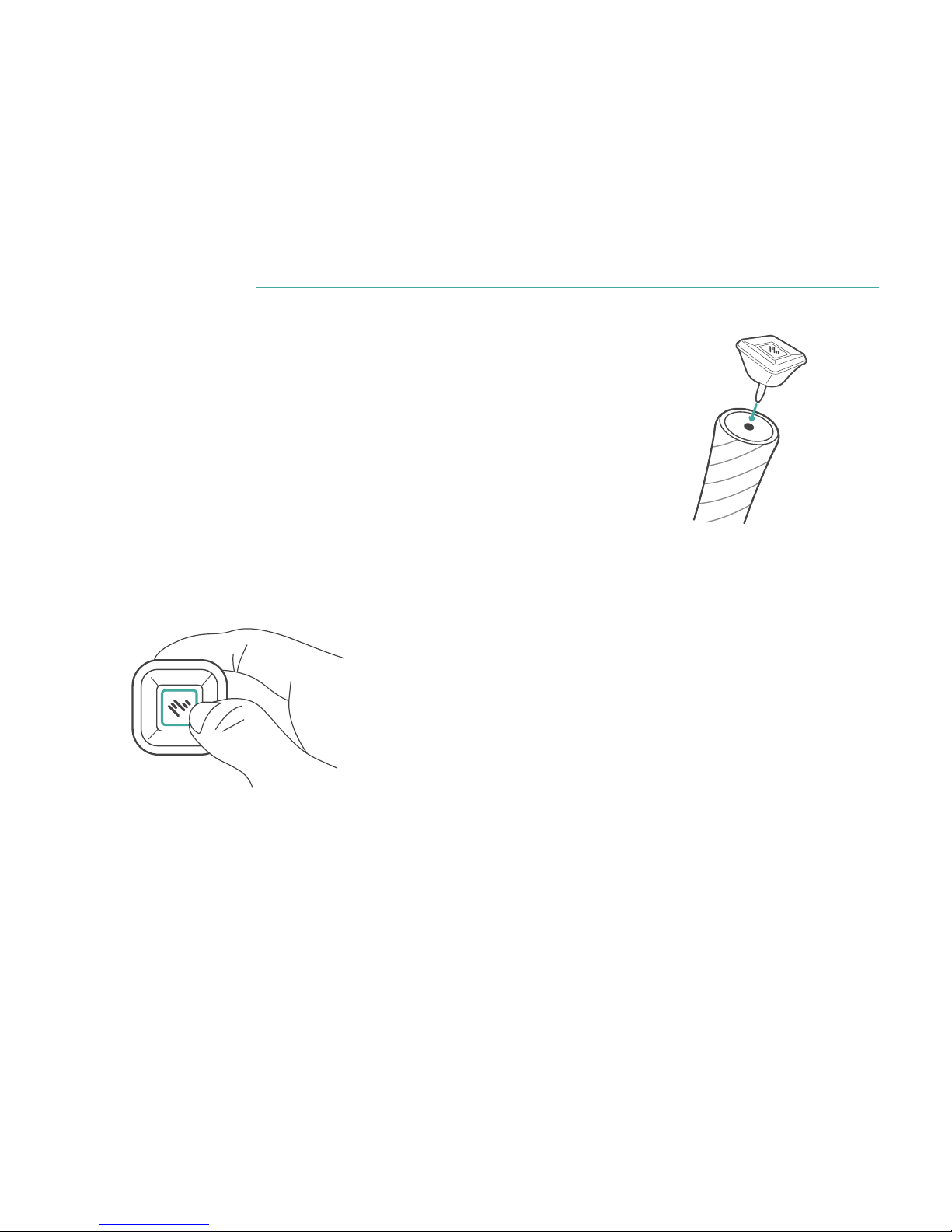
Insert the product into the grip end hole of the swing stick or club.
Push the club insert to the end.
※Your swing stick or club may have no or smaller hole in the grip end.
How to charge the battery
Remove the USB cover, connect the USB cable, and connect the other end of the USB cable
into a computer or an charger adapter. Charge the battery fully before first use of the product.
Power on
Press and hold the power button for at least 1 second.
Page 5

10
Installing the application
Supporting environment
Android 5.0 / iOS 9 or later version
Downloading and installing the application
1. Search PHIGOLF in Google Play or Apple Appstore.
2. Download and install the app.
3. When installation is completed, a PHIGOLF icon appears on the screen of the mobile
device.
Connecting the product with the application
Before connecting the application with the mobile device,
check if the mobile device supports the Bluetooth communication.
1. Switch on the Bluetooth function of the mobile device with the app.
2. Start the PHIGOLF app.
3. Push the power button on the product.
4. The product is automatically recognized by the menu screen of the app.
5. Touch the OK button to approve the product, and you can use all the functions of the app.
Page 6
11
How to swing
3. Hold the address position until the Ready sign appears on the app.
4. Swing the club when the Ready sign appears. The Ready sign appears on the app screen
with a tone, and the status LED of the product maintains the On position.
(During Ready, even a small practice swing can be recognized as an actual swing.)
5. If a swing is not recognized, a retry sign appears on the app screen.
Take the address, and swing the club following the Ready sign.
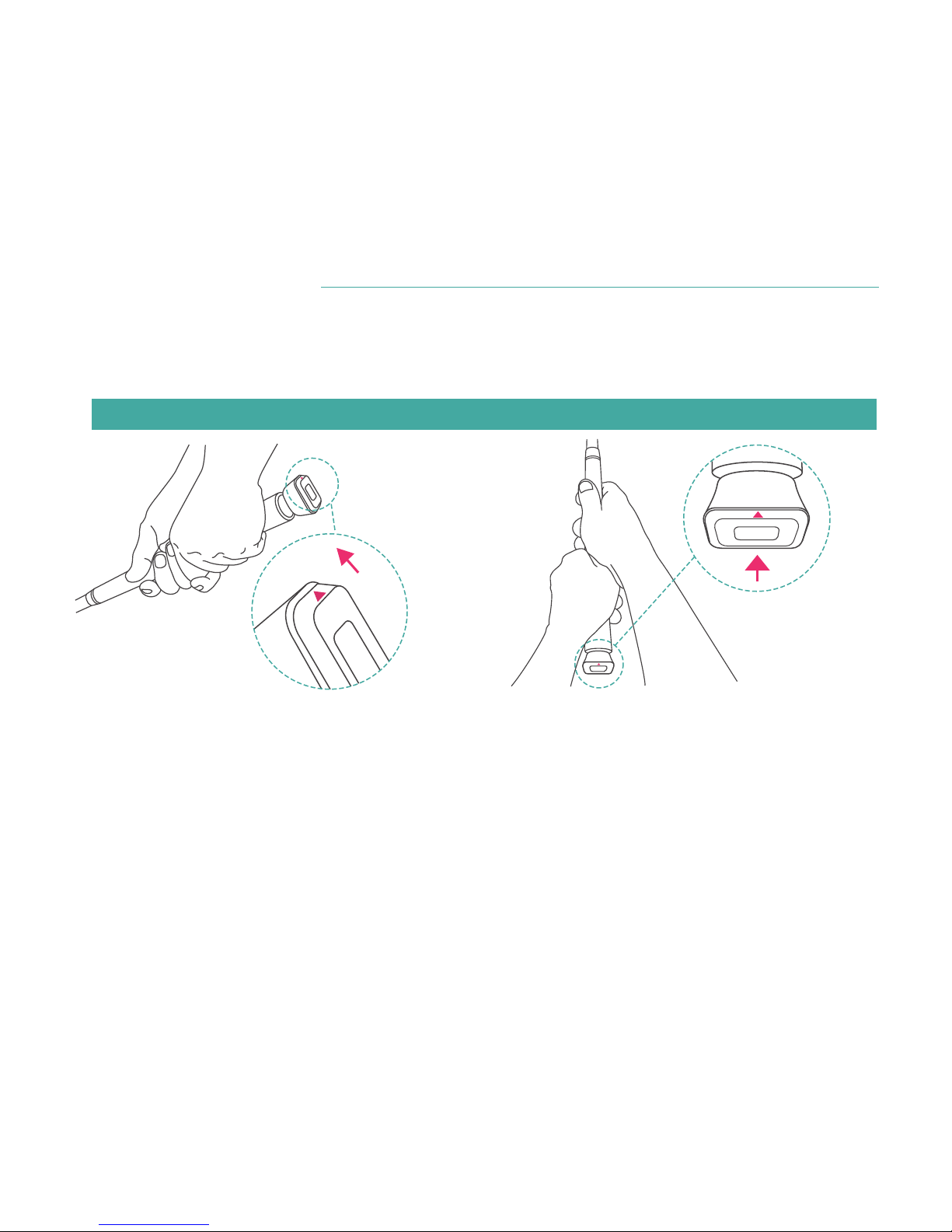
1. When the avatar appears on the screen, take the address with the club or the swing stick
with the product.
2.
Direction: Place the direction marker (arrow) on the product to 12 O'clock.
Page 7
12
Warranty
Label in compliance with the Quality Control and
Safety Management Act
The warranty period is 1 year from the date of purchase of the product. No warranty is
provided for a damage caused by the user, whether such damage is intentional or not, or
force majeure.
To use the warranty service, send us the defective product with the receipt issued by the
original seller by mail. For the defect within the category of warranty, the product will be
repaired, replaced or refunded.
If you cannot contact the original seller, you can visit the website of Phigolf Networks
(www.phigolf.com) to receive the warranty service.
This wireless device is subject to radio interference.
This product is EMC Class-B device (home use). It is mainly intended for use at home, but can be used in any place.
Device name
Date of production
Manufacturer/Country of origin
Authentication code
Frequency
Electric field strength
USB power supply
Specific low power wireless device
Indicated separately
Ubitech / Korea
MSIP-CRS-gin-PHG-100
2400~2483.5 MHz
1mW or lower
DC 5V / 300mA
Page 8
This equipment has been tested and found to comply with the limits for a Class
B digital device, pursuant to Part 15 of the FCC Rules. These limits are designed to
provide reasonable protection against harmful interfernce in a residential
installation. This equipment generate, uses and can radiate radio frequency
energy and, if not installed and used in accordance with the instructions, may cause harmful
interference to radio communications. However, there is no guarantee that interference will not
occur in a particular installation. if this equipment does cause harmful interference to radio or
television reception which can be determined by turning the equipment off and on, the user is
encouraged to try to correct the interference by one or more of the following measures.
- Reorient or relocate the receiving antenna.
- Increase the separation between the equipment and receiver.
- Connect the equipment into an outlet on a circuit different from that to which the receiver is connected.
- Consult the dealer or an experienced radio/TV technical for help.
- Only shielded interface cable should be used.
Finally, any changes or modifications to the equipment by the use not expressly approved by
the grantee or manufacturer could void the users authority to operate such equipment.
This device complies with Part 15 of the FCC Rules. Operation is subject to the following two
conditions: (1) this device may not cause harmful interference, and (2) this device must accept
any interference received, including interference that may cause undesired operation.
FCC RF Exposure Information
This equipment complies with FCC RF exposure limit requirements set for in an uncontrolled
environment
FCC ID.2AO3R-PHG-100
13
Page 9
14
CAUTION: Any changes or modifications in construction of this device which
are not expressly approved by the party responsible for compliance could
void the user’s authority to operate the equipment.
- Changes and modifications not expressly approved by the party
responsible for compliance could void the user’s authority to operate the
equipment.
020-XXXXXX
Page 10
www.phigolf.com
 Loading...