

Page 1

CON-OC-A192
Digital to Analog Audio Converter (up to 192 kHz)
Operation Manual
Page 2

Page 3

DISCLAIMERS
The information in this manual has been carefully checked and
is believed to be accurate. Premium high Definition Solutions
assumes no responsibility for any infringements of patents or
other rights of third
parties, which may result from its use.
Premium high Definition Solutions assumes no responsibility for any
inaccuracies that may be contained in this document. Premium high
Definition Solutions also makes no
commitment to update or to keep
current the information contained
in this document.
Premium high Definition Solutions reserves the right to make
improvements to this document and/or product at any time and
without notice.
COPYRIGHT NOTICE
No part of this document may be reproduced, transmitted,
transcribed, stored in a retrieval system, or any of its part translated
into any language or computer file, in any form or by any means—
electronic, mechanical, magnetic, optical, chemical, manual, or
otherwise—without express written permission and consent from
Premium high Definition Solutions
© Copyright 2013 by Premium high
Definition Solutions All Rights Reserved.
Version 1.1 August 2013
TRADEMARK ACKNOWLEDGMENTS
All products or service names mentioned in this document may be
trademarks of the companies with which they are associated.
Page 4

SAFETY PRECAUTIONS
Please read all instructions before attempting to unpack, install or
operate this equipment and before connecting the power supply.
Please keep the following in mind as you unpack and install this
equipment:
•
Always follow basic safety precautions to reduce the risk of fire,
electrical shock and injury to persons.
•
To prevent fire or shock hazard, do not expose the unit to rain,
moisture or install this product near water.
•
Never spill liquid of any kind on or into this product.
•
Never push an object of any kind into this product through any
openings or empty slots in the unit, as you may damage parts
inside the unit.
•
Do not attach the power supply cabling to building surfaces.
•
Use only the supplied power supply unit (PSU). Do not use the PSU
if it is damaged.
•
Do not allow anything to rest on the power cabling or allow any
weight to be placed upon it or any person walk on it.
•
To protect the unit from overheating, do not block any vents or
openings in the unit housing that provide ventilation and allow for
sufficient space for air to circulate around the unit.
REVISION HISTORY
VERSION NO.
DATE DD/MM/YY
SUMMARY OF CHANGE
REV1
11/12/13
First Release
Page 5

CONTENTS
1.
Introduction .......................................... 1
2.
Applications ......................................... 1
3.
Package Contents .............................. 1
4.
System Requirements .......................... 1
5.
Features ................................................ 1
6.
Operation Controls and Functions ....... 2
6.1 Front Panel .................................. 2
6.2 Right Panel ................................. 2
6.3 Left Panel .................................... 3
6.4 Top Panel .................................... 3
7.
Connection Diagram ........................... 4
8. Specifications ........................................ 5
9. Acronyms ............................................... 5
Page 6

1.
INTRODUCTION
The Digital to Analog Audio Converter is an easy to use product
that converts Coaxial or Optical audio signals into analog
Stereo (R/L) audio. It can be easily switched between either
Coaxial or Optical inputs. With its compact, elegant design
and simple LED input status make it easier for users to connect
up and use instantly.
2.
APPLICATIONS
•
HDTV digital output conversion
•
192 kHz 24-bit DAC conversion
3.
PACKAGE CONTENTS
•
Digital to Analog Audio Converter
•
5 V/1 A DC Power Adaptor
•
Operation Manual
4.
SYSTEM REQUIREMENTS
Source equipment such as a DVD/Blu-ray player or an HDTV and
output to active speaker or amplifier with connection cables.
5.
FEATURES
•
Supports digital audio input (Coaxial/Optical) and stereo analog
audio output (R/L)
•
Integrated digital interpolator filter and Digital to Analog Converter
(DAC)
•
Supports uncompressed digital stereo audio input
•
Compact size and easy to install
•
Supports S/PDIF 192 kHz at 24-bit data for conversion to left and right
analog channels
1
Page 7
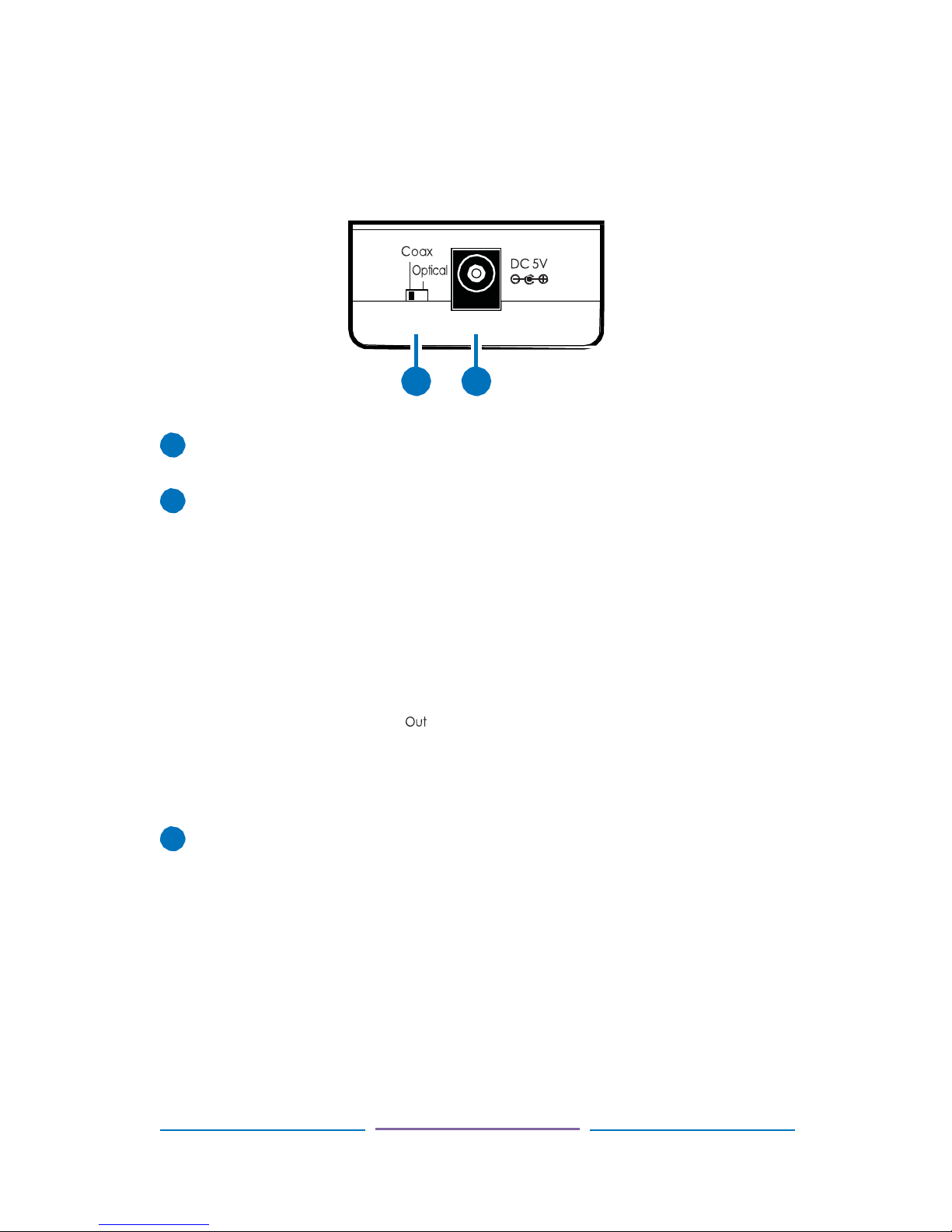
6.
OPERATION CONTROLS AND FUNCTIONS
6.1
Front Panel
Coaxial/Optical Switch: Select which digital audio input is active
and will be converted to analog stereo (R/L) audio.
DC 5V: Connect the 5V DC power supply to the unit and plug the
adaptor into an AC wall outlet.
6.2
Right Panel
R/L Out: Analog stereo output. Connect to the input of your audio
device or display.
2
1 2 1
1
2
1
Page 8
6.3
Left Panel
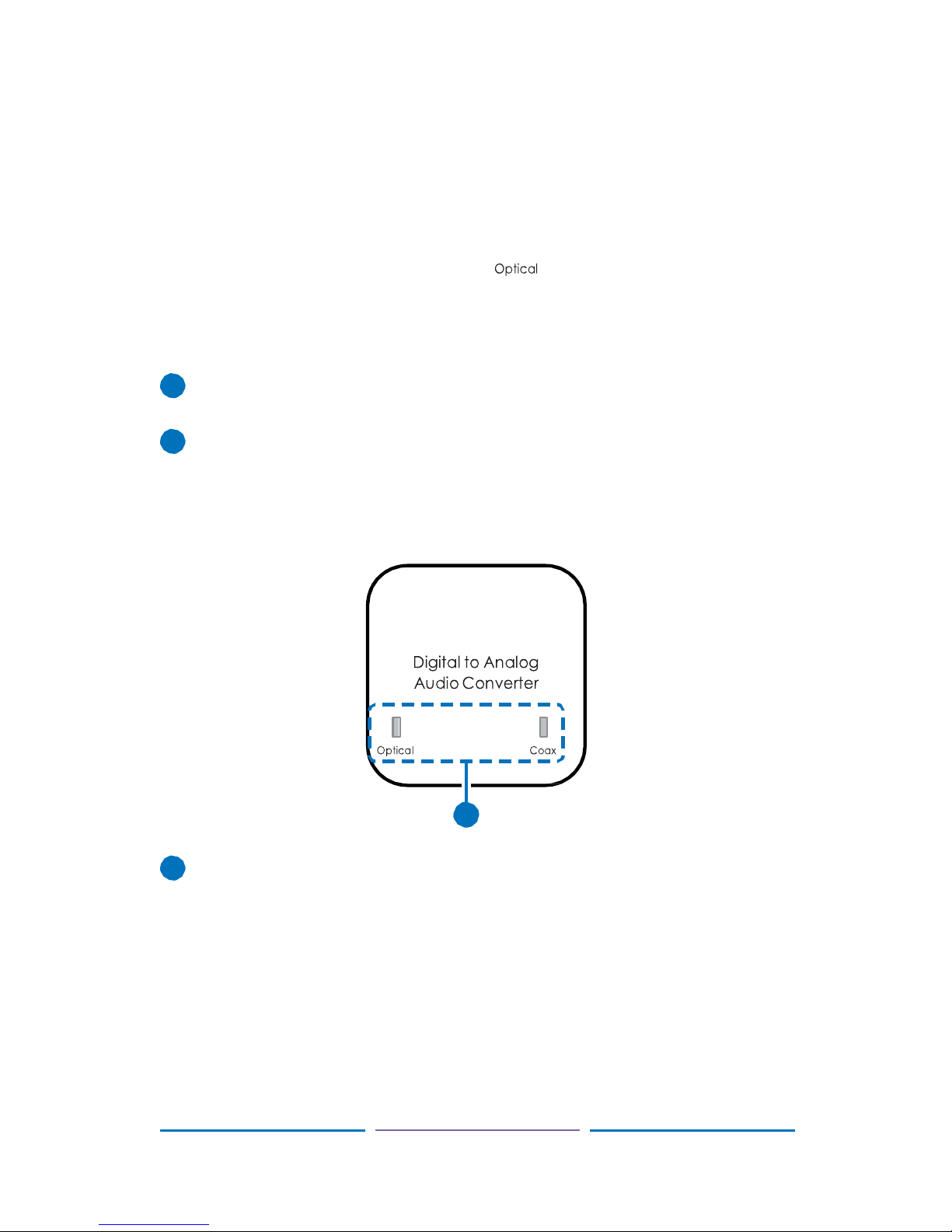
Coaxial In: Connect to the Coaxial digital audio source, such as a
DVD player or CD player.
Optical In: Connect to the Optical audio source, such as a Blu-ray
player or games console.
6.4
Top Panel
Coaxial/Optical Input Status LED: The LED light will illuminate
according to which input is currently selected.
3
In Coax
1
2
1
1 2 1
Page 9

7.
CONNECTION DIAGRAM
DVD or Blu-ray Player Set-top Box
TV
(No Digital Input)
4
Digital Audio Input
Digital Audio Input
(Optical)
Analog
Stereo
Output
Page 10

8. SPECIFICATIONS
Input Ports
1×Coaxial, 1×Optical
Input Format
S/PDIF LPCM 2 CH, 24-bit
Input Sampling Rate
32 kHz, 44.1 kHz, 48 k Hz, 88.2 kHz, 96 kHz,
176.4 kHz up to 192 kHz
Output Ports
Analog Stereo (R/L)
Output Level
2 Vrms
Output Impedance
600
Power Supply
5 V/1 A DC linear power adaptor (US/EU
standards, CE/FCC/UL certified) or
5 V/1.2 A switching power adaptor (with
universal plug. CE/FCC/UL certified)
Dimensions
42 mm (W)×40.5 mm (D)×22 mm (H)
Weight
25 g
Chassis Material
Plastic
Silkscreen Color
White
Operating Temperature
0 °C~40 °C
Power Consumption
0.74 W
9. ACRONYMS
ACRONYM
COMPLETE TERM
DAC
Digital to Analog Converter
S/PDIF
Sony/Philips Digital Interconnect Format
5
Page 11

PhD Solutions Product Warranty
Should you feel your product does not function adequately due to defects in materials or
workmanship, PhD Solutions (hereby referred to as “the warrantor”) will, for the length of the
period
indicated below:
a)
Repair the product with new or
refurbished parts.
or
b)
Replace it with a new or refurbished product.
Limited Warranty Period
Commencing from the original date of purchase, all PhD Solutions products are covered by a
one
year PARTS and LABOUR warranty depending on the product.
Please contact your PhD Solutions dealer for details.
During this period there will be no charge for unit repair, replacement of parts, unit
components or
replacement of product if necessary. The decision to repair or replace will be
made by the warrantor.
The purchaser must mail-in or return the product to PhD Solutions
during the warranty period.
This limited warranty only covers the product purchased as new and is extended to the
original
purchaser only. It is non-transferable to subsequent owners, even during the
warranty period.
A purchase receipt or other proof of original purchase date is required for the limited warranty
service.
IF REPAIR IS NEEDED DURING THE LIMITED WARRANTY PERIOD THE PURCHASER
WILL BE
REQUIRED TO PRODUCE A SALES RECEIPT/PROOF OF PURCHASE
INDICATING DATE OF
PURCHASE, AMOUNT PAID AND PLACE OF PURCHASE.
Please note: THE CUSTOMER WILL BE CHARGED FOR PARTS OR REPAIR
OF
ANY UNIT RECEIVED WITHOUT SUCH PROOF OF PURCHASE.
Premium high Definition Solutions
Page 12

Product Service Provided
1.
Damage requiring service
All units should be serviced by a PhD Solutions qualified service person.:
2.
Servicing Personnel
Do not attempt to service the unit beyond that described in these operating instructions.
Refer all
other servicing to authorised PhD Solutions servicing personnel.
Return to Supplier
When shipping the unit, carefully pack and send it prepaid (preferably in the original packaging)
with a
tracking number and adequate insurance. Please include a document or letter detailing
the reason for
return and include a daytime telephone number and/or email address where you
can be contacted.
If repair is required during the limited warranty period, the purchaser will be required to
provide a
sales receipt or other proof of purchase, indicating date and location of purchase as
well as the price
paid for the product. The customer will be charged for the repair or
replacement of any unit received
unless such information is provided.
Warranty Limits and Exclusions
1.
This Limited Warranty ONLY COVERS failures due to defects in materials or
workmanship and
DOES NOT COVER normal wear and tear or cosmetic damage.
The limited warranty also DOES NOT COVER damage that occurs in shipment or failures
caused by
products not supplied by the warrantor.
Failures resulting from accident, misuse, abuse, neglect, mishandling, misapplication,
alteration,
incorrect installation, set-up adjustment, implementation of/to consumer controls,
improper
maintenance, power line surge, lightening damage, Electro static discharge (ESD)
,modification,
service by anyone other than a manufacturer-approved service center or
factory-authorised
personnel, or damage attributable to acts of God.
Premium high Definition Solutions
Page 13

2.
There are no express warranties except as listed under “limited warranty coverage.” The
warrantor
is not liable for incidental or consequential damage resulting from the use of this
product or arising out
of any breach of this warranty.
•
For example: damage for lost time, the cost of having a person/persons remove or reinstall
previously installed equipment, travel to and from service location, loss of or
damage to
media, images, data or other recorded/stored content.
ANY PARTS AND SERVICE NOT COVERED BY THIS LIMITED WARRANTY ARE
THE RESPONSIBILITY OF THE CUSTOMER.
Premium high Definition Solutions
Website http://www.phdsolutions.co
Page 14

Premium high Definition Solutions
Website http://www.phdsolutions.co
 Loading...