

Page 1
Please read this entire guide before beginning.
Programming and Installation Guide
PPA19-16145
PPA44-16427
Microchip Cat Flap
100
Series
Page 2
petsafe.com
2
Hereinafter Radio Systems Corporation, Radio Systems PetSafe Europe Ltd., Radio Systems
Australia Pty Ltd. and any other af filiate or Brand of Radio Systems Corporation may be referred to
collectively as “We” or “Us”.
IMPORTANT SAFETY INFORMATION
Explanation of Attention Words and Symbols used in this guide
This is the safety alert symbol. It is used to alert you to potential personal injury hazards.
Obey all safety messages that follow this symbol to avoid possible injury or death.
WARNING indicates a hazardous situation which, if not avoided, could
result in death or serious injury.
CAUTION, used without the safety alert symbol, indicates a hazardous
situation which, if not avoided, could result in minor or moderate injury.
NOTICE is used to address practices not related to personal injury.
When children are present in the home, it is important to consider the pet door during child proofing
activities, the pet door may be misused by a child resulting in the child accessing potential hazards
that may be on the other side of the pet door. Purchasers/Homeowners with swimming pools
should ensure that the pet door is monitored at all times and that the swimming pool has adequate
barriers to entry. If a new hazard is created inside or outside of your home, which may be accessed
through the pet door, Radio Systems Corporation recommends that you properly guard access
to the hazard or remove the pet door. The closing panel or lock, if applicable, is provided for
aesthetic and energy efficiency purposes and is not intended as a security device. Radio Systems
Corporation will not be liable for unintended use and the purchaser of this product accepts full
responsibility for oversight of the opening it creates. In keeping with accepted standards of parental
care, children should be supervised at all times.
• Power Tools. Risk of severe injury; follow all safety instructions for your power tools.
• Be sure to always wear your safety goggles.
The user, prior to installation, must become familiar with all building codes that may affect the
installation of the pet door and determine, along with a licensed contractor, its suitability in a given
installation. This pet door is not a fire door. It is important for the owner and contractor to consider
any risks that may be present inside or outside of the pet door, and any risks that may be created
by subsequent changes to your property and how they may relate to the existence and useincluding misuse-of the pet door.
• If cutting a metal surface, be aware of sharp edges to prevent injury.
• Working with glass is a skilled job and should be carried out by a professional glazier. It
is not possible to cut holes in toughened glass or double glazed units except at the time of
manufacture. Please consult a glazier.
• Keep these instructions with impor tant papers; be sure to transfer these instructions to the new
owner of the property.
• Please read these instructions fully prior to forming or modifying an opening in your selected
door or wall. We strongly recommend that your microchip cat flap be programmed for your
cat and a check made that it works with the microchip in your cat first.
• This unit operates properly only when the outside temperatures are greater than -25° C and
less than 55° C.
• PetSafe® pet doors are suitable for most doors, walls or partitions although additional
materials may be required. This product is designed for the convenience of you and your pet.
It is not possible to fully guarantee the exclusion of all other animals in all circumstances. Radio
Systems Corporation will not accept liabilit y for any damage or inconvenience caused by
unwanted animals who may gain access to your home.
SAVE THESE INSTRUCTIONS
Page 3
3
Accessories available online
Thank you for choosing the PetSafe® Brand. You and your pet deserve a companionship
that includes memorable moments and a shared understanding together. Our products
and training tools enhance the relationship between pets and their owners. If you have
any questions about our products or training your pet, please visit our
website at w ww.petsafe.com or contact our Customer Care Centre. For a
listing of Customer Care Centre telephone numbers, visit our website at
www.petsafe.com.
To get the most protection out of your warranty, please register your product within 30 days
at www.petsafe.com. By registering and keeping your receipt, you will enjoy the product’s full
warranty and should you ever need to call the Customer Care Centre, we will be able to help you
faster. Most importantly, your valuable information will never be given or sold to anyone. Complete
warranty information is available online at www.petsafe.com.
TABLE OF CONTENTS
In the Box . . . . . . . . . . . . . . . . . . . . . . . . . . . . . . . . . . . . . . . . . . . . . . . . . . . . . . . . . . . . . . . . . . . . . . . . . .3
Getting Started . . . . . . . . . . . . . . . . . . . . . . . . . . . . . . . . . . . . . . . . . . . . . . . . . . . . . . . . . . . . . . . . . . . .4
Programming Cats into the cat flap . . . . . . . . . . . . . . . . . . . . . . . . . . . . . . . . . . . . . . . . . . . . . . . . . . . .5
Installation . . . . . . . . . . . . . . . . . . . . . . . . . . . . . . . . . . . . . . . . . . . . . . . . . . . . . . . . . . . . . . . . . . . . . . . .5
Installation – Measurement and Marking . . . . . . . . . . . . . . . . . . . . . . . . . . . . . . . . . . . . . . . . . . . . . . .6
Installation – Wooden, PVC, or uPVC Doors . . . . . . . . . . . . . . . . . . . . . . . . . . . . . . . . . . . . . . . . . . . .6
Installation – Metal or Metal Core Doors . . . . . . . . . . . . . . . . . . . . . . . . . . . . . . . . . . . . . . . . . . . . . . .6
Installation – Glass Doors or Windows . . . . . . . . . . . . . . . . . . . . . . . . . . . . . . . . . . . . . . . . . . . . . . . . .6
Installation – Walls . . . . . . . . . . . . . . . . . . . . . . . . . . . . . . . . . . . . . . . . . . . . . . . . . . . . . . . . . . . . . . . . . .7
Training . . . . . . . . . . . . . . . . . . . . . . . . . . . . . . . . . . . . . . . . . . . . . . . . . . . . . . . . . . . . . . . . . . . . . . . . . . . .7
Basic Operation . . . . . . . . . . . . . . . . . . . . . . . . . . . . . . . . . . . . . . . . . . . . . . . . . . . . . . . . . . . . . . . . . . .8
Basic Operation Guide . . . . . . . . . . . . . . . . . . . . . . . . . . . . . . . . . . . . . . . . . . . . . . . . . . . . . . . . . . . . . .8
Function Definitions . . . . . . . . . . . . . . . . . . . . . . . . . . . . . . . . . . . . . . . . . . . . . . . . . . . . . . . . . . . . . . . . . .8
4-Way Manual Lock . . . . . . . . . . . . . . . . . . . . . . . . . . . . . . . . . . . . . . . . . . . . . . . . . . . . . . . . . . . . . . . .8
Maintenance . . . . . . . . . . . . . . . . . . . . . . . . . . . . . . . . . . . . . . . . . . . . . . . . . . . . . . . . . . . . . . . . . . . . . . .8
Additional Information . . . . . . . . . . . . . . . . . . . . . . . . . . . . . . . . . . . . . . . . . . . . . . . . . . . . . . . . . . .9
Warranty . . . . . . . . . . . . . . . . . . . . . . . . . . . . . . . . . . . . . . . . . . . . . . . . . . . . . . . . . . . . . . . . . . . . . . . . . .9
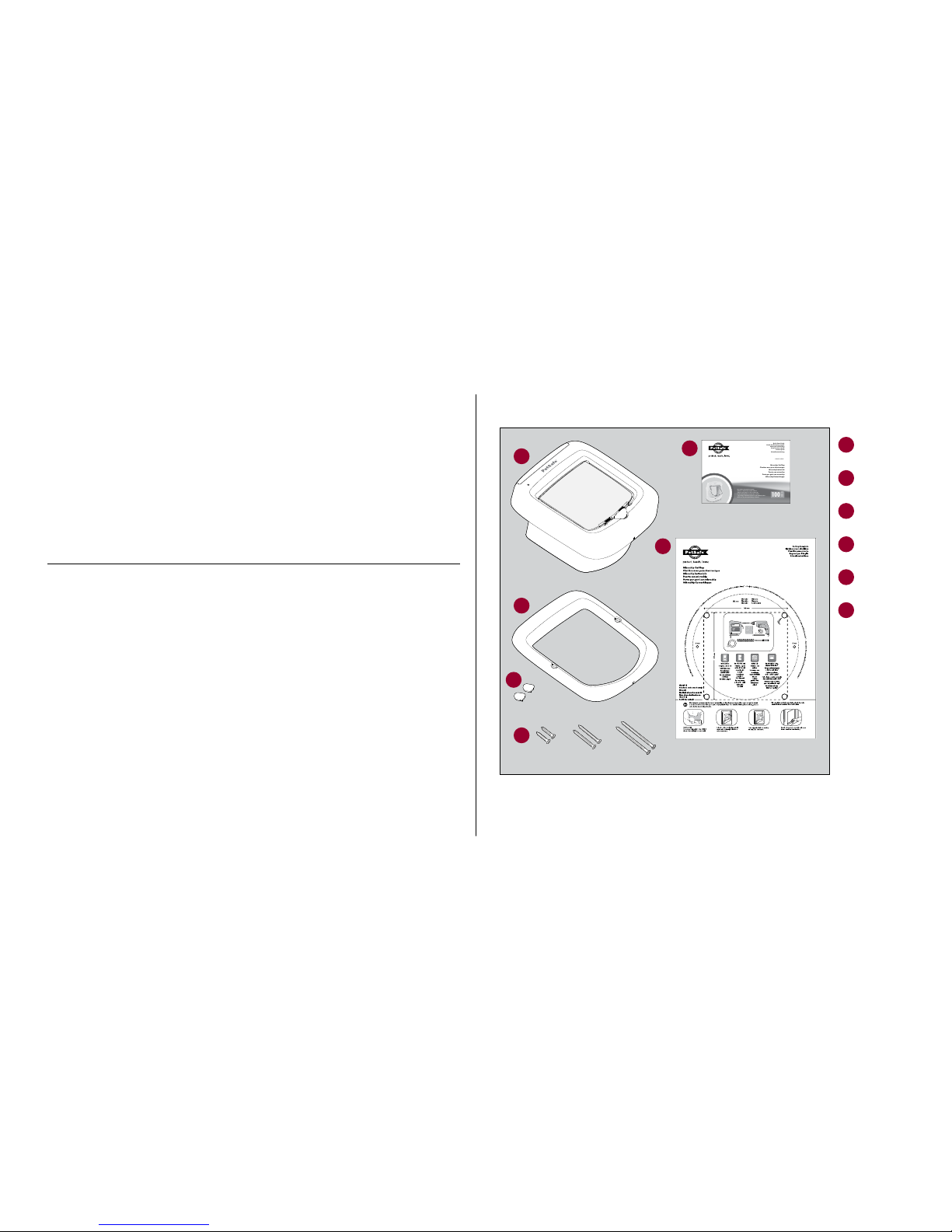
In the Box
Microchip Cat Flap
Chatière avec puce électronique
Microchip kattenluik
Puerta con microchip
Porta per gatti con microchip
Mikrochip Katzenklappe
Please read this entire guide before beginning.
Veuillez lire ce manuel en entier avant de commencer.
Gelieve deze gids volledig door te lezen voordat u begint.
Por favor, lea detenidamente este manual antes de empezar.
Si prega di leggere attentamente la guida al uso prima di utilizzare il collare.
Bitte lesen Sie die gesamte Betriebsanleitung vor dem Train.
Quick Start Guide
Guide de démarrage rapide
Beknopte handleiding
Guía de inicio rápido
Guida rapida
Schnellstartanleitung
100
Series
Série
Serie
Serie
Serie
Serie
PPA19-16145
Interior Frame
Exterior Frame
Quick Start Guide
Cutting Template
Screw Plugs
Phillips head screws
M4 x 28
M4 x 50
M4 x 75
1
1
2
2
3
3
4
4
5
6
5
6
Page 4
petsafe.com
4
Getting Started
With its advanced selective entry technology, our PetSafe® Microchip Cat Flap has been designed
to allow your cat easy access to the outside world whilst keeping other troublesome cats and
animals out of your house. Using radio frequency identification (RFID) technology, the PetSafe®
Microchip Cat Flap works by reading your cat’s unique microchip ID without the need for a collar
or accessory. When your cat approaches the cat flap, the flap will respond by allowing only your
cat to enter. The cat flap will remain locked and deny access to cats that are not programmed, wild
animals, pests, and strays. The cat flap is also designed with a convenient Manual 4-Way lock that
allows you to control the access of your programmed cats.
This model of the PetSafe® Microchip Cat Flap (PPA19-16145) reads the most common type of
microchip implanted in cats – FDX-B (15-digit). If you are not sure what t ype of microchip your
cat has, please either ask your veterinarian or visit ww w.petsafe.com and navigate to our Chip
Checker, microchip compatibility checker, and enter your cat’s microchip ID to verify that your
microchip is compatible. Occasionally a microchip migrates to a position within the cat that the
scanner cannot read reliably.
Batteries
The PetSafe® Microchip Cat Flap requires four alkaline AA batteries (LR6) for operation. Bat teries
are not included with your cat flap. Please use new, non-rechargeable batteries for best results. To
install batteries, remove the battery cover from the top of the interior frame, set aside the hardware
pack, and place the batteries in the proper direction. Once installed, the green LED will quickly
flash 3 times indicating the cat flap is in Automatic Mode and is ready for programming.
Note: With basic operation the batteries will typically last 12 months. The cat flap is designed
with a low battery indicator, for more information, see the Basic Operation Guide section.
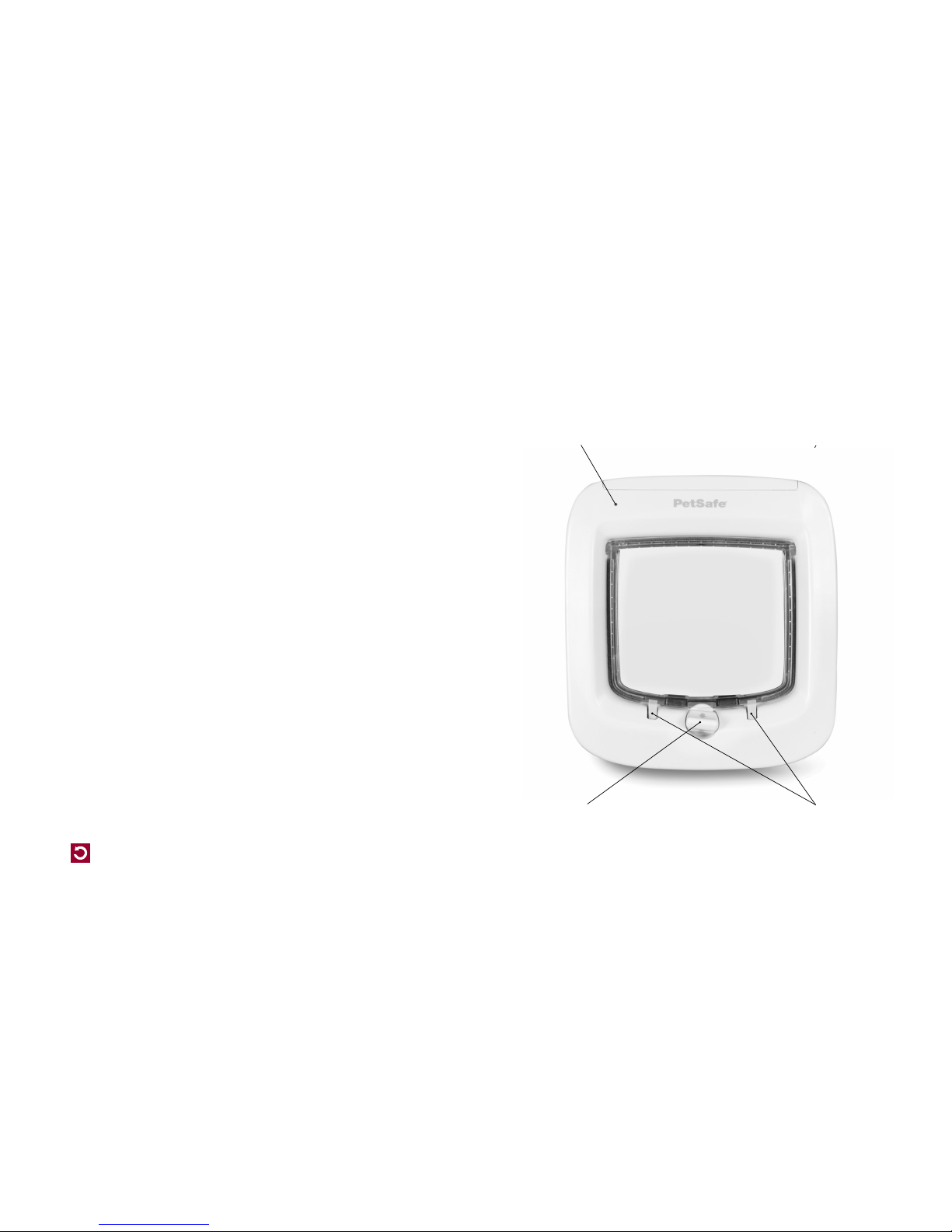
4-way man ual lock
LED and low ba ttery indicat or
Reinforced, dual auto-latch
One button programming
Draught excluder
Page 5

petsafe.com
5
Programming Cats into the cat flap
Your PetSafe® Microchip Cat Flap is designed to work with most 15-digit microchips (FDX-B) used
for pets. Before you begin setup or installation of the cat flap, please ensure your cat has the correct
type of microchip.
To begin operation, the cat flap must learn the unique microchip Identification Number (ID) of your
cat. Please follow the steps below to begin the setup of your cat flap:
1. The cat flap will be factory pre-set in the locked position. Ensure the manual lock is set to the
“In or Out” position (See Fig.H).
2. When the batteries are intstalled properly, the green LED light will flash three times which
indicates that the cat flap is in Automatic Mode.
3. To enter Learn Mode, press and hold the button until the red LED light appears (about 5
seconds). You will have 60 seconds to position the cat’s head in the tunnel to learn the
microchip ID. Once the cat flap has learned the microchip ID, it will unlatch and the red LED will
turn off. The cat flap will stay in Automatic Mode and will re-latch after 3 seconds.
4. After successfully learning the cat’s microchip ID, you will be ready to install the cat flap into
your door.
Note: To learn more than one cat, please follow the same steps starting with step No. 3. The
microchip cat flap can store up to 40 micro-chipped cats. Replace the battery cover when the
process is complete for all cats. Keep away all other micro-chipped cats to ensure only 1 cat is
programmed at a time.
Helpful Tip: Program your cat’s microchip ID before installation to prevent
having to hold your cat in the cat flap once it is installed. If you are
having trouble programming your cat’s microchip ID, please
ensure that their head is extended into the tunnel or they
pass all the way through the cat flap. You should hear the cat
flap unlatch once it has learned your cat’s microchip ID.
Installation
The PetSafe® Microchip Cat Flap is suitable to fit most doors or partitions although additional
materials and competent DIY skills may be required. This cat flap is designed to adapt easily to cutout sizes for Staywell® 200, 300, 400, 500, 900 and Petporte smart flap® series cat flaps. Some
simple DIY skills are required and minor adjustments to the cut-out or additional accessories might
be needed. When replacing a 200 series pet door, the glass adaptor accessory will be needed
for proper installation of the Microchip Cat Flap.
We strongly recommend that your microchip cat flap be programmed for your
cat and a check is made that it works with your cat’s microchip ID first.
Tools Required
• Jigsaw
• Drill
• 12 mm drill bit
• 6 mm drill bit
• Tape measure
• Phillips screwdriver
• Sandpaper
• Masking tape
• Pencil
• Ruler
• Level
Page 6
petsafe.com
6
Installation – Measurement and Marking
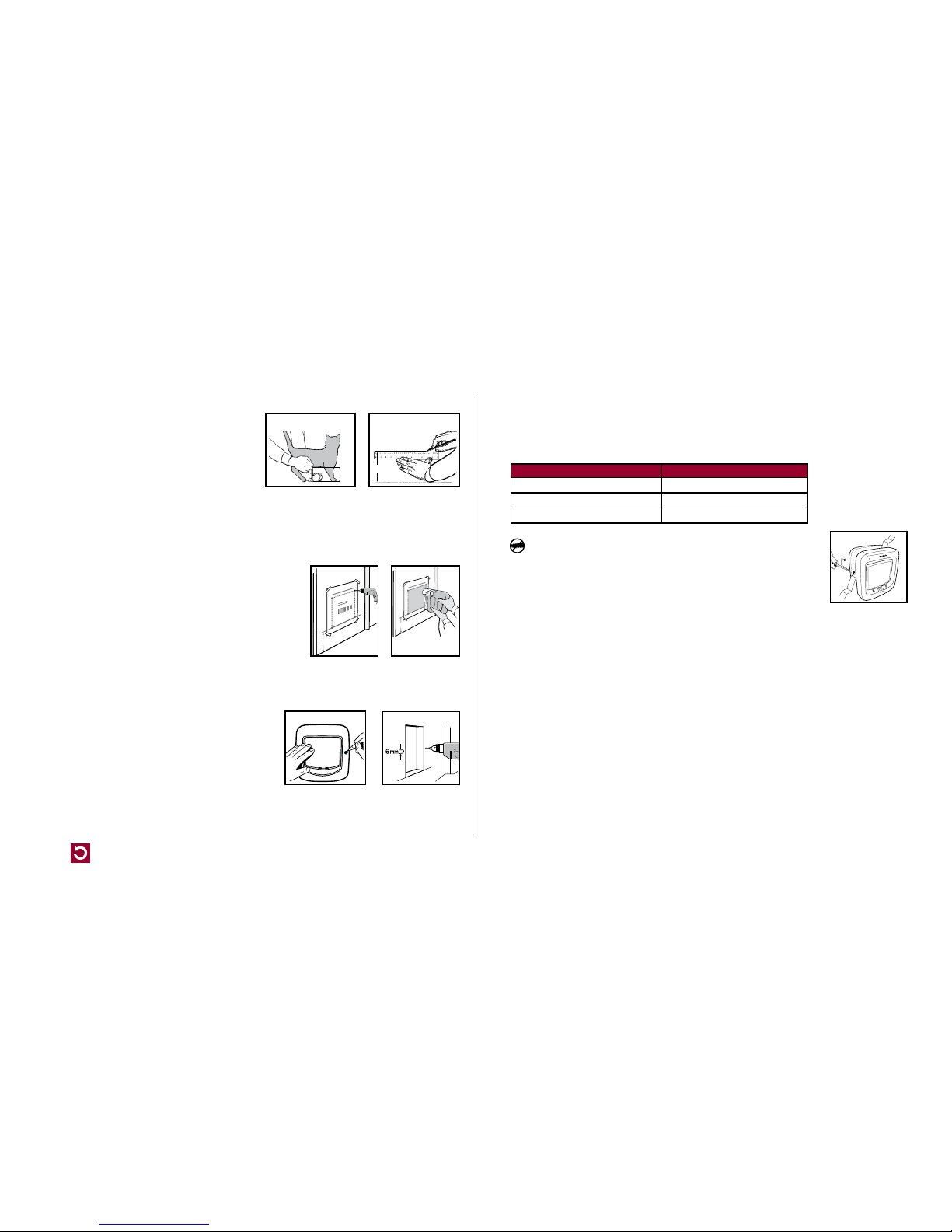
Measure the belly height of your cat. This is usually
100 mm –150 mm (Fig. A).
Mark this measurement on the outside of your door
and draw a straight horizontal line 168 mm long
(Fig. B).
Please keep in mind that this horizontal line will
eventually be the bottom of the hole you will cut in your door. The frame of the pet door will
be larger. If necessar y, this line may have to be lowered slightly to fit the closing panel in some
door designs.
Installation – Wooden, PVC, or uPVC Doors
1. Attach the supplied Cutting Template to the outside of
your door in the correct position ensuring that it is the
right way up and level (Fig. C).
2. Using the template, drill the first corner hole in the upper
right hand of the template with a 12 mm drill bit. Check
to see if your door has a metal core or metal plate. If so,
refer to the Metal and Metal Core Doors section of this
guide. If no metal core is found, drill all four corner holes
through the door. Please ensure the drill remains straight and level.
3. Using a jig or key-hole saw, cut along the dashed line as indicated on the Cutting
Template (Fig. D).
4. Temporarily place both frames into the cutout.
Level the cat flap until it is in the proper position.
On the outside, use a pencil to mark screw holes
through the holes on the exterior frame (Fig. E).
Remove the cat flap and drill the screw holes with
a 6mm drill bit (Fig. F).
5. Clean the area from any dust, dir t or debris.
(x)
Fig. A
(x)
Fig. B
(X)
Fig. C
(X)
Fig. D
Fig. E
Fig. F
6. Place the interior frame (with attached tunnel) into the hole from the inside. Align the exterior
frame to the outside of the door. Three different lengths of screws have been provided with this
cat flap. Select the appropriate length. Using a manual screw driver, screw the exterior frame
through, the holes in your door, to the interior frame.
Screw Selection Guide
Cut-Out Thickness Screw Length
Less than 8 m m 28 mm screw
8 mm – 31 mm 50 mm screw
32 mm – 55 mm 73 mm screw
Important: Do not cut the tunnel. Key components are contained
within the tunnel and any alteration to the tunnel will affect functionality.
7. When the installation of the cat flap is completed, place the two blanking
plugs over the screws on the exterior frame. The cat flap is ready to
use (Fig. G).
Installation – Metal or Metal Core Doors
Installation of the cat flap into a metal door or a door with a metal core plate will require some
modifications. The presence of metal can interfere with the performance of the cat flap including
a reduction in read range of the microchip. If you experience poor performance you may need to
purchase and install an Installation Adaptor and follow the instructions in the Installation – Glass
Doors or Windows section of this guide.
Installation – Glass Doors or Windows
The PetSafe® Microchip Cat Flap is also designed for installation into glass and requires a circular
hole with a diameter of 212 mm and an Installation Adaptor (sold separately). Your glazier will
need to cut a circular hole of diameter 212 mm as per the cutting template. Once a glazier has cut
the hole in your glass door or window please follow the instructions below for installation.
1. Slide one adaptor plate over the tunnel on the interior side of the frame of the cat flap.
2. From the interior of home, install the cat flap into opening.
3. From exterior of home, slide second adaptor over the tunnel of the cat flap.
Fig. G
Page 7

petsafe.com
7
4. Install exterior frame of the cat flap over the attached tunnel.
5. Using appropriate length screws, connect the interior and exterior frames of the cat flap.
6. Insert blanking plugs (included).
Working with glass is a skilled job and should be carried out by a professional
glazier. It is not possible to cut holes in toughened glass or double glazed units except at the time
of manufacture. Please consult a glazier.
Installation – Walls
For installation into walls, an Installation Adaptor and Tunnel Extensions must be purchased
separately. Wall fixing screws are not provided with this cat flap as the type needed will vary
greatly depending on your wall construction. Various fixing types are available from hardware and
D.I.Y. stores.
1. Ensure you have the correct number of Tunnel Extensions. The cat flap is 72 mm in depth and
each additional Tunnel Extension is 50 mm in depth.
2. For best fit, we recommend using the PetSafe® Installation Adaptor for wall installations.
3. Ensure the installation area is free from utility lines and that proper access is available for
your cat.
4. Follow the instructions in the Installation – Wooden, PVC, or uPVC Doors section (Steps 1-5)
to cut the hole in your wall. Important: Ensure you allow proper clearance for the bot tom of
the Installation Adaptor.
5. Attach one adaptor plate to the interior frame of the cat flap and attach the second adaptor
plate to the exterior frame of the cat flap, using the hardware provided. Set both frames aside.
6. Stack the Tunnel Extensions together using permanent glue and reinforce seams with
weatherproof tape.
7. Temporarily place the interior frame of cat flap into the wall cut-out. Use a pencil to mark the
four screw holes. Remove interior frame of cat flap and drill marked holes as is best suited for
your wall construction.
8. Attach Tunnel Extensions to the interior frame with weatherproof tape, do not glue.
9. Install the interior frame of cat flap and attach to the wall using appropriate hardware for your
wall construction.
10. Temporarily place exterior frame of cat flap into the wall cut-out. Use a pencil to mark the four
screw holes. Remove exterior frame of cat flap and drill marked holes as is best suited for your
wall construction.
11. Install the exterior frame of cat flap and attach to the wall using appropriate hardware your
wall construction.
12. Install blanking plugs (included).
Training
To train your cat to use the PetSafe® Microchip Cat Flap, set the cat flap to Manual Mode (see
Basic Operation Guide for mode settings). Lift or tape the flap open to the interior of the door to
help your cat become familiar with the cat flap. Try to encourage your cat to come through the cat
flap. DO NOT FORCE your cat through the flap or they may become frightened. A good motivator
is usually food. First feed your cat close to the cat flap on the inside. Once your cat is comfortable
approaching the flap, move food to the outside to try to get your cat to go through. Af ter your cat
has used the cat flap a few times, lower the flap and hold it open with your hand. Encourage your
cat to go through the flap while gently lowering the flap so it touches your cat’s back. This will help
your cat become familiar with the flap.
Once your cat is comfortable entering and exiting through the closed flap in Manual Mode,
change the cat flap to Automatic Mode to operate with their microchip ID. Walk your cat to the cat
flap until it reads the microchip ID and unlatches. Encourage your cat to push through the flap to the
other side. Repeat a few times.
Note: It is recommend to use the “In or Out” position on the 4-Way Manual lock until your cat is
completely comfor table using the cat flap.
Page 8
petsafe.com
8
Basic Operation
Basic Operation Guide
FUNCTION BUTTON ACTIVATION LED IN DICATOR ACTION
Manual Mode Press & Releas e Red - Solid for 5 seconds Latch wi ll unlock. Use 4-Way Loc k options
for pet acce ss.
Automatic Mode Press & Rele ase Green - So lid for 5
seconds
Latch will l ock and will only be ac tivated by
reading a “programmed” microchip ID.
Learn Mode Press & Hold fo r 5
seconds un til LED is
activated
Red – Solid for u p to 60
seconds
Cat flap wil l exit Learn Mode once
microchip I D is programmed. Latch w ill
unlock after successful programming.
Repeat for additional cats.
Motion Sensor N/A Green - Soli d for the
length of activation
Motion is de tected outside and t he cat flap
is looking f or a microchip to read.
Low Batt ery N/A Red - Flashes ever y 10
seconds
Replace batteries soon.
Batteries
Replaced
N/A Green – 3 quick flash es Cat flap wil l enter Automatic mo de.
Factory Reset Press & Hold 15
seconds un til LED is
activated
Red - 5 quick flas hes C at flap will enter bac k into Automatic
Mode and be l ocked. All programmed
microchip I Ds will be erased from th e
memory.
Error N/A Red – Continuous quick
flashing
Remove bat teries, wait 30 seco nds then
replace ba tteries. If Red lig ht continues,
contact t he Customer Care Centre. L atch
will att empt to unlock for cat fla p to be used
in Manual Mo de.
Function Definitions
• Manual Mode – Pet access setting that allows entry and exit for all. Cat fap does not
operate using programmed microchip IDs. Typically used with 4-Way Manual Lock.
• Automatic Mode – Pet access selective entry setting which only allows programmed cats
to enter. Can be used in conjunction with 4-Way Manual Lock.
• Learn Mode - Mode used to program your cat’s unique microchip ID. The cat flap can learn
up to 40 micro-chipped cats.
• Motion Sensor – Indicates that the cat flap is looking for a microchip ID to read.
• Low Battery Indicator – Indicates that batteries are running low and will need to be
replaced soon.
• Factory Reset – Can be used to erase all programmed microchip IDs in the cat flap.
• Error – Indicates that something is not operating normally in the cat flap. Contact our
Customer Care Centre for assistance. Please visit www.petsafe.com for a list of our Customer
Care Centre telephone numbers.
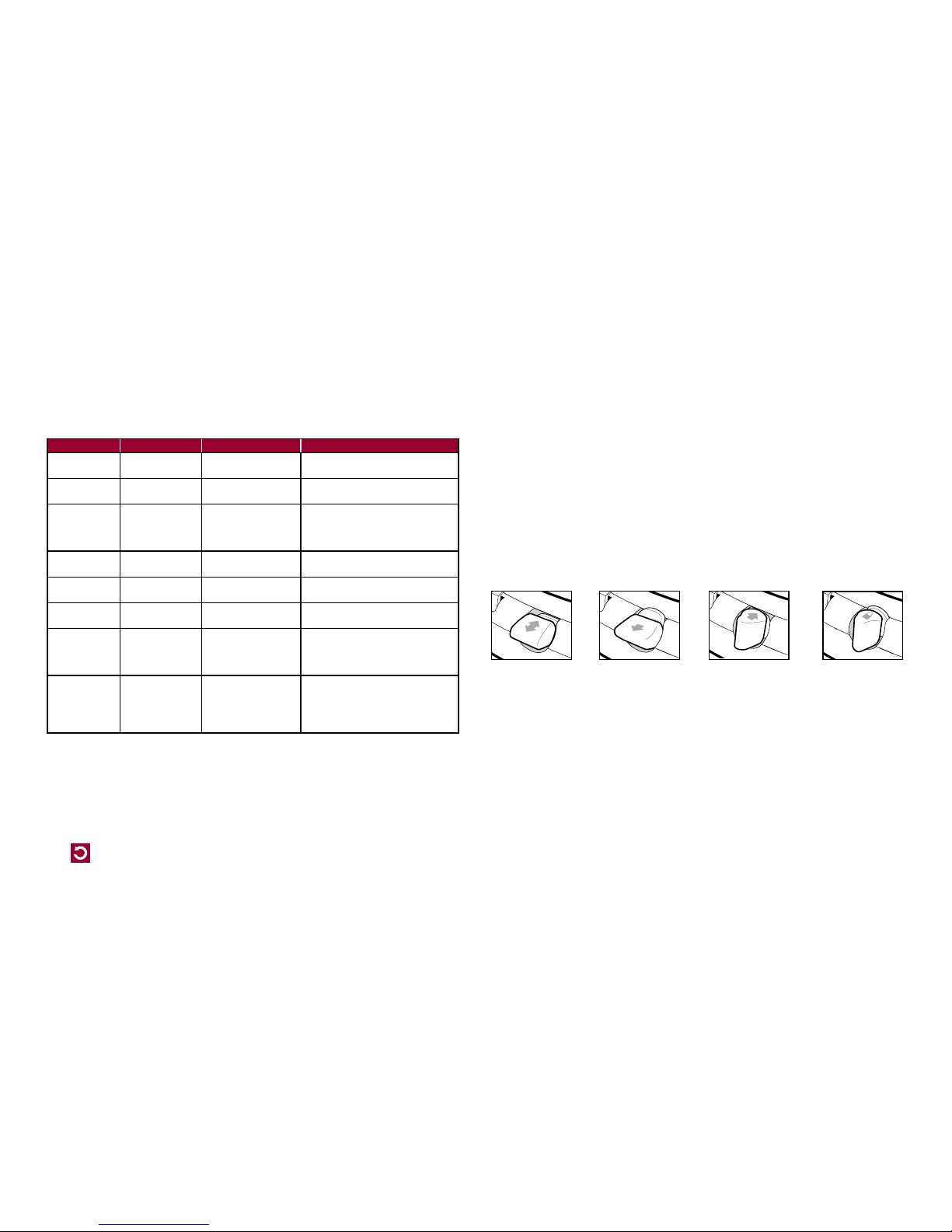
4-Way Manual Lock
The 4-Way Manual lock allows you to control your cat’s access in and out of your home in either
direction. Until your pet is thoroughly familiar with using the cat flap, it is a good idea to only use the
4-Way Manual lock in the “In or Out” position only (Fig. H).
Fig. H
Maintenance
Your cat flap is constructed of the highest quality material with a toughened flap and has been
designed to last for many years. To maintain its appearance, occasional wiping with a damp cloth
is all that is necessary.
From time to time, the motion sensor in the inside of the tunnel may become covered with dirt and
may cause performance issues of the cat Flap. Please wipe this area with a damp cloth as needed
to ensure proper usage. Also check for cat hair or debris in the dual-auto latches.
Fully lockedIn or Out Out onlyIn only
Page 9

petsafe.com
9
Additional Information
For extended information on your PetSafe® Microchip Cat Flap including glass and wall installation,
helpful training tips, and available accessories, please visit www.petsafe.com.
Important recycling advice
Please respect the Waste Electrical and Electrical Equipment regulations in your country. This
equipment must be recycled. If you no longer require this equipment, do not place it in the normal
municipal waste system. Please return it to where it was purchased in order that it can be placed
in our recycling system. If this is not possible, please contact PetSafe® Customer Care Centre for
further information.
Battery Disposal
Separate collection of spent batteries is required in many regions; check the regulations in your
area before discarding spent batteries. At the end of the product life, please contact one of our
Customer Care Centres to receive instructions on proper disposal of the battery. Please do not
dispose of the battery in household or municipal waste.
Compliance
Radio Systems Corporation declares under its own responsibility, that the following product is in
compliance with the essential requirements under article 3 of the RED (2014/53/EU) and the
RoHS Directive (2011/65/EU). Unauthorised changes or modifications to the equipment that are
not approved by Radio Systems Corporation may violate EU RED regulations, could void the user’s
authority to operate the equipment, and will void the warranty.
Hereby, Radio Systems Corporation, declares that this PPA19-16145 is in compliance with the
essential requirements and other relevant provisions. The Declaration of Conformity can be found
at: http://www.petsafe.com/customercare/eu_docs.php.
Australia
This device complies with the applicable EMC requirements specified by the ACMA
(AustralianCommunications and Media Authority).
Warranty
Three Year Non-Transferrable Limited Warranty
This Product has the benefit of a limited manufacturer’s warranty. Complete details of the warranty
applicable to this Product and its terms can be found at www.petsafe.com and/or are available by
contacting your local Customer Care Centre.
Europe – Radio Systems PetSafe Europe Ltd., 2nd Floor, Elgee Building, Market Square, Dundalk,
Co. Louth, A91 YR9X Ireland.
Australia/New Zealand – In compliance with the Australian Consumer Law, Warranties
Against Defects, effective January 1, 2012, warranty details of this Product are as follows: Radio
Systems Australia Pt y Ltd. (hereinafter referred to as “Radio Systems”) warrants to the original retail
purchaser, and not any other purchaser or subsequent owner, that its Product, when subject to
normal and proper residential use, will be free from defects in material or workmanship for a period
of three (3) years from the purchase date. An “original retail consumer purchaser” is a person or
entity who originally purchases the Product, or a gift recipient of a new Product that is unopened
and in its original packaging. When serviced by Radio Systems Customer Service, Radio Systems
covers labour and parts for the first three years of ownership; after the first three years, a service or
upgrade charge will apply relative to replacement of the Product with new or refurbished items at
Radio Systems’ sole discretion.
The limited warranty is non-transferable and shall automatically terminate if the original retail
consumer purchaser resells the Radio Systems Product or transfers the property on which the Radio
Systems Product is installed. This Limited Warranty excludes accidental damage due to dog chews;
lightning damage; or neglect, alteration, and misuse. Consumers who purchase products outside
of Australia, New Zealand, or from an unauthorised dealer will need to return the Product to the
original place of purchase for any warranty issues.
Please note that Radio Systems does not provide refunds, replacements, or upgrades for change of
mind, or for any other reason outside of these Warranty terms.
Page 10

petsafe.com
10
Claims Procedure: Any claim made under this Warranty should be made directly to Radio Systems
Australia Pty Ltd. Customer Care Centre at:
Radio Systems Australia Pty Ltd.
PO Box 7266, Gold Coast Mail Centre QLD 9726, Australia
Australia Residents: 1800 786 608
New Zealand Residents: 0800 543 054
Email: [email protected]
To file a claim, a proof of purchase must be provided. Without a proof of purchase, Radio Systems
will not repair or replace faulty components. Radio Systems requests the Consumer to contact the
Radio Systems Customer Care Centre to obtain a Warranty Return number, prior to sending the
Product. Failure to do so may delay in the repair or replacement of the Product.
If the Product is deemed to be faulty within 30 days from date of original purchase, Radio Systems
will organise for a replacement to be sent in advance of returning the faulty Product. A Post Bag
will be included with the replacement Product for the return of the fault y Product. The Product must
be returned within 7 days of receiving the replacement. If the Product is deemed to be faulty after
30 days from the date of original purchase, the consumer will be required to return the Product
to Radio Systems at the consumer’s own expense. Radio Systems will test and replace the faulty
unit or its components and return to the consumer free of charge, provided the Product is within its
said warranty period. This warranty is in addition to other rights and remedies available to you
under the law. Radio Systems goods come with guarantees that cannot be excluded under the
Australia Consumer Law. You are entitled to a replacement or refund for a major failure and for
compensation for any other reasonably foreseeable loss or damage. You are also entitled to have
the goods repaired or replaced if the goods fail to be of acceptable qualit y and the failure does
not amount to a major failure.
Should you have any queries or require any further information, please contact our Customer Care
Centre on 1800 786 608 (Australia) or 0800 543 054 (New Zealand).
Terms of Use and Limitation of Liability
1. Terms of Use
Use of this Product is subject to your acceptance without modification of the terms, conditions
and notices contained herein. Use of this Product implies acceptance of all such terms,
conditions and notices. If you do not wish to accept these terms, conditions, and notices,
please return the Product, unused, in its original packaging and at your own cost and risk to the
relevant Customer Care Centre together with proof of purchase for a full refund.
2. Proper Use
If you are unsure whether this Product is appropriate for your pet, please consult your
veterinarian or certified trainer prior to use. Proper use includes, without limitation, reviewing
the entire Operating Guide and any specific safety information statements.
3. No Unlawful or Prohibited Use
This Product is designed for use with pets only. Using this Product in a way that is not intended
could result in violation of Federal, State or local laws.
4. Limitation of Liability
In no event shall Radio Systems Corporation or any of its associated companies be liable for
(i) any indirect, punitive, incidental, special or consequential damage and/or (ii) any loss or
damages whatsoever arising out of or connected with the misuse of this Product. The Purchaser
assumes all risks and liability from the use of this Product to the fullest extent permissible by law.
5. Modification of Terms and Conditions
Radio Systems Corporation reserves the right to change the terms, conditions and notices
governing this Product from time to time. If such changes have been notified to you prior to your
use of this Product, they shall be binding on you as if incorporated herein.
Page 11

petsafe.com
400-2164
©2017 Radio Systems Corporation
Radio Systems Corporation
10427 PetSafe Way
Knoxville, TN 37932 USA
+1 (865) 777-5404
Radio Systems PetSafe Europe Ltd.
2nd Floor, Elgee Building, Market Square
Dundalk, Co. Louth, A91 YR9X Ireland
+353 (0) 76 892 0427
PetSafe® pet doors are suitable for most doors, walls or partitions although additional materials may be required. This product is designed for the convenience of you and your pet. It is not possible to fully guarantee the exclusion of all
other animals in all circumstances. Radio Systems
Corporation will not accept liability for any damage or inconvenience caused by unwanted animals who may gain access to your home. In keeping with accepted standards of parental
care, children should be supervised at all times.
1
ST
Edition
 Loading...