

Page 1
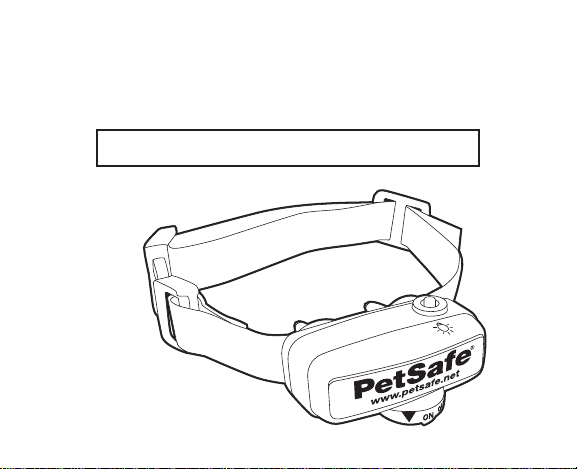
PetSafe® Deluxe Little Dog
In-Ground Fence™ Receiver Collar
Operating Guide
Please read this entire guide before beginning.
Model Number
PIG00-10778
Page 2
Important Safety Information
Explanation of Attention Words and Symbols used
in this guide
This is the safety alert symbol. It is used to alert you to potential
personal injury hazards. Obey all safety messages that follow this
symbol to avoid possible injury or death.
WARNING
CAUTION
WARNING indicates a hazardous situation which, if not
avoided, could result in death or serious injury.
CAUTION, used without the safety alert symbol, indicates
a hazardous situation which, if not avoided, could result in
harm to your pet.
WARNING
2 Customer Care Center 1-800-732-2677
Not for use with aggressive dogs. Do not use this product if
your dog is prone to aggressive behavior. Aggressive dogs can
cause severe injury or death to their owners and others. If you
are not sure that this product is right for your dog, please talk to
your veterinarian or a certifi ed trainer.
Page 3

CAUTION
This PetSafe® In-Ground Fence™ is NOT a solid barrier. The
system is designed to act as a deterrent to remind pets by
Static Correction to remain in the boundary established. It
is important that you reinforce training with your pet on a
regular basis. Since the tolerance level to Static Correction
varies from pet to pet, Radio Systems® Corporation CANNOT
guarantee that the system will, in all cases, keep a pet within
the established boundary. Not all pets can be trained to avoid
crossing the boundary! Therefore, if you have reason to
believe that your pet may pose a danger to others or harm
himself if he is not kept from crossing the boundaries, you
should NOT rely solely upon the PetSafe
®
In-Ground Fence™
to confi ne your pet. Radio Systems® Corporation shall NOT
be liable for any property damage, economic loss or any
consequential damages, sustained as a result of any animal
crossing the boundary.
www.petsafe.net 3
Page 4

CAUTION
Proper fi t of the collar is important. A collar worn for too long
or made too tight on the pet’s neck may cause skin damage.
Ranging from redness to pressure ulcers; this condition is
commonly known as bed sores.
- Avoid leaving the collar on the dog for more than
12 hours per day.
- When possible reposition the collar on the pet’s neck
every 1 to 2 hours.
- Check the fi t to prevent excessive pressure; follow
the instructions in this manual.
- Never connect a lead to the electronic collar; it will
cause excessive pressure on the contacts.
- When using a separate collar for a lead, don’t put
pressure on the electronic collar.
- Wash the dog’s neck area and the contacts of the
collar weekly with a damp cloth.
- Examine the contact area daily for signs of a rash or
a sore.
- If a rash or sore is found, discontinue use of the
collar until the skin has healed.
4 Customer Care Center 1-800-732-2677
Page 5

- If the condition persists beyond 48 hours, see your
veterinarian.
- For additional information on bed sores and pressure
necrosis, please visit our website.
These steps will help keep your pet safe and comfortable.
Millions of pets are comfortable while they wear stainless steel
contacts. Some pets are sensitive to contact pressure. You may
fi nd after some time that your pet is very tolerant of the collar. If
so, you may relax some of these precautions. It is important to
continue daily checks of the contact area. If redness or sores are
found, discontinue use until the skin has fully healed.
Y ou may need to trim the hair in the area of the Contact Points.
Never shave the dog’s neck; this may lead to a rash or infection.
www.petsafe.net 5
Page 6

• The Receiver Collar should not be on your dog when the
system is tested. Your pet may receive an unintended
correction.
• The Boundary Width of the system must be tested
whenever an adjustment is made to the containment fi eld
to prevent unintended corrections to your pet.
• If you use a collar and leash for training, be sure the extra
collar does not put pressure on the contact points.
• Always remove your dog’ s Receiver Collar before
performing any transmitter testing.
6 Customer Care Center 1-800-732-2677
Page 7

Thank you for choosing PetSafe® brand. You and your pet
deserve a companionship that includes memorable moments
and a shared understanding together. Our products and
training tools promote a lifestyle of protection, teaching, and
love — essentials that infl uence memories for a lifetime. If
you have an y questions about our products or training y our
pet, please visit our website a t www.petsafe.net or contact our
Customer Care Center at 1-800-732-2677.
To get the most protection out of your w arranty, please
register your product within 30 days at www.petsafe.net.
By registering and keeping your receipt, you will enjoy the
product’s full warranty and should you ev er need to call the
Customer Care Center, we will be able to help y ou faster.
Most importantly, PetSafe® will never give or sell your valuable
information to anyone. Complete warranty information is
available online at www.petsafe.net.
www.petsafe.net 7
Page 8

How the System Works
A radio signal travels from the Fence Transmitter through a buried wire, marking
the boundaries you wish to set for your dog. Y our dog w ears a Receiver Collar
that detects the signal at the boundary. As your dog approaches the boundary,
the receiver issues a warning tone. If he proceeds further, he receives a safe but
startling Static Correction. While harmless, the correction will persuade him to
stay in the containment area you’ve established. Boundary fl ags are a temporary
visual aid for your pet; remov e them after training. This PetSafe® Deluxe Little
Dog In-Ground Fence
over 6 pounds, neck sizes 6 to 16 inches .
8 Customer Care Center 1-800-732-2677
™
has been proven safe, comfortable, and effectiv e for pets
Page 9
Prepare the Receiver Collar
To Insert and Remove
the Battery
Note: Do not install the battery while the
Receiver Collar is on your pet.
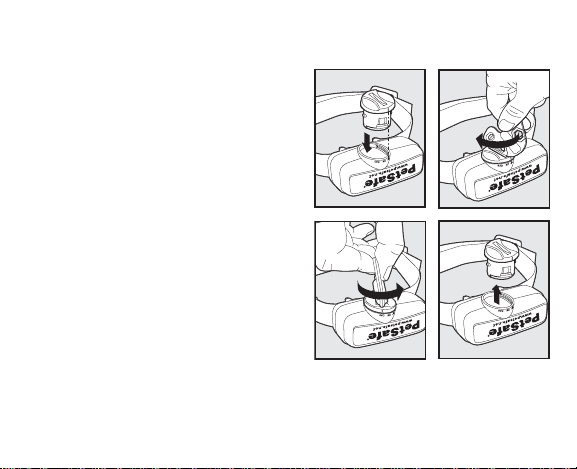
This Receiver Collar utilizes a
replaceable PetSafe® battery
(RFA-188). This unique battery is
designed to make battery replacement
easier and increase water protection.
To activate the collar, insert the battery
module (A). Using the edge of the
Test Light Tool as shown, turn the
battery clockwise until the vertical line
on the battery is pointed to the “ON”
position (B). If the PetSafe
Collar is not going to be used on the
pet immediately, leave it in the
“OFF” position.
www.petsafe.net 9
®
Receiver
AB
C
D
Page 10

To remove the battery, turn the battery counter-clockwise using the edge of
the Test Light Tool as shown (C, D). DO NOT attempt to cut into or pry
open the battery. Be sure to discard the used battery properly.
A replacement PetSafe® battery can be found at many retailers. Contact the
Customer Care Center or visit our website at www.petsafe.net to locate a
retailer near you.
Static Correction and Battery Test Feature
When the RFA-188 Battery Module is fi rst installed in the Receiver, the
red LED will fl ash the current correction level setting (1-5). For the next
30 seconds, the receiver will monitor the battery status and will either fl ash
the green LED once every 5 seconds to indicate a good battery, or fl ash the
red LED once every 5 seconds to indicate a low battery condition.
After the 30 second battery test period, the green LED will cease to fl ash
if the battery is good. If the battery was low during the test period, the
red LED will continue to fl ash at a rate of 1 fl ash every 20 seconds to
indicate a low battery condition. In this situation, battery replacement is
recommended.
10 Customer Care Center 1-800-732-2677
Page 11
To Set the Static Correction Level
Read all steps before attempting to set the Static
Correction Level.
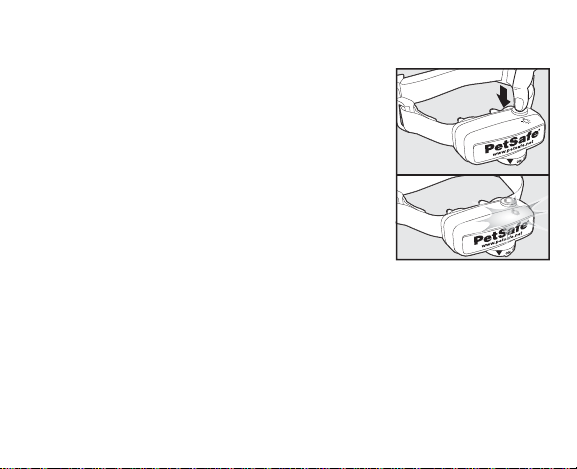
1. With the battery installed, press the Correction
Level Button and release when the Receiver
Indicator Light illuminates red (E).
2. The Receiver Indicator Light will emit a
number of red fl ashes representing the Static
Correction Level (F).
3. Increase the Static Correction Level by pressing
and releasing the Correction Level Button
within 5 seconds of the previous fl ashes.
The Static Correction Levels increase from 1 to 5. Pushing the Correction
Level Button while the Receiver Collar is on level 5 will cause the Receiver
Collar to revert to level 1.
Refer to the Function and Response Table to choose the Static Correction
level that best fi ts your pet.
The Receiver Indicator Light acts as a low battery indicator, fl ashing every
20 seconds when battery replacement is required.
www.petsafe.net 11
E
F
Page 12

Anti-Linger Prevention
The Anti-Linger Prevention feature keeps your dog from staying in the
Warning Zone for long periods of time and draining the Receiver Collar
battery. Your dog will hear a warning tone when he reaches the Warning
Zone. If your dog does not return to the Pet Area after two seconds, he will
receive a continuous Static Correction until he returns to the Pet Area.
Run Through Prevention
This system includes a unique “run-through” prevention so that your
dog cannot escape the Pet Area without receiving an increased level of
Static Correction. The Receiver Collar automatically increases the Static
Correction when your dog continues more than 20% of the way through
the pet fencing Boundary Width. For example, if the signal is detected 10
feet from the wire and your dog enters the Static Correction Zone, this
feature is activated when he is approximately 8 feet from the Boundary
Wire. Your dog will then receive a Static Correction that is at an increased
level corresponding to the Static Correction level setting on the Receiver
Collar. The Receiver Collar is equipped to automatically increase the level
of Static Correction the longer your pet remains in the Static Correction
Zone if the collar is set at level 2 or above.
12 Customer Care Center 1-800-732-2677
Page 13

Over Correction Protection
In the unlikely event that your pet “freezes” in the Static Correction Zone,
this feature limits the static correction duration to a maximum of 30
seconds. While the system locks out further static correction, the warning
tone will continue until the pet leaves the Static Correction Zone.
www.petsafe.net 13
Page 14
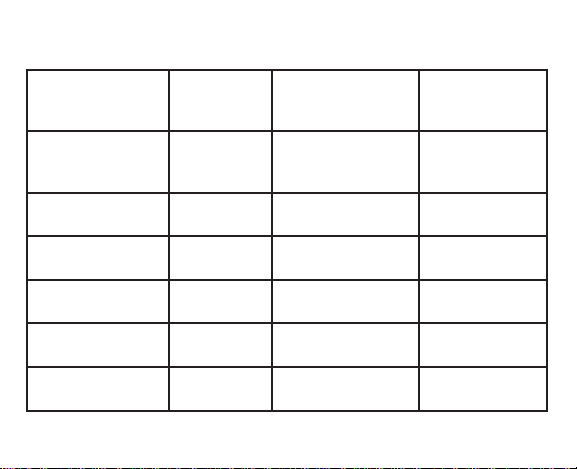
Function and Response Table
Indicator Light
Response
1 Red Flash 1 No Static
2 Red Flashes 2 Low Static
3 Red Flashes 3 Medium Static
4 Red Flashes 4 Medium High
5 Red Flashes 5 High Static
Flashes 1 Red fl ash
every 20 seconds
14 Customer Care Center 1-800-732-2677
Static
Correction
Level
Low Battery
Receiver Collar
Function
Correction,
Tone Only
Correction
Correction
Static Correction
Correction
Temperament
of Pet
Initial Training
Mode
Timid
Timid or
Average
Average or
High Energy
High Energy
Page 15
Fit the Receiver Collar
Important: The proper fi t and placement of your Receiver Collar is
important for effective training. The Contact P oints m ust ha ve direct
contact with your pet’s skin on the underside of his neck.
CAUTION
www.petsafe.net 15
Please read and follow the instructions in this manual. Proper
fi t of the collar is important. A collar worn for too long or made
too tight on the pet’s neck may cause skin damage. Ranging
from redness to pressure ulcers; this condition is commonly
known as bed sores.
• Avoid leaving the collar on the dog for more than 12 hours
per day.
• When possible reposition the collar on the pet’s neck every
1 to 2 hours.
• Check the fi t to prevent excessive pressure; follow the
instructions in this manual.
• Never connect a lead to the electronic collar; it will cause
excessive pressure on the contacts.
• When using a separate collar for a lead, don’t put pressure
on the electronic collar.
Page 16
CAUTION
• Wash the dog’s neck area and the contacts of the collar
weekly with a damp cloth.
• Examine the contact area daily for signs of a rash or a sore.
• If a rash or sore is found, discontinue use of the collar until
the skin has healed.
• If the condition persists beyond 48 hours, see your
veterinarian.
• For additional information on bed sores and pressure
necrosis, please visit our website.
These steps will help keep your pet safe and comfortable.
Millions of pets are comfortable while they wear stainless
steel contacts. Some pets are sensitive to contact pressure.
You may fi nd after some time that your pet is very tolerant of
the collar. If so, you may relax some of these precautions. It
is important to continue daily checks of the contact area. If
redness or sores are found, discontinue use until the skin has
fully healed.
You may need to trim the hair in the area of the Contact
Points. Never shave the dog’s neck; this may lead to a
rash or infection.
16 Customer Care Center 1-800-732-2677
Page 17
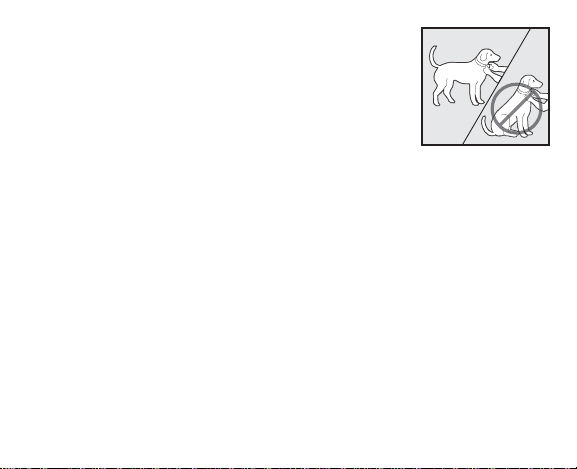
To assure a proper fi t, please follow these steps:
1. Turn the Receiver Collar battery to the
G
OFF position.
2. Start with your pet standing comfortably (G).
3. Place the Receiver Collar on your pet so that
the battery module is pointing down. Center
the Contact Points underneath your pet’s neck,
touching the skin.
www.petsafe.net 17
Page 18
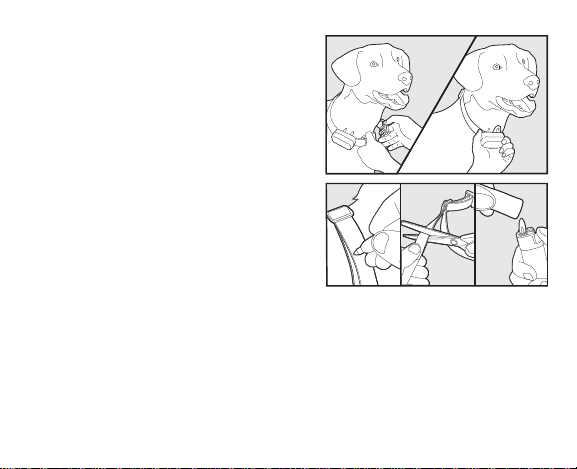
4. The Receiver Collar should fi t snugly,
yet loose enough to allow one fi nger to
H
fi t between a contact point and your
pet’s neck (H). Allow your pet to w ear
the collar for several minutes, then recheck the fi t. Check the fi t again as your
pet becomes more comfortable with the
Receiver Collar.
5. Once you are satisfi ed with the fi t of
the Receiver Collar then you may trim
I
any excess collar strap as follows (I):
a. Mark the desired length of the
Receiver Collar with a pen. Allow
for growth if your pet is young or
grows a thick winter coat.
b. Remove the Receiver Collar from your pet and cut off the excess.
c. Before placing the Receiver Collar back onto your pet, seal the
edge of the cut collar by applying a fl ame along the
frayed edge.
18 Customer Care Center 1-800-732-2677
Page 19
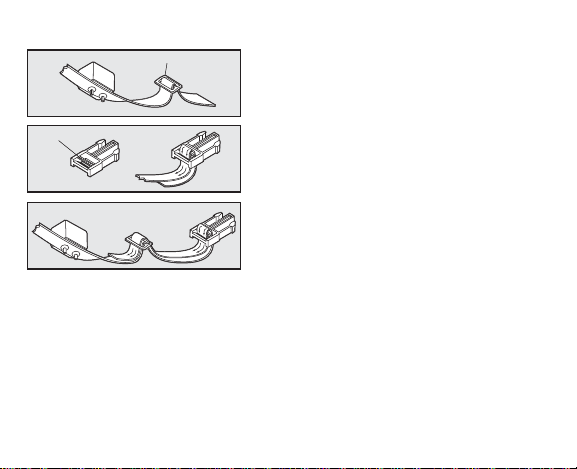
To Re-Thread the Collar
Slide Buckle
The slide buckle prevents the collar from
becoming loose around your pet’s neck.
Ridges
The ridges must be facing up; the collar
will slip if it is not properly threaded.
www.petsafe.net 19
Page 20
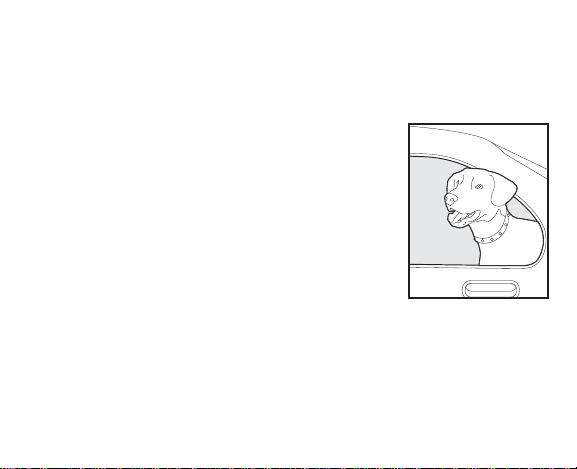
Taking Your Pet Out of the
Pet Area
Important: Remove the Receiver Collar and leav e it in the Pet Area.
Once your pet learns the Boundary Zone, he will be
reluctant to cross it for walks or car rides.
Option 1: Replace the Receiver Collar with a regular
collar. Put your pet in a car that is within the Pet
Area and drive him out of the Pet Area.
Option 2: Replace the Receiver Collar with a
regular collar and leash. Walk your pet out of the Pet
Area while giving a command such as “OK” at a
specifi c place of the Boundary Zone (the end of your
driveway, sidewalk, etc.). Always leave the Pet Area
with a leash at this place and your pet will associate
leaving the Pet Area only on a leash, only at this
place, and only with a person. You may initially need
to convince your pet to leave the Pet Area with a food
treat and lots of praise.
Note: You may also carry your pet out of the Pet Area.
20 Customer Care Center 1-800-732-2677
Page 21
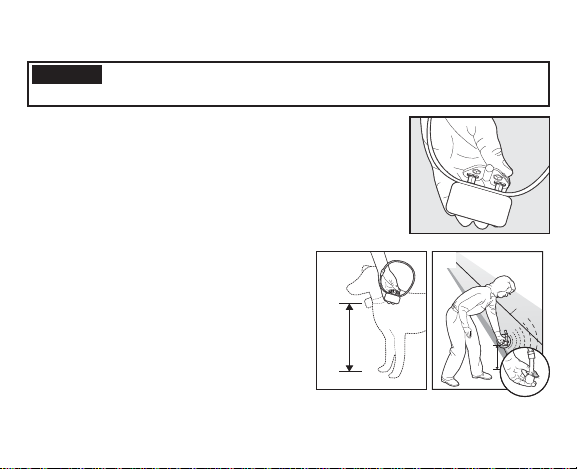
Test Light Instructions
CAUTION
1. Set the correction level to 2 or above.
2. Hold the Test Light contacts to the Contact Points (J)
3. Hold the Receiver Collar at your dog’s neck height
with the Contact Points pointing up (K) and the
Correction Level Button facing the Boundary Wire.
Slowly walk toward the Boundary Wire until you hear
the warning tone and see the Test Light fl ash (L).
Note: The Receiver Collar is waterproof,
which can make the beep hard to hear.
Save the Test Light for future testing.
If the Test Light does not fl ash, refer
to the Troubleshooting section in
your PetSafe® Deluxe Little Dog
In-Ground Fence™ Operating and
Training Guide or contact the
Customer Care Center.
www.petsafe.net 21
The Receiver Collar should not be on your dog when the system
is tested. Your pet may receive an unintended correction.
J
K
L
Boundary
Wire
Page 22
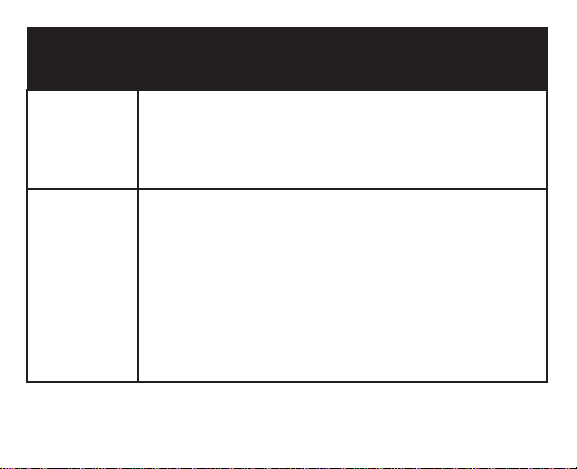
Troubleshooting
Receiver
Collar is not
beeping or
correcting.
The
Receiver
Collar is
beeping,
but the
pet is not
responding
to the Static
Correction.
22 Customer Care Center 1-800-732-2677
• Check battery to make sure it is installed properly and turned
to the ON position.
• Perform Static Correction and Battery Test (page 10). If
Battery Status LED does not fl ash Green, replace the battery.
• Check that both lights are lit on the Fence Transmitter.
• Test the Receiver Collar with the Test Light walking toward
the Boundary Wire.
• If the Test Light fl ashes, check the fi t of the Receiver Collar.
• Trim your pet’s fur where the Contact Points touch the neck
and/or purchase longer Contact Points by contacting the
Customer Care Center.
• Increase the Static Correction Level.
• Repeat training steps to reinforce training.
• Purchase a stronger Receiver Collar by contacting the
Customer Care Center.
Page 23

Additional Information
• The system should only be used with healthy pets. Contact your
veterinarian if you have concerns about the medical condition of your
pet (medication, pregnant, heart conditions, etc.).
• The PetSafe® Deluxe Little Dog In-Ground Fence™ is for residential use
only.
• The Static Correction will get your pet’s attention, but will not cause
harm. It is designed to startle, not to punish.
• Test the Receiver Collar at least once a month to verify that it is
functioning properly. Check that it activates at the Boundary Wire.
Battery life depends upon how often the Receiver Collar is activated.
• Remove the Receiver Collar from your pet when indoors for the comfort
of your pet.
• Never leave the Receiver Collar on your pet for more than 12
consecutive hours.
• Consult your PetSafe
and Training Guide for additional Troubleshooting information.
www.petsafe.net 23
®
Deluxe Little Dog In-Ground Fence™ Operating
Page 24

Terms of Use and Limitation
of Liability
1. Terms of Use
This Product is offered to you conditioned upon your acceptance
without modification of the terms, conditions and notices contained
herein. Usage of this Product implies acceptance of all such terms,
conditions, and notices.
2. Proper Use
This Product is designed for use with pets where training is desired. The
specific temperament of your pet may not work with this Product. If you
are unsure whether this is appropriate for your pet, please consult your
veterinarian or certified trainer. Proper use includes reviewing the entire
Guide provided with your Product and any specific Caution statements.
3. No Unlawful or Prohibited Use
This Product is designed for use with pets only. This pet training
device is not intended to harm, injure or provoke. Using this Product in
a way that is not intended could result in violation of Federal, State or
local laws.
24 Customer Care Center 1-800-732-2677
Page 25

4. Limitation of Liability
In no event shall Radio Systems® Corporation be liable for any direct,
indirect, punitive, incidental, special or consequential damages, or any
damages whatsoever arising out of or connected with the use or misuse
of this Product. Buyer assumes all risks and liability from the use of
this Product.
5. Modification of Terms and Conditions
Radio Systems® Corporation reserves the right to change the terms,
conditions and notices under which this Product is offered.
www.petsafe.net 25
Page 26

Compliance
FCC/Canada
This Class B digital apparatus complies with Canadian ICES-003. This
equipment has been tested and found to comply with the limits for a Class
B digital device, pursuant to Part 15 of the FCC Rules. These limits are
designed to provide reasonable protection against harmful interference when
the equipment is operated in a residential environment. This equipment
generates, uses, and can radia te radio frequency energy and, if not installed
and used in accordance with the instruction guide, may cause harmful
interference to radio communications. Ho wever, there is no guarantee
that interference will not occur in a practical installation. If this equipment
causes harmful interference to radio or television reception, which can be
determined by turning the equipment off and on, the user is encouraged to
try to correct the interference by one or more of the following measures:
• Relocate the interfered receiving antenna.
• Increase the separation between the equipment and receiver.
• Connect the equipment into an outlet on a circuit different to that to
which the receiver is connected.
• Contact the Customer Care Center at 1-800-732-2677.
26 Customer Care Center 1-800-732-2677
Page 27

This device complies with Industry Canada Rules. This device complies
with part 15 of the FCC Rules. Operation is subject to the following two
conditions: (1) This device may not cause harmful interference, and (2)
this device must accept any interference received, including interference
that may cause undesired operation.
Unauthorized changes or modifi cations to the equipment, not approved
by Radio Systems® Corporation, could result in not meeting compliance
with FCC regulations and could void the user’s authority to operate the
equipment.
Australia
This device complies with the applicable EMC requirements specifi ed by
the ACMA (Australian Communications and Media Authority).
www.petsafe.net 27
Page 28

Customer Care International
USA & Canada - Tel: 800-732-2677
Monday - Friday 8 AM - 8 PM / Saturday 9 AM – 5 PM
Australia - Tel: 1800 786 608
Monday - Friday 9 AM - 5 PM
New Zealand - Tel: 0800 543 054
Monday - Friday 12 PM - 7 PM
This product has the benefi t of a limited manufacturer’s warranty. Details
of the warranty applicable to this product and its terms can be found at
www.petsafe.net and/or are available by sending a stamped addressed
envelope to PetSafe
Park, Ackhurst Road, Chorley, Lancashire PR7 1NL, United Kingdom.
®
Ltd. Redthorn House, Unit 9, Chorley West Business
Perchlorate Battery
Perchlorate Material – special handling may apply.
See www.dtsc.ca.gov/hazardouswaste/perchlorate.
28 Customer Care Center 1-800-732-2677
Page 29

www.petsafe.net 29
Page 30

30 Customer Care Center 1-800-732-2677
Page 31

www.petsafe.net 31
Page 32

Radio Systems® Corporation
10427 Electric Avenue
Knoxville, TN 37932
1-800-732-2677
Protected by US Patents 6,921,089, 7,541,937,
and D531,117. Other patents pending.
©2007 Radio Systems Corporation
www.petsafe.net
400-1187
 Loading...