

Page 1
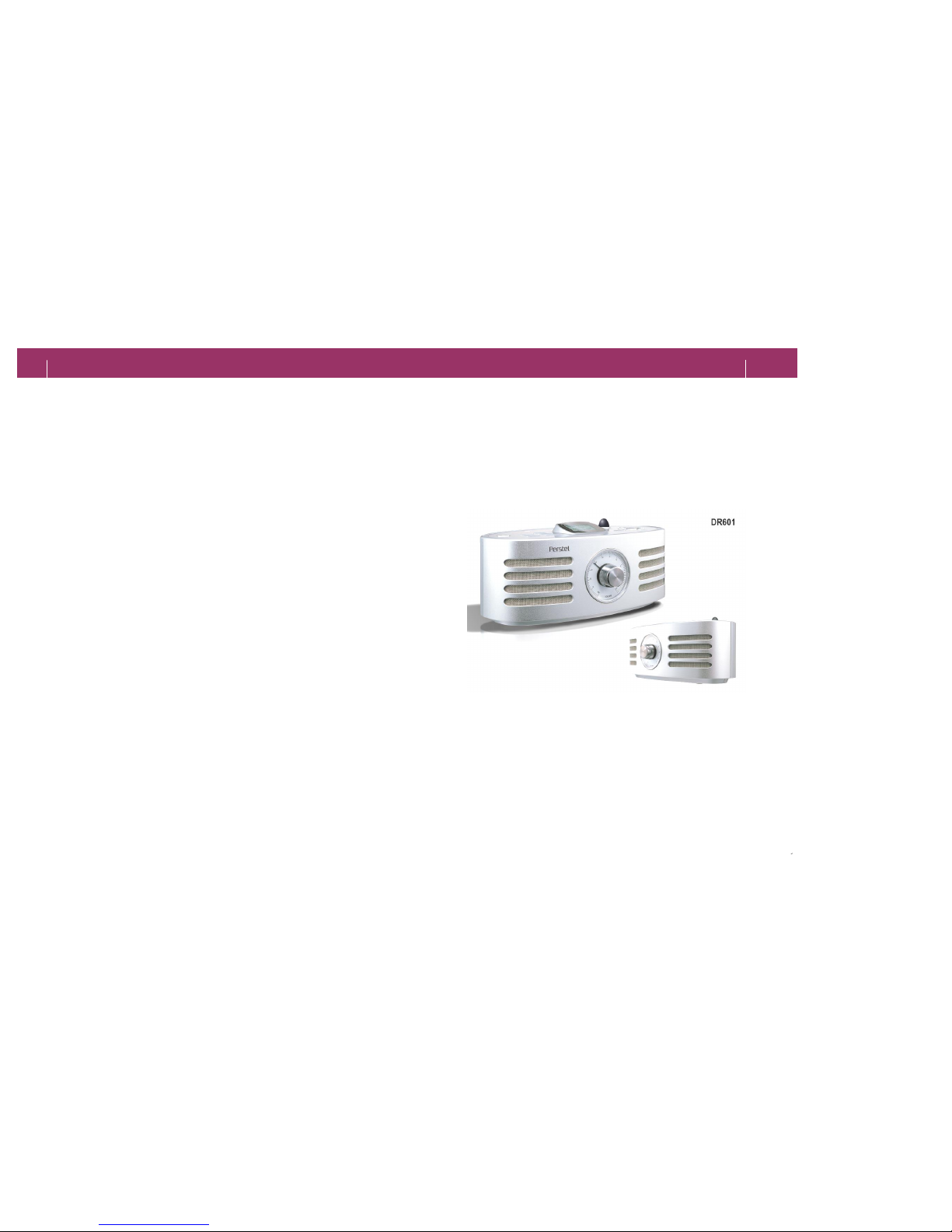
Thank you for purchasing Albrecht DAB Receiver DR601.
This User’s Manual assists you to understand and the product's features safely and easily
Read carefully this User’s Manual to use the receiver appropriately.
DR601
User’s Manual
English
ALAN Electronics GmbH
ALAN Electronics GmbH
Dovenkamp 11
Daimlerstr. 1 k
D
-22952 Lütjensee D-63303 Dreieich
Hotline:
Phone: (+49) 6103 9481 30
Fax: (+49) 6103 9481 60
email: [email protected]
Page 2

Contents
Ⅰ. Before Using
2
3
Contents
I. Before Using
1. Contents ............................................................3
2. Safety & Warnings ...........................................4
3. What’s DAB? ................................................. .......5
II. Preview ...............................................................6
III. Using DR601
1. Basic Operation ..............................................8
2. Listening Radio ..............................................10
IV. Using Menu
1. Viewing Menu ....................................................12
2. Adjusting Menu .....................................................13
3. Setting Current Time ..........................................14
4. Setting Alarm .........................................................15
V. Connecting ............................................................16
VI. Appendix
1. Specifications ..........................................................17
2. FAQ ........................................................ .................18
3. Precautions and environmental ...............................19
VII. Warranty ……...........................................................20
Page 3
Ⅰ
. Before Using
Ⅰ. Before Using
Safety Instructions
4
5
Do not press more
than 2 buttons at the
same time or hit the
display. It may cause
defect.
Do not put the rec
eiver
in too hot or cold
places. Keep away
from highly humid
place or under the
direct sunlight.
Do not apply shock or
drop your receiver
. It
may cause defect.
Do not put any
receptacle with water or
beverage. It may cause
a defect if water or
beverage is split and
soaked to receiver.
Wipe off your receiver
with soft and dry cloth
to clean.
Never dismantle,
repair, or re-
assemble your
receiver. It ma
y give
electrical shock to
the product or
deteriorate its
performance.
Ins
tall this receiver in
safe and flat place not
influenced by serious
vibration or magnetic
interference.
Do not stack heavy
substance on the
receiver.
Do not use your receiver
for other purpose than
the audio system. Keep
your receiver from reach
of the children.
§
For your safety and prevention of property loss, comply with the
following instructions.
§ Be sure to read the instructions and use this receiver appropriately.
Precautions
What is DAB?
1. What is DAB?
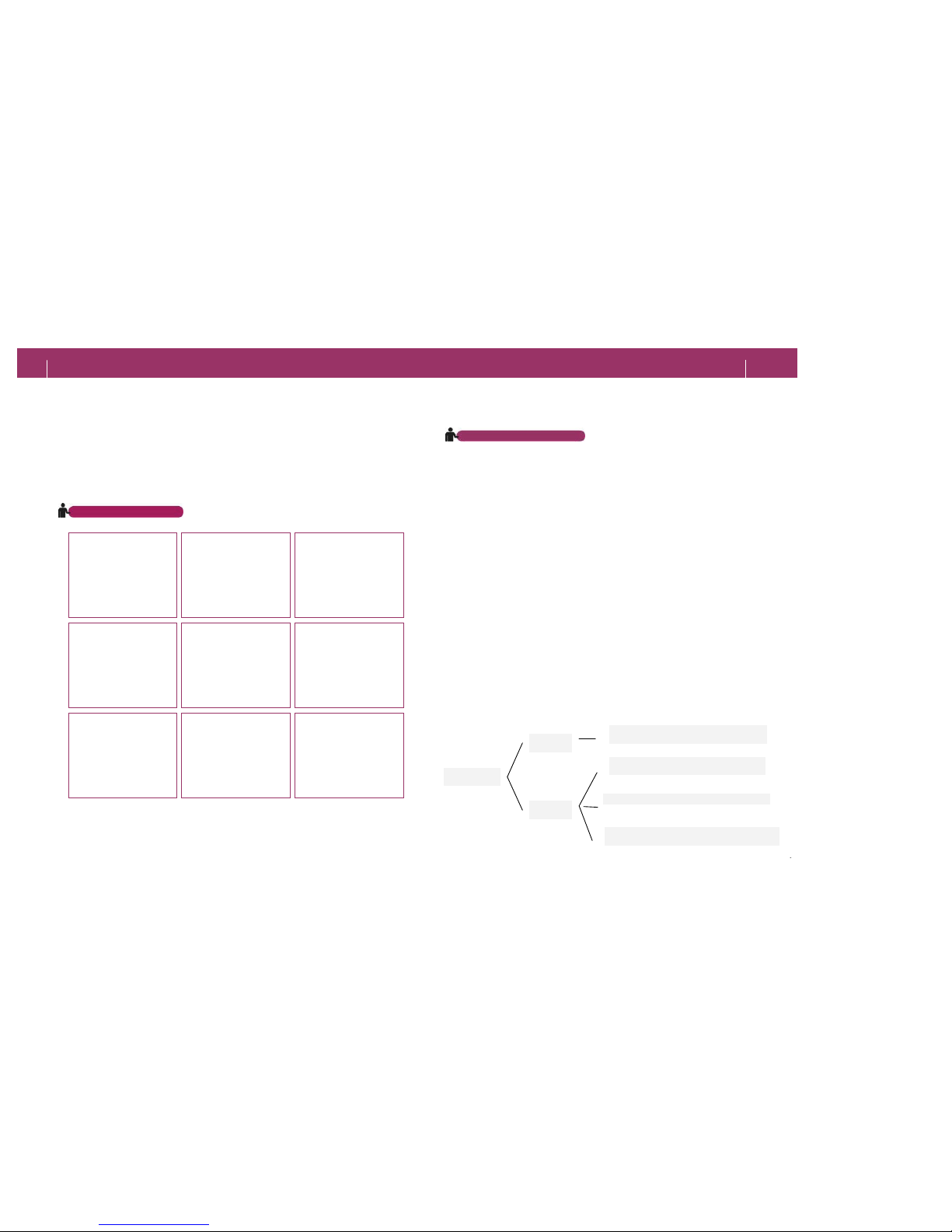
DAB is digital broadcast on terrestrial networks, and you are able to
receive it using solely a tiny non-directional stub antenna. You receive CDlike quality radio program even in the car without any annoying
interference and signal distortion.
Aside from distortion-free reception and CD Quality sound, DAB offers
further advantages as it has been designed for the multimedia age. DAB
can carry not only audio, but also text, pictures, data and even videos - all
on your radio!
You are able to listen to your favorite music program and sing along with
your idols, since the lyrics can be shown on your radio display, or you can
contemplate the handsome face of the latest movie star, while a report is
given on his current box-office hit.
<Source : World DAB Forum>
2. DAB Outline
With DAB, Services are bundled into groups, called Ensembles or
Multiplexes. Test broadcasts may be performed by some broadcast
stations.
PRIMARY SERVICE COMPONENT
SECONDARY SERVICE COMPONENT
ENSEMBLE
SERVICE
SERVICE
PRIMARY SERVICE COMPONENT
SECONDARY SERVICE COMPONENT
Page 4
II. Preview
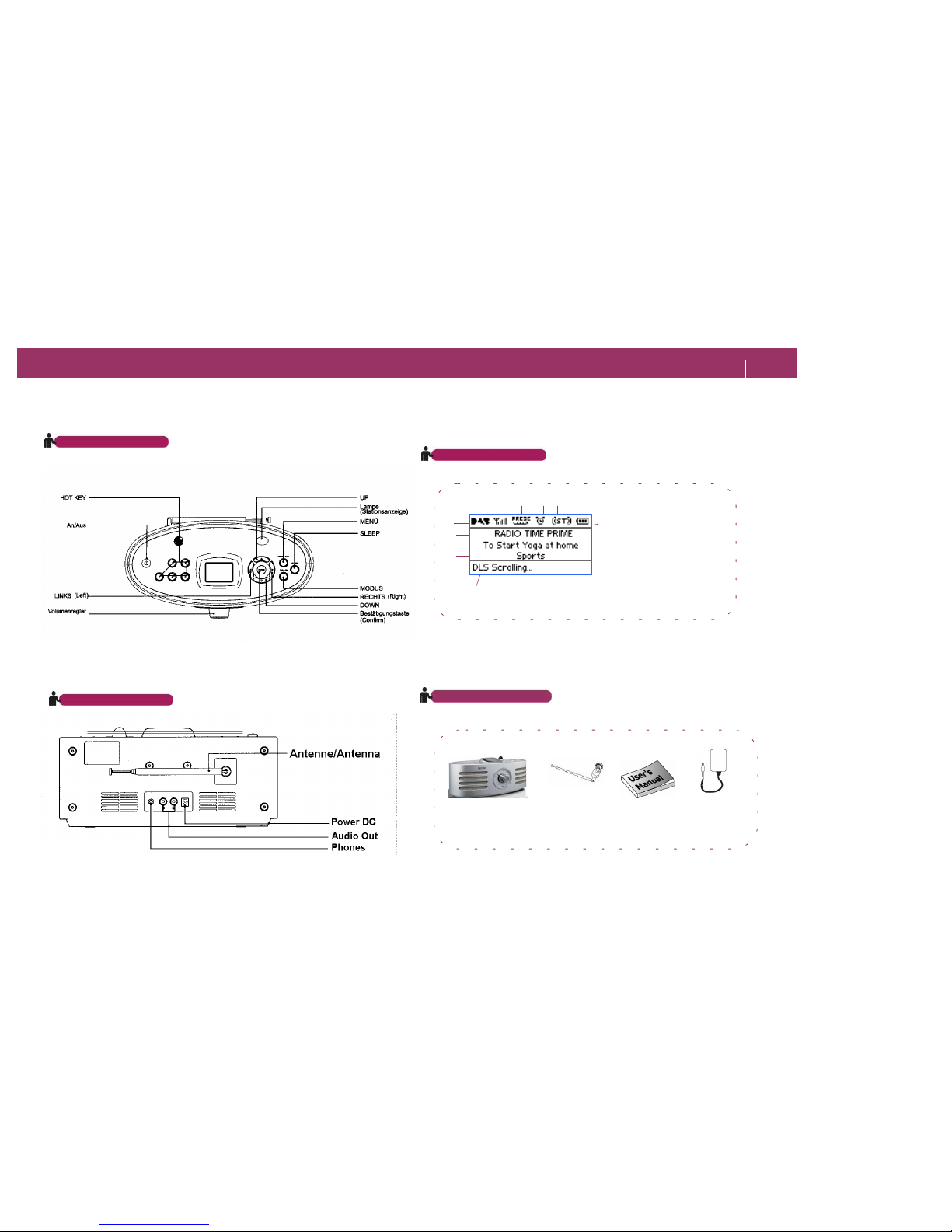
Description (Front)
10
9 10
1. Signal Strength
2. Search Type
3. Alarm/Sleep
4. Stereo/Mono
5. Mode
6. Ensemble
7. Service Component
8. Data/Time Information
9. DLS Data
10. Battery Indicator
1 2 3 4
567
8
Display (DAB)
Description (Back)
USER’S MANUAL
Receiver
ADAPTOR
ANTENNA
(Fitted to Unit)
l
To enhance performance or quality, any item and its appearance in package
may be changed without prior notice.
Package Contents
II. Preview 6
7
Page 5
Ⅲ. Using DR601
9
Ⅲ. Using DR601
Basic Operation
Basic Operation
8
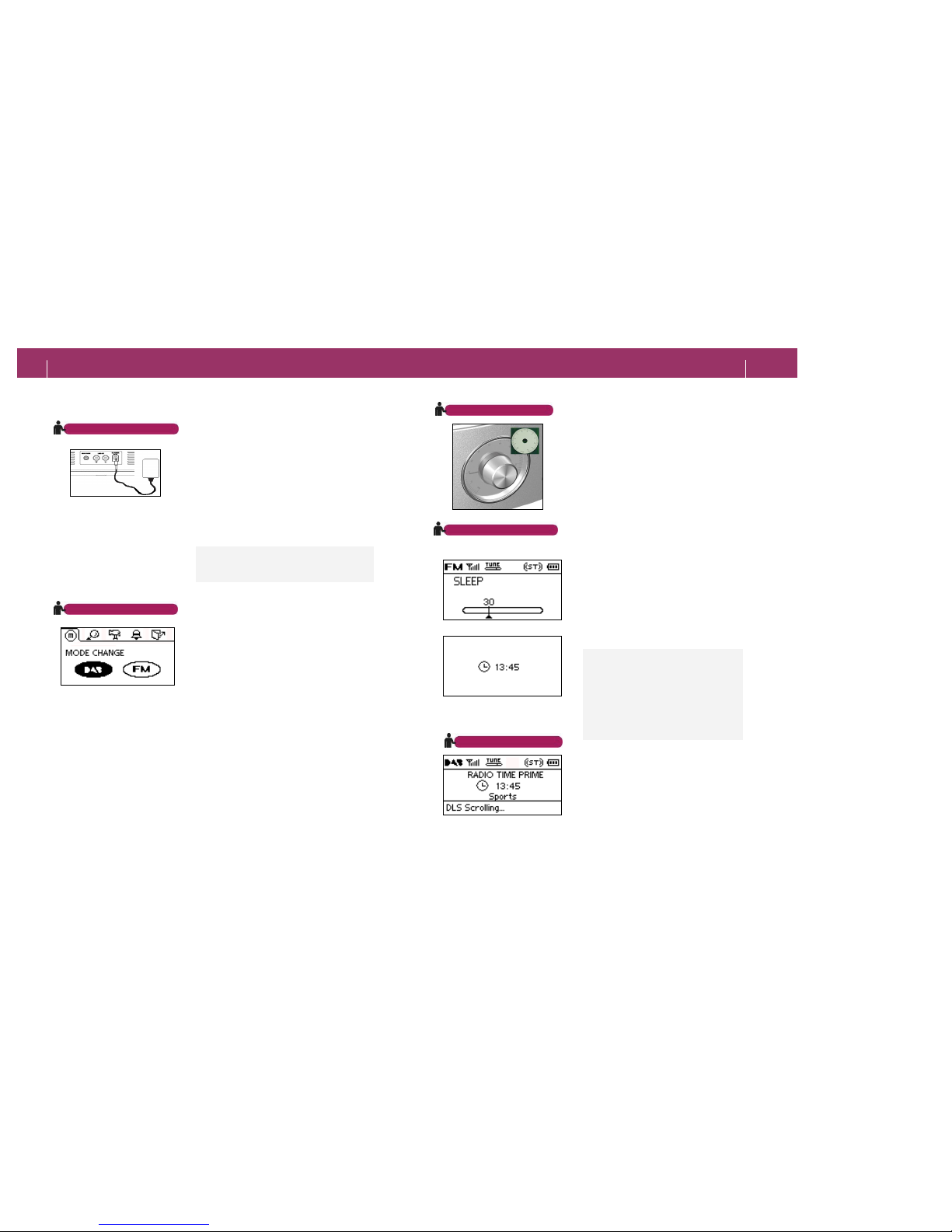
Turning On/Off
You can provide power to
your receiver
by connecting adaptor
on the back or
inserting a battery at the bottom.
- Press and hold
the POWER button to
turn on or off your receiver.
Note
-
Press the POWER button slightly to
enable POWER SLEEP OFF function.
Switching Mode
You can switch i
nto your desired mode
between DAB and FM.
- Press and hold the MENU
/EXIT
button to set your change.
Adjusting Volume
You can adjust volume by turning the
VOLUME KNOB.
SLEEP POWER OFF
You can turn the receiver off automatically by
setting SLEEP POWER OFF.
- Press the SLEEP button to set time.
- SLEEP Setting Step:
OFF-10-30-60-90-120 (Min.)
Note
-
Press any button except for POWER
butto
n to turn your receiver on while in
SLEEP POWER OFF mode.
- Press and hold
POWER button to
turn off your receiver.
-
After the SLEEP POWER OFF
function is operated, current time will
be displayed.
Viewing Current Time
While listening radio, press the CONFIRM
button shortly to display current time.
Page 6
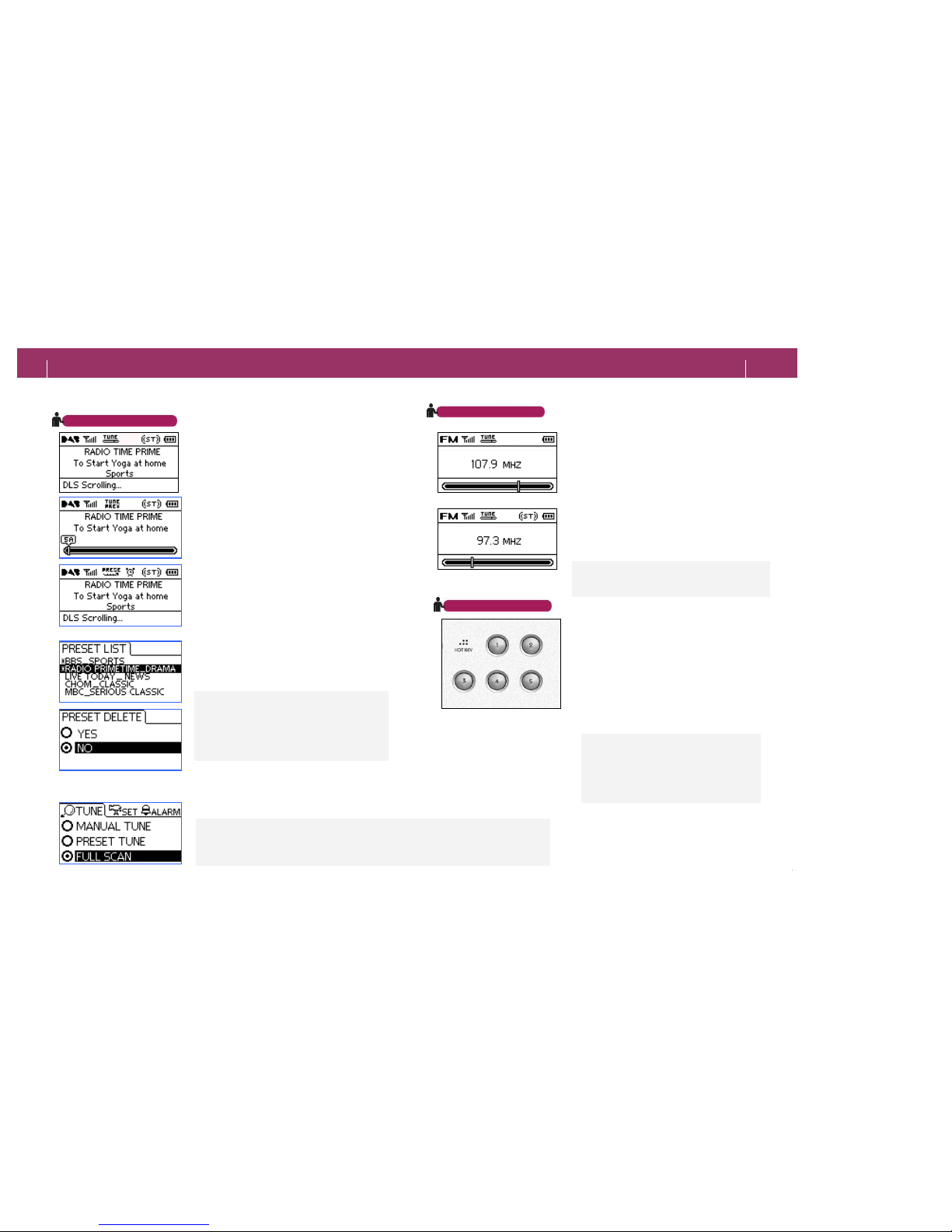
Seeking DAB Broadcasting
You can easily seek the station by selecting
TUNE TYPE from MENU.
[1] MANUAL TUNE
-
Press the LEFT and RIGHT button longer than
1 second to move among the Ensembles; -
Press
those but
tons shortly to move among the
Services.
-
Press the CONFIRM button longer than 1
second to save the current station in
PRESET
MEMORY.
-
Press the CONFIRM button one more time, you
can save the current station as a FAVORITE
CHANNEL which will be locate in
PRESET LIST
upper part.
[2]PRESET TUNE
- Press the LEFT and RIGHT button to change to
one of other broadcastings saved in
PRESET
MEMORY.
[3] PRESET LIST
-
Press the Up and Down button to enter
PRESET LIST.
- If you press Up and Down button shortly, cur
sor
will move between
services.
-
If you press and hold Up and Down button,
cursor will move between preset list pages
.
Note
- When you select PRESET
TUNE but no
Service is saved, your receiver will
start
FULL SCAN automatically first.
-
You can delete channels from PRESET LIST
by press CONFIRM button more than 1
second in PRESET LIST.
[4] FULL SCAN
This function- in MENU- can search and save up to 100 Services
, which is receivable in
DAB mode, 10 Channel in FM mode and then automatically changed to PRESET TUNE.
Seeking FM Broadcasting
You can use the LEFT and RIGHT button to
search available channel easily.
[1] TUNE
- Press the LEFT and RIGHT button shortly
to
change the channel step by step.
[2]SEEK
- Press and hold
the LEFT and RIGHT button
to change to the
previous or next receivable
channel.
Note
- If signal is too weak to detect, you may not
be
able to listen to the broadcasting.
You can set DAB/FM channel as HOT KEY to
change channel quickly.
[1] To Save
Press and hold the HOT KEY to sav
e current
channel.
[2] To Change
Press the HOT KEY short to change channel.
Note
- No station is saved
when you purchase
this product by default.
- D
AB mode and FM mode can save 5 hot
keys each; one channel for each key.
Using HOT KEY
Note
- If you are in other region, select FULL
SCAN to search and save receivable
broadcasting automatically.
- FULL SCAN will be able to select in DAB mode.
Ⅲ. Using DR601
Listening Radio
11
Ⅲ. Using DR601
Listening Radio
10
Page 7
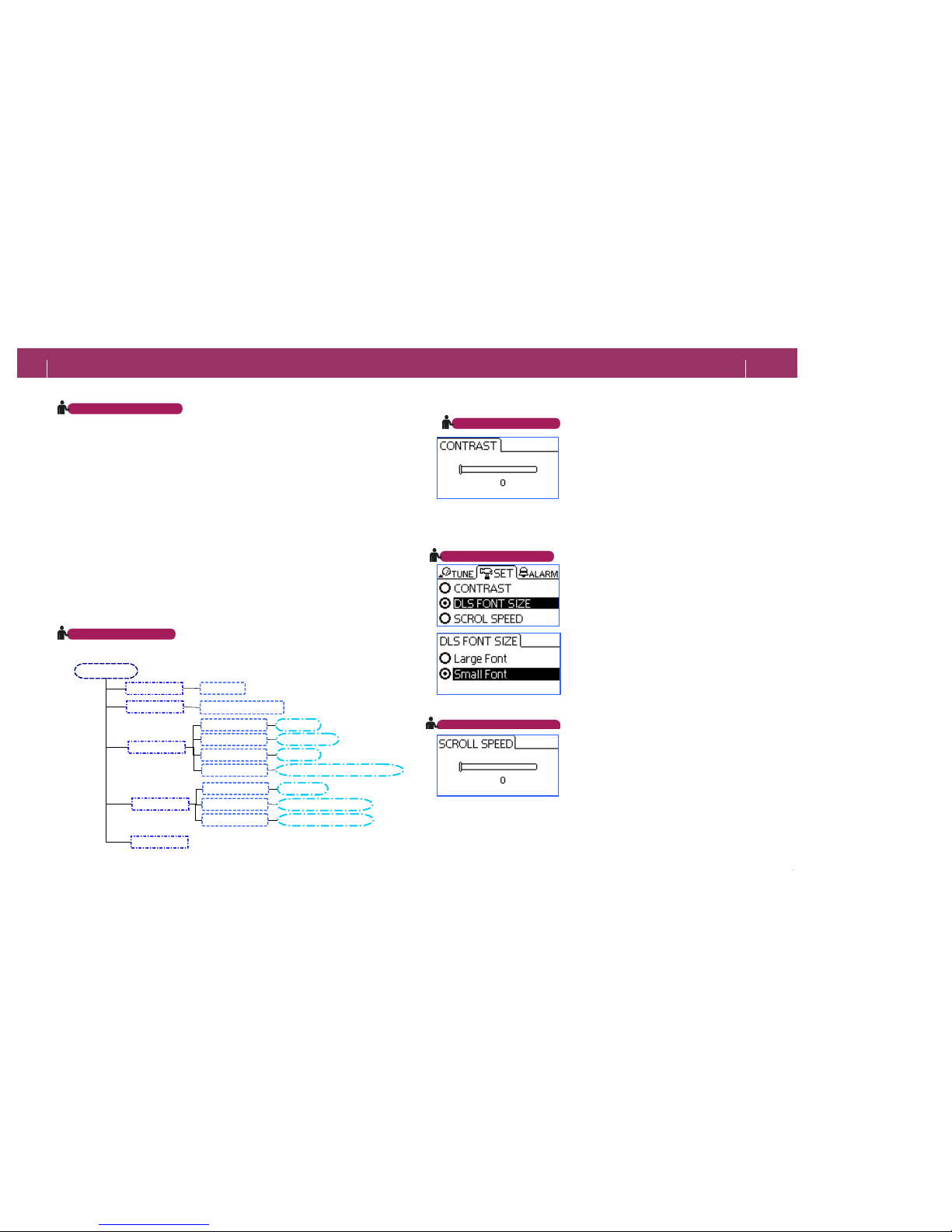
Using MENU
[1] To use MENU
1) To enter MENU: Press the MENU/EXIT button.
2) To change main MENU: Press the
LEFT and
RIGHT button to go to your target menu.
3) To change submenu: In your target
main MENU,
press the CONFIRM button to drill down target
submenu.
4) SETTING: Press the Left/Right/Up/Down button to
set its value.
[2] MENU EXIT
- Press MENU/EXIT button
to finish menu setting
and go back to previous radio display (DAB or FM).
Adjusting CONTRAST
You can adjust LCD CONTRAST.
- MENU-> SETTING -> CONTRAST
: Set CONTRAST to 0 ~ 10 level.
Adjusting DLS SIZE
You can set font size for DLS information
presented in DAB mode.
- MENU -> SETTING -> DLS SIZE
: LARGE-DLS displays information by 1 line.
: SMALL-DLS displays information by 2 lines.
Adjusting SCROLL SPEED
You can adjust DLS SCROLL speed on
display.
- MENU-> SETTING -> SCROLL SPEED
: Set SCROLL SPEED to 0 ~ 10 level.
Viewing Menu Tree
MENU
MODE
SEARCH
SETTING
ALARM
EXIT
DAB/FM
TUNE/Local/Scan
CONTRAST
DLS FONT SIZE
SCROLL SPEED
TIME SETTING
ALARM SETTING
ALARM TYPE
0~10
Small/Large
0~10
AUTO/HOUR/MINUTE
HOUR/MINUTE
RADIO / TONE
SET ALARM ON/OFF
MENU
MODE
SEARCH
SETTING
ALARM
EXIT
DAB/FM
TUNE/Local/Scan
CONTRAST
DLS FONT SIZE
SCROLL SPEED
TIME SETTING
ALARM SETTING
ALARM TYPE
0~10
Small/Large
0~10
AUTO/HOUR/MINUTE
HOUR/MINUTE
RADIO / TONE
SET ALARM ON/OFF
IV. Using Menu
13
IV. Using Menu
Adjusting Menu
Viewing Menu
12
Page 8
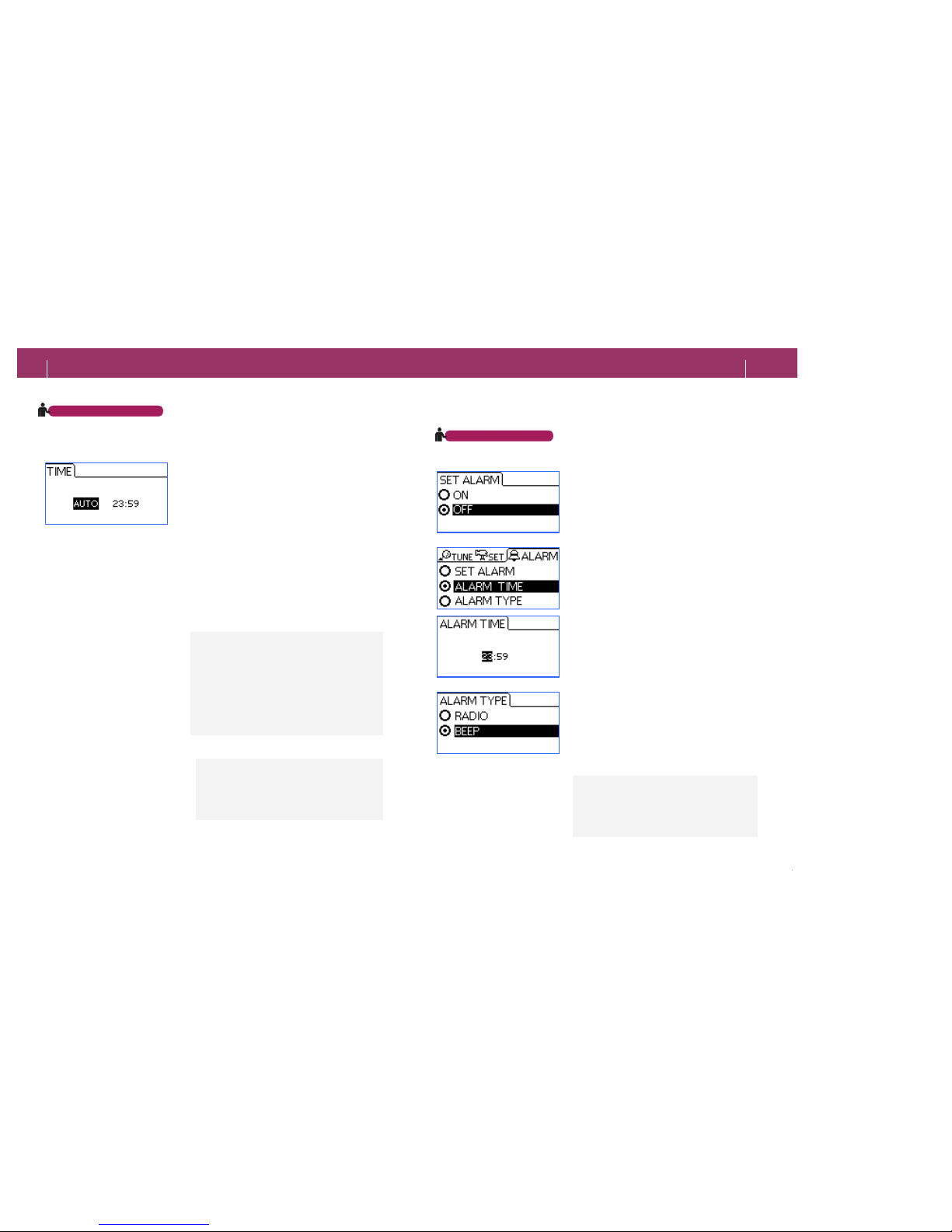
Setting Current Time
You can set current time automatically or
manually.
- MENU-> SETTING->TIME SETTING
[1] To set automatically
When ‘AUTO’ blinks, p
ress the CONFIRM
button to set current time automatically.
[2] To set manually
Use the LEFT or RIGHT button to move
between HOUR and MINUTE; and use the UP
or DOWN button to set time and minute.
Setting Alarm
If you set the alarm, you can automatically
turn your receiver on after it is turned off by
SLEEP POWER OFF setting.
[1] To turn on/off alarm
: Go to SNOOZE –
When alarming, press any
button except
POWER LONG button to stop
it.
[2] To set alarm time
You can set the time to alarm.
- MENU-> ALARM-> TIME
: Set alarm in the same way as ‘[2]
. For
manual setting, go to page 14.
[3] To set Alarm Type
You can select alarm type between radio and
tone.
- MENU -> ALARM -> TYPE
: Select RADIO or TONE for alarm type.
Note
-
Press the UP/DOWN button more than 1
second to change the unit into 10 seconds.
- The AUTO but
ton is activated only in DAB
broadcasting mode.
-
Press the CONFIRM button to check the
local time.
Note
-
Radio alarm channel is set to the channel
being broadcasted when SLEEP POWER
OFF function is enabled. Press the POWER
button fo
r 2 seconds to turn Your receiver
completely off.
You will need to set current t
ime again
- When you buy the product for the first time.
- if the broadcast time is different from local
time.
- If power is recovered after failure.
IV. Using Menu
15
IV. Using Menu
Setting Alarm
Setting Current Time
14
Page 9
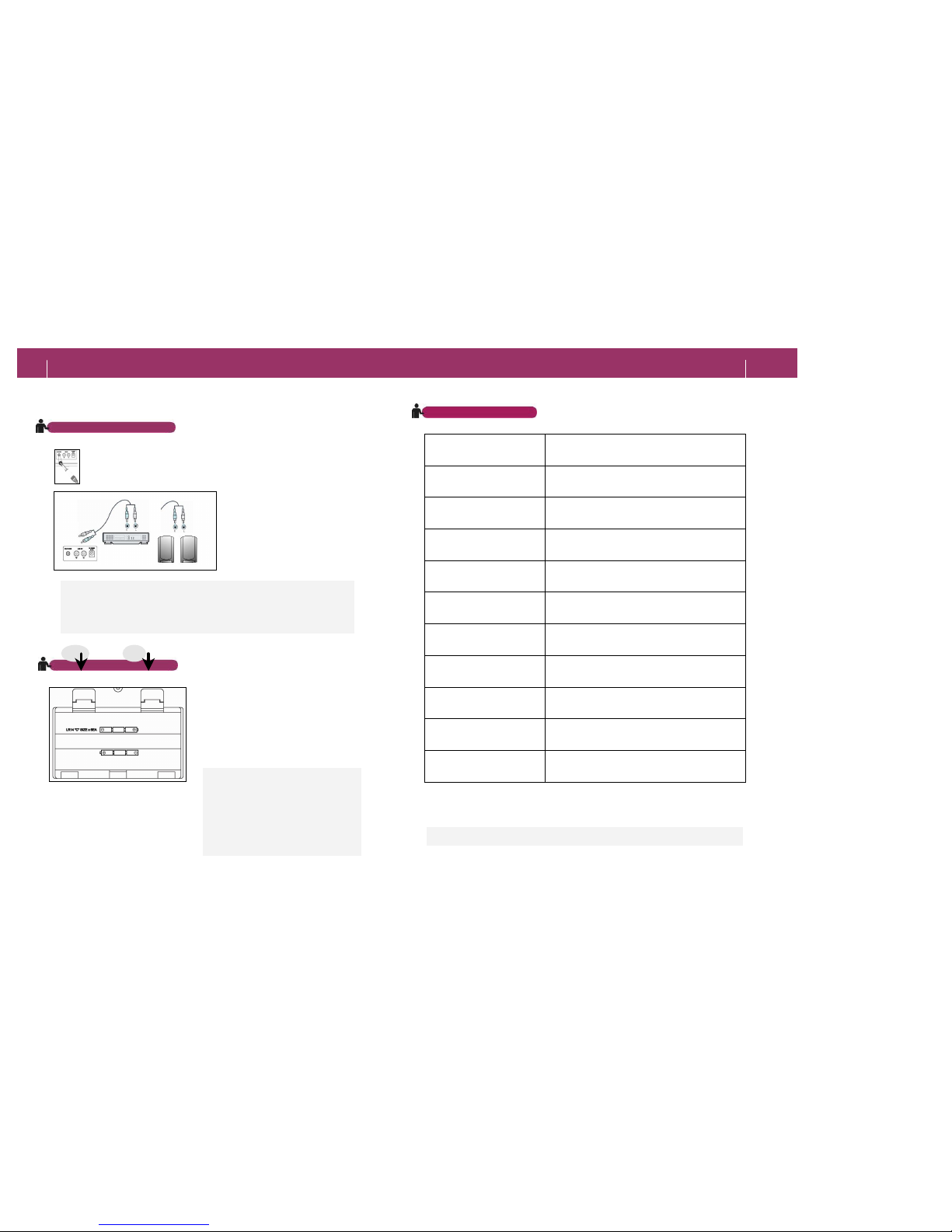
Specifications
Connecting to Other Product
Also, you can listen to the
broadcast
transmission by
connecting Your home audio
system to the LINE OUT audio
sockets
.
If you connect your headphone (3.5mm) to headphone jack,
you can listen to broadcasting via headphone.
Note You will need a connection cable with twin RCA (
=Cynch) type
connectors.
Model DR601
Frequency Range
BAND III : 174 ~ 240 MHz
L-BAND: 1452 ~ 149 MHz (OPTION)
FM BAND : 87.5 ~ 108 MHz
Display 6 Line Full Graphic LCD
Speaker Twin 3” Full Range Drive Unit
Input Connectors
HEADPHONE JACK(3.5 mm)
DC IN
ANTENNA (RF-F Connector for 50 ohm)
Output Connectors Line Out Left/Right (3.5mm)
Audio output 1W + 1 W
Power
9V DC ADAPTOR
6 x C Type Alkaline Battery
Dimension (W/H/D) 290 x 134 x 155 (mm)
Weight 1.3 (Kg) _ Without Battery
Battery life More than 30 hrs (50mW normal music play)
Using Battery
Note
- Check battery polarity before
inserting.
- Always replace batteries
altogether to prevent leakage.
- It is not necessary to insert
batteries if the radio will be used
on mains power only.
Insert the batteries o
n the bottom of
receiver.
You c
an use the receiver without AC
Power.
Albrecht reserves the right to make design and specification changes for
product improvement without
prior notice.
16
17
V. Connecting
VI. Appendix
Specifications
17
Page 10
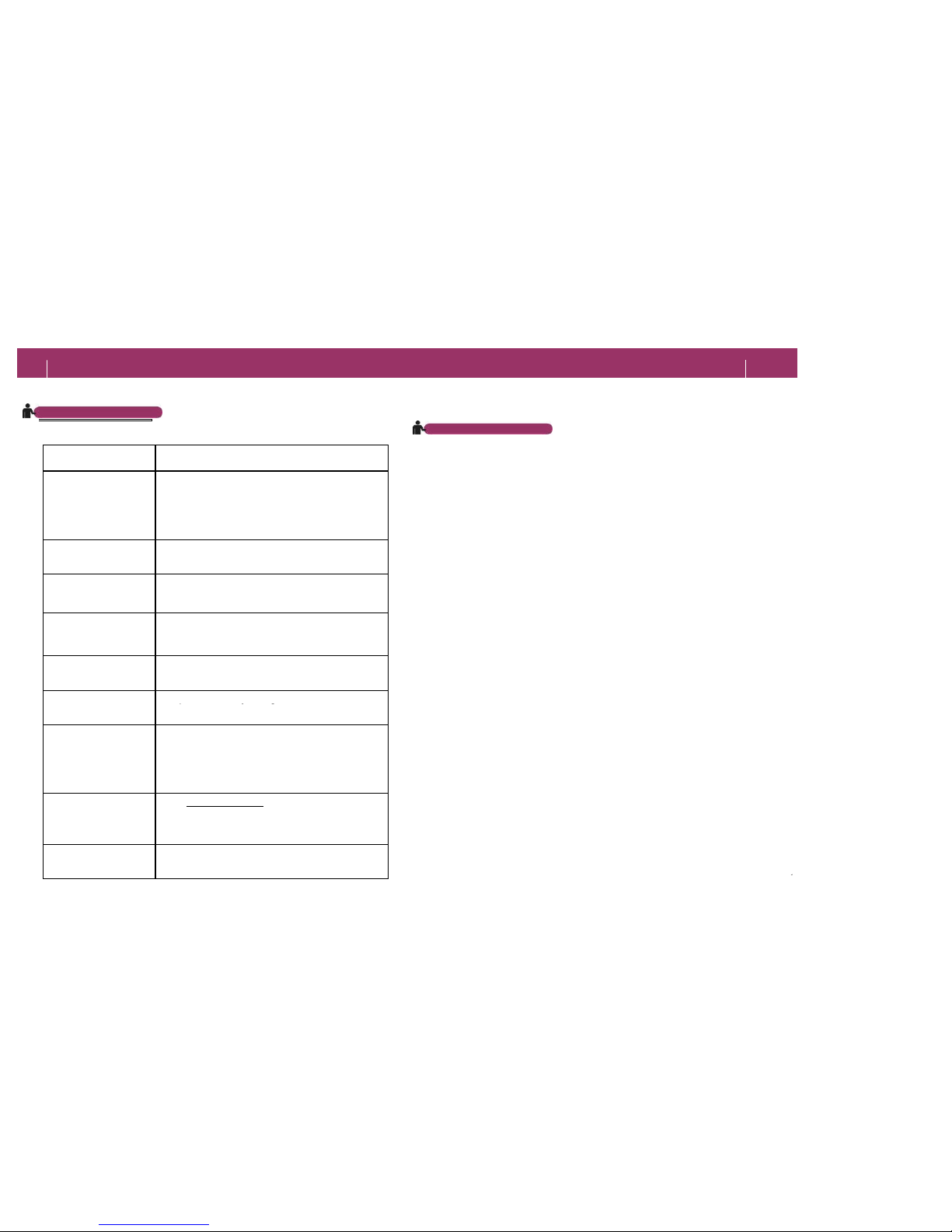
FAQ
Problem What to check
I cannot switch the radio
on
Check if the adapter is correctly plugged in. If you
use batteries, check the polarity.
To turn on, press and hold the POWER key.
I cannot hear anything
Check if your receiver is turned on and volume is set
to MIN.
On some stations
reception is noisy
Make sure that the antenna is fully extended and You
are in a DAB reception area.
No stations can be
found in DAB mode
Make sure that You are in a service area of DAB
DLS information is not
correct.
This receiver shows exactly the same information
transmitted by the broadcasting company.
The blue Lamp is turned
off.
Lamp is turn on only if a signal is received.
Current time is not
correct.
Alarm is not correct.
Set current time again manually. Alarm time may be
wrong influenced by the incorrect local time. IN DAB
Mode, the broadcast time is transmitted by the radio
station and may be different from Your local time.
Where can I find
information about
worldwide use of DAB?
Go to www.worlddab.org > DAB worldwide > Country
Status and select a country. You can find out covered
regions and the latest DAB information.
Where can I get more
help?
Contact Your distributor or get informations from
www.albrecht-online.de.
= WARNING=
1. This receiver uses a 9V type AC-DC Adaptor.
2. Make
sure to use only the correct 230 V adaptor shipped with this
set. Other adaptors with incorrect data or wrong polarity may
damage the radio.
3.
Keep the receiver away from liquids or any sources of excessive
heat or humidity, or direct sunlight.
4. To avoid ov
erheating, do not cover the receiver and keep the
ventilation holes clear.
5.
Do not open the radio and never open the power adapter. Opening
can be dangerous and will invalidate Your warranty.
6. Clean the radio only with a soft cloth and avoid the use of solv
ents
or abrasive detergents.
ENVIRONMENTAL PRECAUTIONS
1.
Collect packing materials, batteries and old electronic appliances
for resource recycling.
2.
Packing materials consists of carton boxes, expanded polystyrene
and PE bags, which are necessary
for safe packaging. Please
recycle these materials, where possible.
18
19
VI. Appendix
F & Q (Frequently Asked Question)
VI. Appendix
Precautions and environmental
PRECAUTIONS
Page 11

Warranty Service
According to European Warranty regulations, Your distributor warrants that this product will be free from defects in materials and workmanship for a period of two years
(in EU countries) from the date of purchase. Within this period, simply take the product and your proof of purchase to any local dealer and the product will be repaired
without charge for parts and labor.
The distributor my forward the radio to an authorized repair center, or will ask You to send the radio to such a repair center. Any product which has been subject to
misuse or accidental damage is excluded from this warranty.
This warranty is only applicable to a product purchased through ALAN / Albrecht dealers and to a product that is presented for repair in a country where ALAN /
Albrecht offers the product for sale.
While this warranty does not confer any legal rights other than those set out above, You may have additional statutory rights which will vary under the laws of the
various countries, states, provinces and other governmental entities in which ALAN / Albrecht Products are being sold. This warranty is subject to all statutory rights
you may have in the country of purchase.
Albrecht is a registered trade mark of ALAN Electronics GmbH.
Warranty Exclusion
• Any service request due to lack of knowledge of product; Read Owner's Manual carefully.
• Misuse or improper modification; Do not open the circuitry without Service Manual.
• Damages by: fire, salty water, flood etc.
• products out of warranty periods can be repaired and will be charged by authorized service center.
Conformity with European Regulations and Standards
This DAB radio complies to the European EMC Directive 89/336/EEC and national regulations.
It corresponds to European harmonised standards EN 55 022 with A1, as well as EN 55024.
The latest issues of our Original Conformity Declaration can be downloaded from our
service homepage www.hobbyradio.de.
Note: In most European countries, listening to public broadcast stations requires to have
a broadcast receiving licence, which can be applied by any household against regular fees.
Under certain conditions, also portable radios may be covered by such regulations,
depending on the country of operation. Please follow the national regulations.
© ALAN Electronics GmbH
20
21
VII. Warranty
 Loading...