

Page 1
Page 1
DAS Reliance 128 Keyswitch wiring & programming RDC_3137_E_TA
DAS Reliance 128 Alarm Panel
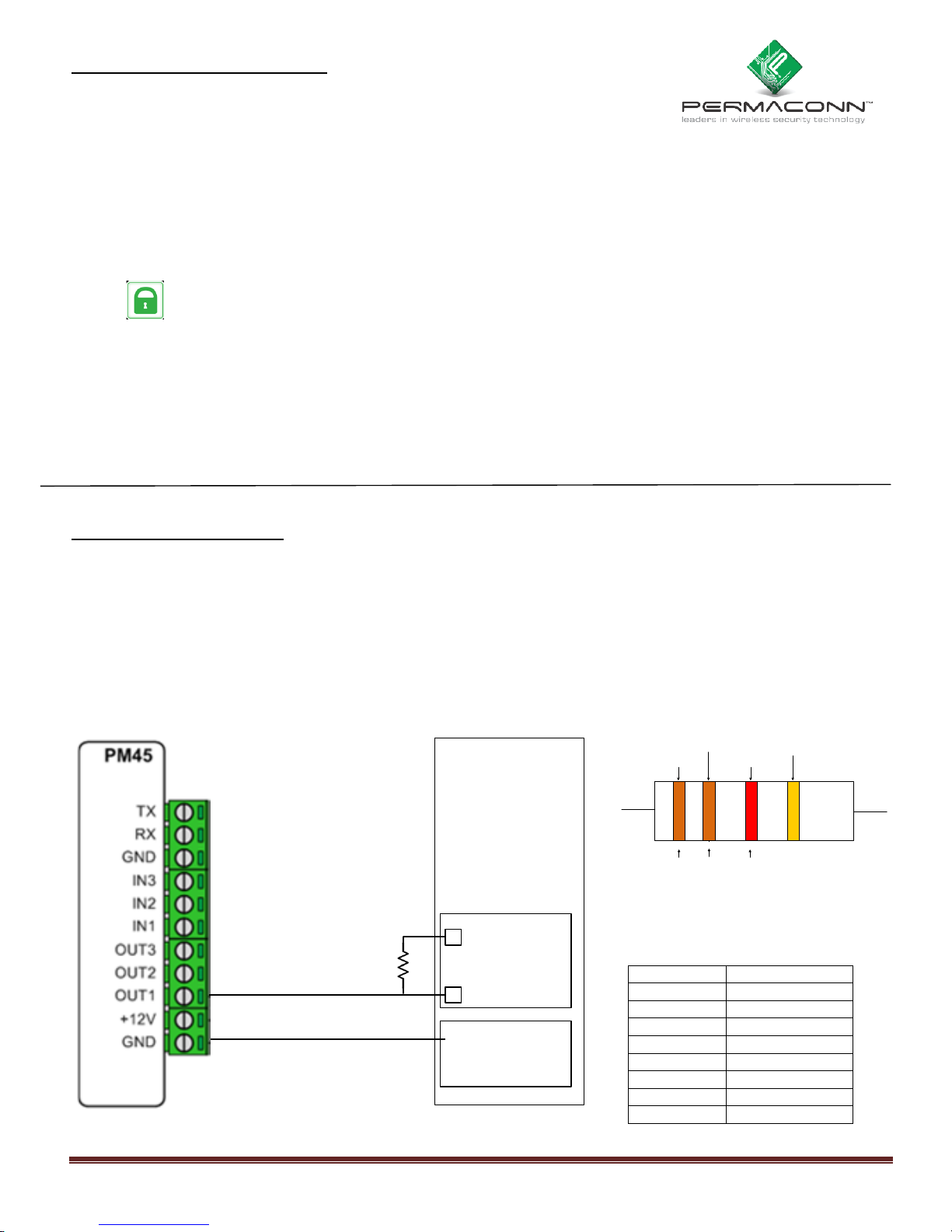
Keyswitch wiring
Keyswitch programming
Background: There are three (3) Outputs available.
Outputs are ‘Open Collector’ @50mA switching negative - for heavier loads a relay must be used.
Outputs can be used for e.g. Keyswitch, opening gates or doors etc.
Ensure there is a common negative between Permaconn and the device being switched.
The outputs can be Opened, Closed or Pulsed remotely using the Permaconn Atlas web portal.
The Pocket Secure App can only ‘Pulse’ the Outputs. A Pulse is approx 1sec.
These outputs when wired to a Keyswitch zone on the Alarm Panel can arm & disarm up to a
maximum of three (3) areas when using ‘Pocket Secure’ app.
Each area should be independently controlled using a separate Keyswitch zone.
Arm/Disarm reporting MUST be Enabled. Pocket Secure App requires this for its status notifications.
Test each Output by placing the +ve leg of a multi meter on the +ve terminal that supplies power to the
Permaconn, then place the -ve leg of a multi meter on the Output terminal you wish to test. Pulse the
selected Output the result should go from 0v DC to 12v DC for approx 1sec and back to 0vDC.
DAS Reliance 128 Alarm Panel
If the Opening / Closing communicator codes are enabled, Key Switch arming/ disarming will report.
(Required for Pocket Secure App)
Feature 9: Segment 1: option 3: must be enabled: - OPENING / CLOSING COMMUNICATOR CODE.
Feature 16: Segment 3: option 1 must be enabled: open / closed reporting.
Feature 68 segment 3 (Key-switch zone (normally open switch) must be enabled.
E.g. 1: Using zones 1 – 8 (NOT zone doubling).
Zone
Com
+
-
Common -ve
Zones 1 - 6
DAS
DL150
3k3
Compatible with ‘Pocket Secure’ remote arming App, available on iTunes, Google Play and the Windows Phone Store.
1st Band
1st Digit
2nd Band
2nd Digit
3rd Band
mulitplier
4th Band
Tolerance
3K3Ω resistor
Orange = 3
Orange = 3
Red = 10
2
3 3
00
= 3K3Ω
Input a value of ‘30’ Keyswitch zone type.
Zone
Feature 18
1
Segment 1
2
Segment 2
3
Segment 3
4
Segment 4
5
Segment 5
6
Segment 6
7
Segment 7
8
Segment 8
Reliance 128
Zones 1 - 8
Page 2
Page 2
DAS Reliance 128 Keyswitch wiring & programming RDC_3137_E_TA
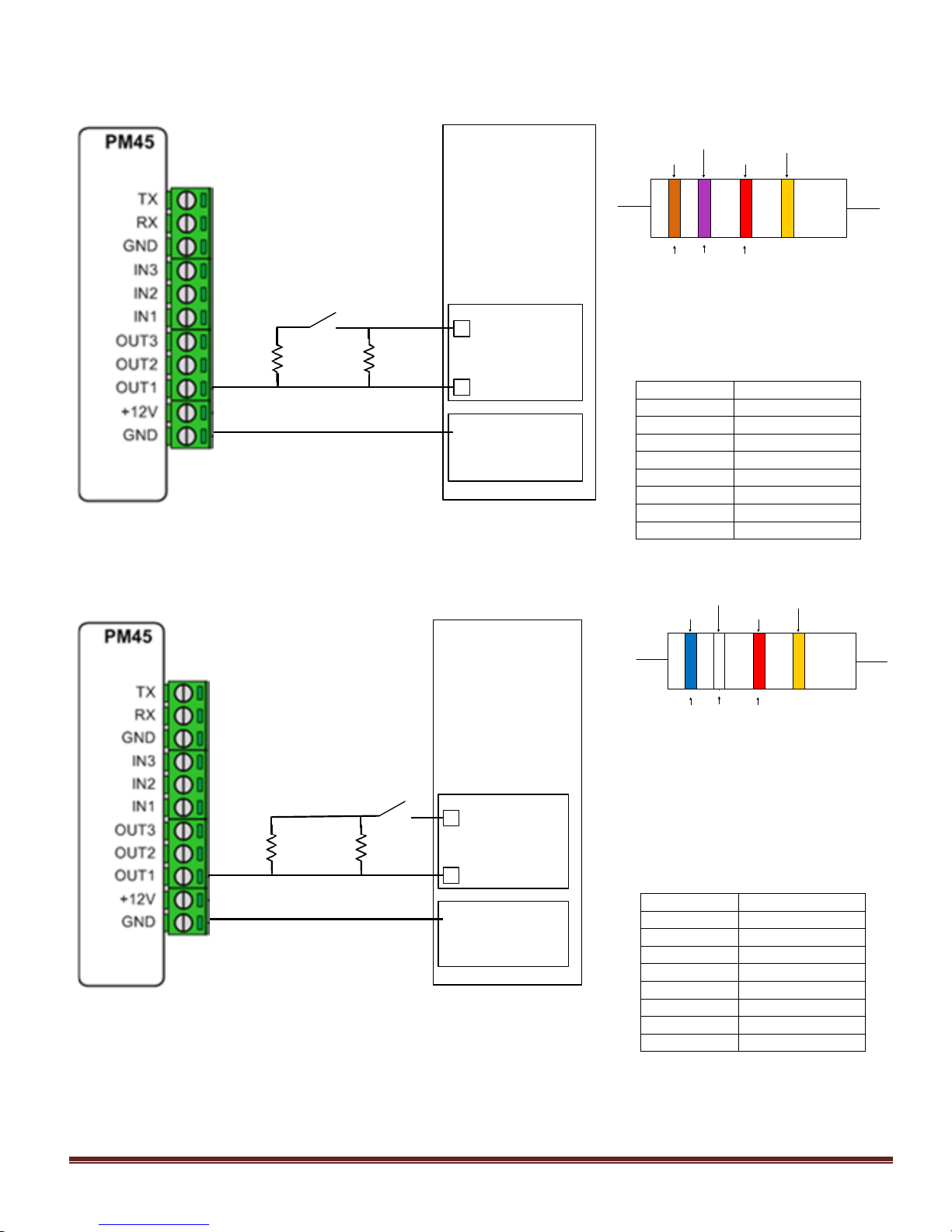
E.g. 2: Using zones 1 – 8 (Zone doubling).
NB: Other zone on the same terminals MUST be an Entry / Exit zone type.
Zone
Com
+
-
Common -ve
DAS
NX4
3k7
6k9
E/E
E.g. 3: Using zones 9 – 16 (Zone doubling).
NB: Other zone on the same terminals MUST be an Entry / Exit zone type.
Zone
Com
+
-
Common -ve
DAS
NX4
3k7
6k9
E/E
1st Band
1st Digit
2nd Band
2nd Digit
3rd Band
mulitplier
4th Band
Tolerance
3K7Ω resistor
Orange = 3 Violet = 7 Red = 10
2
3 7
00
= 3K7Ω
Use 3k7Ω for zones 1 - 8
Input a value of ‘30’ Keyswitch zone
type.
Zone
Feature 18
1
Segment 1
2
Segment 2
3
Segment 3
4
Segment 4
5
Segment 5
6
Segment 6
7
Segment 7
8
Segment 8
1st Band
1st Digit
2nd Band
2nd Digit
3rd Band
mulitplier
4th Band
Tolerance
6K9Ω resistor
Blue = 6
White = 9
Red = 10
2
6 9
00
= 6K9Ω
Use 6k9Ω for zones 9 - 16
Input a value of ‘30’ Keyswitch zone
type.
Zone
Feature 20
9
Segment 1
10
Segment 2
11
Segment 3
12
Segment 4
13
Segment 5
14
Segment 6
15
Segment 7
16
Segment 8
Reliance 128
Reliance 128
 Loading...