

Page 1
Page 1
Crow Power Wave 16 Alarm Dialler wiring & programming RDC_3026_E_TA
Crow Power Wave 16 Alarm Panel
Panel Dialler wiring
Panel Dialler programming
Background:
The PM45 & PM1048-3G (v3) communicator now has a terminal block for the connection of the female 611 fly lead (supplied).
If the Alarm Panel also has a terminal block for PSTN connection, we recommend you use your own cable between the Alarm
Panel dialler and PM45 & PM1048-3G (v3).
This type of installation negates the use of the female 611 fly lead, decreasing your installation time.
For four (4), six (6) and eight (8) pin RJ connectors, please refer to manufactures wiring diagram.
There are four minimum requirements from the Alarm panel for successful communication:
1) Must have an eight (8) digit primary phone. E.g. 12345678 or 55555555.
2) A four (4) digit account number.
3) Must be Contact ID format.
4) Must be set for tone (DTMF) dialling.
5) Optional is open / close reporting, must be enabled for Pocket Secure App.
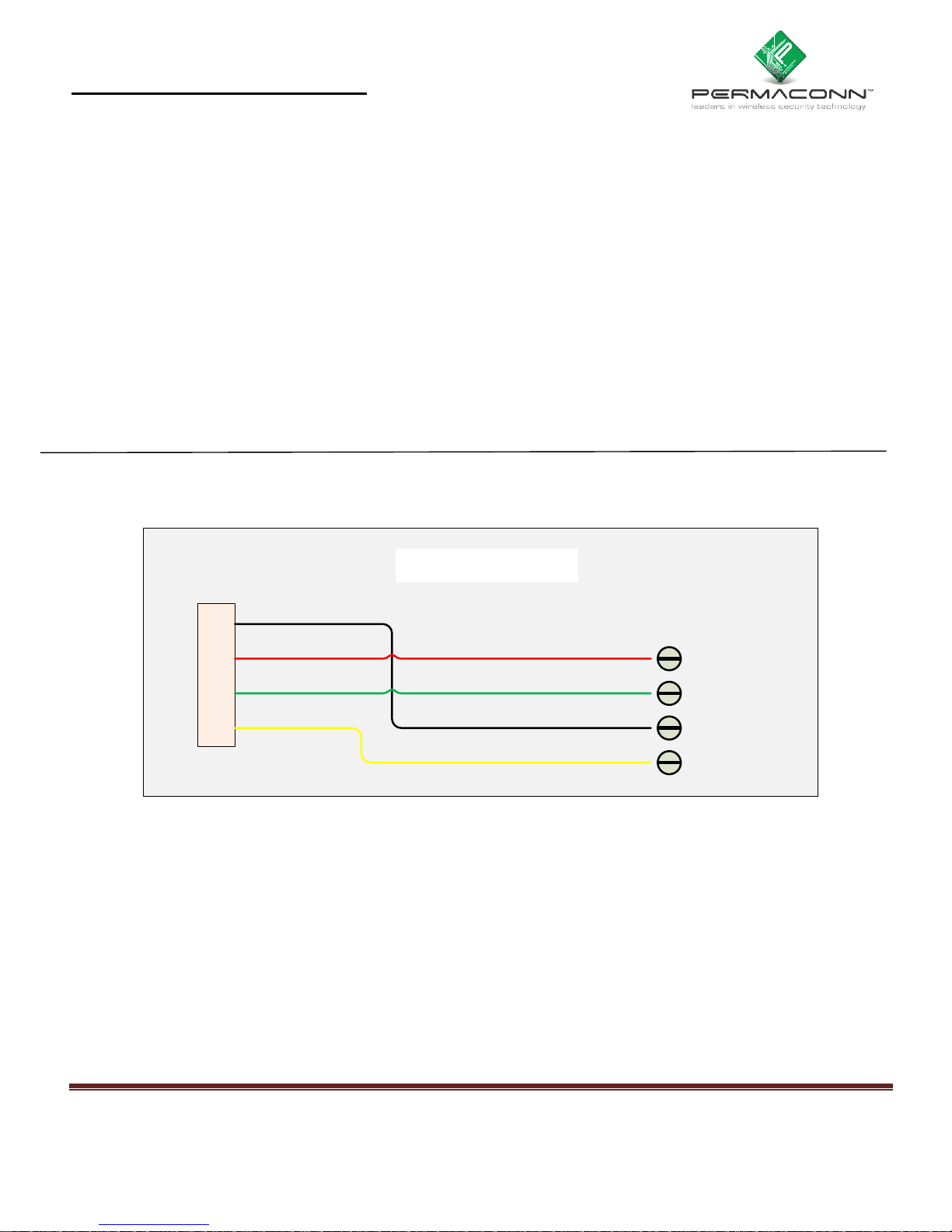
Dialler Lead wiring between Permaconn and Crow Power Wave 16 Alarm Panel:
R
R
T
T
1
1
Permaconn Panel
Ring - IN
Tip - OUT
Tip - IN
Ring - OUT
black
red
green
yellow
red
green
black
yellow
Crow Power Wave 16
Page 2
Page 2
Crow Power Wave 16 Alarm Dialler wiring & programming RDC_3026_E_TA
Programming the Crow Power Wave 16 Alarm Panel for dialler operation:
Description
Location
Default
Dialler Options
260
Option 1 = Dialler On
Option 2 = DTMF (On) or Pulse (Off)
On = Yes, Off = No dialler (default)
On = Yes(default), Off = Pulse
Message format
231
Option 1
1 = Contact ID (Default)
Account A
266
Area A
0000
Account B
267
Area B
0000
Account C
268
Area C
0000
Phone number 1
221
Phone 1
Value 1 – 16 digits
Area Reporting Options
322 option 1 Open/Close Report Area A
324 option 1 Open/Close Report Area B
326 option 1 Open/Close Report Area C
Off = No Report (Default)
On = Report enabled
(Pocket Secure App)
 Loading...