

Page 1

AR1890
www.perfect-prime.com
www.facebook.com/perfectprime/
twitter.com/Perfect_Prime_
Customer Service:
Email: [email protected]
Page 2
AR1890
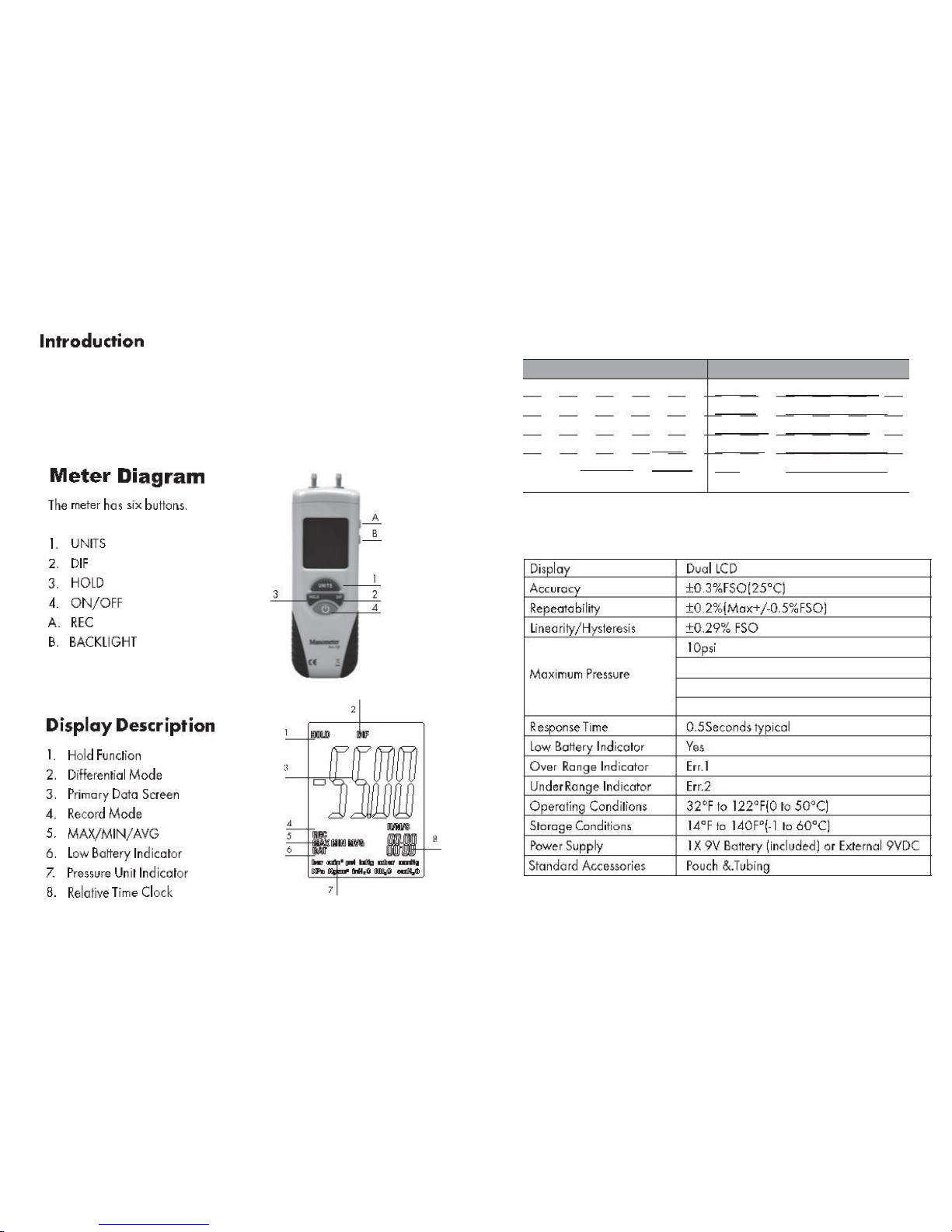
The meter can measure the dierential pressure/positive pressure/negative
pressure. there are 11 uints can be selectable, as inH2O,psi, bar,mbar,kPa,inHg,
mmHg,ozin,ftH2O,cmH2O,kgcm, Equipped with a simple hose connection
device,it is used for testing Ventilation and air conditioning system,spot
check,` clean room, or any gas pressure system troubleshooting. Easy operation
and clear reading. it is an indispensable testing tool for HVAC technician,
maintenance enginers and science researchers.
Function Range Resolution Function
inH2O ± 55.40
Range
Resolution
0.01
0.001
0.1
0.01
0.001
0.1
Ozin2
ftH2O
cmH2O
Kgcm2
Bar
±32.00 0.01
±4.612 0.001
±140.6 0.1
±0.140 0.001
±0.137 0.001
Psi
± 2.000
± 137.8
± 13.79
± 4.072
Mbar
kPa
inHg
mmHg ± 103.4
(HT-1890,HT-1890B,HT-1890C)
20psi (HT-1891)
100psi (HT-1892,HT-1893)
150psi (HT-1895)
Page 3
7.Backlit button:
1.ON / OFF button:
to turn on or o the power
pressing the backlight button and the backlight will turn on. In dark
environment can use this function. Press the backlight button again to
turn o the backlight.
Press the ON / OFF button to turn on the power of manometer. When
turned on, the screen will be displayed for about two seconds and then
will display the normal measurement mode.
2.Clearance button:
When turned on, if there is no input dierential pressure, instrument will
not be cleared by itself. Necessarily need to be manually cleared, press the
HOLD button for about 5 seconds,
8.Automatic power-o function:
it will automatically power o if instrument not work for more than 25
minutes. This can extend the battery life. If do not want to turn o the
power, press hold button -rst , then press the ON / OFF button to start.
LCD will show "ON" to close the function of automatic power-o.
The screen will show ----it will be cleared later.
3.UNITS button:
intermittently press the UNITS button there will revolve various units at
the bottom of the screen. These units are as follows: bar, mmHg, Ozin2,
Kgcm2, psi, inH2O, Kpa, ftH2O, inHg, cmH2O, mbar.
4.DIF button:
the pressure value when pressing the DIF button subtracting the pressure
value before pressing.
5.HOLD button:
pressing the HOLD button will keep the current measured result. Pressing
once more will lift the hold function.
6.REC button:
this button is on the side of the instrument, intermittently press this
button will display the maximum, minimum, average result in process of
recording measuring. Meanwhile the other function buttons are locked
and can not operated. Long pressing the REC button for about 5 seconds
and it will quit recording mode.
 Loading...