

Page 1
Read this user guide carefully before using this device.
Indicators
1 LED on
2 LEDs ON
3 LEDs ON
4 LEDs on
Capacity
≤ 25%
25-
50%
50-
75%
75-
100%
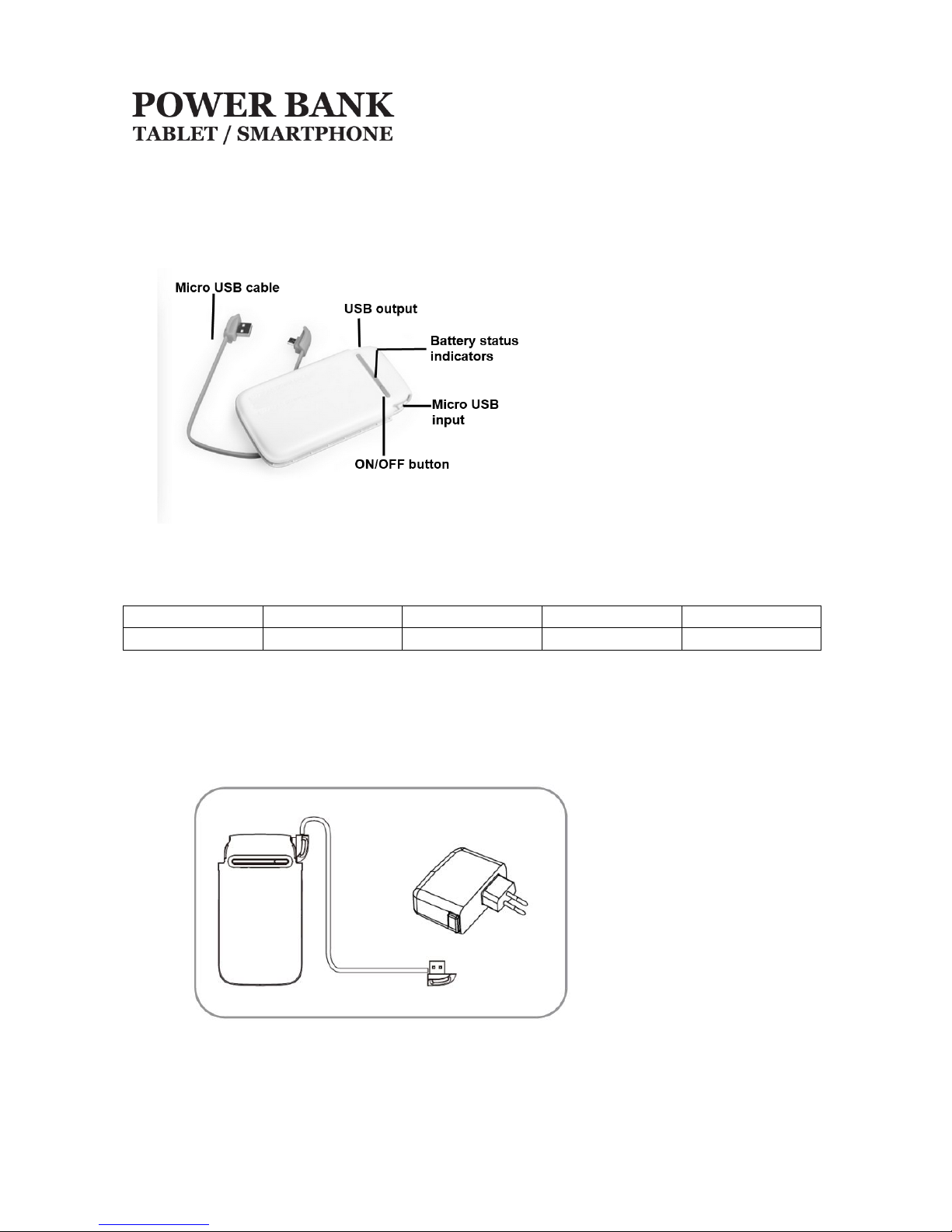
Overview
Battery status indicator
Press ON/OFF button to check the battery capacity, battery status indicators as following:
PC-240853
USER GUIDE
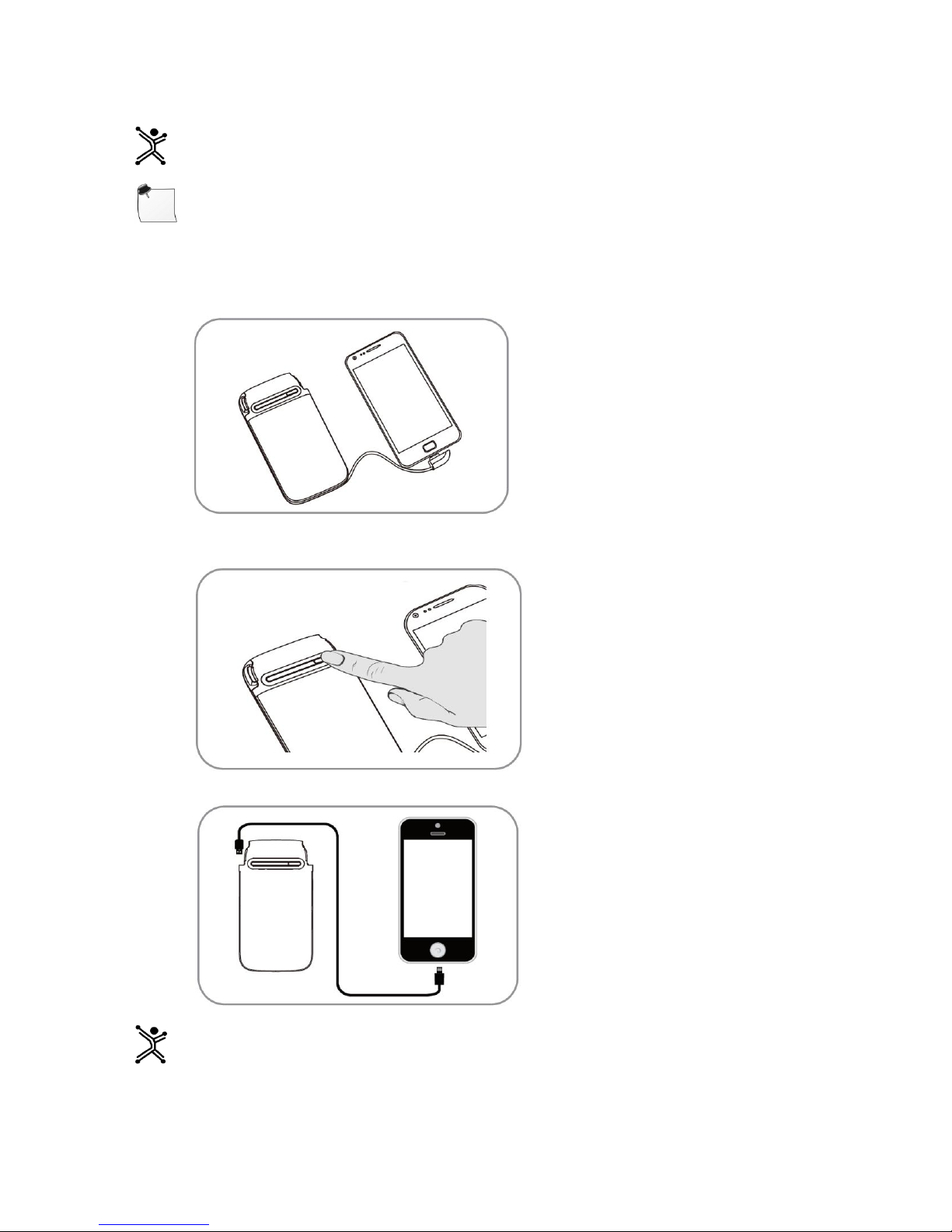
Charge
1. Draw the Micro USB cable from the power bank.
2. Connect Micro USB port to power bank and USB connector to your PC or Smartphone’s original
charger to charge battery.
The battery status indicators will light up when charging.
Page 2
Tip If you don’t wan to see LEDs, press ON/OFF button the LEDs will go off.
Note: Charge time will depends of charger, if you connect to a USB port in your PC time will be bigger
than if you use the original charger.
Charge mobile devices
1. Draw the micro USB plug and insert it to your mobile device.
2. Then press the ON/OFF button.
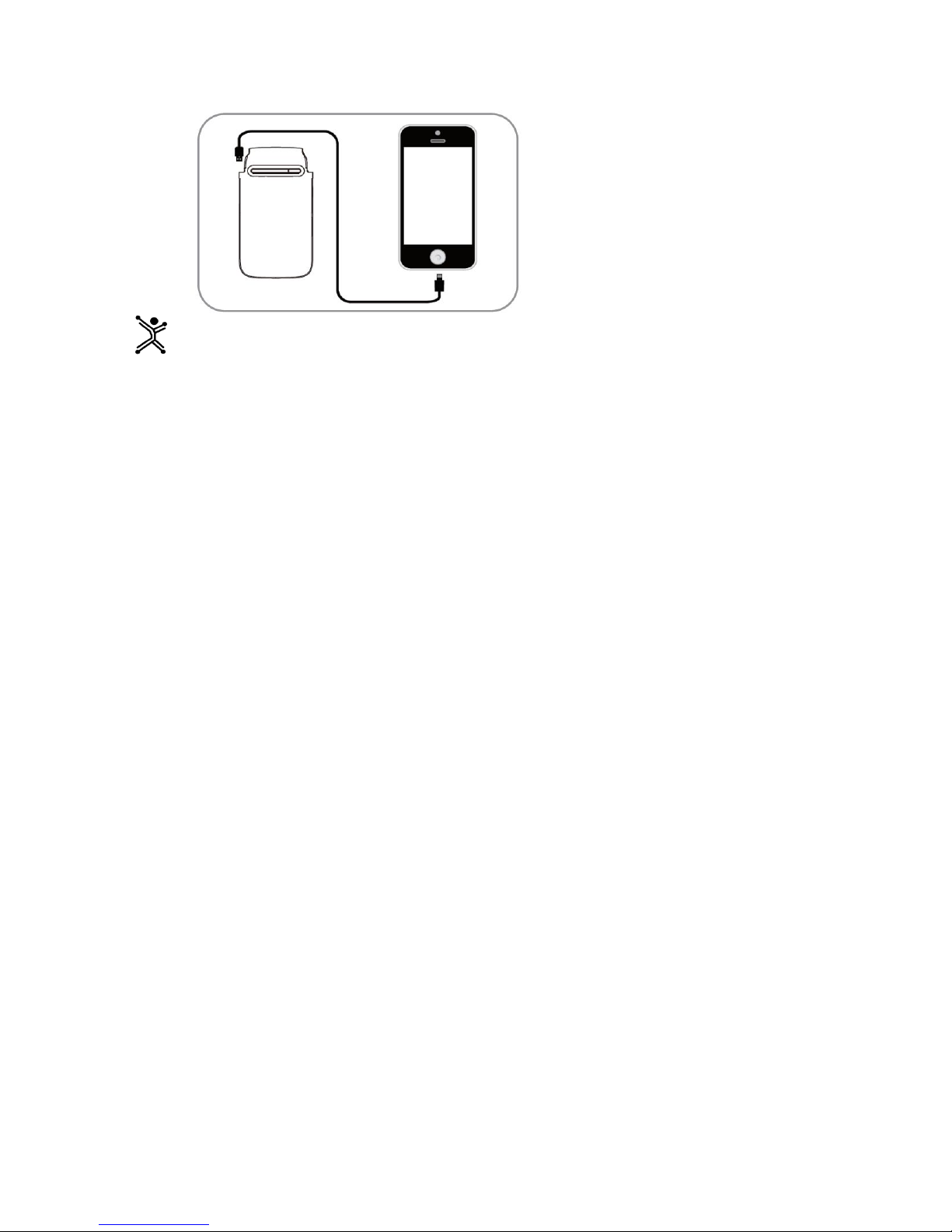
3. Use your existing cable to charge the mobile devices, such as iPhone.
Tip If you don’t wan to see LEDs, press ON/OFF button the LEDs will go off.
Page 3

General warnings and safety information
To enjoy your device for a long time we advice you:
Handle your device with care. Do not drop, knock or shake the device
Do not attempt to open the device
Do not expose to fire and other places with high temperature
Do not expose to water
Stop using if any of the following conditions occurred: electrolytic liquid leakage, overheating, color
change, or any other unusual conditions.
For cleaning use a damp cloth
To disconnect cables, do it pulling the connector
Dispose this product in accordance with your country regulations
Technical specifications
* Power supply: ………………………………………………………………………………..5 Vdc 1 A
* Output voltage: ……………………………………………………………………………… 5 Vdc 2.1 A
* Type: ………………………………………………………………………………………….Lithium Polymer
* Capacity: …………………………………………………………………………………….. 6 800 mAh @ 3.7Vdc
*Charging time: ………………………………………. About 8-9 hours (with Smartphone adapter 5 Vdc 1 A)
About 18 hours (with PC USB 2.0 port )
Technical specifications are subject to change without prior notice
If you have any question or doubts please do not hesitate to contact us:
Technical support
MEXICO
MX, GDL y MTY 4777 0853
Rest of the country 01800 148 1828
REST OF THE WORLD
+52 33 3283 1500
+1 855 7373 246
Page 4
PC-240853
Indica
dores
1 LED
2 LEDs
3 LEDs
4 LEDs
Capaci
dad
≤ 25%
25-
50%
50-
75%
75-
100%
GUIA DE USUARIO
Antes de comenzar a usar el producto es importante que leas esta guía.
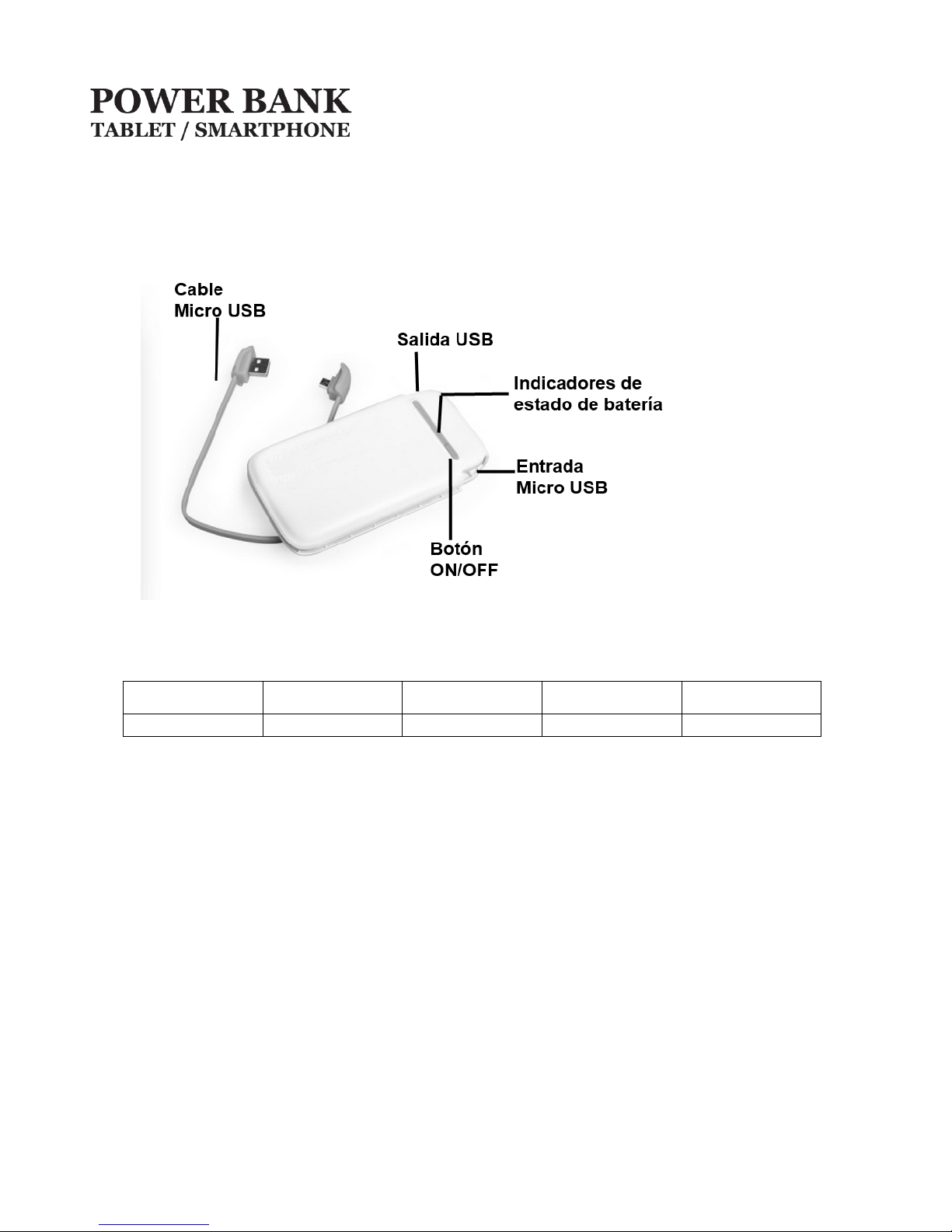
Vista del producto
Indicador de estado de batería
Presiona el botón ON/OFF para verificar la capacidad de la bacteria, Los indicadores son como sigue:
encendido
encendidos
encendidos
encendidos
Carga
1. Retira los 2 extremos del cable Micro USB de la batería.
2. Conecta el extremo con conector Micro USB al puerto de la batería y extremo USB a un Puerto USB
de tu PC o al cargador original de tu Smartphone para cargar la batería.
Page 5
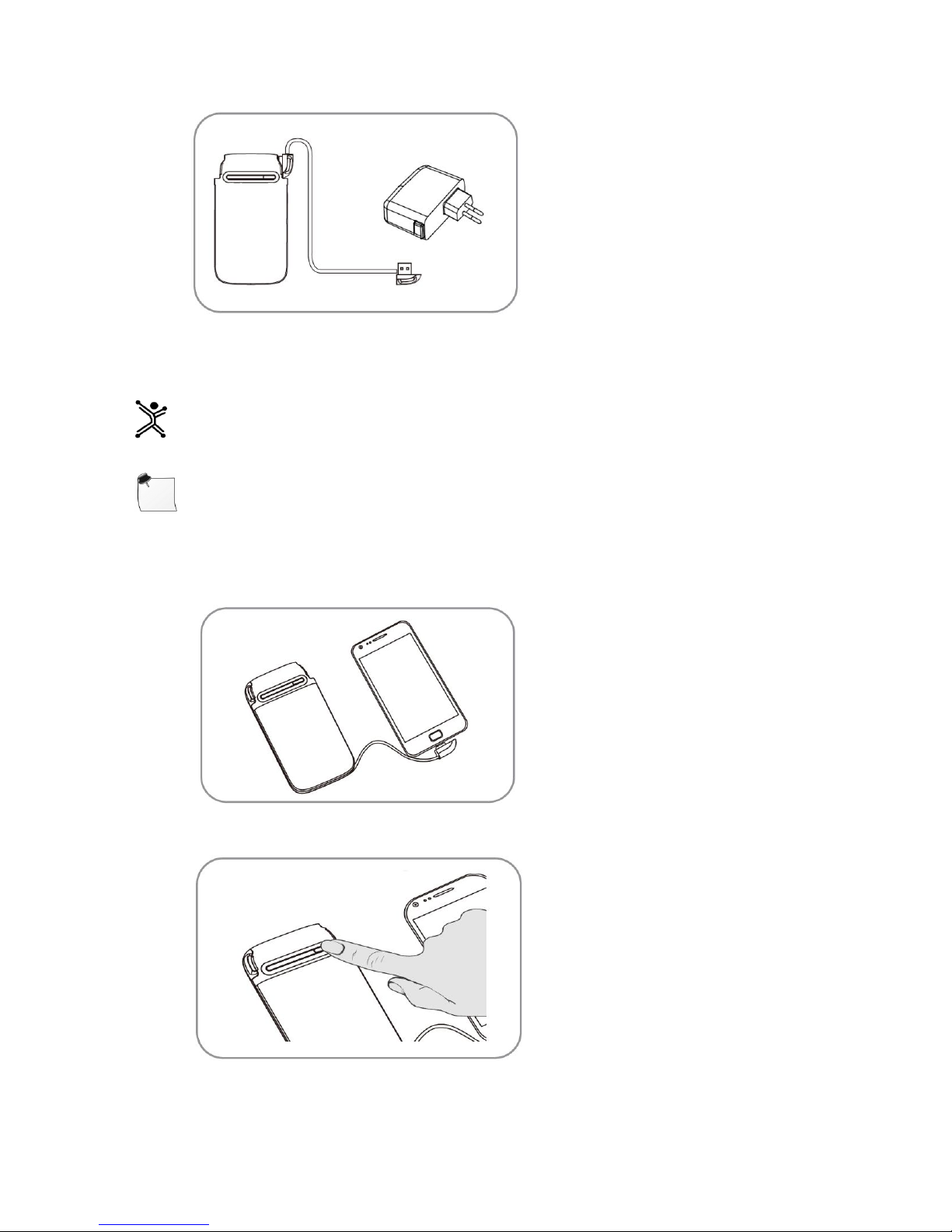
Los indicadores de la bacteria encenderán cuando comience la carga.
Tip Si no deseas que enciendan los indicadores presiona el botón ON/OFF y se apagaran, la carga
continuara.
Nota :El tiempo de carga de la bacteria dependerá de si la conectas a un Puerto USB de tu PC o al
cargador original de tu dispositivo, al conectarse a un Puerto USB el tiempo es mayor.
Carga de dispositivos móviles
4. Retira el extremo del cable Micro USB y conecta a tu dispositivo.
5. Presiona el botón ON/OFF.
6. Usa el cable original de tu dispositivo si el conector de carga no es Micro USB, como el caso de un
iPhone.
Page 6
Tip Si no deseas que enciendan los indicadores presiona el botón ON/OFF y se apagaran, la carga
continuara.
Cuidados y Precauciones
Para disfrutar tu equipo durante mucho tiempo, te recomendamos:
Manéjalo con cuidado, evita golpes a movimientos bruscos.
No abras por ningún motivo la unidad esto puede causarte un daño e invalidar la garantía.
No lo expongas al fuego o lugares con temperatura alta.
No lo expongas al agua.
Para limpiar utiliza un trapo ligeramente húmedo.
Para desconectar no tires de los cables, siempre desconecta tirando del conector
No lo utilices si se presenta alguna de las siguientes condiciones: Derramamiento de liquido interno,
sobre calentamiento, cambio de color, o algún otra condición inusual
Desecha este producto de acuerdo a las regulaciones de tu país.
Especificaciones técnicas
* Alimentación: ……………………………………………………………………………………..5 Vcc 1 A
* Salida de voltaje: ……………………………………………………………………………… 5 Vcc 2.1 A
* Tipo de batería: ……………………………………………………………………………………….Polímero de Litio
* Capacidad: …………………………………………………………………………………….. 6 800 mAh @ 3.7 Vcc
*Tiempo de carga: …………………………. Alrededor de 8-9 horas (con el cargador de tu dispositivo 5 Vcc 1 A)
Alrededor de 18 horas (Con puerto USB 2.0 de PC)
Las características técnicas y eléctricas que aquí se brindan corresponden a unidades típicas y podrían
cambiarse sin previo aviso con el fin de proveer un mejor equipo
Si tuvieras alguna duda o comentario, estamos a tus órdenes:
Soporte Técnico
PARA MÉXICO
MX, GDL y MTY 4777 0853
Resto del País 01800 148 1828
PARA RESTO DEL MUNDO
+52 33 3283 1500
+1 855 7373 246
[email protected]
 Loading...