

Page 1
DG-2 Plus
DG-2 Plus
PERFECT 10PERFECT 10
Satellite DistributingSatellite Distributing
DIGISAT PLUS Operation and Maintenance
TURNING THE UNIT ON
Open the Velcro flap and remove the DC power plug.
Close the Velcro flap.
Insert the small female plug from the battery pack into
the input connector on the bottom of the DIGISAT.
Turn the DIGISAT ON by pressing the power button one
time.
After tracking the satellite antenna, press & hold the
power button to turn the DIGISAT battery pack OFF.
The DIGISAT can operate one LNBF (dual port type) up
to two hours on a single charge.
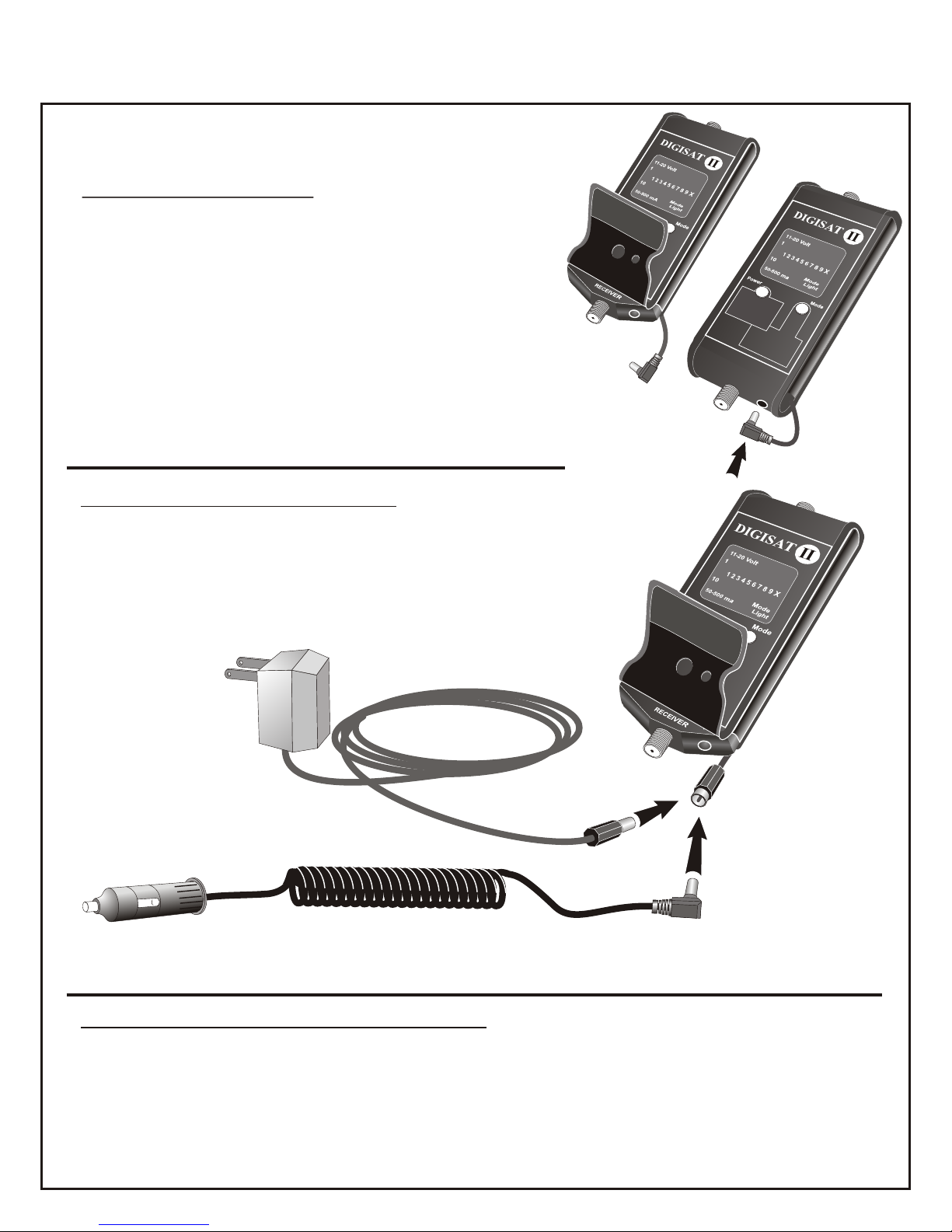
CHARGING THE BATTERY PACK
V
e
l
c
r
o
P
a
d
DC Power
Plug
DG-2 Plus
Plug either AC or DC charger into the male pigtail connector. From a
fully discharged state, the AC charger will charge the 400 mA
battery pack in about 12 hours. Do not continue charging with
the wall charger beyond that time. The DC charger will charge
the battery pack fully in 2 to 4 hours.
V
e
l
c
r
o
P
a
d
Plug into 110vAC wall
outlet socket. A discharged
pack can be fully restored
in about 12 hours. DO NOT
leave the pack connected to
the AC charger indefinitely.
Plug into 12vDC (auto lighter) or accessory socket. DO NOT continue DC charging beyond 4 hours.
SIMPLIFIED OPERATING INSTRUCTIONS
1) Attach the short coax cable jumper supplied with this kit to your LNBF (or LNB) and
connect other end of the coax cable jumper to the TOP "F" connector of the DIGISAT.
2) Turn the DIGISAT on as illustrated above.
3) The audible squawker circuit can be turned ON by pressing the left and right yellow
buttons simultaneously.
Ds/manuals/perfect/digisat/digi07
continued on back
Ver 1.6
Page 2

SIMPLIFIED OPERATING INSTRUCTIONS (continued)
4) DIGISAT comes on in the most signal sensitive mode by default.
5) If the LED bar reading maxes out, push the left yellow button once to desensitize the
DIGISAT and then fine tune the antenna for maximum DIGISAT reading. Note: the LED
readings will not be equal to the satellite receiver meter readings. Two different metering
methods are utilized. Tune the dish for the maximum reading from the DIGISAT and then
tighten the dish mounting bolts.
6) To measure LNBF current consumption push the right yellow button one time, (the Mode
light will come ‘on’ ). Read the lower LED bar graph. Each lighted segment equals 50mA (3
lighted segments = 150mA). Normal LNBF current draw is 100 to 150mA. No current
consumption indicates non functioning, open circuit LNBF. High current consumption
above 250mA also indicates a defective LNBF.
7) To measure voltage of the Ni-Cad battery pack the Mode light must be ‘on’. Read the
voltage on the upper LED bar graph. Each segment in this scale equals one volt plus ten
volts . For example if three (3) LED segments are lit then the voltage is thirteen (13) volts
DC. This feature measures the charge of the internal rechargeable battery pack. If the
battery pack reads ten (10) volts or less, recharge the batteries.
8) To measure voltage provided from a satellite receiver, disconnect the internal battery pack
and connected the satellite receiver's RG-6 to the bottom "F" connector of the DIGISAT.
Make sure the Mode light is ‘on’. The DIGISAT will then display the voltage the receiver is
providing to the LNBF. Make sure you disconnect the battery pack first. Failure to do so
can damage the DIGISAT. Receivers will typically provide 14 or 18 volts DC to a LNBF
depending on the appropriate polarization required for the channel selected on the
receiver.
DG-2 Plus
ADDITIONAL HELPFUL HINTS
1) Charge the battery pack fully before you start to use it. DO NOT leave the DIGISAT battery
pack on either charger indefinitely. Long periods of charging will overheat the batteries
and drastically reduce battery life.
2) DO NOT connect the female plug from the battery pack to the male pigtail socket. THIS
WILL SHORT OUT THE BATTERY PACK and destroy the battery pack or melt the lead
wires.
3) If you are using the battery pack to power the DIGISAT, turning the power ‘off’ and ‘on’
again will restore the default (high signal sensitivity) level. If you are powering the
DIGISAT with a satellite receiver, disconnect the coax from the receiver momentarily to
restore the DIGISAT to the most sensitive (default) mode.
4) The POWER ‘on’/’off’ function is disabled when a satellite receiver is connected to the
DIGISAT. The POWER button controls the battery pack power supply connection only.
PERFECT 10PERFECT 10
3901 Progress
North Little Rock, Arkansas 72114
Satellite DistributingSatellite Distributing
1-800-205-8620
Ds/manuals/perfect/digisat/digi07
Ver 1.6
 Loading...